by Scott Muniz | Aug 25, 2020 | Uncategorized
This article is contributed. See the original author and article here.
With threat analytics, you get a quick overview of the most relevant threats and how they impact your organization. For each threat we cover, you can conveniently read through detailed analyst reports and review relevant vulnerability patches and configuration recommendations. To make your threat analytics experience even better, we’ve delivered some exciting look-and-feel enhancements that you can now access on in public preview in the Microsoft Defender Security Center.
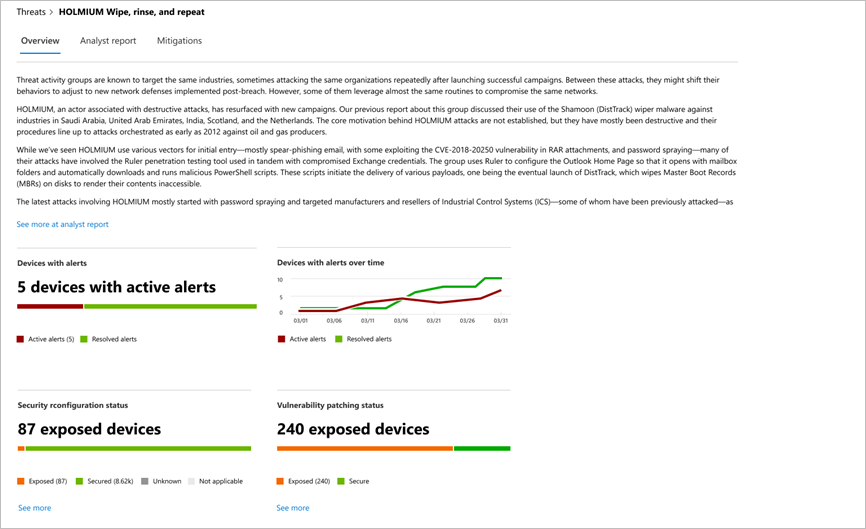
With the new design, you can easily locate and read through the information you need in three separate tabs: Overview, Analyst report, and Mitigations.
The Overview tab provides a quick preview of the detailed report as well as enhanced charts that highlight threat impact and organizational exposure through misconfigured and unpatched devices.
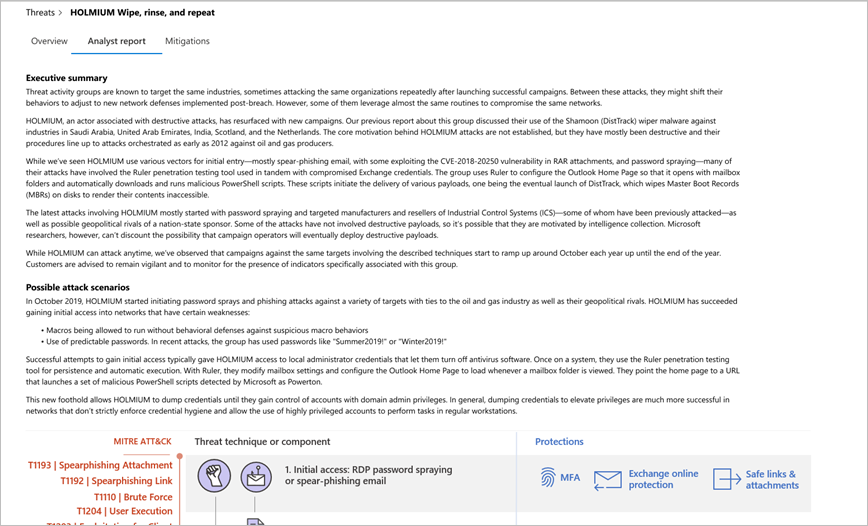
Go to the Analyst report tab to read through the detailed expert write-up. In this new tab, you’re not limited to a constrained view and can fully appreciate the coverage of threat behaviors, exhaustive lists of recommendations, and powerful hunting guidance.
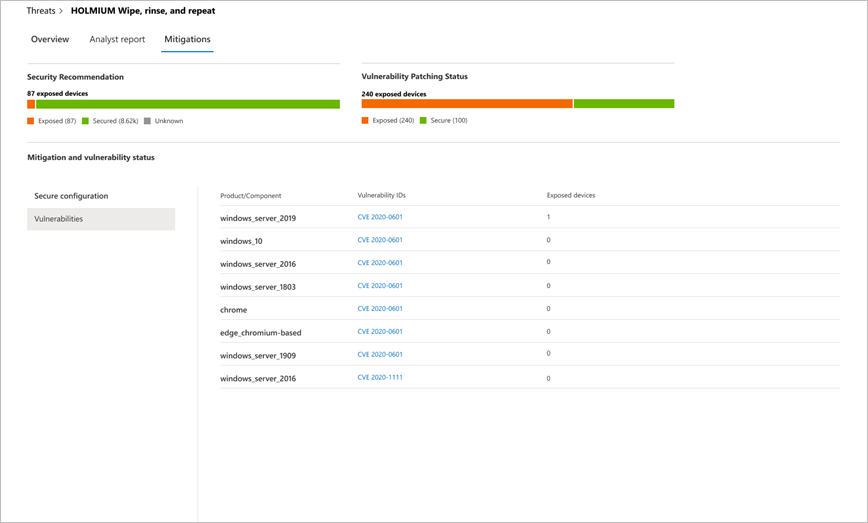
To get a detailed picture of your defenses and exposures, go to the Mitigations tab where we’ve provided the full list of tracked mitigations and the status of your devices.
Check it out now
These enhancements are now available to customers who have public preview features turned on. If you haven’t opted in yet, start getting the latest enhancements across all the capabilities by turning on preview features.
To learn more about threat analytics in Microsoft Defender ATP, please read our documentation.
If you’re not yet taking advantage of Microsoft’s industry leading security optics and detection capabilities for endpoints, sign up for a free trial of Microsoft Defender ATP today.
Your feedback counts! Let us know what you think in the comments section below.
by Scott Muniz | Aug 25, 2020 | Azure, Microsoft, Technology, Uncategorized
This article is contributed. See the original author and article here.
We are excited to announce a new modernization feature in Azure Migrate and are looking for pilot customers. The Migrate apps to Azure Kubernetes Service(AKS) preview lets you containerize applications and run them on Azure Kubernetes Service(AKS).
In the current preview, the tool helps you containerize ASP.NET applications and run them as Windows containers on AKS. The tool uses the running state of the application to package the application into a container image, and doesn’t require code changes or access to the application codebase.
If this scenario interests you (or your customer) and you’d like to try out the preview and provide feedback, sign up here: https://aka.ms/appcontainerizationpreview
by Scott Muniz | Aug 25, 2020 | Azure, Microsoft, Technology, Uncategorized
This article is contributed. See the original author and article here.
Online learning has grown rapidly over the last couple of months as schools and organizations adapt to new ways of connecting and methods of education. Speech technology can play a significant role in making distance learning more engaging and accessible to students of all backgrounds. With Azure Cognitive Services, developers can quickly add speech capabilities to applications, bringing online learning to life.
Developing interactive courses with Text to Speech
One way that Speech technology can support better online learning experiences is through Text to Speech, a Speech service feature that converts text to lifelike speech. Educators can create interactive materials with highly expressive and humanlike voices using Neural Text to Speech (Neural TTS), now available in 36 voices with 31 languages. (Learn about our most recent languages here.)
With Neural TTS, developers can add natural-sounding voice to learning materials, for scenarios like slide narration. Neural TTS can also be used for reading aloud any content, facilitating new ways for students to interact with material as well as increasing accessibility for students with learning differences. Educational organizations can also use Neural TTS to create AI-powered virtual “teachers” that interact with students to make online courses more engaging.
With the Custom Neural Voice capability, online learning solution providers can further create interactive learning experiences for their students in a voice that represents their brand, or develop unique voices for different characters. For example, Tomorrow Advancing Life (TAL) Education Group is building different AI teachers’ voices for their online courses. Duolingo, one of the world’s most popular language learning apps, is creating unique voices for different characters used in the lessons.
Using SSML or the Audio Content Creation tool, users can further finetune audio characteristics like voice style, rate, pitch, and pronunciation to fit their scenarios—no code required. Text to Speech also supports different speaking styles—like cheerfulness and empathy—making it easier to bring audiobooks to life.
To learn more about Audio Content Creation, watch the video tutorial.
Get started today
To learn more and get started adding speech to your educational applications, check out our resources below:
Text to Speech
Tags:
by Scott Muniz | Aug 25, 2020 | Uncategorized
This article is contributed. See the original author and article here.
The Microsoft Tech Community has officially reached half a million members! We’re so excited to be able to celebrate another milestone with you all.
We asked some of our fellow members to share with us how The Microsoft Tech Community has impacted them. Here’s what they had to say:
During milestones like this, it can be good to look back at the highlights and what we’ve been able to achieve! Let’s take a look at some of our top moments on our journey so far:
To celebrate – we’re hosting a sweepstakes contest!!
As you all saw above, we went to our fellow community members with Microsoft to hear about how the Microsoft Tech Community has impacted them. Now, we would like to hear from you!
HERE’S HOW TO ENTER
No Purchase Necessary.
To enter, you must do all of the following:
- Create a video of yourself answering the question “How has the Microsoft Tech Community helped you grow as a professional?”. The video should be 30-90 seconds in length in English.
- Provide your Tech Community username and submit your video for our sweepstakes here.
PRIZES
10 submissions will be chosen at random after the submission period has closed. Each winner will receive a grand-prize swag package outlined in detail below.
Be sure to read our sweepstakes rules in-depth below before entering:
MICROSOFT MICROSOFT TECH COMMUNITY CELEBRATES 500K MEMBERS! SWEEPSTAKES
OFFICIAL RULES
- SPONSOR
These Official Rules (“Rules”) govern the operation of the Microsoft Microsoft Tech Community Celebrates 500K Members! Sweepstakes (“Sweepstakes”). Microsoft Corporation, One Microsoft Way, Redmond, WA, 98052, USA, is the Sweepstakes sponsor (“Sponsor”).
- DEFINITIONS
In these Rules, “Microsoft”, “we”, “our”, and “us” refer to Sponsor and “you” and “yourself” refers to a Sweepstakes participant, or the parent/legal guardian of any Sweepstakes entrant who has not reached the age of majority to contractually obligate themselves in their legal place of residence. By entering you (your parent/legal guardian if you are not the age of majority in your legal place of residence) agree to be bound by these Rules.
- ENTRY PERIOD
The Sweepstakes starts at 12:01 a.m. Pacific Time (PT) on August 25, 2020, and ends at 11:59 p.m. PT on September 8, 2020.
- ELIGIBILITY
To enter, you must be 18 years of age or older and a member of the Microsoft Tech Community. If you are 18 years of age or older but have not reached the age of majority in your legal place of residence, then you must have the consent of a parent/legal guardian.
Employees and directors of Microsoft Corporation and its subsidiaries, affiliates, advertising agencies, and Sweepstakes Parties are not eligible, nor are persons involved in the execution or administration of this promotion, or the family members of each above (parents, children, siblings, spouse/domestic partners, or individuals residing in the same household). Void in Cuba, Iran, North Korea, Sudan, Syria, Region of Crimea, and where prohibited.
- HOW TO ENTER
No Purchase Necessary.
To enter, you must do all of the following:
- Create a video of yourself answering the question “How has the Microsoft Tech Community helped you grow as a professional?”. The video should be 30-90 seconds in length in English.
- Provide your Tech Community username and submit your video for our sweepstakes here.
The entry limit is one per person overall.
Any attempt by any you to obtain more than the stated number of entries by using multiple/different accounts, identities, registrations, logins, or any other methods will void your entries and you may be disqualified. Use of any automated system to participate is prohibited.
We are not responsible for excess, lost, late, or incomplete entries. If disputed, entries will be deemed submitted by the “authorized account holder” of the email address, social media account, or other method used to enter. The “authorized account holder” is the natural person assigned to an email address by the internet or online service provider, or other organization responsible for assigning email addresses.
- ELIGIBLE ENTRY
To be eligible, an entry must meet the following content/technical requirements:
- Your entry must be your own original work; and
- Your entry cannot have been selected as a winner in any other contest; and
- You must have obtained any and all consents, approvals, or licenses required for you to submit your entry; and
- To the extent that entry requires the submission of user-generated content such as software, photos, videos, music, artwork, essays, etc., entrants warrant that their entry is their original work, has not been copied from others without permission or apparent rights, and does not violate the privacy, intellectual property rights, or other rights of any other person or entity. You may include Microsoft trademarks, logos, and designs, for which Microsoft grants you a limited license to use for the sole purposes of submitting an entry into this Contest; and
- Your entry may NOT contain, as determined by us in our sole and absolute discretion, any content that is obscene or offensive, violent, defamatory, disparaging or illegal, or that promotes alcohol, illegal drugs, tobacco or a particular political agenda, or that communicates messages that may reflect negatively on the goodwill of Microsoft.
- USE OF YOUR ENTRY
We are not claiming ownership rights to your Submission. However, by submitting an entry, you grant us an irrevocable, royalty-free, worldwide right and license to use, review, assess, test and otherwise analyze your entry and all its content in connection with this Contest and use your entry in any media whatsoever now known or later invented for any non-commercial or commercial purpose, including, but not limited to, the marketing, sale or promotion of Microsoft products or services, without further permission from you. You will not receive any compensation or credit for use of your entry, other than what is described in these Official Rules.
By entering you acknowledge that we may have developed or commissioned materials similar or identical to your entry and you waive any claims resulting from any similarities to your entry. Further, you understand that we will not restrict work assignments of representatives who have had access to your entry and you agree that use of information in our representatives’ unaided memories in the development or deployment of our products or services does not create liability for us under this agreement or copyright or trade secret law.
Your entry may be posted on a public website. We are not responsible for any unauthorized use of your entry by visitors to this website. We are not obligated to use your entry for any purpose, even if it has been selected as a winning entry.
- WINNER SELECTION AND NOTIFICATION
Pending confirmation of eligibility, potential prize winners will be selected by Microsoft or their Agent in a random drawing from among all eligible entries received within 7 days following the Entry Period.
Winners will be notified via the contact information provided during entry no more than 7 days following the drawing with prize claim instructions, including submission deadlines. If a selected winner cannot be contacted, is ineligible, fails to claim a prize or fails to return any forms, the selected winner will forfeit their prize and an alternate winner will be selected time allowing. If you are a potential winner and you are 18 or older, but have not reached the age of majority in your legal place of residence, we may require your parent/legal guardian to sign all required forms on your behalf. Only three alternate winners will be selected, after which unclaimed prizes will remain unawarded.
- PRIZES
The following prizes will be awarded:
Ten (10) Grand Prizes. A Prize Package consisting of the following items:
A Diversity&Techj Samsonite backpacks. Approximate Retail Value (ARV) $54.00.
A Diversity&Tech Bento Box. Approximate Retail Value (ARV) $20.00.
A S’well Tumbler. Approximate Retail Value (ARV) $35.00.
A Humans of IT Laptop Sticker. Approximate Retail Value (ARV) $0.50.
A Humans of IT Bracelet. Approximate Retail Value (ARV) $12.00.
A Humans of IT Keychain. Approximate Retail Value (ARV) $4.55.
A Humans of IT Card. Approximate Retail Value (ARV) $0.50.
A Bamboo Pen. Approximate Retail Value (ARV) $1.60.
A Popsocket. Approximate Retail Value (ARV) $9.75.
An Embossed Journal. Approximate Retail Value (ARV) $9.95.
An Eco Journal. Approximate Retail Value (ARV) $4.60.
A Qi Mousepad. Approximate Retail Value (ARV) $17.35.
The total Approximate Retail Value (ARV) of this Package is $169.80.
The ARV of electronic prizes is subject to price fluctuations in the consumer marketplace based on, among other things, any gap in time between the date the ARV is estimated for purposes of these Official Rules and the date the prize is awarded or redeemed. We will determine the value of the prize to be the fair market value at the time of prize award.
The total Approximate Retail Value (ARV) of all prizes: $1,698
We will only award one (1) prize per person/company during the Entry Period. No more than the stated number of prizes will be awarded. No substitution, transfer, or assignment of prize permitted, except that Microsoft reserves the right to substitute a prize of equal or greater value in the event the offered prize is unavailable. Prizes are awarded “AS IS” with no warranty of any kind, either express or implied, including but not limited to, the implied warranties or merchantability, fitness for a particular purpose, or non-infringement. Prizes will be sent no later than 28 days after winner selection. Prize winners may be required to complete and return prize claim and/or tax forms (“Forms”) within the deadline stated in the winner notification. Taxes on the prize, if any, are the sole responsibility of the winner, who is advised to seek independent counsel regarding the tax implications of accepting a prize. By accepting a prize, you agree that Microsoft may use your entry, name, image and hometown online and in print, or in any other media, in connection with this Sweepstakes without payment or compensation to you, except where prohibited by law.
- ODDS
The odds of winning are based on the number of eligible entries received.
- GENERAL CONDITIONS AND RELEASE OF LIABILITY
To the extent allowed by law, by entering you agree to release and hold harmless Microsoft and its respective parents, partners, subsidiaries, affiliates, employees, and agents from any and all liability or any injury, loss, or damage of any kind arising in connection with this Sweepstakes or any prize won.
All local laws apply. The decisions of Microsoft are final and binding.
We reserve the right to cancel, change, or suspend this Sweepstakes for any reason, including cheating, technology failure, catastrophe, war, or any other unforeseen or unexpected event that affects the integrity of this Sweepstakes, whether human or mechanical. If the integrity of the Sweepstakes cannot be restored, we may select winners from among all eligible entries received before we had to cancel, change, or suspend the Sweepstakes.
If you attempt or we have strong reason to believe that you have compromised the integrity or the legitimate operation of this Sweepstakes by cheating, hacking, creating a bot or other automated program, or by committing fraud in any way, we may seek damages from you to the full extent of the law and you may be banned from participation in future Microsoft promotions.
- USE OF YOUR ENTRY
Personal data you provide while entering this Sweepstakes will be used by Microsoft and/or its agents and prize fulfillers acting on Microsoft’s behalf only for the administration and operation of this Sweepstakes and in accordance with the Microsoft Privacy Statement.
- GOVERNING LAW
This Sweepstakes will be governed by the laws of the State of Washington, and you consent to the exclusive jurisdiction and venue of the courts of the State of Washington for any disputes arising out of this Sweepstakes.
- WINNERS LIST
Send an email to Techcommunity@microsoft.com with the subject line “Microsoft Tech Community Celebrates 500K Members! Sweepstakes winners” within 30 days of END DATE to receive a list of winners that received a prize worth $25.00 or more.
by Scott Muniz | Aug 25, 2020 | Azure, Microsoft, Technology, Uncategorized
This article is contributed. See the original author and article here.
Have you ever wondered why Az.Compute has a different version than the Az module or why a module had documentation but is not available in Cloud Shell?
The following describes our versioning principles, upgrade policies, and preview process for the PowerShell modules for Azure.
Versioning
We follow the semantic versioning principles (https://semver.org/) for all the Azure modules. Essentially this means:
- Major version change for releases with breaking changes.
- Minor version change for functionality with backward compatibility.
- Patch version change for bug fixes or improvements with backward compatibility.
We apply this policy for each module that we own. For example, Az.Storage had one version upgrade that had a breaking change since the initial version and is currently in version 2.4.0. Az.Network had two major upgrades and is now in version 3.3.0.
The Az wrapper module’s goal is to facilitate the acquisition of the different Azure modules. It comprises several modules with different versions like Az.Storage and Az.Network from the previous example.
From the semver rule definition, if a major version upgrade happens for an underlying module, Az will undergo a major version upgrade as well.
Breaking changes
A breaking change is a change in a PowerShell module that can break a script written with a previous version.
The breaking changes fall into two main categories:
- Changes in the modules: cmdlet or parameter deprecated, parameter name change, change from optional to required, returned type change.
- Changes in the default behaviors. For example, soft delete turned on by default for Azure KeyVault.
Upgrading to a new major version of Az will require script validation with this version and implement the necessary changes.
To allow customers to plan for this, we have two policies in place:
Breaking change releases are identified with “Major Release” in the title and have an exclamation mark in the description on GitHub: https://github.com/Azure/azure-powershell/milestones.
Preview
We have two types of preview modules:
- Modules with a 0.X.X version: new modules potentially calling Azure APIs that are not stable. Hence breaking changes may happen at any time, and issues can occur. Modules will remain at least six weeks in preview to allow customer feedback before considering moving the modules to GA.
Preview modules can be found in the reference documentation (https://docs.microsoft.com/powershell/module/) but are not included in the Az wrapper module nor are available in Cloud Shell by default until they can move to a stable version.
- Modules with X.Y.Z-preview version: expose new features of the associated service that may not be stable yet or introduce breaking changes waiting for the next major release.
We publish the reference documentation for all modules including those with a version 0.x.x. However, only the stable modules are present in Cloud Shell. If you want to use a preview module, you must install the specific module individually.
Over the last few months, you told us that it was difficult to find and install modules in preview and I’m pleased to announce that we are working on a solution that will improve the discovery and management of preview modules along with those that are stable. We will be announcing more about this very soon.
Should you be interested in having a preview module move to GA, please help us prioritize by commenting on existing issues listed here: https://github.com/Azure/azure-powershell/issues/12755
As always, any feedbacks and issues are always welcome https://github.com/Azure/azure-powershell/issues/new/choose
The Azure PowerShell team

by Scott Muniz | Aug 25, 2020 | Uncategorized
This article is contributed. See the original author and article here.
New enhancements in Office apps allow you to harness the power of your voice to spend less time and energy creating your best work, so can focus on what matters most.
The post Microsoft 365 saves you time and effort with transcription and voice commands in Word appeared first on Microsoft 365 Blog.
Brought to you by Dr. Ware, Microsoft Office 365 Silver Partner, Charleston SC.
by Scott Muniz | Aug 25, 2020 | Azure, Microsoft, Technology, Uncategorized
This article is contributed. See the original author and article here.
General Availability of Immersive Reader as an Azure Cognitive Services
Just a few years ago, the Immersive Reader was a bold idea in a Microsoft Hackathon focused on using the latest science and research around reading while using inclusive design principles to empower students of all abilities. Today, more than 23 million people every month are using it, improving their reading and writing comprehension and even their ability to do math problems.
Today, we’re thrilled to announce this powerful literacy tool has reached General Availability as an Azure Cognitive Service, allowing third party apps and partners to add Immersive Reader right into their products. During the public preview period, we’ve had scores of partners integrate the Immersive Reader, and some of them are listed below. The Immersive Reader helps people of all abilities, including dyslexia, ADHD, emerging readers, non-native speakers, people with visual impairments. If there’s an app you love to use in your classroom and you would love to see an Immersive Reader icon show up there soon, let them know. You can also head over to the Azure blog and learn more about this new Cognitive Service.
Get Started Today
To begin exploring how to integration the Immersive Reader into your app or service, here are some helpful getting start links:
We look forward to hearing your feedback, and partners enabling the Immersive Reader to help even more people with reading.
New Partners Integrate Immersive Reader
With today’s announcement of Immersive Reader moving to General Availability, we are excited to announce new partners who are integrating this inclusive tool.
Code.org helps make computer science more inclusive
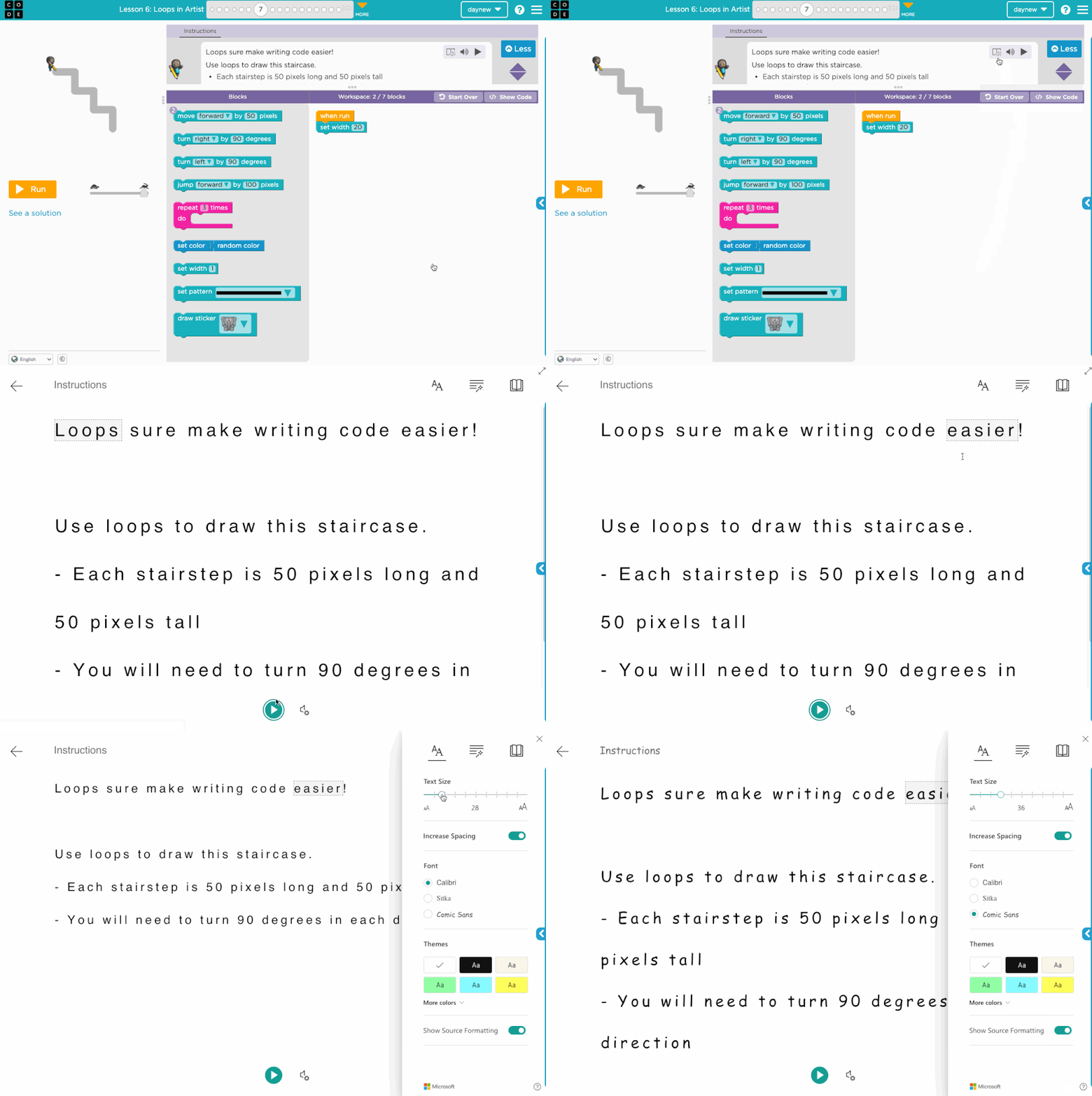
Code.org is a nonprofit dedicated to expanding access to computer science in schools and increasing participation by women and underrepresented youth. Their vision is that every student in every school has the opportunity to learn computer science, just like biology, chemistry or algebra. To help ensure Code.org can reach every student, they have begun to integrate the Immersive Reader into their platform, and this fall will be rolling this integration out. An example of one way this integration will surface is below.
“We’re thrilled to partner with Microsoft to bring Immersive Reader to the Code.org community,” said Hadi Partovi, founder and CEO of Code.org. “The inclusive capabilities of Immersive Reader to improve reading fluency and comprehension in learners of varied backgrounds, abilities and learning styles directly aligns with our mission to ensure every student in every school has the opportunity to learn computer science.”
SAFARI Montage
SAFARI Montage is the leading K-12 Learning Object Repository, Video Streaming Library, IPTV & Live Media Streaming provider. The system provides an interoperable foundation for a Digital Learning Ecosystem where teachers and students can access procured, created and curated educational digital resources, create playlists and integrate items into their LMS. The inclusion of Immersive Reader from Microsoft inside the SAFARI Montage Learning Object Repository (LOR) enhances the equitable access of SAFARI Montage resources for all learners. It provides ideal support for remote learning as instructions to students written in English will be accessible to virtually any learner, in any language or with any reading ability.
“Immersive Reader is a crucial support for CPS students and families. During remote learning, particularly for our younger learners, student learning is often supported by parents, guardians, or other caregivers. Since Microsoft Immersive Reader can be used to translate the student facing instructions in our digital curriculum, families can support student learning in over 80 languages, making digital learning far more equitable and accessible than ever before! In addition, read-aloud and readability supports are game changers for diverse learners”
– Giovanni Benincasa, UX Manager, Department of Curriculum, Instruction, and Digital Learning, Chicago Public Schools
The embedded video below shows how Immersive Reader helps SAFARI Montage students and educators.
SchoolBox integrates Immersive Reader
The LMS from Schoolbox is a highly customizable learning management system that accommodates a range of modern teaching strategies. Its components support learner interaction, creativity, a growth mindset, student wellbeing, and expands learning beyond the classroom to suit all K–12 learners. Share resources, individualized learning, increase collegiality. To help ensure content is fully accessible and inclusive, SchoolBox has integrated the Immersive Reader. You can see an example in this video.
Immersive Reader is coming to more Microsoft apps!
Microsoft Math Solver and the Immersive Reader make math more inclusive
The Microsoft Math solver web site and IOS and Android apps all help students solve math problems independently. Especially during remote learning, this has been a helpful app for students and families. To ensure all students can access the content in the step-by-step solution aspects of the Math Solver, we are adding the Immersive Reader, including all the capabilities to read math out loud, including more complex equations. You can also translate, use line focus, and all of the other Immersive Reader features.
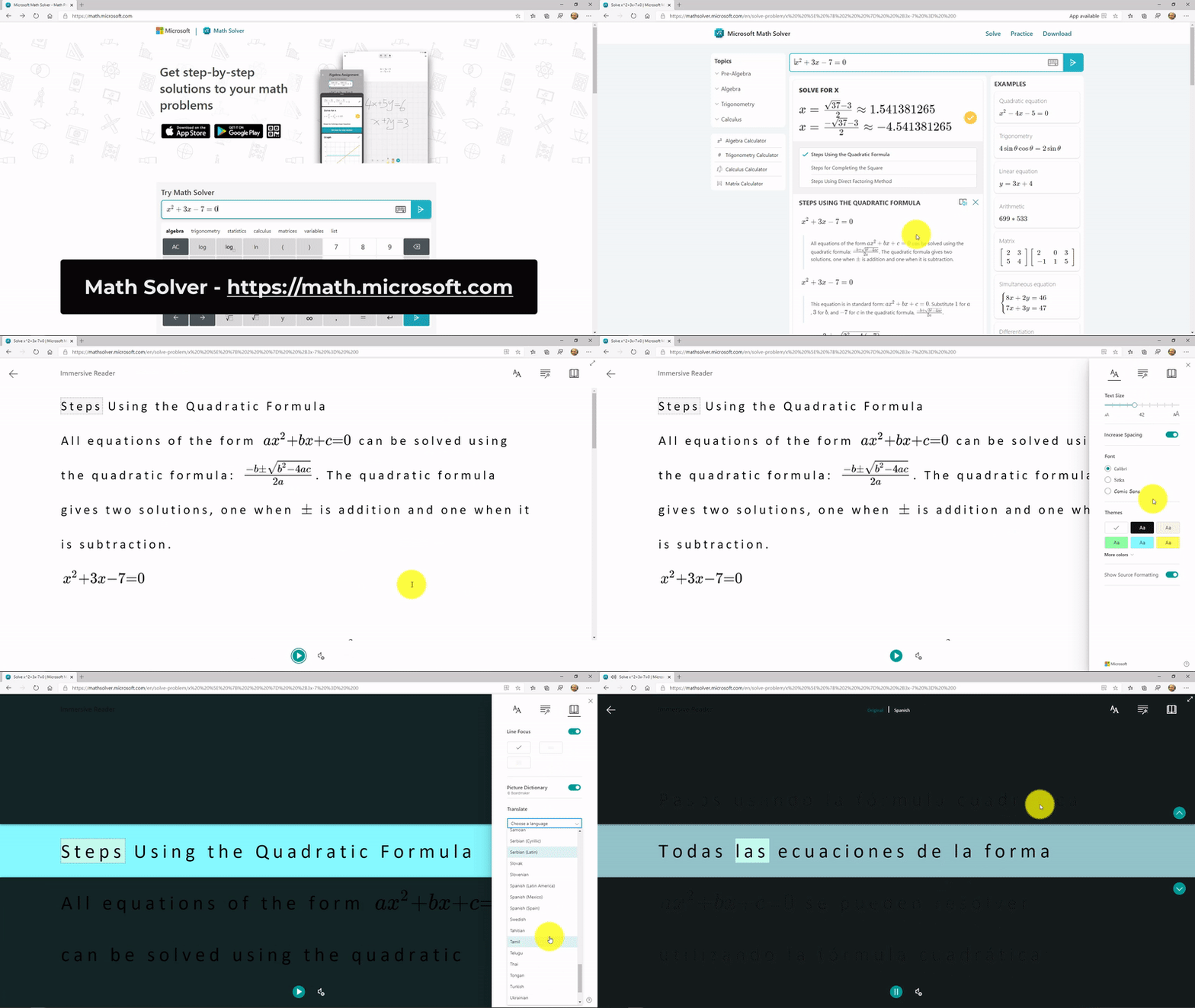
This has already rolled out to the web version of Math Solver (example GIF below) and is coming to the iOS and Android mobile apps at the end of August.
Immersive Reader coming to Outlook Desktop and the Mail app on Windows 10
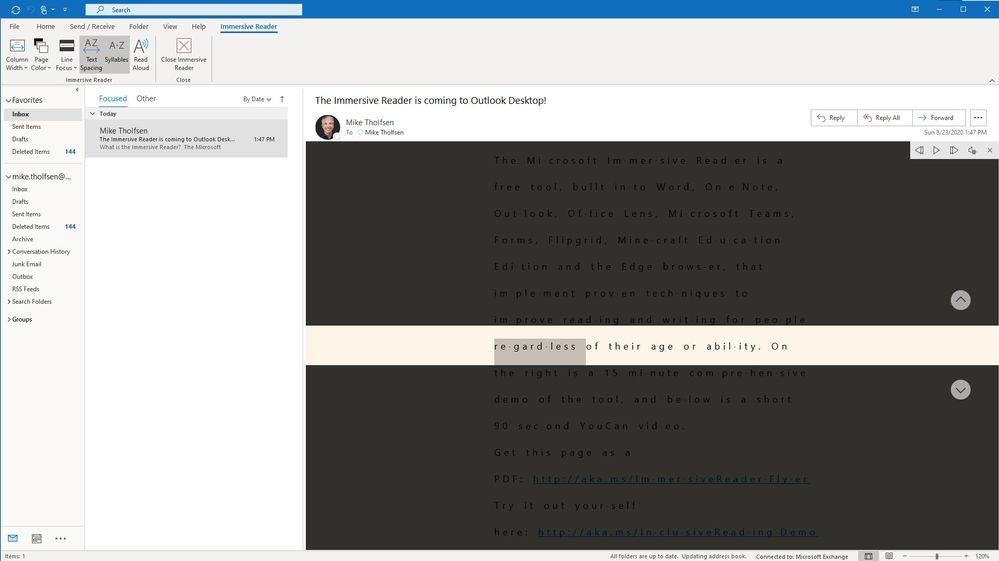
Last year we added Read Aloud to Outlook Desktop, and as a result heard from many people around the world about the positive impact this gave to those reading email. Later this fall, in Outlook Desktop we will be rolling out many of the same Immersive Reader capabilities that Word Desktop currently has. An example of how this will look is below.
In addition, we will be bringing this same set of Immersive Reader features to the Mail client on Windows 10 in the 4th quarter of 2020
Microsoft Forms Mobile and Consumer
We launched Immersive Reader in Forms for our Education customers in fall of 2019. This fall we are rolling out Immersive Reader for our consumer Forms customers who use Outlook.com. There will be a switch to enable Immersive Reader for customers who want this capability. In addition, customers using Forms on a mobile phone will also be able to enable the Immersive Reader.
Immersive Reader Enhancements
Immersive Reader SDK 1.1 updates
With today’s announcement of the General Availability of the Immersive Reader as an Azure Cognitive Service, we have also rolled out some top requests from partners to improve our software development kit (SDK). Version 1.1 adds support to have a page read aloud automatically, or to pass in a language parameter and pre-translate content. Developers can read more about our SDK updates here.
10,000+ new Picture Dictionary Images
The Picture Dictionary in the Immersive Reader has been one of our most well-loved capabilities. We’re expanding our partnership with Tobii Boardmaker and including many more images into our Picture Dictionary. For many languages, we will be adding over 10,000 new images, and we expect all current Picture Dictionary languages will get more images. These additional images will show up for Microsoft apps as well as any partner using our Immersive Reader Cognitive Service.
More Neural Text-to-Speech and translation languages
15 new Neural Text-to-Speech (TTS) voices.
We are always looking to broaden the languages and locales of Immersive Reader. Today we are excited to announce 15 new Neural TTS languages for the Immersive Reader. Neural Text-to-Speech is the “human sounding” read aloud voices that we’ve rolled out in a limited number of languages. We’ve added 15 more to Immersive Reader, including: Salma in Arabic (Egypt), Zariyah in Arabic (Saudi Arabia), Alba in Catalan (Spain), Christel in Danish (Denmark), Neerja in English (India), Noora in Finnish (Finland), Swara in Hindi (India), Colette in Dutch (Netherland), Zofia in Polish (Poland), Fernanda in Portuguese (Portugal), Dariya in Russian (Russia), Hillevi in Swedish (Sweden), Achara in Thai (Thailand), HiuGaai in Chinese (Cantonese, Traditional) and HsiaoYu in Chinese (Taiwanese Mandarin). Read the blog for the new list, and explore the full list of Neural TTS languages.
5 new Translate languages in Immersive Reader
Our friends on the Microsoft Translator team have been hard at work launching 5 new languages, and today the Immersive Reader is adding this under our “Translate” menu, for either by Word or entire Document. The new languages are: Gujaratim Marathi, Oriya, Kurdish (Northern), Kurdish (Central), Pashto & Dari.
And this is for folks who like lists!
- Immersive Reader for Azure Cognitive Services (General Availability) – available today
- Safari Montage and Immersive Reader – available today
- SchoolBox and Immersive Reader – available today
- Immersive Reader Cognitive Services SDK 1.1 updates – available today
- 10,000+ new Picture Dictionary Images – coming this fall
- Fifteen New Neural Text to Speech languages – available today
- Five new languages for translation in Immersive Reader- Gujaratim Marathi, Oriya, Kurdish (Northern), Kurdish (Central), Pashto and Dari – available today
- Microsoft Math Solver and Immersive Reader (Web) – available today
- Microsoft Math Solver and Immersive Reader (iOS) – late August
- Microsoft Math Solver and Immersive Reader (Android) – late August
- Forms Consumer and Forms Mobile Immersive Reader – late August
- Code.org and Immersive Reader – Fall, 2020
- Outlook Desktop and Immersive Reader – Fall, 2020
- Mail app on Windows 10 and Immersive Reader – 4th quarter, 2020
We hope you enjoy these new Immersive Reader updates! Don’t hesitate to reach out with any questions or comments.
Mike Tholfsen
Principal Product Manager
Microsoft Education
@mtholfsen
by Scott Muniz | Aug 25, 2020 | Azure, Microsoft, Technology, Uncategorized
This article is contributed. See the original author and article here.
I’m happy to introduce our Azure IoT Ask the Expert series to you.
Each month, from September onwards, our engineers and specialists will briefly introduce an IoT topic in the Learn IoT discussion section of this community and will open it up to you to ask any questions or thoughts relating to that topic you may have.
These Ask an Experts are intended to be longer lasting Q&As which are inclusive of anyone of you around the world, in all time zones and to create a legacy of questions and answers tailored to your needs. This is why we have chosen to add them as a conversation to the Learn IoT section of the IoT Tech Community opposed to host them as a short, live discussion.
Which topics can you expect?
|
Month
|
Topic
|
Expert(s)
|
Link to discussion
|
|
September
|
IoT and Security
|
Martin Tuip
|
TBA
|
|
October
|
Computer Vision
|
Paul DeCarlo
|
TBA
|
|
December
|
TBA
|
TBA
|
TBA
|
This table will be updated both with new discussion topics, ahead of time as well as links to past discussion topics.
September Ask the Expert Topic: IoT and Security
From the 2019 ‘IoT Signals Report’ we’ve learned that 30% of you feel that complexity and technical challenges are the biggest barrier to the adoption of IoT and to the digital transformation of your company. Security was called both to be one of the main drivers for the implementation of IoT as well as one of the biggest challenges. As security is so top of mind, this will be our first Q&A topic.
Get your questions ready
On the first working day of each month, a new Ask the Expert will be live in the Learn IoT conversation section of this website, plus we will update this blog post with a link. Your questions or ideas around the topic of the month can be added as comments to that specific conversation – the conversation will be monitored for a full month. We’re looking forward to seeing your questions and thoughts in the next upcoming Ask the Expert!
Find previous Ask the Expert Discussions here!
Ask the Expert: Windows 10 IoT Enterprise
Ask the Expert: Azure Sphere, Embedded Hardware, and IoT Security
by Scott Muniz | Aug 25, 2020 | Uncategorized
This article is contributed. See the original author and article here.
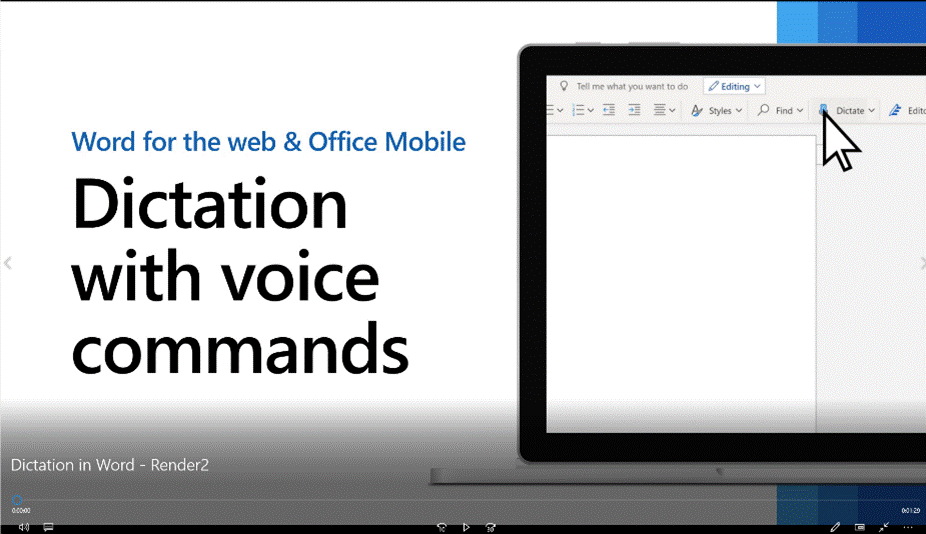
People are interacting with technology using voice input more than ever before. Dictation in productivity apps such as Word empower people to conquer the blank page. Dictating is a fast and easy way to get your thoughts on the page during brainstorming, outlining, and authoring content.
Today, Office announced voice commanding on web and mobile as the next step to make dictation more powerful:
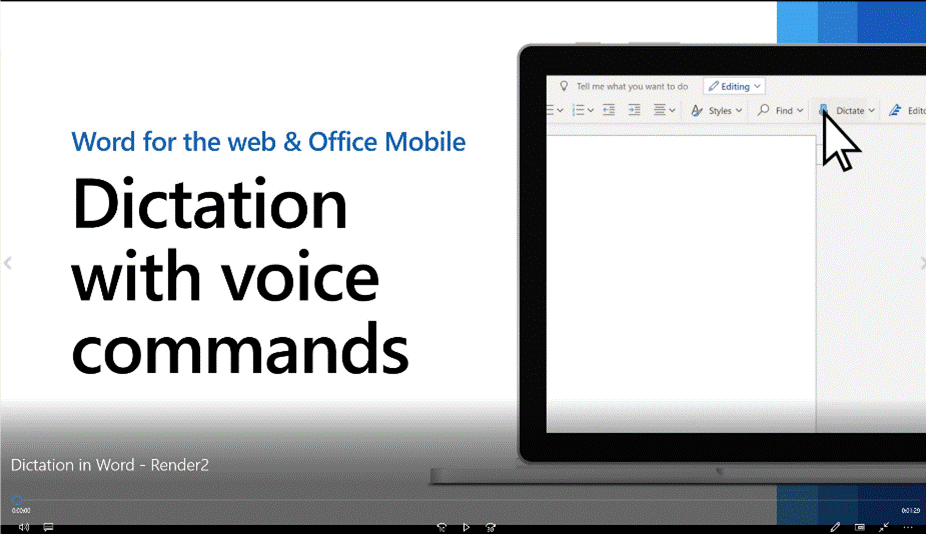
Prior to having voice commands, dictation only allowed people to add basic text with speech-to-text and punctuation with phrases like “new line” or “period”. Now, without leaving dictation or having to switch to keyboard and mouse, you can seamlessly use voice commands to accomplish tasks such as correcting text, light formatting, and making lists using natural language. Phrases like “delete that”, “bold last word”, “start list” are now among many new commands and more will be added regularly.
When the Office dictation team was looking for a good way to understand the natural spoken language commands, they reached out to the Azure Language Understanding team. Following that, an exciting new collaboration formed. Language Understanding in Azure Cognitive Services enables the team to build custom natural language models that interpret a users’ natural speech instead of using a strict command language- all without having to be a machine learning expert. With Language Understanding, you can create custom language models with UI-experience with confidence.
This is just one of the many examples of how Microsoft products are powered by cutting edge AI technology in Azure AI. For example, suggested replies in Outlook and PowerPoint Designer each rely on Azure Machine Learning to make recommendations on quick replies and recommended design layouts, respectively. Additionally, Microsoft Teams uses Speech for live captioning of meetings, while Xbox uses Personalizer to make personalized recommendations for Xbox gamers.
Any developer can extend apps with rich AI-powered capabilities irrespective of machine learning expertise. Azure Cognitive Services offers pre-built AI models and simple customization capabilities that help you infuse capabilities of vision, speech, language and decision.
by Scott Muniz | Aug 25, 2020 | Azure, Microsoft, Technology, Uncategorized
This article is contributed. See the original author and article here.
Azure Migrate has come along way since it’s launch in September 2017, it now very much is the hub for datacentre migration projects. We now see it being able to cover off those key migration scenarios that organisations are attempting, it can take care of the discovery, assessment and migration, as well as integrating third party tools into the platform.
One of the key scenarios that is supports is the ability to assess and migrate your databases from on prem into Azure. Utilising the Data Migration Assistant (DMA) to discover and assess your on prem SQL databases with a view to migrating them either as a SQL database hosted inside a virtual machine in Azure, Azure SQL Database or Azure SQL Database Managed Instance.
The DMA can be used to discover and assess your SQL database anywhere, it doesn’t care if the SQL database installed on a server on prem or even if it already resides within a virtual machine hosted inside Azure. It will give you feedback on the best migration path for your SQL database. You can watch the full video here or on Microsoft Channel 9.
You can find more information here:


Recent Comments