This article is contributed. See the original author and article here.
With the release of Configuration Manager 2006, we’re making another step towards the Microsoft Endpoint Manager admin center being the security policy management tool for ConfigMgr standalone clients.
Microsoft Defender Antivirus policies for Windows can now be managed from the Endpoint security node of Microsoft Endpoint Manager (MEM) and targeted to on-premises Configuration Manager collections.
This allows your security admins to target both cloud-born MDM devices, Intune + ConfigMgr co-managed devices and ConfigMgr only clients.
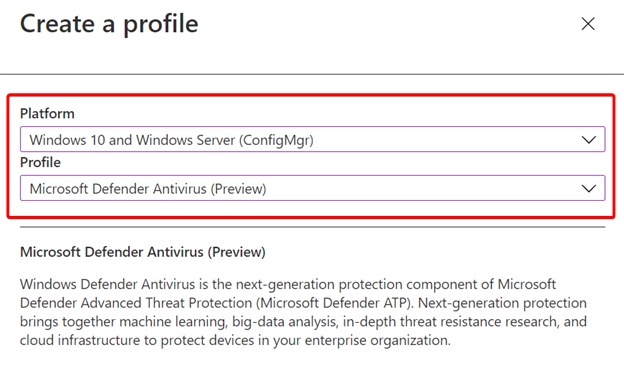
Select Windows 10 and Windows Server (ConfigMgr) as the Platform, and Windows Defender Antivirus (Preview) for the Profile, and select Create.
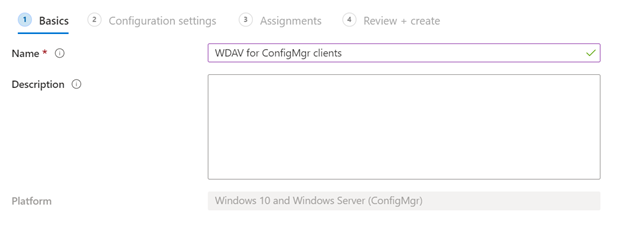
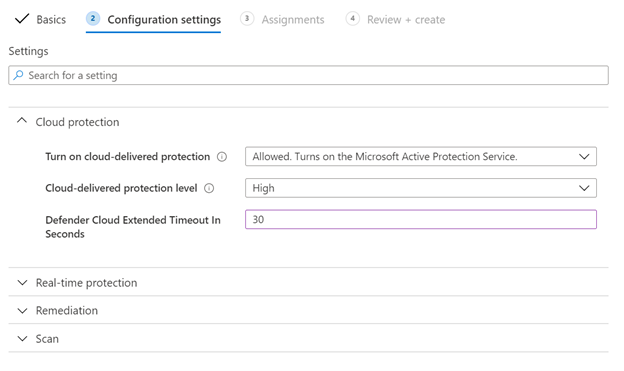
Give the policy a name, and configure your desired settings
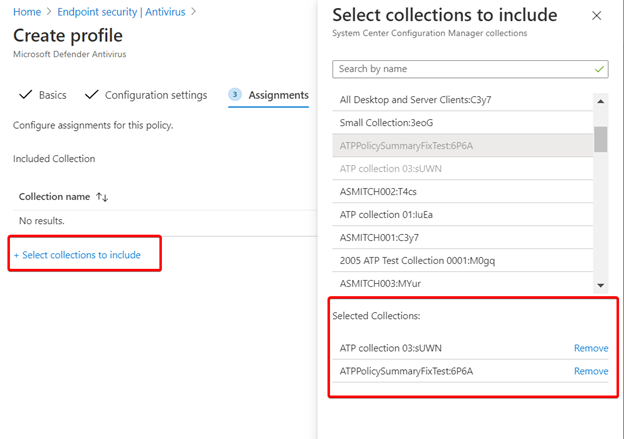
Now select some collections to target and finish the wizard. Once complete, MEM will sync down the policy configuration to ConfigMgr, including the collection assignments.
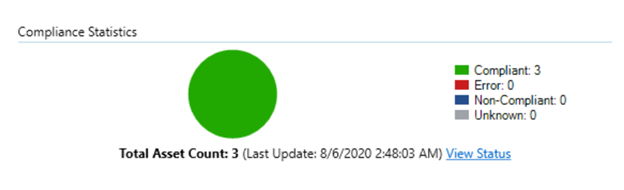
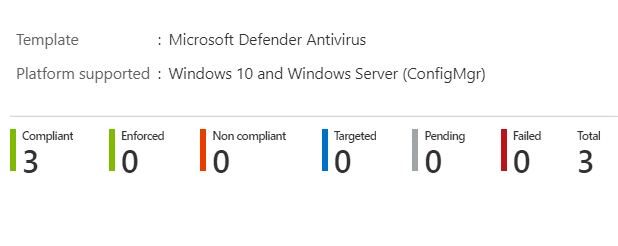
The configuration will apply to the devices in the collection, and report back it’s status in both Configuration Manager and in the MEM console.
In ConfigMgr Monitoring > Deployments
In Endpoint Manager policy > Overview
To learn more about this feature, please see our documentation.
Claire Bonaci: The World Health Organization designated 2020 as the year of the nurse and midwife to raise awareness of nurses and midwives significant and varied roles in healthcare. Today, Molly talks with Dr. Robyn Begley, the chief nursing officer for the American Hospital Association and the CEO of the American organization for nursing leadership.
Molly McCarthy: So hi, I’m Molly McCarthy with Microsoft. Microsoft and the American Hospital Association are partnering together to educate nurses and physicians on artificial intelligence in healthcare. Our mutual goal is to raise awareness and increase understanding of the scope of artificial intelligence, highlighting clinical and administrative use cases, as well as provide continuing education credits for both physicians, nurses and hospital administrator. And I’m so excited to be here today with Dr. Robyn Begley, who is the chief nursing officer for the American Hospital Association, as well as the CEO for AONL. Welcome, Robyn.
Robyn Begley: Hi, Molly. It’s great to be here.
Molly McCarthy: Thank you so much for joining us today. It’s really been a pleasure working with you and the American Hospital Association over the past year to put this course together and would just love to hear from you. You know, tell me a little bit more about yourself and your journey to the AHA. I know, we were talking earlier about the amount of time we’ve both been in health care. So we’d love to hear a little bit more about your background.
Robyn Begley: Sure. Thank you, Molly. Well, I’ve been in health care a little bit longer than you have. But prior to my role here at the AHA and AONL, I began here almost two years ago in September. I was the chief nursing officer for a healthcare system in southeastern New Jersey. Spent most of my professional career there but the last 20 years I was a chief nursing officer. My clinical background is the Maternal Child field which I began you know, after graduation, a number of years ago and spent some time in, in labor and delivery, the NICU different aspects of ob gyn.
Molly McCarthy: Great. That’s another thing we have in common because I started out in the neonatal intensive care unit worked in pedes, and pediatric cardiology. So definitely a special place in my heart for the Maternal Child area. In thinking about the course that is getting ready to launch wanted to hear from you, you know, specifically based upon your experience as a chief nursing officer, for many years within within the healthcare industry, just the importance of providing clinical content around artificial intelligence and technology to our nurses and physicians, as well as healthcare administrators, and really talk a little bit more about the significance of this program.
Robyn Begley: Thanks, Molly. That’s a great question. In my role as chief nursing officer, I learned you know firsthand what, what big decisions are made regarding the future, whether it’s technology, whether it’s AI, and I know that, you know, many times I felt unprepared for the decisions to be that I needed to weigh in on. So I think, you know, a course like this really provides the, the building blocks of it doesn’t tell you necessarily what you it’s not very prescriptive, but what it does is really gives you the information that you need to then make appropriate decisions. Not only just information, factual information, but also what processes to consider and who needs to be included. And I think in particular, what resonated with me was the whole issue of your culture. So every organization has a different culture and how to you know how to set the decision making process up for success, you know, and decisions are around implementation, etc. It was really, I think it was really a great coming together of both the technical side and the administrative and the clinical side. So I’m very proud, you know that we’re going to be able to offer this, this program together.
Molly McCarthy: Well, great, really great points that you’re making. And I think you mentioned kind of that trifecta of technical, clinical and administrative. And I think that’s so important when thinking about technology, not just the implementation piece, but really thinking about what’s right for our organization and making those decisions because not only do they impact the IT group, but certainly the clinicians and ultimately the patients. And just kind of a follow up question to that, obviously, the importance of the continuing education and having that credit available through this course. But really thinking about today’s environment, the herein here, you know, and now and what’s going on in the world? And just Can you talk a little bit about what you’ve seen in terms of the the shift in technology, from your perspective within, you know, within the many hospitals that you work with across the US?
Robyn Begley: Well, it’s a Yes, I’m happy to address that. In speaking with nursing leaders across the country and clinical leaders, not you know, not just nurses, although that certainly is, you know, the group that I mainly interact with. We have heard from everyone that, you know, the, the crisis of the pandemic has has spurred innovation. And one of those things that we see across the country is adoption of technology that maybe has been around for a little while, but there was a lot of, you know, formerly there was reservation, about using things and this technology has been adopted and innovated, so rapidly given You know, given the pandemic, and I think that, you know, both patients have been much more accepting of technology. And I think our clinical caregivers understand that it can really help maximize their not just their, their ability to care for more patients, but care for more patients safely. And how can they really utilize this technology in new ways to, you know, to take care of more patients, and, you know, extend their reach out into the community more rapidly. And that’s been a really great thing. You know, I call I call that a silver lining of the pandemic. We have seen some really, you know, we have seen some benefits, although, of course, you know, we’re dealing with a lot of still in the middle of a lot of, you know, really uncertain times.
Molly McCarthy: Right, Yeah, And I think you know, from me from my standpoint, I’ve been at Microsoft for over seven years and been talking about cloud technology and most certainly virtual health and virtual visits, etc, for a good six years and just to see the adoption rate in the past six months has, you know, trumped the the past six years. So like you said silver lining. Just a couple more questions here as we close out. One is have you taken the course yourself I know that I looked obviously been involved in the course and thinking about the the expertise we needed to put it together but and had a chance last month to look at it and take it and just wanted to see if you’ve taken the course and kind of from your perspective, the outcomes that maybe you’re looking for, for yourself and even nursing leadership.
Robyn Begley: Well, I did take it. I actually went online and and reviewed the whole course. And I thought it was really very thought provoking in addition to providing with me with a lot of information, and it was very user friendly. It’s a really It was very enjoyable to do. And I know with our continuing education required, you know, for our licensure, etc. Some things aren’t as, you know, as pleasant, and you know, and pleasurable, but this was I really felt like I learned a lot by completing the courses. And, you know, you can take your time with it. You know, it has different formats, so that it’s not all just one way of delivering the information. So I just thought it was really, you know, it was really informative. And I hope that it’s well, well accepted by our, you know, by our field, I think it will be because it’s really a pleasure to learn in this way.
Molly McCarthy: Welll great. Thank you so much. Appreciate. Appreciate that candor. And just as we wrap up here. I know that you have a big meeting coming up in the end of September and wanted to hear a little bit more about that and how people can can get involved in that.
Robyn Begley: Sure. Thank you very much, Molly. Speaking of Technology. Of course, we had to cancel our annual meeting that was scheduled for March in person. So we are holding our virtual conference for AONL, the American organization for nursing leadership on September 24. If you go to our website aonl.com, you will be able to learn all you need to know if you’d like to register for our virtual conference, we have our keynote speakers who were to have, you know, presented in March that we’ll be presenting in September as well as many of our breakout groups and again, it’s a great opportunity for continuing education.
Molly McCarthy: That’s great. Well, thank you so much for taking time out of your busy schedule today. I certainly appreciate your expertise and look forward to continued partnership with you. So thank you.
Robyn Begley: My pleasure, Molly. Thank you.
Claire Bonaci: Thank you all for watching. Please feel free to leave us questions or comments below and check back soon for more content from the HLS industry team.
Claire Bonaci: The World Health Organization designated 2020 as the year of the nurse and midwife to raise awareness of nurses and midwives significant and varied roles in healthcare. Today, Molly talks with Dr. Robyn Begley, the chief nursing officer for the American Hospital Association and the CEO of the American organization for nursing leadership.
Molly McCarthy: So hi, I’m Molly McCarthy with Microsoft. Microsoft and the American Hospital Association are partnering together to educate nurses and physicians on artificial intelligence in healthcare. Our mutual goal is to raise awareness and increase understanding of the scope of artificial intelligence, highlighting clinical and administrative use cases, as well as provide continuing education credits for both physicians, nurses and hospital administrator. And I’m so excited to be here today with Dr. Robyn Begley, who is the chief nursing officer for the American Hospital Association, as well as the CEO for AONL. Welcome, Robyn.
Robyn Begley: Hi, Molly. It’s great to be here.
Molly McCarthy: Thank you so much for joining us today. It’s really been a pleasure working with you and the American Hospital Association over the past year to put this course together and would just love to hear from you. You know, tell me a little bit more about yourself and your journey to the AHA. I know, we were talking earlier about the amount of time we’ve both been in health care. So we’d love to hear a little bit more about your background.
Robyn Begley: Sure. Thank you, Molly. Well, I’ve been in health care a little bit longer than you have. But prior to my role here at the AHA and AONL, I began here almost two years ago in September. I was the chief nursing officer for a healthcare system in southeastern New Jersey. Spent most of my professional career there but the last 20 years I was a chief nursing officer. My clinical background is the Maternal Child field which I began you know, after graduation, a number of years ago and spent some time in, in labor and delivery, the NICU different aspects of ob gyn.
Molly McCarthy: Great. That’s another thing we have in common because I started out in the neonatal intensive care unit worked in pedes, and pediatric cardiology. So definitely a special place in my heart for the Maternal Child area. In thinking about the course that is getting ready to launch wanted to hear from you, you know, specifically based upon your experience as a chief nursing officer, for many years within within the healthcare industry, just the importance of providing clinical content around artificial intelligence and technology to our nurses and physicians, as well as healthcare administrators, and really talk a little bit more about the significance of this program.
Robyn Begley: Thanks, Molly. That’s a great question. In my role as chief nursing officer, I learned you know firsthand what, what big decisions are made regarding the future, whether it’s technology, whether it’s AI, and I know that, you know, many times I felt unprepared for the decisions to be that I needed to weigh in on. So I think, you know, a course like this really provides the, the building blocks of it doesn’t tell you necessarily what you it’s not very prescriptive, but what it does is really gives you the information that you need to then make appropriate decisions. Not only just information, factual information, but also what processes to consider and who needs to be included. And I think in particular, what resonated with me was the whole issue of your culture. So every organization has a different culture and how to you know how to set the decision making process up for success, you know, and decisions are around implementation, etc. It was really, I think it was really a great coming together of both the technical side and the administrative and the clinical side. So I’m very proud, you know that we’re going to be able to offer this, this program together.
Molly McCarthy: Well, great, really great points that you’re making. And I think you mentioned kind of that trifecta of technical, clinical and administrative. And I think that’s so important when thinking about technology, not just the implementation piece, but really thinking about what’s right for our organization and making those decisions because not only do they impact the IT group, but certainly the clinicians and ultimately the patients. And just kind of a follow up question to that, obviously, the importance of the continuing education and having that credit available through this course. But really thinking about today’s environment, the herein here, you know, and now and what’s going on in the world? And just Can you talk a little bit about what you’ve seen in terms of the the shift in technology, from your perspective within, you know, within the many hospitals that you work with across the US?
Robyn Begley: Well, it’s a Yes, I’m happy to address that. In speaking with nursing leaders across the country and clinical leaders, not you know, not just nurses, although that certainly is, you know, the group that I mainly interact with. We have heard from everyone that, you know, the, the crisis of the pandemic has has spurred innovation. And one of those things that we see across the country is adoption of technology that maybe has been around for a little while, but there was a lot of, you know, formerly there was reservation, about using things and this technology has been adopted and innovated, so rapidly given You know, given the pandemic, and I think that, you know, both patients have been much more accepting of technology. And I think our clinical caregivers understand that it can really help maximize their not just their, their ability to care for more patients, but care for more patients safely. And how can they really utilize this technology in new ways to, you know, to take care of more patients, and, you know, extend their reach out into the community more rapidly. And that’s been a really great thing. You know, I call I call that a silver lining of the pandemic. We have seen some really, you know, we have seen some benefits, although, of course, you know, we’re dealing with a lot of still in the middle of a lot of, you know, really uncertain times.
Molly McCarthy: Right, Yeah, And I think you know, from me from my standpoint, I’ve been at Microsoft for over seven years and been talking about cloud technology and most certainly virtual health and virtual visits, etc, for a good six years and just to see the adoption rate in the past six months has, you know, trumped the the past six years. So like you said silver lining. Just a couple more questions here as we close out. One is have you taken the course yourself I know that I looked obviously been involved in the course and thinking about the the expertise we needed to put it together but and had a chance last month to look at it and take it and just wanted to see if you’ve taken the course and kind of from your perspective, the outcomes that maybe you’re looking for, for yourself and even nursing leadership.
Robyn Begley: Well, I did take it. I actually went online and and reviewed the whole course. And I thought it was really very thought provoking in addition to providing with me with a lot of information, and it was very user friendly. It’s a really It was very enjoyable to do. And I know with our continuing education required, you know, for our licensure, etc. Some things aren’t as, you know, as pleasant, and you know, and pleasurable, but this was I really felt like I learned a lot by completing the courses. And, you know, you can take your time with it. You know, it has different formats, so that it’s not all just one way of delivering the information. So I just thought it was really, you know, it was really informative. And I hope that it’s well, well accepted by our, you know, by our field, I think it will be because it’s really a pleasure to learn in this way.
Molly McCarthy: Welll great. Thank you so much. Appreciate. Appreciate that candor. And just as we wrap up here. I know that you have a big meeting coming up in the end of September and wanted to hear a little bit more about that and how people can can get involved in that.
Robyn Begley: Sure. Thank you very much, Molly. Speaking of Technology. Of course, we had to cancel our annual meeting that was scheduled for March in person. So we are holding our virtual conference for AONL, the American organization for nursing leadership on September 24. If you go to our website aonl.com, you will be able to learn all you need to know if you’d like to register for our virtual conference, we have our keynote speakers who were to have, you know, presented in March that we’ll be presenting in September as well as many of our breakout groups and again, it’s a great opportunity for continuing education.
Molly McCarthy: That’s great. Well, thank you so much for taking time out of your busy schedule today. I certainly appreciate your expertise and look forward to continued partnership with you. So thank you.
Robyn Begley: My pleasure, Molly. Thank you.
Claire Bonaci: Thank you all for watching. Please feel free to leave us questions or comments below and check back soon for more content from the HLS industry team.
This article is contributed. See the original author and article here.
The following is the first on a series of articles by @Ali Youssefi that we will be cross-posting into this Test Community Blog. These articles were first published by Ali in the Dynamics community but since the topic is very related with Testing it makes sense to publish here as well.
We will be interrelating cross-posting content with original articles and when it’s a series. Stay tuned!
—————————————————————————————————————–
Summary
EasyRepro is a framework that allow automated UI tests to be performed on a specific Dynamics 365 organization. You can use it to automate testing such as Smoke, Regression, Load, etc. The framework is built from the Open Source Selenium web drivers used by the industry across a wide range of projects and applications. The entire EasyRepro framework is Open Source and available on GitHub. The purpose of this article is to walk through the setup of the EasyRepro framework. It assumes you are familiar with concepts such as working with Unit Tests in Visual Studio, downloading NuGet packages and cloning repositories from GitHub.
Getting Started
Now that you have a basic understanding of what EasyRepro is useful for you probably would like to start working with it. Getting EasyRepro up and running is very simple as the framework is designed with flexibility and agility in mind. However, like any other utility there is some initial learning and few hurdles toget over to begin working with EasyRepro. Let’s start with dependencies!
Dependencies
The first dependency involves the EasyRepro assemblies and the Selenium framework. The second involve .NET, specifically the .NET framework (.NET core can be used and is included as a feature branch!). Finally depending on how you are working with the framework you will want to include a testing framework to design, build and run your unit tests.
Choosing How to Consume the EasyRepro Framework
There are two ways of consuming the EasyRepro framework, one is using the NuGet packages directly while the other is to clone or download from the GitHub repository. The decision to use one over the other primarily depends on your need to explore or extend the framework and how you go about doing so. Working directly with the source code allows exploration into how EasyRepro interacts with Dynamics 365. However for extending the framework the approach of using the NuGet packages and building on top allows for increased flexibility.
Downloading using NuGet Package Manager
The quickest way to get started with the EasyRepro framework is to simply add a NuGet package reference to your unit test project. You can do by running this command in the NuGet Package Manager command line:
Create your unit test project and navigate to the NuGet Package Manager CLI. Use the Install-Package command to get the PowerApps.UIAutomation.Api package as show in the command below (v9.0.2 is the latest as of this writing please refer tothis linkfor any updates:
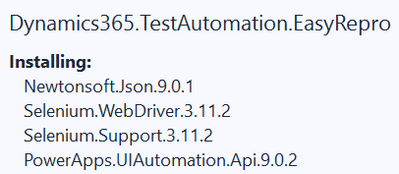
This will get you the references needed to begin working with the framework immediately. Once installed you should the following packages begin to download into your unit test project:
When complete the required assemblies are available and you can begin working with the EasyRepro framework. There are some settings needed for the framework to connect to your Dynamics 365 organization which if you’re new to the framework maybe unknown. If so I would suggest reviewing the next section which initiates a clone of the EasyRepro framework which happens to include a robust amount of sample unit tests that show how to interact with the framework.
Cloning from GitHub
If you’re new to the framework in my opinion this is the best way to begin familiarizing yourself how it works and how to build a wide range of unit tests. This is also the way to go if you want to understand how EasyRepro is built upon the Selenium framework and how to extend.
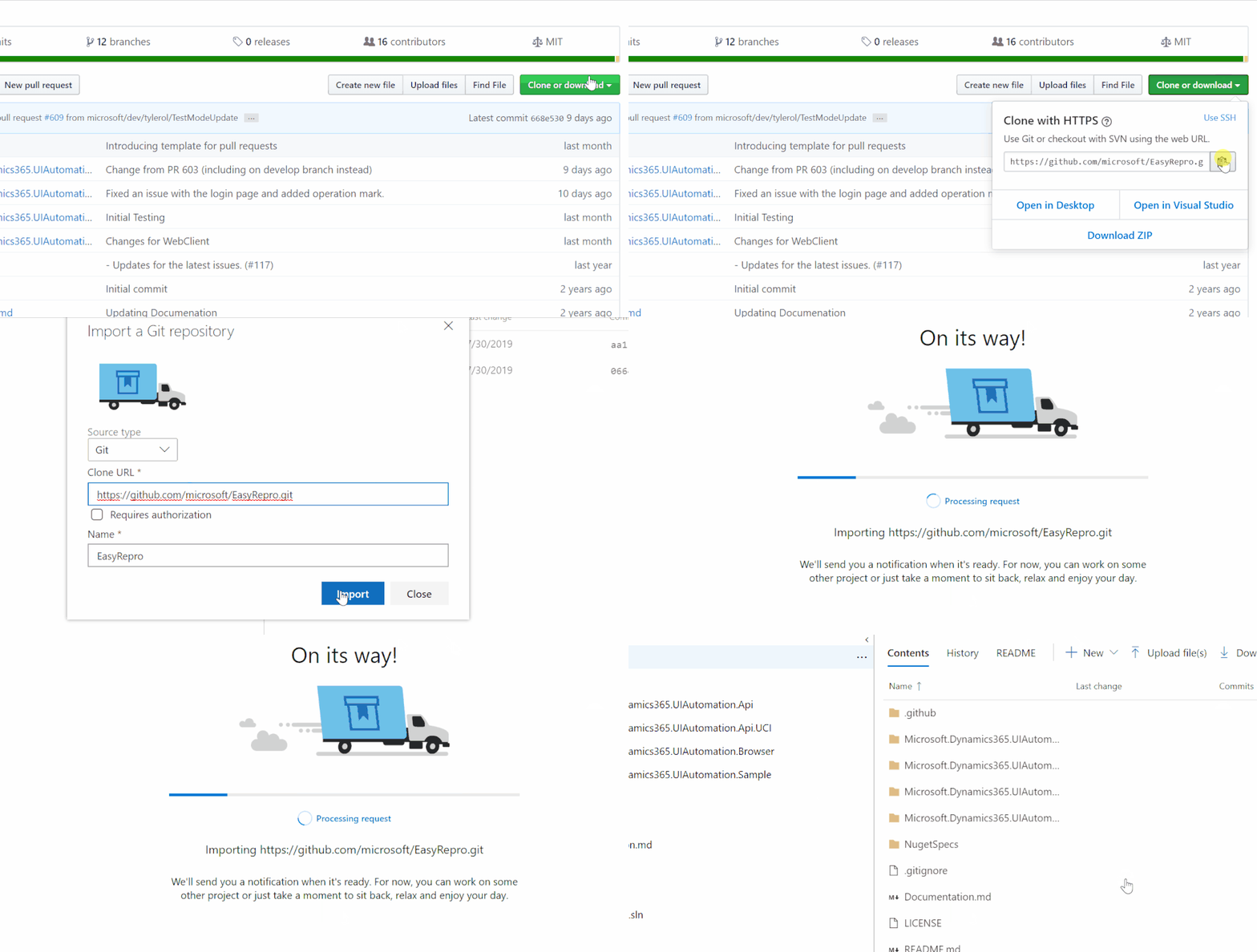
To begin go to the official EasyRepro project located athttps://github.com/Microsoft/EasyRepro. Once you’re there take a moment to review the branches available. The branches are structured in a GitFlow approach so if you’re wanting to work with the latest in market release of Dynamics 365 review the releases/* branches. For the latest on going development I would suggest the develop branch.
Start by cloning the project locally to review the contents and see how the interaction between the frameworks occurs.
The gif below shows cloning to Azure DevOps but cloning locally directly from GitHub is also supported.
Cloning locally from Azure DevOps
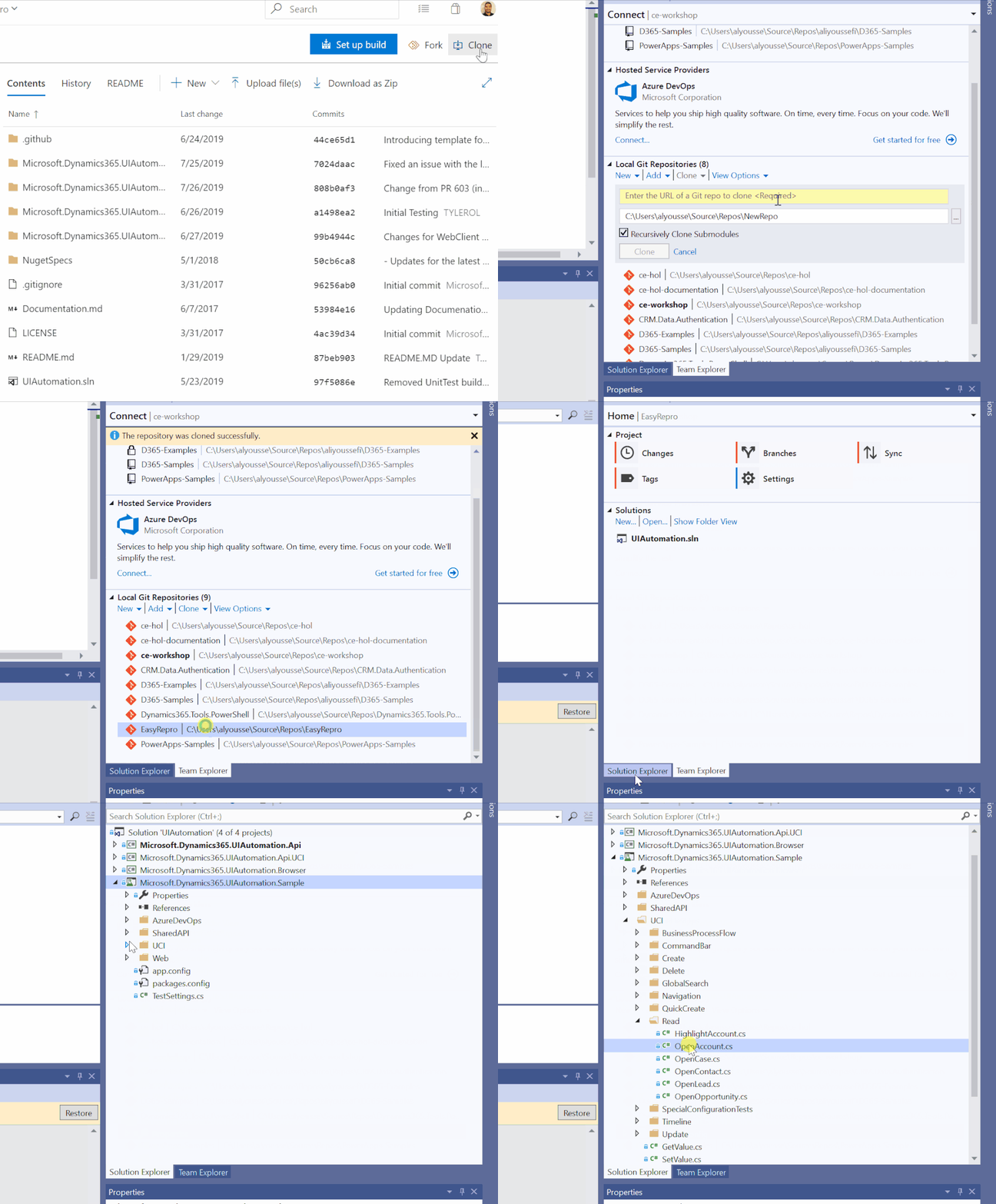
Another alternative which I highly recommend is to clone to an Azure DevOps project which can then be cloned locally. This will allow us to automate with CI/CD which we will cover in another article. If you decided to clone to Azure DevOps from GitHub the next step is to clone locally.
The gif below shows cloning locally from an Azure DevOps repository.
Reviewing the EasyRepro Source Code Projects
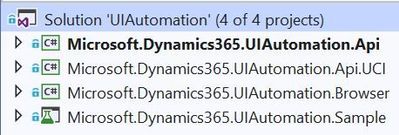
The EasyRepro source code includes a Visual Studio solution with three class library projects and one for sample unit tests.
The projects used by the Unified Interface are Microsoft.Dynamics365.UIAutomation.Api.UCI and Microsoft.Dynamics365.UIAutomation.Api.Browser. Most of the usage between EasyRepro and unit tests will happen with objects and commands within the Microsoft.Dynamics365.UIAutomation.Api.UCI project. This project contains objects to interact with Dynamics Unified Interface modules and forms.
The Microsoft.Dynamics365.UIAutomation.Api.Browser project is limited to interacts with the browser driver and other under the hood components.
Reviewing Sample Unit Tests
Looking into the Open Account Sample Unit Test
The unit test projectMicrosoft.Dynamics365.UIAutomation.Samplecontains hundreds of unit tests which can serve as a great learning tool to better understand how to work with the EasyRepro framework. I highly suggest exploring these tests when you begin to utilize the framework within your test strategy. Many general and specific tasks are essentially laid out and can be transformed to your needs. Examples include opening forms (OpenRecord), navigating (OpenSubArea) and searching for records (Search), creating and updating records (Save).
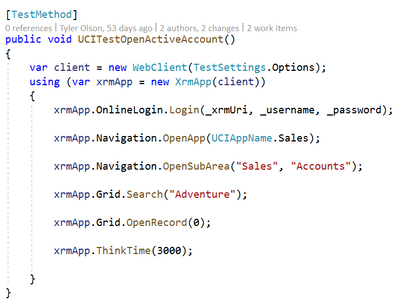
For this exercise we will open up theUCITestOpenActiveAccountunit test, you can find this using Find within Visual Studio (Ctrl+F). Once found you should see something like the following:
Following the steps within the unit test you can see its designed to perform basic user actions to read an account. We start by logging into an organization (Login). Then we proceed to open the UCI application titled “Sales” (OpenApp). Once in the organization we open the Accounts sub area (OpenSubArea) and search for “Adventure” in the Quick Find View (Search). Finally we open the first record (OpenRecord(0)) in the quick find view results.
Exploring Test Settings
In the current sample Unit Test project the test settings are set in two places: theapp.configfile located in the root of the project and in theTestSettings.csfile, a class object used across all of the tests.
Application Configuration file
Theapp.configfile includes string configurations that tell the tests what organization to login to, who to login as and other under the hood settings like which browser to run and how to run the tests.
Application Configuration File Settings
Property
Description
OnlineUsername
String. Used to represent the test user name.
OnlinePassword
String. Used to represent the test user password.
OnlineCrmUrl
String. Used to represent the organization (i.e. https://<your org>.crm.dynamics.com/main.aspx)
AzureKey
String. GUID representation of Azure Application Insights Instrumentation Key.
BrowserType
String. Represents enum flag for Microsoft.Dynamics365.UIAutomation.Browser.BrowserType.
RemoteBrowserType
String. Represents enum flag for Microsoft.Dynamics365.UIAutomation.Browser.BrowserType. Only used if BrowserType is Remote.
RemoteHubServer
String. Represents Selenium Server remote hub URL. Only used if BrowserType is Remote.
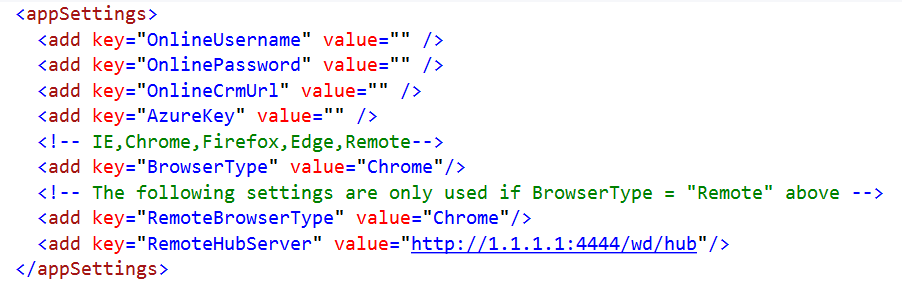
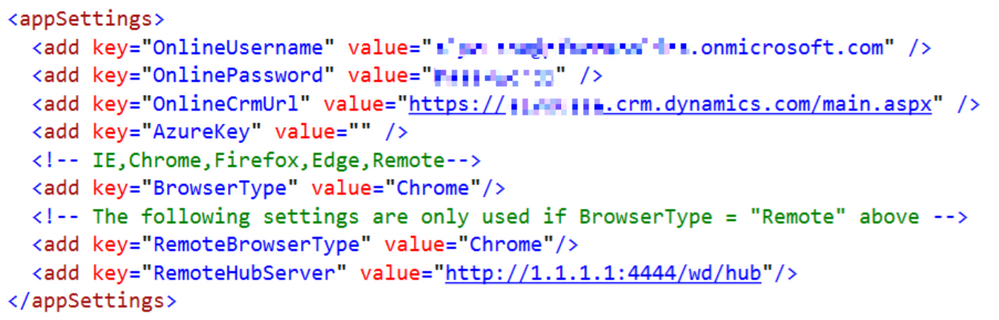
For this article we will focus on simply running locally with the Google Chrome browser by setting theBrowserTypeto “Chrome”. Also inside of theapp.configfile are three settings we need to modify calledOnlineUsername,OnlinePasswordandOnlineCrmUrl. In my case I am using a trial and as you can see below I am using a “user@tenant.onmicrosoft.com” username and a “https://<orgname>.crm.dynamics.com/main.aspx” URL.
Before:
After:
Test Settings and the BrowserOptions object
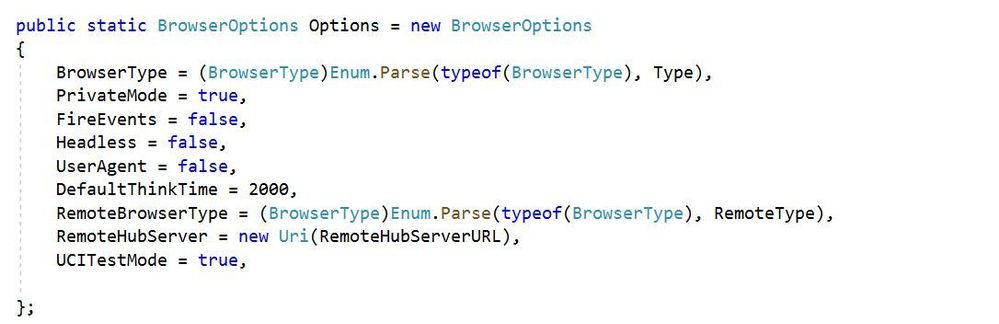
Another key object is theTestSettingsclass and the various properties inside. This class tells the unit tests how to render the browser, where the browser driver can be located as well as other properties. TheTestSettingsclass will need to be included in the Unit Test project and instantiate theBrowserOptionsobject as shown below:
In the next post we will explore how these settings can change your experience working with unit tests and what options are available.
Next Steps
Conclusion
From this article you should be able to begin using EasyRepro with your Dynamics 365 organization immediately. The next articles will go into designing and debugging unit tests, extending the EasyRepro code, implementing with Azure DevOps and other topics.
Marijn Somers is an MVP for Office Apps and Services who has been active in various roles to help clients deliver successful collaboration and content management solutions for more than 14 years. These roles include project manager, presales engineer, evangelist, SPOC (Single-Point-Of-Contact), trainer, analyst and administrator. Marjin is the founder and owner of Balestra, an outfit which focuses on Microsoft Office 365 and specializes in governance and user adoption for collaboration and document management. Follow him on Twitter @MarjinSomers
Sergio Govoni is a graduate of Computer Science from “Università degli Studi” in Ferrara, Italy. Following almost two decades at Centro Software, a software house that produces the best ERP for manufacturing companies that are export-oriented, Sergio now manages the Development Product Team and is constantly involved on several team projects. For the provided help to technical communities and for sharing his own experience, since 2010 he has received the Microsoft Data Platform MVP award. During 2011 he contributed to writing the book: SQL Server MVP Deep Dives Volume 2. Follow him on Twitter or read his blogs in Italian and English.
Asma Khalid is an Entrepreneur, ISV, Product Manager, Full Stack .Net Expert, Community Speaker, Contributor, and Aspiring YouTuber. Asma counts more than 7 years of hands-on experience in Leading, Developing & Managing IT-related projects and products as an IT industry professional. Asma is the first woman from Pakistan to receive the MVP award three times, and the first to receive C-sharp corner online developer community MVP award four times. See her blog here.
Vesku Nopanen is a Principal Consultant in Office 365 and Modern Work and passionate about Microsoft Teams. He helps and coaches customers to find benefits and value when adopting new tools, methods, ways or working and practices into daily work-life equation. He focuses especially on Microsoft Teams and how it can change organizations’ work. He lives in Turku, Finland. Follow him on Twitter: @Vesanopanen
Freek Berson is an Infrastructure specialist at Wortell, a system integrator company based in the Netherlands. Here he focuses on End User Computing and related technologies, mostly on the Microsoft platform. He is also a managing consultant at rdsgurus.com . He maintains his personal blog at themicrosoftplatform.net where he writes articles related to Remote Desktop Services, Azure and other Microsoft technologies. An MVP since 2011, Freek is also an active moderator on TechNet Forum and contributor to Microsoft TechNet Wiki. He speaks at conferences including BriForum, E2EVC and ExpertsLive. Join his RDS Group on Linked-In here . Follow him on Twitter @fberson
This article is contributed. See the original author and article here.
Excel MVPs are Excel experts who passionately share their knowledge with the community. They’re deeply knowledgeable of Excel and use that knowledge to solve real world problems. They’re driven by their passion, community spirit and quest for knowledge, and always willing to help each other.
We want to start sharing with you some of the knowledge directly from our Excel MVPs:
Excel MVP Liam Bastick looks at what he has been able to glean about these welcome new additions to the Excel myriad of functions, features, and formulae.
Excel MVP Ajay Anand explains 11 advantages of using Excel Tables. There are few bonus tips like the least known shortcut for creating Excel Table, Tables as source data for Dynamic Drop-Down List, shortcuts for Excel Tables, etc.
This article is contributed. See the original author and article here.
Another Friday is upon us, so time to share some of the headlines that have happened this week in terms of Azure news. We have some new preview features in Azure as well as some going Generally Available (GA).
Revised end of service date for Windows 10, version 1803: May 11, 2021
Microsoft are delaying the scheduled end of service date for the Enterprise, Education and IoT Enterprise editions of Windows 10, version 1803. This means that if you are still running that version within your environment you will continued to receive security updates until May 11, 2021 instead of the previous November 2020 date.
Azure Migrate
Support to assess physical, AWS, GCP servers now generally available within Azure Migrate
The ability to assess your physical, AWS, GCP servers with Azure Migrate has been around for a while now and it’s now generally available to use. So, it’s great for assessing those servers on another cloud provider you want to move to Azure or even those virtual machines that are hosted by a managed service provider and you can’t access the hypervisor layer on. I actually covered this off in a blog post and video recently, check it out if you want to see it in action.
Cognitive Services
Public Preview: Cognitive Services Form Recognizer v2.1
Form Recognizer is a cognitive service that uses machine learning technology to identify and extract things like text from documents. In this latest public preview edition they team have introduced support for more languages, so as well as supporting English it now supports Chinese (Simplified), Dutch, French, German, Italian, Portuguese and Spanish. It also has a new pre-built model that will help extract information from a business card.
Azure Storage Icon
AzCopy v10.6 released
A new version of AzCopy has been released, with some exciting features. If you aren’t familiar with AzCopy it is a great command line tool that helps you move data in and out of Azure Storage. One of the new features is the ability to query Blob Versioning, so you can download a specific version of a file or delete it.
MS Learn Module of the Week
MS Learn Banner
Improve incident response with alerting on Azure – responding to incidents and things that happen to your infrastructure in a timely manner is part of what makes and IT department successful. In this MS Learn module you’ll learn how alerting in Azure can help you monitor and response to things happening in your environment.
Let us know in the comments below if there are any news items you would like to see covered in next week show. Az Update streams live every Friday so be sure to catch the next episode and join us in the live chat.
This article is contributed. See the original author and article here.
We recently released an update to Microsoft JDBC Driver for SQL Server, version 8.4.1. The update addresses a few issues that are important to our customers.
Fixed issues
Fixed issue with SQLServerConnectionPoolProxy not being compatible withdelayLoadingLobs#1403
Fixed a potentialNullPointerExceptionissue withdelayLoadingLobs#1403
Fixed issue with decrypting column encryption keys using Windows Certificate Store
Add the JDBC 8.4 RTW driver to your Maven project by adding the following code to your POM file to include it as a dependency in your project (choose .jre8, .jre11, or .jre13 for your required Java version).
This article is contributed. See the original author and article here.
This article is written by Jon Shectman and Brian Delaney, Microsoft.
Have you read about the elevation of privilege vulnerability that exists when an attacker establishes a vulnerable Netlogon secure channel connection to a domain controller? An attacker who successfully exploited the vulnerability could run a specially crafted application on a device on the network. If you haven’t, you can read about the vulnerability here a and learn how to manage the changes here. Those articles give an excellent overview of the issue, so I won’t repeat it in detail here. In short, we are addressing this vulnerability in a two-part rollout by modifying how Netlogon handles the usage of Netlogon secure channels.
Phase one, deployment, began on Aug 11. In this phase, secure Remote ProtoCol (RPC) is enforced for machine, trust and domain controller accounts. This phase also includes a new group policy object (GPO) and a registry key to manage configuration, and five new Event IDs.
These Event IDs are important for auditing and understanding of the issue. They are as follows:
Machine Events
5827 – Connection denied
5829 – Non-compliant (allowed during Deployment phase)
5830 – Allowed by policy
Trust Events
5828 – Connection denied
5831 – Allowed by policy
Phase two, enforcement, is slated to begin Feb 9, 2021. In phase two, non-compliant machine connections will be denied by default and an Event ID 5827 will be logged. It’s entirely possible to set the new GPO “Domain controller: Allow vulnerable Netlogon secure channel connections” and to simply allow the vulnerable connections. However, that is not recommended. Rather, you should use the new tab in the Insecure Protocols Workbook to detect and understand the five new Event IDs and take appropriate action to address the vulnerable Netlogon sessions prior to the enforcement phase. If you’re new to the Insecure Protocols Workbook, we recommend checking out the getting started guide and then come back here.
To populate the Workbook, take two steps:
1. On your domain controllers, apply the relevant update from CVE-2020-1472.
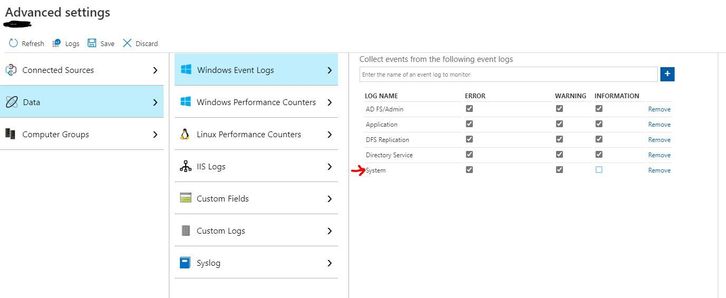
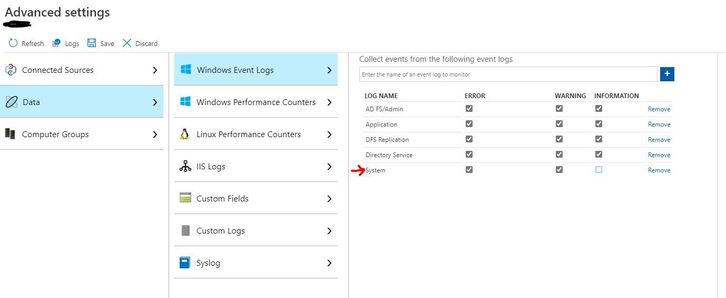
2. In Azure Sentinel, go to Settings, Workspace Settings, Advanced Settings, Data, Windows Event Logs, and add (or make sure you already have added) Errors and Warnings from the System Log.
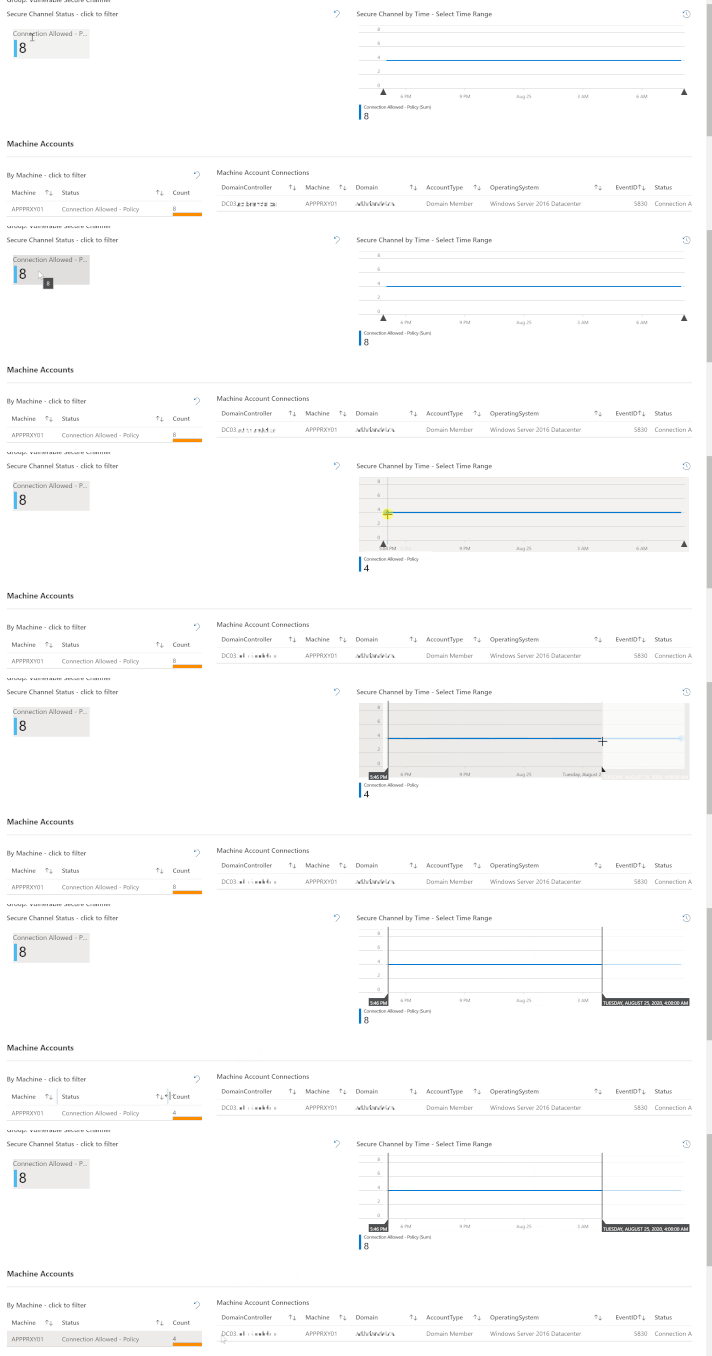
Once you have data flowing, it’s time to start using the Insecure Protocols Workbook. The first addition you’ll notice is a new tab, Vulnerable Secure Channel.
The most efficient way to describe how to use this tab is to simply show it – as in the GIF below.
At the top of the tab is a counter (tile) for each of the five new Event IDs. In our lab, for example, we have eight instances of Event ID 5830. That’s the tile I clicked on to filter to that event ID. Next, I “painted” a timebrush slice to filter the queries below to a particular time; then I simply clicked on a Machine Account to show the Machine Account Connections. The result is a highly actionable data set, showing us exactly where we need to research vulnerable secure channel connections.
Once you know where to look, you’ll need to upgrade all Netlogon clients. However, there’s an additional point to consider. Though we expect it to be a rare finding, vulnerable secure channel connections can come from not only machines, but also from trusts (most likely Realm trusts). This configuration may result in significantly increased exposure (Event ID 5828) and may require more planning to remediate.
In this article, we briefly discussed the exposure in vulnerable secure channel connections, how they are logged during the first phase of CVE-2020-1472, and how to audit them with the Insecure Protocols Workbook.
A brief sidenote: If you ever feel your perspectives don’t matter or that your opinions aren’t good enough, we urge you to think again. This workbook enhancement came directly from a conversation on Twitter where multiple folks made the case for it. If you have concepts to add, functionality you’d like to see added, or ideas for improvement, please reach out on Twitter (@shectonsecurity), find us on LinkedIn, or use the comments section. We are all ears.
Thanks for reading and, as always, happy auditing. :)
This article is contributed. See the original author and article here.
The security we have in place for managing MEM happens at several levels. A mantra here at Microsoft is that every security decision should be made under the assumption that all other security measures have failed to keep the “bad people” out. That means there are a lot of levels of security and thought. Being users of MEMCM and MEM Intune just like the rest of the customers out there we won’t try to cover all the product specific security implementations here. Those we will leave to the product documentation itself. Instead we will look at this from the administration process viewpoint.
Read-Only Access
Through normal daily activities we need to see various things in our services. Elevating or going through the steps necessary below to have read-only access granted becomes too complicated for these common access reasons. For that we maintain several different groups which provide access to various resources. Each of those is managed by an internal system where people can request to join a group and that group membership is either approved through a process or auto-approved, depending on what it is focused on. That membership, once granted, has a renewal timeline and will remove membership when someone leaves the group/company.
Multiple Accounts
A basis of what we do is to have two separate accounts. The idea is to have one account for normal operations (email, TEAMS meetings, etc). The other account is used ONLY for administrative activities. We refer to this as our “Alternative Account” or, “ALT account” for short. The ALT account is backed by a smart card and certificate login requirement making the compromise of the account a little more difficult. Both accounts require multi-factor authentication.
Secure Workstations
While much of our read only access can be done from our normal desktops and laptops, anything that requires an admin level of access is locked down to only allow access from Secure Access Workstations (SAW). These are special laptops which work on a basis of whitelisting what they are allowed to access and what apps they can run. We do not have admin rights on these machines like we do on our normal machines, we can’t go off to malicious websites, and we can’t get email on them. Their exposure to risk is more limited. The SAW run a separate VM which some people use for those “normal” activities, while others will remote back to other machines when that “normal” activity is needed.
Azure Portal
Our Microsoft Endpoint Manager Configuration Manager (SMS to you old school folks, SCCM to you “not as old, but not your first rodeo” folks) is Azure hosted, so protecting that Azure access is the first layer we need to keep secure. We do this using normal methods which allow our normal accounts a level of read access, but no standing administrative rights. Admin access requires Azure Privileged Identity Management (PIM). It will elevate our account, on a temporary basis, to have the needed admin permissions in Azure. This is audited, requires a second person approval, and is time limited to reduce the attack concerns.
Server Access
If we need to get into a server for looking at logs or other simple things we have some read-only share access setup for our team. Beyond that we have a system that is similar in concept to PIM that requires that we request the level of access we need and then grants that access for a limited time. We refer to it as “Just in Time” access, or JIT for short. Things like which server, is it OS level or SQL level or SCCM level, etc. are all separated to require different escalations, and it is all audited, of course. This allows us to request the minimal access necessary for the job at hand.
Intune Access
Admin access to Intune is, essentially, through the normal Azure portal like above. There is a separate PIM role for Intune administrative . This is also designed around the “nuclear launch” concept where a second person is required to agree and authorize the rights elevation. For those that need a lower level of rights, but still have the ability to read or interact with the environment in a limited capacity we make use of the RBAC roles within Intune and some self-cleaning security groups to grant that access. We also have a few different Intune environments (we are running beta versions of things) so we have some separation around those things as well.
Configuration Manager Access
Similar to server access we have JIT groups for accessing MEMCM itself. They tie back into the RBAC roles of the product so different people have different groups for different activities, but anything that can make any kind of change is controlled in this fashion. We have also enabled multi-factor authentication (MFA) in the product to help us ensure that people are coming in as securely as we can.
Summary
Anytime we have a new hire we always must go through an orientation of what to use when and how. But, once you do things a few times it gets to be second nature. A few things have some time delays that can be frustrating at times, but overall it seems to work well and we take the security of our operations very seriously. Does it add complexity and occasional frustration… yes. Is it worth it to keep our environment safe… totally.
Hopefully this gives you an idea of how we securely control access to our MEM environments. We have also done work within the features of the products to increase our security stance, such as removing the Network Access Account and using token authentication, getting rid of traditional service accounts where possible, and auditing activity. All that we will save for other blog posts.













Recent Comments