by Scott Muniz | Sep 16, 2020 | Uncategorized
This article is contributed. See the original author and article here.
As part of our blog series on the value of training and certification, we’re talking with some of our top Learning Partners who deliver Microsoft training and who currently deliver training for Business Applications. We kicked off the series with a post based on a conversation with representatives of Global Knowledge, the 2019 Microsoft Learning Partner of the Year, and followed that up with a blog post based on a conversation with Microsoft Gold Partner Koenig Solutions. Today’s post is based on an interview with Patrick Kersten, Program Director of Computrain and Chairman of the Board of the Leading Learning Partners Association (LLPA).
Leading Learning Partners Association (LLPA), which trains more than 500,000 students per year, is a unique training organization that grew out of innovation and cooperation. In 2009, after Microsoft representatives suggested that the many great local companies in Europe combine to share best practices and better serve customers, 12 companies started working together. By 2013, 20 training partners were cooperating and they joined forces formally as an association, quickly expanding to 32 countries and other continents. Today, LLPA comprises 32 well-known training centers spread over 55 countries in Europe, South America, Africa, and Asia/Pacific, giving LLPA the largest global footprint of all Microsoft training partners. “Our strength is our global coverage,” Kersten says, “combined with our local approach in the 55 countries we’re located in.” For international projects, the association offers a single point of contact, with a centralized quality management and delivery team, but the input of local members makes it possible to “add the local flavor and culture to a training delivery—even in international projects. And we deliver this centralized virtual training in every language and every time zone.”
LLPA is not a company with franchises, Kersten explains, but a group of individual companies—each of which is a leading IT training company in its country or region, and most with 30 to 40 years of training experience. The association’s success depends in part on its selective rules for membership. It accepts only one member per country, which rules out competition and allows for sharing. Members may not be part of another group. And each member must be in good standing with Microsoft, LLPA’s most innovative and biggest partner. Many of its members have been Microsoft Silver or Gold Partners for more than 25 years.
Recognized as the 2020 Microsoft Learning Partner of the Year, LLPA has been closely aligned with Microsoft from its start as an association. It works closely with the Microsoft Learning leadership team. One LLPA staff person manages all its members’ central link to Microsoft Learning. And annual conversations with the Microsoft team let its people know what’s on the drawing board, so they can prepare training. The association also works with the Partner Advisory Board and with One Commercial Partner (OCP), which brings together partner-focused teams across the company to harness Microsoft partner expertise and knowledge—technical, marketing, business development, and programs—and to better recognize how customers are buying technology. “By working with Microsoft in these ways at the corporate level,” Kersten notes, “we know the direction and try to shape our training to be ready for new technology, so we can fill any skills gaps.”
In addition, all LLPA’s members work with local and regional Microsoft representatives, which enables them to think and innovate together. By working with the WE Partner Enablement team, for example, they created future-proof.net, and out of that, working with the Microsoft Cloud and Enterprise team, they created and set up an online portal called Skills Academy. Skills Academy is a learning platform for enterprise customers that can be customized and branded. LLPA works primarily with companies, not individuals, which means, as Kersten says, it “empowers those who empower every person and organization in the world to achieve more.” Approximately 185 companies now have their own branded learning portal. This idea started regionally but was picked up by local teams, so now local companies have their own Skills Academy portals to help keep their people skilled up. These academies now have more than 28,000 students with over 67,000 courses started. As one of the pilot partners for the Microsoft Learn Catalog API, LLPA is able to offer Microsoft Learn tracks on each customer-branded Skills Academy. It keeps innovating its Skills Academy, especially for cloud technology like Azure, Modern Workplace, and Dynamics 365, and expanding it by adding supporting content to the Microsoft Learn resources from third parties.
LLPA members offer all official Microsoft courses and certifications. The shift in Microsoft training the last two years from product-based to role-based has been very successful and well adopted by LLPA’s customers. The changes have been especially good for Dynamics 365 training. Ten years ago, Dynamics training was offered by Learning Partners—and then only by Dynamics partners. Two years ago, with the shift to role-based training and certification, it became part of the Microsoft Learn portfolio. Dynamics 365 training has benefited greatly from this. Being able to connect companies’ Skills Academy portals with Microsoft Learn made it easier to integrate Dynamics 365 training and for people to get access to training. Another advantage of the Skills Academy is the availability of training. For example, like all Dynamics 365 training, the core Dynamics 365 courses—Microsoft Power Platform + Dynamics 365 Core and Microsoft Dynamics 365: Core Finance and Operations—are part of the Skills Academy. That means that even if only one or two people in a company want to take those courses, they can: they don’t have to wait for a class to fill.
The Cloud Certification Circle is another innovative way LLPA supports learners’ success. The association found that when learners get an exam voucher at the end of a training and are told, “Take the exam whenever you want,” many don’t use the voucher. LLPA’s response was to create an end-to-end solution, the Cloud Certification Circle. They take a group of about 25 people, give them a kickoff session, and then train them online—nurturing people and stimulating them to keep learning throughout the training, all the way through to exam preparation and certification. “This way we know who’s preparing online,” Kersten explains, “who’s participating in the virtual instructor-led session, who’s doing final exam prep—so we can offer the support they need.” Certification rates for learners who participate in the Cloud Certification Circle are 80-plus percent, much higher than those without this support. A recent circle of 24 people earned more than 50 certifications, and their certification rate was 85 percent. “With this circle concept,” Kersten says, “we are also able to report to customers and vendors the result of training programs, in terms of certification success, which can give a justification of their investment.”
LLPA’s hybrid training model is part of the Cloud Certification Circle. It, too, makes training more responsive to learners’ needs. “We asked customers what they wanted,” Kersten says, “and built our training around that. We found that not everybody wants five days of training, either in-person or virtually. That’s why we pushed forward our hybrid model: learners train eight to 10 hours per week for four weeks and close off their training with a virtual instructor-led training.” That adaptive model, at the end of which learners are exam-ready, is one of the reasons Kersten believes LLPA won the Learning Partner of the Year Award this year.
When the pandemic hit in March, LLPA went 100 percent virtual in all of its countries. Its hybrid virtual model enabled it to do this quickly, as did its organization as an association of members with different histories and specialties. The association was able to scale its capacity overnight with 1,000 extra virtual seats. Because one of its members already had a great innovative hybrid delivery system set up, LLPA was able—with a great deal of technical innovation—to expand fast. After that, other members, each with its own specialty and experience, were able to expand their training capacity. And, with LLPA’s centralized delivery structure, these expanded offerings were made available to all learners.
LLPA offers other ways to train, besides its hybrid model. People can attend a bootcamp for a week (in countries that are not in COVID-19 lockdown). Bootcamps are led by two trainers and include a study room, breakout sessions, one-on-one training, and an exam room. Group dynamics facilitate the learning, Kersten emphasizes, because participants stimulate and motivate one other. Or learners can attend a Study Academy—a one- to two-day virtual instructor-led training that’s combined with a scheduling service that helps learners stay on track to complete their certification. The service provides them with an exam scheduling form that they fill out, and then the LLPA registration desk registers them. This makes the process easier for individuals and helps make sure everyone in a cohort takes the exam they registered for. The Project and Delivery team is dedicated to this nurturing of learners. It follows up with everyone, with personal contact, evaluation forms, and statistics on whether they passed the practice exam or actual exam. That way the association knows how many who took the exam passed it—statistics that help justify training to companies and individuals. This training—taking the learner through the whole certification journey—sets LLPA apart.
LLPA also offers many Microsoft Webinars, and their annual Global Cloud Skills Tour brings business leaders together to get ahead of the competition. For the 2020 tour, nine events on four continents were planned to respond to the skills gap and encourage lifelong learning. Unfortunately, the pandemic struck after four in-person events. But LLPA organized a virtual series of six presentations in six weeks across time zones in May and June, and hundreds of people gathered to discuss cloud benefits and opportunities, such as how Microsoft and LLPA could support customers.
Because each member has its own history, the association uses a mix of in-house and freelance instructors. The majority, however, are freelancers who are experienced consultants and solution architects who work closely with LLPA’s members, maintaining a good relationship. They’re “very good advisors,” Kersten stresses, “because they’re the ones with direct contact with our customers.” Another advantage of freelancers is that they keep up the rapid change cycle of cloud training, for example, for Azure and Dynamics 365. “We expect a lot more from trainers today than we used to,” he explains, “when products didn’t change as fast and you could give the same training three years in a row and you didn’t need to know how and why processes worked. Our trainers see change logs every day.”
Though Dynamics 365 training is currently about 5–10 percent of LLPA’s Microsoft offerings, that number is growing rapidly. Power BI training is also quickly becoming a front-runner. LLPA members offer all the Dynamics 365 courses. The two most popular are: Microsoft Dynamics 365 Fundamentals and Microsoft Power Platform + Dynamics 365 Core, which is being replaced by Microsoft Certified: Power Platform Functional Consultant Associate (Exam PL-200). And its members have specializations in all areas of Dynamics 365. The Skills Academy helps here to deliver those trainings. “Because of our global footprint and because the association was an early adopter of the Microsoft Learn Catalog API, we can show all those courses in all 185 customer portals. And we have trainers for all of them. If there aren’t enough participants for a Supply Chain Management training in one country, for example, we can combine countries into a group. That’s one of the big advantages of being an association of independent training companies—all of them bring their own expertise.”
The association’s unique structure, history, and commitments benefit LLPA members, customers, vendors, and learners. Kersten sums up LLPA’s mission this way: “We want to close the skills gap. We can help people. That’s what it’s all about.” The largest skills gap he sees right now is in cloud technology, though that need varies by region. In some, fundamentals are needed. In others, more advanced and specialized skills. LLPA’s multi-step approach, from learning to crawl (fundamentals), to learning to walk (certification), to learning to run (using the technology for specific capabilities)—offered around the world—enables it to deliver that mission with excellence.
by Scott Muniz | Sep 16, 2020 | Uncategorized
This article is contributed. See the original author and article here.
Join us at Microsoft Ignite 2020 before, during and after the event (which is September 22-24th).
Ignite is a unique opportunity to connect with Microsoft experts and your world-wide community like never before. Experience the all-new Microsoft Ignite on a global scale!
The event will kick off with a Satya Nadella Key Segment at 8:30AM PDT, followed by Leadership Key Segments. Then you will have access to Digital Breakout Sessions, Ask the Experts, Pre-recorded On- Demand Deep Dive sessions, the Connection Zone, Learning Zone and the Microsoft Ignite Live show. Not only did the IoT teams prepare some cool announcements but we also prepared new learning content and connecting opportunity.
Here are your next steps:
1. Register now, it’s free!
In order to access all the content you will need to register for the event. for this, just visit the event site at https://myignite.microsoft.com/.
2. Create your agenda
Once registered you will be able to see the whole event agenda and mark your calendar to not miss the live sessions during which you’ll get to ask your questions to our experts. You will notice that most of the sessions are replayed so that you can participate from anywhere in the world at your own time.
Below you will find the full list of IoT content at Microsoft Ignite 2020.
3. Start your IoT learning journey today
Don’t wait for the event to start. If you are new to Azure IoT, we recommend you check out the IoT Learning Collection.
If you are already familiar with Microsoft IoT technologies and services, you can extend your IoT skills going through some of our IoT Learning Path and modules on MS Learn. You will also want to check the latest updates on the IoT Show to learn about IoT Plug and Play, Azure Digital Twins, Vision AI in IoT Central, the new IoT Plug and Play certification, upcoming changes in Azure IoT TLS certificates, and more.
If you want to dig even deeper, here are some Deep Dives for you: Getting started with Azure RTOS, Embedded C SDK, Indoor Maps with Azure Maps, Windows 10 Enterprise for IoT, Developing for Azure Sphere,
4. Don’t be a stranger after the event: learning and connection continues!
The experience is not meant to stop at the end of the event. Our experts will stay on the IoT Tech Community forums and blog as well as on the IoT Show and Deep Dives series to discuss and collaborate with the community.
Do not forget to subscribe to our YouTube Channel dedicated to IoT developers to stay posted on latest IoT innovation and technologies, watch interesting and crazy IoT projects, follow along some coding sessions, all of that Engineers to Engineers.
IoT content at Ignite
Here is the full list of IoT content and sessions we prepared for you Ignite
Executive Key Segments featuring IoT
IoT will be featured in several Ignite Key Segments presented by Microsoft leadership and executives. Make sure you add these sessions to your schedule to catch Satya Nadella, Julia White, Erin Chapple and Scott Hanselman highlight key IoT partnership announcements, customer success stories and solution demonstrations.
Times shown are in Pacific Standard Time
|
Code
|
Session Title
|
Primary Speaker(s)
|
Date
|
Start
|
|
N/A
|
Satya Nadella Key Segment
|
Satya Nadella
|
9/22/2020
|
8:30AM
|
|
N/A
|
Satya Key Segment (Replay)
|
Satya Nadella
|
9/22/2020
|
4:30PM
|
|
N/A
|
Satya Key Segment (Replay)
|
Satya Nadella
|
9/23/2020
|
12:30AM
|
|
KEY02
|
Invent with Purpose on Azure with Julia White and Friends
|
Julia White, Erin Chapple, Rohan Kumar
|
9/22/2020
|
9:00AM
|
|
KEY02-R1
|
Invent with Purpose on Azure with Julia White and Friends
|
Julia White, Erin Chapple, Rohan Kumar
|
9/22/2020
|
5:00PM
|
|
KEY02-R2
|
Invent with Purpose on Azure with Julia White and Friends
|
Julia White, Erin Chapple, Rohan Kumar
|
9/23/2020
|
1:00AM
|
|
KEY07
|
Are we there yet? App Development in Azure with Scott Hanselman & Friends
|
Scott Hanselman, Abel Wang, Tara Walker
|
9/23/2020
|
8:30AM
|
|
KEY07-R1
|
Are we there yet? App Development in Azure with Scott Hanselman & Friends
|
Scott Hanselman, Abel Wang, Tara Walker
|
9/23/2020
|
4:30PM
|
|
KEY07-R2
|
Are we there yet? App Development in Azure with Scott Hanselman & Friends
|
Scott Hanselman, Abel Wang, Tara Walker
|
9/24/2020
|
12:30AM
|
Digital Breakout Session
Watch Microsoft CVP, Sam George, present the latest Azure IoT announcements, vision and roadmap in his Digital Breakout Session. Digital Breakout Sessions are 30 minutes with Live Q&A over chat.
Ask the Expert Sessions
These sessions are designed to enable you to continue the dialogue following the Digital Breakout Sessions and will be set up as live 30 minute Live Q&A with multiple experts participating. For IoT, we will host Ask the Expert Sessions covering on the topics of: Azure Digital Twins and IoT Plug and Play.
|
Code
|
Session Title
|
Session Experts
|
Date
|
Start
|
|
ATE-DB116
|
Ask the Expert: Azure IoT: From connected assets to connected environments with Digital Twins
|
Pamela Cortez, Olivier Bloch, Paul DeCarlo, Ines Khelifi, Christian Schormann, Dave Glover
|
9/23/2020
|
3:15PM
|
|
ATE-DB116-R1
|
Ask the Expert: Azure IoT: From connected assets to connected environments with Plug and Play
|
Pamela Cortez, Olivier Bloch, Koichi Hirao, Quinn Tran, Daisuke Nakahara, Stefan Wick, Ricardo Pablos, Peter Provost
|
9/24/2020
|
7:15AM
|
On-Demand Deep Dive Session (Pre-Recorded)
Watch Azure IoT experts Pamela Cortez and Cory Newton Smith deep dive (300 level) on how to build end to end IoT solutions on Azure – secured from edge to cloud. Pre-Recorded sessions are 30 minutes and on-demand – and will not include Live Q&A.
Microsoft Ignite Live Sessions
Watch Microsoft Mechanics presenter, Jeremy Chapman, highlight how Microsoft customer, RXR Realty, is leveraging Azure IoT and AI to reimagine smart office spaces – and how this technology is helping bring their employees back to the workplace. Ignite Live sessions are delivered in a 15 minute, interview-style format.

by Scott Muniz | Sep 16, 2020 | Uncategorized
This article is contributed. See the original author and article here.
Fatima Zohra Benhamida strongly believes that any big change starts with a small act.
While the Paris-based MVP readily admits her home nation of Algeria will require the biggest of changes before young girls and women are given equal opportunity in STEM, Fatima also understands how tech markedly improves education for the next generation. Thus, Fatima is enacting the change she wants to see back home.
“I learnt in public school in Algeria, and it has been a long and challenging path to reach my current level of knowledge,” Fatima admits. “I look back today and want to save the next generation from the same frustration. Plus, I have a burning passion for both technology and teaching which inspires me to use modern teaching methods and better engage my students.”
So, The Office Apps and Services MVP volunteers 10 hours every week to mentor and advise young girls in Algeria. Fatima hopes in doing so to inspire young women just like her to strive for more.
The push to give back to her community began after Fatima represented Algeria in Techwomen 2017.
The Silicon Valley event selects 100 global women for a five-week fellowship focused on professional mentorship, cultural exchange, and impact planning. The conference was revelatory for Fatima, who soon offered technical and educational support not only to students at her university but to women in her home country.

“The best way to inspire future generations is to spend some of our personal free time to mentor them and help them to thrive,” Fatima says. “I really do believe that our actions can start small and grow to something much bigger.”
Fatima – who describes herself as someone with a “big thirst for science and knowledge” – hopes supporting other women in tech will help overcome stereotypes and unconscious bias. While being a dark woman from an underrepresented country has not been advantageous, Fatima says, it has made her persevere.
“I never felt intimidated by the looks from others or their refusal to my ideas. I was always ready to take on a new challenge and prove my competencies, to repeat my words twice if the first time wasn’t enough to be heard, or to start the conversation instead of waiting to be invited. This is how I could evolve both personally and professionally: perseverance and self-confidence.”
Now, Fatima is using this perseverance and self-confidence to benefit those in North Africa. Today offers an incredible opportunity to design new solutions which solve societal challenges, Fatima says, and she hopes to guide the coming batch of tech leaders in caring for our shared future.
“It’s our mission as technical community leaders to design new solutions for new challenges and then make them accessible for everyone. We should include every single person: citizen, refugee, developed nation, undeveloped nation.”
“Being engaged in volunteering is the best way to use our skills for the sake of all humanity,” Fatima says. “We should all ask ourselves: what are my skills, how can I use them for a wider positive impact, and how can I share it with my local community or even worldwide?”
For more on Fatima, check out her website and YouTube channel.
by Scott Muniz | Sep 16, 2020 | Uncategorized
This article is contributed. See the original author and article here.
Over the past few months, we’ve addressed several major asks from our Visio for the web users. We’re announcing some of these for this first time today, like hyperlinks and copy diagrams across files, and recapping others that were released earlier this year, like export as image and multipage operations. Each of these is available for licensed users, although certain limited capabilities are available for Visio Viewer and unlicensed users. Read on for a quick overview of each feature.
Hyperlinks
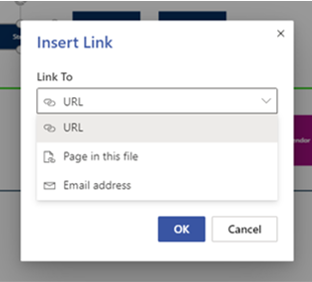
You can now add links to diagram shapes that redirect to a web page, another file stored online, or a sub process or page within same file. You can even insert an email address that prompts the shape to create a draft email when selected.
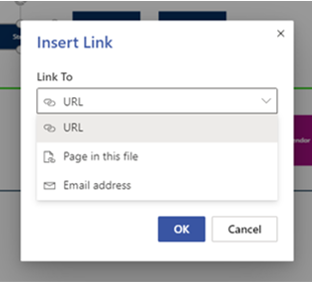
To insert links, choose the appropriate shape, select the link option from the Insert tab or from the right-click options, and pick the link type.
- URL: Link shapes to a webpage or any document that has been stored online, including Visio files.
- Page in this file: Link shapes to a diagram on another page within the same Visio file.
- Email address: Enable shapes to create a draft email with the recipient’s pre-filled address.
Unlicensed users can still access hyperlinks but cannot insert or edit them.
Refer to our support article to learn more about how to add links to your diagrams.
Copy diagrams across files
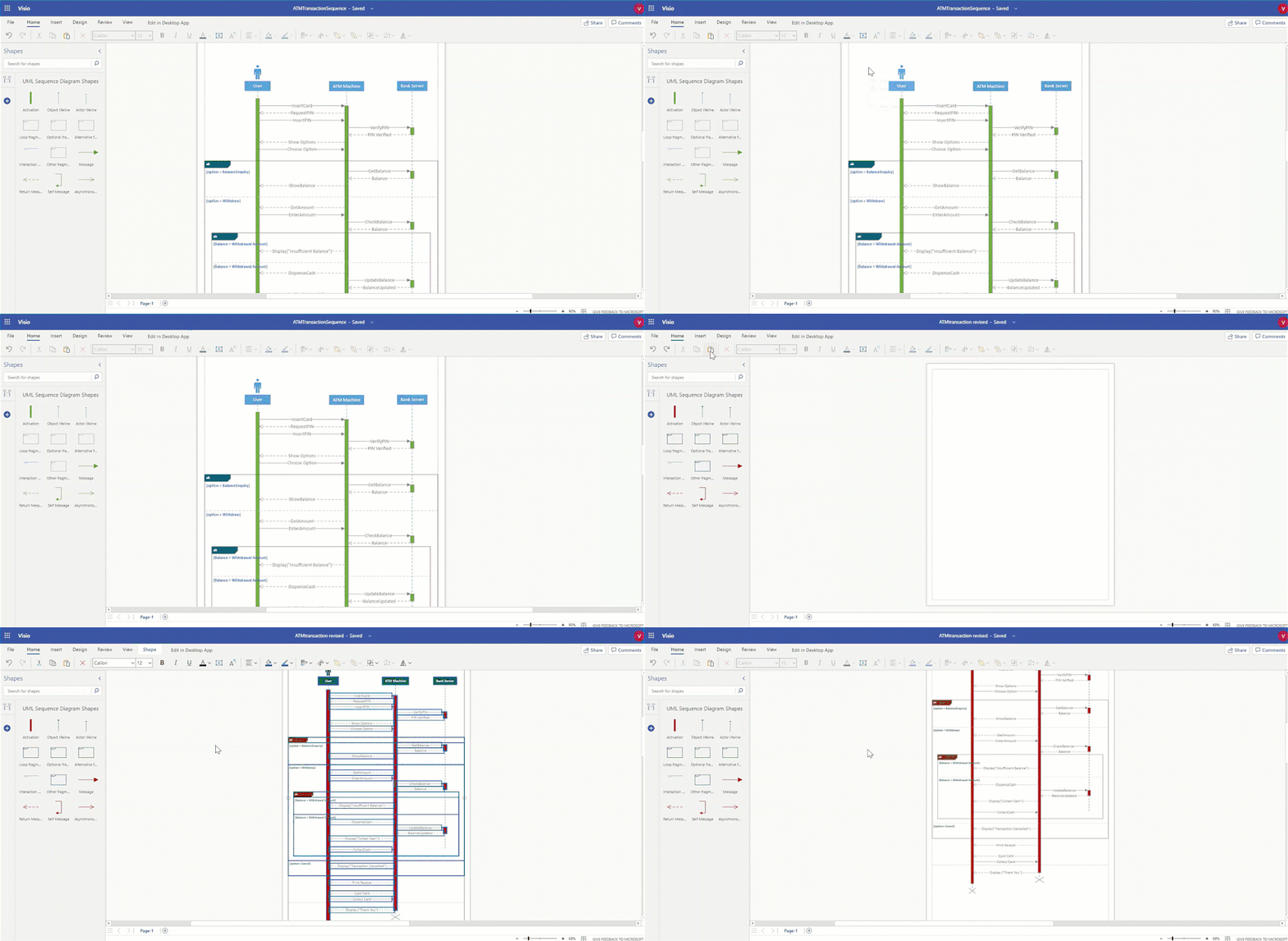
Reusing existing diagram parts just got a lot easier. You can now copy diagrams and diagram parts from one Visio file and paste them into another. Simply select the entire diagram or a single shape and use the Copy function  from the ribbon; right click and select Copy; or, press CTRL + C on your keyboard. Pasting the copied element works the same way: Paste
  from the ribbon, right-click options, or CTRL + V on your keyboard.
This functionality is available in both Visio for the web and Microsoft Teams. The copied diagrams or shapes will follow the destination theme, while any specific formatting you applied in the source file (other than the theme) will be respected and retained in the destination file.
The use cases for copy-paste in Visio for the web are endless. For example, you can copy a diagram part from one file and paste it into another to build out that part more completely. Conversely, you can merge multiple subprocesses from different files to create one final process.
Export as image
With this feature, you can save your Visio for the web diagrams as an image file locally on your device to reuse it anywhere at any time.
To export a Visio diagram as an image, go to the File menu, select Save As, then Download as Image to see the “Download as Image” dialog box. From there, you can choose the pages to download from your Visio file from the “Diagram area” dropdown. You also have the option to pick the resolution of your image: High (300 ppi), Medium (144 ppi), or Low (72 ppi). The image file formats currently supported are JPEG, PNG, and PNG with a transparent background. The selected pages in your file will be downloaded as an individual image file (for a single page) or as a zip folder (for multiple pages).
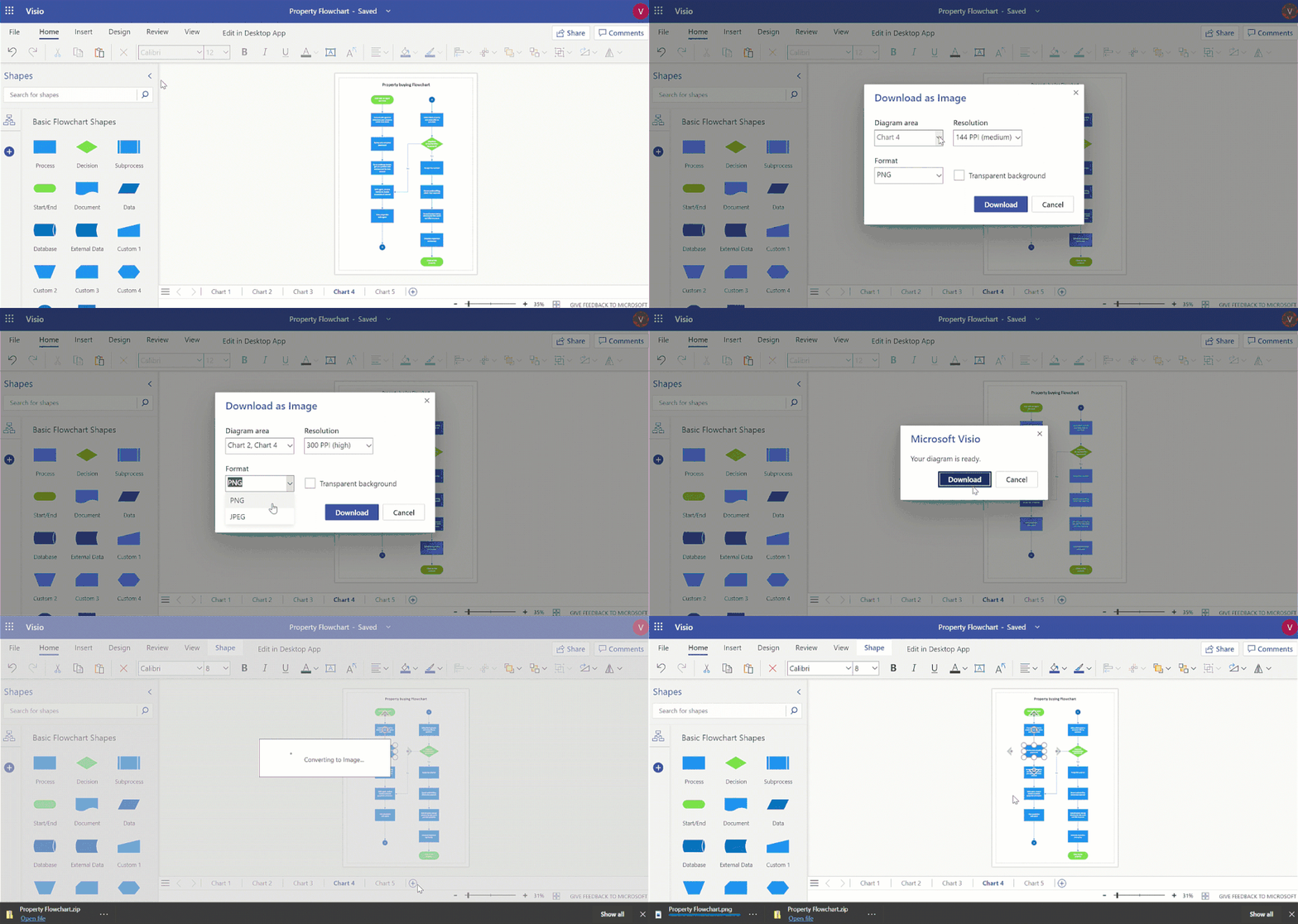
This functionality is also available in Visio Viewer—click on the ellipses menu (…) and select “Download as Image”—with limited customization options. The current active page will be downloaded as a PNG with medium resolution by default. The same is true for unlicensed users, who can export diagrams as an image with the aforementioned defaults.
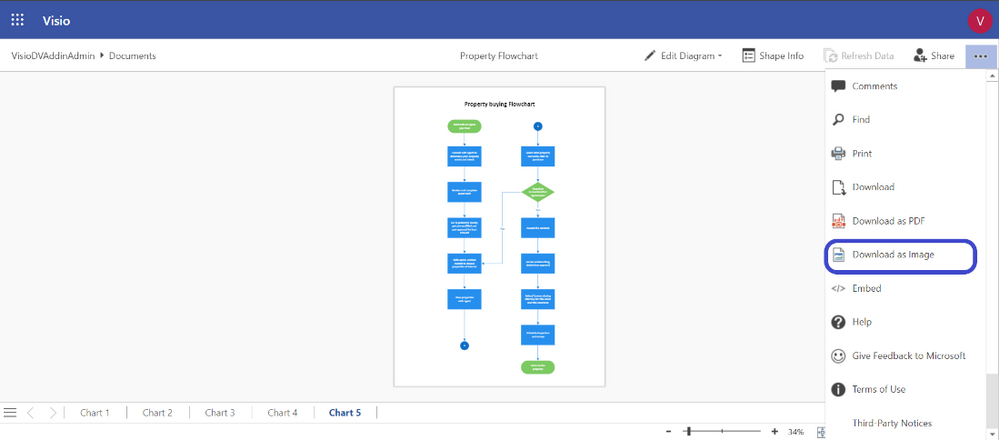
Refer to our support article to learn more about exporting diagrams as an image.
Multipage operations
We’ve made a host of enhancements that bring the familiarity of Office, especially elements like Excel tabs, into Visio for the web.
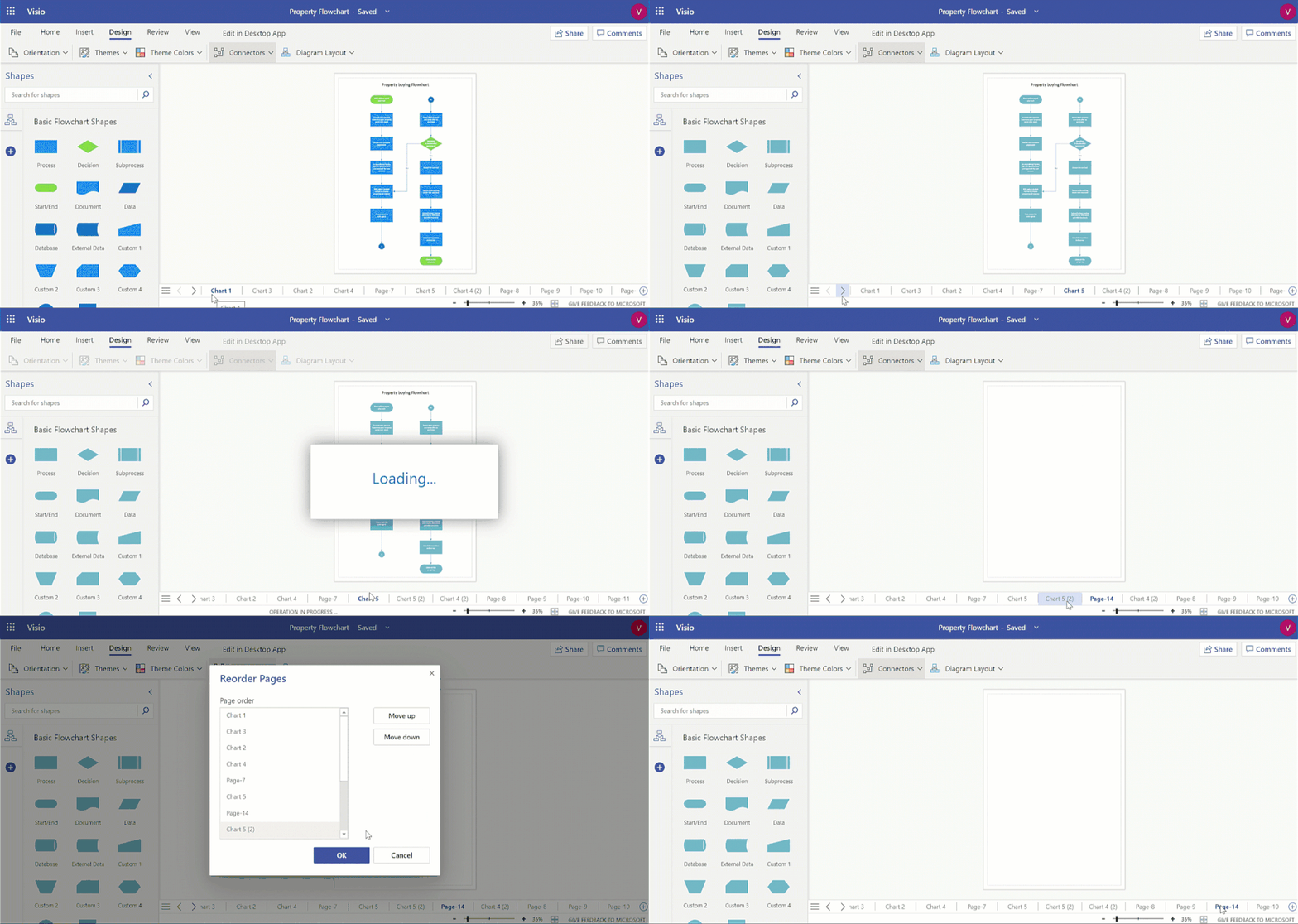
- Insert page: Right-click on an existing page in the page navigation bar to insert a blank page adjacent to it. The inserted page will have all the page-level properties of the source page.
- Duplicate page: Create an exact replica of your existing page by right-clicking that page in the navigation bar.
- Reorder pages: Drag pages across the navigation bar to rearrange them into a more appropriate order. This operation can also be performed using the Reorder option after right clicking a page in the navigation bar.
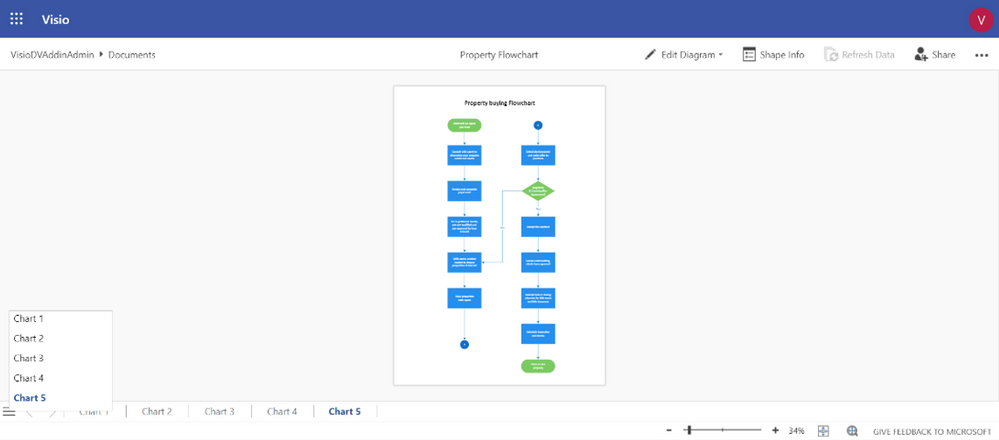
- Page navigation list: Get a one-shot view of the pages in your Visio file by clicking on the page navigation hamburger menu. Click on any page in this list to make it active.
- Scroll arrows: Scroll through the list of pages in the page navigation bar using the left and right arrows. This helps you view the pages in your diagram without making any page active.
Of the above operations, Visio Viewer and unlicensed users can use page navigation list and scroll arrows to navigate through the list of pages in the file.
You can learn more about these multipage operations on our support page. Here are the specific links: Insert page and navigate through multiple pages, Duplicate page, and Reorder pages.
All these improvements happened because of people like you leaving feedback on our UserVoice site—so keep it up! And please continue visiting our Tech Community site for all the latest Visio news.
by Scott Muniz | Sep 16, 2020 | Azure, Technology, Uncategorized
This article is contributed. See the original author and article here.
 Microsoft Ignite banner
The Azure Marketplace team is excited for the upcoming Microsoft Ignite conference! The event is all digital and all free with tons of interesting sessions for customers and partners. We’ll be sharing insight into how IT organizations can use Azure Marketplace to remain agile while maintaining security, compliance, and budgets.
Join the live session or watch on-demand for announcements, engage the team at Ask The Experts, and schedule consultations to go deeper one-on-one.
Register for Microsoft Ignite:
https://myignite.microsoft.com/
Sessions and consultations
Find, try, and buy solutions with ease in Azure Marketplace
On-demand viewing anytime
Learn how to find an application in Azure Marketplace or in the Azure Portal. We will show you how to find, try, and buy solutions aligned to your needs and deploy applications in your environment. After that, we will walk through how you can manage applications purchased through Marketplace.
https://myignite.microsoft.com/sessions/6e0827f9-1e21-43cd-b2ea-472d007ee981
Simplify software procurement and management with Azure Marketplace
Tuesday, September 22 | 1:00 PM – 1:30 PM PDT
Want to accelerate your organization’s access to IT, developer, and business solutions while thrilling your procurement and legal teams? Confidently buy and deploy software solutions and discover services offerings from Microsoft and Microsoft partners in Azure Marketplace. Learn about new governance and management functionality built into the Azure Portal plus how buying through Microsoft simplifies contracting and billing.
https://myignite.microsoft.com/sessions/0e22c4ff-63c4-452d-b502-42083ac46c27
Simplify software procurement and management with Azure Marketplace
Tuesday, September 22 | 9:00 PM – 9:30 PM PDT
https://myignite.microsoft.com/sessions/868cbac4-b741-4270-b970-3f4a6afb45e1
Simplify software procurement and management with Azure Marketplace
Wednesday, September 23 | 5:00 AM – 5:30 AM PDT
https://myignite.microsoft.com/sessions/1e7a9a47-3c2a-445f-8a6a-29c6c86f4165
Ask the Expert: Simplify software procurement and management with Azure Marketplace
Wednesday, September 23 | 5:45 AM – 6:15 AM PDT
Join Microsoft experts to discuss how you can confidently buy and deploy software solutions and discover services offerings from Microsoft and Microsoft partners in Azure Marketplace.
https://myignite.microsoft.com/sessions/8c056d2e-559a-43fb-83e1-ed3dd444ff24
One-on-one consultation
Schedule a 45 minute engagement
Organizations of all sizes and industries find innovative IT and developer tools in Azure Marketplace and business and industry solutions in Microsoft AppSource. Join individual consultations with specialized tech and industry category managers to help you find software from Microsoft partners, or meet with architects and program managers to learn how you can commercialize your organization’s IP to sell through Microsoft.
https://myignite.microsoft.com/app-consult
by Scott Muniz | Sep 16, 2020 | Azure, Technology, Uncategorized
This article is contributed. See the original author and article here.
Initial Update: Wednesday, 16 September 2020 11:16 UTC
We are aware of issues within Log Analytics and are actively investigating. Some customers in Australia South East region may experience intermittent data access issues when accessing application data. Customers that have set up Log Search Alerts may experience those alerts misfiring or being delayed.
- Work Around: None
- Next Update: Before 09/16 13:30 UTC
We are working hard to resolve this issue and apologize for any inconvenience.
-Madhav
by Scott Muniz | Sep 16, 2020 | Azure, Technology, Uncategorized
This article is contributed. See the original author and article here.
Together with the Azure Stack Hub team, we are starting a journey to explore the ways our customers and partners use, deploy, manage, and build solutions on the Azure Stack Hub platform. Together with the Tiberiu Radu (Azure Stack Hub PM @rctibi), we created a new Azure Stack Hub Partner solution video series to show how our customers and partners use Azure Stack Hub in their Hybrid Cloud environment. In this series, as we will meet customers that are deploying Azure Stack Hub for their own internal departments, partners that run managed services on behalf of their customers, and a wide range of in-between as we look at how our various partners are using Azure Stack Hub to bring the power of the cloud on-premises.
Today, I want you to introduce you to Azure Stack Hub Partner Knowledge Park. The Azure Stack Hub Partner Solutions Series journey continues with a few partners that create a SaaS-like experience for their customers. The knowledgepark, akquinet, and BordonaroIT are working together across different levels of the solution (form the top application, all the way to the platform fabric) to provide SaaS services for over 200 Healthcare environments across the region. See how they are working together to achieve this.
Links mentioned through the video:
I hope this video was helpful and you enjoyed watching it. If you have any questions, feel free to leave a comment below. If you want to learn more about the Microsoft Azure Stack portfolio, check out my blog post.

by Scott Muniz | Sep 15, 2020 | Uncategorized
This article is contributed. See the original author and article here.

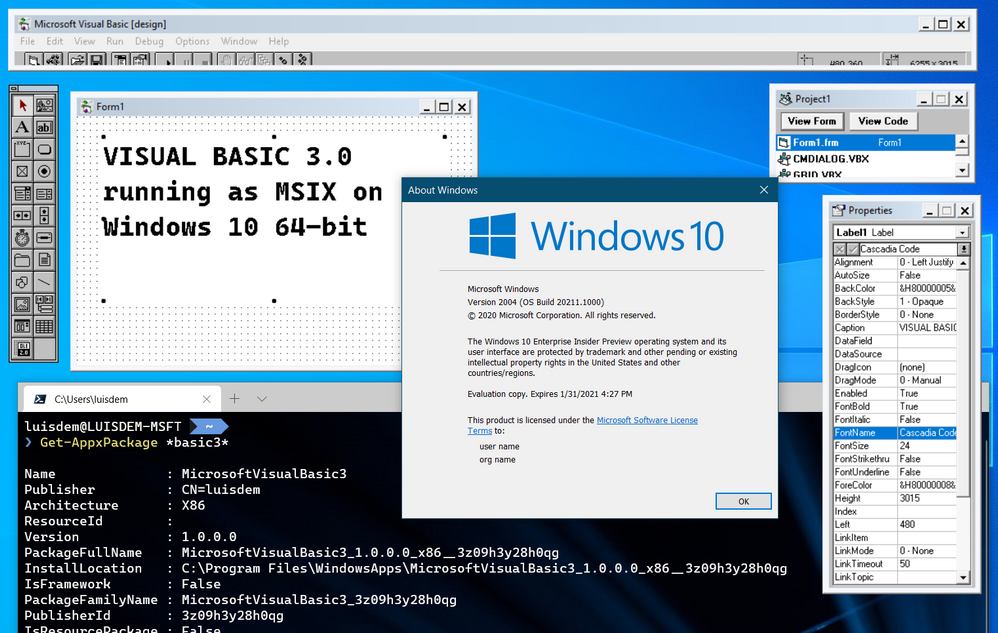
I wrote this post as a proof of concept and as a best effort to make a 16-bit application run on Windows 10 64-bit.
It will be demonstrated how to use a third-part open source framework called otya128 – winevdm, how to use MSIX, UWP Execution Alias and Packaging Support Framework.

Please notice that Microsoft recommends using virtualization or 32-bit machines to run 16-bit applications.
This post is only a proof of concept and for informational and training purposes only and are provided “as is” without warranty of any kind, whether express or implied.
Download the 16-bit emulator
As 64-bit operating system does not have support for the Windows NT DOS Virtual Machine (NTVM) system component, the first step is to download the 16-bit emulator called otya128 – winevdm that is open source and available on GitHub:

https://github.com/otya128/winevdm
You can clone the repository and build yourself or download the build artifact from the AppVeyor repository https://ci.appveyor.com/project/otya128/winevdm/history
If you opt to download the app from the AppVeyor repository, you need to choose what build you want:
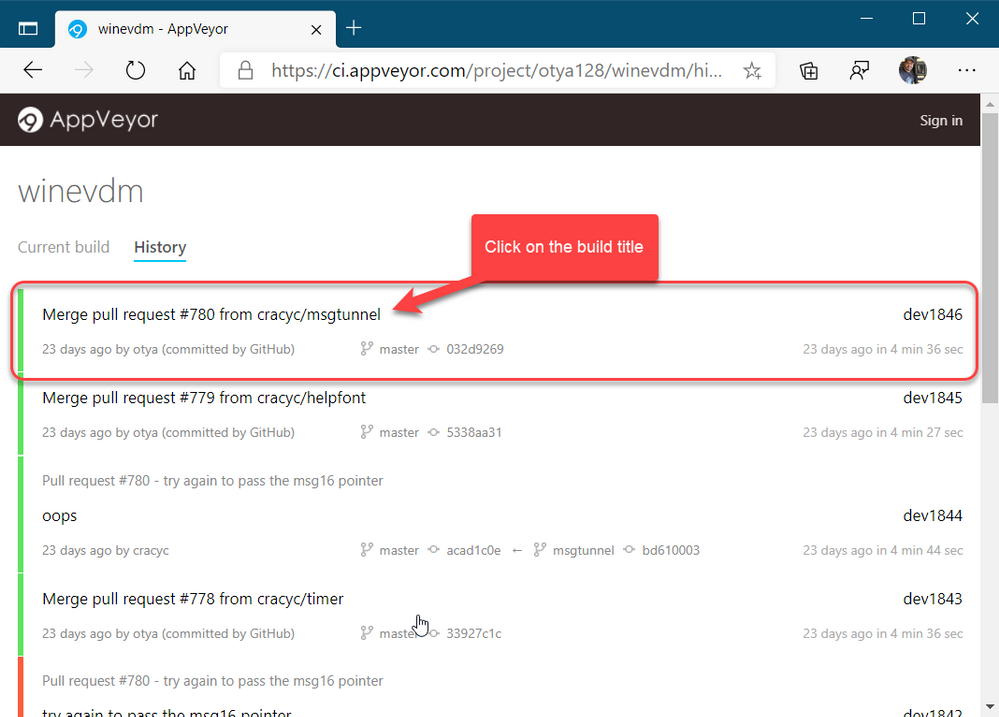
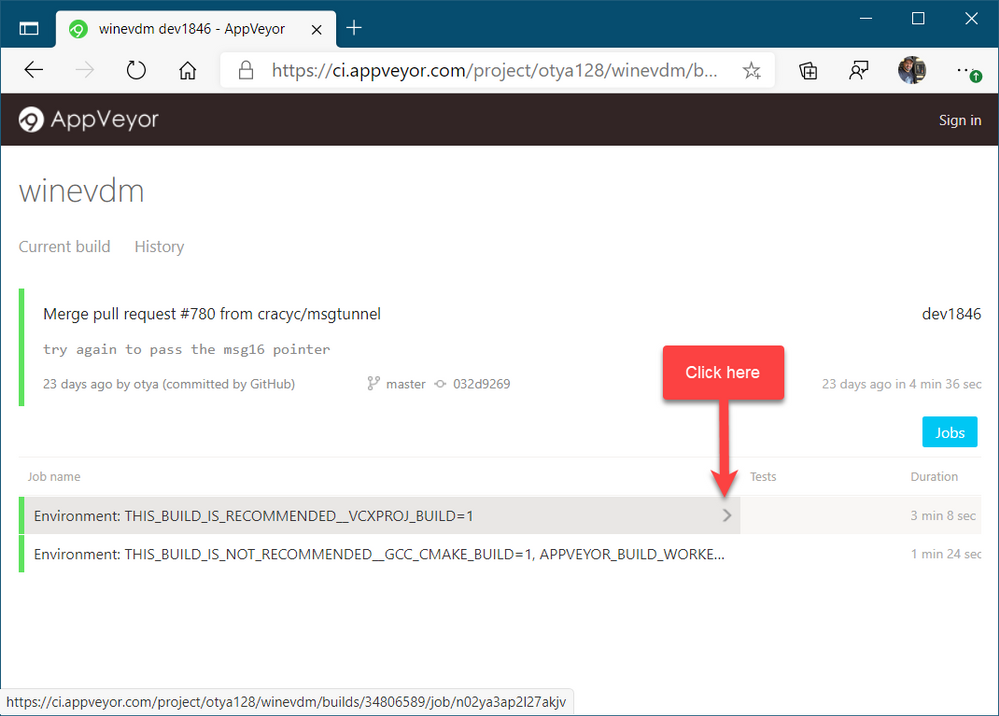
Select the job:
And finally click on artifacts to download the artifact file:
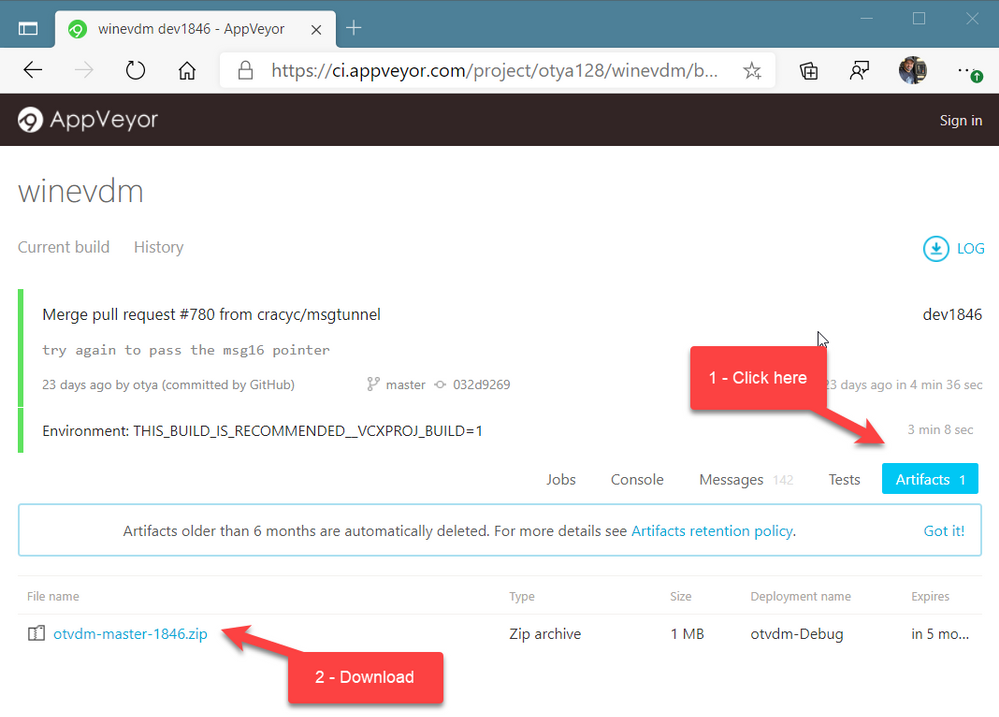
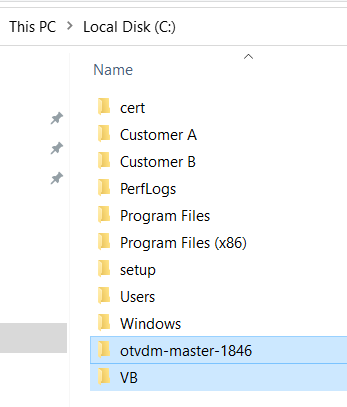
Now, all you must do is to extract the files to a folder of your preference. I will extract the files in the following folder of the root of my C drive:
C:otvdm-master-1846
Installing Microsoft Visual Basic 3.0 IDE on Windows 10 64-bit
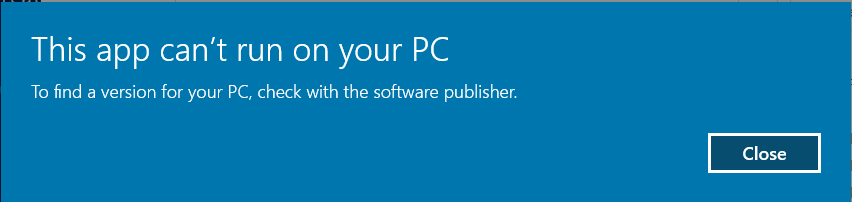
If you try to run the Visual Basic 3 installer (setup.exe), you will receive the following message telling that the application cannot run, since it is a 16-bit application and that the NTVDM is not available.
We need to run the otvdm.exe passing as argument the application that we want to launch, in our case, the setup.exe of Visual Basic 3.0:
C:otvdm-master-1846otvdm.exe "C:VBVB.EXE"
Notice that now the Visual Basic 3.0 16-bit installer has been successfully launched:
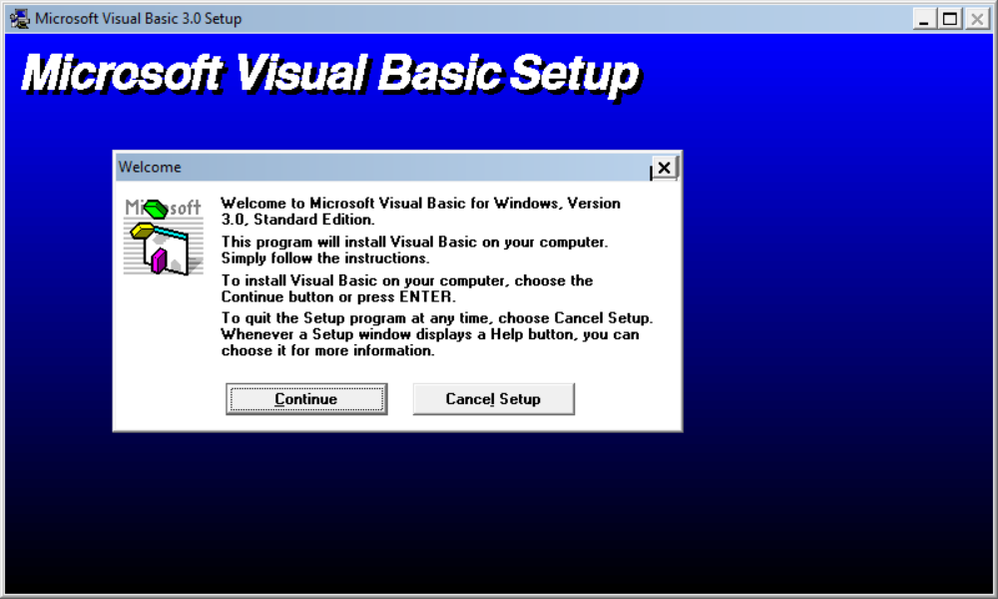
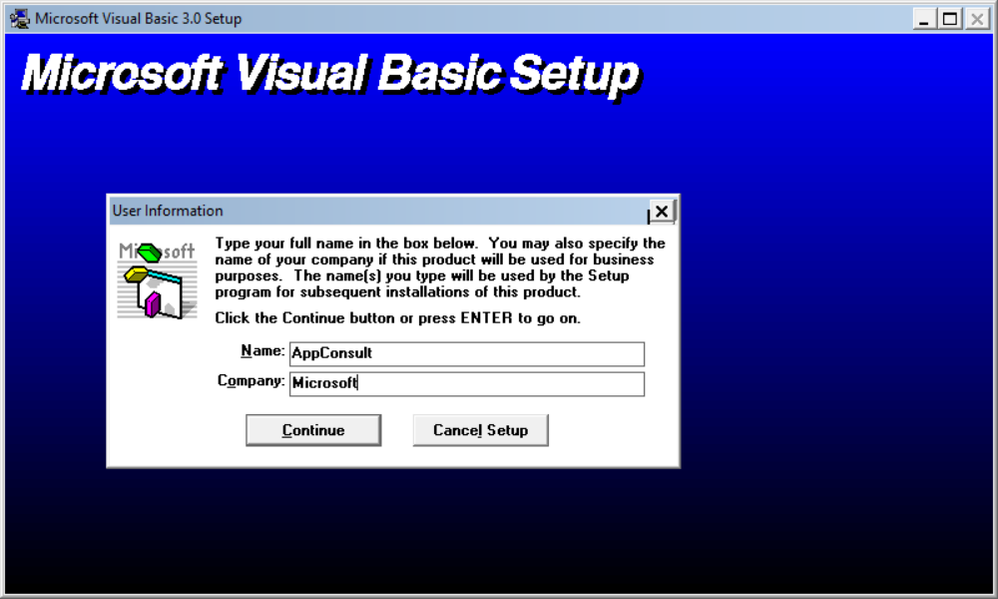
We can proceed with the installation:
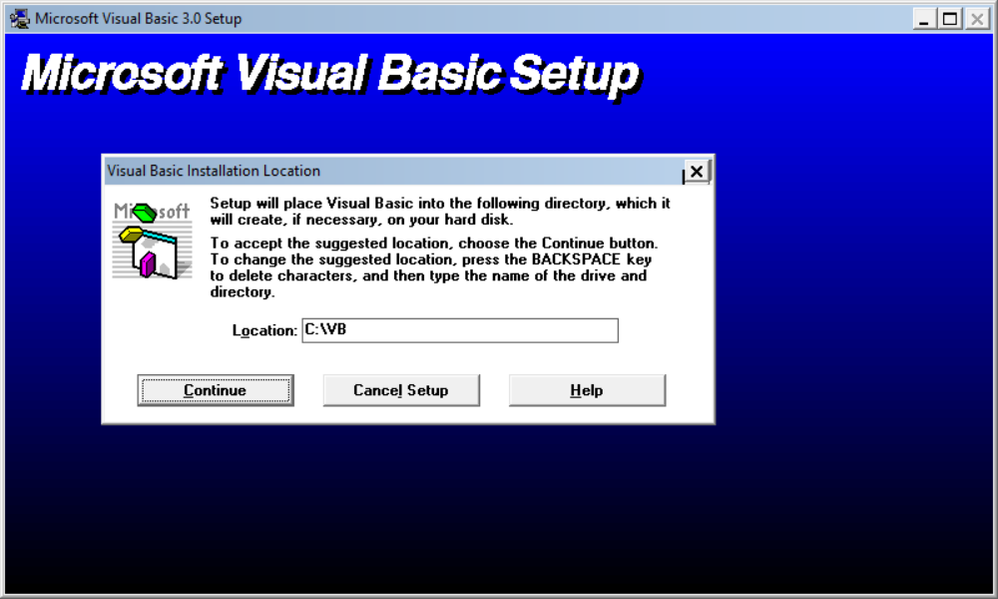
The default destination folder is C:VB:
There are no registry keys, and all the files will be copied to the C:VB directory:
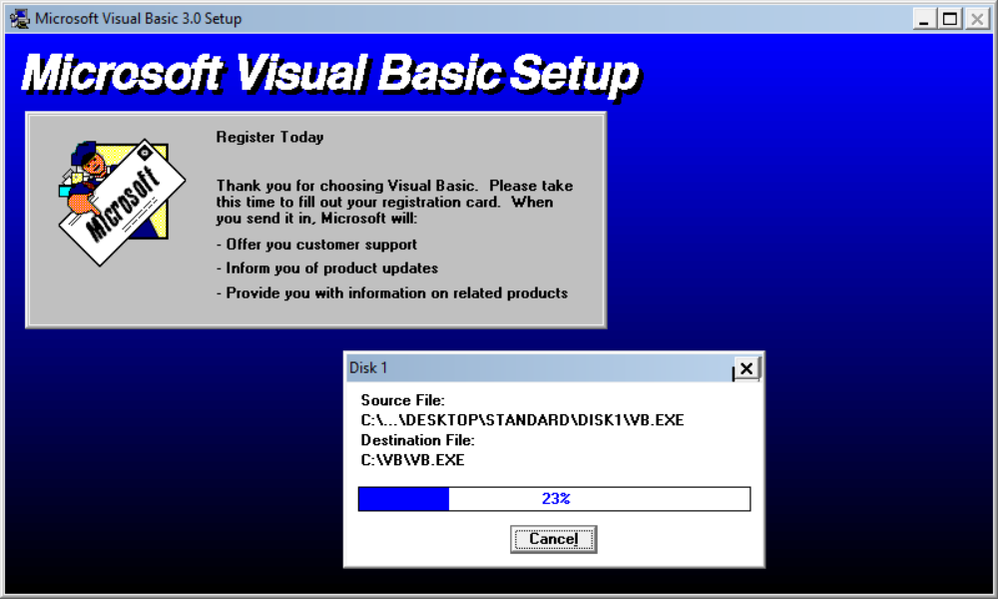
Done!!!! Visual Basic is successfully installed:
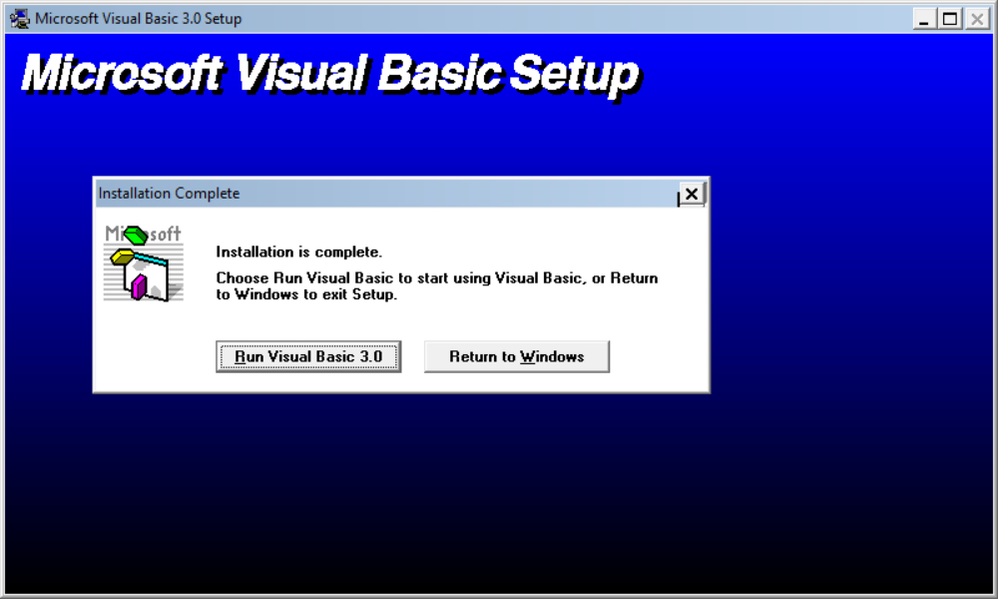
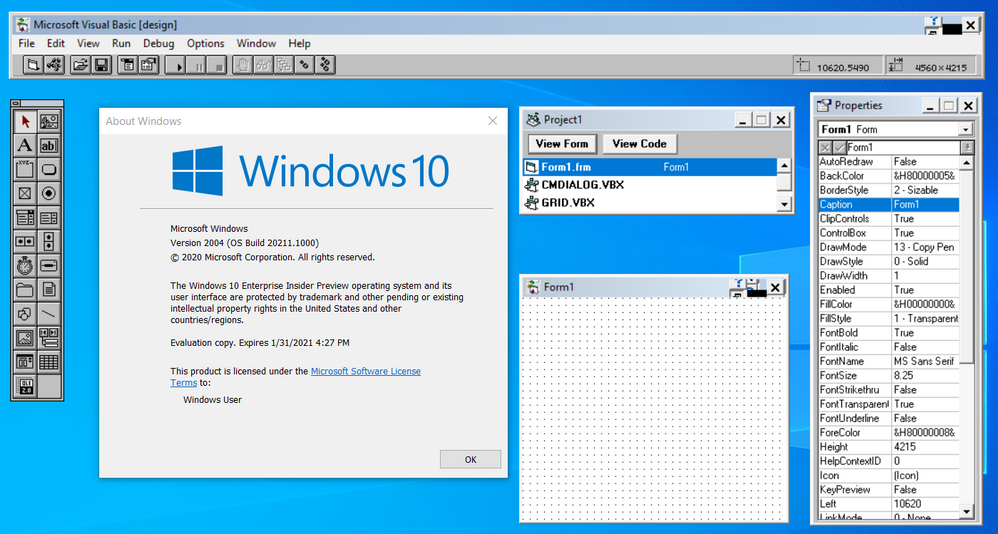
Click on Run Visual Basic 3.0 to launch VB3 on Windows 10 64-bit:
Notice that despite of Visual Basic 3 is available on Start menu, you can’t directly launch the app from there, as the app is 16-bit:
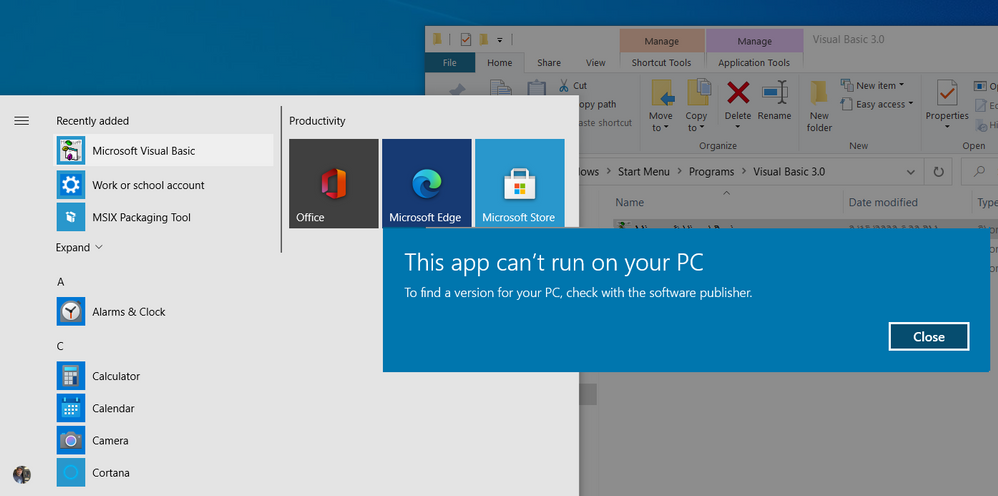
In that case you need to run the following command:
C:otvdm-master-1846otvdm.exe "C:VBVB.EXE"
Improving the app distribution and providing a better user experience through MSIX
Let’s see how MSIX can simplify the application deployment by keeping together the 16-bit emulator and VB3 application in a single MSIX installation file. The installation will be reduced to a single click action that will install the App in less than 10 seconds.
At the same time MSIX will provide a better user experience, allowing the users or other apps to call the application executable, in this case, VB.EXE without having to specify the otvdm emulator.
MSIX Packaging Tool
We need of the install the MSIX Packaging Tool, that is free and available on Microsoft Store:
https://www.microsoft.com/store/productId/9N5LW3JBCXKF
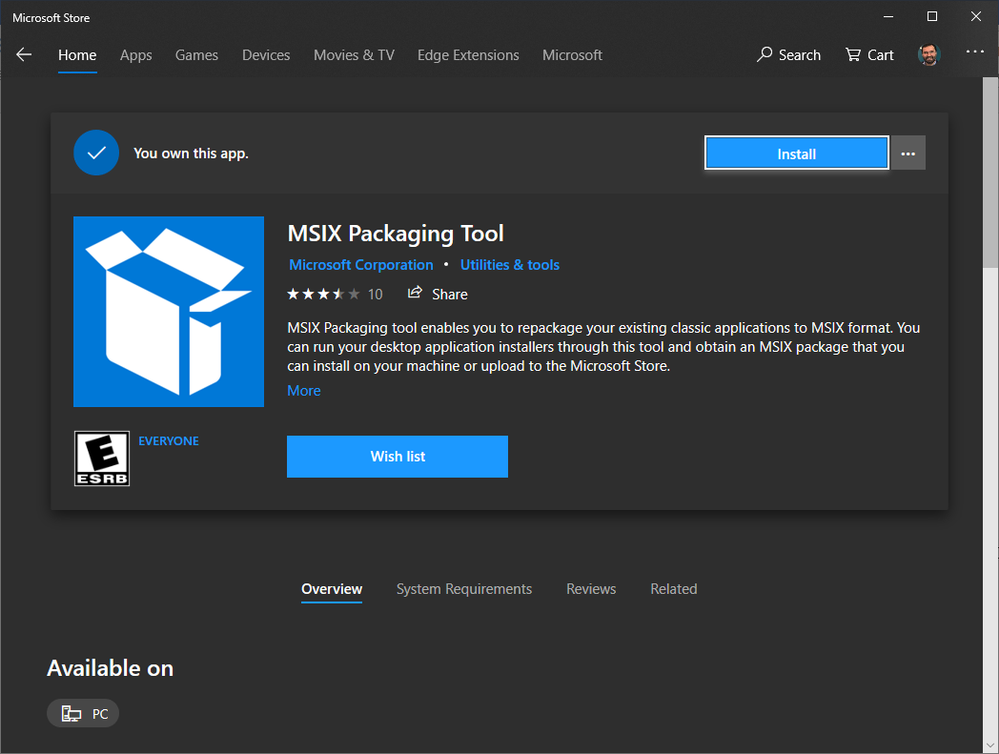
See the following documentation for more details about the tool:
https://docs.microsoft.com/windows/msix/mpt-overview
Before launching the MSIX Packaging Tool, move the emulator and VB folders to another folder, like C:setup:
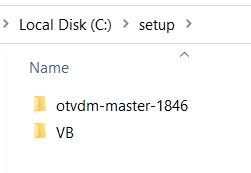
This step is need, as MSIX Packaging Tool (MPT) will monitor the changes made on the computer environment. So, as we already have VB3 installed and we don’t want to install it again, I will just copy these two folders to their final destinations at the moment that the MPT will be monitoring the modifications.
Once installed, open the MSIX Packaging Tool and click on Application package to create a new package for the application:
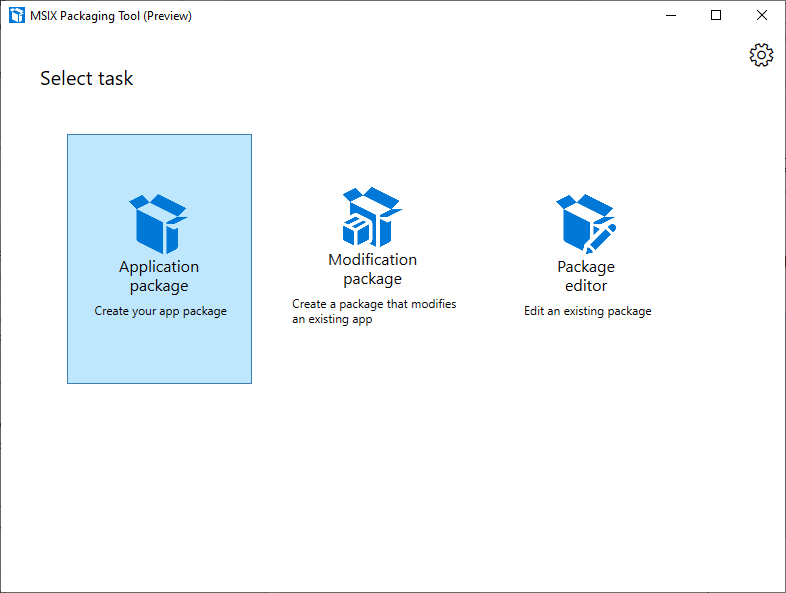
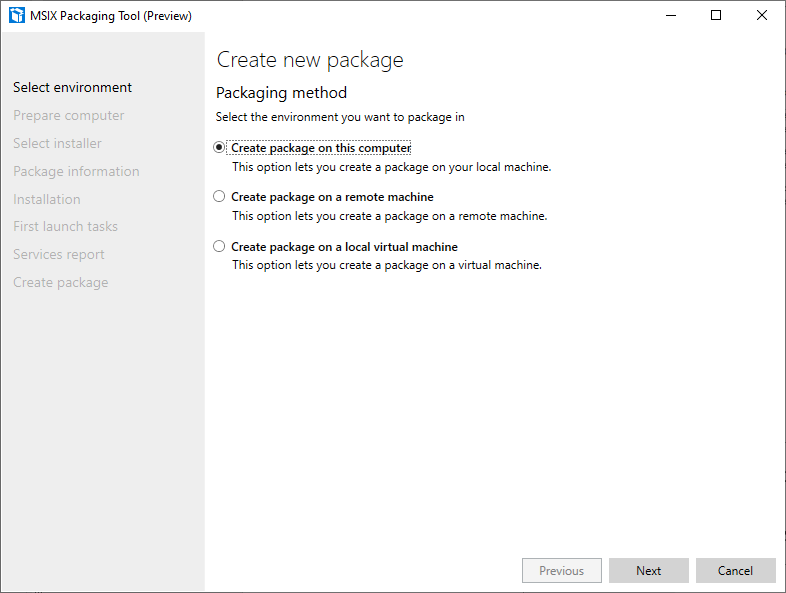
The MSIX Packaging Tool will monitor the changes made on the environment. To perform the packaging, it is possible to use a virtual machine or the physical machine itself to install the application.
The best scenario is to use a virtual machine allowing you to reproduce the same process if necessary. It is important that the machine used to install the application does not contain the applications and their previously installed components.
Choose the desired scenario and click the Next button:
In this step, the tool will verify that the MSIX Packaging Tool Driver is installed and will disable Windows Update to decrease the number of changes to the operating system:
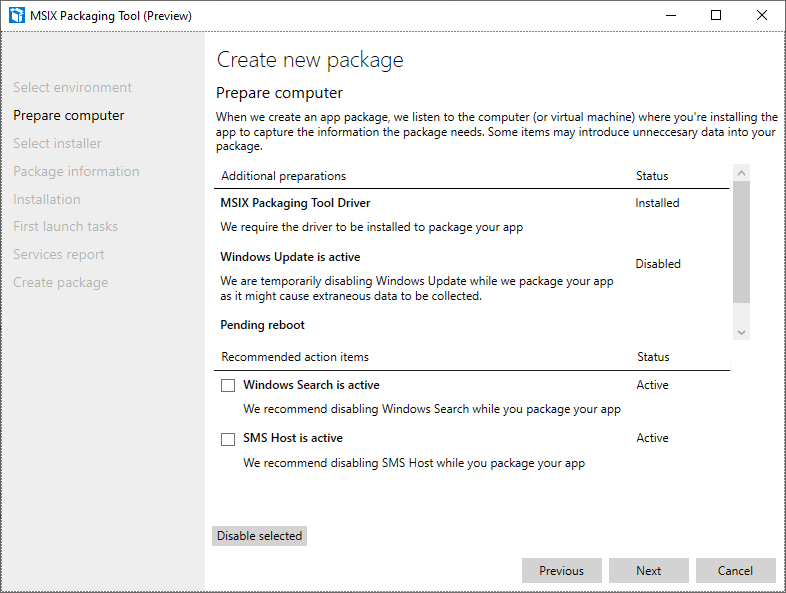
Click on the Next button.
Only MSIX packages signed with a valid certificate can be installed on Windows 10 machines.
You can create a self-signed certificate for testing purposes, using the following PowerShell command:
function CreateCertificate($name, $path)
{

    Set-Location Cert:LocalMachineMy

    New-SelfSignedCertificate -Type Custom -Subject "CN=$name" -KeyUsage DigitalSignature -FriendlyName $name -CertStoreLocation "Cert:LocalMachineMy"

    $cert = Get-ChildItem "Cert:LocalMachineMy" | Where Subject -eq "CN=$name"

    $pwd = ConvertTo-SecureString -String DefineTheCertificatePasswordHere@2020 -Force -AsPlainText

    Export-PfxCertificate -cert $cert.Thumbprint -FilePath "$path.pfx" -Password $pwd

    Export-Certificate -Cert $cert -FilePath "$path.cer"

    Move-Item -Path $cert.PSPath -Destination "Cert:LocalMachineTrustedPeople"

}

CreateCertificate "luisdem" "cert"
To execute the command, open PowerShell_ISE.exe and press F5. The command creates the test certificate and copies it to the Trusted People folder.
It is important to notice that this test certificate should only be used to approve the application in a test environment. To distribute the application.
Now, that we have a certificate, we can inform the certificate to have the final MSIX package file automatically signed. It is not necessary to provide the installer file, as the tool monitors all changes made to the operating system.
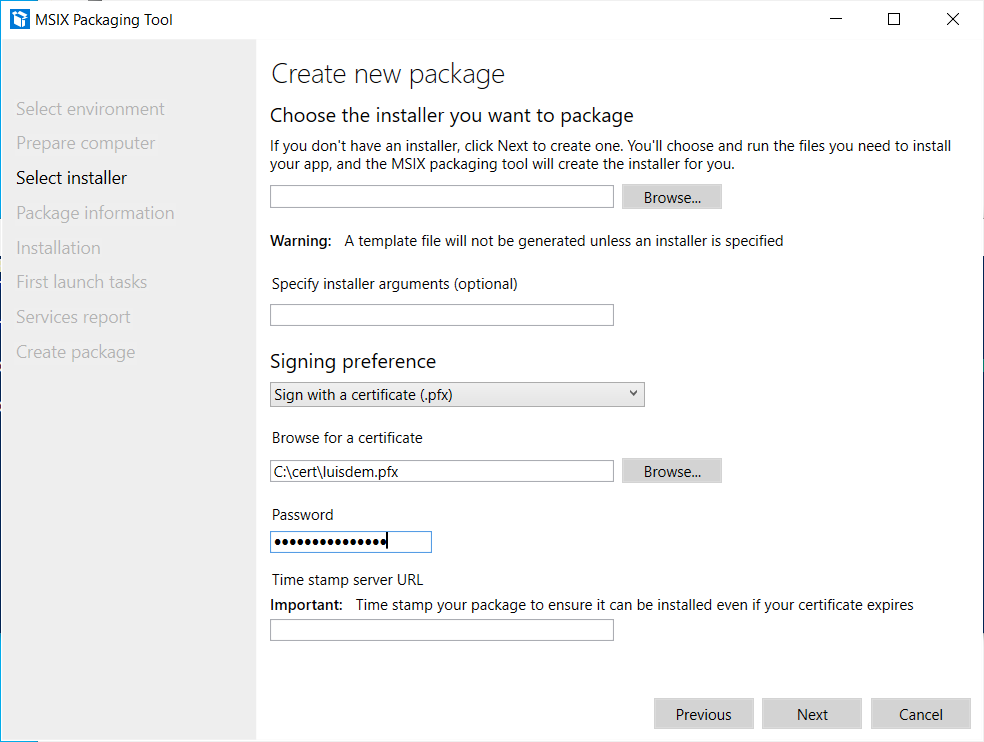
Click on the Next button.
In this step, it is necessary to provide information such as the name of the package, the description that will be displayed to the user during installation, the name of the supplier (must be the same as the certificate) and the version number. Fill in the requested information:
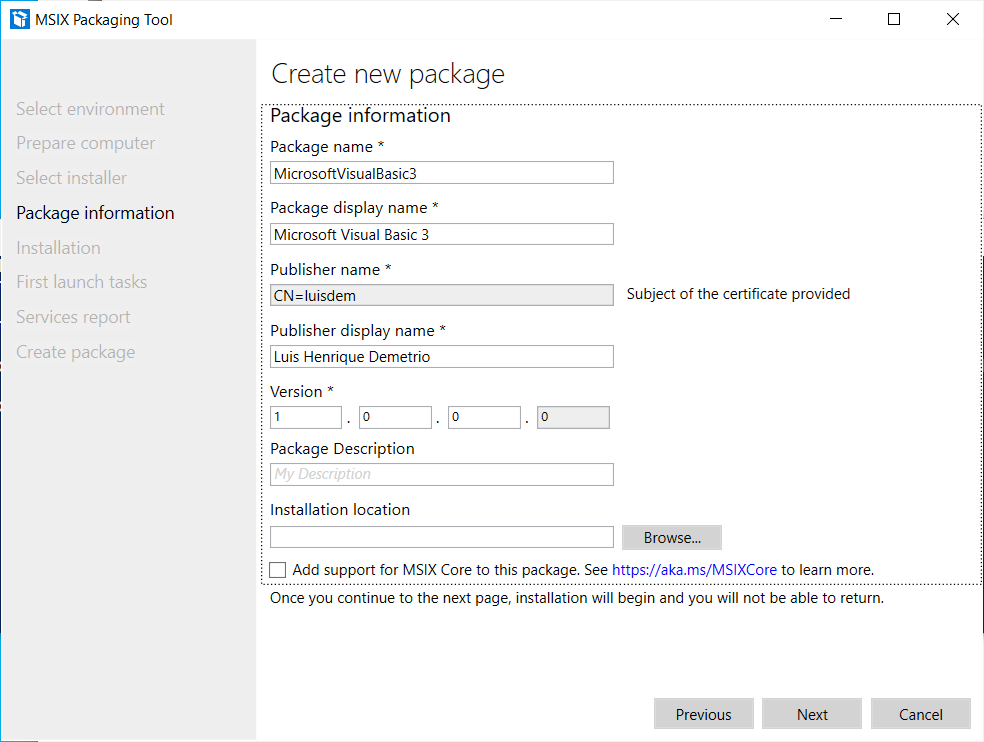
Click on the Next button.
Is in this step that we need to install the application.
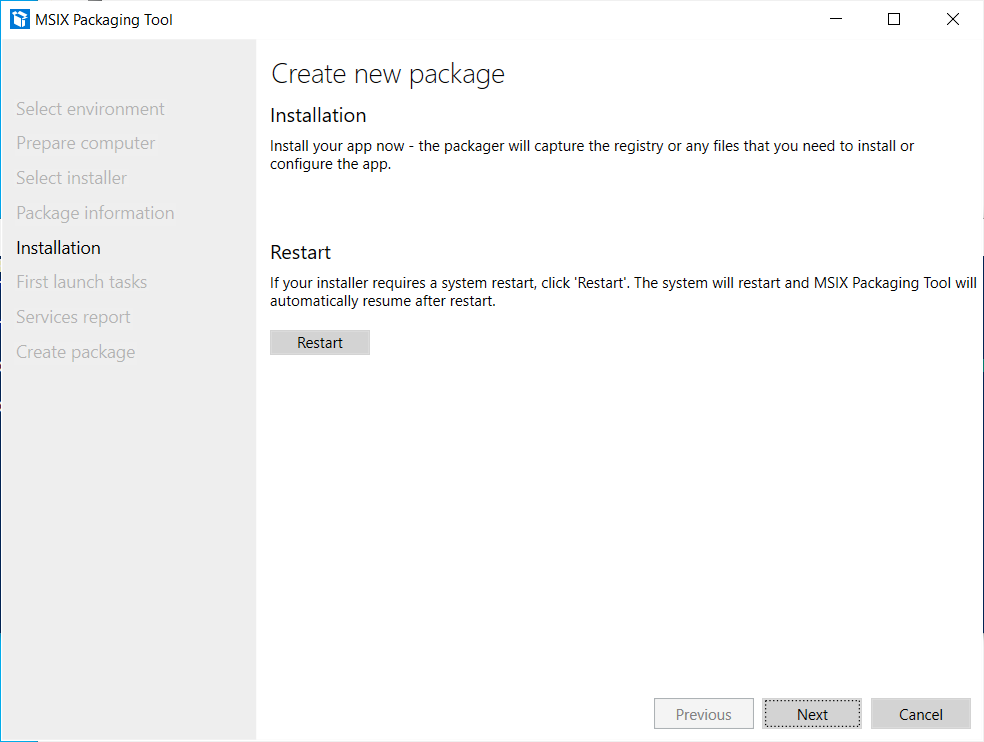
As we already have the VB3 installed, this is the moment to moving back the emulator and VB3 folders to the drive C root:
Click on the Next button only after completing the application installation and all settings.
On the next screen it is necessary to define which applications will be visible in the start menu.
As VB3 is a 16-bit application that depends on the 16-bit emulator, select only the otvdm.exe, as follows:
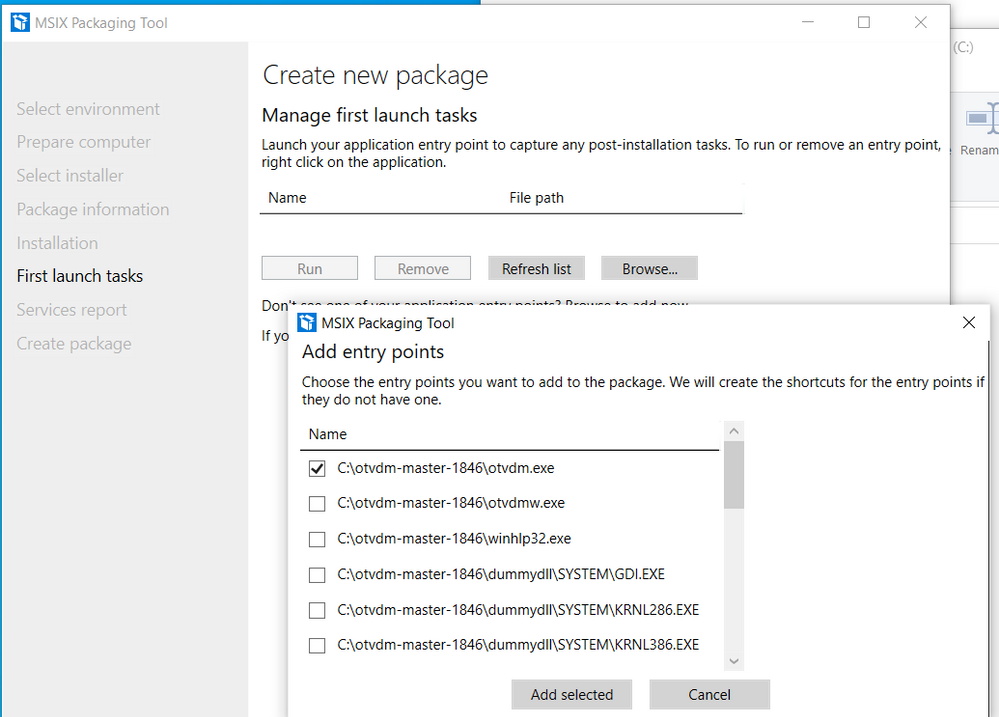
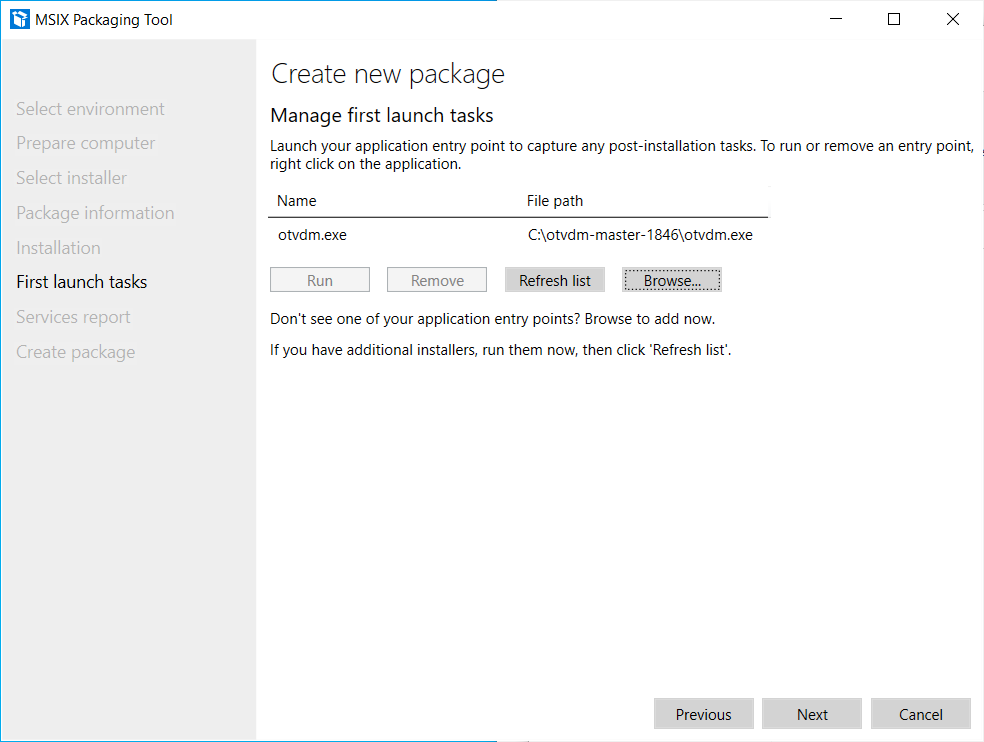
Notice that is not possible to provide the arguments for the otvdm.exe, i.e., C:VBVB.EXE. For now, we can ignore the arguments as we are fix that later.
Follows the expected result so far:
Click on the Next button.
The following screen is displayed at the end of the installation and asks for confirmation if the monitoring can be ended:
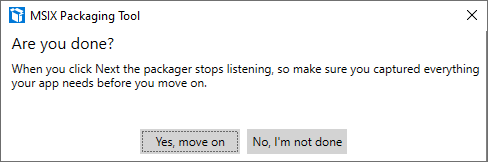
Click the Next button, as the application does not install any services:
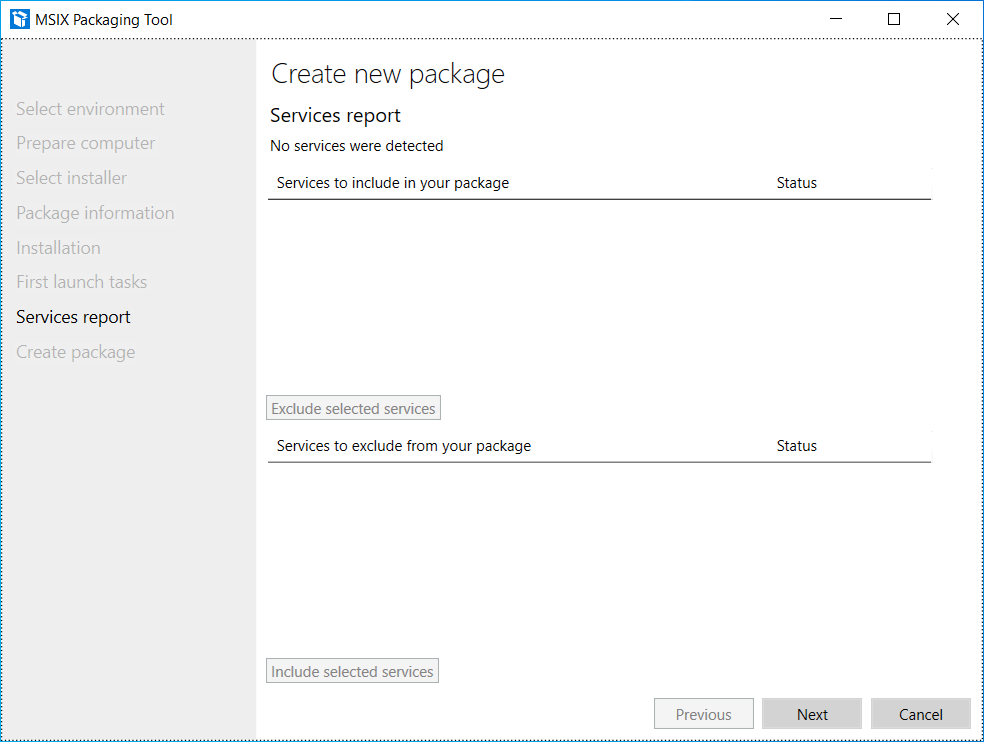
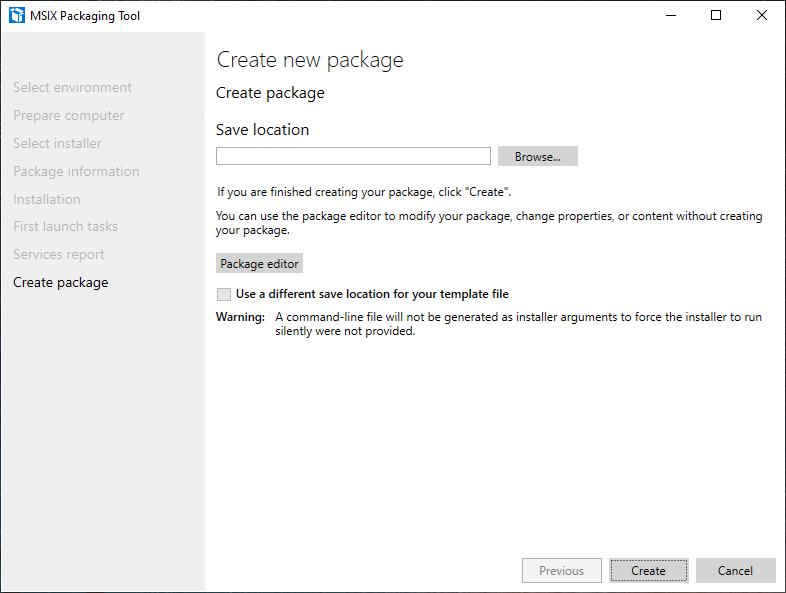
At this point, it is necessary to inform where the package will be generated, as well as it is possible to edit the package before saving it.
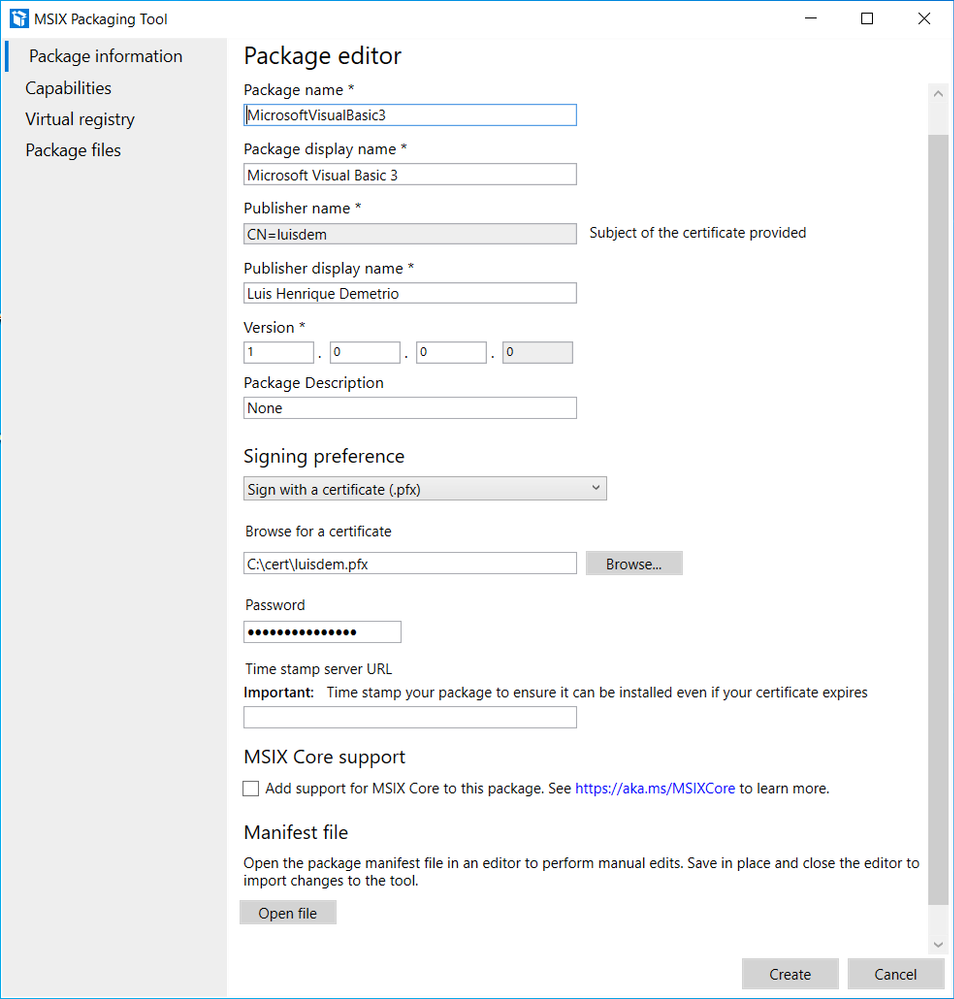
Click on the Package editor button to check the package structure, as follows:
Click on Open file to check how the manifest was generated:
It is possible to edit the manifest information, such as processor architecture, application description, minimum supported version of Windows 10 and others.
Change the ProcessorArchitecture to “x86”, the DisplayName and Description attributes to “Microsoft Visual Basic 3.0”:
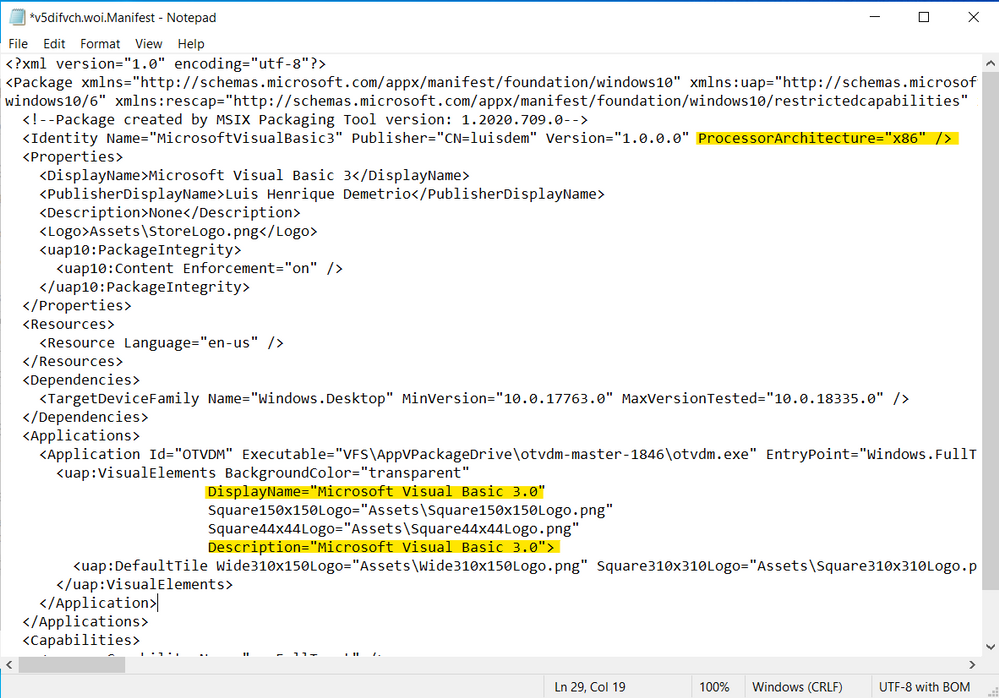
Notice that the Executable attribute doesn’t have the C:otvdm-master-1846, but instead it has the value VFSAppVPackageDriveotvdm-master-1846. The AppVPackageDrive is the folder inside the package that corresponds to drive C. The application will look for the file on C:otvdm-master-1846 but it will be redirected to the folder inside the package (VFSAppVPackageDriveotvdm-master-1846).
The only problem here, is that is no possible to pass arguments in this manifest file. So, we will need to use Package Support Framework (PSF) to fix that.
For now, just change the Executable value path to “PsfLauncher32.exe” that is part of the PSF.
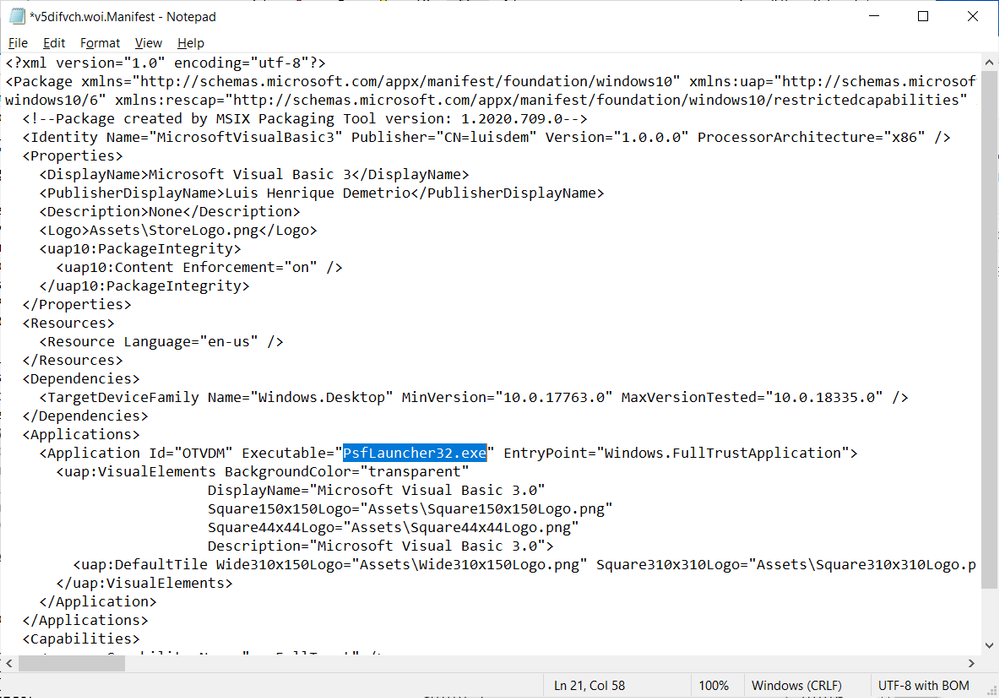
We will now create an execution ALIAS to allow launching the application by typing or calling the VB.EXE command. To do this, add the following lines just below the line </uap:VisualElements>:
<Extensions>
        <uap3:Extension Category="windows.appExecutionAlias"
                        Executable="PsfLauncher32.exe"
                        EntryPoint="Windows.FullTrustApplication">
          <uap3:AppExecutionAlias>
            <desktop:ExecutionAlias Alias="VB.EXE" />
          </uap3:AppExecutionAlias>
        </uap3:Extension>
 </Extensions>
Follows how the manifest file must be defined:
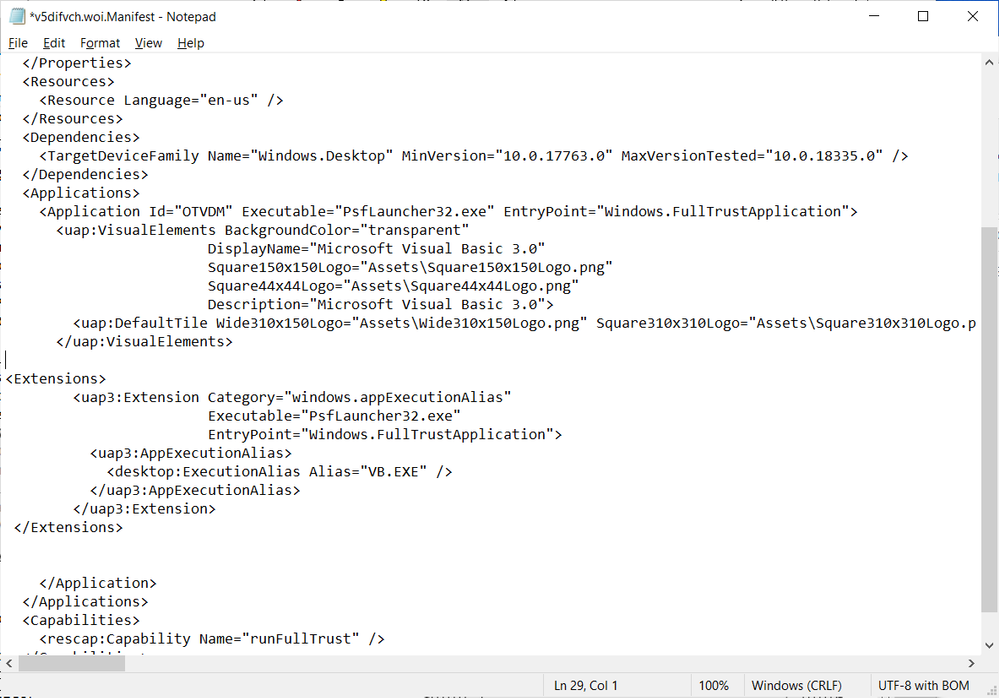
Save the file and close Notepad to free access to the MSIX Packaging Tool Editor screen.
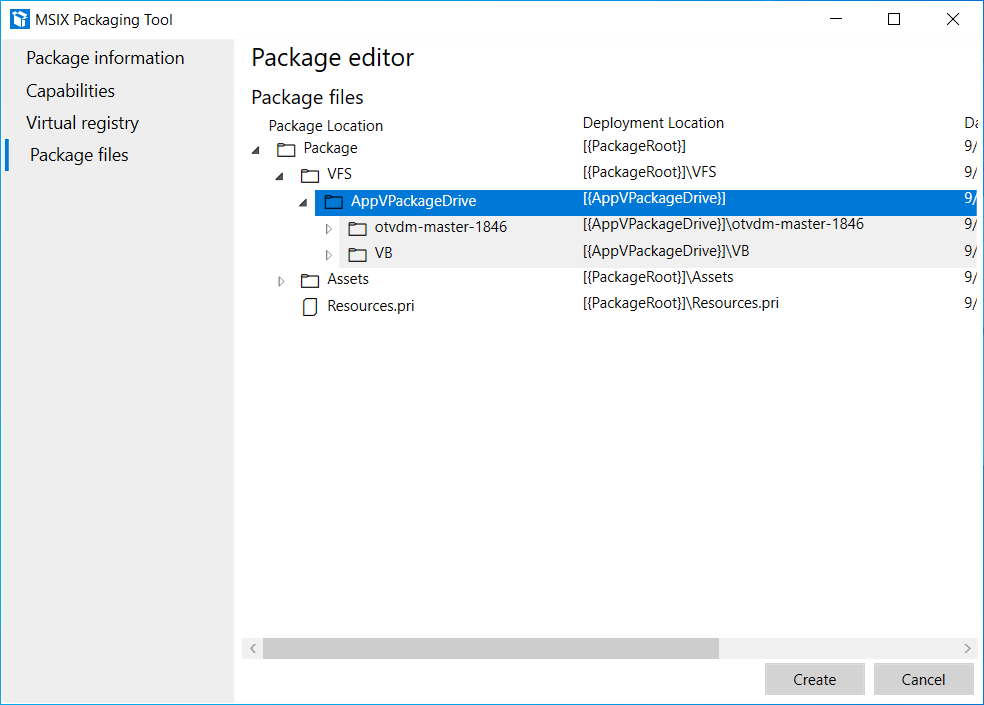
Click on Package files and check if all the files and directories listed are used by the application.
Remove unnecessary files or directories to reduce the package size:
It is at this step that we need to add the Package Support Framework files, to allow the PsfLauncher32.exe calling the emulator passing the arguments.
To proceed, download the PSF files (PSFBinaries.zip) available on GitHub:
Releases · microsoft/MSIX-PackageSupportFramework (github.com)
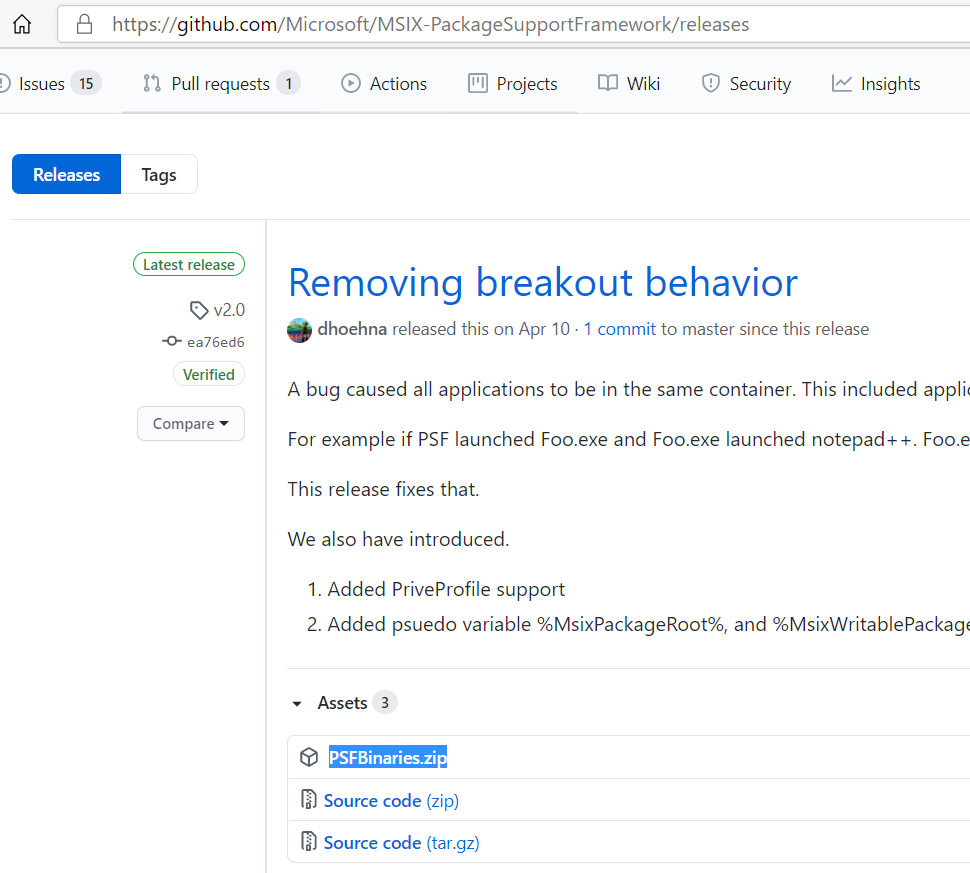
And extract the contents to a folder of your preference. I will extract to C:PSF:
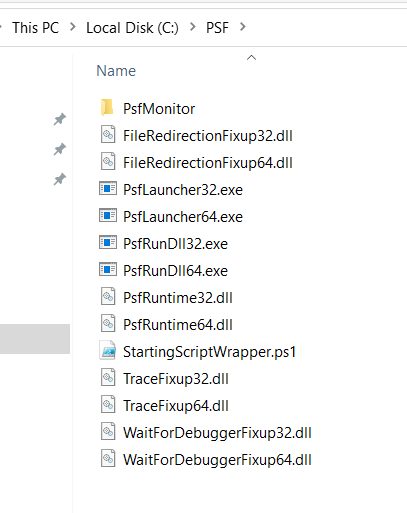
In the same folder, create a config.json file with the following content:
{
   "applications": [
    {
      "id": "OTVDM",
      "executable": "VFS/AppVPackageDrive/otvdm-master-1846/otvdmw.exe",
      "arguments": "AppVPackageDrive/VB/VB.EXE",
      "workingDirectory": "VFS"
    }
  ]
}
The id corresponds to the Application Id defined in the application manifest, the executable contains the emulator path inside the package and the arguments the VB3 path inside the package.
Switch back to MSIX Packaging Tool. In the Package file tab, right click on Package folder and click on
Add file from the context menu:
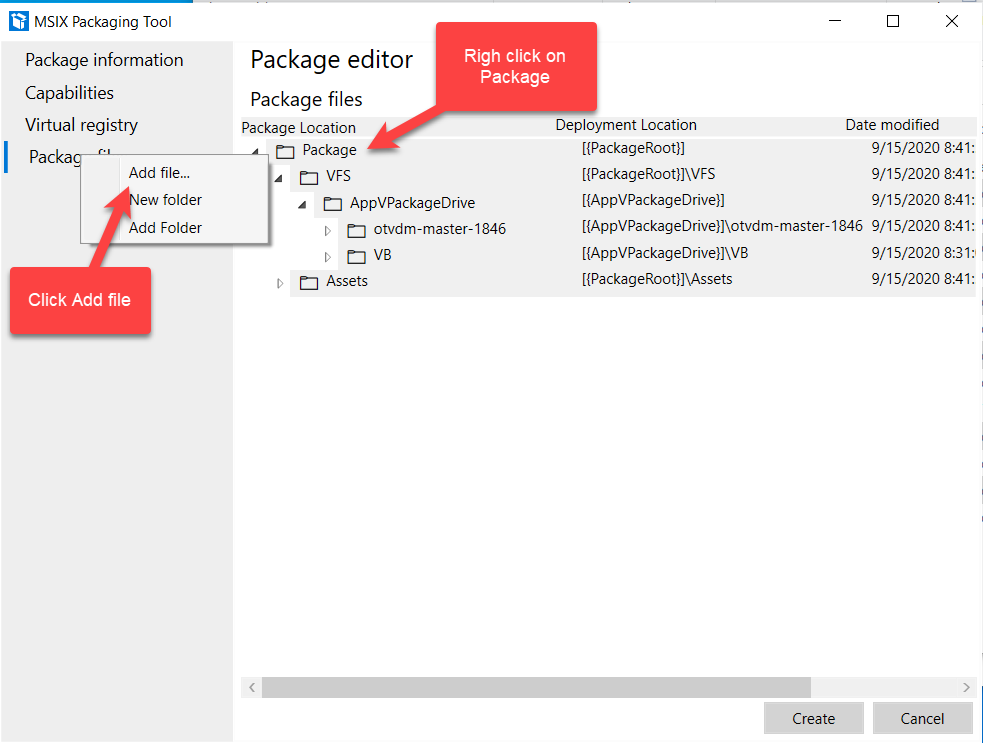
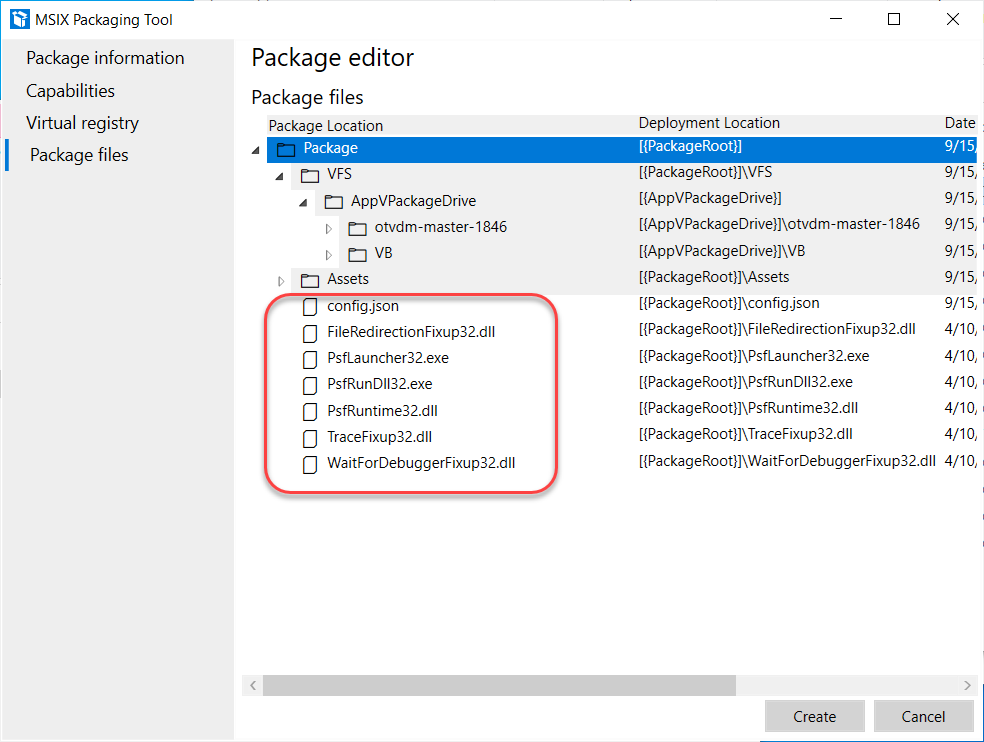
Add all the files that finish with 32 and the config.json files to the project:
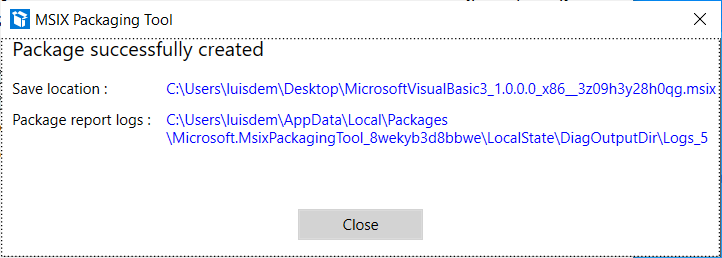
Click on the Create button to generate the package and inform where the file should be generated.
The following screen will display where the MSIX file was generated as well as the log file:
Install the Visual Basic 3 packaged with MSIX
Double-click the package to install the application:
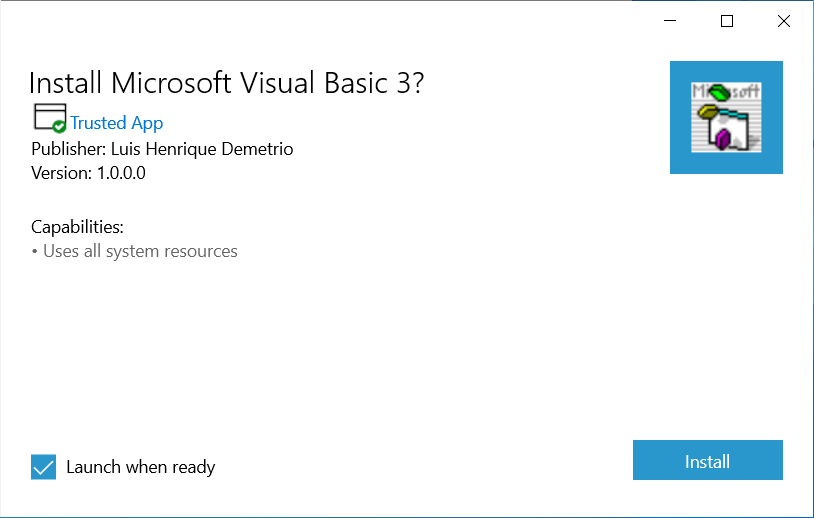
You can now launch the application directly from Start menu:
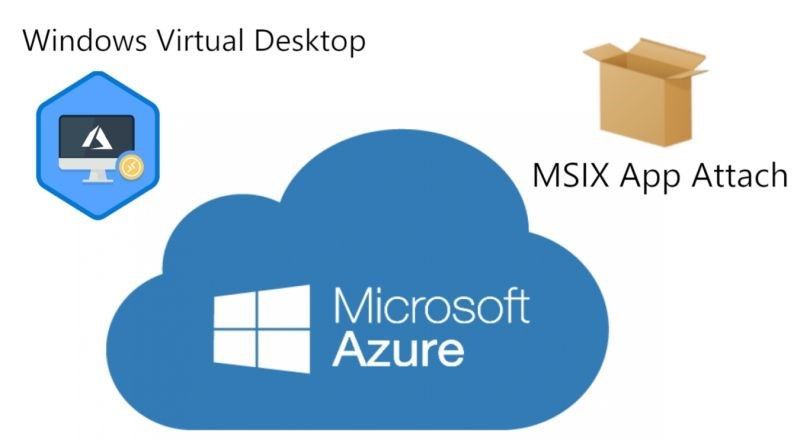
That solution is compatible with MSIX App Attach for Windows Virtual Desktop on-premises or on Microsoft Azure.
I hope you like it!!!
by Scott Muniz | Sep 15, 2020 | Uncategorized
This article is contributed. See the original author and article here.
We’re pleased to announce simplified options for registering Surface devices to your Azure AD tenant for Windows Autopilot deployment. Beginning today, customers and partners can submit registration requests directly to Microsoft Support.
The streamlined process means customers no longer need to harvest their own hardware hashes. Instead, they just open a ticket and get the hashes or request Microsoft to register their Surface devices on their behalf, reducing the cost and time hit, especially for customers without dedicated IT resources. This registration by Microsoft also enables Device Firmware Configuration Interface (DFCI) on those devices, allowing customers to make their devices more secure.
Getting started
Before submitting requests, you’ll need to have some basic information about your Azure AD environment and the devices you want to register including:
- Azure Active Directory Tenant ID
- Azure Active Directory Domain Name
- Proof of ownership
- Device serial numbers
For complete details, go to Surface Registration Support for Windows Autopilot.
Zero-touch provisioning
We hope this new initiative will enable more customers to take advantage of zero touch provisioning for full lifecycle management. If you’re not familiar with Windows Autopilot, registration for new or recycled devices allows IT admins to configure Autopilot profiles that can automatically be applied to those devices. Devices are then delivered directly to an end user who needs only to power the device on, connect to a network, and enter their organization credentials. The device will be provisioned into a fully business ready state — secured and managed with all the apps that they need to be productive.
To learn more, check out Windows Autopilot and Surface devices and visit Windows Autopilot – Microsoft 365.
by Scott Muniz | Sep 15, 2020 | Uncategorized
This article is contributed. See the original author and article here.
We are officially one week away from our first ever digital Microsoft Ignite, and Microsoft Teams is bringing you an amazing lineup of content all-digital event experience. Given we’re doing things a little bit differently this year, we want to walk you through what your journey will look like. We’ve created over 40 sessions that span the breadth of Teams so you can hear about the newest product capabilities, get your questions answered, and learn how to create a resilient, inclusive, and connected workplace with Microsoft Teams.

Sessions
For a full list of sessions, check out the Teams digital brochure embedded at the bottom of this blog and bookmark this brochure link for future reference.
Featured Sessions
To kick off the 48 hours of continuous learning, we will be presenting our Modern Work and Teams keynotes. Join sessions from Teams executives and get a detailed view of our vision for Teams, the latest capabilities, and product roadmap.
- The Future of Modern Work – Jared Spataro, Corporate Vice President, Modern Work
- Creating a resilient and hybrid workplace with Microsoft Teams – Nicole Herskowitz, General Manager, Microsoft Teams Marketing
- Enabling collaboration, communication, and knowledge sharing with Microsoft Teams, SharePoint, Project Cortex, and more – Jeff Teper, Corporate Vice President, Microsoft Teams, SharePoint, OneDrive
Digital Breakouts
Next, dive deep into specific Teams topics by attending our 30-min digital breakouts. Digital breakout sessions will cover Teams Meetings, Calling, and Devices; Teams Core and Collaboration; Teams platform and Microsoft 365 platform; Security, Compliance, and Management; and Firstline Worker.
Ask the Experts
If you’re looking to engage with Teams product and engineering experts, join an “Ask the Expert” session following our digital breakouts. “Ask the Experts” are the perfect place to get your Teams questions answered and hear from subject matter experts that are closest to the product. Space is limited in Ask the Expert sessions so make sure you add those to your schedule ASAP.
Resources
Below is a list of resources you can take a look at now to learn more and bookmark to reference later:
- Register for Microsoft Ignite and start building your event schedule with Teams sessions.
- Access the Virtual Hub for deep-dive technical training for IT pros, developers, and community champions available on September 22nd and get access to interactive guides, community resources and more.
- Check out the Microsoft Tech Community Video Hub launching on September 22nd to view videos and join conversation.
- Follow Microsoft Teams on Twitter to stay up to date with the latest Teams @ Ignite news.
Teams Virtual Photo Booth
Staying true to an all-digital theme, we’re very excited to offer a Teams Virtual Photo Booth where you can share your Teams spirit with a selfie! The photo booth will be available from Friday, September 18 at 8:00am PDT to Thursday, September 24.
Come back on Friday to start sharing selfies and what you’re learning at Ignite on your favorite social media platforms. Don’t forget to use the #MicrosoftTeams and #MSIgnite hashtags so we can see what your Teams @ Ignite 2020 experience looks like.
Teams Digital Brochure


Recent Comments