by Scott Muniz | Sep 22, 2020 | Uncategorized
This article is contributed. See the original author and article here.
Final Update: Tuesday, 22 September 2020 18:41 UTC
We’ve confirmed that all systems are back to normal with no customer impact as of 9/22, 18:36 UTC. Our logs show the incident started on 9/22, 13:05 UTC and that during the 5 hours and 30 min that it took to resolve the issue some Application Insights customers experienced accessing live metrics data.
- Root Cause: The failure was due to incorrect deployment to one of the backend services. .
- Incident Timeline: 5 Hours & 30 minutes – 9/22, 13:05 UTC through 9/22, 18:36 UTC
We understand that customers rely on Application Insights as a critical service and apologize for any impact this incident caused.
-Anupama
Initial Update: Tuesday, 22 September 2020 17:45 UTC
We are aware of issues within live metrics service for Application Insights customers and are actively investigating. Some customers may experience Data Access.
- Work Around: none
- Next Update: Before 09/22 21:00 UTC
We are working hard to resolve this issue and apologize for any inconvenience.
-Anupama
by Scott Muniz | Sep 22, 2020 | Uncategorized
This article is contributed. See the original author and article here.
Initial Update: Tuesday, 22 September 2020 17:45 UTC
We are aware of issues within live metrics service for Application Insights customers and are actively investigating. Some customers may experience Data Access.
- Work Around: none
- Next Update: Before 09/22 21:00 UTC
We are working hard to resolve this issue and apologize for any inconvenience.
-Anupama
by Scott Muniz | Sep 22, 2020 | Azure, Technology, Uncategorized
This article is contributed. See the original author and article here.
Unified operations for hybrid IT
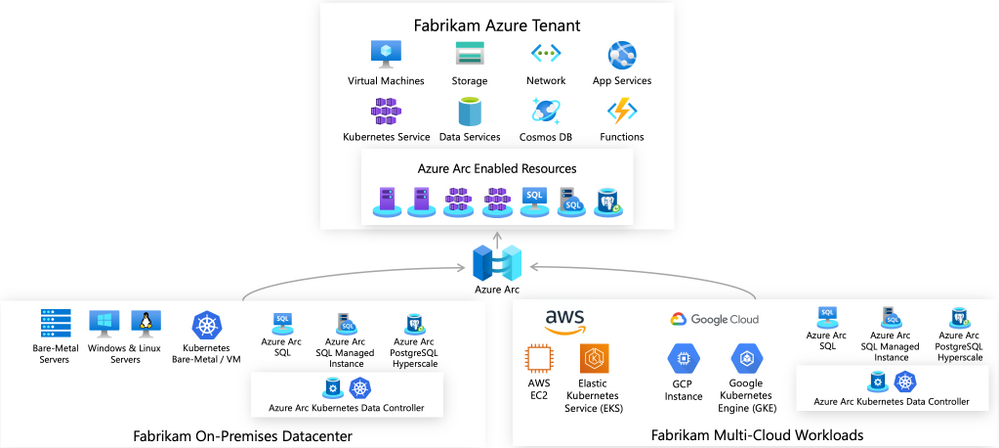
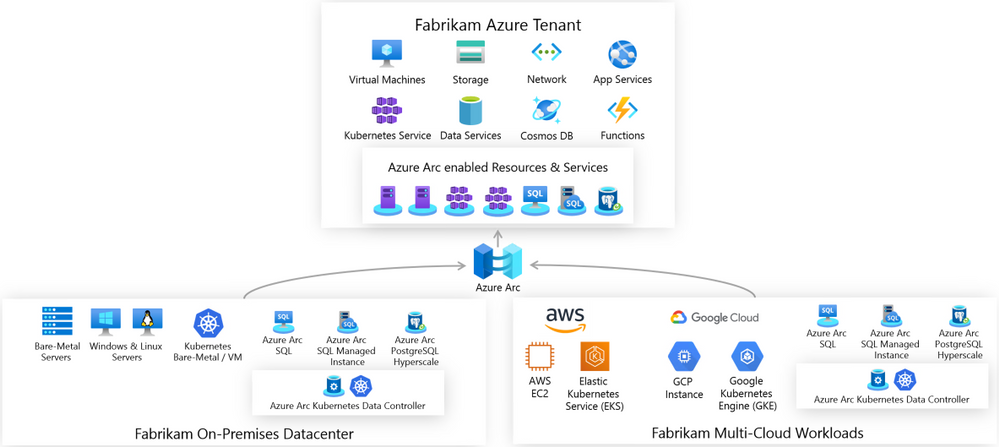
Azure Arc enabled servers is a powerful new technology that will help Microsoft customers and partners build seamless solutions for managing hybrid IT resources from a single pane of glass. Servers running outside of Azure such as AWS EC2 instances, on-premises VMware or physical machines, or devices in edge scenarios can now be projected into Azure as first-class resources. These resources can then be managed using Azure Policy, resource tags, and other Azure capabilities like update management, change tracking, monitoring, and more as if they were native Azure virtual machines. Azure Arc provides a unified governance and management strategy using Azure tools for our hybrid IT and multi-cloud environments.

Azure Arc Connected Machine agent
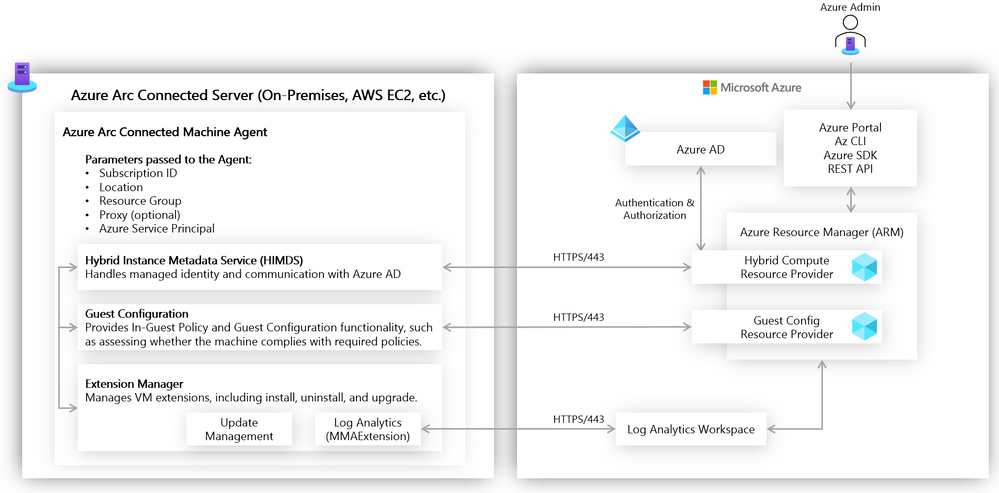
Azure Arc enabled servers interact with Azure via the Connected Machine agent. This agent interfaces with an Azure Resource Manager (ARM) resource provider which gives us the ability to perform management operations on the server via Azure Portal, Azure CLI, or Azure SDK. This agent contains logical components that control how an Azure Arc enabled server interfaces with various Azure services. The Hybrid Instance Metadata Service manages communication with Azure AD, while the Extension Manager service and Guest Configuration service allow the server to easily use Azure Virtual Machine extensions and to be governed using Azure Policy. The agent is configured with an Azure service principal and other parameters to manage scope and resource placement it can be deployed manually or as part of scripted automation.
Azure Arc enabled servers in action
Let’s take a closer look now at the above concepts in action. Imagine that we have a mature hybrid IT organization with server assets spread out over various public clouds and on-premises datacenters. We have standardized on using Azure Policy and other Azure governance tools (e.g., Log Analytics, Update Management, Backup, tagging). Because of the various hosting platforms for our virtual machines, we need an easy way to apply a common policy strategy across them all. To accomplish this, we will use Azure Arc enabled servers.
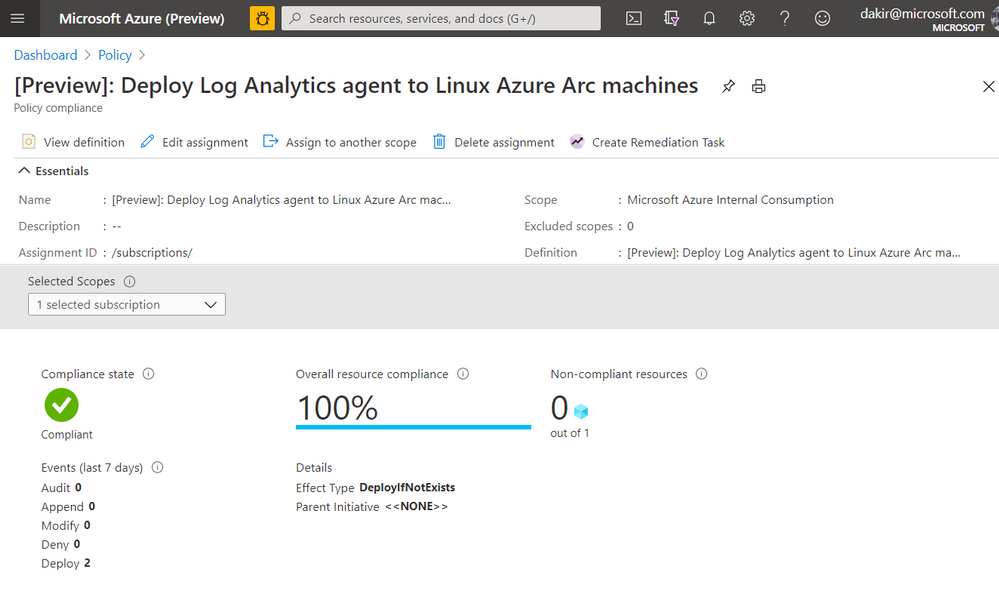
One of my requirements is that all virtual machines must send logs to Log Analytics to manage updates, change tracking, inventory, and monitoring. The onboarding of the Log Analytics agent must be done automatically via policy. To accomplish this, I have set up a Log Analytics workspace and enabled Update Management and Change Tracking, and I can deploy a built-in Azure Policy that checks for the presence of the Log Analytics agent and automatically deploys it if it is not found. Below you can see I have deployed this built-in policy and that will accomplish this.
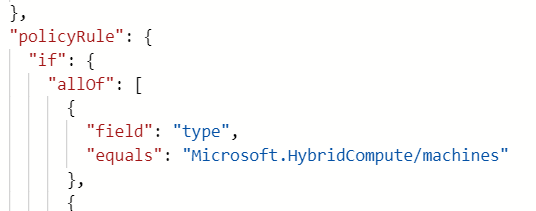
If you look closely at the JSON in the screenshot below you can see that this policy is scoped to the Microsoft.HybridCompute/machines resource type. Once this policy is in place, new Azure Arc enabled servers that I onboard by deploying the Connected Machine agent should automatically have the Log Analytics agent deployed by the policy.
Onboarding a server
Our next step is to onboard some servers to Azure by deploying the Connected Machine agent. We can do this using our own Azure credentials, or we can use a service principal for automated scenarios. We can scope a service principal to the “Azure Connected Machine Onboarding” role to restrict actions using the service principal to onboarding Azure Arc enabled servers only.
Below, you can see I have deployed a virtual machine to AWS. This VM is running Ubuntu 18.04.
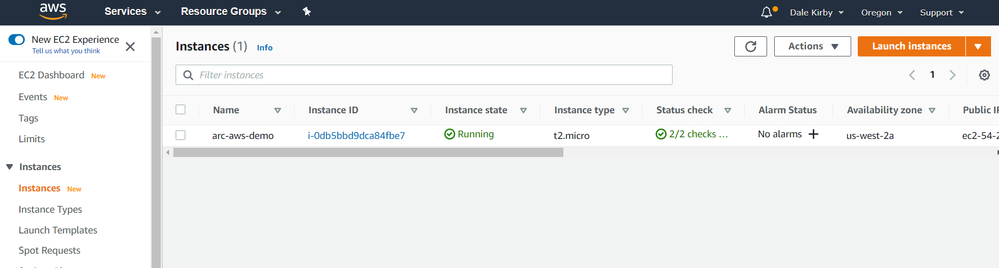
We can get the Connected Machine agent provisioned on this server by running some commands. First we will download the agent install script using wget and then install the agent by running the downloaded script.
#!/bin/bash
# Download the installation package
wget https://aka.ms/azcmagent -O ~/install_linux_azcmagent.sh

# Install the hybrid agent
sudo bash ~/install_linux_azcmagent.sh
The script will run and generate some output. When complete you should see something similar to the below screenshot.
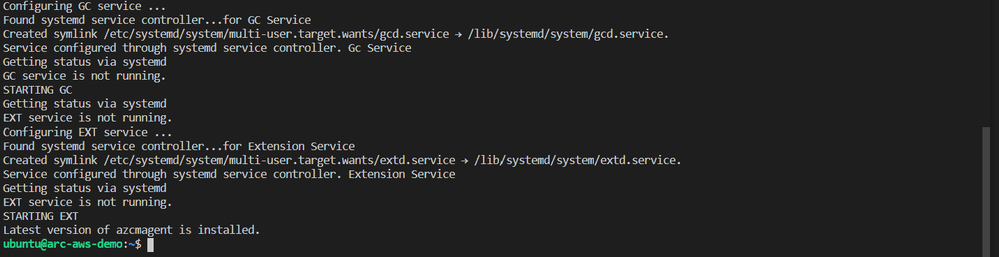
Next, I will run azcmagent connect to onboard the server. We can see in the example below that this command requires us to pass our service principal and secret, Azure tenant and subscription id, which I am injecting as environment variables. I also pass an Azure region and resource group.
sudo azcmagent connect
   --service-principal-id $TF_VAR_client_id
   --service-principal-secret $TF_VAR_client_secret
   --tenant-id $TF_VAR_tenant_id
   --subscription-id $TF_VAR_subscription_id
   --location "westus2"
   --resource-group "Arc-AWS-Demo"

Now that the server has been onboarded I can open the Azure Portal and it as a resource in the resource group I specified when running azcmagent connect.
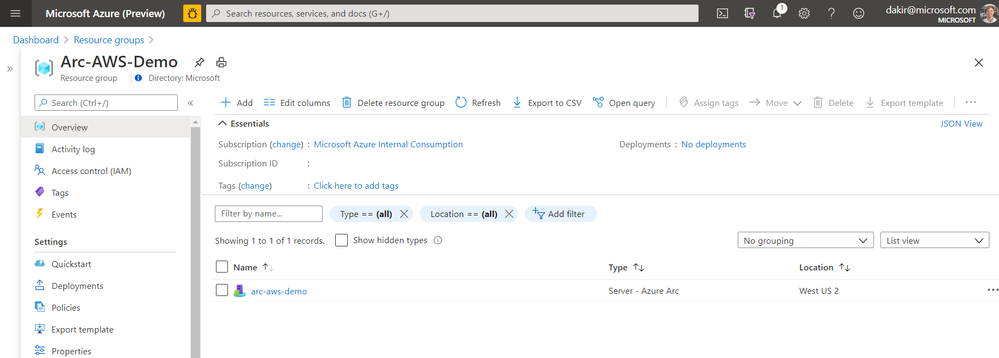
If I look at the Extensions blade, I can also see that the Log Analytics agent (MMAExtension) is provisioned. This happened automatically as a result of the policy we configured.
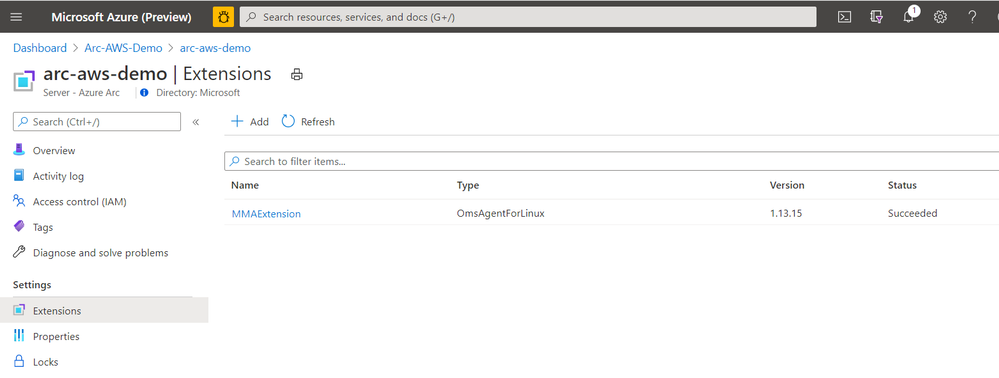
With the MMAExtension enabled and my server sending logs to my workspace, we can take advantage of many governance tools such as managing updates with Update Management, reviewing security posture with Azure Security Center, and proactively managing security and other incidents with Azure Sentinel.
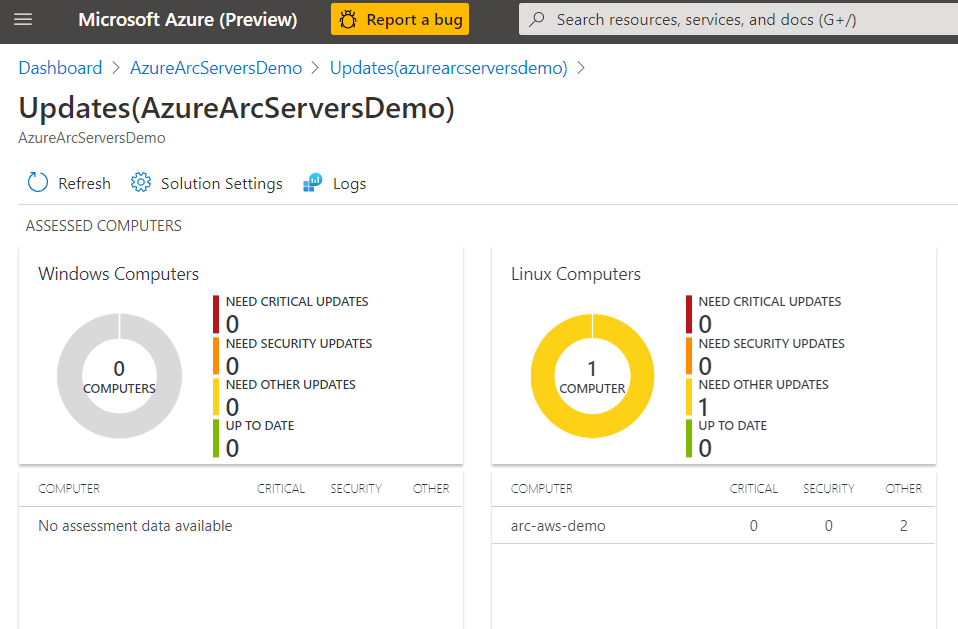
Below we can see our server is missing some updates. With the Update Management solution we can apply the update automatically or generate an alert that creates an incident in Azure Sentinel if this is a critical security update.
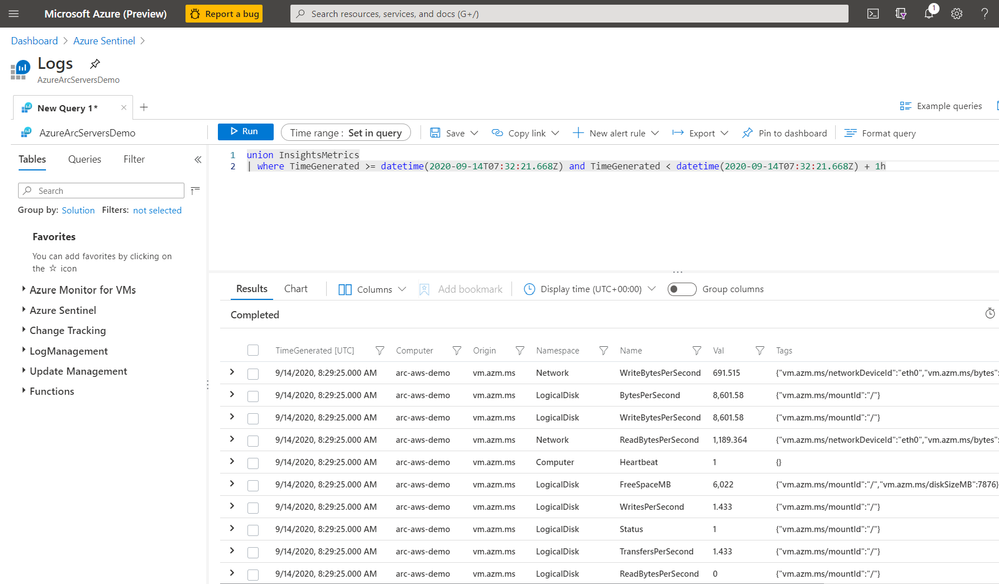
We can also use Kusto to query logs on the server for custom reports or other monitoring scenarios.
By using this workflow of deploying policies that are scoped to Azure Arc enabled servers, I can enable a large variety of governance scenarios. Some other examples of using Azure Arc enabled servers with Azure Policy include:
- Automatically deploying Azure Security Center at scale on any server
- Hardening servers for compliance scenarios using Guest Configuration
- Applying inventory management tags for better organization of my diverse hybrid resources.
- Enable multi-tenant or multi-customer service provider solutions by using Azure Lighthouse together with Azure Arc
Next steps
I hope this has been a helpful primer on Azure Arc enabled servers. For additional Azure Arc content visit the Azure Arc Jumpstart GitHub repository, where you can find more than 30 Azure Arc deployment guides and automation and visit the official Azure Arc documentation page. Additionally, my colleagues have written some other articles on Azure Arc that you can read:
Enjoy the rest of Ignite 2020!
by Scott Muniz | Sep 22, 2020 | Azure, Technology, Uncategorized
This article is contributed. See the original author and article here.
Azure Monitor for containers has been generally available for a while now, providing comprehensive viability to Azure Kubernetes Service (AKS) clusters and the applications deployed in it. Did you know this can be applied on Azure Arc enabled Kubernetes clusters as well?!
Monitor this, monitor that
As Kubernetes becomes more and more the de-facto container orchestration platform out there, the need for an organization’s operations maturity around it is facing a lot of challenges.
Now, it’s even if the current challenges are not enough, Kubernetes deployments sprawling across multiple cloud providers and on-premises is adding another dimension to these challenges.
Specifically, when you have different ways and interfaces to monitor those clusters and the applications deployed on top of it.
1st party experience
If you are an AKS user, you might already be leveraging the Azure Monitor for containers integrated experience and if not, well, you should.
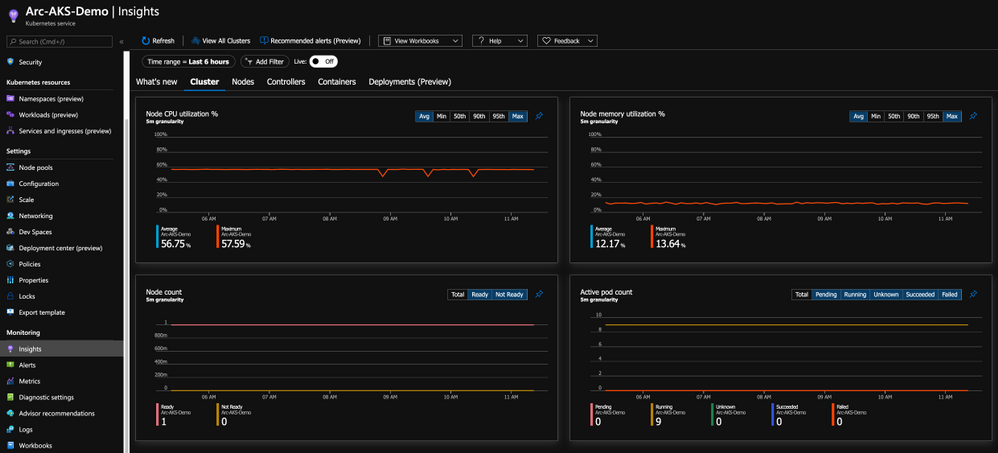
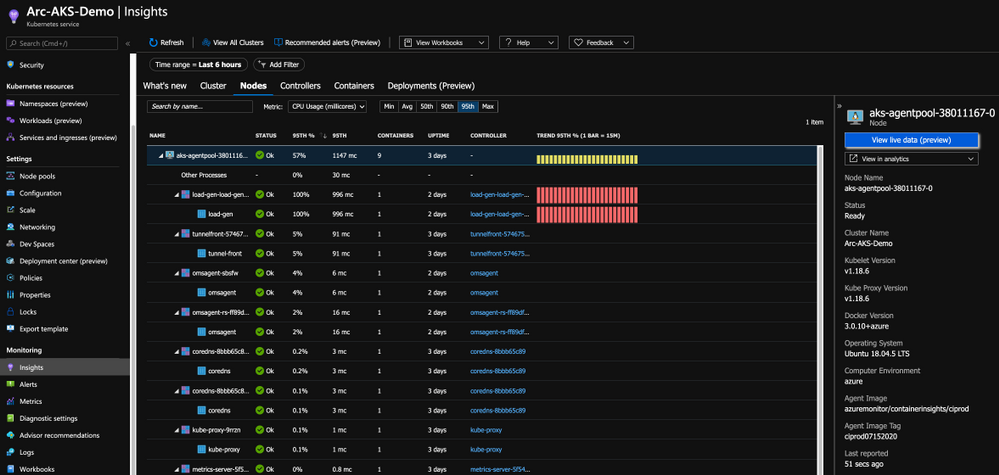
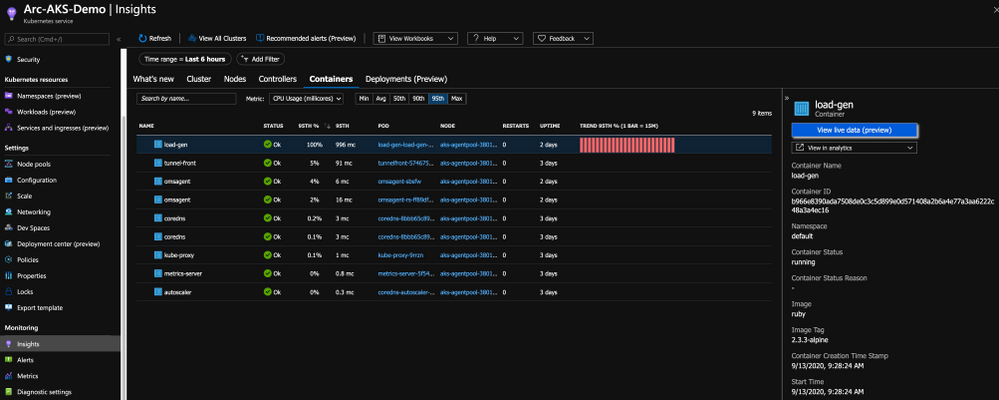
With this integration, you are getting all the Kubernetes-related performance metrics, telemetry, and metadata you need. Not just on the cluster-level, but also the relevant information on the applications deployed on the cluster as you can see in the below figure.

Bring “outsiders” to the party
Having AKS integrate with Azure Monitor for containers, a 1st party Azure product is a given and mandatory but now that we have Azure Arc enabled Kubernetes clusters projected in Azure, wouldn’t make sense to have the same integration for these clusters as well?! Of course so!
By onboarding the Kubernetes clusters outside of Azure using Arc and deploy the Operations Management Suite Agent in the cluster, we are able to connect the clusters to an Azure Log Analytics workspace, same as we are doing for AKS and as a result, have the same monitoring experience for outside Kubernetes clusters.
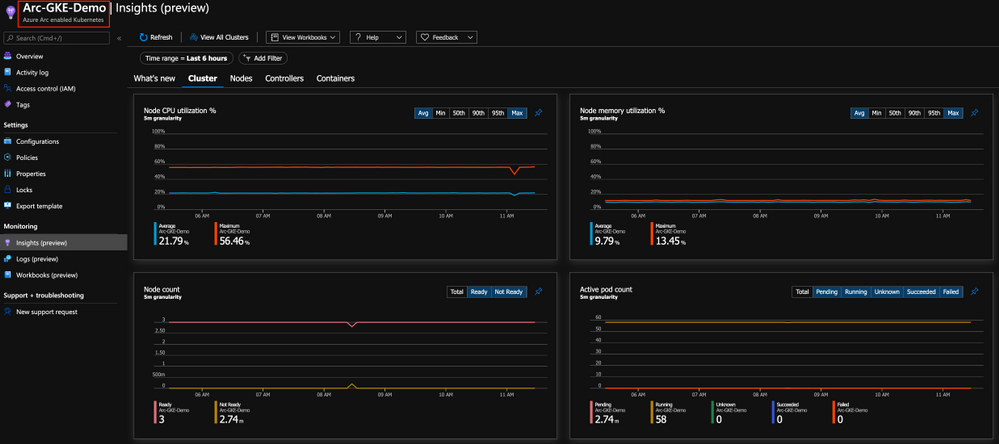
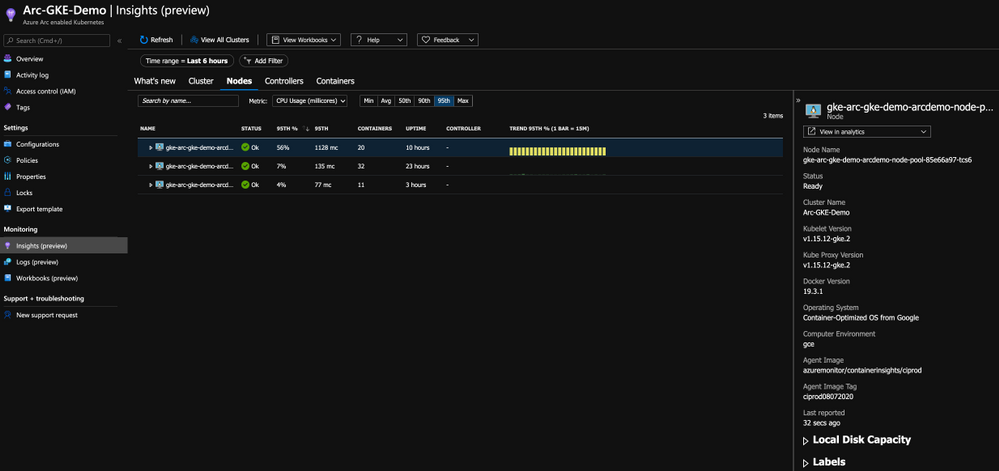
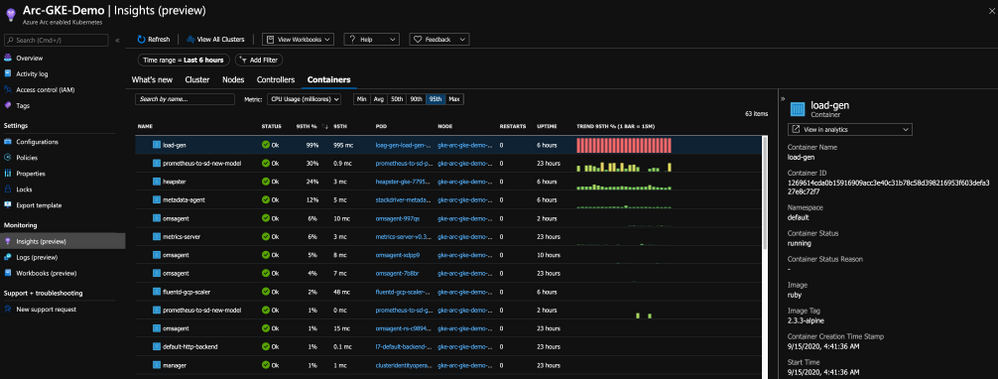
As you can from the below figure, we are getting the same performance metrics, both on the cluster and the application-level, metadata and all the telemetry one might need but now, it is a Google Kubernetes Engine (GKE) cluster we are looking at – that’s dope!
Get Started Today
In this post, we briefly touched on Azure Monitor for containers integration with Azure Arc enabled Kubernetes clusters and showed how you can have a unified monitoring experience for both AKS clusters and the Kubernetes clusters deployed outside of Azure.
To get started, visit the Azure Arc Jumpstart GitHub repository, where you can find more than 30 Azure Arc deployment guides and automation, including how to onboard your Azure Arc enabled Kubernetes clusters and start using Azure Monitor for containers with it. I addition, visit the official Azure Arc documentation page where you can find more information.
Also, check out these additional great Azure Arc blog posts!
by Scott Muniz | Sep 22, 2020 | Azure, Technology, Uncategorized
This article is contributed. See the original author and article here.
There is a new kid on the block, his name is “Azure Arc” and he wants people to play with it. This is why we create the Azure Arc Jumpstart project and GitHub Repository.
The goal of the repo is for you to have a working Azure Arc demo environment spun up in no-time so you can focus on playing, demoing, upskilling yourself and your team and see the core values of Azure Arc.

Disclaimer: The intention of this repo is to focus on the core Azure Arc capabilities, deployment scenarios, use-cases and ease of use. It does not focus on Azure best-practices or the other tech and OSS projects being leveraged in the guides and code.
The Why – Design Principles
The repository was created with 3 main design principles in mind:
- Provide a “zero to hero” Azure Arc scenarios for multiple environments, cloud platforms and deployment types using as much automation as possible.
- Create a ”Supermarket” experience by being able to take “off the shelf” scenarios and implement (eat) them.
- Meeting Azure Arc customers and users where they are.
The How – Using & Implementing
Our goal with the repository is for you to be self-sufficient and for us to provide you with the right set of instructions and automation, no matter which platform you want to use.
The structure of the repo is aligned with the Azure Arc pillars; Servers, Kubernetes and Data Services and will have future Arc-related content as well. As you may have already noticed, the scenarios in the repo are split into two categories – Bootstrapping and Day-2.
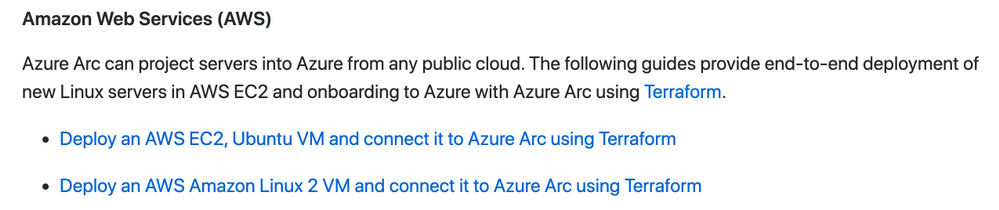
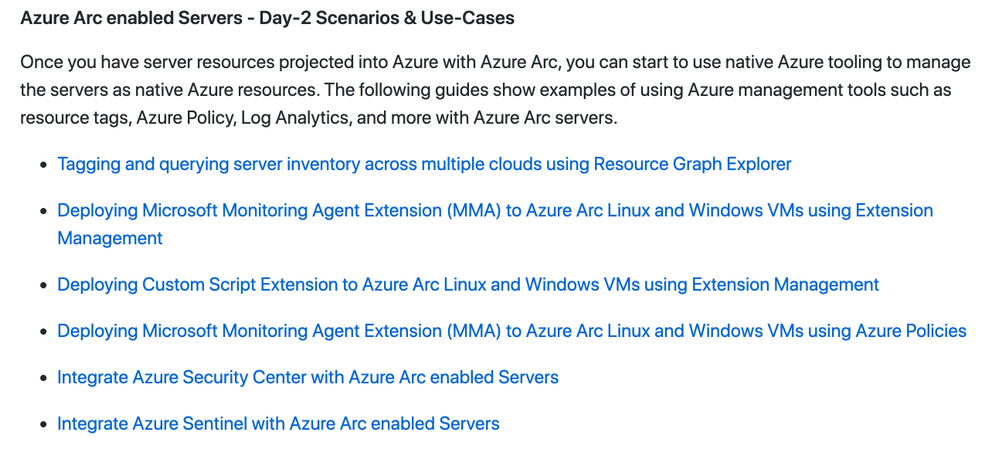
So first, you will bootstrap and environment and then, you can move on to the Day-2 stuff. For example, spin-up an AWS EC2 instance, onboard it as an Azure Arc enabled Server and then apply tags, Azure Policies followed by hooking it to Azure Security Center or Azure Sentinel.
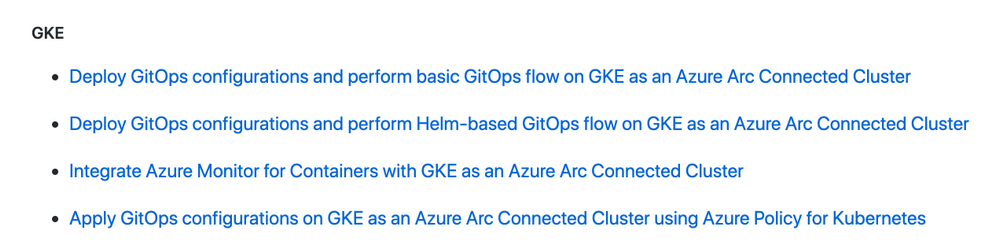
Another example could be provisioning a Google Kubernetes Engine (GKE) cluster, onboard it to Azure Arc enabled Kubernetes and then start creating GitOps Configurations and connect it to Azure Monitor for Containers.

So, as you can see, there is something for everyone with tons more scenarios in the repo. You even don’t have to have AWS or GCP account, we have included guides on how to deploy environments using tools like Hashicorp Vagrant or using a VMware vSphere environment you can leverage.
Get Started Today!
It’s very easy to get going with the repo and the scenarios. As you will notice, we also incl. Very detailed prerequisites section in each guide, again, so you will have everything you need to become Azure Arc Master Ninja.
Hop on to https://aka.ms/AzureArcJumpstart and start your Arc-journey  !
!
In addition, check out these additional great Azure Arc blog posts!
by Scott Muniz | Sep 22, 2020 | Azure, Technology, Uncategorized
This article is contributed. See the original author and article here.
This blog post is co-authored by @Nikhil_Jethava and @LauraNicolas
Modern organizations often manage diverse and complex IT infrastructures that frequently sprawl to multi-cloud environments.
Many enterprises have chosen pattern or vendor specific tools causing a ruptured management experience and an inconsistent approach to their operations. This problem is heightened with the pressure to innovate and deliver applications faster to the market, as well with the explosion of cloud native technologies and practices. The absence of single view and consistent tooling complicates the management for customer and partners alike.
Azure is focused on delivering innovation anywhere with a wide offering of hybrid services that meet customers and partners requirements as their environments become more complex. When Azure Lighthouse was introduced, it was another major step to address these challenges as it uncovered new possibilities for cross tenant management in the Azure platform with greater scale, visibility, and accuracy, turning the Azure Portal into a single control plane. With the addition of Azure Arc these cloud operations and practices can be extended to every workload and infrastructure, regardless of what it’s running or where is running.
Build a single view to manage across tenants.
Azure Lighthouse enables cross and multi-tenant management bringing greater scale and visibility into operations. The secret sauce behind Azure Lighthouse is the Azure Delegated Resource Management capability that logically projects resources from one tenant onto another and unlocks cross-tenant management with granular role based access and eliminates the need to do context switching.
Although Azure Lighthouse will work on any multitenant scenario, like customers that may have multiple Azure AD tenants (e.g. multiple subsidiaries or geographies in separate tenants) and it is very valuable for partners, specially Managed Service Providers (MSPs) as they can realize efficiencies using Azure’s operations and management tools for multiple customers.

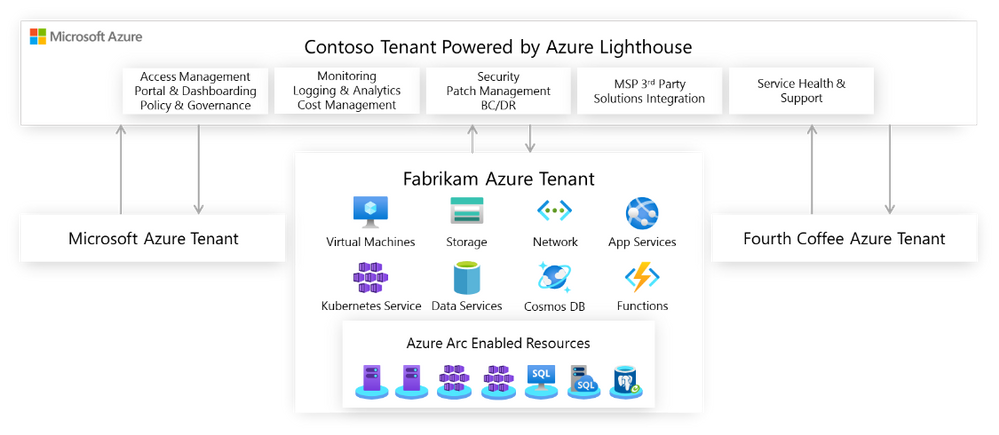
To illustrate this scenario, let’s take a look at Contoso who is responsible for the IT operations of three separate entities: Microsoft, Fabrikam and Fourth Coffee, each of them running Azure workloads on dedicated tenants. Azure Lighthouse enables Contoso to centrally manage resource inventories, access and identity, governance, monitoring and security across all the other three tenants. By aggregating all this data in a single view, Contoso can achieve consistency, security, and compliance for all the tenants while achieving greater operational efficiencies and building new offerings.
Governance and Compliance Management
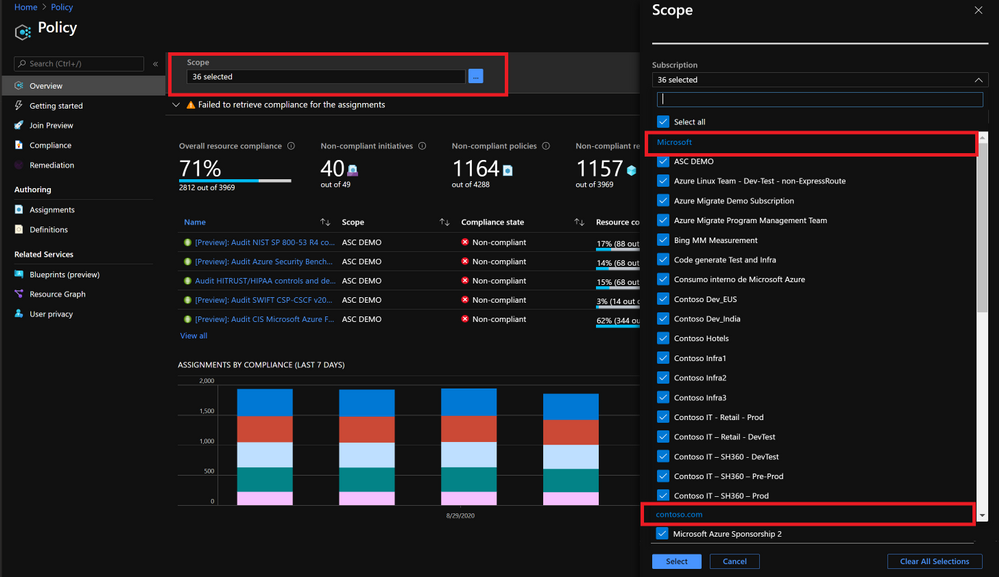
With Azure Policy, Contoso can create, edit and apply policy definitions within the delegated subscriptions, they can also get a compliance snapshot that ensures that managed resources are compliant with corporate or regulatory standards from all three tenants having a full picture of the compliance status. Also, if Contoso develops new policies their intellectual property will be protected by using Azure Lighthouse as they can be centrally managed from their own central tenant.
The Azure Policy portal has been enhanced so you can select multiple scopes that will include a list of managed tenants and subscriptions:
Inventory Tracking and Management
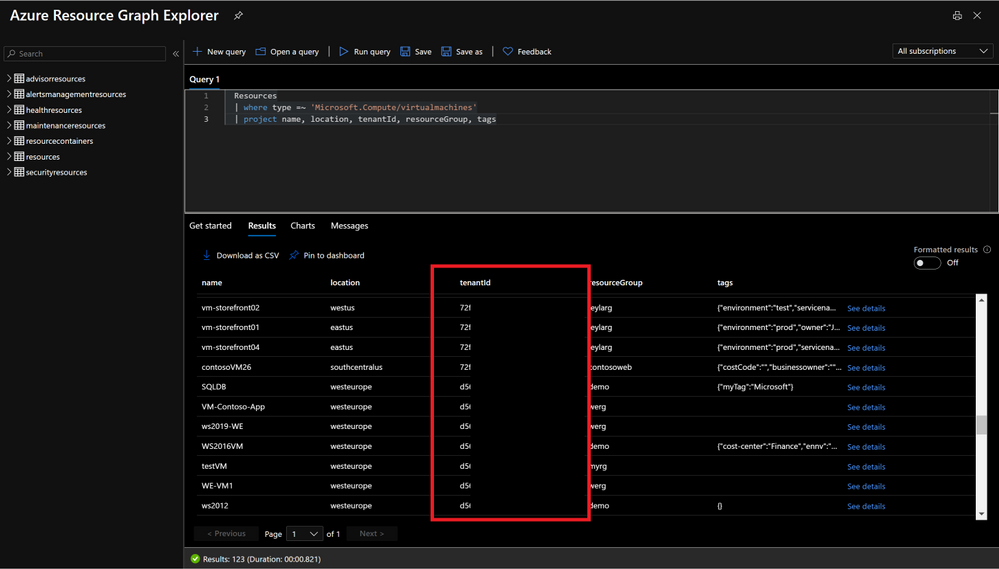
Contoso has now the ability to develop multitenant queries using Azure Resource Graph to filter resources, leverage tags or track changes. The tenant ID can be returned in the query results, so the subscription and delegated tenant can be identified.
Monitoring and Alerting
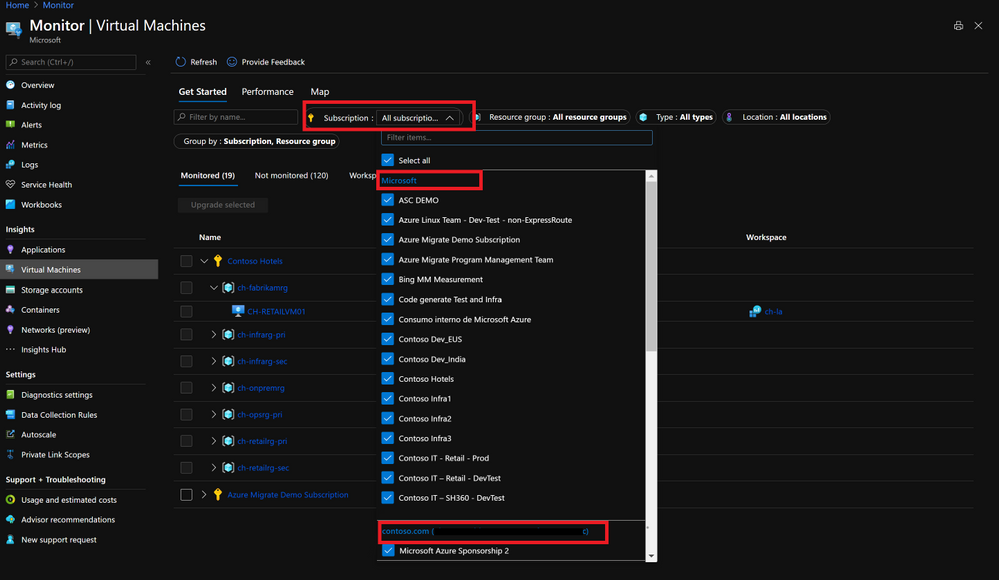
Contoso can also get monitoring and security alerts across all of the tenant’s subscriptions, run multitenant queries using KQL and set up dashboards that provides valuable insights on the managed environments. There is no need to store logs from different entities into a shared log analytics workspace, Microsoft, Fabrikam and Fourth Coffee can keep their logs on a dedicated workspace in their subscription, while Contoso gets delegated access to them and get insights from all tenants. Once again Contoso can choose the scope they want to work with in the portal.
Security and Compliance
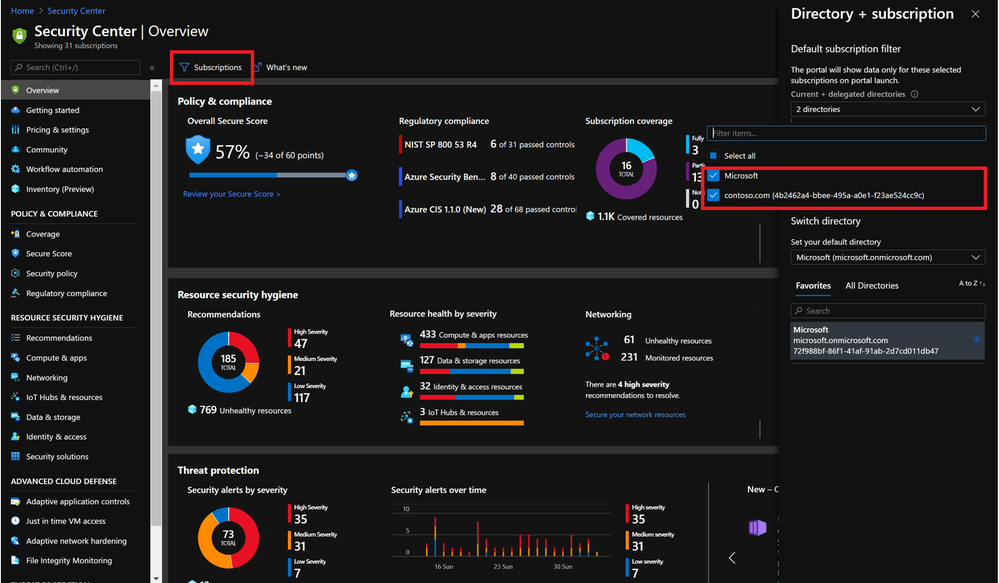
Contoso can offer managed security services by centrally protecting Azure resources with Azure Security Center and Azure Sentinel they can provide proactive/reactive security best practices. Azure Security Center has cross-tenant visibility to manage security posture centrally and take actions on recommendations, detect threats, and harden resources.
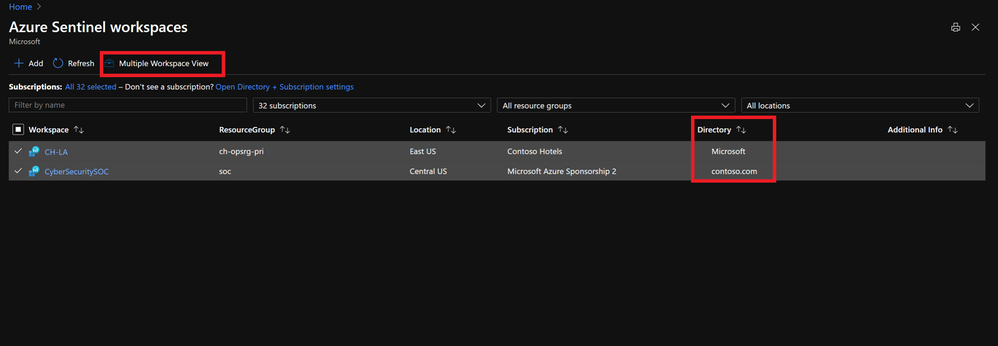
Azure Sentinel when working with Lighthouse, can track incidents and attacks across tenants as well as define cross-tenant KQL queries.
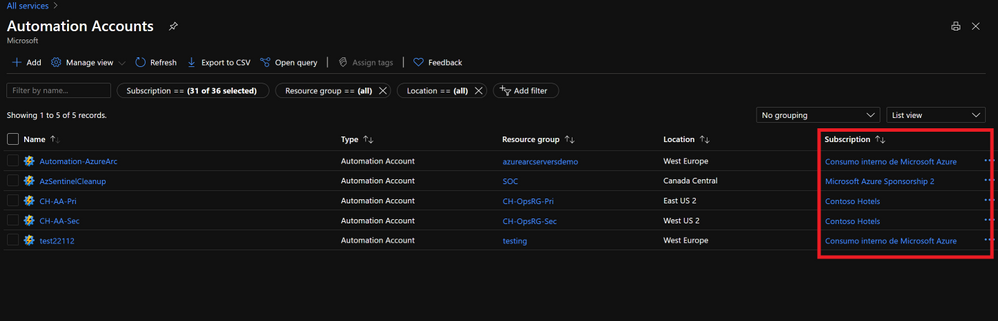
Process Automation and Configuration Management
Azure Automation can be set up at scale, including runbook automation, desired state configuration and update management. Contoso can automate processes running custom scripts on the managed tenants while having their IP protected.
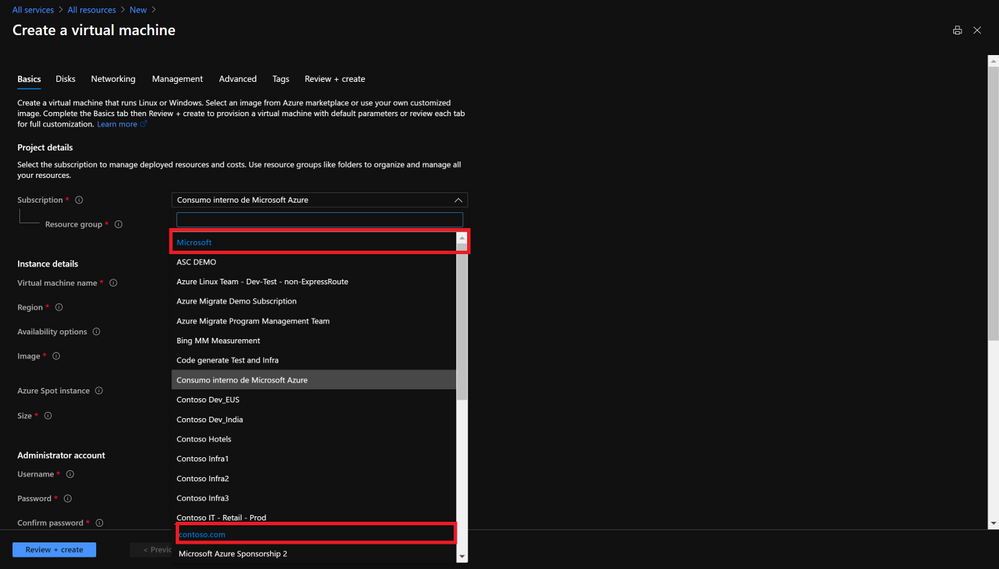
Resource Deployment at Scale
Lighthouse allows Contoso to not only operate but also deploy and configure Azure services on the managed tenants’ subscriptions. Taking care of their networking, storage, virtual machines, container environments and PaaS services. The management of operational tasks of those resources like backup or disaster recovery are very often handed off to specialists like Contoso that can centrally manage backup, restore and replication as well.
Extend Azure management across your environments.
Very often, enterprises have resources on-premises or on other clouds and they need to extend operations to those hybrid and distributed states. Having built processes and offerings using Azure Services and Lighthouse it would be very powerful if those could be stretched to run across on-premises, other clouds, or the edge.
With Azure Arc your on-premises and other clouds deployments become an Azure Resource Manager entity and as such, servers, Kubernetes clusters or data services can be treated as first-class citizens of Azure. As any other ARM resource, they can be organized into resource groups and subscriptions, use tags, policies, assign RBAC and you can even leverage Azure Arc to onboard other services such as Azure Monitoring, Azure Security Center, Azure Sentinel or Azure Automation.
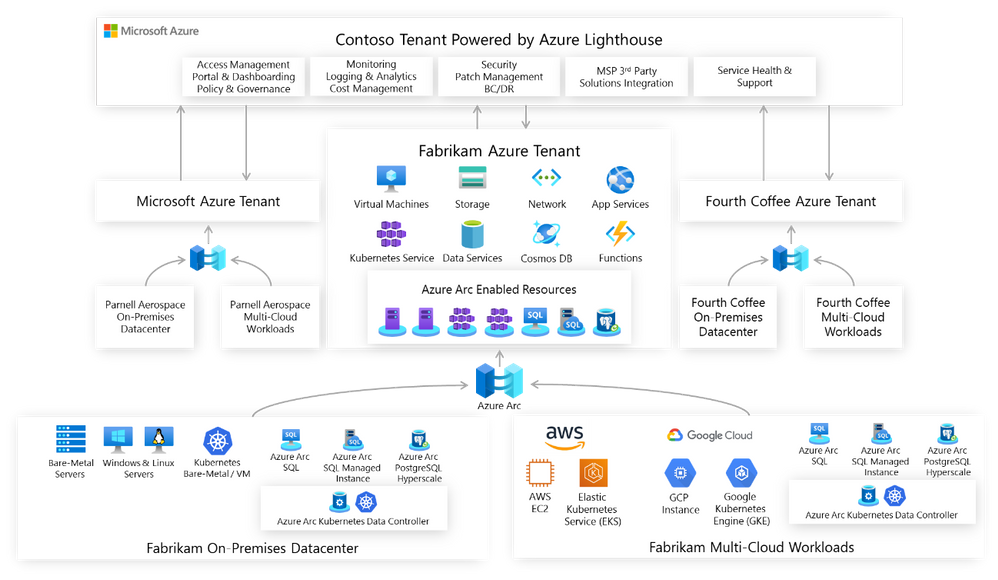
Let’s revisit the Contoso scenario; Microsoft, Fabrikam and Fourth Coffee all have workloads on their on-premises datacenters or in other clouds. With Azure Arc Contoso can not only understand and organize the breadth of operations, but also extend and grow services and offerings provided in Azure into every corner of the portfolio. Using Azure hybrid management services with Azure Arc allows Contoso to adopt cloud-native practices everywhere and Lighthouse will provide the multitenancy required to have a single view into operations.
Governance and Compliance
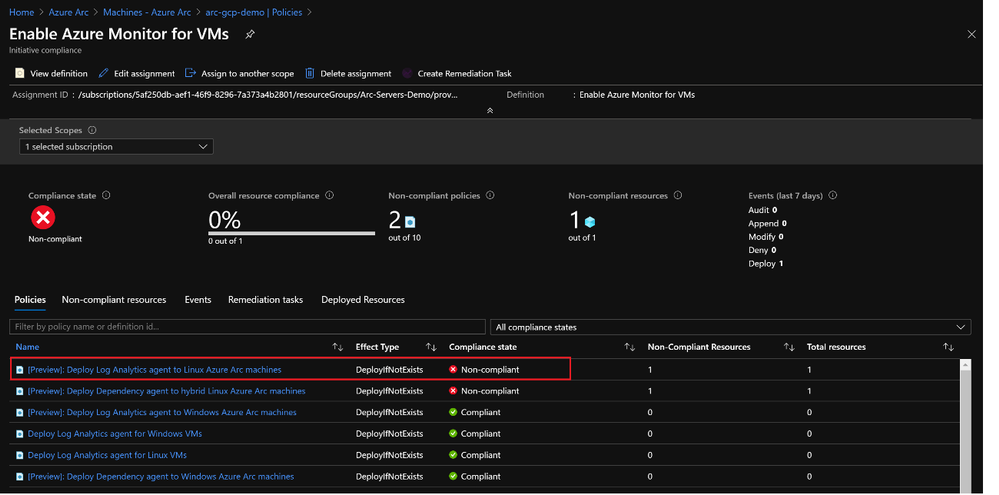
Azure Policies can now be assigned to Azure Arc enabled servers and Kubernetes to entirely manage governance and guarantee corporate compliance. An initiative like the one shown here ‘Enable Azure Monitor for VMs’ will group not only Azure VMs but also Azure Arc enabled servers both Linux and Windows machines having a full compliance snapshot.
Inventory Management
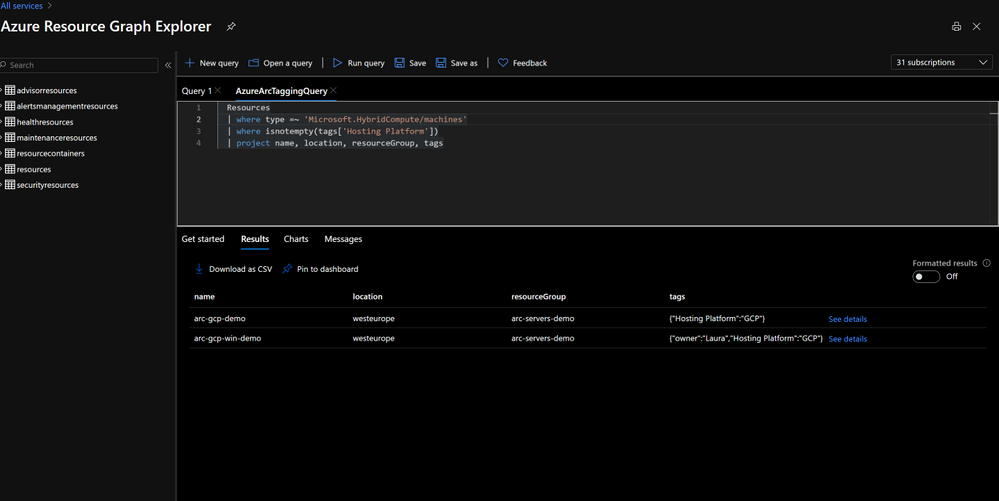
Multitenant queries with Azure Resource Graph, can now also include Azure Arc enabled resources with filtering, using tags or tracking changes.
Hybrid Services Onboarding at Scale
Contoso can automate the deployment of agents and onboard Arc enabled resources into Azure Monitoring, Azure Automation, Azure Security Center or Azure Sentinel either by using Azure Polices or Azure Arc’s extension management capabilities. The extension management feature for Azure Arc enabled servers provide the same post-deployment configuration and automation tasks that you have for Azure VMs.
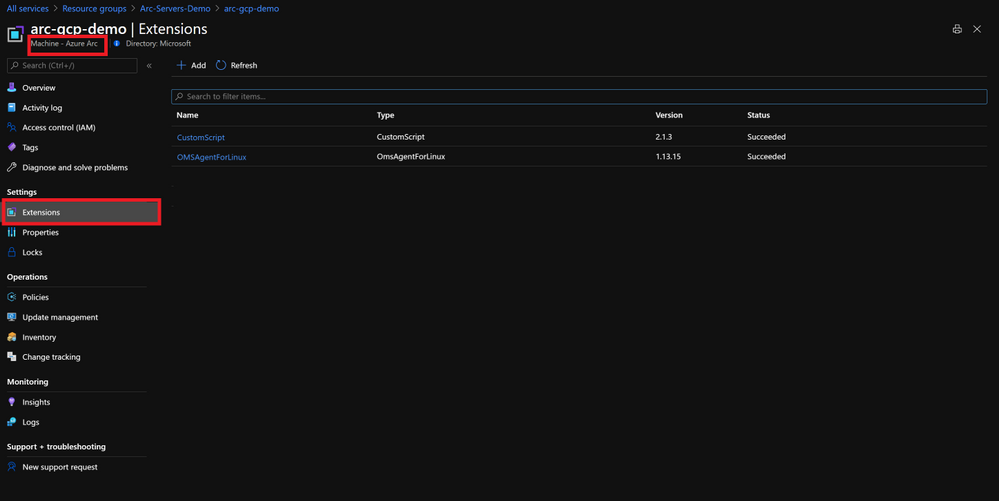
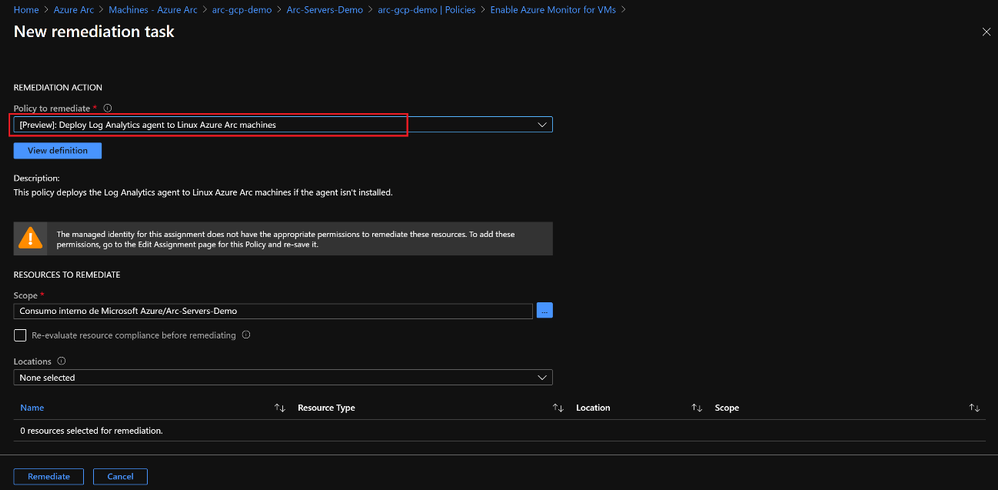
Contoso can also leverage policies to guarantee that all resources are properly onboarded into services like Azure Monitor by setting up remediation tasks that use the extension management feature, it will fix automatically any non-compliant resources.
Access Management
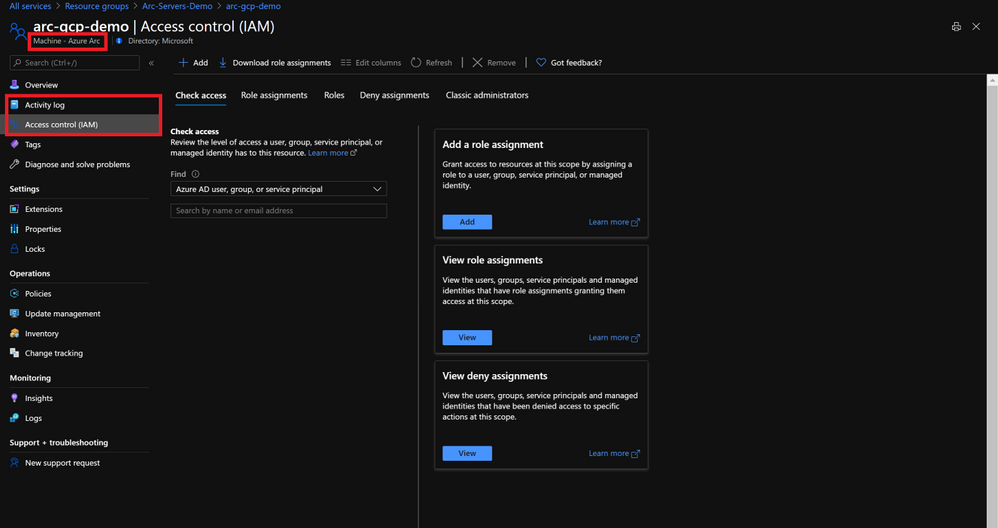
Auditability provided by Lighthouse is kept as Azure Arc supports RBAC and the Azure activity log will keep track of actions.
Application and Data Management at Scale
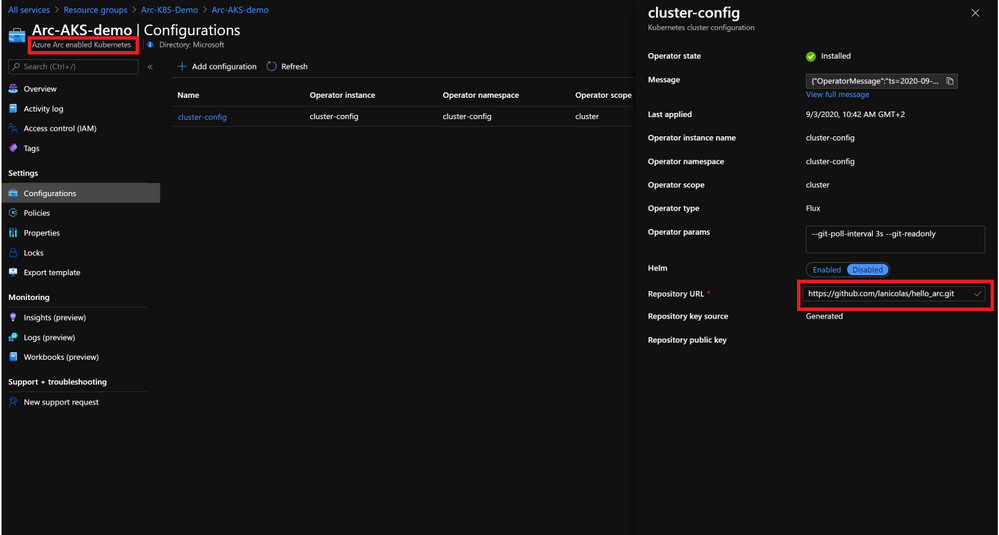
Contoso can use configuration as code and uniformly govern and deploy containerized application using GitOps-based configurations across on-premises, multi-cloud, and edge. Contoso can link a cluster to a Git repo that becomes the single source of truth for container deployments and applications, Azure Arc enabled Kubernetes will make sure there is no drift between Git and what is running in the cluster.
Azure Arc enabled data services allows Contoso to run Azure data services like Azure SQL Managed Instance and Azure Database for PostreSQL Hyperscale on any Kubernetes cluster with unified management and familiar tools.
With Azure Arc and Azure Lighthouse, Contoso is empowered to create cloud native management operations with no location boundaries.
Get Started
On this blog post we touched on a set of scenarios that are possible by combining Azure Arc with Azure Lighthouse and that will empower you to build reliable and at scale operations for hybrid and multi cloud environments with cross-tenant capabilities. To get started with Azure Lighthouse check out these links:
To get started with Azure Arc visit these links:
by Scott Muniz | Sep 22, 2020 | Azure, Technology, Uncategorized
This article is contributed. See the original author and article here.
These days, it seems like Kubernetes is one of the most popular conversation topics in the world of Cloud and modern applications. The question is not if your organization uses Kubernetes, it is when the organization will use it.
This post will focus on the need for standardization and not if Kubernetes is meeting your business and technical requirements or not. So now we established the assumption that you already use it, let’s talk about a couple of challenges.
Challenges #1 – Sprawling
If you are in the process of modernizing your applications and adopting cloud-native design patterns, you know, like “next-gen” scalability, availability, security, etc. you probably have some notion of why Kubernetes. But the challenge, in this case, is the Kubernetes cluster sprawl that is about to hit you.
Rather you are building it yourself on-premises, using the gazillion Kubernetes flavors out there, installing on bare-metal or deploying one of the managed Kubernetes offerings the cloud providers has to offer, the problem remains, and all of a sudden you are in the business of managing Kubernetes clusters, well, all over the place. I like to call this “my fleet is out of control” :)
Challenge #2 – “I am drifting away…”
You got your clusters, good for you! But how do you keep all these clusters configured the way you left it?! Don’t you want them to be all meet your configuration baseline?! You do!
It’s not just your clusters that matter because after all, the applications are what drives the business!
Looking at both situations, you can see a recurring theme. This is really about making sure no configuration, rather on the cluster and/or the applications deployed on it are drifting away. You want this because otherwise, you might be facing an outdated application or a cluster that is not meeting for example your security needs.
Azure Arc enabled Kubernetes + GitOps == Wining
Now that we addressed these couple of challenges, we can talk a solution – enters Azure Arc enabled Kubernetes with GitOps configurations.
By extending or “stretching” the Azure Resource Manager (ARM) control plane, we are able to project your Kubernetes clusters which are deployed OUTSIDE of Azure as 1st class citizens inside Azure next to existing resources, for example, as you can see in the figure below, Azure Kubernetes Service (AKS) clusters reside next to Azure Arc ones.
By doing so, you get a single interface to rule them all which is the start of the solution to challenge #1 – the sprawl of clusters.
 Azure Arc enabled Kubernetes clusters alongside AKS clusters
Projecting the clusters is the fundamental building block and now you apply GitOps Configurations for these clusters. Azure Arc with Kubernetes and GitOps is not scary as one might think, the concept and the flow are very straight forward.
Generally speaking, GitOps with Kubernetes is about deploying your applications based on Git repository which represents the “source of truth” or the baseline for this app deployment.
It relays on a Kubernetes Operator, which Is the Flux Operator in the Azure Arc Kubernetes case to “listen” if changes are being made on the baseline, meaning the repo. If such changes occur, the operator will initiate a rolling update Kubernetes deployment, deploying the new Pods and terminating the old one.
This can be done against a standard Kubernetes YAML manifest or a Helm charts release, using also the Help Operator with conjunction to the Flux one (which also gets deployed automatically).
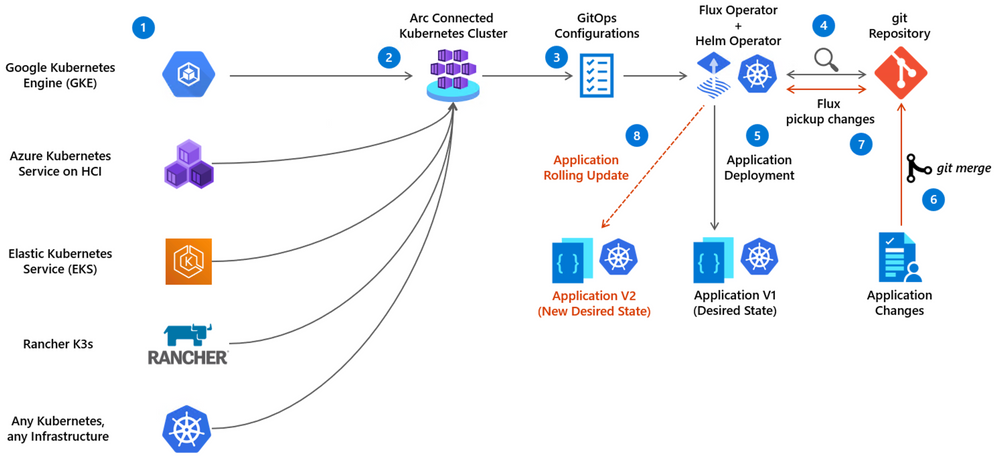 Application deployment GitOps flow with Azure Arc enabled Kubernetes
- Existing Kubernetes clusters are already deployed
- Azure Arc Kubernetes connected cluster is created
- The user creates Azure Arc Kubernetes cluster GitOps Configuration
- The Flux Operator (and optionally the Helm Operator) is deployed on the cluster and starts” listening” to the git repository with the user’s application code
- The Flux operator initiates the user’s application deployment on the cluster, representing the current desired state
- User is updating the application (creating a new app version) and merge changes to the repository
- Flux pick up a change to the Git repository
- Flux operator initiates a new user’s application version deployment on the cluster while removing old version application pods, resulting in a new Desired State
Cluster-level Configuration vs. Namespace-level Configuration
Cluster-level Configuration
With Cluster-level GitOps Configuration, the goal is to have a baseline for the “horizontal components” or “management components” deployed on your Kubernetes cluster which will then be used by your applications. Good examples are Ingress Controller, Service Meshes, Security products, Monitoring solutions, etc. Having such deployments as part of your GitOps Configuration will assure your cluster is meeting the cluster baseline standards.
Namespace-level Configuration
With Namespace-level GitOps Configuration, the goal is to have the Kubernetes resources deployed only in the namespace selected. The most obvious use-case here is simply your application and it’s respective pods, services, ingress routes, etc. Having such deployments as part of your GitOps Configuration will assure your applications are meeting the Kubernetes applications baseline standards.
 Azure Arc enabled Kubernetes GitOps Configurations
So, as you can see, by having the same GitOps Configurations for all your Kubernetes clusters, managed by Azure Arc you are solving challenge #2 and able to govern a potential cluster and application config and versioning drifts.
Get Started Today!
In this post we briefly touched on the power of using Azure Arc enabled Kubernetes alongside its native GitOps Configurations capabilities. Having all your Kubernetes clusters projected as Azure resources and have the same GitOps Configurations for all of them will allow you to gain much better control for both fleet management and deployment baselines as well as drift avoidance.
To get started, visit the Azure Arc Jumpstart GitHub repository, where you can find more than 30 Azure Arc deployment guides and automation, including how to deploy end-to-end GitOps flows against your Azure Arc enabled Kubernetes clusters as well as visit the official Azure Arc documentation page.
In addition, check out these additional great Azure Arc blog posts!
by Scott Muniz | Sep 22, 2020 | Azure, Technology, Uncategorized
This article is contributed. See the original author and article here.
We are excited to announce several updates to Azure Migrate’s assessment and migration capabilities. Cloud migration can be a complex project, which is why Microsoft is committed to advancing its migration services to support all your migration needs through expanded scenarios and capabilities. Azure Migrate is Microsoft’s central service for datacenter migration. It features a central hub of migration tools to discover, assess, and migrate your datacenter to the cloud. The service is free to use with your Azure subscription, accessible through the Azure portal.
First, begin your migration project by performing a datacenter discovery to plan the migration and mitigate risks. Azure Migrate helps you discover servers, inventory the applications running on them, and identify dependencies between servers. The discovery process helps you identify and group the workloads to be migrated and plan your migration waves. Server discovery is completely agentless and can discover servers running on any cloud including servers that are virtualized on VMware or Hyper-V, physical machines, or virtual machines running in other public clouds. For VMware virtual machines, Azure Migrate can perform agentless application discovery and dependency mapping at scale, with a single Azure Migrate appliance now capable of analyzing dependencies for up to 1000 virtual machines in one project. This allows you to visualize connections and process-level details between machines, which helps with grouping them for assessment and migration. You can learn more about agentless dependency mapping here.
With a better understanding of your server estate and dependencies, you can generate an assessment report to understand Azure readiness, cloud cost estimations, and right-sizing recommendations. Read more about best practices for assessments in our prioritizing assessments blog.
With the assessment complete, you’ll be ready to migrate your workloads safely and efficiently. The Azure Migrate Server Migration tool now lets you to migrate UEFI machines to Azure Gen 2 virtual machines. With no boot type conversion needed, you can migrate UEFI machines as is and take advantage of additional Gen 2 virtual machine features. You can now also select a specific Availability Zone to place migrated machines in when migrating to an Azure Region that supports Availability Zones to achieve increased resiliency and security.
Looking for more than just a lift-and-shift server migration for your datacenter? Azure Migrate now supports migrating .NET applications to Azure Kubernetes Service (AKS). The brand-new feature is available in preview, and allows you to containerize ASP.NET applications and run them on Windows containers in AKS.
by Scott Muniz | Sep 22, 2020 | Uncategorized
This article is contributed. See the original author and article here.
With remote work being the new norm these days, it is critical to safeguard your business data from unauthorized access while at the same time make your employees, partners, and customers more productive. Microsoft runs on trust. We continue to provide you enterprise grade and frictionless security along with comprehensive compliance offerings.
Today at Microsoft Ignite 2020 we are excited to announce the following new security and compliance controls in SharePoint and OneDrive that help you to secure and govern your data holistically in this remote work era. We categorized them under three areas:
- Secure external collaboration in SharePoint and OneDrive
- Preventing data loss through end points and user sessions
- Comprehensive compliance and best performance
Secure external collaboration in SharePoint/OneDrive
Automatic expiration of external access
With external collaboration so paramount for your business growth, equally important is to govern the external users access. We are expanding our external collaboration offering with one more critical control. We are announcing the general availability of automatic expiration of external access, roll out starting today.
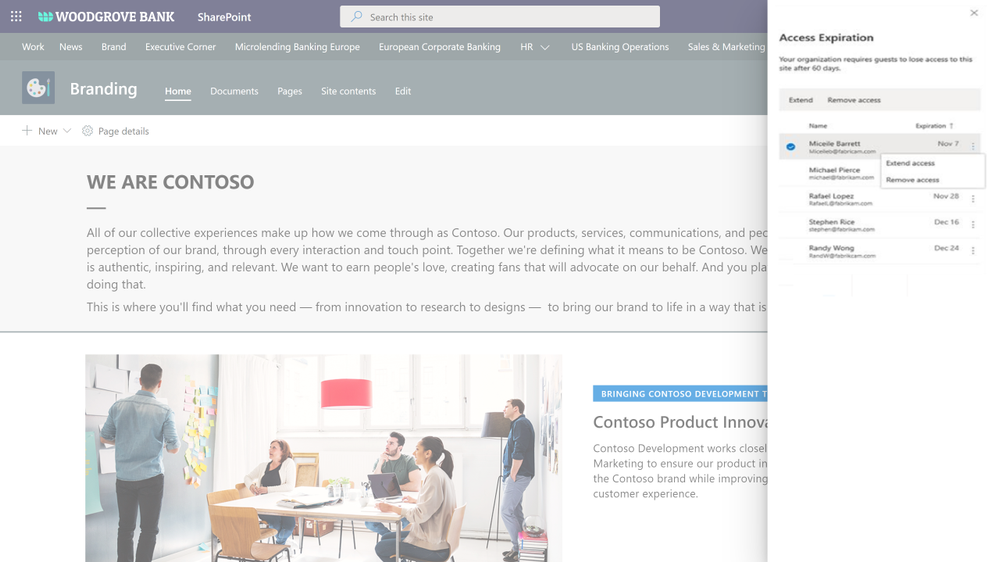
You can now simply set an expiration, say 30 days, for external access in your organization. From the day an external guest user got invited to a site or a file, the timer starts and the access is automatically revoked upon expiration. In addition, site admins can get detailed reports of external access and can extend the expiration for specific external users as needed. Learn more here.
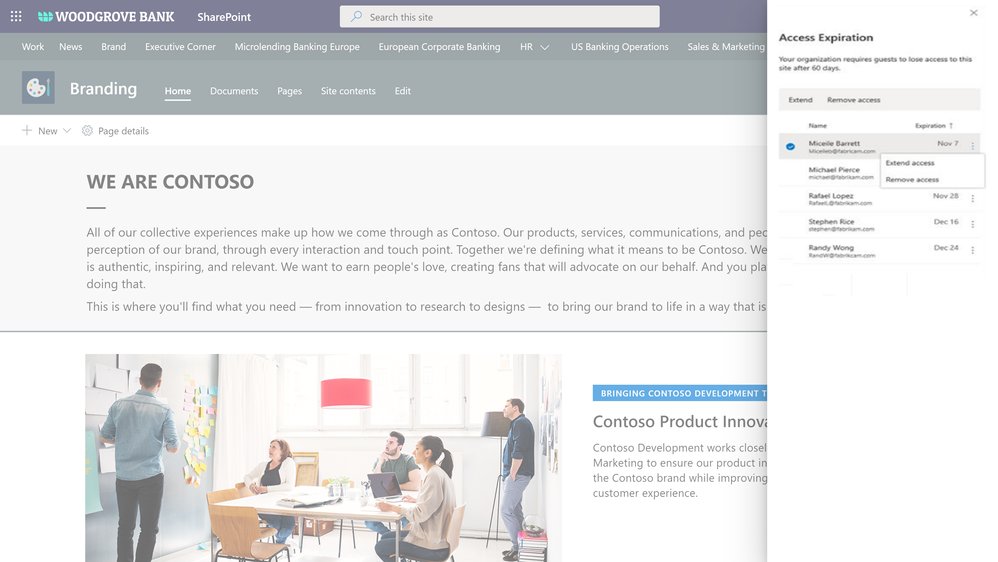 Figure. SharePoint site collection admin manages the external access expiration for a site
External sharing policies with Microsoft Information Protection sensitivity labels
We are continuing to innovate in our Microsoft Information Protection (MIP) journey to help you secure your sensitive content holistically and throughout its lifecycle. This spring we announced MIP sensitivity labels for securing Teams, SharePoint Sites, and Microsoft 365 Groups. We started with associating privacy and device policies with sensitivity labels.
Today we are announcing external sharing policies with Microsoft Information Protection sensitivity labels, coming soon in public preview. You can now associate external sharing policies to the sensitivity labels making it even more powerful to achieve secure external collaboration with frictionless experience to your users.
Administrators can tailor the external sharing settings according to the sensitivity of the data and business needs. For example, for Confidential label you may choose to block external sharing whereas for General label you may allow it. Users have to simply select the appropriate sensitivity label while creating a SharePoint site or Team, the appropriate external sharing policy for SharePoint content is automatically applied.
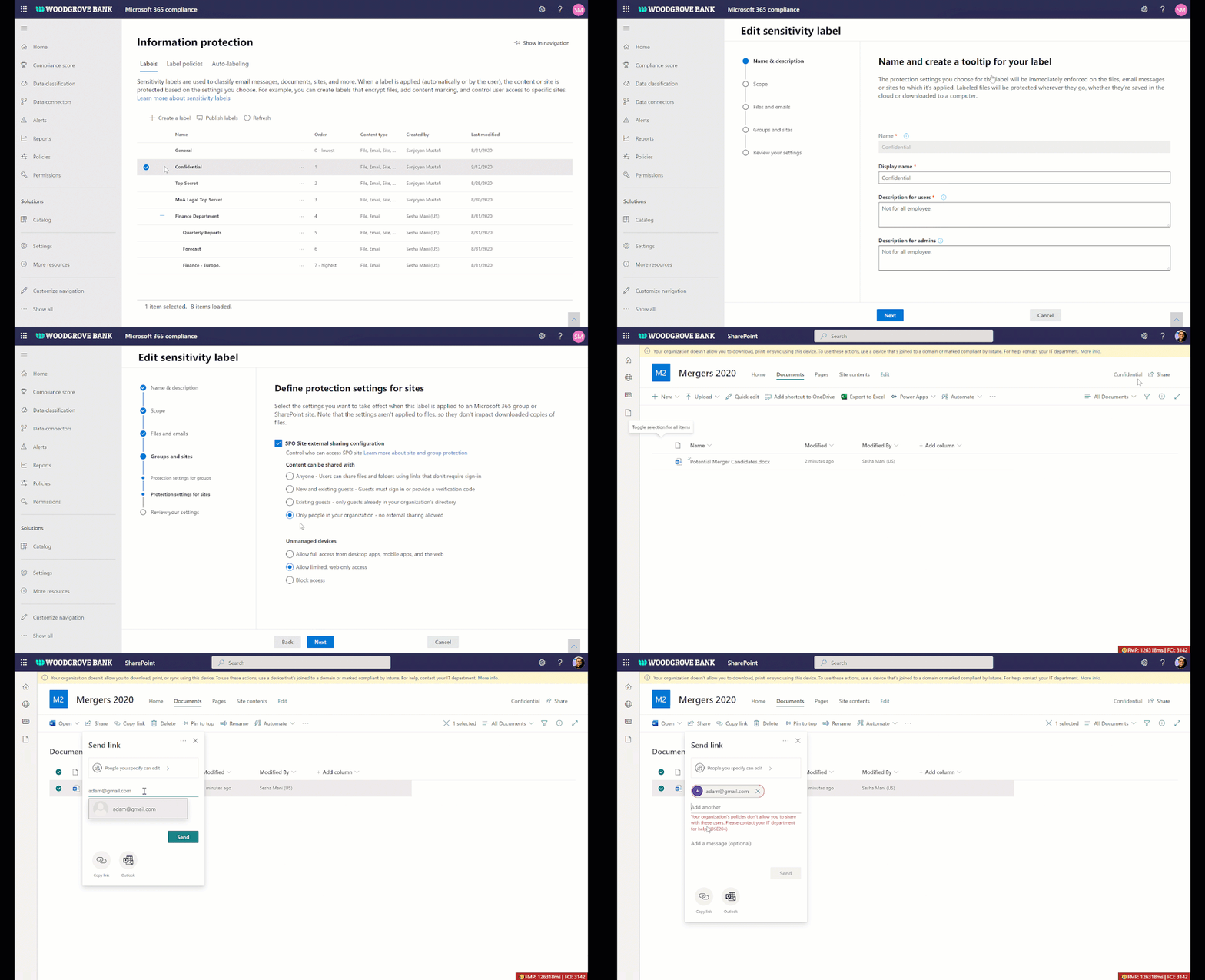 Figure. Microsoft Information Protection sensitivity labels with external sharing policies
Access governance insights for files in SharePoint, OneDrive, and Teams
As your workforce expands across the globe and you see exponential growth in digital data, administrators need a way to holistically govern the top sites that matter the most, for example top sites that contain most number of sensitive documents or top sites that are over shared. The access governance insights dashboard in SharePoint admin center aims to solve that need.
You can now see access centric insights for your top sites with most sensitive documents and over shared sites. Insights allow you to validate the access policy settings such as unmanaged device and external sharing are appropriate for your security posture and as needed take actions and tweak them in SharePoint admin center. This feature is coming to private preview soon, if interested you can sign-up here.
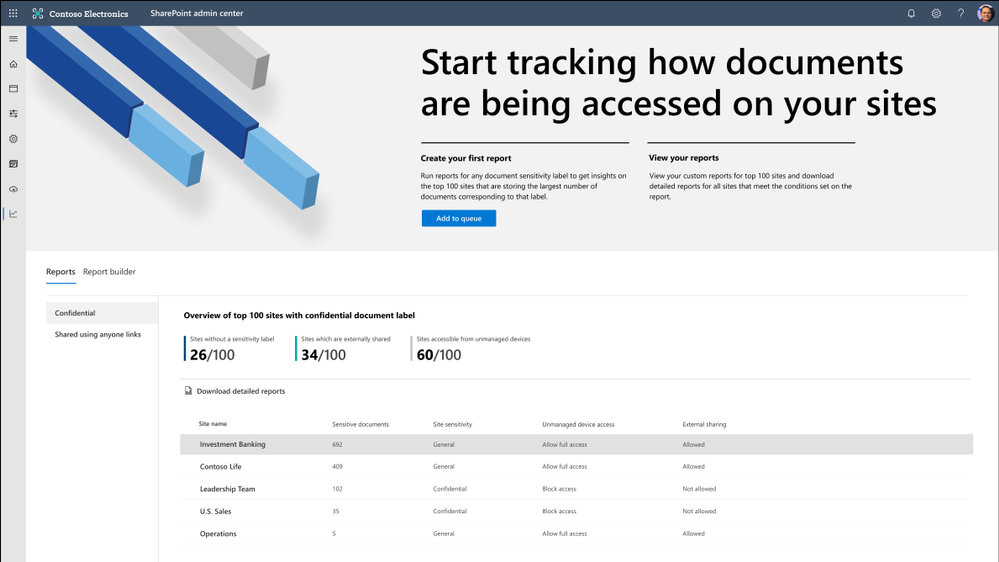 Figure. SharePoint admin center and data access governance insights
Data loss prevention (DLP) policy for blocking anyone links for sensitive content
You want to share sensitive content with external collaborators. However, due to sensitivity of the content, you want to avoid external users accessing it using anyone link and instead require authenticated access.
We are announcing DLP policy rule to block anyone with the link option for sensitive content, generally available now. Administrators can now configure DLP rules with an action to block sharing and access to the sensitive content using anyone with the link. Learn more here.
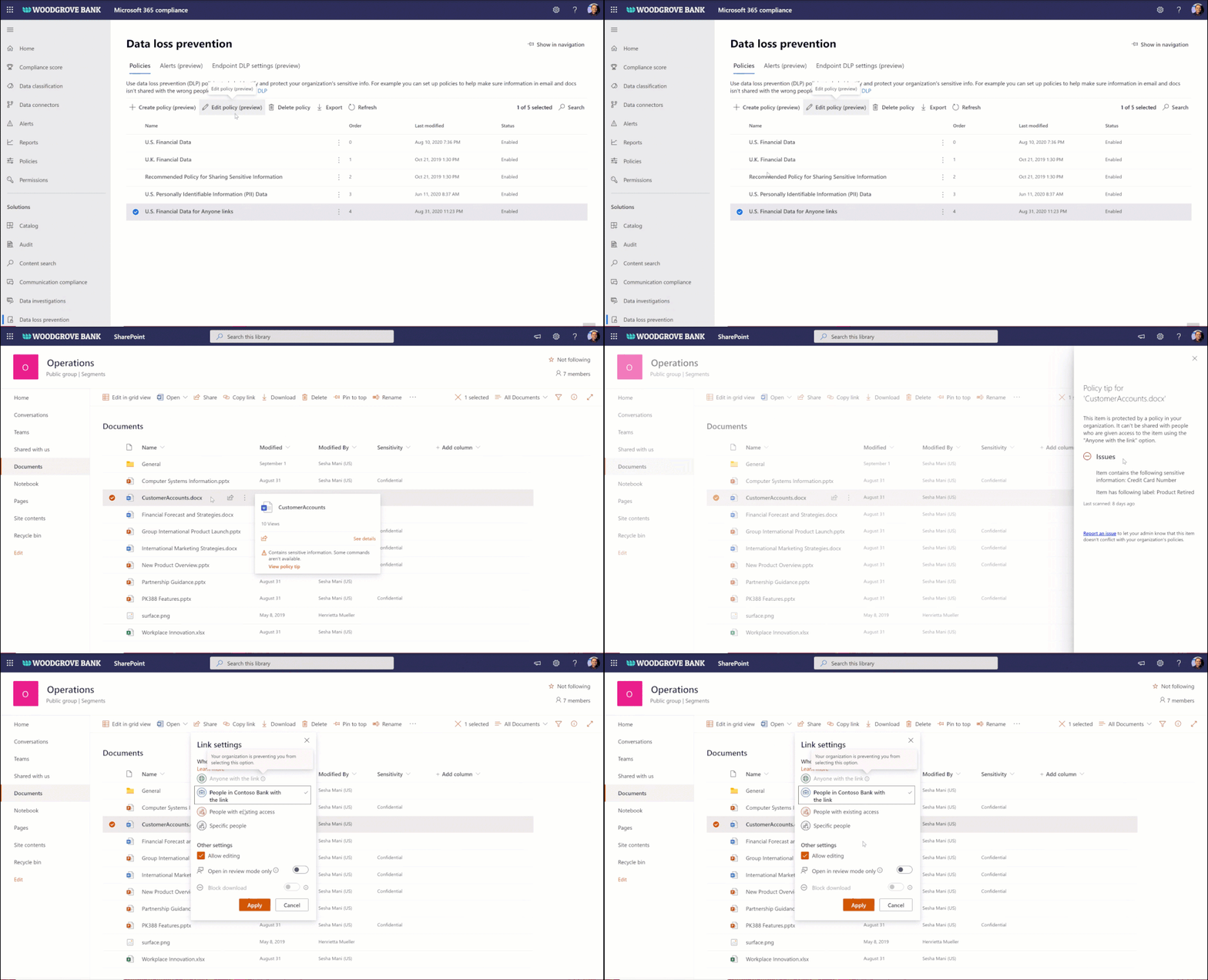 Figure. Microsoft 365 DLP policy blocking ‘anyone with the link’ sharing option
Preventing data loss through end points and user sessions
Endpoint data loss prevention (DLP)
With remote working and proliferation of devices, end points have exponentially grown, we are helping you to protect and avoid leakage of sensitive content at all end points on Windows devices. Learn more about Endpoint DLP here and it is available in public preview.
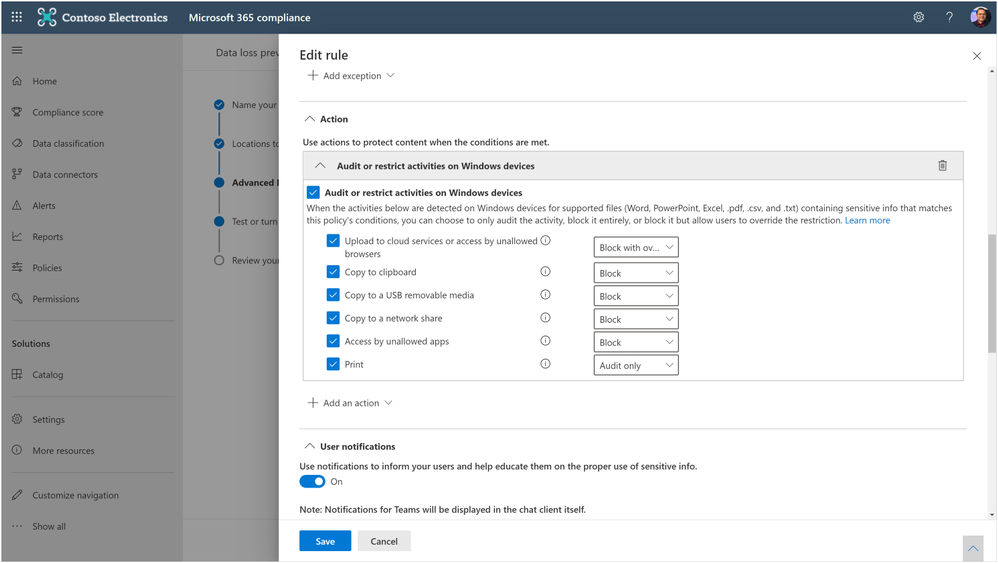 Figure. Microsoft 365 compliance admin editing the end point DLP policy rules
Unified session sign-out powered by continuous access evaluation
Not only end points, we are also helping you to prevent data loss in the event of device lost or theft or account compromise. Today we are announcing the public preview of unified session sign-out in Microsoft 365, including SharePoint and OneDrive. With one click in Microsoft 365 admin center, you can now sign out a user instantly from all their sessions on all devices, including both managed & unmanaged devices. Learn more here.
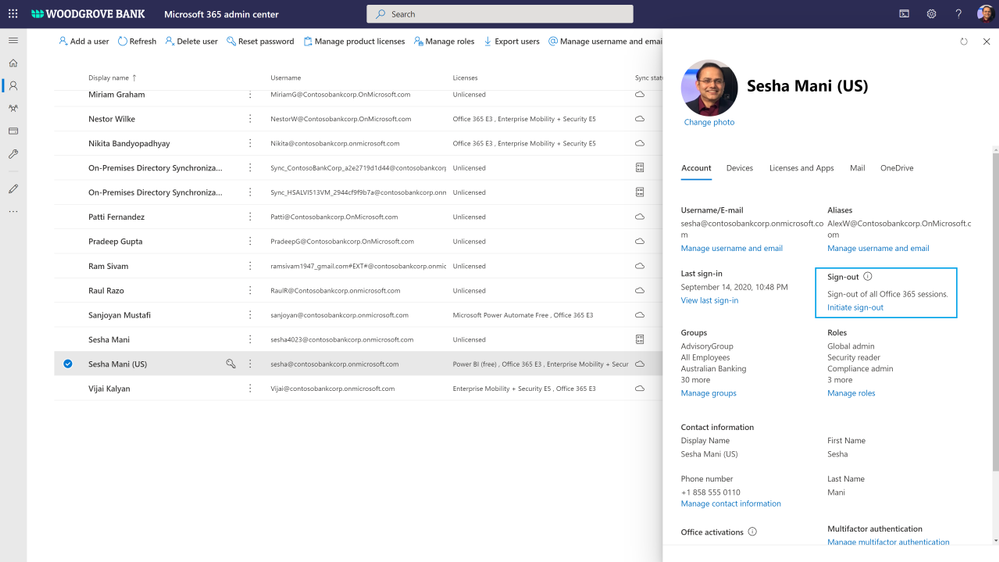 Figure. Microsoft 365 admin signs out a user from all sessions on all devices
Comprehensive compliance and best performance
We announced multi-geo, records management, and many other compliance controls for SharePoint and OneDrive. Today we are excited to add one more compliance control to that portfolio.
Information barriers for OneDrive and SharePoint
You may have compliance needs to put barriers in collaboration and communication between certain set of users in your organization to avoid conflict of interest. You can now achieve these needs in Microsoft 365, we are announcing general availability of information barriers for SharePoint and OneDrive.
You can create information segments per your compliance needs, for example Investment banking vs Advisory, and then create barriers for communication and collaboration between those segment users. In near future, as a SharePoint administrator or a site owner you can manage the segments association for a site, as illustrated in the pictures below. You can learn more here and here.
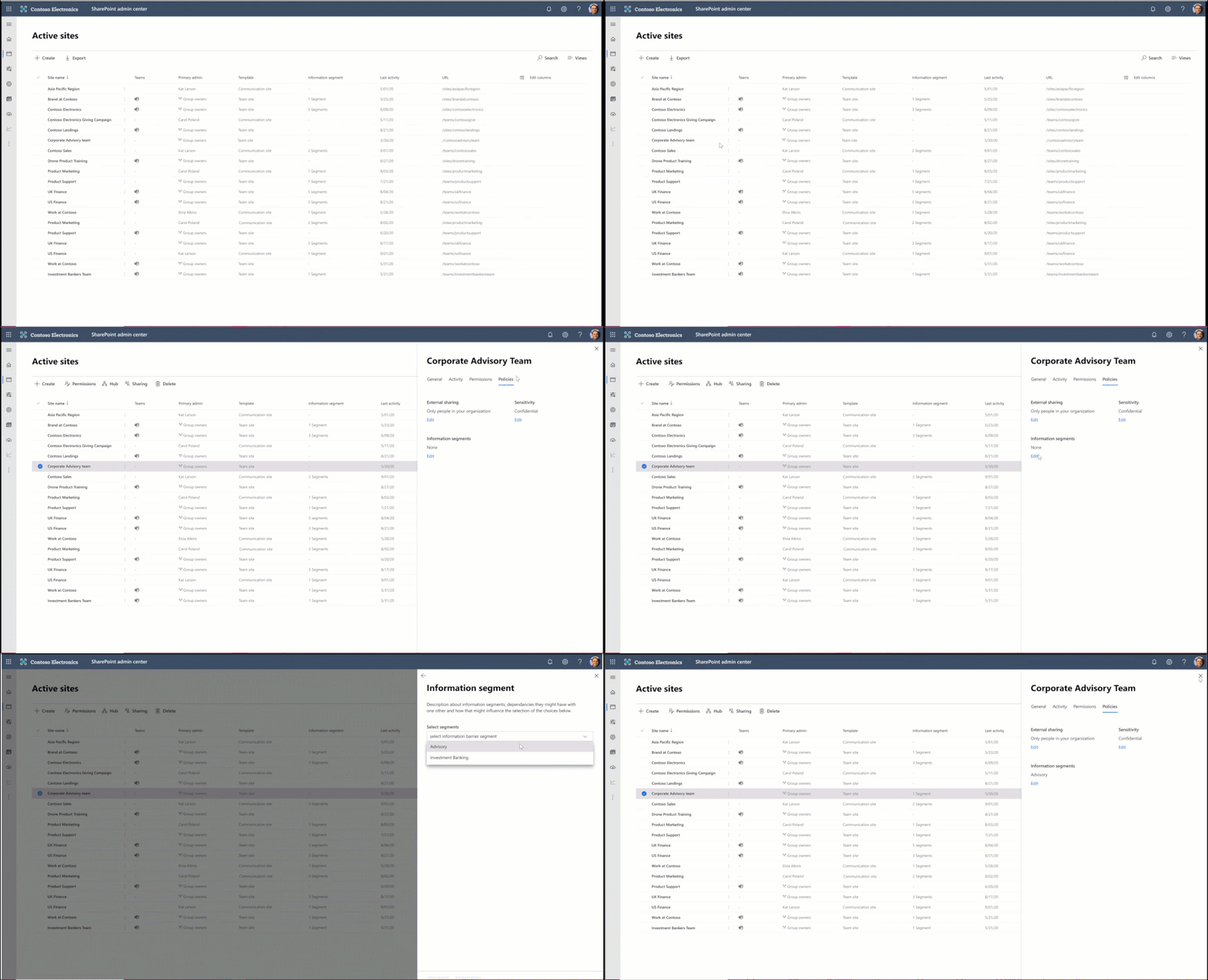 Figure. SharePoint admin experience to manage information segments for sites
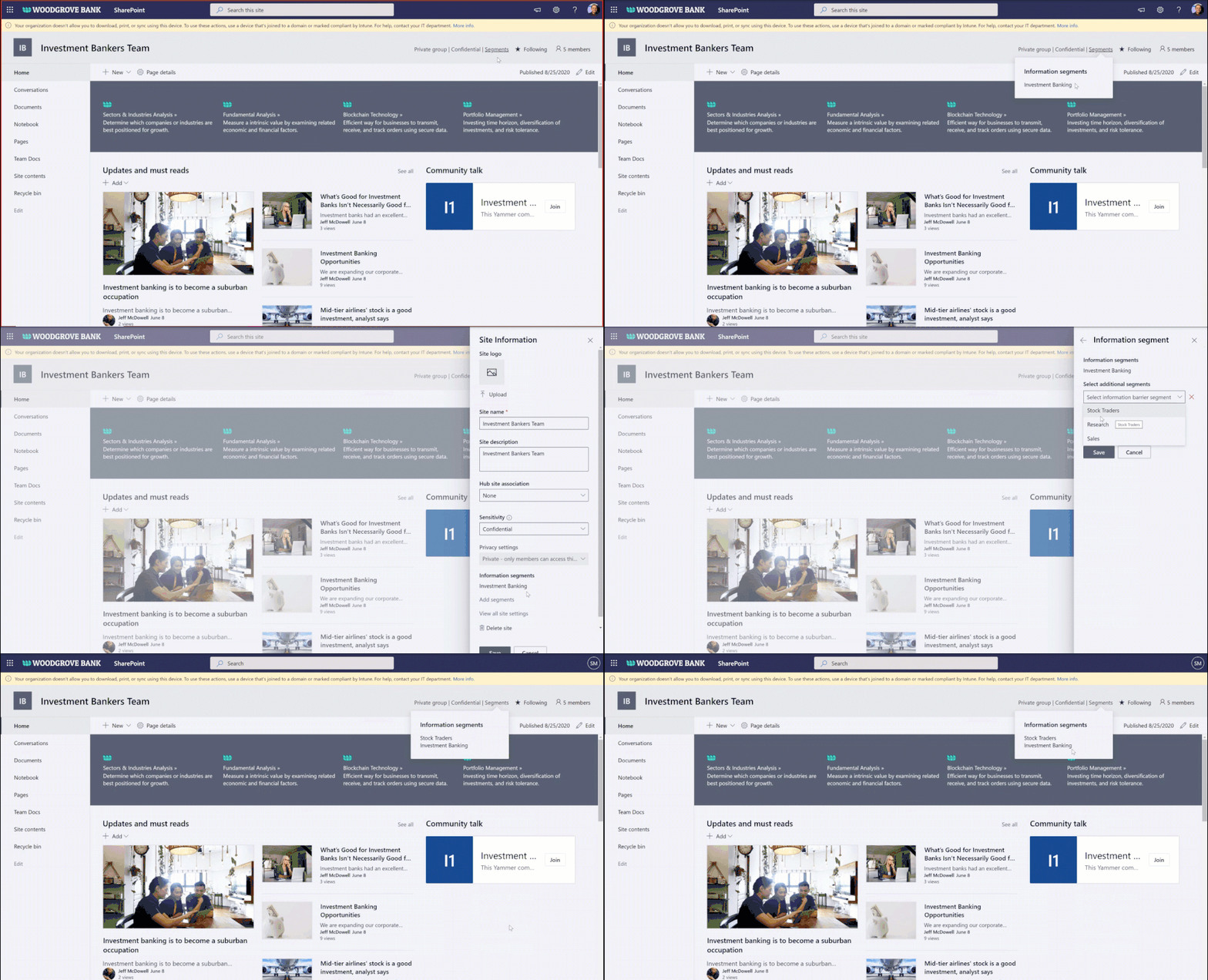 Figure. SharePoint site owner experience to manage information segments for a site
Microsoft 365 Network Insights
Network connectivity to Microsoft 365 is critical to offer the best performant experience to your users for accessing the Microsoft 365 content. We are excited to announce Microsoft 365 Network Insights, available in public preview today, that help in designing network perimeters for your office locations across the globe. These insights provide live performance data for common issues for each geographic location where users are accessing your content from. To learn more, check out the article here.
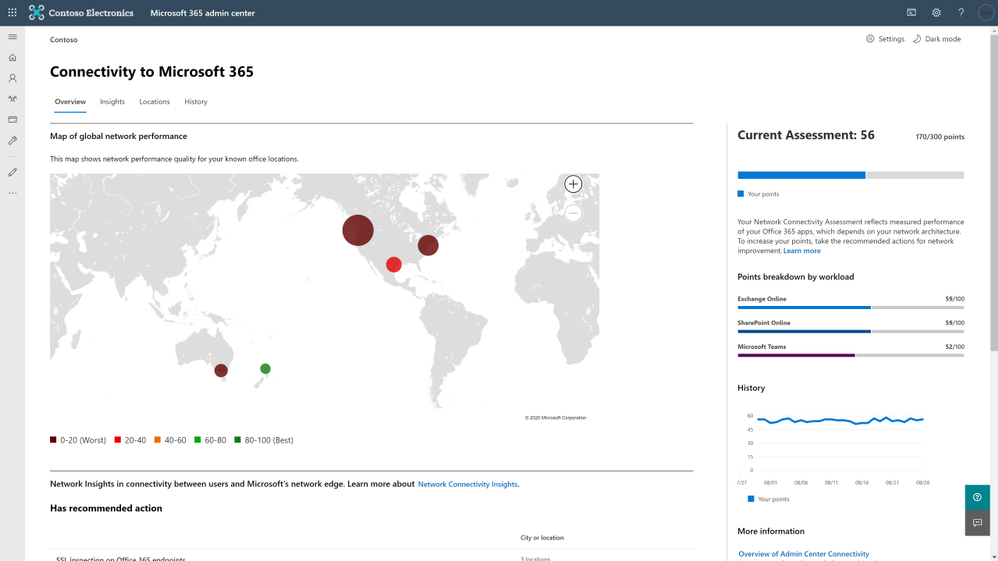 Figure. Microsoft 365 network insights showing global network performance
For licensing information for these features, check out the respective product documentations.
In addition to the above features, we have a beautiful security and compliance cook book for SharePoint, OneDrive, and Microsoft 365 administrators. You can download SharePoint and OneDrive Security Cook Book for FREE.
To take advantage of all these capabilities in Microsoft 365, we are also helping you to migrate content to Microsoft 365 from on-premises and other cloud sources. Check out our new migration manager.
To learn more about our SharePoint Administration and Migration improvements, check out SharePoint admin and migration announcements at Ignite 2020. Also, check out the Microsoft Lists announcements at Ignite 2020 and Top OneDrive Moments from Microsoft Ignite 2020.
Getting started
To learn more about the above features in detail, check out the product documentation articles below:
To participate in the private previews, sign up here: https://aka.ms/SPSecurityPreviews
Here are our Ignite 2020 videos related to security and compliance controls in SharePoint & OneDrive & Microsoft 365 (Note that links will become active once Ignite videos are live, check these links out on 9/23/2020):
Check out many more Ignite sessions in the Ignite website and Microsoft 365 Adoption Center: Virtual Hub.
If you are new to Microsoft 365, learn how to try or buy a Microsoft 365 subscription.
As you navigate this challenging time, we have additional resources to help. For more information about how we are responding together to COVID-19, visit our Remote Work site. We’re here to help in any way we can. Stay safe!
Thank you!
Sesha Mani – Principal Group Product Manager (GPM)
Microsoft 365, SharePoint and OneDrive, Security & Compliance

by Scott Muniz | Sep 22, 2020 | Azure, Technology, Uncategorized
This article is contributed. See the original author and article here.
We are delighted to announce the availability of a major release for solutions to run Oracle WebLogic Server (WLS) on Azure Linux Virtual Machines. The release is jointly developed with the WebLogic team as part of the broad-ranging partnership between Microsoft and Oracle. The partnership also covers joint support from Oracle/Microsoft and a range of Oracle software running on Azure. Software available under the partnership includes Oracle WebLogic, Oracle Linux and Oracle Database as well as interoperability between Oracle Cloud Infrastructure (OCI) and Azure. This major release covers various common use cases for WLS on Azure, such as base image, single working instance, clustering, load balancing via App Gateway, database connectivity and integration with Azure Active Directory. WLS is a key component in enabling enterprise Java workloads on Azure. Customers are encouraged to evaluate these solutions for full production usage and reach out to collaborate on migration cases.
Use Cases and Roadmap
The partnership between Oracle and Microsoft was announced in June of 2019. Under the partnership, we announced the initial release of the WLS on Azure Linux Virtual Machines solutions at Oracle OpenWorld 2019. The solutions facilitate easy lift-and-shift migration by automating boilerplate operations such as provisioning virtual networks/storage, installing Linux/Java resources, setting up WLS as well as configuring security with a network security group. The initial release supported a basic set of use cases such as single working instance and clustering. In addition, the release supported a limited set of WLS and Java versions.
This release expands the options for operating system, Oracle JDK, and WLS combinations. The release also automates common Azure service integrations for load-balancing, databases and security. The database integration feature supports Azure PostgreSQL, Azure SQL as well as the Oracle Database running on OCI or Azure. The release is aimed to enable a majority of WLS on Azure Linux Virtual Machines migration cases.

A subsequent release by the end of calendar year 2020 will deliver distributed logging via Elastic Stack as well as distributed caching via Oracle Coherence. Oracle and Microsoft are also working on enabling similar capabilities on the Azure Kubernetes Service (AKS) using the WebLogic Kubernetes Operator.
Solution Details
There are four offers available to meet different scenarios.
- Single Node
- This offer provisions a single Virtual Machine and installs WLS on it. It does not create a domain or start the Administration Server.
- This is useful for scenarios with highly customized domain configuration.
- Admin Server
- This offer provisions a single Virtual Machine and installs WLS on it. It creates a domain and starts up the Administration Server, which allows you to manage the domain.
- Cluster
- This offer creates an n-node highly available cluster of WLS Virtual Machines, ready for Java EE session replication. The Administration Server and all managed servers are started by default, which allow you to manage the domain.
- Dynamic Cluster
- This offer creates a highly available and scalable dynamic cluster of WLS Virtual Machines. The Administration Server and all managed servers are started by default, which allow you to manage the domain.
The solutions will enable a variety of robust production-ready deployment architectures with relative ease, automating the provisioning of most critical components quickly – allowing customers to focus on business value add.
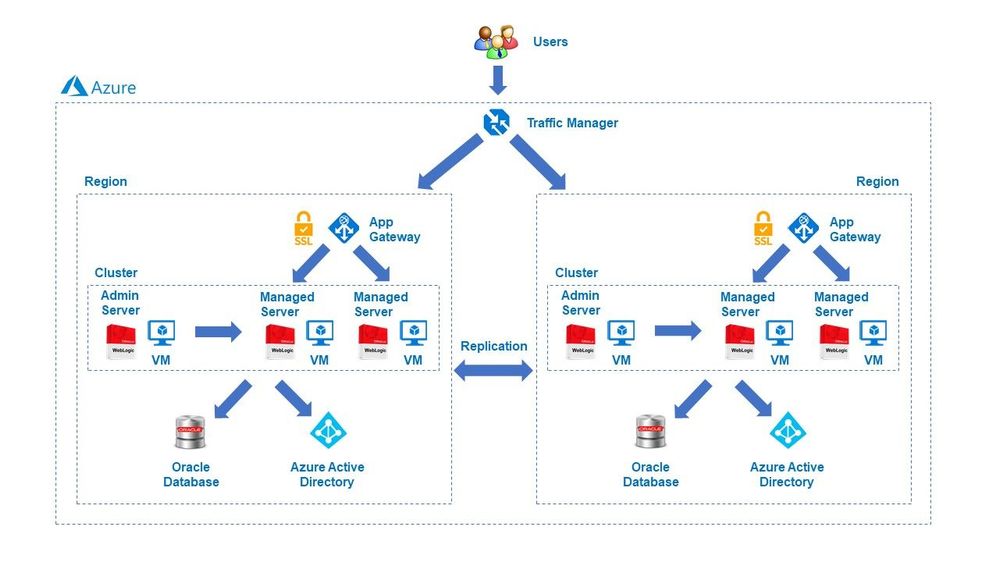
These offers are Bring-Your-Own-License. They assume you have already procured the appropriate licenses with Oracle and are properly licensed to run offers in Azure.
You have a choice of pre-validated, supported OS/JDK/WLS stacks. The offers enable both Java EE 7 and Java EE 8, letting you choose from a variety of base images including WebLogic 12.2.1.3.0 with JDK8u131/251 and Oracle Linux 7.4/7.6 or WebLogic 14.1.1 with JDK11u01 on Oracle Linux 7.6. All base images are also available on Azure on their own. The standalone base images are suitable for customers that require very highly customized Azure deployments.
Summary
Customers interested in WLS on Azure Virtual Machines should explore the solutions, provide feedback and stay informed of the roadmap, including upcoming WLS enablement on AKS. Customers can also take advantage of hands-on help from the engineering team behind these offers. The opportunity to collaborate on a migration scenario is completely free while the offers are under active initial development.


Recent Comments