by Contributed | Sep 24, 2020 | Uncategorized
This article is contributed. See the original author and article here.
In the past 6 months, I’ve spoken to customers around the world about the challenges associated with providing secure and seamless access for a remote workforce. Organizations need to maximize user productivity while safeguarding the business from cyber threats, but they also must reduce costs in light of today’s difficult economic conditions. To help you meet these goals, Microsoft announced several new product enhancements for Ignite 2020. But we can’t go at it alone. Partnerships play a key role in complementing our built-in capabilities. Today, I’d like to share 7 key ways solutions from partners working with Microsoft enable a secure, productive workforce.
Simplifying identity management and access to your apps
Software-as-a-service (SaaS) and cloud-based apps have been key enablers of user productivity—especially with so many people working from home. Out of the box, Azure AD integrates with leading SaaS apps, with more added every month. These integrations simplify user lifecycle management and app provisioning, allowing you to automatically create and update user identities and roles. Adobe and ServiceNow are two partners that we’ve developed integrations that can ensure employees have access to the right applications through their tenure at your organization.
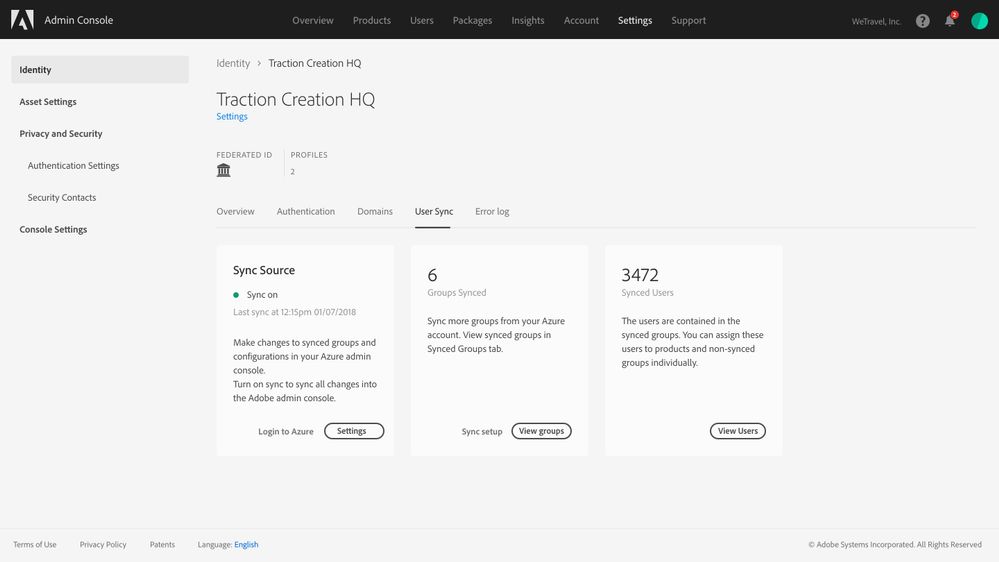
Adobe announces support for SCIM-based provisioning.
To streamline access and administration of its business-critical apps, Adobe has announced a SCIM standard-based app provisioning integration for its core Adobe Identity Management platform. Working with Microsoft IT as a customer to get insights, Adobe has built an updated admin experience, which will make it easier to manage user lifecycles across Adobe Creative Cloud, Adobe Document Cloud, and Adobe Experience Cloud. This integration will be available for limited preview in October and generally available for customers by the end of 2020.
 Screenshot of updated Adobe Admin experience to enable SCIM provisioning with Azure AD. Experience subject to change.
ServiceNow integrates with Azure AD to automate new hire onboarding
ServiceNow recently announced in their latest Now Platform Paris release new capabilities to automatically kick off the right onboarding workflows as soon as a new employee profile is created in Azure AD. IT and hiring managers can automatically provision application access for new hires through Azure AD, including from an HR system, increasing productivity for employees and support teams. This integration automates the whole onboarding workflow from case creation in ServiceNow HR Service Delivery, to role assignment by hiring manager, and application provisioning by IT based on the new hire’s role. Learn more about ServiceNow and Azure AD’s new employee onboarding capabilities.
Saviynt is partnering with Azure AD to provide advanced identity governance capabilities to customers
Saviynt is working with Microsoft and Azure AD to provide additional governance scenarios to customers. Saviynt Cloud Privileged Access Management (PAM) now integrates with Azure AD Privileged Identity Management and Identity Protection to create an identity led, Zero Trust security service to accelerate an enterprise’s digital transformation journey. Saviynt Cloud PAM has also extended their solution to provide privileged access for Microsoft Azure IaaS and expanded governance to Azure AD B2C customers (public preview coming soon). In the recent update to the Saviynt for Microsoft Teams governance, the solution now provides Microsoft Teams site succession management and support for Teams Private Channels. Learn more about the Azure AD and Saviynt partnership.
Enabling stronger security through passwordless, identity verification, and threat intelligence
With more employees working from home, we know that security is even more top of mind. This starts with securing identities. Azure AD capabilities like passwordless are designed to help protect identities with minimal impact to employees. Security operations (SecOps) teams also need greater visibility to enable them to take the right actions in remediating threats. Several recent partnerships have helped us advance these goals.
Illusive Networks integrates with Microsoft Security and Azure AD APIs
Illusive Networks enhances the visibility and monitoring of vulnerable privileged identities in Azure AD, such as redundant identities, identities with excessive privileges, risky practices (e.g. Azure MFA disabled), and unauthenticated identities. Learn more about Illusive Networks’ new integrations across Microsoft Security products.
Yubico enables the move to passwordless
Weak passwords are the most vulnerable attack vector, which is why we are such strong advocates of passwordless technologies. To help reduce the reliance on passwords, we’ve developed a limited time offer with Yubico where qualified services partners can nominate their customers to go passwordless. Learn more about the new program and ways we’re partnering with Yubico in the video below.
Enabling Identity Proofing and Verification capabilities to Azure AD B2C through partners
As more businesses move to online, they need to verify and onboard customers remotely. Jumio and Onfido now enable Azure AD B2C customers to perform identity card (passport or driver license) scanning, identity verification, and liveness detection during a user’s journey.
Protect legacy applications through new secure hybrid access partnerships
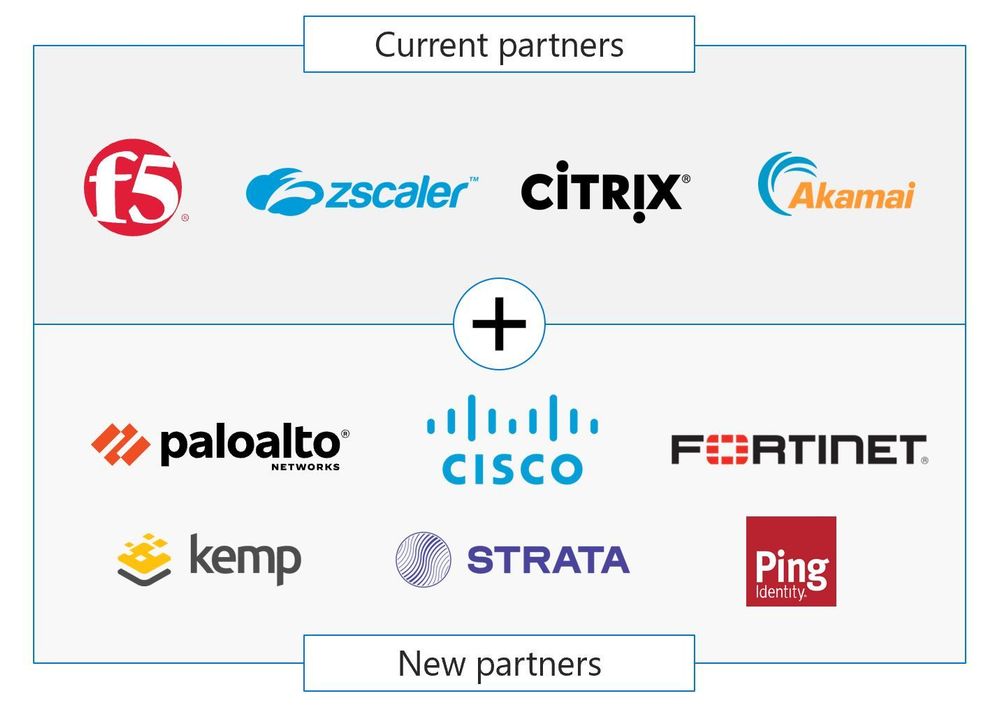
During the COVID-19 outbreak, our customers need to access all mission critical apps from home securely, including legacy applications. While Azure AD Application Proxy can provide remote access to your legacy apps, we know that some customers prefer to use their existing application delivery networks, VPNs, or Software Defined Perimeter solutions. That’s why we’re expanding our Secure Hybrid Access Partnerships to include new partners such as Kemp, Palo Alto Networks, Cisco AnyConnect, Fortinet and Strata and Ping Identity for Azure AD B2C customers.
We hope all these announcements are welcome additions as you support the new realities of remote work. Please let us know any feedback you have, including any other partners you think we should be working with to improve the employee experience and security.
Join us virtually, on-demand for Identity Partner Sessions at Ignite 2020
While we wish we could have met in person this year at Microsoft Ignite 2020, we have a great line up of free, virtual sessions to share with you wherever you are in the world. Register for free here.
All the Microsoft Identity sessions, on-demand, can be found on this Microsoft Ignite playlist or the Video Hub. Here are my top sessions to attend that relate to our partner solutions:
- Azure Active Directory: our vision and roadmap to help you secure remote access and boost employee productivity
- Save money by securing access to all your apps with Azure Active Directory
- Bridge the gap between HR, IT and business with Azure Active Directory
- Build experiences that customers and partners will love with Azure Active Directory External Identities
Best regards,
Sue Bohn
Partner Director of Program Management
Microsoft Identity Division
by Contributed | Sep 24, 2020 | Azure, Technology, Uncategorized
This article is contributed. See the original author and article here.
by Contributed | Sep 24, 2020 | Azure, Technology, Uncategorized
This article is contributed. See the original author and article here.
Hi Everyone,
This week we have announced the availability of the initial public preview of Azure Kubernetes Service (AKS) on Azure Stack HCI.
You can evaluate AKS on Azure Stack HCI by registering for the Public Preview here: https://aka.ms/AKS-HCI-Evaluate
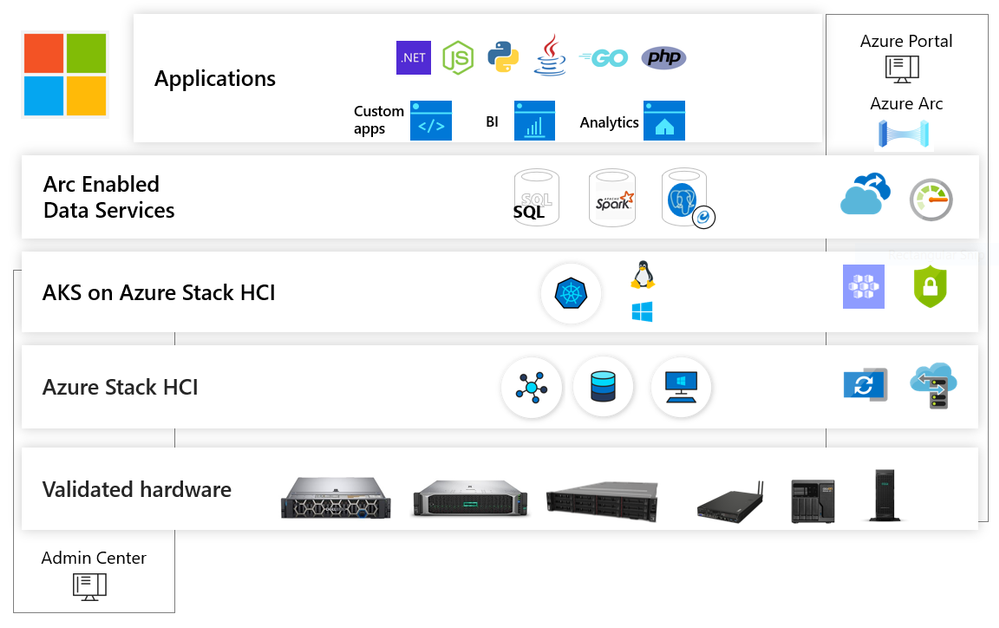
Azure Kubernetes Service on Azure Stack HCI takes our popular Azure Kubernetes Service (AKS) and makes it available to customers to run on-premises; delivering Azure consistency, a familiar Azure experience, ease of use and high security for their containerized applications. AKS on Azure Stack HCI enables developers and administrators to deploy and manage containerized apps on Azure Stack HCI. You can use AKS on Azure Stack HCI to develop applications on AKS and deploy them unchanged on-premises, run Arc enabled Data Services on a resilient platform and modernize Windows Server and Linux applications.
With AKS on Azure Stack HCI, Microsoft is delivering an Industry leading experience for modern application development and deployment in a hybrid cloud era. Microsoft is the only company that delivers technology that takes you from bare metal to a public cloud connected and consistent application and data platform in your datacenter.
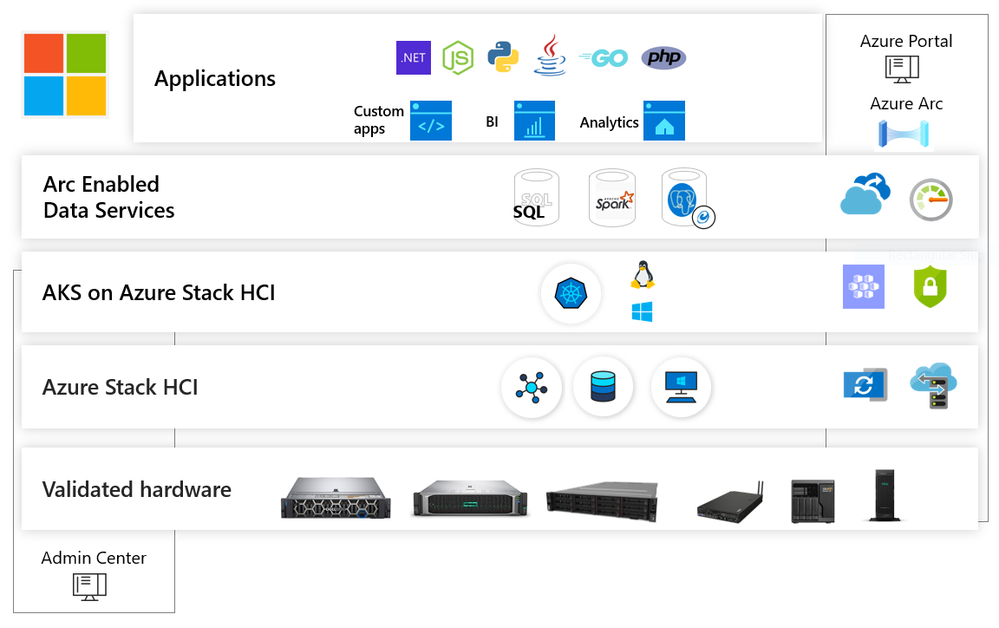
AKS on Azure Stack HCI can run Windows and Linux containers, all managed and supported by Microsoft. AKS on Azure Stack HCI leverages our experience with AKS, follows the AKS design patterns and best-practices, and uses code directly from AKS. This means that you can use AKS on Azure Stack HCI to develop applications on AKS and deploy them unchanged on-premises. It also means that any skills that you learn with AKS on Azure Stack HCI are transferable to AKS as well.
AKS on Azure Stack HCI uses Windows Admin Center and PowerShell to provide an easy to use and familiar deployment experience for any user of Azure Stack HCI. AKS on Azure Stack HCI simplifies the process of setting up Kubernetes on Azure Stack HCI and includes the necessary components to allow you to deploy multiple Kubernetes clusters in your environment.
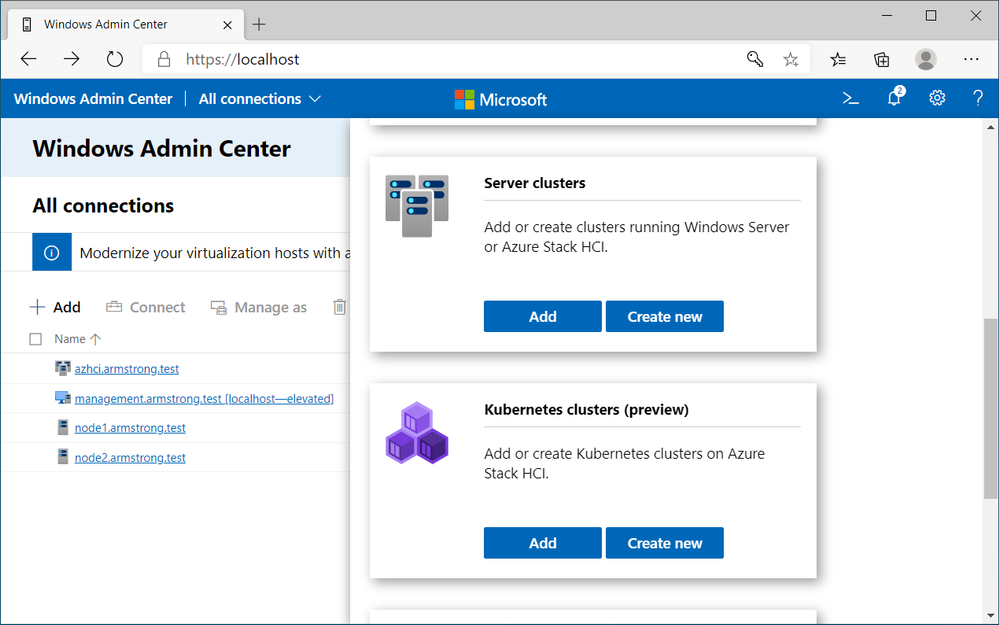
Which all means that you can focus on what matters most to you – your applications.
AKS on Azure Stack HCI is designed such that every layer is secure. Microsoft provides a secure baseline of all components in AKS on Azure Stack HCI and keeps them up to date. We will be adding mode security features and further hardening the platform over the course of the public preview.
AKS on Azure Stack HCI fully supports both Linux-based and Windows-based containers. When you create a Kubernetes cluster on Azure Stack HCI you can choose whether to create node pools (groups of identical virtual machine, like on AKS) to run Linux containers, Windows containers, or both. AKS on Azure Stack HCI creates and maintains these virtual machines so that you don’t have to directly manage operating systems.
If you have existing .NET applications that you want to modernize, and take advantage of the latest cloud development patterns, AKS on Azure Stack HCI is the platform for you. AKS on Azure Stack HCI provides an industry leading experience for Windows Containers on Kubernetes. We are also working on great tooling and documentation for the process of moving .NET applications from virtual machines to containers with AKS on Azure Stack HCI.
If you are building a new cloud native applications on AKS, AKS on Azure Stack HCI provides to easiest way for you to take those applications and run them in your datacenter. AKS on Azure Stack HCI shares a common code base with AKS, the user experience is consistent across both products, and Microsoft is investing to ensure that applications can move easily between these two environments.
If you are wanting to utilize new Microsoft technologies like Arc enabled Data Services in your datacenter, AKS on Azure Stack HCI delivers a complete solution from Microsoft. It is validated and supported by Microsoft, designed to deliver the best experience for these applications.
You can learn more about AKS on Azure Stack HCI by watching:
Working on this project has been a lot of fun for everyone involved, and we are excited to finally be able to share this with the world. I look forward to seeing what everyone is able to achieve with AKS on Azure Stack HCI!
Cheers,
Ben Armstrong
by Contributed | Sep 24, 2020 | Azure, Technology, Uncategorized
This article is contributed. See the original author and article here.
Join us to hear all about the great new features, announcements, and collaborations for Azure Data Explorer – Azure’s fast, fully- service for real-time analysis of telemetry big data streaming from apps, websites, IoT devices, and more.
One of Azure’s most used services and the foundation of Microsoft’s telemetry platform, Azure Data Explorer , combines broad data exploration and powerful analytical queries with lightning-fast interactivity.
Use Azure Data Explorer to:
- Monitor mission-critical systems.
- Analyze IoT data from thousands of devices.
- Explore and identify trends and anomalies in your data.
- Tune up customer experience.
- And many more exciting capabilities!
Join us to learn how to harness the growing volume of telemetry data to drive business success while keeping costs at bay with the super cost-efficient Azure Data Explorer service.
Capacity is limited to make sure to save your spot today!
Register to our online event to learn about the latest groundbreaking innovations, new features, and exciting collaborations.
The event includes a keynote by Rohan Kumar, CVP, Azure Data and fascinating content by the product group team members, delivering sessions on various topics. See the full agenda below.
Win a brand-new Surface Duo
In every session, one participant will win the newest Surface Duo from Microsoft.
Register now for a chance to enter the contest and win!
When: October 14th, 2020
Where: Wherever you are! The event will be streamed on Teams Live.
1st round: 09:00 BST (London Time)
2nd round: 09:00 PST (US Pacific Time)
Register Now
Agenda
|
Name
|
Description
|
Speakers
|
Duration (Min)
|
|
Opening Session
|
Opening words, brief overview of the agenda and service
|
Oded Sacher, Partner Group Manager
Uri Barash, Principal Group Program Manager
|
15
|
|
Re-imagine Telemetry Analytics, with Rohan Kumar
|
Join us to hear from Rohan Kumar, Corporate Vice President of Azure Data, about the exciting developments with Azure Data Explorer, Microsoft’s telemetry analytics platform that is powering Microsoft’s internal and external business
|
CVP, Azure Data, Rohan Kumar
|
30
|
| |
|
|
|
|
What’s new with ADX
|
Updates on the latest and greatest in ADX ingestion, query, dashboards and more
|
Gabi Lehner, Program Manager
Tzvia Gitlin Troyna, Program Manager
|
30
|
|
Powering Engineering Excellence With Azure Data Explorer
|
Taboola on AzureDataExplorer “It’s magic, interactive & intuitive. My users are in love”
|
Ariel Pisetzky, VP Information Technology & Cyber at Taboola.
|
15
|
|
Start Fast and Accelerate!
The next generation of the Kusto engine
|
Azure Data Explorer engine enhancements.
|
Evgeney Ryzhyk, Partner Software Engineer
Alexander Sloutsky, Principal Engineering Manager
Avner Aharoni, Principal Program Manager
|
30
|
|
|
|
|
|
|
Breakout Sessions– 30 minutes 11:30 – 12:00
All Breakout sessions are running in parallel at the end of Azure Data Explorer engine enhancements session
|
|
|
|
ADX overview
|
Azure Data Explorer is a big data interactive analytics platform for telemetry. Join this session to learn about ADX, where does it fit, when to use it, what are its key features, scenarios and customers
|
Uri Barash, Principal Group Program Manager
Minni Walia, Senior Program Manager
|
|
Enterprise Readiness
|
This session is about all the great features needed to run Azure Data Explorer at enterprise scale. We will cover security, business continuity, high availability CI/CD related details.
|
Henning Rauch, Senior Program Manager
Anagha Khanolkar, Principal Program Manager
|
|
ML, Time Series
|
Anomaly detection, forecasting, diagnostics & RCA for preventive maintenance in IIoT, cloud services and other markets. Training/scoring ML models in ADX using Python.
|
Adi Eldar, Principal Program Manager
Manoj Raheja, Principal Program Manager
Roy Ofer, Senior Data Scientist
|
|
Operating ADX optimally: Cost and performance
|
Choosing optimal SKU for your workload and utilizing auto-scale can significantly reduce your cluster cost. Join us for a deep dive session where we drill into the different cost reducing options.
|
Avner Aharoni, Principal Program Manager
Deepak Agrawal, Senior Program Manager
Guy Reginiano, Program Manager
|
|
Ingestion
|
In this session we will focus on ingestion methods, how to choose the right method to your customer scenario, and what are the available options
|
Vladik Branevich, Principal Engineering Manager
Tzvia Gitlin Troyna, Senior Program Manager
|
|
Visualizing big data
|
Overcoming scale and performance challenges when building dashboards solution in big data scenarios
|
Gabi Lehner, Principal Program Manager
Olga Goldenberg, Senior Program Manager
|
Please share and subscribe,
Azure Data Explorer
by Contributed | Sep 24, 2020 | Azure, Technology, Uncategorized
This article is contributed. See the original author and article here.
Azure Kubernetes Service on Azure Stack HCI (AKS-HCI) is an on-premises implementation of the popular Azure Kubernetes Service (AKS) orchestrator, which automates running containerized applications at scale. AKS on Azure Stack HCI enables developers and admins to deploy and manage Linux and Windows containerized apps on Azure Stack HCI.
With AKS-HCI, enterprises can take advantage of consistent AKS experience across cloud and on-premises environments, extend to Azure with hybrid capabilities, run apps with confidence through built-in security, and use familiar tools to modernize Windows apps. For a more detailed overview of AKS-HCI capabilities, refer to this blog.
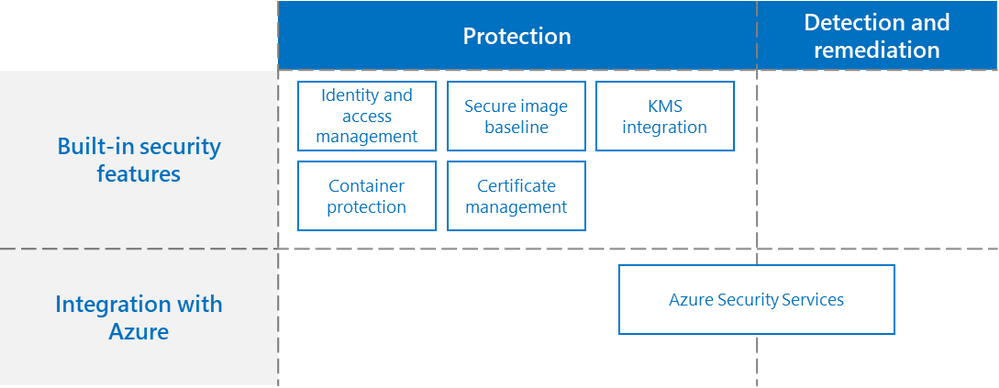
One of the core strengths of AKS-HCI is using security-first approach. At Microsoft, we believe that leading with strong security posture is table stakes for an enterprise-grade offering. Our security roadmap is comprehensive, starting with a mindset of placing strong protection guardrails and bolstering that with industry-hardened threat detection, and remediation and recovery. The protection-related hardening is built into AKS-HCI. To bring threat detection and remediation, and we integrate with security management systems such as Azure Security Center.
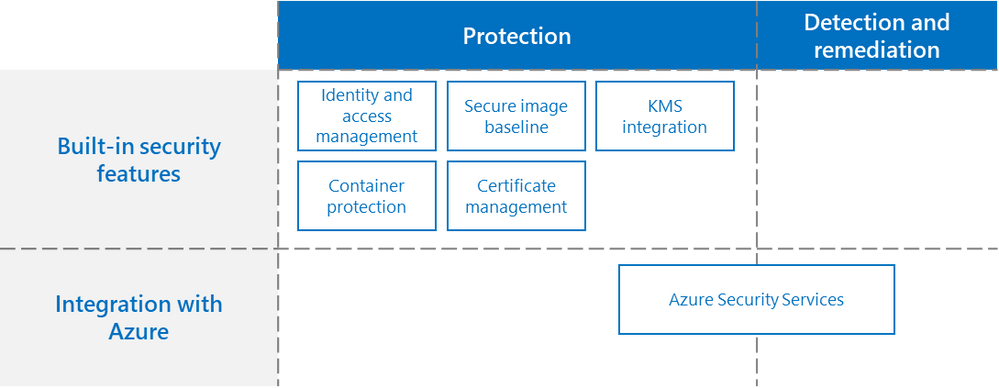
Figure 1. Securing AKS-HCI Deployment
In this blog, we will describe the security capabilities in AKS-HCI. These security features are not available in the current public preview version, but these and more will be released in the lead-up to general availability.
Secure image baseline and container protection
Microsoft provides a secure baseline for Windows and Linux container host images and services the updates of those images to maintain consistency and standards.
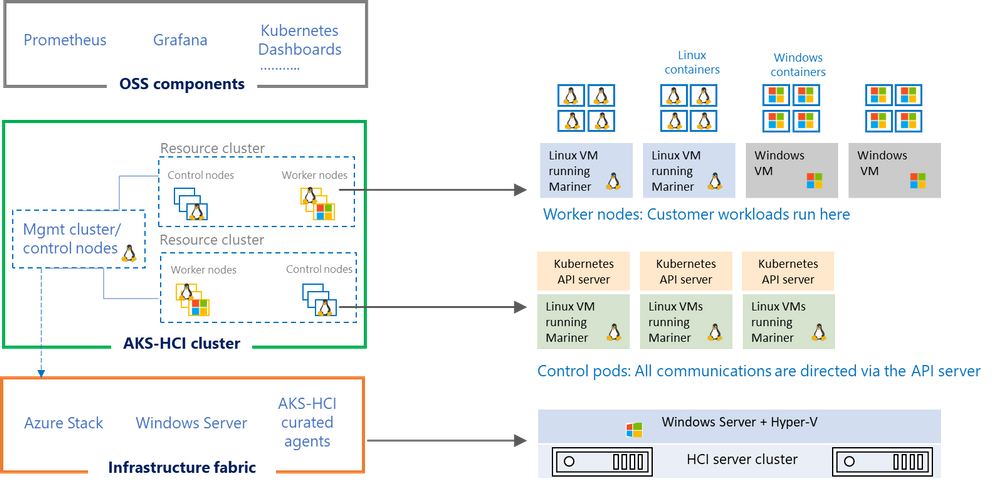
Figure 2. AKS-HCI implemented with hypervisor isolation
AKS-HCI is designed such that every layer is secure. The container host is deployed as a virtual machine. Each tenant cluster runs on its dedicated set of container hosts and uses the same strong Hyper-V-based isolation used in Azure which provides the strong kernel isolation among the container hosts.
In addition, AKS-HCI has multiple layers of protection built in. The first cluster to be bootstrapped is the management cluster, which is then used to bootstrap other tenant clusters. The container pods are run within Hyper-V virtual machines, enforcing strong isolation guarantees wherein the impact of a compromised container or pod is contained within the Hyper-V VM itself.
Identity and access management (IAM)
AKS-HCI integrates with Active Directory (AD), providing strong identity and facilitating seamless single sign-on (SSO) to manage the AKS-HCI environment and deploy the container workloads. Additionally, there is provision for Windows containerized application workloads to be bootstrapped with group Managed Service Account (gMSA) identity. gMSA is an AD-managed service account for which the passwords are automatically rotated.
Secure communication and secrets Management
Communication between the control plane components is protected by Transport Layer Security (TLS). AKS-HCI comes with zero-touch, out-of-the-box provisioning, and management of certificates for the infrastructure and Kubernetes built-in components. Additionally, the Kubernetes secrets are encrypted at rest using strong Advanced Encryption Standard (AES), with the ability to rotate the key encryption keys (KEK).
Integration with Azure security assets
AKS-HCI is integrated into the Microsoft security ecosystem, which allows extending Azure security constructs such as Azure Container Registry and Azure policies. In the future, integration with Azure assets like Azure Security Center will provide customers the ability to monitor for threats and offer pre- and post-runtime security assessments for both the infrastructure fabric and the Kubernetes cluster. This helps in monitoring for threats and keeping a strong security posture.
Join us in this journey
Security is a journey, not a destination. These are just some of the security features that we are working on and making generally available (GA) soon. AKS-HCI is going to be continually updated like a service. We will add more security features and continue to further harden the platform. Join us in this journey: we would love to hear feedback, experience, and insights on security. Be part of discussions in our Github repository.
by Contributed | Sep 24, 2020 | Azure, Technology, Uncategorized
This article is contributed. See the original author and article here.
Now more than ever, organizations are challenged with keeping their employees productive working remotely and interacting with their customers over digital channels. At the same time there has been an increase in evolving digital security threats as bad actors recognize an opportunity to disrupt your business. Moreover, security resources are stretched, and prioritization is important.
To help you protect all the assets within your organization earlier this week we announced Microsoft Defender. Microsoft Defender delivers comprehensive threat protection spanning users, devices, apps, data, servers, IoT devices, Operational Technology (OT), and more. Microsoft Defender is Microsoft’s leading Extended Detection and Response (XDR) solution for threat protection across all your technical assets composed of two experiences: Microsoft 365 Defender and Azure Defender. Azure Defender is an evolution of the threat protection technologies in Azure Security Center, protecting Azure and hybrid environments. With this announcement, we are rebranding the offerings previously called advanced threat protection services in Azure Security Center as Azure Defender. For example, Advanced Threat Protection for Azure Storage is now Azure Defender for Storage.
1. Updated Azure Security Center UI
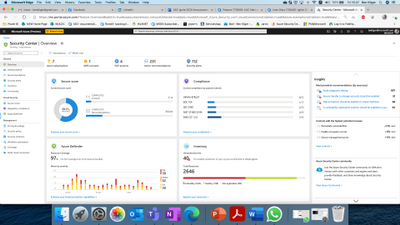
Following this rebranding, and in order to better reflect the different value pillars that Azure Security Center offers, we have also changed the main Security Center product experience. With the new experience, Security Center serves as the central overarching experience that includes multiple independent cloud security pillars such as Azure Secure Score, Regulatory Compliance and of course Azure Defender. In addition, each of these pillars has its own dedicated dashboard allowing deeper insights and actions around that vertical. Changes to the product can be seen at the following link (http://aka.ms/ascignite2020) during the conference and will be integrated into the product after Ignite 2020.

Figure 1: Azure Security Center Overview window
When you click on the Azure Defender dashboard, you can see that you have better visibility into Azure Defender coverage across your different resource types, visibility into onboarding state & agent installation and a holistic view of the threat detection alerts included in Azure Defender.
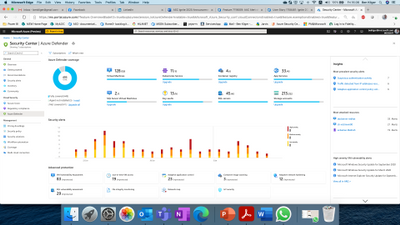
Figure 2: Azure Defender dashboard
2. Protection for multi cloud workloads (AWS & GCP)
As more organizations manage cloud workloads on multiple cloud platforms, they require a security solution that provides visibility & protection across all their cloud environments. To enable that, Security Center is announcing a public preview for protection of workloads in AWS & GCP –
- Customers will be able to onboard their AWS/GCP accounts into ASC.
- Security Center will include detected misconfigurations and findings from AWS Security Hub and GCP Security Command Center into its Secure Score model and Regulatory Compliance experience, thus providing a central pane to visualize security posture across multi-cloud assets.
- Azure Defender for Servers will leverage Azure Arc to extend its support for VMs in AWS & GCP including capabilities such as automatic agent provisioning, policy management, vulnerability management, embedded EDR and more., embedded EDR and more.
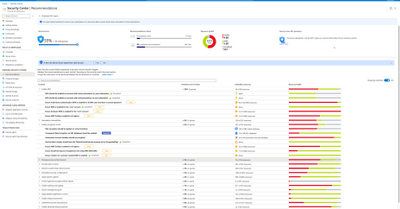
Figure 3: Secure Score Recommendations page including AWS and GCP recommendations
We are also delighted to announce the preview availability of Azure Arc enabled SQL Servers and its integration with Azure Defender and Azure Sentinel. With Azure Arc enabled SQL Server you can now protect SQL Servers anywhere (on-premises, and in other clouds such as AWS, GCP) the same way you protect Azure SQL directly from the Azure portal for a unified, hybrid security experience using Azure Defender. This unified experience simplifies protecting your entire SQL estate. In addition, your security operations team can take the threat information from Azure Security Center and surface it into Azure Sentinel, the industry’s first cloud native SIEM, where when combined with security intelligence from throughout your enterprise, you can now detect and mitigate threats that may traverse laterally across your hybrid environments before attackers have the opportunity to exfiltrate data.
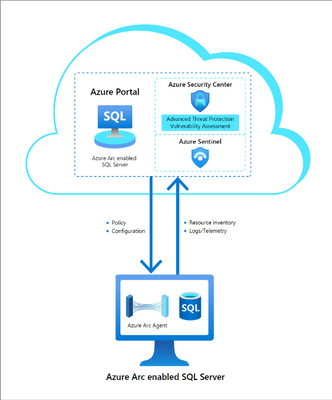
Figure 4. Integration of Azure Arc enabled SQL Server and Azure Security Center
3. Containers Enhancements
As containers and specifically Kubernetes are becoming more widely used, we are extending our Azure Defender for Kubernetes offering to include Kubernetes level policy management, hardening and enforcement with admission control to make sure that Kubernetes workloads are created secure by default. In addition, Container image scanning by Azure Defender for Container Registries will now support continuous scanning of container images in the Azure Container Registry and re-evaluate registry images for new vulnerabilities to minimize the exploitability of running containers.
4. General availability for more platform protection
We are announcing the general availability of Azure Defender for Key Vault and for Azure Defender for Storage protection for Azure Files and Azure Data Lake Storage Gen2.
5. Azure Defender for IoT, Now With CyberX Agentless Technology
At Ignite, we’re announcing Public Preview of new capabilities for securing Operational Technology (OT) environments such as manufacturing, building automation, life sciences, energy and water utilities, oil & gas, and warehousing & logistics.
Incorporating agentless technology from Microsoft’s recent acquisition of CyberX, Azure Defender for IoT enables organizations to auto-discover their IoT/OT assets, identify critical vulnerabilities, and continuously monitor for threats. It will initially be available for on-premises deployments, with an Azure-based console to follow. Read more.
Azure Security Center cloud security posture management enhancements
Azure Security Center continues to provide cloud security posture management enhancements. At Ignite this year, we are announcing general availability for the new Asset Inventory experience. The new experience enables customers to explore their security posture data in a much deeper way, providing view, filter and query abilities for all details and insights across all resources protected by ASC, via an easy to use and crystal clear user interface.
This new experience is fully built on top of Azure Resource Graph (ARG) which now holds all of ASCs security posture data, and leveraging its powerful KQL engine enables customers to quickly and easily reach deep insights on top of ASC data and cross reference with any other resource properties.
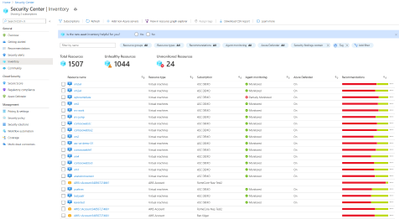
Figure 5: Azure Security Center Inventory view
We are also very excited to announce the public preview of a more fine-grained ability to manage and control security recommendations and their application on one’s resources. This includes ability to exempt specific resources from specific security recommendations, with documented reasoning and easy monitoring of exemptions. Another advanced capability is to customize security findings either by configuring which findings should be applicable, such as by severity, type, name or any other category. This allows maximum flexibility of adjusting the security recommendations to the organization’s policy and priorities and by that better representation of their security posture in Secure Score.
For related material, see the following articles:
by Contributed | Sep 24, 2020 | Azure, Technology, Uncategorized
This article is contributed. See the original author and article here.
Initial Update: Thursday, 24 September 2020 13:10 UTC
We are aware of issues within Application Insights and are actively investigating. Some customers may experience data access issue and issues with missed or delayed Log Search alerts in South UK and North Europe regions.
-
Work Around: None
-
Next Update: Before 09/24 15:30 UTC
We are working hard to resolve this issue and apologize for any inconvenience.
-Rama
by Contributed | Sep 24, 2020 | Uncategorized
This article is contributed. See the original author and article here.
Last week Microsoft released a new version of the Containers extension on Windows Admin Center. This release was focused on helping IT Admins getting their container hosts up and running without much effort.
The process of deploying the containers feature on Windows and Docker is actually well documented on our docs page – for both Windows 10 and Windows Server. However, installing the necessary components is just the first step you have to take to prepare your container host. So let’s take a look at what the process looks like on Windows Admin Center.
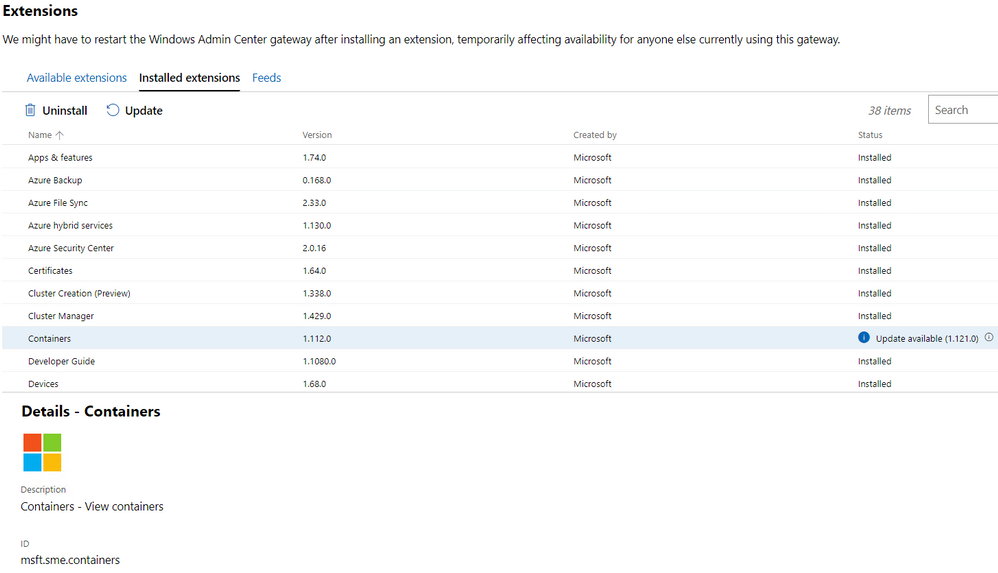
To get started, make sure you have the latest version of the Containers extension installed on your Windows Admin Center instance. To do that, go to the Extension Manager on the Windows Admin Center Settings and check for the Containers extension version 1.121.0:
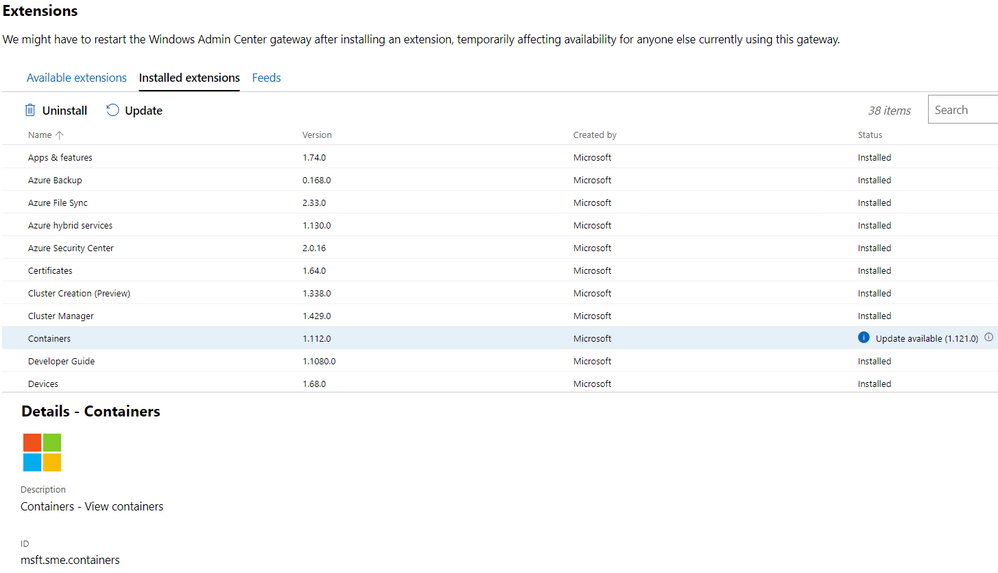
If you don’t have the extension installed, you’ll see it under Available extensions. If you have a previous version of it installed you can check the Installed extensions tab and look for the update.
An important note here is that the previous version of this extension was available on the Windows Admin Center Insiders feed – which required some additional configuration. This is not a requirement anymore, as the new version is now available on the public feed.
Next, you can go the Windows Admin Center main page and target the server you want to deploy as a container host. Once you open the connection to the targeted server, you’ll see the Containers extension show up:
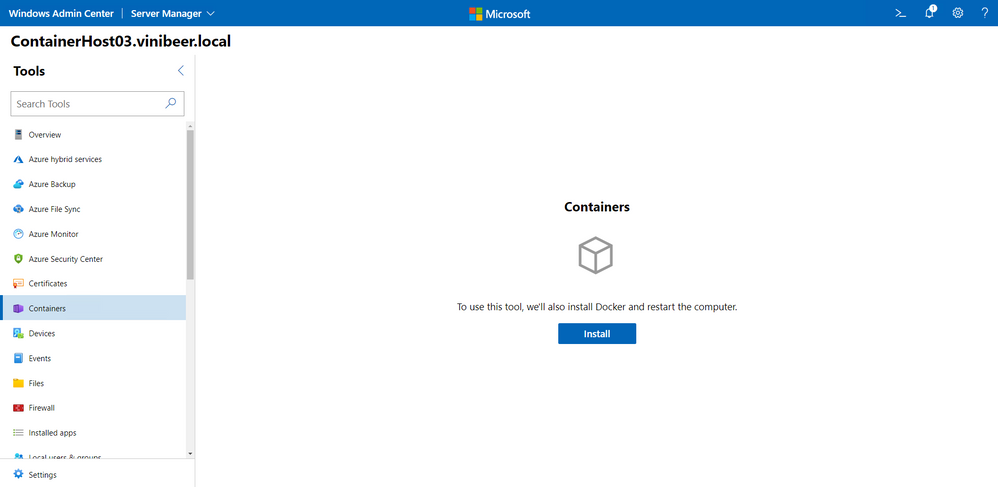
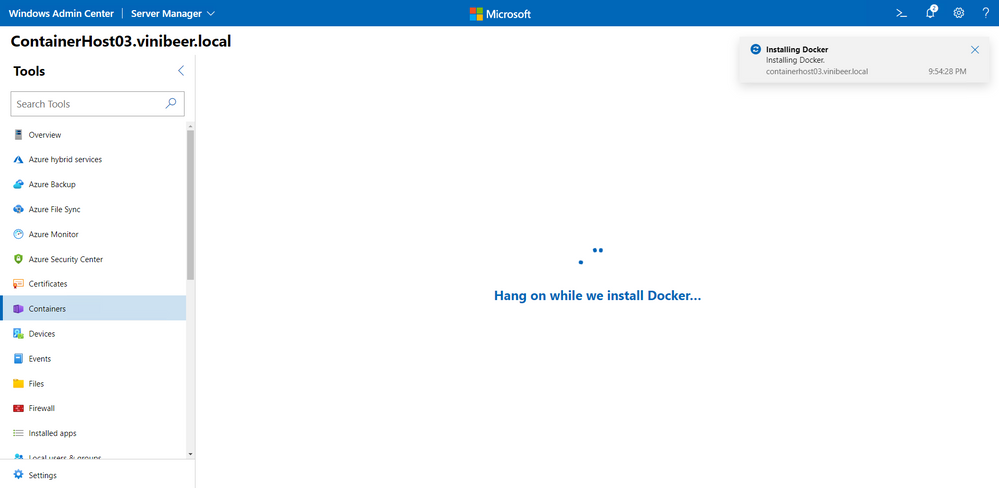
Once you click Install, Windows Admin Center will start the deployment of the Docker components as well as the container feature on Windows. This process might take a few moments to complete and will restart your server:
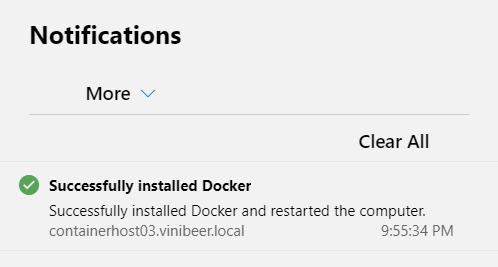
After the server restarts, you’ll be taken to the Windows Admin Center main page.
That’s it, no command line and PowerShell commands needed. However, there’s more to be done in order to run your first container. Let’s open the connection to the server again and open the Containers extension, then click on the Images tab:
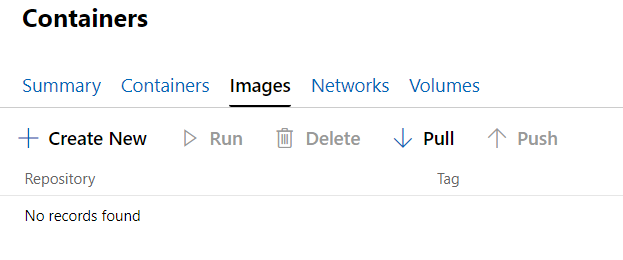
As you can see, there are no images available to create new containers from. While you could go to the command line and simply pass on the image name you want to run, it will take a while to pull the layers needed to run that image. Since all Windows containers are created from the base container images, it’s probably a good idea to have those images already pulled for when you need it. to do that, click the Pull option:
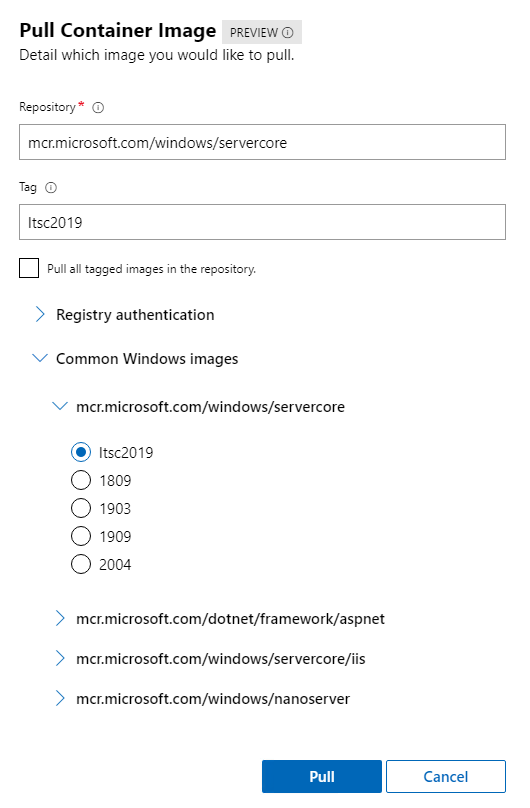
Another great update to this extension is that now you have a list of the most common container images, including the base container images of Server Core and Nano Server. After you pull the images, the process of running new containers based on those images will be way faster.
I hope this blog post was useful and that will help you get started in using Windows Containers with Windows Admin Center. Let us know what you think in the comments or in our GitHub repo.
You can find on Twitter @vrapolinario.
by Contributed | Sep 24, 2020 | Azure, Technology, Uncategorized
This article is contributed. See the original author and article here.
Currently Azure marketplace SQL Images are only available in English locale. If you want to change your SQL locale to any other than English, then you can deploy a virtual machine that contains SQL Server initially. We will walk through the steps involved in changing SQL Server language from English to Japanese in this blog.
SQL Server database engine executable file is common to all languages, you can store, extract, and search Japanese data without having to perform the following steps. The default collation of the database can be specified when the database is created. You can explicitly specify the collation of a table column, or if not, the collation of the database is inherited.
If you want to manage from SQL Server Management Studio with a Japanese UI on a remote machine, you do not need to do the following. If you only need the Japanese user interface for administrative tools, you will need to Change locale for SQL Server. The following is an example of SQL Server 2016, but the procedure remains almost the same for other versions of SQL Server:
Uninstall SQL Resource Provider
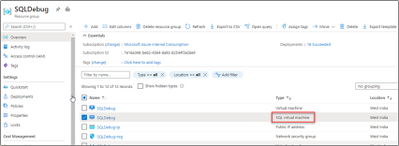
From the Azure Portal, navigate to your resource group. Click on your “SQL virtual machine” Resource.
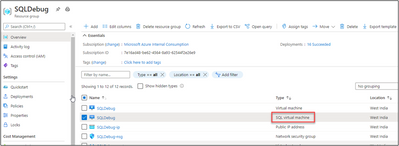
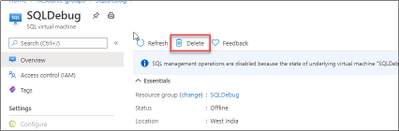
Delete SQL Virtual Machine resource. We are not deleting the Virtual Machine here.
Uninstall SQL Server and its related components.
-
To start the Uninstall process, we will Uninstall SQL instance. Review the list of features and components that will be uninstalled so you can install those when you install the new instance.
-
We need to uninstall “Data Tier Application Framework” and “Microsoft Visual Studio Shell” related packages from programs and features.
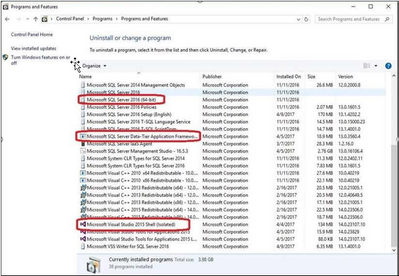
At the end of this step there are no SQL instance, features or components on this machine. Everything has been uninstalled.
Configure Operating System to Support Localized Versions
Before you can install the Japanese version of SQL Server on an English operating system, you must change the language settings of the operating system. Please follow the below steps:
-
User interface settings for the operating system
-
User locale settings for the operating system
-
System locale settings
To change the operating system user interface setting
-
If not already installed, install the operating system MUI that matches your localized version of SQL Server.
-
In Control Panel, open Regional and Language Options.
-
On the Languages tab, for Language used in menus and dialogs, select a value from the list. This setting will affect the user interface language of SQL Server, so it must match your localized version of SQL Server.
-
Click Apply to confirm the change, and OK to close the window.
To change the operating system user locale setting
- If not already installed, install the operating system MUI that matches your localized version of SQL Server.
-
In Control Panel, open Regional and Language Options.
-
On the Regional Options tab, for Select an item to match its preferences, select a value from the list. This setting will affect culture-specific data formatting.
-
Click Apply to confirm the change, and OK to close the window.
To change the system locale setting
-
If not already installed, install the operating system MUI that matches your localized version of SQL Server.
-
In Control Panel, open Regional and Language Options.
-
On the Advanced tab, for Select a language to match the language version of the non-Unicode programs you want to use, select a value from the list. This setting will allow SQL Server Setup to choose the best default collation for your SQL Server installation.
-
Click Apply to confirm the change, and OK to close the window.
Installing the SQL Server with your preferred Locale/Language
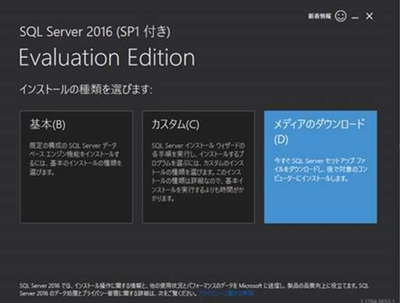
-
Set the package type to ISO and download it.
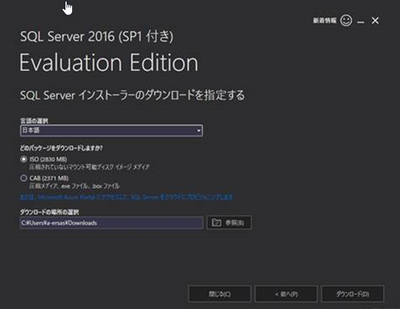
-
You will also need a Microsoft account to download. After downloading, mount the appropriate ISO file and load it into the DVD drive.
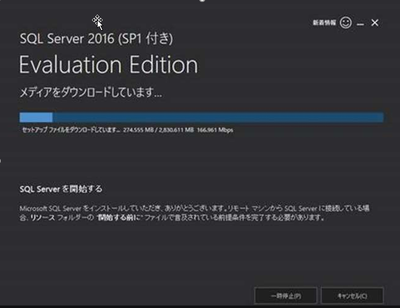
-
On the SQL Azure VM, open C:/SQLServer_13.0_Full/x64/DefaultSetup.ini.
DefaultSetup.ini
********************
SQL Server 2016 Configuration File
[OPTIONS]
PID:”XXXXX-XXXXX-XXXXX-XXXXX-XXXXX”
PCUSOURCE: “.
********************
The XXXXX becomes the actual product key which we need to use while installing. Start the installation of the Japanese version of SQL Server 2016. (By default, it is mounted on the E drive, so start setup from here.) )
On the Product Key page, you can change the Edition from Evaluation by entering the product key.
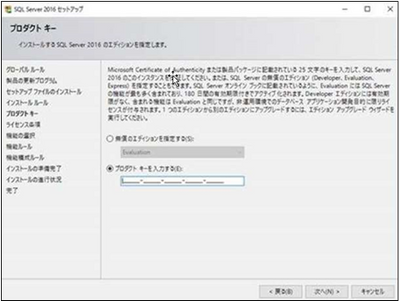
For more information about installing SQL, please check Install SQL Server 2016 from the Installation Wizard (Setup)
Reinstall Resource Provider
Install SQL Resource Provider . This will sync your billing and the SQL Version/Edition we installed with the Azure Portal.
References
Install non-English language versions of SQL Server Management Studio (SSMS)
Microsoft 2012 SP1 Japanese locale Evaluation
Microsoft 2014,2016,2017,2019 Japanese locale Evaluation Version
Local Language Versions in SQL Server
by Contributed | Sep 24, 2020 | Azure, Technology, Uncategorized
This article is contributed. See the original author and article here.
Final Update: Thursday, 24 September 2020 09:50 UTC
We’ve confirmed that all systems are back to normal with no customer impact as of 9/24, 09:40 UTC. Our logs show the incident started on 9/24, 09:00 UTC and that during the 40 minutes that it took to resolve the issue some customers may have experienced failure accessing live metrics data.
-
Root Cause: The failure was due to configuration changes in one of our dependent service.
-
Incident Timeline: 40 minutes – 9/24, 09:00 UTC through 9/24, 09:40 UTC
We understand that customers rely on Application Insights as a critical service and apologize for any impact this incident caused.
-Harshita


Recent Comments