by Contributed | Sep 25, 2020 | Uncategorized
This article is contributed. See the original author and article here.
Microsoft Ignite is officially wrapped, with big news coming from several products:
SharePoint Syntex,
the first product from Project Cortex, was announced.
Microsoft Teams announced several new capabilities to help people stay connected, collaborate and build solutions in Teams.
Endpoint Analytics is now generally available in Microsoft Endpoint Manager.
@alexandertuvstrom is our Member of the Week, and a great contributor across multiple communities like Windows 10.
View the Weekly Roundup for Sept 21-25th in Sway and attached PDF document.
by Contributed | Sep 25, 2020 | Azure, Technology, Uncategorized
This article is contributed. See the original author and article here.
The most read paths on LEARN has gotten an update. Check out the new paths here and some description on what each path contains:
Azure Fundamentals part 1: Describe core Azure concepts
- Understand the benefits of cloud computing in Azure and how it can save you time and money
- Explain cloud concepts such as high availability, scalability, elasticity, agility, and disaster recovery
- Describe core Azure architecture components such as subscriptions, management groups, resources and resource groups
- Summarize geographic distribution concepts such as Azure regions, region pairs, and availability zones
Azure Fundamentals part 2: Describe core Azure services
- Understand the breadth of services available in Azure including compute, network, storage, and database
- Identify virtualization services such as Azure Virtual Machines, Azure Container Instances, Azure Kubernetes Service, and Windows Virtual Desktop
- Compare Azure’s database services such as Azure Cosmos DB, Azure SQL, Azure Database for MySQL, Azure Database for PostgreSQL, and Azure’s big data and analysis services
- Examine Azure networking resources such as Virtual Networks, VPN Gateways, and Azure ExpressRoute
- Summarize Azure storage services such Azure Blob Storage, Azure Disk Storage, and Azure File Storage
Azure Fundamentals part 3: Describe core solutions and management tools on Azure
- Choose the correct Azure Artificial Intelligence service to address different kinds of business challenges.
- Choose the best software development process tools and services for a given business scenario.
- Choose the correct cloud monitoring service to address different kinds of business challenges.
- Choose the correct Azure management tool to address different kinds of technical needs and challenges.
- Choose the right serverless computing technology for your business scenario.
- Choose the best Azure IoT service for a given business scenario.
Azure Fundamentals part 4: Describe general security and network security features
-
Having a good security strategy is essential in today’s digital world. Every application and service, whether on-premises or in the cloud, needs to be designed with security in mind. Security needs to happen at the application level, at the data level, and at the network level.
Learn about the various Azure services you can use to help ensure that your cloud resources are safe, secure, and trusted.
Azure Fundamentals part 5: Describe identity, governance, privacy, and compliance features
-
With the rise of remote work, bring your own device (BYOD), mobile applications, and cloud applications, the primary security boundary has shifted from firewalls and physical access controls to identity.
Understanding who is using your systems and what they have permission to do are critical to keeping your data safe from attackers. To stay organized, manage costs, and meet your compliance goals, you need a good cloud governance strategy.
Learn how Azure can help you secure access to cloud resources, what it means to build a cloud governance strategy, and how Azure adheres to common regulatory and compliance standards.
Azure Fundamentals part 6: Describe Azure cost management and service level agreements
-
Migration to the cloud presents new ways to think about your IT expenses. The cloud also removes the burden of supporting IT infrastructure.
As you move to the cloud, you might ask:
- How much will it cost?
- What guarantees does Azure provide around uptime and connectivity?
- How do preview services impact my production applications?
Learn about the factors that influence cost, tools you can use to help estimate and manage your cloud spend, and how Azure’s service-level agreements (SLAs) can impact your application design decisions.
by Contributed | Sep 25, 2020 | Azure, Technology, Uncategorized
This article is contributed. See the original author and article here.
The most read paths on LEARN has gotten an update. Check out the new paths here and some description on what each path contains:
Azure Fundamentals part 1: Describe core Azure concepts
- Understand the benefits of cloud computing in Azure and how it can save you time and money
- Explain cloud concepts such as high availability, scalability, elasticity, agility, and disaster recovery
- Describe core Azure architecture components such as subscriptions, management groups, resources and resource groups
- Summarize geographic distribution concepts such as Azure regions, region pairs, and availability zones
Azure Fundamentals part 2: Describe core Azure services
- Understand the breadth of services available in Azure including compute, network, storage, and database
- Identify virtualization services such as Azure Virtual Machines, Azure Container Instances, Azure Kubernetes Service, and Windows Virtual Desktop
- Compare Azure’s database services such as Azure Cosmos DB, Azure SQL, Azure Database for MySQL, Azure Database for PostgreSQL, and Azure’s big data and analysis services
- Examine Azure networking resources such as Virtual Networks, VPN Gateways, and Azure ExpressRoute
- Summarize Azure storage services such Azure Blob Storage, Azure Disk Storage, and Azure File Storage
Azure Fundamentals part 3: Describe core solutions and management tools on Azure
- Choose the correct Azure Artificial Intelligence service to address different kinds of business challenges.
- Choose the best software development process tools and services for a given business scenario.
- Choose the correct cloud monitoring service to address different kinds of business challenges.
- Choose the correct Azure management tool to address different kinds of technical needs and challenges.
- Choose the right serverless computing technology for your business scenario.
- Choose the best Azure IoT service for a given business scenario.
Azure Fundamentals part 4: Describe general security and network security features
-
Having a good security strategy is essential in today’s digital world. Every application and service, whether on-premises or in the cloud, needs to be designed with security in mind. Security needs to happen at the application level, at the data level, and at the network level.
Learn about the various Azure services you can use to help ensure that your cloud resources are safe, secure, and trusted.
Azure Fundamentals part 5: Describe identity, governance, privacy, and compliance features
-
With the rise of remote work, bring your own device (BYOD), mobile applications, and cloud applications, the primary security boundary has shifted from firewalls and physical access controls to identity.
Understanding who is using your systems and what they have permission to do are critical to keeping your data safe from attackers. To stay organized, manage costs, and meet your compliance goals, you need a good cloud governance strategy.
Learn how Azure can help you secure access to cloud resources, what it means to build a cloud governance strategy, and how Azure adheres to common regulatory and compliance standards.
Azure Fundamentals part 6: Describe Azure cost management and service level agreements
-
Migration to the cloud presents new ways to think about your IT expenses. The cloud also removes the burden of supporting IT infrastructure.
As you move to the cloud, you might ask:
- How much will it cost?
- What guarantees does Azure provide around uptime and connectivity?
- How do preview services impact my production applications?
Learn about the factors that influence cost, tools you can use to help estimate and manage your cloud spend, and how Azure’s service-level agreements (SLAs) can impact your application design decisions.
by Contributed | Sep 25, 2020 | Uncategorized
This article is contributed. See the original author and article here.
This week at Microsoft Ignite we announced the new home site app. The app gives employees a gateway to your organization, starting with the app’s name and icon, which you can customize to reflect the identity of your organization or your intranet. The app’s multi-level navigation lets people find sites across the organization, including portals, teams, communities and applications.
We are happy to see the excitement for this in the community and with our customers. Many of you have asked for additional information. As part of Ignite we have released a new session, on demand, focused on the home site app.
We have also put together an FAQ with the most common questions we have been asked.
Home site app
Q: Can any site be pinned as a Home site app in Teams?
A: Communication sites designated as Home Sites are eligible for pinning in Teams as the Home site app using our default configuration flow.
Q: Where are global navigation links curated?
A: Links for global navigation are managed through the home site, by home site owners, freeing global admins from having to play the role of curator
Q: Can my classic site be pinned in Teams ?
A: Only home sites are eligible to be pinned as the home site app in Teams with our default configuration flow. Home sites must be modern SharePoint communication sites.
Q: What is difference between Home site app and Home page pinned as tab?
A: The home site app provides organizations to pin company branded entry point to their intranet as a top level app in Teams. It provides an immersive site consumption experience, complete with navigation, mega-manus and support for tenant wide search. It also provides quick access to company curated resources, important sites and news similar to those provided by the SharePoint App Bar in the web. Home pages (or any other SharePoint pages) pinned as tabs in Channels provide ways to bring content directly into Team collaboration scenarios, and these pages have navigation and search elements removed to facilitate focus on the page content itself.
Q: Do I need a Home site app for the Global nav to show up in Teams?
A: Yes, the global navigation links are stored in the home site of a tenant, and is required in order for the navigation panel to appear in the home site app in Teams
Q: Can a Team site be a Home site?
A: No. Only communication sites can be made a Home site in a tenant.
We are humbled and honored by the reaction to this upcoming feature and appreciate all the engagement with us. Please, keep your feedback and questions coming.
by Contributed | Sep 25, 2020 | Uncategorized
This article is contributed. See the original author and article here.
HoloLens applications have the power to overlay digital objects on top of the real world. Getting these holograms to look visually accurate comes with its own set of challenges, but how should they sound? This post will cover the audio side of developing for mixed reality, providing some tips and tricks for making your application’s audio more immersive.
Adding audio to your application is an easy way to increase user engagement and confidence. For example, even the simple act of adding a sound to confirm a button click can let the user know when their input has been recognized. Going one step further – enabling spatial audio for that same button click can make the user interface feel like it is coexisting in the same physical room as the user, rather than just some button floating in space. This short video demonstrates these differences (best listened to over headphones for the closest representation of what a user will hear with HoloLens).
To get started, you’ll need to add an audio spatializer plugin to your Unity project. I recommend including the Microsoft Spatializer. This has the added benefit of offloading all spatial audio processing to dedicated hardware on the HoloLens 2, freeing up more CPU for your application’s core business logic. If you’re looking to get started quickly, you can download this plugin directly from the releases tab on Github. If you need to customize the plugin for any reason, you can also build it directly from the repository – it is fully open source.
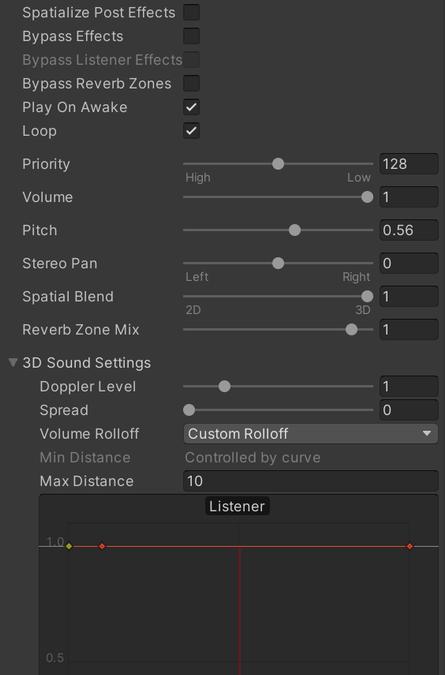
Once you have the plugin added to your Unity project, you can enable spatial audio for an audio source by clicking the Spatialize checkbox and setting the Spatial Blend to 1.0. You’ll also notice that there is a volume roll-off curve. Unity’s default curve may or may not work for your application. For example, we recommend disabling distance attenuation for UI sounds. To do this, flatten the curve out as seen below. Don’t be afraid to experiment with this volume curve! All applications have different requirements, so different curves can be useful.
 Unity Audio Source settings to enable spatial audio and disable distance attenuation
What about for sounds for more interesting holograms? Spatial audio has the benefit of helping a user distinguish between multiple sound sources playing simultaneously. Instead of a cacophony of sounds, users can enjoy increased ability to locate holograms when spatial sound is enabled, as seen in this video.
One important note about the Microsoft Spatializer – to leverage the hardware acceleration capabilities of the HoloLens 2, the Unity audio mixer functionality is bypassed. If you are accustomed to routing audio sources to different mixer groups to better control volume or effects processing, you’ll need to apply those effects on a per-source basis instead of using the audio mixer. Unity comes with some built-in audio effects, such as EQ filters and reverb. Additionally, some other Unity plugins, such as WebRTC, rely on the audio effect infrastructure to operate properly. If you want to use audio effects in conjunction with the Microsoft Spatializer, make sure to check the “Spatialize Post Effects” checkbox on the audio source, otherwise these components won’t work properly.
A quick note on when not to use spatial audio. Given how easy it is to enable spatial audio, you may be inclined to enable it for all the audio in your application! However, there are cases when this can be distracting. In general, spatial audio works best for things that also have a visual component (i.e. menus, holograms, etc.). For audio-only parts of your application, such as narrators or background music, spatial audio may actually be more of a distraction. Consider disabling spatial audio for these sounds so the user may enjoy them without looking around for some visual cue of where they are coming from.
If you want more information about adding spatial audio to your application, definitely check out the full set of documentation, and try out the spatial audio tutorial. If you’re developing with the Unreal Engine, these same principals apply but there’s a slightly different setup process. You can learn more about using spatial audio in the Unreal Engine here. If you’ve done all this and are ready to explore what else you can do with audio, check out Project Acoustics! It can add an additional layer of immersion to your application by simulating room effects. If you’ve gotten stuck somewhere along the way, let us know in the comments, or feel free to file an issue on the Microsoft Spatializer issues page.
by Contributed | Sep 25, 2020 | Uncategorized
This article is contributed. See the original author and article here.
This week’s blog roundup brought to you by Excel MVPs Charles Williams, David Abiola, and Yolanda Cuesta
Backward Compatibility of Dynamic Arrays
Charles Williams offers an in-depth discussion of dynamic array backward compatibility
Lookup Values in VBA Userform using XLOOKUP
David Abiola provides a tutorial on using XLOOKUP to look up values in Excel VBA Userform
Crea tu hoja Excel de gastos (Create your Excel expense sheet)
Yolanda Cuesta shows how to create a simple Excel expense sheet to help manage household income and payments
Find this useful and/or have an Excel question? Click the Like button and/or leave a comment below
by Contributed | Sep 25, 2020 | Uncategorized
This article is contributed. See the original author and article here.
This week, at Ignite, we announced that the next version of Skype for Business (SfB) Server will be available in the second half of 2021, and will only be available with the purchase of a subscription license. Subscription entitles access to support, product updates, bug and security fixes. We will share additional details around the official name, pricing and availability, later.
The next version of SfB Server will support in-place upgrade from SfB Server 2019 for a period of approximately two years following release. This feature will allow the admin to easily upgrade existing servers running SfB Server 2019 to the subscription-based codebase without needing to add or change servers.
The next version of SfB Server will continue to support side-by-side deployment and migration from earlier versions of SfB, as has been the case over the last few releases, but we have increased the number of versions it can be installed alongside. Customers with Lync Server 2013, SfB Server 2015 or SfB Server 2019 can install the next version of SfB Server into their existing organization.
We highly recommended that customers with existing Lync Server 2013 or SfB Server 2015 deployments and who expect to keep on-premises servers in the future, should start planning and installing SfB Server 2019 today. Once the next version of SfB is released, they will then be able to perform an in-place upgrade to that version, making the move to SfB Server 2019 the last major upgrade they will ever need to do.
We will have more details on this change over the coming months.
-SfB Server Team
by Contributed | Sep 25, 2020 | Uncategorized
This article is contributed. See the original author and article here.
Microsoft is launching the new Power Platform functional consultant role to focus on Power Platform solutions and apps, and we need beta participants.
Do you perform discovery, capture requirements, engage subject matter experts and stakeholders, translate requirements, and configure Power Platform solutions and apps? Do you create application enhancements, custom user experiences, system integrations, data conversions, custom process automation, and custom visualizations? Do you implement the design provided by and in collaboration with a solution architect and the standards, branding and artifacts established by User Experience Designers? Do you design integrations to provide seamless integration with third party applications and services? If so, you may be a Power Platform Functional Consultant…why not get certified?
The new Microsoft Certified: Power Platform Functional Consultant Associate certification has one exam that is currently in beta: Exam PL-200: Microsoft Power Platform Functional Consultant.
To receive the 80% discount*, use code PL200LMshines when prompted for payment.
This is NOT a private access code. You can use this code to register for and take the exam on or before 10/23/2020.
*The first 300 people who register can take these exams for an 80% discount! (Why beta exams are no longer free.) The seats are offered on a first-come, first-served basis. You must register for the exam on or before 10/23/2020. Take the exam as soon as possible, so we can leverage your comments, feedback, and exam data in our evaluation of the quality of the questions.
Preparing for Beta Exams
Taking a beta exam is your chance to have a voice in the questions we include on the exam when it goes live. The rescore process starts on the day that exams go live, and final scores are released approximately 10 days later. For updates on when the rescore is complete, follow me on Twitter (@libertymunson). For questions about the timing of beta exam scoring and live exam release, see the blog posts The Path from Beta Exam to Live Exam and More Tips About Beta Exams.
Remember, the number of spots is limited, so when they’re gone, they’re gone. You should also be aware that there are some countries where the beta code will not work (including Turkey, Pakistan, India, and China). You will not be able to take the beta exam in those countries.
Also keep in mind that these exams are in beta, which means that you will not be scored immediately. You will receive your final score and passing status after your exam is live.
Related announcements
Announcing three new Microsoft Certifications for Business Applications
Skill up and stand out, with new role-based training and certification!
New role-based certification and training is here, and we’re just getting started!
Catching up: continuing our journey with new role-based certifications and training
by Contributed | Sep 25, 2020 | Azure, Technology, Uncategorized
This article is contributed. See the original author and article here.
Hyperscale cloud technologies have become a common platform for modernization and lift-and-shift of On-Premise customers due to cost efficiencies, scalability and resiliency, Complex workloads like SAS have very particular workload characteristics and requirements that need to be understood and rationalized prior to deciding whether to move to the cloud or not, the maturity of compute and storage however has made this easier than in the past, allowing for Microsoft Azure to become a consideration for hosting such demanding workloads.
The attached whitepaper describes guidelines for deploying SAS 9.4 Grid technologies on Azure using the Lustre parallel clustered filesystem in a cost effective, performant and scalable manner.
The work is a collaboration between Donovan White and myself from Microsoft and Renier Dryer from CrunchYard.
Open the whitepaper with the link below.

by Contributed | Sep 25, 2020 | Uncategorized
This article is contributed. See the original author and article here.

Azure DevOps: Update release variables across stages
Rob Bos is a Developer Technologies MVP and DevOps consultant from The Netherlands. Rob is typically working with anything DevOps related to improve flow. As a Global DevOps Bootcamp team member, he loves to automate large setups for the yearly event and uses any tool to get things done. For more on Rob, check out his Twitter @robbos81

Compare 2 SharePoint libraries at lightning speed with Power Automate
Pieter Veenstra is a Business Applications and Office Apps & Services MVP from the United Kingdom. Working in IT consultancies in both the Netherlands and the UK, Pieter has gained experience in a number of different companies and different sectors. From a background in document management, content management and workflow, Pieter now specialises in SharePoint based solutions and business development. Follow Pieter on Twitter @PieterVeenstra and his blog SharePains

Intro to Azure Security Center
George Chrysovalantis Grammatikos is based in Greece and is working for Tisski ltd. as an Azure Cloud Architect. He has more than 10 years’ experience in different technologies like BI & SQL Server Professional level solutions, Azure technologies, networking, security etc. He writes technical blogs for his blog “cloudopszone.com“, Wiki TechNet articles and also participates in discussions on TechNet and other technical blogs. Follow him on Twitter @gxgrammatikos.
The better and improved Teams Whiteboard
Vesa Nopanen is a Principal Consultant in Office 365 and Modern Work, and is passionate about Microsoft Teams. He enjoys helping and coaching customers to find benefits and value when adopting new tools, methods, ways of working and practices for a daily work-life equation. He focuses especially on Microsoft Teams and how it can change how organizations work. He lives in Turku, Finland. Follow him on Twitter @vesanopanen.

PASS Summit 2020!
Sergio Govoni is a graduate of Computer Science from “Università degli Studi” in Ferrara, Italy. Following almost two decades at Centro Software, a software house that produces the best ERP for manufacturing companies that are export-oriented, Sergio now manages the Development Product Team and is constantly involved on several team projects. For the provided help to technical communities and for sharing his own experience, since 2010 he has received the Microsoft Data Platform MVP award. During 2011 he contributed to writing the book: SQL Server MVP Deep Dives Volume 2. Follow him on Twitter or read his blogs in Italian and English.


Recent Comments