by Contributed | Sep 28, 2020 | Azure, Technology, Uncategorized
This article is contributed. See the original author and article here.
Azure Service Fabric is the foundational technology that powers Azure core infrastructure and mission critical services such as Azure SQL Database, Event Hubs, and Microsoft Teams. This technology, exactly as we use it within Microsoft, was made publicly available in 2015. Since then, we have seen it been used for the most demanding and performant workloads, both inside and outside Microsoft. We have seen adoption of the product to support highly available, scalable, and flexible workload types, including containers, stateful and stateless programming models, and regular executables. Over this period of time customers have expressed feedback that infrastructure deployment and management should be easier.
To provide our customers with a simplified experience we are excited to announce the preview of Service Fabric managed clusters. Service Fabric managed clusters in Azure maintain the same enterprise-grade reliability, scalability, and proven mission-critical performance that our customers have come to expect, while making it easier than ever before to deploy and manage your Service Fabric environment, freeing you up to deliver on business impact.
Simplified Cluster Deployment and Management
We have exciting new features that will make managing your Service Fabric clusters easier than ever before:
-
Encapsulated Resource Model – Service Fabric managed clusters will allow you to create a cluster without needing to define all of the separate resources that make up the cluster such as VMs, storage, or networking configurations. A managed Service Fabric cluster is deployed as a single ARM resource. This reduces the average ARM template from over 1000 lines of JSON to about 100 lines of JSON.
-
Storage backed by managed disks – When creating a Service Fabric managed cluster, you are no longer limited by the size of the temp storage that comes with the VM. Now, you can easily select the amount of storage that meets your application needs.
-
Fully managed cluster certificates – Cluster certificates are now fully managed by Azure, ensuring that you don’t have to worry about things like an expired cluster certificate.
-
Single step cluster operations – Operations such as removing a node type that previously required multiple steps can now be completed in a single step. Service Fabric managed clusters will automatically make any changes necessary to fulfill the request and better handle failures during the process.
-
Enhanced cluster safety – Cluster operations will be validated by the Service Fabric resource provider to ensure that they are safe to perform.
-
Simplified Cluster SKUs – Two new cluster SKUs (Basic, Standard) to help you create test and production environments. When using Standard SKU, the durability and reliability values will be automatically adjusted to best utilize the available resources in your cluster.
See below how easy it is to deploy a Service Fabric managed cluster:
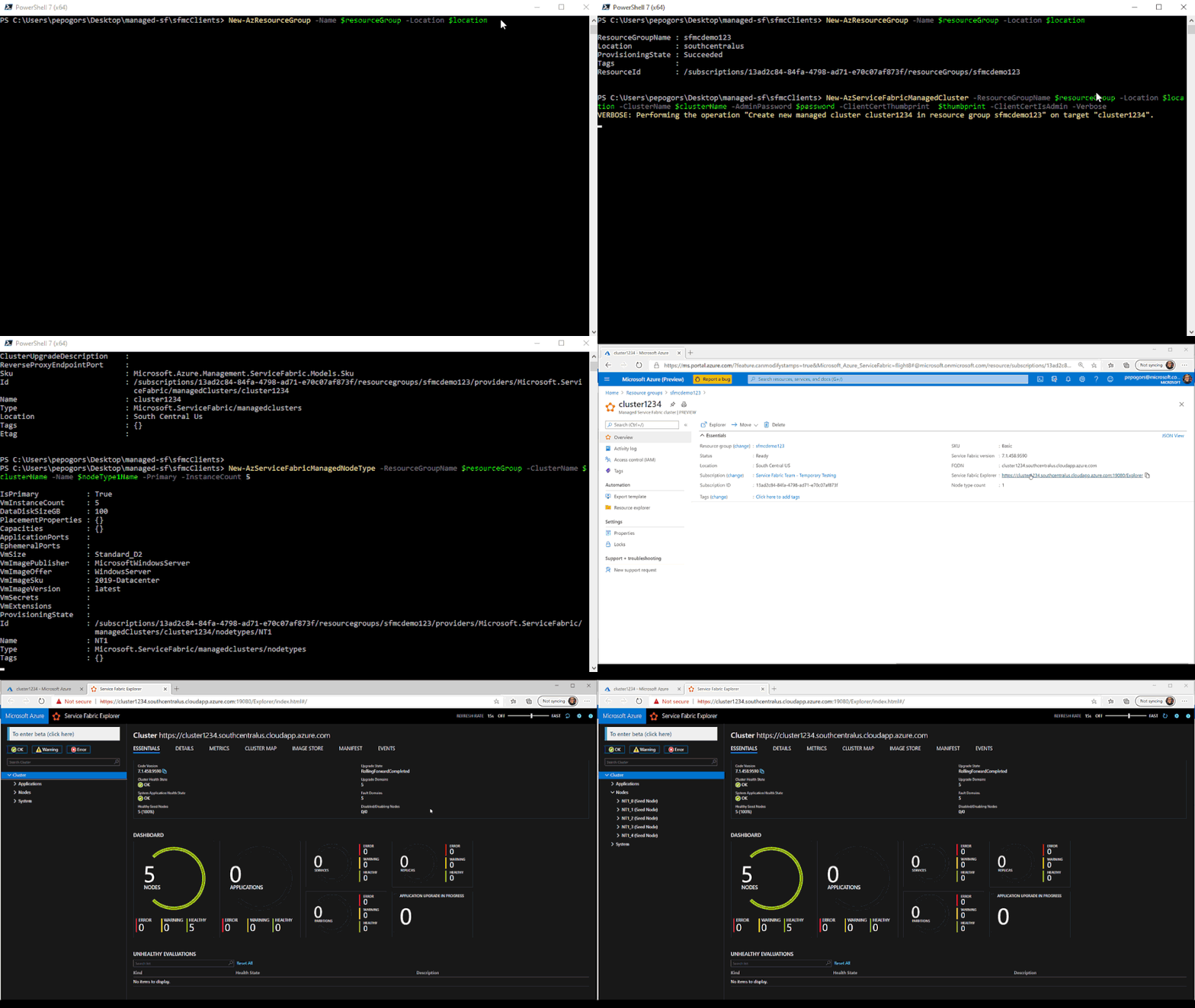 Deployment of a Service Fabric managed cluster using Azure PowerShell.
Looking towards the future
The Service Fabric managed cluster resource is the first step in providing a managed experience for our customers. In the near future, we are working towards decreasing the operational overhead even further by separating out the system service components and providing them as a managed service. Look out for additional announcements around this work in the coming months!
Try it out
Start out with our quickstart or head over to the Service Fabric managed clusters documentation page to get started. You can find many resources including documentation, and cluster templates. You can view the feature roadmap and provide feedback on the Service Fabric GitHub repo.
by Contributed | Sep 28, 2020 | Azure, Technology, Uncategorized
This article is contributed. See the original author and article here.
Content Round Up
Microsoft Graph + Logic Apps + Microsoft Teams ToDo Scenario
Ayca Bas
Wouldn’t it be nice to receive your list of assigned tasks every morning on Microsoft Teams?
Build a flow using Azure Logic Apps to automate Microsoft Teams Flow bot for sending To-Do tasks every morning at 9 AM! In this article you will learn about the queries and responses of Microsoft Graph To-Do APIs in Graph Explorer, how to register your app in Azure Active Directory, building Azure Logic Apps Custom Connector to consume Graph To-Do API for getting the tasks and finally creating a Logic Apps flow to automate sending tasks from Microsoft Teams Flow bot every morning.
Blogpost about file upload in the browser with azure blob storage sdk v12
Alvaro Videla Godoy
This article explains how to add a serverless API to an Azure Static Web App, to generate SAS keys that authorize users to upload images to Azure Blob Storage. The examples use the latest Azure SDK for JavaScript.
Serverless ToDoMVC app using Azure Static WebSites, Azure Functions, Vue.Js, Node and Azure SQL
The ToDoMVC app has been around for a while and it is a great sample app to get started on front-end building. But what about the full-stack? And what if we want to create a complete Serverless Full-Stack solution? Well with Azure Static Websites, Azure Functions, Node and Azure SQL, this is much simpler than anyone could expect! Let’s see how simple is that!
Develop a Serverless Integration Platform for the Enterprise
Integrating different systems is critical. Let’s see how we can create a completely #Serverless Enterprise Integration Platform using the tools #Azure offers: #AzureFunctions, #LogicApps and #ServiceBus.
Azure Stack Hub Partner Solutions Series – Byte
Thomas Maurer
Today, I want you to introduce you to Azure Stack Hub Partner Byte. Join our Australian partner Byte as we explore how they are using the Azure Stack products to simplify operations, accelerate workload deployment, and enable the teams to focus on creating value rather than “keeping the lights on”.
Writing safe orchestrator functions with the Durable Task Analyzer
When using Durable Functions, the orchestrator function will replay several times. This behavior puts some restrictions on the code that can run in the orchestrator. The Durable Task Analyzer, a Roslyn code analyzer written for Durable Functions, helps you write deterministic C# code, safeguarding the replay behavior. In this post, Marc Duiker demonstrates the code violations and their solutions.
Livestream: Deep Dive VM and Kubernetes Management to any Infrastructure with Azure Arc
Thomas Maurer
Azure Arc has the ability to managed multi-cloud and on-premise. Join us on the second day of the Azure Hybrid Cloud Webinar Series to learn and discover how to manage and govern your Windows and Linux machines hosted outside of Azure on your corporate network or other cloud providers, similar to how you manage native Azure virtual machines. When a hybrid machine is connected to Azure, it becomes a connected machine and is treated as a resource in Azure. Azure Arc provides you with the familiar cloud-native Azure management experience, like RBAC, Tags, Azure Policy, Log Analytics, and more.
Azure Stack Hardware Experience App (NDA until Ignite)
Thomas Maurer
As you know, Microsoft Ignite 2020 has gone virtual this year. We have some great sessions, engagement options, the Cloud Skills Challenge, and much more for you. However, one part I would have missed this year would have been the expo hall, where I could look at all the new Azure Stack hardware. That is why the Azure Stack team created a mobile app that allows you to look at Azure Stack hardware and new form factors through augmented reality (AR) in the comfort of your environment.
This app allows you to look at some of our Azure Stack hardware portfolio, including Azure Stack Hub, Azure Stack HCI, and the all-new Azure Stack Edge and Azure Stack Edge pro devices, running at the edge in your Hybrid Cloud environment.
Writing an Azure Function in node.js to implement a webhook
Integrating disparate systems can be a fiddly business. Find out how @Zegami developed an Azure Function App in node.js to create a serverless bridge between their CRM system and accounts API.
5 Reasons to go Serverless with Azure
At some point, you’ll need to hook up your mobile application to some database in the cloud and becoming a cloud engineer to do that would be quite overkill and really unnecessary when you can easily get the services of all cloud professionals by going serverless. Here are 5 reasons why you want to go serverless with the azure platform as a mobile applications developer.
Step-by-Step: How to deploy a container host with Windows Admin Center
Anthony Bartolo
Last week Microsoft released a new version of the Containers extension on Windows Admin Center. This release was focused on helping IT Admins getting their container hosts up and running without much effort.
AzUpdate: Post Ignite recap, Responsible AI, Azure Auto Manage, Azure Resource Mover and more
Anthony Bartolo
Well Microsoft Ignite 2020 is over and while out Fitbit counters may not have captured as many steps as last year… it doesn’t mean that there wasn’t a plethora of Azure news shared. Here are the headlines we are covering this week: The IT Professional’s role in the Responsible use of AI, Azure Auto Manage for VMs, Move resources to another region with Azure Resource Mover, New Windows Virtual Desktop Capabilities, Hybrid Cloud announcements surrounding Azure Arc and Azure Stack as well as the Microsoft Learn module of the week.
Data Ingestion into Azure Data Explorer with Kafka Connect and Strimzi
Abhishek Gupta
In this blog, we will go over how to ingest data into Azure Data Explorer using the open source Kafka Connect Sink connector for Azure Data Explorer running on Kubernetes using Strimzi. Kafka Connect is a tool for scalably and reliably streaming data between Apache Kafka and other systems using source and sink connectors and Strimzi provides a “Kubernetes-native” way of running Kafka clusters as well as Kafka Connect workers.
Public Preview: Run Steeltoe .NET Applications in Azure Spring Cloud
Shayne Boyer
Earlier this month at SpringOne,
we announced general availability of Azure Spring Cloud. Today we are bringing you another exciting update and launching the public preview of Steeltoe .NET application support in Azure Spring Cloud.
Azure Stack Hardware Experience App
Thomas Maurer
As you know, Microsoft Ignite 2020 has gone virtual this year. We have some great sessions, engagement options, the Cloud Skills Challenge, and much more for you. However, one part I would have missed this year would have been the expo hall, where I could look at all the new Azure Stack hardware. That is why the Azure Stack team created a mobile app that allows you to look at Azure Stack hardware and new form factors through augmented reality (AR) in the comfort of your environment.
This app allows you to look at some of our Azure Stack hardware portfolio, including Azure Stack Hub, Azure Stack HCI, and the all-new Azure Stack Edge and Azure Stack Edge pro devices, running at the edge in your Hybrid Cloud environment.
Azure Stack Hub Partner Solutions Series – Byte
Thomas Maurer
Today, I want you to introduce you to Azure Stack Hub Partner Byte. Join our Australian partner Byte as we explore how they are using the Azure Stack products to simplify operations, accelerate workload deployment, and enable the teams to focus on creating value rather than “keeping the lights on”.
Docker image deploy: from VSCode to Azure in a click
Lucas Santos
In this article, we explore the newest integration between Azure and Docker CLI on VSCode!
CloudSkills.fm Podcast – Azure Architecture with Thomas Maurer
Thomas Maurer
In this episode we dive into Azure Architecture with Thomas Maurer. Learn about Enterprise Scale Landing Zones, Azure Bicep, the Well Architected Framework, and more.
Thomas Maurer works as a Senior Cloud Advocate at Microsoft. As part of the Azure engineering team (Cloud + AI), he engages with the community and customers around the world to share his knowledge and collect feedback to improve the Azure platform.

by Contributed | Sep 28, 2020 | Uncategorized
This article is contributed. See the original author and article here.
Kippy the robot wakes up to find itself stranded on an island… and it’s up to you to solve a series of puzzles and help it find a path to its rocket ship! Kippy’s Escape is a new open source sample app for HoloLens 2, built with Unreal Engine 4 and Mixed Reality UX Tools for Unreal. It’s now available for download from the Microsoft Store; once you’ve played through, you also can check out the repository from GitHub and dig into how it was made.

We built Kippy’s Escape to highlight Unreal Engine’s HoloLens 2 support, the HoloLens 2’s capabilities, and the UX components provided out-of-the-box by the Mixed Reality Toolkit. We wanted to inspire developers to imagine what they could create with Unreal and HoloLens 2. As such, we came up with three guiding principles for the experience: that it needed to be fun, interactive, and have a low barrier to entry. We wanted the experience to be intuitive enough that even a first-time mixed reality user wouldn’t need a tutorial to go through it.
Key HoloLens 2 features helped make the game feel fun. Eye tracking allowed us to fire off material and sound attributes, highlighting key pieces of the game without being too distracting or overwhelming. Spatial audio helped make the levels feel at home in the player’s surroundings. Being able to grab objects, push buttons and manipulate sliders engages the player in such innovative ways, it was important to make sure these connection points felt natural.
The Mixed Reality UX Tools plugin provided us with a set of extensible components to make the game interactive. Hand interaction actors enable both direct and far manipulation of holograms out-of-the-box. At the start of Kippy’s Escape, the user is given the opportunity to set the location of the game. Hand beams extending from the user’s palm make it easy to manipulate large holograms that are far away, like the placeholder scene. The scene is able to be dragged and rotated using UX Tools’ bounds control component. On the second island, the user must pick up gems with manipulators attached and place them in their matching slots. A slider component appears on the fourth island, triggering the final bridge to be raised.

We hope you enjoy Kippy’s Escape, and better yet, that it inspires you to re-use and even build off the experience. We would love to see posts of your reactions to Kippy’s Escape, and even any spin-offs from the experience, on social media- that’s why we’ve open sourced it!

For the full story of how Kippy’s Escape was made, check out this article.
by Contributed | Sep 28, 2020 | Uncategorized
This article is contributed. See the original author and article here.
Last week was the Microsoft Ignite 2020 digital event. Along with the event we have a lot of new content on MSIX for IT Pros and developers. Check out the new sessions below:
MSIX in the Enterprise – A state of the union for MSIX. The MSIX platform is continuing to grow and adapting to customer needs. Let’s walk through what’s new in the past year for the MSIX platform and what it means for your enterprise. We will also cover the plans upcoming for the MSIX platform.
Reduce developer friction with Azure Code Signing – Azure Code Signing is a service from Microsoft to enable developers and IT Pros to minimize the friction in code signing. The session will walk through the basics and importance of code signing and how Azure Code Signing will help reduce the challenges involved in signing your apps and code.
Using MSIX with CI/CD Pipelines for Code Changes – With MSIX and Azure DevOps you can go from making a code change in your repo to getting the updated release of your application on users’ machines in a matter of minutes. Join us for this demo-driven session as we demonstrate how to use MSIX CI/CD Pipelines to automate building, packaging, and deploying your desktop applications.
John Vintzel @jvintzel
Program Manager Lead, MSIX
by Contributed | Sep 28, 2020 | Uncategorized
This article is contributed. See the original author and article here.
Last week was the Microsoft Ignite 2020 digital event. Along with the event we have a lot of new content on MSIX for IT Pros and developers. Check out the new sessions below:
MSIX in the Enterprise – A state of the union for MSIX. The MSIX platform is continuing to grow and adapting to customer needs. Let’s walk through what’s new in the past year for the MSIX platform and what it means for your enterprise. We will also cover the plans upcoming for the MSIX platform.
Reduce developer friction with Azure Code Signing – Azure Code Signing is a service from Microsoft to enable developers and IT Pros to minimize the friction in code signing. The session will walk through the basics and importance of code signing and how Azure Code Signing will help reduce the challenges involved in signing your apps and code.
Using MSIX with CI/CD Pipelines for Code Changes – With MSIX and Azure DevOps you can go from making a code change in your repo to getting the updated release of your application on users’ machines in a matter of minutes. Join us for this demo-driven session as we demonstrate how to use MSIX CI/CD Pipelines to automate building, packaging, and deploying your desktop applications.
John Vintzel @jvintzel
Program Manager Lead, MSIX
by Contributed | Sep 28, 2020 | Azure, Technology, Uncategorized
This article is contributed. See the original author and article here.
|
We continue to expand the Azure Marketplace ecosystem. For this volume, 82 new offers successfully met the onboarding criteria and went live. See details of the new offers below:
|
Applications
|
 |
Ackee – Web Traffic Analytics on Ubuntu 18.04: This image offered by Tidal Media contains Ackee on Ubuntu 18.04. Ackee delivers self-hosted web analytics, enabling you to analyze the traffic of your sites without being tracked. Ackee has an API and a web interface, and it strikes a good balance between analytics and privacy.
|
 |
Advanced hMail Mail Server on Windows Server 2016: Specially hardened for Azure Marketplace, Tidal Media’s Advanced hMailServer image on Windows Server 2016 is fully configured for quick and easy deployment. It runs as a Windows service and supports IMAP, POP3, and SMTP email protocols.
|
 |
Advanced hMail Mail Server on Windows Server 2019: Specially hardened for Azure Marketplace, Tidal Media’s Advanced hMailServer image on Windows Server 2019 is fully configured for quick and easy deployment. It runs as a Windows service and supports IMAP, POP3, and SMTP email protocols.
|
 |
AhnLab CPP: AhnLab CPP is a centralized cloud workload protection platform that focuses on providing optimized protection, unified management, and flexibility for workloads in hybrid environments. It uses IPS/IDS, application control, and antivirus functionalities to protect Windows and Linux servers.
|
 |
Ampache – Music Streaming Server on Ubuntu 18.04: This image from Tidal Media contains Ampache on Ubuntu 18.04. Ampache enables you to maintain a simple, secure, and fast web front end that runs on PHP. Access music and videos from anywhere with an internet-enabled device.
|
 |
Arcserve Continuous Availability: Powered by asynchronous replication technology, Arcserve Continuous Availability delivers automatic failover and data protection for Windows and Linux applications and systems on-premises and in the cloud.
|
 |
AVEVA Unified Engineering: Unified Engineering on Microsoft Azure provides end-to-end integration of conceptual and front-end engineering design (FEED) into an environment that handles all process simulation and engineering (1D, 2D, and 3D) from one data hub with bidirectional information flow.
|
 |
AzuraCast – Web Radio Management Server on Ubuntu: This image offered by Tidal Media contains AzuraCast on Ubuntu. AzuraCast is an open-source web radio management suite. Get your radio station running in minutes, then manage your media, playlists, DJs, and more from a simple web interface.
|
 |
C3 Thermal Scanning Solutions: Driven by artificial intelligence, Twayne Communications’ C3 thermal scanning solutions offer quick, effective, and contactless detection of COVID-19 symptoms. Scanners support HIPAA compliance and tested for safety, security, and accuracy.
|
 |
ChainDoc: Based on a private server blockchain network where only document hashes are saved, ChainDoc ensures documents’ content, form, and time of publication remain unchanged. Meet the challenge of communicating with customers via a durable medium by using Atende’s ChainDoc.
|
 |
Checkingas: Checkingas on Microsoft Azure delivers visibility into fuel levels in propane and natural gas tanks. The solution also provides Microsoft Power BI dashboards that empower users to make data-driven decisions. This app is available only in Spanish.
|
 |
Claim Genius Free Trial: Claim Genius uses AI to assess auto damage, determine whether to repair or replace damaged parts, and predict total loss based on photos, enabling insurance carriers to speed up claims processing and significantly reduce loss adjustment expenses.
|
 |
Coding.Ai – Medical Coding Automation: Coding.Ai automates medical coding to help healthcare organizations cut costs and reduce administrative burdens. Decrease claim denials related to erroneous coding and gain greater insight into the coding process through a robust analytics dashboard with custom reporting.
|
 |
Compliance Recording AI Analysis Microsoft Teams: AGAT Software Development’s SphereShield for Microsoft Teams performs audio and video analysis on recorded meetings for data-loss prevention and e-discovery needs. Featuring advanced AI and NLP analytics, SphereShield can transcribe audio to more than 70 languages.
|
 |
Cosmos Forms Return to Work Offer: Cosmos Forms’ Return to Work offer provides customers a rapidly deployable, easy-to-use mobile solution to screen and check in employees and visitors to support their organization’s return-to-work processes and protocols during the COVID-19 pandemic.
|
 |
Covid-19 Workforce Wellness: BroadReach Consulting’s COVID-19 Workforce Wellness solution on Microsoft Azure monitors the daily health of employees to help prevent the spread of COVID-19 at the workplace and beyond. Employees answer a simple five-question survey every day to be evaluated for infection.
|
 |
CT-SAP-Chatbot: Account Manager Bot is a smart chatbot that incorporates functionalities from SAP and Salesforce, enabling users to check on account receivables and invoices just by entering a client’s name rather than logging in to SAP and carrying out additional steps.
|
 |
eDiscovery and Archiving for Microsoft Teams: AGAT Software Development’s SphereShield for Microsoft Teams offers a next-generation archive and e-discovery solution that captures all content and makes it searchable via a variety of parameters.
|
 |
Eventador Platform: Using SQL with Apache Flink, Eventador on Microsoft Azure provides data scientists and analysts with a robust platform for quickly and securely processing vast amounts of real-time and streaming data using simple data APIs.
|
 |
Factory Insights as a Service: Factory Insights as a Service is a SaaS-based cloud solution that allows manufacturers to improve the impact, speed, and scale of their digital transformation initiatives. PTC’s lean, accelerated approach vastly reduces setup, integration, and validation efforts.
|
 |
Filezilla On Windows Server 2016: Cognosys offers a hardened, enterprise-ready image of Filezilla on Windows Server 2016. Filezilla is a cross-platform graphical FTP, SFTP, and FTPS file management tool that helps users quickly move files between computers and web servers.
|
 |
Filezilla On Windows Server 2019: Cognosys offers a hardened, enterprise-ready image of Filezilla on Windows Server 2019. Filezilla is a cross-platform graphical FTP, SFTP, and FTPS file management tool that helps users quickly move files between computers and web servers.
|
 |
FUJITSU Manufacturing Industry Solution COLMINA V2: COLMINA accelerates manufacturers’ digital transformation by implementing a three-layer structure that provides overall optimization of manufacturing processes via a cyberphysical system (CPS). This app is available only in Japanese.
|
 |
Funkwhale – Music Sharing Server for Ubuntu 18.04: Get rapid access to your favorite playlists, tracks, and artists with Tidal Media’s hardened image of Funkwhale on Ubuntu 18.04. Funkwhale is a community-driven project that lets you listen to and share music in an open, decentralized network.
|
 |
GDS Collaboration Platform: The GDS Collaboration Platform from Samsung SDS facilitates collaboration and communication by using large, high-resolution GDS files (200+ GB) that include all related information. It supports various chip/mask layout formats and simultaneous visualization for multiple users.
|
 |
Gift & Entertainment Registration: Based on the Microsoft Power Platform, CSI Interfusion’s Gift & Entertainment Registration solution helps properly manage and maintain good employee-client relationships. It digitizes gift receipt, approval, and declaration processes to help prevent bribery and conflicts of interest.
|
 |
Gitbucket – Plan Projects, Code, Test, and Deploy: Tidal Media’s image of Gitbucket, a web-based version control repository hosting service for source code and development projects, features a GitHub-like user interface, Git repository hosting via HTTP and SSH, a repository viewer, a wiki, and a plug-in system.
|
 |
HR Onboarding Bridge to Office 365, Azure AD or AD: Aquera’s HR Onboarding Bridge imports employee information from human resource management system apps to Office 365, Active Directory, and Azure Active Directory. Automate hiring, terminations, rehires, and more with HR Onboarding Bridge.
|
 |
ICONICS Suite 10.96: ICONICS provides automation software solutions that visualize, historicize, analyze, and mobilize real-time information for any application on any device. ICONICS Suite 10.96 includes the GENESIS64, Hyper Historian, AnalytiX Suite, and MMX automation solutions.
|
 |
iEdge: Advantech’s iEdge drives effective equipment management for optimized productivity. It provides equipment connectivity with standard industrial protocol support (Modbus, OPC-UA, ODBC, etc.) and a user-friendly interface for equipment status monitoring and management.
|
 |
InCyber TPIT – True prediction of insider threats: InCyber’s True Prediction of Insider Threats (TPIT) solution on Microsoft Azure provides an ongoing risk ranking for all employees, contractors, consultants, and so on, enabling CEOs or CSOs to take preventive measures to avoid major losses to their organization.
|
 |
Infosys SAP S/4HANA – Intelligent Order Creation: The SAP S/4HANA – Intelligent Order Creation solution uses the Azure Cognitive Services Form Recognizer to extract information from incoming documents, apply machine learning algorithms to it, and present data in the form of key-value pairs.
|
 |
Inventory Count Auditing Application: ISYX Technologies’ Inventory Count Auditing application helps organizations match their physical inventory count with the inventory availability in their ERP system. Ensure proper forecasting and better inventory management while reducing costs.
|
 |
iSpring Suite Full Services Business License: iSpring Suite on Microsoft Azure extends PowerPoint to allow for rapid e-course authoring, enabling users to easily develop quality courses, videos, lectures, and assessments that work on any device.
|
 |
JetPatch 4.0.1: JetPatch provides end-to-end vulnerability remediation by automating the patch management process. Execute patch rollout workflows by endpoint groups and maintenance windows, and eliminate patch blind spots with discovery of devices, operating systems, and apps across your organization.
|
 |
Localization for Serbia: This extension for Microsoft Dynamics 365 Business Central supports Serbian legal requirements, including VAT forms, VAT books (issued/received invoices), and more. The advanced pack features integration with banks, modified prepayment invoices, and credit memos.
|
 |
LOMT Pool Testing: Laboratory Optimizer for Mass Testing (LOMT) is laboratory software to manage COVID-19 pool testing. It allows a lab to test two to 30 as many people by reducing the quantity of assays, reagents, and time spent on each test.
|
 |
Navidrome – Streaming Media Server on Ubuntu: This ready-to-run image from Tidal Media contains Navidrome on Ubuntu. Navidrome lets you stream your music from any browser or mobile device. Easily share your music and playlists with your friends and family.
|
 |
Nodejs On Windows Server 2016: This image offered by Cognosys contains Node.js on Windows Server 2016. Node.js is an open-source JavaScript runtime environment that executes JavaScript code outside a web browser.
|
 |
Nodejs On Windows Server 2019: This image offered by Cognosys contains Node.js on Windows Server 2019. Node.js is an open-source JavaScript runtime environment that executes JavaScript code outside a web browser.
|
 |
OBS On Windows Server 2016: This image offered by Cognosys contains OBS (Open Broadcaster Software) Studio on Windows Server 2016. OBS Studio is open-source software for video recording and live streaming that allows you to use native plug-ins for high-performance integrations or scripts written with Lua or Python.
|
 |
OBS On Windows Server 2019: This image offered by Cognosys contains OBS (Open Broadcaster Software) Studio on Windows Server 2019. OBS Studio is open-source software for video recording and live streaming that allows you to use native plug-ins for high-performance integrations or scripts written with Lua or Python.
|
 |
OpeNgine DevOps Accelerator: OpeNgine, a DevOps accelerator for Microsoft Azure infrastructure and continuous integration/continuous delivery, offers out-of-the-box deployment architectures and integrations. Accomplish the full DevOps lifecycle with a smaller team, less expertise, less complexity, and higher margins.
|
 |
Passport 360 – Client Package Transact: Made for large-scale enterprises in high-risk environments, Passport 360 helps clients manage complex health and safety regulations, streamlining compliance and onboarding processes. Passport 360 integrates with the APIs of all major ERP, supply chain, safety, and HR applications.
|
 |
Pritunl – Self-hosted VPN Server on Ubuntu 18.04: This ready-to-run image offered by Tidal Media contains Pritunl on Ubuntu. Pritunl is an enterprise VPN server that allows you to virtualize your private networks across datacenters and provide local network access to remote users.
|
 |
RetailHarvest: Through analytics and business intelligence, retailHARVEST reduces the loss of sales due to inventory shortages and reduces the cost of extra inventory due to poor distribution of products. This app is available in Spanish.
|
 |
SaaS Cloud Based LMS iSpring Learn: Move to virtual classrooms and deliver corporate training with iSpring Learn, an easy-to-use e-learning platform. iSpring Learn supports 11 languages, screen sharing, online meetings, reports in XLSX format, and more.
|
 |
SenservaPro: Made for Microsoft Azure administrators and Azure security auditors, the SenservaPro scanner locates security configuration concerns, ranks security risks, and helps you safeguard Office 365 migrations.
|
 |
Smart Survey – feedback simplified and organized: Make surveys more enjoyable for your customers with Smart Survey, which features status indicators and a hassle-free experience. Multidevice compatibility enables users to access Smart Survey from any device or platform, and dual input feedback helps you identify the quality of survey responses.
|
 |
Sonerezh – Music Broadcasting Server for Ubuntu: This image offered by Tidal Media contains Sonerezh on Ubuntu. Sonerezh is a self-hosted audio streaming application that lets users access their music from a web browser. Sonerezh features auto-transcoding to mp3 and automatic metadata extraction and file import.
|
 |
Squid On Windows Server 2016: This image offered by Cognosys contains Squid on Windows Server 2016. Squid is a content accelerator used by thousands of websites around the world to ease the load on their servers.
|
 |
Squid On Windows Server 2019: This image offered by Cognosys contains Squid on Windows Server 2019. Squid is a content accelerator used by thousands of websites around the world to ease the load on their servers.
|
 |
Streama 1.9.1 – Media Streaming on LINUX Centos 7: Tidal Media offers a preconfigured, ready-to-run image of Streama 1.9.1 on CentOS 7. Streama is a powerful and easy-to-use streaming application and file manager, with features including a built-in media player, batch file operations, and media metadata.
|
 |
SymbioSys eApplication-as-a-Service: SymbioSys eApplication-as-a-Service enables insurers to easily configure and customize electronic application forms for the needs of life, annuity, pension, and health insurance carriers, along with the necessary regulatory compliance.
|
 |
SymbioSys Underwriting-as-a-Service: Designed for global insurance underwriting needs, SymbioSys Underwriting-as-a-Service on Microsoft Azure improves your organization’s underwriting efficiency by facilitating informed decision-making for quick policy issuance.
|
 |
Teradata Data Stream Controller VM: The Teradata Data Stream Controller virtual machine provides administrative functions and metadata storage for the Data Stream Utility and is a key component of the backup and restore functionality of Teradata systems on Microsoft Azure.
|
 |
timeghost: Designed for Office 365, timeghost tracks project time and reminds users of all their daily Office 365 activities. timeghost is installed directly in Microsoft Teams and provides a feed that ensures users don’t forget even the smallest task.
|
 |
Veso Media Server on Ubuntu 18.04 LTS: This preconfigured image of Veso Media Server on Ubuntu 18.04 LTS from Tidal Media offers a quick and easy way to move your media storage to the cloud. The ad-free, open-source media server features media transcoding, a media player, and more.
|
 |
Welch Allyn RetinaVue Care Delivery Model: The Welch Allyn RetinaVue care delivery model from Hillrom helps primary healthcare providers preserve the vision of patients living with diabetes and achieve the “triple aim” of healthcare: improved patient satisfaction, improved population health, and reduced per-capita costs.
|
 |
Work Resumption Solution: Built on the Microsoft Power Platform, CSI Interfusion’s Work Resumption solution enables organizations to collect data for insights into employee health status, resource allocation, and more. Drive informed decision-making and keep workers safe during the COVID-19 pandemic.
|
 |
Zegami Image Analysis & Annotation: Transact: Zegami is an AI-enabled image analysis platform for scientific and medical imaging. It combines advanced analysis tools with a unique visualization interface, enabling users to rapidly categorize, label, and clean large image datasets.
|
Consulting services
|
 |
Azure AI in a Day – 1 Day workshop: In this workshop from FyrSoft, you’ll find out how to build machine learning models, bots, and AI-infused apps. You’ll also discover new ways to use Microsoft Azure AI, Azure Machine Learning, Azure Cognitive Search, and more.
|
 |
Azure Cloud Adoption Discovery – 4 week Assessment: Whether you’re looking to bring some in-house servers to the cloud or digitize paper-based processes, RedBit Development will determine how your organization can use Microsoft Azure to modernize and optimize your business.
|
 |
Azure Cloud Migration: 1 wk Assessment: Murdock Martin Consulting’s assessment, aligned with the Microsoft Cloud Adoption Framework for Azure, will provide a solid foundation for customers migrating enterprise workloads to Azure.
|
 |
Azure Customer Data Platform 8-Week Workshop: This engagement from Computer Enterprises Inc. will demonstrate how you can use Microsoft Azure to combine data ingestion, cleanup, storage, security, and big data analytics. Computer Enterprises Inc. will develop an initial custom data analytics product to prove immediate value.
|
 |
Azure Governance CIE: 4 Hour Workshop: Save money on your Microsoft Azure resources with TechStar Consulting Inc.’s workshop, which will focus on governance and security controls. You’ll learn about subscription management, cost governance, role-based access control, disaster recovery options, and more.
|
 |
Azure Security Hardening: 2-week Implementation: Team Venti’s packaged service for Microsoft Azure provides you with a streamlined and affordable way to harden your accounts against cybersecurity threats. Team Venti will use Azure Security Center to analyze your resources and identify vulnerabilities.
|
 |
Azure Synapse Analytics – 1 Day Online Workshop: This workshop from CLOUD SERVICES is designed to get you started with Microsoft Azure Synapse, which brings together enterprise data warehousing and big data analytics. The workshop will contain theoretical and practical elements to help you solve tasks more efficiently.
|
 |
Data Platform: 30 Days Implementation: Modernize your data estate with this implementation from FyrSoft. FyrSoft will assist customers in deploying and utilizing Azure data services so they can quickly build apps backed by Azure’s pre-built AI capabilities.
|
 |
DevOps for Data Science: 3-Wk Implementation: Using Microsoft Azure DevOps and Azure Machine Learning, Kapernikov will implement a DevOps pipeline that integrates with your industrial process. This will enable your engineers to automate testing and optimize processes through data science.
|
 |
Form Recognizer 5-day PoC: Use AI-powered form recognition to accelerate your business process optimization. Computer Enterprises Inc.’s proof of concept, which includes an assessment and a workshop, will show you how you can replace an unreliable optical character recognition (OCR) solution with Microsoft Azure Cognitive Services.
|
 |
Holographic human capturing: 1-Day Workshop: In this workshop from Volucap GmbH, you will learn about volumetric content, like holograms, and how you can start delivering mixed reality across mobile devices, headsets, PCs, and augmented reality platforms.
|
 |
Modern Desktop Management: 5 days assessment: GFI will work with your IT and business teams to begin implementing Microsoft Azure technical architecture (Windows Virtual Desktop, Intune, and Azure Active Directory) in your Azure tenant. This service is available in French.
|
 |
Modernize your Azure Data Platform: 2 Day Workshop: In this workshop, Data-Driven AI will consider your company’s current data estate and help you design a strategic roadmap to modernize your data platform on Microsoft Azure.
|
 |
Remote Work Mgt&Cost Optimization 3-Day Assessment: FyrSoft’s assessment will enable your enterprise to manage and secure your remote devices using Microsoft Azure. FyrSoft will convey how Microsoft technologies and services can be utilized for lean IT efficiency and infrastructure optimization.
|
 |
SpaceHub Quickstart AZURE: 5 days assessment: Designed for the Netherlands market and available only in Dutch, PQR’s service helps organizations set up a Microsoft Azure landing zone. This will provide a solid basis for the expansion of Azure services and the implementation of cost management.
|
 |
SQL Disaster Recovery Planning: 1 Day Assessment: Minimize downtime with database replication to Microsoft Azure. TechStar Consulting Inc. will review your SQL Server or Azure database and design a solution to meet your service-level agreement and budget requirements.
|
 |
SQL Server Health Check, CEO-5 Days Implementation: ALESON ITC’s technical team will review your Microsoft Azure-based database system to improve performance and availability, check the licensing and the cost of your environment, and help you save money.
|
 |
TeamsHub by Cyclotron for Non-Profits Offer: Cyclotron’s special offer for nonprofits includes a two-day workshop and a 90-day trial of its TeamsHub solution to help drive Microsoft Teams adoption and training. Simplify your journey to Teams with Cyclotron. |
 |
Upskill As A Service 1-Hr Briefing: Tech Mahindra Limited’s briefing will help your organization onboard employees, get technology training in place, track and achieve necessary certifications, and provide recommendations for future trainings.
|
 |
Windows Azure Landing Zone – 1 Week Implementation: In this engagement, Nexio will assist your organization in migrating on-premises servers to Microsoft Azure so you can meet your availability, agility, and scalability demands.
|
 |
Windows Virtual Desktop WVD: 2-Wk Proof of Concept: Because of COVID-19, many employees are working from home and companies are looking to provide a secure desktop environment. This proof of concept from Preeminent Solutions will help you plan your Windows Virtual Desktop deployment.
|
|
by Contributed | Sep 28, 2020 | Azure, Technology, Uncategorized
This article is contributed. See the original author and article here.
We just made building video analytics solutions simpler from edge to cloud with a new Azure IoT Central application template. This application template integrates Azure Live Video analytics video inferencing pipeline and OpenVINO™ AI Inference server by Intel® to build an end to end solution in a few hrs.
The number of IP cameras is projected to reach 1 billion (globally) by 2021. Traditionally, these types of cameras are used for security and surveillance. With the advent of video AI, businesses increasingly want to use their cameras to extract insights that help improve their profitability and automate (or semi-automate) their business processes. Such video analytics applied to live video streams help businesses react to real-time events and derive new business insights by observing trends over time.
Building a video analytics solution involves multiple complicated phases. This is relatively elaborate instrumentation that requires significant technical expertise and time. These solutions typically start with setting up new cameras or leveraging existing IP cameras for video traffic. IP cameras are versatile devices that support comprehensive configuration and management based on ONVIF standards. Once the IP cameras are set up, you need to ingest the video feeds, process the video, and prepare frames for analysis using inference servers that use specific AI models. These inference servers must be highly performant so that the solution can scale to dozens of cameras at any facility. The results from video analytics need to be collected and stored along with the relevant video for business applications to consume.
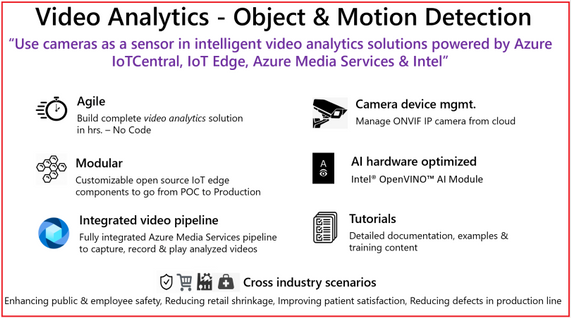
Using the new Azure IoT Central application template you can design, define, deploy, scale, and manage a live video analytics solution within hours. Video analytics template supports object and motion detection scenarios with key value propositions, as shown in the following illustration.

Figure 1. Customer & Partner value proposition from Video Analytics – Object and Motion detection app template
In our mission to democratize video analytics, Microsoft and Intel collaborated to build end-to-end video analytics solutions using IoT Central. These solutions leverage:
-
Live Video Analytics on IoT Edge (LVA) to capture, record, and analyze live video. LVA is a platform for building AI-based video solutions and applications that include AI applications to live video. You can generate real-time business insights from live video streams, process data near the source to minimize latency and bandwidth requirements and apply the AI models of your choice. LVA provides a flexible programming model to design live video workflows and defines an extensibility model for integrating with inference servers. This frees you up to focus development efforts on the business outcome rather than setting up and operating a complex, live video pipeline.
- For real-time analysis of live video feeds, the video pipeline leverages OpenVINO™ Model Server (OVMS), an inference server that’s highly optimized for AI vision workloads and developed for Intel® architectures. OVMS is powered by OpenVINO™ toolkit, a high-performance inference engine optimized for Intel® hardware on the Edge. An extension has been added to OVMS for easy exchange of video frames and inference results between the inference server and LVA, thus empowering you to run any OpenVINO™ toolkit supported model, and select from the wide variety of acceleration mechanisms provided by Intel® hardware. These include CPUs (Atom, Core, Xeon), FPGAs, VPUs.
-
Azure IoT Central is a platform for rapidly building enterprise-grade IoT applications on a secure, reliable, and scalable infrastructure. IoT Central simplifies the initial setup of your IoT solution and reduces the management burden, operational costs, and overhead of a typical IoT project. This enables you to apply your resources and unique domain expertise to solving customer needs and creating business value, rather than needing to tackle the mechanics of operating, managing, securing, and scaling a global IoT solution.
The IoT Central application template brings the goodness of Azure IoT Central, Live Video Analytics, and Intel components integration to enable building scalable solutions in a few hrs. as described in tutorials
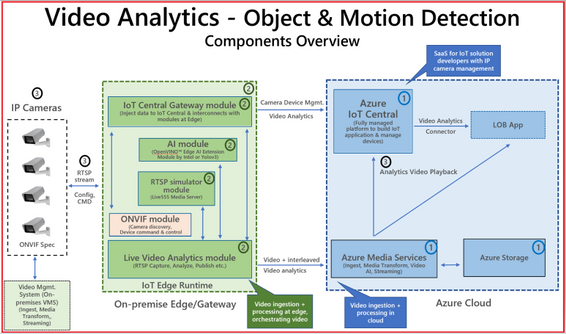
Figure 2. Block diagram of Video Analytics – Object and Motion Detection app template
The app template stitches the following components,
-
Cloud Services – IoT Central Video Analytics Application Template to stich the end-end solution & Azure Media Services for video snippet storage
-
Edge Modules – Video processing pipeline (Live Video Analytics), hardware optimized OpenVINO™ AI Inference server by Intel, IoT Central gateway module to for protocol & identify translation of RTSP & Camera, RTSP Server (Live 555) for pre-recorded video strams
-
Connecting & managing IP Camera, RTSP streams and AI module configuration
The IoT Central application template natively provides device operators view for object and motion detection scenarios, as shown in the following illustration.
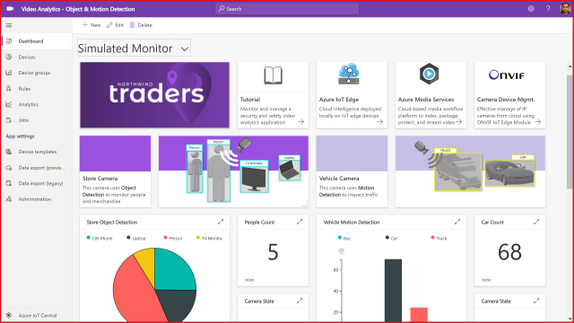
Figure 3. Dashboard from IoT Central template for Video Analytics – Object & Motion Detection
The dashboard in the new Video Analytics – Object & Motion Detection template for IoT Central is shown above. The template requires,
-
IP cameras (any IP cameras that support RTSP on the ONVIF conformant products page devices that conform with profiles G, S, or T), or You can leverage simulated video stream that we ship as part of this template for demonstrations.
-
Linux server powered by your choice of Intel® acceleration technology (CPUs such as Atom, Core, Xeon, or FPGAs, or VPUs)
-
Azure subscription to host relevant cloud services.
Don’t forget to check out the IoT Show episode for application template details.
ASK: Try out our comprehensive tutorial that will walk you through the creation of a Video Analytics solution in just a few hours.
Get started today
- You can use the new Video Analytics for Object & Motion Detection template to build and deploy your live video analytics solution.
- You can build Video Analytics solution within hours by leveraging Azure IoT Central, Live Video Analytics, and Intel.
- You can learn more about Live Video Analytics on IoT Edge here, and try out some of the other video analytics scenarios via the quickstarts and tutorials here. These show you how you can leverage open source AI models such as those in the Open Model Zoo repository or YOLOv3, or custom models that you have built, to analyze live video.
- You can learn more about the OpenVINO™ Inference server by Intel® in Azure marketplace and its underlying technologies here. You can access developer kits to learn how to accelerate edge workloads using Intel®-based accelerators CPUs, iGPUs, VPUs and FPGAs. You can select from a wide range of AI Models from Open Model Zoo
by Contributed | Sep 28, 2020 | Azure, Technology, Uncategorized
This article is contributed. See the original author and article here.
Written in collaboration with @Chris Boehm and @aprakash13
Introduction
Readers of this post will hopefully be familiar with both Azure Sentinel and Azure WAF. The idea we will be discussing is how to take the log data generated by WAF and do something useful with it in Sentinel, such as visualize patterns, detect potentially malicious activities, and respond to threats. If configured and tuned correctly (a topic for another post), Azure WAF will prevent attacks against your web applications. However, leaving WAF alone to do its job is not enough; security teams need to analyze the data to determine where improvements can be made and where extra action may be required on the part of response teams.
Send WAF Data to Sentinel
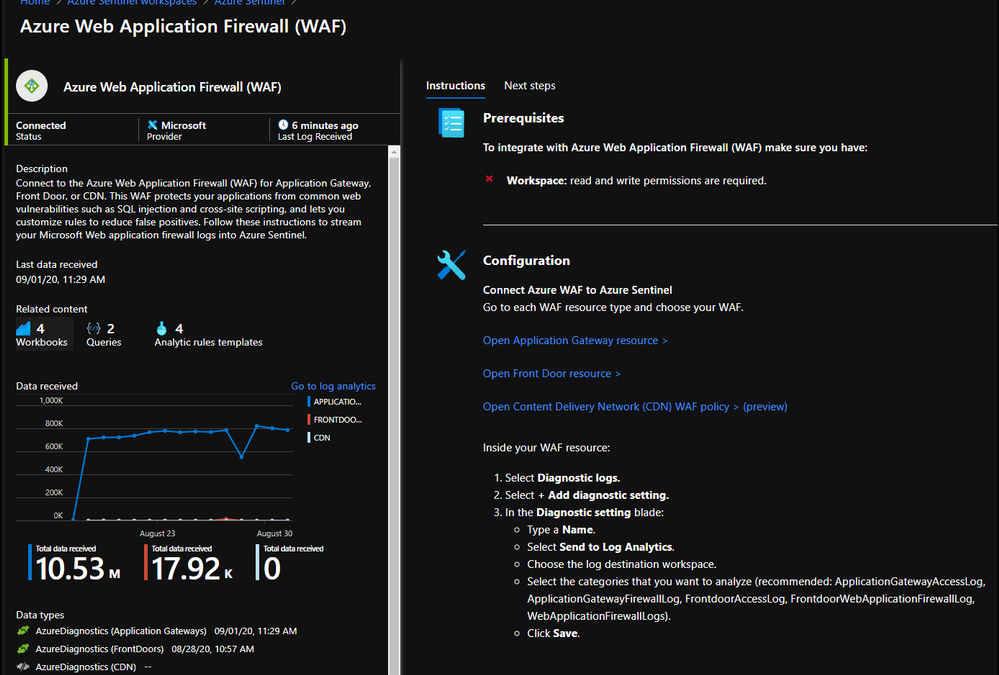
The first step to integrating these tools is to send WAF logs and other relevant data, such as access logs and metrics, to Sentinel. This process can be initiated using the built-in Sentinel Data Connector for Azure WAF:

Once you have connected your WAF data sources to Azure Sentinel, you can visualize and monitor the data using Workbooks, which provide versatility in creating custom dashboards. Looking inside the Azure Sentinel Workbooks tab, look up the default Azure WAF Workbook template to get you started with all WAF data types.
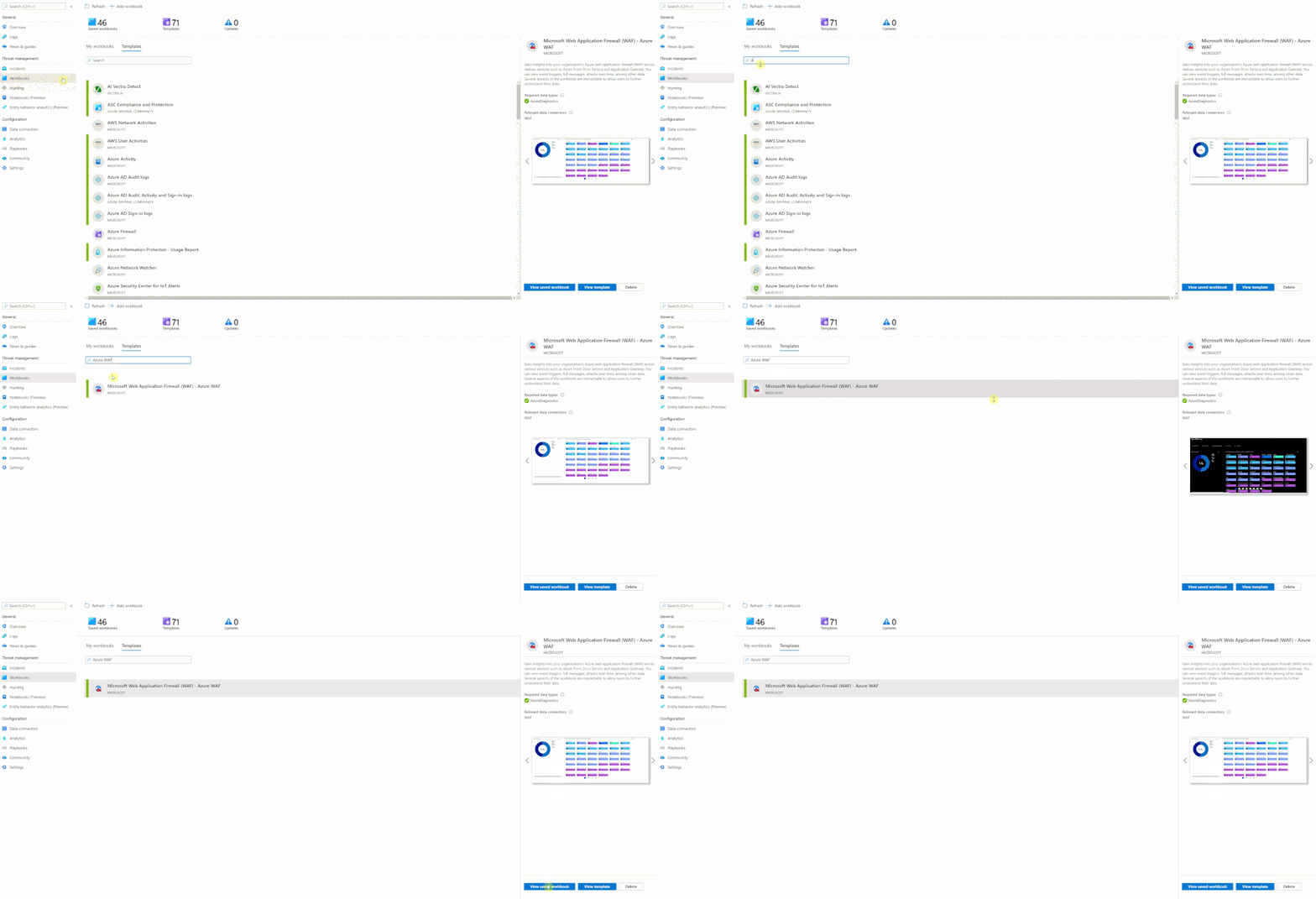
When starting out with the Microsoft WAF Workbook, you’ll be faced with a few data filter options:
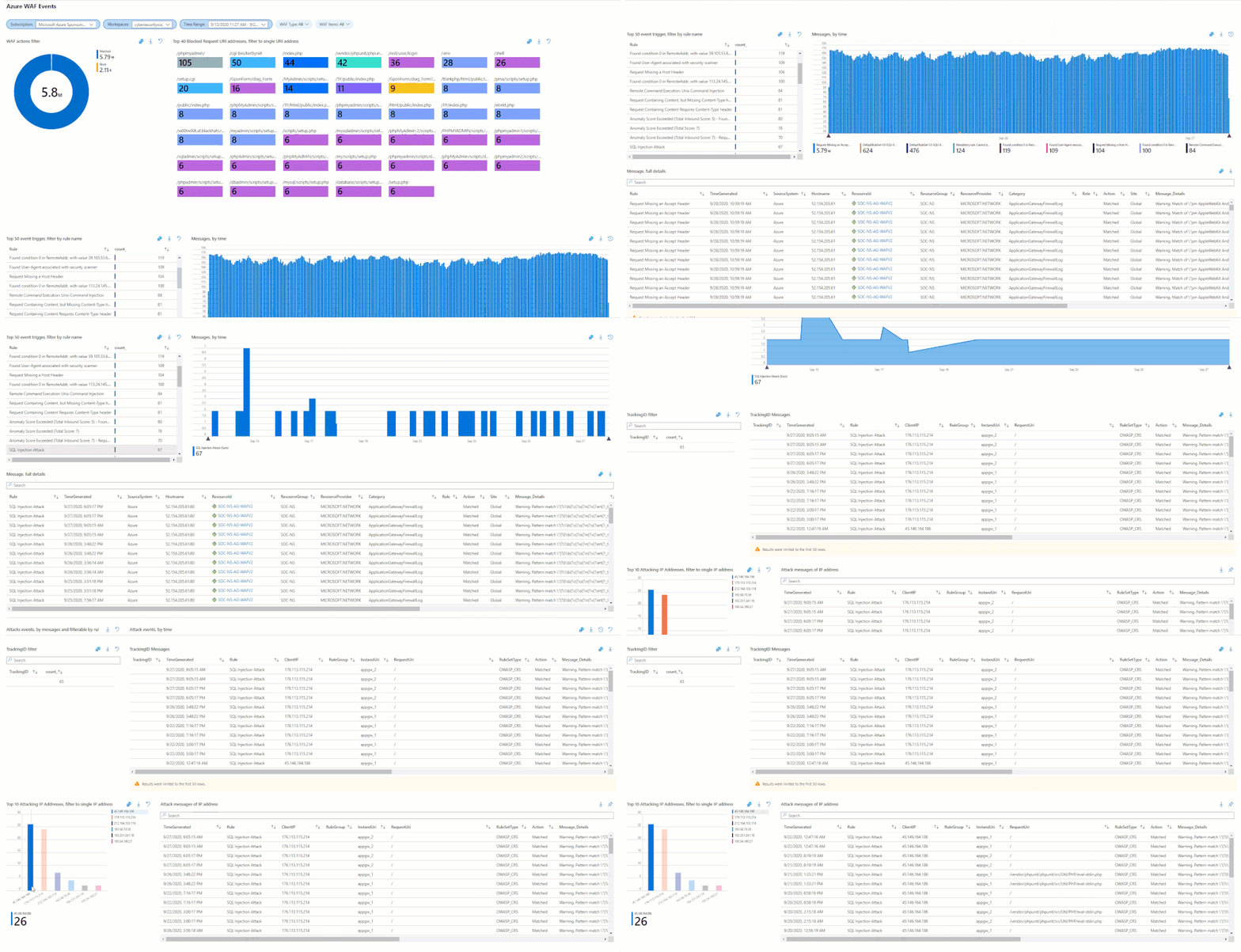
In the short annotation below, you’ll be taken through a few preconfigured filters, two different subscriptions (across two different tenants), while having preselected two different workspaces. The annotation is going to walk through a SQL Injection attack that was detected and how you can filter down the information by time or by event data. Like an IPAddress or Tracking ID provided by the diagnostic logs.
If you’re unfamiliar with a workbook, the design is a top to bottom filter experience. If you filter the top of the workbook, it’ll filter everything below with the selected filters above. You’ll see some filters that were not selected, example being “Blocked or Matched” within the logs, or the Blocked Request URI Addresses. Both could have been selected and filtered across the workbook.
Hunting Using WAF Data
The core idea of Azure Sentinel is that relevant security regarding your hunting or investigation is produced in multiple locations/logs and being able to analyze them from a single point makes it easier to spot trends and see patterns that are out of the ordinary. The logs from our Azure WAF device is one critical part of this puzzle. As more and more companies move their applications to the cloud their Web Application security posture has become super relevant in their overall security framework. Through the WAF logs, we can analyze the application traffic and combine it with other data feeds to uncover various attack patterns that an organization needs to be aware of.
However, to be able to effectively use the telemetry from WAF, a general understanding of the WAF logs is critical. It is very hard to focus on the hunting mission, be productive and effective if we don’t understand the data. WAF data is collected in Azure Sentinel under the AzureDiagnostics table. Depending on whether the Azure WAF policy is applied to web applications hosted on Application Gateway or Azure Front Doors the category under which the logs are collected are a little different.
While we don’t cover this thoroughly in this post, WAF Policies can be applied to CDN; more information here. When applied to CDN, the relevant logs are under the category:
- WebApplicationFirewallLogs (set on the WAF Policy)
- AzureCdnAccessLog (set on the CDN Profile)
There are subtle and nuanced differences between both these log types (Application Gateway vs Front Door) however in general, when we talk about the Access Logs, they give us an idea about Application’s access patterns. The firewall logs on the other hand logs any request that matches a WAF rule through either detection or prevention mode of the WAF policy. These logs include a bunch of interesting information like the caller’s IP, port, requested URL, UserAgent and bytes in and out. The Azure Sentinel GitHub repository is a great source of inspiration for the kind of hunting and detection queries that one can build with some of these fields. However, let us go through a couple of examples of what we can do with this data.
One of the techniques that a lot of threat hunters have in their arsenal is count based hunting i.e. they aggregate the event data and look for events that crosses a particular threshold. For example, in the WAF data we could probably look for a number of sessions originating from a particular client IP address in a given interval of time. Once the number of connections exceeds a particular threshold value, an alert could be triggered for further investigation.
However, since each environment is different, we will have to modify the threshold value accordingly. Additionally, IP based session tracking have their own challenges and false positives due to various dynamic factors like Proxy/NAT etc. that we would have to be mindful of for these type of queries.
let Threshold = 200;  //Adjust the threshold to a suitable value based on Environment, Time Period.

let AllData =  AzureDiagnostics

| where TimeGenerated >= ago(1d)

| where Category in ("FrontdoorWebApplicationFirewallLog", "FrontdoorAccessLog", "ApplicationGatewayFirewallLog", "ApplicationGatewayAccessLog")

| extend ClientIPAddress = iff( Category in ("FrontdoorWebApplicationFirewallLog", "ApplicationGatewayAccessLog"), clientIP_s, clientIp_s);

let SuspiciousIP = AzureDiagnostics

| where TimeGenerated >= ago(1d)

| where Category in ( "ApplicationGatewayFirewallLog", "ApplicationGatewayAccessLog", "FrontdoorWebApplicationFirewallLog", "FrontdoorAccessLog")

| extend ClientIPAddress = iff( Category in ("FrontdoorWebApplicationFirewallLog", "ApplicationGatewayAccessLog"), clientIP_s, clientIp_s)

| extend SessionTrackingID = iff( Category in ("FrontdoorWebApplicationFirewallLog", "FrontdoorAccessLog"), trackingReference_s, transactionId_g)

| distinct  ClientIPAddress, SessionTrackingID

| summarize count() by ClientIPAddress

| where count_ > Threshold

| distinct ClientIPAddress;

SuspiciousIP

| join kind = inner ( AllData) on ClientIPAddress

| extend SessionTrackingID = iff( Category in ("FrontdoorWebApplicationFirewallLog", "FrontdoorAccessLog"), trackingReference_s, transactionId_g)

| summarize makeset(requestUri_s), makeset(requestQuery_s), makeset(SessionTrackingID), makeset(clientPort_d),  SessionCount = count() by ClientIPAddress, _ResourceId

| extend HostCustomEntity =  _ResourceId, IPCustomEntity = ClientIPAddress
Another way to leverage the WAF data could be through Indicators of Compromise (IoCs) matching. IoCs are data that associates observations such as URLs, file hashes or IP addresses with known threat activity such as phishing, botnets, or malware. Many organizations aggregate threat indicators feed from a variety of sources, curate the data and then apply it to their available logs. They could match these IoCs with their WAF logs as well. For more details check out this great blog post that talks about how you can import threat intelligence (TI) data into Azure Sentinel. Once the TI data is imported in Azure Sentinel you can view it in the ThreatIntelligenceIndicator table in Logs. Below is a quick example of how you can match the WAF data with the TI data to see if there is any traffic that is originating from a Bot Network or from an IP that is known to be bad.
let dt_lookBack  = 1h;

let ioc_lookBack = 14d;

ThreatIntelligenceIndicator

| where TimeGenerated >= ago(ioc_lookBack) and ExpirationDateTime > now()

| where Active == true

// Picking up only IOC's that contain the entities we want

| where isnotempty(NetworkIP) or isnotempty(EmailSourceIpAddress) or isnotempty(NetworkDestinationIP) or isnotempty(NetworkSourceIP)

// As there is potentially more than 1 indicator type for matching IP, taking NetworkIP first, then others if that is empty.

// Taking the first non-empty value based on potential IOC match availability

| extend TI_ipEntity = iff(isnotempty(NetworkIP), NetworkIP, NetworkDestinationIP)

| extend TI_ipEntity = iff(isempty(TI_ipEntity) and isnotempty(NetworkSourceIP), NetworkSourceIP, TI_ipEntity)

| extend TI_ipEntity = iff(isempty(TI_ipEntity) and isnotempty(EmailSourceIpAddress), EmailSourceIpAddress, TI_ipEntity)

| join (

AzureDiagnostics | where TimeGenerated >= ago(dt_lookBack)

| where Category in ( 'ApplicationGatewayFirewallLog', 'FrontdoorWebApplicationFirewallLog', 'ApplicationGatewayAccessLog', 'FrontdoorAccessLog')

| where isnotempty(clientIP_s) or isnotempty(clientIp_s)

| extend ClientIPAddress = iff( Category in ("FrontdoorWebApplicationFirewallLog", "ApplicationGatewayAccessLog"), clientIP_s, clientIp_s)

| extend WAF_TimeGenerated = TimeGenerated

)

on $left.TI_ipEntity == $right.ClientIPAddress

| project TimeGenerated, ClientIPAddress, Description, ActivityGroupNames, IndicatorId, ThreatType, ExpirationDateTime, ConfidenceScore,_ResourceId, WAF_TimeGenerated, Category, ResourceGroup, SubscriptionId, ResourceType,OperationName, requestUri_s, ruleName_s, host_s, clientPort_d,details_data_s, details_matches_s, Message, ruleSetType_s, policyScope_s

| extend IPCustomEntity = ClientIPAddress, HostCustomEntity = _ResourceId, timestamp = WAF_TimeGenerated, URLCustomEntity = requestUri_s
Threat hunters could even leverage KQL advanced modelling capabilities on WAF logs to find anomalies. For example, they could do the Time Series analysis on the WAF data. Time Series is a series of data points indexed (or listed or graphed) in time order. By analyzing time series data over an extended period, we can identify time-based patterns (e.g. seasonality, trend etc.) in the data and extract meaningful statistics which can help in flagging outliers. The different Thresholds would have to be adjusted depending on the environment.
Below is an example query demonstrating Time Series IP anomaly.
let percentotalthreshold = 25;

let timeframe = 1h;

let starttime = 14d;

let endtime = 1d;

let scorethreshold = 5;

let baselinethreshold = 10;

let TimeSeriesData =  AzureDiagnostics

  | where Category in ( "ApplicationGatewayFirewallLog", "ApplicationGatewayAccessLog", "FrontdoorWebApplicationFirewallLog", "FrontdoorAccessLog") and action_s in ( "Log", "Matched", "Detcted")

  | where isnotempty(clientIP_s) or isnotempty(clientIp_s)

  | extend ClientIPAddress = iff( Category in ("FrontdoorWebApplicationFirewallLog", "ApplicationGatewayAccessLog"), clientIP_s, clientIp_s)

  | where TimeGenerated between ((ago(starttime))..(ago(endtime)))

  | project TimeGenerated, ClientIPAddress

  | make-series Total=count() on TimeGenerated from (ago(starttime)) to (ago(endtime)) step timeframe by ClientIPAddress;

let TimeSeriesAlerts=TimeSeriesData

  | extend (anomalies, score, baseline) = series_decompose_anomalies(Total, scorethreshold, 1, 'linefit')

  | mv-expand Total to typeof(double), TimeGenerated to typeof(datetime), anomalies to typeof(double),score to typeof(double), baseline to typeof(long)

  | where anomalies > 0 | extend score = round(score,2), AnomalyHour = TimeGenerated

  | project ClientIPAddress, AnomalyHour, TimeGenerated, Total, baseline, anomalies, score

  | where baseline > baselinethreshold;

  TimeSeriesAlerts

  | join (

      AzureDiagnostics

      | extend ClientIPAddress = iff( Category in ("FrontdoorWebApplicationFirewallLog", "ApplicationGatewayAccessLog"), clientIP_s, clientIp_s)

  | where isnotempty(ClientIPAddress)

  | where TimeGenerated  > ago(endtime)

  | summarize HourlyCount = count(), TimeGeneratedMax = arg_max(TimeGenerated, *), ClientIPlist = make_set(clientIP_s), Portlist = make_set(clientPort_d) by clientIP_s, TimeGeneratedHour= bin(TimeGenerated, 1h)

  | extend AnomalyHour = TimeGeneratedHour

  ) on ClientIPAddress

  | extend PercentTotal = round((HourlyCount / Total) * 100, 3)

  | where PercentTotal > percentotalthreshold

  | project  AnomalyHour, TimeGeneratedMax, ClientIPAddress, ClientIPlist, Portlist, HourlyCount, PercentTotal, Total, baseline, score, anomalies, requestUri_s, trackingReference_s, _ResourceId, SubscriptionId, ruleName_s, hostname_s, policy_s, action_s

  | summarize HourlyCount=sum(HourlyCount), StartTimeUtc=min(TimeGeneratedMax), EndTimeUtc=max(TimeGeneratedMax), SourceIPlist = make_set(ClientIPAddress), Portlist = make_set(Portlist) by ClientIPAddress , AnomalyHour, Total, baseline, score, anomalies, requestUri_s, trackingReference_s, _ResourceId, SubscriptionId, ruleName_s, hostname_s, policy_s, action_s

  | extend HostCustomEntity =  _ResourceId, IPCustomEntity = ClientIPAddress
Generate Incidents using Azure Sentinel Analytics
Azure Sentinel uses the concept of Analytics to accomplish Incident creation, alerting, and eventually automated response. The main piece of any Analytic rule is the KQL query that powers it. If the query returns data (over a configured threshold), an alert will fire. To use this in practice, you need to craft a query that returns results worthy of an alert.
The logic used can be complex, possibly adapted from the hunting logic outlined above, or fairly basic like the example below. It can be difficult to know what combination of WAF events warrant attention from analysts or even an automated response. We will assume the WAF has been tuned to eliminate most false positives, and that rule matches are usually indicative of malicious behavior.
The Analytic Rule we will look at serves the purpose of detecting repeated attacks from the same source IP address. We simply look for WAF rule matches, which amount to traffic being blocked with WAF in Prevention Mode, and count how many there have been from the same IP in the last 5 minutes. The thinking is that if a single source is repeatedly triggering blocks, they must be up to no good.
AzureDiagnostics

| where Category == "FrontdoorWebApplicationFirewallLog"

| where action_s == "Block"

| summarize StartTime = min(TimeGenerated), EndTime = max(TimeGenerated), count() by clientIP_s, host_s, _ResourceId

| where count_ >= 3

| extend clientIP_s, host_s, count_, _ResourceId

| extend IPCustomEntity = clientIP_s

| extend URLCustomEntity = host_s

| extend HostCustomEntity = _ResourceId
Notice that we are using entity mapping for the resource ID of the Front Door that blocked the requests; this becomes important when creating response actions with Playbooks. The full details of our example analytic can be seen in the screen capture below:
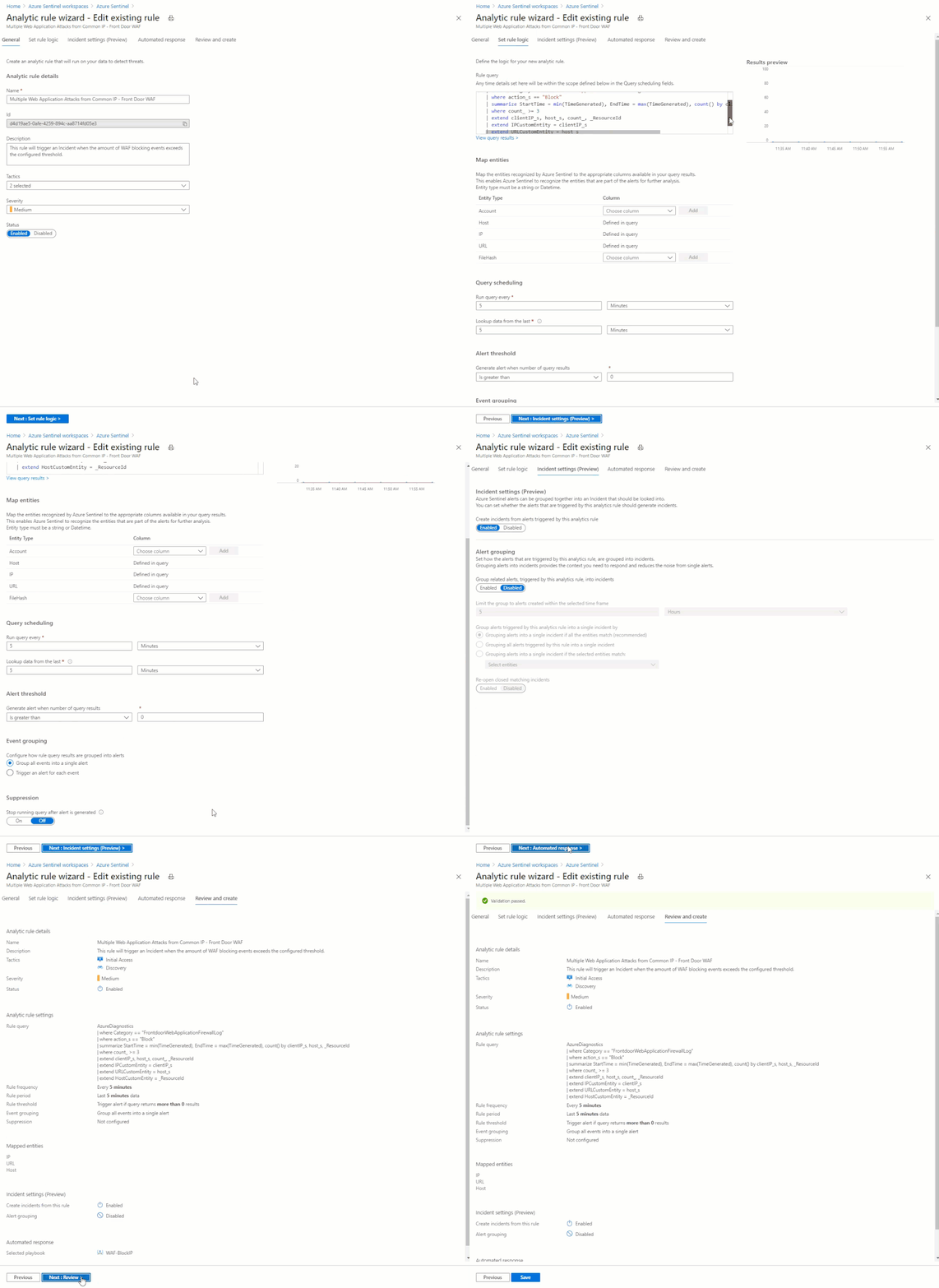
With this Analytic active, any source IP address that generates 3 or more rule matches in 5 minutes will generate an alert and incident. A playbook will also be automatically triggered, which is covered in the next section.
Respond to Incidents with Playbooks
A Sentinel Playbook is what is used to execute actions in response to Incidents. Playbooks are mostly the same as Logic Apps, which are mostly the same as Power Automate. Sentinel Playbooks always start with the Sentinel trigger, which will pass dynamic content into the Logic App pipeline. Specifically, we are looking for the Resource ID of the Front Door (the Playbook also supports Application Gateway) in order to look up the information needed to perform the remediation actions.
From the example in the Analytics section, we have detected multiple WAF rule matches from the same IP address, and we want to block any further action this attacker attempts. Of course the attacker could just keep attempting to exploit the application from different IP addresses, as they often do, but automatically blocking each IP is a low effort method to make the payoff as difficult as possible.
The end goal of this Playbook is to create or modify a custom rule in a WAF Policy to block requests from a certain IP address. This is accomplished using the Azure REST API using the following broad steps:
- Set variables and parse entities from the Incident
- Check WAF type – Front Door or App Gateway
- Get the associated WAF Policy
- Read existing custom rules and store in an array
- If an existing rule called “SentinelBlockIP” exists, add the attacking IP to the rule
- If no rule exists yet, create a custom rule blocking the attacking IP
- Re-assemble the WAF Policy JSON with the new or updated custom rule
- Initiate a PUT request against the Azure REST API to update the WAF Policy
Here is what the Playbook looks like:
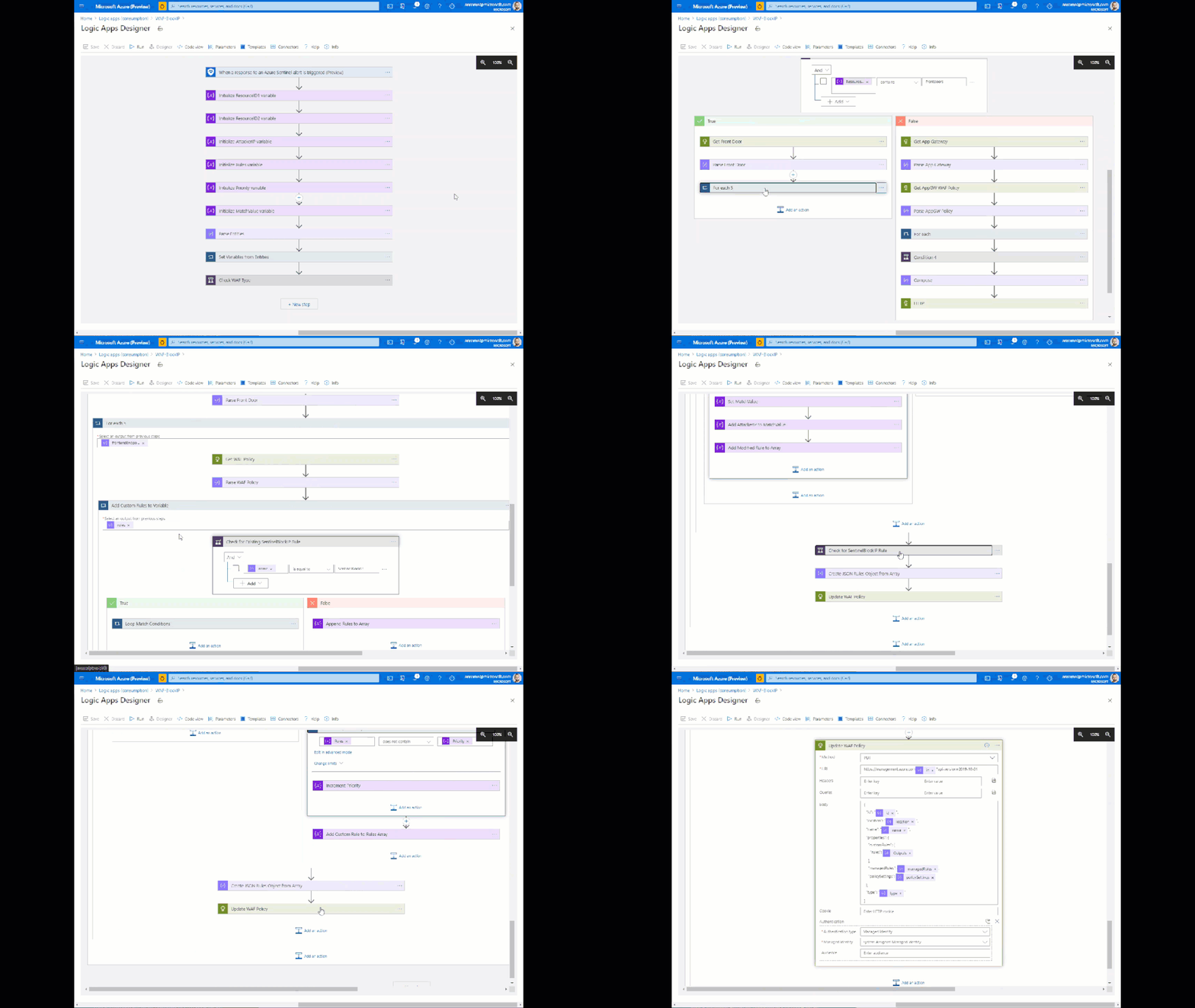
This playbook can be deployed from our GitHub repository.
To see everything we covered in this post and more in video format, check it out here.
It is our hope that you now have the tools and skills needed to take log data from Azure WAF and use it in Azure Sentinel to detect, investigate, and automatically respond to threats against your web applications.
by Contributed | Sep 28, 2020 | Uncategorized
This article is contributed. See the original author and article here.
We’re excited to continue our blog series to share the learning journeys of our customers, partners, employees, and future generations. Today, we present the third blog in the series and show how Microsoft is working with its partners worldwide to help build and validate technical skills using Microsoft technologies.
In June 2020, Accenture achieved something that no Microsoft partner has ever done; the company trained so many employees that it submitted it as a Guinness World Record. The massive global systems integrator certified a record number of global Azure certifications from a single organization with 20,000 employees across all Microsoft solutions in a fiscal year. Accenture also achieved a record with 17,000 certified employees on Azure.
“At Accenture continuous learning, constant upskilling, and achieving expertise at scale is a way of life,” explains Raghavan Iyer, Advanced Technology Centers Lead for Avanade and leader for its Azure Cloud Practice. “In order to capture the mindshare of all the engineering professionals in our organization, we kicked off a program called ‘Microsoft on my Mind’ and recorded the highest number of Azure certifications ever, a 500% increase year-over-year. We immediately saw a tremendous response and were proud when Microsoft informed us that we were named Microsoft Global Alliance SI Partner of the Year.”
Advanced Technology Center
The central point for record-setting global technical training success of the Microsoft on Mind program is Avanade’s Advanced Technology Center, also led by Iyer. The initiative targeted practitioners who focused on both Microsoft and non-Microsoft technologies across both Accenture and Avanade, a joint venture between Accenture and Microsoft. A big part of the program was a specifically designed cross-technology framework targeted at the Microsoft practitioners to measure the versatility of the company’s talent. Accenture identified the basic skill sets of their talent, after which they were quickly rotated into other Microsoft technology training programs.
“Continuous learning has definitely given a tremendous boost to my career,” said Tuhin Sarkar, who achieved two Azure certifications as part of the Accenture program this year. “I use Microsoft Learn to study different topics when I have time and it has also helped me focus on the right areas as it provides learning advice and suggestions. I am planning to add higher level certifications this upcoming year.”
Microsoft on my Mind
Accenture used a variety of unique approaches to constantly initiate its employees to engage in upskilling their Microsoft credentials. The ‘Microsoft on My Mind’ program started with a massive and very successful Data and AI hackathon, followed by the largest Teams hackathon in the world (to-date) that generated over 800 ideas. The third event, Azure Cloud Week, aimed to emphasize and drive Azure certification at Accenture. The icing on the cake was a speech by Microsoft CEO, Satya Nadella, during his visit to India. Dubbed “Developer Empowered,” the Accenture event was simulcast across seven cities to drive certification at scale for Power Platform.
“The whole process was really motivating because there was a lot of excitement across the team to get certified,” said Manas Chatterjee, a cloud architect at Accenture who has completed more than fifteen certifications and is also is a trainer in the program. “As an architect and trainer, I always have to be on top of the latest technologies, so learning is a big part of my job. During the ‘Microsoft on my Mind’ effort, we not only leveraged self-paced study through Microsoft Learn, but they also established a platform where we’re able to connect to other senior architects to share viewpoints, case studies and ideas. And that connection has continued as a standing weekly meeting to learn.”
Diversity and inclusion matters
A big part of Accenture’s success was a heavy investment in diversity as a part of its training programs. Over the past fiscal year, 37% of its certified employees in the program were women, a number that will only keep growing, according to Alakananda Ray, an Enterprise Cloud Architect at the company, who also leads the India Azure Test Capability and is the heart and soul of the company’s ‘Women In Cloud’ initiative.
“Accenture runs several programs for women in technology to support our diversity and inclusion charter,” explains Ray. “Many of the participants in the program are mothers returning to the workforce. Microsoft Learn provides immense flexibility with self-paced learning content to help prepare for certification, regardless of whether they are a business analyst, developer, or an architect. The learning culture here at Accenture is invaluable.”
Enabling partners to upskill
The Accenture learning story is one of many across the Microsoft Partner Network’s effort to increase partner technical and practice development. Microsoft has developed resources to guide partners through the journey, starting with a Partner Transformation Readiness Assessment, which determines current capability for partners who want to participate and provides guidance on next steps to grow technical and business skills. From there, partners are directed to the Training Center, a connection point to on-demand technical, sales, and marketing learning paths and courses, including the Virtual Training Series, which offers certification preparation courses and advanced technical training. Microsoft also provides guidance on how to hire a trainer to ensure partners get the right people to deliver solutions and services customers need.
“The skills gap is a real threat to the success and profitability of our partners. Microsoft supports partners by helping them make the training investments to create a culture of learning and professional development,” adds Phil Webb, Business Strategy for Partner Enablement at Microsoft. “Accenture is a great example of a partnership where we deeply invested in each other’s success. We have done a lot of intense work on skilling with Accenture in our FY20, including the support of their events throughout the year to encourage employee skilling on Microsoft technologies.”
Accenture, in the meantime, is waiting patiently to find out whether its skilling milestones will be recognized by the Guinness World Records and has no plans to slow down its record-setting learning initiatives. The company is continuing to invest and expand in the successful skilling programs it has instituted, and is encouraging recently-certified employees to take different, deeper, or more specialized training and certifications, while is also planning regional versions of their cloud week event across the globe this upcoming fiscal year. Get ready for more records in 2021.
Related posts:
EY’s learning journey
Skilling future generations: A tale of two universities
![[Mentorship Spotlight] Community Mentor: Samuel Adranyi, MVP](https://www.drware.com/wp-content/uploads/2020/09/medium-239)
by Contributed | Sep 28, 2020 | Uncategorized
This article is contributed. See the original author and article here.
Learn more about this week’s spotlighted community mentor, Samuel Adranyi, a Humans of IT Community Ambassador and Microsoft Azure MVP who shares his mentorship experience with 5 mentees via the Humans of IT Community Mentors mobile app!
On today’s #MentorshipMonday, meet our featured mentor, MVP, and Humans of IT community ambassador, Samuel Adranyi:

Q: Tell us a little about yourself.
A: My name is Samuel Adranyi. I am Ghanaian and I have been in Tech for a little over 12 years. I moved home to Ghana last year. Prior to that I was working in the US – Beaverton, Oregon to be specific. I started my tech journey quite early in Grade 4, when I started writing Q basic. I love learning so naturally, I like to share and teach others too. I have been an instructor for 4 or 5 years at a tech school here in Ghana before I left for the States. So, it is kind of like an extra curricular thing that I enjoy. I am always trying to learn something, and then once I learn it, I look for a way to share it.
Q: What does mentoring mean to you?
A: One of the things I realized during the early journey of my learning was that there were people that were surprised and intrigued that someone so young could be so interested in computers and technology. Thankfully, I got a lot of support from parents and friends and I realized that the support I got from people really helped motivate and kept me going. The fact that I had some form of an internal support system from my family made a huge difference to me. If this is how it is, I figured that there are a lot more opportunities for other people like me to be guided, mentored etc and it will make the journey so much easier for them. In my case, I got that. Unlike most people that have to learn all on their own (which can feel lonely/isolating at times) or just go to school to learn it, as a budding technologist I have had the luxury of having a 1:1 instructor after the regular class. So that gave me the insight on the value of helping guide people and it was how I ultimately become passionate about mentoring.
Q: When did you first start as a mentor?
A: I would say that for as long as I can remember! Here is an example: in primary school when we started with computers – our school only had 2 units. We didn’t have a computer lab because it was something that had just started, plus computers were very expensive. The computers were stored in the headmaster’s office. When it was time for computer class or lessons, we had to go to his office, get the computers, take them back to class, and set them up. Back then there were no indicators on the keyboard or the mouse to tell you that the green one goes to the keyboard and the purple one goes to the mouse. There wasn’t anything like that – so you had to figure it out, look at the ping count. That was part of the training, but after a while I was the only person that could immediately assemble and put the computer together. I happened to be one of the few that could do it, so after that I was the main custodian for making sure the computers were properly set up. I loved it doing it so the instructor would say, “Help your friends”. So, from Grade 4, I just kept helping my friends (my earliest mentees of sort!), and this simply continued into high school. Now here we are!
Q: Amazing, so is this what inspired you to be a mentor?
A: Yes, here is another example – in Ghana you get to select your high school based on your preference. It all depends on your grades to determine whether you’ll get your first or second choice selection. Fortunately, I got my first choice and they were using the high school’s computer lab for the administration process– to get your uniform, books, and stuff. So, I was peeking into the computer lab and I was talking to my Dad, telling him that I am not joining to join the computer class. He was surprised and asked, “Why not? You love computers.” And I replied, “Look at the computers – they are so old. They are older than the ones I used back at home.” Unfortunately, or fortunately for me the computer instructor was just passing by and he overheard me. He said, “Young man – what are you saying about my computers?” Almost immediately I gave him the specs of his computers (without even touching them, just from looking at them). He went silent, and looked astoundingly at me, then my Dad and back to me. My Dad was smiling- you know, the proud father moment. The teacher said, “Do you know anything about computers?” Then my Dad jumped in – “Oh yes, this is my son and he already took all the credentials surpassing even me in Windows 95, DOS, Q Basic – he has all of the paperwork from the certification pack.” So, the teacher looked at me and now seemed a bit interested – he then said, “When you are done with your admission process, come see me.” What was cool was that I had collected all the diskette packs (mind you, there weren’t CDs at that time). You had drivers that were generic – I had Printer drivers, Windows 95 drivers etc. I had a full stack and would bring them to school.
After admission, I went to the lab and started having a conversation. Most of the computers were broken down – and at that time most of the schools had to wait their turn to have computers repaired, so if the computer broke down you would have to just sit and wait until someone comes from the Capitol to fix the computer. During the first 2 weeks of school, I was going around fixing the computers. The headmaster would come by the lab, and he would watch me at work and exclaim in surprise, “Wait, another computer is now on, and then another computer is on too!” The instructor would say, “Yes- this young guy here has been fixing them.” Since there, it has just been like that; I learning by doing, and then extend my knowledge by helping others. This has inspired me to continue to help others all throughout my career.
Q: How did you get matched with your mentees?
A: Actually, we first met outside of the mentorship app but eventually moved onto it. When I got back from the States, I wanted to mentor a few very enthusiastic and determined people in Ghana. I originally with 5 people on my own outside of the app since we already had something going, but then during one of our Humans of IT x MVP community calls we heard about the Community Mentors app. We wanted to have a more formal process and the app allowed us to have more structure. So now I tell any potential mentee: go on the app, sign up, look for me, and then we can have a more formalized process.
Q: What has been your experience with the app?
A: The app is a cool thing – it is a great way to have a formal process for mentoring. It is fun and is a good experience. This gives people a way to connect with you and actually form a connection
Q: What is the key to being an effective mentor?
A: Being yourself – it sounds simple but that is the greatest thing I have seen. Make your mentees like part of your life – thinking like my home is their home. They know when to be goofy with you and also when it is time to get serious. If you are yourself around your mentees, it goes a long way. They need to know that you are human and make mistakes too. They need to see that you make mistakes and that it is okay to not be okay. Sometimes mentees think mentors are that perfect unicorn, but no one is perfect. When you start making yourself accessible and being vulnerable too, that is when mentees can really learn from you.
Want to start your journey as a mentor and/or mentee?
1. Download the Microsoft Community Mentors app (make sure you’re on the latest v3.0!)
2. Log in with your Tech Community credentials (Note: You will need to be a member of the Humans of IT Community). If you are not already a member, you will be prompted to complete your Tech Community registration and officially join the Humans of IT community.
3. Create your profile and look for your future mentor and/or mentee!
Happy mentoring!
#HumansofIT
#Mentorship
#CommunityMentors


Recent Comments