by Contributed | Oct 16, 2020 | Azure, Technology
This article is contributed. See the original author and article here.
Abstract
Location – classified. Customer – classified.
CTO: Azure Cloud Adoption Framework is best resource to define out Cloud adoption strategy. As of part of “Ready” stage n CAF, can you tell me what best practices we are following to ensure “azure resources and resource groups are organized effectively”?
Azure Architect: Yes, we follow 2 important guidelines as follow –
- Allow deployment of azure resources in designated allowed locations only; so, we follow the geopolitical boundary of our country.
- Define resource group – project wise.
CTO: This is good. I recently went through many Azure Events webinar. I think as a best practice for our Azure environment, we should also make sure that “Azure resources are deployed in same location as of Resource group for better management and clarity? How are we placed on this task?”
Azure Architect: Ummmm, yes. It is a good suggestion!
CTO: Ok, so give me report every week where I can see if we are following having all resources in the same location of parent Resource group. Thanks.
Azure Architect: But we have 100+ Resource Groups, 300+ resource in subscription. That will be good time-consuming task every week.
CTO: Well, let us find better solution to get report of azure resources not belonging to Azure Resource group location/ region.
This blog will help our friend Azure Architect to find report of “any azure resources not having same location as parent resource group”.
This will help to satisfy CTO requirement and promotion for our Azure Architect friend in the company.
Azure Resource Group, Azure Resource and Location
Azure Resource Manager is a consistent management layer on Azure used for deployment and end to end management. Important component of Azur Resource Manager is “Resource Group.”
Azure Resource Group is a container that holds related resources for azure solution. It helps hold those resources which you want to manage as a group. The choice of resource group and resource
deployment within is completely organization and project specific decision.
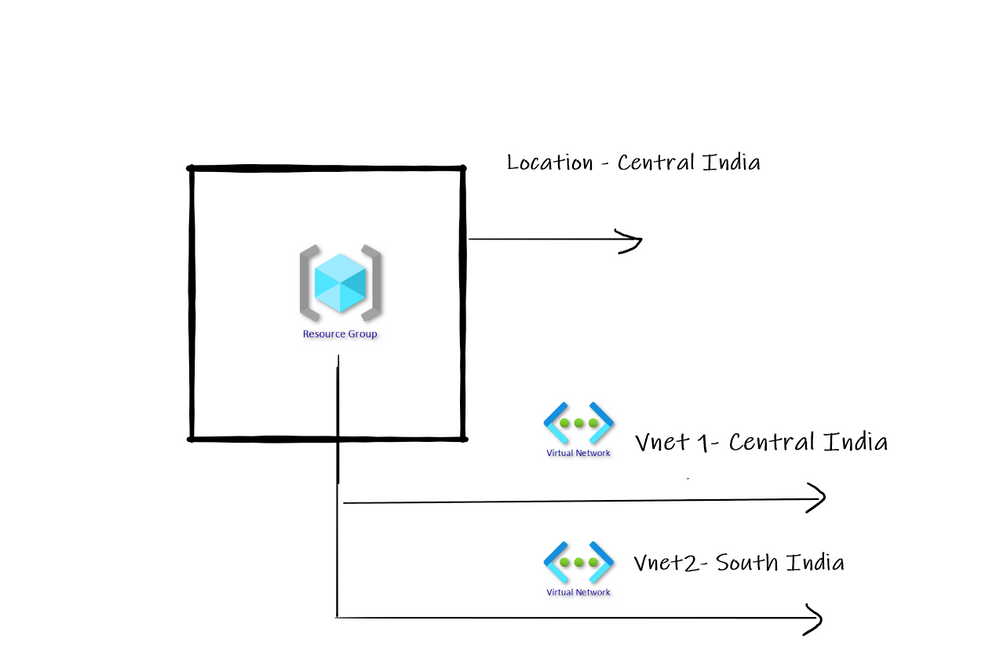
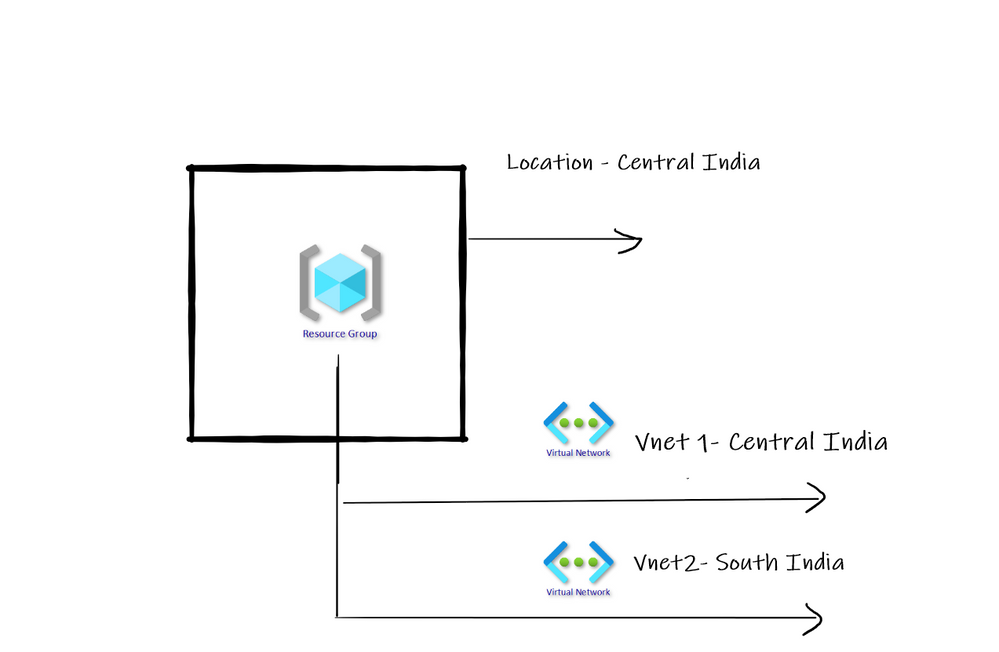
As resource group is container only and never control actual life cycle of resources deployed; the location of Resource Group and Actual Resource can be different. Refer below diagram –
How to report resource and associated resource group location mismatch?
Azure Policy is best thing on Azure that can help to do wonders. If Policy is applied on Azure Subscription level, then automatically Azure policy searches and report noncompliance as per policy definition. There are many built in policies already available on Azure.
One of such important built in policy is – “Audit resource location matches its resource group location”.
This policy can help us to identify is Resources present in Resource Group do not have same location as Resource Group.
In above diagram we have resource group in Central India where as one VNET is in different region. Having separate location for Resource group and separate location for actual Resource is completely normal.
However, as a general best practice I have seen that having all resources deployed in the same location as that of resource group works best in many scenarios.
Create and Assign Policy
Go to Azure portal and search for Policy in top search box. Once found click on it. You will land on below screen. Click on Assign Policy as shown below –

Search the policy named as Audit that the resource location matches its resource group location.
Then click on Review + Create. Once enabled the policy will review the entire Azure subscription for the policy and will also report.

Compliance view
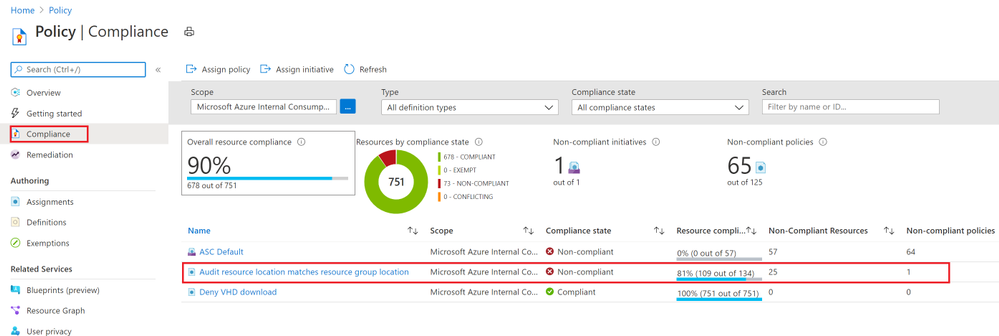
Now click on Compliance view as shown below and we should see the non-compliant resources list for the policy as shown below –
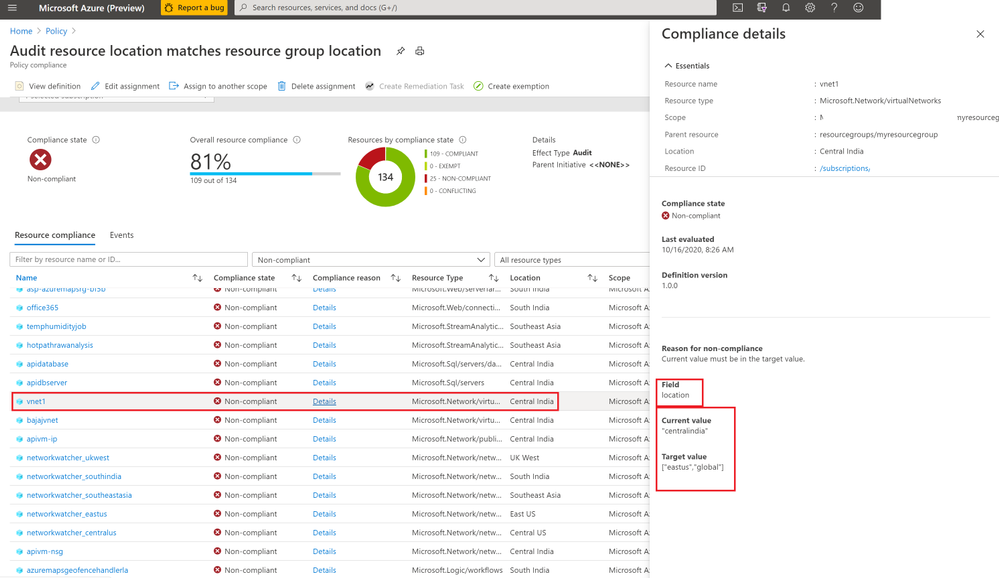
When you go into details you can view individual resources with current value of location and Target expected value of location.
Conclusion
Hope this blog post helped you to understand how Azure policy can effectively help you implement your specific restrictions, best practices on Azure.

by Contributed | Oct 16, 2020 | Azure, Technology
This article is contributed. See the original author and article here.
Lots to share in the world of Microsoft services this week. News includes Microsoft 365 Apps Admin Center’s new inventory & monthly servicing feature currently in preview, Azure Cognitive Services has achieved human parity in image captioning, Azure Site Recovery TLS Certificate Changes, Static Web App PR Workflow for Azure App Service using Azure DevOps, and of course the Microsoft Learn Module of the week.
Microsoft 365 Apps Admin Center’s new inventory & monthly servicing feature currently in preview
Microsoft has released in preview tools and services that provide insights, automation, and control to help manage monthly Office app updates. Some of the features offered include: Servicing profiles, Office Apps and Add-in Inventory, and Security Currency reports. Access to these services will require that each of the Office Apps are currently on version 2007 or higher and will require a passthrough of a simple onboarding process. More details can be found here: Microsoft 365 Apps Admin Center
Azure Cognitive Services reaches human parity in image captioning
Artificial intelligence researchers at Microsoft have successfully created a solution that can generate caption for images that are more accurate than the descriptions provided by people as measured by the NOCAPS benchmark. This achievement milestone brings Microsoft one step closer in the making products and services accessible to everyone. This Computer Vision service is now commercially available and further details can be found here: Computer Vision Services
TLS Certificate changes for Azure Site Recovery
As Producer Pierre reported last week, Microsoft has updated the Azure services to use Transport Layer Security (TLS) certificates from a different set of Root Certificate Authorities (CAs). As reported, the changes were made because the current CA certificates don’t comply with one of the CA/Browser Forum Baseline requirements. This change also effects Azure Site Recovery service endpoints which will be updated in a phased transition across all public regions beginning on October 16 2020, completed by October 26, 2020. This change affects connectivity from on-premises configuration server/process servers (for physical/VMware VM replication), and from Hyper-V host servers/System Center VMM servers connected to the Azure Site Recovery service. Additional details regarding the change can be found here: Azure Site Recovery TLS Certificate changes
Static Web App PR Workflow for Azure App Service using Azure DevOps
Fellow Cloud Advocate, Abel Wang, has shared an amazing pull request workflow built right out of the box for use with Static Web Apps. Abel highlights how Static Web Apps uses GitHub Actions for CI/CD and when a user issues a pull request to perform certain tasks and shares steps on how to harness it. Further information can be found here: Static Web App PR Workflow
MS Learn Module of the Week
Building applications with Azure DevOps
As stated earlier, Azure DevOps enables you to build, test, and deploy any application to any cloud or on premises. Learn how to configure build pipelines that continuously build, test, and verify your applications. Complete this module here: Azure DevOps Learn Module
Let us know in the comments below if there are any news items you would like to see covered in next week show. Az Update streams live every Friday so be sure to catch the next episode and join us in the live chat.
by Contributed | Oct 16, 2020 | Azure, Technology
This article is contributed. See the original author and article here.
Hi there  .
.
Today, I am here again, to present one of the possible solutions to keep the Microsoft Monitoring Agent (MMA) installed on your virtual machine up to date with roughly 0 effort.
The reason why I started playing with this theme, is because I couldn’t keep up with the latest and greatest MMA releases that comes as part of the Azure world, easily and in a time saving way.
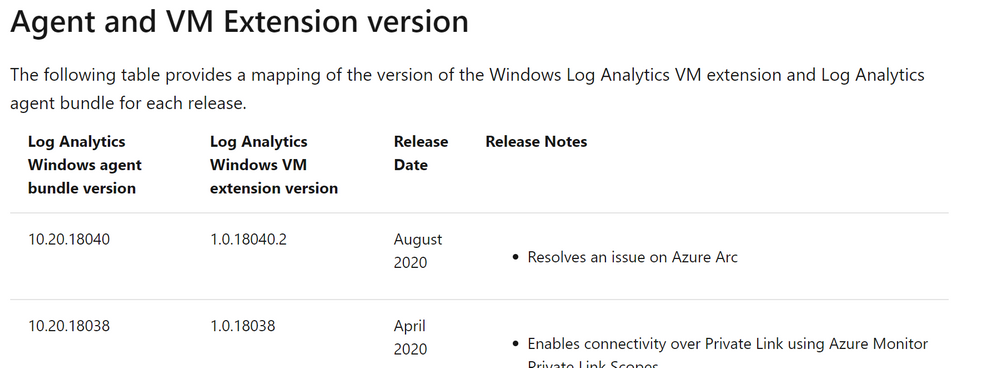
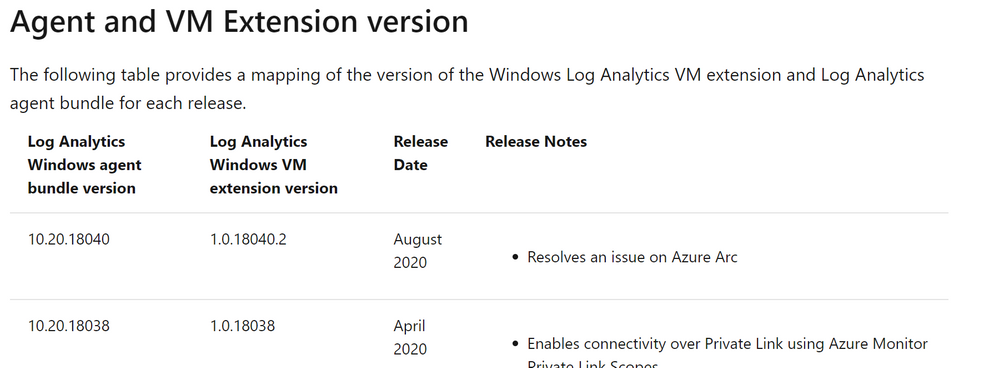
Everybody knows that from time to time, thanks to the work and effort of our colleagues, we get new Log Analytics Agent version available. These updates open the door to more stability and new features.
As I anticipated there are several methods of updating the MMA once installed and your choice is mostly related to the way the MMA was installed. In fact, if it has been installed as Virtual Machine (VM) extension, it gets updated automatically as part of the infrastructure maintenance that is in charge to Microsoft (see Shared responsibility in the cloud).
Same for those VMs which have been configured using Azure Policies (with Azure Security Center for instance).
But what if you are managing a hybrid environment? What happen if you installed the agent manually? Even more, do you get any Windows Update if you selected ”I don’t want to …” in the following window?
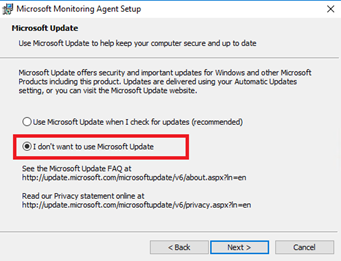
NOTE: If you selected “Use Microsoft Update …” the update will be presented together with other updates, meaning that you have to rely on your patch management process and tool.
Well in this case you need to take care of your agent version manually and here it comes my idea.
Since Azure offers lots of services and one of them is the Azure Automation, why not using it?
Based on that, I created a very simple PowerShell Automation Runbook, based on a PowerShell script, that does the stuff for you. Of course, my approach is just an example, but you could leverage the idea or the attached script in your environment if you like.
I want to point out that:
- Test is always recommended to make sure it works as expected.
- You might need to check and eventually adjust the Invoke-WebRequest command line to include the proxy server and the related credentials if necessary (see the commented line in the script).
The script is very easy, as you can see. It just goes over some links, downloads the files in the C:Temp folder (the path existence is verified and created if necessary) and execute them.
# Setting variables
$setupFilePath = "C:Temp"

# Setting variables specific for MMA
$setupMmaFileName = "MMASetup-AMD64.exe"
$argumentListMma = '/C:"setup.exe /qn /l*v C:TempAgentUpgrade.log AcceptEndUserLicenseAgreement=1"'
$URI_MMA = "https://aka.ms/MonitoringAgentWindows"

# Setting variables specific for DependencyAgent
$setupDependencyFileName = "InstallDependencyAgent-Windows.exe"
$argumentListDependency = '/C:" /S /RebootMode=manual"'
$URI_Dependency = "https://aka.ms/DependencyAgentWindows"

# Checking if temporary path exists otherwise create it
if(!(Test-Path $setupFilePath))
{
    Write-Output "Creating folder $setupFilePath since it does not exist ... "
    New-Item -path $setupFilePath -ItemType Directory
    Write-Output "Folder $setupFilePath created successfully."
}

#Check if the file was already downloaded hence overwrite it, otherwise download it from scratch
if (Test-Path $($setupFilePath+""+$setupMmaFileName))
{
    Write-Output "The file $setupMmaFileName already exists, overwriting with a new copy ... "
}
else
{
    Write-Output "The file $setupMmaFileName does not exist, downloading ... "
}

# Downloading the file
try
{
    $Response = Invoke-WebRequest -Uri $URI_MMA -OutFile $($setupFilePath+""+$setupMmaFileName) -ErrorAction Stop
    ##$Response = Invoke-WebRequest -Uri $URI_MMA -Proxy "http://myproxy:8080/" -ProxyUseDefaultCredentials -OutFile $($setupFilePath+""+$setupMmaFileName) -ErrorAction Stop
    #$StatusCode = $Response.StatusCode

    # This will only execute if the Invoke-WebRequest is successful.
    Write-Output "Download of $setupMmaFileName, done!"
    Write-Output "Starting the upgrade process ... "
    start-process $($setupFilePath+""+$setupMmaFileName) -ArgumentList $argumentListMma -Wait
    Write-Output "Agent Upgrade process completed."
    Write-Output "Checking if Microsoft Dependency Agent is installed ..."
    try
    {
        Get-Service -Name MicrosoftDependencyAgent -ErrorAction Stop | Out-Null
        Write-Output "Microsoft Dependency Agent is installed. Moving on with the upgrade."
        if (Test-Path $($setupFilePath+""+$setupDependencyFileName))
        {
            Write-Output "The file $setupDependencyFileName already exists, overwriting with a new copy ... "
        }
        else
        {
            Write-Output "The file $setupDependencyFileName does not exist, downloading ... "
        }
        try
        {
            $Response = Invoke-WebRequest -Uri $URI_Dependency -OutFile $($setupFilePath+""+$setupDependencyFileName) -ErrorAction Stop
            #$Response = Invoke-WebRequest -Uri $URI_Dependency -Proxy "http://myproxy:8080/" -ProxyUseDefaultCredentials -OutFile $($setupFilePath+""+$setupDependencyFileName) -ErrorAction Stop
            Write-Output "Download of $setupDependencyFileName, done!"
            Write-Output "Starting the upgrade process ... "
            start-process $($setupFilePath+""+$setupDependencyFileName) -ArgumentList $argumentListDependency -Wait
            Write-Output "Dependency Agent Upgrade process completed."
        }
        catch
        {
            Write-Output "Error downloading the new Microsoft Dependency Agent installer"
        }
    }
    catch
    {
        Write-Output "Dependency Agent is not installed."
    }
}
catch
{
    $StatusCode = $_.Exception.Response.StatusCode.value__
    Write-Output "An error occurred during file download. The error code code is ==$StatusCode==."
}

# Logging runbook completion
Write-Output "Runbook execution completed."
As you can see, I am also taking care of the Microsoft Dependency Agent used by both the Azure Monitor for VMs and Service Map.
Provided that you already have an Automation Account already created and configured as well as the Hybrid Runbook Worker deployed, all you need to do is to import the runbook and schedule it accordingly. Wait for the execution and the game is done …
Thanks,
Bruno 
Disclaimer
The sample scripts are not supported under any Microsoft standard support program or service. The sample scripts are provided AS IS without warranty of any kind. Microsoft further disclaims all implied warranties including, without limitation, any implied warranties of merchantability or of fitness for a particular purpose. The entire risk arising out of the use or performance of the sample scripts and documentation remains with you. In no event shall Microsoft, its authors, or anyone else involved in the creation, production, or delivery of the scripts be liable for any damages whatsoever (including, without limitation, damages for loss of business profits, business interruption, loss of business information, or other pecuniary loss) arising out of the use of or inability to use the sample scripts or documentation, even if Microsoft has been advised of the possibility of such damages.
by Contributed | Oct 15, 2020 | Technology
This article is contributed. See the original author and article here.
SSIS DevOps Tools Azure DevOps extension was released a while ago. While for customers who use other CICD platforms, there was no straight-forward integration point for SSIS CICD process.
Standalone SSIS DevOps Tools provide a set of executables to do SSIS CICD tasks. Without the dependency on the installation of Visual Studio or SSIS runtime, these executables can be easily integrated with any CICD platform. The executables provided are:
- SSISBuild.exe: build SSIS projects in project deployment model or package deployment model.
- SSISDeploy.exe: deploy ISPAC files to SSIS catalog, or DTSX files and their dependencies to file system.
Installation
.NET framework 4.6.2 or higher is required.
Download the latest installer from download center, then install.
SSISBuild.exe examples
- Build a dtproj with the first defined project configuration, not encrypted with password:
SSISBuild.exe -p:”C:projectsdemodemo.dtproj”
- Build a dtproj with configuration “DevConfiguration”, encrypted with password, and output the build artifacts to a specific folder:
SSISBuild.exe -p:C:projectsdemodemo.dtproj -c:DevConfiguration -pp:encryptionpassword -o:D:folder
- Build a dtproj with configuration “DevConfiguration”, encrypted with password, striping its sensitive data, and log level DIAG:
SSISBuild.exe -p:C:projectsdemodemo.dtproj -c:DevConfiguration -pp:encryptionpassword -ss -l:diag
SSISBuild.exe examples
- Deploy a single ISPAC not encrypted with password to SSIS catalog with Windows authentication.
SSISDeploy.exe -s:D:myfolderdemo.ispac -d:catalog;/SSISDB/destfolder;myssisserver -at:win
- Deploy a single ISPAC encrypted with password to SSIS catalog with SQL authentication, and rename the project name.
SSISDeploy.exe -s:D:myfoldertest.ispac -d:catalog;/SSISDB/folder/testproj;myssisserver -at:sql -u:sqlusername -p:sqlpassword -pp:encryptionpassword
- Deploy a single SSISDeploymentManifest and its associated files to Azure file share.
SSISDeploy.exe -s:D:myfoldermypackage.SSISDeploymentManifest -d:file;myssisshare.file.core.windows.netdestfolder -u:Azuremyssisshare -p:storagekey
- Deploy a folder of DTSX files to on-premises file system.
SSISDeploy.exe -s:D:myfolder -d:file;myssissharedestfolder
Please refer to this page for more detail usage. If you have questions, visit Q&A or ssistoolsfeedbacks@microsoft.com.
by Contributed | Oct 15, 2020 | Technology
This article is contributed. See the original author and article here.
Log Analytics provides a set of powerful tools to query and understand your Azure estate.
One of the most powerful ways to understand your data is by visualizing it.
Log Analytics offers a set of visualizations – designed to help you reach faster insights from your queries.
We are reaching out to our community to get your feedback and priorities about improving this important part of our offering.
Please fill in the following survey to make your opinion count:
https://forms.office.com/Pages/ResponsePage.aspx?id=v4j5cvGGr0GRqy180BHbR3iLWsjQ77lBgGKMbN9hC7ZUNjlORkEwUzg1Wks5WEExUUdPRjM1V0tORS4u&embed=true
Thank you.
by Contributed | Oct 15, 2020 | Technology
This article is contributed. See the original author and article here.
We have released a new early technical preview of the JDBC Driver for SQL Server which contains numerous additions and changes.
Precompiled binaries are available on GitHub and also on Maven Central.
Below is a summary of the new additions, changes made, and issues fixed.
Added
- Added support for already connected sockets when using custom socket factory #1420
- Added JAVA 15 support #1434
- Added LocalDateTime and OffsetDateTime support in CallableStatement #1393
- Added new endpoints to the list of trusted Azure Key Vault endpoints #1445
Fixed issues
- Fixed an issue with column ordinal mapping not being sorted when using bulk copy #1406
- Fixed an issue with bulk copy when inserting non-unicode multibyte strings #1421
- Fixed an issue with SQLServerBulkCSVFileRecord ignoring empty trailing columns when using setEscapeColumnDelimitersCSV() API #1438
Changed
- Changed visibility of SQLServerBulkBatchInsertRecord to package-private #1408
- Upgraded to the latest Azure Key Vault libraries #1413
- Updated API version when using MSI authentication #1418
- Updated SQLServerPreparedStatement.getMetaData() to retain exception details #1430
- Made ADALGetAccessTokenForWindowsIntegrated thread-safe #1441
Getting the latest release
The latest bits are available on our GitHub repository, and Maven Central.
Add the JDBC preview driver to your Maven project by adding the following code to your POM file to include it as a dependency in your project (choose .jre8, .jre11, or .jre15 for your required Java version).
<dependency>
  <groupId>com.microsoft.sqlserver</groupId>
  <artifactId>mssql-jdbc</artifactId>
  <version>9.1.0.jre11</version>
</dependency>
Help us improve the JDBC Driver by taking our survey, filing issues on GitHub or contributing to the project.
Please also check out our
tutorials to get started with developing apps in your programming language of choice and SQL Server.
David Engel
by Contributed | Oct 15, 2020 | Azure, Technology
This article is contributed. See the original author and article here.
Databases > Azure Cosmos DB
- Azure Cosmos DB serverless capacity mode now in public preview
Intune
- Updates to Microsoft Intune
_________________________________________________________
Databases > Azure Cosmos DB
Azure Cosmos DB serverless capacity mode now in public preview
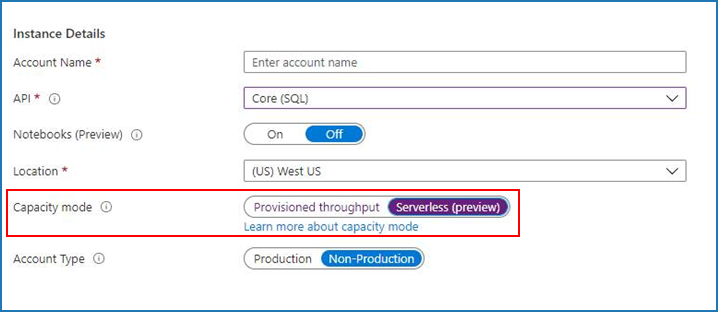
Serverless is a new consumption-based model that bills only for the resources used by database operations, with no minimum. It’s ideal for small to mid-sized workloads with sporadic traffic. To get started, select “Serverless (preview)” during account creation.

INTUNE
Updates to Microsoft Intune
The Microsoft Intune team has been hard at work on updates as well. You can find the full list of updates to Intune on the What’s new in Microsoft Intune page, including changes that affect your experience using Intune.
Azure portal “how to” video series
Have you checked out our Azure portal “how to” video series yet? The videos highlight specific aspects of the portal so you can be more efficient and productive while deploying your cloud workloads from the portal. Check out our most recently published video:
Next steps
The Azure portal has a large team of engineers that wants to hear from you, so please keep providing us your feedback in the comments section below or on Twitter @AzurePortal.
Sign in to the Azure portal now and see for yourself everything that’s new. Download the Azure mobile app to stay connected to your Azure resources anytime, anywhere. See you next month!
by Contributed | Oct 15, 2020 | Technology
This article is contributed. See the original author and article here.
As many of you may know, cohorts are subsets of Windows systems and devices targeted by a shipping label that share the same attributes (such as HWID, CHID, OS Version, etc.). Earlier this year, we started to analyze drivers not just by the entire shipping label, but also by cohort to better identify quality.
Starting October 30, 2020, if your driver is canceled due to a failing targeting cohort, you will receive a Cohort Failure Repot with the details of those failures. You can find out how to access and understand the Cohort Failure Report, on MS Docs.
by Contributed | Oct 15, 2020 | Azure, Technology
This article is contributed. See the original author and article here.
Since the inception of Azure SQL more than ten years ago, we have been continuously raising the limits across all aspects of the service, including storage size, compute capacity, and IO. Today, we are pleased to announce that transaction log rate limits have been increased for General Purpose databases and elastic pools in the vCore purchasing model.
Increasing log rate
Resource governance in Azure SQL has specific limits on resource consumption including log rate, in order to provide a balanced Database-as-a-Service and ensure that recoverability SLAs (RPO, RTO) are met.
Maximum transaction log rate, or log write throughput, determines how fast data can be written to a database in bulk, and is often the main limiting factor in data loading scenarios such as data warehousing or database migration to Azure. In 2019, we doubled the maximum transaction log rate for Business Critical databases, from 48 MB/s to 96 MB/s. With the new M-series hardware at the high end of the Azure SQL Database SKU spectrum, we now support log rate of up to 264 MB/s.
Our latest increases are for all hardware generations currently supported in the General Purpose service tier, and apply equally to both provisioned and serverless compute tiers.
For single databases, log rate limit increases are:
Cores
|
1
|
2
|
3
|
4
|
5
|
6
|
7
|
8 and higher
|
Old limit (MB/s)
|
3.75
|
7.5
|
11.25
|
15
|
18.75
|
22.5
|
26.3
|
30
|
New limit (MB/s)
|
4.5
|
9
|
13.5
|
18
|
22.5
|
27
|
31.5
|
36
|
For elastic pools, log rate limit increases are:
Cores
|
1
|
2
|
3
|
4
|
5
|
6
|
7
|
8 and higher
|
Old limit (MB/s)
|
4.7
|
9.4
|
14.1
|
18.8
|
23.4
|
28.1
|
32.8
|
37.5
|
New limit (MB/s)
|
6
|
12
|
18
|
24
|
30
|
36
|
42
|
48
|
All up-to-date resource limits are documented for single databases and elastic pools.
Impact at scale
To see the impact of log rate increases on customer workloads, we analyzed telemetry data for the period when the change was being deployed in one Azure region. During that time, the region had a mix of databases and elastic pools with old and new limits.
The chart below plots the percentage of General Purpose databases that reached log rate limit and experienced log rate throttling (defined as at least one LOG_RATE_GOVERNOR wait in a 1-hour interval). The higher (light blue) area is for databases with the old limits, and the lower (red orange) area is for databases with the new limits.
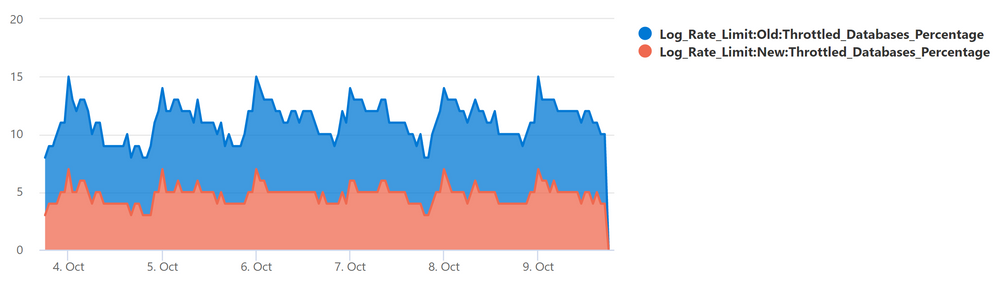
The positive impact is clear: the change reduced the average percentage of General Purpose databases experiencing log rate throttling from over 10% to less than 5%.
Data load example
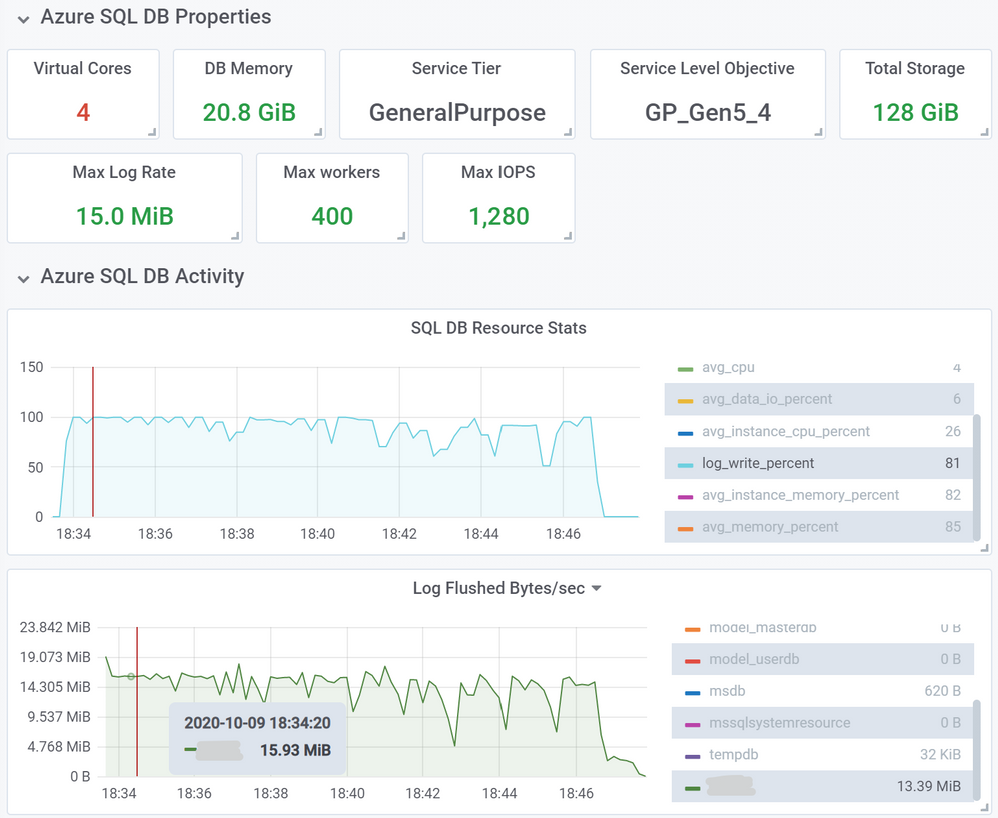
As an example of an operation benefiting from higher log rate limits, we inserted 10 million rows into a heap table using a SELECT … INTO … statement, using a 4-core General Purpose database on Gen5 hardware. Row size was 1,255 bytes, and total inserted data size was 11.7 GB.
First, we used a database with the old log rate limit of 15 MB/s. This load took 13 minutes and 2 seconds.
Next, we repeated the same load, but using a database with the new 18 MB/s limit.
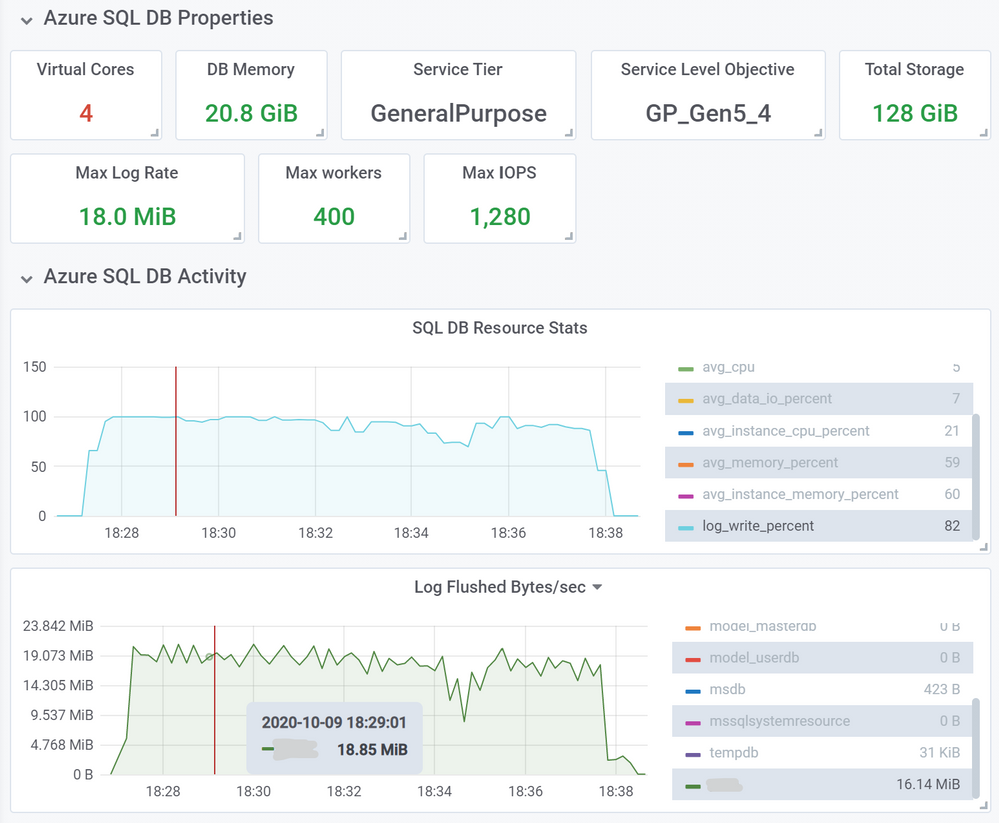
This load took proportionally less time, 10 minutes and 33 seconds, a 21% decrease in load time.
You can expect this kind of improvement for most operations that used to consume close to 100% of log write throughput with the old limit. Similarly, for databases in elastic pools that generate high volumes of log writes at the same time, delays due to throttling are now reduced due to higher log rate limit at the elastic pool level.
Conclusion
This increase in log rate limits helps our customers using General Purpose databases and elastic pools improve performance of bulk data loading and data modification operations. In some cases, customers may be able to scale down to a lower service objective and maintain the same data load performance.
This improvement is another step in our journey to improve Azure SQL performance and scalability to help our customers achieve their goals more efficiently and at lower cost, while maintaining Database-as a-Service principles and existing recoverability SLAs.
by Contributed | Oct 15, 2020 | Azure, Technology
This article is contributed. See the original author and article here.
This covers broad resources to help you get started with Microsoft Azure. To find resources on a specific element of Azure, please re-try your search with those keywords or use filters to refine your results.
Getting Started
- Microsoft Azure: Sign in to your Azure account. The site also includes technical documentation, pricing, training, and news for Microsoft Azure. Start turning your ideas into solutions with Azure products and services
- Microsoft Learn: Microsoft Azure: Find learning paths, training, and information on how to obtain a Microsoft Certification on Azure. Grow your skills to build and manage applications in the cloud, on-premises, and at the edge.
- LinkedIn Learning: Azure: See the LinkedIn Learning courses on Azure. Get the training you need to stay ahead with expert-led courses on Azure.
Working with Azure
- Azure Architecture Center: Find everything you need about Azure architecture, from application architecture guides, to reference architectures, cloud design patterns, and more. Guidance for architecting solutions on Azure using established patterns and practices.
- Azure Portal: Find the available Azure services, as well as tools and links to technical documentation.


Recent Comments