This article is contributed. See the original author and article here.
Background:
Azure DevOps provides developer services to support teams to plan work, collaborate on code development, and build and deploy applications. Developers can work in the cloud using Azure DevOps Services or on-premises using Azure DevOps Server. Azure DevOps Server was formerly named Visual Studio Team Foundation Server (TFS). Azure cloud services can be managed in Azure DevOps by using the PowerShell cmdlets that are available in the Azure PowerShell tools, so that you can perform all of your cloud service management tasks within the service. Management certificates allow you to authenticate with the classic deployment model. Many programs and tools (such as Visual Studio or the Azure SDK) use these certificates to automate configuration and deployment of various Azure services.
Purpose:
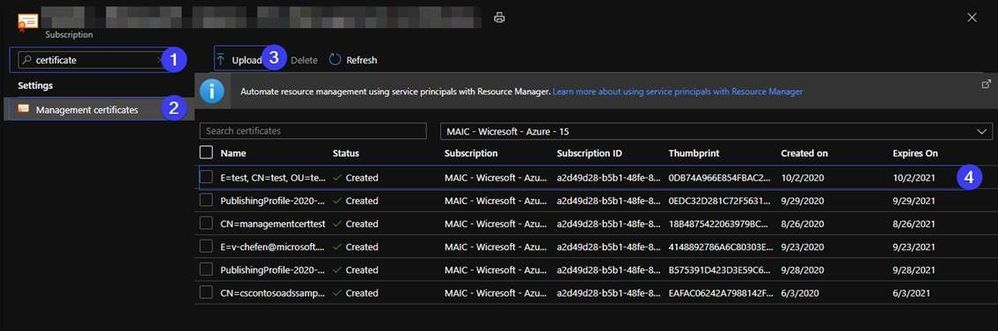
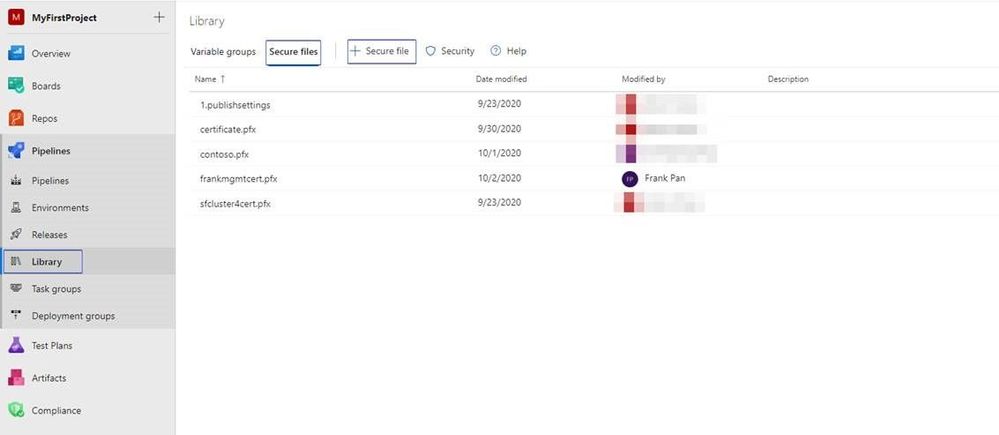
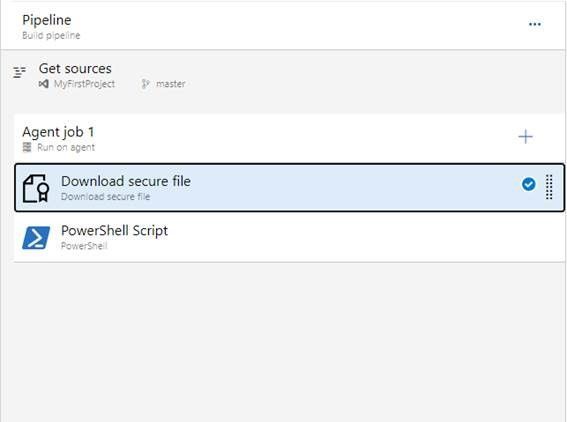
This blog is to guide you to create a management certificate and use it to manage your Azure Classic resources such as Cloud Service in Azure DevOps.
3. When prompted, type the password for the root key, and the organizational information for the custom CA such as Country/Region, State, Org, OU, and the fully qualified domain name (this is the domain of the issuer).
This article is contributed. See the original author and article here.
Hello bot developers,
In our previous blogpost, we have seen the magic of Bot Telemetry Logger middleware, like what does it offer and how does it work in harmony with the Application Insights. Today, I will be talking about the Bot Analytics blade.
If we compare these two telemetry; “Bot Telemetry Logger” reflects how Bot Service perceives traffic coming from and being sent to the Bot and “Bot Analytics” reflects the perspective of the bot itself. While they can be used in concert, they are different sets of data.
I witness some number of customer complaints that, it may not show the expected data, when our customers perform some Power BI reporting. I.e. when you use Bot Telemetry logger, the number of Users is not the same as in the “Bot Analytics” reports. Well, it may be normal because of the fact that, they are making analytics from different perspectives. Let me take you deeper cause of this:
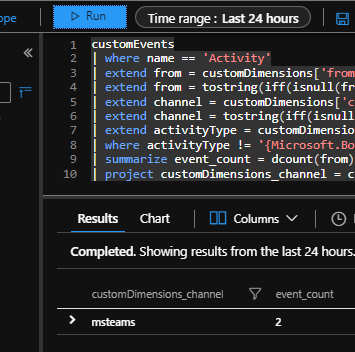
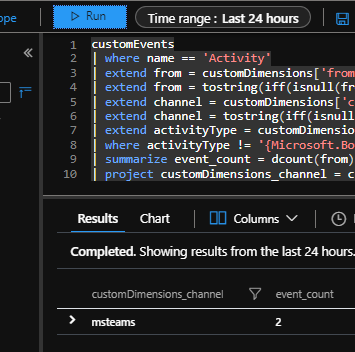
Built-in “Bot Analytics Blade” uses a different schema when compared to other SDK based telemetry tools like “Bot Telemetry Logger”. It uses different queries, to report “User”/”Message”/”Channel Data” information. For example, it reaches out to user information from the “CustomEvents” table through “customDimensions” field, where the custom event is named as “Activity”. it is essentially using following query, for “User” reporting:
customEvents
| where name == ‘Activity’
| extend from = customDimensions[‘from’]
| extend from = tostring(iff(isnull(from), customDimensions[‘From ID’], from))
If you run this query, on the “Application Insights Project” which you configured for bot analytics, you will see that the results are similar with the “Bot Analytics Blade”. See it below, when we run it on Application Insights, for last 24 hours:
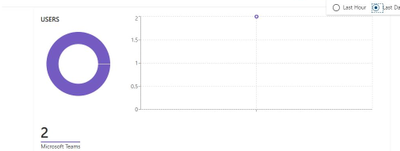
And here is a screenshot from “Bot analytics blade” , which show the exact same information.
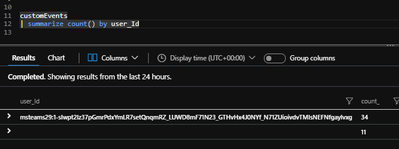
On the other hand, “Bot Telemetry logger” has a different schema for user reporting. You may remember from our previous blogpost that it use the actual “user_Id” field when logging to “customEvents” table. This field is left empty for the “Bot Analytics” logger.
See below query that in the first row, we see the “user_Id”s logged by “Bot Telemetry Logger”, and in the second row, we see the other “customEvents”, logged by “Azure bot analytics” which has null “user_Id” field:
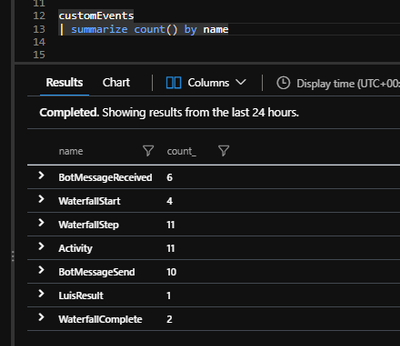
These logging schemas do not overlap or mix-up, because bot telemetry logger does not log any customEvent with a name “Activity”:
There are no plans to unify the two telemetry schemas at this time. They were designed independently, so you need to know how they log, to understand what you should expect. By that way, you can generate meaningful PowerBI reports from your Application insights data.
This article is contributed. See the original author and article here.
1. Update to SAP on Azure Documentation
Several important updates to Azure documentation have been made recently.
Customers and Partners are recommended to regularly review the SAP on Azure documentation pages as new features and configurations are continuously improved.
Important Update for Linux High Availability customers – set the Linux kernel parameter net.ipv4.tcp_keepalive_time=300. It is recommended to set this parameter on DB, Application Servers and Central Services VMs. This now aligns with SAP Note: 1410736 – TCP/IP: setting keepalive interval
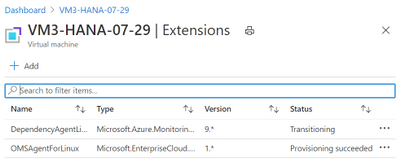
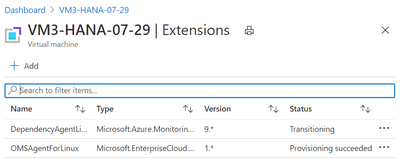
Older versions of the Azure Linux OMS Agent did not run or deploy after the Python release was updated to Python3 using the package python3-azure-mgmt-compute.
This issue is now resolved and the Linux OMS Agent now supports modern Python releases on Suse 12.x and Redhat.
Customers who are running Suse 15.1 will still be unable to use the full functionality as the Dependency Agent is not released for Suse 15.1 or Oracle Linux.
The Dependency Agent will stay in “Transitioning” status and the only data populated into Log Analytics will the in the “Heartbeat” and “InsightsMetrics” tables. Check this blog site regularly for updates on the Dependency Agent for Suse 15.1
3. High LOGWRITE Waitstat on SQL Server TDE Databases Due to Certificate Revocation List Not Accessible
Several support cases have been analyzed recently where Firewall policies have blocked access to network resources that are checked by the Certificate Revocation mechanism.
The problem manifests as intermittent slow LOGWRITE and on AlwaysOn systems a the command TM REQUEST may be waiting on HADR_SYNC_COMMIT. The problem occurs on a regular periodic basis. SQL Server will run very slowly for approximately 180 seconds and them return to normal
There are two solutions to this problem:
Turn off Certification Revocation (not recommended)
Ensure that the Firewall is configured to allow access to the addresses in the whitelist in this link
End to End Monitoring on the internal Microsoft SAP system. This includes the ability to read events such as ST22 shortdumps and correlate these events with infrastructure availability
5. Oracle Linux & PTP Timer – Especially for Oracle ASM Systems
Oracle Linux customers may receive errors in Oracle error logs similar to the text below. If this is seen it is recommended to edit the chrony.conf file and add the PTP timer
Warning: VKTM detected a forward time drift.
Time drifts can result in unexpected behavior such as time-outs.
Please see the VKTM trace file for more details
Check chrony configuration with the following command
chronyc sources -v
In chrony.conf, add line below,
refclock PHC /dev/ptp0 poll 3 dpoll -2 offset 0
And restart the chronyd, systemctl restart chronyd.service
6. Azure CLI Commands After Python3 Update on Suse
After updating to the latest Python3 release Azure CLI may stop working. The error message will be similar to “No module named azure.cli.__mail___; ‘azure.cli’ is a package and cannot be directly executed”
The message appears after updating to the latest Python/Python3 libraries and the package for the Azure SDK (python-azure-mgmt-compute on SLES12 ; python3-azure-mgmt-compute on SLES15)
Follow this procedure to resolve the problem on Suse 15.1:
# az login Traceback (most recent call last): File “/usr/lib64/python3.4/runpy.py”, line 170, in _run_module_as_main “__main__”, mod_spec) File “/usr/lib64/python3.4/runpy.py”, line 85, in _run_code exec(code, run_globals)
Follow this procedure to resolve the problem on Suse 12.x:
Run this command to check the Python3 path
which python3 /usr/local/bin/python3
If the python3 path is /usr/local/bin/python3 then run this command
7. SAP License Key May Become Invalid on Azure VMs
Some customers may notice that the SAP License Key on their systems may become invalid and SAP starts running on a temporary license key. This issue is explained in these SAP Notes.
A new SAP Note discusses how to reduce latency between Database and SAP Application servers. Note 2931465 includes instructions on how to run /SSA/CAT. This utility is the most reliable and best way to measure latency between the database and application server. Ideally the result in the Acc DB and E. Acc DB columns should be below 100.
Only the Database and Applications servers for a single SID should be in PPG. The ASCS does not need to be in PPG. PPG should be kept as small and compact as possible. The communication between the SAP Application and the ASCS is not highly latency sensitive
In recent months many new features have become available for SAP customers. The list below is a very brief overview of recommended features and updated documentation
RHEL 8.1 – is released and Generally Available for Azure
Suse 15.2 is now certified for Netweaver and Hana
Recommended stack for Oracle Customers – Oracle Linux OL 8.2 + Oracle 19.8c + Grid + ASM. ASM is highly recommended for all new Oracle systems. Oracle 18 is not recommended and will be EOL soon
Windows 2019 – fully supported for NetWeaver and most standalone SAP components. Hyper-V support matrix can be found here
Azure Monitor for SAP is now in preview and supports VMs and HLI. Hana and SQL Server Databases are supported currently. Telemtry from Pacemaker Cluster is also collected and displayed. Azure Monitor for SAP is a free of charge service
A very small collector VM is required. Further documentation can be found here
Cathay Pacific has recently completed moving their SAP S4HANA system to Azure M-series. SAP application servers are running on E-series. As part of the project S4HANA was upgraded to 1809.
Orica has completed their global S4HANA global transformation with more than 50 countries on a single instance
Azure Load Balancer – switch from Netcat to more reliable Socat was completed this in the Q1’20.
SAP HANA upgrade to SPS 5 in progress
SuSE 12 Support Pack 5 upgrade in progress
Gen2 VM Migration – S/4HANA Database migrated to Gen 2 VM [M208ms_v2 (208 vcpus, 5700 GiB memory)] for both nodes in Cluster and in DR VM [E32s_v4 (32 vcpus, 256 GiB memory)].
Azure Application Proxy is used for Fiori launchpad and 1,400+ applications deployed. Azure Backup is used for SQL Server and HANA, Azure Site Recovery for DR and Azure Monitor for SAP Solutions for Production systems
13. Troubleshooting Checklist for Hana Performance Issues
Customers experiencing performance or reliability issues with SAP Hana installations are highly recommended to follow the troubleshooting process. The list below is a basic checklist that should be followed before raising a support case to Microsoft and SAP:
14. R3load Based Hana System Copy – Tables >2 Billion Rows
SAP do not generally recommend copying Hana based systems with R3load and there are multiple issues that can occur when performing Homogeneous or Heterogenous system copies using R3load.
One issue is how to handle tables with more than 2 Billion rows. Hana supports 2 Billion rows per table partition.
2369936 – Overview of system copy options for systems based on SAP HANA
2784715 – SWPM: Using R3load-based migration for SAP System on HANA when tables contain more than 2 billion rows
15. Very Large Busy Hana VMs Freeze Due to Memory Exhaustion
Very large busy Hana VMs may sometimes freeze due to Linux kernel memory exhaustion.
The procedure below should be reviewed and discussed with the Linux vendor and implemented if appropriate
Steps to implement solution:
Set these kernel parametners
vm.min_free_kbytes = 65536
vm.zone_reclaim_mode = 0
(a) Get the current value of parameter “vm.min_free_kbytes”
[ root ] # sysctl vm.min_free_kbytes
(b) Increase minimal free memory and monitor for next 5 working days.
[ root ] # sysctl -w vm.zone_reclaim_mode=1
# sysctl -w vm.min_free_kbytes=Y
Example : # sysctl -w vm.min_free_kbytes=98304
(c) monitor in next 5 working days to see if message “Error 11 Resource temporarily unavailable” and/or
“Freeing unused kernel memory” still being reported.
This article is contributed. See the original author and article here.
Final Update: Friday, 13 November 2020 02:06 UTC
We’ve confirmed that all systems are back to normal with no customer impact as of 11/13, 01:20 UTC. Our logs show the incident started on 11/13, 00:25 UTC and that during the 55 minutes that it took to resolve the issue customers may have experienced with missed or delayed Log Search Alerts or experienced difficulties accessing data for resources hosted in West US2 and North Europe
Root Cause: The failure was due to one of our backend services
Incident Timeline: 55 minutes – 11/13, 00:25 UTC through 11/13, 01:20 UTC
We understand that customers rely on Azure Log Analytics as a critical service and apologize for any impact this incident caused.
We will have our Service Fabric Community Q&A call for this month on Nov 19th 10am PST.
Update: This will be our last community call for 2020 to accommodate for the upcoming holiday season. We encourage you tune in to last one for this year to learn about updates and ask questions. We will publish Holiday Schedule in a separate post.
Starting Aug 2020, we introduced a framework for our monthly community session. In addition to our normal Q&A in each community call we will focus on topics related to various components of the Service Fabric platform, provide updates to roadmap, upcoming releases, and showcase solutions developed by customers that benefit the community.
Join us to learn more on the above topics with cool demos on how to use them and ask us any questions related to Service Fabric, containers in Azure, etc. This month’s Q&A features one session on:
This article is contributed. See the original author and article here.
David Brown, an Accessibility and Inclusion leader at Phoenix Software, a Microsoft Partner based in the UK, shares his personal journey with Dyslexia and how he leverages Microsoft 365 tools for accessibility.
By pushing the button and opening the door to issues like race, accessibility, sexuality and religion, we are given opportunities that we may never have been presented with. I don’t think I could have ever imagined that Microsoft would be asking me to write a blog.
Picture of a disabled access door button
As someone with dyslexia, I’m passionate about inclusion. I spent most of my childhood undiagnosed, struggling to read and write until the age of 14 when I finally started to get the support I needed. That, however, ended abruptly when I left education and started in the workplace. I’d often try to hide my dyslexia and, until just a few years ago, I’d ask my partner and friends to proofread my emails to avoid embarrassment and therefore hide my accessibility needs.
Fast forward to today, I’m sitting on my sofa using Microsoft Dictate in Word Online, not even pausing to consider spelling and punctuation.
Those diagnosed with dyslexia are often great thinkers, and weirdly, great communicators, but unfortunately in my case that went untapped until I found the tools that I needed to unlock my potential.
Now, I’m not saying that I’ve ‘made it’, but the moment I stopped hiding my vulnerability and my disability, I found opportunities you wouldn’t believe. I now lead the Modern Workplace and Accessibility practice at Phoenix Software and every day I get the opportunity to help the UK Public Sector become more inclusive by utilizing these skills and Microsoft’s amazing accessibility features. I’m also the Director of Accessibility & Inclusion for York Pride, ensuring it becomes a more inclusive event for our community.
Inclusive and Accessible Design
Push the disabled access door button…it opens wider than you could imagine!
Have you ever walked into a hotel and pressed the disabled access door button either for your own need or simply as your huge suitcase won’t fit through the dreaded revolving door? You don’t need to have a physical disability to see how poorly designed revolving doors are – they’re inaccessible by design.
The power of inclusive design is something we can all benefit from, whether it be a dropped curb, tactile paving, voice-activated technology, or clear and concise print design.
Accessible tech excites me. Cortana, Microsoft 365’s (M365) learning tools, robotic synthetics dictation and live captioning (to name a few), but what really excites me is the impact that accessible design brings.
Coincidentally, Microsoft has just rolled out a fantastic new feature for its M365 productivity suite which helps streamline something I have always struggled with – transcribing.
The feature, called Transcribe in Word, gives you the ability to open the Word app on your desktop, and in the near future on your smartphone, and begin transcribing anything being said by multiple people in the room with you or on Microsoft Teams. You can also quickly grab portions of a transcribed conversation and drag them into your document.
To access this new feature, just click the Dictate button in the toolbar and select the Transcribe option.
Delivering accessibility and inclusion to transform education and impact lives in the community
One of the best examples customer engagements I’ve had the privilege of supporting is City College Peterborough. The college prides itself on the important role it plays in the Peterborough community, where it works with organizations of all shapes and sizes, and people from all backgrounds, to achieve their goals.
Utilizing Microsoft Teams has meant that the College now has one platform upon which they’ve built their internal communication strategy. All staff have access and can use this to hold learner files, enabling them to do their job more efficiently and effectively. They are also able to better support their learners including those in need of additional support. An example of one such student is Ziah.
Ziah’s journey started in the Schools for Independence Group and, following a Cerebral Palsy diagnosis, he needed a frame to walk as well as other aids. The college have seen him excel and noted great improvements year on year. Thanks to the support of the college and having the right tools such as the Surface Go and Microsoft Teams, Ziah is fully independent and ready to leave the college. He is currently on work placement, and the college knows that the use of Microsoft Teams and the Surface Go is the best thing to help him excel now and in the future.
Well, I want to talk to you about the opportunities that accessibility can bring to you and your organization.
For much of my life I’ve hidden my accessibility needs, certainly in the corporate world it has been deemed unprofessional to discuss things that don’t fit the norm. Working within the tech industry, certainly a few years ago, I was convinced, with justification, that my career progression would be limited. Thankfully things have changed, and although there is progress to be made, by questioning, listening and adapting we all have greater opportunities than ever before.
Only recently have I been honest with my employer about my Dyslexia, and only after discovering the amazing tools available, built-in to the software I already used, have I gained opportunities I could never have imagined. I have been asked to speak at events like Microsoft Inspire, Future Decoded, GAAD and more. I’ve built a profitable practice for Phoenix delivering hundreds of Accessibility workshops to Public Sector Organizations and I’ve recently been appointed the Accessibility & Inclusion Director for York Pride. However, more importantly, I’ve helped thousands of individuals, like me, benefit from the capabilities of inclusive technologies.
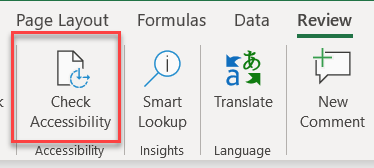
Organizations can benefit from the implementation of a diverse workforce and generate new revenue streams by engaging with more people. Take, for example, something as simple as Accessibility Checker in M365
Using this ensures that the content you create is accessible to everyone, and might mean you reach a customer/individual that you may otherwise have missed.
Rather than an organization pushing out a blanket statement, organizations should be doing what employees and customers want to see to back up statement. Do you provide training? Do you provide a platform for your staff to discuss and support these statements? Open discussion of these issues is in itself education.
Hundreds of our staff and customers have completed this free online certification designed to educate organizations and individuals on the tools Microsoft offer to support with accessibility.
I talk about accessibility everyday due to my passions, but seeing a huge part of our business complete this accreditation without instruction has been inspiring. It’s led to employees being comfortable talking about their own hidden disabilities and encouraged everyone to think more inclusively. Hopefully you will too.
Take care, be kind and thank you for taking the time to think about inclusion.
This article is contributed. See the original author and article here.
Welcome to newest post in our series on how to protect your API Connected Apps using Microsoft Cloud App Security (Microsoft CAS).
As our first App, we’ll discuss easy steps to protect and gain more visibility and control on GitHub. We’ll publish other Blogs on Salesforce, Box and AWS in the coming weeks. If there is an App you would like to be covered in future blogs, let us know in the comments.
Why connect GitHub?
Connecting GitHub to MCAS will get you the following benefits:
Benefit
Description
Policy or template
Compromised account or insider threat
The built-in Threat Detection policies in Microsoft Cloud app Security will apply to GitHub as soon as you have connected it. No additional configuration is necessary: by simply connecting you will start seeing new alerts when applicable.
“OAuth app creation (GitHub)”
Data Leakage Protection
While the GitHub API connector does not allow content inspection, you can use MCAS to view and alert when a GitHub repository is shared, or when files are being downloaded at a high rate (mass download)
“Repository access level becomes public (GitHub)”
SaaS Security Posture Management (SSPM)
Some developers may not be network security experts and we often see risky settings in our customers’ GitHub environments, such as allowing repositories to be shared or changing admin permissions. MCAS can notify you if such action happens, empowering you to act fast, rather than react after a misconfiguration lead to data leakage.
“Enablement of private repository forking (GitHub)”
Connect GitHub to Microsoft Cloud App Security
To get these benefits you will need to connect Microsoft Cloud App Security to your enterprise GitHub instance.
We have already documented the steps to connect MCAS to GitHub in the step-by-step guide here.
Or if you prefer, check our video below.
Quick config – Quick Value!
To ease your MCAS configuration protecting your GitHub environment, we have added a few built-in templates for Activity Policies, that will simplify your tasks.
These built-in templates are available out of the box, and they can be used to create policies after you have connected MCAS to GitHub.
You can see the use of these templates in action in our video:
We recommended that you enable all these templates in your environment (by default they have no impact on end-users at all). Once the policies are created, they can be adjusted and filtered if the alerts become too chatty or too quiet.
GitHub Template list:
Template
Description
Repository access level becomes public (GitHub)
This template will help generate an alert when a repository becomes accessible publicly. If the data in this repository is business critical, or represents corporate IP, it could be posing a high risk of data leakage.
Enablement of private repository forking (GitHub)
This policy template will trigger an alert when an admin changes a key security setting “Enablement of Repository Forking”. When repository forking is enabled, users accessing a repo could duplicate (“Fork”) it, making it potentially easier to exfiltrate. Note that this policy does not alert when a repository is forked, but rather when forking becomes allowed. Of course, if Repository Forking is something that your GitHub team needs to allow, do not enable this template.
OAuth app creation (GitHub)
Oauth apps can be a very easy way for attackers to take control of an app account without requiring a username and password.
As for many other apps, GitHub allows Oauth apps to connect to it and potentially access its data, download code, or change administrative configuration. For that a token must generated.
By creating a policy based on this template, you can be alerted when a new Oauth app token is created in your GitHub environment, letting you know ASAP when a potential risk is detected.
Note: in addition to detecting new OAuth tokens, it is also recommended to integrate GitHub with Conditional Access App Control and prevent downloads altogether from risky sessions. More info here.
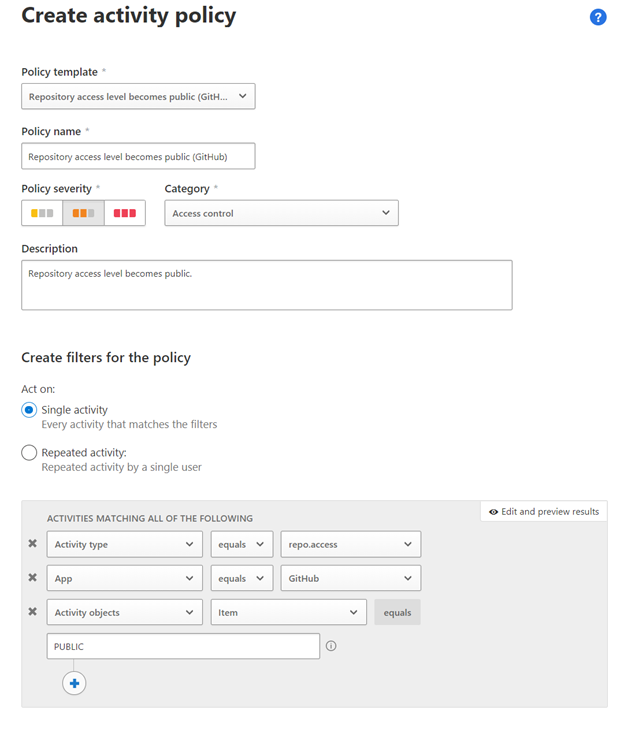
Below is an example of the configuration of one of our templates:
Of course, after creating a policy from one of these templates, you can edit them to add any additional filters to tailor them to your specific needs.
Create your own policy and use advanced configuration.
The templates we discussed here are all activity policies. They can allow you to quickly configure very common use cases.
However, for any advanced, or less common scenario, activity policies can be configured manually, using the Activity types presented by MCAS from the GitHub API (a real-life example is presented below).
Here are a few best practices when configuring these:
Single or repeated activity?
That would depend fully on your needs, but cases where several repositories are shared in a short period of time could be a good indicator of data loss.
Activity filters: filters are the most important part of the Activity policy as they allow to device what kind of event must be captured.
App: always start with selecting the App you are creating the policy for (here, GitHub). This will limit the number of entries when trying to apply a filter on the Activity Type.
Activity Type: this is often the most important filter. The list of activities caught by MCAS for each app can be very broad. For GitHub, it can be a sharing activity, or adding users to a repository. Based on your needs, review them, and select the appropriate filter. When in doubt, a good way to validate the behavior of a specific activity is to use the Activity Log in MCAS and filter on the type of Activities being evaluated. Another, more advanced option to get a better grasp on each of the activity is to view the GitHub API reference.
Other filters can bring additional value, whether it is for GitHub or other apps, and they should be reviewed as needed.
Now let’s review a more concrete example, with a real-life use case:
Allowing Deletion or Transfer of Repository was enabled.
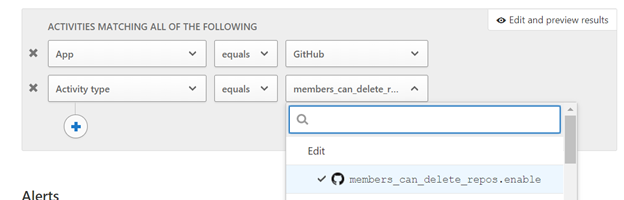
Following the same principle as some of the templates defined above, this policy will trigger when an admin changes the GitHub tenant’s setting allowing a repository to be deleted. This does not mean that the action has happened, but rather that it was allowed and there may have been a malicious or erroneous configuration.
To configure that, apply the following filters in your Activity Policy:
You can add additional filters, such as location, usernames, etc. to personalize the policy.
Real time control
The policies and controls we have discussed above are all relying on GitHub’s APIs to query activities and information about the current user context. While this allows monitoring activities very specific to GitHub, it is an out of band connection (cloud to cloud, users are never aware of this connection) and as such, data is received by MCAS in Near Real Time.
For use-cases where real time controls are required, we can leverage another component of MCAS: Conditional Access App Control.
This feature allows MCAS to act as a reverse proxy in the cloud, and allows for a real time control of several activities, for GitHub or any other Cloud App:
Control file downloads
Control file Uploads (including malware detection)
Control or prevent Cut/Copy/Paste/Print
Some of the most common scenario used with Conditional access app Control with GitHub are:
Block download of code files to unmanaged devices
Prevent upload of code containing malware.
Prevent copying data from an unmanaged device.
More info on how to use Conditional Access App control is available here:
Now that you know all you need to get started with protecting GitHub using Microsoft Cloud App Security, please share with us your thoughts and your use cases. We would love to hear your feedback on our GitHub integration.
This article is contributed. See the original author and article here.
Everyone’s a beginner at some time in their career, whether it’s when you are in school, in a boot camp, a postdoctoral program, or as an experienced developer learning a new technology.
Learn with us!
Over the past summer, Azure Advocates and Project Managers have been hard at work creating lessons and tutorials for beginners around the world who want to become professional web developers. We launched several beginner video series, and now, in the same vein, we have created acurriculumthat you can access completely free of charge to take your first steps with JavaScript, CSS, and HTML, the building blocks of the web.
Here on the Academic Team in Azure Advocacy, we have partnered with colleagues across our large department of educators, advocates, managers and content creators to create for you 24 lessons spanning 12 weeks that you can take either in full or in part, at your leisure from the safety of your own home. They are freely open to be used as you like, via GitHub. Teachers, you can use this content withinGitHub Classroom!
Meet the team!
Pedagogy
What’s pedagogy? It’s the way you teach, what underlying values inform your teaching style and choices.
We have chosen two pedagogical tenets while building this curriculum: ensuring that it is project-based and that it includes frequent quizzes. By the end of this series, students will have built a typing game, a virtual terrarium, a ‘green’ browser extension, a ‘space invaders’ type game, and a business-type banking app, and will have learned the basics of JavaScript, HTML, and CSS along with the modern toolchain of today’s web developer.
What about non-English speaking learners? We are working to translate this curriculum to several languages, so please stay tuned!
Curriculum Structure
Each of the 24 lessons includes:
optional sketchnote
optional supplemental video
pre-lesson warmup quiz
written lesson
for project-based lessons, step-by-step guides on how to build the project
knowledge checks
a challenge
supplemental reading
assignment
post-lesson quiz
By ensuring that the content aligns with projects, the process is made more engaging for students and retention of concepts will be augmented. We also wrote several starter lessons in JavaScript basics to introduce concepts, paired with video from the “Beginners Series to: JavaScript” collection of video tutorials, some of whose authors contributed to this curriculum.
In addition, a low-stakes quiz before a class sets the intention of the student towards learning a topic, while a second quiz after class ensures further retention. This curriculum was designed to be flexible and fun and can be taken in whole or in part. The projects start small and become increasingly complex by the end of the 12 week cycle.
While we have purposefully avoided introducing JavaScript frameworks so as to focus on the basic skills needed as a web developer before adopting a framework, a good next step to completing this curriculum would be learning about Node.js via another collection of videos: “Beginner Series to: Node.js“.
Whether you’re a student or a teacher, we welcome your feedback! The issues are open on the repos for you!
Special thanks to Floor Drees, Christopher Harrison, Chris Noring, Yohan Lasorsa, Jasmine Greenaway, and Tomomi Imura for their work on this curriculum!
This article is contributed. See the original author and article here.
We know the world of education is becoming increasingly more complex. With hybrid and remote learning, there is more information to track than ever. Fortunately, new technology can help teachers, students, and administrators get organized. Gone are the days of juggling information between paper planners, computer files, and group chats – Microsoft 365 has you covered.
Introducing Microsoft Lists Microsoft Lists helps you optimize your productivity and save time by managing your information closely, critical for modernizing your classroom. Lists provide a simple, smart, and flexible way to organize information, and is included in your Microsoft 365 subscription. Use Lists as a standalone Microsoft 365 application or add Lists to your Microsoft Teams channel to collaborate with full functionality (Microsoft Lists is now a default option within Microsoft Teams for Education). For teachers, students, and administrators alike, lets walk through some key Lists features and use cases.
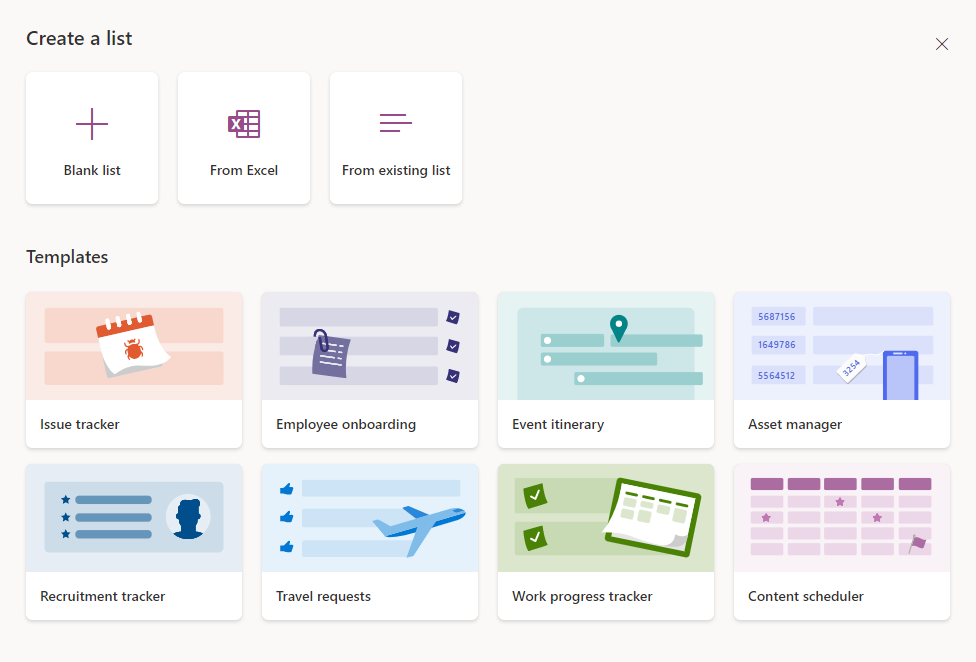
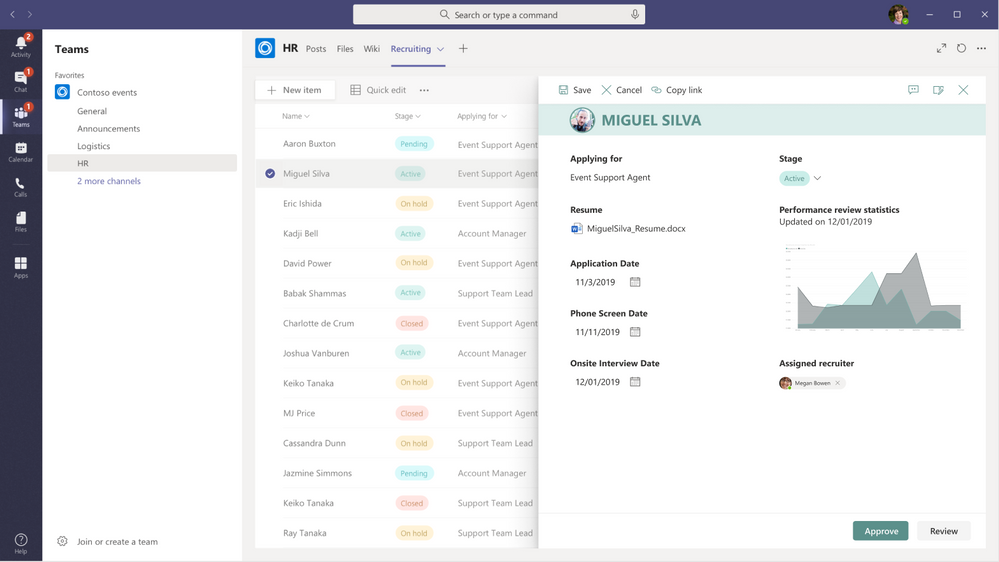
Organize and track information in one central hub Lists provides an easy to use interface to manage a variety of information. There are numerous ready-made templates available in the app that give a starting point for your list creation. Teachers can use the Work item tracker template to track lesson plans, which comes with columns to note progress, priority, and due dates. Students can use the template to create a study plan or project outline. Other templates like Asset manager, Event itinerary, or Recruitment tracker can be helpful for administrators from a school planning perspective. Asides from creating a list from one of the templates, you can create a list from scratch or import data from Excel into a new list. Choose to start one right from the Lists app, Microsoft Teams, or your SharePoint site.
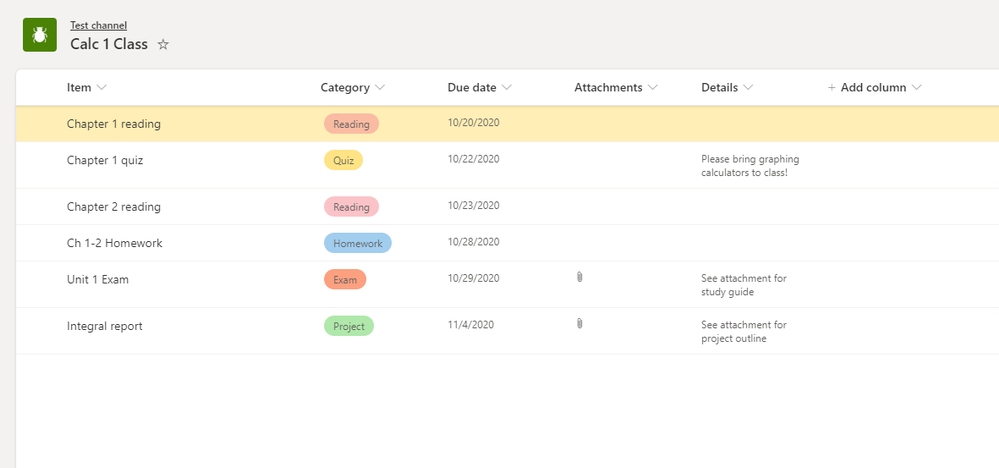
Each item in your list can be as complex or as simple as you make it. Attach files and due dates to list items so everyone is on track and can access everything in one place. Lists are also customizable, with built-in settings to edit layouts – no coding required. Filters, views, and color formatting make it easy to add personal flair to your or your classroom’s lists.
Plus, access and edit your lists on the go with the Lists mobile app, now in preview for iOS. Fill out this form to get early access to the Lists Mobile App (iOS).
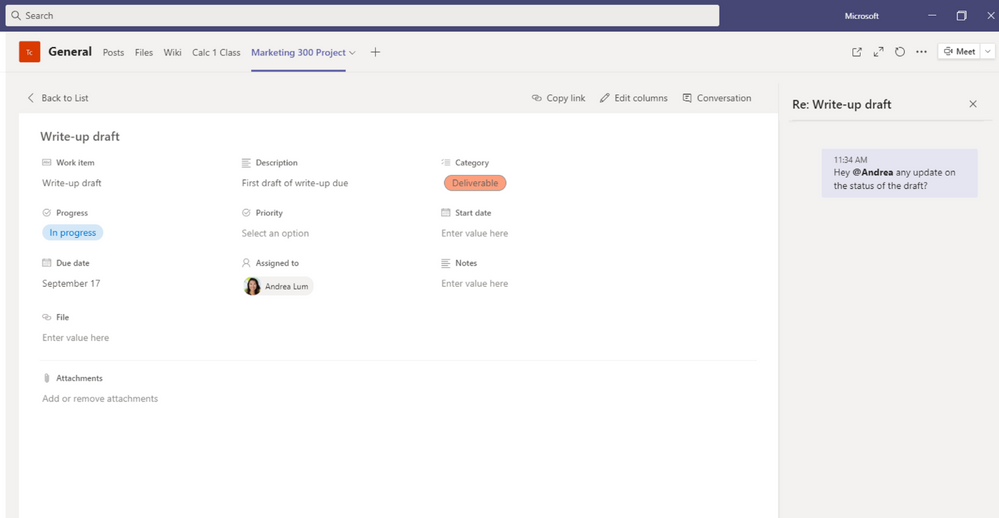
Foster classroom collaboration and sharing If you’re using Lists with your classroom, it’s a great way to encourage students and teachers to work together. Share a list from a SharePoint site or class Teams channel to give everyone live access to view and edit. Anyone can leave comments on list items, @mention others to draw attention, and open a chat window alongside your list. Students can work remotely on a shared list with their group and keep track of project responsibilities among members. Teachers can create a list in their class Teams channel to organize classroom resources and assignments, providing instant access to students and filterable views so they can find exactly what they are looking for.
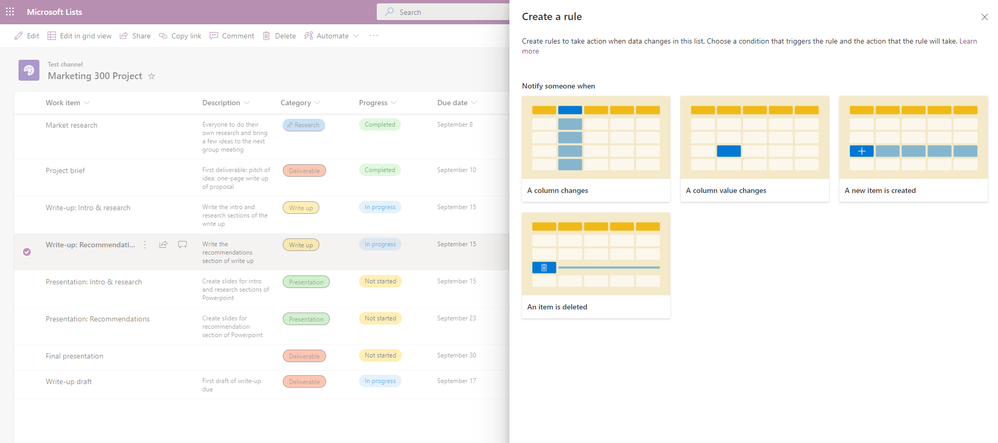
Lists also lets you add rules and notifications to items, triggering reminders to specified class members with upcoming due dates. For example, students working on a group project can set up email notifications to each assigned member when an item deadline is coming up.
Unlock your school or classroom’s full potential Microsoft Lists handles project management and organization so you and your students can focus on what’s really important: growth and learning. Lists offers endless flexibility to create a solution for your needs.
Lists integrates with Microsoft’s Power Platform, allowing you to easily customize a list form. Change the size, orientation, or display of a list, and save your new form for others to use. Teacher evaluations coming up? Administrators can create an evaluation questionnaire with Microsoft Forms and use Power Automate to automatically send details to a list. Similarly, add automation to an incident list to track details from classroom incident report forms, creating an easy way to keep records and analyze trends.
Get Started with Lists You can read about more education-specific use cases in this informational flyer, or watch a quick Lists for education tutorial. Ready to equip your school or classroom with Lists? Launch the Lists app from the app launcher of your organization’s Microsoft 365 homepage or add a Lists tab to your Microsoft Teams channel to get started. You can find best practices, guides, and resources on creating a Lists adoption plan for your organization on the Lists Adoption site.
This article was originally posted by the FTC. See the original article here.
Here at the FTC, we’ve seen people pitching COVID treatments like gemstone bead bracelets, water filtration systems, indoor tanning with red light UV therapy, copper water bottles, high dose vitamin C IV drips, juices and supplements, stem cell treatments, ozone therapy, laser light treatments, and more. All of these products and treatments have one thing in common: there is no evidence — as required by law — that they work against the Coronavirus.
Brought to you by Dr. Ware, Microsoft Office 365 Silver Partner, Charleston SC.

![[Guest Blog] Ability lies within your vulnerability](https://www.drware.com/wp-content/uploads/2020/11/large-473)







Recent Comments