This article is contributed. See the original author and article here.
Original release date: November 19, 2020
Cisco has released security updates to address vulnerabilities in multiple products. A remote attacker could exploit some of these vulnerabilities to take control of an affected system.
The Cybersecurity and Infrastructure Security Agency (CISA) encourages users and administrators to review the following Cisco Security Advisories and apply the necessary updates.
This article is contributed. See the original author and article here.
MPS Monitor, integrated with Universal Print, is the first cloud platform to bring together a single, easy-to-implement, and cost-effective managed print service (MPS) solution that fulfills the most important needs of dealers and customers.
Print management and device management are essential parts of any MPS offering. Until now, there has been no platform on the market that provided multi-brand remote monitoring and management (RMM), user management, job tracking, rule-based printing, and pull printing, all in a single cloud platform. Having different applications for managing various aspects of the same fleet is far from being optimal. This is even more true with a large percentage of the workforce currently working from home. Moving all print-related processes to the cloud is a compelling and urgent need for customers and MPS providers—and a modern and optimized MPS environment is ideally based on a single cloud platform to manage devices, users, print jobs, security policies, reporting, and analytics.
This is even more true in the current work from home (WFH) environment, where moving all print-related processes to the cloud is a compelling and urgent need for customers and MPS Providers.
MPS Monitor integrated with Universal Print is the first cloud platform that brings all these requirements together into a single, easy to implement and cost-effective solution that fulfills most of the Managed Print Services needs of dealers and customers.
Why is MPS Monitor integrating Universal Print?
MPS Monitor is a leader in the RMM space, with about one million devices monitored and hundreds of thousands of data collection agent (DCA) connectors installed with customers all over the world.
This integration aims to provide to MPS Monitor’s users all the Universal Print features by leveraging the existing MPS Monitor infrastructure, thus enabling a seamless and fully integrated user experience from a single web portal with single sign-on access.
Customers with MPS Monitor DCA installed on their network do not need any additional software or hardware component, as the DCA performs all the Universal Print tasks.
Reporting and business intelligence tools in MPS Monitor will integrate user and print job information from Universal Print, joined with existing device data, to provide a full and comprehensive view of print costs, usage patterns, and predictive analytics.
What will you get from MPS Monitor Universal Print Integration?
A single web application to manage printing devices, users, and print jobs
A single sign-on experience that can be accessed using your Active Directory user account – no proliferation of systems and different credentials
No other connector installation – the MPS Monitor DCA does all the work
No manual printer registration and configuration on Azure – MPS Monitor does this for you
Users and job reporting integrated into the self-service Microsoft Power BI platform integrated with MPS Monitor Portal
Pull printing via mobile app
How does it work?
You can enable Universal Print for all your existing customers from within MPS Monitor, as long as they use Azure Active Directory (Azure AD) services or Microsoft 365. MPS Monitor automatically syncs with Azure AD to activate the Universal Print tenant. You will not need to install any additional connector, as the MPS Monitor DCA is automatically enabled to work as a Universal Print Connector.
You can configure MPS Monitor to register for you in Universal Print every device you monitor, and activate the offering for print queues, pull printing, and all Univesral Print functionality.
How can I get more information on MPS Monitor and Universal Print?
If you are an existing MPS Monitor user, you can contact the MPS Monitor support team for your region. If you are new to MPS Monitor, please go to www.mpsmonitor.com and register for a free trial.
This article was originally posted by the FTC. See the original article here.
Have you gotten your Economic Impact Payment yet? If you haven’t, time is running out. You have until November 21 at 3pm Eastern Time to enter your information with the IRS.
Brought to you by Dr. Ware, Microsoft Office 365 Silver Partner, Charleston SC.
This article is contributed. See the original author and article here.
(English)
These last weeks we got several cases that our customers reported that they need to identify the query that is taking time and they are not able to find it. In this video recorded in Spanish we covered several techniques to identify it.
For example, in .NET we have the option to debug our application using instrumentation to know the time spent. You could use it in combination with StopWatch, Query Data, SQL Server Management Studio and the Portal.
I hope that you could enjoy this video in spanish. This session was recorded in NetCoreConf event this last 2nd Oct 2020.
(Spanish)
Estas últimas semanas hemos tenidos casos de soporte que nuestros clientes solicitan identificar la query que está tomando mucho tiempo en ejecutarse. En este video en español vamos a revisar ciertos técnicas que nos permitirán encontrarlo.
Por ejemplo, en .NET tenemos una opción para depurar nuestra aplicación usando la instrumentación que nos permite conocer los tiempos invertidos en cada proceso. Esto se puede usar en StopWatch, Query Data, SQL Server Management Studio, Portal, etc.
Espero que lo encuentres interesante. Esta session fue grabada en el evento NetCoreConf de este pasado 2 de Octubre 2020.
This article is contributed. See the original author and article here.
These last weeks we got several cases that our customers reported the following error message: Login timeout expired – A network-related or instance-specific error has occurred while establishing a connection to SQL Server. Server is not found or not accessible. Check if instance name is correct and if SQL Server is configured to allow remote connections. For more information see SQL Server Books Online. TCP Provider: A connection attempt failed because the connected party did not properly respond after a period of time, or established connection failed because connected host has failed to respond, in the following video I would like to share with you what is the issue, how to identify, fix and prevent it.
This article is contributed. See the original author and article here.
Currently, there are115+ million Teams daily active users. That is millions of new users that developers can reach when they develop apps for Teams. A huge number of academic institutions world wide are now utilizing Microsoft Teams.
A huge number of academic institutions world wide are now utilizing Microsoft Teams. A number of institutions including University College London have included the development of Teams apps into their courses and curricula ranging from Bots to native app. So if your trying to inspire and educate the developers of future. Let us share how to create engaging and unique application experiences on Teams. In this two-hour livestream onLearn TV.
On Dec 16th 2020 join our Microsoft team for a free two-hour livestream event for developers by developers. Let’s talk app dev for Microsoft Teams.
Attendees will gain the following insight and knowledge
• Why you should consider building apps for Teams • How to get started building apps for Teams in VS Code • Where you can integrate your apps in the Teams user experience
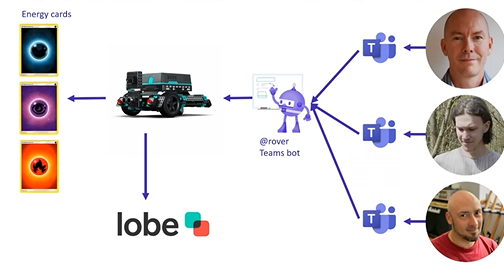
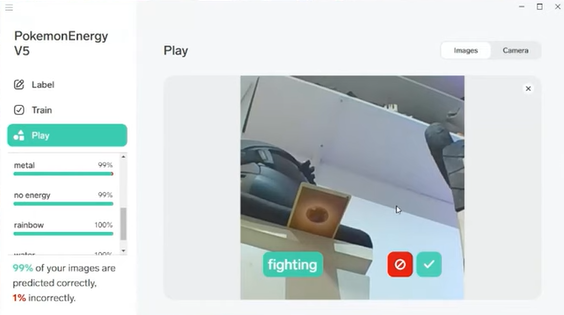
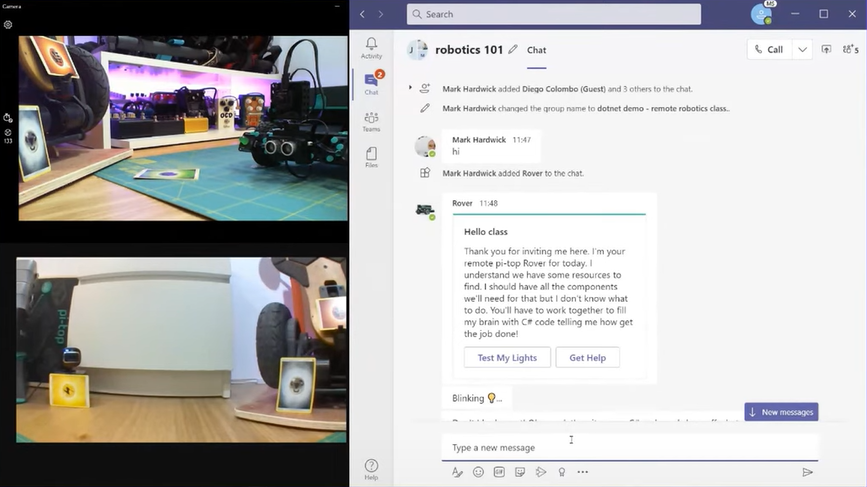
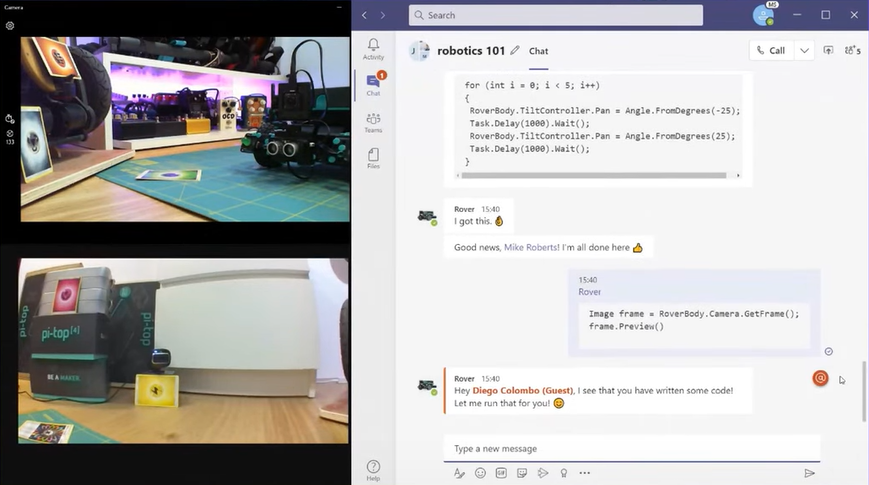
The students will be using Microsoft Teams to showcase the remote computer science class of the future. Students will be using remote learning to program a robot which uses a Machine Learning Model based on http://Lobe.ai to detect and identify Pokémon Energy Card using a robot. All the collaboration will be done over teams and the rover programmed with .NET using Microsoft Teams and .NET interactive using a Microsoft Bot.
As you can see the students simply interact via the Rover Bot within Microsoft teams
This article is contributed. See the original author and article here.
As many of you may know I run the Glasgow Azure User Group, and over the last three years I’ve had the privilege to hear a good number of excellent speakers deliver their sessions at the group’s meetups. Recently Tricia Sinclair, delivered a brill session going into Azure DevOps Boards. Something I use daily, but don’t even scratch the surface of functionality wise. So, Tricia’s session opened a whole new world to me.
This plug in is part of the Azure DevOps Office Integration 2019 feature that allows non-developers to interact with Azure DevOps. Now I don’t believe this tool is only for non-developers, I think it can help everyone that needs to interact with DevOps Boards.
To get to work with this feature you need to have Excel 2010 or later installed, the plug, be a member of the project you want to interact with, have the relevant permissions to modify items in the project you want to interact with and of course be using Azure DevOps. For a full list of prerequisites please do check out the official documentation.
Use Excel to create items in Azure DevOps Boards
Using Azure DevOps Boards to keep track of work items, bugs, whatever it might be is an awesome way to create visibility for you and your team, however, it can be a bit tiresome entering a bunch of those things at a time. And being able to bulk load would be handy and this is what the plugin allows you to do!
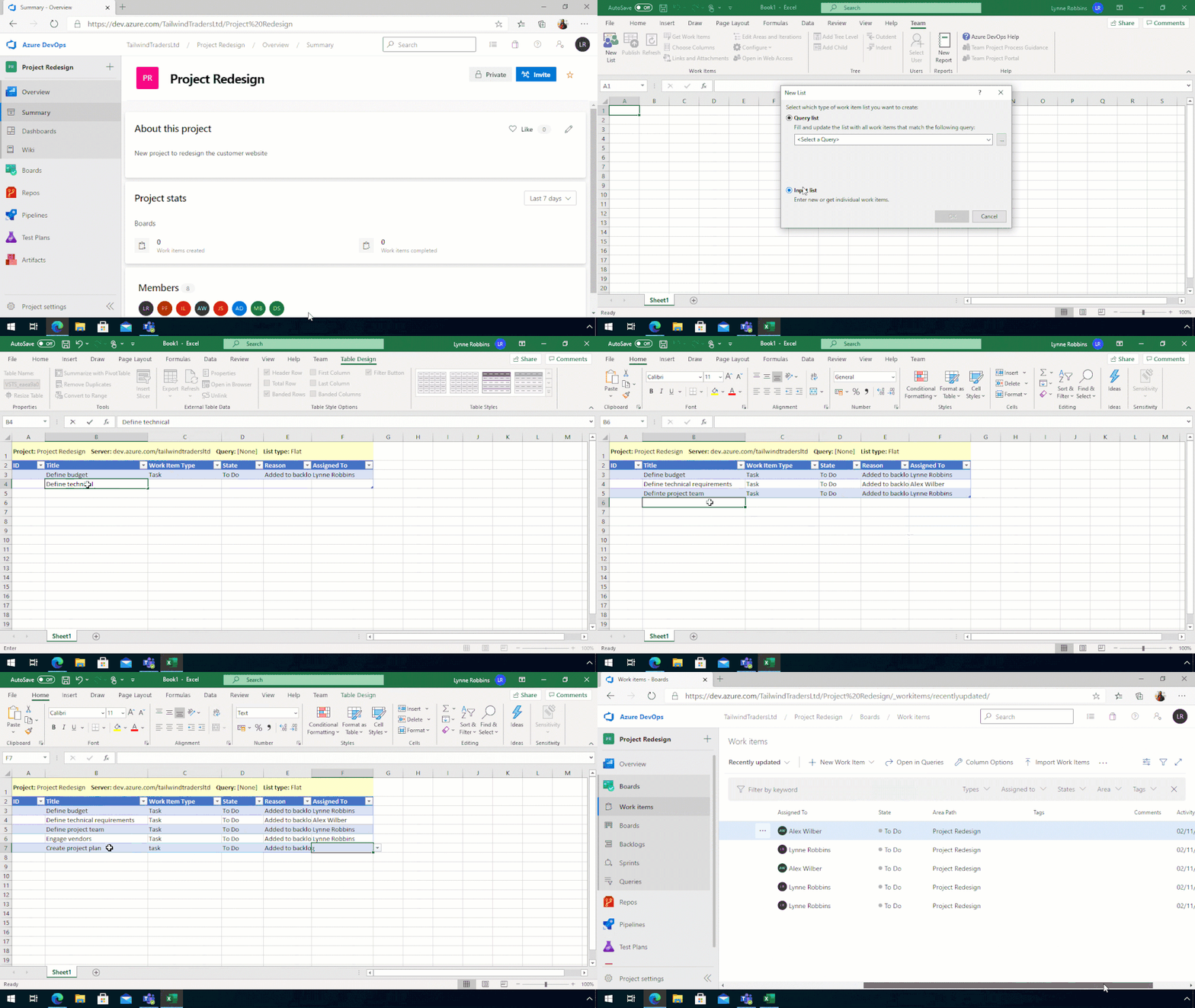
Once you install the plug in when you open Excel, you have a tab called Team, which allows you to connect with Azure DevOps within Excel.
So, if you have a new Azure DevOps Project and want to bulk import a bunch of tasks for the team to work through you can do that by connecting Excel to the Project and starting the list.
Create a new DevOps List from Excel
You can also do this if you have new tasks or bugs or issues, to add to an existing project. And I will be using this feature in the future to track my work, especially when I’ve been neglecting my duties and not adding my tasks to the team board.
Update items from Excel to your Azure DevOps Board
What about updating items, you can do that as well. Which again allows you to create items, update items, add more information to items. All of that is available.
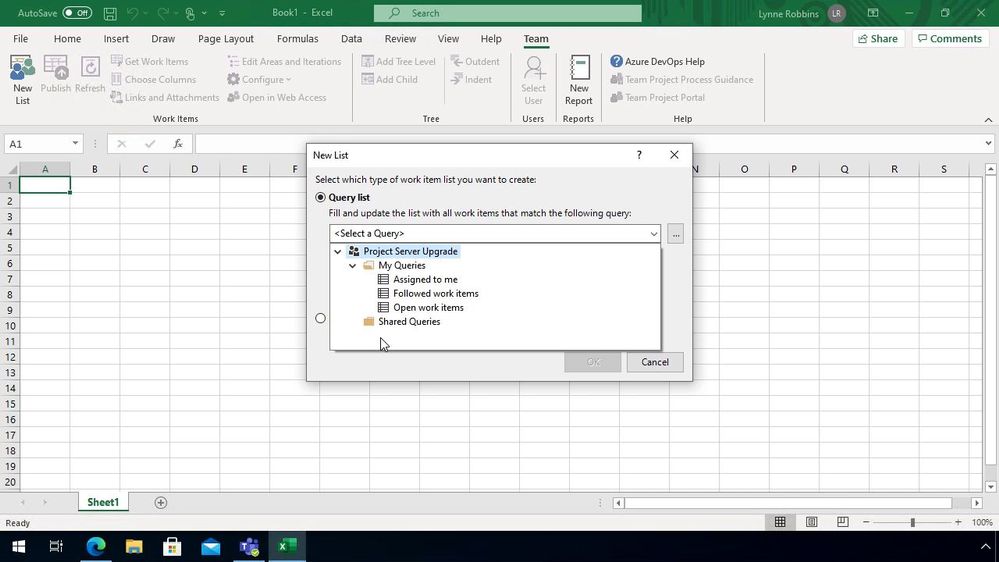
The best way I have found to bulk update tasks on an existing project is to have a query setup that pulls the items I want to update and then use that to help pull the information into Excel.
Opening up the plug in within Excel, this time I tell it I want to pull the information from the query.
Pull information from DevOps into Excel
Once the information is pulled down I can update the items that I need to, either bulk closing items, or reassigning the items to others.
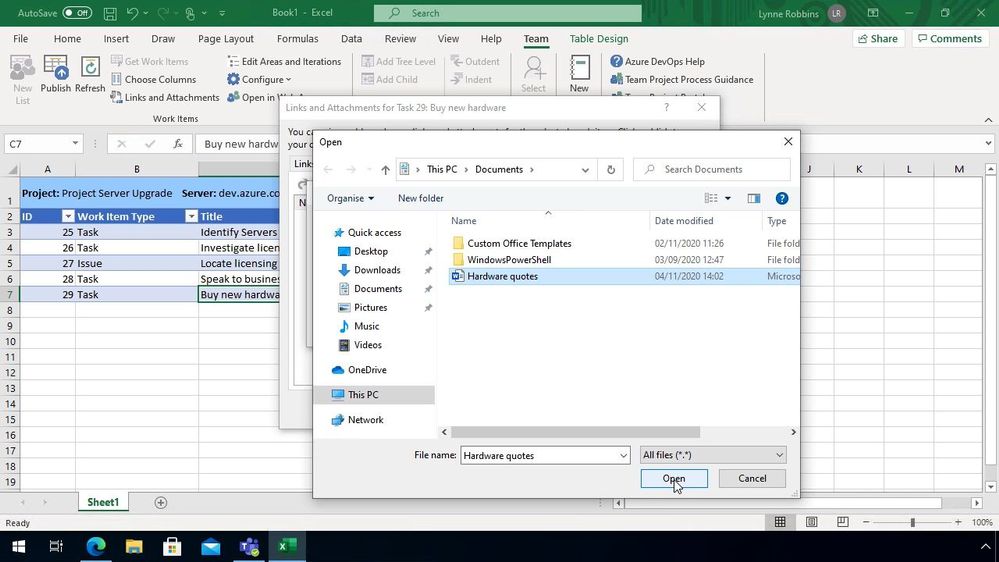
It’s also a great opportunity to link any items together using the “Links and Attachment” button or even uploading any supporting information for that item.
Add files to your DevOps Items
Speed up those admin tasks
As I said at the top of this blog post I don’t think this is something only for non-developers I think this is a great tool for everyone, if you set aside time at the end of your week to go through and update your Azure DevOps Board this can help speed things up. I’d love to hear if you are using this plugin and if it’s helping to speed up the management of your items or not!
This article is contributed. See the original author and article here.
Initial Update: Thursday, 19 November 2020 01:20 UTC
We are aware of issues within Log Analytics and are actively investigating. Some customers may experience issues with missed or delayed Log Search Alerts or experience difficulties accessing data for resources hosted in West US2 and North Europe.
Work Around: None
Next Update: Before 11/20 01:30 UTC
We are working hard to resolve this issue and apologize for any inconvenience. -Saika
This article is contributed. See the original author and article here.
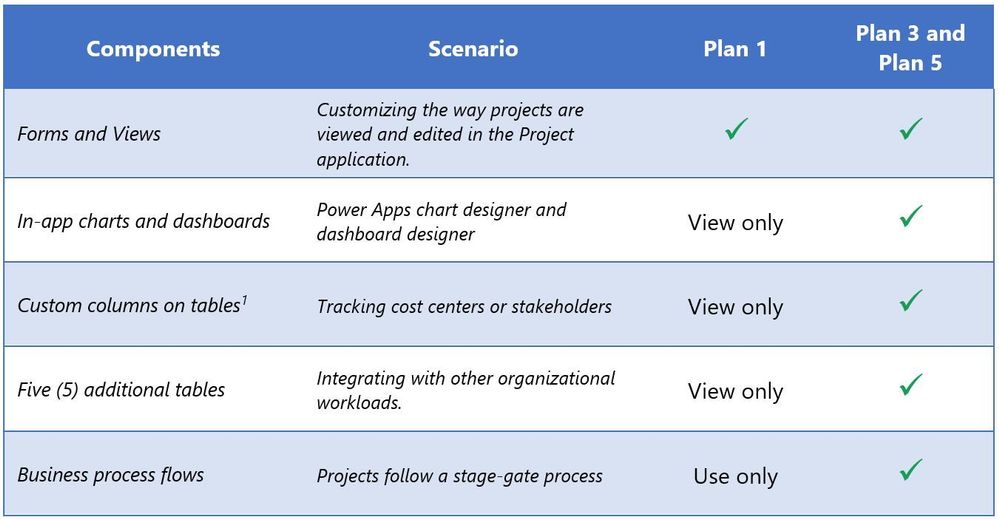
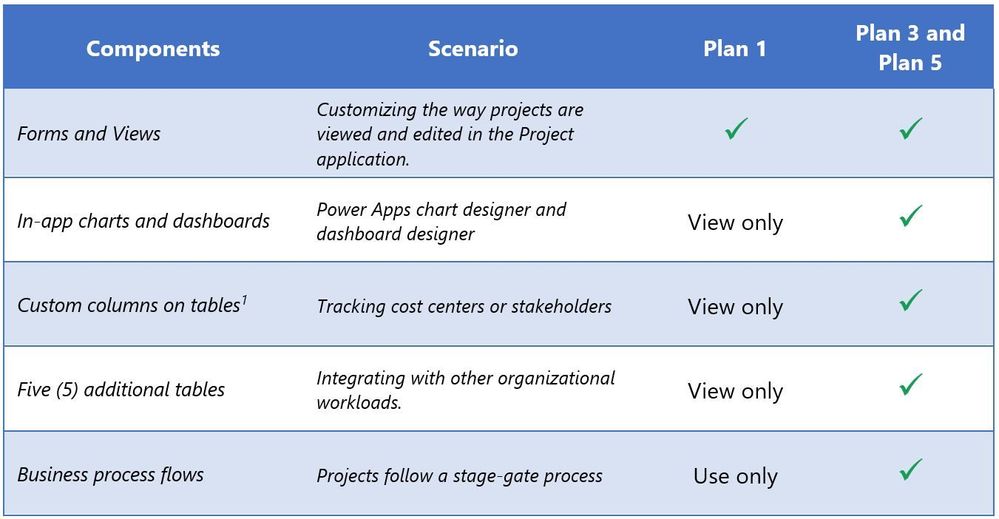
In response to your feedback on UserVoice, we are pleased to announce a change to the Project for the web licensing to allow you to customize and extend the Project app without the need to purchase additional Power Apps licenses. For many scenarios, this change makes it easier for your organization to tailor Project Plan 5, Project Plan 3, and Project Plan 1 to meet unique business needs. The table below outlines what you can do with your subscription. The change to licensing is effective immediately.
The table below only outlines these changes. Please review the Project Service Descriptionfor further details.









Recent Comments