HLS Microsoft Teams Live Events and Stream AMA Webcast

HLS Microsoft Teams Live Events and Stream AMA Webcast

This article is contributed. See the original author and article here.

Microsoft Teams Live Events and Stream AMA Webcast.png By Request! Over the last several months more organizations than ever are leveraging the power of Live Events webcasting to deliver training, executive engagement, and more within their organizations. With this proliferation of the use of both Live and On-Demand rich media content challenges have arisen around network configuration, production best practices, and more.


Join Microsoft’s Samantha Brown and Michael Gannotti for this customer requested Ask Me Anything webcast focusing on YOUR questions around Microsoft Teams Live Events and Microsoft Stream. This event will take place on Wednesday December 2nd. Grab the .ics calendar invite file to add the event to your calendar, share this post with your colleagues, and join us!!


See you Wednesday!!


Thanks for visiting – Michael Gannotti   LinkedIn | Twitter  

Michael GannottiMichael Gannotti

Azure Marketplace new offers – Volume 97

Azure Marketplace new offers – Volume 97

This article is contributed. See the original author and article here.

We continue to expand the Azure Marketplace ecosystem. For this volume, 81 new offers successfully met the onboarding criteria and went live. See details of the new offers below:

Applications

7DaystoDie-GameServeronUbuntu1804LTS.png 7 Days to Die – Game Server on Ubuntu 18.04 LTS: Tidal Media offers this pre-configured image of 7 Days to Die game server on Ubuntu 18.04 LTS. 7 Days to Die is an open-world, voxel-based game that combines first-person shooter, survival horror, tower defense, and role-playing games.
7DaystoDie-GameServeronWindowsServer2016.png 7 Days to Die – Game Server on Windows Server 2016: Tidal Media offers this pre-configured image of 7 Days to Die game server on Windows Server 2016. 7 Days to Die is an open-world, voxel-based game that combines first-person shooter, survival horror, tower defense, and role-playing games.
AgendaWebTotalPack.png AgendaWeb TotalPack: AgendaWeb TotalPack is a cloud-based appointment scheduling solution that enables businesses to manage appointments for their branch locations online. Customers can enter contact information, select a branch, and choose from available dates and times.
AIRBlobExplorerArchiveIndexRetrieve.png AIR Blob Explorer: Archive, Index, Retrieve: AIR Blob Explorer is designed to simplify the management of assets on Azure Blob storage. With a customizable skills pipeline, you can enrich the metadata associated with your assets, surfacing documents, videos, and assets that were previously unsearchable.
AlmentornetB2BOffer.png Almentor.net B2B Offer: Almentor FZCO’s Almentor.net offers an online, video-based learning library in Arabic for professional service development. Different subscription and pricing models are available.
arabotchatbotforEnterprise.png arabot chatbot for Enterprise: arabot is an AI-powered chatbot from arabot Company LTD that supports English and numerous Arabic dialects. Support conversational experiences between always-on chatbots and your customers via web, mobile, messaging, or voice.
Arma3-CombatGameServeronWindowsServer2016.png Arma 3 – Combat Game Server on Windows Server 2016: Tidal Media offers this pre-configured image of Arma 3 game server on Windows Server 2016. Arma 3 is a massive military sandbox game featuring standalone and multiplayer content, 20 vehicles, 40 weapons, and numerous opportunities for content creation.
ArubaClearPassPolicyManagerCPPM.png Aruba ClearPass Policy Manager (CPPM): ClearPass Policy Manager (CPPM) from Aruba Networks provides secure network access control for corporate, guest, bring-your-own-device (BYOD), and IoT devices. Devices on networks can be secured when making wired, wireless, or VPN connections.
AstroneerGameServerforWindowsServer2016.png Astroneer Game Server for Windows Server 2016: Tidal Media offers this pre-configured image of Astroneer game server on Windows Server 2016. Astroneer is set during the 25th century, when players explore outer space, risk their lives in harsh environments, and unearth rare discoveries.
AstuteAgent.png Astute Agent: Astute Agent is a consumer engagement CRM designed for consumer relations and customer care teams. Astute Agent’s features include integrated knowledge management, reputation management, workflow automation, and more.
AutomatedEngineeredSAPLandscapeasService.png Automated Engineered SAP Landscape as Service: Vnomic provides automated, engineered SAP landscape deployments and governance as a service on Microsoft Azure. The end-to-end solution addresses enterprises’ needs with zero touch as they move to SAP HANA and SAP S4HANA.
AvidXchangeAPAutomation.png AvidXchange AP Automation: AvidXchange AP and payment automation solution for Microsoft Dynamics GP helps organizations eliminate inefficient, paper-based processes and easily pay their bills. AvidXchange provides bill-capture services, automated workflows, and bill approval from PC or mobile device.
AzureRemoteAccessManagementARAM.png Azure Remote Access Management (ARAM): NET BRINEL SA’s Azure Remote Access Management (ARAM) is a cloud-based for secure remote management and support of customers through Azure virtual machines.
Beehive-TaskAutomationServeronUbuntu1804.png Beehive – Task Automation Server on Ubuntu 18.04: Tidal Media offers this pre-configured image of Beehive on Ubuntu 18.04. Beehive is an event and agent system that allows you to create agents that perform automated tasks triggered by events and filters. Beehive interfaces with social media platforms, email, RSS, and more.
BindezSocialListening.png Bindez Social Listening: Bindez Insights monitors and analyzes Facebook pages, producing sentiment analytics about your brand directly and in relation to your industry. This service is available in English and Burmese.
CONTROLACCESSWITHRAPIDEMPLOYEESCREENING.png CONTROL ACCESS WITH RAPID EMPLOYEE SCREENING: IT Convergence’s CARES (Control Access With Rapid Employee Screening) is an AI-powered solution that processes images from thermal cameras, scanning visitors and detecting their temperature variations without identifying individuals. CARES ensures safety compliance and supports advanced analytics.
CorLife.png CorLife: CorLife provides screening, goal setting, education, and targeted coaching to help employees adopt healthy habits. CorLife exists to transform employee mental and physical health.
CounterStrike16GameServeronUbuntu1804LTS.png Counter-Strike 1.6 Game Server on Ubuntu 18.04 LTS: Tidal Media offers this pre-configured image of Counter-Strike 1.6 game server on Ubuntu 18.04 LTS. Counter-Strike is a first-person shooter where two teams must fight each other to achieve a set objective.
CrunchYardGlusterCluster.png CrunchYard Gluster Cluster – Scalable Data Storage: CrunchYard’s Gluster provides a high-performance data cluster that is ideal for clients with high I/O throughput needs. Built on Microsoft Azure, Gluster creates large, distributed storage solutions suitable for engineering, financial, big data, and other uses.
DayZ-HardcoreGameServeronWindowsServer2016.png DayZ – Hardcore Game Server on Windows Server 2016: Tidal Media offers this pre-configured image of DayZ game server on Windows Server 2016. DayZ is an open-world survival game with survival mechanics, including hunting, crafting, building, health preservation, and resource management.
Documentmanagementsystem-EnovatioWorkflow.png Document management system – Enovatio Workflow: Enovatio Workflow is an Azure-based document management system designed for companies that strive to optimize business processes and improve workflows, regardless of industry. This product is available in English, German, and Polish.
DontStarveTogether-GameServeronUbuntu.png Don’t Starve Together – Game Server on Ubuntu: Tidal Media offers this pre-configured image of Don’t Starve Together game server on Ubuntu. Don’t Starve Together is a multiplayer wilderness survival game, where you gather resources to craft items and structures that match your survival style.
DroneInchDroneAutomationPlatform.png DroneInch Drone Automation Platform: DroneInch’s automation software enables companies to plan, operate, analyze, and collaborate together on global drone missions. DroneInch integrates with Azure FarmBeats, enabling customers to view data collected from drones inside the FarmBeats IoT platform.
dunnhumbyShop.png dunnhumby Shop: dunnhumby London’s Shop empowers you to make confident, data-led decisions that improve customer experience and grow sales. Shop provides on-demand access to an array of customer insights relevant to both retailers and brand owners.
ECommerceAIbyDelvify.png ECommerce AI by Delvify: Delvify APAC’s ECommerce AI can increase revenues and deliver improved customer experiences using AI-powered visual technology for product recognition, discovery, and personalized recommendations to your customers.
EcoStruxureITAdvisor.png EcoStruxure IT Advisor: EcoStruxure IT Advisor is a datacenter infrastructure planning and modeling solution for large enterprises and colocation datacenters. This cloud-based solution provides datacenter managers with thorough insights into their infrastructure to improve profitability, efficiency, and availability.
EnersightbyAucerna.png Enersight by Aucerna: Aucerna’s Enersight is a cloud-ready, comprehensive, integrated system for late-stage asset development and operational planning. Enersight was built to help asset level planners, engineers and economists make the right decisions with accurate data and defensible field development models.
ExcelintegrationforJiraServerDataCenter.png Excel integration for Jira Server/Data Center: Unlike Jira’s built-in export features, Midori’s Excel for Jira provides native Microsoft Excel exports, spreadsheet reports, and business intelligence for Jira. Improve your internal business processes with seamless Jira data export to Excel.
Flogo-EventProcessingSystemonUbuntu1804.png Flogo – Event Processing System on Ubuntu 18.04: Tidal Media offers this pre-configured image of Flogo on Ubuntu 18.04. Flogo is a resource-efficient, Go-based ecosystem for building event-driven apps that enables developers to build once, consume from anywhere, and process using any of the supported actions.
FMEServerDistributedDeployment.png FME Server (Distributed Deployment, Windows): FME Server is a web-server application that automates data integration workflows by using the power of FME Desktop. FME is a data integration platform with support for spatial data and integration with over 450 systems.
FunQuickView.png Fun Quick View: Fun Quick Watch is an AI-powered app that helps physical retail stores attract new customers with gamification centered on the customer experience. This app is available only in Chinese.
GarrysModGameServeronWindowsServer2016.png Garry’s Mod Game Server on Windows Server 2016: Tidal Media offers this pre-configured image of Garry’s Mod (GMod) server on Windows Server 2016. GMod is a physics sandbox with no predefined goals. You spawn objects and weld them together to create your own contraptions.
gcc-office-addin.png gcc-office-addin: Garden City Consultants’ gcc-office-addin SaaS provides the centralized and integrated services to enable GCC Office Add-ins for the online versions of Microsoft Excel and Microsoft Word. GCC Office Add-ins add data visualization options in Excel and productivity tools in Word.
GhostNodes.png Ghost Nodes – Smart Integration of Everything: Gateway Host (GHOST) Nodes is a hybrid and distributed platform with centralized device management and edge intelligence. GHOST Nodes embeds advanced analytics services at endpoints, allowing you to deliver distributed digital services.
Huginn-Workflow-AutomationServeronUbuntu.png Huginn – Workflow-Automation Server on Ubuntu: Tidal Media offers this pre-configured image of Huginn on Ubuntu. Huginn is a system for building agents that perform automated tasks for you online, such as reading web pages, watching for events, and taking actions on your behalf.
IITCVlearn.png IITC VLearn: IITC VLearn is a customizable, web-based learning management system (LMS) based on the Moodle open-source platform. This Azure-based system integrates with Microsoft Teams and provides a highly functional, secure, flexible, and interoperable digital learning solution.
Intel®EdgeSoftwareHub.png Intel Edge Software Hub: The Intel Edge Software Hub is a one-stop resource that allows developers to find software and tools that make it easier to develop, test, deploy, and maintain solutions at the edge. The solution provides tools and deployment-ready software packages that are pre-tested and pre-validated.
IntelligencePlatform-IntegraComex.png Intelligence Platform – Integra Comex: Integra Comex provides information on how to operate in foreign trade, whether in the form of exports, imports, or cargo management. This solution consolidates data and speeds databases updates. This app is available only in Portuguese.
Ipro.png Ipro: Ipro Enterprise is an e-discovery platform designed for large, complex, and early data assessments. IPro Enterprise lets your team quickly connect and assess live data without moving it, report, and stream relevant documents directly into review.
JedoxforDynamics365FinanceandOperations.png Jedox for Dynamics 365 Finance & Operations: Jedox enables collaborative planning, budgeting, and forecasting in Microsoft Dynamics 365 by unifying core CRM and ERP processes. Jedox integrates FP&A processes, automates planning, creates continuous augmented forecasts, and more.
KatanaXR.png Katana XR: Katana XR is a cloud-based mixed reality solution for the industrial sector. Katana XR gives project teams the ability to quickly and easily create mixed reality workflows and guides without requiring knowledge of coding.
LeadValidationandScoringforUSandCanada.png Lead Validation and Scoring for US and Canada: DOTS Lead Validation from Services Objects Inc. is a real-time API service that corrects and appends contact records and provides an actionable lead quality score. The service integrates with Microsoft Dynamics and Microsoft Azure.
Left4Dead2-GameServeronWindowsServer2016.png Left 4 Dead 2 – Game Server on Windows Server 2016: Tidal Media offers this pre-configured image of Left 4 Dead 2 game server on Windows Server 2016. Left 4 Dead 2 is a first-person survival horror game in which four survivors fight their way through levels filled with infected creatures.
MamoruBiz.png Mamoru Biz: Mamoru Biz is a business concierge tool that reduces anonymous tasks related to people, goods, and money, such as searching for people at free addresses, cash management in offices, and asset management. This app is available only in Japanese.
MinervaThreatPreventionPlatform.png Minerva Threat Prevention Platform: Minerva Labs LTD’s threat-prevention platform provides a zero-touch preemptive endpoint to defend against modern cyberthreats, such as file-less attacks, scripts, ransomware, malicious document macros, and more. Minerva blocks attacks before infection.
MoneythorData-DrivenBanking.png Moneythor Data-Driven Banking: The Moneythor solution provides a set of software APIs enabling banks and fintechs to offer improved functionality and experience to their retail and business customers. Moneythor is powered by real-time data, machine learning, and behavioral science techniques.
NetworkFileSystemServeronWindowsServer2016.png Network File System Server on Windows Server 2016: Tidal Media offers this pre-configured image of Network File System (NFS) service on Windows Server 2016. NFS is a protocol that allows you to share directories and files with Windows and non-Windows clients in a network.
NetworkMonitoring.png Network Monitoring: NeMo is a cloud-based monitoring solution for electricity networks. This Azure-based solution lets you manage conditions and maintenance at distribution grid stations, perform day-to-day forecasting of network quality, and more. This app is available in English and German.
NFSStorageFileServeronWindowsServer2019.png NFS Storage File Server on Windows Server 2019: Tidal Media offers this pre-configured image of Network File System (NFS) service on Windows Server 2019. NFS is a protocol that allows you to share directories and files with Windows and non-Windows clients in a network.
NuWaveTeamsDirectRoutingVoice.png NuWave Teams Direct Routing Voice: iPilot, an automated portal form NuWave Communications Inc., lets you quickly provision always-on calling plans and related carrier services for Microsoft Teams using shared public switched telephone networks (PSTNs).
powercloudAcloudnativebillingandCRMSaaS.png powercloud | A cloud native billing and CRM SaaS: powercloud GmbH offers a cloud-native, open-source SaaS solution customized for infrastructure and utility companies. powercloud takes care of the meter-to-cash value chain, including billing, regulatory processes, product management, meter data management, debt collection, and accounting.

PraelexisCredit.png Praelexis Credit: Praelexis Credit offers a streamlined and integrated solution for the end-to-end credit modeling process. The toolkit’s flexibility allows state-of-the-art machine learning techniques to be combined with traditional credit modeling techniques.
PrimeForayCSP.png Prime Foray CSP: Prime Foray’s cloud service provider offering on Microsoft Azure Lighthouse is structured specifically for ISVs of all sizes from startups to public companies. Prime Foray will manage your Azure environment securely and safely, providing round-the-clock support.
processscienceProcessMining.png process.science Process Mining: process.science for Power BI is an add-in for Microsoft Power BI that lets you see your company from new perspectives. This app from process.science GmbH & Co. KG provides an overview of your processes by analyzing your organization’s process events compared with your targets.
QuayChain.png QuayChain: QuayChain is a digital marketplace for the marine fuel industry. The platform provides buyers, suppliers, and traders an easy, intuitive application for procuring and paying for marine fuel in a global market.
Rendezvousdeskbookingandhotelingsoftware.png Rendezvous desk booking and hoteling software: Rendezvous Workspace Desk Booking from NFS Technology Group makes desk booking an easy and safe process. The mobile app floorplan module makes it easy to select and book desks. This software integrates with Microsoft Outlook and a range of wayfinding and desk panel solutions.
RendezvousMeetingRoomBookingSoftware.png Rendezvous Meeting Room Booking Software: Rendezvous Workspace Meeting Booking from NFS Technology Group improves management of meeting room bookings. The software integrates with Microsoft Outlook, Office 365, and Microsoft Exchange and includes mobile and web-based apps.
SchoolAffairsResearchAnalysisSolutionIRSolution.png School Affairs Research Analysis Solution (IR Solution): Use these dashboards for Microsoft Power BI to get valuable insights into schools based on data from multiple public sources, including the Ministry of Education’s open data. The dashboard analyzes school enrollment, retirements, and available funds. This app is available in Chinese.
SCONEplatformforAzureconfidentialcomputing.png SCONE platform for Azure confidential computing: SCONE is a solution platform that supports confidential, cloud-native applications and multi-party confidential computing. Built on Microsoft Azure, SCONE protects your applications including code and data during transmission, at rest, and during computation.
SkypetoTeamsbyCyclotron.png SkypetoTeams by Cyclotron: SkypetoTeams.io by Cyclotron Inc. provides a full toolkit to migrate your enterprise from Skype for Business to Microsoft Teams. Features include templatized inputs, support for MFA and non-MFA authentication, and more.
SPA.png SPA: SPA is a document data utilization solution that enables document data conversion and document management automation by using AI-powered OCR. This app is available only in Japanese.
SquidProxyServerwithWebminGUIonUbuntu1804.png Squid Proxy Server with Webmin GUI on Ubuntu 18.04: Tidal Media offers this pre-configured image with Squid proxy server with Webmin GUI on Ubuntu 18.04. Squid speeds up services by caching requests for web, DNS, and other computer traffic for a group of people on a shared network.
SwimContinuumSaaS.png Swim Continuum SaaS: Swim Continuum is an enterprise-grade platform for building and running continuous intelligence applications at scale. Providing performance and agility under high loads, Swim Continuum efficiently operationalizes high-frequency data analytics on massive amounts of streaming and batch data.
SySearchAIBasedSearchforHealthcare.png SySearch AI Based Search for Healthcare: SySearch is a fully managed cloud search service with built-in AI capabilities that enrich health information to easily identify and explore healthcare data at scale. With SySearch, you can spend more time innovating and less time designing, maintaining, and querying a complex search solution.
TeamFortress2GameServeronUbuntu1804LTS.png Team Fortress 2 Game Server on Ubuntu 18.04 LTS: Tidal Media offers this pre-configured image with Team Fortress 2 game server on Ubuntu 18.04. Team Fortress 2 is a multiplayer, first-person shooter video game with support for up to 32 players.
TeamFortress2GameServeronWindowsServer2016.png Team Fortress 2 Game Server on Windows Server 2016: Tidal Media offers this pre-configured image with Team Fortress 2 game server on Windows Server 2016. Team Fortress 2 is a multiplayer, first-person shooter video game with support for up to 32 players.
TenjinforEnterprise.png Tenjin for Enterprise: Tenjin for Enterprise enables virtual assistant creation in a few clicks and deploys the assistant in minutes. Using AI-driven conversational interactions, Tenjin streamlines access to common business services like knowledge, resetting passwords, and escalating support requests.
Terraria-AdventureSandboxGameServeronUbuntu.png Terraria – Adventure Sandbox Game Server on Ubuntu: Tidal Media offers this pre-configured image with Terraria game server on Ubuntu. Terraria is a sandbox game featuring action and adventure driven by the players choices and creativity. The server can be used for standalone or multiplayer gameplay.
TIG.png TIG: TIG is a next-generation video technology developed by Paronimu Co. Ltd. that allows you to obtain information about an object in a video simply by tapping the object on your smartphone screen. This app is available only in Japanese.
Unturned-AdventureSandboxGameServeronUbuntu.png Unturned – Adventure Sandbox Game Server on Ubuntu: Tidal Media offers this pre-configured image with Unturned game server on Ubuntu. Unturned is a multiplayer sandbox game in the apocalypse survival genre, in which players must work with friends and forge alliances to survive zombies.
WootricCXNPSCSATandCESsurveys.png Wootric CX | NPS, CSAT and CES surveys: Wootric Customer Experience Management platform helps cloud-based companies increase retention, prioritize product improvements, and engage brand advocates. Wootric analytics and reporting use machine learning to deliver insights from high volumes of feedback.

Consulting services

AIdiscoveryworkshop4h.png AI discovery workshop (4h): If you are curious what type of benefits AI and advanced analytics can bring to your organization, join Unit8 SA for this exploration of AI in consideration of your industry. Unit8 will introduce you to AI services available on Microsoft Azure and help launch your AI journey.
AppModernisation-2weekImplementation.png App Modernization – 2 week Implementation: Arinco has developed an application modernization accelerator service targeted at organizations that are focused on modernizing their application infrastructure and their developer experience on Azure App Services and Azure DevOps.
AppsModernisationPlan1WKAssessment.png Apps Modernization Plan: 1WK Assessment: Modernize your apps and realize the benefits of Microsoft Azure with this offering from vNEXT PTY LTD. The vNEXT App Modernization Plan will help you innovate faster, improve reliability, and keep pace with the agility of today’s modern applications.
CitrixonAzureWVD1WeekProofofConcept.png Citrix on Azure WVD: 1 Week Proof of Concept: Sayers experts will guide you through a proof of concept built to satisfy your business requirements and demonstrate the benefits of combining Citrix Virtual Apps and Desktops with Windows Virtual Desktop on Microsoft Azure.
ComputerVisiononAzure2-mthsProofofConcept.png Computer Vision on Azure: 2-mths Proof of Concept: SEMANTIVE sp. z o. o. will validate your computer vision use case by building a working prototype deployed to Azure Machine Learning and will provide you with recommendations and a roadmap for next steps.
4-HrConsultFreeWorkshoponAzureDataPlatform.png Half-day free workshop on Azure Synapse Analytics: In this free workshop, Softcrylic LLC will help you understand how Azure Synapse Analytics can accelerate the responsiveness of your business by providing a secure, scalable environment for your data to support big data, analytics, business intelligence, and data science. ​
HorizonCloudonAzure3-weekImplementation.png Horizon Cloud on Azure: 3-week Implementation: World Wide Technology (WWT) offers quick-start engagements for customers who want to provide desktops as a service (DaaS) by deploying VMWare Horizon Cloud on Microsoft Azure. WWT experts can demonstrate pre-built integration labs to speed customer evaluation.
ISVAppMigration-10daysimplementation.png ISV App Migration – 10 days implementation: Sela Group will assess your on-premises and cloud environments for deployment of your application to the Microsoft Azure Marketplace. Sela will analyze your current situation, provide insights during migration, and support your team during implementation.
Offer-QBotImplementation.png Offer – QBot Implementation: QBot is an AI-powered program that answers student queries through a conversational chatbot. Integrated with Microsoft Teams, QBot provides a personalized learning experience and collaboration among students and teachers.
PortivaCybersecurityMaturityAssessment.png Portiva Cybersecurity Maturity Assessment: Portiva will provide insight into how you can improve the cloud security of your organization. This assessment will identity cybersecurity risks based on your organization and industrial sector, then classify the risks based on impact and likelihood. This offer is available only in Dutch.


Teams Templates – Upcoming CollabCast with Sam & Pete

Teams Templates – Upcoming CollabCast with Sam & Pete

This article is contributed. See the original author and article here.

samnpete.PNG

Are you responsible for planning, deploying or managing multiple teams across your organization? Have you ever wished that you could pre-build a team based on the business or project need? Come check out Teams Templates with us!

On Wednesday, December 9th, at 12 Noon EST, Pete and Sam are hosting a webcast to walk you through Teams Templates. We will show you what can be defined in templates, how to create a team from a template, and a few examples of base template types. Join us and bring your questions!

Webcast Details:

  • Click here to join on December 9th at 12 noon eastern time.

OR

  • Click here to download the .ics file for the calendar invite.

Presenters and Producers:

IMG_8280 (2).jpg

Sam Brown, Microsoft Teams Technical Specialist

pete.jpg

Pete Anello, Senior Microsoft Teams Technical Specialist

See you then!

Sysmon 12.03, SDelete v2.04, WinObj v2.23 and ARM64 releases

This article is contributed. See the original author and article here.


Sysmon v12.03


This version of Sysmon fixes reporting and a possible crash condition for PipeEvent and RegistryEvent rules.


SDelete v2.04


This update to SDelete, a command line utility for secure file deletion, provides a new switch, -f, to to avoid file/directory versus drive ambiguity.


WinObj v2.23


This update to WinObj, a utility to explore the Windows NT Object Manager’s namespace, brings bug fixes and is now available for x64 and ARM64.


ARM64 ports


New ARM64 releases for ADRestore v1.2, LogonSessions v1.41 and WinObj v2.23. Download all ARM64 tools in a single download with the Sysinternals Suite for ARM64.

Microsoft 365 & SharePoint PnP Weekly – Episode 106

Microsoft 365 & SharePoint PnP Weekly – Episode 106

This article is contributed. See the original author and article here.

pnp-weekly-episode-107-promo.png


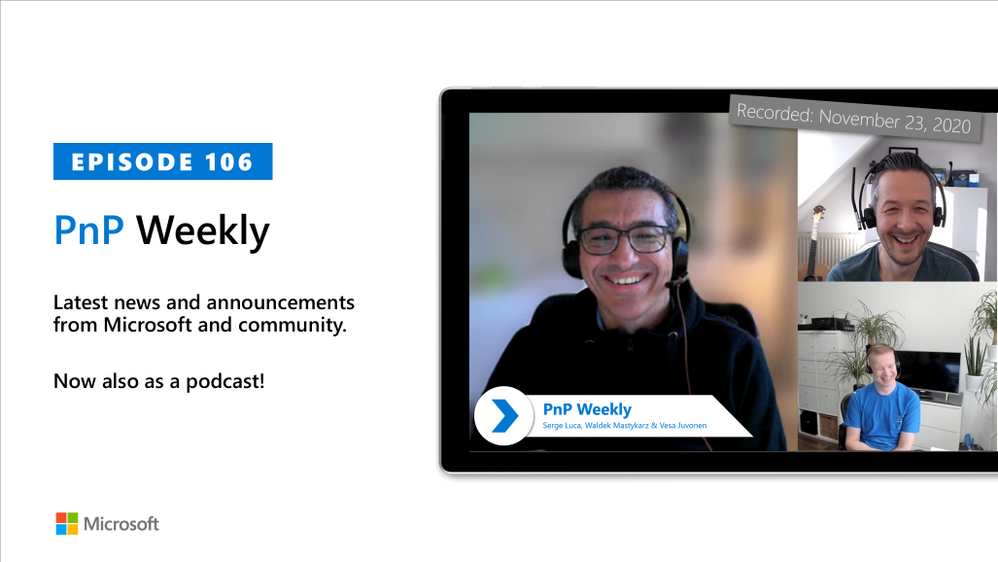
In this installment of the weekly discussion revolving around the latest news and topics on Microsoft 365, hosts – Vesa Juvonen (Microsoft) | @vesajuvonen, Waldek Mastykarz (Microsoft) | @waldekm, are joined by Business Apps MVP Serge Luca (a.k.a., Dr. Flow) (Power Platform Associates) | @sergeluca. 


Discussed in this session – Serge’s interest in Power Platform, growth in the number of available connectors – application integration, and data storage options.  As well, the need for more developer focused patterns and practices was called out.


Regarding data storage, the group more-or-less defined a decision tree.   There is product – CDS (free or paid), SQL/Azure, SharePoint, or Hybrid and there are other considerations – licensing, app types, security/permission requirements, data storage costs, and database management.   Finally, Serge gives viewers a quick tour of the workflow companion tool he has been developing called BPM.


This episode was recorded on Monday, November 23, 2020.


Did we miss your article? Please use #PnPWeekly hashtag in the Twitter for letting us know the content which you have created. 


As always, if you need help on an issue, want to share a discovery, or just want to say: “Job well done”, please reach out to Vesa, to Waldek or to your PnP Community.


Sharing is caring!

Azure Stack Hub Partner Solutions Series – BORDONARO IT

This article is contributed. See the original author and article here.

This week, Tiberiu Radu (Azure Stack Hub PM) and I, had the chance to speak with Microsoft MVP Dino Bordonaro from Azure Stack Hub Partner BORDONARO IT. BORDONARO IT is an Azure Stack Hub partner and Preferred SI that focuses on managed services. They are lead by Dino Bordonaro, who is an Azure Stack Hub MVP, and together with his team, they are delivering value to their customers by creating hybrid solutions on Azure and Azure Stack. BORDONARO IT runs the Center of Excellence where they offer Validation as a Service and PoC environments that partners and customers can use.


We created this new Azure Stack Hub Partner solution video series to show how our customers and partners use Azure Stack Hub in their Hybrid Cloud environment.  In this series, as we will meet customers that are deploying Azure Stack Hub for their own internal departments, partners that run managed services on behalf of their customers, and a wide range of in-between as we look at how our various partners are using Azure Stack Hub to bring the power of the cloud on-premises.


Links mentioned through the video:


I hope this video was helpful and you enjoyed watching it. If you have any questions, feel free to leave a comment below. If you want to learn more about the Microsoft Azure Stack portfolio, check out my blog post.

Demystifying Ransomware Attack against Microsoft Defender Solution

Demystifying Ransomware Attack against Microsoft Defender Solution

This article is contributed. See the original author and article here.

RS2.gif

Hi IT Pros,

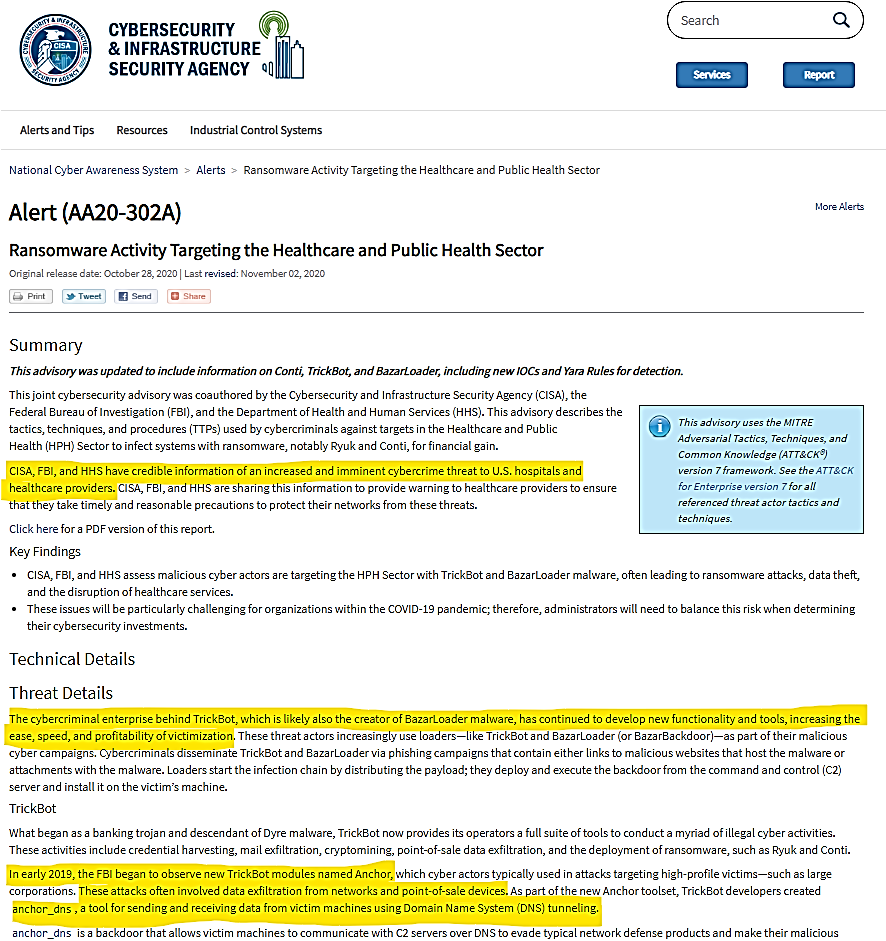
As you knew it, Ransomware is in aggravated assault mode at this time of year 2020, the joint cybersecurity advisory comes from the Cybersecurity Infrastructure and Security Agency (CISA), the Federal Bureau of Investigation (FBI), and the Department of Health and Human Services (HHS) have just given a serious warning about Ransomware Threat as shown in the following announcement:

TanTran_1-1606259880764.png

Debut in August of 2018, the Ransomware Ryuk gained shocking attention in 2019, Ryuk gangs demanded multi-million-dollar ransoms from victims, among them are companies, hospitals, and local governments. The actors be able to pocket over $61 million just in the US alone, according to FBI’s report.

Check Point, a security software vendor also noted that the gang was attacking on an average of 20 companies every week in the third quarter of 2020.

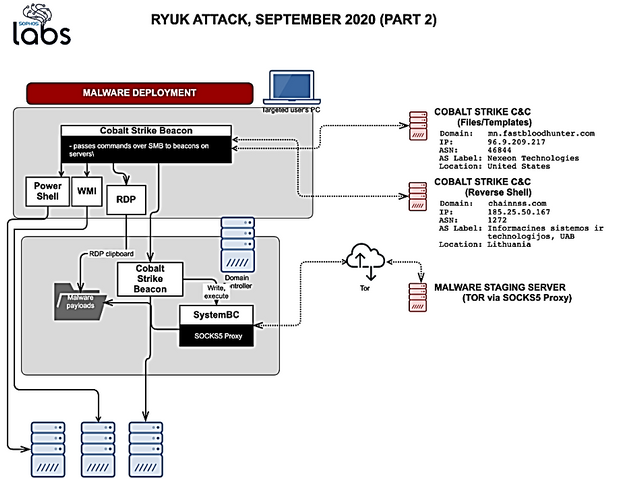
Sean Gallagher from Sophos Lab, gave us the story about a typical Ryuk and Conti Ransomeware attack.

  • The attack began on the afternoon of Tuesday. September 22,2020 when multiple employees of the targeted company had received highly targeted phishing emails.
  • The email was tagged with external sender warnings by the company’s mail software. The link, served up through the mail delivery service Sendgrid, redirected to a malicious document hosted on docs.google.com.

Multiple instances of the malicious attachment were detected and blocked. But there was one employee who clicked on the link in the email that afternoon, allowing the document to execute print_document.exe—a malicious executable identified as Buer Loader.

  • The Buer Loader malware dropped qoipozincyusury.exe, a Cobalt Strike “beacon,” along with other malware files.
  • Cobalt Strike’s beacon makes a covert connection to the command and control of hackers.

By Wednesday morning the actors had obtained administrative credentials and had connected to a domain controller, where they performed a data dump of Active Directory details.

Data dump to an Admin User directory was most likely accomplished using SharpHound, a Microsoft C#-based data “injestor” tool for BloodHound (an open-source Active Directory analysis tool used to identify attack paths in AD environments).

  • Ransomware attack is now ready to remotely deploy to other servers using WMI, Powershell and Remote Desktop RDP
  • Next, the SystemBC malicious proxy was deployed on the domain controller. SystemBC is a SOCKS5 proxy used to conceal malware traffic that shares code and forensic markers with other malware from the Trickbot family.
  • The malware installed itself (as itvs.exe), and created a scheduled job for the malware, using the old Windows task scheduler format in a file named itvs.job—in order to maintain persistence.

TanTran_2-1606259880776.png

  • The organizational backup server was among the first targeted. The attackers used the icacls command to modify access control, giving them full control of all the system folders on the server. GMER is frequently used by ransomware actors to find and shut down hidden processes, and to shut down antivirus software protecting the server.

Ryuk ransomware was redeployed and re-launched three more times in short order after each failed attempt, no files were encrypted.

TanTran_3-1606259880784.png

Lesson Learn

  •  The actor could repeat the attack multiple times with different variants of Ryuk, the attack period could be prolonged for days or weeks with multiple backdoors been used.
  • Response time is critical to prevent damage from further steps down the path of attacking sequence, from reconnaissance, credential compromise to later movement, domain dominance and exfiltration, data encryption, data deletion.
  • Team effort should be fully utilized during the attacking period.
  • If more resources are needed, Security Team could consult with online security support experts ASAP to form an united front against hackers .
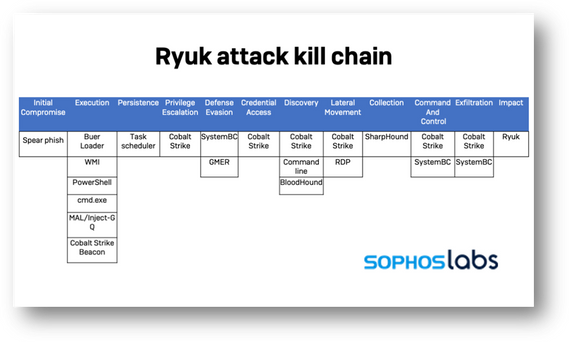
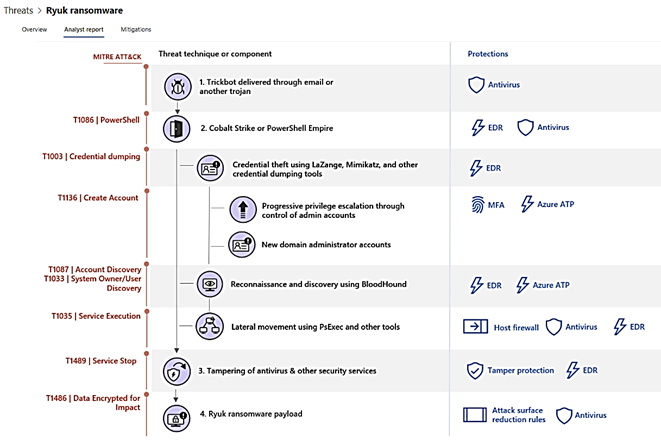
  • We need to stop the attack at the Cobalt Strike Beacon level (step 2 in the above Chart) when compromised system starts connecting to outside command and control center of actor.
  • The attack also shows that Remote Desktop Protocol can be dangerous even when it is inside the firewall.
  • Proactive prevention with ASR rules for Office documents’ macros could be an important factor to avoid the ransomware attack right at step 0, by giving no attack opportunity . We should consider it as the best option. (see MD for Endpoint Mitigation Plan)

How good is Microsoft Defender for Endpoint and Identity against ransomware attack? 

You may be worried and wonder how good the MD for Endpoint and MD for Identity could protect your systems from ransomware.

Well, let us bring MD to the test. The most trusted industry test could be AV-Test from the Independent IT-Security Institute, who has been known as the owner of the largest malware database in the world.

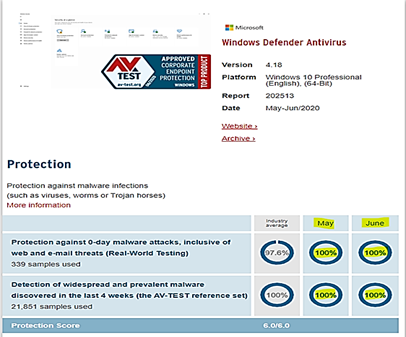
  • For Windows Systems Antivirus Products.  AV-Test conduct monthly tests against widespread and prevalent malware discovered in the last 4 weeks, for example, the test-set of August 2020 included 21,851 (virus) samples. AV-TEST creates identical and reproducible conditions for all the antivirus products from all big AV vendors who join the test program.
  • MD for Endpoint continue getting AV-TEST top score monthly as shown in the following image, it scores 100% compared to the Industry at 97.6% protection level:

rs1.png

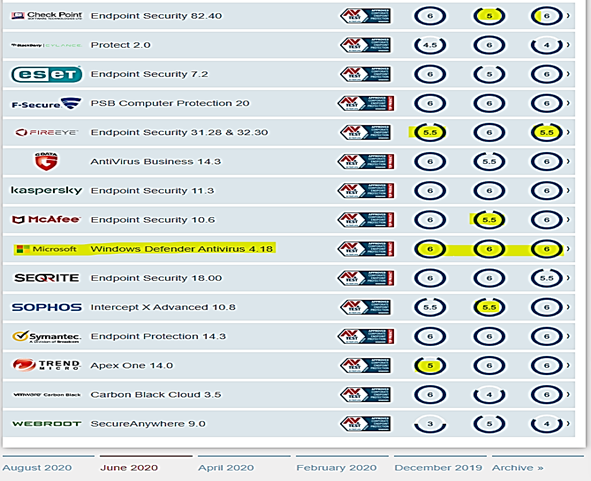
The test result table for all products based on protection, performance, usability scores is shown here, value of 6 is the highest score:

rs2.png

https://www.av-test.org/en/antivirus/business-windows-client/windows-10/june-2020/

Now, let us conduct our own test using the MD for Endpoint – Evaluation Lab feature:

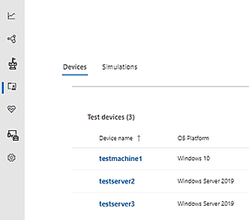
  • we will create at least 3 test devices run windows 10 and windows server 2019 as shown here:

Rs04.png

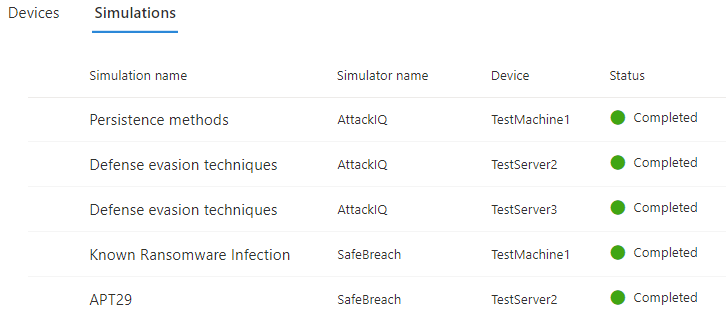
  • We run the ” known ransomware infection” simulation by Safe breach for testmachine1
  • You may also want to run different attack simulations provided by Safebreach and AttackIQ for different devices

Rs05.png

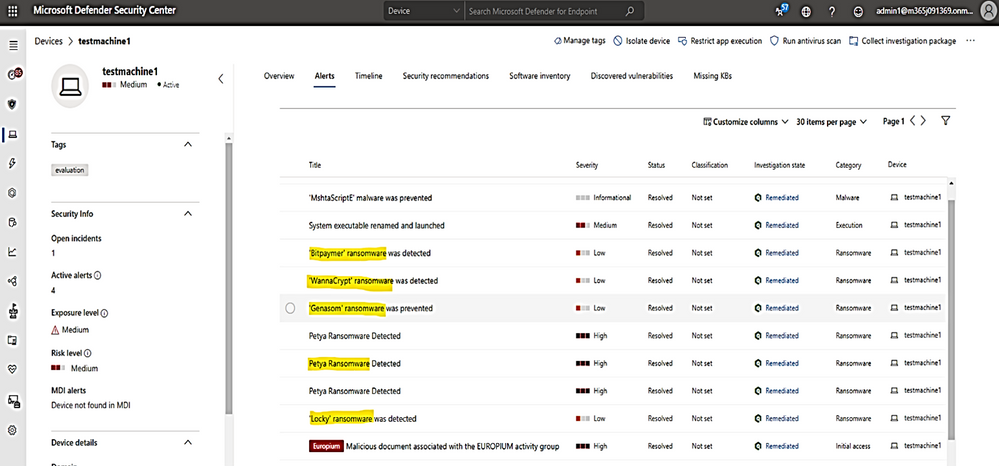
with ” known ransomware infection” attack simulation , the following ransomware names are detected and alerted on test machine1:

Rs3.png

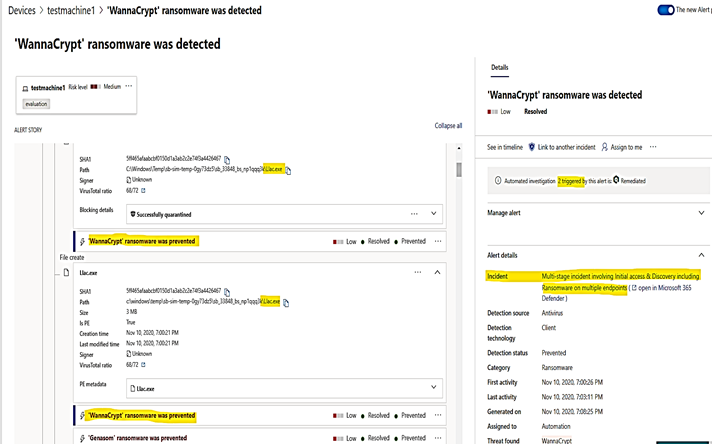
Click on WannaCrypt ransomware to show the details about malicious file named Llac.exe and how long it stayed before being quarantined (3 minutes and 15 seconds):

Rs4.png

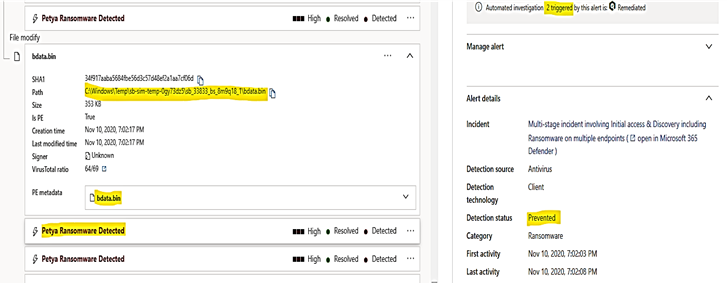
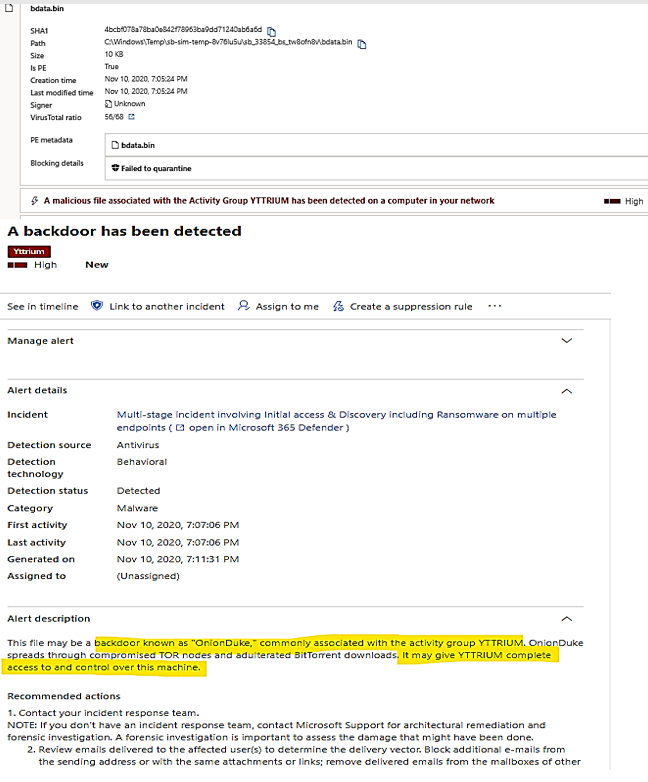
Click on Petya ransomware to show detail of malicious file named bdata.bin, it was existed within only 5 seconds and been quarantined:

Rs5.png

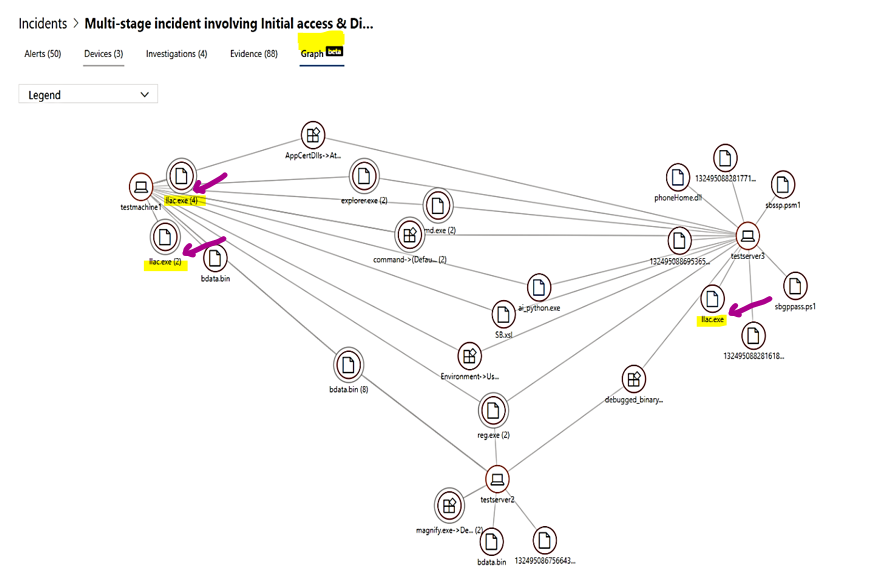
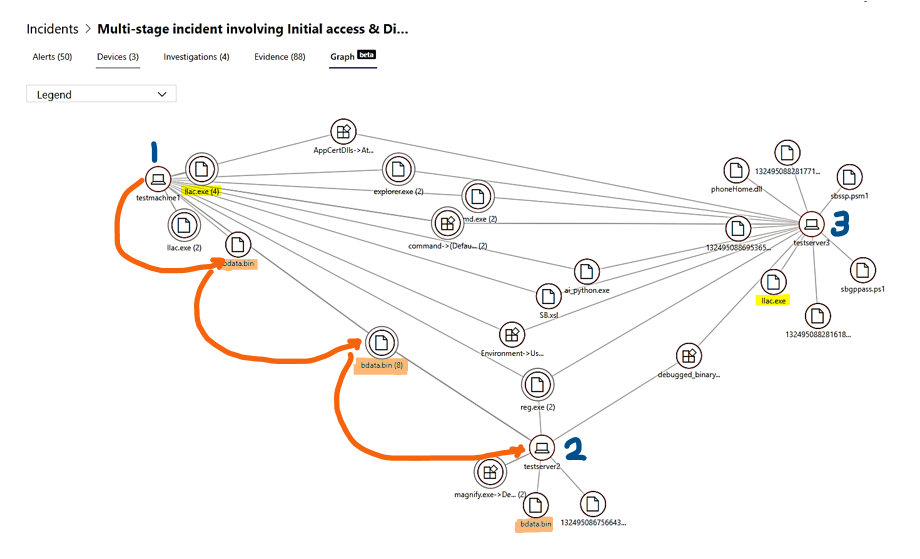
The ransomware attack overview and its entities are shown in the incident named “Multi-stage incident involving Initial access & Discovery including Ransomware on multiple Endpoints” tree graph,

  • The Wanacry Ransomware file, llac.exe was blocked at source on testmachine1 with a total of 6 failed attempts.
  • The Wanacry Ransomware file, llac.exe was blocked at source on testserver3.

Picture6.png

  • The Petya ransomware file, bdata.bin had been laterally spread out to testserver2 before it was stopped.

Rs7.png


Ransomware Action


MD for Endpoint and MD for Identity Alert
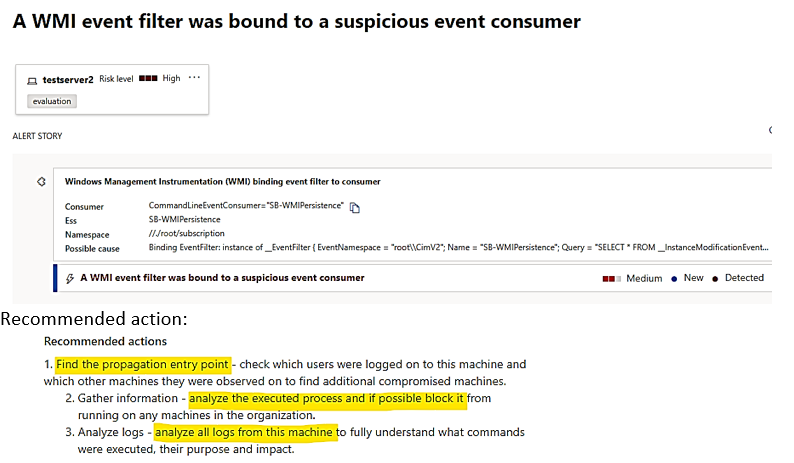
Malicious services were created on remote servers using the same admin credentials, using WMI Event to drop command payload. MD for Endpoint Alert: WMI suspicious Event

Rs8.png

PowerShell is used to download more malicious payloads.


MD for Endpoint Alert
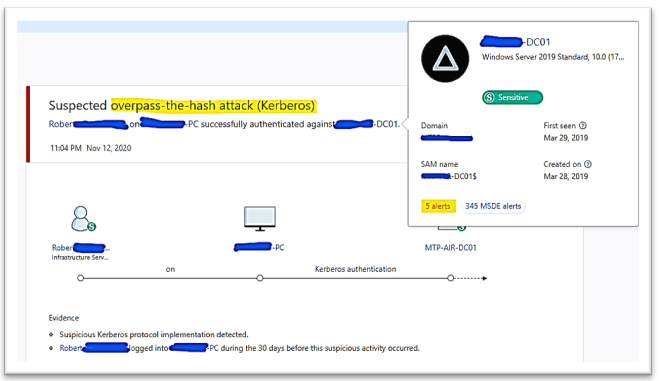
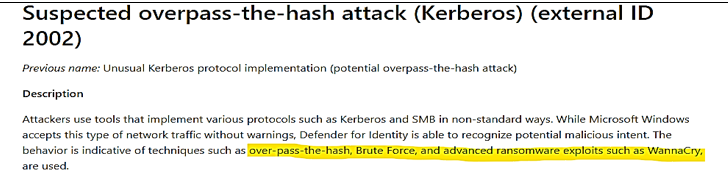
Credential theft activity MD for Identity Alert about overpass the hash attack:

Rs10.png

Rs11.png

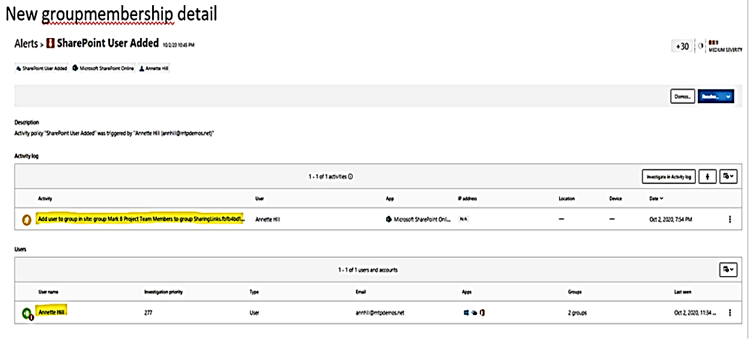
Impersonate action on privilege account and privilege group membership by PowerShell script. Alert by MD for Identity and displayed in Cloud App Security Portal:

Rs12.png

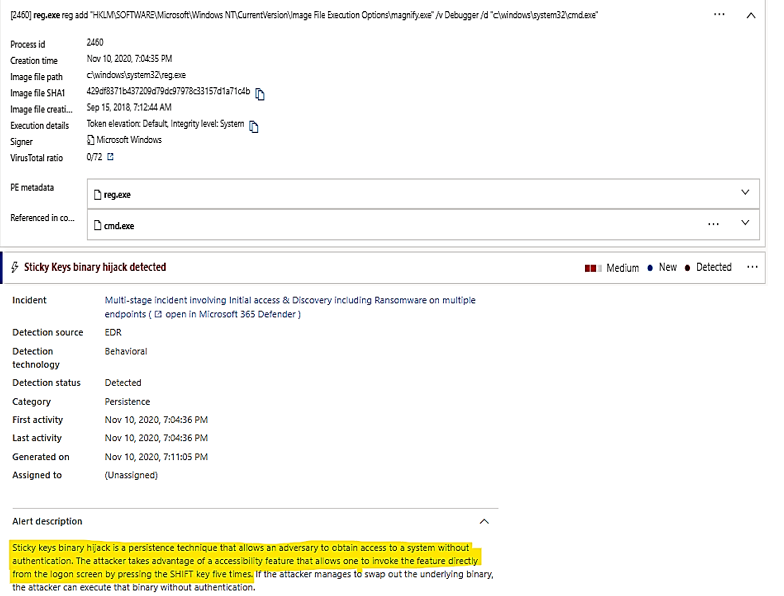
Keyboard hijack activity Alert by Defender for Endpoint:

Rs13.png

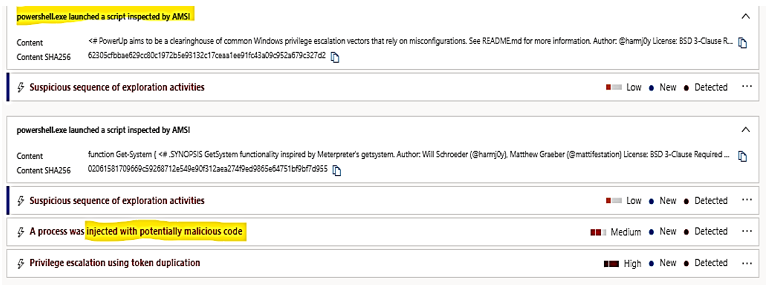
Fileless attacks with memory payload. These activities could be detected by AMSI, Microsoft’s Anti-Malware Scanning Interface, when it inspects the in-memory process. MD for Endpoint raised the alert, details as follow:

Rs14.png

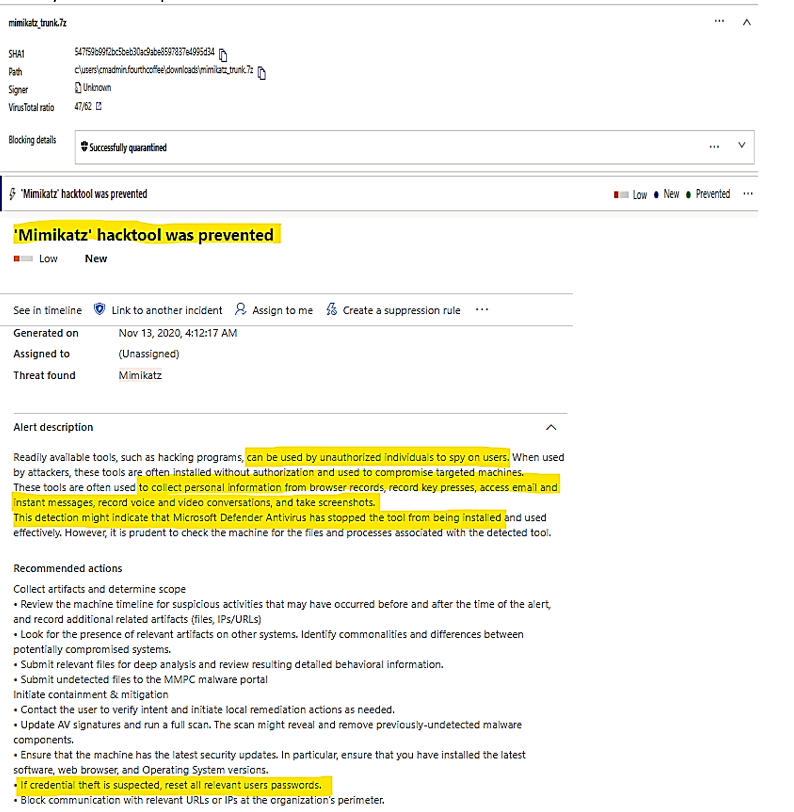
Mimikatz was used as a credential theft tool, It was detected and blocked from installation.

Mimikatz files were quarantined.

Alert by MD for Endpoint

Rs15.png

Backdoor activity detected Alerted by MD for Endpoint:

Rs16.png

Ransomware Payload and encryption activities are prevented beforehand. There is no domain dominant – alert event.

There is no encryption – alert event.


 Ryuk Ransomware Prevention and Protection strategy provided by MD for Endpoint – Threat Analytics.

Microsoft Defender for Endpoint Analytics proposed an analyst report and mitigation (plan) against the Ryuk ransomware. Each of the attack step in Ryuk’s killing chain is mapped to the protection measures which include Antivirus-EDR (MD for Endpoint), Azure ATP (MD for Identity), Multi Factors Authentication MFA, Attack Surface Reduction rules for Office Macro, Windows Host Firewall, and Tamper Protection Security Policy.

The detail of Ryuk attack based on MITRE ATT&CK process is shown in the following image, each Ransomware action step of the attack sequence was mapped to one or multiple counter attack measure:

Rs01.png

Mitigations provided by MD for Endpoint – Threat Analytics

  1. Apply these mitigations to reduce the impact of this threat:
  • Utilize the Microsoft Defender Firewall and your network firewall to prevent RPC and SMB communication among endpoints whenever possible. This limits lateral movement as well as other attack activities.
  • Turn on tamper protection features to prevent attackers from stopping security services.
  • Enforce strong, randomized local administrator passwords. Use tools like LAPS.
  • Monitor for clearing of event logs. Windows generates a security event ID 1102 when this occurs.
  • Ensure internet-facing assets have the latest security updates. Audit these assets regularly for suspicious activity.
  • Determine where highly privileged accounts are logging on and exposing credentials. Monitor and investigate logon events (event ID 4624) for logon type attributes. Highly privileged accounts should not be present on workstations.
  • Turn on cloud-delivered protection and automatic sample submission on Microsoft Defender Antivirus. These capabilities use artificial intelligence and machine learning to quickly identify and stop new and unknown threats.
  • Turn on attack surface reduction rules, including rules that block credential theft, ransomware activity, and suspicious use of PsExec and WMI.
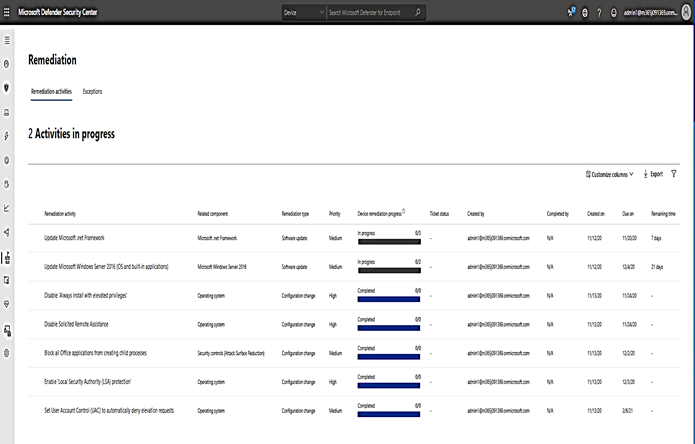
  1. Check the recommendations card for the deployment status of monitored mitigations in “Threat & Vulnerability Management” under “Remediation”.

Rs02.png

If Security Administrators enable EDR and all features of Defender, setup alert notification and completely finish all of the Defender Endpoint and Defender Identity’s remediation plans against each ransomware and malware, then, I guess, our colleagues may have a much better sleep at night, knowing that their systems are safe and well protected from ransomware and other malware threats.

To get to the 100% level of protection your defender strategy should always include Windows 10 Defender Guard (Application Guard, Credential Guard, Exploit Guard with Attack Surface Reduction rules, System Guard, …) together with MD for Endpoint deployed on workstations and servers and MD for Identity applied to all domain controllers.

I hope the info is useful,

Have a valuable time with your Defender!

___________________________________

Reference:

Service Fabric Clusters secured with certificates issued by DigiCert – at risk of undergoing outage

This article is contributed. See the original author and article here.

What is the Certificate Validation Issue? 


DigiCert introduced a new CA which reuses the signing key of an existing and still-valid CA. This means there are 2 different CA certificates in circulation, and either can be included in the chain built for a certificate signed by this shared key. Existing certificates declared in Service Fabric clusters by subject with issuer pinning are at risk of spontaneously failing validation.  


How to identify if your cluster is susceptible to the Certificate Validation Issue? 


This issue affects any SF cluster that uses a Cluster certificate that is a DigiCert-issued X509 certificate(s), declared by common name with issuer pinning with the following configuration: 


  • Certificate’s Authority Key Identifier Extension matches  


  • OId: 2.5.29.35 

  • KeyID=0f80611c823161d52f28e78d4638b42ce1c6d9e2 


  • SHA1 thumbprint 1F:B8:6B:11:68:EC:74:31:54:06:2E:8C:9C:C5:B1:71:A4:B7:CC:B4 


  • valid until 08/Mar/2023 

  • serial # 01:FD:A3:EB:6E:CA:75:C8:88:43:8B:72:4B:CF:BC:91 


  • SHA1 thumbprint 62:6D:44:E7:04:D1:CE:AB:E3:BF:0D:53:39:74:64:AC:80:80:14:2C 


  • valid until 22/Sep/2030 

  • serial #02:74:2e:aa:17:ca:8e:21:c7:17:bb:1f:fc:fd:0c:a0 () 


  • Pinned-issuer list for cluster configuration includes 1fb86b1168ec743154062e8c9cc5b171a4b7ccb4 but does not include 626D44E704D1CEABE3BF0D53397464AC8080142C 


If your cluster is not configured using the above properties, you may disregard the rest of this post.  


Symptoms in impacted environments 


  • One or more cluster nodes appear down/unhealthy. 

  • Cluster is unreachable, whether from the Azure portal or directly (SFX/other clients). 

  • Event logs show errors like: “authorization failure: CertificateNotMatched”. 

  • Pending upgrades are not progressing/appear to be stuck.


Required Action 


  • Follow the Trouble Shooting guide with Mitigation steps: Troubleshooting Guide  

  • Mitigation specified in the TSG must be applied by you.  


If you have any questions or concerns, please contact us by opening a support request. In addition, here are your general support options for Service Fabric: Learn about Azure Service Fabric Support options – Azure Service Fabric | Microsoft Docs

Azure CLI improvements for Azure Database for PostgreSQL – Single server

Azure CLI improvements for Azure Database for PostgreSQL – Single server

This article is contributed. See the original author and article here.

With the new changes to the Azure CLI, building applications has become much easier. This blog post walks you through key changes that can help enhance your productivity.


Some major changes include:


  1. A simplified single command for creating a new Postgres single server on Azure.

  2. The ability to use contextual information between CLI commands to help reduce the number of keystrokes for each command.

  3. New values for the parameter –public to create firewall rules as a part of the create experience.

  4. New command – list connection strings.

  5. Improved readable tabular formatted output for sku list and server list commands.


Note: Download the latest official release of the Azure CLI from the Azure CLI page or the dev build from the GitHub Azure CLI homepage.


Important: While this post focuses on Azure Database for PostgreSQL Single server, the changes described apply equally to our Flexible server deployment model.


1. Single command for creating a single server instance


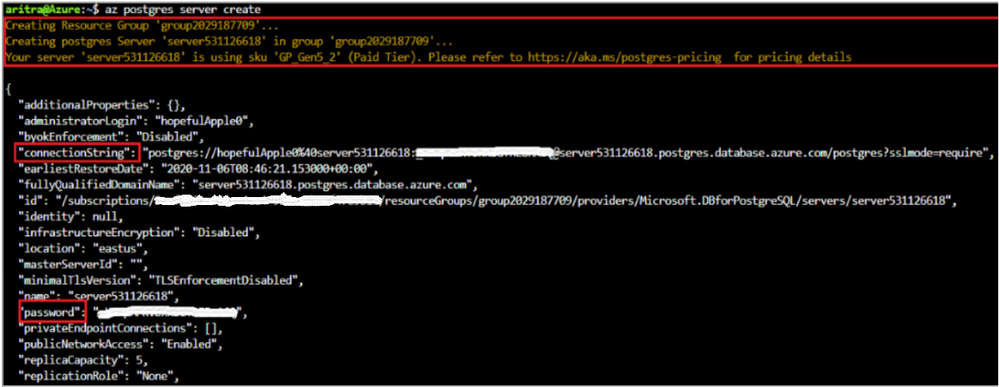
Login to your Azure account using  `az login`, select your subscription (if different from default), and then run the command `az postgres server create’ to create a Postgres Single Server Instance on Azure.


Note the following key points:


  • A resource group with a random name is created for you in the default region.

  • A server-name, admin username, and password are auto-generated for you.

  • The text in yellow indicates what is going on behind the scenes. The server gets created with the defaults which can be found using `az postgres server create –help`.

  • Two new fields (password and connection-string) are introduced in the output.

  • To override a default value, pass that parameter with the value of your choice.


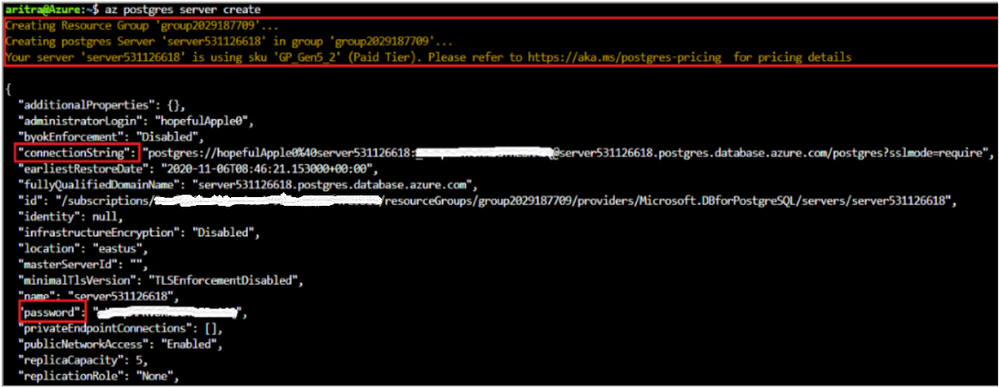
PG create.png


2. Support for param-persist


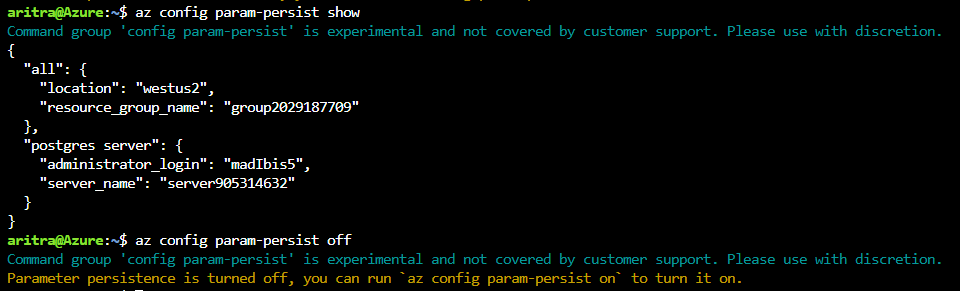
Azure Database for PostgreSQL server CLI commands now support persisting values of parameters with the `az config param-persist` command , which locally stores information such as location, resource group, administrator login and server name for every sequential CLI command you execute. You can easily turn on param persist to store information using `az config param-persist on`. With param persist turned on, you can see the contextual information using `az config param-persist show`. You can always turn off support for param persist by using `az config param-persist off`.


A summary of points that you might find helpful is listed below:


  • Fields commonly stored in param persist are location, resource group, server name and administrator login.

  • The param persist is designed to hold only one value for any parameter – which is always from the latest executed command.

  • Turning off the param persist does not automatically clear the stored fields. You can clear up all or specific values in the param persist using the commands in `az config param-persist delete`.

  • An example of how param persist can reduce the effort is shown below.


Param persist on.PNG


  • Note how there is no longer a need to supply the server name and resource group in the firewall creation command when you add a new firewall rule to the server you just created. 


az postgres server firewall-rule create -n firewall-rule-1 --start-ip-address 107.223.9.21 --end-ip-address 107.223.9.27


  •  When in confusion about the values fetched from param persist – look for the text ‘Command argument values from local context’ field in the command output as shown below.


Local context is turned on. Its information is saved in working directory /home/aritra. You can run `az local-context off` to turn it off.
Command argument values from local context: --resource-group: group2029187709, --server-name: server905314632
{- Finished ..
  "endIpAddress": "107.223.9.27",
  "id": "/subscriptions/<your-subscription-id>/resourceGroups/group2029187709/providers/Microsoft.DBforPostgreSQL/servers/server905314632/firewallRules/firewall-rule-1",
  "name": "firewall-rule-1",
  "resourceGroup": "group2029187709",
  "startIpAddress": "107.223.9.21",
  "type": "Microsoft.DBforPostgreSQL/servers/firewallRules"
}


3. New values for the –public parameter in az postgres server create command


When creating a Postgres server using our managed database service on Azure, you want to get started quickly. You can now let the create experience take care of the accessibility based on the value you pass for the –public parameter in the create command. When a server is created with any of these newly supported values, a new field `firewallName` will show up in the output of the create command. In addition to the existing values of ‘Enabled’ and ‘Disabled’, we are now supporting the below values:


Scenario Command
Allow all IPs from 0.0.0.0-255.255.255.255 az postgres server create –public all
Allow access to your client IP only az postgres server create –public <SingleIP>
Allow all IPs within a range az postgres server create –public <StartIP-DestinationIP>
Allow access to all Azure Services az postgres server create –public 0.0.0.0
Allow public access, but add allowed IPs later

az postgres server create –public Enabled.


Note : You need to add allowed IPs using `firewall-rule create` command


4. New command – az postgres server show-connection-string


`az postgres server show-connection-string`: Lists the connections string for connecting your Postgres database to applications such as ADO.NET, JDBC, JDBC Spring, Node.JS, PHP, Python, and Ruby.


az postgres server show-connection-string -s server905314632 -u flexibleHorse


All placeholder fields within {} in the connection string can be substituted with actual values when you pass them as parameters in the above command. 


{
  "connectionStrings": {
    "C++ (libpq)": "host=server905314632.postgres.database.azure.com port=5432 dbname={database} user=flexibleHorse@server905314632 password={password} sslmode=require",
    "ado.net": "Server=server905314632.postgres.database.azure.com;Database={database};Port=5432;User Id=flexibleHorse@server905314632;Password={password};",
    "jdbc": "jdbc:postgresql://server905314632.postgres.database.azure.com:5432/{database}?user=flexibleHorse@server905314632&password={password}",
    "node.js": "var client = new pg.Client('postgres://flexibleHorse@server905314632:{password}@server905314632.postgres.database.azure.com:5432/{database}');",
    "php": "host=server905314632.postgres.database.azure.com port=5432 dbname={database} user=flexibleHorse@server905314632 password={password}",
    "psql_cmd": "postgresql://flexibleHorse@server905314632:{password}@server905314632.postgres.database.azure.com/{database}?sslmode=require",
    "python": "cnx = psycopg2.connect(database='{database}', user='flexibleHorse@server905314632', host='server905314632.postgres.database.azure.com', password='{password}', port='5432')",
    "ruby": "cnx = PG::Connection.new(:host => 'server905314632.postgres.database.azure.com', :user => 'flexibleHorse@server905314632', :dbname => '{database}', :port => '5432', :password => '{password}')"
  }
}


5. Improved readable tabular format


For the commands below, the latest version of the Azure CLI supports viewing output in a tabular format, which provides you with a snapshot view.


  • `az postgres server list-skus -l eastus -o table`

  • `az postgres server list [-g <group_name>] [-n <server_name>] -o table`

    • Not supplying -g and –n would list all servers in the subscription.

    • Supplying -g and -n would list the details of a single server.

    • Supplying only -g would list the details of all servers in the resource group.


formatted output.PNG


Use powerful Azure CLI utilities with single server CLI


Azure CLI has powerful utilities that can be used with PostgreSQL Server CLI commands from finding right commands, getting readable output or even running REST APIs.  


  • az find to find the command you are looking.

  • Use the –help argument to get a complete list of commands and subgroups of a group.

  • Change the output formatting to table or tsv or yaml formats as you see fit.

  • Use az interactive mode which provides interactive shell with auto-completion, command descriptions, and examples.

  • Use az upgrade to update your CLI and extensions.

  • Use az rest command that lets you call your service endpoints to run GET, PUT, PATCH methods in a secure way.


The improvements have been designed to support the best possible experience for developers to create and manage their PostgreSQL servers. We’d love for you to try out the improvements and share your feedback for new CLI commands or issues with existing ones.


Sync Up – a OneDrive podcast : Episode 15, “OneDrive helps SMBs achieve secure productivity”

Sync Up – a OneDrive podcast : Episode 15, “OneDrive helps SMBs achieve secure productivity”

This article is contributed. See the original author and article here.

Sync Up is your monthly podcast hosted by the OneDrive team taking you behind the scenes of OneDrive, shedding light on how OneDrive connects you to all your files in Microsoft 365 so you can share and work together from anywhere. You will hear from experts behind the design and development of OneDrive, as well as customers and Microsoft MVPs. Each episode will also give you news and announcements, special topics of discussion, and best practices for your OneDrive experience.


So, get your ears ready and Subscribe to Sync up podcast!


Episode 15, “OneDrive helps SMBs achieve secure productivity” focusses on the tools available for small and medium businesses (SMBs) to enhance productivity with OneDrive and Microsoft 365 especially as they adapt to remote work. This month cohosts Ankita Kirti and Jason Moore talk with Paul DiamondProduct Marketing Manager for OneDrive for home and SMBs 
and Matthew Woodget, founder of Go Narrative, which helps companies improve their team alignment, marketing engagement and sales conversions by building narratives and optimizing messaging. Matthew shares how he leverages OneDrive within his small business and the group discusses most useful OneDrive features for SMBs as well as some tips and tricks.


Tune in! 


Meet your show hosts and guests for the episode:


s15.PNG


Jason Moore is the principal group program manager for OneDrive and the Microsoft 365 files experience.  He loves files, folders, and metadata. Twitter: @jasmo 


Ankita Kirti is a product manager on the Microsoft 365 product marketing team responsible for OneDrive for Business. Twitter: @Ankita_Kirti21


Paul Diamond is a Product Marketing Manager for OneDrive for home and SMB.


Matthew Woodget is the founder of GoNarrative, which helps companies improve their team alignment, marketing engagement and sales conversions by building narratives and optimizing messaging. Twitter: @mattwoodget

Listen to the show! If you like what you hear, we’d love for you to Subscribe, Rate and Review it on iTunes   or wherever you get your podcasts.


Quick links to the podcast


Links to resources mentioned in the show:


Be sure to visit our show page to hear all the episodes, access the show notes, and get bonus content. And stay connected to the OneDrive community blog where we’ll share more information per episode, guest insights, and take any questions from our listeners and OneDrive users. We, too, welcome your ideas for future episodes topics and segments. Keep the discussion going in comments below.


As you can see, we continue to evolve OneDrive as a place to access, share, and collaborate on all your files in Office 365, keeping them protected and readily accessible on all your devices, anywhere. We, at OneDrive, will shine a recurring light on the importance of you, the user.  We will continue working to make OneDrive and related apps more approachable. The OneDrive team wants you to unleash your creativity. And we will do this, together, one episode at a time.


Thanks for your time reading and listening to all things OneDrive,


Ankita Kirti – OneDrive | Microsoft