by Contributed | Jan 17, 2021 | Technology
This article is contributed. See the original author and article here.
Hey there…
Whilst 2009 fixed many issues, we discovered there was a couple of issues affecting OneDrive and CCD. Pleased to say these have now been addressed.
You can find the HF at this location :
FSLogix Apps 2009 HF_01 (2.9.7654.46150)
You should no longer use FSLogix 2009 (2.9.7621.30127)
by Contributed | Jan 17, 2021 | Technology
This article is contributed. See the original author and article here.
Hey there….
This is Phil here from the FSLogix Team. I recently came across an interesting topic the other day and I thought i would share it with you .
When using VHDlocations and have 2 or more locations set in the string , whether this is a Multi_SZ or Reg_SZ, it may be perceived that if the first location in the string is not accessible then we will fall back to the second location or the third and so on to create and /or access the VHD(X) container.
This is not the correct interpretation.
When using VHD locations, only one VHD location can be accessed at any one time
- This feature is NOT created as a fail-over option; using 2 or more VHD locations does not offer any form of HA or resiliency compared to CCD ( Cloud Cache)
- The list of locations in VHDLocations was created to allow a customer to control where the VHD is placed and to be able to control which VHDs are created on which location using Share Permissions
- VHDLocations with a list expects all the locations to be available at all times.
- Storage locations for user data are not supposed to be unavailable.
So what happens if the first location is not available as a result of the Server being physically unavailable ?
FSlogix has built-in logic to determine that the first location is not available and will not proceed to create another disk on the next server in the list .
If the opposite were true and the VHD Locations were allowed to proceed in creating new VHDs then we would end up with a scenario of a user having multiple VHDs in different locations ; this would result in Profile data not be available for that current user session . It would then be an arduous task to merge all that data from the multiple disks to one disk.
Caveat: If one of the servers in the list is down then, it would prevent people from logging on.
The only time that a another location is made available is when the share permissions on the server containing the VHD has changed and the share is no longer accessible. FSlogix will then look at the next server in the list and if the share is accessible then it will create the VHD on that share.
To prevent another VHD from being created on another share location, you should ensure that you always specifically set the permissions so that only one location was writeable for specific user(s) or groups and thus preventing any of the other share locations having another profile and /or ODFC disk for that user.
And if its HA /Resiliency you are looking for then Cloud Cache is the solution here.
Until next time ……..
by Contributed | Jan 17, 2021 | Technology
This article is contributed. See the original author and article here.
Final Update: Sunday, 17 January 2021 12:03 UTC
We’ve confirmed that all systems are back to normal with no customer impact as of 01/17, 11:00 UTC. Our logs show the incident started on 01/17, 10:00 UTC and that during the 1 hour that it took to resolve some of customers may experience missing of misfired alerts when using Azure Metric Alert Rules.- Root Cause: The failure was due to a recent deployment task .
- Incident Timeline: 1 Hour – 01/17, 10:00 UTC through 01/17, 11:00 UTC
We understand that customers rely on Alerts as a critical service and apologize for any impact this incident caused.-Soumyajeet

by Contributed | Jan 16, 2021 | Technology
This article is contributed. See the original author and article here.
The importance of online accessibility has become even more pronounced for Office Apps & Services MVP Susan Hanley.
In the past four years, the consultant and author specializing in successful collaboration and knowledge management solutions turned 60, became a grandmother, and attended her 40th college reunion.
“These personal milestones are a stark reminder that even though I feel a lot younger and can do a lot more physically than many of my much younger friends, I’ve noticed personally, as people age, they may experience changes in their abilities,” Susan says.
“As an information architect, I care enormously about organizing and presenting information. As a business analyst, I care enormously about generating business value. For the past few years, my professional learning journey has been driven by some personal and professional experiences that have caused me to think a lot about time, or the lack thereof, and inclusion.”
Susan, who is dedicated to creating easier-to-consume SharePoint sites and pages, says one of those instructive professional experiences came in the form of the Intrazone podcast ‘Accessibility from The Start’ and guest Lauren Back, a usability engineer at HCL Technologies who happens to be blind.
In the 2019 episode, Lauren discussed how she imagined that someone who is not blind could quickly scan a webpage to get a sense of what the page is all about. However, Lauren uses a screen reader and, depending on how the page author created the page, she might have to listen to every single word on a page.
“Lauren got me thinking about other things I should be doing to make my SharePoint pages not just more organized and readable, but also more accessible,” Susan says.
There remains an accessibility awareness gap for many information architects and business analysts, Susan says, but it is one which can be overcome with better education and training.
“For example, I think people know in general that it’s good to add alt-text for images, but many people aren’t aware of what exactly you should put in alt-text,” she says. “I took the Accessibility fundamentals courses in Docs.microsoft.com and learned for the first time about the accessibility checker in PowerPoint. I am still working through all of my PowerPoint slide decks to make sure that they are more accessible!”
Ensuring accessibility is an ongoing process, and Susan shares the following three tips in making SharePoint pages and news accessible to all.
First, write content “upside down.” People scan web pages, they don’t read them, Susan says. To make pages more “scannable” for all readers, put the key information that readers must have to be successful at the top of the page. Try to write more like a journalist with the key points early on the page and less critical information next. Put your conclusion first, instead of at the end.
Second, make sure all images have ‘alt text.’ Susan notes that all images and graphics need alternative text descriptions that allow people who use a screen reader to understand what they represent. Alt text also shows in browsers when images don’t load, so it is helpful for slow internet connections as well.
Third, Susan suggests using headings to make pages easy to navigate. This means using the built-in H1, H2, and H3 styles in text web parts. This allows readers to jump from section to section using keyboard shortcuts such as the Tab key. Heading styles also allow for the creation of “table of contents” for pages using page anchors (bookmarks).
For more tips, check out Susan’s article on Sharepoint accessibility on the Humans of IT Blog.
Image: Office Apps & Services MVP Sue Hanley and her granddaughter.
by Contributed | Jan 16, 2021 | Technology
This article is contributed. See the original author and article here.
As Synapse engineer or Synapse Support Engineer you may need to start and test some Pools, and you want this to be the most cost efficient possible. Leaving some Synapse with a lot of DWU left turned on during the weekend because you forget to pause the DW after you shutdown your computers is not a good approach and we can quickly resolve this by using Powershell + Automation accounts.
Before we get into the procedure on the automation, just want to show you some details.
We currently have two flavors of Synapse
- Dedicated SQL pools (formerly SQL DW)
- Old mode where the SQL DW lives in an Azure SQL DB Server that can be shared with regular Azure SQL databases.
- Internally is a resource of type (Microsoft.SQL)
- Sample: /subscriptions/xxxxxx/resourceGroups/yyyyyyy/providers/Microsoft.Sql/servers/yyyyyyyy/databases/olddwpool
- Azure Synapse Analytics – Dedicated SQL pool
- SQL DW database inside a workspace
- Internally is a resource of type (Microsoft.Synapse)
- Sample: /subscriptions/xxxxxx/resourceGroups/yyyyyyy/providers/Microsoft.Synapse/workspaces/yyyyyyyy/sqlPools/dwpool
This is important to know because we are going to use 2 different scripts to pause the pool
- Suspend-AzSynapseSqlPool (Az.Synapse)
- Suspend-AzSqlDatabase (Az.SQL)
There are 2 versions of the script
- Powershell to run from your machine
- Using Azure Automation Account
1. Powershell to run from your machine
This script you can run from your machine and you can get last version of script at ScriptCollection/Synapse – Pause all DWs.ps1 at master · FonsecaSergio/ScriptCollection · GitHub
You are going to need the modules installed
- Az.Accounts
- Az.Sql
- Az.Synapse
For below script I’m considering that your user is same that you use to admin your Azure Subscription
Find a sample below
Context exists
Current credential is sefonsec@microsoft.com
Current subscription is SEFONSEC Microsoft Azure Internal Consumption
—————————————————————————————————
Get SQL / Synapse RESOURCES
—————————————————————————————————
—————————————————————————————————
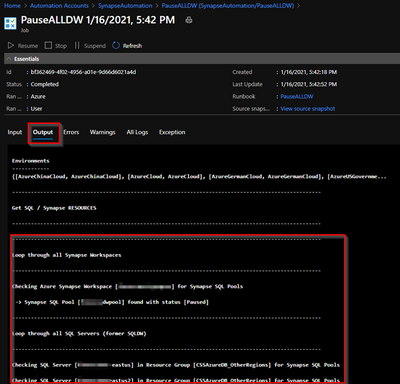
Loop through all Synapse Workspaces
—————————————————————————————————
Checking Azure Synapse Workspace [xxxxxxxxxxx_synapse] for Synapse SQL Pools
-> Synapse SQL Pool [dwpool] found with status [Online]
-> Pausing Synapse SQL Pool [dwpool]
-> Synapse SQL Pool [dwpool] paused in 0 hours, 2 minutes and 32 seconds. Current status [Paused]
—————————————————————————————————
Loop through all SQL Servers (former SQLDW)
—————————————————————————————————
Checking SQL Server [xxxxxxxxxxx-eastus] in Resource Group [CSSAzureDB_OtherRegions] for Synapse SQL Pools
Checking SQL Server [xxxxxxxxxxx-eastus2] in Resource Group [CSSAzureDB_OtherRegions] for Synapse SQL Pools
Checking SQL Server [xxxxxxxxxxx-northeu] in Resource Group [CSSAzureDB_OtherRegions] for Synapse SQL Pools
Checking SQL Server [xxxxxxxxxxx-southcentralus] in Resource Group [CSSAzureDB_OtherRegions] for Synapse SQL Pools
Checking SQL Server [xxxxxxxxxxx-uksouth] in Resource Group [CSSAzureDB_OtherRegions] for Synapse SQL Pools
Checking SQL Server [xxxxxxxxxxx-ukwest] in Resource Group [CSSAzureDB_OtherRegions] for Synapse SQL Pools
Checking SQL Server [xxxxxxxxxxx] in Resource Group [CSSAzureDB] for Synapse SQL Pools
-> Synapse SQL Pool [SQLDW] found with status [Paused]
Checking SQL Server [xxxxxxxxxxx-byok] in Resource Group [CSSAzureDB_OtherRegions] for Synapse SQL Pools
Checking SQL Server [xxxxxxxxxxx-demo] in Resource Group [CSSAzureDB_OtherRegions] for Synapse SQL Pools
Checking SQL Server [xxxxxxxxxxx_synapse] in Resource Group [synapseworkspace-managedrg-5da694c3-ae72-4f25-9cc6-626adcf858e6] for Synapse SQL Pools
-> This DB is part of Synapse Workspace – Ignore here Should be done above using Az.Synapse Module
Checking SQL Server [xxxxxxxxxxx-westeu] in Resource Group [CSSAzureDB_OtherRegions] for Synapse SQL Pools
Checking SQL Server [xxxxxxxxxxx-westus] in Resource Group [CSSAzureDB_OtherRegions] for Synapse SQL Pools
A sample with error
Checking Azure Synapse Workspace [xxxxxxxxxxx_synapse] for Synapse SQL Pools
Write-Error: -> Checking Synapse SQL Pool [dwpool] found with status [Resuming]
2. Using Azure Automation Account
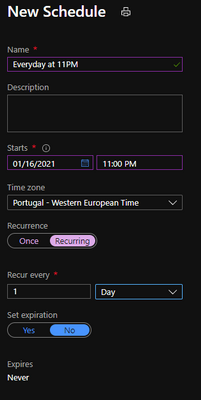
Now we want this to be automated, like as a sample to shutdown every day at 11PM and send me alerts if error happens
You can find last version at: ScriptCollection/Synapse – Pause all DWs – Automation Acount.ps1 at master · FonsecaSergio/ScriptCollection · GitHub
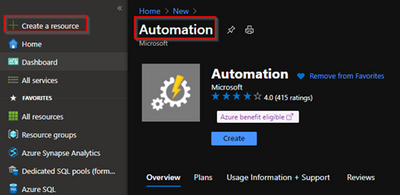
1 – Lets first create the Automation Account
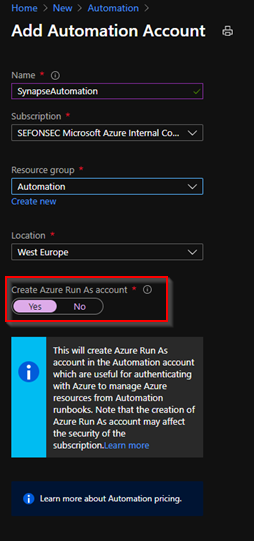
2 – Make sure to create a Run As Account
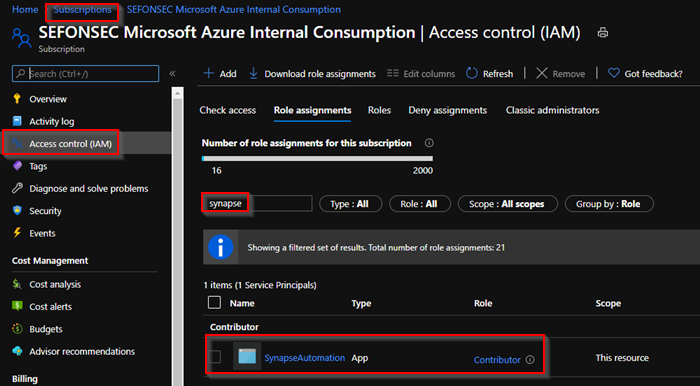
3 – By default it already got the contributor permission in the subscription level. You can change that if needed. Or add the any required permissions.
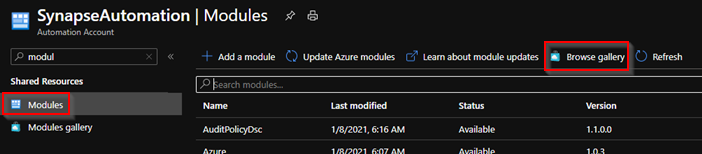
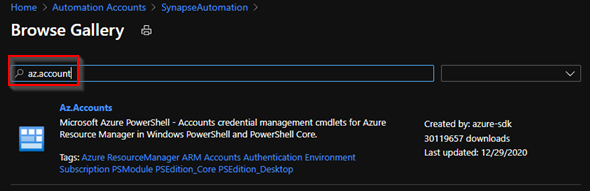
4 – You need to install the Az modules. Just go to modules and look for them in the gallery.
5 – Install first the Az.Account because it’s a prerequisite for others
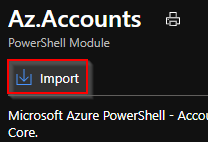
Wait for it to complete
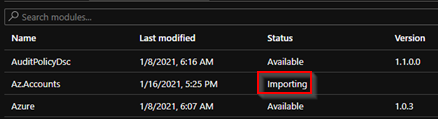
6 – Do same for 3 modules
- Az.Accounts
- Az.Sql
- Az.Synapse
7 – Now go to runbooks and create a new Powershell runbook
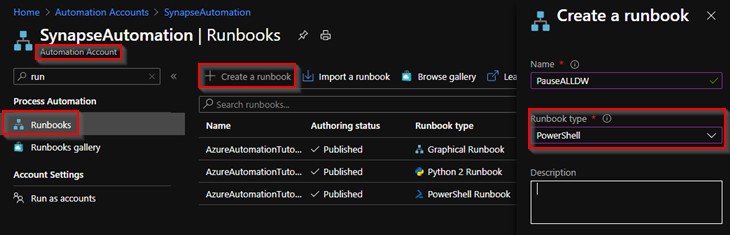
8 – Add code from ScriptCollection/Synapse – Pause all DWs – Automation Acount.ps1 at master · FonsecaSergio/ScriptCollection · GitHub
8.1 – Save and Publish. And click on Start to test it
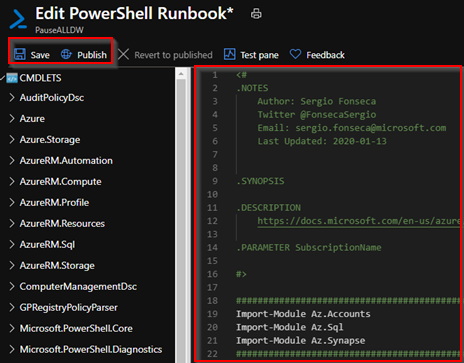
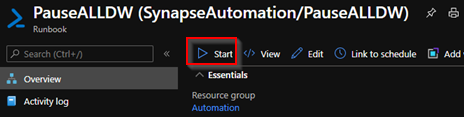
9 – Check output tab
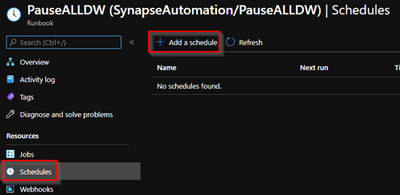
10 – You can now go to schedules and add a new schedule
11 – You may also want also to be alerted if schedule fail. Just to back to automation account and click on Alerts
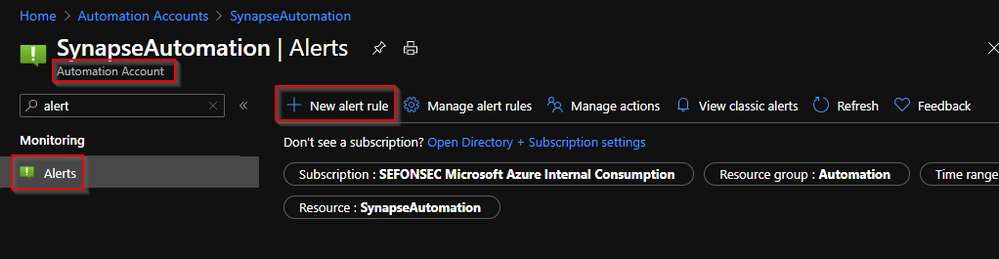
12 – You need to add a condition when alert will fire and what actions will be taken. This action could be email to you or run some process or run another script
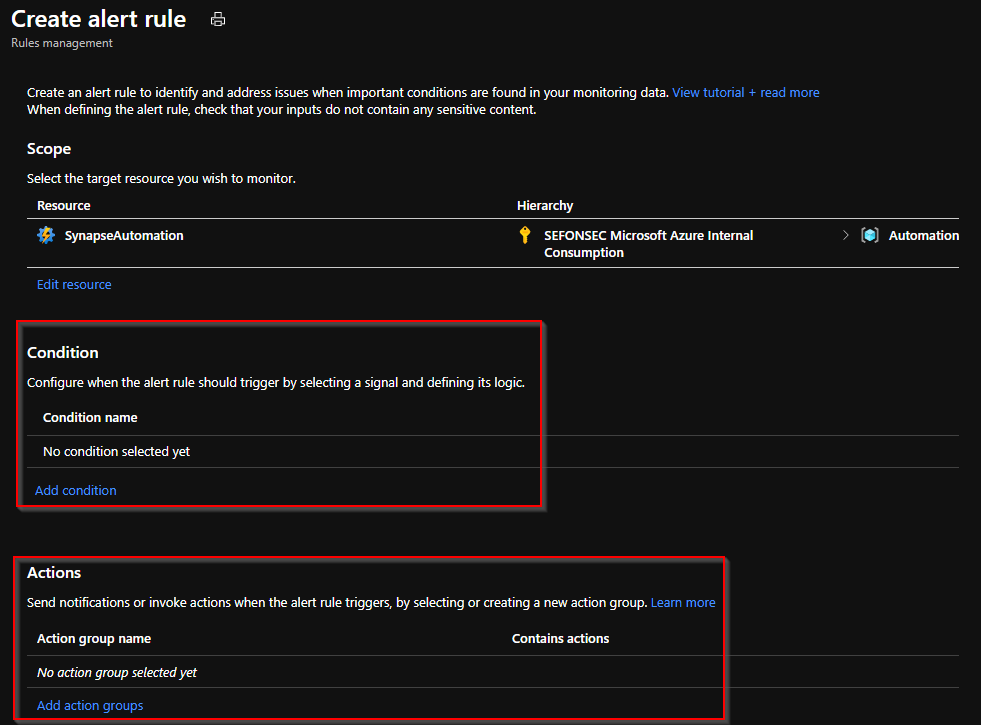
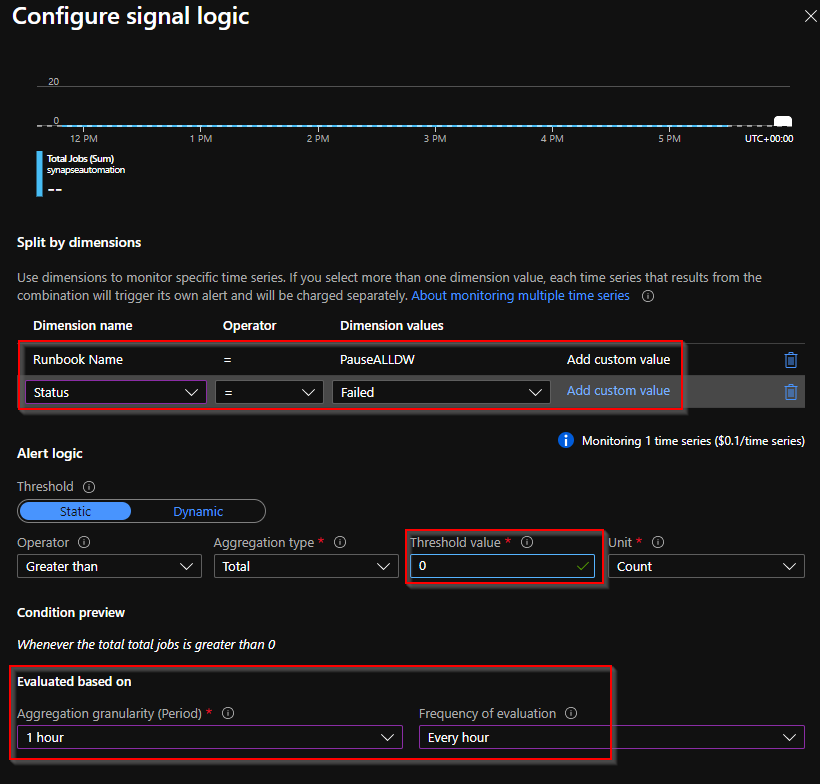
13 – First configure the condition. You are going to use the metric Total Jobs (Like total jobs failed)
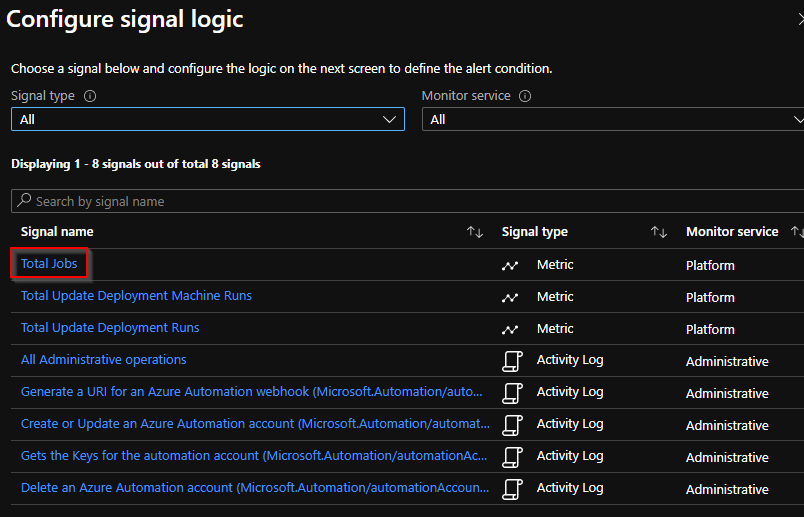
14 – Define
– runbook name
– status (Add custom status “Failed“)
– Threshold > 0
– Run every hour
15 – Add now the action group. In this case, send email to me
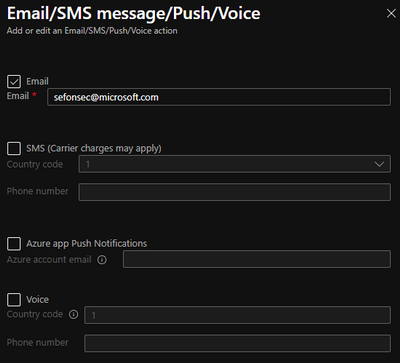
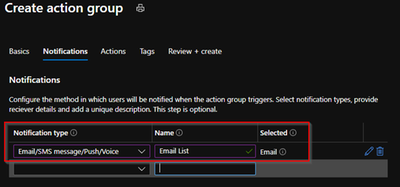
You are now set. So your DW will be stopped at 11PM if some error happen you will be alerted like as a sample when a DW is in a state that could not be paused.
Another last tip is to use the Azure Budget control I got from my colleague @Gonçalo Ventura
Create a budget and alert
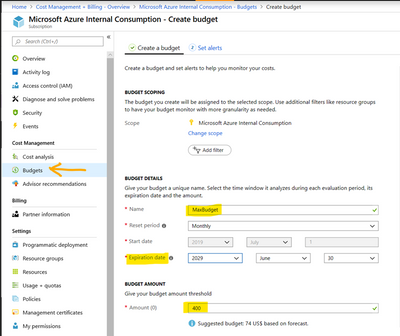
The budget puts a maximum limit on the cost of the subscription, in case some service is left running the subscription will automatically suspend when the budget is reached.
To avoid reaching the max limit and let the subscription go into suspended mode, it is possible to create an alert when the cost reaches a percentage of the budget.
To configure a budget, go to “Subscriptions” or “Cost Management + Billing”, then click on Budgets and fill in the parameters for your budget:
Click next and set an alert:
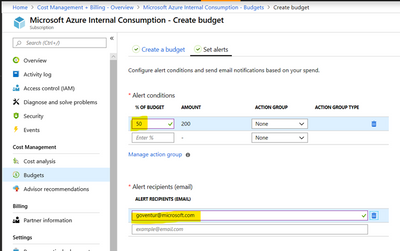
Because you do not have only Synapse in your subscription, you may have VMs, SQL DBs, etc.
by Contributed | Jan 16, 2021 | Technology
This article is contributed. See the original author and article here.
(part 1 of my series of articles on security principles in Microsoft SQL Servers & Databases)
Principle of Least Privilege (POLP)
The first security principle, one that most System Administrators are familiar with, is the “principle of least privilege” (short: POLP). It demands that the required permissions for a task shall only grant access to the needed information or resources that a task requires. When permissions are granted, we shall grant the least privileges possible.
POLP is so crucial because initially it is the privileges that any attacker is targeting. When developing an application, using a least-privileged user account (LUA) is the first rule of engagement.
Note
User Account Control (UAC) in Windows is a feature that Microsoft developed to assist administrators in working with least-privileges by default and elevate to higher permission only when needed.
You may also know that Microsoft recommends separating service accounts. This security best practice is generally referred to as service account isolation and is related to POLP: Using distinct service accounts prevents increased privileges, which happens easily when you share an account to be used for multiple purposes and as a consequence, the privileges are merged. – This would violate the principle of least privilege.
Both POLP and service account isolation help reducing the attack surface (aka attack surface reduction).
– Read more on this topic here: SQL Server security – SQL Server | Microsoft Docs
and here: Surface Area Configuration – SQL Server | Microsoft Docs
Service account isolation also prevents between services if an attacker gained access to one service. You see how one thing is connected to another in Security?
Note
Lateral movement is a common attack strategy to move from one target to the next: If the main target (for example the database server) cannot be breached into directly, attackers try to gain foothold in some other server in the system within the same network and then launch other attacks to try to get to the final goal, server by server or service by service.
Principle of Least Privilege in the SQL realm
Let’s look at some examples within the SQL Server engine (applying to on-prem as well as our Azure SQL-products):
Example 1, read-access to data
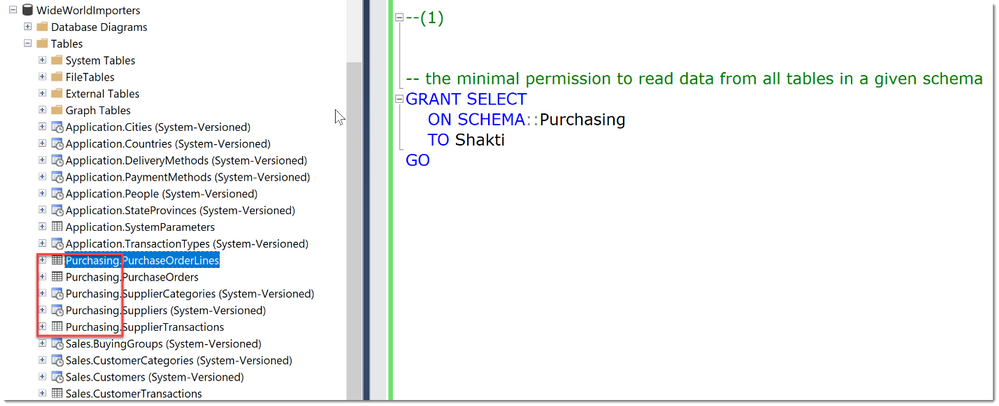
A typical example within SQL Server would be: To allow a User to only read data from a small set of tables, ideally defined by a schema-boundary, we have the SELECT-Permission, grantable at the schema- (or even table-) level. There is no need to grant SELECT at the whole database, or to Grant anything other than SELECT.
In the code-snippet below we see that there are many tables in different schemas (Application, Purchasing, Sales) within the database WideWorldImporters. Instead of granting Select in the whole database, we chose to grant the user Shakti the permission at the schema scope. As long as this schema really contains only objects that Shakti needs access to, this is a best practice as it greatly reduces the management and reporting overhead compared to granting permissions at the object-level.
Tip
An alternative is to use stored procedures for all data access, which would allow even better control and completely hide the schema from Users.
That was easy, wasn’t it?
Example 2, creating user accounts
Unfortunately, not everything is implemented to always ensure POLP.
Let’s take another example:
You want to delegate the ability to create new Logins in SQL Server.
The minimal permission available is ALTER ANY LOGIN. Ok, so now this person can create new Logins, and maybe also Dropping them is ok.
But: With this permission comes the ability to change the password of any SQL Login (“ALTER LOGIN … WITH PASSWORD=’NewPassword’).
This can be an unwanted scenario as this would enable this person to essentially take over other accounts.
Note
This would not work if the Account were a Windows Domain or Azure Active Directory account. This is where a separation of the authenticating system from SQL Server has a real advantage. (This is a great example of Separation of Duties btw.)
Example 3, changing table structures
What about the following?
Say you want to allow a developer to add a set of new columns to the existing tables. (For example, for logging purposes, you need to include the timestamp of any new row.)
The minimal permission to change tables/add new columns is the ALTER-permission on each individual table (it cannot be done on schema-level).
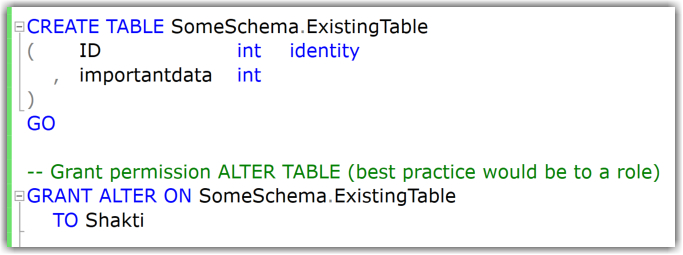
In my example you can see that adding new columns works fine, also dropping the table is not allowed.
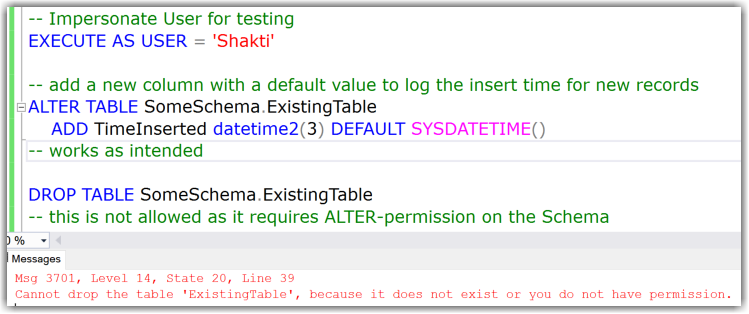
But:
Instead of adding new columns this user could also drop existing columns. This is covered under the same least permission/privilege:
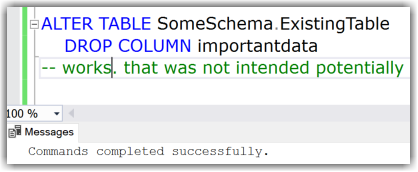
Or: You want them to only create new tables but disallow to change existing tables. Since the required permissions for that are: CREATE TABLE on Database + ALTER on the schema, they could also drop tables. With permissions alone this cannot be solved. This is a common reason for the use of DDL Triggers as a preventative control. (I demonstrated an example of a DDL Trigger in this Blog-Article: Logging Schema-changes in a Database using DDL Trigger, which can easily be adjusted to prevent certain statements altogether by rolling them back.)
Conclusion
The more you dive into this subject and real-world implementation, the more you will realize that this apparently basic security principle is much tougher than you may initially have expected.
The permission system of SQL Server is very granular, vast, and continuously growing. (SQL Server 2019 provides 248 permissions and Azure SQL Database exposes 254 permissions as of December 2020.)
While some of the examples above are reasonable, we need to balance every decision for every new permission and look at it from multiple angles whenever a new functionality or command is implemented. For example:
- Which other commands and tasks are covered under the same permission?
- How do they relate to the functionality at hand?
- Is the use of the new functionality/command alone a common scenario?
Having permissions on parts of Table-structures, like adding columns but not dropping them, would increase the complexity of the permission-system and hence the compromise to have just one ALTER-permission on table DDL was made.
That said, I know there are examples where the balance is not right, and SQL Server can be improved, like TRUNCATE TABLE requiring ALTER on the table as well and others.
Feel free to let me know where you believe that POLP is seriously unbalanced and more granularity is required to reach compliance.
Happy securing
Andreas
Resources

by Contributed | Jan 16, 2021 | Technology
This article is contributed. See the original author and article here.
Introduction into security principles in the context of database systems
By Andreas Wolter
While many of us are practicing ‘social distancing’, and spend lots of time at home, I am finally finding the time to share some of the topics with the public that I have been working on since I joined Microsoft at the end of 2018.
In the recent years and with increasing frequency, one of the asks in terms of Security to the SQL Engine On-Prem as well as SQL Azure Database has been coming up with solutions to help accomplish “Separation of Duties”. This is a good thing, because it reassures my point of view that Separation of Duties is becoming increasingly important in IT and specifically Cloud-based systems.
On the other hand, we noticed that there is not a broad understanding in the technical community yet as to what Separation of Duties (aka SoD) really means and how it can be accomplished today. It occurs to me that the understanding is often vague and sometimes even contradicting depending on who you ask. It might therefore help to provide some context and guidance on what SoD really is and how it relates to other commonly referenced security principles that have been established over the last decades in IT.
If you are not already an expert in IT security, I hope that you will find this series useful.
Intro: Motivation
Security principles in information technology or cybersecurity (I won’t touch on physical security in these articles) exist as guidelines to assist design and decision processes in architecture, implementation, and reactive procedures when incidents happen. The purpose is to help designing for security in the first place, by using common proven patterns, and to be able to effectively assess a systems security.
Building secure systems from the start can be an expensive task, but over the years we have all seen security incidents which can cost millions and cause companies or even banks to go out of business. (i.e. see https://www.ibm.com/ae-en/security/data-breach )
One word of caution: Simply complying with these security principles provides no guarantee of preventing successful attacks. Some attackers invest a lot of time thinking to come up with ever new methods and exploit attack vectors which may not have been considered before.
But following these security principles helps to reach the following objectives:
- Reducing the blast radius of an attack
- i.e. attackers may not gain access to all targeted services because of partitioning or may not be able to elevate to all permissions to gain access to all documents
- Increasing the time for a successful attack
- this also goes back to #1 as it becomes harder to gain sufficient access
- Increasing the chances of early detection (!!)
- More controls and audits usually mean more chances of raising triggers or errors along the way
- Improving forensic abilities after detection
- Better audit trails allow for more successful investigations
Security a first
Therefore, I strongly advise to implement the proper security controls from start. And this is not just because it is common knowledge among IT architects that changing running systems is more expensive than making sure that Security is a main pillar in the architecture from the start.
To take it one step further: security should be THE FIRST pillar to be implemented. What I mean by that is that, ideally, nothing gets deployed before all security measures have been put in place. Otherwise, it is easily possible to admit backdoors or other security issues in the foundation, purposefully or not, that remain undetected. The very first measure therefore should be to put Auditing in place. We will talk more about Auditing in a later article.
Contents
This series of articles will provide an overview on the most commonly cited security principles and concepts which are often used when talking about Separation of Duties – or even intermingled with it – and briefly clarify their meaning and relation. Expect a lot of keywords (not buzzwords though, I promise)
Principle of Least Privilege (POLP) Need to know
Delegation of Authority Separation of Privilege
Audit Trail Separation of Duties
– These articles will be released one by one over the next weeks and the links will then be updated one by one as well.
One more principle you should keep in mind when designing security: “KISS” – Keep it simple, stupid
As already mentioned in my article from 2017 (Separation of Duties (SoD) and role-based security conception in SQL Server), it is absolutely vital to keep the user experience as simple as possible. Anything “too much” of an effort (and that can be just “too many clicks”) will lead to users to try to find ways around it. And they will.
Example
A common example of that is the shared Admin account. Instead of having one elevated account per person, often especially in small shops, developers share one common privileged account. Among other things this renders Auditing almost useless as no one can really tell who did what.
Note
Separation of concerns (SoC)
Over time I have heard it being used when actually “Separation of Duties” was meant. SoC is NOT a security principle and rather a basic programming design principle which leads to modular (or “functional”) programming. Hopefully, this clears up this common mix-up.
Wikipedia-Article: https://en.wikipedia.org/wiki/Separation_of_concerns
Let me know if you find this series helpful and what else you want to hear about in the future.
Andreas
Special thanks to
Raul Garcia, former SQL Security PM and “honorable member for life” :) – your knowledge in Security and SQL Security helped me make sure to not overlook anything important and meet a certain quality bar ;)
Steven Gott, one of our most senior Security Engineers, for your critical viewpoints which help me look ahead, although I know I can’t possible mention everything.
Ralf Dietrich from Sarpedon Quality Lab® Germany for countless hours of brainstorming about secure architectures even while being based in separate time zones.
“Security Logo” by pixabay is licensed under CC0
by Contributed | Jan 16, 2021 | Technology
This article is contributed. See the original author and article here.
Introduction into security principles in the context of database systems
By Andreas Wolter
While many of us are practicing ‘social distancing’, and spend lots of time at home, I am finally finding the time to share some of the topics with the public that I have been working on since I joined Microsoft at the end of 2018.
In the recent years and with increasing frequency, one of the asks in terms of Security to the SQL Engine On-Prem as well as SQL Azure Database has been coming up with solutions to help accomplish “Separation of Duties”. This is a good thing, because it reassures my point of view that Separation of Duties is becoming increasingly important in IT and specifically Cloud-based systems.
On the other hand, we noticed that there is not a broad understanding in the technical community yet as to what Separation of Duties (aka SoD) really means and how it can be accomplished today. It occurs to me that the understanding is often vague and sometimes even contradicting depending on who you ask. It might therefore help to provide some context and guidance on what SoD really is and how it relates to other commonly referenced security principles that have been established over the last decades in IT.
If you are not already an expert in IT security, I hope that you will find this series useful.
Intro: Motivation
Security principles in information technology or cybersecurity (I won’t touch on physical security in these articles) exist as guidelines to assist design and decision processes in architecture, implementation, and reactive procedures when incidents happen. The purpose is to help designing for security in the first place, by using common proven patterns, and to be able to effectively assess a systems security.
Building secure systems from the start can be an expensive task, but over the years we have all seen security incidents which can cost millions and cause companies or even banks to go out of business. (i.e. see https://www.ibm.com/ae-en/security/data-breach )
One word of caution: Simply complying with these security principles provides no guarantee of preventing successful attacks. Some attackers invest a lot of time thinking to come up with ever new methods and exploit attack vectors which may not have been considered before.
But following these security principles helps to reach the following objectives:
- Reducing the blast radius of an attack
- i.e. attackers may not gain access to all targeted services because of partitioning or may not be able to elevate to all permissions to gain access to all documents
- Increasing the time for a successful attack
- this also goes back to #1 as it becomes harder to gain sufficient access
- Increasing the chances of early detection (!!)
- More controls and audits usually mean more chances of raising triggers or errors along the way
- Improving forensic abilities after detection
- Better audit trails allow for more successful investigations
Security a first
Therefore, I strongly advise to implement the proper security controls from start. And this is not just because it is common knowledge among IT architects that changing running systems is more expensive than making sure that Security is a main pillar in the architecture from the start.
To take it one step further: security should be THE FIRST pillar to be implemented. What I mean by that is that, ideally, nothing gets deployed before all security measures have been put in place. Otherwise, it is easily possible to admit backdoors or other security issues in the foundation, purposefully or not, that remain undetected. The very first measure therefore should be to put Auditing in place. We will talk more about Auditing in a later article.
Contents
This series of articles will provide an overview on the most commonly cited security principles and concepts which are often used when talking about Separation of Duties – or even intermingled with it – and briefly clarify their meaning and relation. Expect a lot of keywords (not buzzwords though, I promise)
Principle of Least Privilege (POLP) Need to know
Delegation of Authority Separation of Privilege
Audit Trail Separation of Duties
– These articles will be released one by one over the next weeks and the links will then be updated one by one as well.
One more principle you should keep in mind when designing security: “KISS” – Keep it simple, stupid
As already mentioned in my article from 2017 (Separation of Duties (SoD) and role-based security conception in SQL Server), it is absolutely vital to keep the user experience as simple as possible. Anything “too much” of an effort (and that can be just “too many clicks”) will lead to users to try to find ways around it. And they will.
Example
A common example of that is the shared Admin account. Instead of having one elevated account per person, often especially in small shops, developers share one common privileged account. Among other things this renders Auditing almost useless as no one can really tell who did what.
Note
Separation of concerns (SoC)
Over time I have heard it being used when actually “Separation of Duties” was meant. SoC is NOT a security principle and rather a basic programming design principle which leads to modular (or “functional”) programming. Hopefully, this clears up this common mix-up.
Wikipedia-Article: https://en.wikipedia.org/wiki/Separation_of_concerns
Let me know if you find this series helpful and what else you want to hear about in the future.
Andreas
Special thanks to
Raul Garcia, former SQL Security PM and “honorable member for life” :) – your knowledge in Security and SQL Security helped me make sure to not overlook anything important and meet a certain quality bar ;)
Steven Gott, one of our most senior Security Engineers, for your critical viewpoints which help me look ahead, although I know I can’t possible mention everything.
Ralf Dietrich from Sarpedon Quality Lab® Germany for countless hours of brainstorming about secure architectures even while being based in separate time zones.
“Security Logo” by pixabay is licensed under CC0

by Contributed | Jan 16, 2021 | Technology
This article is contributed. See the original author and article here.
Paralyzed in an accident from the waist down, Arjun* thought he would never walk again.
However, the 30-year-old, backed by his loved ones and a generous community, soon turned to a team of technologists and scientists, including MVP Praveen Srivatsa, for a second chance at life. The result is an impressive feat: an exoskeleton powered by Microsoft technologies which restores mobility to those without it.
Praveen, a six-time MVP titleholder from Bangalore who served as the team CTO, says it was Arjun’s relatives who noted the potential of exoskeletons but their prohibitive price point. “Moreover, those exoskeletons could not help patients with an injury higher up the spinal cord due to lack of upper body strength,” he says. Not one to give up, the family rallied a team and raised more than $1 million to build a patented third-generation exoskeleton that could help people with any kind of injury to stand up and walk again.
The device is a robotic system powered by a NI cRIO controller and driven by a Windows Surface tablet. The software platform leverages Azure Web, Storage, Azure SQL and Azure Functions. The robotic device streams IoT data through the Azure IoT Hub and Stream Analytics makes it possible to monitor the robot behavior in real-time. The actual gait profile and customized rehabilitation are controlled by a proprietary machine learning algorithm that is being trained on Azure ML.
The device is currently in a premier hospital in Bangalore for patient rehabilitation and data collection for different types of injuries. “Our vision is to be able to provide highly personalized rehabilitation from different types of injuries and enable people from different walks of life to not only to get back their mobility, but also to be able to lead their own life with dignity,” Praveen says. “And we wish to do this in a very affordable manner so that it can impact the lives of a much wider base of people affected by different injuries.”
Praveen says the exoskeleton team enjoyed large community support from the early days of the project. Doctors started stepping in to provide guidance on how to rehabilitate patients with different injuries, and retired officials came forward to provide insights on how the government could support this initiative on a larger scale.
Moreover, institutes like IIIT Bangalore came forward to assist on the research around machine learning and gait algorithms. “In fact, the technology community stepped in and offered crowdsourced data collection for human gait to enable us to create a gait profile baseline for our algorithms,” Praveen says.
“This initiative could not have progressed at this pace without the strong support of the community around us,” he says.
Editor’s Note: Microsoft MVP has used an alias for the patient to protect their anonymity.
by Contributed | Jan 16, 2021 | Technology
This article is contributed. See the original author and article here.
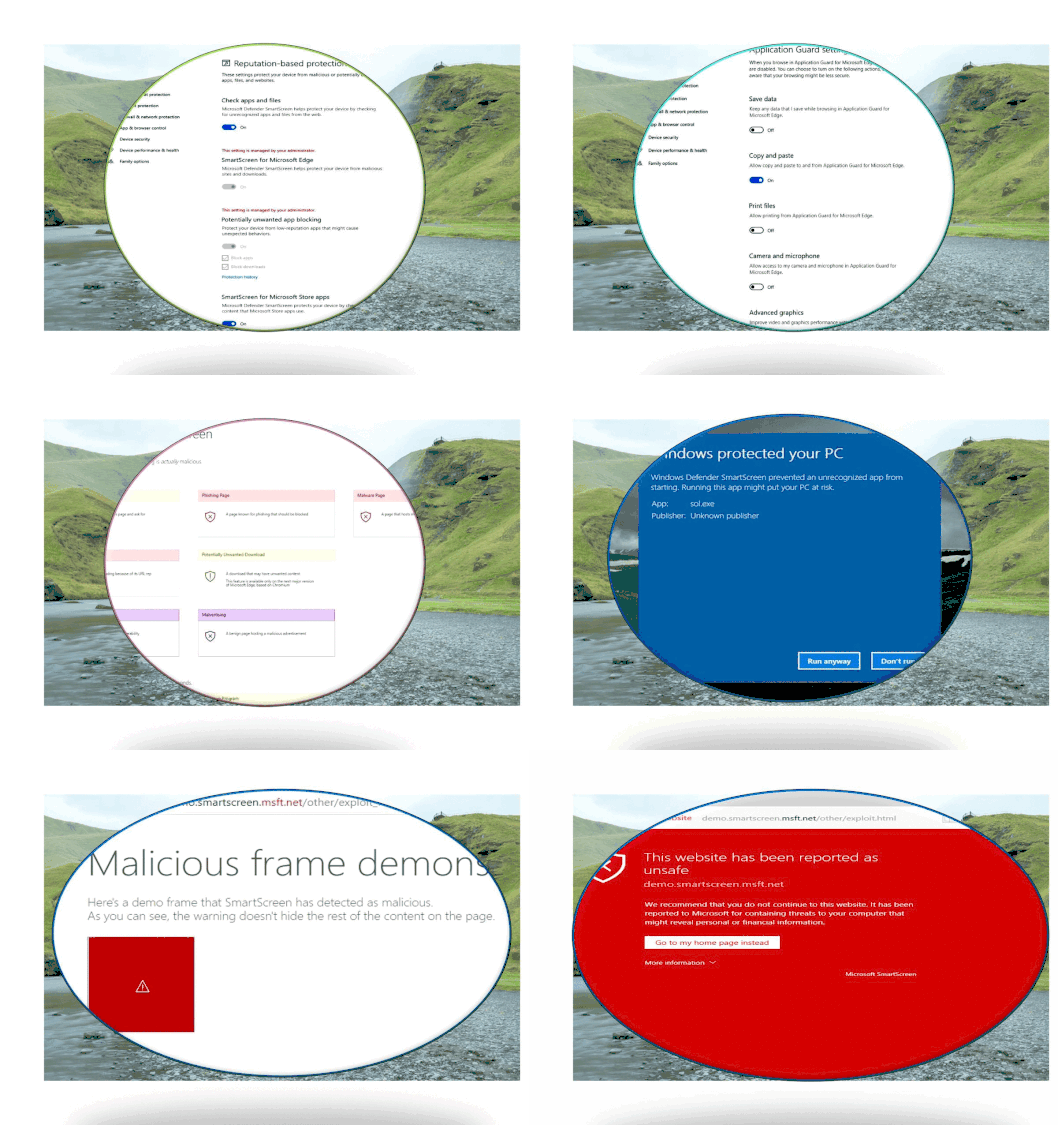
SmartScreen has become a part of Windows 10 OS, it was named as Windows Defender SmartScreen. It is useful to protect not just Edge, Internet Explorer browsers but also other applications such as third-party browsers, Email Client and Apps from malicious Web link attack, malicious Web download threat. Let us have a quick look into SmartScreen functionalities:
- Anti-phishing and anti-malware support. Microsoft Defender SmartScreen helps to protect users from sites that are reported to host phishing attacks or attempt to distribute malicious software.
- Prevent drive-by attacks. Drive-by attacks are web-based attacks that tend to start on a trusted site, targeting security vulnerabilities in commonly used software. Because drive-by attacks can happen even if the user does not click or download anything on the page, the danger often goes unnoticed.
- Reputation-based URL and app protection. Microsoft Defender SmartScreen evaluates a website’s URLs to determine if they’re known to distribute or host unsafe content. It also provides reputation checks for apps, checking downloaded programs and the digital signature used to sign a file. If a URL, a file, an app, or a certificate has an established reputation, users won’t see any warnings. If, however, there’s no reputation, the item is marked as a higher risk and presents a warning to the user.
- Improved heuristics and diagnostic data. Microsoft Defender SmartScreen is constantly learning and endeavoring to stay up to date, so it can help to protect you against potentially malicious sites and files.
- Blocking URLs associated with potentially unwanted applications. software that can cause your machine to run slowly, display unexpected ads, or at worst, install other software
Website blacklist block example
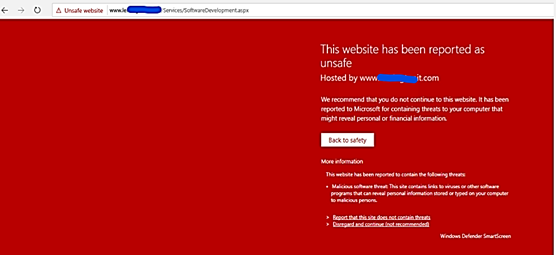
App blocked by Defender SmartScreen example:
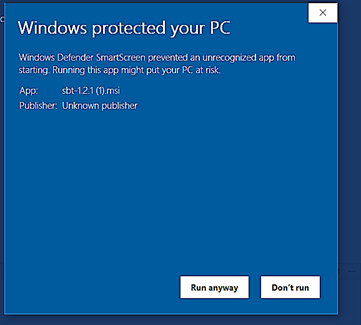
Starting with Windows 10 version 1703 to 2004 you will configure SmartScreen directly by Windows Defender SmartScreen GPO (not through Edge GPO anymore): Administrative TemplatesWindows ComponentsWindows Defender SmartScreenMicrosoft Edge
Submit File for Whitelisting to Microsoft Security Intelligence
You may experience false positive block or warning by Defender SmartScreen when accessing in-house Web App’s URL or Website URLs and you need to whitelist those URLs.
General rule, there will usually be a direct link in the product app notification for error reporting to Microsoft Security Support. In case of Defender SmartScreen, the link shown in the notification as seen here:
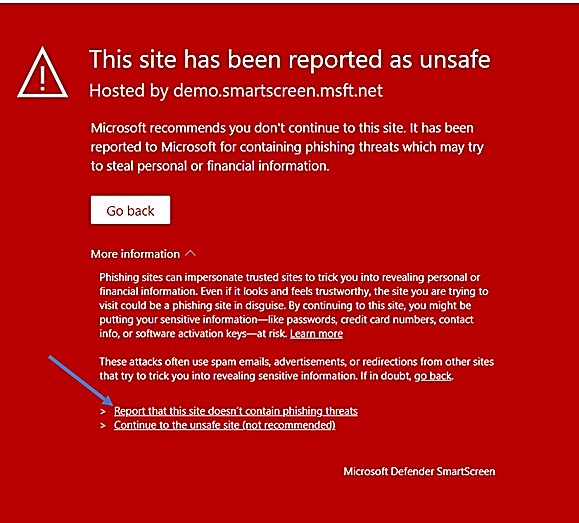
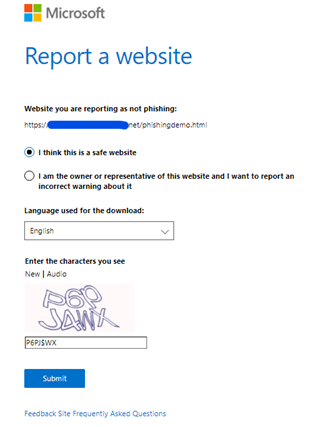
You should provide the information to the Defender SmartScreen Support Team if your Site gets a false-positive alarm of blockage or gets a false positive warning of unknow web site, …, the following screenshot shown the report’s content:
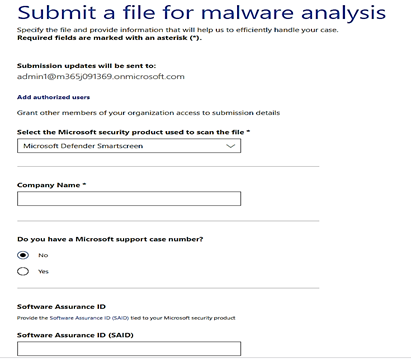
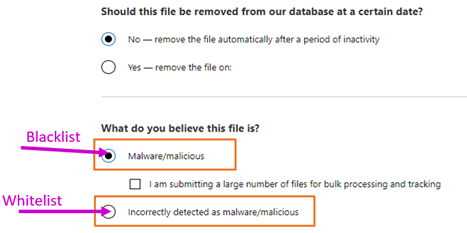
For download block or download warning report of false-positive, you could manually submit the sample files by accessing the WDSI Website and choose to submit as an enterprise user or a developer user. (You could also submit file as a home user too.)
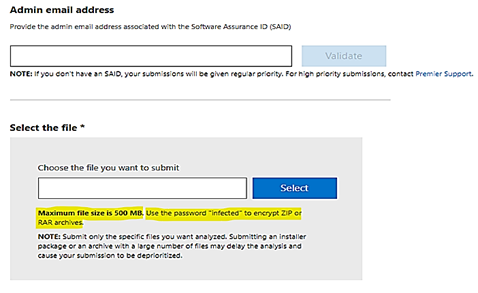
- To upload sample file with size more than 500MB, you could compress it by Zip or RAR archive.
- You could report file for Blacklist to block access to it or report file for Whitelist to allow access.
- You could submit filtering request for almost any of Microsoft’s software and service as per the dropped down list of the above Form:
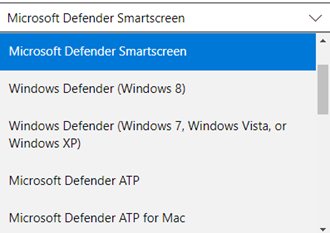
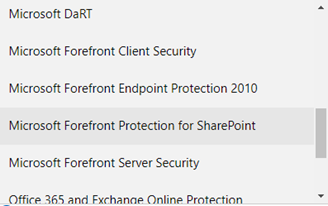
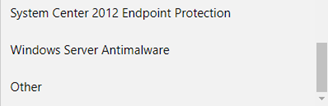
Microsoft goal is to minimize false warnings or blocks. In the rare case of a false warning, Microsoft offered a web-based feedback system to help users and website owners report any errors as quickly as possible. These reports are verified by the support team and mistakes are corrected. Enterprise Premier Customer will get the highest priority in response time.
Flash Player should be removed from the Sites after December 2020
- Flash will not be disabled by default from Microsoft Edge classic (Edge legacy) or Internet Explorer 11 prior to its removal by December of 2020.
- Group policies are available for enterprise admins and IT pros to change the Flash behavior
Flash will be completely removed from all browsers by December 31, 2020, via Windows Update. Companies reliant on Flash for development and playback of content are encouraged to remove the dependency on Adobe Flash prior to December 2020.
Reference:


Recent Comments