This article is contributed. See the original author and article here.
By Anusha Ammaluru
This time we bring you a blog article about Cucumber, Selenium and Integration with Azure DevOps, let’s get started and welcome to the journey to learn Cucumber.
The blog post will cover the following topics:
Cucumber Introduction
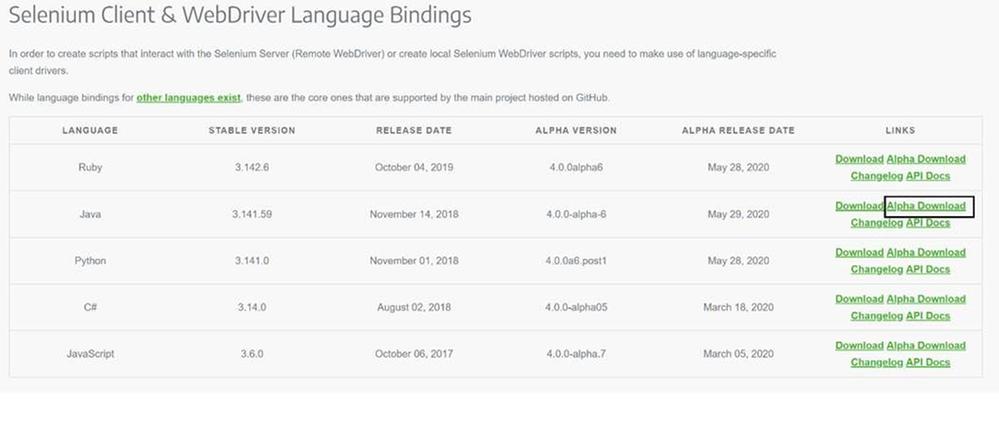
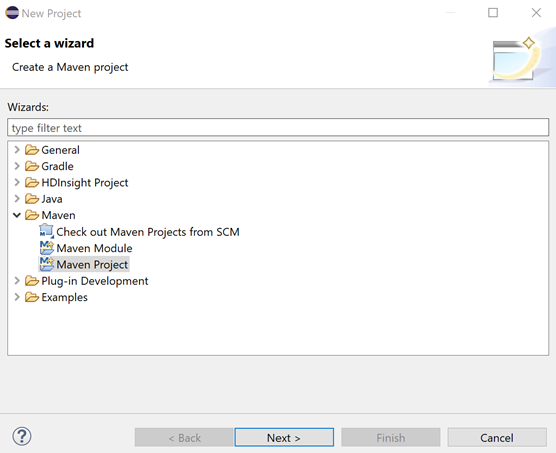
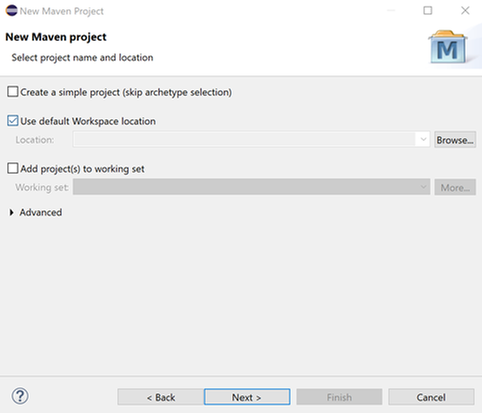
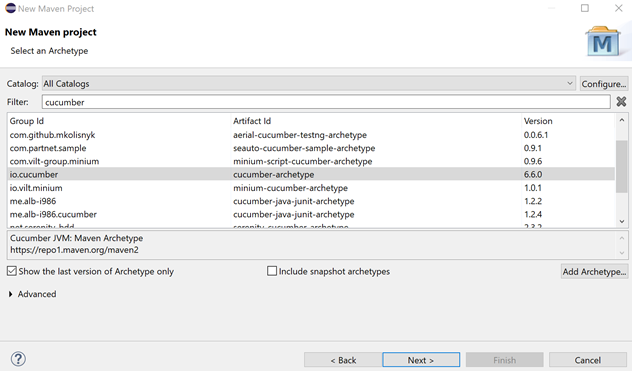
Setup Cucumber with Selenium in Eclipse
Cucumber Basics
Eclipse Integration with Azure DevOps
Cucumber Introduction
Cucumber is a tool that supports Behaviour-Driven Development(BDD). It lets us define application behavior in plain meaningful English text using a simple grammar defined by a language called Gherkin. Cucumber itself is written in Ruby, but it can be used to “test” code written in Ruby or other languages.
Cucumber is one of the most powerful tools. It offers us the real communication layer on top of a robust testing framework. The tool can help run automation tests on wide-ranging testing needs from the backend to the frontend. Moreover, Cucumber creates deep connections among members of the testing team, which we hardly found in other testing frameworks.
What is Gherkin? It is a simple, lightweight, and structured language, which uses regular spoken language to describe user requirements and scenarios. Examples of regular spoken language are English, French, and around 30 more languages. Gherkin contains a set of syntax/keywords
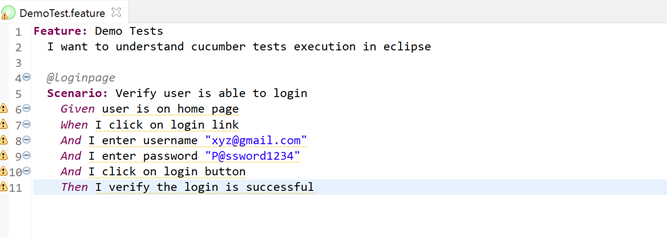
Feature: Defines the feature (generally a user story)
Given: Specifies the pre-condition of the test
And: Defines additional conditions of the test
Then: States the post-condition/expected result of the test
Key points to note:
The test is written in plain English, which is common to all the domains of your project team.
This test is structured that makes it capable of being read in an automated way. Thereby creating automation tests at the same time while describing the scenario.
restart eclipse with -clean option so OSGi bundles are recomputed
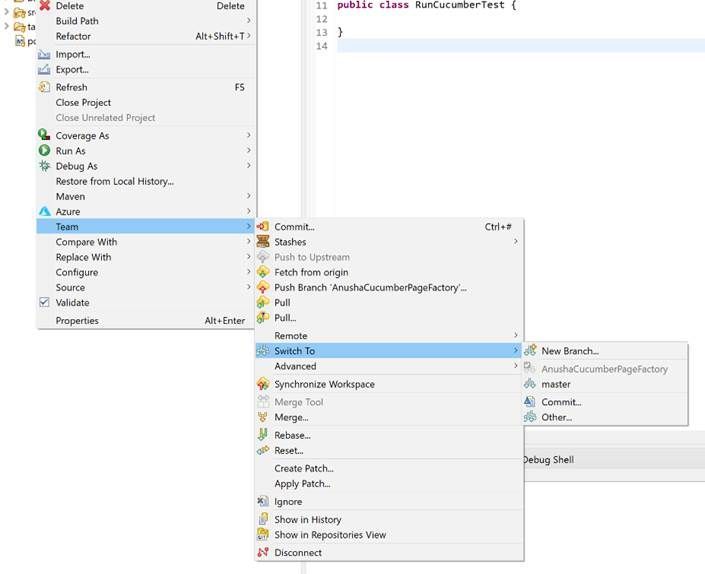
Right-click on the project -> Team and you will have the rest of the git operations
Conclusion
I have created a sample Java Maven project using the Selenium Page factory and Cucumber in GitHub https://github.com/anu-01/CucumberSelenliumPageFactory. This is a great place to get started with a Cucumber-based framework.
This article is contributed. See the original author and article here.
We are pleased to announce, a public community group for leaders, innovators, professionals, and end-users across both industry and government who are interested in Microsoft 365!
The goal of this group is to foster community, share knowledge, and networking around security, collaboration, governance, identity, communication, development, process automation, and much more! Anyone with an interest in government, and digital transformation using Microsoft 365 will want to participate! Please join our MeetUp.com group today for more information, communication, and events. https://aka.ms/m365govmeetup
Join Microsoft US Security CTO @Steve Faehl and Microsoft Cyber security Architect Mark Simos to hear perspectives on supply chain attacks, and how modern cyber security architectures and practices can disrupt the kill chain and reduce risk. Learn applicable remedies to mitigate and reduce exposure from supply chain and other trending threats. Live Q&A to follow.
This article is contributed. See the original author and article here.
As you embark on your cloud journey, there are obvious concerns around security, compliance and proper governance of your digital assets in the cloud. You want to enable your teams to achieve innovation with speed and agility and at the same time ensure that proper guardrails are in place. Azure landing zones help you set up your Azure environment for scale, security, governance, networking, and identity – aligned to your organizational needs. They are a set of architecture guidelines, reference implementations, and code samples based on proven practices—to prepare cloud environments.
We are pleased to share a new Mechanics video on this topic where we talk about the 8 key design areas which describe what you should consider before choosing the right implementation option for Azure landing zones; which could be a ‘start small and expand approach’ where you start with implementing basic landing zone considerations or the ‘enterprise-scale approach’ where you have a rich initial implementation with fully integrated governance, security and operations right from the start.
Whether you’re looking to deploy your first production application to Azure or you’re operating a complex portfolio of workloads, the Azure landing zone implementation options can be tailored to your needs. You can learn more about Azure landing zones through this Microsoft learn module. You can also read more about landing zones in this recently published blog for more information and review the detailed documentation on this topic.
This article is contributed. See the original author and article here.
Always Encrypted in SQL Server 2019 is now in its second iteration which has added the ability to do pattern matching searches on encrypted data with the use of a technology called secure enclaves. In this episode with Mladen Prajdić, we’ll take a short look at what’s needed to make this work, how it works, and how it can benefit your organization for more secure data practices.
This article is contributed. See the original author and article here.
Powering Customer Service Bots are a great way to provide a customer-facing agent who can answer frequently asked questions and fend off 90% of the users who need help. For the other 10%, your bot should be able to escalate the user to a human once their needs can no longer be met by the bot.
There are many solutions out there that provide this live chat capability. ServiceNow and Dynamics both have live chat capabilities, both of which are escalation scenarios supported by AtBot. But what if you do not own either of these solutions, or you just want to be able to leverage Teams as your platform of choice? The video below illustrates this exact scenario, using AtBot, Teams and Power Automate.
[VIDEO EMBED]
Conclusion If this is a scenario that you would like to implement, we would love to hear from you! You can reach out to us at hello@atbot.io or you can get started yourself with AtBot Premium.
This article is contributed. See the original author and article here.
We are pleased to announce the enterprise-ready release of the security baseline for Microsoft Edge version 88!
We have reviewed the settings in Microsoft Edge version 88 and updated our guidance with the addition of one setting that we will explain below. A new Microsoft Edge security baseline package was just released to the Download Center. You can download the version 88 package from the Security Compliance Toolkit.
Basic Authentication
HTTP Basic Authentication is a non-secure authentication method that relies on sending the username and password to the server in plaintext (base64). When Basic Authentication is used over non-secure HTTP connections, the credentials can be trivially stolen by others on the network.
Basic Authentication for HTTP has been configurable since Internet Explorer 7. Until now, however, there wasn’t a way to configure it for Microsoft Edge. With version 88 we now have that ability and are recommending the disablement of basic authentication over HTTP. Disabling Basic Authentication over HTTP falls in line with our other security baselines where we disable this method.
Microsoft Edge version 88 introduced 17 new computer settings and 17 new user settings. We have included a spreadsheet listing the new settings in the release to make it easier for you to find them.
As a friendly reminder, all available settings for Microsoft Edge are documented here, and all available settings for Microsoft Edge Update are documented here.
This article is contributed. See the original author and article here.
Intro:
Pinning a visualization from Log Analytics to Azure Dashboards is a fast and easy way to operationalize logs, creating a single pane of glass that allows fast and easy monitoring of resources in your Azure estate.
Multi scope pinning
We have upgraded our pinning capabilities to allow pinning from multi scope queries.
This allows the selection of multiple resources of the same type as the scope of the query – and simply pin a unified visualization spanning cross the selected scopes.
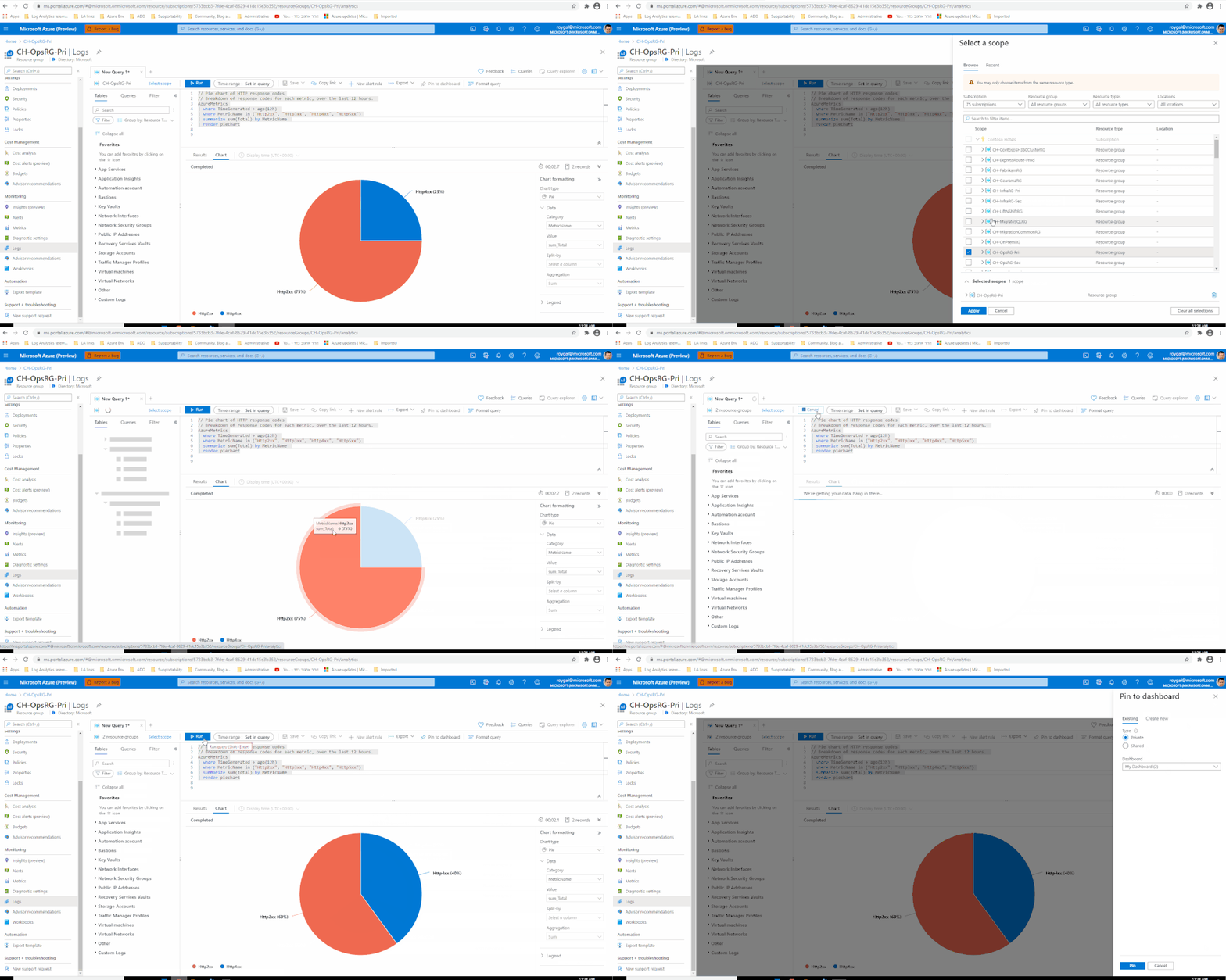
To take advantage of this new capability, use the resource picker to select the scope or scopes you want for your query, run your query and pin to an Azure Dashboard as you normally would:
Feedback
We appreciate your feedback! comment on this blog post and let us know what you think of the this feature.
You may also use our in app feedback feature to provide us with additional feedbacks:
This article is contributed. See the original author and article here.
The Internet of Things and Machine Learning
The Internet of Things (IoT) is arriving at pace, enabling new applications and business models across many consumer, enterprise, and industrial sectors. When you attach a “thing” to the Internet, you are connecting new data sources. which can be costly and resource intensive to store or upload.
That’s where machine learning (ML) comes to the fore. ML is excellent at processing noisy and complex sensor data to determine higher-level insights like “operating normally” versus “cooling unit failed” in a vibration sensor data stream, or “wake word detected” in an audio stream, or “items placed correctly” versus “item out of place” in a video stream.
ML can be used on the IoT device itself, in the cloud, or in a combination of both. ML on IoT devices brings the processing closer to the data generation. This has lots of benefits, including (a) internet connectivity is not relied upon in order for the higher-level states to be determined and actions to be taken on that basis, (b) fewer resources are consumed for transmission of data to the cloud, and data that is not needed for the long-term can be immediately used and then deleted rather than stored, (c) it can enhance privacy, because the raw data might include more personal information (such as voices accidentally captured by an audio sensor designed to listen to machine behaviour), so if that data is processed and discarded locally, then there are fewer privacy risks.
Of course, there are also benefits to operating ML in the cloud. The availability of plentiful server resources means that cloud-based ML can be faster and use more complex models to achieve higher accuracy. Retraining of models, which is resource-intensive, can be quicker and redeployment of models can be immediate.
Hybrid designs are also possible, which involve ML on IoT devices and in the cloud. One example most of us will recognize is voice assistants—the wake word is recognized locally on the device, but then the voice data is streamed to a cloud service where language understanding and response generation is done.
Azure Sphere and ML
You can use Azure Sphere to build IoT devices while relying on Microsoft to stay on top of OS security threats, which means that you can focus on the actual application logic that defines your device, including ML where appropriate.
There are lots of advantages to using Azure Sphere for ML applications.
First, Microsoft secures the device over its full lifetime. Since many devices requiring ML include sensors such as cameras or microphones, it is important to invest in ongoing security as this is a prerequisite for privacy—an insecure device cannot protect private data.
Second, Azure Sphere provides a unique identity for the device and a certificate that encodes that identity for connection to cloud services, the result being that no other device can pretend to be this device. This is particularly important for ML applications because data that is falsely regarded as coming from a device can pollute training datasets, which degrades ML performance.
Third, Azure Sphere’s application update service provides an easy way to update the ML model and ML runtime.
Finally, ML models are valuable intellectual property, and the security of the Azure Sphere platform protects those models.
In a previous blog post, we described how Azure Sphere supports machine learning through “Tiny ML”, and detailed four different Tiny ML solutions that can run on the MT3620. Is this post, we will describe a demo that uses one of these ML solutions in combination with cloud ML service, showing how easy it is to build such hybrid ML solutions with Azure Sphere.
Recognizing faces: a hybrid ML example using Azure Sphere and Cognitive Services
To illustrate how Azure Sphere-based ML and cloud ML can work together, we’re going to use an example application which is recognising individuals. This could be used for scenarios like appliances which personalize their experience based on the user, or safety applications like only allowing authorized and trained individuals into potentially dangerous locations in an industrial building.
Face recognition is supported by an Azure Cognitive Service. It is quick and easy to train this cognitive service to recognize individuals. However, if this were to be used directly by an IoT device watching for a user, then that IoT device would have to upload pictures constantly, which is a poor design for many reasons including the bandwidth and cloud services costs, privacy implications, and energy consumption.
On the other hand, deploying this machine learning model to MT3620 presents difficulties. An appropriate ML model would need to be retrained for each individual user of each device, meaning that every IoT device would need a different model. Some ML models are large, and while various techniques can be used to compress them, ultimately this may not be achievable with high performance for some tasks.
The solution is to use the hybrid approach. In our face recognition example, we perform person detection on MT3620 using a pre-existing model provided by Mediatek as part of their Neuropilot-Micro framework. Then, only when a person is sensed do we need to use the Cognitive Service for face verification to determine identity.
Finally, we should note that machine learning is a technology that it is particularly important to apply responsibly. ML-based products should be designed to protect principles such as being inclusive, human-centric, behaving understandably, and promoting fairness. At Microsoft, we take these responsibilities seriously for our own products, and we provide a range of resources to help our partners and customers navigate this space.
This article is contributed. See the original author and article here.
Microsoft Teams is dedicated to helping our customers achieve more and we spend a great deal of time listening to our customers describe their goals and challenges. This feedback is an essential guide to what we focus on next in the product.
Our engineering teams also partner with industry-leading researchers to help shape new experiences and improve existing ones. This has been especially true over the past 10 months, as the pandemic moved so many of us to remote and hybrid work. We worked together to inform and inspire Teams features like Together mode, Virtual commute, and the new integration with the Headspace meditation app.
It’s exhilarating to share these new experiences with our customers but we don’t often get to share the thinking behind them – or the people who helped bring them to life. People like Jaron Lanier, who coined the term “virtual reality” and is one of Together mode’s leading creators; or Mary Czerwinski, a Microsoft research leader, who’s leading ground-breaking work to bring emotional intelligence to technology. As product leaders and thinkers, we realize the power of listening to customers directly and to what the data and research tells us about their needs. We are committed to understanding how work is evolving, and how we can shape our tools and products to benefit the greatest number of people.
Today, I am excited to help introduce WorkLab, a site focused on the future of work. WorkLab leverages Microsoft expertise and research, as well as customer voices, to spark conversation on the changing world of work. Stories range from Together mode’s origin story (who knew Stephen Colbert was involved?) to tips on how to improve your meeting culture. You’ll hear from an expert on workplace friendships; learn about the technology opportunity for frontline workers; and discover new ways to find balance in the ever-evolving workday.
With WorkLab, we are starting a conversation and we’re counting on this community to jump right in. I hope you’ll take a moment to check out the site, let us know what you think on LinkedIn and Twitter, and keep engaging as this experiment evolves.
Work is changing fast, and we’re dedicated to innovating and bringing value in this rapidly changing landscape. There’s so much we can discover and learn together.








Recent Comments