by Scott Muniz | Feb 9, 2021 | Security, Technology
This article is contributed. See the original author and article here.
Microsoft has released a security advisory to address an escalation of privileges vulnerability, CVE-2021-1732, in Microsoft Win32k. A local attacker can exploit this vulnerability to take control of an affected system. This vulnerability was detected in exploits in the wild.
CISA encourages users and administrators to review Microsoft Advisory for CVE-2021-1732 and apply the necessary patch to Windows 10 and Windows 2019 servers.
by Contributed | Feb 9, 2021 | Technology
This article is contributed. See the original author and article here.
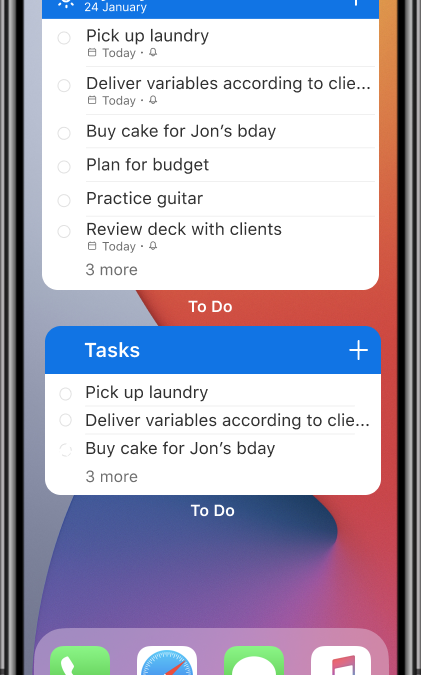
With the launch of iOS 14, you can now add widgets to your home screen. We’re excited to announce that To Do widgets for iOS 14 are now available! We’ve added three new types of widgets for you – read on to learn more.
Your Tasks Widget
The Your Tasks widget helps you select and view tasks from a list of your choice. The widget is available in two sizes: the medium widget shows a list of your tasks, while the large widget shows a list of your tasks along with due dates and other details. By default, the Your Tasks widget shows the Tasks list. To change the list it displays, long press on the widget and select Edit Widget, then select your list of choice.
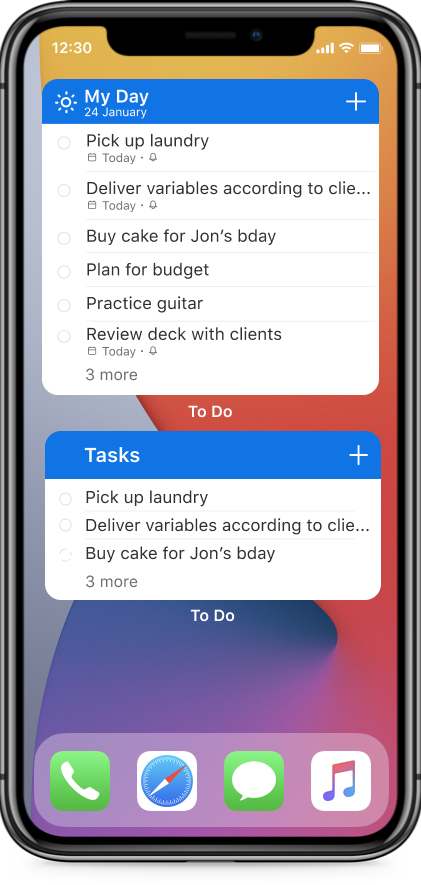
Your Task widget
My Day Widget
In the My Day widget, you can view the first task on your My Day list. Want to see the rest of your list? Tap anywhere on the widget to open the My Day list in To Do.

My Day Widget
Add Task Widget
The Add Task widget allows you to quickly add a task to a list of your choice without having to open the To Do app. To add a task, tap anywhere on the widget. To pick which list your task is added to, long press on the widget and select Edit Widget.
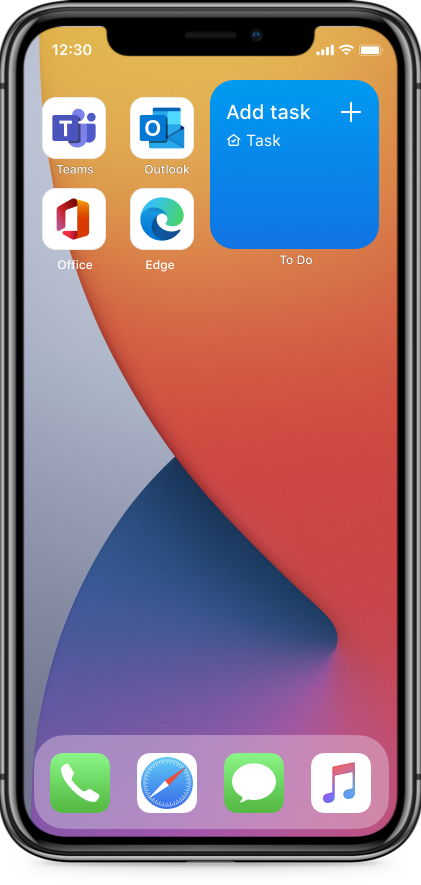
Add Task Widget
How to get started with To Do’s widgets:
- Long press on any empty space on your home screen to enter the home screen edit mode, then tap the plus icon [+] to open the widgets menu.
- Search for To Do or scroll down to find Microsoft To Do, then add the widget of your choice. (You can also add multiple widgets!)
You can also create a widget stack with To Do and Outlook widgets to access your tasks and calendar all in one, or create stacks with multiple To Do widgets to keep track of all your tasks in one view.
We’d love to hear your feedback on the new widgets. What’s your favorite widget? Let us know in the comments below or connect with us on Twitter and Facebook. You can also write to us at todofeedback@microsoft.com.
by Contributed | Feb 9, 2021 | Technology
This article is contributed. See the original author and article here.
In the previous post in this series on DevOps for Data Science , I explained that it’s often difficult to try and implement all of the DevOps practices and tools at one time. I introduced the concept of a “Maturity Model” – a list of things you can do, in order, that will set you on the path for implementing DevOps in Data Science. The first thing you can do in your projects is to implement Infrastructure as Code (IaC).
Right away I may have put a few Data Scientists off. No, it isn’t that they can’t set up a server or components, it’s just that this isn’t normally their job. However, in a Data Science project, it’s often the case that you’re working with technologies that the other team members aren’t as familiar with, or perhaps you’re working on a cloud environment. In either case, the software, hardware configuration (virtual or otherwise), containers (if you use those, and yes, you should) Python environments, R libraries, and many other parameters affect the experiment. It’s essential that you’re able to duplicate all of that and store it in a source-control system so that you can re-create it for testing, deployment and the downstream phases.
That brings us to scripts. There are lots of ways to build a Virtual Server these days, both on and off premises. Containers are deployed with scripts. Python (using Anaconda) and R (using packrat or Checkpoint packages) environments can be set with dependency files or in the code itself, and both have ways of handling library and function versions. All of that can and should roll up into a repeatable set of steps so that you can re-deploy to that exact environment for accurate testing.
If you’re using Microsoft Azure, the Resource Manager is a method of gathering all of the pertinent resources for your solution under a single umbrella. After you create your storage, servers, services, networks and whatever else you need, a simple click of the “Properties” panel allows you to script out everything into a JSON file that you can edit, version, or save, and redeploy it with PowerShell, C#, Python or even the Azure Portal itself. Other cloud providers offer similar features to create artifacts from code. In any case, get whatever scripting artifacts that re-create your environment into your project at a given state.
Even if you don’t develop a full DevOps mindset at your organization, this is a skill you can and should learn. And if you do, you’re on your way to a better structured and managed project.
See you in the next installment on the DevOps for Data Science series.
For Data Science, I find this progression works best – taking these one step at a time, and building on the previous step. Here are the articles in this series on implementing DevOps in Data Science:
- Infrastructure as Code (IaC) (This article)
- Continuous Integration (CI) and Automated Testing
- Continuous Delivery (CD)
- Release Management (RM)
- Application Performance Monitoring
- Load Testing and Auto-Scale
In the articles in this series that follows, I’ll help you implement each of these in turn.
(If you’d like to implement DevOps, Microsoft has a site to assist. You can even get a free offering for Open-Source and other projects: https://azure.microsoft.com/en-us/pricing/details/devops/azure-devops-services/)
by Contributed | Feb 9, 2021 | Technology
This article is contributed. See the original author and article here.
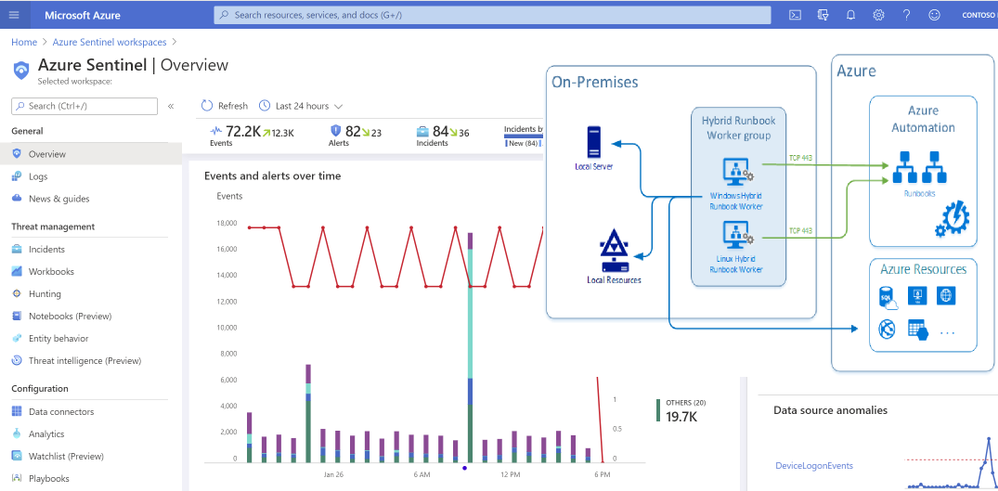
Many organizations have an on premises Active Directory infrastructure that is synced to Azure cloud. However, given that the on-prem side is the authoritative source of truth, any changes, such as disabling a user in the cloud (Azure AD), are overridden by the setting defined in the on-prem AD in the next scheduled sync. This presents challenges when you want to orchestrate a user property change from Azure that needs to persist even after the sync happens. To address the problem, this solution leverages Azure Automation Accounts and Hybrid Worker features across Windows & Azure. Automation Accounts are used to perform cloud-based automation across Azure and non-Azure environments. For non-Azure environments such as an On-Premises Active Directory, an Automation Hybrid Worker is required in addition to the Automation Account to be able to issue commands to the On-Premises Active Directory from Azure. Hybrid Workers can be used in Linux and Windows environments and if one has deployed Azure Arc , then they can also be used with the same OS types running in AWS or GCP so long as those machines are reporting to a Log Analytics workspace.
Deployment Steps
Create an Automation Account and link it with the Log Analytics Workspace
- Create an Automation Account from the Azure Portal
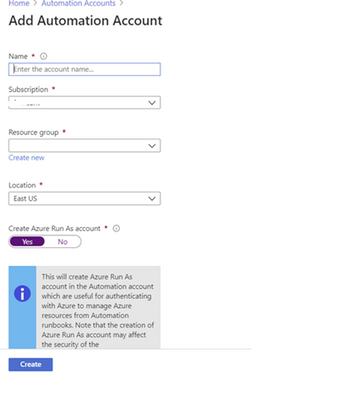
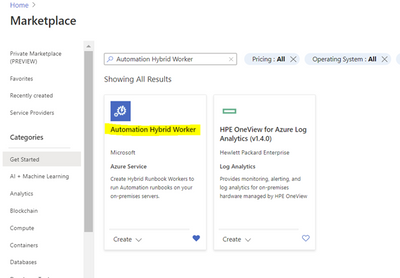
2. Deploy the Automation Hybrid Worker solution from the Azure Market place
Link a Log Analytics Workspace to your Automation Account.
Link the LA workspace to an automation account using the “Change Tracking” menu item on the list. If the Log Analytics workspace is in either East US or East US2 then you need to use the region mapping in the following link to select the location of your automation account: Supported regions for linked Log Analytics workspace | Microsoft Docs
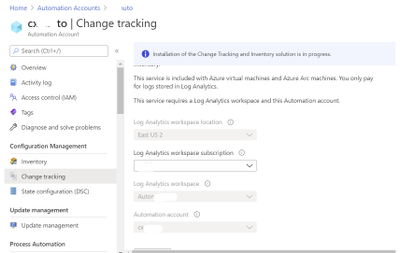
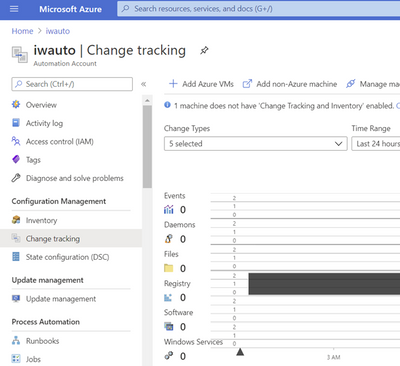
From the same Automation Account menu, create a Hybrid Worker Group
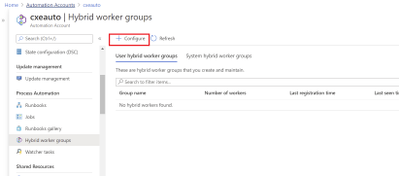
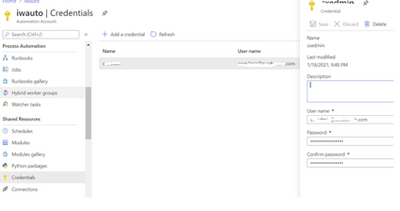
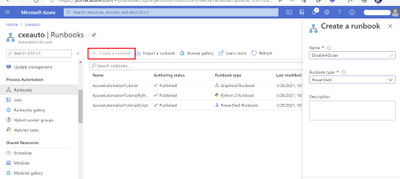
To create a new PowerShell Runbook navigate to you Automation Account and select the Runbooks blade.
Select PowerShell from the Runbook type menu and paste the below script in the resulting window. Click save then publish to activate the Runbook.
Note: the script also includes code to report an error in case of a failure in the process of disabling the account:
Param (

[string] $SAMAccountName

)

if (Get-Module -ListAvailable -Name ActiveDirectory) {
    Write-Output "ActiveDirectory PowerShell module already exists on host."
}
else {
    Write-Output "ActiveDirectory PowerShell module does not exist on host. Installing..."
    try {
        Import-Module ActiveDirectory
    }
    catch{
        Write-Error "Error installing ActiveDirectory PowerShell module."
        throw $_
        break
    }

    Write-Output "ActiveDirectory PowerShell module installed."
}

Write-Output "Finding and disabling user $SAMAccountName"
try {
    Get-ADUser -Identity $SAMAccountName | Disable-ADAccount
}
catch {
    Write-Error "Error disabling user account $SAMAccountName"
    throw $_
    break
}
Write-Output "Successfully disabled user account $SAMAccountName"
The script takes in a SAMAccountName parameter which it uses to find the appropriate user and disable the account. This script can be modified to do a variety of other tasks, such as password resets, adding/removing users to/from groups, etc.
Create a test user in Active Directory then perform the steps in the on-prem machine to install the Hybrid Worker feature
Deploy the below script from this URL: PowerShell Gallery | New-OnPremiseHybridWorker 1.7 . Depending on the PowerShell module currently installed on your machine you may need manually download the file. If you do so, you will need to rename the extension to a .zip file first then extract to the directory where you’ll execute the script from.
This script performs the following actions:
1) Install the necessary modules
2) Login to an Azure account
3) Check for the resource group and automation account
4) Create references to automation account attributes
5) Create an Log Analytics Workspace if needed
6) Enable the Azure Automation solution in Log Analytics
7) Download and install the Microsoft Monitoring Agent
8). Register the machine as hybrid worker
To register your HybridWorker in Azure add the details of your hybrid runbook into the parameters to be passed to the creation command execute the below statement at your PowerShell prompt:
$NewOnPremiseHybridWorkerParameters = @{
AutomationAccountName = “iwauto”
AAResourceGroupName = “AD-Onprem”
OMSResourceGroupName = “AD-Onprem”
HybridGroupName = “AutoGroup”
SubscriptionID = “xxxxxxxxxxxxxxxx”
WorkspaceName = “iwautola”}
From the same PowerShell command prompt type: Install-Script -Name New-OnPremiseHybridWorker which will use parameters specified above
This command will open a log on screen to Azure Portal to register the Hybrid Worker in Azure.
The command will open a log on screen in Azure Portal to register the Hybrid Worker in Azure
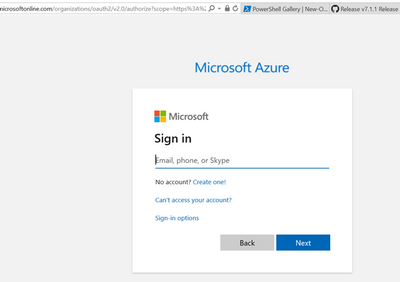
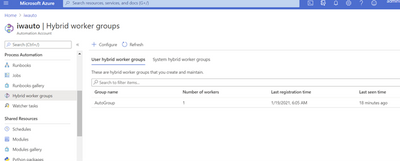
To confirm successful registration, navigate to your automation account then select Hybrid worker groups. You should see the recently registered Hybrid Worker Group in the list per below screen shot.
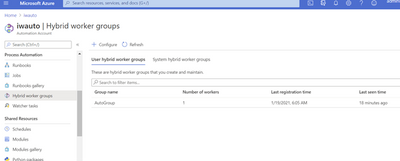
If you get the error indicating that the PowerShell file is not digitally signed, then you will need to execute the command below:
Set-ExecutionPolicy RemoteSigned
You may still have to unblock the file in case changing the execution policy alone does not work. The command to do this is from a PowerShell prompt is:
Unblock-File -Path .New-OmPremiseHybridWorker.ps1
It is also recommended that you use TLS versions more recent than 1.0 and 1.1. For this reason you may be required to run the below command as well:
[Net.ServicePointManager]::SecurityProtocol = [Net.SecurityProtocolType]::Tls12
You can learn more about the process of deploying Hybrid Workers here:
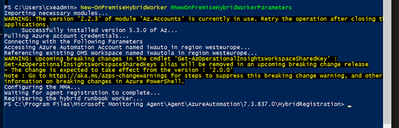
On successful registration you should see an output similar to the below:
To confirm successful registration, navigate to your automation account then select Hybrid worker groups. You should see the recently registered hybrid worker group in the list per below screen shot.
Test the Runbook
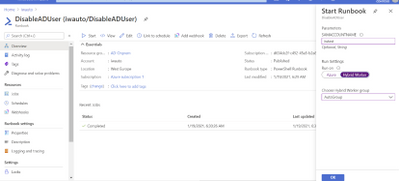
To ensure the Runbook is working ok before integrating with a Logic App, execute the Runbook manually from the Azure Portal and specify a test account in the SAMAccountName box, select HybridWorker in the Run Settings section and then choose your Hybrid Worker group name from the drop-down list:
Steps to orchestrate from Azure Sentinel/Logic Apps
Below is the structure of the orchestration Logic App that triggers the runbook to disable qualifying accounts from the On-Prem AD. With this action the next on-prem to cloud AD sync will maintain the state on the account – in this case disabled, until the setting is reversed from the on-prem AD Users & Computers management console.
High-Level structure of the Playbook
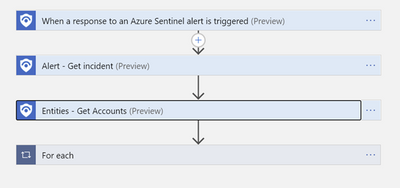
Detailed structure of the Playbook:
Extract entity details (to capture user ID) following trigger execution
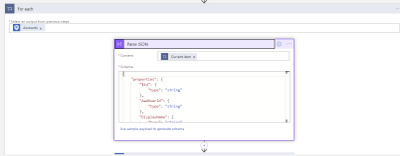
Parse the JSON output from the Entities-Get Actions step above in order to extract the Azure User ID and SAM Account name needed to perform disable operations-first on Azure then on the On-Prem Active directory.
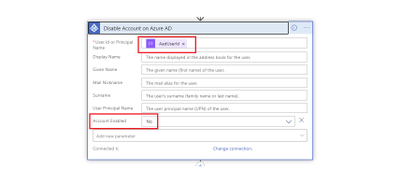
Disable Account in Azure AD
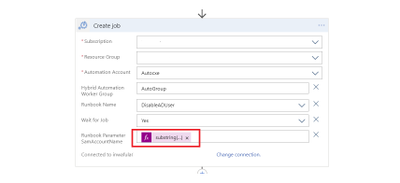
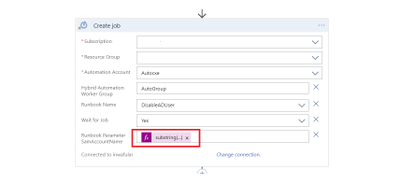
Create Hybrid Automation Job
The string function below is contained in the ‘Runbook Parameter SamAccountName’ above and is needed to extract the SAMAccount from the UPN of the user as the On-Prem AD can only act on the User ID when specified in this format:
substring(body(‘Parse_JSON’)?[‘Name’], 0, sub(length(body(‘Parse_JSON’)?[‘Name’]),indexOf(body(‘Parse_JSON’)?[‘Name’],’@’)))
To simulate the block orchestration from Azure Sentinel, you may use the below sample query to create an Analytics rule that will detect a failed log on due to a wrong password entered on Azure AD portal. You can then simulate failed log on attempts with the account you wish to test with.
SigninLogs
| where Location == “KE” and Identity contains “mytestaccount” and ResultType ==”50126″
| extend AccountCustomEntity = AlternateSignInName
This Playbook can be deployed directly from GitHub on this link: Azure-Sentinel/Playbooks/Block-OnPremADUser at master · Azure/Azure-Sentinel (github.com)
Troubleshooting guide: Troubleshoot Azure Automation Hybrid Runbook Worker issues | Microsoft Docs
Special thanks to @haelshab for his valuable collaboration in this project & @YanivS for suggestions to enhance the solution

by Contributed | Feb 9, 2021 | Technology
This article is contributed. See the original author and article here.
Microsoft partners like Greater Than, Letsignit, and ZEDEDA deliver transact-capable offers, which customers can purchase directly from Azure Marketplace. Learn about these offers below:
 |
Enerfy Loyalty: Designed to help auto insurance carriers create engaging programs that generate customer loyalty and increase sales, Enerfy Loyalty from Greater Than helps your organization collect valuable customer data, increase customer satisfaction, strengthen customer retention, and gain new customers via peer recommendations.
|
|
Letsignit Email Signature Manager: Keep your company branding consistent and transform email into a low-cost acquisition channel with Letsignit’s cloud-based email signature management solution. Letsignit features an easy-to-use interface and Office 365 integration to help you showcase your brand and communicate key contact information while freeing up IT resources across your organization.
|
 |
ZEDEDA Edge Orchestration for Azure IoT: Integrate ZEDEDA’s cloud-based orchestration solution to simplify Microsoft Azure IoT Edge project deployment and scale quickly across thousands of nodes. The fully automated, one-click Azure IoT Edge runtime deployment features comprehensive security capabilities and integrates Azure IoT Hub Device Provisioning Service to eliminate manual, per-device configuration.
|
|
by Contributed | Feb 9, 2021 | Dynamics 365, Microsoft 365, Technology
This article is contributed. See the original author and article here.
Having spoken to over 300 Microsoft Dynamics 365 on-premises customers, I have a lot of empathy for companies that are faced with the decision to migrate to the cloud. Most commonly I’ve heard that changing business software can appear risky, daunting, and expensive, but the customers that have successfully migrated to Dynamics 365 will tell you that the benefits of cloud far exceed the perceived risks of going through migration, or simply remaining on-premises. For me, I think of cloud migration as buying a house. You can enjoy the benefits right away while investing in your future. Take the first step toward cloud success by migrating your on-premises solution with expert guidance from Microsoft. Below are the three main reasons why you should accelerate your journey to the cloud with Dynamics 365.
1. Peace of mind
COVID-19 has established that having your business applications in the cloud is critical for ensuring business continuity through unexpected external events that are out of your control. Companies that are on Dynamics 365 in the cloud are able to pivot their resources and processes to respond to the unprecedented circumstances. These companies are able to quickly switch to a fully remote work environment, and swiftly manage the variability in supply and demand. Moreover, since Dynamics 365 is a fully managed software as a service (SaaS), they don’t have to worry about upgrades or security enabling them to invest in strategic work rather than managing IT. This is a unique time in history that may become the new normal for businesses, so now is the time to migrate your on-premises applications to Dynamics 365 in the cloud to stay resilient and flexible.
2. Enhanced functionality
Dynamics 365 provides increased productivity from latest functionality, such as real-time insights and customized modern reporting optionshelping business owners get a 360-degree view of their business. With Dynamics 365 you are always on the latest software version with improved features that address industry and regulatory trends. Dynamics 365along with Microsoft Teams, Microsoft Office, Microsoft Azure, and Microsoft Power Platformoffers extended functionality and competitive advantages for you to always stay ahead. With these enhanced capabilities, several companies on Dynamics 365 can fundamentally reimagine their business processes while being more agile and responding to change even faster.
Read additional details how leading recreational vehicle maker, Lippert Components, Inc., advanced scalability by migrating from Dynamics 365 on-premises to Dynamics 365 in the cloud.
3. Economic value
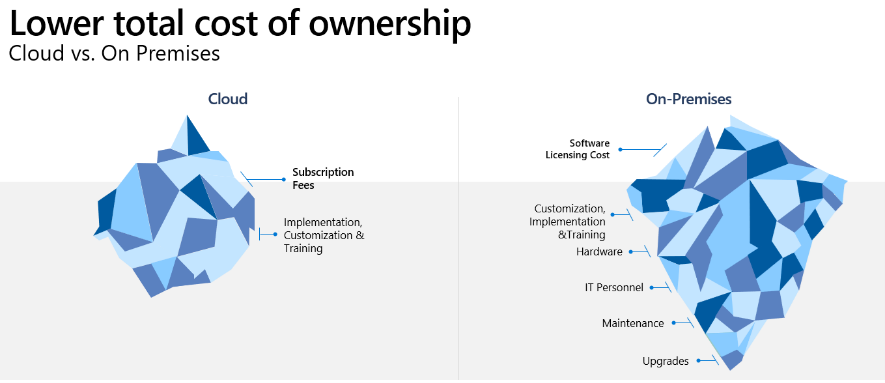
Organizations on Dynamics 365 have often observed that they have higher financial returns when compared to staying on on-premises business applications. The primary cost savings come from improved business and IT productivity. Plus, when you compare your on-premises costs to cloud, don’t stop at the cost of software licenseslook at the total economic impact. For example, companies in the cloud don’t have to manage servers, IT-focused maintenance, or periodic upgrades anymore. According to a recent Forrester study, when migrating from Microsoft Dynamics AX to Microsoft Dynamics 365 Finance + Operations, there was a 109 percent ROI with a payback period of six months. Likewise, when migrating from Microsoft Dynamics CRM to Dynamics CE, there was a ROI of 63 percent with a payback period of 10 months.
Get started with the Dynamics 365 Migration Program assessment
COVID-19 has accelerated the cloud journey of many companies. If you are on Dynamics AX or Dynamics CRM then you can apply to take part in the Dynamics 365 Migration Program. The migration program offers access to a dedicated team of migration advisors, no-charge migration assessments, pricing offers, tools, and migration support for qualified customers.
Learn more about the no-charge Standard Migration Assessment. This virtual technical assessment helps you to:
- Understand the benefits of moving from an older, on-premises solution to the cloud.
- Identify business objectives and tie those into the functionality of Dynamics 365.
- Learn how to optimize the migration process with a focus on reducing effort and costs.
- Determine your next steps toward cloud transformation.
Join many customers who have benefited from the program.
“I was impressed about the information received from the migration assessment. The results will give us confidence for the next steps.”Senior Business Analysist
“Our migration advisor was very thorough. He did great degree of analysis and provided greater insights on the good, the bad, and the ugly. He was knowledgeable and took the time to answer every question my team had along the way.”Senior Vice President and Chief Information Officer
To apply or learn more, visit the Dynamics 365 Migration Program to take the first step toward cloud success.
The post 3 reasons to accelerate your migration journey to Dynamics 365 appeared first on Microsoft Dynamics 365 Blog.
Brought to you by Dr. Ware, Microsoft Office 365 Silver Partner, Charleston SC.
by Contributed | Feb 9, 2021 | Technology
This article is contributed. See the original author and article here.
Explore the new role-based learning paths and modules that were released last month on Microsoft Learn. We continually add to our training and certification portfolio to help you build your skills and then validate them by earning certification. Check out our two new Business Central learning paths—one on setting up warehouse management and one on managing warehouse practices—and our new modules on Microsoft Power Platform, Power Virtual Agents, Business Central, and more. You can work through these and other modules at your own pace. Using free, online training on Microsoft Learn, you can develop new skills to use on the job—and to show your employer that you’re ready to advance your career. If you need help figuring out which training to take, check out the Dynamics 365 learning paths page, where you’ll find useful collections, learning paths to get you started, and popular modules.
The following learning paths and modules were released in January 2021.
Microsoft Power Platform
Power Virtual Agents
Supply Chain Management
Business Central
Learning path/module
|
Role
|
Certification
|
Set up warehouse management in Microsoft Dynamics 365 Business Central
Six modules
|
Functional consultant, business user
|
N/A
|
Manage warehouse processes in Microsoft Dynamics 365 Business Central
Three modules
|
Functional consultant, business user
|
N/A
|
Move items in Dynamics 365 Business Central
Module
|
Functional consultant, business user
|
N/A
|
Use item journals in the warehouse in Dynamics 365 Business Central
Module
|
Functional consultant, business user
|
N/A
|
Produce items in the warehouse in Dynamics 365 Business Central
Module
|
Functional consultant, business user
|
N/A
|
Get started with warehouse management in Dynamics 365
Module
|
Functional consultant, business user
|
N/A
|
Set up zones and bins in Dynamics 365 Business Central
Module
|
Functional consultant, business user
|
N/A
|
Create new bins in Dynamics 365 Business Central
Module
|
Functional consultant, business user
|
N/A
|
Set up put-away templates in Dynamics 365 Business Central
Module
|
Functional consultant, business user
|
N/A
|
Prepare warehouse management for item tracking in Dynamics 365 Business Central
Module
|
Functional consultant, business user
|
N/A
|
Configure bins on the location card in Dynamics 365 Business Central
Module
|
Functional consultant, business user
|
N/A
|
Receive orders in Dynamics 365 Business Central
Module
|
Functional consultant, business user
|
N/A
|
Human Resources
by Contributed | Feb 9, 2021 | Technology
This article is contributed. See the original author and article here.
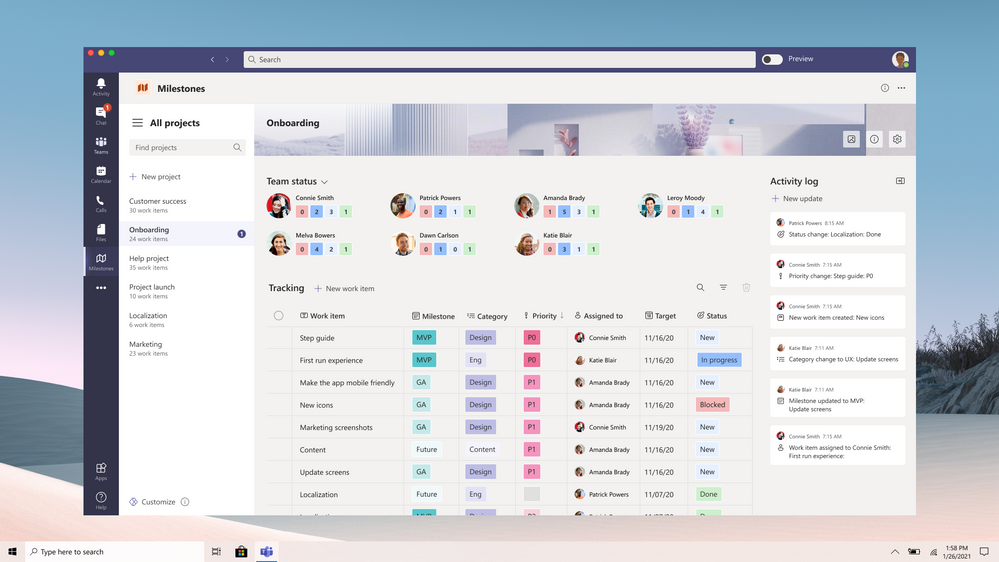
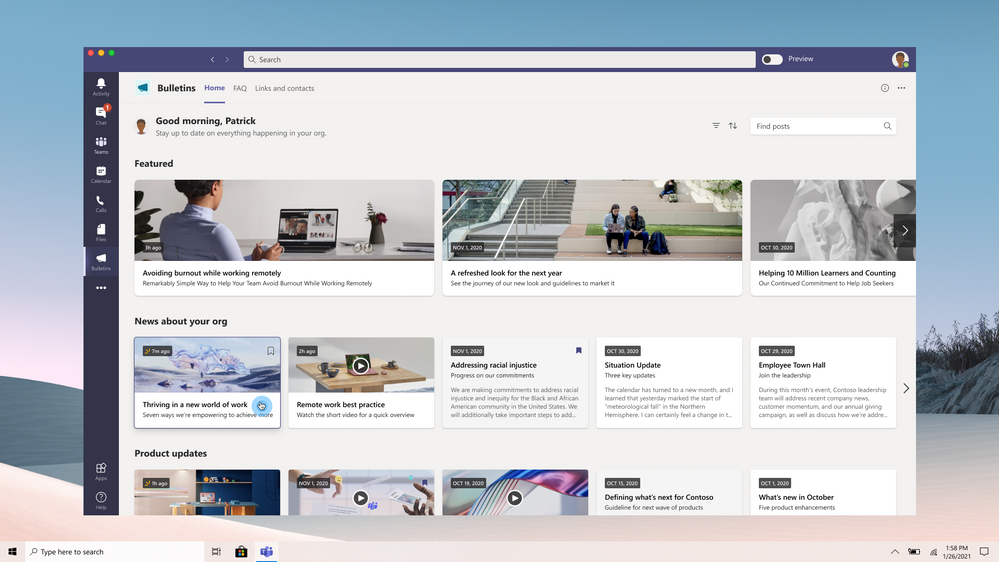
Within the Teams app store, you’ll now find two brand new applications published by Microsoft: Milestones and Bulletins. With the Milestones app, you can seamlessly track projects across your company, and with Bulletins, you can quickly publish news articles to the rest of your company.
Both are deeply integrated within Teams, but what makes them unique is that they are built with Power Apps on top of the recently released Dataverse for Teams. By shipping them on top of Dataverse for Teams, we’re making it possible for you to fully customize these apps from top to bottom and to leverage them as inspiration to build your own apps!
Further customizing the apps to fit your needs
Like the existing Employee ideas, Inspection, and Issue reporting Teams apps, these brand new apps are built on top of Power Apps so that you can easily customize them to address your company’s specific needs.
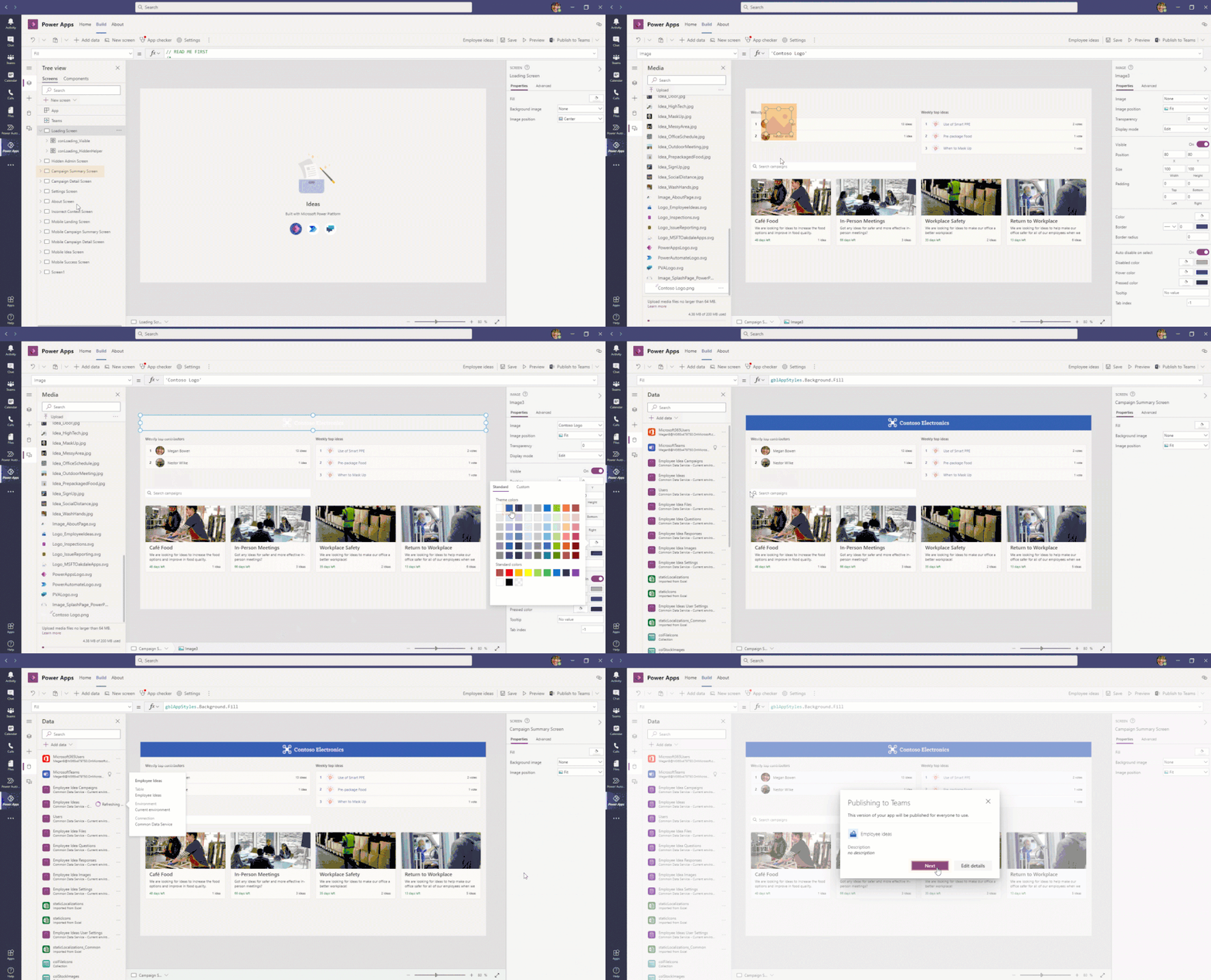
With Power Apps and Dataverse for Teams, you can change things as simple as the branding of your app, all the way to what type of data you want to collect and the business rules you want to enforce.
Using Milestones and Bulletins as inspiration for your next app
If the new Milestones and Bulletins apps have inspired you to build your own apps on top of Dataverse for Teams, check out our documentation on how to get started.
In particular, these new apps take advantage of the recently released share with colleagues functionality. With the new share with colleagues feature, you can take apps like Bulletins and broadly distribute them to the rest of the company. The same feature can allow you to build organization-wide apps like time reporting, invoicing, expense reporting, and more, all on top of Dataverse for Teams.
Governing apps on top of Dataverse for Teams
Lastly, I would be remiss if I didn’t call out the powerful tools we ship to allow admins to govern apps like Milestones and Bulletins. In particular, we’ve shipped a powerful template as part of the Center of Excellence Starter Kit to manage Dataverse for Teams environments. With it, users within your company can provide business justifications for Dataverse for Teams so that admins can approve the usage.
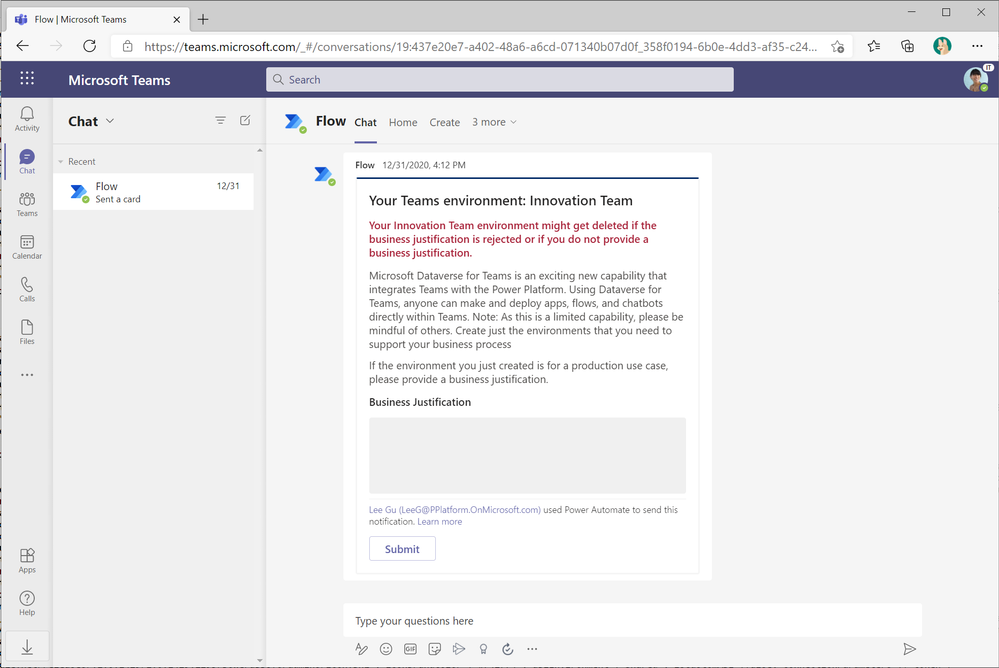
Team owners can provide a business justification for their new environment within X days of creating the environment
|
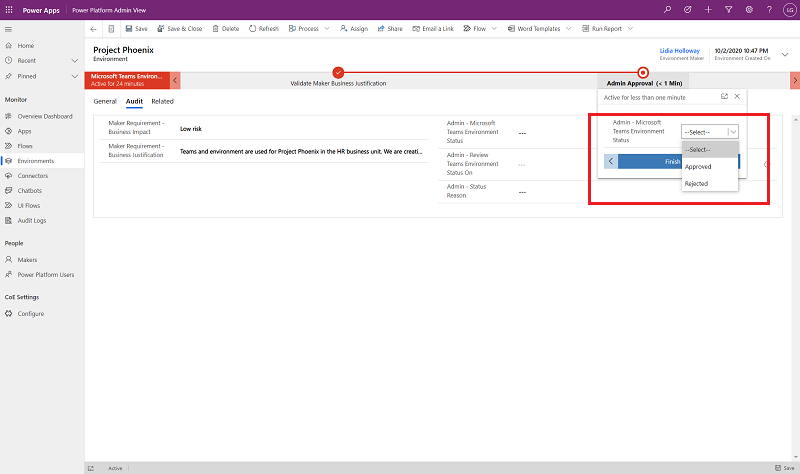
Admins approve or reject the submitted business justifications, and optionally mark them for a later review.
|
We can’t wait to see what you’re able to build with Power Apps and Teams
We’re always excited to see what the community is able to build. To learn more about the Milestones and Bulletins, and to get further inspiration for what’s possible, check out the deep dive into these two apps by the Power Apps team.

by Contributed | Feb 9, 2021 | Dynamics 365, Microsoft 365, Technology
This article is contributed. See the original author and article here.
When your business depends on you to make informed strategic, tactical, and operational decisions, being able to gain actionable insights from your fraud protection system is crucial. Data should drive everything from reconfiguring rules to targeting new fraud vectors, manually reviewing transactions, presenting at monthly business meetings, or even monitoring and troubleshooting technical issues.
Built on an extensive data platform, Dynamics 365 Fraud Protection enables you to develop a toolkit with custom reports and applications that help you establish a robust fraud management strategy while providing ongoing insights into your business.
Detecting and understanding fraud
Minimizing fraud begins with understanding fraud by identifying trends and patterns. Reporting helps you do just that by providing a historical view of fraud volume for your business. A customized fraud tracker is one example of a report that you can add to your fraud protection toolkit. These types of reports enable analysts to filter historical data and view score distributions by dimensions (for example, country or region, payment instrument type, or product category) to highlight high-risk segments. These reports can then be used to configure new or existing rules to target those events.
Tracking and raising awareness of high-level fraud trends also provides valuable insight for business planning. Reports used for monthly business reviews can be used to drive conversations around monthly targets, how your fraud protection system is performing, areas for improvement, and plans for upcoming product or process changes that could impact fraud rates.
Defining the analytics that matter for your business is imperative. Measuring success and understanding the impact, scale, fraud pressure, and efficacy of your systems will play a large role in influencing your business strategies.
Managing services and operations
Fraud operations often require multiple touchpoints for members within the organization to either review, monitor, or act on events occurring across various systems. Often businesses choose to develop custom applications to cover these overarching use cases. They will weigh the cost of maintaining these custom applications with the potential improvement in operational efficiency.
For example, if you have an IT organization that manages the service health of multiple business applications, it may be valuable to create a single application to monitor and alert on the health of them all. Sending API request times and errors for your fraud protection solution within the context of all of the other service notifications on a single application would streamline the process altogether. Adding these custom applications to your fraud protection toolkit will not only improve the health of your risk management solutions but also your business all-up.
How Dynamics 365 Fraud Protection can help
Dynamics 365 Fraud Protection provides in-app reporting through scorecards, monitoring dashboards, and a virtual fraud analyst. In addition, understanding the power of joining data across multiple business systems and each business’ unique reporting needs, we have also provided a platform to easily extract and manipulate the data available within Fraud Protection.
Event tracing provides both a real-time and bulk data egress mechanism to send data to your own Azure Event Hubs or Azure Blob Storage locations. By subscribing to events to track transactions, portal actions, or API performance through our Event Tracing page, you can easily analyze your service, extract insights, and develop custom reports by using Azure Stream Analytics or Logic Apps and Dataverse. Here you can join to other datasets available within your tenant to create a rich set of real-time reports such as audit logs, fraud trackers, or monthly business reports.
You can also utilize the data available in Event Tracing to create custom mobile or desktop applications to target unique use cases, which support your business with the help of Power Apps. Utilize Microsoft’s low-code app development platform to create fraud investigation tools for your support agents, latency monitoring applications, and more.
Next steps
Developing a well-rounded fraud protection toolkit that is customized for your business needs will improve your fraud management strategy. The use of custom reports and applications to address unique needs for your business is a great way to extend existing business processes while incorporating insights from your fraud protection solution. Dynamics 365 Fraud Protection and the event tracing capability can provide the data platform to easily enable your business to configure these new experiences.
Get started today with Dynamics 365 Fraud Protection
Configure event tracing
Get started with sample reports
Get started with sample apps
The post Do you monitor the pulse of your fraud protection operations? appeared first on Microsoft Dynamics 365 Blog.
Brought to you by Dr. Ware, Microsoft Office 365 Silver Partner, Charleston SC.

by Contributed | Feb 9, 2021 | Technology
This article is contributed. See the original author and article here.
Join us for MidDay Café this upcoming 02/22, at 12 noon eastern, as we host Microsoft’s Bill Baer, Senior Technical Product Manager for Microsoft Search.
Search at Microsoft has been a rapidly evolving service building upon the power of the Microsoft Graph. Properly leveraged within an organization the power of search, search driven, applications can be transformational. As Senior Technical Product Manager for Microsoft Search, Bill Baer will be bringing us the latest in Microsoft search to help organizations unlock the potential in their Microsoft 365 data and more.
In addition to our guest segment on search MidDay Café will also feature our hosts Patrick Miller, Mark Litwin, Peter Anello, Samantha Brown, and myself covering the latest in Microsoft news and events, as well as taking open QA around your questions.
MidDay Café 02/22/2021 Agenda:
- Welcome and Introductions.
- Mid-Day Café News and Events
- Microsoft Search and More with Bill Baer, Senior Technical Product Manager for Microsoft Search
- Open Q&A
- Wrap Up
Resources:
Thanks for visiting – Michael Gannotti LinkedIn | Twitter
 Michael Gannotti


Recent Comments