by Contributed | Feb 10, 2021 | Technology
This article is contributed. See the original author and article here.
A new security concept is emerging and consolidating more and more in recent years: the so-called zero-trust security model.
In particular, in the IoT market, security is a crucial element to be considered. This is generally addressed by having your cloud gateway service trusting your devices. Still, when you have something too precious to be sent into the cloud, you also need to think about how your devices trust your cloud gateway, as you would not like having your data transmitted to a malicious endpoint.
Trusting Device vs. Trusting the Cloud Gateway
As mentioned above, frequently, addressing the challenge of trusting a device is handled by merely choosing the best attestation mechanism available (according to your hardware specs) to confirm your device’s identities when connecting to a platform service like Azure IoT Hub.
For example, IoT Hub supports symmetric key, X.509 thumbprint, and X.509 CA (also known as client certificates) attestation methods.
This allows your cloud endpoint to verify that your device is what it states it is.
Ok, this is fine; the cloud portion now can trust the Devices, but what about if a malicious entity performs a DNS Spoofing (https://it.wikipedia.org/wiki/DNS_spoofing) attack and allows your devices to point to a forged alternative cloud gateway?
To provide a quick refresh: a DNS Spoofing happens when an attacker manages to let your DNS query results in a different IP address for the target host. In this case, let’s assume that instead of obtaining the IP address of your IoT Hub, you got an IP address of a forged malicious endpoint pretending to be your cloud gateway!
How can you check this out?
TLS Support in IoT Hub
There is excellent news for you.
IoT Hub supports Transport Layer Security (TLS) (https://docs.microsoft.com/en-gb/azure/iot-hub/iot-hub-tls-support).
What does this mean, and how can it be leveraged?
It means that when your device attempts a connection to it, IoT Hub presents server certificates to connecting clients.
Those certificates are part of a chain-of-trust, and clients could check against those certificates to ensure that the Cloud Gateway is what it states it is.
Chain of Trust?
A chain-of-trust is the practice of validating the security of components up to the “root of trust” (https://en.wikipedia.org/wiki/Chain_of_trust).
In particular, in the context of TLS, your endpoint certificate is typically signed by another certificate that could be a root certificate or an intermediate certificate.
Root certificates are “self-signed,” and you usually trust them because they are emitted by “Certification Authorities” (those are well-known entities wisely recognized in the business of security); they are your “root of trust”.
Typically OSs have those “well-known CAs” in a certificate store, and you do not have to do anything special to accept and recognize them.
So, as a super high-level summary: you got a Root Certificate that signs an Intermediate Certificate that signs your endpoint Certificate.
That’s what happens for IoT Hub Certificates: a well-known CA signs Microsoft-owned Intermediate Certificate with a Root Certificate (Baltimore Cybertrust Root CA); then IoT Hub Server Certificates are signed by one of those Microsoft Intermediate Certificates.
Here are some announced changes in these certificate chains, which are valuable to keep in mind: https://azure.microsoft.com/en-us/updates/iot-hub-tls-certificate-update.
Another critical point to remember is that certificates expire, or better, they have a specific validity period (start/end).
Let me elaborate a bit further on this later.
IoT Hub SDKs
Ok, how does IoT Hub SDKs deals with that?
In a nutshell: it’s a trade-off between operational complexity and ensuring protection against all the possible attack vectors.
Most IoT Hub SDKs only validate that the Root Certificates match the expected one (as mentioned before: Baltimore Cybertrust Root CA) while not enforcing Intermediate Certificates.
Checking against Server Certificate chain-of-trust is a practice known as “Certificates pinning”.
Certificates Pinning
- What’s Certificate Pinning?
- Could it mitigate DNS Spoofing?
- Does it add operational complexity?
Let’s tackle these three questions one by one.
1) Certificate pinning is the practice to restrict what certificates are considered valid for a particular endpoint.
If you don’t do that explicitly, you are usually trusting any certificate presented by your endpoint backed by any well-known Root Certificate trusted by your system.
You can “pin” the Root Certificate, Intermediates, or even your specific endpoint certificate.
2) Well, it could help to mitigate it, yes.
If you “pin” Certificates, you are just restricting the range of acceptable certificate chains. This means that a potential attacker needs to generate a certificate signed by that specific chain to make its rouge endpoint accepted.
While IoT Hub Root Certificate is a well-known public CA, the intermediate certificates are privately-owned by Microsoft.
An attacker couldn’t forge a certificate for its malicious endpoint pretending to be an IoT Hub Gateway as it could get access to the private key of Microsoft intermediate certificates.
3) Yes, this could add complexity. Remember, before I’ve mentioned before that certificates have a life span. It means they expire over time. Root Certificates typically have “some years” of life span while intermediates rotate more frequently (around 6 months or so far, but they might as well have a longer validity period). This is the extra operational complexity to which I refer.
If you build an IoT client which “pins intermediates”, you need to ensure that whenever those intermediates refresh, you can update your client upfront before it cuts itself out because it didn’t recognize your cloud gateway certificates chain anymore.
How to check Intermediates
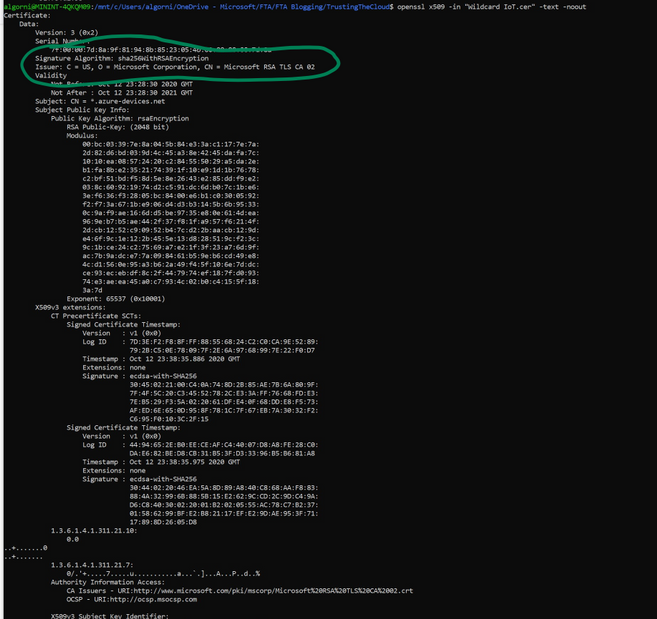
An approach would be using OpenSSL to decode the IoT Hub cert:
openssl x509 -in "Wildcard IoT.cer" -text -noout
Once you find the Intermediates cert you can just verify that the IoT Hub Certificate was signed by that specific Intermediate:
openssl verify -verbose -CAfile "Microsoft RSA TLS CA 02.cer" "Wildcard IoT.cer"
where the first certificate is the Intermediate and the second is your specific IoT Hub Certificate

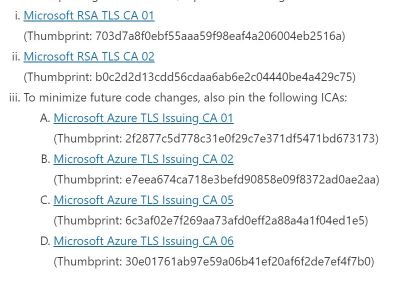
The latest Intermediate certs can be found here:
https://techcommunity.microsoft.com/t5/internet-of-things/azure-iot-tls-changes-are-coming-and-why-you-should-care/ba-p/1658456
There are two main certs:
- Microsoft RSA TLS CA 01
- Microsoft RSA TLS CA 02
Final note
While the practice of certificate pinning is generally not encouraged, there are still some valid reasons to adopt it, especially when the rewards of being protected from man-in-the-middle attack are worth the extra effort.
by Contributed | Feb 10, 2021 | Technology
This article is contributed. See the original author and article here.
Anyone keeping up with business news these days knows that IT security is paramount. They also know that traditional IT security practices aren’t enough to defend against today’s cyberattacks. And with more security vulnerabilities identified every day, it’s increasingly more difficult to triage, prioritize, and manage responses. Azure provides security from the ground up—from identity and access control, security posture management, threat protection, and much more. And Azure security engineers are on the front lines, helping to keep their organizations’ infrastructure, apps, and data safe in the cloud.
The Azure Security Engineer Associate certification validates that you have subject matter expertise implementing security controls and threat protection, managing identity and access, and protecting data, applications, and networks in cloud and hybrid environments as part of an end-to-end infrastructure. You earn this certification by passing Exam AZ-500: Microsoft Azure Security Technologies.
If your responsibilities as part of a larger team include maintaining the security posture, identifying and remediating vulnerabilities by using a variety of security tools, implementing threat protection, and responding to security incident escalations, this could be the certification for you.
What kind of knowledge and experience should you have?
Candidates for this certification must have expert Azure administration skills. Although it’s not a requirement, we recommend that you shore up your foundation with Azure administrator training. In fact, you might even consider earning the Azure Administrator Associate certification before pursuing this one. For more details, check out our blog post, Level up with Microsoft Certified: Azure Administrator Associate.
In addition to Azure administrator skills, you should have solid scripting and automation skills. Plus, you need a deep understanding of networking, virtualization, and cloud N-tier architecture. And it’s important to be thoroughly familiar with cloud capabilities, along with Azure technologies and other Microsoft products and services.
How can you get ready?
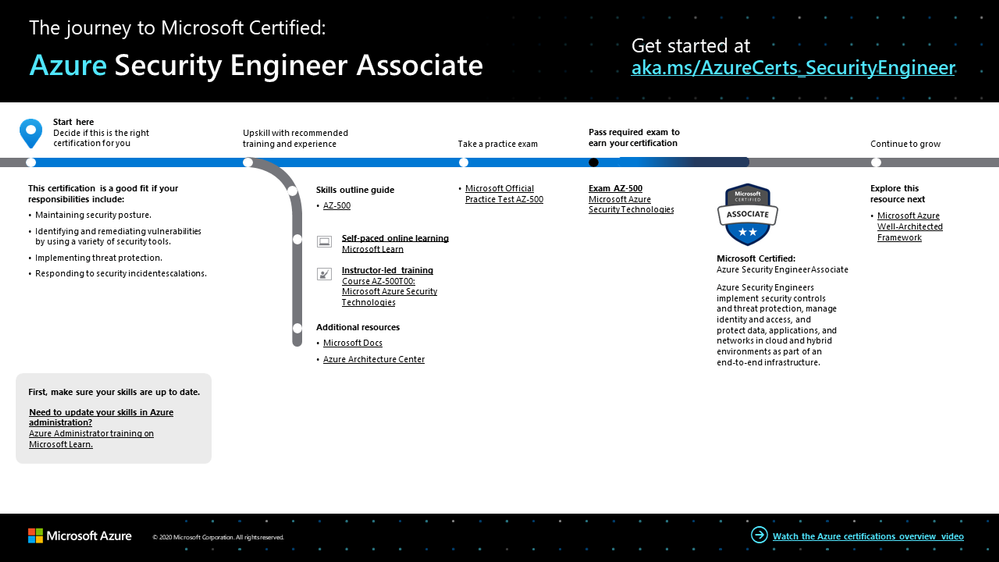
To help you plan your journey, check out our infographic, The journey to Microsoft Certified: Azure Security Engineer Associate. You can also find it in the resources section on the certification and exam pages, which contains other valuable help for Azure security engineers.
To map out your journey, follow the sequence in the infographic. First, decide whether this is the right certification for you, and be sure your Azure administrative skills are up to date.
Next, to understand what you’ll be measured on when taking Exam AZ-500, review the skills outline guide on the exam page.
Sign up for training that fits your learning style and experience:
Then take a trial run with the Microsoft Official Practice Test for AZ-500: Microsoft Azure Security Technologies. All objectives of the exam are covered in depth, so you’ll find what you need to be ready for any question.
Complement your training with additional resources, like Microsoft Docs or the Azure Architecture Center.
After you pass the exam and earn your certification, check out the many other training and certification opportunities. Want to add to your Azure knowledge? Explore the Microsoft Azure Well-Architected Framework. For related training, check out Microsoft Learn.
Note: Remember that Microsoft Certifications assess how well you apply what you know to solve real business challenges. Our training resources are useful for reinforcing your knowledge, but you’ll always need experience in the role and with the platform.
Celebrate your Azure talents with the world
When you earn a certification or learn a new skill, it’s an accomplishment worth celebrating with your network. It often takes less than a minute to update your LinkedIn profile and share your achievements, highlight your skills, and help boost your career potential. Here’s how:
- If you’ve earned a certification already, follow the instructions in the congratulations email you received. Or find your badge on your Certification Dashboard, and follow the instructions there to share it. (You’ll be transferred to the Acclaim website.)
- To add specific skills, visit your LinkedIn profile and update the Skills and endorsements section. Tip: We recommend that you choose skills listed in the skills outline guide for your certification.
Keep your certification up to date
If you’ve already earned your Azure Security Engineer Associate certification, but it’s expiring in the near future, we’ve got good news. You’ll soon be able to renew your current certifications by passing a free renewal assessment on Microsoft Learn—anytime within six months before your certification expires. For more details, please read our blog post, Stay current with in-demand skills through free certification renewals.
It’s time to level up!
Your Microsoft Certification can help validate that you have the skills to stay ahead with today’s technology. It can also help empower you with a boost in confidence and job satisfaction—and maybe even a salary increase. Want to know more? In our blog post, Need another reason to earn a Microsoft Certification?, we offer 10 good reasons to earn your certification.
Although cloud security may be a relatively new field in many industries, it’s definitely here to stay—and it’s foundational to Azure, with multiple layers across infrastructure and operations. And implementation is key. As an Azure security engineer, validate that you have the skills and experience you need to assess your current IT environment and assets and to identify and address potential security issues. Help keep your organization’s data, devices, and apps safe every day—smarter and faster—with your proven Azure skills.
Related announcements
Understanding Microsoft Azure certifications
Finding the right Microsoft Azure certification for you
Master the basics of Microsoft Azure—cloud, data, and AI

by Scott Muniz | Feb 10, 2021 | Security
This article was originally posted by the FTC. See the original article here.
Valentine’s Day is this weekend, so over the next three days, we’re talking about romance scams. Lots of people have profiles on dating apps to meet someone — maybe even more so in these virtual times. And many people have built successful relationships from an online start. But what if, instead of finding a potential partner, you find a scam?
Romance scams reached a record $304 million in losses reported to the FTC in 2020. That’s up about 50% from 2019.
So how can you spot a romance scam? Check out this video, and watch this space for more tips and tools in the next couple of days. And share the video, and what you learn. You might not need the info yourself, but you probably know someone who does.
Brought to you by Dr. Ware, Microsoft Office 365 Silver Partner, Charleston SC.
by Contributed | Feb 10, 2021 | Technology
This article is contributed. See the original author and article here.
Initial Update: Wednesday, 10 February 2021 13:57 UTC
We are aware of issues within Log Analytics and are actively investigating. Some customers may experience data access issues and issues with missed or delayed Log Search Alerts in Central US region.
- Work Around: NA
- Next Update: Before 02/10 17:00 UTC
We are working hard to resolve this issue and apologize for any inconvenience.
-Deepika

by Contributed | Feb 10, 2021 | Technology
This article is contributed. See the original author and article here.
It is time once again to Reconnect, and this week we are thrilled to be joined by former Visual Studio and Development MVP Denis Kazakov!
Hailing from Kiev, Ukraine, Denis is a .NET software engineer whose areas of expertise include Xamarin, Azure, ASP.NET Core, and WP.
Denis is the founder and chief executive of FlatSolutions, a software development company with specialization in mobile, web and desktop applications using Microsoft technology stack. Since 2006, the company has delivered software development services for more than 60 clients from 20 countries around the world, including USA, United Kingdom, Australia, Germany, Brazil, India and more.
Recently, Denis has also been working on a free, non-commercial app to help people learn the basics of Microsoft Azure and Cloud Computing. The advertisement-free app, Learn Azure Fundamentals, teaches with 14 unique tests, 269 questions, and 132 articles. Moreover, Denis is already working on two additional teaching apps to instruct Azure for developers and help others prepare for Microsoft Certification exams.
“Then I have plans for a global education project to help people learn technologies based on their current background,” Denis says.
Looking back at his time as an MVP, Denis says he most enjoyed Azure Bootcamp in 2017 and the chance to meet all of the other Ukrainian MVP. He still manages to stay in touch with his local IT community as a regular contributor with Azure Ukraine and Belarus User Groups, as well as .NET Core user groups.
Reconnect offers an important opportunity to stay in touch with former MVPs, Denis says, with hopes to earn back his title once again in the future. To new MVPs, Denis recommends they: “contribute more — time is short!”
For more on Denis, check out his profiles on GitHub and StackOverflow.

by Contributed | Feb 10, 2021 | Technology
This article is contributed. See the original author and article here.
We have published another new class type this week. This class type shows how to set up a lab with ArcGIS Desktop’s ArcMap to make, edit, and analyze 2d geographic maps.
Like the other class types that we’ve published, this class is based on a real-world class that we partnered with a university to host using Azure Lab Services.
This class type includes the following information:
- Recommended VM size for the lab.
- How to setup ArcGIS, including the licensing server.
- Using OneDrive to backup files such as the mxd file, file geodatabases, etc.
- Recommended auto-shutdown setting values.
- Example costing for the class.
Here is where you can find the new ArcGISArcMap class type: Set up a lab for ArcMapArcGIS Desktop with Azure Lab Services – Azure Lab Services | Microsoft Docs
Thanks!
Azure Lab Services team
by Contributed | Feb 10, 2021 | Technology
This article is contributed. See the original author and article here.
We are very exited to announce that Data Factory Azure Policy integration is live now! There are several built-in policies that you can assign to your data factory to ensure resource consistency, regulatory compliance, and security.
Azure Policy is a service in Azure that enables you to create, assign, and manage policies that control or audit your resources. These policies enforce different rules and effects over your resource configurations so that those configurations stay compliant with corporate standards.
Create a policy assignment to Data Factory
1. Launch the **Azure Policy** service in the Azure portal.
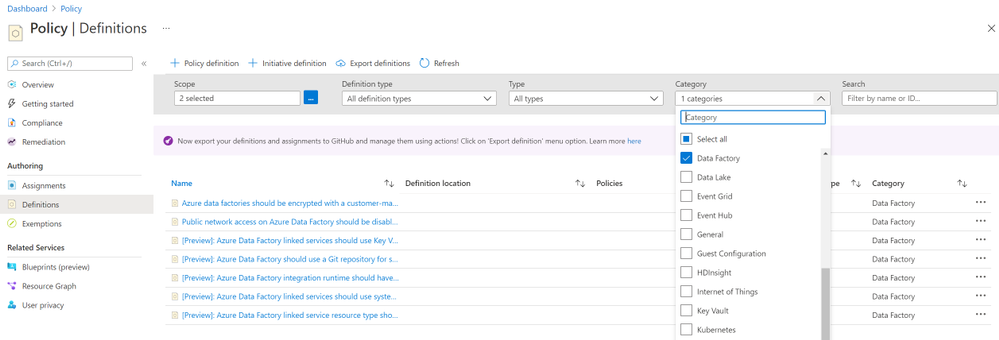
2. Select **Definitions** on the left side of the Azure Policy page. Choose your subscription ID as **scope** and **Data Factory** as Category. Then you will see several built-in policies.
3. On the **Assign Policy** page, set the **Scope** by selecting the ellipsis and then selecting either a management group or subscription. Optionally, select a resource group. A scope determines what resources or grouping of resources the policy assignment gets enforced on. Then use the **Select** button at the bottom of the Scope page.
For more details about how to assign a policy, please see Create a policy assignment to identify non-compliant resources
Next steps
Learn about what is Azure Policy
Azure Policy built-in definitions for Data Factory
by Contributed | Feb 10, 2021 | Technology
This article is contributed. See the original author and article here.
Azure NetApp Files (ANF) was generally available on May 2019. Ever since it has been widely adopted across industries, including many silicon companies running their Electronic Design Automation (EDA) workloads on Azure. Azure NetApp Files provides 3 different tiers of service level to ensure throughput, NFS 3.0/NFS4.1/SMB mount protocols connecting from Windows or Linux VMs, and takes only minutes to setup. Enterprise can seamlessly migrate their applications to Azure with an on-premises-like experience and performance.
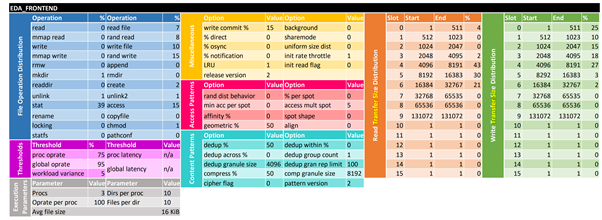
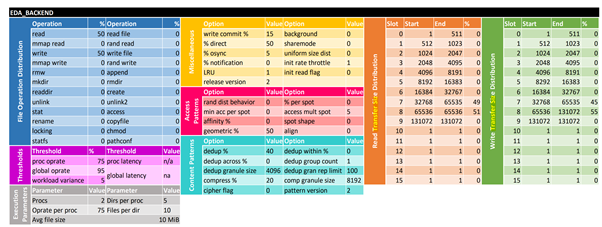
EDA workloads are generated by SPEC SFS® benchmark suite, to “measure file server throughput and response time.” The benchmark suite generates EDA operations on the ratio of EDA_FRONTEND and EDA_BACKEND as 3:2, to simulate a classic IC-design workload. The distribution of the operations are illustrated below:
(From SPEC SFS® 2014)
The goal of this article is to share lessons learned from running the SPEC SFS® EDA stress test on Azure NetApp files. Including:
- Provide practical performance best practices in real world.
- Examine ANF’s scale-out capabilities with multiple volumes.
- Compare ANF with other Azure file-based storage solutions including Azure Files NFS (preview) and Azure BLOB NFS (preview).
- Cost-effective analysis for users to choose the most suitable ANF’s tier of service level.
Architecture
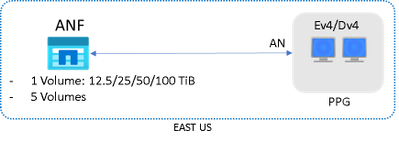
The test was performed in Azure EAST US regions. Mix of Premium and Ultra tier with different sizes of volumes were tested. E64dsv4 or D64dsv4 VMs were acting as clients, which generated EDA workload operation, and reside in the same Proximity Placement Group with Accelerated Networking enabled.
The average ping latency from VMs to ANF was around 0.6~0.8 milliseconds.
The overall performance is determined by two key metrics: Operations/sec and Response Time (millisecond). The test will incrementally generate EDA workload Operations, and Response Time will be recorded accordingly. The Operations/sec also indicates the combined read/write throughput (MB/s).
Performance Tuning
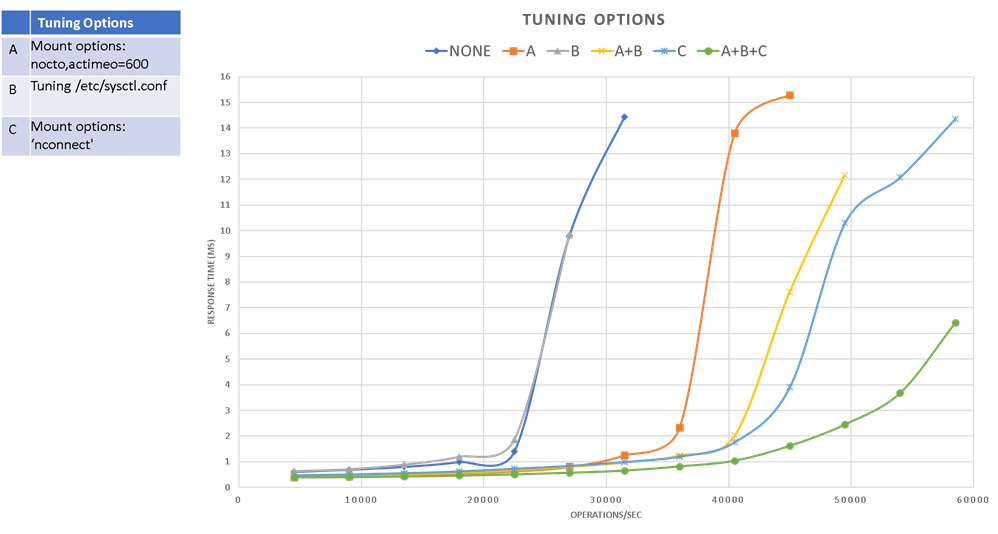
Below table shows the 8 different options have been examined and their performance impact. Please see Appendix for details and their applicability. If no specifically stated, NFS vers=3, mountproto=TCP, and default MTU=1500 were applied.
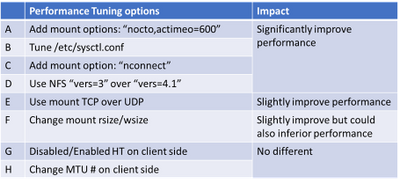
The below results shows that the first 3 (A, B & C) options can all improve response time and maximize throughput significantly, and the effectiveness can be added up.
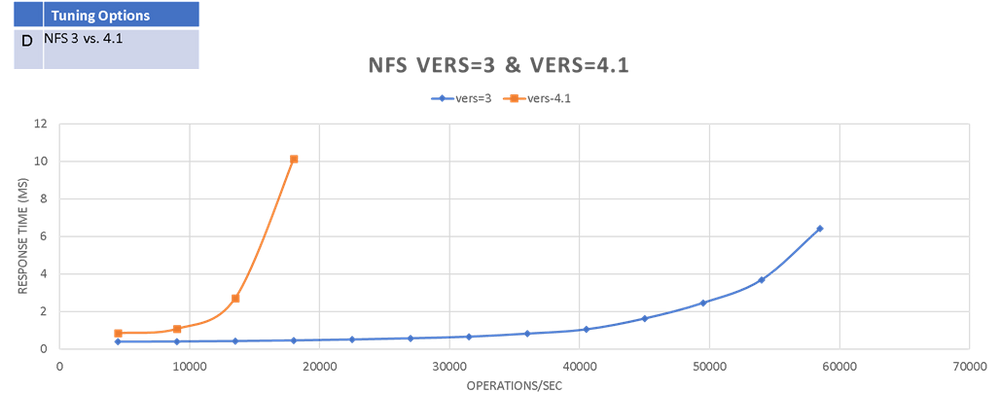
NFS 4.1 shows poor performance in this test compared to NFS 3. So be cautious of using it if there’s no specific security requirements.
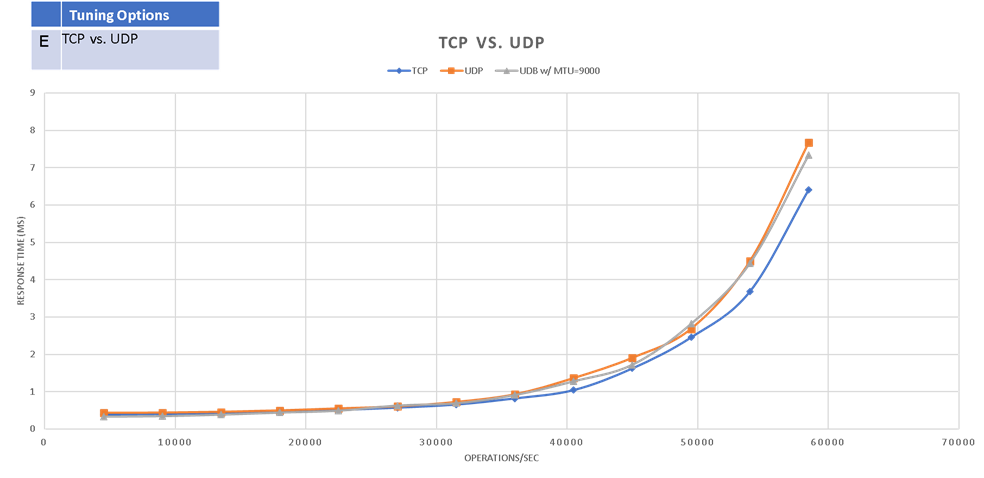
TCP shows slightly better performance than UDP (‘mountproto=udp’)
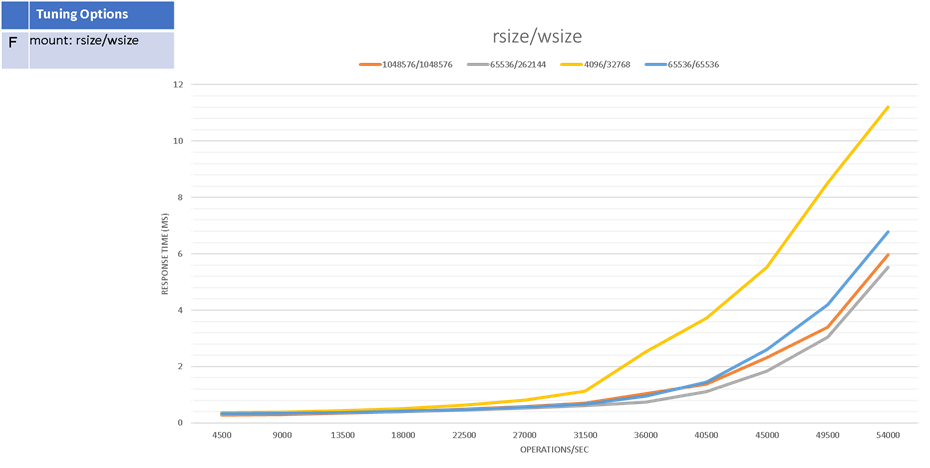
Appropriate rsize/wsize could improve performance. But be cautious to modify the default value (1MB/1MB) as unproper value could also inferior performance.
There’s no significant impact on performance when changing VM’s MTU # from default 1500 bytes to 9000 bytes.

Cost-Effective analysis
One advantage of ANF is it provides 3 tier of different service level with different pricing structure. That is, users are able to change the tier and volume size to reach the most cost-effective sweet spot when running their applications on Azure.
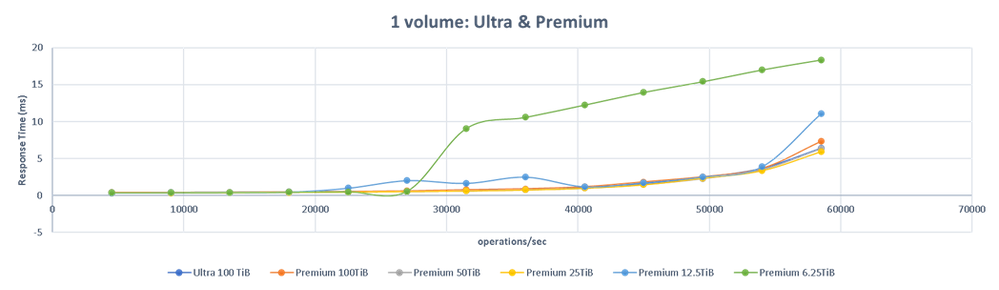
In below chart it shows:
- Premium 25TiB can achieve the same performance (max. throughput=58,500 ops/sec while maintaining same response time)
- Premium 12.5TiB can achieve max. throughput=54,000 ops/sec.
- Premium 6.25TiB can achieve max. throughput=27,000 ops/sec.
Which implies high IOPS EDA workloads (such as the LSF events share) can generally be done on the Premium tier and without excessively large volumes.
Scalability
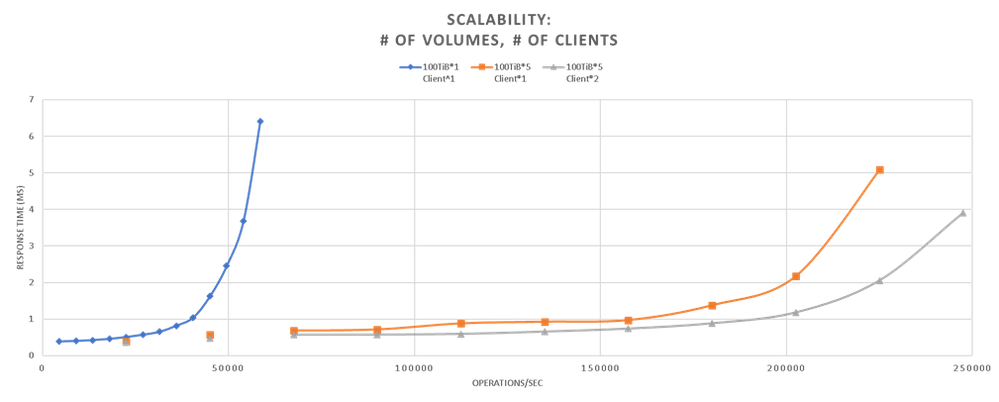
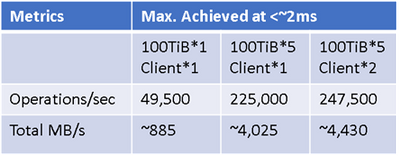
- By simply adding # of volumes to ANF, max. throughput can scale linearly, and still maintaining low response time. (~500% from 1 to 5 volumes)
- In real world, EDA workloads are running on hundreds or thousands of nodes (VMs) connecting to the same ANF. Below chart shows more clients could further improve performance on either response time or overall throughput. As it surpasses the limitation of network bandwidth and max connections from one single VM.
Compare with Azure File NFS (preview) and Azure BLOB NFS (preview)
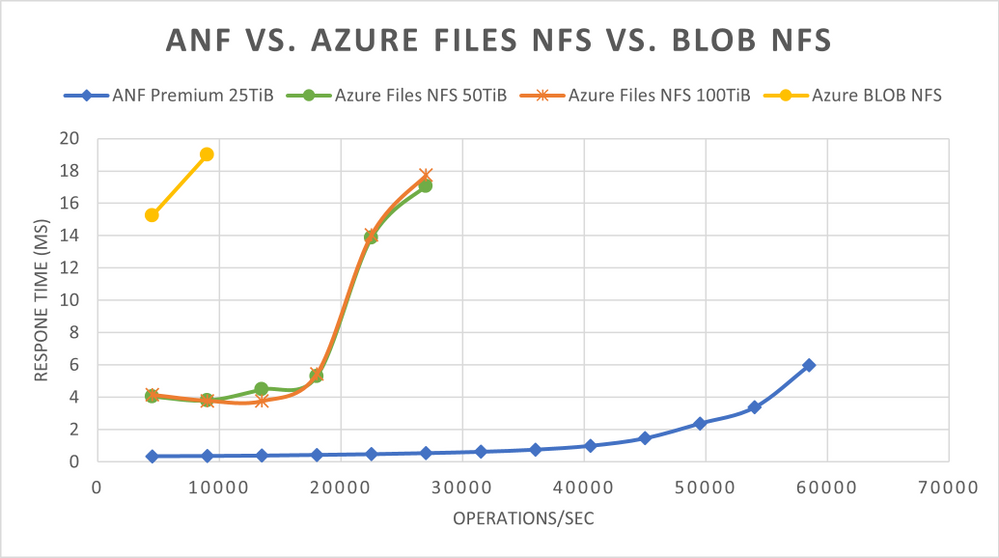
ANF shows superior performance than Azure Files NFS (preview) and Azure BLOB NFS (preview).
Summary
It’s important to keep in mind that in real-world, storage performance is impacted by a wide range of factors. This article is by no means to provide an ultimate guidance, but to share lessons learned from running the standard EDA benchmarking tools, and examine some generic performance best practice could be applied in your applications running on Azure.
Generally, the first 4 options (A, B, C & D) are suggested to be applied when applicable. As their effectiveness can be added up, they also improve Max. IOPS and bandwidth on regular FIO test:

And as stated please be cautious to change rsize/wsize (option F) as it could also impact performance in different way.
Appendix:
1. Tuning /etc/sysctl.conf (option B) example on Ev4/Dv4:
sudo vi /etc/sysctl.conf
Append or update the following attributes:
net.core.somaxconn = 65536
net.core.netdev_max_backlog = 300000
net.core.rmem_default = 67108864
net.core.wmem_default = 67108864
net.core.rmem_max = 67108864
net.core.wmem_max = 67108864
net.ipv4.tcp_rmem = 8192 87380 16777216
net.ipv4.tcp_wmem = 8192 87380 16777216
net.ipv4.tcp_fin_timeout = 5
To make the change effective:
sudo sysctl -p
2. Upgrade Linux kernel to 5.3+ to be able to utilize “nconnect” (option C). Please note that you will need to reboot the VM at the end of the upgrade. So it might not be applicable for some cases.
# CentOS/Redhat 7+

sudo rpm -Uvh http://www.elrepo.org/elrepo-release-7.0-2.el7.elrepo.noarch.rpm

# CenOS/Redhat 8+

sudo rpm --import https://www.elrepo.org/RPM-GPG-KEY-elrepo.org

sudo yum -y --enablerepo=elrepo-kernel install kernel-ml

sudo reboot

# check version:

uname -r

3. actimeo and nocto
The actimeo and nocto mount options are used primarily to increase raw performance. Please review NetApp ONTAP’s Best Practice Guide for applicability of your applications.
4. mounting examples:
TCP:
sudo mount -t nfs -o rw,nconnect=16,nocto,actimeo=600,hard,rsize=1048576,wsize=1048576,vers=3,tcp 10.1.x.x:/ultravol ultravol
UDP:
sudo mount -t nfs -o rw,nconnect=16,nocto,actimeo=600,hard,rsize=1048576,wsize=1048576,vers=3,mountproto=udp 10.1.x.x:/ultravol ultravol

by Contributed | Feb 10, 2021 | Technology
This article is contributed. See the original author and article here.
Hi IT Pros,
We still get the questions about Internet Explorer migration to Edge Chromium once in a while, especially from Government Agency Customers, the questions usually related to the in-house legacy application’ compatibility and develop tools.
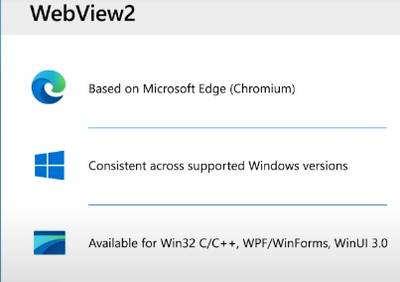
Today we discuss about all thing migration from IE to Edge, I combine a check list of features, how to run Edge in IE compatible mode and the limitations for your review. We also touch on the new Edge feature Webview2 available in the near future.
Migrate from IE to Edge check list.
ActiveX control, Silverlight, Java
|
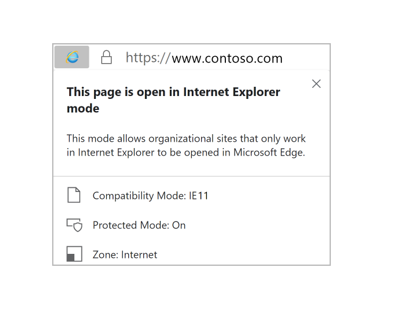
Microsoft Edge doesn’t support ActiveX controls or Browser Help Objects (BHOs) like Silverlight or Java. However, if you’re running web apps that use ActiveX controls, BHOs, or legacy document modes on Internet Explorer 11, you can configure them to run in IE mode on the new Microsoft Edge
 |
Edge browser in IE mode, features and configuration
|
Only those sites that you specifically configure (via policy) will use IE mode:
- List the site in the Enterprise Mode Site List XML defined in one of these policies:
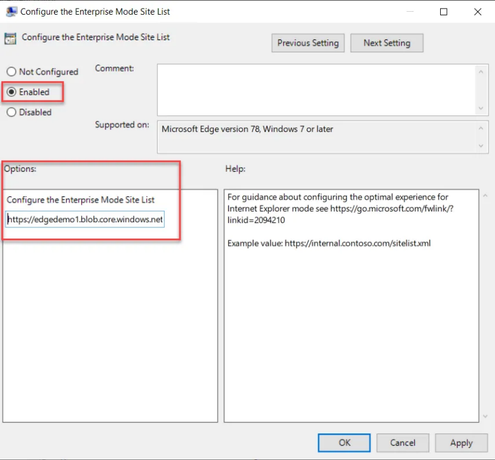
- Microsoft Edge, “Configure the Enterprise Mode Site List”
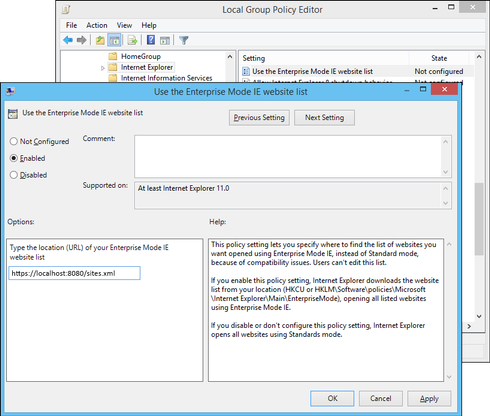
- Internet Explorer, “Use the Enterprise Mode IE website list“
- The Microsoft Edge site list policy takes precedence over the Internet Explorer site list policy.
- All Intranet sites when the Send all intranet sites to Internet Explorer group policy is enabled.
IE mode supports the following Internet Explorer functionality
- All document modes and enterprise modes
- ActiveX controls (such as Java or Silverlight)
- Browser Helper Objects
- Internet Explorer settings and Group Policies that affect the security zone settings and Protected Mode
- The F12 developer tools for IE, when launch with IEChooser
- Microsoft Edge extensions (Extensions that interact with the IE page content directly are not supported.)
IE mode doesn’t support the following Internet Explorer functionality
- Internet Explorer toolbars
- Internet Explorer settings and Group Policies that affect the navigation menu (for example – search engines, and home pages.)
- IE11 or Microsoft Edge F12 developer tools
|
Use GPO to enable Edge Enterprise mode (IE compatible mode)
|
Computer configurationPoliciesAdministrative templateMicrosoft Edge
- Configure Internet Explorer integration
- Configure the Enterprise Mode Site List policy
|
Use GPO to enable IE Enterprise mode
|
Administrative TemplatesWindows ComponentsInternet ExplorerUse the Enterprise Mode IE website list
More info: Turn on Enterprise Mode and use a site list
(Internet Explorer 11 for IT Pros) – Internet Explorer | Microsoft Docs
Add multiple sites to the Enterprise Mode site list using a file and
the Enterprise Mode Site List Manager (schema v.2)
(Internet Explorer 11 for IT Pros) – Internet Explorer | Microsoft Docs
|
Edge feature to auto-redirect from IE to Edge if there is compatible function.
|
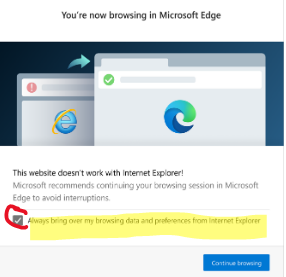
Many modern websites have designs that are incompatible with Internet Explorer (IE). When an IE user visits an incompatible public website, the user may get a message about incompatible browser. After the message, starting with version 84, automatically redirects users to Microsoft Edge.
|
IE incompatible banner
|
- A website incompatibility banner is displayed under the address bar for each redirection.
- Users may continue to use IE for websites that are not on the IE compatibility list.
- Add / Remove Public site in compatible list : email suggestion to ietoedge@microsoft.com
|

|
Microsoft Edge supported browser privacy
with tracking prevention feature.
|
- The tracking prevention feature in Microsoft Edge protects users from online tracking by restricting the ability of trackers to access browser-based storage as well as the network.
- To configure, typing in the url address box: edge://settings/privacy.
- If any of the visited host names match with a host name on the Disconnect lists of Edge, Microsoft Edge proceeds with evaluating enforcement actions to prevent users from being tracked.
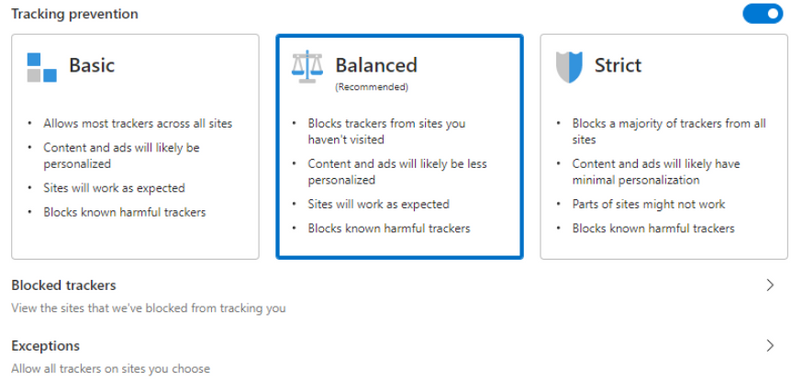
- You could set 3 level of prevention as shown here:
|
|
Unblock tracking prevention for company’s web developer.
|
Microsoft is currently working on the Storage Access API in the Chromium codebase. The Storage Access API gives site developers a way to request storage access from users directly, to quickly and intuitively unblock themselves.
|
|
Advertizing
|
Analytics
|
Content
|
Cryptomining
|
Fingerprinting
|
Social
|
Other
|
Same Org Mitigation
|
Org Engagement Mitigation
|
Basic
|
–
|
–
|
–
|
B
|
B
|
–
|
–
|
Enabled
|
N/A
|
Balanced
|
S
|
–
|
S
|
B
|
B
|
S
|
S
|
Enabled
|
Enabled
|
Strict
|
B
|
B
|
S
|
B
|
B
|
B
|
B
|
Enabled
|
Disabled
|
|
Same Org Mitigation
|
Microsoft Edge exempts a site from tracking prevention when the site is making third-party requests to other sites owned by the same parent organization (as defined in the Disconnect entities.json list)
|
Using Microsoft Edge DevTools to debug Office-Add-in
|
When the Office add-in is running in Microsoft Edge, you can use the Microsoft Edge DevTools.
- Run the add-in.
- Run the Microsoft Edge DevTools.
- In the tools, open the Local tab. Your add-in will be listed by its name.
- Click the add-in name to open it in the tools.
- Open the Debugger tab.
- Choose the folder icon above the script (left) pane. From the list of available files shown in the dropdown list, select the JavaScript file that you want to debug.
- To set a breakpoint, select the line. You will see a red dot to the left of the line and a corresponding line in the Call stack (bottom right) pane.
- Execute functions in the add-in as needed to trigger the breakpoint.
|
ClickOnce
DirectInvoke
|
Currently, Edge Chromium doesn’t provide native support for ClickOnce or DirectInvoke.
ClickOnce and DirectInvoke are features available in IE and Microsoft Edge classic (version 45 and earlier) that support the use of a file handler to download files from a website.
ClickOnce requests are handled by the native file handler in Windows. DirectInvoke requests are handled by a registered file handler specified by the website hosting the file.
ClickOnce and DirectInvoke in Microsoft Edge | Microsoft Docs
|
Edge Group Policy list:
Applies to Microsoft Edge version 77 or later (Edge Chromium).
Available Browser policies
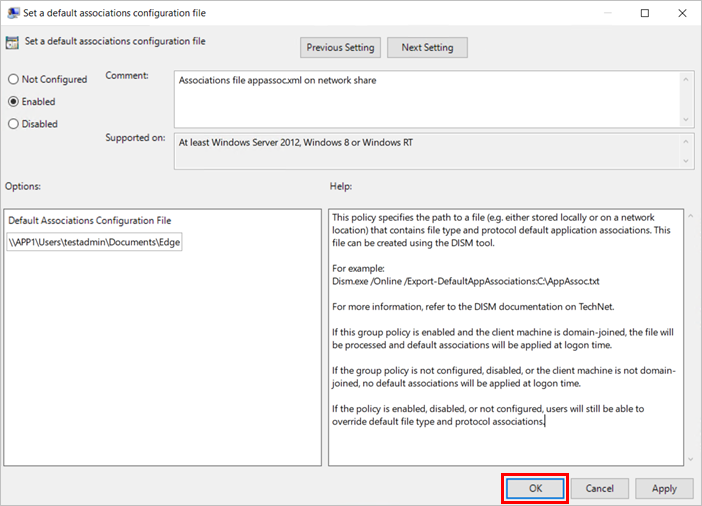
To configure the group policy for a default file type and protocol associations configuration file:
- Open the Group Policy editor and go to the Computer ConfigurationAdministrative TemplatesWindows ComponentsFile Explorer.
- Select Set a default associations configuration file.
Import favorites in Microsoft Edge:
Open Microsoft Edge and select Settings and more at the top corner of the window.
Select Favorites > Import.
Under Import from, select the browser from which you want to import your favorites or select Favorites or bookmarks HTML file.
More Edge features and documents:
Reference:
by Contributed | Feb 9, 2021 | Technology
This article is contributed. See the original author and article here.
Initial Update: Wednesday, 10 February 2021 01:58 UTC
We are aware of issues within Log Analytics and are actively investigating. Some customers may experience data access issues for Log Analytics Workspaces in West US2 Region.
- Next Update: Before 02/10 06:00 UTC
We are working hard to resolve this issue and apologize for any inconvenience.
-Jayadev


Recent Comments