Experiencing delay in Activity logs and Activity Log Alerts – 02/12 – Resolved

This article is contributed. See the original author and article here.

Final Update: Friday, 12 February 2021 17:30 UTC

We’ve confirmed that all systems are back to normal with no customer impact as of 02/12, 17:00 UTC. Our logs show the incident started on 02/12, 12:15 UTC and that during the 4 hours and 45 minutes that it took to resolve the issue some customers may have experienced issues with delay in Activity logs and delayed Activity log alerts. Alerts would have eventually fired.


  • Root Cause: The failure was due to issues with one of the backend services.  


  • Incident Timeline: 4 Hours & 45 minutes – 02/12, 12:15 UTC through 02/12, 17:00 UTC

We understand that customers rely on Activity Logs and Activity Log Alerts as a critical service and apologize for any impact this incident caused.

-Jayadev

Microsoft Azure Attestation is now generally available

This article is contributed. See the original author and article here.

Rapid adoption of Azure globally has resulted in a need to provide strong security assurances to customers on the state of their workloads and Azure’s ability to protect their data. Azure confidential computing offers a state-of-the-art hardware, software & services platform to protect sensitive customer data in-use while minimizing the Trusted Computing Base (TCB). Azure Attestation reinforces the security promises made by cutting-edge security paradigms such as confidential computing.


Azure Attestation offers a simple PaaS experience to enable customers solve the complicated problem of gaining trust and verifying the identity of an environment before they interact with it. As a result, customers can tap into what were previously impossible opportunities using disruptive business models that require highly scalable compute resources and uncompromising trust.


What is Azure Attestation?


Azure Attestation is a unified solution that supports attestation of platforms backed by Trusted Platform Modules (TPMs) alongside the ability to attest to the state of Trusted Execution Environments (TEEs) such as Intel® Software Guard Extensions (SGX) enclaves


Azure Attestation receives evidence from an environment, validates it with Azure security standards and user-defined policies, and produces cryptographic proofs (termed as attestation tokens) for claims-based applications. These tokens enable relying parties to gain confidence in trustworthiness of the environment, integrity of the software binaries running inside it and make trust-based decisions to release sensitive data to it. The tokens generated by Azure Attestation can be consumed by services in scenarios such as enclave validation, secure key sharing, confidential multi-party computation etc.


Why use Azure Attestation?


Azure Attestation provides the following benefits:


  • Offers a unified solution for attesting

  • Allows creation of custom attestation providers and configuration of policies to customize attestation token generation

  • Provides ability to securely communicate with the attested platform with the help of data embedded in an attestation token using industry-standard formatting

  • Highly available service with Business Continuity and Disaster Recovery (BCDR) configured across regional pairs


Customer success stories


We are excited to see multiple scenarios benefiting from Azure Attestation such as:


SQL Always Encrypted with secure enclaves


“Microsoft Azure Attestation is a key component of a solution for confidential computing provided by Always Encrypted with secure enclaves in Azure SQL Database. Azure Attestation allows database users and applications to attest secure enclaves inside Azure SQL Database are trustworthy and therefore can be confidently used to process queries on sensitive data stored in customer databases.”


– Joachim Hammer, Principal Group PM Manager, Azure SQL


Future roadmap for Azure Attestation


Our long-term aspiration is partnering with people and organizations around the planet to help them achieve more, and more securely with Microsoft Azure Attestation. Azure Attestation will be the one Microsoft service that attests multiple platforms used by Azure customers such as Confidential Containers, Confidential VMs, IOT edge devices and more. We expect Azure Attestation to be the leading cloud service for customers to establish unconditional trust in infrastructure and runtime across Azure, on-prem and edge. It will drive the adoption of Microsoft services while strengthening customer data governance.


Learn more about Azure Attestation

Azure Marketplace new offers – Volume 115

Azure Marketplace new offers – Volume 115

This article is contributed. See the original author and article here.


We continue to expand the Azure Marketplace ecosystem. For this volume, 96 new offers successfully met the onboarding criteria and went live. See details of the new offers below:


Applications


Adopteq eLearning Plus by ClipTraining.png

Adopteq eLearning Plus by ClipTraining: Running in Microsoft Teams, Adopteq provides an online library of over 5,000 training videos and gamification awards to promote Microsoft 365 adoption. The app enables administrators to tailor learning paths to different job roles.


Alloc8 - Workforce Management & Scheduling.png

Alloc8 – Workforce Management & Scheduling: Providing intelligent workforce and asset allocation at scale, Alloc8 is designed to meet the challenges of resourcing people and equipment in multi-job locations with flexible job structures.


Appsurify Professional.png

Appsurify TestBrain: Providing up to a 95 percent reduction in automated test completion times, TestBrain uses machine learning to determine the areas of an application that have changed after each developer commit, and only runs the subset of tests associated with those changes.


Automatic Document Mining System.png

Automatic Document Mining System: Automate the process of scanning, marking, and archiving documents. ALTAIR SOFTWARE’s app has a 99.1 percent success rate in data extraction and saving documents with attached metadata. This application is available in English and Czech.


Azure IoT Platform in a Box.png

Azure IoT Platform in a Box: Sopra Steria developed this acceleration pack for establishing an Azure IoT Platform and migrating data to Azure. Available in English and Norwegian, the solution is ready to deploy as a dev/test/prod environment in any tenant. 


CCH Tagetik.png

CCH Tagetik: Speed up your financial close and keep pace with evolving accounting standards with this unified platform by Wolters Kluwer. CCH Tagetik supports financial consolidations, planning, reporting, and analytics.


Cloudgoda - Azure Resource Config.png

Cloudgoda – Azure Resource Config: Cloudgoda allows you to set and view resource configurations, regions, and usage status in multiple Microsoft Azure subscription accounts at once.


CloudReady Monitoring for Microsoft 365.png

CloudReady Monitoring for Microsoft 365: Monitor, manage, and optimize end-user experiences for your entire Microsoft 365 deployment with CloudReady. Ensure uptime and availability for all your mission-critical applications whether users are in the office or working from home.


Cold Chain Monitoring.png

Cold Chain Monitoring: Comprising custom sensors, an IoT platform and blockchain, this solution from Wipro helps transform supply chain security in the pharmaceutical industry and reduce cold chain waste by generating geospatial alerts and breach notifications.


Consulting Manager 365.png

Consulting Manager 365: This solution was developed by the ALW Group for large international consulting firms. It provides relationship tools, automated report collection, reconciliation, archive support, and mobile access. 


Controller Consultant.png

Controller Consultant: This solution from Intelligent Plant helps you manage your controllers. Find controllers automatically without an expensive configuration report, and identify controllers left in manual mode.


Court and Justice Case Management for Azure.png

Court and Justice Case Management for Azure: This advanced case management software from GoPro gives court associates controlled access to their case data and supports their proactive collaboration in real time.


DBm-Health.png

DBm-Health: Sensyne Health Group offers remote monitoring in the United Kingdom for patients with diabetes, or at risk of diabetes, who need additional support to maintain safe blood glucose levels. This free smartphone application connects to a blood glucose monitor via Bluetooth.


DNN intranet website with Azure AD.png

DNN intranet website with Azure AD: If you need to spin up an intranet site for your staff or school, WebAdvantage provides an instant intranet portal using the DNN website content management system with Azure Active Directory.


Docker Compose Server.png

Docker Compose Server: Cloud Infrastructure Services provides this pre-configured image of Docker Compose server on Ubuntu Server 20.04. Docker Compose is a simple yet powerful tool used to run multiple containers as a single service.


eLogistics.png

eLogistics: Reduce operating costs and simplify e-commerce warehousing and logistics management with eLogistics. Available only in Traditional Chinese, this solution provides multi-path order integration, real-time cargo tracking, and diversified access.


emfluence Marketing Platform.png

emfluence Marketing Platform: The emfluence Marketing Platform helps marketers execute successful digital marketing campaigns. Using your Microsoft Dynamics 365 data, it provides marketing automation, email marketing, landing pages, social media, surveys, and contact scoring.


E-Visor Teams App.png

E-Visor Teams App: E-Visor Entry is a reporting app that shows customers their Microsoft 365 profile, configuration, and usage in Microsoft Teams. The app collects data from different Microsoft portals to present to users in a single location.


Fast+.png

Fast+: FHIR is a Health Level Seven International standard for exchanging healthcare information electronically. FAST+ is an end-to-end FHIR implementation suite that complies with the Centers for Medicare & Medicaid Services’ Interoperability and Patient Access Rule.


Fleetman.png

Fleetman: Konica Minolta IT Solutions developed this cloud app for smarter management of your car fleet. It reminds you about all the important actions that need your attention, allowing you to share the tasks with your team. This application is available in English and Czech.


Hamilton Core.png Hamilton Core: A software as a service (SaaS) financial data quality and publication management tool, Hamilton Core uses machine learning and artificial intelligence to facilitate the mapping of financial and performance data between systems and locations.
ICONICS Suite 10.96.2.png

ICONICS Suite 10.96.2: ICONICS provides automation software solutions that visualize, historize, analyze, and mobilize real-time information for any application on any device.


IDLive Voice.png

IDLive Voice: Speech conversion, replay attacks, and text-to-speech (TTS) can create signal artifacts indistinguishable by a human ear. IDLive Voice by ID R&D distinguishes live voices from recordings and synthesized or altered voices.


IDVoice.png

IDVoice: IDVoice is an AI-driven voice biometric engine that provides voice verification for standalone devices and mobile, web, and telephone channels. It is language-independent and works with ultra-short utterances.


IT Service Management on Azure.png

IT Service Management on Azure: ServiceNow provides a modern, cloud-based, silo-busting service management solution. Consolidate your IT tools into a single data model to transform the service experience, automate workflows, gain real-time visibility, and improve IT productivity.


Jetdocs.png

Jetdocs: Getting the information you need outside your immediate team might require multiple follow-up emails. Jetdocs for Microsoft Teams allows you to request, track, and gather information from anyone inside and outside your company.


LeadBoxer for Outlook.png

LeadBoxer for Outlook: Activate your LeadBoxer for Outlook license to enable centralized email tracking for your organization. LeadBoxer can track all emails sent to individuals through Outlook, which is especially useful for people in sales, marketing, and business development.


Magnitude Every Angle.png

Magnitude Every Angle: Providing operational reporting and process analytics for SAP, Every Angle transforms and enhances your organization’s SAP data into simple-to-use and actionable insights. It puts the power of prescriptive analytics into the hands of the people who need it most – your business users.


MAINT - MIS FACTURAS.png

MAINT – MIS FACTURAS: In Ecuador, the Internal Revenue Service requests that all tax documents be declared electronically. MIS FACTURAS is a simple and agile implementation solution on Microsoft Azure for electronic document management. This application is available only in Spanish.


Peg@sus 305 Certified E-Mail.png

Peg@sus 305 Certified E-Mail: A collaboration solution for electronic signatures, Peg@sus 305 Certified E-Mail is certified under the Mexican standard NMX-I-305-NYCE-2016, which requires electronic time stamping and electronic surveillance. This application is available only in Spanish.


Photon Commerce PDF Extraction AI.png

Photon Commerce PDF Extraction AI: Photon’s document-understanding AI unlocks data in any PDF and turns it into an API, catching errors before they become costs. It captures line items from invoices and converts them into detailed line-item data with one click.


PlayBooks Meeting App.png

PlayBooks Meeting App: PlayBooks uses libraries of expertise to help business advisors create game plans with their clients. Easily organize your meetings with agendas, discussion items, and action points for your client along with private notes for yourself.


Privacera Platform.png

Privacera Platform: Privacera provides a centralized data governance and compliance platform for secure data sharing in the cloud. The data discovery, access management, and encryption/anonymization modules can automate your enterprise data governance lifecycles and meet regulatory standards.


Process management app for plant construction business.png

Process Management App for Plant Construction Businesses: A-ZiP’s sales inventory management system helps construction businesses increase the visibility of project plans and progress across departments, personnel, and partner companies. This application is available only in Japanese.


Production management system for sock manufacturing industry.png

Production Management System for Sock Manufacturing Industry: Available only in Japanese and powered by Microsoft Azure, AZiP’s production management system for the sock manufacturing industry securely connects manufacturers in Japan and Vietnam to improve production control and boost competitiveness.


Restaurant Online Ordering System using QR Code.png

Restaurant Online Ordering System using QR Code: Tunnelbiz makes restaurant ordering more systematic with its SaaS ordering solution. Restaurants can create menus with a self-designed QR code, enabling customers to place their order by simply scanning the code using a web admin panel.


Sales inventory management system.png

Sales Inventory Management System: Developed by A-ZiP and available only in Japanese, this sales inventory management system enables users to check real-time inventory status and share data between the head office and distribution centers.


Secure File Upload & Transfer Tool for SharePoint.png

Secure File Upload & Transfer Tool for SharePoint: Microsoft SharePoint offers best-in-class document storage and sharing capabilities. This add-on from Brimit enhances the upload functionality of SharePoint Online and OneDrive for Business, enabling you to collect files securely without logging in.


Senior Living Accounting on Azure.png

Senior Living Accounting on Azure: Hosted on Microsoft Azure, Intellitec’s Microsoft Dynamics 365 solution designed for senior living helps users capitalize on their financial and operational data, delivered in powerful dashboards and reports.


ServiceNow DevOps with Azure (in a ServiceNow DC).png

ServiceNow DevOps with Azure (in a ServiceNow DC): Accelerate change and minimize friction between IT operations and development by connecting ServiceNow DevOps with Microsoft Azure DevOps. Enable developers to keep working in Azure DevOps while sharing data for use in ServiceNow workflows.


ServiceNow IT Operations Management on Azure.png

ServiceNow IT Operations Management on Azure: Move IT operations from a reactive response team to a proactive business partner with ServiceNow IT Operations Management. The Now Platform and SaaS solutions on Microsoft Azure are available in Azure regions in France and Singapore for highly regulated industries.


Site construction schedule management system for temporary construction.png

Site Construction Schedule Management System for Temporary Construction: Use your smartphone or tablet to respond to customers quickly and check on-site schedules and work instructions with A-Zip’s schedule management system for temporary construction. This application is available only in Japanese.


Smart Asset Track and Trace.png

Smart Asset Track and Trace: Wipro’s Track and Trace Solution platform enables seamless indoor and outdoor asset tracking and tracing. Powered by IoT technologies, it offers sensor tags, an IoT gateway, connectivity, and a secure platform and application.


Soft Flow - Smart Desk.png

Soft Flow – Smart Desk: Smart Deck helps IT staff manage cases and change requests, categorize vendors and contacts, manage hardware and software assets, and organize service level agreements. It also allows business users to create customized automated processes for approvals.


soviaRetail - Digital Signage.png

soviaRetail – Digital Signage: Bütema takes the digital signage experience in brick-and-mortar retail to a new level with soviaRetail. Integrate real-time social media content, ensure advertised products are in stock, and centrally manage your displays in one location. This application is available only in German.


Squid Protected Proxy Server on Ubuntu Minimal.png

Squid Proxy Server on Ubuntu 18.04 Minimal: Pre-configured by Tidal Media, this image of Squid Proxy Server on Ubuntu 18.04 Minimal provides you with a ready-to-run, hardened, and secured Squid Proxy solution. Squid is a caching proxy for the web that improves response times by caching and reusing frequently requested pages.


Squid Proxy Server on Ubuntu 18.04 Minimal.png

Squid: Protected Proxy Server on Ubuntu Minimal: Tidal Media offers this pre-configured image of Squid Proxy Server on Ubuntu Minimal. Squid is a caching and forwarding HTTP web proxy with variety of uses, including speeding up web servers by caching repeated requests and filtering web traffic.


Subscriptions and Pay-per-Use for Dynamics 365.png

Subscriptions and Pay-per-Use for Dynamics 365: Available as SaaS on Microsoft Azure, Good Sign is a subscription and pay-per-use solution that complements Microsoft Dynamics 365 to help you automate your recurring revenue pricing and billing, save time, and reduce billing errors.


SurePact Project & Contract Risk Management SaaS.png

SurePact Project & Contract Risk Management SaaS: Used by government and corporate organizations for mitigating contract and project risks, SurePact’s end-to-end cloud-based solution serves as the hub for business efficiencies related to your projects, contracts, and grant delivery workflows and lifecycles.


Sycomp Storage Fueled by IBM Spectrum Scale.png

Sycomp Storage Fueled by IBM Spectrum Scale: This offering deploys IBM Spectrum Scale storage clusters with RHEL 7.8 for clients seeking a performance-oriented storage platform, including current Microsoft Azure high-performance computing, artificial intelligence, and machine learning clients.


Tangles - Web Investigation Platform.png

Tangles – Web Investigation Platform: Cobweb Technologies’ powerful web intelligence solution monitors online activity, collecting and analyzing data from digital channels from the open, deep, and dark web to mobile and social. Gain increased situational awareness with real-time insights generated via online content monitoring.


TheHive v3 Official.png

TheHive v3 Official: StrangeBee offers this image of TheHive, a scalable and open-source security incident response platform designed to make life easier for SOCs, CSIRTs, CERTs, and other information security practitioners dealing with security incidents that need to be investigated and resolved swiftly.


ThoughtSpot.png

ThoughtSpot: ThoughtSpot uses search and AI to makes analytics accessible for every business user. Its BI architecture and in-memory calculation engine were built for speed at scale on billions of rows of data across multiple sources—all while delivering speedy performance and enterprise-wide governance.


TIM-TALK ITSM BOT.png

TIM-TALK ITSM BOT: Powered by Microsoft Azure, TIM-TALK is a cognitive IT service management (ITSM) bot for Microsoft Teams. TIM-TALK integrates seamlessly with existing ITSM tools and works proactively to help users create, manage, and support requests intelligently.


Total Reward Platform.png

Total Reward Platform: With real-time digital reward data and reward policy documentation at its core, uFlexReward’s Total Reward Platform helps you generate administrative cost savings and create personalized, targeted rewards.


ViraHawk Automated Fever Screening.png

ViraHawk Automated Fever Screening: ViraHawk is an automated fever-screening solution that helps prevent the spread of infectious diseases, such as COVID-19. It reads variations in facial skin temperature to identify potential threats, help you prevent contagion, and reduce impact in the event of an outbreak.


Web Order and Sales Management System.png

Web Order and Sales Management System: Available only in Japanese, A-ZiP’s web order and sales management system delivers real-time order information to help your organization increase sales, improve customer experience, prevent mistakes, and more.


Well Intelligence.png

Well Intelligence: Well Intelligence enables you to optimize your production and gas lift choke positions to facilitate increased production without changing anything else. Optimize your entire system, including all reservoirs, wells, riser separators, and more.


WorkSchool 365 for CRM + LMS (customer-student).png

WorkSchool 365 for CRM + LMS (customer/student): WorkSchool 365 integrates your business’s or university’s customer relationship management (CRM) and learning management system (LMS).


Workspace Booking Manager 365.png

Workspace Booking Manager 365: Workspace Booking Manager 365 lets employees reserve a specific desk or conference room for a given date and time (within one hour) using a floor plan of the office. The system monitors previous bookings and will return a warning if a user tries to book an already booked desk or room.


Consulting services


AI Masterclass 10-Hour Workshop.png

AI Masterclass: 10-Hour Workshop: Heroes’ AI Masterclass workshop will teach you how to start using artificial intelligence in your organization. Gain theoretical knowledge about AI, practical knowledge about how AI projects become successful, and hands-on experience with a typical AI project cycle.


Azure Arc Fast Start 6-Week Implementation.png

Azure Arc Fast Start: 6-Week Implementation: Insight’s Fast Start implementation for Microsoft Azure Arc helps organizations adopt Microsoft’s Azure Arc to the simplify management and operation of hybrid cloud environments. 


Azure Architecture Review 2-Week Assessment.png

Azure Architecture Review: 2-Week Assessment: Gain an understanding of the infrastructure and architecture of your Microsoft Azure cloud environment in Nortal’s two-week assessment. The assessment covers security and networks, storage and databases, infrastructure automation, and more.


Azure Multi-Factor AuthN 10-Week Deployment.png

Azure Multi-Factor AuthN: 10-Week Deployment: In this 10-week engagement, PwC will design, build, and deploy a multi-factor authentication toolkit using Microsoft technologies, run a workforce enrollment strategy for expedited adoption, and enable ongoing assessments of critical applications for onboarding and readiness.


Azure Sentinel 10-Week Implementation.png

Azure Sentinel 10-Week Implementation: Whether you are looking to replace your existing SIEM or implement new cyber operations capabilities from the ground up, PwC’s 10-week implementation will rapidly integrate Azure Sentinel-driven threat detection and response (TDR) capabilities into your IT estate.


CI-CD practice implementation 4-6 weeks.png

CI/CD Practice Implementation: 4-6 weeks: BTT Cloud’s team of certified Microsoft Azure experts will implement a continuous integration and continuous delivery (CI/CD) pipeline that embodies Azure DevOps tools and operating principles. Plan smarter, improve collaboration, and ship faster with modern dev services.


Cloud Adoption Accelerator 1-Day Workshop.png

Cloud Adoption Accelerator: 1-Day Workshop: Create an action plan based on the Microsoft Cloud Adoption Framework to guide the adoption of cloud technologies across your organization in Fujitsu’s Cloud Adoption Accelerator workshop.


Cloud Economics Accelerator Six-Week Assessment.png

Cloud Economics Accelerator: 6-Week Assessment: Fujitsu’s Cloud Economics Accelerator assessment helps your organization build a financial model for transitioning to Microsoft Azure. The financial model is based on data compared with industry standards and realistic assumptions to support your business case.


Cloud Files [Azure Files] 2-Day Implementation.png

Cloud Files [Azure Files]: 2-Day Implementation: In this two-day implementation, Nexio, formerly Storage Technology Services, will implement Azure Files and migrate your file share content to the cloud. Azure Files offers fully managed file shares that you can access from anywhere via the industry-standard Server Message Block (SMB) protocol.


Cloud Optimisation 3-Week Assessment.png

Cloud Optimization: 3-Week Assessment: Gain insight into your Microsoft Azure environment, including how to improve overall performance, cost, security, and architecture, in this three-week assessment from Fujitsu.


Cloud Readiness Assessment 3 Weeks.png

Cloud Readiness Assessment: 3 Weeks: This assessment from Proximus will provide you with insights into your organization’s cloud journey, including strengths and weaknesses, workload migration feasibility, and closing identified gaps to maximize the benefits of Microsoft Azure.


CloudTeaming - Azure Managed Services.png CloudTeaming: Azure Managed Services: Trustmarque’s CloudTeaming offer provides a range of managed services for Microsoft Azure built on the open-source Cloudmarque architecture to enable customers to build and run their cloud estates to best practice.
Data Platform in a Box 5-Day Implementation.png

Data Platform in a Box: 5-Day Implementation: Data Platform in a Box is Elastacloud’s single deployment methodology based on Microsoft’s modern data warehouse architecture. In this implementation, Elastacloud will set up a CI/CD pipeline for your team to rapidly accelerate data platform development and drive business value from your data.


DFARS NIST CMMC 1-2 Week Compliance Assessment.png

DFARS NIST CMMC 1-2 Week Compliance Assessment: This one-week to two-week engagement from Ardalyst will deliver a clear understanding of current DFARS, CMMC, and NIST compliance requirements and provide configuration options for your Microsoft 365, Microsoft Azure, or GCC High tenant to meet evolving DoD requirements.


DFARS NIST CMMC 4-Week Compliance Assessment.png

DFARS NIST CMMC 4-Week Compliance Assessment: Featuring an executive workshop and help drafting your system security plan, Ardalyst’s four-week assessment will deliver a clear understanding of current DFARS, CMMC, and NIST compliance requirements and provide configuration options to meet evolving DoD requirements.


DFARS NIST CMMC 6-8 Week Cybersecurity Pilot.png

DFARS NIST CMMC 6-8 Week Cybersecurity Pilot: In this pilot, Ardalyst will review DFARS, CMMC, and NIST compliance requirements and provide full software licenses for five users, proof of its solution and environment, and an outline of roles and responsibilities to help you meet evolving DoD requirements.


DFARS NIST CMMC FREE 4-Hour Compliance Assessment.png

DFARS NIST CMMC Free 4-Hour Compliance Assessment: Ardalyst’s free four-hour compliance assessment will help you understand the current DFARS, CMMC, and NIST compliance requirements and discuss configuration options for your Microsoft 365, Microsoft Azure, or GCC High tenant to meet evolving DoD requirements.


Experience Design 6-Week Proof of Concept.png

Experience Design: 6-Week Proof of Concept: Using a technology-agnostic, user-centered approach, Tigerspike’s Experience Design proof of concept helps organizations solve problems, align goals, and visualize solutions and cloud services to help transform their business.


FinOps Optimization Costs 8-Week Implementation.png

FinOps Optimization Costs: 8-Week Implementation: Tivit’s consumer analytics and optimization service helps organizations manage Microsoft Azure costs without degrading performance. This service is available in Portuguese.


Heroes IoT Insights 4-Week Implementation.png

Heroes IoT Insights: 4-Week Implementation: Quickly transform your factory’s IoT data into actionable insights with Heroes’ IoT Insights implementation. Improve uptime of operating lines, increase product quality output, and predict maintenance activities to prevent unplanned downtime.


LTI Canvas Insights 5-Week Implementation.png

LTI Canvas Insights: 5-Week Implementation: Generate insights and facilitate data-driven decision-making with the implementation of LTI Canvas Insights, an AI-powered Agile and DevOps platform that incorporates an end-to-end correlation engine, predictive insights engine, impact analysis, and knowledge management.


Mphasis DeepInsights 4-Week Proof of Concept.png

Mphasis DeepInsights: 4-Week Proof of Concept: Mphasis DeepInsights is a cognitive intelligence platform delivering faster access to data insights. Mphasis’ DeepInsights proof of concept includes a working feature concept designed to determine the feasibility of the solution along with a business case for the solution.


Mphasis DeepInsights 5 Day Assessment.png

Mphasis DeepInsights: 5-Day Assessment: Mphasis DeepInsights is a cognitive intelligence platform delivering faster access to data insights. Mphasis’ DeepInsights assessment provides analysis of your processes, systems, and data to identify potential use cases for cognitive and predictive analytics solutions.


Mphasis DeepInsights 5-Day Workshop.png

Mphasis DeepInsights: 5-Day Workshop: Mphasis DeepInsights is a cognitive intelligence platform delivering faster access to data insights. Mphasis’ DeepInsights workshop leverages design thinking and user journey analysis to identify key use cases and create a roadmap for implementing cognitive solutions for your business.


Mphasis PACE-ML 5- Day Assessment.png

Mphasis PACE-ML: 5- Day Assessment: Mphasis PACE-ML is a framework and methodology for automating machine learning pipelines. Mphasis’ five-day PACE-ML assessment is designed to help enterprises perform structured analysis of their data science practice to identify use-cases and toolchains for MLOps deployment.


Mphasis PACE-ML 5-Day Workshop.png

Mphasis PACE-ML: 5-Day Workshop: Mphasis PACE-ML is a framework and methodology for automating machine learning pipelines. Mphasis’ PACE-ML workshop leverages design thinking and user journey analysis to create a strategic roadmap for implementing MLOps in your organization’s data science practice.


Mphasis PACE-ML 6-Week Proof of Concept.png

Mphasis PACE-ML: 6-Week Proof of Concept: Mphasis PACE-ML is a framework and methodology for automating machine learning pipelines. Mphasis’ PACE-ML proof of concept will establish an MLOps framework and toolchain, facilitating improved management of machine learning application and service production pipelines.


Rackspace SAP on Azure.png

Rackspace SAP on Azure: Let Rackspace bring the intelligence, security, and reliability of Microsoft Azure to your SAP applications. Rackspace has experience managing SAP environments and providing SAP support services to meet specific business needs, from application monitoring to fully vetted architectures.


Rackspace Sitecore on Azure.png

Rackspace Sitecore on Azure: Let Rackspace optimize your Sitecore environment. Rackspace can remove the complexity of architecting, hosting, and maintaining Sitecore with an optimized platform and specialized support.


SAP on Azure 4-Hour Assessment.png

SAP on Azure: 4-Hour Assessment: In this free assessment, akquinet will work with your stakeholders to review your SAP architecture (on-premises or on Microsoft Azure), then provide recommendations for a managed SAP Basis service on Azure tailored to your business needs.


SAP S-4HANA Azure (Green-Bluefield) 7-Day Workshop.png

SAP S/4HANA Azure (Green/Bluefield): 7-Day Workshop: BRAMS’ SAP S/4HANA on Azure workshop includes a review of your current environment and business needs as well as recommendations and preparation for a greenfield or bluefield implementation in your organization.


Windows Hello for Business 10-Week Implementation.png

Windows Hello for Business: 10-Week Implementation: Offer a secure, passwordless journey for your enterprise users with PwC’s implementation of Microsoft’s Windows Hello for Business. Enable users to securely access their workstation devices, apps, online services, and networks.


Windows Server-SQL - Migration 6-Week Implementation.png

Windows Server/SQL – Migration: 6-Week Implementation: Using best-practice methodologies, Trustmarque Solutions will assess your infrastructure and applications; plan and design your Microsoft Azure migration; and implement a consolidated, flexible, and resilient server environment for your organization.


Windows Virtual Desktop - WVD 4-Week Proof of Concept.png

Windows Virtual Desktop – WVD: 4-Week Proof of Concept: Trustmarque Solutions’ proof of concept enables you to rapidly test Windows Virtual Desktop capabilities in your organization. Deliverables include discovery workshops, a WVD PoC environment, full design documentation, and testing.


WVD 3-Week Proof of Concept.png

WVD: 3-Week Proof of Concept: ProActive’s Windows Virtual Desktop proof of concept serves as the first step in your transformation strategy. See how your organization can easily save money, quickly adapt external desktops to Windows Virtual Desktop users, and deliver new apps directly to employees’ virtual desktops.


Xencia Azure Managed Services.png

Xencia Azure Managed Services: Leave the hassle of 24×7 Microsoft Azure monitoring, alerting, investigating, and troubleshooting activities to Xencia Technology Solutions. Xencia’s managed services for Azure also cover backup and DR management, restoration, and resolution with root cause analysis.


VMware Releases Security Update

This article is contributed. See the original author and article here.

VMware has released a security update to address a vulnerability in vSphere Replication. An attacker could exploit this vulnerability to take control of an affected system.

CISA encourages users and administrators to review VMware Security Advisory VMSA-2021-0001 and apply the necessary update.

Modern SharePoint list formatting

Modern SharePoint list formatting

This article is contributed. See the original author and article here.

This article shall give you guidance and inspiration on how to turn your classic boring lists into interactive modern list experiences, which will wow your users, let them get information at first sight, and increase overall productivity. This post is not about the Microsoft 365 list templates; I will cover them in one of the next blog posts.


If you never heard anything about modern SharePoint list formatting, don’t worry; I will guide you through this.


daniel-cheung-zky0BmMT5m8-unsplash.jpg


Why would we use SharePoint lists


First things first: Why should we use SharePoint lists and not use – for instance – an Excel spreadsheet? Because we don’t need to hide information in cascading folders, that should be at the user’s fingertips. The beauty of lists lies in their simplicity and flexibility to organize work and track the information that matters most to our businesses.


Creating, sharing, and tracking lists is easy and available on any device; everyone stays in the loop, and we can use lists for all kinds of purposes like tracking issues, assets, routines, contacts, inventory, and more. Lists can easily be customized to make them visually more appealing.


How can we turn on modern experience


Now that we are teased into modern lists and libraries in SharePoint, it’s time to turn on modern experiences. We can do it like this in the classic experience:


  • select Library Settings or List Settings on the ribbon

  • select Advanced settings and select List experience

  • select New experience

  • save with Ok


How can we change the look and feel of a list in the UI


Lists can contain different columns, and each column has a certain column type, depending on the kind of value we want to store in that column like text, numbers, dates, choice, persons, locations, links, or images. As lists can contain much information, its brilliant if we emphasize crucial parts by formatting them in a way that they are


  • easier to read

  • give a grasp on what is going on

  • are mobile-friendly


Already built-in, we will find options to format columns and views. Formatting a view means modifying the way the entire list is displayed. Formatting a column means changing the way this particular column looks like.


list-formatting-create.png


Formatting Views


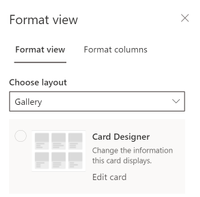
  • We can change the format view


  • and also display a gallery view


list-formatting-formatgallery.png


Formatting columns


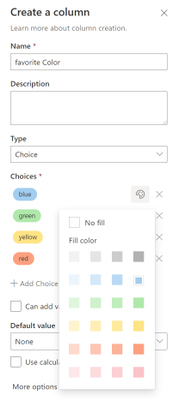
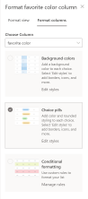
  • If we want to change the column’s appearance, we can do that very end-user-friendly directly in the UI:


list-formatting-formatcolumns.png


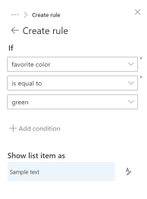
* and even with rules like if – then – else:


list-formatting-formatrules.png


How can I apply conditional formatting, aka rules


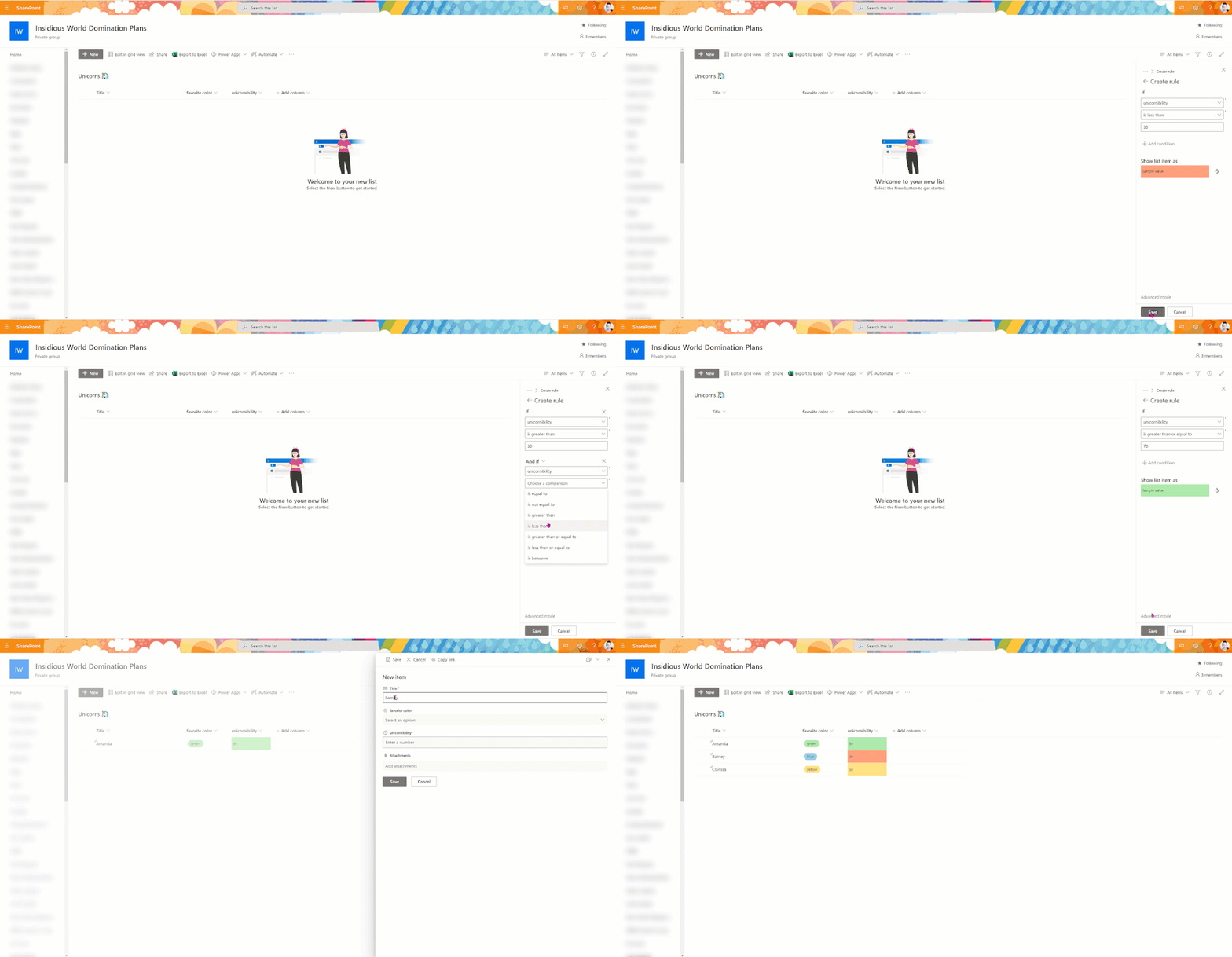
Rules are a powerful feature to determine how a column should look like. Let’s say we want to apply a background color depending on a number value. If the number is below 30, the field should be red; between 30 and 70, it should yellow, and above 70, it should be green. Let’s see how this looks like:


list-formatting.gif


How can we change the look and feel of a list with JSON


Sometimes, even if those options are already cool, we need some more flexibility.


whatif.jpg


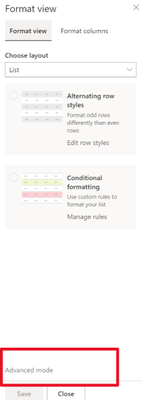
There is a way to format both columns and views beyond what is already offered, as seen above. Perhaps you might have noticed the little link Advanced mode? This is where we will find the cool tools to play with!


advanced-mode.png


This field expects you to put some JSON code in it to format this column. If you never heard about JSON, you can quickly get started with Intro to JSON by Bob German, this video, or you can learn more at w3schools.


Samples


We will browse to the Microsoft 365 PnP List formatting repository on GitHub and open the folder column samples. In here, we will find free-to-use samples to make our lists look fantastic.


Instead of having a list like this:


example list-BEFORE.png


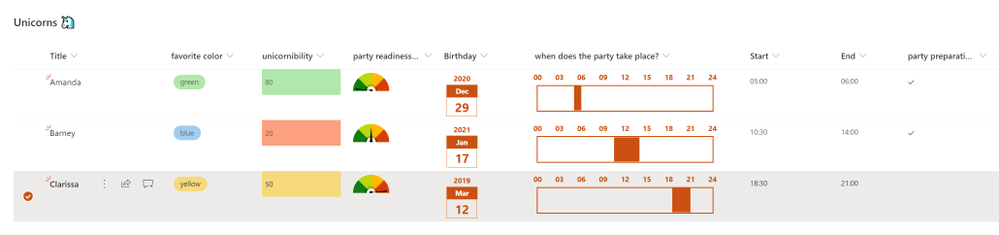
we can now look at a list like that:


example list.png


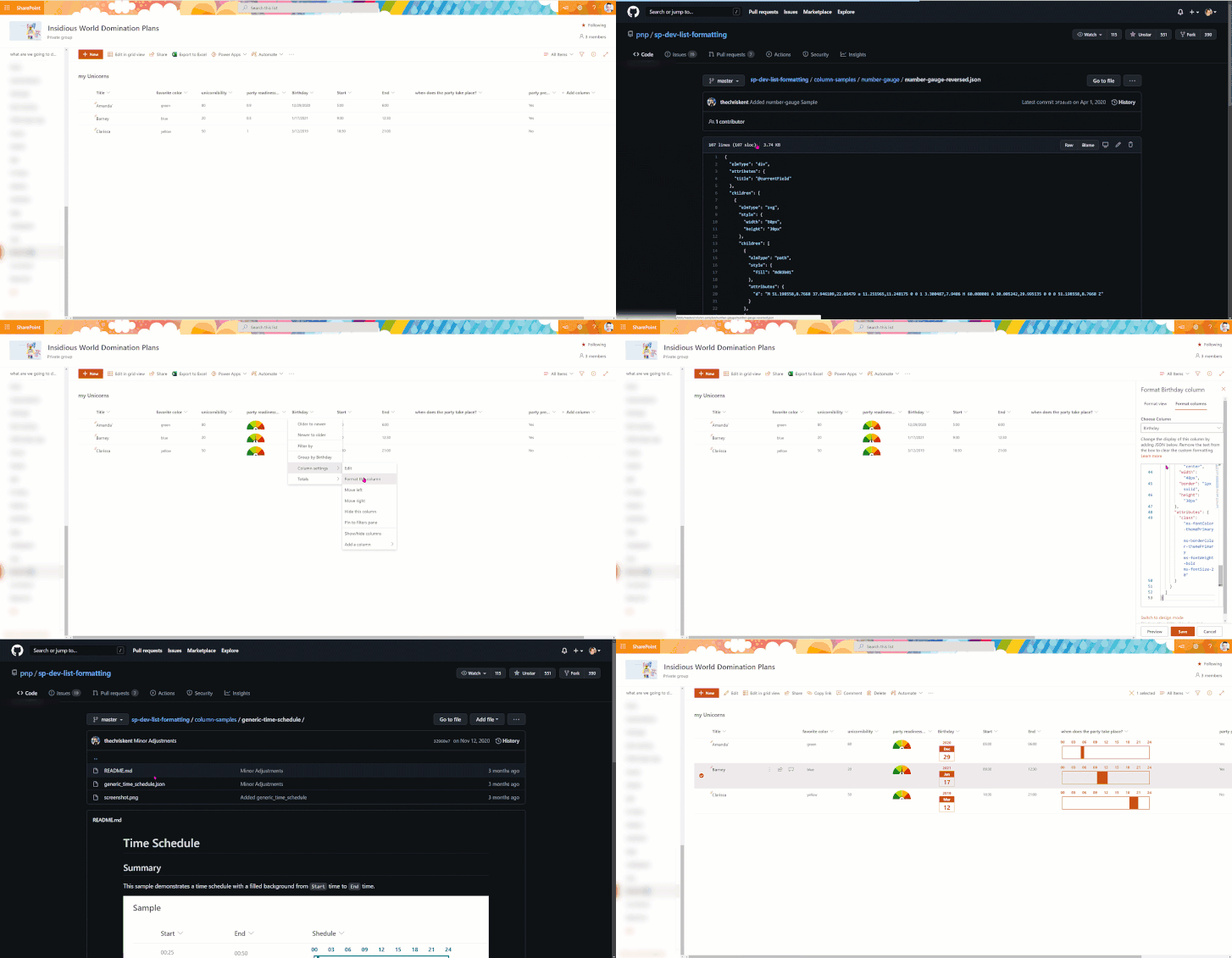
How can we apply a sample?


  • Get familiar with the samples that are available on GitHub

  • regularly check for new ones / pin the repo

  • select the one that is interesting for you

  • read the readme.md file to know the requirements for your column. Some samples only work with choice, text, or number columns

  • open the JSON file

  • copy the code to your clipboard

  • go to your SharePoint list

  • go to column settings –> format this column

  • click on Advanced mode

  • paste the code

  • click Save


formatsplist.gif


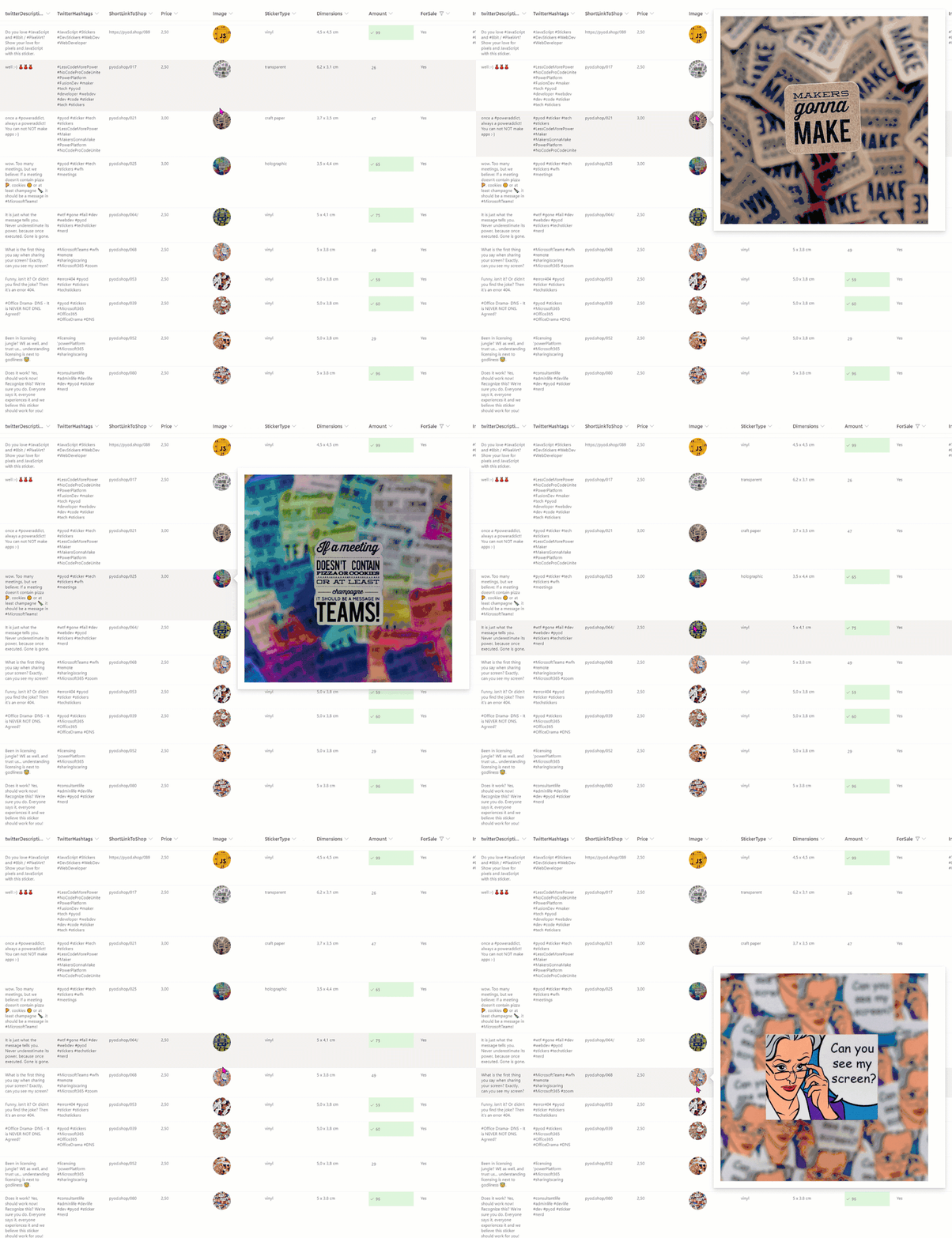
One more example how amazing a list can look like? I run a the PimpYourOwnDevoce.com sticker store together with Elio Struyf and we use a SharePoint list as our inventory (Elio blogged about the whole architecture here. With this sample we can hover over our images to have a big preview:


listformat-pyod.gif


That’s it!:stareyes:


We will find view samples in the same GitHub repository.


Want to learn more?


You can find helpful resources to learn more here:


Have fun and happy Modern SharePoint list formatting – #SharingIsCaring 


PS: Did you like this post? I wrote even more about list formatting


First published on m365princess.com 

Analyze root cause and impact using ADF ETL lineage in Azure Purview

Analyze root cause and impact using ADF ETL lineage in Azure Purview

This article is contributed. See the original author and article here.

Welcome to the first of the “Azure Data Factory and Azure Purview integration” blog series! 


Many enterprise customers and ISVs are using Azure Data Factory for their data integration and transformation needs.  We are excited to see how ADF is making modeling and operating ETL flows more efficient and scalable for organizations worldwide!  To make that experience even better, we are integrating ADF with Azure Purview to bring more customer values around lineage, policy management, and data governance. 


In this blog series we will share scenarios, use cases, and how-to instructions on integration between ADF and Azure Purview.  Each post will take 5-10 minutes to read. 


As enterprises bring into more siloed data into their data lake and enterprise data warehouse, the data integration processes become more complex.  As a result, it gets increasingly harder for users to track the freshness of the produced data and to analyze and optimize the existing ETL process For example, when user needs to modify some data sources, it is very difficult to know how much impact it has on the ETL and downstream analytical process. 


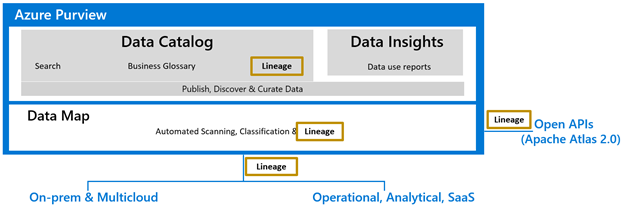
Azure Purview is a new cloud service for data users to centrally manage and govern data across their data estate spanning cloud and on-prem environments.  


Picture1.png


You can connect one or more data factories to an Azure Purview account, and the connection allows Data Factory to automatically publish lineage data for Copy, Data flow and SSIS package execution into Azure Purview.  Data Factory Lineage in Azure Purview provides detailed information for root cause analysis and impact analysis.


Scenarios 1: Root cause analysis


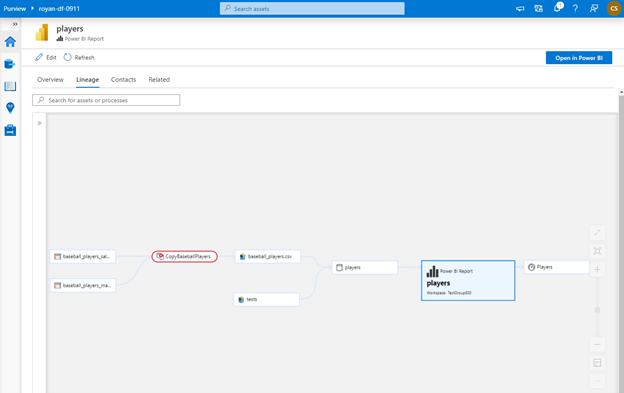
Data Engineers own data sources within a data estate. In situations when a data source has incorrect data due to upstream issues, the data engineers have no centralized place to identify the issues.


Using catalog lineage, the data engineers can understand upstream process failures and be informed about the reasons for their data sources discrepancy.


Picture2.png


Scenario 2: Impact analysis


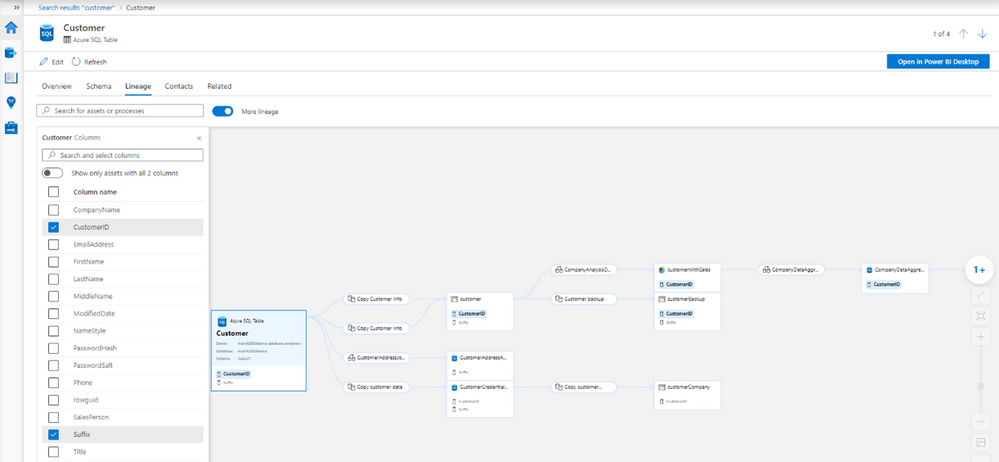
If data Producers want to change and deprecate a column in a data source they own, and they want to know who are being impacted upon making such a change. There isn’t a centralized place a data producer can know all the downstream consumers of their data sources.


Using catalog lineage, a data producer can easily understand the impact of the downstream assets upon changing the attributes of the data source.


Picture3.png


Next steps


Friday Five: Azure Stack Edge, Apache JMeter, More!

Friday Five: Azure Stack Edge, Apache JMeter, More!

This article is contributed. See the original author and article here.

nori.jpg

Build your own random Twitter Bot by Azure Logic Apps and Azure Table Storage

Noriyuki Takei is an Azure MVP from Japan who specializes in Azure Cloud Native Service. An avid writer, Noriyuki posts about 100 blogs annually to present technical information at Azure Communities for all beginners of Azure. For more, check out Noriyuki’s Twitter @Noriyukitakei

robbos.jpg

GitHub Actions & Security: Best practices – Forking Action repositories

Rob Bos is a Developer Technologies MVP and DevOps consultant from The Netherlands. Rob is typically working with anything DevOps related to improve flow. As a Global DevOps Bootcamp team member, he loves to automate large setups for the yearly event and uses any tool to get things done. For more on Rob, check out his Twitter @robbos81

unnamed (1).jpg

Load test with Apache JMeter™ against Azure Media Services

Kuniteru Asami is an Azure MVP and core staff member of the Japan Azure User Group. Kuniteru has been providing technical consulting for Microsoft Azure for more than 10 years since its initial release. Moreover, the Japanese Azure expert is the CEO of a company with six Azure MVPs on its staff. Follow him on Twitter @kunyami

image.png

Step by Step Azure Stack Edge – Azure Data Box Gateway for a Hybrid Cloud

Robert Smit is a EMEA Cloud Solution Architect at Insight.de and is a current Microsoft MVP Cloud and Datacenter as of 2009. Robert has over 20 years experience in IT with experience in the educational, health-care and finance industries. Robert’s past IT experience in the trenches of IT gives him the knowledge and insight that allows him to communicate effectively with IT professionals. Follow him on Twitter at @clusterMVP

20180904081913-IMG_0221_medium copy.jpg

How to make your Teams bots richer with markdown

Vesku Nopanen is a Principal Consultant in Office 365 and Modern Work and passionate about Microsoft Teams. He helps and coaches customers to find benefits and value when adopting new tools, methods, ways or working and practices into daily work-life equation. He focuses especially on Microsoft Teams and how it can change organizations’ work. He lives in Turku, Finland. Follow him on Twitter: @Vesanopanen

How to create an improved Microsoft Teams Files approval process using Azure Logic Apps

How to create an improved Microsoft Teams Files approval process using Azure Logic Apps

This article is contributed. See the original author and article here.

We are all there during some days: Power Automate Premium is the key to the next level but there is no way we could justify that licensing – the ROI is simply not enough. Have you thought that you could be utilizing a Azure Logic App instead?


2021-02-10_22-02-47.png


Following my earlier post ( How to: initiate a document approval directly in team files tab (using Power Automate) ) that required a Power Automate Premium license I recreated that with Azure Logic Apps solution. Please do refer and compare to that blog post these steps to see how they differ. For later mentioned parts you need to follow steps in that post.


What are Azure Logic Apps and do they cost?


First: what are Logic Apps? Let’s take a snippet from Microsoft Azure Logic Apps documentation here.


Azure Logic Apps is a cloud service that helps you schedule, automate, and orchestrate tasks, business processes, and workflows when you need to integrate apps, data, systems, and services across enterprises or organizations. Logic Apps simplifies how you design and build scalable solutions for app integration, data integration, system integration, enterprise application integration (EAI), and business-to-business (B2B) communication, whether in the cloud, on premises, or both.


In short: you are create something almost like a Power Automate Cloud Flow but you do that in the Azure. The user interface is slightly different but almost all essential parts are there: triggers, actions, connections and of course various connector.


The big difference is that you will be paying for all Logic App runs but the bright side is that you don’t have to purchase Power Automate Premium. Of course it pays to do some rough calculation on Logic Apps. In my demos for a week I accumulated less than one euro on Logic Apps costs.. If something you construct is used repeatedly and has lots of loops costs can build up. But if you have a random need for a Premium or custom connector requirements Logic Apps might be a perfect solution. This also depends on number of users you would have to license Premium Power Automates to: yearly investment counts.


Read more about Logic Apps pricing here.


I suggest to start with


  • Create a resource group for Logic Apps so you can easily keep on track of the costs – and also manage your apps

  • Put a budget to Azure in place so your costs don’t suddenly skyrocket

  • Follow costs and cost estimate


Creating Azure Logic Apps -process for file approval requests


Now that we have that householding taken care of we can finally create the Logic App.


Navigate to your Resource Group and click on Add.


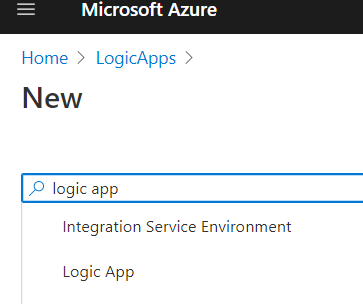
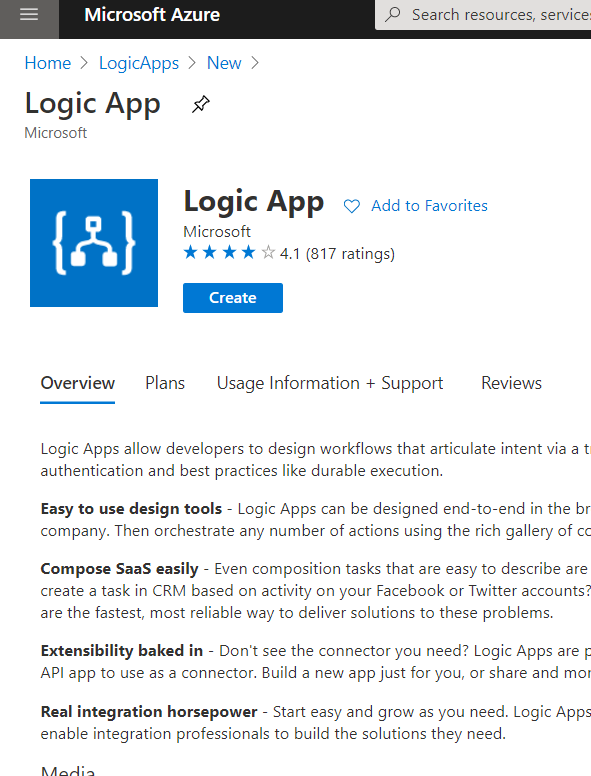
Add a Logic App. Use search to narrow the list down.


image-55


image-56


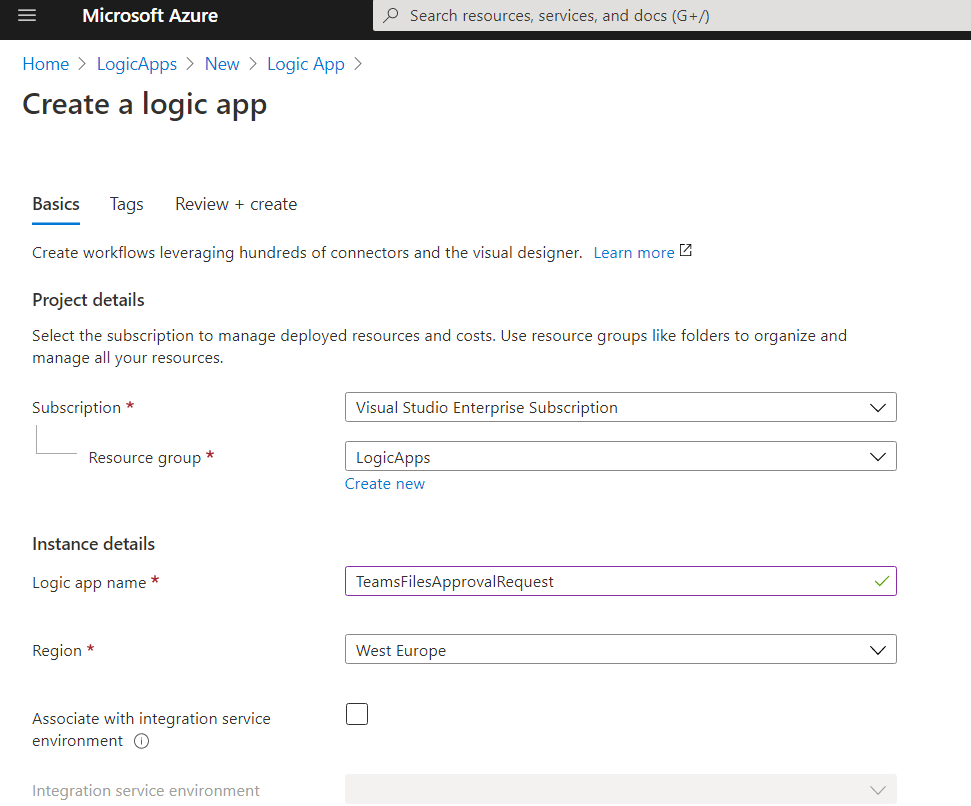
Note: Be careful how you name your Logic App in the next step because you won’t be able to change it later!


image-58


Add Tags if you use them, Review and Create the App. The Logic App is deployed rather quickly and you can then go to the Resource.


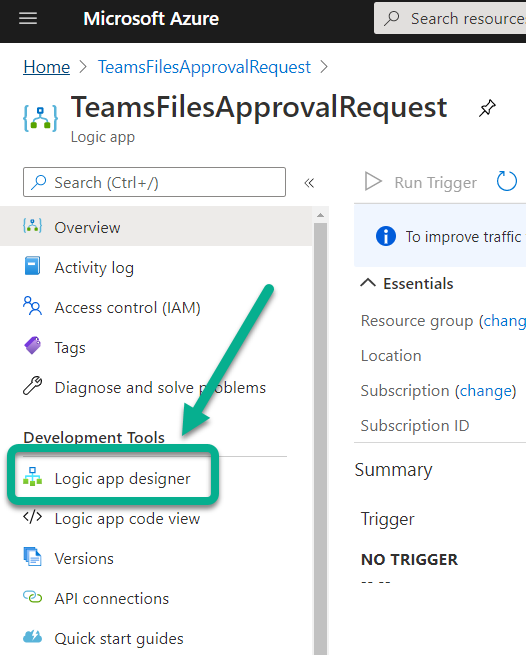
Go to Logic App Designer


image-59


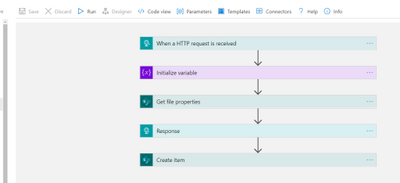
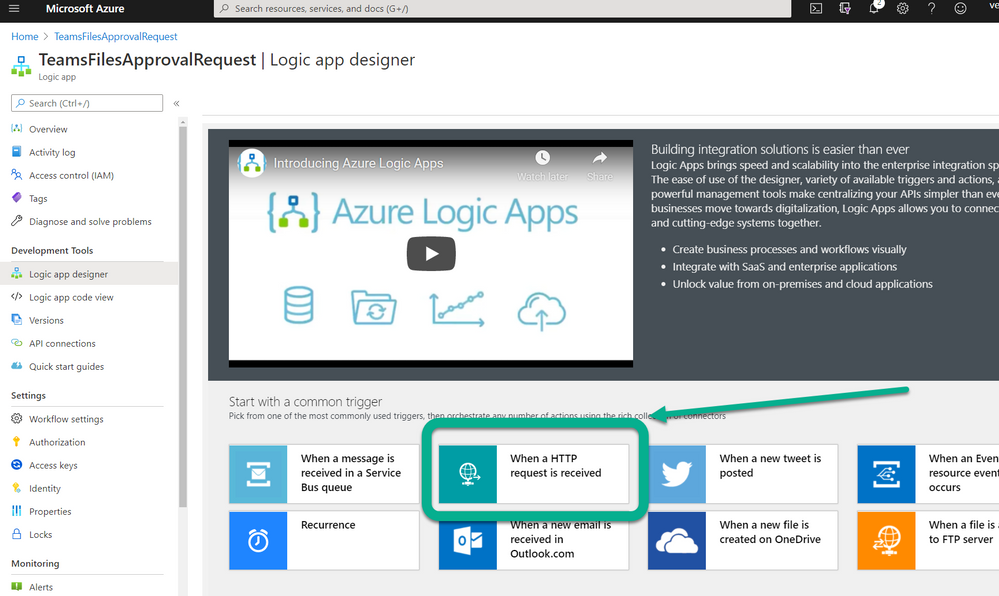
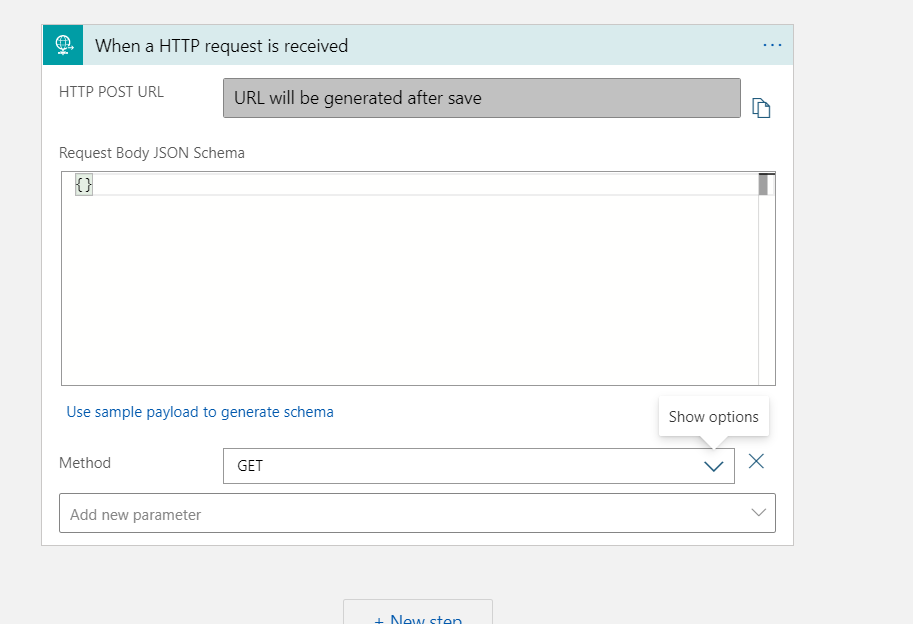
From there you can start selecting your trigger how the Logic App is activated. Since we are duplicating the earlier post functionality with Azure Logic Apps we choose “When a HTTP request is received”


image-60


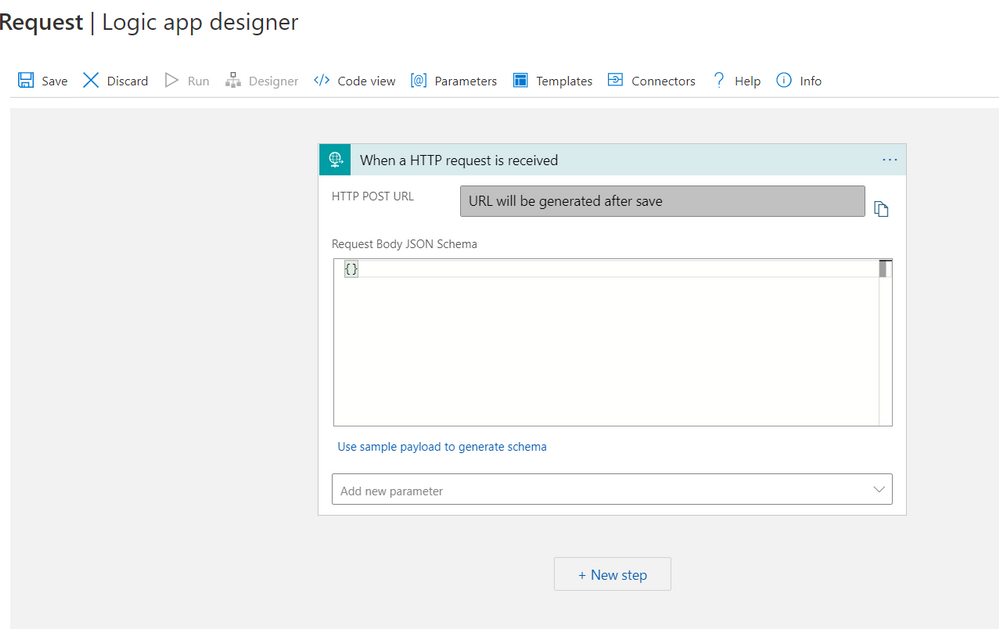
And now the UI starts to look very Power Automatish


image-61


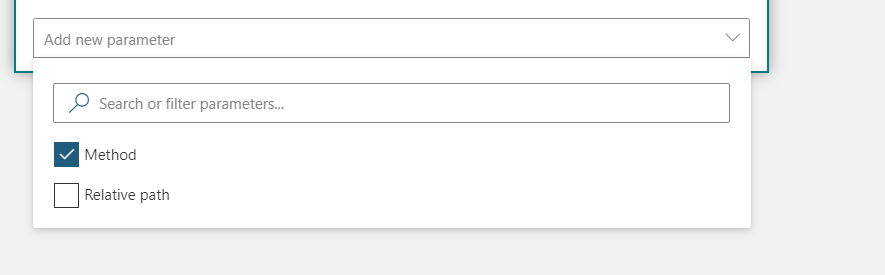
The difference is about available parameters. You need to click on Add new parameter to open menu that is in this (and in many other actions) not visible unlike at Power Automate designer.


image-62


Check Method


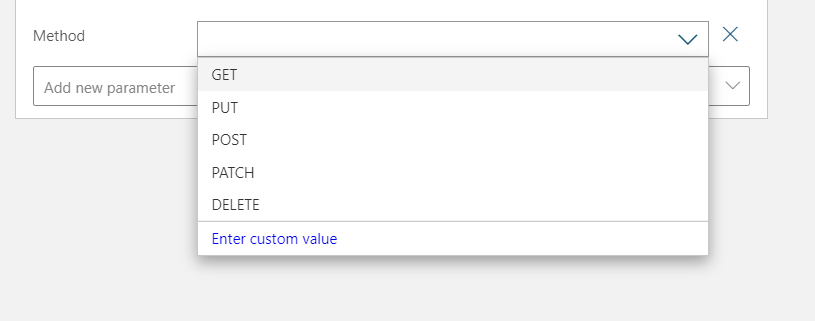
image-63


And you can choose Get from the list.


image-64


And now we have the trigger part ready (waiting for a save)!


image-65


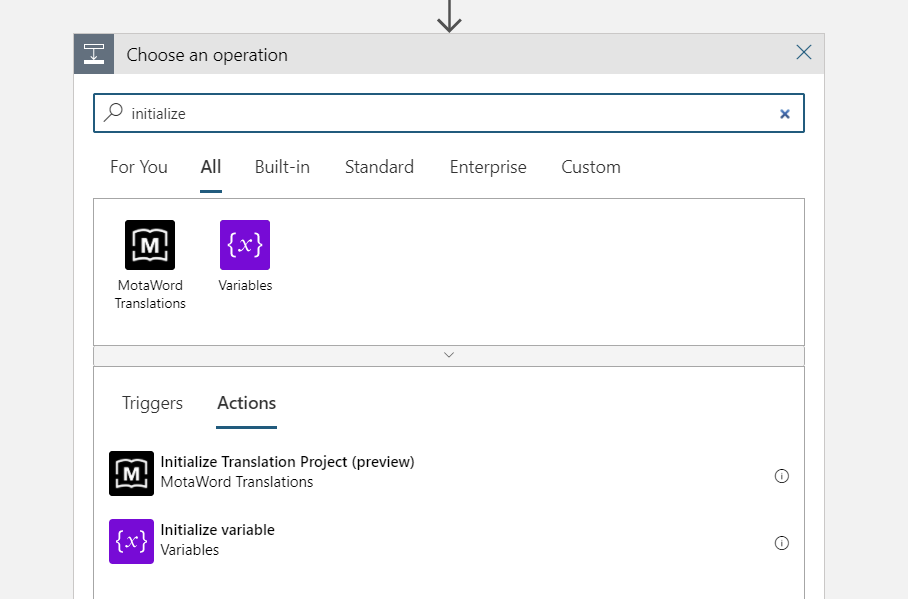
Then we add other parts. The search for actions is not as good as in Power Automate Cloud Flows but keep on trying – the actions are there!


image-66


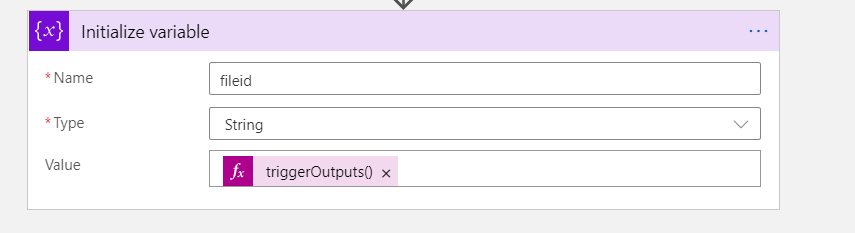
Let’s populate that with triggerOutputs()[‘queries’][‘FileID’] just like in the earlier blog post.


image-67


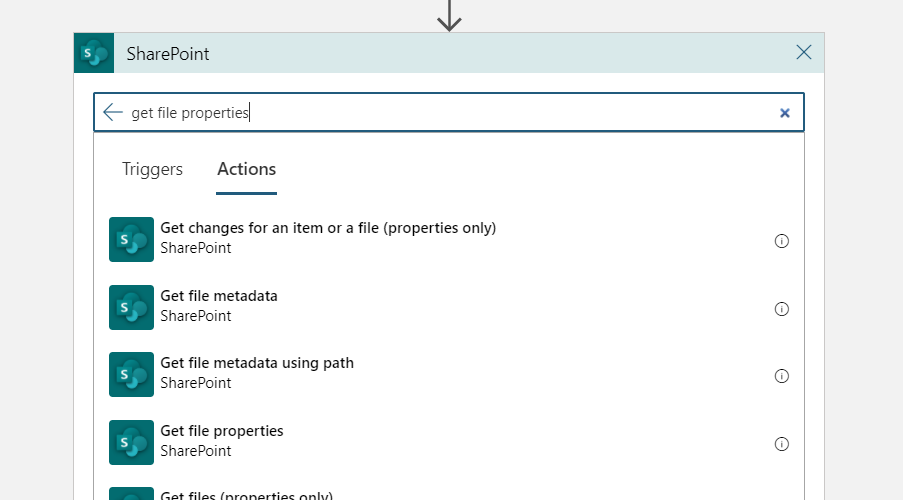
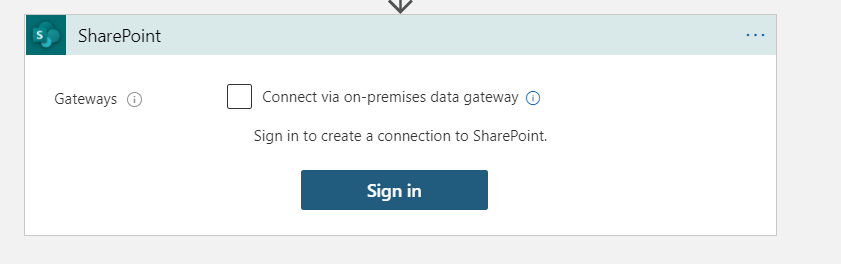
Add there Get File Properties from SharePoint. In this point we need to add a connection to the SharePoint. Use credentials that you seem to be fit.


image-68


image-69


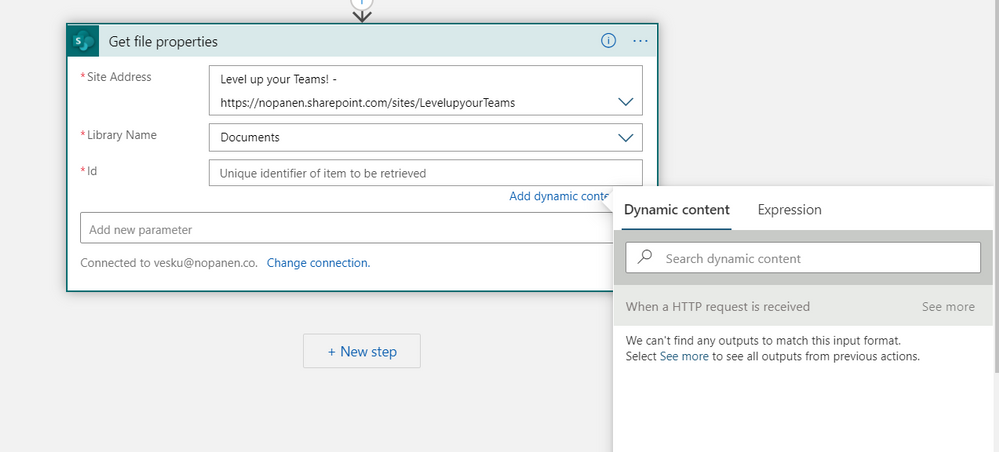
Once you have signed in you can define the information how to get file properties.


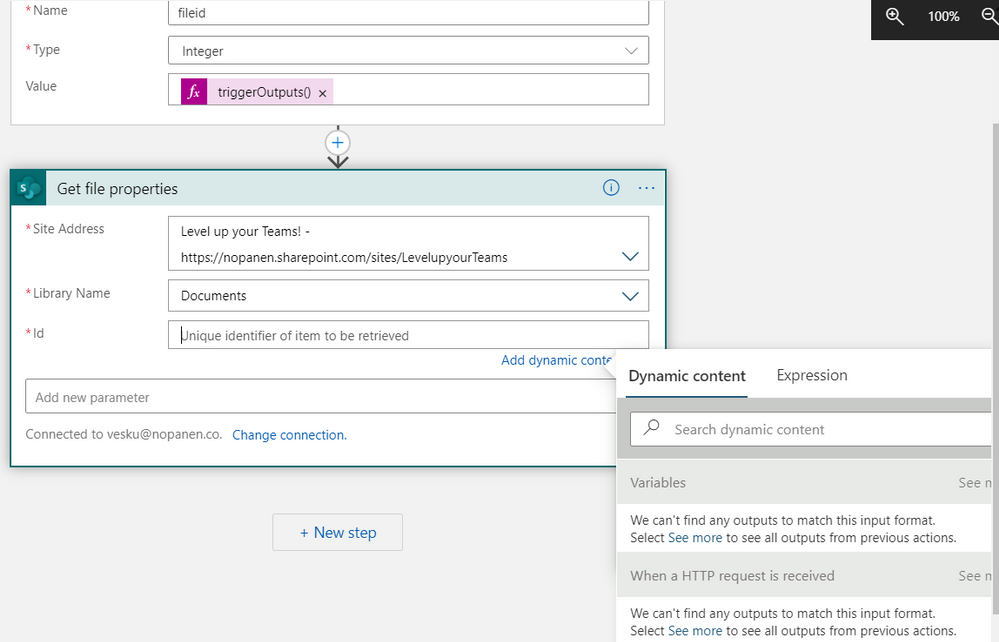
image-70


The FileID is missing. You need to do a bit trick here:


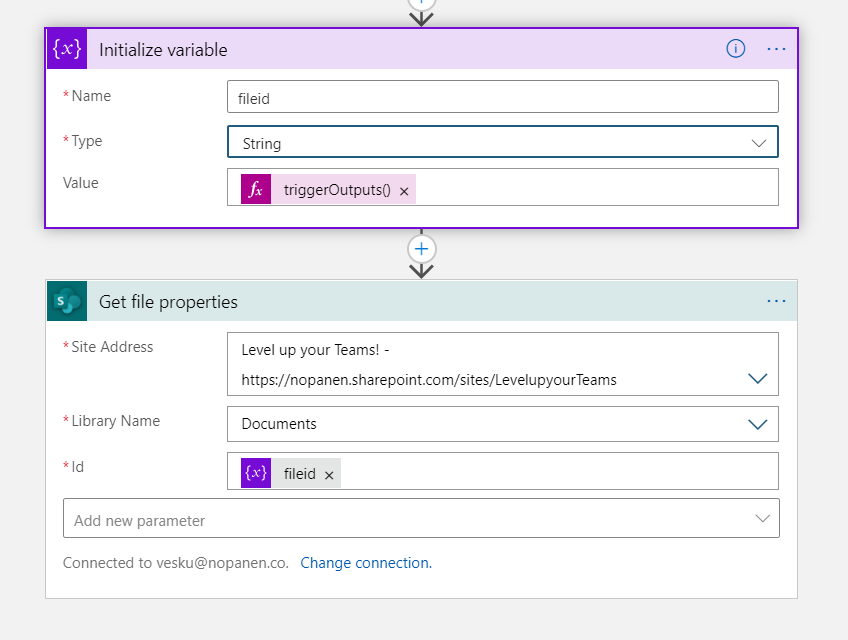
  • Change parameter to integer

  • add it to the Get file properties

  • Change parameter back to string


image-71


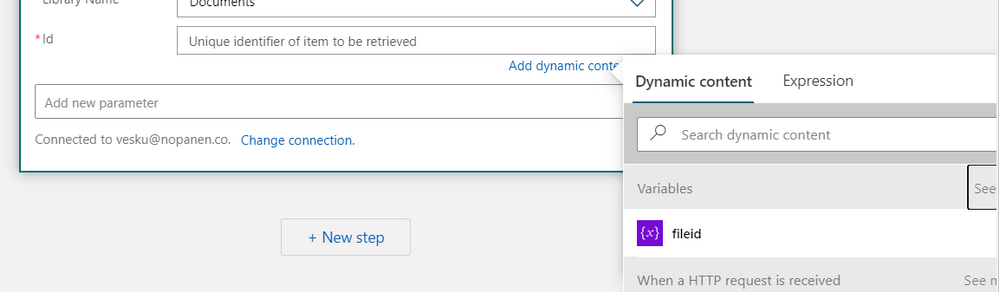
And click on see more at Variable section in Dynamic content


image-72


Choose fileid. And yes! (don’t forget to change the fileid parameter back to string)


image-73


At this point we have


  • FileID

  • All file properties

  • Open HTTP request..


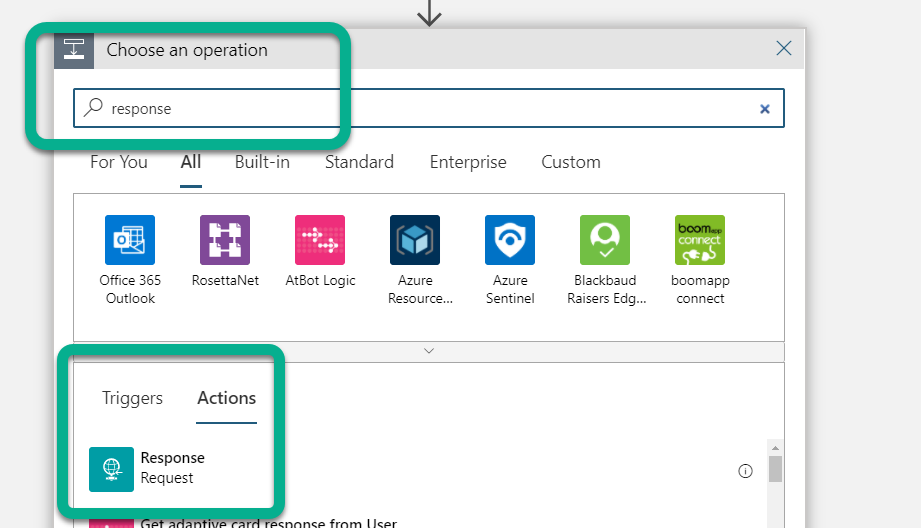
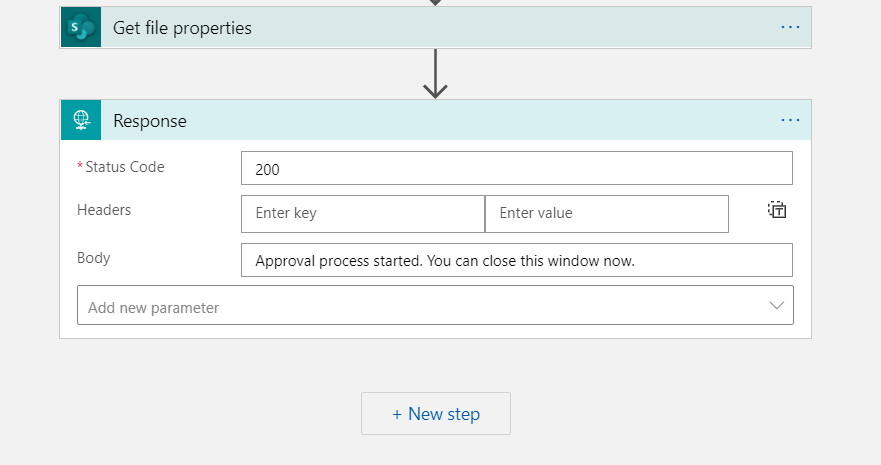
Let’s close that HTTP request first. Add Response-action and instruct to close the tab.


image-74


image-75


Note: here is when you need to progress differently than with Power Automate Cloud Flow approval


This is because Azure Logic Apps doesn’t have Approval-connection. In this phase I decided to make the demo easily: writing the approval request to a SharePoint list in the tenant and and creating a another Power Automate with a when item is inserted trigger there.


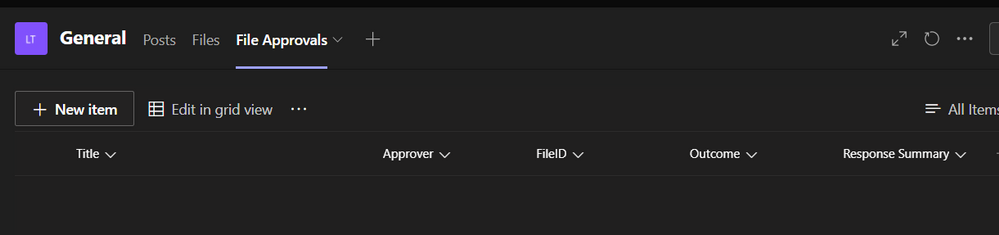
First – let’s create that list where we can write the information to. We can use Teams Lists -app for that.


image-76


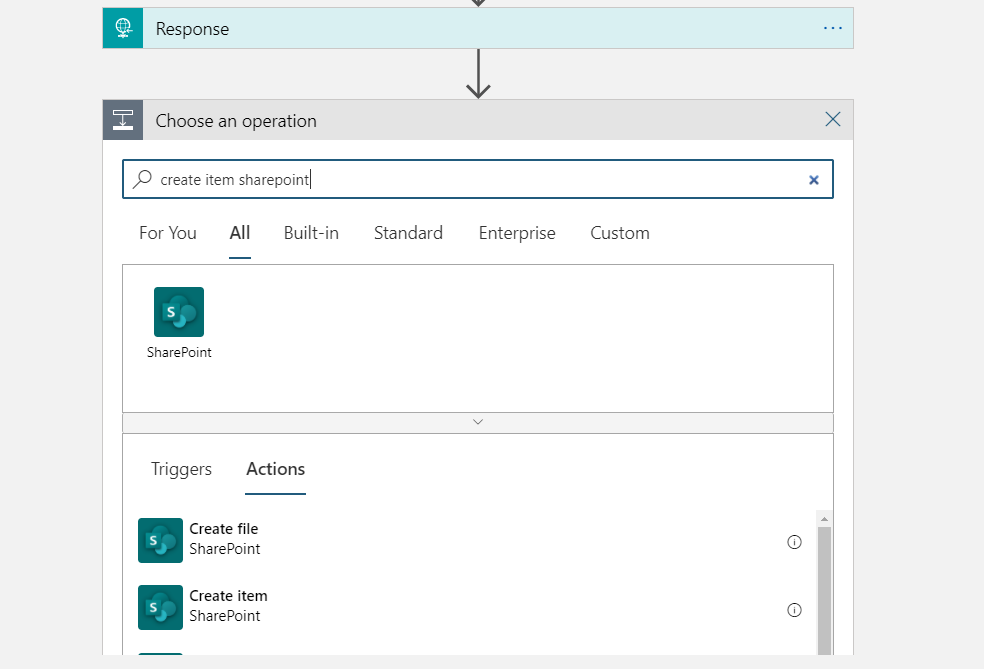
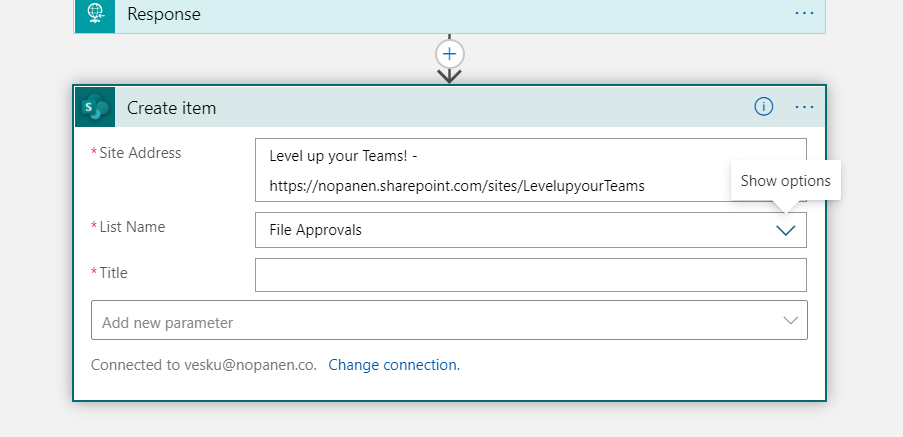
Search for the action in Azure Logic Apps and add Create Item


image-77


image-78


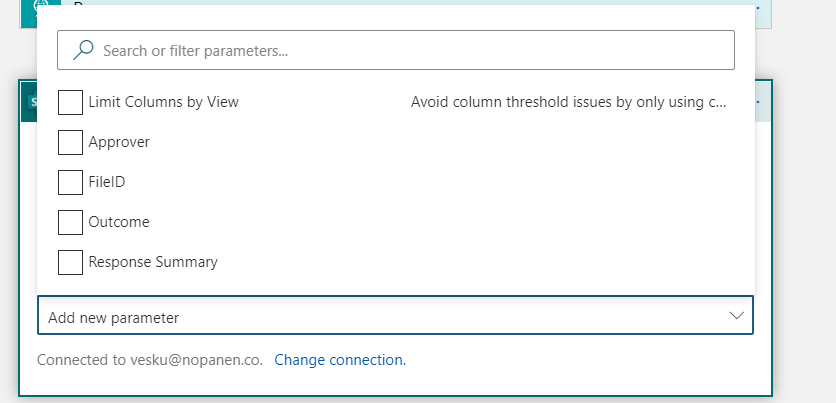
Now, we need to click on Add new parameter to add list columns to the action.


image-79


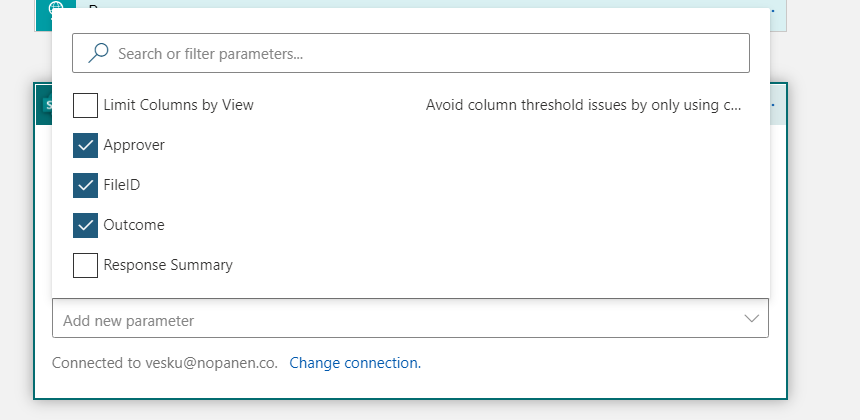
Choosing Approver, FileID, and Outcome. I actually should have named Approver as Approval Requestor but hopefully it doesn’t confuse too much.


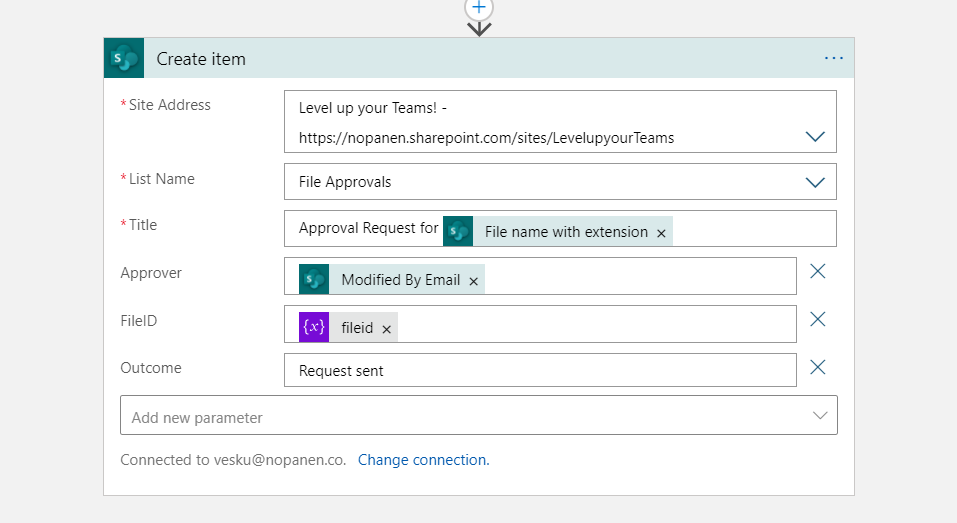
image-80


When filling up information you can use Dynamic values from Get file properties. Since we don’t really know who clicked that request approval button we just assume it was the person who did changes the last time.


And that’s it!


image-81


Hit save (if you haven’t already) and you have the URL in the trigger action available. Proceed with column formatting as stated in previous post.


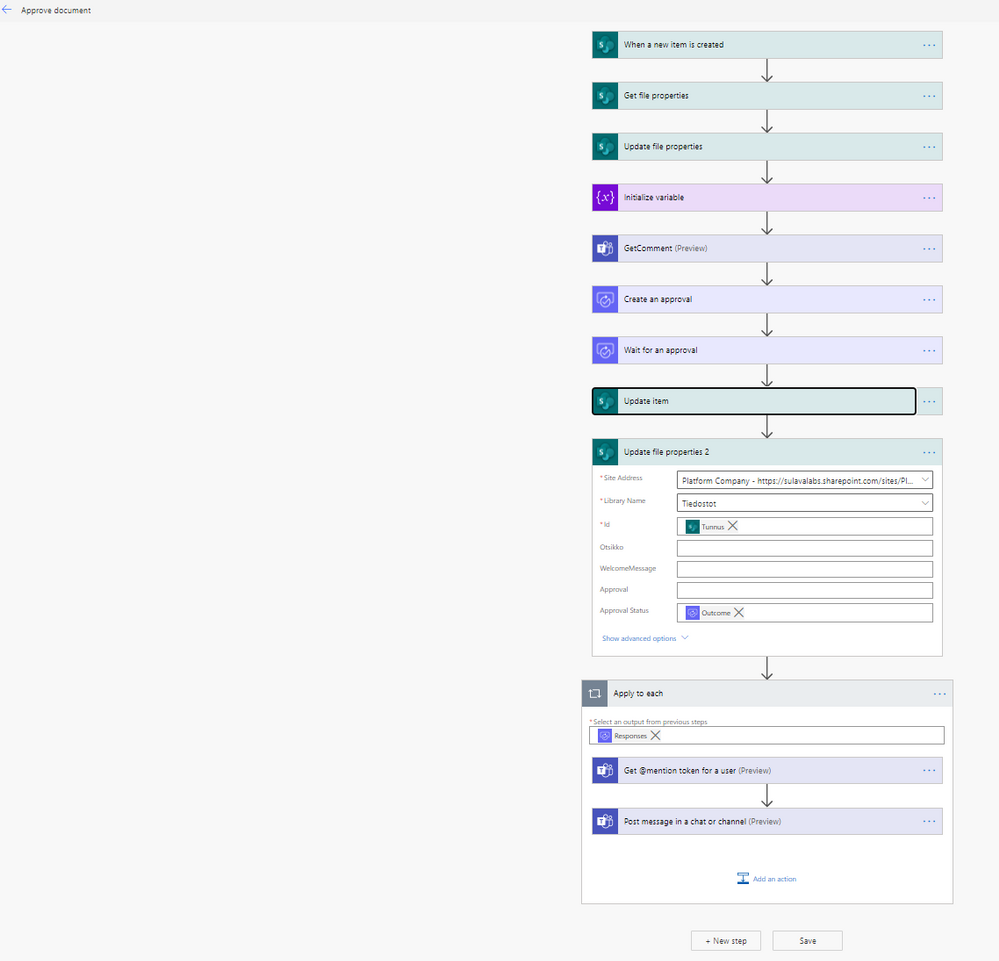
Fast forwarding the Power Automate that is created as a trigger to the File Approvals -list looks like this:


image-83


Steps are roughly similar to the ones as in the earlier post.


  • The new item is inserted trigger

  • Getting file properties from the Documents (based on the fileID )

  • Updating that file that Approval is processing

  • Storing the file name into a variable

  • Getting a comment from the user that last modified the file why this document needs approving

  • I didn’t add this one but you could figure out who is really the document approver. Perhaps there is metadata that can define that one – or the library / folder itself is tied to a structure that defines the real approver

  • Create the approval request

  • Wait for the approval to conclude. I have found out that it is better to use Create + Wait combination in separate actions compared to the Start & Wait single action. If you need to count your Power Automate executions then a single action might make more sense..

  • Add also the check is it approved or rejected. I didn’t add this either to this demo but this is definitely needed if you are taking any real action after the approval process!

  • Updated the outcome to the list and then to the file itself to a dedicated columns

  • Added a information about approval request to be sent to a channel


Conclusion


With Azure Logic Apps it is possible to go the next level without paying for Premium Power Automates. There are also other create features in Logic Apps that I didn’t even touch on this one: ability to modify the app in Visual Studio for example. And that means it is easy to add to a version control as well..


You need to pay attention to the execution costs and make sure that your Logic Apps stay in the budget. This suits extremely well for low-medium usage actions.


You may have to switch from a Logic App to Power Automate at some point – like we did in this example. Plan carefully how you do the data exchange and where do you store the information & who can access it. The HTTP trigger in this example isn’t the safest one to use (it lacks security) so you need to plan how you either add some security to it or secure it in some other way. In my earlier post I also made some pointers about this: look them up.


Not all connectors / actions are in the Logic Apps but many of them are.


Azure Logic Apps are a great way to extend Microsoft Teams and integrate it to different systems – inside and outside of Microsoft 365 cloud.


This blog article is a repost from MyTeamsDay.Com.

They give love a bad name

They give love a bad name

This article was originally posted by the FTC. See the original article here.

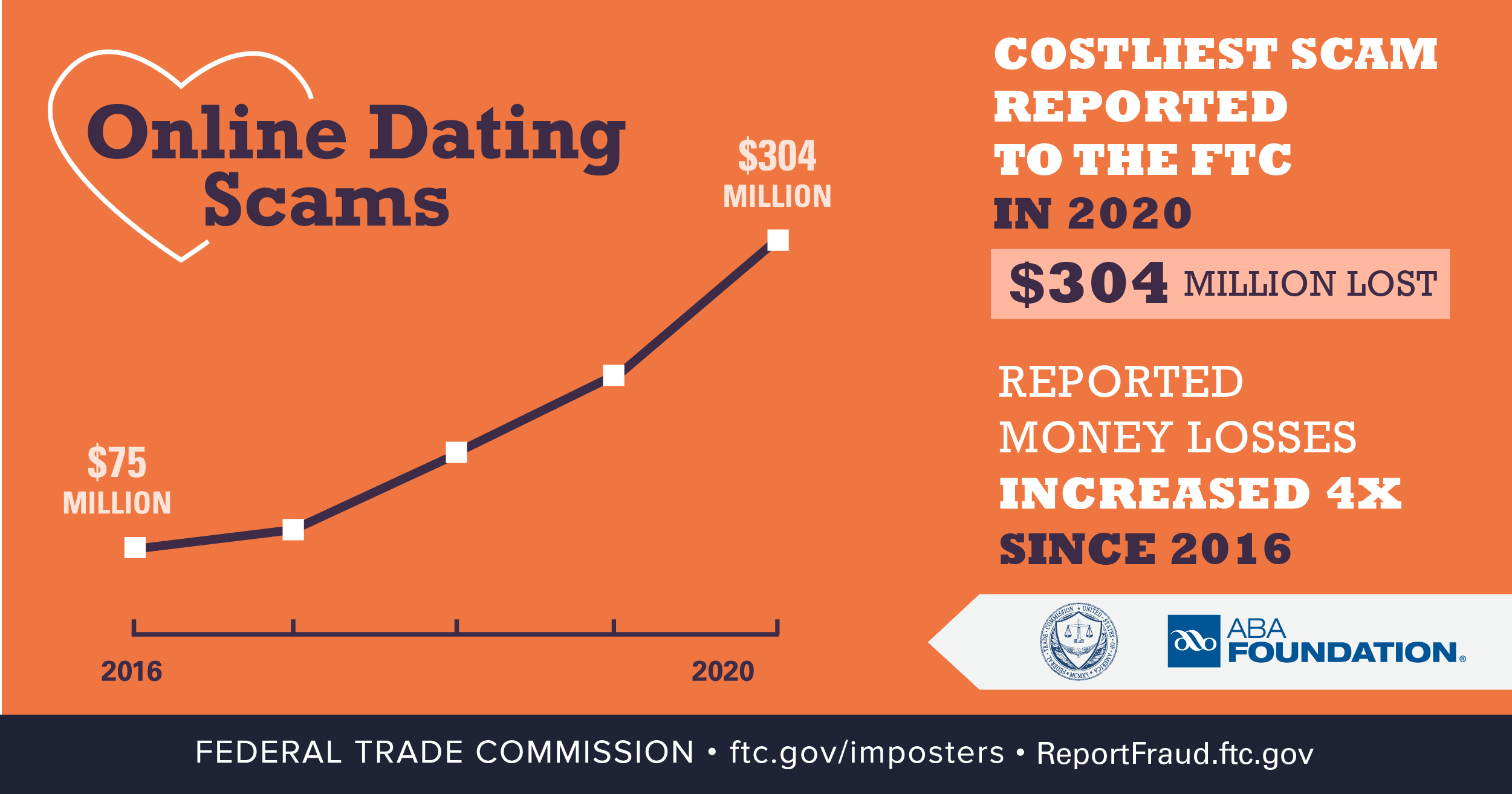
Leaving broken hearts and empty bank accounts, romance scammers give love a bad name. Now that you know how many people experience romance scams, and how to spot the scams, take some anti-scam action this Valentine’s Day. Whether you’re wondering if that interesting person who just messaged you is for real, looking forward to February 15 discounts on chocolates, or thinking about friends who are out in the online dating world, here are some messages to know and share about romance scams.

  • If an online love interest you’ve never met in person asks you for money, that’s a scam. No matter what story they tell you.
  • Never send money or gifts to anyone you haven’t met in person — even if they send you money first.
  • Only scammers tell you to buy gift cards, wire money, or buy cryptocurrency. And once you send that money, you won’t get it back.
  • Talk to someone you trust about your new love interest, and pay attention if they’re concerned. 
  • Report romance scams to the dating or social networking site, and to the FTC at ReportFraud.ftc.gov.

Learn more at ftc.gov/romancescams. And share this blog series, video, and graphics with people who might need it — even if you don’t.

Brought to you by Dr. Ware, Microsoft Office 365 Silver Partner, Charleston SC.

Troubleshooting Performance on SQL On-demand or Serverless

Troubleshooting Performance on SQL On-demand or Serverless

This article is contributed. See the original author and article here.

Scenario: Customer is running multiples queries and he sees there are some delays during the execution, some queries are in the wait state. 


Questions


  1. are all the files been queried in the same region?

  2. is the storage account been used only to query the SQL Serverless files or do we have other processes accessing this storage account at the same time?

  3. which type of files? Parquet, CSV, JSON? 4)If CSV? did the customer created the stats?


Consider Review this document: Best practices for serverless SQL pool – Azure Synapse Analytics | Microsoft Docs


Troubleshooting


Run this script while you recreate the scenario


Execution: Troubleshooting SQL On-demand or Serverless DMVs – Microsoft Tech Community


Note in this scenario, there was a lot of wait for Async network IO:


By definition: ASYNC_NETWORK_IO is an indication that your client application is not able to efficiently retrieve the data it needs from the system.


async.png


Possible RCA


One problem can have multiple reasons even with similar symptoms. In this case, the customer was running multiple queries from the same storage ( dedicate to SQL OD), all parquet files. The process of distribution and execution against the nodes was fairly fast. However, while sending the results back to the client, it was taking more time than expected, and I mean customer network.


Hence consider two approaches in a scenario like this. As much SQL Serverless is fast, you need to consider if the client app is consuming the information fast enough and if the network is keeping up. One possible way to rule out the network is to create a VM on the same region as the datacenter is localized and execute the queries on SQL Serverless from that VM instead of your computer.


Credits to Veljko Vasic on this as also the great product group team of SQL Serverless. 


That is it!


Liliam 


UK Engineer