by Contributed | Feb 26, 2021 | Technology
This article is contributed. See the original author and article here.
Did you know that Microsoft Learn Student Ambassadors speak at least 117 languages between them? Or that about 15 percent of them go to school more than 805 kilometers from where they grew up?
To learn more about the big stuff and the small stuff that makes them tick, check out this visual introduction to who they are and what student life looks like for them.
And if you see yourself in this incredible community and wonder what you could achieve with the right opportunity, we’d love to meet you. Learn more at StudentAmbassadors.microsoft.com.
by Contributed | Feb 26, 2021 | Technology
This article is contributed. See the original author and article here.
As cities continue connecting their urban environments, the concept of digital twins—a digital representation of real-world environments brought to life with real time data from sensors and other data sources—has entered the realm of smart cities and promises to enable city administrations and urban planners to make better decisions with the help of data integration and visualization from across the urban space.
Last year, we announced the general availability of the Azure Digital Twins platform which enables developers to model and create digital representations of connected environments like buildings, factories, farms, energy networks, railways, stadiums, and cities, then bring these entities to life with a live execution environment that integrates IoT and other data sources.
Today, we are excited to announce that the open-source GitHub repository of Smart Cities ontology for Azure Digital Twins available to the ecosystem.
Why ontologies
To drive openness and interoperability, Azure Digital Twins comes with an open modeling language, Digital Twins Definition Language (DTDL), which provides flexibility, ease of use, and integration into the rest of the Azure platform. Using DTDL, developers can describe twins in terms of the telemetry they emit, the properties they report or synchronize and the commands they respond to. Most importantly, DTDL also allows describing the relationship between twins.
Common representation of places, infrastructure, and assets will be paramount for interoperability and enabling data sharing between multiple domains. It’s our goal to partner with industry experts and provide DTDL-based ontologies which learn from, build on, and/or use industry standards, meet the needs of developers, and are adopted by the industry. The resulting open-source ontologies provide common ground for modeling connected environments, accelerate developers’ time to results, and enable interoperability between DTDL-based solutions from different solution providers.
Smart Cities ontology approach and overview
We collaborated with Open Agile Smart Cities (OASC) and Sirus to provide a DTDL-based ontology, starting with ETSI CIM NGSI-LD, and accelerate development of digital twins-based solutions for smart cities.
In addition to ETSI NGSI-LD, we’ve also evaluated Saref4City, CityGML, ISO and others.
The ETSI CIM NGSI-LD specification defines an open framework for context information exchange named NGSI-LD which comes with an information model that defines the meaning of the most needed terms, and a domain-specific extension to model any information. The core meta-model provides a basis for representing property graphs using RDF/RDFS/OWL, and is formed of Entities, their Relationships, and their Properties with values, encoded in JSON-LD. In addition to the core meta-model, NGSI-LD compliant open models for aspects of smart cities have been defined by organizations and projects, including OASC, FIWARE, GSMA and the Synchronicity project. The NGSI-LD models for Smart Cites comprise models in the domains of Mobility, Environment, Waste, Parking, Building, Park, Port, etc.
The property graph nature of NGSI-LD made it quite straightforward to map it to DTDL, and with today’s release, we are making an initial set of DTDL models adapted from the NGSI-LD open models for Smart Cities available to the community.
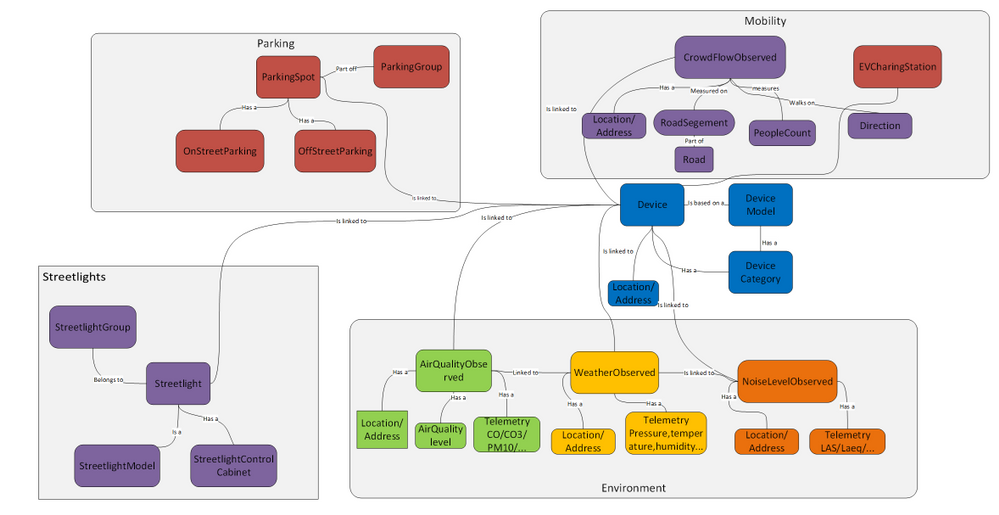
We’ve focused our initial set on use cases that are increasingly relevant to cities given the availability of IoT devices and sensors, like measuring the air quality in a neighborhood, understanding the noise level in a district, the crowd flow in a road segment, traffic flow in a road segment, monitoring on-street parking in parking spots, availability of EV-Charging, or monitoring streetlights and reducing energy consumption, but as well enabling streetlight infrastructure for additional smart cities services enabling citizen-centric use cases.
In addition to the ETSI NGSI-LD, we’ve also started leveraging ETSI SAREF extension for Smart Cities ontology framework for Topology, Administrative Area and City Object modeling. Using Saref4City ontology constructs represented in DTDL allowed us to model city objects like poles, their containment within an administrative area of a city, and linked to the smart models in the domain of mobility, environmental, parking adapted in DTDL from NGSI-LD models for Smart Cities described above.
Watch this IoT Show episode to learn how we approached the DTDL-based Smart Cities ontology, how we mapped the ETSI NGSI-LD models to DTDL, extending the ontology based on Saref4City, while bringing it all together with an example use case brought to life with Azure Digital Twins Explorer.
Partners
We collaborated with OASC and Sirus to bring the first DTDL ontology for Smart Cities for Azure Digital Twins to the community. We are also working with more partners that are validating and contributing to the open source ontology.
Open & Agile Smart Cities – OASC in short –is an international network of cities and communities, working with local public administrations of all sizes to support their digital transformation journey. Together with its members, partners, and experts, OASC creates sustainable impact for cities with data driven solutions based on a Minimal Interoperability Mechanisms which includes open standards, open APIs, and a recommended catalog of open data models, including NGSI-LD models, to enable interoperability for applications and systems among different cities.
Sirus is a dynamic software integration company that specializes in building IoT and Smart City solutions. Sirus enables cities to build digital solutions and integrate data from a variety of IoT devices and other systems through an open standards-based approach, like ETSI NGSI-LD, and has pioneered multiple smart cities data integration platforms including for the City of Antwerp. Sirus invests heavily in innovation, like smart city digital twins based on Azure and pioneers in open standards implementations. Sirus is also an SME partner of OASC.
Siemens MindSphere City Graph is a solution that offers a new way to optimize city operations. It creates a digital twin of urban spaces allowing cities to model, monitor, and control physical infrastructure, powered by Azure Digital Twins. MindSphere City Graph uses the Digital Twins Definition Language and context information management specifications ETSI NGSI-LD to drive openness for solution providers to integrate and deliver sustainable value for a city while enabling open data for cities through open standard approach. The open source DTDL-based ontologies for Smart Cities based on ETSI NGSI-LD will accelerate the development of digital twins solutions and integration.
ENE.HUB, a portfolio of Brookfield Infrastructure Partners, is a fully integrated smart city infrastructure as a service provider. ENE.HUB’s flagship product, the SMART.NODE™ is a comprehensive and self-contained smart pole solution that integrates a range of smart city services including smart lighting, communication services, energy services, environment services, transport services, safety, and media services. ENE.HUB is collaborating with Microsoft on digital twin’s representation of smart poles based on the open DTDL-based Smart Cities ontology.
We also continue to collaborate with our partners Bentley Systems and Imec, experts in digital twin solutions for smart cities. Both Bentley Systems and Imec are also members of the Digital Twin Consortium along with Microsoft.
Next steps
With this release of smart cities ontology for digital twins, we’ve focused on an initial set of models and we welcome you to contribute to extend the initial set of use cases, as well as improve the existing models.
Explore the open-source GitHub repository, try it out with Azure Digital Twins, and learn how to contribute.
Our goal is to accelerate your development of digital twins solutions for smart cities and enable interoperability and data sharing for cities.
If you are interested in Smart Building solutions, we worked with the RealEstateCore consortium to provide DTDL based ontology for Smart Buildings. Similarly, we are also working on Energy Grid ontology which will be coming soon.
As part of our commitment to openness and interoperability, we also continue to promote best practices and shared digital twin models and use cases through the Digital Twin Consortium.
by Contributed | Feb 26, 2021 | Technology
This article is contributed. See the original author and article here.
Today, I worked on a service request that our customer wants to download a large resultset from Azure SQL Database to OnPremises. The table has several blob columns (XML,Varchar(max),text) and millions of rows. In this situation, I would like to share with you several tests that I did and how to reduce the download time spent.
Initial points
- Try to increase the packet size in your connection string to higher values.
- Instead to use Proxy connection policy use Redirection connection policy to improve the connection.
- About the redirection, remember to use the latest drivers because some old drivers are not able to use redirection.
- As this process is a pure data processing, if possible, try to use Premium or Business Critical to reduce the I/O latency.
- In OnPremises try to distribute the data and log files in different location to improve the IO.
In Azure SQL Database, I created a table and filling the data:
- Basically, I created the following table:
CREATE TABLE [dbo].[Destination](
   [ID] [int] IDENTITY(1,1) NOT NULL,
   [Name1] [varchar](4000) NULL,
   [Name2] [varchar](4000) NULL,
   [Name3] [varchar](4000) NULL,
   [Name4] [varchar](4000) NULL,
   [Name5] [varchar](4000) NULL,
PRIMARY KEY CLUSTERED
(
   [ID] ASC
))
- Running multiple times the following query, I got around 7 millions of rows.
INSERT INTO Destination (Name1,Name2,Name3,Name4,Name5)  values(Replicate('X',4000),Replicate('X',4000),Replicate('X',4000),Replicate('X',4000),Replicate('X',4000))
INSERT INTO DESTINATION (Name1,Name2,Name3,Name4,Name5) SELECT Name1,Name2,Name3,Name4,Name5 FROM DESTINATION
In OnPremise:
- I developed a small C# aplication that has 3 different process:
- The first process was to read the whole table from Azure SQL Database and using bulkcopy download the data, but the spent time was high. I saw that transfer ratio was about (100-200 mb/s).
        private void LoadDataReaderWithoutCompression(C.SqlDataReader newProducts, int lCutOver = 10000, string sDestinationTable = "Destination")
        {
            using (C.SqlBulkCopy bulkCopy = new C.SqlBulkCopy(GetConnectionStringTarget(0), C.SqlBulkCopyOptions.KeepIdentity | C.SqlBulkCopyOptions.KeepNulls | C.SqlBulkCopyOptions.TableLock))
            {
                bulkCopy.DestinationTableName = sDestinationTable;
                try
                {
                    bulkCopy.BulkCopyTimeout = 6000;
                    bulkCopy.SqlRowsCopied += new C.SqlRowsCopiedEventHandler(OnSqlRowsCopied);
                    bulkCopy.NotifyAfter = 2000;
                    bulkCopy.EnableStreaming = false;
                    bulkCopy.BatchSize = lCutOver;
                    bulkCopy.WriteToServer(newProducts);
                }
                catch (Exception ex)
                {
                    Console.WriteLine(ex.Message);
                }
            }

        }
- The second process was to compress the data using COMPRESS function before downloading the data. Basically, the idea was:
- Create a table with the following structure.
- Execute the query INSERT INTO [_M$_Destination_X] (ID,NAME1,NAME2,NAME3,NAME4,NAME5) SELECT ID,COMPRESS(NAME1) AS NAME1,COMPRESS(NAME2) AS NAME2,COMPRESS(NAME3) AS NAME3, COMPRESS(NAME4) AS NAME4, COMPRESS(NAME5) AS NAME5 FROM Destination
- Download using bulkcopy the compressed data
- Uncompress the data in the destination, running the following TSQ:, INSERT INTO [Destination] (ID,NAME1,NAME2,NAME3,NAME4,NAME5) SELECT ID,DECOMPRESS(NAME1) AS NAME1,DECOMPRESS(NAME2) AS NAME2,DECOMPRESS(NAME3) AS NAME3, DECOMPRESS(NAME4) AS NAME4, DECOMPRESS(NAME5) AS NAME5 FROM [_M$_Destination_X]
CREATE TABLE [dbo].[_M$_Destination_X](
	[ID] [int] NOT NULL,
	[Name1] [varbinary](max) NULL,
	[Name2] [varbinary](max) NULL,
	[Name3] [varbinary](max) NULL,
	[Name4] [varbinary](max) NULL,
	[Name5] [varbinary](max) NULL,
PRIMARY KEY CLUSTERED (	[ID] ASC ))
- The second execution process was very good because I was able to skip the networking issue compressing and de-compressing. But, was only a thread running, what happening if I have millions and millions of rows, well, in this situation, I modified the source using a configurable number of threads (for example, running in parallel 10 threads reading 150000 rows each one).
- Every process read 150000 rows, using the following TSQL: INSERT INTO [_Tmp100] (ID,NAME1,NAME2,NAME3,NAME4,NAME5) SELECT ID,COMPRESS(NAME1) AS NAME1,COMPRESS(NAME2) AS NAME2,COMPRESS(NAME3) AS NAME3, COMPRESS(NAME4) AS NAME4, COMPRESS(NAME5) AS NAME5 FROM Destination ORDER BY ID OFFSET 0 ROWS FETCH NEXT 150000 ROWS ONLY
- Using bulkcopy I transferred the data to the OnPremise service.
- Finally running the query I was able to uncompress the data and save in the destination table, INSERT INTO [Destination] (ID,NAME1,NAME2,NAME3,NAME4,NAME5) SELECT ID,DECOMPRESS(NAME1) AS NAME1,DECOMPRESS(NAME2) AS NAME2,DECOMPRESS(NAME3) AS NAME3, DECOMPRESS(NAME4) AS NAME4, DECOMPRESS(NAME5) AS NAME5 FROM [_Tmp100]
At the end, I was able to reduce the time spent in hours for this process. I got other lessons learned for OnPremises to speed up the process and reduce the PageIOLatch contention, but, this will be for another post.
Enjoy!

by Contributed | Feb 26, 2021 | Technology
This article is contributed. See the original author and article here.
Microsoft partners like Ant Media, Claim Genius, and Uncrowd deliver transact-capable offers, which customers can purchase directly from Azure Marketplace. Learn about these offers below:
|
Ant Media Server Enterprise Edition: Ant Media Server Enterprise Edition is a streaming engine solution that uses WebRTC technology to provide adaptive, ultra-low-latency streaming. Supporting WebRTC, CMAF, HLS, RTMP, RTSP, and more, Ant Media Server is highly scalable horizontally and vertically and can run on-premises or in the cloud.
|
 |
GeniusCLAIM: Claim Genius’s GeniusCLAIM platform helps insurance carriers reduce costly processing delays by using artificial intelligence-powered damage estimation. Try GeniusCLAIM for free to see how it can help your firm reduce claim processing times and loss adjustment expenses, increase throughput and profitability, and reduce customer churn.
|
 |
Uncrowd FRi – Retail Customer Analytics Platform: Uncrowd’s Friction/Reward Indexing (FRi) analytics platform answers retail’s most fundamental question: “Why do customers choose Retailer X over Retailer Y?” FRi leverages artificial intelligence and machine learning to provide insights into shoppers’ choices, behaviors, and likelihood to buy your products.
|
|
by Contributed | Feb 26, 2021 | Technology
This article is contributed. See the original author and article here.
This is your guide to all things Windows & Devices at Microsoft Ignite, March 2-4!
This past year has underscored the critical importance of Windows – the Windows PC has become more essential than ever, serving as a connector for people and organizations all around the world. And at the center of it all is IT. Our goal at Microsoft Ignite in March is to quickly get you to speed on how you can use the latest capabilities, services, and devices to support your end users and your organization—and prepare you for what’s to come.
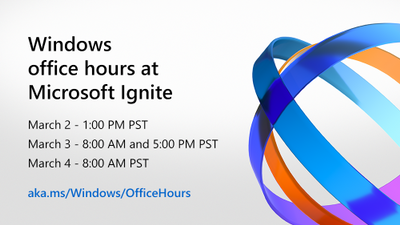
From sessions with the top leaders and engineers at Microsoft supporting Windows to an awesome catalog of in-depth videos that you can watch on demand at any time, Microsoft Ignite is your chance to get up to speed on Windows, Surface, and Microsoft Edge. We’ll have Ask the Experts sessions so you can engage directly with those building the capabilities that will support you as IT pros and developers today and in the future—and we’ll extend the time available for you to engage with our experts through Windows Office Hours here on Tech Community.
Now is a great time to be a part of the big, wide world of Windows. If you haven’t already, register at https://ignite.microsoft.com and start building your schedule. Click on the session names below to add them to your schedule (or digital “backpack”)—then bookmark this post as we’ll be updating it each day with links to all our announcements, depth learning on demand, and post-conference activities.
There is a lot happening around Windows at Microsoft Ignite so let’s dive in!
Jump to: Core sessions | Depth on demand | Ask the experts | Office hours | Additional resources
– – – – – – – – – – – – – – – – – – – – – – – – – – – – – – – – – – – – – – – – – – – – – – – – – – – – – – – – – – – – – – – – – – – – –
Core sessions
Windows fireside chat with Panos Panay & Roanne Sones
Kicking off our Windows experience at Microsoft Ignite at 11:30 AM PST on Tuesday, March 2nd is none other than Microsoft Chief Product Officer Panos Panay! In a fun, informative chat, Panos and Azure Edge + Platform CVP Roanne Sones will talk about why Windows matters, using examples of recent innovations in security, devices, browsing, and the cloud. We’ll have our product and engineering experts standing by in the chat to answer your questions as well!
Can’t make it at 11:30 AM PST? Not to worry! We’ll replay this session later in the day. Keep an eye on the main channel around 9:30 PM PST.
Engineer to engineer: Let’s talk Windows!
One of our goals for this Microsoft Ignite is to show and tell you how your feedback inspires our innovations! On Wednesday, Windows CVP Aidan Marcuss is sitting down with pivotal members of our Windows (Gabe Frost), security (David Weston), and endpoint management (Ramya Chitrakar) engineering teams for a lively discussion about the features and capabilities we’ve developed over the past year based on your ideas and suggestions—and how we’re taking those further to help prepare your and your organization for the future.
We’ll have live Q&A throughout this session too so pick the time that works best for you and add it to your schedule!
On demand: Microsoft Edge, Surface, and Microsoft Endpoint Manager
After the keynotes, make sure to check out our featured on demand sessions:
– – – – – – – – – – – – – – – – – – – – – – – – – – – – – – – – – – – – – – – – – – – – – – – – – – – – – – – – – – – – – – – – – – – – –
Depth on demand
We know you come to Microsoft Ignite to build your technical skills and knowledge. That’s why we’re offering deep dives, demos, and more in the Video Hub on Tech Community—direct from our engineering and product teams!
- What’s new in Windows servicing – Joe Lurie, Namrata Bachwani
- The how-to guide for managing Windows updates – Aria Carley, Kay Toma
- The key to rolling out Windows updates with confidence – Aria Carley, Blair Glennon, Kevin Scharpenberg
- A simple recipe to accelerate Windows 10 patch compliance – David Guyer
- Windows 10 update monitoring and reporting – Charles Inglis
- Delivery Optimization + ConfigMgr = cloud content made easy – Narkis Engler, Carmen Forsmann
- Modernize application validation with Test Base for Microsoft 365 – Maitreyee Agashe Wagh
- 10 tips to make the Windows update experience fast and easy – Steve DiAcetis
- This is Windows security! – Katharine Holdsworth, David Weston, Ron Aquino
- What’s new in MSIX – John Vintzel
- Driver and firmware servicing in the enterprise – Nir Froimovici, Bryan Keller, Thad Martin
- Enterprise development futures: Project Reunion – Thomas Fennel
- Windows 10 in cloud configuration: endpoint management simplified – Ravi Ashok, Joe Lurie
Note: Links to these great sessions will be available after the keynotes conclude on day one.
– – – – – – – – – – – – – – – – – – – – – – – – – – – – – – – – – – – – – – – – – – – – – – – – – – – – – – – – – – – – – – – – – – – – –
Ask the experts
Windows & Devices
While we’ll offer live Q&A during the fireside chat and the Let’s Talk Windows! panel session, you’ll have an opportunity to ask additional questions and get answers from a diverse group of engineering, support, and product experts with our Ask the Expert sessions. These sessions are conducted in Teams Live Events so there’s sure to be some lively banter as they answer your questions. Space is limited so click your desired day and time to RSVP!
Microsoft Edge
If you have specific questions around deploying and managing Microsoft Edge, we’ve got a special Microsoft Edge edition of Ask the Experts on Tuesday, March 2 from 11:30-11:59 PM PST.
Microsoft Endpoint Manager
Or, if you are looking for advice on endpoint security, on monitoring and analysis or discovering vulnerabilities and potential compliance issues in real time, check out Ask the Experts: Securing your endpoints with Defender and Microsoft Endpoint Manager on Wednesday, March 3 from 2:30 AM to 3:00 AM PST.
– – – – – – – – – – – – – – – – – – – – – – – – – – – – – – – – – – – – – – – – – – – – – – – – – – – – – – – – – – – – – – – – – – – – –
Windows office hours on Tech Community
We want to ensure you have plenty of time to get answers to your questions at Microsoft Ignite. That’s why we are holding four special editions of Windows office hours on Tech Community! Select any and all of the desired times below to save the slot and join us to get answers and tips to help you more easily manage Windows 10 updates and your Windows device estate.
– – – – – – – – – – – – – – – – – – – – – – – – – – – – – – – – – – – – – – – – – – – – – – – – – – – – – – – – – – – – – – – – – – – – –
Additional resources
If a prescriptive learning path is what you’re looking for, we’ve got a good one for you. Stay current with Windows 10 and Microsoft 365 Apps is designed to help you integrate a prescriptive, process-based model into the way you deploy Windows and manage updates.
– – – – – – – – – – – – – – – – – – – – – – – – – – – – – – – – – – – – – – – – – – – – – – – – – – – – – – – – – – – – – – – – – – – – –
Learn more
Windows is a universe, not an island. Here are some additional guides to the breadth of experiences open to you at Microsoft Ignite 2021: March edition.
Stay informed
Follow us at @MSWindowsITPro for announcements and updates throughout Microsoft Ignite—and to stay up-to-date with the latest resources, tips, and information for IT pros working in the Windows ecosystem.
by Contributed | Feb 26, 2021 | Technology
This article is contributed. See the original author and article here.
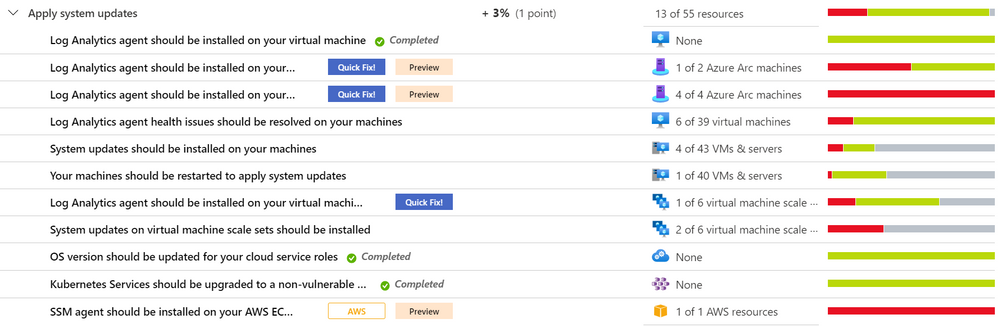
As part of our recent Azure Security Center (ASC) Blog Series, we are diving into the different controls within ASC’s Secure Score. In this post we will be discussing the security control Apply System Updates.
Image 1
System updates bring fresh and enhanced features, deliver security fixes, greater compatibility and in general a better user experience that help improving your security posture. Azure Security Center takes this and transforms it in several recommendations – depending on the resource types you have – that have Quick Fixes and easily shows you the big picture in your environment so you can act. Let’s drill into some of the recommendations for this control.
Note
There are two recommendations from this security control that are being deprecated. Learn more about it in this article Important changes coming to Azure Security Center | Microsoft Docs.
Log Analytics agent should be installed on…
Azure Security Center collects data using the Log Analytics agent (formerly known as Microsoft Monitoring Agent – MMA), which reads security-related configurations and event logs and then sends them to a Log Analytics workspace. Depending on the resource types you have, you may come across this recommendation for your virtual machines, virtual machine scale sets, Windows-based and Linux-based Azure Arc machines (Preview). The mapped policies audits if the Log Analytics agent is not installed.
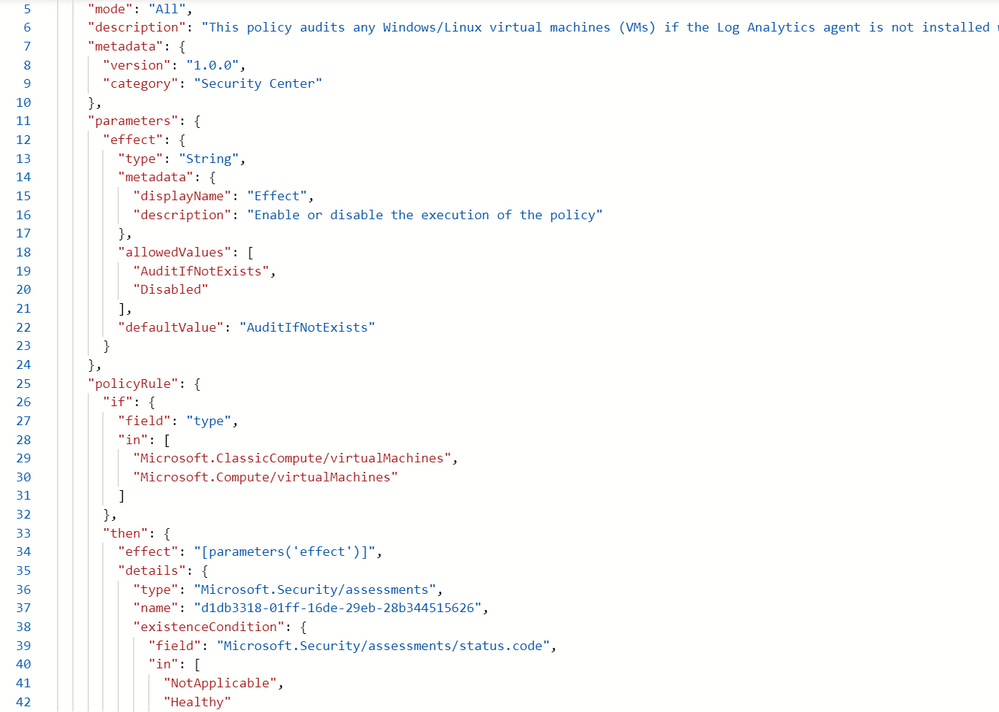 Image 2
This comes with a Quick Fix button that will install the MMAExtension. The workspaceID will be requested once the remediation script is triggered.
"parameters": {
      "vmName": {
        "value": "resourceName"
      },
      "location": {
        "value": "resourceLocation"
      },
      "logAnalytics": {
        "value": "workspaceId"
      }
    }
You can also use ARM template or Azure Policies to manage the extension deployment to Arc servers. Learn more about Log Analytics agent for Linux or Log Analytics agent for Windows. For multiple ways to install and configure your Log Analytics agent please see this article.
System updates should be installed on your virtual machines
This recommendation doesn’t come with a Quick Fix button, but it does come with the Exempt feature; that way you can set an exemption for specific resources either if you have already mitigated it through a third-party service or accept the risk and give a waiver. From ASC you will be able to see the outstanding updates of the unhealthy resources. The KB ID is provided as well for you to track down specs and the impact it may have.
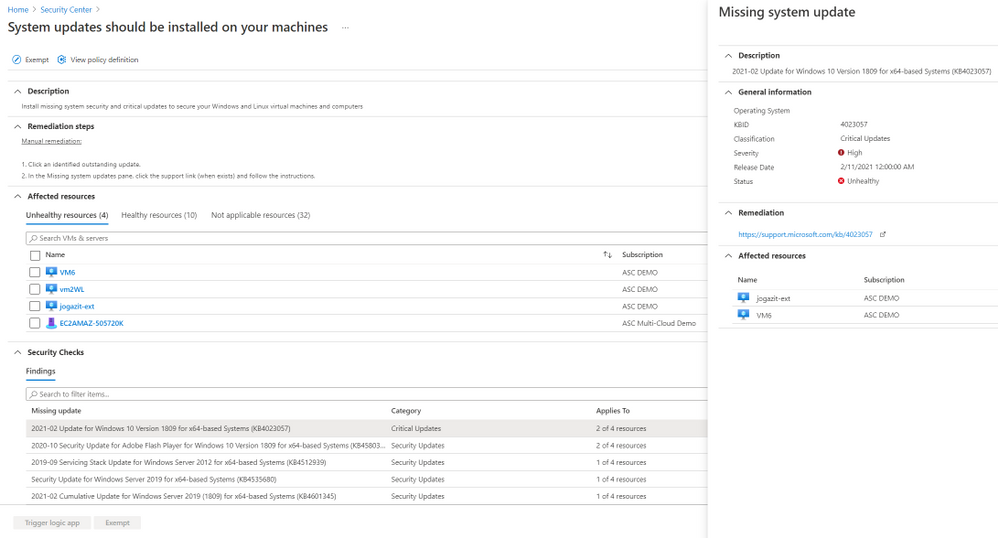 Image 3
System updates on virtual machine scale sets should be installed
The information brought in this recommendation is like the one of VMs, but there are a few differences (see Image 4). To check the security updates, you will have to click o the VMSS that will take you to its Log Analytics Workspace query dashboard. Automatically, a query is deployed and will display the update and its count, because we are talking about scale sets (see Image 5). At this point, there are only manual remediation steps to follow, and that’s taking into consideration the corresponding Knowledge Base (KB) article ID. Nevertheless, there’s a Trigger Logic App option available in case you want to create an automation to remediate that.
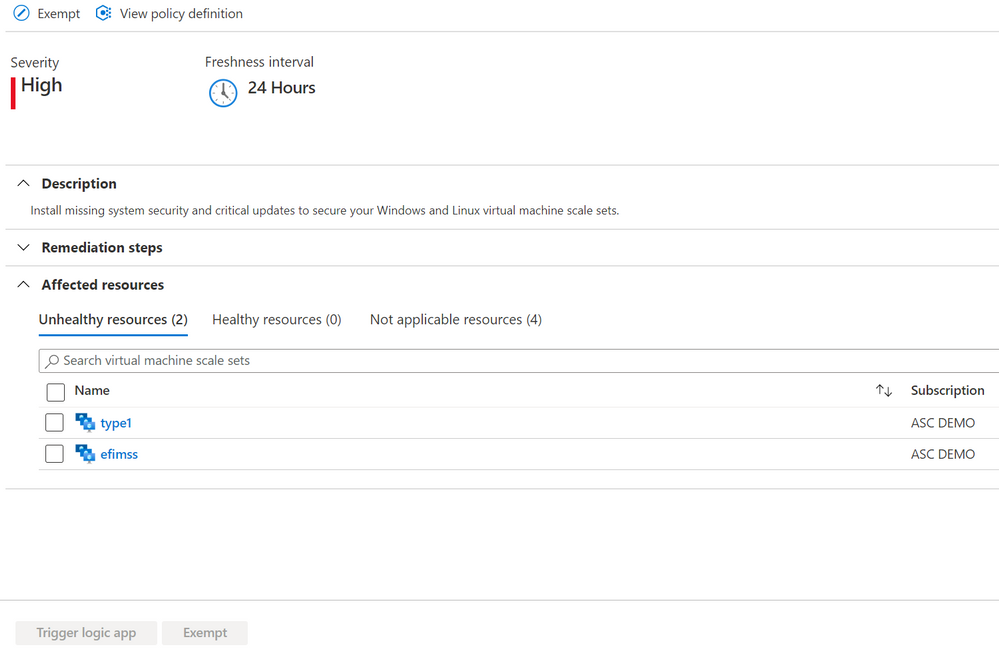 Image 4
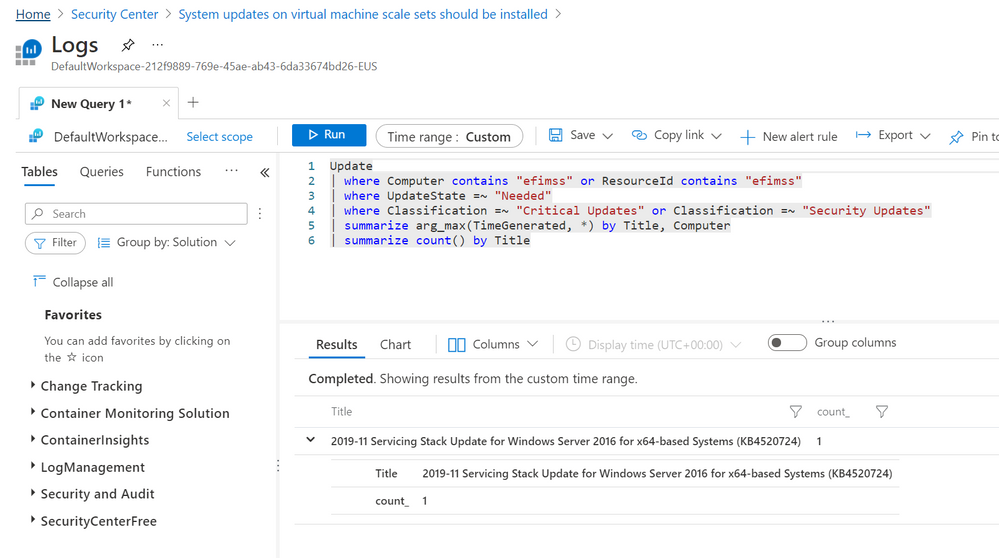 Image 5
OS version should be updated for your cloud service roles
If you happen to have a cloud service role (classic), you might come across this recommendation. The Exempt feature is also available. By default, Azure periodically updates your guest OS to the latest supported image within the OS family that you’ve specified in your service configuration; but choosing a specific OS version disables automatic OS updates, and here is when this comes handy. To learn more about how to solve this follow this article.
Kubernetes Services should be upgraded to a non-vulnerable Kubernetes version
This recommendation will appear if you must upgrade your Kubernetes service cluster to a later Kubernetes version (at the time this article was written the latest was 1.11.9+, 1.12.7+, 1.13.5+, and 1.14.0+) to protect against known vulnerabilities in your current Kubernetes version. For a tutorial on how to accomplish this, go to this article.
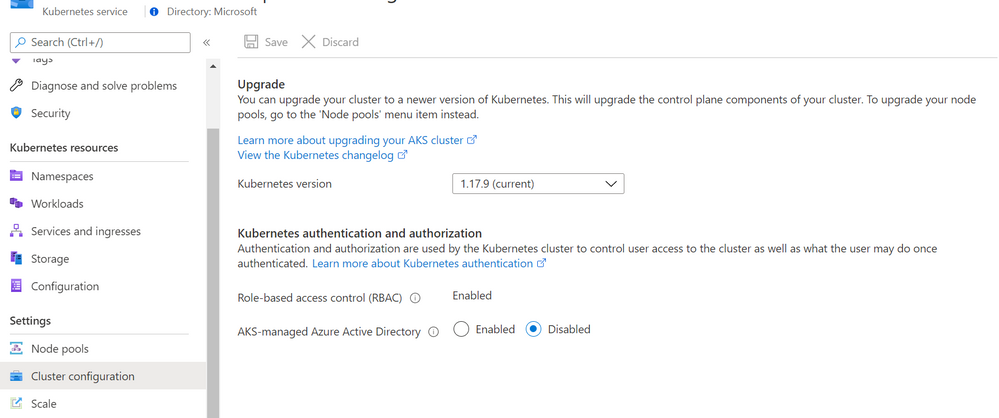 Image 6
Next Steps
As with all security controls, you need to make sure to remediate all recommendations within the control that apply to a particular resource to gain a potential score increase for your security posture. Check out our GitHub repo for artifacts that may help you achieve your 100% Secure Score. For more content like this join the Microsoft Security Community at https://aka.ms/SecurityCommunity
Reviewer:
@Yuri Diogenes , Principal Program Manager – CxE ASC

by Contributed | Feb 26, 2021 | Dynamics 365, Microsoft 365, Technology
This article is contributed. See the original author and article here.
Don’t miss Microsoft Ignite, an all-digital three-day event kicking off this next Tuesday, March 2 at 8:00 AM Pacific Time! This is your opportunity to get a sneak peek at the future of Microsoft Dynamics 365 and Microsoft Power Platform, connect with experts, and engage with your global community. We’ve packed the line-up with technical and hands-on contentfrom learning sessions to live Q&As, featured speakers to one-on-one consultationsall streaming digitally live and on-demand to help you get the most from the event.
To help you plan your experience from the variety of sessions and activities, we’ve compiled some essential presentations, sessions, and viewing tips below. Click the linked titles to learn more and add each event to your session scheduler.
Tune in to the Dynamics 365 and Power Platform featured sessions
To kick things off on Tuesday, March 2, tune in to the opening keynote hosted by Microsoft CEO Satya Nadella streaming live at 8:30 AM Pacific Time. Then, learn what’s new and on the horizon for Dynamics 365 and Power Platform in these featured sessions:
Tuesday, March 2 | 1:00 PM 1:30 PM Pacific Time
What’s new and what’s next for Microsoft Power Platform
Hosted by Charles Lamanna, CVP, Low Code Application Platform and Julie Strauss, Partner PM Director
Learn about new and upcoming capabilities across Power Platform, including demos, real-world examples of Power Platform in action, new features, and the roadmap for later this year. Also, learn how Microsoft Power Apps, Microsoft Power Automate, and Microsoft Power Virtual Agents rapidly enables digitization and automation with a modern set of capabilities.
Tuesday, March 2 | 2:00 PM 2:30 PM Pacific Time
Elevating the end-to-end customer experience with Dynamics 365: Infusing intelligence from front- to back-office
Hosted by Muhammad Alam, CVP, Dynamics 365 and Lori Lamkin, VP, Dynamics 365 Marketing
Learn about new solutions and capabilities from Dynamics 365 that enable you to deliver unparalleled customer excellence on every step of the journeyfrom agility in predicting and meeting customer needs to flawlessly executing with an intelligent and agile supply chain.
Wednesday, March 3 | 11:00 AM 11:30 AM Pacific Time
Microsoft Teams + Dynamics 365: The unified collaboration platform for modern business
Hosted by Takeshi Numoto, CMO, Commercial Marketing and Emma Williams, CVP, Microsoft Office Modern Workplace Transformation.
Discover how we are integrating Microsoft Teams into Dynamics 365 across marketing, sales, customer service, field service, and commerce solutions to up-level collaboration across your organization and drive stronger engagement with customers.
Wednesday, March 3 | 3:00 PM 3:30 PM Pacific Time
Drive a data culture with Power BI: Vision, strategy, and roadmap
Hosted by Arun Ulagaratchagan, CVP, Power BI
Learn how Microsoft Power BI can help drive a data culture in your organization and get a sneak peek at the vision and roadmap for Power BI. You’ll discover how AI automatically find patterns in your data, you will learn about how Power BI is built into Teams and Excel to enable incredible collaboration experiences, and how Power BI with Microsoft Azure Synapse Analytics meets your most demanding needs.
In addition to the live streams above, each segment will be rebroadcasted throughout the event. The key segments are open to everyone, but we encourage you to register in advance to unlock the full Microsoft Ignite experiencefrom digital breakout sessions with live Q&As to conversations with Microsoft experts and your global community.
Sessions: More than 100 opportunities to ramp up your skills
Learn about Dynamics 365 and Power Platform capabilities and expand your skills, all guided by the experts and engineers behind the tools you use every day. Browse the session catalog to plan your personalized schedule. In the session catalog, you can filter sessions by solution area, such as Dynamics 365 or Power Platform, session time, start time, theme, or expertise level to find the right sessions for you. Register to access a personalized schedule planner that tracks all of your sessions, meetings, and messages.
More to explore
Microsoft Ignite will include live segments and Q&A, available across time zones. Check out all of the events and activities hosted by our team of experts:
Get the most of your Microsoft Ignite experience
Be sure to follow Microsoft Ignite on LinkedIn and Twitter to stay up to date and connected with the community and register for Microsoft Ignite today.
The post Join Dynamics 365 and Power Platform at Microsoft Ignite appeared first on Microsoft Dynamics 365 Blog.
Brought to you by Dr. Ware, Microsoft Office 365 Silver Partner, Charleston SC.
by Contributed | Feb 26, 2021 | Technology
This article is contributed. See the original author and article here.
Countdown to Microsoft Ignite is on! The event starts Tuesday, March 2nd at 8:00 am PT.
If you have not already registered, click here.
We are so excited to have you virtually joining us either live or catching the event on-demand. Our product and engineering teams have been working hard over the past six months to bring you the latest product news and announcements that will be shared during the event. Below is a comprehensive list of all sessions and opportunities to engage with Microsoft experts. There is a lot to explore during Microsoft Ignite, so we hope you take some time to watch, participate and learn!
Security Keynote
Join Vasu Jakkal’s Keynote:
KEY05 | “Security for All” by Vasu Jakkal, CVP SCI (delivered two times):
Learn how to reduce complexity and defend your organization against business risk with innovations in security, compliance, identity, and management.
Featured Sessions
Featured Sessions (30mins) delivered twice. Did you attend a Featured Session, but still have questions? Join the corresponding Ask the Experts session for a live Q&A with subject matter experts.
Join Joy Chik’s Featured Session:
FS195 | “Azure Active Directory: our identity vision and roadmap for strengthening Zero Trust defenses in the era of hybrid work” by Joy Chik; CVP of Identity (delivered two times):
As cyberattacks get more sophisticated, securing hybrid work environments is more complex—and more critical. Adopting a Zero Trust approach and upgrading your identity infrastructure hardens your defenses now and for the long-term. In this demo-heavy, can’t-miss session, we’ll share how Azure AD helps you maximize control while enabling a seamless and secure user experience. Join us to see and learn how to eliminate passwords, simplify onboarding, and secure access to all your apps.
Join Rob Lefferts and Eric Doerr’s Featured Session:
FS197 | “Microsoft Security’s roadmap for defending against advanced threats” by Rob Lefferts; CVP of Security and Eric Doerr; VP of Cloud Security (delivered two times):
Today’s threat landscape continues to grow in complexity, sophistication, and frequency. As advanced attacks emerge, Microsoft is on the frontlines working with customers and partners. We’ll share our actionable tips and the latest on technology, including the only integrated SIEM + XDR on the market, to protect your environment from end-to-end and get ahead of adversaries.
Join Alym Rayani’s Featured Session:
FS196 | “Manage risk and secure information across your environment” by Alym Rayani; CVP of Security and Eric Doerr; VP of Cloud Security (delivered two times):
Organizations have an onslaught of new risks as a result of remote work. Data is now being accessed and stored outside of the traditional borders of business – across endpoints, clouds, and apps. With this massive growth of data, managing risk and securing your sensitive information is critical to digital transformation. Learn how Microsoft’s risk management and compliance solutions enable you to identify and respond to these emerging risks while keeping your most important information safe.
On-demand Sessions
On-demand sessions (30 minutes max) are hosted within the Microsoft Ignite platform and are available to watch anytime during or after the live event concludes. Click the links below to watch:
- OD356 | Taking identity and privacy to a new level | Verifiable Credentials with decentralized identity using blockchain
- OD357 | Information risks keeping you up at night? Deploy intelligent information protection and data loss prevention
- OD358 | Take charge of data governance across your digital landscape
- OD359 | Elevating security and efficiency with Azure Sentinel, your cloud-native SIEM
- OD360 | Prevent attacks by protecting your applications with Azure Active Directory
- OD361 | Don’t get caught off guard by the hidden dangers of insider risks! Secure your sensitive information with Insider Risk Management
- OD362 | Zero Trust – The proactive approach to cybersecurity
- OD363 | Winning Azure Active Directory strategies for identity security and governance
- OD364 | Safeguard your multi-cloud apps and resources with the latest Cloud Security innovations
- OD365 | Microsoft Defender: Stop attacks and reduce security operations workload with XDR
Interstitial Programming
Interstitial programming is a content experience, using programmatic elements including live desk, wayfinding, breaking news, social media, attendee-generated content, and keynotes that inform the way attendees think, feel, and makes sense of the event.
These segments will air on the Microsoft Ignite main page periodically throughout the live event. For estimated times of delivery, please see the below.
Approx. AIRTIME
|
seSSION TITLE
|
3/2 11:45 AM PT
|
Zero Trust Methodology
|
3/2 4:44 PM PT
|
Mechanics: Passwordless
|
3/3 4:30 PM PT
|
Microsoft Security: Building & Learning
|
3/3 12:00 AM PT
|
Adversarial Machine Learning is Real: A Security Unlocked Podcast Episode
|
3/3 1:30 PM PT
|
What is the Microsoft Intelligent Security Association (MISA)?
|
3/3 3:03 PM PT
|
Customer Tech Talk [Ben Walters & Jen Hall]
|
Opportunities to engage with our security experts
Be sure to join our security experts in the Connection Zone by attending our additional Ask the Experts sessions and by participating in our two Microsoft Learn Live Sessions, scheduling a One-on-one Consult, Intro to Tech Skills, signing up for the Cloud Skill Challenges, and any of our 10 Product Roundtables.
Connection Zone Program
|
Details
|
Ask the Experts
|
ATE109 | Ask the Experts: Passwordless Deployment
ATE110 | Ask the Experts: Secure your sensitive information with Insider Risk Management
ATE111 | Ask the Experts: Elevating Security and Efficiency with Azure Sentinel, Your Cloud-Native SIEM
ATE112 | Ask the Experts: Zero Trust – The proactive approach to cybersecurity
ATE114 | Ask the Experts: Securing your endpoints with Defender and Microsoft Endpoint Manager
ATE115 | Ask the Experts: Azure Platform Security
ATE134 | Ask the Experts: How can AI make security teams more efficient and strategic?
|
Learn Live
|
LRN252: Plan, implement and administer conditional access
LRN253: Threat response with Azure Sentinel playbooks
|
Intro to Tech Skills
|
Title: Introduction to Security, Compliance and Identity
Abstract: Learn about the different Microsoft solutions for managing security in your organization. Microsoft 365 provides a holistic approach to security, helping you to protect identities, data, applications, and devices across on-premises, cloud, and mobile.
|
Cloud Skills Challenge
|
1. Identity + Information Protection Admin Challenge
a. Maps to Cert SC-300; SC-400
2. Security Operations Analyst Challenge
a. Maps to Cert SC-200
Learn more about certifications here
|
Product Roundtables
|
Upon registration for a session, you will be required to answer a short survey regarding the topic. You will be notified of your status for the roundtable as soon as your submission is reviewed. Attendance is limited to ensure everyone has an opportunity to contribute to the discussion. To review Product Roundtables Participation terms & conditions, click here.
· Topic: Zero Trust: Walking the path
· Topic: Identity and access management for services
· Topic: Privileged Access management
· Topic: Enabling seamless collaboration across technology barriers
· Topic: Best practices for managing data security risks and meeting compliance requirements
· Topic: What should the Microsoft Compliance Think Tank build next?
· Topic: Compliance business priorities and challenges: a discussion
· Topic: Microsoft Cloud App Security (MCAS) – A discussion on potential investment areas and a chance to help shape our product direction
· Topic: Building Security and Efficiency with Azure Sentinel, your cloud-native SIEM
· Topic: CISO Tips for Removing Silos Between IT and OT
|
One-on-one Consults
|
Want to have your questions answered by a Microsoft Professional? Schedule a 45-minute consultation where you can engage directly with a security expert. Click the link to begin scheduling your meeting.
|
by Contributed | Feb 26, 2021 | Technology
This article is contributed. See the original author and article here.
In the new Hybrid Workplace, providing the right digital tools to connect and support employees wherever they are is essential. It supports productivity, engagement, safety, and collaboration. As companies begin to reopen their offices, and conference rooms and meeting spaces become busy again, optimizing how they are utilized will be key to everyone’s success.
Microsoft Teams Panels were announced last October at Ignite 2020 as a new category of devices. They provide a space and time management solution powered by a native Teams experience, running on a compact digital display that can be mounted virtually anywhere. Today, we’re pleased to announce that they’re now generally available.
Supporting the Hybrid Workplace with the right devices in the right places
With Teams Panels, employees can book an available room on the spot or find another time slot and reserve it right from the panel. With vibrant, color-coded LED indicators, it’s easy to determine space availability from a distance. And, the intuitive and easy-to-read UI presents space and meeting information, so you can confirm you’re in the right place at the right time.
A popular feature available now is the ad hoc meeting scheduler. Let’s say you and a colleague need to jump on a quick client call. Simply go to the Teams Panel outside a meeting space. If the time slot is not booked, it will appear green. Just tap the screen to instantly book it and the room is yours for the time selected. Teams Panels use the Exchange calendar for the booking of the room, so users can have insight in the meeting space free or busy status at any time.
Teams Panels work with a range of devices
When paired with Microsoft Teams Rooms or Surface Hub devices, users can take advantage of connected device experiences, like booking an ad-hoc Teams meeting on the Panel and joining the same ad-hoc meeting on a Teams Rooms or Surface Hub device.
And while the best end-to-end experience is pairing a Teams panel with another Teams device or Teams Room configuration, you can add a panel outside of any meeting space, allowing users to schedule any room through Outlook or right from the panel itself. All Teams Panels can be centrally provisioned, updated, and monitored from Microsoft Teams Admin Center.
https://www.microsoft.com/en-us/videoplayer/embed/RWyCQA
In the coming months, four powerful new features will roll out:
Room Capacity Warning leverages select in-room cameras to detect when the maximum people allowed per room is reached.
Nearby Rooms lets employees view the building floor plan and book another room when a space is unavailable.
Room Check-in Notification sends a message to the in-room display that people in the next meeting are waiting outside.
Remove Unused Scheduled Room identifies and allows for the removal of ‘ghost’ meetings to free up unused meeting space time slots.
Teams Panels are currently available from our partner Crestron and Yealink will release theirs in April, with additional partners to be announced later in the year. Our certified hardware partners deliver optimized touch screen experiences with LED indicators and multiple mounting options, as well as additional sensors that integrate seamlessly with Microsoft Teams.
When an organization licenses Microsoft Teams Room Standard or Microsoft Teams Room Premium, no additional licenses are required for Microsoft Teams Panels. Teams Panel devices are currently sold separately by Crestron and Microsoft.

by Contributed | Feb 26, 2021 | Technology
This article is contributed. See the original author and article here.
Unit testing: The tSQLt framework and the execution of a test!
Sergio Govoni is a graduate of Computer Science from “Università degli Studi” in Ferrara, Italy. Following almost two decades at Centro Software, a software house that produces the best ERP for manufacturing companies that are export-oriented, Sergio now manages the Development Product Team and is constantly involved on several team projects. For the provided help to technical communities and for sharing his own experience, since 2010 he has received the Microsoft Data Platform MVP award. During 2011 he contributed to writing the book: SQL Server MVP Deep Dives Volume 2. Follow him on Twitter or read his blogs in Italian and English.

#WindowsAdminCenter – Installing Windows Server version 20H2 Core Build 10.0.19042
James van den Berg has been working in ICT with Microsoft Technology since 1987. He works for the largest educational institution in the Netherlands as an ICT Specialist, managing datacenters for students. He’s proud to have been a Cloud and Datacenter Management since 2011, and a Microsoft Azure Advisor for the community since February this year. In July 2013, James started his own ICT consultancy firm called HybridCloud4You, which is all about transforming datacenters with Microsoft Hybrid Cloud, Azure, AzureStack, Containers, and Analytics like Microsoft OMS Hybrid IT Management. Follow him on Twitter @JamesvandenBerg and on his blog here.
How to create an Azure Windows Server FCI File Cluster If you don’t want to use Azure Files
Robert Smit is a EMEA Cloud Solution Architect at Insight.de and is a current Microsoft MVP Cloud and Datacenter as of 2009. Robert has over 20 years experience in IT with experience in the educational, health-care and finance industries. Robert’s past IT experience in the trenches of IT gives him the knowledge and insight that allows him to communicate effectively with IT professionals. Follow him on Twitter at @clusterMVP

How to use SharePoint Spaces in Microsoft Teams
Vesku Nopanen is a Principal Consultant in Office 365 and Modern Work and passionate about Microsoft Teams. He helps and coaches customers to find benefits and value when adopting new tools, methods, ways or working and practices into daily work-life equation. He focuses especially on Microsoft Teams and how it can change organizations’ work. He lives in Turku, Finland. Follow him on Twitter: @Vesanopanen

12 features I would like to see land in Microsoft Teams in 2021
Chris Hoard is a Microsoft Certified Trainer Regional Lead (MCT RL), Educator (MCEd) and Teams MVP. With over 10 years of cloud computing experience, he is currently building an education practice for Vuzion (Tier 2 UK CSP). His focus areas are Microsoft Teams, Microsoft 365 and entry-level Azure. Follow Chris on Twitter at @Microsoft365Pro and check out his blog here.


Recent Comments