by Contributed | Mar 1, 2021 | Technology
This article is contributed. See the original author and article here.
Well-running apps are critical to a great endpoint experience. Users are never happy when an app crashes or a device restarts and their flow is broken. Worst case scenario, they may even lose the work that they just did. Service desks help solve these problems, but they only have visibility into the ones that people report, not the ones where someone just suffers in silence. What is needed is greater visibility into these issues across the entire organization. The two new Microsoft Endpoint Manager features in Endpoint analytics give IT admins the visibility and insights needed to help improve this experience.
Both of these features — a new application reliability report and new data for reboot frequency in the existing startup performance report — reflect our commitment to the user experience because users are happier when work isn’t slowed down and IT can focus on helping drive the business when there are fewer support calls.
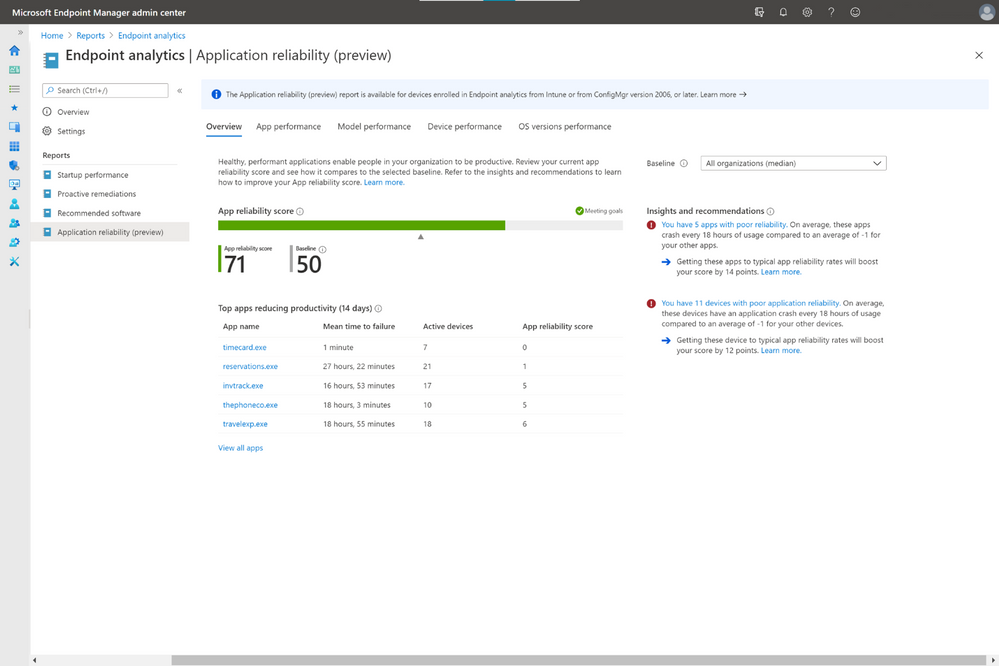
The application reliability report, available in preview and rolling out over the next few days, gives IT visibility into which desktop applications are hampering the user experience, due to frequent crashes and because they are broadly deployed to users. The report also offers suggestions for improving app performance and alerts IT to issues that users may not have created tickets for yet despite growing frustration, which can help decrease the number of support tickets in the long run.
How to use the application reliability report
If your devices are Intune managed or co-managed, you don’t need to do anything to see the application reliability report. It sits alongside the rest of the Endpoint analytics reports in the Microsoft Endpoint Manager admin center console. If you have devices enrolled through tenant attach, upgrade to Configuration Manger 2006 for this report to populate. On the Overview page is your app reliability score as well as a baseline score, which, by default, represents the median across all commercial organizations. This can help you determine issues unique to your environment—and potentially caused by poor configurations—versus more widespread issues.
Below that is a list of the apps most likely to have reduced user productivity during the previous 14 days. This considers not only crash frequency but also usage to help reduce noise, such as one-off applications crashing 100 times on a single device. On the right column are app reliability Insights and Recommendations prioritized by which are most likely to boost your score.
In the App performance tab is a list of all your organization’s apps, which can be sorted by app name, publisher, active devices, app reliability score, and mean time to failure, which is the average number of times the app can be used across the organization between crashes.
You can also see your organization’s application reliability performance by other pivots like model, and OS version deployed, as well as troubleshoot application reliability issues with individual devices. In device performance, each device is given a device app health score, based on how often applications crashed on that device during the previous 14 days. Clicking into each device gives you a timeline of app crash and app hang events so you know exactly when crashes occurred, which can help speed troubleshooting.
New insights into device restart frequency
To help improve the user experience even further, we have also enhanced the existing startup performance report. New insights on device restart frequency, also known as reboot frequency, will help you identify problematic devices because reboots break the user from their flow and should not be needed often.
To help you better understand the type of reboots that happens, we classify each them as either normal or abnormal. Normal restarts are those that go through the normal Windows shutdown process. These include: Windows update installations, which typically occur once a month; non-update shutdowns from users, typically to save battery power; and non-update restarts, which shouldn’t occur often beyond monthly patching.
In contrast, abnormal restarts are ones that haven’t gone through the normal Windows shutdown process and could suggest problems that need to be investigated further. There are also three categories for this type of restart.
- Blue screens: This abnormal restart type is also called a stop error. Usually, less than two stop errors occur per device per year.
- Long power button press: This restart happens when a user holds down the power button to force a restart. These shutdowns are typically even less frequent than blue screens.
- Unknown: These are shutdowns that don’t fit either of the two other abnormal shutdown types. Microsoft will continue to research these to determine if additional categories should be added.
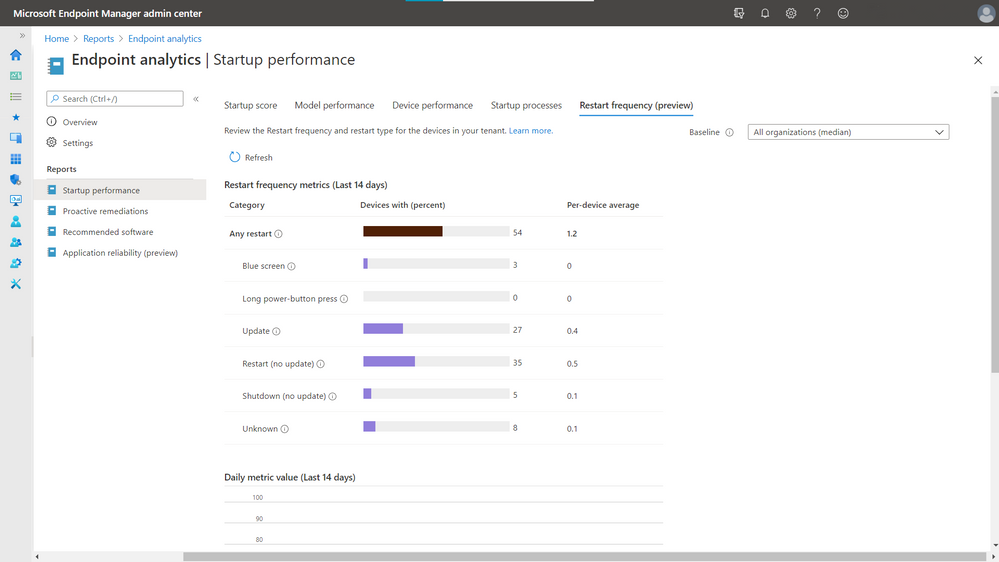
The restart frequency feature is now in preview and is rolling out to everyone over the next few days regardless of how you’ve configured the telemetry level or Windows Error Reporting in Windows Diagnostics.
Check out the rest of Endpoint analytics
There is so much more to Endpoint analytics than what we just covered. There are also reports on recommended software that help advise organizations on software that can help optimize OS and Microsoft versions for the best user experience. There is also the proactive remediations feature, giving you the power to automatically detect and remediate some of the top issues hampering users’ productivity — sometimes even before users realize something is wrong — while also helping reduce helpdesk call volume.
More information and feedback
For more information on getting started, visit the Endpoint analytics documentation, and check out the FAQ. Tweet your questions or feedback using the hashtag #MEMpowered and if you have an idea for a new feature, add it to UserVoice.
Please follow @MSIntune on Twitter
by Contributed | Mar 1, 2021 | Technology
This article is contributed. See the original author and article here.
In this series, Microsoft identity team members share their reasons for loving passwordless authentication (and why you should too!). Today, Maria Puertas Calvo, data scientist for Microsoft Identity, continues the series.
Hi!
I am honored to be among such a fine group of people bringing you the goodness of passwordless authentication. Today, I’m going to talk about how passwordless dramatically reduces the risk of phishing attacks against your organization. As a data scientist, I turned to statistics to help me explain. Let’s begin!
Phishing is a form of social engineering in which a victim is tricked into giving their credentials to an attacker. It remains one of the main points of entry into organizations by cybercriminals. The attacker generally presents the user with a sign-in page that spoofs the real authentication page and hopes that the victim enters their credentials. Even long complex passwords won’t help you in a phishing situation if you enter them exactly right unknowingly on a phishing site.
Passwords are the most commonly phished credentials, but some sophisticated attackers go one step further and perform real-time phishing attacks for multifactor authentication credentials, luring the victim to provide the one-time password (OTP) sent to their email or phone. From September 2019 to September 2020, Microsoft Defender for Office blocked 1.6 billion phishing emails linking to around 2 million phishing URL sites. In 2020, phishing incidents rose by 220% compared to the yearly average during the height of global pandemic fears.
OK, you get the point. Phishing is bad and scary, but how does passwordless protect your organization from phishing attacks?
To start, most phishing sites are designed to collect passwords. If you normally don’t use a password to log in, you will be immediately suspicious if the site is asking for it. Even if you think the site is legitimate, you will likely not know your password because you never use it! Sites that phish other credentials, such as OTPs sent to your phone app or hardware token are much less prevalent, so if you choose to go passwordless say for example with the Authenticator app for its amazing usability, you’ll also get enhanced security.
But the benefits don’t end there. Two of our main passwordless authenticators are FIDO2 based – Windows Hello for Business and security keys. If you want to make it extremely hard for your users to get phished, these two authentication methods provide phishing-resistant authentication. How? – you ask. Phishing sites rely on humans not noticing that the domain asking for their credential is not the one they registered that credential with. With FIDO, this problem is avoided because the server domain is used by the client (i.e. browser) to ask the authenticator (i.e. security key) to sign the login request. What this means in simpler words is that only when the site visited is foobar.com the authenticator will provide a credential that’s valid for foobar.com. If an attacker creates foodbar.com and tries to phish the user credentials, the authenticator will sign a message that won’t be accepted by foobar.com, hence making phishing impossible.
So that’s it, one more reason to love passwordless. Go passwordless and drive cybercriminals out of business by keeping them out of your business.
Learn more about Microsoft identity:
Check out the other posts in this series:
by Contributed | Mar 1, 2021 | Technology
This article is contributed. See the original author and article here.
Problem
We’ve seen several cases come in lately where customers have been trying to use PolyBase feature and encountering “Failed to generate query plan” error. Depending on which command you run, the error will display differently.
- CREATE EXTERNAL TABLE or CREATE EXTERNAL DATA SOURCE command fails with:
Msg 110813, Level 16, State 1, Line 21
100001;Failed to generate query plan.
- SELECT from an existing external table fails with:
Msg 7320, Level 16, State 110, Line 1
Cannot execute the query “Remote Query” against OLE DB provider “MSOLEDBSQL” for linked server “(null)”. 100001;Failed to generate query plan.
In either of the above scenarios, if you open the <ServerName>_<InstanceName>_DWEngine_errors.log, you’ll see an error like the following:
{datetime} [Thread:<ThreadID>] [ServerInterface:InformationEvent] (Info, Normal): Starting processor ExecuteMemoProcessor. [Session.SessionId:SID##][Session.IsTransactional:False][Query.QueryId:QID##]
{datetime} [Thread:<ThreadID>] [EngineInstrumentation:EngineQueryErrorEvent] (Error, High):
Microsoft.SqlServer.DataWarehouse.Common.ErrorHandling.UnexpectedStatementException: 100001;Failed to generate query plan. —> Microsoft.SqlServer.DataWarehouse.Sql.Optimizer.MemoDeserializer.UnknownElementException: Unknown element DatabaseUser is found.
at Microsoft.SqlServer.DataWarehouse.Sql.Optimizer.MemoDeserializer.MemoDeserializer.ShowMemoXMLState.HandleState(XmlReader reader, MemoDeserializer deserializer)
at Microsoft.SqlServer.DataWarehouse.Sql.Optimizer.MemoDeserializer.MemoDeserializer.Deserialize(XmlReader reader)
at Microsoft.SqlServer.DataWarehouse.Sql.Optimizer.MemoProvider.AbstractMemoGenerator.DeserializeMemoFromXML(SqlXml memoXml, ExecutionEnvironment executionEnvironment)
— End of inner exception stack trace —
at Microsoft.SqlServer.DataWarehouse.Sql.Optimizer.MemoProvider.AbstractMemoGenerator.DeserializeMemoFromXML(SqlXml memoXml, ExecutionEnvironment executionEnvironment)
at Microsoft.SqlServer.DataWarehouse.Sql.Statements.OptimizedStatement.GenerateMemo(IMemoProvider memoProvider, IQPTelemetry queryProcessingTelemetry, Boolean isLocalShellSession)
at Microsoft.SqlServer.DataWarehouse.Engine.Utils.EventUtils.PublishApplicationEventAndExecute(ApplicationEventTrigger beginTrigger, ApplicationEventTrigger endTrigger, ApplicationEventTrigger errorTrigger, ApplicationEventTrigger cancelTrigger, PublishedEventPayloadDelegate payload, Action callback)
at Microsoft.SqlServer.DataWarehouse.Engine.Processors.ExecuteMemoProcessor.OnExecuteRequest()
at Microsoft.SqlServer.DataWarehouse.Engine.Utils.EventUtils.PublishApplicationEventAndExecute(ApplicationEventTrigger beginTrigger, ApplicationEventTrigger endTrigger, ApplicationEventTrigger errorTrigger, ApplicationEventTrigger cancelTrigger, PublishedEventPayloadDelegate payload, Action callback)
at Microsoft.SqlServer.DataWarehouse.Engine.Processors.AbstractProcessor.OnProcess()
at Microsoft.SqlServer.DataWarehouse.Engine.Processors.AbstractProcessor.OnExecute() [Session.SessionId:SID##][Session.IsTransactional:False][Query.QueryId:QID##]
You may also observe a memory dump file (SQLDmpr*.dmp) created in SQLServerInstallDrive:Program FilesMicrosoft SQL ServerMSSQL15.<InstanceName>MSSQLLogPolybasedump.
The problem has only been observed in SQL Server 2019 on Windows.
Cause
The problem occurs when SQL Server Engine has been patched to at least Cumulative Update 8 (15.0.4073) and the PolyBase feature hasn’t been updated to the same build.
The most common way of encountering this problem is to already have installed SQL Server 2019 and patched to CU8 and then subsequently add the PolyBase feature. When you add a feature to an existing SQL Server instance that has been patched, the feature added is still at the original RTM version. This isn’t specific to PolyBase feature, but any feature added to an existing instance that has been patched. This would lead to problem with being unable to create the external table.
In order to get the error when selecting from the external table, you must have already successfully created the external table. We’ve seen this scenario when there’s been some problem applying Cumulative Update 8 to the PolyBase feature, but installation of CU8 to the SQL Engine was successful. In scenarios like this, we’ve seen customers have uninstalled the PolyBase feature and reinstalled it, but then failed to subsequently apply CU8 to PolyBase feature.
How to Confirm
You must determine the SQL Server Engine version and PolyBase Engine version and compare.
Determine SQL Server Engine version.
This can be done a few different ways.
Check errorlog – at the top of the file errorlog (which you can find in SQLServerInstallDrive:Program FilesMicrosoft SQL ServerMSSQL15.<InstanceName>MSSQLLog) the first line in the file will show the version of SQL Server Engine. For example:
{datetime} Server Microsoft SQL Server 2019 (RTM-CU8) (KB4577194) – 15.0.4073.23 (X64)
Connect to SQL Server and run the query
SELECT @@VERSION as SQLEngineVersion
The output will look something like:
SQLEngineVersion
————————————————————————————————————
Microsoft SQL Server 2019 (RTM-CU8) (KB4577194) – 15.0.4073.23 (X64)
Sep 23 2020 16:03:08
Copyright (C) 2019 Microsoft Corporation
Developer Edition (64-bit) on Windows Server 2019 Datacenter 10.0 <X64> (Build 17763: ) (Hypervisor)
Determine PolyBase Engine version
PowerShell – if PolyBase Services are running, run the following command:
Get-Process mpdwsvc -FileVersionInfo | Format-Table -AutoSize
The output will look something like:
ProductVersion FileVersion FileName
————– ———– ——–
15.0.2000.5 2019.0150.2000.05 ((SQLServer).190924-2033) C:Program FilesMicrosoft SQL ServerMSSQL15.MSSQLSERVERMSSQLBinnPolybasempdwsvc.exe
15.0.2000.5 2019.0150.2000.05 ((SQLServer).190924-2033) C:Program FilesMicrosoft SQL ServerMSSQL15.MSSQLSERVERMSSQLBinnPolybasempdwsvc.exe
PowerShell – if PolyBase Services aren’t running, run the following command:
cd ‘C:Program FilesMicrosoft SQL Server’
ls mpdwsvc.exe -r -ea silentlycontinue | % versioninfo | Format-Table -AutoSize
The output will look something like:
ProductVersion FileVersion FileName
————– ———– ——–
15.0.2000.5 2019.0150.2000.05 ((SQLServer).190924-2033) C:Program FilesMicrosoft SQL ServerMSSQL15.MSSQLSERVERMSSQLBinnPolybasempdwsvc.exe
If for some reason the two above examples don’t work, you can use the original setup media and run SQL Discovery
- Start SQL Server setup (setup.exe)
- Click on Tools in left pane
- Click Installed SQL Server features discovery report. It will generate a Setup Discovery Report that will look something like this:
Microsoft SQL Server 2019 Setup Discovery Report
Product
|
Instance
|
Instance ID
|
Feature
|
Language
|
Edition
|
Version
|
Clustered
|
Configured
|
Microsoft SQL Server 2019
|
MSSQLSERVER
|
MSSQL15.MSSQLSERVER
|
Database Engine Services
|
1033
|
Developer Edition
|
15.0.4073.23
|
No
|
Yes
|
Microsoft SQL Server 2019
|
MSSQLSERVER
|
MSSQL15.MSSQLSERVER
|
SQL Server Replication
|
1033
|
Developer Edition
|
15.0.4073.23
|
No
|
Yes
|
Microsoft SQL Server 2019
|
MSSQLSERVER
|
MSSQL15.MSSQLSERVER
|
PolyBase Query Service for External Data
|
1033
|
Developer Edition
|
15.0.2000.5
|
No
|
Yes
|
Microsoft SQL Server 2019
|
MSSQLSERVER
|
MSSQL15.MSSQLSERVER
|
PolybaseCorePolybaseJava
|
1033
|
Developer Edition
|
15.0.2000.5
|
No
|
Yes
|
Microsoft SQL Server 2019
|
MSSQLSERVER
|
MSSQL15.MSSQLSERVER
|
Azul-Java-Runtime
|
1033
|
Developer Edition
|
15.0.2000.5
|
No
|
Yes
|
You can check KB4518398 – SQL Server 2019 build versions (microsoft.com) to see which ProductVersion value corresponds to which Cumulative Update.
Compare Versions
If the versions don’t match and PolyBase Engine version is less than SQL Server Engine, and SQL Server Engine is at least 15.0.4073, then you have confirmed the problem is due to not having applied the same Cumulative Update to PolyBase feature.
Resolution
To resolve this issue, you need to apply the same Cumulative Update to PolyBase features that SQL Engine is already on.
Additional Information
- In Cumulative Update 8 there was a change made to the XML memo that is sent from SQL Server Engine to PolyBase Engine. If the PolyBase Engine is on a build prior to CU8, it will be unable to “deserialize” the memo and throw this error because it cannot generate a query plan.
- In general, any time any feature is added to an existing SQL Server instance that has been patched, you need to reapply the same patch to bring the feature to same build.

by Contributed | Mar 1, 2021 | Technology
This article is contributed. See the original author and article here.
We continue to expand the Azure Marketplace ecosystem. For this volume, 101 new offers successfully met the onboarding criteria and went live. See details of the new offers below:
|
Applications
|
|
AddPro Azure Managed Services: AddPro helps manage Microsoft Azure resources at resource group and subscription levels. AddPro will use delegated access to set up, configure, monitor, and operate services.
|
 |
AI-FI Demand Forecasting ML: Alithya Digital helps optimize supply chain material procurement and demand planning with AI analytics. You can more accurately predict future material demand by product category or store location with machine learning (ML) methods.
|
 |
AI-Powered Azure Automation as a Service: Dynapt Solutions offers this comprehensive automation, monitoring, and management solution for Microsoft Azure. This management platform helps take the grunt work out of managing your Azure usage.
|
 |
An EMR that replicates paper: Clinicea from Technolarity converts paper forms into a customized electronic medical record (EMR) that is classified based on its clinical significance. Built on Microsoft Azure, Clinicea creates an ongoing medical summary for each patient.
|
 |
ArchiveBox: This self-hosted internet archiving solution by Linnovate Technologies is written in Python 3. You feed it URLs of pages, and it saves them to disk in a variety of formats depending on the configuration and the content it detects.
|
 |
Azure Blob Connector for SAP: The CaRD Azure Blob ArchiveLink Connector for SAP uses Microsoft Azure containers as content repositories in SAP. You can save all your SAP-managed documents as attachments or documents in Azure.
|
 |
Azure Cost Optimization: Acuvate’s AI-driven managed services are designed to help you better predict and transform future outcomes, optimize Microsoft Azure spending, monitor AI-based anomalies, and build more intelligent IT environments.
|
 |
BIC For Payers: Score +: Score+ by Citiustech is a real-time quality performance platform to improve Healthcare Effectiveness Data and Information Set (HEDIS) scores. It is designed to give health plan providers the granular visibility and transparency they need.
|
 |
Birlasoft intelliOpen Solution: Leaders are looking for ways to rebuild safer workplaces. Birlasoft intelliOpen is an intelligent system for contactless screening, monitoring social distancing, and contact tracing without collecting any personally identifiable information (PII).
|
 |
BlueVoyant MDR for Azure Sentinel: BlueVoyant managed detection and response (MDR) for Microsoft Azure Sentinel combines the power of a SIEM tool with a security operations team to identify and remediate cyberattacks.
|
 |
ByteSave: TSG offers this simple tool for small and medium-sized businesses to back up and restore files or folders into Azure Blob Storage. This application is available in English and Vietnamese.
|
 |
CentOS 7.9: This pre-configured image by Cloud Whiz Solutions provides CentOS 7.9 on Microsoft Azure. CentOS Linux is a rebuild of the freely available sources for Red Hat Enterprise Linux (RHEL).
|
 |
CentOS 8.3: This pre-configured image by Cognosys provides CentOS 8.3 on Microsoft Azure. CentOS is a stable, predictable, manageable, and reproducible computing platform.
|
 |
CentOS 8.3 Cloud Ready: This pre-configured image by Cloud Whiz Solutions provides CentOS 8.3 on Microsoft Azure. CentOS Linux is a rebuild of the freely available sources for Red Hat Enterprise Linux (RHEL).
|
 |
Chartmuseum – Helm Chart Repository: ChartMuseum is an open-source Helm chart repository that is used in development, especially for continuous integration (CI) and continuous delivery (CD) in Kubernetes environments.
|
 |
Clinic Assist Software: This comprehensive clinic management solution by Assurance Technology consists of practice management and electronic medical records functions to support clinic operation, management, documentation, and compliance.
|
 |
Corvidae – A radically new approach to attribution: Corvidae unbundles marketing data silos, including Google Ads and Facebook marketing campaigns, and rebuilds your data. Corvidae deploys entirely in Microsoft Azure and can feed directly into Microsoft Dataverse.
|
 |
Cyren Inbox Security: Phishing, business email compromise, and fraud attacks are getting past existing email defenses. Delivered as a native cloud service, Cyren Inbox Security establishes a continuous and automated layer of security right in users’ mailboxes.
|
 |
Data Privacy Manager: This privacy management platform helps solve common General Data Protection Regulation (GDPR) problems. The platform design enables full control over personal data processing, ranging from data collection to data removal from all systems.
|
 |
Debian GUI Linux by Techlatest.net: This pre-configured image contains a Debian 10 GUI-based Linux desktop environment built by Techlatest.net. Debian is composed of free, open-source software, developed by the community-supported Debian Project.
|
 |
Dynasty – Information and Case Management: Available in Finnish and Swedish, Innofactor Dynasty is a certified public sector case management suite for municipal and state administration. It contains case, document, meeting, contract, decision, and information management modules.
|
 |
eGain Customer Engagement Suite on Azure: Delivering memorable customer journeys, the eGain Customer Engagement Suite provides a digital customer engagement omnichannel experience that is unified and personalized for the enterprise.
|
 |
eInsight CRM: Cendyn’s platform provides marketing automation and guest intelligence for enterprise hotels, multi-property hotels, and multi-brand hotels. It consolidates, engages, and measures disparate data points about travelers throughout the guest journey.
|
 |
Email TeamMate by harmon.ie: Many organizations have rapidly rolled out Microsoft Teams during the pandemic. Email TeamMate brings an Outlook interface into Microsoft Teams for users to select and share Outlook emails within Teams conversations and chats.
|
 |
EmpowerIQ: Microsoft 365 User Adoption Service: Crayon US developed this self-service training portal to educate about the modern workplace tools and technologies that Microsoft 365 provides. With over 4,000 learning materials, you can benefit from personalized learning tracks.
|
 |
Eolementhe CC collaborative subtitling platform: Developed by Videomenthe for marketing, communications, HR professionals, journalists, and content creators, Eolementhe CC automates subtitling with human revision in 120 languages. This app is available in French, English, and Spanish.
|
 |
eSklep – Online store from home.pl: home.pl offers a complete store for online sales and business development. You can create your store without a sales commission and operate it from any device. This app is available only in Polish.
|
 |
FACEPLATE IIoT: FACEPLATE’s platform provides advanced remote monitoring of discrete and process manufacturing through the Industrial Internet of Things (IIoT). FACEPLATE’s mission is to connect equipment, visualize information, and analyze efficiency.
|
 |
Genesys Engage Enterprise Contact Center: Engage is an omnichannel and customer engagement solution for large-scale Microsoft Azure customers. With Genesys Engage, you can unify voice and digital channels, self-service, work items, and inbound and outbound interactions.
|
 |
Handshakes App: Powered by proprietary data analytics technology, Handshakes provides real-time access to information on specific persons or companies. Map out relationship networks and uncover potential conflicts of interest.
|
 |
Health Hero Wellness Engagement: Health Hero Bot on Microsoft Teams allows teams of any size to create fun and engaging well-being activities and challenges that bring your team and peers together to receive activity points.
|
 |
Inno App: Revitalize and optimize your application portfolio with containers and Kubernetes. Mindtree helps you utilize cutting-edge DevOps, enabling app developers and IT operations to deliver business value with speed and innovation.
|
 |
Inspection Management: Available only in Russian, this app oversees preventive and repair work, displays the list of work to be completed by engineers, sends information about the work carried out at sites, and automates reporting.
|
 |
Kubernetes Event Exporter Helm Chart: This pre-configured container image from Bitnami provides Kubernetes Event Exporter as a Helm chart. Kubernetes Event Exporter makes it easy to export Kubernetes events to other tools, enabling custom alerts and aggregation.
|
 |
Learning Management System Mentor: Available only in Spanish, Mentor TM is OpenTec’s learning and talent management system that helps you plan, distribute, monitor, and evaluate training processes in different modalities.
|
 |
Levridge Scale: This app can be used to accurately capture weight and grade factors while issuing scale tickets, with tickets issued to drivers or synchronized to Microsoft Dynamics 365 Finance in real time. This app is available in the United States and Canada.
|
 |
Managed Defender for Endpoint (SOC): Truesec adds leading cybersecurity competence, always-on monitoring, and elimination of false positives to Microsoft Defender for Endpoint. Truesec’s Security Operations Center (SOC) as a service provides active threat monitoring.
|
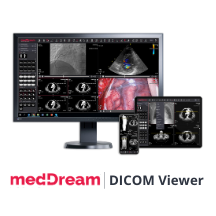 |
MedDream DICOM Viewer: MedDream is designed by Softneta to aid medical professionals in their daily decision-making processes. The DICOM Viewer is FDA-cleared for diagnostic use as a Class 2 medical device and can be installed in Microsoft Azure.
|
 |
mGrants – A Grants Management System on Power Apps: Based on MERP Systems’ experience with US federal agencies, state and local governments, and non-profit organizations, mGrants is an all-in-one solution for the grants process, from program initiation through awards management.
|
 |
Microsoft Teams Automation Solution: With the rapid adoption of Microsoft Teams, enterprises face the challenge of driving efficiency and governance for Teams. Cambay developed this solution on Power Automate, Microsoft Power Apps, and Azure Automation to drive workflow automation.
|
 |
Mission Critical Azure – CSP: Wortell offers a fully managed service for your business-critical Microsoft Azure environment. This package provides seamless Azure management access control via Azure Lighthouse.
|
 |
Narad: Cloudstrats Technologies offers this integrated command-and-control center for real-time digital surveillance, disease control, and outbreak management. The COVID-19 Outbreak Management System is included.
|
 |
Newgen ActiveScript: Newgen Omnidocs ActiveScript enables end-to-end automation of your industry-specific, document-centric processes. Ensure business continuity and enable remote work while providing access to relevant documents at any time from anywhere.
|
 |
Node-RED on IoT Edge: Node-RED is a programming tool for connecting hardware devices, APIs, and online services in new and interesting ways. Using Node-RED with Azure IoT Edge makes it possible to easily communicate with the cloud.
|
 |
OnActuate Fraud Protection (SaaS): An extension to the Microsoft Dynamics 365 Fraud Protection suite, OnActuate offers risk-based assessment, multi-factor authentication, and two types of identity verification services.
|
 |
Orbital Witness: This application helps real estate professionals conduct legal due diligence in the United Kingdom by allowing them to instantly understand legal risks at a site.
|
 |
Postgres Pro Standard Database 9.5 (VM+docker): This pre-configured container image by Postgres Professional provides a PostgreSQL-based Postgres Pro Standard Database 9.5 container image with a Debian server. Postgres Professional develops Postgres Pro Database, a private PostgreSQL fork.
|
 |
Postgres Pro Standard Database 9.6 (VM+docker): This pre-configured container image by Postgres Professional provides a PostgreSQL-based Postgres Pro Standard Database 9.6 container image with a Debian server. Postgres Professional develops Postgres Pro Database, a private PostgreSQL fork.
|
 |
Postgres Pro Standard Database 10 (VM+docker): This pre-configured container image provides a PostgreSQL-based Postgres Pro Standard Database 10 container image with a Debian server. Postgres Professional develops Postgres Pro Database, a private PostgreSQL fork.
|
 |
Qumuli Security & Cloud Compliance Platform: Qonsult Systems provides this multi-cloud compliance security posture management (CSPM) platform for security automation, provisioning, compliance monitoring, and reporting. Make it easier to maintain industry compliance.
|
 |
SaguiLog: Manage your orders, delivery lists, vehicles, and drivers with SaguiLog, an integrated carrier management app that is compatible with mobile devices and integrates with Microsoft 365. This app is available only in Brazilian Portuguese.
|
 |
Scheduling assistant using Microsoft Health Bot: Using AI, language understanding built on Azure LUIS, Azure QnA Maker, and Microsoft Health Bot Service, the IWConnect scheduling assistant drastically reduces the time to schedule appointments, check doctors’ availability, and set reminders.
|
 |
Sense Traffic Pulse OneAPI: Sense Traffic Pulse OneAPI together with Intel oneAPI delivers on-demand intelligent video analytics with the power of machine learning and AI. It relies on Microsoft Azure, Intel’s OpenVINO Toolkit, and computer vision architecture technology.
|
 |
Skalable Stream – AI-Driven Invoice Automation: Stream is an easy-to-use accounts payable platform that cuts the time and expense of manually processing vendor invoices by up to 90 percent. It automates the process of importing accounts payable data and managing vendor invoices.
|
 |
Smile CDR CMS FHIR Data Platform: Smile CDR is a complete enterprise Fast Healthcare Interoperability Resources (FHIR) data platform that can meet the Centers for Medicare & Medicaid Services (CMS) Interoperability and Patient Access rule.
|
 |
Strata – Maverics Identity Orchestrator: Maverics is an abstraction layer that simplifies identity delivery to apps, enables secure hybrid access for Azure Active Directory, and consolidates management of policies and identities across multiple clouds.
|
 |
Teams Control: Developed by Infoworker, Teams Control is a governance tool for managing the growth and creation of new teams. It allows you to create different Microsoft Teams templates based on your needs.
|
 |
Trivadis Crisis Management App: Ensure that your company continues to operate in crisis situations. The Trivadis app is based on the Microsoft Power Platform and helps you manage exceptional situations by enabling transparent and prompt communication with your employees.
|
 |
Trivadis Dashboard: Based on Microsoft Power BI, this dashboard provides you with an overview of important internal and external news, including the latest tweets and media reports, contract status, employee attendance, and more.
|
 |
Trivadis Workforce App: Monitor work status and absences with the Trivadis Workforce App, which is based on the Microsoft Power Platform. You can quickly reorganize your team if the situation requires it. The app can be linked to various services, including Outlook.
|
 |
Ubuntu 16.04 LTS Minimal Ready to use: Cloud Maven provides this pre-configured, ready-to-use image of Ubuntu 16.04 LTS Minimal. Ubuntu Minimal is designed for automated deployment at scale and made available across a range of cloud substrates.
|
 |
Ubuntu 18.04 LTS Minimal Ready to use: Cloud Maven provides this pre-configured, ready-to-use image of Ubuntu 18.04 LTS Minimal. Ubuntu Minimal is designed for automated deployment at scale and made available across a range of cloud substrates.
|
 |
Ubuntu 20.04 LTS Minimal Ready to use: Cloud Maven provides this pre-configured, ready-to-use image of Ubuntu 20.04 LTS Minimal. Ubuntu Minimal is designed for automated deployment at scale and made available across a range of cloud substrates.
|
 |
Unifield: Create digital twins or predict construction risks earlier in a simulation. Unifield combines the latest business intelligence, AI, and IoT technologies to offer an integrated 5D Building Information Modeling construction management solution.
|
 |
Voicy Telephone Agent: Driven by artificial intelligence, machine learning, and natural language processing, Voicy.ai’s Telephone Agent is a completely automated service that answers phone calls, solves customer queries, and generates orders.
|
 |
WISE-PaaS/IoTSuite: WISE-PaaS/IoTSuite is a complete IoT platform that covers a set of development kits to enable the rapid development of IIoT applications as well as cloud-native applications and data management platforms.
|
 |
WitFoo Precinct 6.1 Diagnostic SIEM (BYOL): WitFoo’s Precinct is a big data diagnostic SIEM that provides advanced analytics, log collection, and log aggregation. Bring your own license (BYOL) from a WitFoo reseller.
|
 |
WitFoo Precinct 6.1 Diagnostic SIEM (PAYG): Pay as you go (PAYG) to use WitFoo’s Precinct, a big data diagnostic SIEM that provides advanced analytics, log collection, and log aggregation.
|
 |
Wrench SmartProject – Project Performance Control: SmartProject is an intelligent cloud-based platform for project owners, consultants, and contractors that is designed to help them collaborate, plan, monitor, and control the lifecycle of their projects.
|
 |
Yva.ai SaaS with Microsoft: Yva.ai is a real-time employee experience platform that combines weekly micro-surveys with collaboration analytics across corporate tools to enhance employee wellness and engagement.
|
 |
ZFlow: ZFlow lets you easily model and optimize business processes intended for users of both local and cloud versions of Microsoft SharePoint.
|
Consulting services
|
 |
Analytics Quick Start: 10-Hour Workshop: Altitudo will evaluate your Microsoft Azure data analytics systems with respect to the solutions market and to other companies in the sector. This offer is available only in Italian.
|
 |
Azure Infrastructure Readiness: 4-Week Assessment: This infrastructure assessment by Agilisys will help build your cloud strategy. Agilisys will identify utilization and interdependencies to provide time and cost estimates for migrating your estate to Microsoft Azure.
|
 |
Azure Integration: Clear Ship 4-Hour Workshop: Available only in German, DATA Passion experts will analyze your application integration needs and suggest smart integration solutions built on technologies such as Azure Integration Services or Microsoft BizTalk Server.
|
 |
Azure Starter: 2-Week Implementation: Starting with best practices from Azure DevOps and Azure Cloud Services, DataArt will help automate the initial setup of your Microsoft Azure projects to significantly lower the entry threshold for new users.
|
 |
Business Intelligence Delivery: 10-Week Implementation: Depending on your business needs and technology stack, SoftwareONE can implement your business intelligence strategy in Microsoft Azure by using Azure Synapse Analytics, Azure Data Factory, and Microsoft Power BI.
|
 |
Caloudi App Modernization: 1-Day Assessment: Caloudi Corporation provides end-to-end support throughout your web app transformation journey. Its app assessment will provide you with a modernization plan, a design plan, and a cost estimate.
|
 |
Cloud Discovery and Assessment – Two Weeks: This engagement is for customers planning to integrate public or hybrid cloud solutions into their infrastructure. VAST IT offers inventory analysis, roadmap generation, application mapping, vendor analysis, and migration planning.
|
 |
Cloud Velocity – Cloud Transformation: 2-Week Assessment: UST offers Cloud Velocity, a platform enabling a simplified and automated approach to move workloads from the datacenter to Microsoft Azure. It includes automated discovery and inventory analysis to minimize business disruptions and decision touchpoints.
|
 |
Connected Smart Devices: 4-Week Proof of Concept: Convert your devices into smart connected devices through IoT-friendly Plug and Play modules. Anvation Labs will connect your devices to Azure IoT Hub, manage data flow, and visualize the data in Microsoft Power BI.
|
 |
Data Modernization: 6-Week Implementation: Insight Canada will classify your legacy data estate and help you modernize your existing assets or adopt cloud-native approaches to data platform architecture by using Microsoft Azure services.
|
 |
Data Modernization Azure in a Day: 4-Hour Workshop: If you are in a data management or technical decision-making role, DataArt invites you to an interactive exploration of how to migrate apps and databases to the cloud. The workshop provides hands-on experience with data migration tools.
|
 |
Data Warehouse Cloud Migration: 8-Hour Assessment: BizOne offers this assessment and virtual workshop for organizations that are considering migrating their data warehouse to Microsoft Azure. BizOne will create a high-level architectural suggestion and a cost estimate.
|
 |
Datanomics Data & AI practice: 6-Week Implementation: Datanomics provides predictive analytics for retail and fast-moving consumer goods businesses. Using Microsoft Azure technologies and machine learning, Datanomics will help you with data-driven purchasing and optimization of inventory and assortment policy.
|
 |
Docker Workshop – 1 Day: Newwave Telecom and Technologies will help your developers and engineers understand the concept of containerization technology using Docker to improve their proficiency in building apps in Microsoft Azure.
|
 |
Journey to Cloud: 4-Week Assessment: Nubiral will help you understand the benefit of bringing your business to the cloud and migrating to Microsoft Azure with ease and efficiency. This assessment is available only in Spanish.
|
 |
Microsoft Identity Security: 3-Day Workshop: Protect your authorized users’ identities and allow them to access the apps they need on the devices they want. Apex Digital Solutions’ workshop provides you with a security posture assessment and a strong security foundation.
|
 |
Migesa Risk & Compliance Assessment – 4 Weeks: Migesa will assess your Microsoft Azure environment to detect and mitigate threats. Migesa will also provide a roadmap for implementation, use, consumption, and adoption of services. This service is available only in Spanish.
|
 |
Migrate VMware VMs to Azure: 3-Day Assessment: Korcomptenz will help migrate your VMware VMs using Azure Migrate: Server Migration, a Microsoft tool that can seamlessly migrate VMWare virtual machine workloads to Microsoft Azure.
|
 |
Move to Microsoft Azure: 8-Week Proof of Concept: Dace IT will assess and migrate services for small businesses seeking to move operations to Microsoft Azure and interested in expenditures that may be eligible for coverage under the Paycheck Protection Program (PPP).
|
 |
MultiCloud Manager: 8-Week Implementation: UST MultiCloud Manager enables near zero-touch operation and common end-to-end governance for any cloud. It gives you a standard way to optimize, secure, and govern your complex hybrid cloud environment.
|
 |
Openvino Smart Cities Reference Implementation: DACE IT will implement a smart-city reference solution built on Intel’s OpenVINO Toolkit and smart city sample.
|
 |
Sage 200 on Azure: 4-Week implementation: OfficeTechHub will install your Sage 200 on-premises solution in Microsoft Azure. OfficeTechHub will build virtual machines in Azure, add disaster recovery and backup, and train key users. A demo can be organized at no cost.
|
 |
Servian DevOps Compass 1-week – Workshop & Report: One of the Servian Compass solutions, the DevOps Compass program provides a clear and concise path to deliver new functionality in stages, focusing on standard practices across the DevOps lifecycle.
|
 |
SIEM – ZenSOC Azure Sentinel 2-Week Assessment: Zensar offers this free assessment to build a business case for your organization to deploy a cloud-native SIEM solution using Microsoft Azure Sentinel to address cyberattacks.
|
 |
UNICLOUD MANAGED SERVICES: Take advantage of UniCloud’s always-available remote management and consulting for Microsoft Azure services. UniCloud provides virtual machine management, monitoring, security, backups, and storage.
|
 |
Windows Virtual Desktop: 1-Day Workshop: Spektra Systems invites you to a one-day workshop covering architecture, deployment, and management aspects of a quality implementation of Windows Virtual Desktop.
|
 |
Windows Virtual Desktop: 2-Week Proof of Concept: Spektra Systems offers a free proof of concept for you to try Windows Virtual Desktop in a sandbox or in your own environment along with access to Spektra experts.
|
 |
Windows Virtual Desktop: 5-Week Implementation: Spektra Systems will work with your IT and business users to set up a desired Windows Virtual Desktop environment packaged with Microsoft 365 security capabilities.
|
 |
X.CELERATE KYC: AI-ML KYC Automation: 6-Week Proof of Concept: Xoriant Corporation will implement a test environment of its X.CELERATE KYC solution, helping streamline your compliance processes by using Microsoft Azure and Azure-based services.
|
 |
Zero Trust Framework: 2-Week Security Assessment: Brillio offers this enterprise security assessment to discover IT assets across six domains and recommend tools, services, solutions, and best practices to harden your security.
|
|
by Contributed | Mar 1, 2021 | Technology
This article is contributed. See the original author and article here.
So, there may be six more weeks of Winter – thanks, Phil. And February may only have 28 days this go around the sun… but it was busy, no matter how long or short the groundhog shadows.
February 2021 brought some great new offerings: Microsoft Viva Topics (GA), SharePoint web part toolbox updates, Lightbox for images, Quick Links web part audience targeting, SharePoint portal launcher scheduler, Microsoft Lists: Number column updates, Managed Metadata column, Microsoft Search in classic SharePoint sites, and more. Details and screenshots below, including our audible, “groundhog, shadow-casted” companion: The Intrazone Roadmap Pitstop: February 2021 podcast episode – all to help answer, “What’s rolling out now for SharePoint and related technologies into Microsoft 365?”
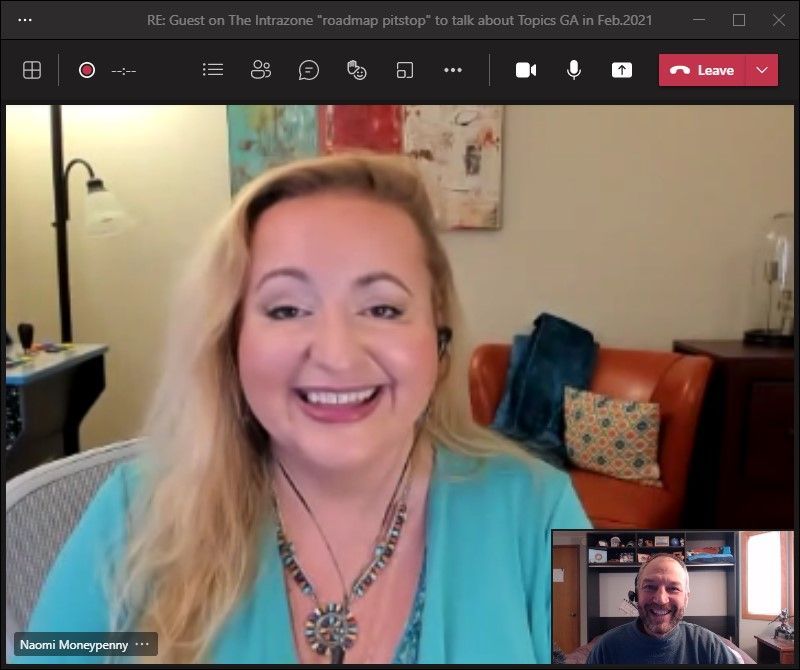
In the podcast episode, I chat with Naomi Moneypenny (LinkedIn | Twitter), principal PM manager at Microsoft focused on building new capabilities in advanced content, knowledge, and search experiences in Microsoft 365. We talk about the challenges of harnessing knowledge in the enterprise, the tech behind Viva Topics, and a future glimpse of what’s to come next from she and the Project Cortex team.
Naomi Moneypenny, principal PM manager at Microsoft (Microsoft) [Intrazone guest], with Mark Kashman on a Teams interview call [host]
All features listed below began rolling out to Targeted Release customers in Microsoft 365 as of February 2021 (possibly early March 2021).
Inform and engage with dynamic employee experiences
Build your intelligent intranet on SharePoint in Microsoft 365 and get the benefits of investing in business outcomes – reducing IT and development costs, increasing business speed and agility, and up-leveling the dynamic, personalized, and welcoming nature of your intranet.
Microsoft Viva Topics (general availability)
Topics is the latest product output from Project Cortex, bringing artificial intelligence (AI) to empower people with knowledge and expertise in the apps they use every day and to connect, manage, and protect content across systems and teams. It is also the first one of four disclosed Microsoft Viva modules to be released.
Microsoft Viva is the new employee experience platform built on Microsoft 365 that empowers people and teams to be their best from wherever they work. See Viva Topics in action:
Think of Viva Topics as a Wikipedia with AI superpowers. It uses AI to automatically organize company-wide content and expertise into relevant categories like “projects,” “products,” “processes,” and “customers.”
When you come across an unfamiliar topic or acronym, just hover. No need to search for knowledge—knowledge finds you. Viva Topics automatically surfaces topic cards as people work in apps like Office, SharePoint, and Microsoft Teams. When employees click on a card, a topic page appears with documents, videos, and related people. Experts at the company can also help curate the information shown in Viva Topics by sharing knowledge through simple, highly customizable web sites called Topic Pages.
- Learn more, plus the Viva Topics Buy Now page, which includes cost information, plus licensing requirements.
- Roadmap ID: 72069.
SharePoint web part toolbox updates
This one is for page authors or site owners that design a lot of content on their site home page. If you’re new to using web parts, one thing the team discovered was the lack of discovery – of all the useful web parts.
So, to help, we are updating the web part toolbox to make it easier to find and use web parts on pages and news posts. We have added categories, a toggle to switch between a grid view and list view, web part descriptions in list view, and a section for the user’s most frequently used web parts.
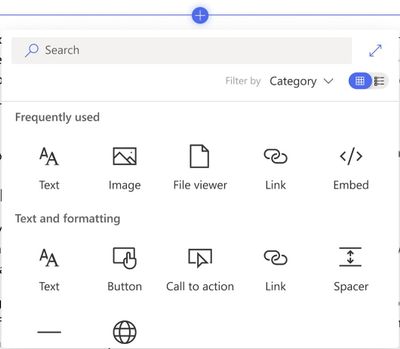 Updated web part toolbox when authoring SharePoint pages and news articles.
Bring content visualization to life across your intranet pages and news, now with greater creator visibility when using the service.
Lightbox for images on SharePoint pages
A lightbox popup is a window overlay that appears on top of a webpage. With this update, when people click or tap on an image in SharePoint, they will be able to see a larger version of the image in the lightbox. When viewing the image in the lightbox, the remainder of the page is inactivated and dimmed.
And then, it’s easy to close lightbox and turn back to the rest of the page.
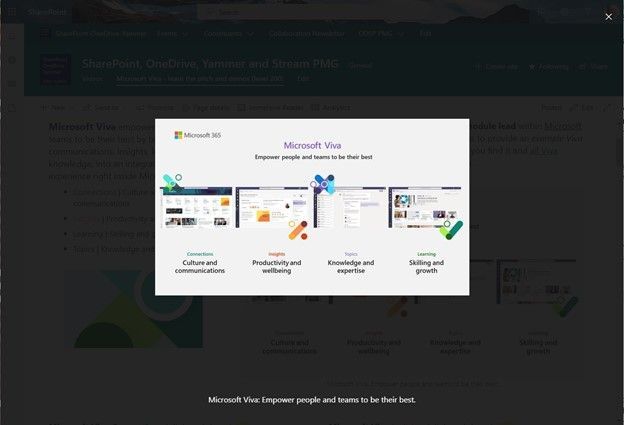 Click on an image from a SharePoint page to get a clearer, focused view of it. The rest of the page will darken, and any image captions will appear below the image.
There has been a lot of new tech for uploading and working with images during the edit phase, to crop, resize, rotate… and once you’ve gotten just the way you want it, your readers can see it best in all its glory all lit up and large in the lightbox.
SharePoint: Audience Targeting for Quick Links web part
We are adding the ability to target specific audiences per link within the Quick Links Web Part. With it, you will be able to target specific links to different audiences, helping you provide more personalized experiences on SharePoint pages.
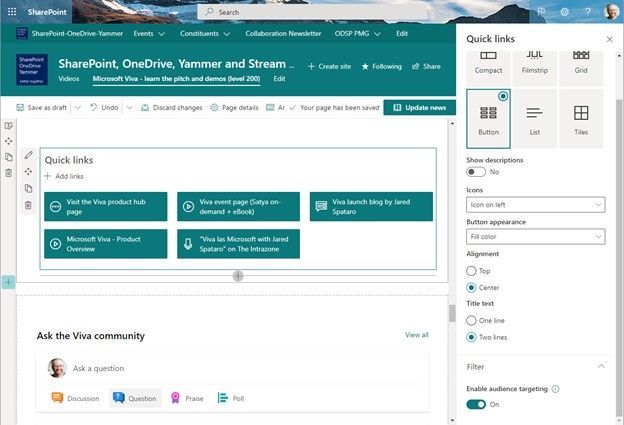 Enable audience targeting to promote links to specific audiences across the site.
SharePoint Portal Launch Scheduler
This is an admin feature designed to help coordinate and schedule launch details for SharePoint sites that are expected to receive high volumes of traffic. The Portal Launch wizard available via SharePoint PowerShell is designed to configure the deployment waves when launching a new site. It also provides an automatic redirect for users dependent on which redirect option is selected.
The Portal Launch Scheduler makes it possible for you to manage a phased rollout for a new SharePoint site. It also provides an automatic redirect for existing sites, if needed.
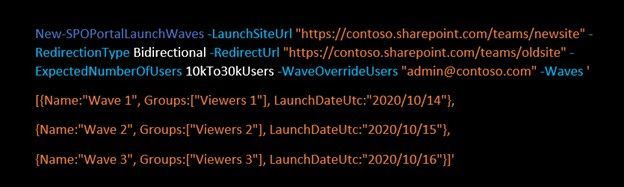 Example PowerShell command to designate portal launch waves.
During each of the waves, you can gather user feedback and monitor performance. This provides a managed way to slowly introducing the portal, giving you the option to pause and resolve issues before proceeding; ultimately ensuring a positive experience for your users from start to fully launched.
- Learn more:
- Roadmap ID: 66162.
Teamwork updates across SharePoint team sites, OneDrive, and Microsoft Teams
Microsoft 365 is designed to be a universal toolkit for teamwork – to give you the right tools for the right task, along with common services to help you seamlessly work across applications. SharePoint is the intelligent content service that powers teamwork – to better collaborate on proposals, projects, and campaigns throughout your organization – with integration across Microsoft Teams, OneDrive, Yammer, Stream, Planner and much more.
Microsoft Lists | Support for thousands separator and custom symbols in Number columns
With Microsoft Lists and SharePoint lists, owners and members have the ability to add a thousands separator to numbers and to be able to choose their preferred symbol that best represents what the numbers represent – like the various currency symbols used across the world.
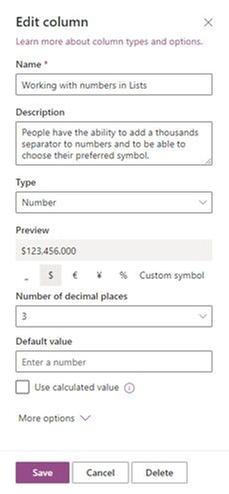 When using Number columns in lists, configure numbers based on how you want or need to present them.
There’s an important difference between the Yen and the Euro, and you want it to be as clear as it can be. The right symbol goes a long way.
Adding taxonomy columns for modern SharePoint library views
Yes, the power of metadata in the hands of those that need to manage document library content as the business prescribes. This new feature gives you the ability to add taxonomy-powered columns directly to library views in modern SharePoint libraries.
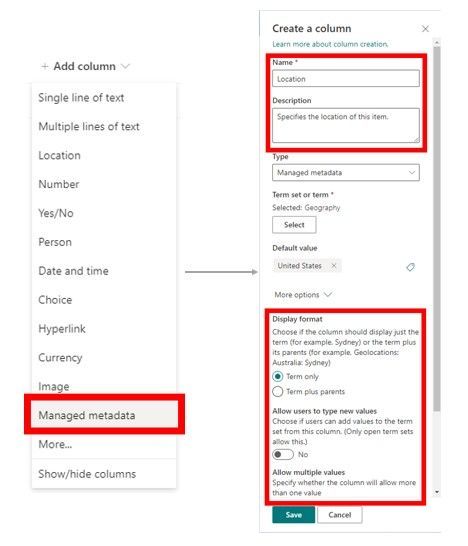 The Managed Metadata column connects your information to your organization’s term store (taxonomy).
Quick note: SharePoint document libraries are powered by lists for their row and column capabilities.
With this update, users will see a new Managed metadata option as a column type within the Add column menu in SharePoint lists and libraries. Then simply specify the column information such as name and description as well as choose their organization’s desired term set or term, to associate the column with. From there, the use of that column is driven by the managed metadata coming from the programmed, managed term set.
Microsoft Search in classic SharePoint sites
This is a quick and simple one, with lots of power for sites that have been around a while and may still be in classic mode. We are expanding the reach of Microsoft Search; classic SharePoint team sites that do not have customized search experience will be updated to the modern Microsoft Search experience, bringing improved personalization and relevance.
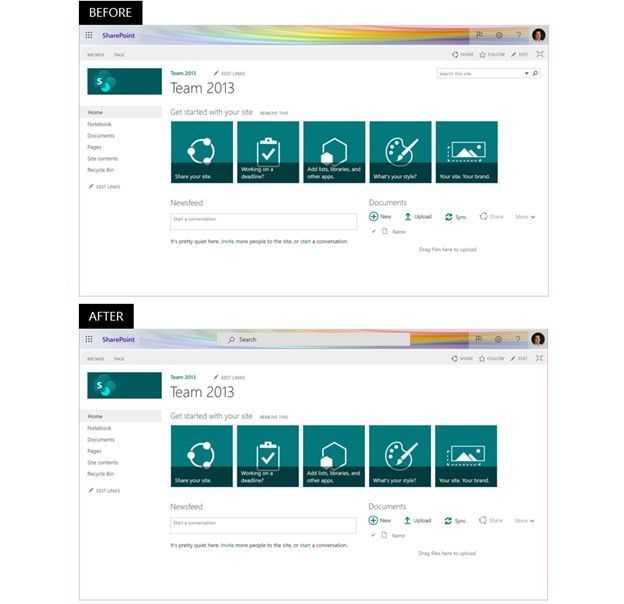 Classic SharePoint pages in Microsoft 365 will start using Microsoft Search, which provides personalized results with higher relevance. Top show the classic search experience – note the top-right search box, and the bottom shows a classic site using Microsoft Search – the search box at the center top.
That’s it. Another example of how Microsoft Search is truly powering search throughout Microsoft 365 – aka, no site left behind.
Related technology
Text predictions are coming to Word for Windows
Initially, text predictions popped up in Outlook for Windows – during composition to help users write more efficiently by predicting text quickly and accurately. Now, text predictions are coming to Microsoft Word when writing documents in English. And we know a lot of Word document are created in Teams, SharePoint, and OneDrive.
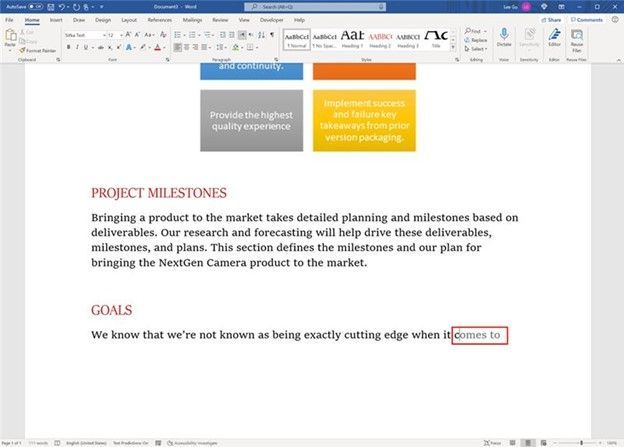 Text predictions within Word for Windows appear ahead as you type.
As you type, you’ll see suggested text, which you can accept by tapping the Tab key or they can ignore suggestions by simply continuing to type. The feature reduces spelling and grammar errors and learns over time to give the best recommendations based on your writing style.
Note: this is a Microsoft 365 connected experience, and can be turned off by going to any Microsoft 365 application such as Word, Excel, or PowerPoint and going to File > Account > Manage Settings. This feature can also be managed through the policy settings for privacy controls.
Evolution of Microsoft Lens (formerly Office Lens)
And with the evolution, beyond a new name, comes some dynamic new features, like intelligent actions into the camera, including: Image to Text, Image to Table, Image to Contact, Immersive Reader, and QR Code Scan.
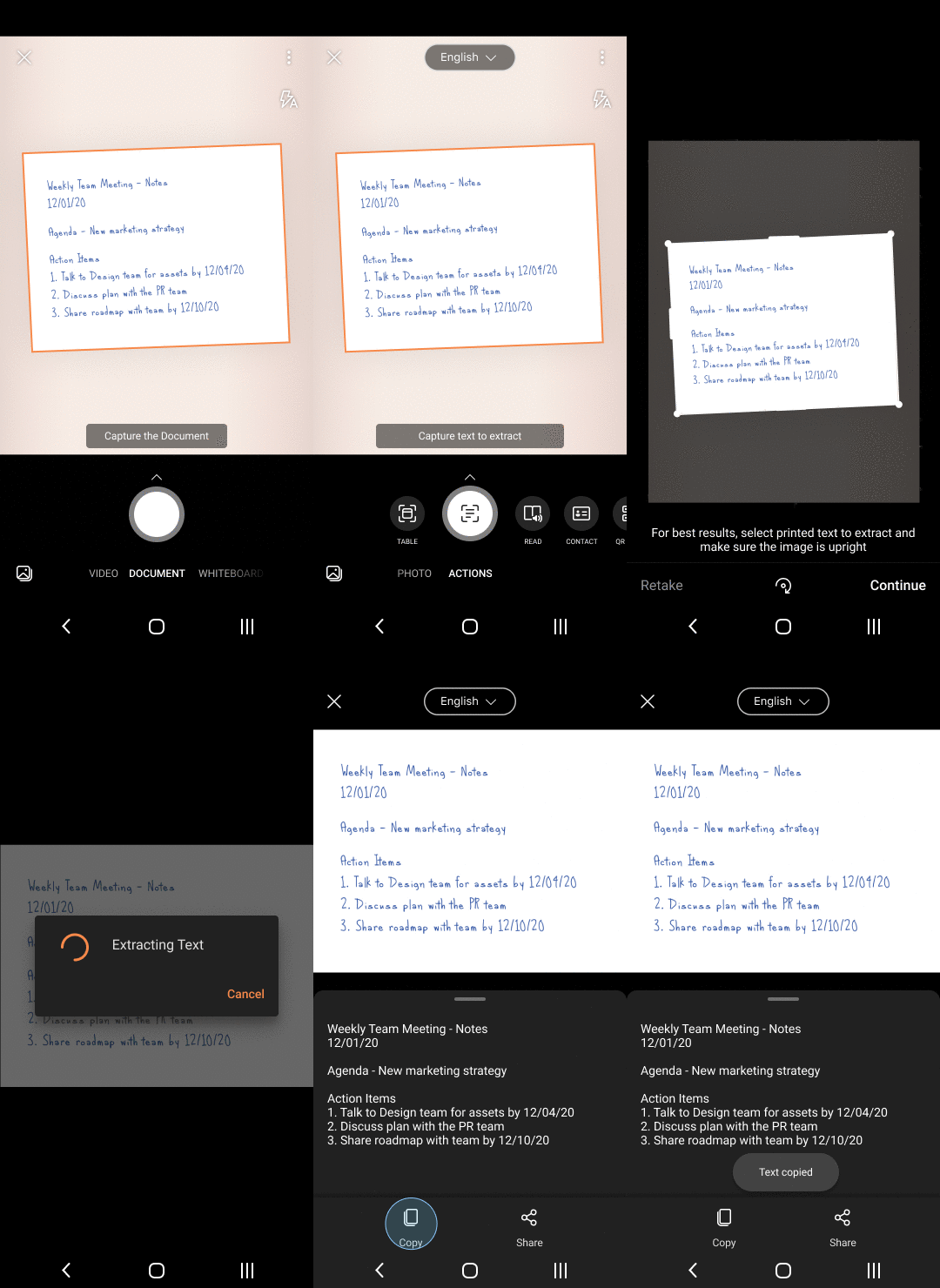 One of the new intelligent actions into the camera: Image to Text.
We are releasing an improved scan experience allowing you to re-order pages, re-edit scanned PDFs, apply a filter to all images in the document, scan up to 100 pages as images or PDFs, easily switch between local and cloud locations while saving PDF, along with an easy way to identify local and cloud files.
We’re noting it here because Microsoft Lens powers the camera in Microsoft 365 mobile apps, including Office, Microsoft Teams, Outlook, and OneDrive – yes, OneDrive loves lens – scan, scan, scan the physical world right where it needs to be stored digitally.
OneDrive for Android updates
We’re introducing an updated home screen experience for Android users, plus support for Samsung Motion Photos and 8K video. Now, you can pick up where you left off on recent and offline files, and easily re-discover memories from the past right from the home screen.
 The new home screen experience on OneDrive for Android shows recently accessed files, files downloaded for offline use, and “On This Day” photos.
For Samsung Android phones, OneDrive has always saved your Samsung Motion Photos, and now you’ll be able to view them in all their moving glory. Similarly, you’ve always been able store Samsung 8K videos with no loss or compression on OneDrive, and now you can play them back as well. Great storage always, and now rich, new viewing experiences on your Android device.
March 2021 teasers
Psst, still here? Still scrolling the page looking for more roadmap goodness? If so, here is a few teasers of what’s to come to production next month…
- Teaser #1: SharePoint app bar [Roadmap ID: 70576]
- Teaser #2: SharePoint page analytics [Roadmap ID: 70635]
… shhh, tell everyone – especially Punxsutawney Phil.
Helpful, ongoing change management resources
- Follow me to catch news and interesting SharePoint things: @mkashman; warning, occasional bad puns may fly in a tweet or two here and there, plus my new blog on Substack: The Kashbox.
Thanks for tuning in and/or reading this episode/blog of the Intrazone Roadmap Pitstop – February 2021 (blog/podcast). We are open to your feedback in comments below to hear how both the Roadmap Pitstop podcast episodes and blogs can be improved over time.
Engage with us. Ask those questions that haunt you. Push us where you want and need to get the best information and insights. We are here to put both our and your best change management foot forward.
Stay safe out there on the groundhoggy-shadowy-laden road’map, and thanks for listening and reading.
Thanks for your time,
Mark Kashman – senior product manager (SharePoint/Lists) | Microsoft)
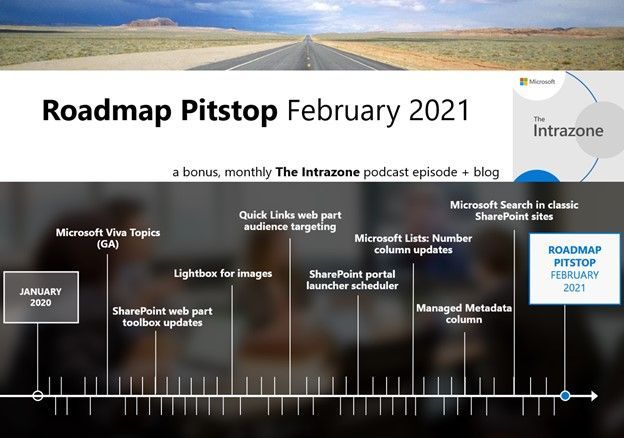 The Intrazone Roadmap Pitstop – February 2021 graphic showing some of the highlighted release features.
by Contributed | Mar 1, 2021 | Technology
This article is contributed. See the original author and article here.
Labels in Planner are visual cues, drawing attention to a particular set of tasks for a particular reason. For example, you might use labels to tag tasks with the same completion requirements, dependencies, or issues, and then filter your plan on those labels to zero-in on related tasks. In short, labels are a quick, visual way to categorize similar tasks.
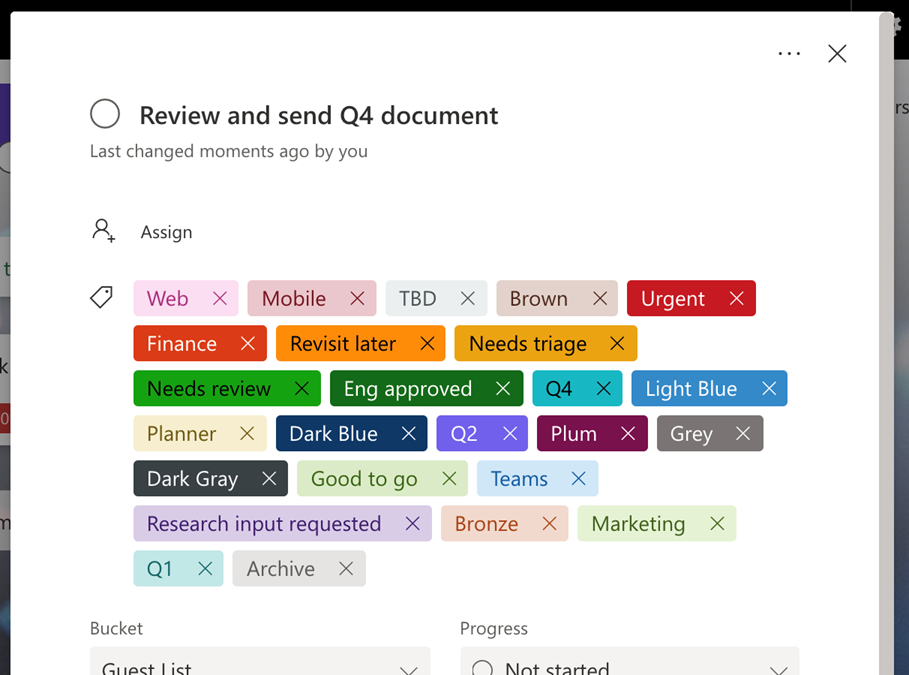
But we’ve long heard that the current catalogue of labels (six total) isn’t enough; in fact, adding more labels to Planner is one of the very top asks on UserVoice. This update has been on our radar as long as yours, so we’re thrilled to announce that there are now 25 labels available in Tasks in Teams and Planner on all platforms and in most environments. (GCC availability is coming in March.)
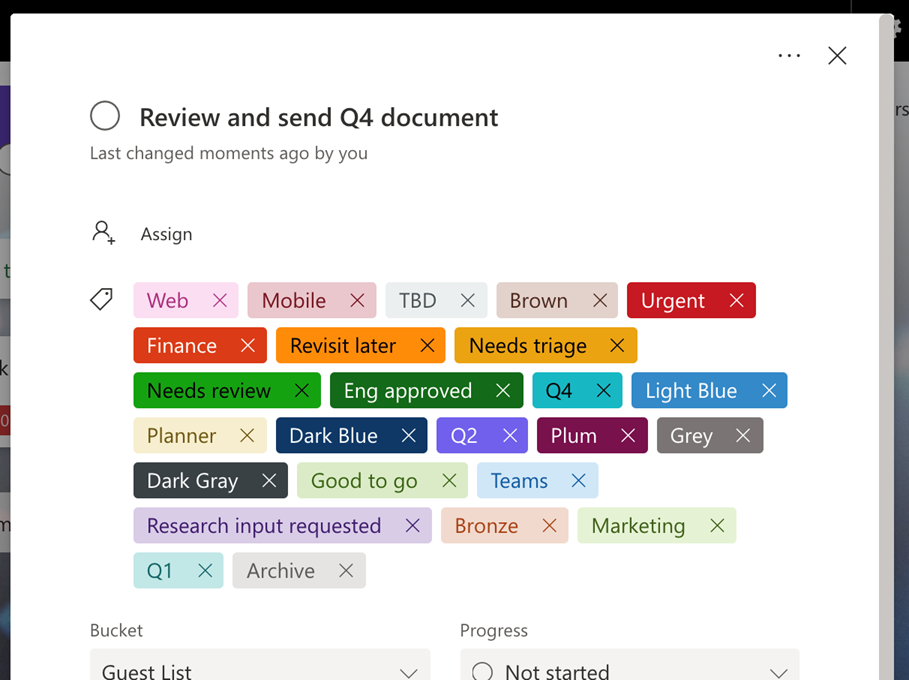
Each of the 25 labels is a different color, and each can be edited with whatever text you’d like. More labels mean more options for getting a similar group of tasks done right: flagging more risks, signaling more reasons for a delay, prompting reviews from more people, and tagging more departments, to name a few.
We’re constantly chipping away at big and small asks alike from UserVoice, and invite you to submit your ideas for improving Planner and Tasks in Teams to that site. In the meantime, keep checking our Tech Community Blog to see which ask we address next.
by Contributed | Mar 1, 2021 | Technology
This article is contributed. See the original author and article here.
This post was written in collaboration with Gabi Stein, Geri Gillespy, Brian Dang and Jon Levesque
If there is one resource that continually evades the grasp of nearly every educator on earth, it is time. With such a broad set of responsibilities, it seems there simply are not enough hours in the day for a teacher to accomplish everything. Preparing materials, organizing classes, teaching classes, engaging in professional learning, working with parents and families, and playing key roles as co-workers, school leaders, and community members only scratch the surface of what it means to be an educator. When you toss COVID-19 into the mix, it’s no wonder that teachers have even less time as they work to fulfill their important roles during a tumultuous time.
Remote and hybrid learning environments are now the predominant means for instruction. Platforms like Microsoft Teams have become the avenue through which teachers teach and students learn. It is our mission to empower every educator to achieve more and we want to help you take meaningful steps toward that end by saving you precious time.
Power Automate can be a useful tool that takes everyday tasks and automates them through various “flows”. Like a “flow chart” from which it gets its name, a “flow” is a series of steps that run in order. It can look up rows from a table, send emails, create files, and even play back a set of recorded clicks and keystrokes for desktop automation. Gone are the days of repeating by hand, one by one.
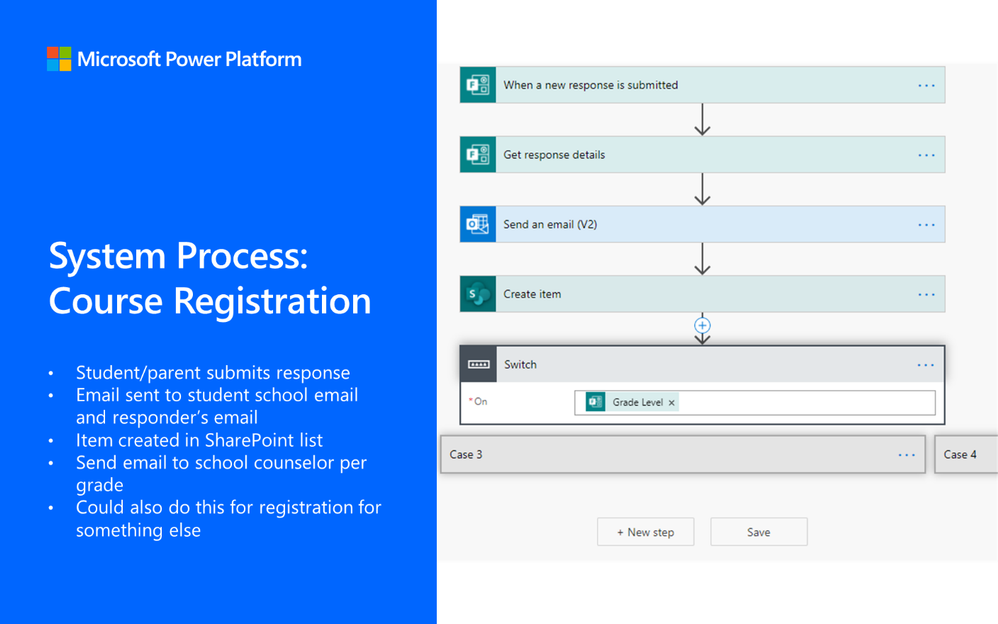
As you will read in the list below, anything from course registration to scheduling announcements can be set to automatically run with very little setup beforehand. The EDU teams within Microsoft have surveyed hundreds of teachers around the world and created automated workflows on common educator tasks including:
Title
|
Description
|
Create tasks in Microsoft Planner for onboarding new teacher
|
Automatically create all the tasks and checklist items a new teacher needs to complete in Microsoft Planner.
|
Send text to office liaison to translate
|
Communication from a teacher, administrator, or anyone at the office may need to be translated for families to read in their language. This flow will help an office liaison set up a way to receive content to be translated, automate a basic translation to work from, and return a refined translation to the sender.
|
Automating registration for courses or school events
|
This flow will allow you to automatically set up course or event registrations and send confirmation emails to the organizer and attendee.
|
Collect instructional feedback or other information for staff and students
|
This flow will allow educators create an automatic system for gathering and collecting information using Microsoft Forms and SharePoint.
|
Sending posts between Teams channels
|
This flow will allow for educators to send messages from one Teams channel to a different Team without having to copy and paste. This is different from posting one message across multiple channels within the same Team
|
Scheduling posts and announcements in Teams
|
This flow will allow educators to schedule announcements and posts to be published at a designated time in Microsoft Teams such as a schedule for the week.
|
Creating an assessment calendar
|
This flow will allow for educators to create a calendar of assessments across the institution. Any teacher can submit an assessment date in a form which will add it to a calendar.
|
Notification or communication when a list item is added or changed
|
Leaders and educators may modify documents on a regular basis. This flow would allow them to create an automatic system for notifying users when a SharePoint list is updated or edited.
|
Submitting professional development (PD) requests
|
This flow tracks an approval process for professional development credits. Educators submit a form for PD requests, then an approval is automatically sent for consideration.
|
Track approvals or requests for maintenance
|
This flow will allow leaders or educators create an automatic maintenance system that involves approvals or requests using Microsoft Forms, Outlook, and SharePoint.
|
We are here to help you implement the flows you see in this list along with any others you may be able to think up. We are eager to understand how automation can become a meaningful and helpful part of your daily workflow as continue to improve them. If you have a story about how an automated process has improved your life as an educator or if you have an idea for building a new one, we want to hear it! Please contact us here.
It is our hope that these flows can free you from the manual aspects of teaching in remote and hybrid learning environments and give you back some time.
by Contributed | Mar 1, 2021 | Technology
This article is contributed. See the original author and article here.
As I mentioned in a previous blog, we have decided to split the Microsoft Dynamics 365 Fundamentals exam into its core components—customer engagement apps and finance and operation apps. The second one, MB-920: Microsoft Dynamics 365 Fundamentals Finance and Operations Apps (ERP), is now in beta. This exam covers the features and capabilities of Dynamics 365 finance and operations apps. Candidates should have a fundamental understanding of financial principles and business operations.
When you successfully pass this exam, you will earn the Microsoft Dynamics 365 Fundamentals Finance and Operations Apps (ERP) certification.
To receive the 80% discount*, use code MB920LMhiking when prompted for payment. You can use this code to register for and take the exam on or before March 26, 2021.
This is NOT private access code.
*The first 300 people who register can take these exams for an 80% discount! (Why beta exams are no longer free.) The seats are offered on a first-come, first-served basis. You must register for the exam on or before March 26, 2021. Take the exam as soon as possible, so we can leverage your comments, feedback, and exam data in our evaluation of the quality of the questions.
Preparing for Beta Exams
Taking a beta exam is your chance to have a voice in the questions we include on the exam when it goes live. The rescore process starts on the day that exams go live, and final scores are released approximately 10 days later. For updates on when the rescore is complete, follow me on Twitter (@libertymunson). For questions about the timing of beta exam scoring and live exam release, see the blog posts The Path from Beta Exam to Live Exam and More Tips About Beta Exams.
Remember, the number of spots is limited, so when they’re gone, they’re gone. You should also be aware that there are some countries where the beta code will not work (including Turkey, Pakistan, India, and China). You will not be able to take the beta exam in those countries.
Also keep in mind that these exams are in beta, which means that you will not be scored immediately. You will receive your final score and passing status after your exam is live.
Related announcements
Skill up and stand out, with new role-based training and certification!
New role-based certification and training is here, and we’re just getting started!
Catching up: continuing our journey with new role-based certifications and training
Announcing two new Microsoft Dynamics 365 Fundamentals certifications!

by Contributed | Mar 1, 2021 | Technology
This article is contributed. See the original author and article here.
Join us for MidDay Café Monday 3/8 as we host Microsoft’s Mark Kashman, Senior Product Manager, Microsoft. Mark will be bringing us all the latest goodness around Microsoft Lists including real world examples of highly scalable lists for healthcare and more. This is a must attend session for those who are looking to create highly scalable applications or who may have struggled with the limitations of SharePoint lists in the past.
Join us for this session at 12 noon eastern 3/8 on MidDay Café. Additionally the MidDay Café crew will be covering the latest in Microsoft News/Events, taking open Q&A, and more.
MidDay Café 03/08/2021 Agenda:
- Welcome and Introductions.
- Mid-Day Café News and Events
- Microsoft Lists with Microsoft’s Mark Kashman, Senior Product Manager, Microsoft.
- Open Q&A
- Wrap Up
For the Event:
Keep up to date with MidDay Café:
Thanks for visiting – Michael Gannotti LinkedIn | Twitter
 Michael Gannotti
by Contributed | Mar 1, 2021 | Technology
This article is contributed. See the original author and article here.
The Microsoft Cloud Adoption Framework for Azure guides your entire cloud journey through best practice guidance. Achieve the right business outcomes for your organization, implementing business and technical strategies throughout the cloud adoption lifecycle. We are continually adding new content as we learn through the experience of our field engineers, partners, and customers. We are excited to introduce a new customer journey in the framework that provides guidance for hybrid and multicloud adoption scenarios.
Unlock flexibility, agility, and scale with hybrid and multicloud
As businesses accelerate cloud innovation, there continues to be increasing technology investment in on-premises infrastructure (local data centers, branch offices, and edge platforms), and increasing adoption of the cloud across multiple providers. The hybrid and multicloud approach connects on-premises infrastructure to diverse cloud infrastructure—extending innovations like simplified cloud management and consistent cloud services.
This rich infrastructure empowers organizations with the flexibility, agility, and scale they need to drive innovation. It also adds complexity to management and operations processes of asset portfolios across different hybrid platforms, and customers face three key needs when adopting a hybrid and multicloud approach, as a result:
- Visibility: Customers need visibility into the health of their existing, as well as future infrastructure and applications, in a single pane of glass.
- Compliance: Many customers want to maintain consistent governance, compliance, and organizational regulations and policies. Customers can extend unified cloud management across environments, applying consistent governance policies and operational control processes to resources scattered across heterogeneous environments
- Integration: There are a wide range of skills across on-premises and cloud, since organizations often have different app development teams. Customers are looking for consistent interoperability between the two so they can unify development practices.
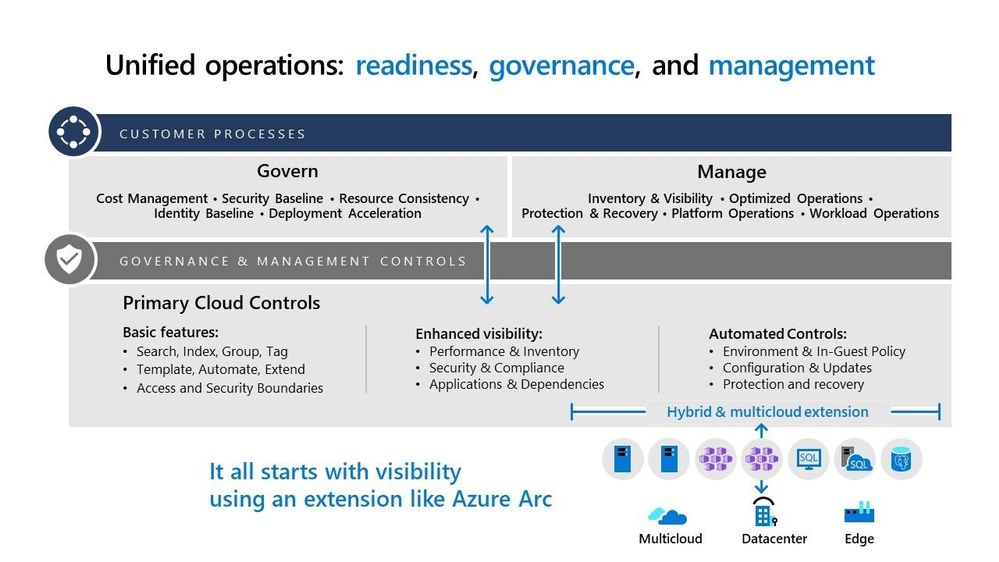
Address hybrid and multicloud needs with unified operations
Unified operations centrally governs, manages, and operates your resources regardless of where they live, whether on-premises, edge or multicloud platforms, reducing duplication in cloud platform utilities around governance, security, and operations tooling. In implementing unified operations, a single enterprise control plane extends across your organization’s distributed assets, bringing consistent management, application development, and cloud services to any infrastructure, anywhere, at scale. In the case of Azure, that single control plane is Azure Arc, which extends the same controls and operational processes used to govern the Azure cloud to other public clouds, private clouds, and the edge.
Get started with implementing hybrid and multicloud?
As mentioned earlier, the Cloud Adoption Framework for Azure guides your cloud journey across different phases of defining your strategy, creating your plan, preparing your environment, migrating to the cloud, and governing and managing your cloud portfolio.
We are releasing new content in the Cloud Adoption Framework that provides guidance specific to hybrid and multicloud adoption scenarios, including unified operations. This guidance will walk you through the stages of the cloud journey as defined in the Framework, and share best practice content for every stage, so you can successfully implement a hybrid and multicloud approach. The content includes business considerations, landing zone design considerations, and governance and management practices to help you implement a successful hybrid and multicloud architecture.
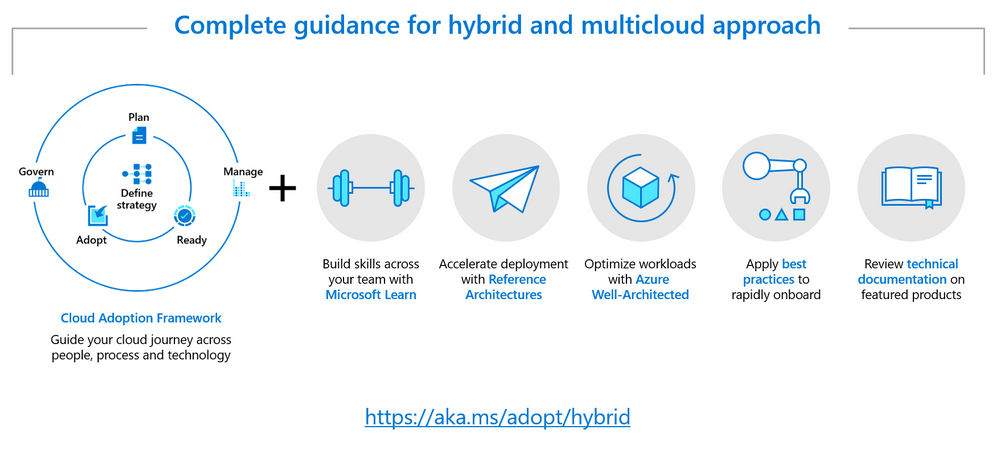
Beyond the content in the Framework, the guidance in the hybrid and multicloud scenario includes assets and resources that provide a complete set of guidance as you implement your hybrid and multicloud approach, including:
Microsoft Learn content for hybrid and multicloud scenarios, including learning modules for Hybrid, Azure Arc, and Azure Stack.
Reference architectures specific to hybrid and multicloud, including scenarios such as hybrid security, hybrid networking, hybrid identity, and more.
Microsoft Azure Well-Architected Framework guidance for effectively operating your workloads across hybrid environments, aligning with best practices for cost optimization, operational excellence, security, performance efficiency, and reliability.
Best practices to rapidly onboard resources to hybrid environments. These include step-by-step guides for independent Azure Arc scenarios that incorporate as much automation as possible, detailed screenshots with code samples, and a rich and comprehensive experience while getting started with the Azure Arc platform.
Featured product documentation covering product-specific technical guidance on hybrid-related products, including Azure Arc, Azure Stack HCI, Azure IoT Edge, and more.
More hybrid and multicloud learning resources
Check out the Ignite 2021 pre-recorded session on Implementing hybrid and multicloud approach with cloud adoption framework. This session provides an overview of content covered in the hybrid and multicloud scenario as part of the Cloud Adoption Framework. There is also an episode on the hybrid and multicloud approach, recently published as part of the Azure Enablement show, that covers key topics related to your cloud journey. Lastly, check out this new content on hybrid and multicloud, and let us know what you think!


Recent Comments