by Contributed | Mar 30, 2021 | Technology
This article is contributed. See the original author and article here.
Today Microsoft announced the result of a leadership study on Security Signals in the IT industry. The study delves into the biggest challenges reported by security decision makers. Specifically, the report shows that as organizations are pivoting to hybrid work environments, attacks on endpoint devices have grown increasingly more frequent and sophisticated.
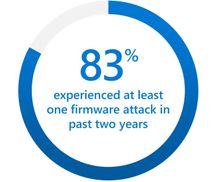
One area that is called out in the study is the recent surge (5x) of attacks against device firmware. The firmware, which lives below the operating system, is emerging as a primary target because it’s where devices store sensitive information, like credentials and encryption keys. The study points out that 83 percent of enterprises have experienced at least one firmware attack in the past two years. And during that time, less than a third of security decision makers allocated any budget resources on firmware protection. Respondents reported that little effort is made to invest in firmware protection until a breach occurs.
UEFI firmware protection
Microsoft introduced its own open-source UEFI to enable a secure and maintainable interface to manage firmware. On the Surface side, we have been enabling the automation of firmware protection since the 2015 release of Surface Pro 4. That’s when we made the decision to to build our own Microsoft UEFI 1 and move away from the third party UEFI that our OEM partners were using. The result is a fully transparent open-source project called Project Mu.
If you’re not already familiar with UEFI, it stands for Unified Extensible Firmware Interface. It’s essentially a modern version of a BIOS that initializes and validates system hardware components, boots Windows 10 from an SSD, and provides an interface for the OS to interact with the keyboard, display, and other input/output devices.
Centralized device management down to the firmware level
As Microsoft further developed the UEFI for Surface, we also built tools for managing and updating UEFI, beginning with SEMM (Surface Enterprise Management Mode). You can use it as a stand-alone tool or integrated with Microsoft Endpoint Configuration Manager to manage the UEFI settings on your Surface. SEMM lets you remotely enable and disable key components of Surface devices that would otherwise require you to physically go to every machine and boot straight into the UEFI (Power button + Volume Up). From a security perspective this is important as the more components you disable, that are not normally used, the smaller the attack vector.
Aligned to Microsoft’s broader commitments, we moved SEMM capabilities to the cloud with the launch of DFCI (Device Firmware Configuration Interface). DFCI enables cloud-based control over UEFI settings through the Intune component of Microsoft Endpoint Manager. The best part is that DFCI can be enabled via policy and deployed with Windows Autopilot before anyone even logs into the device. This advancement placed Surface into a distinct technical advantage over other devices on the market. With DFCI a Surface device can be fully managed from Windows 10 down to firmware all through the power of the cloud and Microsoft Endpoint Manager.
Surface drives innovation into firmware security
So, what makes our UEFI secure? To start, it can be updated via Windows Update. Our UEFI does not require an outside tool from a third party or download site. In fact, when the vulnerability of Spectre and Meltdown was announced, Surface already had a fix available that was automatically pushed to every Surface device accepting updates. Windows Update patched the microcode of our processors all through UEFI. Another security step we take is to lock down the UEFI, to protect against known exploits. Surface UEFI uses Boot Guard and Secure Boot, which translates to a measured and signed firmware check at each stage in the initial boot process.
To take it a step further, Boot Guard enables the SoC (System on a Chip) to use the Surface/OEM key to verify that the initial UEFI firmware stage was signed by the OEM. The OEM key is a Surface key that is fused into the SoC at the factory. In simpler terms Boot Guard ensures valid firmware is booted during the initial boot phase of the device.
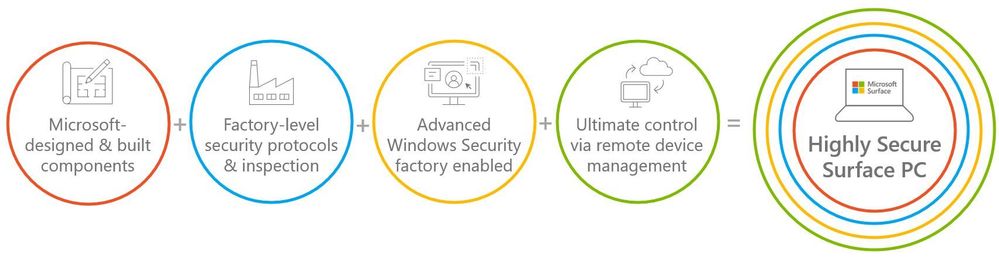
All of this leads us back to the Security Signals study. Microsoft Surface has implemented safeguards to address firmware vulnerabilities. Surface devices are developed with our own UEFI that is open-source, and we’ve built tools – both on-prem and in the cloud — to centrally manage devices at the firmware level to help further reduce attack vectors. We also provide a means to ensure your UEFI stays up to date via Windows Update, and we’ve secured the UEFI via Boot Guard to ensure what you boot is authentic and what you expect. At Surface, we are fully committed to continuing our iteration on the Security front by designing and building innovative practices to protect your devices and data.
To learn more about Surface Security please visit the Surface for Business security website: Security & Endpoint Protection – Microsoft Surface for Business
1 Surface Go and Surface Go 2 use a third-party UEFI and do not support DFCI. DFCI is currently available for Surface Laptop Go, Surface Book 3, Surface Laptop 3, Surface Pro 7, Surface Pro 7+ and Surface Pro X. Find out more about managing Surface UEFI settings at https://docs.microsoft.com/en-us/surface/manage-surface-uefi-settings.
by Contributed | Mar 30, 2021 | Technology
This article is contributed. See the original author and article here.
In this video, we’ll go through the details of how data is ingested into FHIR from an EMR. Marc Kuperstein walks through the different ways data can be ingested such as batch ingestion or realtime ingestion and why you would want to use each process. He will also go over the ingestion pipeline and different ways to get the data out of FHIR.
by Contributed | Mar 30, 2021 | Technology
This article is contributed. See the original author and article here.
We are bringing together Microsoft, SAP and a select number of Global System Integrator partners in a jointly led, live webinar series now through June 2021, to showcase how SAP and Microsoft technologies along with our partner solutions, solve a unique business challenge for our customers. We invite you to participate in the upcoming live webinar and view the on-demand webinars. Stay tuned for new webinar topics in May & June!
Upcoming Webinar on Tue Apr 27 at 11 am ET:
Real-Time Inventory Replenishment powered by T-systems with SAP on Azure
Digital Transformation is in the middle of historic acceleration, fueled by a pandemic, and it has brought up new ways of collaboration, disruption, and innovation. Organizations must fundamentally adapt and change their business models so they can be nimble, agile, and responsive. T-Systems believes that tech intensity will play a key role in enhancing business resilience and the transformation of organizations amid the pandemic and beyond.
Join experts from T-systems, Microsoft, and SAP on this webinar, who will showcase their collective innovation and technology capabilities to demonstrate a Real-time Inventory Replenishment solution. The solution brings a perspective of how a responsive supply chain dynamically flexes itself to avoid business disruption and alerts a low stock inventory within the retail landscape, and the insights gained results in issuing a real-time order with SAP to fulfill new sales orders. The entire process is transparent such that customer satisfaction and experience is safeguarded from stock out situation. Register here.
Available On Demand
Imagine What’s Possible: Real Success Stories for Business Leaders Seeking SAP Modernization on Microsoft Azure
Join Microsoft, SAP and DXC Technology on this webinar to explore the possibilities enterprises realize from migrating their SAP workloads to S/4HANA on Azure. Sharing real customer stories, DXC illustrates how customers have transformed and modernized their SAP applications and derived greater business insights from their SAP data through Azure cloud native analytics, while achieving the resiliency required for these mission critical applications. Watch the webinar
Maximize your investment in SAP and Azure Synapse to create a cost-effective data analytics strategy
Many businesses struggle trying to wrangle multiple data sources into a cohesive data analytics strategy. Bringing together SAP and non-SAP data can be complex and require significant technical resources. IBM can help you bring this data together in data fabric that maximizes your investment in SAP combined with Azure Synapse creating a cost- effective data analytics strategy and implementation.
Join this webinar to learn:
- How to build a cost-effective data fabric across your SAP and non-SAP data that delivers business insights.
- Utilize the Microsoft & SAP reference architectures and data patterns to reduce complexities of duplication and maximize insights.
- Understand how Azure Synapse brings together data integration, enterprise data warehousing, and big data analytics for unified experience. Watch the webinar.
Understand the phased path to SAP S/4HANA and the differentiated benefits of running SAP on Microsoft Azure
SAP S/4HANA offers simplifications, efficiency, and compelling features such as planning and simulation options in many conventional transactions. Yet because moving your complete application portfolio from on-premises to cloud-based SAP S/4HANA is a big investment, it can be difficult to get organizational buy-in, let alone know where to start. SAP, Microsoft, and Infosys have come together in this interactive webinar to help answer business decision maker questions such as where to start, how to scope the project for your company’s unique needs, choosing the right path of transition versus transformation. View the webinar on demand.
To learn more about Infosys solutions for SAP, visit SAP End to End Consulting, Implementation, Support Services | Infosys
by Contributed | Mar 30, 2021 | Technology
This article is contributed. See the original author and article here.
The Workplace Analytics team is excited to announce our feature updates for April 2021. (You can see past blog articles here). This month’s update describes a coming attraction: Collaboration and Manager metrics with Teams IM and call data.
Coming soon: Collaboration and manager metrics with Teams IM and call data
Overview
We are pleased to announce a new feature release for April 19, 2021. The new release includes a few exciting updates:
- Integration of Microsoft Teams chats and Teams calls into the Collaboration hours metric and refined Collaboration hours logic to better accommodate overlapping activities
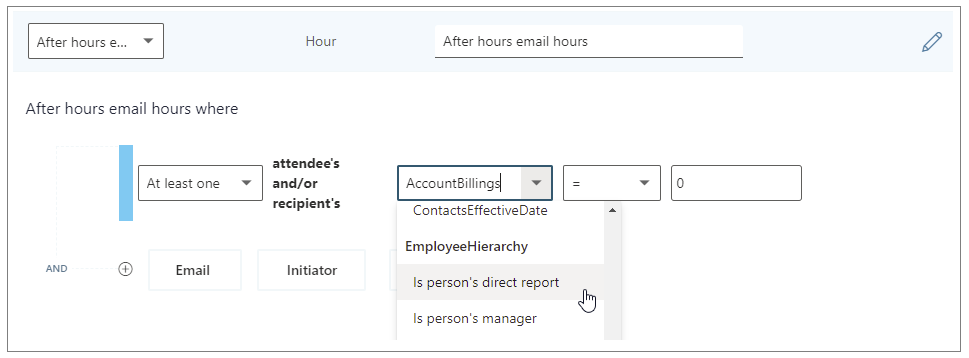
- New “is person’s manager” and “is person’s direct report” attributes available in Person query participant filters
Additionally, we’ve implemented a handful of improvements to other metrics:
- Outlier improvements to Email hours and Call hours metrics
- Better alignment of After-hours collaboration hours and Working hours collaboration hours to total Collaboration hours, and of After-hours email hours and Working hours email hours to total Email hours
These updates reflect customer feedback and help leaders better understand how collaboration in Microsoft Teams impacts wellbeing and productivity.
How do these changes impact you?
For Workplace Analytics analysts
- Adjusted results – If you are accessing insights in Microsoft Viva Insights app in Teams or the Workplace Analytics web application, running custom queries, or using Workplace Analytics Power BI templates, some of the aggregated results might show different numbers than previously seen.
These changes will not impact any queries that have already been run and saved, and starting April 19, 2021, new queries and calculated insights will use the new logic over the entire historical period of collaboration data. If you are in the middle of an active project that uses these metrics, we recommend re-running your queries to update the results with the new versions of the impacted metrics.
- “Unstacking” the Collaboration hours metric – You might be used to seeing or using visualizations that “stack” the components of collaboration time (like Meeting hours and Email hours) to get to the total collaboration time. But since emails and Teams chats and calls can occur during meetings and Teams calls, we’ve refined the logic so that these “overlapping activities” only count toward total collaboration time once.
As a result, expect to see Collaboration hours that is no longer just the sum of its parts – Email hours, Call hours, Teams chat hours, and Meeting hours. If you have reports and visuals that compare collaboration hours with its parts, you might want to adjust the report to show these components side by side instead. For example, the Workplace Analytics Ways of working assessment and Business continuity templates for Power BI both previously included examples of this “stacked” view, which will reflect revised visuals when you download the newest versions of the templates.
- New manager measures – Want to know how many emails the average manager sends to their directs? Or whether managers on a team tend to use unscheduled calls instead of scheduled 1:1s? You are no longer limited to just the “built-in” manager meeting metrics in Workplace Analytics.
If you are interested in understanding how employees communicate with their direct managers, you can create new custom measures in a Person query to measure the meeting, email, call, and chat activity where any or all participants are the measured employee’s direct manager or direct report.
- Impact on Plans – If you are currently running a Wellbeing plan to reduce after-hours collaboration, you might observe a shift in the baseline After-hours collaboration hours metric, which might cause the goal that was selected for the plan to no longer make sense. If this is the case, we recommend requesting a deferral of this feature so that ongoing plans can finish running undisturbed.
For manager or leader insights
Shifting points of reference – If you are used to seeing a specific result for some metrics (for example, “I know that our average email hours are usually around 8 hours per week, and that’s something we’d like to reduce.”), the new changes will likely change the results. However, that baseline number might shift as a result of the improved methodology. If you are working directly with a Workplace Analytics practitioner from Microsoft, a partner, or your own organization, they can help you evaluate whether this raises any new considerations for ongoing projects.
What if you want to get these features sooner than April 19, 2021?
To sign up for early access, please complete this online form.
Can you defer this release?
Expect to see some shifts in the results for metrics impacted by these changes (full list below). If you are in the middle of an active project that uses these metrics, we recommend re-running your queries to update the results with the new version of collaboration hours.
If this shift would be disruptive to your project, you can optionally request a one-time deferral of this feature release for up to three months. Please complete the online form by April 15, 2021, if you would like to request a one-time, three-month deferral.
Additional details about the changes
Integrates Microsoft Teams chats and calls into Collaboration hours and related metrics
The legacy Collaboration hours metric simply added email hours and meeting hours. However, in reality, these activities can overlap. Collaboration hours now reflect the total impact of different types of collaboration activity, including emails, meetings, Teams chats, and Teams calls. With this release, Collaboration hours capture more time and activity, and adjusts the results so that any overlapping activities are counted only once.
The following queries and metrics will reflect this new logic:
Person query and Peer analysis query
- Collaboration hours
- Working hours collaboration hours
- After hours collaboration hours
- Collaboration hours external
Person-to-group query
Group-to-group query
The following join the other metrics that already include Teams activity:
Person query and Peer analysis query
- Workweek span
- Internal network size
- External network size
- Networking outside organization
- Networking outside company
Network: Person query
Network: Person-to-person query
Adds new “Is person’s manager” and “Is person’s direct report” metric filter options
We’re adding new participant filter options to our email, meeting, chat, and call metrics for Person queries. These new options enable you to filter activity where all, none, or at least one participant includes the measured employee’s direct manager or their direct report.
You can use the new filters to customize any base metric that measures meeting, email, instant message, or call activity (such as Email hours, Emails sent, Working hours email hours, After hours email hours, Meeting hours, and Meetings).
Selecting the “Is person’s direct report” filter to customize a metric
The following are examples of some custom metrics you can create in a Person query with these new filters.
Analysis question
|
Definition
|
Base metric
|
Customized filter
|
How much time do employees spend chatting with their manager?
|
The number of hours the person’s manager spent talking to the person through IMs
|
Instant message hours
|
(Participant: At least one participant’s: Is person’s manager = True)
|
How often do managers use unscheduled calls for 1:1s with their direct reports?
|
Total number of hours that a manager spent in 1:1 calls with their direct reports
|
Call hours
|
(Call: Participant Count =2) AND (Participant: At least one participant’s: Is person’s direct report = True) AND
(Call: IsScheduled = FALSE)
|
How much discussion between employees and their manager occurs via email?
|
Total number of hours that a person spent in emails with their manager
|
Email hours
|
(Participant: At least one participant’s: Is person’s manager = True)
|
Improves outlier handling for Email hours and Call hours
When actual received email data is not available, Workplace Analytics uses logic to impute an approximation of the volume of received mail. We are adjusting this logic to reflect the results of more recent data science efforts to refine these assumptions. Further, we have received reports about measured employees with extremely high measured call hours. This was a result of “runaway calls” where the employee joined a call and forgot to hang up. We have capped call hours to a maximum of three hours to avoid attributing excessive time for these scenarios.
The following queries and metrics will use the new logic:
Person query and Peer analysis query
- Collaboration hours
- Working hours collaboration hours
- After hours collaboration hours
- Collaboration hours external
- Email hours
- Working hours email hours
- After hours email hours
- Call hours
Person-to-group query
- Collaboration hours
- Email hours
Group-to-group query
- Collaboration hours
- Email hours
Better aligns working hours and after-hours metrics with their respective overall metrics
Previously, After-hours email hours plus Working hours email hours and After-hours collaboration hours plus Working hours collaboration hours did not add up to total Email hours or Collaboration hours, because of limitations attributing certain types of measured activity to a specific time of day. We improved the algorithm to better attribute time for these metrics, resulting in better alignment between working hours and after-hours metrics.
The following queries and metrics will reflect the new logic:
Person query and Peer analysis query
- Working hours collaboration hours
- After hours collaboration hours
- Working hours email hours
- After hours email hours
Impacted metrics by query type
Person and Peer analysis queries
|
Collaboration hours
|
The number of hours the person spent in meetings, emails, IMs, and calls with at least one other person, either internal or external, after deduplication of time due to overlapping activities (for example, calls during a meeting).
- Updated with time-journaling logic to deduplicate time due to overlapping activities
- Improved logic for imputation of reads from unlicensed employees
- Added a cap to prevent outliers for call hours.
|
Working hours collaboration hours
|
The number of hours the person spent in meetings, emails, IMs, and calls with at least one other person, either internal or external, after deduplication of time due to overlapping activities (for example, calls during a meeting), during working hours.
- Updated with time-journaling logic to deduplicate time due to overlapping activities
- Improved logic for imputation of reads from unlicensed employees
- Improved logic to attribute email read time to time of day
- Added a cap to prevent outliers for call hours
|
After hours collaboration hours
|
The number of hours the person spent in meetings, emails, IMs, and calls with at least one other person, either internal or external, after deduplication of time due to overlapping activities (for example, calls during a meeting), outside of working hours.
- Updated with time-journaling logic to deduplicate time due to overlapping activities
- Improved logic for imputation of reads from unlicensed employees
- Improved logic to attribute email read time to time of day
- Added a cap to prevent outliers for call hours
|
Collaboration hours external
|
The number of hours the person spent in meetings, emails, IMs, and calls with at least one other person outside the company, after deduplication of time due to overlapping activities (for example, calls during a meeting).
- Updated with time-journaling logic to deduplicate time due to overlapping activities
- Improved logic for imputation of reads from unlicensed employees
- Added a cap to prevent outliers for call hours.
|
Email hours
|
The number of hours the person spent sending and receiving emails.
- Improved logic for imputation of reads from unlicensed employees
|
After hours email hours
|
The number of hours the person spent sending and receiving emails outside of working hours.
- Improved logic for imputation of reads from unlicensed employees
- Improved logic to attribute email read time to time of day
|
Working hours email hours
|
The number of hours the person spent sending and receiving emails during working hours.
- Improved logic for imputation of reads from unlicensed employees
- Improved logic to attribute email read time to time of day
|
Generated workload email hours
|
The number of email hours the person created for internal recipients by sending emails.
- Improved logic for imputation of reads from unlicensed employees
|
Call hours
|
The number of hours the person spent in scheduled and unscheduled calls through Teams with at least one other person, during and outside of working hours.
- Added a cap to prevent outliers for call hours
|
After hours in calls
|
The number of hours a person spent in scheduled and unscheduled calls through Teams, outside of working hours.
- Added a cap to prevent outliers for call hours
|
Working hours in calls
|
The total number of hours a person spent in scheduled and unscheduled calls through Teams, during working hours.
- Added a cap to prevent outliers for call hours
|
Person-to-group queries
|
Collaboration hours
|
The number of hours that the time investor spent in meetings, emails, IMs, and calls with one or more people in the collaborator group, after deduplication of time due to overlapping activities (for example, calls during a meeting). This metric uses time-allocation logic.
- Updated with time-journaling logic to deduplicate time due to overlapping activities
- Improved logic for imputation of reads from unlicensed employees
- Added a cap to prevent outliers for call hours.
|
Email hours
|
Total number of hours that the time investor spent sending and receiving emails with one or more people in the collaborator group. This metric uses time-allocation logic.
- Improved logic for imputation of reads from unlicensed employees
|
Group-to-group queries
|
Collaboration hours
|
The number of hours that the time investor spent in meetings, emails, IMs, and calls with one or more people in the collaborator group, after deduplication of time due to overlapping activities (for example, calls during a meeting). This metric uses time-allocation logic.
- Updated with time-journaling logic to deduplicate time due to overlapping activities
- Improved logic for imputation of reads from unlicensed employees
- Added a cap to prevent outliers for call hours.
|
Email hours
|
Total number of hours that the time investor spent sending and receiving emails with one or more people in the collaborator group. This metric uses time-allocation logic.
- Improved logic for imputation of reads from unlicensed employees
|
by Contributed | Mar 30, 2021 | Technology
This article is contributed. See the original author and article here.
Introduction
Recent attacks highlight the fact that in addition to implementing appropriate security protection controls to defend against malicious adversaries, continuous monitoring, and response for every organization. To implement security monitoring and response from a networking perspective, you need visibility into traffic traversing through your network devices and detection logic to identify malicious patterns in the network traffic. This is a critical piece for every infrastructure/network security process.
Readers of this post will hopefully be familiar with both Azure Firewall which provides protection against network-based threats, and Azure Sentinel which provides SEIM and SOAR (security orchestration, automation, and response) capabilities. In this blog, we will discuss the new detections for Azure Firewall in Azure Sentinel. These new detections allow security teams to get Sentinel alerts if machines on the internal network attempt to query/connect to domain names or IP addresses on the internet that are associated with known IOCs, as defined in the detection rule query. True positive detections should be considered as Indicator of Compromise (IOC). Security incident response teams can then perform response and appropriate remediation actions based on these detection signals.
Scenario
In case of an attack, after breaching through the boundary defenses, a malicious adversary may utilize malware and/or malicious code for persistence, command-and-control, and data exfiltration. When malware or malicious code is running on machines on the internal network, in most cases, it will attempt to make outbound connections for command-and-control updates, and to exfiltrate data to adversary servers through the internet. When this happens, traffic will inevitably flow out through the network egress points where it will be processed and logged by the by devices or ideally a firewall controlling internet egress. The data logged by devices/firewalls processing internet egress traffic can be analyzed to detect traffic patterns suggesting/representing command-and-control or exfiltration activities (also called IOCs or Indicator of Compromise). This is the basis of network-based detections discussed in this blog.
When customers use Azure Firewall for controlling their internet egress, Azure Firewall will log all outbound traffic and DNS query traffic if configured as a DNS Proxy, to the defined Log Analytics workspace. If a customer is also using Azure Sentinel, they can ingest log data produced by Azure Firewall and run built-in or custom Analytic Rules templates on this data to identify malicious traffic patterns representing IOCs, that these rules are defined to detect. These rules can be configured to run on a schedule and create an incident (or perform an automated action) in Azure Sentinel when there is a match. These incidents can then be triaged by the SOC for response and remediation.
What’s New
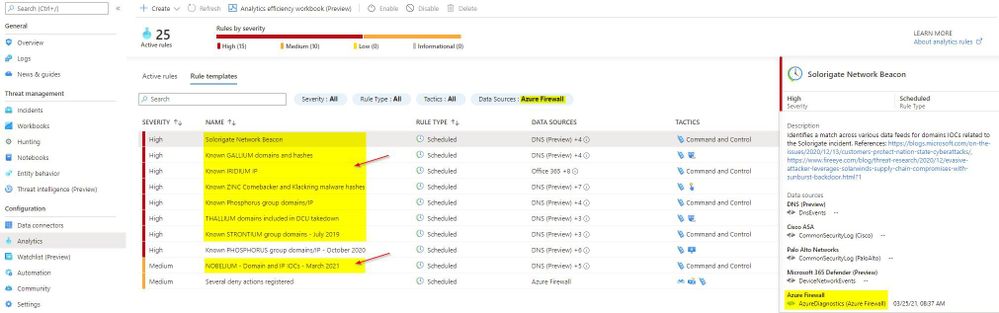
Up until now, there were only a couple of Analytic Rule based detections for Azure Firewall available in Azure Sentinel. We are excited to announce availability of eight new detections for well-known IOCs in Azure Sentinel based on traffic patterns flowing through the Azure Firewall. The table below provides a list of new detections which have been added recently and are available to you at the time of publishing this blog.
The screenshot below shows the new Azure Firewall detections in the Azure Sentinel Analytic Rule blade
Azure Firewall Detection Rules in Azure Sentinel
How Network Based Detection Work
To understand how these detections work, we will examine the “Solorigate Network Beacon” detection which indicates a compromise associated with the SolarWinds exploit. The query snippet below identifies communication to domains involved in this incident.
- We start by declaring all the domains that we want to find in the client request from the internal network
let domains = dynamic(["incomeupdate.com","zupertech.com","databasegalore.com","panhardware.com","avsvmcloud.com","digitalcollege.org","freescanonline.com","deftsecurity.com","thedoccloud.com","virtualdataserver.com","lcomputers.com","webcodez.com","globalnetworkissues.com","kubecloud.com","seobundlekit.com","solartrackingsystem.net","virtualwebdata.com"]);
- Then we perform a union to look for traffic destined for these domains in data from multiple sources which include Common Security Log (CEF), DNS Events, VM Connection, Device Network Events, Azure Firewall DNS Proxy, and Azure Firewall Application Rule logs
(union isfuzzy=true
(CommonSecurityLog
        | parse ..
),
(DnsEvents
        | parse ..
),
(VMConnection
        |parse ..
),
(DeviceNetworkEvents
        | parse ..
),
(AzureDiagnostics
    | where ResourceType == "AZUREFIREWALLS"
    | where Category == "AzureFirewallDnsProxy"
    | parse msg_s with "DNS Request: " ClientIP ":" ClientPort " - " QueryID " " Request_Type " " Request_Class " " Request_Name ". " Request_Protocol " " Request_Size " " EDNSO_DO " " EDNS0_Buffersize " " Responce_Code " " Responce_Flags " " Responce_Size " " Response_Duration
    | where Request_Name has_any (domains)
    | extend DNSName = Request_Name
    | extend IPCustomEntity = ClientIP
    ),
  (AzureDiagnostics
    | where ResourceType == "AZUREFIREWALLS"
    | where Category == "AzureFirewallApplicationRule"
    | parse msg_s with Protocol 'request from ' SourceHost ':' SourcePort 'to ' DestinationHost ':' DestinationPort '. Action:' Action
    | where isnotempty(DestinationHost)
    | where DestinationHost has_any (domains)
    | extend DNSName = DestinationHost
    | extend IPCustomEntity = SourceHost
    )
    )
- When this rule query is executed (based on schedule), it will analyze logs from all the data sources defined in the query which also includes the Azure Firewall DNS Proxy and Application Rule logs. The result will identity hosts in the internal network which attempted to query/connect to one of the malicious domains which were declared in Step 1
Instructions to Configure Azure Firewall Detections in Sentinel
These detections are available as Analytic Rules in Azure Sentinel and can be quickly deployed by following the steps below.
- Open the Azure Sentinel blade in the Azure Portal
- Select the Sentinel workspace where you have the Azure Firewall logs
- Select Analytics blade and then click on Rule templates
- Under Data Sources, filter by Azure Firewall
- Select the Rule template you want to enable and click Create rule and configure rule settings to create a rule
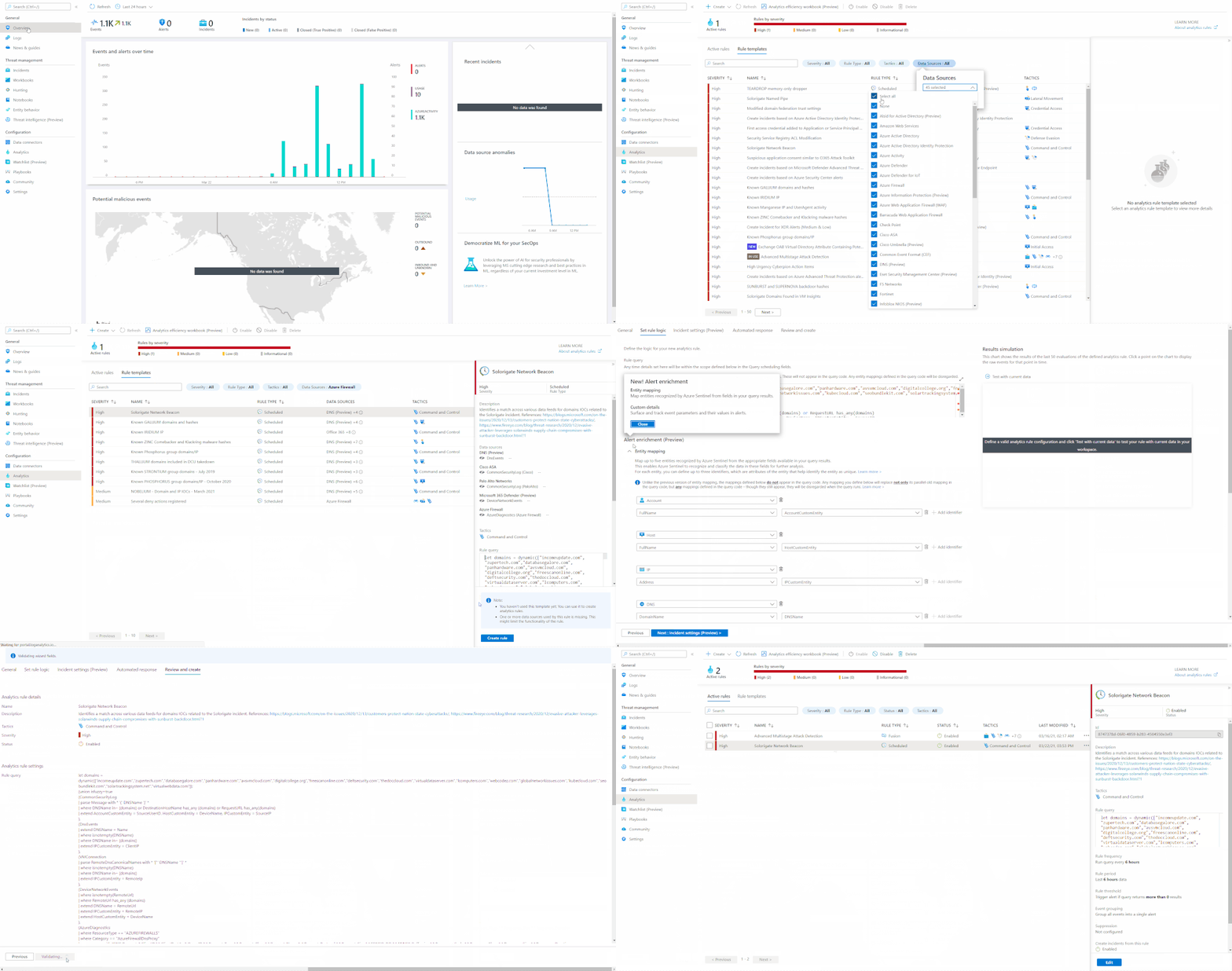 Steps to Configure Azure Firewall Rules in Azure Sentinel
Summary
Azure Firewall logs can help identify patterns of malicious activity and Indicators of Compromise (IOCs) in the internal network. Built-in Analytic Rules in Azure Sentinel provide a powerful and reliable method for analyzing these logs to detect traffic representing IOCs in your network. With added support for Azure Firewall to these detections, you can now easily detect malicious traffic patterns traversing through Azure Firewall in your network which allows you to rapidly respond and remediate the threats. We encourage all customers to utilize these new detections to help improve your overall security posture.
As new attack scenarios surface and associated detections are created in future, we will evaluate them and add support for Azure Firewall or other Network Security products, where applicable. You can also contribute new connectors, detections, workbooks, analytics and more for Azure Firewall in Azure Sentinel. Get started now by joining the Azure Network Security plus Azure Sentinel Threat Hunters communities on GitHub and following the guidance.
Additional Resources
by Contributed | Mar 30, 2021 | Technology
This article is contributed. See the original author and article here.
Getting started with Azure Speech and Batch Ingestion Client
Batch Ingestion Client is as a zero-touch transcription solution for all your audio files in your Azure Storage. If you are looking for a quick and effortless way to transcribe your audio files or even explore transcription, without writing any code, then this solution is for you. Through an ARM template deployment, all the resources necessary to seamlessly process your audio files are set-up and set in motion.
Why do I need this?
Getting started with any API requires some amount of time investment in learning the API, understanding its scope, and getting value through trial and error. In order to speed up your transcription solution, for those of you that do not have the time to invest in getting to know our API or related best practices, we created an ingestion layer (a client for batch transcription) that will help you set-up a full blown, scalable and secure transcription pipeline without writing any code.
This is a smart client in the sense that it implements best practices and optimized against the capabilities of the Azure Speech infrastructure. It utilizes Azure resources such as Service Bus and Azure Functions to orchestrate transcription requests to Azure Speech Services from audio files landing in your dedicated storage containers.
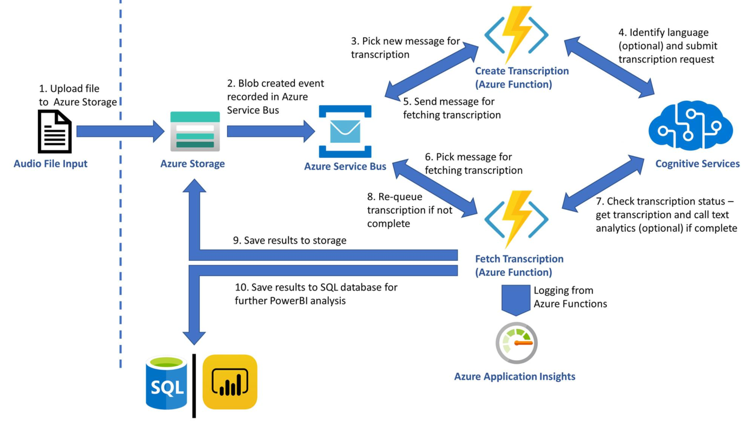
Before we delve deeper into the set-up instructions, let us have a look at the architecture of the solution this ARM template builds.
The diagram is simple and hopefully self-explanatory. As soon as files land in a storage container, the Grid Event that indicates the complete upload of a file is filtered and pushed to a Service bus topic. Azure Functions (time triggered by default) pick up those events and act, namely creating Tx requests using the Azure Speech Services batch pipeline. When the Tx request is successfully carried out an event is placed in another queue in the same service bus resource. A different Azure Function triggered by the completion event starts monitoring transcription completion status and copies the actual transcripts in the containers from which the audio file was obtained. This is it. The rest of the features are applied on demand. Users can choose to apply analytics on the transcript, produce reports or redact, all of which are the result of additional resources being deployed through the ARM template. The solution will start transcribing audio files without the need to write any code. If -however- you want to customize further this is possible too. The code is available in this repo.
The list of best practices we implemented as part of the solution are:
- Optimized the number of audio files included in each transcription with the view of achieving the shortest possible SAS TTL.
- Round Robin around selected regions in order to distribute load across available regions (per customer request)
- Retry logic optimization to handle smooth scaling up and transient HTTP 429 errors
- Running Azure Functions economically, ensuring minimal execution cost
Setup Guide
The following guide will help you create a set of resources on Azure that will manage the transcription of audio files.
Prerequisites
An Azure Account as well as an Azure Speech key is needed to run the Batch Ingestion Client.
Here are the detailed steps to create a speech resource:
NOTE: You need to create a Speech Resource with a paid (S0) key. The free key account will not work. Optionally for analytics you can create a Text Analytics resource too.
- Go to Azure portal
- Click on +Create Resource
- Type Speech and
- Click Create on the Speech resource.
- You will find the subscription key under Keys
- You will also need the region, so make a note of that too.
To test your account, we suggest you use Microsoft Azure Storage Explorer.
The Project
Although you do not need to download or do any changes to the code you can still download it from GitHub:
git clone https://github.com/Azure-Samples/cognitive-services-speech-sdkcd cognitive-services-speech-sdk/samples/batch/transcription-enabled-storage
Make sure that you have downloaded the ARM Template from the repository.
Batch Ingestion Client Setup Instructions
- Click on +Create Resource on Azure portal as shown in the following picture and type ‘ template deployment ’ on the search box.
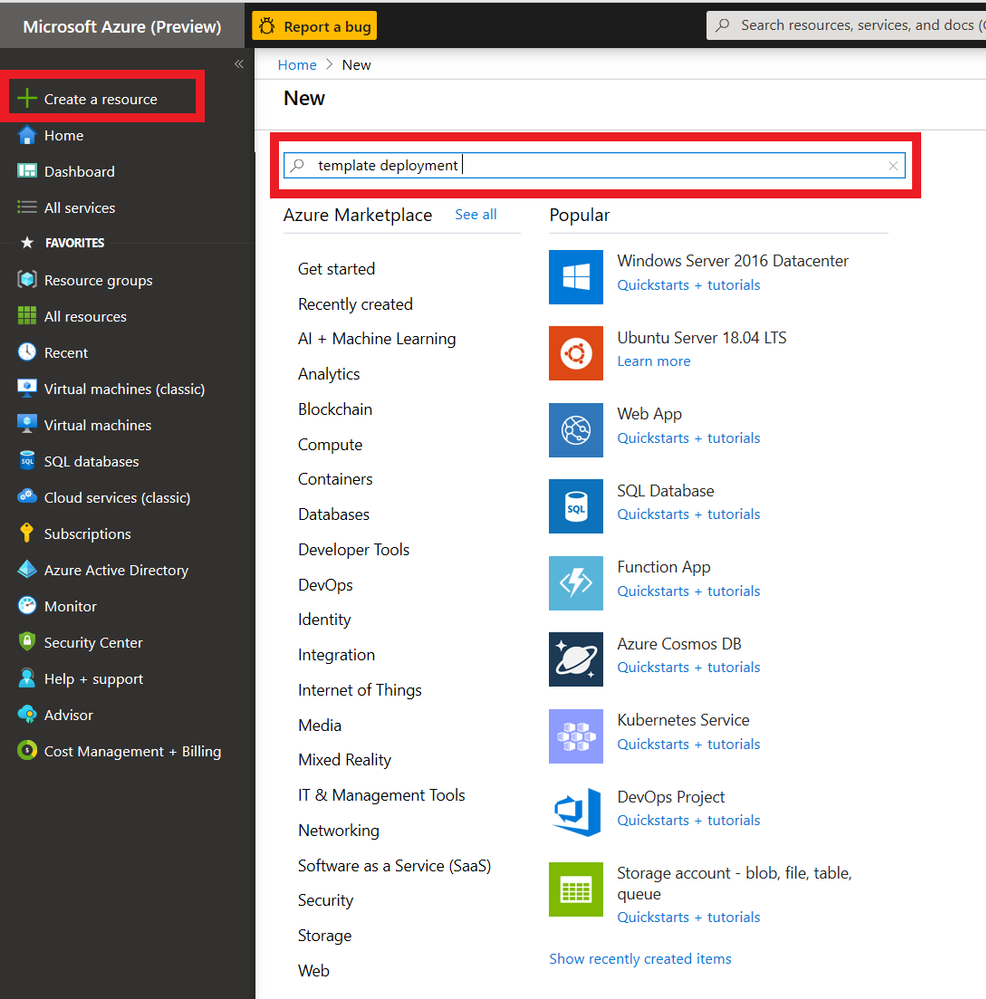
2. Click on Create Button on the screen that appears as shown below.
3. You will be creating the relevant Azure resources from the ARM template provided. Click on click on the ‘Build your own template in the editor’ link and wait for the new screen to load.
You will be loading the template via the Load file option. Alternatively, you could simply copy/paste the template in the editor.
Saving the template will result in the screen below. You will need to fill in the form provided. It is important that all the information is correct. Let us look at the form and go through each field.
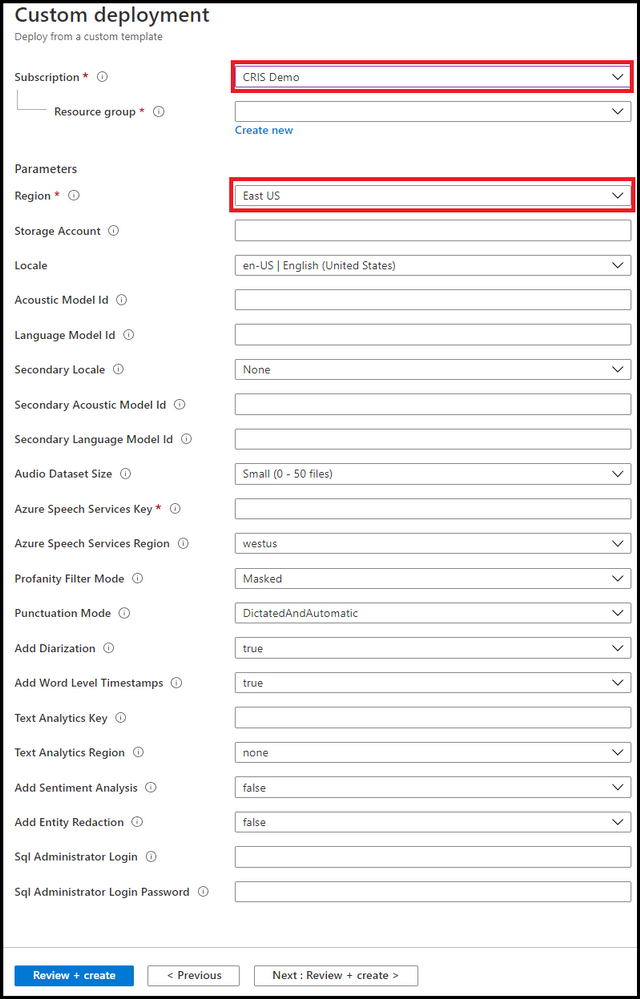
NOTE: Please use short descriptive names in the form for your resource group. Long resource group names may result in deployment error
- First pick the Azure Subscription Id within which you will create the resources.
- Either pick or create a resource group. [It would be better to have all the resources within the same resource group so we suggest you create a new resource group].
- Pick a region [May be the same region as your Azure Speech key].
The following settings all relate to the resources and their attributes
- Give your transcription enabled storage account a name [you will be using a new storage account rather than an existing one]. If you opt to use existing one then all existing audio files in that account will be transcribed too.
The following 2 steps are optional. Omitting them will result in using the base model to obtain transcripts. If you have created a Custom Speech model using Speech Studio, then:
- Enter optionally your primary Acoustic model ID
- Enter optionally your primary Language model ID
If you want us to perform Language identification on the audio prior to transcription you can also specify a secondary locale. Our service will check if the language on the audio content is the primary or secondary locale and select the right model for transcription.
Transcripts are obtained by polling the service. We acknowledge that there is a cost related to that. So, the following setting gives you the option to limit that cost by telling your Azure Function how often you want it to fire.
- Enter the polling frequency [There are many scenarios where this would be required to be done couple of times a day]
- Enter locale of the audio [you need to tell us what language model we need to use to transcribe your audio.]
- Enter your Azure Speech subscription key and Locale information
Spoiler (Highlight to read)
NOTE: If you plan to transcribe large volume of audio (say millions of files) we propose that you rotate the traffic between regions. In the Azure Speech Subscription Key text box you can put as many keys separated by column ‘;’. In is important that the corresponding regions (Again separated by column ‘;’) appear in the Locale information text box. For example if you have 3 keys (abc, xyz, 123) for east us, west us and central us respectively then lay them out as follows ‘abc;xyz;123’ followed by ‘east us;west us;central us’
NOTE: If you plan to transcribe large volume of audio (say millions of files) we propose that you rotate the traffic between regions. In the Azure Speech Subscription Key text box you can put as many keys separated by column ‘;’. In is important that the corresponding regions (Again separated by column ‘;’) appear in the Locale information text box. For example if you have 3 keys (abc, xyz, 123) for east us, west us and central us respectively then lay them out as follows ‘abc;xyz;123’ followed by ‘east us;west us;central us’
The rest of the settings related to the transcription request. You can read more about those in our docs.
- Select a profanity option
- Select a punctuation option
- Select to Add Diarization [all locales]
- Select to Add Word level Timestamps [all locales]
Do you need more than transcription? Do you need to apply Sentiment to your transcript? Downstream analytics are possible too, with Text Analytics Sentiment and Redaction being offered as part of this solution too.
If you want to perform Text Analytics please add those credentials.
- Add Text analytics key
- Add Text analytics region
- Add Sentiment
- Add data redaction
If you want to further analytics we could map the transcript json we produce to a DB schema.
- Enter SQL DB credential login
- Enter SQL DB credential password
You can feed that data to your custom PowerBI script or take the scripts included in this repository. Follow this guide for setting it up.
Press Create to trigger the resource creating process. It typically takes 1-2 mins. The set of resources are listed below.
If a Consumption Plan (Y1) was selected for the Azure Functions, make sure that the functions are synced with the other resources (see this for further details).
To do so, click on your StartTranscription function in the portal and wait until your function shows up:
Do the same for the FetchTranscription function
Spoiler (Highlight to read)
Important: Until you restart both Azure functions you may see errors.
Important: Until you restart both Azure functions you may see errors.
Running the Batch Ingestion Client
Upload audio files to the newly created audio-input container (results are added to json-result-output and test-results-output containers). Once they are done you can test your account.
Use Microsoft Azure Storage Explorer to test uploading files to your new account. The process of transcription is asynchronous. Transcription usually takes half the time of the audio track to be obtained. The structure of your newly created storage account will look like the picture below.
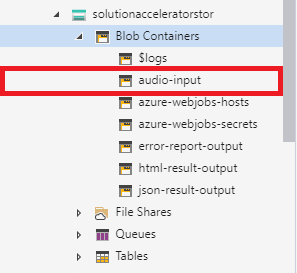
There are several containers to distinguish between the various outputs. We suggest (for the sake of keeping things tidy) to follow the pattern and use the audio-input container as the only container for uploading your audio.
Customizing the Batch Ingestion Client
By default, the ARM template uses the newest version of the Batch Ingestion Client which can be found in this repository. If you want to customize this further clone the repo
To publish a new version, you can use Visual Studio, right click on the respective project, click publish and follow the instructions.
What to build next
Now that you’ve successfully implemented a speech to text scenario, you can build on this scenario. Take a look at the insights Text Analytics provides from the transcript like caller and agent sentiment, key phrase extraction and entity recognition. If you’re looking specifically to solve for Call centre transcription, review this docs page for further guidance

by Contributed | Mar 30, 2021 | Technology
This article is contributed. See the original author and article here.
This week, twelve student teams from across the globe will pitch their purpose-driven applications in Round 2 of the Imagine Cup World Finals. Four winning teams will be selected by a panel of expert judges to move forward to the 2020 World Championship.
This year’s panel includes industry experts with backgrounds in sustainability, e-commerce, accessibility, science, and more. Aligning with our Earth, Education, Healthcare, and Lifestyle competition categories, judges’ combined expertise will allow them to assess which teams have designed inclusive and original solutions with the potential for global impact.
During the World Finals, teams will pitch their solutions live to showcase their ideas and technology to each judge. The top four innovations will be selected to win USD10,000 and advance to the 2020 World Championship this May, plus two runner-up teams in each category will take home USD2,500.
Meet our World Finals judges!
Keira Havens
Sustainability and Public Affairs Manager, Pivot Bio
|
Keira Havens has been deeply involved in synthetic biology as a scientist, an entrepreneur, a communicator, and a thought leader. Her work has engaged all facets of the synthetic biology economy in the pursuit of beautiful biotechnology – well designed, elegant solutions to intractable problems. In her current role as Sustainability and Public Affairs Manager she is working with the Pivot Bio team to tell the story of the future of fertilizer. She received her B.S. in Molecular Biochemistry and Biophysics from the Illinois Institute of Technology and her Masters from CSU. |

Devendra Singh
Chief Technology Officer, PowerSchool
|
As Chief Technology Officer for PowerSchool, Devendra is responsible for all Product Development and Cloud Operations within the company. He brings more than 20 years of experience in building enterprise-class software and cloud solutions for managing mission-critical business processes at Fortune 1,000 companies. Prior to joining PowerSchool, Devendra was Vice President of Product Development at Oracle, held senior positions in Product Development and Product Management at Agile Software, and participated in major business transformation initiatives as a Management Consultant with A.T. Kearney. Devendra earned his Bachelor of Engineering degree from Delhi College of Engineering and an MBA from University of Michigan Ross School of Business.
|

Jason Goldberg
Chief Commerce Strategy Officer, Publicis
|
Jason Goldberg is the Chief Commerce Strategy Officer at Publicis Communications. He is one of the most followed e-commerce subject matter experts on the web (@retailgeek). He is the executive chairman of the board of directors of shop.org (and the National Retail Federation Digital Advisory Board). Jason has served as an expert witness in Federal Court on e-commerce, a guest lecturer on retail and e-commerce at the Kellogg School of Management for Northwestern University, hosts iTunes top e-commerce podcast called “The Jason & Scot Show”, and has been voted one of retail’s top global influencers by Vend five consecutive years. |

Kai Frazier
Founder, KaiXR
|
Kai Frazier is an educator turned EdTech entrepreneur passionate about using tech to provide inclusive and accessible opportunities for underestimated communities. She is the founder & CEO of Kai XR, the most inclusive and accessible, educational VR platform where kids can explore, dream, & create. Before creating Kai XR, she worked with several museums such as the United States Holocaust Memorial Museum as well as the Smithsonian National Museum of African American History & Culture, specializing in digital strategy and content creation. Kai served as an entrepreneur in residence at the Kapor Center for Social Impact as well as Techstars Social Impact accelerator.
|

Amanda Silver
Corporate Vice President, Microsoft
|
Amanda Silver is the Corporate Vice President & Head of Product for Microsoft’s Developer Division, which includes Visual Studio, Visual Studio Code, .NET, TypeScript, and much of Microsoft’s developer platform. Her focus on customer-driven engineering, with a tight digital feedback loop, has helped ensure our products are loved by developers. She has been key to Microsoft’s transformation to contribute to open source with the introduction of TypeScript, Visual Studio Code, and the acquisition of both Xamarin and GitHub. She championed customer-focused innovations like Visual Studio Live Share and IntelliCode, which have transformed how developers and teams build and collaborate worldwide. Amanda is a leader in driving cultural transformation, working with teams across Microsoft to foster diversity and inclusion, customer-driven engineering practices, and product incubation. Unleashing the creativity of all developers is her passion.
|

Neil Sebire
Chief Clinical Data Officer, HDR UK
|
Neil Sebire is Professor of Pathology at Great Ormond Street Children’s Hospital in London and a Professor at UCL. He is the Chief Research Information Officer and runs the clinical-informatics research program at GOSH, as well as being national Chief Clinical Data Officer for Health Data Research UK. He has published numerous scientific journal articles and several textbooks and current research interests are focused on the development and evaluation of data driven technologies to improve child health. |
Follow the competition journey on Instagram and Twitter to find out which four teams judges will select to move forward. Stay tuned as they get ready to compete in the Imagine Cup World Championship for the chance to take home USD75,000 and a mentoring session with Microsoft CEO, Satya Nadella!

by Contributed | Mar 30, 2021 | Technology
This article is contributed. See the original author and article here.
Microsoft partners like iGlobe, Starburst Data, and Zegami deliver transact-capable offers, which allow you to purchase directly from Azure Marketplace. Learn about these offers below:
|
iPlanner Pro: Manage all your Microsoft Planner tasks directly from Microsoft Outlook with iGlobe’s iPlanner Pro add-in for Microsoft 365. iPlanner Pro extends the Microsoft 365 experience by providing contextual functionality that enables users to create, organize, share, and assign tasks and files in Planner while working in Outlook.
|
 |
Starburst Enterprise: Deployed via Azure Kubernetes Service on Microsoft Azure, Starburst Enterprise is a data consumption layer that unlocks siloed data by providing fast access to any data source via SQL. Provide all your data consumers a secure single point of access to all your data, no matter where it lives.
|
 |
Zegami: Zegami is an AI-powered image analysis platform for scientific and medical imaging designed to increase the accuracy of machine learning models. Rapidly categorize, label, and clean large image datasets and extract insights from disparate data sources, including images, videos, databases, and APIs.
|
|
by Contributed | Mar 30, 2021 | Technology
This article is contributed. See the original author and article here.
Claire Bonaci
You’re watching the Microsoft US health and life sciences confessions of health geeks podcast. A show that offers industry insight from the health geeks and data freaks of the US health and life sciences industry team. I’m your host Claire Bonaci on this episode we celebrate national physicians day with a special podcast with Dr. Clifford Goldsmith our US chief medical officer. Clifford shares his unique journey that led him to become a doctor and discusses the importance of technology for physicians. Hi Clifford and welcome to the podcast
Clifford Goldsmith
Thanks nice to be with you
Claire Bonaci
so you have been at Microsoft for quite some time now around 21 ish years but you were also a practicing physician for a long time before joining Microsoft do you mind giving us a little bit of background about why you became a doctor in the first place
Clifford Goldsmith
well you know I think I it was a calling you know in a sense that i wanted to help patients it was a it was very much a feeling that I wanted to be able to make a difference and for individual patients and it as I studied medicine and went through medical school I actually became interested in community health as well and growing up in South Africa in under apartheid it became it became very obvious something that is fairly obvious to us today yeah after seeing health inequities in the us those were just as obvious you know during apartheid where you could see that inequity and so I started to get interested in in community health as well and and so that it was it was really around doing the right thing for people and for populations or groups of people
Claire Bonaci
And so you did mention the apartheid briefly i heard through the grapevine that you kind of had some underground hospitals during that time can you explain a little bit more about that sure
Clifford Goldsmith
so as you probably will people know Nelson Mandela headed up the African national congress which was the leading opposition to apartheid and for his for the work that he did and many others did they were jailed many people were jailed he was jailed for 27 years on Robin island but even as he was jailed on Robin island he was still able to influence the what was going on and so in the in the country and and through and he did this in this case so we got approached a group of us that were in fifth medic fifth year medical school at the time were involved in the anti apartheid movement but hadn’t done much in terms of health care and we we got approached by someone who had spent five years on Robin island in direct contact with Nelson Mandela and he said so he came to us and he said one of the things that Nelson Mandela feels is necessary is that people in South Africa were being victimized after they had protested and the way this was happening was that the government was shooting rubber bullets shooting real bullets but spraying a dye that pretty much like the mace dyes that we see here today and that guy was on their skin and identified and then they would go they would send policemen or agents to the hospital the local hospitals to put into jail anyone who came in with an injury that had this purple or whatever color die was on at the time and so people were afraid to go to hospitals and he we discovered this from through Nelson Mandela indirectly but then we’ve also shown by an internal wing of the united democratic friend we were taken to churches in black communities and shown what was really happening and I was horrified I have to tell you I vividly remember a 21 year old woman who had an open chest wound and had had an open chest wound with a collapsed lung for seven days and she was so afraid to go to hospital because she knew should be arrested so what we did is we started an underground system that would when somebody was injured and needed care like that they could call a triage center and the triage center then would make sure that they could be taken out of that community to a different community where they would know where there wouldn’t have been oversight over the hospitals so that was essentially what we did and we created a fairly extensive underground health system that led to unfortunately some of the doctors being killed off by the police as well the person who was triage during the coals was killed by the police and so it was it was in that period that I lived there was also a movie that was done and I agreed to be part of that movie so that only if the movie was only released after I’d lived South Africa and so in 1986 the movie was released it’s called witness to a party
Claire Bonaci
Wow that’s that really is amazing what was kind of the reason for you to stop practicing medicine or was it to just go to the US and leave that behind
Clifford Goldsmith
yeah so the main reason was to leave the to leave South Africa, I had to leave. There were other reasons I had to leave as well. I tried. Well, let me let me go back one step. So even after all of that, I tried really hard to stay in South Africa, but there was compulsory conscription. And every white male had to spend two years in the Army defending the country, I was able to defer that when I started medical school, as many doctors do, because they wanted doctors in the army. And so I deferred the medical training, I deferred the army. But when I finished medical school, I immediately got conscripted into the army. And unfortunately, someone who had been an opponent of mine in political circles, us, who was a right wing medical student who had led the pro apartheid movement on my campus, knew me, he had now become a colonel and a surgeon in the army. And he used that opportunity to really to, to, to exempt sort of what he thought was a form of punishment on me. And so I got sent into the very front lines of the pro apartheid army, fighting against Southwest African peoples organization, which is the organization in Namibia, in previously southeast Africa. And, and so and that was traumatic, there was incredibly coming, I was I was put on foot with reconnaissance mercenaries. And and it wasn’t something I ever would have wanted to do in my wildest dreams. And so I ended up having to me, it was at that time that I made the decision that I needed to leave. And so I deferred the second year of my army, specialized in order to specialize which they allow me to do, and in the process of specializing, made plans to come to the US. And so that’s why I came here.
Claire Bonaci
Wow, that is an amazing story. I really, I would have never guessed that, to be honest. And so if you had qualified in the US to continue practicing medicine, is that something you would have wanted to do? It sounds like you would really, you’re in such an arc of practicing medicine and seeing such horrible things? Is that something that you wanted to continue? Or were you really looking into moving to do something more in a technology company,
Clifford Goldsmith
you know, as horrible as it was in South Africa, and the trauma that I saw, there was some sense of satisfaction, if you want or sense of gratefulness, that I was able to help. And so it was a really good it’s, it’s hard to say this, but it was a really good experience. And I’ve got many sort of vivid memories, not just of the people that we helped through the the underground health system for my emergency health system. But even in the army, I there was some sense of helping people in Angola that were I was placed outside of Southeast Africa. That was also quite rewarding. I think I if I had, I had to finish specializing. And so I was a pulmonologist by then came to the US. And unfortunately, we’re fortunate unfortunately, we live in Massachusetts, and there are only some states that require that I go all the way back and redo my internship as well as my specialization. And I didn’t really become very interested in technology. In fact, while I was doing my residency, could registrar ship in South Africa. I also did, I worked in technology, I got trained in computer programming, I loved computer programming. And it was through computer programming that I got my first job in America, I needed a job right away, and I got a job at Harvard Medical School. And the two hospitals that worked with in their hospital systems, the Beth Israel in the Brigham and Women’s Hospital. And it was through that group, the Center for Clinical computing, that I became really, really interested in technology. If you ask me today, I would have loved to and I would still love to have been able to practice a limited amount as I see many of my informaticists physician colleagues doing, I would like to practice day, a week, two days a week. And, and and worked in technology as as I do, which I love and enjoy, you know, three to four days a week.
Claire Bonaci
Interesting. Well, that’s great. And Microsoft, we’re very lucky to have someone of your background and your experience here. And I know I’m I feel very lucky to work with you every day. I’m curious. So have you been in contact with the doctors that you had worked with there? or How was the relationship after you went to the USA and left a lot of those people there?
Clifford Goldsmith
It was a very hard time coming to the US from that perspective. I mean, I loved I always loved what America offered. I love the opportunity offered. I love the innovation and creativity in the US. And so I’ve never ever turned back on that. But when Nelson Mandela was released, I was I left South Africa in 1986. Nelson Mandela was released in 1990. He became the the Prime Minister of South Africa, the President of South Africa actually in 1994. That was a very hard day for me because it happened that exactly on the same day that He was inaugurated, as the new president of South Africa, I was also made a permanent resident. I mean, I received my US citizenship. And and it’s a hard day because the the realization that what we’ve been fighting for came about. And so, you know, I, my friends, many of my friends were able to stay through that summit going back that I know, some, some didn’t. But but some of them have gone back and played a very significant role in the new health system in South Africa. And it’s a great system. It’s a, it’s a system that really views health equity at its core, which is cool.
Claire Bonaci
That’s, that’s really interesting. I’m glad you kind of saved part of that as well. So given that you have seen both worlds of being a practicing physician, and on the technology side of healthcare, what do you think the role of technology is to a doctor who is so focused on the patient, you know, 100% of the time.
Clifford Goldsmith
So I actually think that our role as technologists, I feel just as good, making technology that helps other doctors do their job as I did as a doctor in a way. In fact, I consider my approach to informatics as part of the Hippocratic oath. And the Hippocratic oath that we all took in medical school was to do the right thing for patients and for populations. And to today, I mean, I’m heading populations in the early days, it was really focused on the individual patient. And so it was really exciting. And I’ve just written a blog about this for for doctors day. And that it was really exciting to do things like when I read the Institute of Medicine reports in 1999, and 2001, which was the second part of that report was called Crossing the Chasm. It pointed out how technology could improve patient safety. And it was incredibly exciting to read that. And then it was incredibly exciting to spend the next 10 years implementing physician order entry, because we knew that physician or he was going to make prescribing more accurate and patient safer. And that was the joy of it. What I do worry about today, and in the last 10 years is we’ve heard about physician burnout, we’ve heard about physician dissatisfaction. In fact, if you remember there was this quadruple aim that the triple aim, which was came from the Institute of Health Improvement IHI and the triple aim was was about better care, better health at a lower cost. But no one thought about the fact that as you use technology to do that, you are going to create the possibility which unfortunately, sometimes happen of dissatisfaction or burnout among clinicians, physicians and nurses. And so it’s quite disappointing that our technology has led or is bearing the brand, in some cases have this feeling of alienation, that doctor said, and so what would I like to do? I’d like to make sure right now that technology goes gets back to the point where it’s actually empowering, and not alienating doctors and nurses. And and I think that’s, you know, it’s certainly we’ve seen that in many industries. And I think that healthcare is on the cusp, and I’m very excited about what Microsoft’s doing around the Microsoft Cloud for healthcare, because I think that’s our opportunity to really make to put physicians back in a position where they feel productive, they feel empowered, and they feel grateful for how you know, technology’s living them practice what they love doing, which is caring for patients.
Claire Bonaci
100% agree, I think you really hit the nail on the head around just that physicians and nurses they’re so burdened with having to do everything and whether that’s they have the technology to do that it’s still a burden to end the the curve to learn that to implement it and to of course, be there for the patient 100% as well. So definitely anything that Microsoft and other technology companies can do to help that I think that’s our end goal overall. And so 10 this podcast, I just want to say thank you again, Dr. Goldsmith, for being on the podcast and for sharing your story and Happy National physician day
Clifford Goldsmith
Thank you. Thank you so much for the opportunity to do this. And thanks for all you do. These podcasts that you’ve done over the last year or more have been wonderful. So thank you.
Claire Bonaci
Thank you all for watching. Please feel free to leave us questions or comments below. And check back soon for more content from the HLS industry team.
by Contributed | Mar 30, 2021 | Technology
This article is contributed. See the original author and article here.
Microsoft is pleased to announce the draft release of the recommended security configuration baseline settings for Microsoft Office 365 ProPlus, version 2103. We invite you to download the draft baseline package (attached to this post), evaluate the proposed baselines, and provide us your comments and feedback below.
This baseline builds on the previous Office baseline we released mid-2019. The highlights of this baseline include:
- Restrict legacy JScript execution for Office to help protect remote code execution attacks while maintaining user productivity as core services continue to function as usual.
- Expanded macro protection requiring application add-ins to be signed by a trusted publisher. Also, turning off Trust Bar notifications for unsigned application add ins and blocking them to silently disable without notification.
- Block Dynamic Data Exchange (DDE) entirely.
- New policies added for Microsoft Defender Application Guard, protecting users from unsafe documents.
Also, see the information at the end of this post regarding updates to Security Policy Advisor and Office Cloud Policy Services.
The downloadable baseline package includes importable GPOs, a script to apply the GPOs to local policy, a script to import the GPOs into Active Directory Group Policy, updated custom administrative template (SecGuide.ADMX/L) file, all the recommended settings in spreadsheet form and a Policy Analyzer rules file. The recommended settings correspond with the Office 365 ProPlus administrative templates version 5140, released February 26, 2021.
GPOs included in the baseline
Most organizations can implement the baseline’s recommended settings without any problems. However, there are a few settings that will cause operational issues for some organizations. We’ve broken out related groups of such settings into their own GPOs to make it easier for organizations to add or remove these restrictions as a set. The local-policy script (Baseline-LocalInstall.ps1) offers command-line options to control whether these GPOs are installed.
The “MSFT Office 365 ProPlus 2103” GPO set includes “Computer” and “User” GPOs that represent the “core” settings that should be trouble free, and each of these potentially challenging GPOs, each of which is described later:
- “Legacy JScript Block – Computer” disables the legacy JScript execution for websites in the Internet Zone and Restricted Sites Zone.
- “Legacy File Block – User” is a User Configuration GPO that prevents Office applications from opening or saving legacy file formats.
- “Require Macro Signing – User” is a User Configuration GPO that disables unsigned macros in each of the Office applications.
- “DDE Block – User” is a User Configuration GPO that blocks using DDE to search for existing DDE server processes or to start new ones.
Restrict legacy JScript execution for Office
The JScript engine is a legacy component in Internet Explorer which has been replaced by JScript9. Some organizations may have Office applications and workloads relying on this component, therefore it’s important to determine whether legacy JScript is being used to provide business-critical functionality before you enable this setting. Blocking the legacy JScript engine will help protect against remote code execution attacks while maintaining user productivity as core services continue to function as usual. As a security best practice, we recommend you disable legacy JScript execution for websites in Internet Zone and Restricted Sites Zone. We’ve enabled a new custom setting called “Restrict legacy JScript execution for Office” in the baseline and provided it in a separate GPO “MSFT Office 365 ProPlus 2103 – Legacy JScript Block – Computer” to make it easier to deploy. Learn more about Restrict JScript at a Process Level.
Note: It can be a challenge to identify all applications and workloads using the legacy JScript engine, it’s often used by a webpage by setting the script language attribute in HTML to Jscript.Encode or Jscript.Compact, it can also be used by the WebBrowser Control (WebOC). After the policy is applied, Office will not execute legacy JScript for the internet zone or restricted site zone websites. Therefore, applying this Group Policy can impact the functionalities in an Office application or add-ins that require the legacy JScript component and users aren’t notified by the application that legacy JScript execution is restricted. Modern JScript9 will continue to function for all zones.
Important: If you disable or don’t configure this Group Policy setting, legacy JScript runs without any restriction at the application level.
Comprehensive blocking of legacy file formats
In the last Office baseline we published, we blocked legacy file formats in a separate GPO that can be applied as a cohesive unit. There are no changes to the legacy file formats recommended to block.
Blocking DDE entirely
Excel already disabled Dynamic Data Exchange (DDE) as an interprocess communication method, and now Word added a new setting “Dynamic Data Exchange” that we have configured to a disabled state. Because of the new addition from Word the existing GPO has been renamed to “MSFT Office 365 ProPlus 2103 – DDE Block – User”.
Macro signing
The “VBA Macro Notification Settings” policy has been updated for Access, Excel, PowerPoint, Publisher, Visio, and Word with a new option. To further control macros we now recommend that macros also need to be signed by a Trusted Publisher. With this new recommendation macros not digitally signed by a Trusted Publisher will be blocked from running. Learn more at Upgrade signed Office VBA macro projects to V3 signature.
Note: Enabling “Block macros from running in Office files from the Internet” continues to be considered part of the main baseline and should be enforced by all security-conscious organizations.
Application Guard policies
We’re excited to announce the integration of Office with Microsoft Defender Application Guard. When Application Guard is enabled for your tenant, the integration will help prevent untrusted files from accessing trusted resources. New policies for Application Guard are added to the baseline to protect users from unsafe documents including enabling “Prevent users from removing Application Guard protection on files.” and disabling “Turn off protection of unsupported file types in Application Guard for Office.” Learn more about Microsoft Defender Application Guard.
Other changes in the baseline
- New policy: “Control how Office handles form-based sign-in prompts” we recommend enabling and blocking all prompts. This results in no form-based sign-in prompts displayed to the user and the user is shown a message that the sign-in method isn’t allowed. We understand this setting might have some issues, and we value your feedback during the Draft cycle of this baseline posting.
- New policy: We recommend enforcing the default by disabling “Disable additional security checks on VBA library references that may refer to unsafe locations on the local machine” (Note: This policy description is a double negative, the behavior we recommend is the security checks remain ON).
- New policy: We recommend enforcing the default by disabling “Allow VBA to load typelib references by path from untrusted intranet locations”. Learn more at FAQ for VBA solutions affected by April 2020 Office security updates.
- New dependent policy: “Disable Trust Bar Notification for unsigned application add-ins” policy had a dependency that was missed in the previous baseline. To correct, we have added that missing policy, “Require that application add-ins are signed by Trusted Publisher”. This applies to Excel, PowerPoint, Project, Publisher, Visio, and Word.
- Removed from the baseline: “Do not display ‘Publish to GAL’ button”. While this setting has been there for a long time, after further research, we believe this setting is used to ensure good deployment practices and not to mitigate security concerns.
Deploy policies from the cloud, and get tailored recommendations for specific security policies
Deploy user-based policies from the cloud to any Office 365 ProPlus client through the Office cloud policy service. The Office cloud policy service allows administrators to define policies for Office 365 ProPlus and assign these policies to users via Azure Active Directory security groups. Once defined, policies are automatically enforced as users sign in and use Office 365 ProPlus. No need to be domain joined or MDM enrolled, and it works with corporate-owned devices or BYOD. Learn more about Office cloud policy service.
Security Policy Advisor can help give you insights on the security and productivity impact of deploying certain security policies. Security Policy Advisor provides you with tailored recommendations based on how Office is used in your enterprise. For example, in most customer environments, macros are typically used in apps such as Excel and only by specific groups of users. Security Policy Advisor helps you identify groups of users and applications where macros can be disabled with minimal productivity impact, and optionally integrate with Office 365 Advanced Threat Protection to provide you details on who is being attacked. Learn more about Security Policy Advisor.
As always, please let us know your thoughts by commenting on this post.


Recent Comments