by Contributed | Apr 16, 2021 | Technology
This article is contributed. See the original author and article here.
We are pleased to announce the enterprise-ready release of the security baseline for Microsoft Edge, version 90!
We have reviewed the new settings in Microsoft Edge version 90 and determined that there are no additional security settings that require enforcement. The settings from the Microsoft Edge version 88 package continues to be our recommended baseline. That baseline package can be downloaded from the Microsoft Security Compliance Toolkit.
Microsoft Edge version 90 introduced 9 new computer settings, 9 new user settings. We have attached a spreadsheet listing the new settings to make it easier for you to find them.
As a friendly reminder, all available settings for Microsoft Edge are documented here, and all available settings for Microsoft Edge Update are documented here.
Please continue to give us feedback through the Security Baselines Discussion site or this post.
by Contributed | Apr 16, 2021 | Technology
This article is contributed. See the original author and article here.
Azure Synapse Analytics provides multiple query runtimes that you can use to query in-database or external data. You have the choice to use T-SQL queries using a serverless Synapse SQL pool or notebooks in Apache Spark for Synapse analytics to analyze your data.
You can also connect these runtimes and run the queries from Spark notebooks on a dedicated SQL pool.
In this post, you will see how to create Scala code in a Spark notebook that executes a T-SQL query on a serverless SQL pool.
Configuring connection to the serverless SQL pool endpoint
Azure Synapse Analytics enables you to run your queries on an external SQL query engine (Azure SQL, SQL Server, a dedicated SQL pool in Azure Synapse) using standard JDBC connection. With the Apache Spark runtime in Azure Synapse, you are also getting pre-installed driver that enables you to send a query to any T-SQL endpoint. This means that you can use this driver to run a query on a serverless SQL pool.
First, you need to initialize the connection with the following steps:
- Define connection string to your remote T-SQL endpoint (serverless SQL pool in this case),
- Specify properties (for example username/password)
- Set the driver for connection.
The following Scala code contains the code that initializes connection to the serverless SQL pool endpoint:
// Define connection:
Class.forName("com.microsoft.sqlserver.jdbc.SQLServerDriver")

val hostname = "<WORKSPACE NAME>-ondemand.sql.azuresynapse.net"
val port = 1433
val database = "master" // If needed, change the database
val jdbcUrl = s"jdbc:sqlserver://${hostname}:${port};database=${database}"

// Define connection properties:
import java.util.Properties

val props = new Properties()
props.put("user", "<sql login name>")
props.put("password", "<sql login password>")

// Assign driver to connection:
val driverClass = "com.microsoft.sqlserver.jdbc.SQLServerDriver"
props.setProperty("Driver", driverClass)
This code should be placed in some cell in the notebook and you will be able to use this connection to query external T-SQL endpoints. In the following sections you will see how to read data from some SQL table or view or run ad-hoc query using this connection.
Reading content of SQL table
The serverless SQL pool in Azure Synapse enables you to create views and external tables over data stored in your Azure Data Lake Storage account or Azure CosmosDB analytical store. With the connection that is initialized in the previous step, you can easily read the content of the view or external table.
In the following simplified example, the Scala code will read data from the system view that exists on the serverless SQL pool endpoint:
val objects = spark.read.jdbc(jdbcUrl, "sys.objects", props).
objects.show(10)
If you create view or external table, you can easily read data from that object instead of system view.
You can easily specify what columns should be returned and some conditions:
val objects = spark.read.jdbc(jdbcUrl, "sys.objects", props).
                            select("object_id", "name", "type").
                            where("type <> 'S'")
objects.show(10)
Executing remote ad-hoc query
You can easily define T-SQL query that should be executed on remote serverless SQL pool endpoint and retrieve results. The Scala sample that can be added to the initial code is shown in the following listing:
val tsqlQuery =
"""
select top 10 *
from openrowset(
    bulk 'https://pandemicdatalake.blob.core.windows.net/public/curated/covid-19/ecdc_cases/latest/ecdc_cases.parquet',
    format = 'parquet') as rows
"""

val cases = spark.read.jdbc(jdbcUrl, s"(${tsqlQuery}) res", props)
cases.show(10)
The text of T-SQL query is defined the variable tsqlQuery. Spark notebook will execute this T-SQL query on the remote serverless Synapse SQL pool using spark.read.jdbc() function.
The results of this query are loaded into local data frame and displayed in the output.
Conclusion
Azure Synapse Analytics enables you to easily integrate analytic runtimes and run a query from the Apache Spark runtime on the Synapse SQL pool. Although Apache Spark has built-in functionalities that enable you to access data on Azure Storage, there some additional Synapse SQL functionalities that you can leverage in Spark jobs:
- Accessing storage using SAS tokens or workspace managed identity. This way you can use serverless SQL pool to access Azure Data Lake storage protected with private endpoints or time limited keys.
- Using custom language processing text rules. Synapse SQL contains text comparison and sorting rules for most of the world language. If you need to use case or accent insensitive searches or filter text using Japanese, France, German, or any other custom language rules, Synapse SQL provides native support for text processing.
The samples described in this article might help you to reuse functionalities that are available in serverless Synapse SQL pool to load data from Azure Data Lake storage or Azure Cosmos DB analytical store directly in your Spark Data Frames. Once you load your data, Apache Spark will enable you to analyze data sets using advanced data transformation and machine learning functionalities that exist in Spark libraries.
by Contributed | Apr 16, 2021 | Technology
This article is contributed. See the original author and article here.
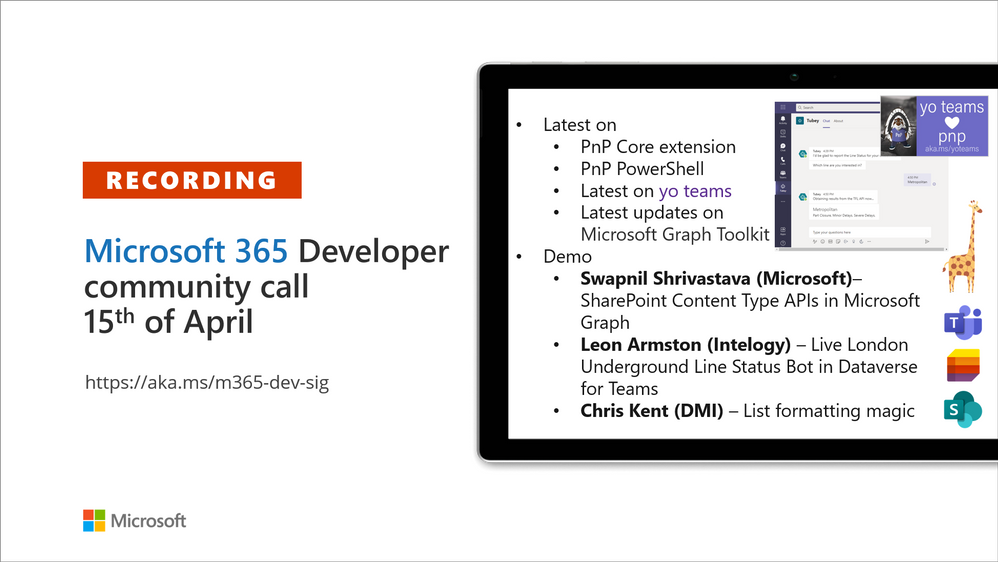
Recording of the Microsoft 365 – General M365 development Special Interest Group (SIG) community call from April 15, 2021.
Call Summary
Latest news from Microsoft 365 engineering and updates on open-source projects: PnP .NET libraries, PnP PowerShell, modernization tooling, on yo Teams, on Microsoft Graph Toolkit, and on Microsoft Teams Samples.
The Microsoft 365 developer community survey is now open, visit the Microsoft Teams samples gallery to get started with Microsoft Teams development, preview the new Microsoft 365 Extensibility look book gallery, and register now for April trainings on Sharing-is-caring. Recent PnP project updates include – PnP .NET Libraries – PnP Framework v1.4.0 and PnP Core SDK v1.1.0 and PnP PowerShell v1.5.0 (new commandlets for Microsoft Viva Connections and Syntex). yo Teams generator-teams (apps generator) v3.0.3 GA and 3.1.0 Preview, yo teams-build-core (gulp tasks) v1.0.1 + v1.1.0 Preview, and msteams-react-base-component (React UI helpers) v3.1.0, have been released. Microsoft Graph Toolkit try out the new OneDrive file components (Preview). The host of this call was Vesa Juvonen (Microsoft) | @vesajuvonen. Q&A takes place in chat throughout the call.
Actions:
Microsoft Teams Development Samples: (https://aka.ms/TeamsSampleBrowser)

It’s together time – Super comfy seats!
Demos delivered in this session
SharePoint Content Type APIs in Microsoft Graph – Classic SharePoint APIs are now showing up in Microsoft Graph. In this demo, step through beta API methods, properties and responses for creating a content type (CT), adding CT to list, adding a column, copying to default location, updating a CT, publishing a CT, and associating CT to a hub site. API permission requirements are called out and differ slightly by API.
Live London Underground Line Status Bot in Dataverse for Teams – the next stage in the evolution of the presenter’s Tube Status solution. An interactive Tube bot in Power Virtual Agents, using Power Automate, and configuring your Azure environment for Azure API Management and Azure Functions. Dataverse for Teams allows users to leverage Azure API Management service using a custom connector in Power Platform. See solution architecture, execution triggers, rules, calls and more.
Microsoft list formatting with header and footer settings – we are reminded that there are layers of formatting options for lists and that there is sample code for each layer. Here we look at header and footer settings, for groups and entire list, beyond the vanilla capabilities delivered 2 weeks ago. This session looks at Collapsed Simple formatting used for Q&A. Uses groupProps, aggregates, hiding, tips on double nesting and more.
Thank you for your work. Samples are often showcased in Demos.
Topics covered in this call
Resources:
Additional resources around the covered topics and links from the slides.
General resources:
Upcoming Calls | Recurrent Invites:
General Microsoft 365 Dev Special Interest Group bi-weekly calls are targeted at anyone who’s interested in the general Microsoft 365 development topics. This includes Microsoft Teams, Bots, Microsoft Graph, CSOM, REST, site provisioning, PnP PowerShell, PnP Sites Core, Site Designs, Microsoft Flow, PowerApps, Column Formatting, list formatting, etc. topics. More details on the Microsoft 365 community from http://aka.ms/m365pnp. We also welcome community demos, if you are interested in doing a live demo in these calls!
You can download recurrent invite from http://aka.ms/m365-dev-sig. Welcome and join in the discussion. If you have any questions, comments, or feedback, feel free to provide your input as comments to this post as well. More details on the Microsoft 365 community and options to get involved are available from http://aka.ms/m365pnp.
“Sharing is caring”
Microsoft 365 PnP team, Microsoft – 16th of April 2021
by Contributed | Apr 16, 2021 | Technology
This article is contributed. See the original author and article here.
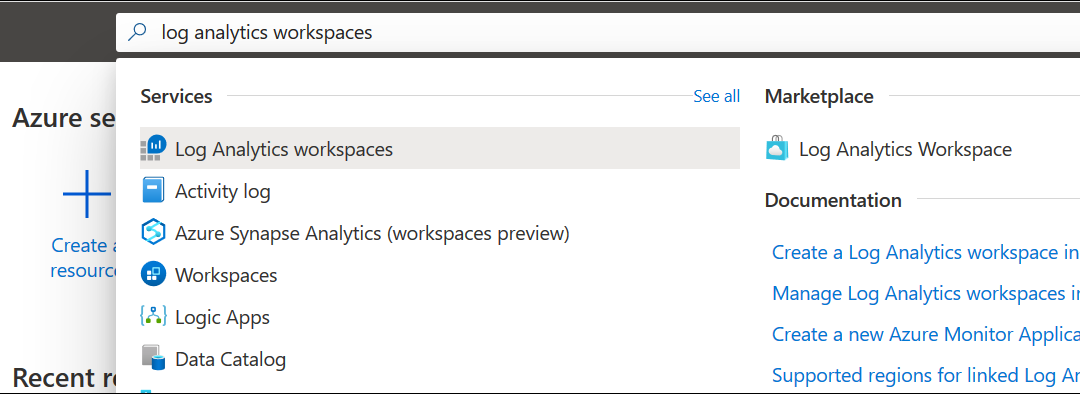
AzUpdate celebrates its first-year anniversary, and the team would like to thank all of you for supporting the show! News the team will be covering this week includes Log analytics workspace name uniqueness, Azure IoT Central new and updated features for March 2021, Surface Laptop 4 and Microsoft accessories announcements, Azure Blob storage supports objects up to 200 TB in size and our Microsoft Learn Module of the week.
Log analytics workspace name uniqueness is now per resource group
When a workspace name was used by one customer or user in the same organization, it couldn’t be used again by others as Azure Monitor log analytics workspace name uniqueness was maintained within the subscription.
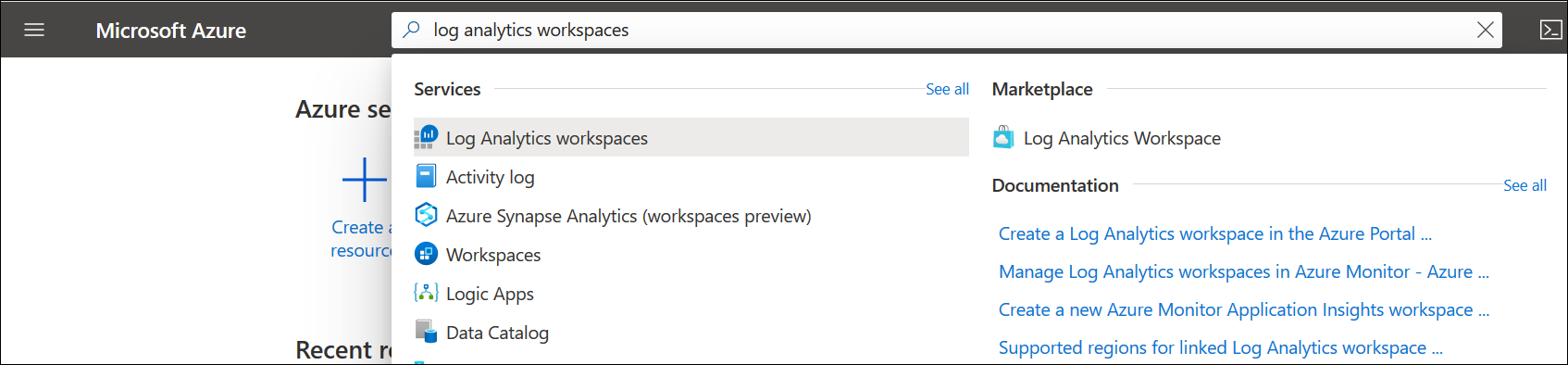
Microsoft has changed the way they enforce workspace name uniqueness and it’s now maintained inside of the resource group context and allows use of the same workspace name in deployments across multiple environments for consistency.
Workspace uniqueness is maintained as follow:
- Workspace ID – global uniqueness remained unchanged.
- Workspace resource ID – global uniqueness.
- Workspace name – per resource group
Learn More
Azure IoT Central new and updated features for March 2021
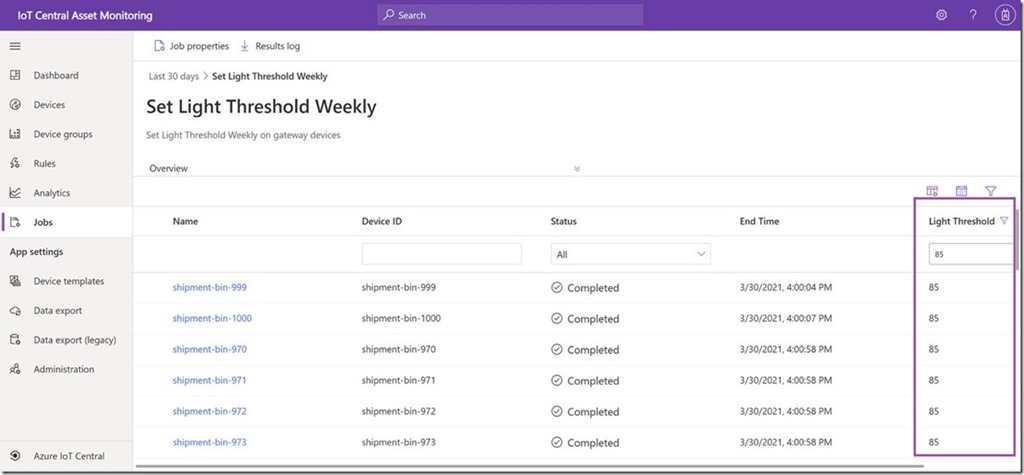
Filter jobs results on reported properties
IoT Central now supports filtering on reported properties in the jobs results grid which lets you view a subset of devices based device state for a current running job or a completed job and helps you view job metrics in production scenarios.
Export device lifecycle and device template events
New data export capabilities allow you export device lifecycle events and device template events. Export these new types of data and get notified when devices are registered or deleted, or when device templates are published or deleted. You can use filters and enrichments and export to the existing destinations. To learn more, see Export data from Azure IoT Central.
Application usage monitoring improvements
IoT Central metrics provided through Azure Monitor can now improve the ability to monitor and diagnose the health and usage of your IoT Central application and the devices connected to it. With the new set of metrics made available this month, it’s now easier to monitor and troubleshoot provisioned devices, device data usage, telemetry messages, commands, and more. For a complete list of available platform metrics, see Supported metrics with Azure Monitor.
IoT Central documentation improvements
Documentation content updates, including new overview articles for administrators and operators, and added more content about multi-component device models including a refresh of the Create and connect a client application tutorials.
New Surface Laptop 4 and Productivity Peripherals
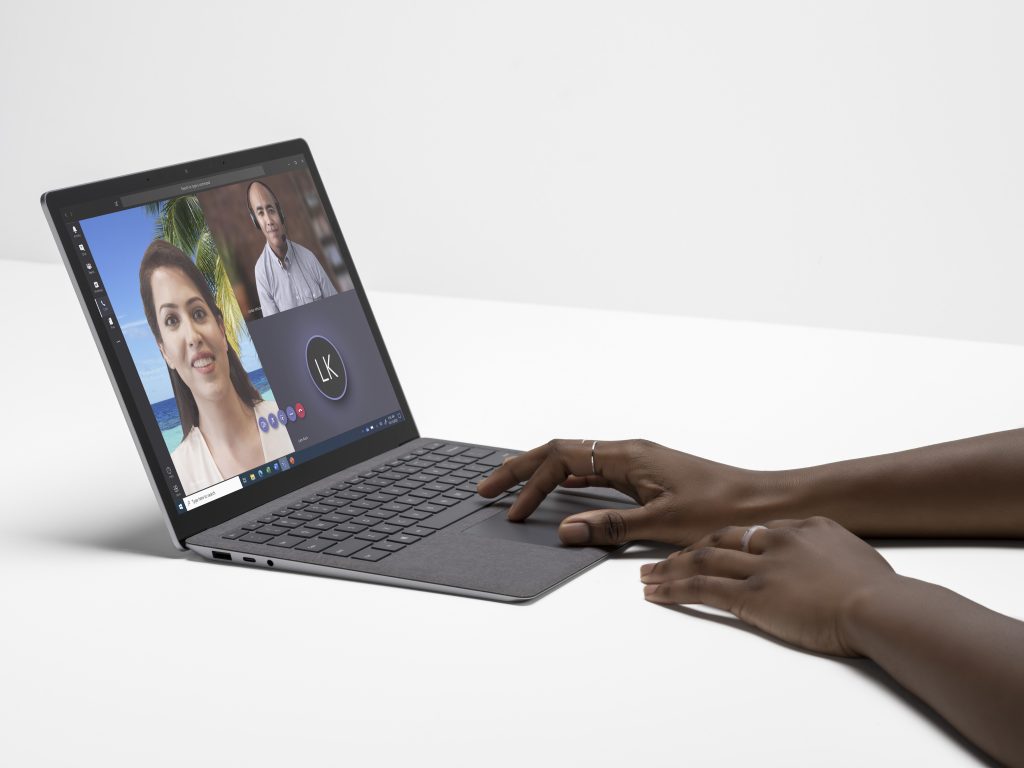
Microsoft announced this week the latest forth generation Surface Laptop sporting your choice of a New Quad Core 11th Gen Intel® Core™ processors and Intel® Iris® Xe graphics or a Custom AMD Ryzen™ Microsoft Surface® Edition processor with 8 CPU cores. Models include either 13.5” or 15” PixelSense displays
Microsoft also introduced the Surface Headphones 2+ carring over all of the features from the existing Surface Headphones customers; 13 levels of active noise cancellation, innovative earcup dials, an advanced 8-microphone system for incredible voice clarity, 18.5 hours of music listening time or up to 15 hours of voice calling time, and the all-day comfort to help you through the day’s virtual meetings.
More information on the plethora of devices that were announced can be found here: Introducing Surface Laptop 4 and new accessories for enhanced meeting experiences
Azure Blob storage supports objects up to 200 TB in size
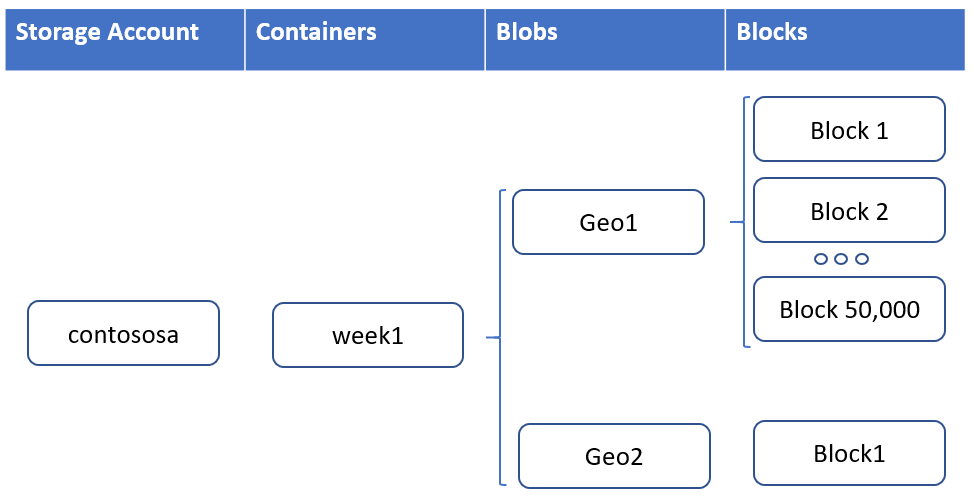
Workloads that utilize larger file sizes such as backups, media, and seismic analysis can now utilize Azure Blob storage and ADLS Gen2 without breaking these large files into separate blobs. Each blob is made up of up to 50,000 blocks. Each block can now be 4GBin size for a total of 200 TB per blob or ADLS Gen2 file.
Learn more
Community Events
- Global Azure 2021 – April 15th to 17th, communities around the world are organizing localized live streams for everyone around the world to join and learn about Azure from the best-in-class community leaders.
- Hello World – Special guests, content challenges, upcoming events, and daily updates.
- Patch and Switch – It has been a fortnight and Patch and Switch are back to share the stories they have amassed over the past two weeks.
MS Learn Module of the Week

Architect storage infrastructure in Azure
Learn how to architect storage solutions for your applications in Azure.

Modules include:
- Choose a data storage approach in Azure
- Create an Azure Storage account
- Upload, download, and manage data with Azure Storage Explorer
- Connect an app to Azure Storage
- Make you application storage highly available with read-access geo-redundant storage
- Secure your Azure Storage account
- Store and share files in your app with Azure Files
- Choose the right disk storage for your virtual machine workload
- Monitor, diagnose, and troubleshoot your Azure storage
Learn more here: Architect storage infrastructure in Azure

Let us know in the comments below if there are any news items you would like to see covered in the next show. Be sure to catch the next AzUpdate episode and join us in the live chat.
by Contributed | Apr 16, 2021 | Technology
This article is contributed. See the original author and article here.
@ArnabGanguly

by Contributed | Apr 16, 2021 | Technology
This article is contributed. See the original author and article here.
Surface tools that assist IT admins with core security, management, and diagnostic tasks are now updated with support for the latest enterprise devices. These IT tools include:
- Surface Enterprise Management Mode. Allows you to secure and manage firmware settings within your organization. Notably, customers can now use Surface Enterprise Management Mode to enable and disable hardware components and UEFI in Surface Laptop 4 along with support for simultaneous multithreading and improved MSI signing across all devices.
- Surface Diagnostic Tool for Business. Eases the support experience through Surface Diagnostics. Provides a full suite of diagnostic tests and software repairs to quickly investigate, troubleshoot, and resolve hardware, software, and firmware issues with Surface devices. This latest update lets you quickly determine if the SSD was replaced from the original inbox SSD.
- Surface Data Eraser. With the all new and improved Surface Data Eraser, we re–engineered how the tool works to provide a seamless experience to help you secure your devices through erasure.
- Surface Deployment Accelerator. Support for building your own Surface images for Surface Laptop 4 will be available soon.

Built-in support
In addition, the latest versions of Surface Brightness Control and Surface Asset Tag already have built-in support for Surface Laptop 4.
Download
You can download these and other tools from Surface Tools for IT, available on the Microsoft Download Center. Surface Laptop 4 and Surface Headphones 2+” are available for purchase now.
by Contributed | Apr 15, 2021 | Technology
This article is contributed. See the original author and article here.
Azure Sphere OS version 21.04 is now available for evaluation in the Retail Eval feed. The retail evaluation period provides 14 days for backwards compatibility testing. During this time, please verify that your applications and devices operate properly with this release before it is deployed broadly via the Retail feed. The Retail feed will continue to deliver OS version 21.03 until we publish 21.04 in two weeks. For more information on retail evaluation see our blog post, The most important testing you’ll do: Azure Sphere Retail Evaluation.
This evaluation release includes an OS update only; it does not include an updated SDK.
Notes about this release
- Areas of special focus for compatibility testing with 21.04 should include apps and functionality utilizing:
- Any wolfSSL calls, as it has been upgraded to version 4.7.
- Wi-Fi connectivity as the background scanning process had been upgraded.
- 21.04 includes updates to mitigate against the following CEVs:
- CVE-2021-28460
- CVE-2021-22876
- CVE-2021-22890
- RF tools version 21.01 is compatible with OS version 21.04.
For more information on Azure Sphere OS feeds and setting up an evaluation device group, see Azure Sphere OS feeds and Set up devices for OS evaluation.
For self-help technical inquiries, please visit Microsoft Q&A or Stack Overflow. If you require technical support and have a support plan, please submit a support ticket in Microsoft Azure Support or work with your Microsoft Technical Account Manager. If you would like to purchase a support plan, please explore the Azure support plans.
by Contributed | Apr 15, 2021 | Technology
This article is contributed. See the original author and article here.
We are experiencing issues with the Microsoft Tech Community Language Translation system which means that Translations will currently be unavailable for all users. Our engineers are investigating the cause and we will resume normal service as soon as possible.
Please comment or subscribe to this post to receive updates via email.
Please accept our apologies for any inconvenience.
Allen Smith
Technical Lead
by Contributed | Apr 15, 2021 | Technology
This article is contributed. See the original author and article here.
Yanelis Lopez, Security Software Engineer, Cloud & AI Security Green Team
A common tactic we observe used by adversaries against customers running Linux Virtual Machines (VMs) in Azure is password-based attacks. This article will explain how to help protect Linux VMs in Azure from these types of attacks at every step of the deployment pipeline.
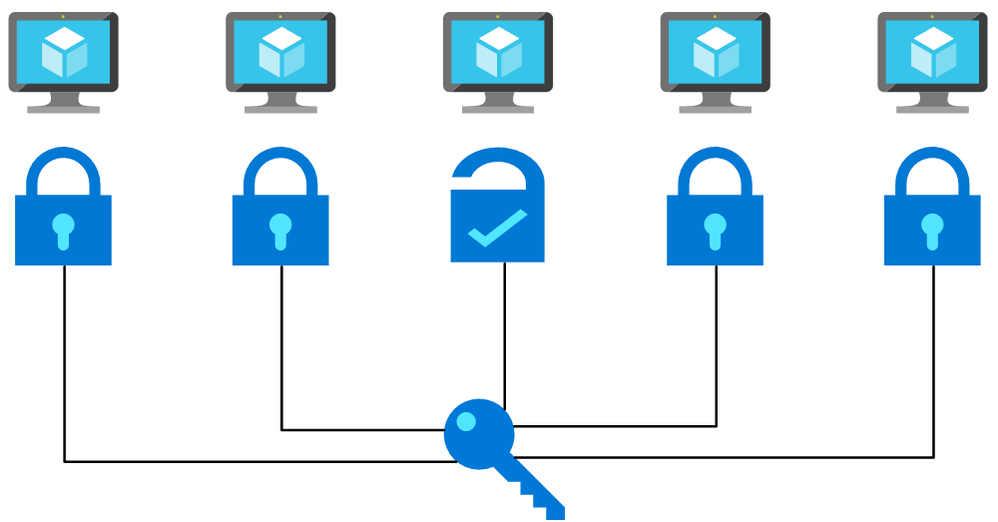
Flow chart picturing a password being used on multiple machines and working with one. This is a simplified depiction of a password spray attack.
Many tools exist that are commonly used to brute force user account passwords over SSH, including those used in cases of Linux brute force compromise in Azure. A specific example is password spray attacks, where an attacker uses one or a few passwords against multiple well-known user accounts in an environment. These attacks typically attempt common passwords hoping one or more accounts can be compromised across multiple virtual machines. Attackers limit the number of password guess attempts to avoid account lockout and detection by defenders.
Although mitigating controls such as password complexity, routine password rotations, disallowing common passwords, etc. help, using password-less authentication is the safer approach.
On Linux, authentication via SSH can be password-less, using SSH key-based authentication instead. SSH keys, are non-human generated, inherently unique, and significantly harder to be brute forced or guessed.
Below, we will show you how to use SSH key-based authentication pre-deployment, enforce it during deployment, and detect non-compliance post-deployment.
Pre-Deployment – Secure from the start: Creating Linux virtual machines
In Azure, there are a few methods for creating Linux VMs: via the Azure Portal, Azure CLI, Powershell, or Azure Resource Manager (ARM) Templates. All have the ability (and document how) to deploy a Linux VM with SSH key as a default option for authentication. To update an ARM template that uses password authentication to instead use SSH keys, follow the below steps.
How to transform your ARM template to use SSH key
Replace the admin password parameter with the ‘adminSSHKey’ parameter
“parameters”: {
…
    “adminUsername”: {
        “type”: “string”,
        “metadata”: {
            “description”: “Username for the Virtual Machine.”
        }
    },
    “adminPassword”: {
        “type”: “securestring”,
        “metadata”: {
            “description”: “Admin password on all VMs.”
        }
    },
    “adminSSHKey”: {
        “type”: “securestring”,
        “metadata”: {
            “description”: “SSH Key for the Virtual Machine.”
        }
    }
…
}
Next, add the ‘linuxConfiguration’ property to the variables of the template
“variables”: {
…
  “linuxConfiguration”: {
    “disablePasswordAuthentication”: true,
    “ssh”: {
      “publicKeys”: [
        {
          “path”: “[concat(‘/home/’, parameters(‘adminUsername’), ‘/.ssh/authorized_keys’)]”,
          “keyData”: “[parameters(‘adminSSHKey’)]”
        }
      ]
    }
  },
…
}
Finally, add the ‘linuxConfiguration’ property to the VM resource in the template. In the ‘osProfile’ property remove the ‘adminPassword’ property and add the following ‘linuxConfiguration’ property
“properties”: {
…
  “osProfile”: {
  …
    “adminPassword”: “[parameters(‘adminPassword’)]”
    “linuxConfiguration”: “[variables(‘linuxConfiguration’)]”
  }
…
}
Now that the template is updated to use SSH key authentication, generate a SSH key using the following command
ssh-keygen -m PEM -t rsa -b 4096
Check out this documentation for more information about generating SSH keys on Windows.
Pass the public key of the SSH key as the value for the ‘adminSSHKey’ parameter described above. Now all VMs deployed using these transformed ARM templates will be safer from password-based attacks.
You can find many examples of ARM templates that deploy VMs with SSH key-based authentication online. When searching for ARM Template examples for Linux VMs, one of the top results is the Azure Quickstart GitHub Repo. These templates are used as starting points for deployments by many individuals. Almost 200 templates in this 800-template repo, deploy a VM or VMSS and previously had SSH authentication configured as password only, making VMs deployed with these templates vulnerable to password-based attacks. We updated these sample templates to disable password-based authentication by default, adding SSH key as the default option.
At Deployment – SSH key enforcer: Using Azure Policy
As part of Microsoft’s quest to get rid of passwords, we have published an Azure Policy which helps ensure Azure Linux VMs use SSH key authentication instead of passwords. You can deploy this policy to your subscription or management group to prevent creation of Linux VMs with password as the SSH authentication type. As seen below, this policy blocks the deployment if the ‘disablePasswordAuthentication’ property in a VM is not defined or is set to ‘false’ when the VM image publisher and offer are well-known Linux offerings. After deploying this policy, any new deployments which include a Linux VM with password-based authentication fail.
"policyRule": {
  "if": {
    "allOf": [
      {
        "field": "type",
        "equals": "Microsoft.Compute/virtualMachines"
      },
      {
        "anyof": [
          {
            "field": "Microsoft.Compute/virtualMachines/osProfile.linuxConfiguration.disablePasswordAuthentication",
            "exists": "False"
          },
          {
            "field": "Microsoft.Compute/virtualMachines/osProfile.linuxConfiguration.disablePasswordAuthentication",
            "equals": "false"
          }
        ]
      },
      {
        "anyOf": [
          {
            "allOf": [
              {
                "field": "Microsoft.Compute/imagePublisher",
                "equals": "Canonical"
              },
              {
                "field": "Microsoft.Compute/imageOffer",
                "in": [
                  "UbuntuServer",
                  "Ubuntu_Core"
                ]
              }
            ]
          },
          ...
          {
            "allOf": [
              {
                "field": "Microsoft.Compute/imagePublisher",
                "equals": "RedHat"
              },
              {
                "field": "Microsoft.Compute/imageOffer",
                "in": [
                  "osa",
                  "RHEL",
                  "rhel-byos",
                  "rhel-ocp-marketplace",
                  "RHEL-SAP",
                  "RHEL-SAP-APPS",
                  "RHEL-SAP-HANA"
                ]
              }
            ]
          }
        ]
      }
    ]
  },
  "then": {
    "effect": "deny"
  }
}
Post-Deployment – Staying Secure: Azure Security Center Recommendation
We have discussed solutions for new deployments, but what if you have VMs already deployed which use password-based SSH authentication? A new Azure Security Center (ASC) recommendation, “Authentication to Linux machines should require SSH keys”, checks for the use of SSH authentication after a VM has been deployed. This recommendation is part of the ASC Secure Score* and follows Azure Security Benchmark best practices. The recommendation is a built-in Guest Configuration policy that monitors changes made to the SSH password authentication setting on the machine itself; if a VM was originally deployed with SSH key-based authentication and later password-based authentication is enabled in the SSH settings, this recommendation will report the VM as non-compliant.
For the recommendation to run, the Guest Configuration extension must be installed. You can follow this documentation for installing the prerequisite Guest Configuration extension. There is also an ASC recommendation suggesting downloading the extension that includes a Quick Fix capability named “Guest Configuration extension should be installed on your machines”. It can be found under the “Manage access and permissions” control. Likewise, the Linux SSH policy recommendation can be found under the “Manage access and permissions” control. The figure below shows this Linux SSH policy recommendation:
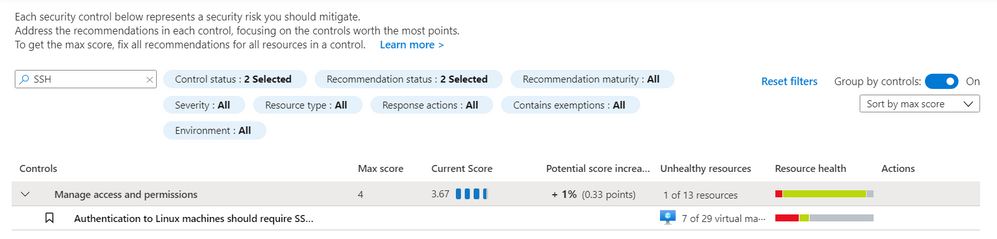 ASC Linux SSH Recommendation – Screenshot of the recommendation in the Azure Security Center blade in the Azure Portal. You can find the recommendation by searching for “ssh” in the search bar.
The policy can also be found in the virtual machine resource under the Policies blade. This can be useful for understanding the Compliance state, Compliance reason, and Last evaluated time. The figure below shows a Non-compliant machine using password authentication:
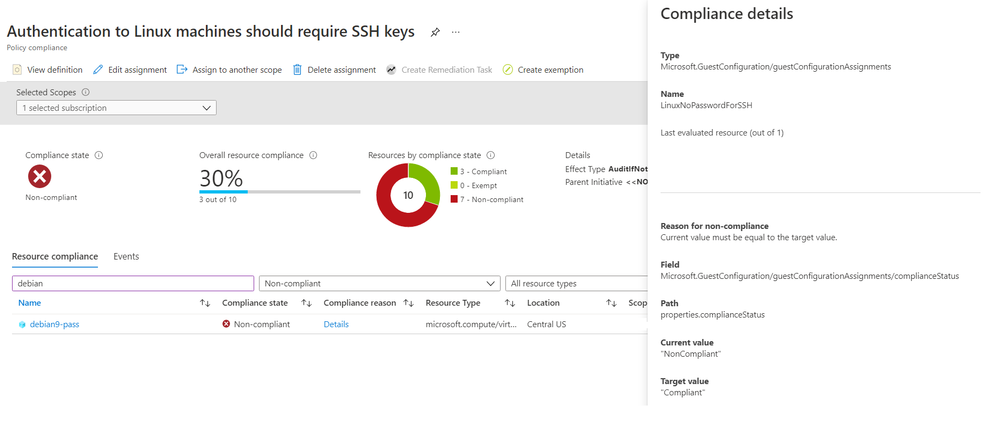 ASC Linux SSH Policy – Screenshot of the Azure Portal showing the Compliance information for the ASC recommendation. This example shows a VM as non-complaint for this recommendation.
To remediate this recommendation, you must add an SSH key to the non-compliant VM and disable password authentication by following the below steps.
- SSH into the existing VM
- Copy the SSH public key from your host into ~/.ssh/authorized_keys
- Edit /etc/ssh/sshd_config (with sudo) and update the value of “PasswordAuthentication” to “no”.
- Restart the SSH service on the VM
Azure Active Directory (Azure AD) alternative
An alternative to SSH keys is using Azure Active Directory (Azure AD) authentication. This allows for the use of Azure AD credentials to log in to Azure Linux VMs; this feature is currently in public preview.
Conclusion
Password-based attacks on Azure Linux VMs is an active problem, but solutions are available to help protect against these attacks. We’ve demonstrated how to fix ARM templates to use SSH Key instead of passwords, how to deploy a security gate using Azure Policy which disallows Linux VMs that use passwords, and how to detect and remediate existing VMs that have password authentication enabled. Together, these recommendations provide a solid defense against password-based attacks on Azure Linux VMs. Take action and do all you can to be as secure as possible!
Footnotes:
*The policy does not impact the ASC Secure Score during public preview. Secure Score will only be impacted when the policy becomes Generally Available (GA).
Reviewers
Johnathon Mohr, Security Software Engineer, Cloud & AI Security Green Team
by Contributed | Apr 15, 2021 | Dynamics 365, Microsoft 365, Technology
This article is contributed. See the original author and article here.
In any business operations software, the ability to visualize, inspect, and print data in an appropriate layout is paramount. In Dynamics 365 Business Central and in most other software, reports serve these purposes.
Our partner community is familiar with customizing built-in reports, either as suppliers of a vertical solution that adds capabilities to underlying data which must be reflected in the relevant reports, or as resellers who tailor reports to meet individual customer requirements.
In the past, you had to modify existing reports through code customization by directly editing the report object.
In Business Central online, direct customization is not possible. Instead, you add new objects or modifications in a controlled manner through extensions to the base product. The extensions make it easier to deploy, maintain, and upgrade the software.
However, until now you weren’t able to extend report objects, so partners had to copy and branch any report that required modification. These steps were a pain point that incurred costs and a maintenance burden even for the simplest changes. As a result, closing this gap has been the highest voted idea on the Business Central Ideas site year after year.
2021 release wave 1 brings support for report extensions in Dynamics 365 Business Central. You can now extend both document type, visual reports as well as processing reports. You no longer need to branch reports when you add capabilities, and multiple solutions can now add to the same base report dataset. Plus, as a reseller who adds additional customer requirements and custom layouts, you have access to all of the resulting report datasets.
With the introduction of report extensions, there are two approaches to customizing reports:
- Use the event-based substitution of a report, which is useful for taking over reports without changing any actions in the user interface.OK
- Use the new report extension for making additive changes.
New report extension AL object
Report extensions are based on a new object type in AL, the programming language used for manipulating data and controlling the execution of the various application objects, such as pages, reports, or codeunits. With this object type, you can extend an existing report in several different ways, including the following:
- Add new columns to existing data items.
- Add new nested data items.
- Add columns for fields in a source table, a table extension, related tables, variables, procedures, or expressions.
- Add a new RDLC layout or Word layout.
- Add or modify the request page.
Note that there is no support for extending or modifying an existing layout.
In an upcoming service update, we will add support for labels, as well as some limited abilities to modify existing data items, such as adding to request fields, calc fields, or triggers.
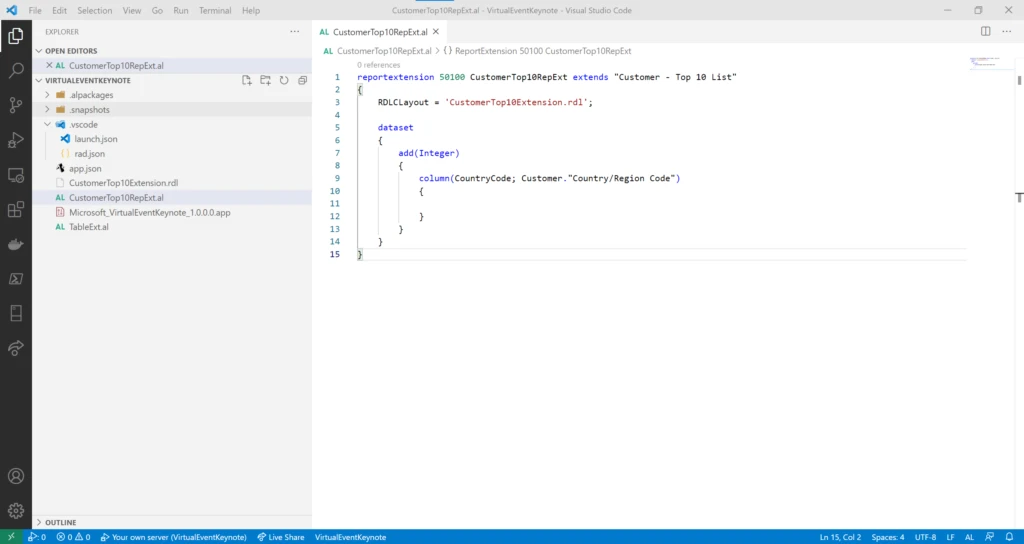
Use report extensions to make additive changes to existing reports, such as adding a country column to the existing customer top 10 list.
Choose layouts from report extensions
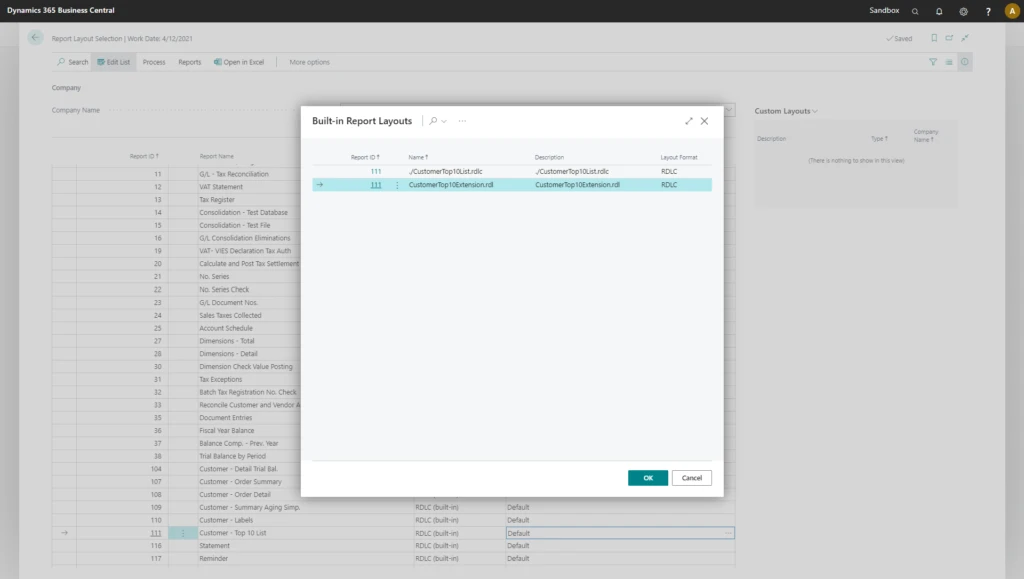
When an extension deploys to a customer environment, either as an AppSource app or as a per-tenant extension (PTE), any report layouts in the extension also become available in the environment. However, if you want to apply a report extension layout to a specific report, you need to add installation and upgrade code in the extension. Users will be able to choose a layout from a report extension in the Report Layout Selection page that lists all available layouts for a given report.
The Report Layout Selection page includes any layouts from report extensions so that the user can choose between all available layouts.
Next steps
Learn more about report extensibility in the release plans, the documentation, or at the virtual launch event sessionLE21-08 What’s new in Visual Studio code and AL, which covers report extensions in detail. The virtual launch event site has many other valuable sessions on new features in Dynamics 365 Business Central 2021 Wave 1 release.
We encourage you to explore the new report extension feature and provide feedback to our AL GitHub repo. You can also submit any suggestions for additional coverage or improvements on the Business Central Ideas site.
The post Extending reports in Business Central appeared first on Microsoft Dynamics 365 Blog.
Brought to you by Dr. Ware, Microsoft Office 365 Silver Partner, Charleston SC.


Recent Comments