
by Contributed | Apr 19, 2021 | Technology
This article is contributed. See the original author and article here.
Azure SQL Database offers an easy several-clicks solution to scale database instances when more resources are needed. This is one of the strengths of PaaS, you pay for only what you use and if you need more or less, it’s easy to do the change. A current limitation, however, is that the scaling operation is a manual one. The service doesn’t support auto-scaling as some of us would expect.
Having said that, using the power of Azure we can set up a workflow that auto-scales an Azure SQL Database instance to the next immediate tier when a specific condition is met. For example: what if you could auto-scale the database as soon as it goes over 85% CPU usage for a sustained period of 5 minutes? Using this tutorial we will achieve just that.
Supported SKUs: because there is no automatic way to get the list of available tiers at script runtime, these must be hard-coded into it. For this reason, the script below only supports DTU and vCore (provisioned compute) databases. Hyperscale, Serverless, Fsv2, DC and M series are not supported. Having said that, the logic is the same not matter the tier so feel free to modify the script to suit your particular SKU needs.
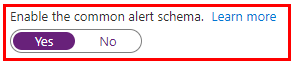
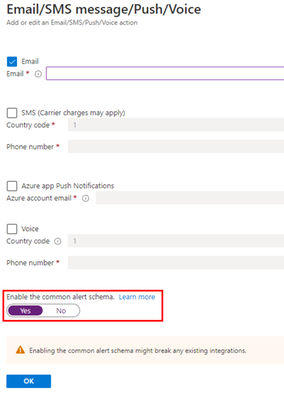
Important: every time any part of the setup asks if the Common Alert Schema (CAS) should be enabled, select Yes. The script used in this tutorial assumes the CAS will be used for the alerts triggering it.
|
Step #1: deploy Azure Automation account and update its modules
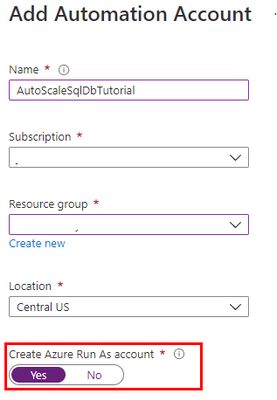
The scale operation will be executed by a PowerShell runbook inside of an Azure Automation account. Search Automation in the Azure Portal search bar and create a new Automation account. Make sure to create a Run As Account while doing this:
Once the Automation account has been created, we need to update the PowerShell modules in it. The runbook we will use uses PowerShell cmdlets but by default these are old versions when the Automation account is provisioned. To update the modules to be used:
- Save the PowerShell script here to your computer with the name Update-AutomationAzureModulesForAccountManual.ps1. The Manual word is added to the file name as to not overwrite the default internal runbook the account uses to update other modules once it gets imported.
- Import a new module and select the file you saved on step #1:
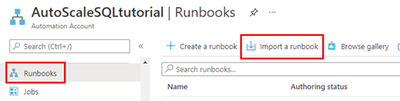
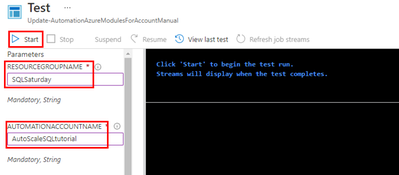
- When the runbook has been imported, click Test Pane, fill in the details for the Resource Group and the Azure Automation account name we are using and click Start:
- When it finishes, the cmdlets will be fully updated. This benefits not only the SQL cmdlets used below but any other cmdlets any other runbook may use on this same Automation account.
Step #2: create scaling runbook
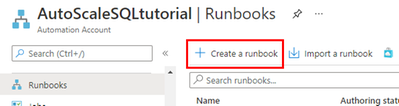
With our Automation account deployed and updated, we are now ready to create the script. Create a new runbook and copy the code below:
The script below uses Webhook data passed from the alert. This data contains useful information about the resource the alert gets triggered from, which means the script can auto-scale any database and no parameters are needed; it only needs to be called from an alert using the Common Alert Schema on an Azure SQL database.
param
(
    [Parameter (Mandatory=$false)]
    [object] $WebhookData
)
# If there is webhook data coming from an Azure Alert, go into the workflow.
if ($WebhookData){
    # Get the data object from WebhookData
    $WebhookBody = (ConvertFrom-Json -InputObject $WebhookData.RequestBody)

    # Get the info needed to identify the SQL database (depends on the payload schema)
    $schemaId = $WebhookBody.schemaId
    Write-Verbose "schemaId: $schemaId" -Verbose
    if ($schemaId -eq "azureMonitorCommonAlertSchema") {
        # This is the common Metric Alert schema (released March 2019)
        $Essentials = [object] ($WebhookBody.data).essentials
        Write-Output $Essentials
        # Get the first target only as this script doesn't handle multiple
        $alertTargetIdArray = (($Essentials.alertTargetIds)[0]).Split("/")
        $SubId = ($alertTargetIdArray)[2]
        $ResourceGroupName = ($alertTargetIdArray)[4]
        $ResourceType = ($alertTargetIdArray)[6] + "/" + ($alertTargetIdArray)[7]
        $ServerName = ($alertTargetIdArray)[8]
        $DatabaseName = ($alertTargetIdArray)[-1]
        $status = $Essentials.monitorCondition
    }
    else{
        # Schema not supported
        Write-Error "The alert data schema - $schemaId - is not supported."
    }
    # If the alert that triggered the runbook is Activated or Fired, it means we want to autoscale the database.
    # When the alert gets resolved, the runbook will be triggered again but because the status will be Resolved, no autoscaling will happen.
    if (($status -eq "Activated") -or ($status -eq "Fired"))
    {
        Write-Output "resourceType: $ResourceType"
        Write-Output "resourceName: $DatabaseName"
        Write-Output "serverName: $ServerName"
        Write-Output "resourceGroupName: $ResourceGroupName"
        Write-Output "subscriptionId: $SubId"

        # Because Azure SQL tiers cannot be obtained programatically, we need to hardcode them as below.
        # The 3 arrays below make this runbook support the DTU tier and the provisioned compute tiers, on Generation 4 and 5 and
        # for both General Purpose and Business Critical tiers.

        $DtuTiers = @('Basic','S0','S1','S2','S3','S4','S6','S7','S9','S12','P1','P2','P4','P6','P11','P15')
        $Gen4Cores = @('1','2','3','4','5','6','7','8','9','10','16','24')
        $Gen5Cores = @('2','4','6','8','10','12','14','16','18','20','24','32','40','80')

        # Here, we connect to the Azure Portal with the Automation Run As account we provisioned when creating the Automation account.

        $connectionName = "AzureRunAsConnection"
        try
        {
            # Get the connection "AzureRunAsConnection "
            $servicePrincipalConnection=Get-AutomationConnection -Name $connectionName

            "Logging in to Azure..."
            Add-AzureRmAccount `
                -ServicePrincipal `
                -TenantId $servicePrincipalConnection.TenantId `
                -ApplicationId $servicePrincipalConnection.ApplicationId `
                -CertificateThumbprint $servicePrincipalConnection.CertificateThumbprint
        }
        catch {
            if (!$servicePrincipalConnection)
            {
                $ErrorMessage = "Connection $connectionName not found."
                throw $ErrorMessage
            } else{
                Write-Error -Message $_.Exception
                throw $_.Exception
            }
        }

        # Gets the current database details, from where we'll capture the Edition and the current service objective.
        # With this information, the below if/else will determine the next tier that the database should be scaled to.
        # Example: if DTU database is S6, this script will scale it to S7. This ensures the script continues to scale up the DB in case CPU keeps pegging at 100%.

        $currentDatabaseDetails = Get-AzureRmSqlDatabase -ResourceGroupName $ResourceGroupName -DatabaseName $DatabaseName -ServerName $ServerName

        if (($currentDatabaseDetails.Edition -eq "Basic") -Or ($currentDatabaseDetails.Edition -eq "Standard") -Or ($currentDatabaseDetails.Edition -eq "Premium"))
        {
            Write-Output "Database is DTU model."
            if ($currentDatabaseDetails.CurrentServiceObjectiveName -eq "P15") {
                Write-Output "DTU database is already at highest tier (P15). Suggestion is to move to Business Critical vCore model with 32+ vCores."
            } else {
                for ($i=0; $i -lt $DtuTiers.length; $i++) {
                    if ($DtuTiers[$i].equals($currentDatabaseDetails.CurrentServiceObjectiveName)) {
                        Set-AzureRmSqlDatabase -ResourceGroupName $ResourceGroupName -DatabaseName $DatabaseName -ServerName $ServerName -RequestedServiceObjectiveName $DtuTiers[$i+1]
                        break
                    }
                }
            }
        } else {
            Write-Output "Database is vCore model."

            $currentVcores = ""
            $currentTier = $currentDatabaseDetails.CurrentServiceObjectiveName.SubString(0,8)
            $currentGeneration = $currentDatabaseDetails.CurrentServiceObjectiveName.SubString(6,1)
            $coresArrayToBeUsed = ""
            try {
                $currentVcores = $currentDatabaseDetails.CurrentServiceObjectiveName.SubString(8,2)
            } catch {
                $currentVcores = $currentDatabaseDetails.CurrentServiceObjectiveName.SubString(8,1)
            }
            Write-Output $currentGeneration
            if ($currentGeneration -eq "5") {
                $coresArrayToBeUsed = $Gen5Cores
            } else {
                $coresArrayToBeUsed = $Gen4Cores
            }

            if ($currentVcores -eq $coresArrayToBeUsed[$coresArrayToBeUsed.length]) {
                Write-Output "vCore database is already at highest number of cores. Suggestion is to optimize workload."
            } else {
                for ($i=0; $i -lt $coresArrayToBeUsed.length; $i++) {
                    if ($coresArrayToBeUsed[$i] -eq $currentVcores) {
                        $newvCoreCount = $coresArrayToBeUsed[$i+1]
                        Set-AzureRmSqlDatabase -ResourceGroupName $ResourceGroupName -DatabaseName $DatabaseName -ServerName $ServerName -RequestedServiceObjectiveName "$currentTier$newvCoreCount"
                        break
                    }
                }
            }
        }
    }
}
Step #3: create Azure Monitor Alert to trigger the Automation runbook
On your Azure SQL Database, create a new alert rule:
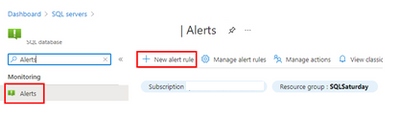
The next blade will require several different setups:
- Scope of the alert: this will be auto-populated if +New Alert Rule was clicked from within the database itself.
- Condition: when should the alert get triggered by selecting a signal and defining its logic.
- Actions: when the alert gets triggered, what will happen?
Condition
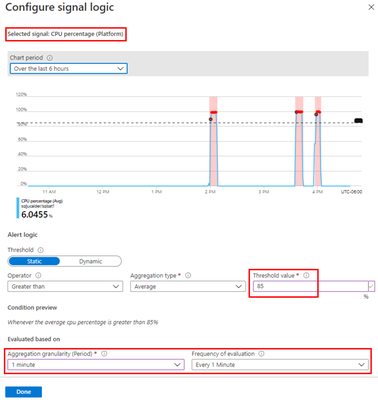
For this example, the alert will monitor the CPU consumption every 1 minute. When the average goes over 85%, the alert will be triggered:
Actions
After the signal logic is created, we need to tell the alert what to do when it gets fired. We will do this with an action group. When creating a new action group, two tabs will help us configure sending an email and triggering the runbook:
Notifications
Actions
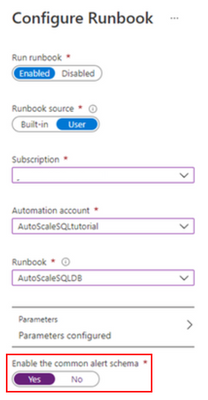
After saving the action group, add the remaining details to the alert.
That’s it! The alert is now enabled and will auto-scale the database when fired. The runbook will be executed twice per alert: once when fired and another when resolved but it will only perform a scale operation when fired.

by Contributed | Apr 19, 2021 | Dynamics 365, Microsoft 365, Technology
This article is contributed. See the original author and article here.
Over the last several months, we have continued to see the agility and resiliency shown by businesses across the globe in response to the COVID-19 pandemic. Throughout the holiday trading period, we saw businesses adapt to new customer needs across digital channels, along with enhancing and streamlining in-person buying experiences. As vaccines become available, many retail businesses are looking at the future shopping needs of their customers and what the return to in-store buying will mean for customer experiences. Along with this, business-to-business (B2B) buying has also been transitioning from in-person to more digital and self-service buying options for accounts and partners.
Building atop the great features released in Microsoft Dynamics 365 Commerce 2020 release wave 2, we are bringing additional capabilities to Dynamics 365 Commerce 2021 release wave 1, grounded in intelligence to help businesses meet the needs of their customers across consumer-facing and business-to-business segments. We are delivering innovation across the following key investment areas:
- New digital commerce capabilitiesto further enhance customer experience and business outcomes: We continue to build upon the foundation e-commerce capabilities including announcing the general availability of B2B e-commerce capabilities on a single connected platform.
- Enhancements through ingrained intelligence to drive growth and efficiencies: Utilize enhancements with AI and machine learning to further improve insights into business operations and deliver differentiation.
- Expand on omnichannel capabilities to improve business performance: We continue to invest in core capabilities that support unified commerce capabilities along with enhancements with broader Microsoft and Microsoft Dynamics 365 solutions.
Let’s take a closer look at some of the new capabilities and highlights we are bringing to our customers within the Dynamics 365 Commerce 2021 release wave 1.
Build rich, relevant, and intuitive digital commerce experiences for every customer
With the acceleration of digital commerce channels amidst COVID-19, we continue to invest in building the best e-commerce platform available on the market. With the addition of business-to-business e-commerce capabilities for Dynamics 365 Commerce, we are bringing intelligent and user-friendly features available in business-to-consumer (B2C) e-commerce to business partners.
B2B e-commerce capabilities now available: B2B e-commerce capabilities for Dynamics 365 Commerce enables organizations in varied industry segments to digitize their B2B transactions with personalized, user friendly, and self-serve driven B2C e-commerce-like experiences while still providing the unique capabilities needed for a B2B user to be productive in their job function.
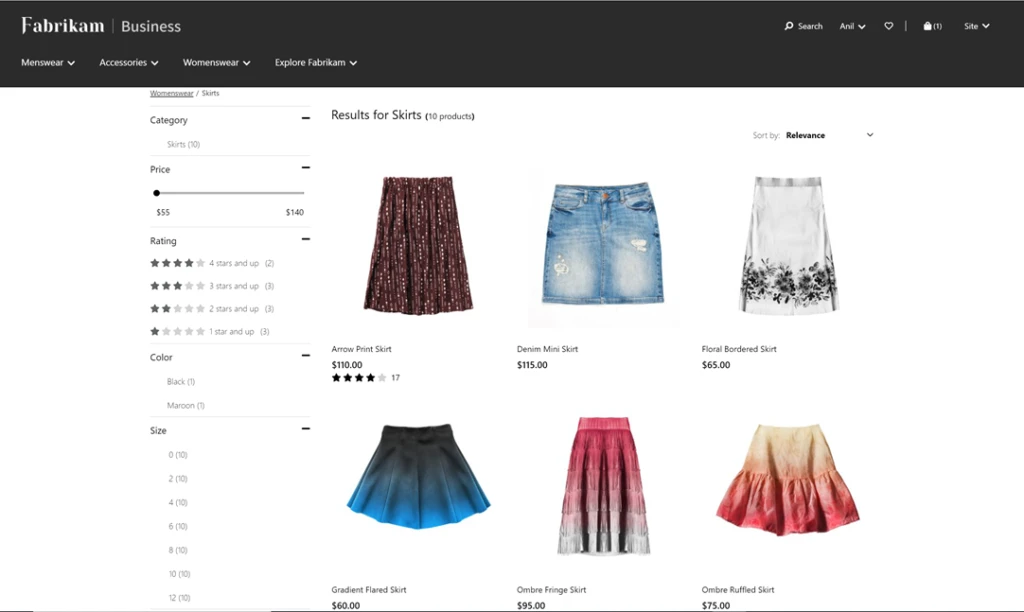
As e-business teams look for solutions in the market, not only are they benchmarking their future-state online buying experience against B2B peers, but also against B2C leaders. They need solutions with a best-in-class foundation of B2C features, such as robust marketing and merchandising and experience management tools. With this release, we are bringing a range of B2B e-commerce capabilities to market including partner onboarding, order templates, quick order entry, account statement and invoicing management, and more. In addition, we are delivering native integration to Dynamics 365 Sales and Dynamics 365 Customer Service for unified customer engagement across touchpoints. Unique B2B capabilities such as contract pricing, quotes pricing lists, e-procurement, product configuration and customization, guided selling, bulk order entry, and account, contract, and budget management can also be layered on top of our rich e-commerce capabilities to deliver a great buying experience for every partner.
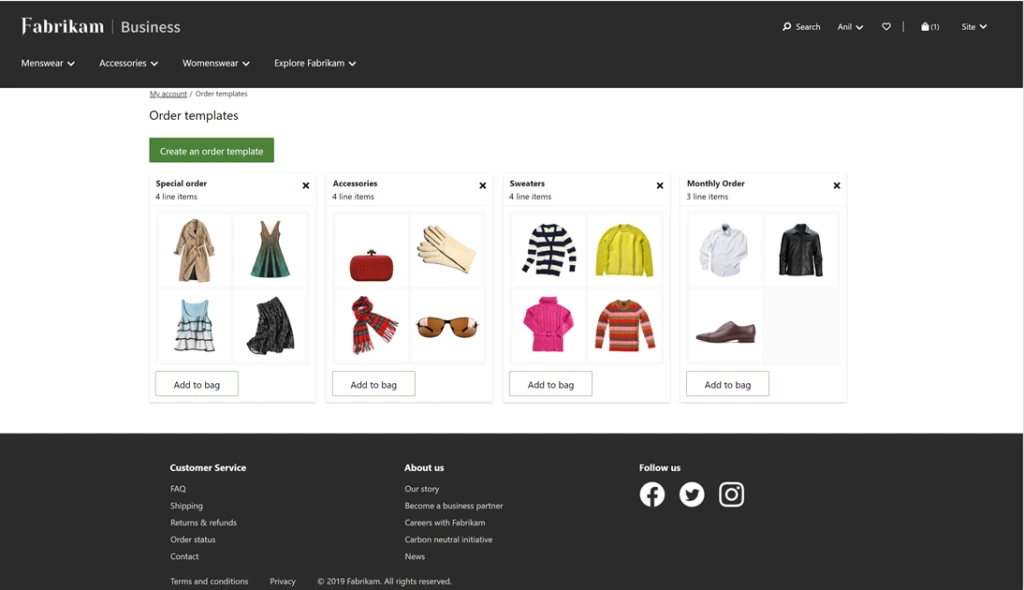
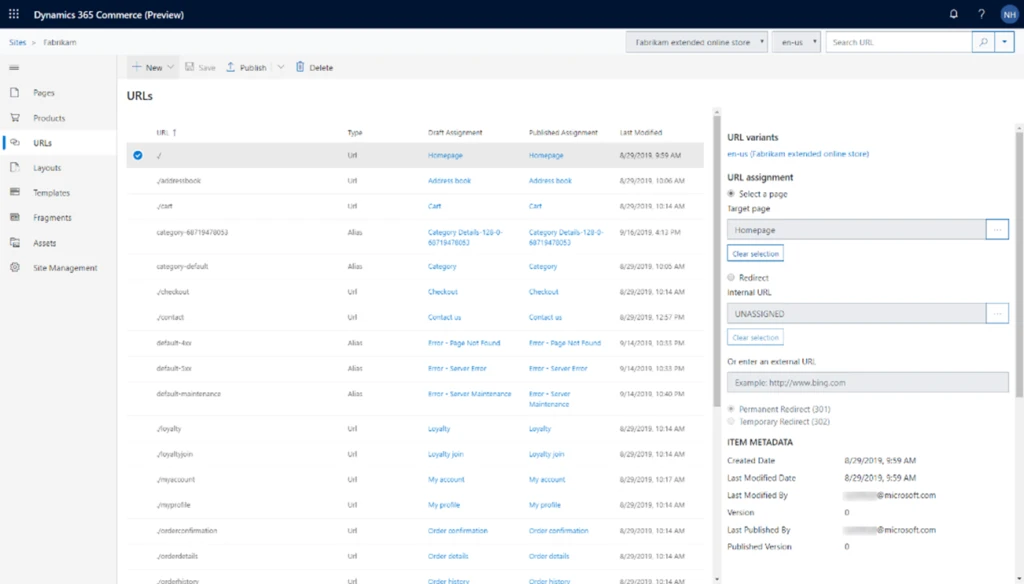
Enhanced search engine results: Improve SEO rankings for product landing and display pages to enable quicker page discovery through native support for schema.org/product metadata. Product pages can utilize existing Dynamics 365 Commerce headquarters product data to simplify and streamline merchandising workflows.
Enhancements through ingrained intelligence to drive growth and efficiencies
Unlock immersive AI-powered intelligent shopping features that enable more personal and relevant shopping experiences for every customer.
Shop similar looks: Bring fresh and appealing choices to the forefront of the shopping experience using the power of AI and machine learning. The effect can be transformative and can create additional selling power as shoppers find more of the things they want in an easy-to-use visual experience.
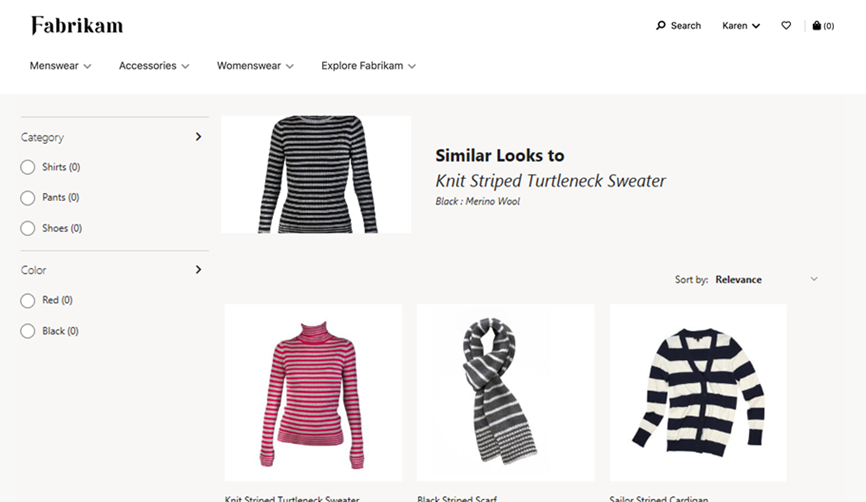
Shop by similar description: This recommendations service enables customers to easily and quickly find the products they need and want (relevant), find more than they had originally intended (cross-sell, upsell), all the while having an experience that serves them well (satisfaction). For retailers, this functionality helps drive conversion opportunities across all customers and products, resulting in more all-up sales revenue and customer satisfaction.
System monitoring and diagnostics across in-store and e-commerce: Access to system diagnostic logs allows better visibility for IT administrators and enables improved time to detection, time to mitigation, and time to resolution of live-site incidents. IT administrators are able to determine key contributing factors of incidents, which allows for targeted engagement with Microsoft support teams, or with implementation partners, ISVs, or other stakeholders.
Cloud-powered customer search (preview): Customer data is the lifeblood for businesses, and yet almost all businesses run into the problem of duplicate customer records because of inefficient customer search algorithms. If cashiers are not able to easily find a customer, they end up creating new customers. With this enhancement, businesses will be able to easily switch their current customer search experience from SQL-based search to cloud-powered search to gain performant, relevant, and scalable search capabilities.
Expand on omnichannel capabilities to improve business performance
We continue to see the rapid evolution of technologies supporting business, employee, and customer shopping experiences. With this, comes the need to deliver tools that span across channels to streamline purchasing experiences and empowers staff to perform at their best. In this release, we are continuing to invest in making Dynamics 365 Commerce the best solution for omnichannel shopping and bringing new capabilities to customers and frontline workers alike.
Better together with Microsoft Teams: Administrators now can provision Microsoft Teams from Dynamics 365 Commerce and create teams for stores, add members from a store’s worker book, and more in Microsoft Teams, and synchronize the changes in the future. They can also notify frontline workers on mobile devices and synergize task management between Dynamics 365 Commerce and Microsoft Teams to improve productivity.

Additional features and improvements to Curbside Pickup
In today’s world, it is important that organizations can offer safe and flexible fulfillment options to meet their customers’ ever-changing needs. Building on Dynamics 365 Commerce’s existing capabilities that enables buy online, pick up in-store (BOPIS), Dynamics 365 Commerce now offers additional features to optimize convenient and COVID safe curbside pickup. These capabilities will make it easier for businesses to deploy mobile POS devices and allow their store associates to efficiently manage orders that need to be fulfilled and picked up. With this release, we have added the following features and improvements to Dynamics 365 Commerce:
- Ability for shoppers to set their preferred pick-up location on E-Commerce channel.
- Ability for businesses to offer multiple pickups and delivery options for shoppers to choose from.
- Flexible configuration of pickup time slots per day by location and allowing shoppers to choose a pickup time slot on E-Commerce channel.
- Improved email receipts and notifications with the ability for businesses to customize email receipts, configure by deliver mode, etc.
- Enhanced order fulfillment visibility for store associates with live tile and notifications to monitor and address orders that need to be fulfilled.
- Streamline order pick-up flows, including support for QR codes.
Enhancements to inventory visibility, movement, and adjustments
Inventory management and visibility is key to business success in order to give customers clear insights into where stock is located, reduce out-of-stock situations, and empower our sellers, managers, and merchandisers to make better decisions. With this update, we have made a range of improvements touching inventory and stock management including enhancements to e-commerce inventory availability lookup API, inventory aware product discovery for e-commerce customers, improvements to inventory lookup operations via in-store point of sale, along with comprehensive in-store inventory management capabilities.
Chat in Dynamics 365 Commerce with Power Virtual Agents and Dynamics 365 Customer Service (Preview)
Customer service functionality will be added to Dynamics 365 Commerce by leveraging the capabilities in Microsoft Dynamics 365 Customer Service and Microsoft Power Virtual Agents. Site administrators will be able to configure the chat widget on the e-commerce site with proactive notification capability based on different criteria.
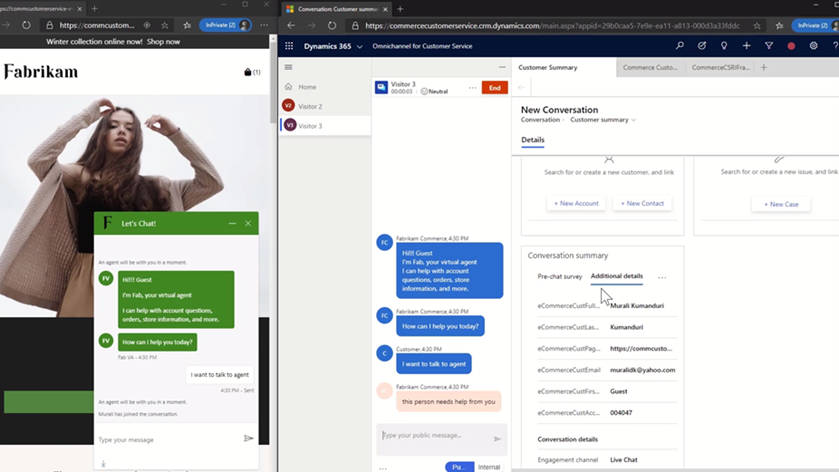
This will be supported via native integrations with Dynamics 365 Customer Service chat or virtual agents into Dynamics 365 Commerce. With this, contact center agents will be able to look up customer information using Dynamics 365 Commerce Call Center and act on customer’s details and orders as required.
Learn more about Dynamics 365 Commerce
Please share your thoughts with us about the 2021 release wave 1 updates for Dynamics 365 Commerce. We will continue to bring new capabilities and enhancements to Dynamics 365 Commerce and look forward to sharing more in the future.
The post Continued innovation in Dynamics 365 Commerce 2021 release wave 1 appeared first on Microsoft Dynamics 365 Blog.
Brought to you by Dr. Ware, Microsoft Office 365 Silver Partner, Charleston SC.
by Contributed | Apr 19, 2021 | Technology
This article is contributed. See the original author and article here.
We are pleased to announce an update to the Azure HPC Cache service!
HPC Cache helps customers enable High Performance Computing workloads in Azure Compute by providing low-latency, high-throughput access to Network Attached Storage (NAS) environments. HPC Cache runs in Azure Compute, close to customer compute, but has the ability to access data located in Azure as well as in customer datacenters.
Preview Support for Blob NFS 3.0
The Azure Blob team introduced preview support for the NFS 3.0 protocol this past fall. This change enables the use of both NFS 3.0 and REST access to storage accounts, moving cloud storage further along the path to a multi-tiered, multi-protocol storage platform. It empowers customers to run their file-dependent workloads directly against blob containers using the NFS 3.0 protocol.
There are certain situations where caching NFS data makes good sense. For example, your workload might run across many virtual machines and requires lower latency than what the NFS endpoint provides. Adding the HPC Cache in front of the container will provide sub-millisecond latencies and improved client scalability. This makes the joint NFS 3.0 endpoint and HPC Cache solution ideal for scale-out read-heavy workloads such as genomic secondary analysis and media rendering.
Also, certain applications might require NLM interoperability, which is unsupported for NFS-enabled blob storage. HPC Cache responds to client NLM traffic and manages lock requests as the NLM service. This capability further enables file-based applications to go all-in to the cloud.
Using HPC Cache’s Aggregated Namespace, you can build a file system that incorporates your NFS 3.0-enabled containers into a single directory structure – even if you have multiple storage accounts and containers that you want to operate against. And you can also add your on-premises NAS exports into the namespace, for a truly hybrid file system!
HPC Cache support for NFS 3.0 is in preview. To use it, simply configure a Storage Target of the type “ADLS-NFS” type and point at your NFS 3.0-enabled container.
Customer-Managed Key Support
HPC Cache has had support for CMK-enabled cache disks since mid-2020, but it was limited to specific regions. As of now, you can use CMK-enabled cache disks in all regions where CMK is supported.
Zone-Redundant Storage (ZRS) Blob Containers Support for Blob-As-POSIX
Blob-as-POSIX is a 100% POSIX compliant file system overlaid on a container. Using Blob-as-POSIX, HPC Cache can provide NAS support for all POSIX file system behaviors, including hard links. As of April 2nd, you can use both ZRS and LRS container types.
Custom DNS and NTP Server Support
Typically, HPC Cache will use the built-in Azure DNS and NTP services. When using HPC Cache and your on-premises NAS environment, there are some situations where you might want to use your own DNS and NTP servers. This special configuration is now supported in HPC Cache. Note that using your own servers in this case requires additional network configuration and you should consult with your Azure technical partners for further information. You can find more documentation here.
Client Access Policies
Traditional NAS environments support export policies that restrict access to an export based on networks or host information. Further, they typically allow the remapping of root to another UID, known as root squash. HPC Cache now offers the ability to configure such policies, called client access policies, on the junction path of your namespace. Further, you will be able to squash root to both a unique UID and GID value.
Extended Groups Support
HPC Cache now supports the use of NFS auxiliary groups, which are additional GIDs that might be configured for a given UID. Any group count above 16 falls into the auxiliary, or extended, group definition. HPC Cache now supports the use of such group integration with your existing directory mechanisms (such as Active Directory or LDAP, or even a recurring file upload of these definitions). Using HPC Cache in combination with Azure NetApp Files, for example, allows you to leverage your extended groups.
Get Started
To create storage cache in your Azure environment, start here to learn more about HPC Cache. You also can explore the documentation to see how it may work for you.
Tell Us About It!
Building features in HPC Cache that help support hybrid HPC architectures in Azure is what we are all about! Try HPC Cache, use it, and tell us about your experience and ideas. You can post them on our feedback forum.
by Contributed | Apr 19, 2021 | Technology
This article is contributed. See the original author and article here.
MVPs know better than most that education is not something that starts and ends with a formal experience like college. Instead, education is a life-long process and requires continual upskilling.
Four MVPs were recently featured in two separate sessions at MS Ignite about the importance of skilling and certification in their careers. In the first session, Azure MVP Tiago Costa and Office Apps & Services MVP Chris Hoard shared the digital stage with tech trainers and managers on the value of Microsoft Certifications.
Tiago, from Portugal, says he has personally used Microsoft Certification to progress into new roles and climb the corporate ladder. Tiago advises tech enthusiasts of all experience levels to experiment with MS Learn, a resource that is “free and of amazing quality and accuracy.”
“If you have the willingness to learn, it doesn’t matter what level of expertise you have,” Tiago says. “I have helped people with literally zero – I will repeat, zero – experience in IT and today they are tech leaders with their field.”
UK-based Chris agrees: “Authenticity, validation, knowledge, closing skill gaps, finding a new passion, the prospects of better wages or even a better job – these are all good reasons why learning and certification are important.”
“My advice is that it is never too late to start. Set yourself a modest goal and once you have started, don’t stop – keep learning and unlearning,” Chris says.
Later at the conference, Business Apps MVPs Amey Holden and Lisa Crosbie shared their learning journeys as part of the Australian tech community.
Amey says that she was thrown into the deep end when a respected practice lead sold her to a project as an expert in Dynamics 365 when “actually I was a clueless graduate with some impressive Excel formulae skills.”
Thus, Amey’s Power Platform journey began with a three-day crash course in Dynamics 365 Sales and “piles of PDFs with labs and content to learn everything (back in the days before MS Learn!)” Now, however, Amey is a big fan of the platform as it “has given me the tools to understand all new features and functionality.”
“Being officially recognized by Microsoft for your knowledge and achievements helped to boost my confidence earlier in my career when the impostor syndrome kicked in or I genuinely had no idea what I’m doing,” Amey says.
“It has helped me attain knowledge that I never knew I would have needed until I find myself calling on it during client conversations. This has helped me to more easily become a trusted client advisor who can have a positive and valuable impact.”
Lisa similarly uses MS Learn to illuminate new tech knowledge. Lisa made a career change from book publishing to tech in 2016, and says MS Learn “is an awesome revision tool for a number of certifications in my main area of Power Platform and Dynamics 365, as well as using it to upskill in new areas and pass certification exams in M365 and Azure AI.”
“It is a good discipline to make sure I stay up to date with new features and review the things I use less often. I also feel it gives credibility to the advice I give to customers and gives me confidence in my knowledge,” Lisa says.
“I always have more collections bookmarked and not enough hours in the day!”
For more, check out Amey’s and Lisa’s session at MS Ignite, as well as Tiago’s and Chris’ session.
by Contributed | Apr 19, 2021 | Technology
This article is contributed. See the original author and article here.
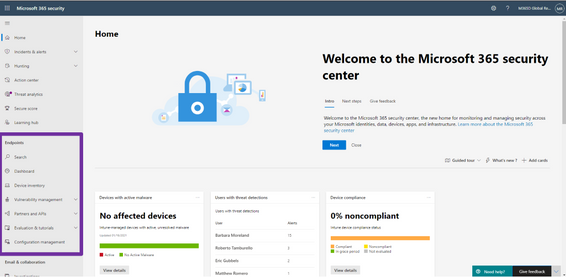
We’re excited to announce that we have reached a new milestone in our XDR journey: the integration of our endpoint and email and collaboration capabilities into Microsoft 365 Defender is now generally available. Security teams can manage all endpoint, email, and cross-product investigations, configuration, and remediation within a single unified portal.
Register for the Microsoft 365 Defender’s Unified Experience for XDR webinar to learn how your security teams can leverage the unified portal and check out our video to learn more about these new capabilities.
This release delivers the rich set of capabilities we announced in public preview, including unified pages for alerts, users, and automated investigations, a new email entity page offering a 360-degree view of an email, threat analytics, a brand-new Learning hub, and more – all available exclusively in the Microsoft 365 Defender portal at security.microsoft.com.
Now is the time to start moving your users to the unified experience using the automatic URL redirection for Microsoft Defender for Endpoint and automatic URL redirection for Microsoft Defender for Office 365 as the previously distinct portals will eventually be phased out.
Figure 1: Endpoint features integrated into Microsoft 365 Defender.
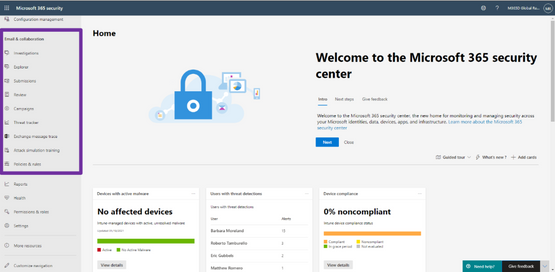
Figure 2: Email and collaboration features integrated into Microsoft 365 Defender.
We’re excited to be bringing these additional capabilities into Microsoft 365 Defender and look forward to hearing about your experiences and your feedback as you explore and transition to the unified portal.
To read more about the unified portal experience, check out:

by Contributed | Apr 19, 2021 | Technology
This article is contributed. See the original author and article here.
Ivana Tilca’s tech journey is marked by a life-long passion for learning. The AI MVP from Argentina is now a tech evangelist at the top of her field, but things were not always this way.
Originally, Ivana began her academic career in journalism at National University in Cordoba, Argentina. For family reasons, however, Ivana moved back to her home city of Salta where she changed course and began studies in Information Systems.
“I started speaking at events and mentoring students at my university in my 20s, and from that moment I realized the passion I feel for technology and for sharing with the community,” Ivana says.
It was not as easy to learn then as it is now. Rather, the education experience relied on books or the little content that existed on the internet. That’s when Ivana found Microsoft Channel 9, a video platform that covered innovation and topics breaking new ground. Then, Ivana says she was later able to support those videos with MS Learn and MS Docs.
Fast forward years later and Ivana is an accomplished MVP and Quality Manager at 3XM Group. These resources changed the course of her education experience, Ivana says, especially in an ever-changing field like AI. Further, the tech evangelist continues to take advantage of online resources to study AI, autonomous systems and mixed realities.
“I believe that technology is advancing by leaps and bounds, and the reality is that those who do not spend time updating themselves lose competitiveness in the professional market,” Ivana says.
“Further, continuing to face challenges gives you motivation and passion for your profession.”
For those looking to break into AI, Ivana suggests the following open resources: Bring AI to your business with AI Builder, AI edge engineer, Build AI solutions with Azure Machine Learning, Explore computer vision in Microsoft Azure.
“I think many professions in the future will involve the use of AI,” Ivana says. “AI has existed for several years, but recently it has grown and found its place. It is a branch of technology that is just beginning and will continue to improve constantly, and personally, I believe that it has no limits.”
For more on Ivana, visit her Twitter @ivanatilca
by Contributed | Apr 19, 2021 | Technology
This article is contributed. See the original author and article here.
Microsoft.Data.SqlClient 3.0 Preview 2 has been released. This release contains improvements and updates to the Microsoft.Data.SqlClient data provider for SQL Server.
Our plan is to provide GA releases twice a year with two preview releases in between. This cadence should provide time for feedback and allow us to deliver features and fixes in a timely manner. This second 3.0 preview includes many fixes and changes over the previous 3.0 Preview 1 release.
Please note the first item in the list of breaking changes from previous releases. If you use Azure Managed Identity authentication with a user-assigned identity, you will need to update your connection information.
Breaking Changes over preview release 3.0.0-preview1
- For User-Assigned, Azure Managed Identity (MSI) authentication, the `User Id` connection property now requires `Client Id` instead of `Object Id` [read more about the new Azure.Identity library dependency]
- `SqlDataReader` now returns a `DBNull` value instead of an empty `byte[]`. Legacy behavior can be enabled by setting `AppContext` switch **Switch.Microsoft.Data.SqlClient.LegacyRowVersionNullBehavior** [read more about this change]
Preview 2 also includes many bug fixes and performance improvements. For the full list of changes in Microsoft.Data.SqlClient 3.0 Preview 2, please see the Release Notes.
If you missed our 3.0 Preview 1 announcement, the most notable new feature in 3.0 is Configurable Retry Logic.
Configurable retry logic is available when you’ve enabled an app context switch. Configurable retry logic builds significantly more transient error handling functionality into SqlClient than existed previously. It will allow you to retry connection and command executions based on configurable settings. Since it is even configurable outside of your code, it can help make existing applications more resilient to transient errors that you might encounter in real-world use.
For a detailed look into this feature, check out the blog post Introducing Configurable Retry Logic in Microsoft.Data.SqlClient v3.0.0-Preview1.
To try out the new package, add a NuGet reference to Microsoft.Data.SqlClient in your application and pick the 3.0 preview 2 version.
We appreciate the time and effort you spend checking out our previews. It makes the final product that much better. If you encounter any issues or have any feedback, head over to the SqlClient GitHub repository and submit an issue.
David Engel
by Contributed | Apr 19, 2021 | Technology
This article is contributed. See the original author and article here.
Microsoft Ignite might be done and dusted for another year, but that did not stop scores of MVPs and tech enthusiasts in both China and Japan from continuing their education journey in March.
Following the global tech conference, both communities in Asia decided to review the takeaways in their local language and focus on lessons learned.
First, Microsoft China hosted a two-day digital conference, Microsoft Ignite China, that comprised seven keynotes, 11 connection sessions and 30 featured sessions. In collaboration with the MVPs and Regional Directors (RD), the March 18 event brought to life six hours of online engagement per day, with two RDs contributing to the “Connection Zone” and nine MVPs helping with live stage sessions.
Data Platform MVP Dan Zhang says it is very important for self-learners to have an integrated and authentic learning platform in China. Microsoft Ignite China, along with resources like MS Learn, are vital to staying on top of the ever-changing world of tech, Dan says.
“Knowledge on the internet is separated and unsystematic, which will cost learners a lot of time and energy to find good resources and materials. The emergence of MS Learn is a good benefit for numbers of developers,” Dan says.
“Continuous learning in technical areas is important in China since it can help developers keep up to pace with new tech and the environment,” agrees AI MVP Yuxiang Wang. Meanwhile, Azure and AI MVP Hao Hu suggests that an additional achievement system on MS Learn could be one way to encourage developers to further their skills.
Later that month on March 24, it was time for the community-driven learning event Microsoft Ignite Recap Community Day in Japan. A total of 20 MVP/RD/community leaders contributed to 10 sessions across the 4-hour event. Not only that, but the 20 MVP/RDs also shared their Ignite recommended sessions for further member learning.
Business Applications / Office Apps & Services MVP Taichi Nakamura joined multiple sessions and shared the latest updates of Microsoft 365 & Power Platform. Taichi says he wanted to take part simply because it looked fun. “I wanted to share my joy with attendees, provide our passion to attendees, and call more attention to join a tech community,” he says.
Developer Technologies MVP and fellow session presenter Kazushi Kamegawa says the pandemic has enacted many rapid changes in the world, and education remains an important way to stay connected. “As an engineer, of course, in order to adapt to the new world in the future, I think I have to continue to learn, to identify the right information, and not to be left behind by the situation in the world.”
Azure MVP Tetsuya Odashima contributed to one of the Ignite recommended session resources and says it is important to remember that “learning is not something that is given by someone, but something that you can get by acting on your own.”
“Learning new things stimulates curiosity,” posits Enterprise Mobility MVP Yutaro Tamai. “I’d like to share this experience with more community members.”
For more information on the dual events, visit the community pages for Microsoft Ignite China and Microsoft Ignite Recap Community Day Japan.

by Contributed | Apr 19, 2021 | Dynamics 365, Microsoft 365, Technology
This article is contributed. See the original author and article here.
In today’s increasingly complex business environment, project-centric organizations face a variety of challenges to succeed; challenges like winning new deals, optimizing resource utilization, simplifying time and expense processes, streamlining project financials, and gaining key business insights. Ultimately, project-centric organizations are always looking for ways to optimize their operations and improve their bottom line.
Since its launch, Microsoft Dynamics 365 Project Operations has connected sales, resource management, project management, and finance teams within one application to help win more deals, accelerate project delivery, and maximize profitability. In our first 2021 release wave 1 for Dynamics 365 Project Operations, we’ve refined and enhanced features that will continue to empower your project-centric business.
Non-stock materials for projects
With this update, sales and account managers using Project Operations deployed for lite and resource or non-stocked scenarios can provide more accurate quotes based on estimates, including non-stocked materials and their pricing as well as project contracts that contain services and materials. This update will also allow consumption tracking of these materials during the project delivery phase so project accountants can invoice customers for their use.
Procurement agents will have the ability to record pending vendor invoices for projects and provide these insights to all personas involved, from the project manager to the project accountant. Project team members and project managers will be able to track and approve non-stocked material usage against the project, enabling downstream accounting. Accounting and finance can see non-stock material costs immediately and invoice customers for their usage.
Task-based billing
In project-centric businesses, account and project managers often face the challenge of accommodating their customer’s complex billing and contracting needs. Sometimes a set of project tasks are complimentary or not chargeable, like proof of concept or presales activities, while the remaining tasks may require fixed fee or time and materials billing. Another example of complex contracting requirements is when multiple organizations need to be billed for different sets of tasks under the same project. Project Operations deployed for resource or non-stocked scenarios now support multiple billing scenarios with the flexibility to define what to bill for, whom to bill, and when to bill for each contract line all the way down to the task level.
Customers will now have the flexibility to use multiple billing methods in the contract while keeping the work in the same project for easy management and invoicing. Finance and leadership now get combined, accurate project profitability analysis for the work under a contract, regardless of its billing requirements.
Improvements to project planning and task scheduling experiences
Since its release, Project Operations has leveraged project management capabilities from Microsoft Project for the web. Project Operations customers have benefited from new features released by the Project team like Export to Excel, Export Timeline to PDF, Create Attachments on Tasks, and more. Learn more about what’s new in Project.
One 2021 release wave 1 feature we’d like to highlight is Scheduling modes, which will enable project managers to designate how Project Operations calculate task assignments depending on what makes the most sense for a particular project. Define the amount of work needed to complete an assignment (fixed effort) or the amount of time it will take to complete (fixed duration). Alternatively, set a completion date or the amount of work, and let Project Operations determine the allocation of resources needed to meet the deadline (fixed units).
Throughout the 2021 release wave 1, the Project team will bring even more new features to Project for the web and to Project Operations as well.
Enhanced Project Operations APIs
Project for the web capabilities in Project Operations were preventing certain scheduling entities from create, update, and delete programmatic access. We have now enabled enhanced APIs so customers can develop custom solutions to utilizing this API. Learn more about Schedule APIs.
Learn more about these features and how Project Operations connects project-centric businesses in one application
Learn about these capabilities by reading the What’s New April 2021 release notes and the Project Operations 2021 release wave 1.
We invite you to watch on-demand event sessions showcasing these features, Reimagine Project Management with Microsoft.
To learn more about Projects Operations, watch videos on how Project Operations can help you:
- Win more bids with better deal management
- Optimize resource utilization
- Accelerate project delivery
- Enhance collaboration and simplify time and expense
- Drive project performance
- Increase business agility
The post Discover the latest capabilities in Dynamics 365 Project Operations appeared first on Microsoft Dynamics 365 Blog.
Brought to you by Dr. Ware, Microsoft Office 365 Silver Partner, Charleston SC.
by Contributed | Apr 19, 2021 | Technology
This article is contributed. See the original author and article here.
Today I wanted to share with you some exciting new capabilities that are now available to help Microsoft Defender for Office 365 and Microsoft 365 Defender customers investigate emails.
Investigating email threats is now easier than ever!
We know that you, the security teams, spend a lot of time diving deep into alerts, hunting threats, identifying malicious indicators, and taking remediation actions. You go through multiple workflows to take the right measures to protect your organization. These workflows involving email borne threats typically have a few steps in common – all involving analyzing an email in question and any related emails – to answer questions like: Why did the system call an email malicious? Why did an email get blocked (or delivered)? How many users (and which ones) received these emails? What actions have already been taken on these emails? And a lot more.
Answering these questions often takes time and effort. And we consistently hear how much you crave ever-increasing efficiency in the tools you use, so the effort and time involved in responding to alerts and threats is reduced.
That’s why we’re excited to introduce the new Email Entity page in Microsoft Defender for Office 365. A simple, yet rich experience that offers a single pane of glass view to answer all the questions above, greatly amplifying the efficiency with which you can investigate and respond to threats.
Introducing the new Email Entity page
The new email entity page brings a comprehensive experience that provides an exhaustive view of details critical to investigation. The email entity page gives a 360-degree view of an email in one page, and helps security analysts save time and effort, leading to more effective threat protection.
Curious why an email was delivered despite being marked as malicious? Or what the latest location of the email is? What are the rich set of details for a URL or file that was detonated? Was it sent to a priority account? The email entity page brings you the answer to these questions, and the details you need to investigate and analyze an email – overrides, exchange transport rules, latest delivery location, detonation details, tags and a lot more.
The email page has information and capabilities for analysts to dig deeper into intricate email details, and headers, look at email preview or email download. The email page also builds on our promise to integrate Defender for Office 365 tightly with other Microsoft 365 Defender experiences like hunting, alerts, investigations and more.
What’s exciting about the Email Entity page?
We are sure the single page view is appealing, but that is not it. We bring a lot more details and capabilities to the new email entity page.
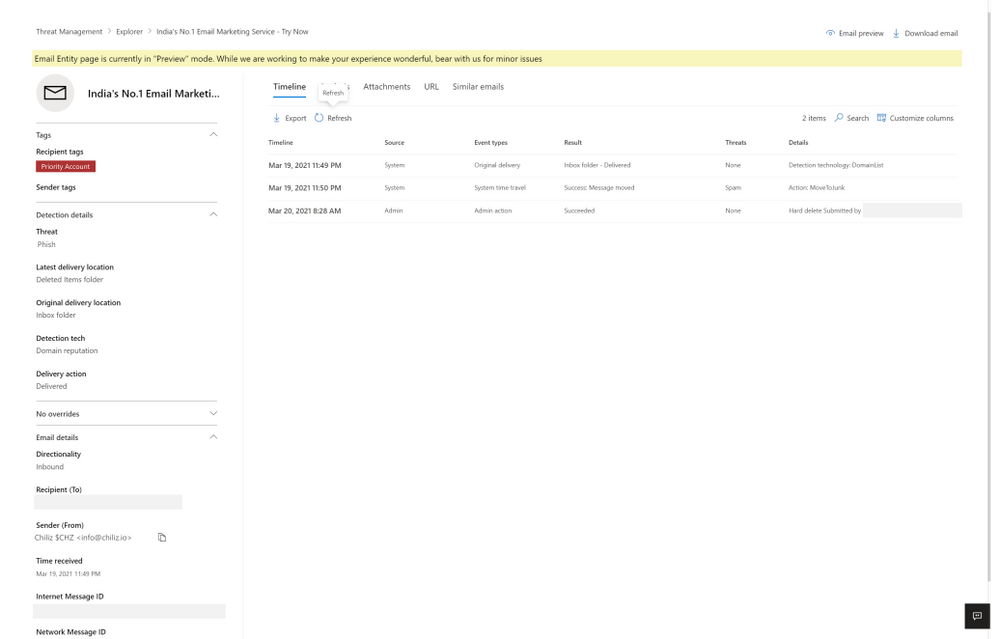
Each tab presents you with information about the email. The timeline tab has a series of events which took place on email by system, admin or user.
Figure 1: The timeline tab has a series of events which took place on email by system, admin or user.
The analysis tab shows pre and post-delivery fields about email, in addition to the headers presented in the same tab, helpful for a side-by-side analysis.
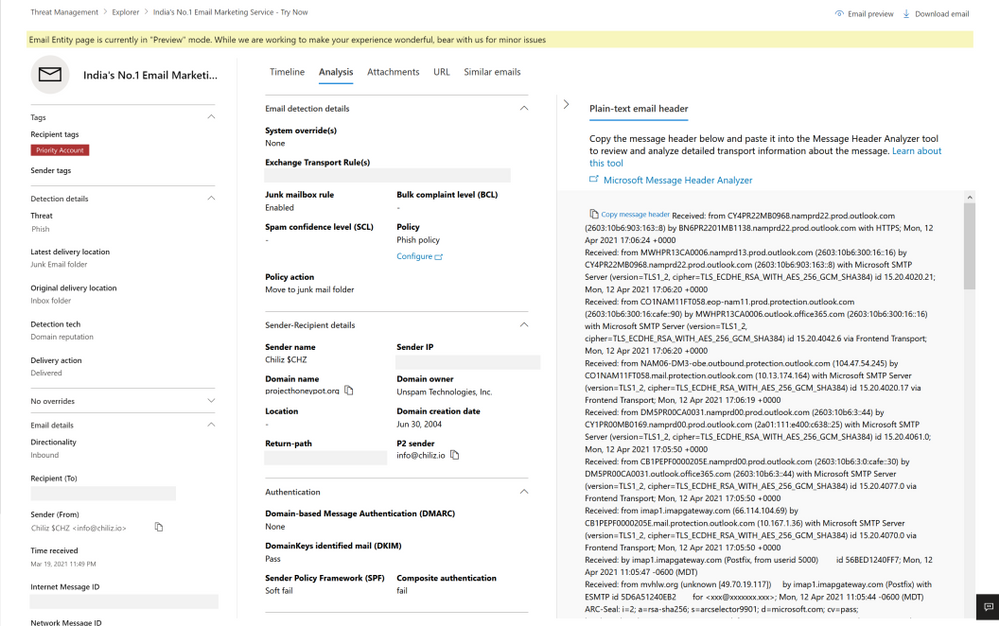
Figure 2: The analysis tab shows pre and post-delivery fields about email, in addition to the email headers
The attachment and URL tabs present detailed information about attachments and URLs present in the email, along with detonation details in case a detonation occurs (shown in the section later on detonation details).
Lastly, the similar emails tab shows emails found similar to the email. Similar emails are found using the body fingerprint i.e. the cluster ID.
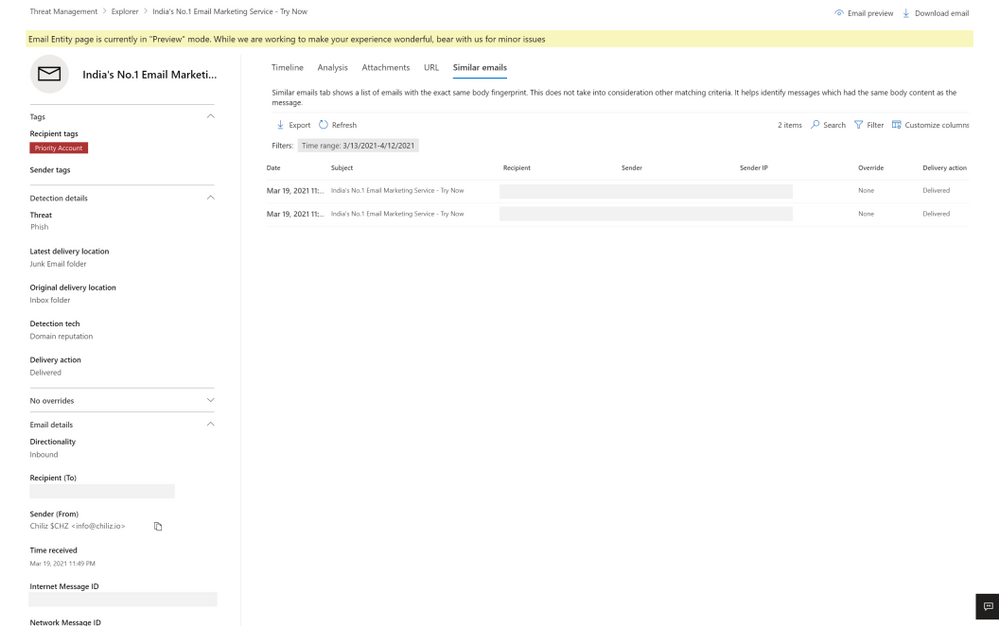
Figure 3: The similar emails tab shows emails found similar to the email, using cluster ID
The email entity page not only has enriched details, but also new capabilities to help the security operations team investigate successfully, like email preview and detonation details.
Email preview for cloud mailboxes
We now provide full previews of emails found in cloud mailboxes. No need to download a copy of a malicious message to understand what your users saw – you can now do this with the click of a button from the safety of the admin center.
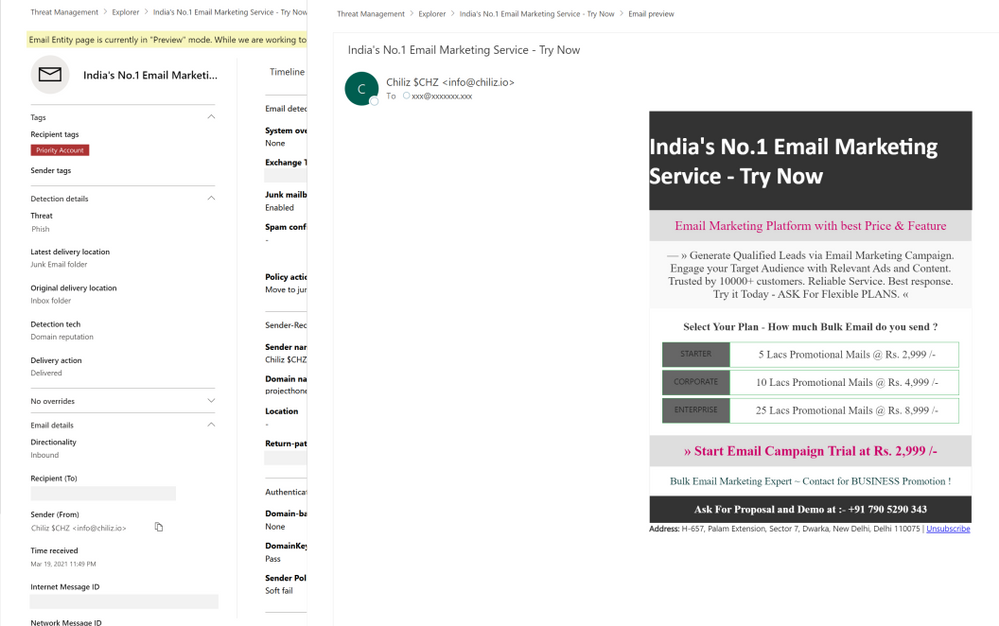
Figure 4: Email preview provides full previews of emails found in cloud mailboxes
Exposing details for detonated URLs and attachments
With the email entity page, we have greatly enhanced the level of details we present about the observations we make in the detonation chamber for entities which get detonated. When a URL or file present in an email is found malicious during detonation, we will present the information to help you understand the full scope of related threats. Detonation details reveal information like the full detonation chain, a detonation summary, a screenshot and observed behavior details. This information can help security teams understand why we reached a malicious verdict for a URL or file following a detonation.
For file detonation cases (you can filter by detection technology in Threat Explorer), the Attachments tab shows a list of attachments and their respective threats. Clicking on the malicious attachment opens the detonation details flyout for the detonated attachments. For URL detonations, the URL tab shows a list of URLs and the corresponding threats. Clicking on the malicious URL will open the detonation details flyout for detonated URLs.
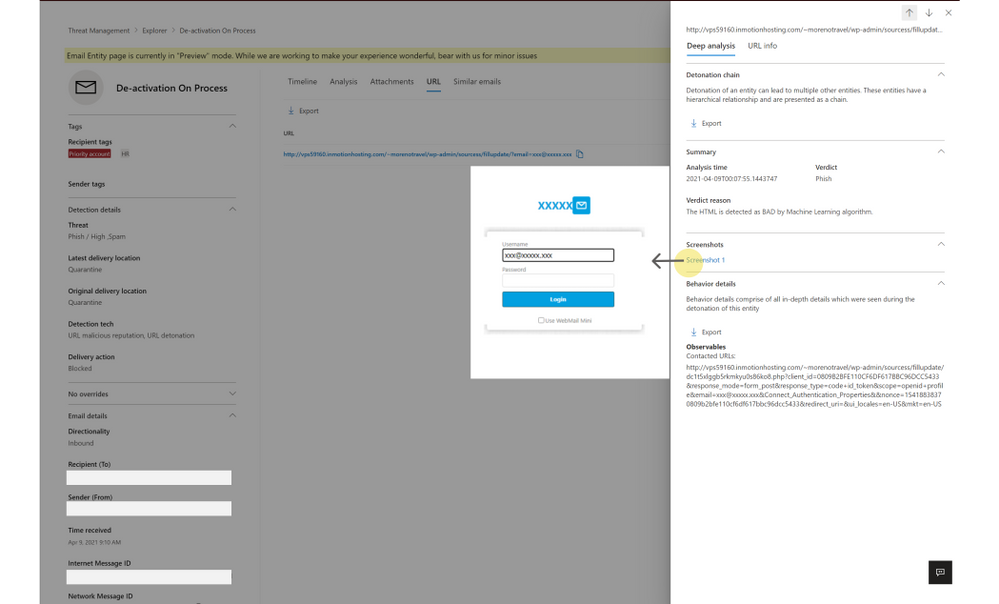
Figure 5: Detonation details shows additional details discovered during detonation of links and files
How can I get started with this new experience?
If you have Microsoft Defender for Office 365 or Microsoft 365 Defender, you can take advantage of this new experience today. When hunting for email-based threats, natively integrated into Explorer, you may now choose to navigate to the new email entity page. You can do the same with alerts experience, across both the security and protection portals at security.microsoft.com and protection.office.com respectively.
Learn more about the email entity page on Microsoft Docs, and check out a video overview of these capabilities here.
Do you have questions or feedback about Microsoft Defender for Office 365? Engage with the community and Microsoft experts in the Defender for Office 365 forum.


Recent Comments