by Contributed | Apr 23, 2021 | Technology
This article is contributed. See the original author and article here.
SQL server is a batch oriented service, just like any DBMS. One program has to query it in order to get the result – so to have real time analytics we would have to change this batch behavior to a streaming /event/push behavior.
On the other side, we have azure with Azure Event Hubs, Stream analytics and Streaming datasets on Power BI. They work pretty well together if the data source is a streaming, producing events (something we can have with an custom code application or some Open Source solution with Kafka.
The challenge here was to find something to make the bridge between SQL Server and Event Hubs.
After some time looking for solutions on the internet, I found this Docs <reference> page with an approach to bring CDC data from Postgres to Event Hubs.
The solution proposed to use an Apache Kafka based solution named Debezium <reference>. This was so far unknown to me. With Debezium, one solution can monitor a CDC source and generate the events on a Kafka enables hub.
The initial setup seems a bit complex and it do not run on windows, so I had to find easier ways to enable this deployment.
Have you event thought about Docker?
It works pretty well on windows 10 or any build after (Build number…18363?) because of WSL2 <reference>. If you still never tried WSL2, I hightly recommend it.
After a few tries, I installs a WSL2 – Ubuntu 20.04 based and with that I could install Docker Desktop on my Windows 10 Surface Book :smiling_face_with_smiling_eyes:
Note: Docker Desktop works well for your development env. For production, you can install it on ACI or AKS <reference, reference>
With that said, Debezium had a Docker Image available on hub.docker.com, named Debeziumserver.
Debezium Server is a lightweight version that do not have Kafka installed. The image has already installes the SQL Server connector and can output the events directly to Event Hubs.
To install and configure the docker, I ran only this line of code
docker run -d -it –name SampleDebezium -v $PWD/conf:/debezium/conf -v $PWD/data:/debezium/data debezium/server
My SQL Server is hosted on Azure and to create a lab enviorement, I created a single table and ebabled CDC on it
<script>
Debezium will query the latest changed rows on CDC based on how it is setted on the configuration file and create the events on Event Hub
<sample configuration file>
Event Hub:
I created a sample event hub to hold this experiment.
But how to consume the events?? -> Stream analytics
With Stream analytics I consumes the events and created 2 outputs.
Azure Data Lake output
I’m saving every event on a Azure data lake for doing later analytics. This approach even enables to move from a OLTP on premises database to a modern Data Warehouse architecture with a incremental CDC based load. More need to be worked and tested here – Maybe a next post
Power BI Output
The Power BI output created a real tine dataset that can be consumes from a Power BI Dashboard.
Difference between real time dataset and Direct Query <reference>
Make it work and test
I created a script who negates data on my CDC enables table to test this method. The script will <describe the script>
<Add the script from GitHub>
Lets assure the Debezium server container is running
Show query output on Steam Analytics
Create the tiles on a Power BI Dashboard
See it running
<Add a .gif with real time enables dashboard and the SQL Server creating data>
Known problem
It seems when a big transaction (like a update on 200k rows) happens, Debezium stops complaining the message was bicker than the maximum size defined from Event Hubs. Maybe there is a way to break it on smaller messages, maybe it is how it works, so our system shoun only run OLTP (row by row) workload.
Acknowledgment
Special thanks to Goran, who guided me on my first steps on Stream Analytics
<Add a gif >
# References
# Architecture https://debezium.io/documentation/reference/architecture.html#_debezium_server
# Docker image with example https://hub.docker.com/r/debezium/server
# Debezium Server https://debezium.io/documentation/reference/1.4/operations/debezium-server.html
# SQL Server connector https://debezium.io/documentation/reference/connectors/sqlserver.html
# Azure Event hubs connection https://debezium.io/documentation/reference/1.4/operations/debezium-server.html#_azure_event_hubs
by Contributed | Apr 23, 2021 | Technology
This article is contributed. See the original author and article here.
Here’s an excerpt. Please find the full article on https://lnkd.in/gMqFCnW
Machine Learning Services is a feature of Azure SQL Managed Instance that provides in-database machine learning, supporting both Python and R scripts. The feature includes Microsoft Python and R packages for high-performance predictive analytics and machine learning. The relational data can be used in scripts through stored procedures, T-SQL script containing Python or R statements, or Python or R code containing T-SQL.
Use Machine Learning Services with R/Python support in Azure SQL Managed Instance to:
· Run R and Python scripts to do data preparation and general purpose data processing
· Train machine learning models in database
· Deploy your models and scripts into production in stored procedures
by Contributed | Apr 23, 2021 | Technology
This article is contributed. See the original author and article here.
A common conversation for bringing Oracle workloads to Azure always surrounds the topic of Real Application Clusters, (RAC). As it’s been quite some time since I’ve covered this topic, I wanted to update from this previous post, as with the cloud and technology, change is constant.
One thing that hasn’t changed is my belief RAC is A solution for Oracle for a specific use case and not THE solution for Oracle. The small detail that Oracle won’t support RAC in any third-party cloud is less important than the lack of need for RAC in most cases for those migrating to an enterprise level cloud such as Azure.
Not So Lift and Shift
Whenever we are working on migrating Oracle workloads to Azure, it is important for us to focus on how we should most effectively architect for the Azure cloud and not to just lift and shift what exists onprem. A common challenge during cloud migrations is when an attempt is made to duplicate everything onprem in the cloud or simply treating the cloud like another data center, not realizing how much high availability is built into Azure that isn’t in their onprem data center.
We often experience customers implementing redundancy in products, features and at the same time, introducing redundancy and sometimes their own failures. Most common abuses are in the areas of hypervisors on top of hypervisors, mirroring/storage copies and storage management tripping all over itself and this topic, high availability products.
In Data Guard We Trust
Due to this transparent and very important part of the Azure cloud, the most common Oracle architecture deployed are single instance Oracle databases, (often from onprem RAC) with Oracle Data Guard standbys to support both disaster recovery and high availability using features that surprisingly, less technologists are aware of than we’d like.
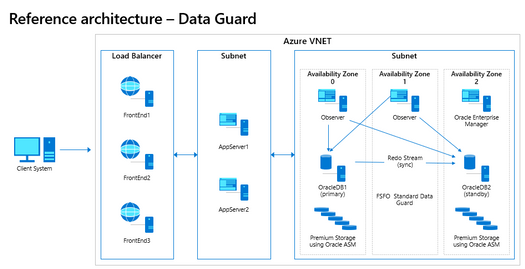
When we’ve completed an Oracle sizing and architecture assessment here at Microsoft with a customer, the diagrams look very similar to the following:
Fig. 1
As there are several topics around why we so rarely use RAC in Azure, I’m going to take each of these on separately and hopefully cover the important details.
High Availability Cluster
If we were to build out a RAC cluster in the Azure cloud, unlike an Always on Availability Group, all the nodes for RAC are deployed only to a single Availability Zone. If we think about high availability architecture design, you will realize that this architecture will fail basic HA requirements.
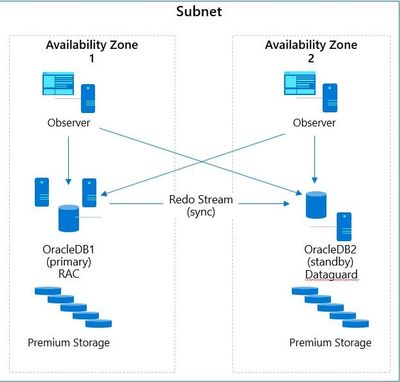
Fig. 2
Oracle Data Guard is very similar in design to Always on AG and an essential part of any Disaster Recovery architecture design. Notice in the diagram, Figure 3, if the RAC in Availability Zone 1 goes down, there will be an outage unless there is an Oracle Data Guard standby available in another Availability Zone to failover to.
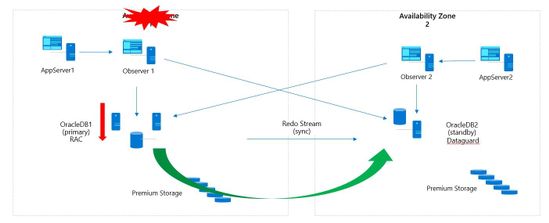
Fig. 3
With Oracle Data Guard, we can configure several features to build out a full-blown, highly available architecture that can support 8-9’s of uptime. With Oracle Data Guard configured with Fast-Start Failover, (FSFO) if the primary database becomes unavailable or goes down for any reason, the secondary will automatically become the primary and take over in a matter of seconds. A notification can be set up in Oracle Enterprise Manager to notify those responsible, but this failover happens in seconds when configured correctly in Azure, allowing for transparent failover to a secondary standby in a second availability zone.
To take this a step further, you can configure the DG Broker and set up Oracle Observer in secondary Availability zones, (with full redundancy) to failover applications that are failover compatible. This results in a transparent failover of new sessions to the secondary when FSFO comes into play, failing over the database.
We can deploy the primary in one Availability Zone and a standby in a second Availability Zone, creating a fully redundant and automatic failover solution. As Oracle Data Guard can support numerous standby databases, these HA and DR copies can be deployed in multiple Availability Zones and secondary regions to meet the customer’s RPO/RTO, no matter how complex the SLA.
For Oracle’s Maximum Availability Architecture, (MAA) to reach a gold standard, Oracle Data Guard must be part of the deployed solution. As customers often move to storage snapshots from RMAN for backups, having Data Guard features, such as DBverify and Analyze to perform logical checks for intra-block and inter-object consistency offers added benefits. Data Guard provides in-memory intra-block checks and shadow lost write protection if there is an interruption in service to the storage layer to the database.
For an additional charge of Active Data Guard, the standby can be used for an RMAN backup target to offload the demand on the primary database, as well as offload the intra-block logical checks to the standby in its active read-only mode.
We can also use a separate Far Sync instance to guarantee zero data loss by performing a compressed offload compressed transport of the redo to the Active standby database. This also offers the ability to perform continuous Oracle validation to the standby and additional encryption to secure business data.
High Availability via rolling patches and upgrades
As RAC isn’t supported in any third-party cloud, Azure specialists are going to investigate the solutions that do provide what is required and for Azure cloud, Oracle Data Guard is very compatible with Azure cloud infrastructure HA. Another nice feature that many aren’t aware of is that with Oracle Active Data Guard, (active/active, secondary is a read-only active standby) you can do switch overs and using the DBMS_ROLLING package provided with Oracle 19c, you can do rolling patches and upgrades. This provides one of the most loved features of Oracle RAC by DBAs and is very little known in Data Guard.
With DBMS_ROLLING and Active Data Guard, database and application downtime can be decreased to seconds with a fault tolerant, resumable and rollback capable solution.
Scalability
This is the best reason to use RAC and for many, the least common reason we’ve often seen businesses choose it. For an OLTP or hybrid database workload that requires significant CPU and memory and the database design has been optimized for RAC, considerable demanding workloads can be leveraged with the product. When we reach for RAC over OS level clustering with load balancer or a larger VM that can handle the workload has to do with per VM limits we can’t work our way around. There are significant challenges with concurrency, initial transaction locking, GC waits or shipping between nodes that are outside of this discussion, but you do realize the benefit that could be brought to the table with RAC…but not in Azure or any other third-party cloud if you want it supported by Oracle. It’s not about the shared storage or even the multi-cast network that’s the problem, it’s simply around supportability by Oracle.
Although we’re not able to use RAC for scalability, for heavy read-only workloads, we can use Oracle’s Active Data Guard standbys, in a read-only active mode to disperse those application compatible workloads, retaining the primary to only process the transactional workload.
Oracle Sharding offers another option for scalability, spreading the database, with a shared-nothing architecture, across multiple databases/hosts using shard keys. Sharding is a horizontal partitioning of data across numerous databases and each shard holds a subset of the total data source vs. housing in a single database. As RAC isn’t supported in any third-party cloud, this is deployed in the Azure cloud without a RAC clusterware backbone but is able to use Oracle’s multi-tenant feature with the additional licensing.
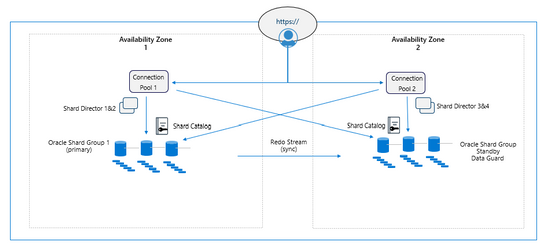
Fig. 4
For those workloads that absolutely need a RAC solution, we leverage OS level clustering in Azure VMs using PaceMaker and for the customers who can adopt a co-location, we recommend Azure BareMetal RAC offering. This is a proximity located Co-Lo to Azure that can offer RAC for customer that absolutely must have it. The infrastructure is supported by Azure and everything above that is supported by the customer.
There is also Azure RAC BareMetal which is in a gated GA status. Bare Metal, which are dedicated machines in a co-location configuration in proximity to the Azure cloud offers a RAC solution where the infrastructure is supported by Azure, but everything above this is managed by the customer.
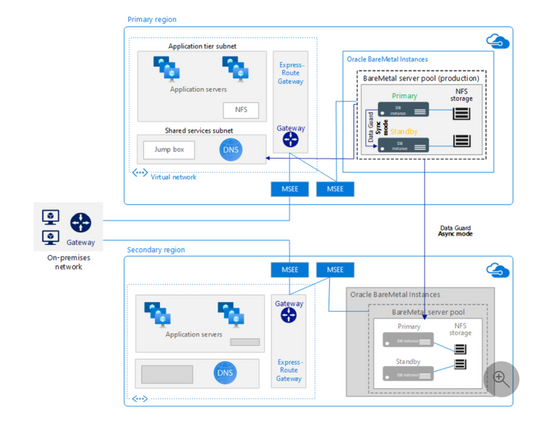
Fig. 5
Latency between the Bare Metal solution and other Azure services and VMs is minimized, along with additional high availability built into the offering to support what would be missing from most onprem data center deployments.
Azure Bare Metal can support RAC One Node and standard RAC deployments with an HA storage configuration to support the demands of 2 and 4 Node RAC configurations in a highly scaled, enterprise cloud solution.
A customer may use Flashgrid on Azure with the understanding that all support for this RAC solution running in Azure must go through Flashgrid. Neither Oracle nor Microsoft can support RAC running inside the Azure cloud, but Flashgrid has shown a history of offering solid support for their customers.
Although initially, we hoped to use Azure’s shared storage for an option to run Oracle RAC in our cloud, we’ve backtracked from this due to support constraints and same goes for networking advancements in Azure. It’s not that we can’t run RAC in Azure, it’s just that it isn’t supported, and our main goal is long term customer satisfaction and supportability in Azure. No matter your feelings on RAC, the goal for this post was to discuss what features are best suited for a deployment in Azure making Oracle highly available, easy to manage and most likely to receive vendor support.

by Contributed | Apr 23, 2021 | Technology
This article is contributed. See the original author and article here.
About Me
My name is Chak Koppula https://ckoppula199.github.io/ and I’m a 3rd year Computer Science student at University College London and have been working alongside Microsoft’s Project 15 team to help in creating a system to reduce the poaching of elephants.
Project Aims and Goals
The overall aim of the project is to create a system that utilises the Project 15 platform to identify and track the movement of elephants. The African elephant population has reduced by 20% in the past decade due to poaching meaning keeping track of them has become vital in preventing their numbers from further decreasing.
To help in the development of this system I made three tools:
Source Code
ckoppula199/UCL-Microsoft-IXN-Final-Year-Project (github.com)
Video Indexer Analysis Script
The following Python script that takes videos of surveillance footage from Azure cloud storage and passes them to Azure Video Indexer to obtain quick insights into a video.
import requests
import os
import io
import json
import time

from azure.storage.blob import (
    ContentSettings,
    BlobBlock,
    BlockListType,
    BlockBlobService
)


# Load details from config file
with open('config.json', 'r') as config_file:
        config = json.load(config_file)

storage_account_name = config["storage_account_name"]
storage_account_key = config["storage_account_key"]
storage_container_name = config["storage_container_name"]

video_indexer_account_id = config["video_indexer_account_id"]
video_indexer_api_key = config["video_indexer_api_key"]
video_indexer_api_region = config["video_indexer_api_region"]

file_name = config["file_name"]

confidence_threshold = config["confidence_threshold"]

print('Blob Storage: Account: {}, Container: {}.'.format(storage_account_name,storage_container_name))

# Get File content from blob
block_blob_service = BlockBlobService(account_name=storage_account_name, account_key=storage_account_key)
audio_blob = block_blob_service.get_blob_to_bytes(storage_container_name, file_name)
audio_file = io.BytesIO(audio_blob.content).read()

print('Blob Storage: Blob {} loaded.'.format(file_name))

# Authorize against Video Indexer API
auth_uri = 'https://api.videoindexer.ai/auth/{}/Accounts/{}/AccessToken'.format(video_indexer_api_region,video_indexer_account_id)
auth_params = {'allowEdit':'true'}
auth_header = {'Ocp-Apim-Subscription-Key': video_indexer_api_key}
auth_token = requests.get(auth_uri,headers=auth_header,params=auth_params).text.replace('"','')

print('Video Indexer API: Authorization Complete.')
print('Video Indexer API: Uploading file: ',file_name)

# Upload Video to Video Indexer API
upload_uri = 'https://api.videoindexer.ai/{}/Accounts/{}/Videos'.format(video_indexer_api_region,video_indexer_account_id)
upload_header = {'Content-Type': 'multipart/form-data'}
upload_params = {
    'name':file_name,
    'accessToken':auth_token,
    'streamingPreset':'Default',
    'fileName':file_name,
    'description': '#testfile',
    'privacy': 'Private',
    'indexingPreset': 'Default',
    'sendSuccessEmail': 'False'}

files= {'file': (file_name, audio_file)}
r = requests.post(upload_uri,params=upload_params, files=files)
response_body = r.json()

print('Video Indexer API: Upload Completed.')
print('Video Indexer API: File Id: {}.'.format(response_body.get('id')))
video_id = response_body.get('id')

# Check if video is done processing
video_index_uri = 'https://api.videoindexer.ai/{}/Accounts/{}/Videos/{}/Index'.format(video_indexer_api_region, video_indexer_account_id, video_id)
video_index_params = {
    'accessToken': auth_token,
    'reTranslate': 'False',
    'includeStreamingUrls': 'True'
}
r = requests.get(video_index_uri, params=video_index_params)
response_body = r.json()

while response_body.get('state') != 'Processed':
    time.sleep(10)
    r = requests.get(video_index_uri, params=video_index_params)
    response_body = r.json()
    print(response_body.get('state'))

print("Done")

output_response = []
item_index = 1
for item in response_body.get('videos')[0]['insights']['labels']:
    reformatted_item = {}
    instances = []
    reformatted_item['id'] = item_index
    reformatted_item['label'] = item['name']
    for instance in item['instances']:
        reformatted_instance = {}
        if instance['confidence'] > confidence_threshold:
            reformatted_instance['confidence'] = instance['confidence']
            reformatted_instance['start'] = instance['start']
            reformatted_instance['end'] = instance['end']
            instances.append(reformatted_instance)
    if len(instances) > 0:
        item_index += 1
        reformatted_item['instances'] = instances
        output_response.append(reformatted_item)

#Print response given by the script
print(json.dumps(output_response, indent=4))
Demo
Camera Trap Simulator
The camera trap simulator allows users to simulate a real camera trap on their own computers and can even be run on devices such as a Raspberry Pi. It takes in a video feed and then uses a detection method over that video feed. If the detection method is triggered then it will send a message to Azure IoT hub. Once the data is in the cloud the user can test out their cloud paths and solutions as if the data had come from a real camera trap.
The camera trap can operate over both a live video feed such as a webcam or it can be used with a pre-recorded video feed. A video of the intended deployment area can be provided to the simulator to make the simulation more realistic, but for projects who don’t have access to videos of their deployment area, a live video feed may be fine for testing and development purposes.
The camera trap can use motion based detection or can utilise a Machine Learning model to more accurately identify points of interest within a video frame. Use of an ML model will reduce the number of false positives the systems gives and will be a more accurate.
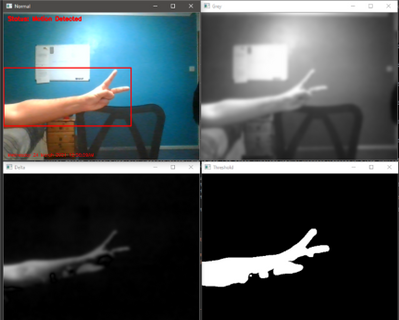
Above is an image showing the motion detection software running. It uses a method of motion detection known as foreground detection. The top left is the normal video feed, the top right is a greyscaled and blurred version of the video feed, the bottom left is the difference between the current frame and the reference frame and the bottom right is the final result showing any moving object in white.simulation but if an ML model isn’t available then motion detection can be used for testing and development purposes.
Demo
Machine Learning Models
When creating the models there was difficulty in collecting a suitable dataset. Initially the plan was to use our own devices in the deployment area to create our own dataset of images to use for training purposes but due to time constraints and various blockers I ended up having to utilise a public dataset called Animals-10 from Kaggle which contained images of elephants among other animals.
I then created a set of image classification models using Python with TensorFlow and also created a set of object detection models using Azure Custom Vision services.
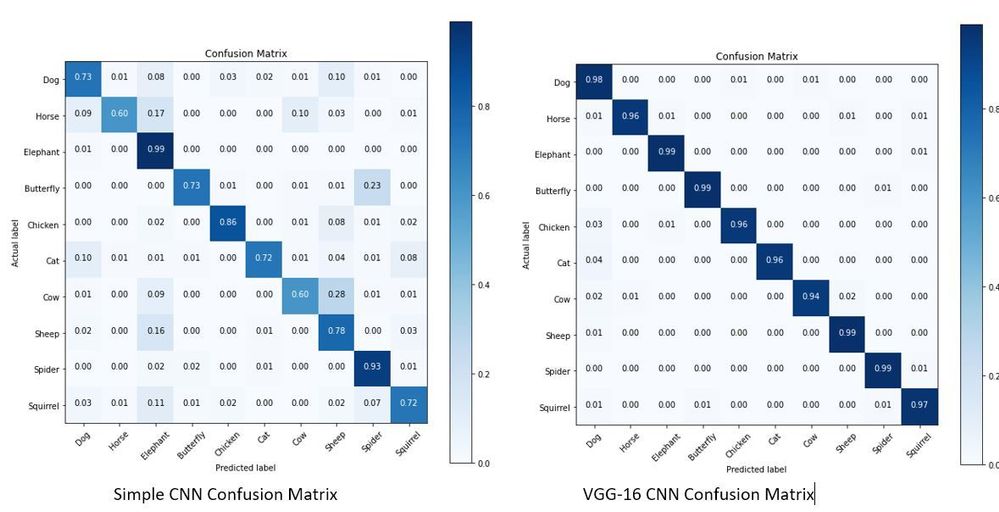
The first image classification model that was made used a very simple Convolutional Neural Network and achieved an accuracy of 77% on a test set. The second image classification model used a CNN architecture known as VGG-16 which performed much better with an accuracy of 97% on the test set. The confusion matrices for these two models can be seen below.
The object detection models made using Azure Custom Vision also achieved quite high results as shown below.
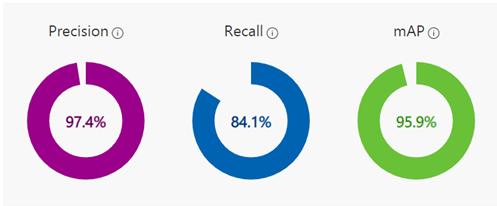
The object detection model was only trained using around 130 images of elephants and managed to achieve the above metrics. More images weren’t used since when providing images for the object detection models to train on, you have to tag every occurrence of every object you want to model to identify which can be quite time consuming.
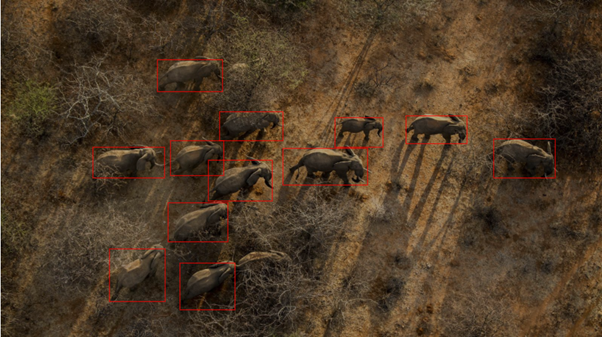
The object detection model ended up being able to identify most elephants in an image, struggling on in cases where elephants were obscured. In the above image you can see in the bottom middle of the image there is a single elephant hidden by bush the model didn’t quite manage to identify.
The conclusion that was reached was that for our use case object detection should be used. This is due to it not only saying if an image is of an elephant, but it providing the additional information of how many elephants are in the image and where in the image they are. This extra information that can’t be provided by image classification allows for more uses case to be fulfilled by the system later on. Azure custom vision was also chosen as the method to use as while TensorFlow is an incredible library allowing users to specify the exact architecture and hyperparameters that they want to use, it can take a long time to find the optimal setup and also requires more data to train on to achieve the same level of results produced by Azure Custom Vision. The ease of use and its ability to seamlessly work with other Azure services being used in the Project 15 platform make Azure Custom Vision the best choice for this project.
Demo
Summary
Overall, the process of learning about cloud services and machine learning tools has been extremely enjoyable and getting the opportunity to apply what I learnt to a real world project like this has been an incredible experience. So if your interested in building a project to support Project 15 see Project 15 Open Platform for Conservation and Ecological Sustainability Solutions or if your new to this see the amazing resources to help get your started at Microsoft Learn.
by Contributed | Apr 23, 2021 | Technology
This article is contributed. See the original author and article here.
Today, I had a discussion with a colleague with a very interesting situation. All points to that the IP address is part of the cached data in the connection pooling slot.
In order to test this situation, I developed this small PowerShell Script doing a simple connection and executing “SELECT 1” command around for 10000 times. Using connection pooling the connection will be re-use every time without opening a new port everytime.
So, during the execution of PowerShell script, we are going to use the host file to modify the resolution of the IP address of our Azure SQL Server servername.database.windows.net based on North Europe.
Results using connection pooling:
- Using a fake IP we obtain errors about the connection, removing this fake IP the execution becomes successulf but if I changed the resolution of the IP again to this fake address new connections using the same connection pooling slot is still working, so the IP address has not been updated.
- However, without using connection pooling and repeating the same procedure without using connection pooling I have the expected behavior, everytime that I changed the IP resolution to the fake IP I got an error.
Lesson Learned: In case of failovers or IP changes if you are using connection pooling, all points that the connection pooling slot will be used the previous IP. In order to avoid this issue, I implemented the following workaround:
- In every connection check the DNS
- if the IP is changed execute a ClearPool of the SQLConnection in order to clean this cache, with an exception if that both IPs are from the same datacenter (round-robin access), because, there is not needed to execute the clean the pool.
Enjoy!
Code:
$DatabaseServer = "servername.database.windows.net"
$Database = "DatabaseName"
$Username = "UserName"
$Password = "Password"
$Pooling = $true
$NumberExecutions =100000
$FolderV = "C:MyFolder"
[string]$LocalInitialIP = ""

#-------------------------------
Function DetectIP([Parameter(Mandatory=$true, Position=0)]
                  [string] $IP)
{

  $IP=$IP.Trim()
  if(($IP -eq "40.68.37.158") -or ($IP -eq "104.40.168.105") -or ($IP -eq "52.236.184.163")) {return "WE"}

  if(($IP -eq "40.113.93.91") -or ($IP -eq "52.138.224.1") -or ($IP -eq "13.74.104.113")) {return "NE"}

  return "UNknow"

  ##See URL: https://docs.microsoft.com/en-us/azure/azure-sql/database/connectivity-architecture
}


#-------------------------------
Function DeleteFile{
  Param( [Parameter(Mandatory)]$FileName )
  try
   {
    $FileExists = Test-Path $FileNAme
    if($FileExists -eq $True)
    {
     Remove-Item -Path $FileName -Force
    }
    return $true
   }
  catch
  {
   return $false
  }
 }

function GiveMeSeparator
{
Param([Parameter(Mandatory=$true)]
      [System.String]$Text,
      [Parameter(Mandatory=$true)]
      [System.String]$Separator)
  try
   {
    [hashtable]$return=@{}
    $Pos = $Text.IndexOf($Separator)
    $return.Text= $Text.substring(0, $Pos)
    $return.Remaining = $Text.substring( $Pos+1 )
    return $Return
   }
  catch
  {
    $return.Text= $Text
    $return.Remaining = ""
    return $Return
  }
}

#--------------------------------------------------------------
#Create a folder
#--------------------------------------------------------------
Function CreateFolder
{
  Param( [Parameter(Mandatory)]$Folder )
  try
   {
    $FileExists = Test-Path $Folder
    if($FileExists -eq $False)
    {
     $result = New-Item $Folder -type directory
     if($result -eq $null)
     {
      logMsg("Imposible to create the folder " + $Folder) (2)
      return $false
     }
    }
    return $true
   }
  catch
  {
   return $false
  }
 }

#--------------------------------
#Validate Param
#--------------------------------

function TestEmpty($s)
{
if ([string]::IsNullOrWhitespace($s))
  {
    return $true;
  }
else
  {
    return $false;
  }
}

Function GiveMeConnectionSource([Parameter(Mandatory=$false)][String][ref]$InitialIP)
{
  for ($i=1; $i -lt 10; $i++)
  {
   try
    {
      logMsg( "Connecting to the database...Attempt #" + $i) (1)
      if( TestEmpty($InitialIP) -eq $true)
       {$InitialIP = CheckDns($DatabaseServer)}
      else
      {
       [string]$OtherIP = CheckDns($DatabaseServer)
       If( $OtherIP -ne $InitialIP )
       {
         $PreviousOneDC=DetectIP($InitialIP)
         $NewOneDC = DetectIP($OtherIP)

         If($PreviousOneDC -ne $NewOneDC)
         {
           [System.Data.SqlClient.SqlConnection]::ClearAllPools()
           logMsg("IP changed noticed. Cleaning Pools...") (1)
         }
         else
         {
           logMsg("IP changed noticed, same DC...") (1)
         }

       }
      }

      $SQLConnection = New-Object System.Data.SqlClient.SqlConnection
      $SQLConnection.ConnectionString = "Server="+$DatabaseServer+";Database="+$Database+";User ID="+$username+";Password="+$password+";Connection Timeout=15"
      if( $Pooling -eq $true )
        {
          $SQLConnection.ConnectionString = $SQLConnection.ConnectionString + ";Pooling=True"
        }
      else
        {
          $SQLConnection.ConnectionString = $SQLConnection.ConnectionString + ";Pooling=False"
        }

      $SQLConnection.Open()
      logMsg("Connected to the database...") (1)
      return $SQLConnection
      break;
    }
  catch
   {
    logMsg("Not able to connect - Retrying the connection..." + $Error[0].Exception) (2)
    Start-Sleep -s 5

   }
  }
}

#--------------------------------
#Check DNS
#--------------------------------
function CheckDns($sReviewServer)
{
try
 {
    $IpAddress = [System.Net.Dns]::GetHostAddresses($sReviewServer)
    foreach ($Address in $IpAddress)
    {
        $sAddress = $sAddress + $Address.IpAddressToString + " ";
    }
    logMsg("ServerName:" + $sReviewServer + " has the following IP:" + $sAddress) (1)
    return $sAddress
    break;
 }
  catch
 {
  logMsg("Imposible to resolve the name - Error: " + $Error[0].Exception) (2)
  return ""
 }
}

#--------------------------------
#Log the operations
#--------------------------------
function logMsg
{
    Param
    (
         [Parameter(Mandatory=$true, Position=0)]
         [string] $msg,
         [Parameter(Mandatory=$false, Position=1)]
         [int] $Color
    )
  try
   {
    $Fecha = Get-Date -format "yyyy-MM-dd HH:mm:ss"
    $msg = $Fecha + " " + $msg
    Write-Output $msg | Out-File -FilePath $LogFile -Append
    $Colores="White"
    $BackGround =
    If($Color -eq 1 )
     {
      $Colores ="Cyan"
     }
    If($Color -eq 3 )
     {
      $Colores ="Yellow"
     }

     if($Color -eq 2)
      {
        Write-Host -ForegroundColor White -BackgroundColor Red $msg
      }
     else
      {
        Write-Host -ForegroundColor $Colores $msg
      }


   }
  catch
  {
    Write-Host $msg
  }
}


cls


  $sw = [diagnostics.stopwatch]::StartNew()


  logMsg("Creating the folder " + $FolderV) (1)
   $result = CreateFolder($FolderV)
   If( $result -eq $false)
    {
     logMsg("Was not possible to create the folder") (2)
     exit;
    }
logMsg("Created the folder " + $FolderV) (1)

$LogFile = $FolderV + "Results.Log"    #Logging the operations.

logMsg("Deleting Log File") (1)
   $result = DeleteFile($LogFile) #Delete Log file
logMsg("Deleted Log File") (1)

$query = @("SELECT 1")

$LocalInitialIP = CheckDns($DatabaseServer)

  for ($i=0; $i -lt $NumberExecutions; $i++)
  {
   try
    {

      $SQLConnectionSource = GiveMeConnectionSource([ref]$LocalInitialIP) #Connecting to the database.
      if($SQLConnectionSource -eq $null)
      {
        logMsg("It is not possible to connect to the database") (2)
      }
      else
      {

       $SQLConnectionSource.StatisticsEnabled = 1
       $command = New-Object -TypeName System.Data.SqlClient.SqlCommand
       $command.CommandTimeout = 60
       $command.Connection=$SQLConnectionSource

         for ($iQuery=0; $iQuery -lt $query.Count; $iQuery++)
         {
           $start = get-date
             $command.CommandText = $query[$iQuery]
             $command.ExecuteNonQuery() | Out-Null
           $end = get-date
           $data = $SQLConnectionSource.RetrieveStatistics()
           logMsg("-------------------------")
           logMsg("Query                 :  " + $query[$iQuery])
           logMsg("Iteration             :  " +$i)
           logMsg("Time required (ms)    :  " +(New-TimeSpan -Start $start -End $end).TotalMilliseconds)
           logMsg("NetworkServerTime (ms):  " +$data.NetworkServerTime)
           logMsg("Execution Time (ms)   :  " +$data.ExecutionTime)
           logMsg("Connection Time       :  " +$data.ConnectionTime)
           logMsg("ServerRoundTrips      :  " +$data.ServerRoundtrips)
           logMsg("-------------------------")
          }
          $SQLConnectionSource.Close()

      }
    }
    catch
   {
    logMsg( "You're WRONG") (2)
    logMsg($Error[0].Exception) (2)
   }

}
logMsg("Time spent (ms) Procces :  " +$sw.elapsed) (2)
logMsg("Review: https://docs.microsoft.com/en-us/dotnet/framework/data/adonet/sql/provider-statistics-for-sql-server") (2)
by Contributed | Apr 23, 2021 | Technology
This article is contributed. See the original author and article here.
The combination of artificial intelligence and computing on the edge enables new high-value digital operations across every industry: retail, manufacturing, healthcare, energy, shipping/logistics, automotive, etc. Azure Percept is a new zero-to-low-code platform that includes sensory hardware accelerators, AI models, and templates to help you build and pilot secured, intelligent AI workloads and solutions to edge IoT devices. This posting is a companion to the new Azure Percept technical deep-dive on YouTube, providing more details for the video:
Hardware Security
The Azure Percept DK hardware is an inexpensive and powerful 15-watt AI device you can easily pilot in many locations. It includes a hardware root of trust to protect AI data and privacy-sensitive sensors like cameras and microphones. This added hardware security is based upon a Trusted Platform Module (TPM) version 2.0, which is an industry-wide, ISO standard from the Trusted Computing Group. Please see the Trusted Computing Group website for more information with the complete TPM 2.0 and ISO/IEC 11889 specification. The Azure Percept boot ROM ensures integrity of firmware between ROM and operating system (OS) loader, which in turn ensures integrity of the other software components, creating a chain of trust.
The Azure Device Provisioning Services (DPS) uses this chain of trust to authenticate and authorize each Azure Percept device to Azure cloud components. This enables an AI lifecycle for Azure Percept: AI models and business logic containers with enhanced security that can be encrypted in the cloud, downloaded, executed at the edge, with properly signed output sent to the cloud. This signing attestation provides tamper-evidence for all AI inferencing results, providing a more fully trustworthy environment. More information on how the Azure Percept DK is authenticated and authorized via the TPM can be found here: Azure IoT Hub Device Provisioning Service – TPM Attestation.
Example AI Models
This example showcases a Percept DK semantic segmentation AI model (Github source link) based upon U-Net, trained to recognize the volume of bananas in a grocery store. In the video below, the bright green highlights are the inferencing results from the U-Net AI model running on the Azure Percept DK:
Semantic segmentation AI models label each pixel in a video with the class of object for which it was trained, which means it can compute the two-dimensional size of irregularly shaped objects in the real world. This could be the size of an excavation from a construction site, the volume of bananas in a bin, or the density of packages in a delivery truck. Since you can perform AI inferencing over these items periodically, this enables time-series data upon the change in shape of the objects being detected. How fast is the hole being excavated? How efficient is the cargo space loading utilization in the delivery truck? In the banana example above, this time series data allows retailers reduce food waste by creating more efficient supply chains with less safety stock. In turn this reduces CO2 emissions by less transportation of fresh food, and less fertilizer required in the soil.
This example also showcases the Bring Your Own Model (BYOM) capabilities of Azure Percept. BYOM allows you to bring your own custom computer vision pipeline to your Azure Percept DK. This tutorial shows how to convert your own TensorFlow, ONNX or Caffe models for execution upon the Intel® Movidius™ Myriad™ X within the Azure Percept DK, and then how to subclass video pipeline IoT container to integrate your inferencing output. Many of the free, pre-trained open-source AI models in the Intel Model Zoo will run on the Myriad X.
People Counting Reference Application
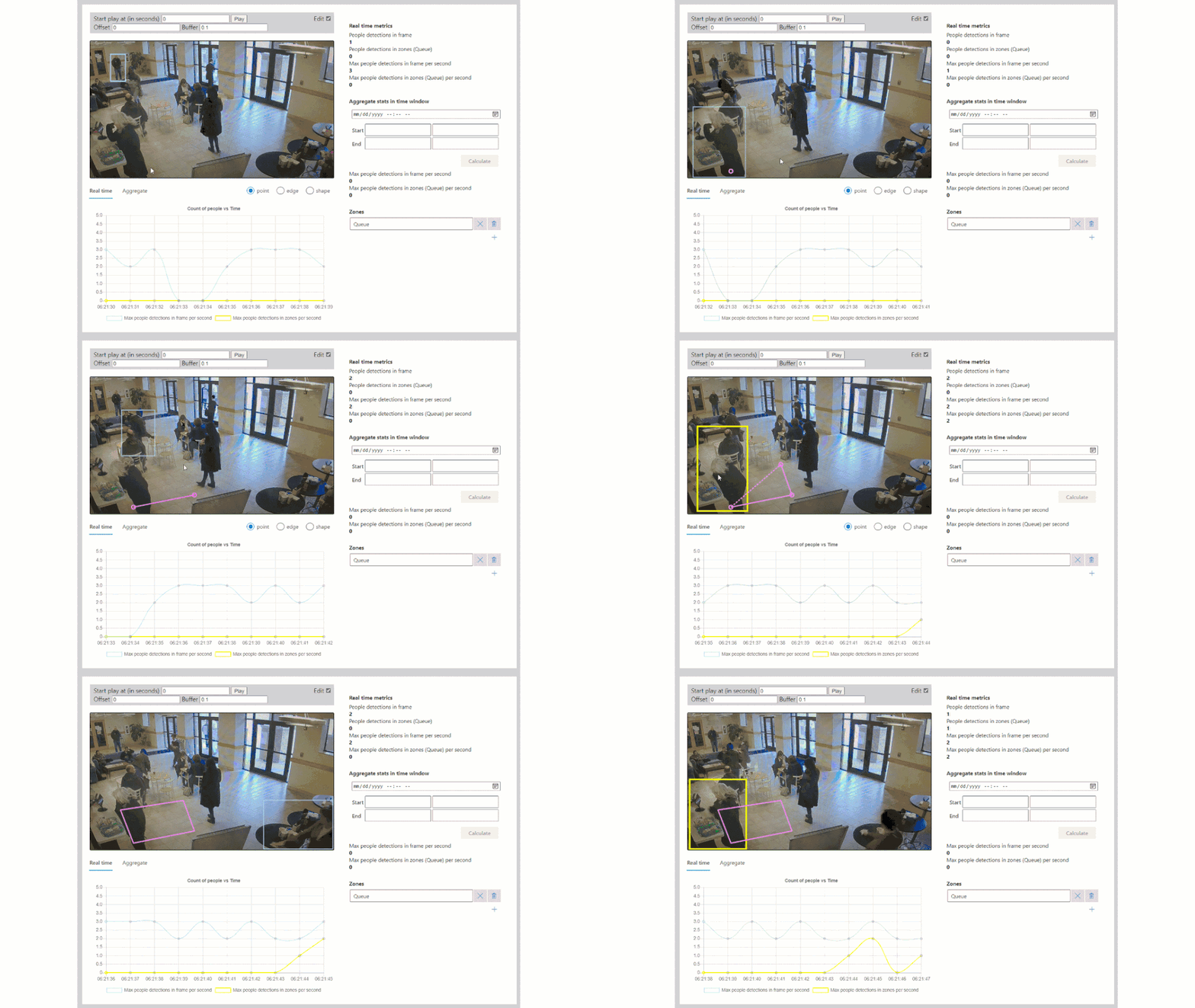
Combining edge-based AI inferencing and video with cloud-based business logic can be complex. Egress, storage and synchronization of the edge AI output and H.264 video streams in the cloud makes it even harder. Azure Percept Studio includes a free, open source reference application which detects people and generates their {x, y} coordinates in a real-time video stream. The application also provides a count of people in a user-defined polygon region within the camera’s viewport. This application showcases the best practices for security and privacy-sensitive AI workloads.
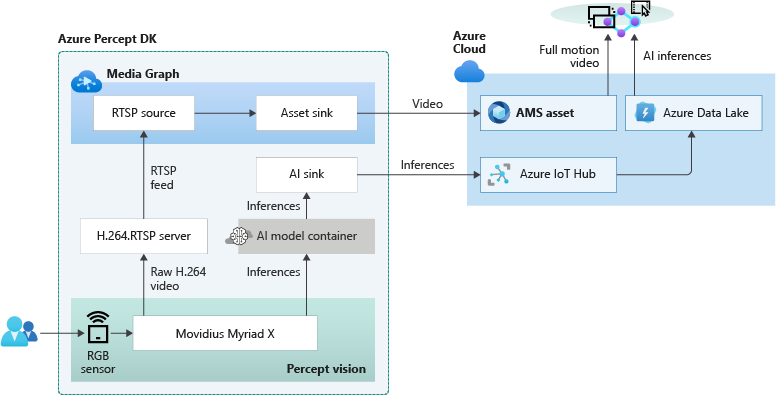
The overall topology of the reference application is shown below. The left side of the illustration contains the set of components which run at the edge within Azure Percept DK. The H.264 video stream and the AI inferencing results are then sent in real-time to the right side which runs in the Azure public cloud:
Because the Myriad X performs hardware encoding of both the compressed full motion H.264 video stream and AI inferencing results, hardware-synchronized timestamps in each stream makes it possible to provide downstream frame-level synchronization for applications running in the public cloud. The Azure Websites application provided in this example is fully stateless, simply reading the video + AI streams from their separate storage accounts in the cloud and composing the output into a single user interface:
Included in the reference application is also a fully automated deployment model utilizing an Azure ARM template. If you click the “Deploy to Azure” button, then “Edit Template”, you will see this code:
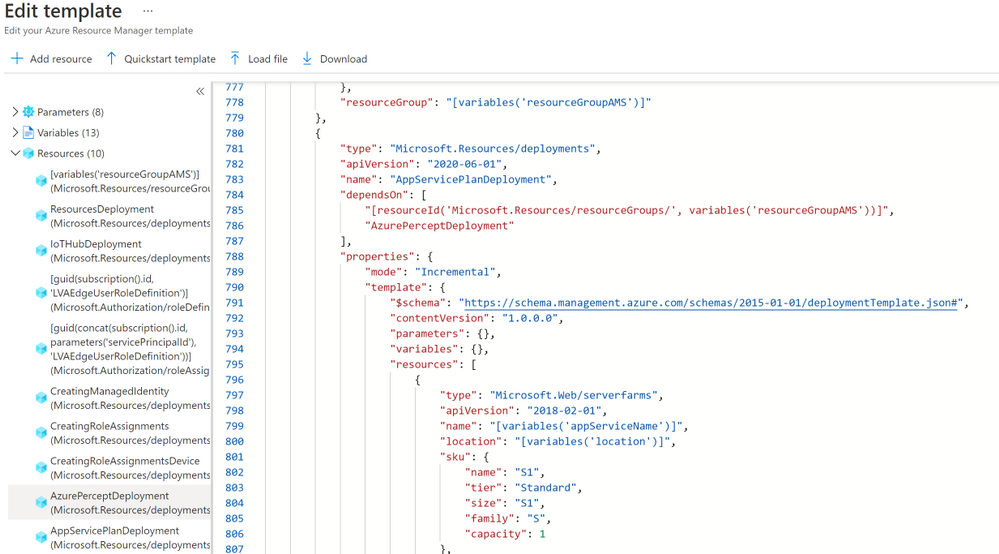
This ARM template deploys the containers to the Azure Percept DK, creates the storage accounts in the public cloud, connects the IoT Hub message routes to the storage locations, deploys the stateless Azure Websites, and then connects the website to the storage locations. This example can be used to accelerate the development of your own hybrid edge/cloud workloads.
Get Started Today
Order your Percept DK today and get started with our easy-to-understand samples and tutorials. You can rapidly solve your business modernization scenarios no matter your skill level, from beginner to an experienced data scientist. With Azure Percept, you can put the cloud and years of Microsoft AI solutions to work as you pilot your own edge AI solutions.

by Contributed | Apr 23, 2021 | Technology
This article is contributed. See the original author and article here.
The Ultimate How To Guide for Presenting Content in Microsoft Teams
Vesku Nopanen is a Principal Consultant in Office 365 and Modern Work and passionate about Microsoft Teams. He helps and coaches customers to find benefits and value when adopting new tools, methods, ways or working and practices into daily work-life equation. He focuses especially on Microsoft Teams and how it can change organizations’ work. He lives in Turku, Finland. Follow him on Twitter: @Vesanopanen

Backup all WSP SharePoint Solutions using PowerShell
Mohamed El-Qassas is a Microsoft MVP, SharePoint StackExchange (StackOverflow) Moderator, C# Corner MVP, Microsoft TechNet Wiki Judge, Blogger, and Senior Technical Consultant with +10 years of experience in SharePoint, Project Server, and BI. In SharePoint StackExchange, he has been elected as the 1st Moderator in the GCC, Middle East, and Africa, and ranked as the 2nd top contributor of all the time. Check out his blog here.

Getting started with Azure Bicep
Tobias Zimmergren is a Microsoft Azure MVP from Sweden. As the Head of Technical Operations at Rencore, Tobias designs and builds distributed cloud solutions. He is the co-founder and co-host of the Ctrl+Alt+Azure Podcast since 2019, and co-founder and organizer of Sweden SharePoint User Group from 2007 to 2017. For more, check out his blog, newsletter, and Twitter @zimmergren

Azure: Talk about Private Links
George Chrysovalantis Grammatikos is based in Greece and is working for Tisski ltd. as an Azure Cloud Architect. He has more than 10 years’ experience in different technologies like BI & SQL Server Professional level solutions, Azure technologies, networking, security etc. He writes technical blogs for his blog “cloudopszone.com“, Wiki TechNet articles and also participates in discussions on TechNet and other technical blogs. Follow him on Twitter @gxgrammatikos.

Teams Real Simple with Pictures: Hyperlinked email addresses in Lists within Teams
Chris Hoard is a Microsoft Certified Trainer Regional Lead (MCT RL), Educator (MCEd) and Teams MVP. With over 10 years of cloud computing experience, he is currently building an education practice for Vuzion (Tier 2 UK CSP). His focus areas are Microsoft Teams, Microsoft 365 and entry-level Azure. Follow Chris on Twitter at @Microsoft365Pro and check out his blog here.
by Contributed | Apr 23, 2021 | Technology
This article is contributed. See the original author and article here.
Context
During a Power Platform audit for a customer, I was looking for exporting all user licenses data into a single file to analyze it with Power BI. In this article, I’ll show you the easy way to export Power Apps and Power Automate user licenses with PowerShell!
Download user licenses
To do this, we are using PowerApps PowerShell and more particular, the Power Apps admin module.
To install this module, execute the following command as a local administrator:
Install-Module -Name Microsoft.PowerApps.Administration.PowerShell
Note: if this module is already installed on your machine, you can use the Update-Module command to update it to the latest version available.
Then to export user licenses data, you just need to execute the following command and replace the target file path to use:
Get-AdminPowerAppLicenses -OutputFilePath <PATH-TO-CSV-FILE>
Note: you will be prompted for your Microsoft 365 tenant credentials, you need to sign-in as Power Platform Administrator or Global Administrator to execute this command successfully.
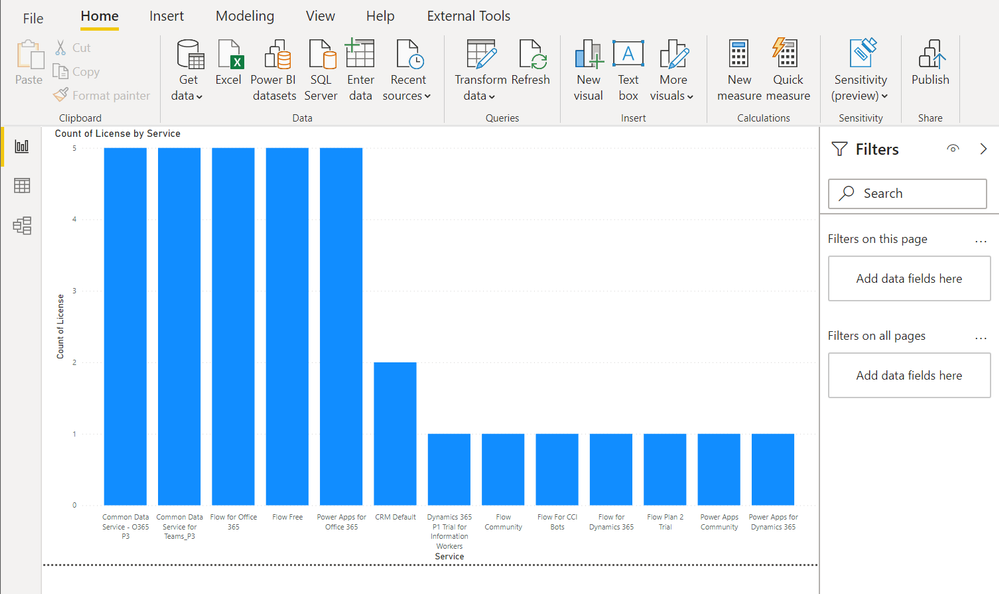
After this, you can easily use the generated CSV file in Power BI Desktop for further data analysis:
Happy reporting everyone!
You can read this article on my blog here.
Resources
https://docs.microsoft.com/en-us/powershell/powerapps/get-started-powerapps-admin
https://docs.microsoft.com/en-us/powershell/module/microsoft.powerapps.administration.powershell/get-adminpowerapplicenses

by Contributed | Apr 23, 2021 | Technology
This article is contributed. See the original author and article here.
The team is excited this week to share what we’ve been working on based on all your input. News to be covered includes Application Gateway URL Rewrite General Availability, End of Support for Ubuntu 16.04, Using Azure Migrate with Private Endpoints, Overview of HoloLens 2 deployment and security-based Microsoft Learn Module of the week.
Application Gateway URL Rewrite General Availability

Azure Application Gateway can now rewrite the host name, path and query string of the request URL. You can now also rewrite the URL of all or some of the client requests based on matching one or more conditions as required. Administrators can also now choose to route the request based on the original URL or the rewritten URL. This feature enables several important scenarios such as allowing path based routing for query string values and support for hosting friendly URLs.
Learn more here: Rewrite HTTP Headers and URL with Application Gateway
Upgrade your Ubuntu server to Ubuntu 18.04 LTS by 30 April 2021
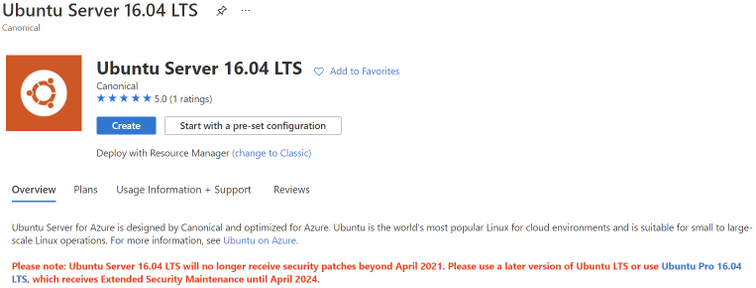
Ubuntu is ending standard support for Ubuntu 16.04 LTS on 30 April 2021. Microsoft will replace the Ubuntu 16.04 LTS image with an Ubuntu 18.04 LTS image for new compute instances and clusters to ensure continued security updates and support from the Ubuntu community. If you have long running compute instances, or non-autoscaling clusters (min nodes > 0), please follow the instructions here for manual migration before 30 April 2021. After 30 April 2021, support for Ubuntu 16.04 ends and no security update will be provided. Please migrate to Ubuntu 18.04 immediately or before 30 April 2021, and please note that Microsoft will not be responsible for any kind of security breaches after the deprecation.
Azure Migrate with private endpoints
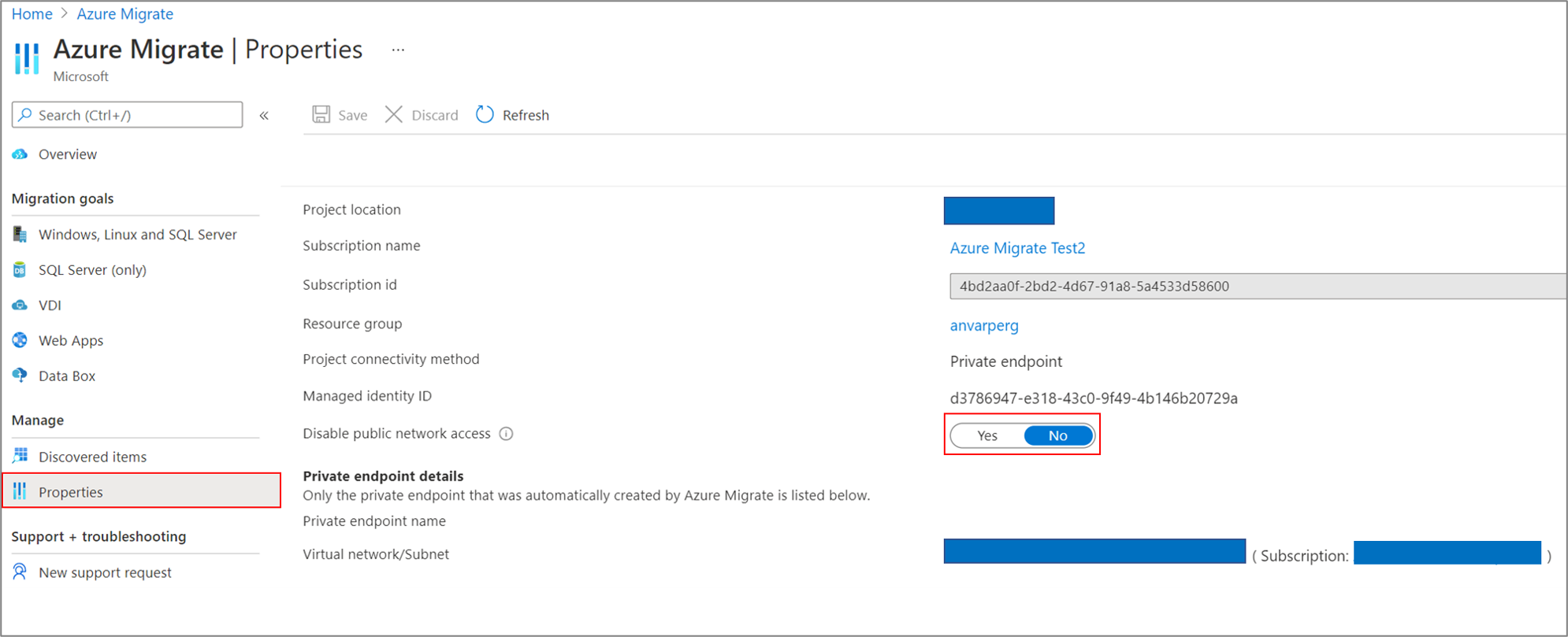
You can now use Azure Migrate: Discovery and Assessment and Azure Migrate: Server Migration tools to privately and securely connect to the Azure Migrate service over an ExpressRoute private peering or a site-to-site VPN connection via an Azure private link. The private endpoint connectivity method is recommended when there is an organizational requirement to not cross public networks to access the Azure Migrate service and other Azure resources. You can also use the private link support to use an existing ExpressRoute private peering circuits for better bandwidth or latency requirements.
Learn more here: Using Azure Migrate with private endpoints
HoloLens 2 Deployment Overview
Our team recently partnered with the HoloLens team to collaborate on and curate documentation surrounding HoloLens 2 deployment. Just like any device that requires access to an organizations network and data, the HoloLens in most cases requires management via that organization’s IT department.
This writeup shares all the necessary services required to get started: An Overview of How to Deploy HoloLens 2
Community Events
MS Learn Module of the Week

AZ-400: Develop a security and compliance plan
Build strategies around security and compliance that enable you to authenticate and authorize your users, handle sensitive information, and enforce proper governance.

Modules include:
- Secure your identities by using Azure Active Directory
- Create Azure users and groups in Azure Active Directory
- Authenticate apps to Azure services by using service principals and managed identities for Azure resources
- Configure and manage secrest in Azure Key Vault
- and more
Learn more here: Develop a security and compliance plan

Let us know in the comments below if there are any news items you would like to see covered in the next show. Be sure to catch the next AzUpdate episode and join us in the live chat.
by Contributed | Apr 23, 2021 | Technology
This article is contributed. See the original author and article here.
I remember running my first commands and building my first automation using Windows PowerShell back in 2006. Since then, PowerShell became one of my daily tools to build, deploy, manage IT environments. With the release of PowerShell version 6 and now PowerShell 7, PowerShell became cross-platform. This means you can now use it on even more systems like Linux and macOS. With PowerShell becoming more and more powerful (you see what I did there ;)), more people are asking me how they can get started and learn PowerShell. Luckily we just released 5 new modules on Microsoft Learn for PowerShell.
Learn PowerShell on Microsoft Learn
Microsoft Learn Introduction to PowerShell
Learn about the basics of PowerShell. This cross-platform command-line shell and scripting language is built for task automation and configuration management. You’ll learn basics like what PowerShell is, what it’s used for, and how to use it.
Learning objectives
- Understand what PowerShell is and what you can use it for.
- Use commands to automate tasks.
- Leverage the core cmdlets to discover commands and learn how they work.
PowerShell learn module: Introduction to PowerShell
Connect commands into a pipeline
In this module, you’ll learn how to connect commands into a pipeline. You’ll also learn about filtering left, formatting right, and other important principles.
Learning objectives
- Explore cmdlets further and construct a sequence of them in a pipeline.
- Apply sound principles to your commands by using filtering and formatting.
PowerShell learn module: Connect commands into a pipeline
Introduction to scripting in PowerShell
This module introduces you to scripting with PowerShell. It introduces various concepts to help you create script files and make them as robust as possible.
Learning objectives
- Understand how to write and run scripts.
- Use variables and parameters to make your scripts flexible.
- Apply flow-control logic to make intelligent decisions.
- Add robustness to your scripts by adding error management.
PowerShell learn module: Introduction to scripting in PowerShell
Write your first PowerShell code
Getting started by writing code examples to learn the basics of programming in PowerShell!
Learning objectives
- Manage PowerShell inputs and outputs
- Diagnose errors when you type code incorrectly
- Identify different PowerShell elements like cmdlets, parameters, inputs, and outputs.
PowerShell learn module: Write your first PowerShell code
Automate Azure tasks using scripts with PowerShell
Install Azure PowerShell locally and use it to manage Azure resources.
Learning objectives
- Decide if Azure PowerShell is the right tool for your Azure administration tasks
- Install Azure PowerShell on Linux, macOS, and/or Windows
- Connect to an Azure subscription using Azure PowerShell
- Create Azure resources using Azure PowerShell
PowerShell learn module: Automate Azure tasks using scripts with PowerShell
Conclusion
I hope this helps you get started and learn PowerShell! If you have any questions feel free to leave a comment!


Recent Comments