by Contributed | Apr 30, 2021 | Technology
This article is contributed. See the original author and article here.
The Mako™ Core SDK from Global Graphics Software is perfectly placed to help software vendors and service providers integrate with Universal Print. Our SDK can help developers analyze, edit, and convert the documents at the heart of Universal Print workflows.
Case study: Modifying print job payloads
As a part of Universal Print, developers get access to a set of Microsoft Microsoft Graph APIs that allows analysis and modification of print job payload data. This feature enables a few different scenarios, including adding security (e.g. redactions or watermarks) to a Universal Print-based workflow.
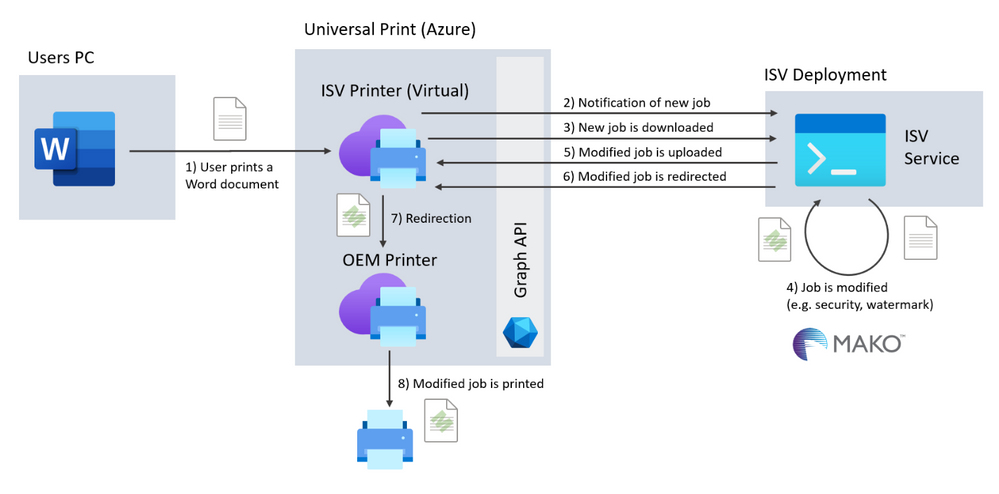
The diagram below shows a software vendor’s implementation for modifying print job payloads using Universal Print and the Graph APIs.
In the scenario, the ISV creates a service which uses the Mako SDK to modify the payload. This service could be implemented as an Azure Serverless Function or App Service deployment. Either of these would expose an endpoint which is called by the Graph’s change notifications when a print job has been sent.
Once notification has been received, the service downloads the payload and uses Mako to analyze and modify it. Once modified, the payload can be uploaded again and redirected.
Mako fits this type of workflow perfectly, since it can handle multiple page description languages (PDLs), including those commonly used in printing such as PDF, PostScript, PCL/XL and XPS.
The Mako SDK also has a PDL-agnostic document object model (DOM), meaning that your integration can edit the print job payload in the same way, regardless of the PDL you’ve been given.
Existing integrations
If you have an existing Universal Print integration, it’s likely that Mako already supports your environment, making switching easy!
The Mako SDK supports both cloud and on-premise deployments, including Azure and containerized workloads. We support many desktop and mobile environments including Windows, Linux (including Alpine), Android, iOS and MacOS.
It’s also likely that your integration uses a programming language that we already support: we natively wrote the SDK in C++ for the perfect balance of performance and ease-of-use, but we distribute it as beautifully wrapped libraries for C#, Java and Python too.
See it in action
We’ve integrated Mako into Universal Print ourselves and used it to automatically redact print jobs as they go through a Universal Print workflow. Watch at the recording of our Mako live coding webinar to see it in action.
Try it out
We’d be excited to talk to you about your Universal Print project and see how we can help. For more information about Mako, visit globalgraphics.com/mako

by Contributed | Apr 30, 2021 | Technology
This article is contributed. See the original author and article here.
Guest blog John van Zetten, ICT Teacher, Hoornbeeck College and Microsoft Learn for Educators Ambassador
Thank you for reading this blog! My name is John van Zetten, a passionate teacher at the Hoornbeeck College.
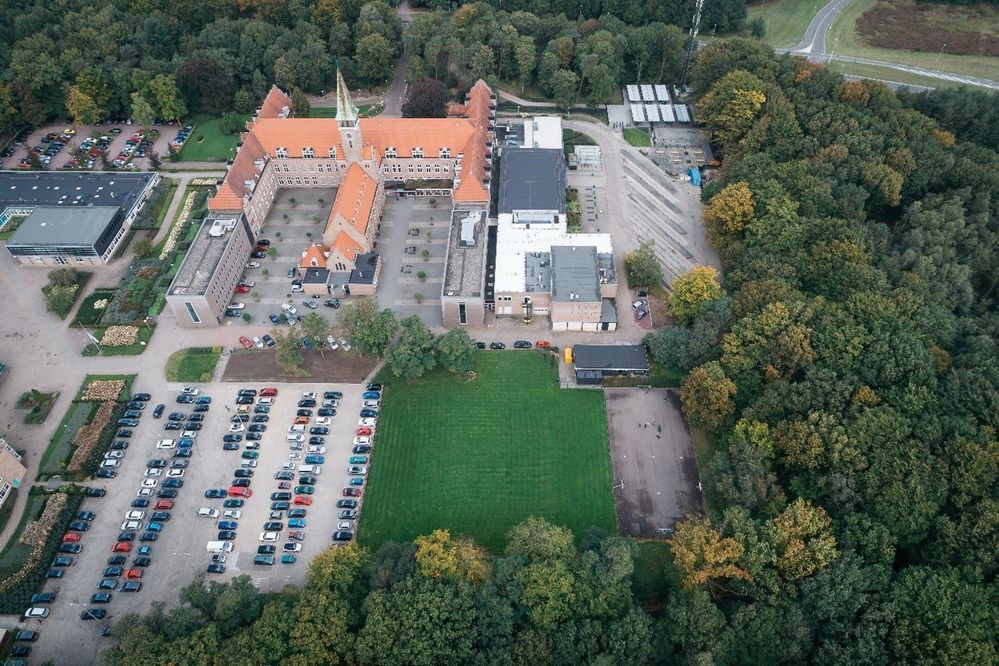
Hoornbeeck College is a Community College in the Netherlands. On 6 locations we offer 131 different studies over 4 departments. Each study prepares the student for a place in the professional field, ranging from mechanics to doctor’s assistants and from management assistants to software developers. Currently we have around 10000 students. In this blog I will focus on the training area for IT Professionals. In this study we teach our students everything they need to work in the field as an IT administrator. A couple of things that pass in review: data communications with Cisco, service management, Linux, Microsoft Office, security, scripting, and cloud-computing. The cloud-computing courses are based on Microsoft 365 and Microsoft Azure, as these are the two most used cloud platform in the SMB in the Netherlands.
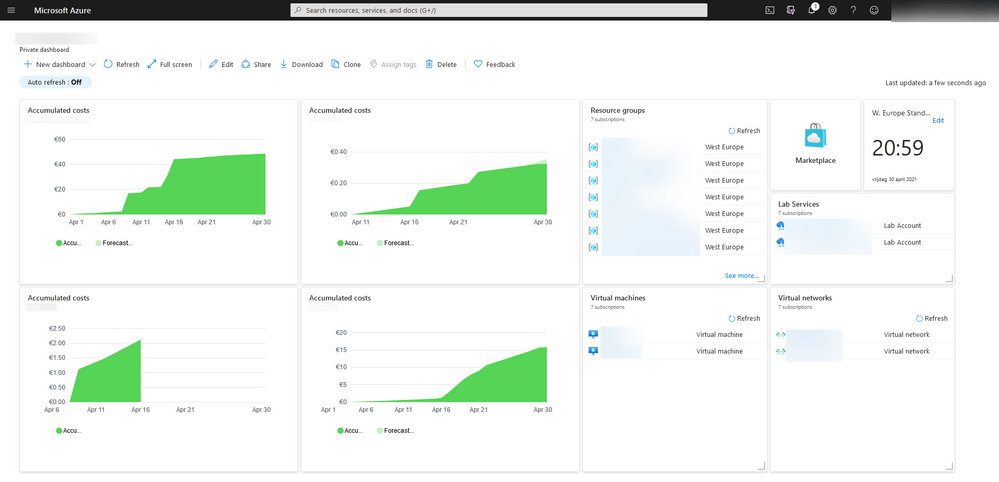
With Azure growing in the Netherlands over the last years we felt the need to embed this in our curriculum for our IT Professionals. Also: our students needed to buy an expensive laptop to run the virtual machines we use to give them hands-on experience with the technology we teach. So, we were facing two challenges: students need to have knowledge and hands-on experience with Azure, and we needed to lower cost for our course.
We started with the second bit as this was the easiest to do and because we expected that with using Azure as our primary work-load platform (instead of the students’ laptops) the students get the hands-on experience as well. A certification path was not part of our considerations at that moment. Only one instructor was certified in Azure Fundamentals AZ900 exam at that moment.
We choose our lessons series on Windows Server to host them in Azure instead of VMware Workstation. After working in/with Azure for two years, we started looking for a way to not only let them use Azure as a workload platform but also give them broader knowledge of cloud-computing and Azure. After experimenting with different teaching materials, we decided to use the Microsoft Learn for Educators curriculum for Azure Fundamentals. There were three main reasons for that:
- The materials provided by Microsoft are up-to-date and complete: Everything covered in the official AZ-900 exam has a place in the course materials.
- The course has a nice mix between explanation and hands-on experience via labs: the provided slide-decks give a good overview of Azure and comes with hands-on labs that you can either walk through as a teacher or let the students work through it by themselves.
- It is compact, the whole curriculum could be packed into 20 hours or less: With a strong focus on the right things, there is plenty of time available for exam preparation our more hands-on experience.
Teaching with this material gives students a great chance of passing the Azure Fundamentals AZ-900 exam and adding this valuable certification to their resume. We are currently at an >75% first pass rate for AZ-900.
Implementing new course-materials always come with certain challenges. I want to share a couple of our lessons learned here:
- Students need hands-on experience for good exam results. As mentioned before, we started using Azure before we jumped on the certification train. This means that our student already had quite a bit of hands-on experience before they take their exams. All students agreed that if they did not have the hands-on experience like they had, it would have been much harder to pass the exam. So, I would like to recommend to you to give them as much hands-on experience as possible. The labs provided by Microsoft are a good starting point but expanding this with other materials is very valuable.
- New technology is not only a challenge for students but for teachers as well. So, if you want to implement Azure in your curriculum, make sure that you spent a decent amount of time to train your colleagues and get them to at least the Fundamentals level. The trainer-the-trainer sessions on the Learning Download Center are a good resource to do this, also the Virtual Educator Prep Sessions (VEPS) give a lot of input. Getting your feet wet is simply the best option to learn these things.
- Teaching Azure means that you teach a platform that literally changes every 30 days or so. This gives a never-ending challenge of keeping you own knowledge and learning materials up to date. Keeping an eye on the roadmap so you know what is coming and be prepared! Microsoft runs various technical and training events throughout the year to help keep you upto date Microsoft Ignite and Microsoft Build are the key developer conferences.
As stagnation means decline, we are always looking for opportunities to build an even better curriculum. Currently we are looking at these options:
As a passionate teacher and Microsoft Learn for Educators Ambassador, I am happy to share more of my insights and learn from your experience to make our lessons better together!

by Contributed | Apr 30, 2021 | Technology
This article is contributed. See the original author and article here.
Welcome to the monthly Healthcare and Life Sciences blog recap, April edition! Check out the highlights below:
Power BI
- Ingest Healthcare Open Data into Azure and Power BI using New GitHub Repository: Greg Beaumont, Microsoft Senior Intelligence Technical Specialist, built a repository of healthcare open data in GitHub called Power Pop Health. The solution contains low code/no code/no PowerShell deployment, so anyone can use it with nothing more than an Azure subscription and Power BI. Read more about the solution here.
- Excel Analyst in a Day with Power BI: Explore how Excel and Power BI are best used together and how Excel and Power BI can be integrated in Microsoft Teams and SharePoint online. Click here to learn more and register for the event.
- Dashboard in a Day with Power BI: Interested in participating in a free Power BI workshop? Click here to learn how.
- Embed Power BI Reports in Healthcare EMR: Learn more about how healthcare providers are embedding Power BI reports from their EMRs/EHRs. Click here to register for the event.
- Power BI at Microsoft Business Applications Summit: Join the Power BI team and learn about the next features, demos, roadmap for Power BI. Click here to learn more.
Microsoft Teams Rooms
- Transitioning to Microsoft Teams Video Conference Rooms: Are your employees returning to work? Learn how to configure existing conference rooms for Teams meetings. Click here to learn more.
Confessions of Health Geeks
- Microsoft Nurses Heeding the Call of Service: Learn from Molly McCarthy and Kathleen McGrow as they discuss the complexities of volunteering at a COVID-19 vaccination clinic and their hopes for the future of the COVID-19 vaccination process. Click here to watch.
- Innovations in Pediatric Patient Experience: Hear from Microsoft’s Chief Patient Experience Officer, Antionette Thomas, as she interviews a team from Children’s Hospital of Colorado and representatives from Childsplay Charity on innovative new technologies they are adopting to enhance the experience of patients. Click here to watch the webcast.
- Health Plan Member Experience Improvement: Microsoft’s Director of Population Health, Amy Berk, discusses some of the forces driving health plan member experience improvement. Click here to learn more.
- Diversity in Clinical Trials and Drug Development: In this podcast, Claire Bonaci discusses the importance of diversity and inclusion in pharma and life sciences, specifically the importance of diversity in clinical trials. Watch the podcast here.
- Tackling health inequity: Dr. Zafar Chaundry, SVP and CIO at Seattle Children’s Hospital shares how he and his team are working to expand access to healthcare and improve health equity in the greater Seattle area. Click here to watch.
MidDay Café
- MidDay Café Re-launch: The MidDay Café is temporarily pausing until the re-launch on May 10th. The new format will be shorter with different content. Read the announcement here.
January’s HLS Blog Contributors:

Michael Gannotti, Principal Technical Specialist, Microsoft Teams

Greg Beaumont, Senior Technical Specialist, Intelligence

Claire Bonaci, Director, Business Development, Health and Life Sciences
Samir Thapa, Principal Technical Specialist, Microsoft Teams

Kendra Burgess, Senior Technical Specialist, Business Applications
Thanks for reading and let us know how else our Microsoft team can help!

Erin Spencer, Technical Specialist, Microsoft Teams

by Contributed | Apr 30, 2021 | Technology
This article is contributed. See the original author and article here.
Guest blog by Amir Pourabdollah PhD, MSc, Meng, BEng. Senior Lecturer & AI Course Leader, Department of Computer Science, Nottingham Trent University and Microsoft Learn Educator Ambassador
I live in Nottingham, UK with my family: My wife, my son who is 18 and my daughter who is 11. I am from an Iranian background that live in the UK from 2003 when I started my MSc then PhD in Computer Science at the University of Nottingham (UoN). After graduation, I became a research fellow in the same university and worked in this position for 8 years. Then I moved to Nottingham Trent University (NTU) and became a senior lecturer at the Department of Computer Science. This all means that by now, I have been in Nottingham “Universities” for 18 years (i.e., as old as son!).
OK, after this short intro, what are all these have to do with being a “Microsoft Learn Educator Ambassador”?
Well, it starts from the last year, just in the middle of COVID lock down, that I [unnecessarily!] taking Artificial Intelligence module leadership. Although I had research background in AI and have been in the AI community and research groups, teaching AI was relatively new for me. By the way, I took leadership for the 3rd year AI module, and recently became “Computer Science – AI” Course Leader. This course is newly proposed and approved following marketing research at NTU, and will hopefully get the first students in 2022-23 academic year. Moreover, we run AI modules for MSc Computer Science and MSc Data Analytics students, and finally for Degree Apprenticeship courses. (imagine how all these arrangements took place in COVID Lockdown)
Sorry, let’s comeback… eventually at the same time of taking all of those responsibilities, I was told that Microsoft and NTU are teamed up to expand collaborations, not only for infrastructure but also for computer science education. Particularly there have been some communications between our head of department (Prof Ahmad Lotfi) and Clare Riley (HE engagement manager for Microsoft UK) that Microsoft can support free materials and certification of “Azure AI Fundamental” for a limited number of students and staff.
This was a start of making some changes to the AI module and reach to a win-win situation: For students to learn more up-to-date and practical materials that what they’d have supposed to learn, and get a free certificate by the time they graduate from NTU! For us as academics, it was a risk of doing this as a pilot program that if runs successfully can showcase a good industrial collaboration and will be continued more widely. Ahmad asked me if I can lead this pilot program, and the answer was [again unnecessarily] yes!
Leveraging Microsoft Azure-AI Fundamental
How did I incorporate the MS Learn for Educators teaching materials into the existing materials? What about assessment? Timing?… These were questions to be answered. I was myself new to Azure-AI so all of these had to be a learning-teaching experience.
The decision to make the changes was done in November 2020. By that time, no substantial change would have been allowed for a module.
The first thing I did was asking my students: Do you want to get this certificate or want me to leave it for the next year students?! Take it or leave it! If you take it, then we need to work together for good: be tolerant about unexpected changes and uncertainties. I asked them to expect changes from the start of term 2 (January 2021). I received positive messages, although in online teaching, understanding the actual views were not easy, and to be honest I still do not have a strong feeling what my students think about this program – let’s be optimistic for now!
I planned my new year holidays to learn Azure-AI myself, and plan for the changes in materials and assessments. The module revamping challenge was that I needed to draw a line between the materials that are being assessed in the module exam/coursework and those which are just needed for taking the MS test. On the other hand, there are something that are covered in the Microsoft materials that are not being asked in the Microsoft test (such as coding). I followed an assessment pattern like this:
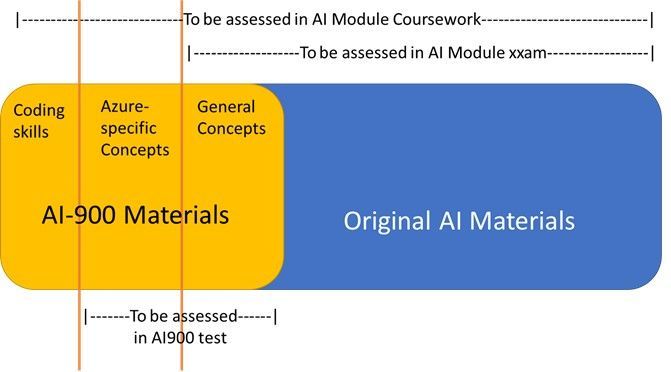
I will write later how did I incorporate the AI-900 into assessment elements (exam and coursework) together with the challenges and limitations I had.
Impact on Learning
It is perhaps too soon to fully evaluate the learning outcomes. I know that the students (and the school) were complaining about overloading unnecessary theoretical AI materials and wished a practical-focus revamp of the module. This year, although the participation was not high, there are positive feedback from the students that appreciate the change, and expressing that the modules was interesting to follow particularly when it comes to the incorporated AI-900 materials. The other evaluation result I have now, is the final stage of the coursework (out of 4), in which I asked the students to add an Azure service to their chatbot (the subject of the coursework). I just finished marking of this coursework component and I can observe more engagement and better marks for this component.
A better evaluation is to be done after the module exam as well as after the AI-900 certification test.
What Else for Now and Future?
Well, I did not limit myself to incorporating AI-900 to a particular module only. As an academic, there are many other educational benefits from Microsoft materials and technologies I can take. I would like to give some headlines here and continue on each in some later posts.
- AI-900 is just incorporated into another module that I teach: Artificial Intelligence for Degree Apprenticeship course (today is its last day). The settings are different from the ordinary 3rd year AI module, due to the number of students, their maturity, their existing employment and the very short module length.
- MSc projects are fantastic routes to incorporate Microsoft technology into research out of the pre-defined and limited teaching materials. I defined an MSc project to develop an Azure-based AI solution which uses fuzzy logic as the core technique. The student who picked the project up is starting the work, and I hope to get good result – updates to follow.
- Active using of Azure VMs for labs. Due to more than a year in COVID, it looks like that blended labs, i.e., combining face-to-face lab-based teaching with home-based works will remain with us for some times. To have a consistent working environment for all students, Particularly for running AI-900 practical sessions, Azure VM can be used as the platform for both groups of students. This is undergoing.
International collaboration for AI teaching in High Schools
Within IEEE CIS (Computational Intelligence Society), I participate in a subgroup called High School Outreach Subcommittee with members around the globe. In the recent 2021 meeting, the members welcomed my idea in adapting Azure-AI learning materials for high school teaching activities of this committee, such as in summer schools and short courses, even as competition programs. More updates are to follow.
by Contributed | Apr 30, 2021 | Technology
This article is contributed. See the original author and article here.
April 2021 brought some great new offerings: Immersive Reader: SharePoint pages and news posts, Events Web Part: Audience Targeting, SharePoint site templates, Microsoft Lists for iOS: iPad support, Manage Microsoft Lists for iOS using InTune APP, Microsoft Lists: Visualize date with Power BI, OneDrive sync 64-bit for Windows, and more. Details and screenshots below, including our audible, “groundhog, shadow-casted” companion: The Intrazone Roadmap Pitstop: April 2021 podcast episode – all to help answer, “What’s rolling out now for SharePoint and related technologies into Microsoft 365?”
https://html5-player.libsyn.com/embed/episode/id/18927740/height/90/theme/custom/thumbnail/yes/direction/backward/render-playlist/no/custom-color/247bc1/
In the podcast episode, I chat with Nicole Woon (LinkedIn | Twitter), program manager on the SharePoint at Microsoft focused on all things site templates. We dig into all about the new templates, their history from the SharePoint Look Book – moving into Microsoft 365, and insights into what you can expect next for templatizing your intranet.
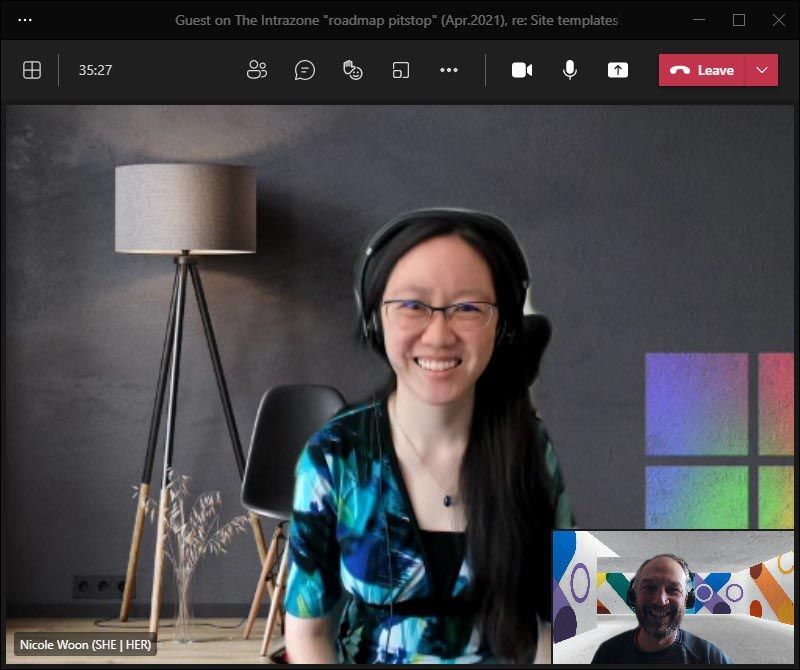
Nicole Woon, program manager at Microsoft [Intrazone guest], with little Mark Kashman [co-host] in the bottom right corner during our interview over Teams.
HELP AMPLIFY | India is experiencing one of the worst outbreaks of COVID cases since the start of the pandemic. Many of our colleagues and friends in India are greatly impacted. We wish to amplify the COVID resource website my colleague Prarthana Sannamani manages for anyone that will benefit from it. Thank you for considering sharing it. We are grateful the U.S. government is mobilizing to help. And as Satya Nadella shared, “Microsoft will continue to use its voice, resources, and technology to aid relief efforts, and support the purchase of critical oxygen concentration devices.”
All features listed below began rolling out to Targeted Release customers in Microsoft 365 as of April 2021 (possibly early May 2021).
Inform and engage with dynamic employee experiences
Build your intelligent intranet on SharePoint in Microsoft 365 and get the benefits of investing in business outcomes – reducing IT and development costs, increasing business speed and agility, and up-leveling the dynamic, personalized, and welcoming nature of your intranet.
Immersive Reader is coming to SharePoint pages and news posts
The Microsoft Immersive Reader tech, currently built into Word, OneNote, Outlook, Teams, and other Microsoft apps, will soon be available for SharePoint pages and news posts. The Immersive Reader uses proven techniques to improve reading and writing for people regardless of their age or ability.
 Click the Immersive Reader button to minimize aspects of the SharePoint site to best focus on the text of the page or news article.
Viewers of SharePoint pages and news posts will see a button on the page command bar to open the Immersive Reader. Note: In this initial release, the Immersive Reader will only read content contained in text web parts.
Audience Targeting capability for Events Web Part
This provides the ability to target specific audiences per event within the SharePoint Events Web Part. Meaning you can target specific events to different audiences – aligning with in-place options to personalize your intranet experience.
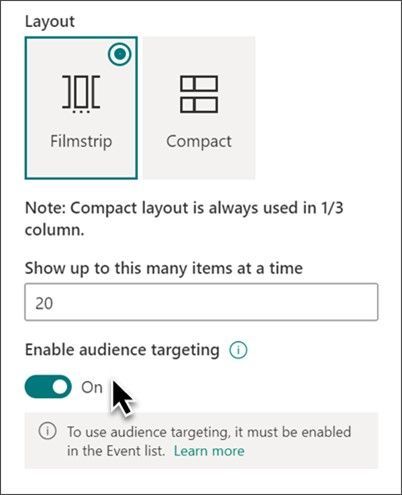 When you turn on audience targeting, you can make it so certain events within the Events web part appear, or don’t, for certain people and/or groups.
Knowing about events in your organization is great. Seeing the set of events that are meant for you based on role, region and distinct team or org, even better.
SharePoint site templates (Nicole Woon); merge in with Next steps
This new SharePoint release of scenario-based site templates will help you expand what’s possible with content, pages, and web parts while helping you quickly get started building your own site. Each template contains pre-populated content and web parts that are fully customizable to meet the needs of your organization.
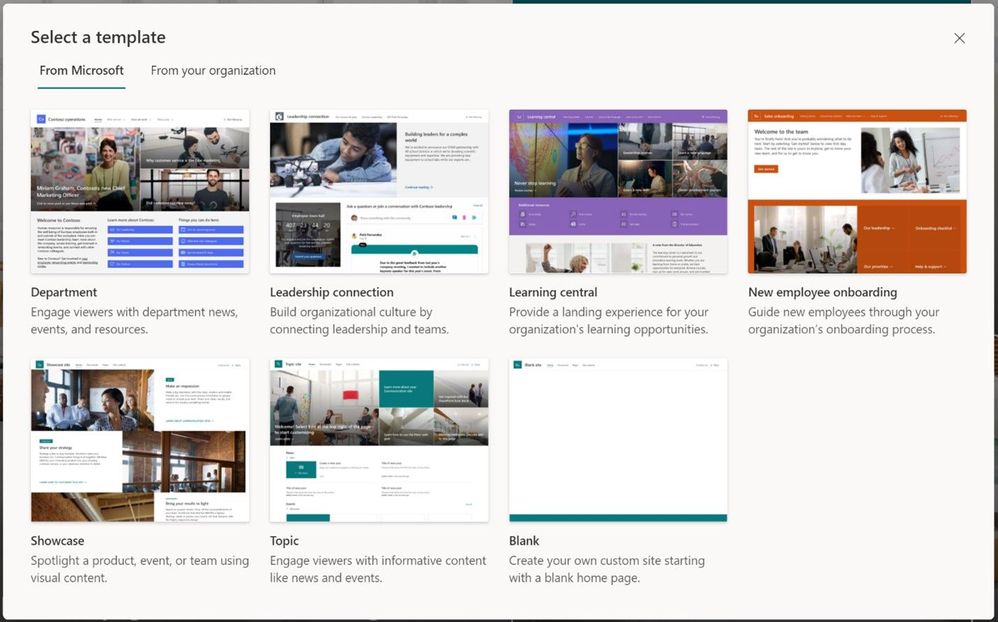 You’ll find Microsoft-provided templates when you create new sites in Microsoft 365, alongside any custom templates you may have deployed.
Current set of scenario-based site templates:
- Communication site templates
- Department – Engage and connect viewers with departmental news and resources.
- Leadership connection – Build community by connecting leadership and team members.
- Learning central – Showcase learning and training opportunities.
- New employee onboarding – Streamline and refine new hire onboarding process.
- Showcase – Spotlight a product, event, or team using visual content.
- Topic – Engage viewers with informative content like news and announcements.
- Blank – Create your own custom site starting with a blank home page.
- Team site templates
- Event planning – Coordinate and plan event details with your team.
- Project management – Create a collaboration space for your project team.
- Training and courses – Prepare course participants for learning opportunities.
- Training and development team – Plan opportunities to help others learn and grow.
- Team collaboration – Manage projects, share content, and stay connected with your team.
- Roadmap ID: 70574.
- Learn more:
Teamwork updates across SharePoint team sites, OneDrive, and Microsoft Teams
Microsoft 365 is designed to be a universal toolkit for teamwork – to give you the right tools for the right task, along with common services to help you seamlessly work across applications. SharePoint is the intelligent content service that powers teamwork – to better collaborate on proposals, projects, and campaigns throughout your organization – with integration across Microsoft Teams, OneDrive, Yammer, Stream, Planner and much more.
iPad support now available in Microsoft Lists for iOS
Track what matters most from the comforts of a larger touch screen device. We’re pleased to share Microsoft Lists for iOS now supports iPad. AKA, no more Lists at 2x. You’ll get a beautiful native experience to track, manage and share your information.
With the extra screen real estate, you can easily search for lists, list items, and tap directly into your favorite and recent lists – directly from the home screen. Lists looks great in both portrait and landscape modes. And it mirrors the Lists Web experience, blended within the common design of iOS.
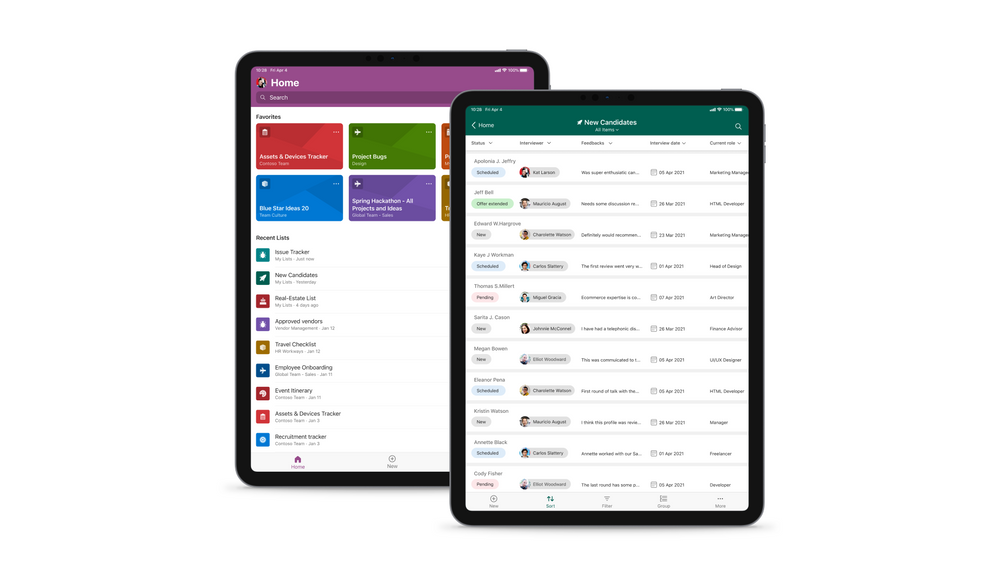 Microsoft Lists for iOS on an iPad, showing the main home screen with Search, and Favorites and Recent lists (left), and working on an individual ‘New Candidates’ list (right).
Once in a list, you’ll swipe up and down, left to right to navigate your list. You’re able to tap into a specific list item to see it’s full view form. And you can refine the view of information using filter, group by, and tapping into individual fields to make changes to drop-down menus or enter text.
Manage Microsoft Lists for iOS using InTune app protection policies (APP)
The Microsoft Lists iOS app is now configurable as a public app in Intune app protection policy (APP) through the Microsoft Endpoint Manager admin center. This allows app to be targeted to ensure that the data accessed is protected by app protection policies.
The app now also supports conditional access deployment through Azure admin portal. Please note that ‘Require app protection policy’ is supported which provides higher level of assurance. Lists app doesn’t currently support ‘Require approved client app’ grant access.
Microsoft Lists: Visualize date with Power BI
We are excited to announce the arrival of a new guided experience in Lists that will make it easy to create business intelligence reports in Power BI using your list data as your source.
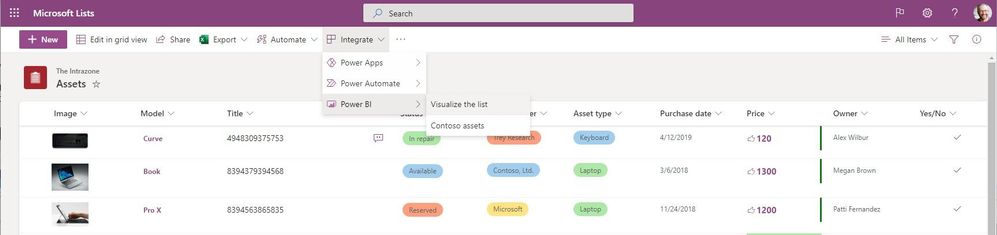 From within Microsoft Lists, click Integrate > Power BI > Visualize this list to open your data into a new Power BI dashboard.
List users will see a new menu option in Integrate > Power BI > Visualize this list, which allows users to create a new Power BI report using that list. With just one click, you’ll be able to autogenerate a basic report and customize the list columns that are shown in the report. To take further advantage of Power BI, go into Edit mode. Once a report is saved and published, it will appear in the same submenu under Integrate > Power BI.
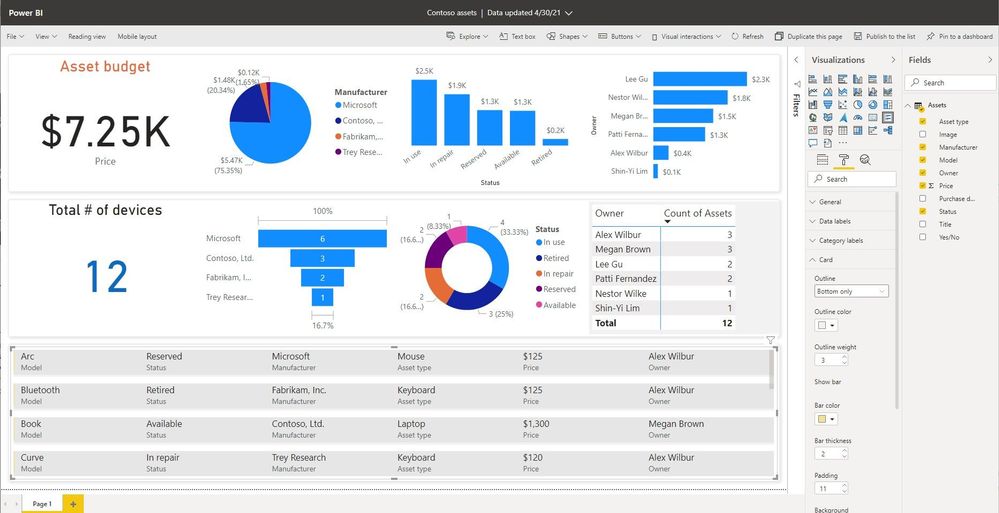 Once your list is open in Power BI, you can edit it (showing Edit mode), publish the custom dashboard back to your list, and share it.
Licensing information:
- Users with a Microsoft 365 E5 license or Power BI Pro license will have access to the full report authoring and viewing experience.
- Users without either of those licenses will be prompted by Power BI to sign up for a 60-day free trial of Power BI Pro when they attempt to save a new report or edit or view an existing report. You can turn off self-service sign-up so that the option for a trial is not exposed to List users, click here. Users with a Power BI free license may only visualize their list data but cannot publish nor view reports.
- Roadmap ID: 72175.
- Learn more:
Related technology
OneDrive sync 64-bit for Windows
We’re excited to announce that the 64-bit OneDrive sync client for Windows is now available as a public preview. This has been a long awaited and highly requested feature. You can now download the 64-bit version for use with OneDrive work, school, and home accounts.
Note : If you have a 64-bit operating system with an x64-based processor, you can choose to install either the 32-bit or 64-bit OneDrive. For ARM64 devices, you should continue to use the 32-bit OneDrive. Computers running 64-bit versions of Windows generally have more resources—such as processing power and memory.
Exclude specific files from OneDrive sync on macOS
This new feature setting will allow you to exclude newly added OneDrive files from syncing to the cloud by file name or extension on macOS devices. This setting lets you enter keywords to prevent the OneDrive sync app from uploading certain files to OneDrive or SharePoint. You can enter complete names, such as “setup.exe” or use the asterisk (*) as a wildcard character to represent a series of characters, such as *.pst.
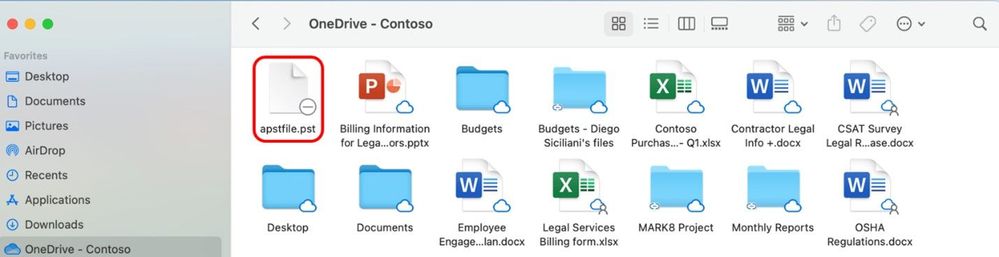 Exclude certain file types when using OneDrive sync for macOS.
If you enable this setting, the sync app doesn’t upload new files that match the keywords you specified. No errors appear for the skipped files, and the files remain in the local OneDrive folder.
New options for attachments in Outlook on the web
This is an updated experience when you receive email attachments. We are updating the look and contents of the attachments and consolidating all options under a single menu (like Outlook for Mac and Outlook for Windows).
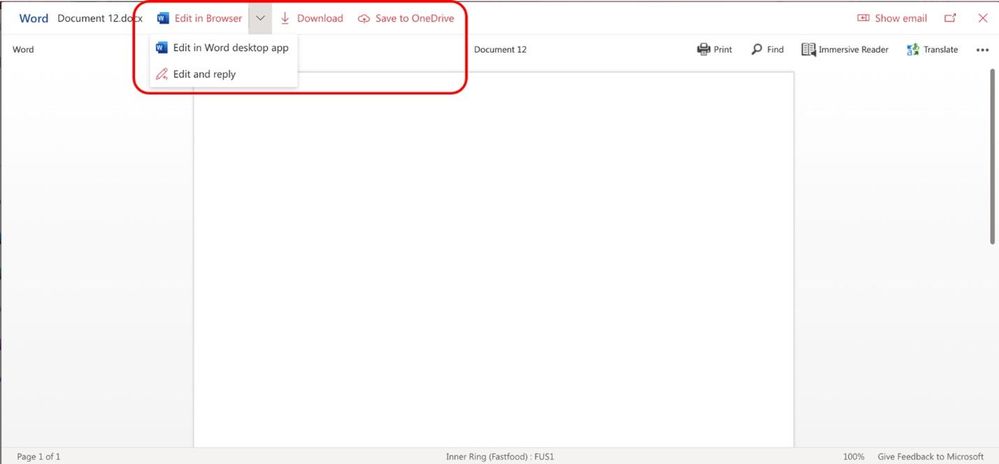 Start working on Outlook attachments with them in OneDrive as you begin to edit and share them beyond the initial email.
What this means for people with OneDrive enabled, they will see new options in this menu and in the attachment previewer for Word, Excel, and PowerPoint files, to directly begin editing Office attachments in the corresponding browser or desktop app – beginning the storage and collaboration from the SharePoint files platform – a single source of truth – not multiple versions of file attachments.
Upcoming Microsoft Lists virtual workshops – May 10-14, 2021
“Go further with Microsoft Lists” – Microsoft will deliver five FREE virtual workshops across various time zones. Just pick your time zone and join in. We’ve got a lot of great presenters from the product team. See how Lists evolve from SharePoint lists to empower individuals and teams to create, share and track information – including innovation in Microsoft Teams.
We will teach you how to use and create views, configure conditional formatting, adjust forms and more. Plus, we will highlight extending lists with the integrated Power Platform and answer all frequently, or infrequently, asked questions; in fact, you can submit a question in advance to ensure we cover it.
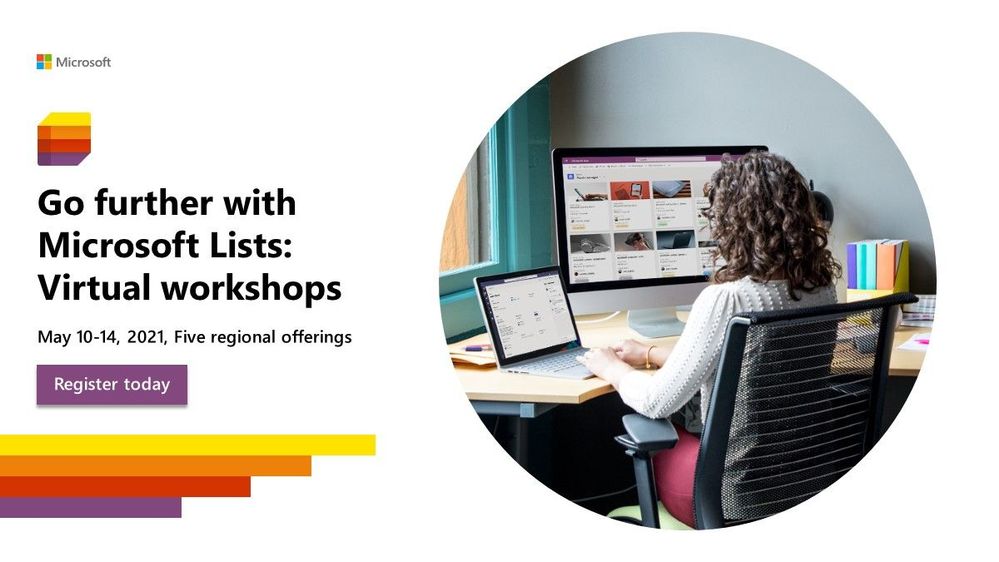 “Go further with Microsoft Lists” – five, free Microsoft workshops across time zones (May.10-14.2021)
Get ready to become a Microsoft Lists pro, for free. Learn all you can do with Microsoft Lists – your smart information tracking app in Microsoft 365.
Learn. Connect. Inspire | Register today at https://aka.ms/MSLists/workshop
May 2021 teasers
Psst, still here? Still scrolling the page looking for more roadmap goodness? If so, here is a few teasers of what’s to come to production next month…
- Teaser #1: SharePoint Auto News Digest updates [Roadmap ID: 70606]
- Teaser #2: Migrate content from Google to Microsoft 365 [Roadmap ID: 82014]
… shhh, tell everyone.
Helpful, ongoing change management resources
- Follow me to catch news and interesting SharePoint things: @mkashman; warning, occasional bad puns may fly in a tweet or two here and there, plus my new blog on Substack: The Kashbox.
Thanks for tuning in and/or reading this episode/blog of the Intrazone Roadmap Pitstop – April 2021 (blog/podcast). We are open to your feedback in comments below to hear how both the Roadmap Pitstop podcast episodes and blogs can be improved over time.
Engage with us. Ask those questions that haunt you. Push us where you want and need to get the best information and insights. We are here to put both our and your best change management foot forward.
Stay safe out there on the road’map, and thanks for listening and reading.
Thanks for your time,
Mark Kashman – senior product manager (SharePoint/Lists) | Microsoft)
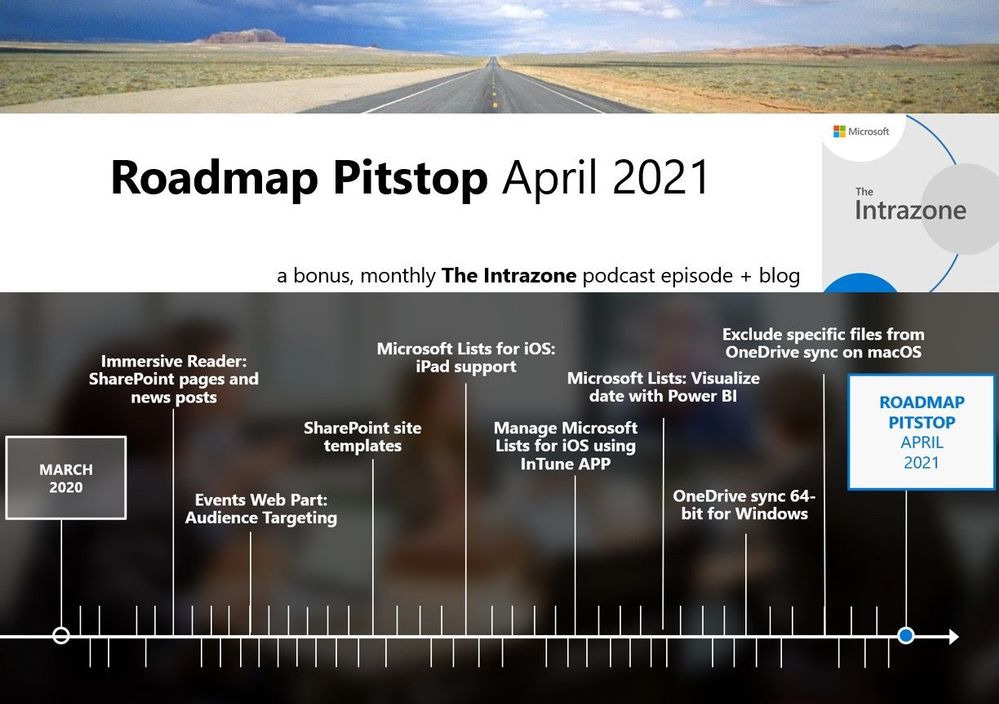 The Intrazone Roadmap Pitstop – April 2021 graphic showing some of the highlighted release features.
by Contributed | Apr 30, 2021 | Technology
This article is contributed. See the original author and article here.
Hello MSIX Community! We are excited to announce that the April 2021 release (1.2021.422.0) of the MSIX Packaging Tool is now available!
We have released the MSIX Packaging Tool through the Microsoft Store, and are offering the offline download of the tool and license here as well.
Our April 2021 release features a number of bug fixes, as well as some improvements to the Device Guard Signing experience. To learn more about the features and fixes we’ve made, you can check out our release notes. If you have any questions, feature ideas, or just want to connect with the Product Team, join our Tech Community. We love connecting and hearing from you, so don’t hesitate to file any feedback with us via the Feedback Hub as well!
Don’t forget about our Insider Program, which gets you early access to releases as they are in development!
Sharla Akers (@shakers_msft)
Program Manager, MSIX

by Contributed | Apr 30, 2021 | Technology
This article is contributed. See the original author and article here.
Microsoft partners like Dynatrace, Red Sift, and NETSCOUT deliver transact-capable offers, which allow you to purchase directly from Azure Marketplace. Learn about these offers below:
|
Dynatrace Managed: This all-in-one platform from Dynatrace provides answers, not just data, about the performance of applications and the experience of users. Powered by AI, Dynatrace optimizes resources and rationalizes tools, accelerating migration, integrating with Microsoft Azure DevOps, and discovering Docker and Azure Kubernetes Service containers without code or image changes.
|
 |
OnDMARC by Red Sift: OnDMARC, an AI-powered security platform for email, blocks phishing attacks and email impersonation. With OnDMARC, you can quickly configure DMARC, SPF, and DKIM security protocols. Once your domain is protected, you’ll be alerted to SPF breakages, unsynchronized DKIM keys, or an ISP turning off DKIM during high email peaks, along with remediation steps.
OnINBOX by Red Sift: OnINBOX scans every email and gives users a clear risk assessment for each one, displaying indicators pertaining to authentication, message content, and trustworthiness. Companywide security standards can be customized, and enterprises can kick-start a user’s contacts and URL trust network with preapproved, or banned, entries.
|
 |
NETSCOUT application performance management for Azure: Every action and transaction in a hybrid-cloud or multi-cloud environment is communicated through traffic flows or wire data. NETSCOUT’s patented technology captures and analyzes wire data in real time, resulting in visibility that allows you to take full advantage of Microsoft Azure capabilities. Migrate workloads to Azure with end-to-end visibility.
|
|
by Scott Muniz | Apr 30, 2021 | Security, Technology
This article is contributed. See the original author and article here.
CISA is aware of a compromise of the Codecov software supply chain in which a malicious threat actor made unauthorized alterations of Codecov’s Bash Uploader script, beginning on January 31, 2021. Upon discovering the compromise on April 1, 2021, Codecov immediately remediated the affected script. On April 15, 2021, Codecov notified customers of the compromise and on April 29, 2021, Codecov released an update containing new detections—including indicators of compromise (IOCs) and a non-exhaustive data set of likely compromised environment variables—to assist organizations in determining whether they have been affected.
CISA urges all Codecov users to review the Codecov update and:
- Search for the IOCs provided.
- Log in to Codecov to see any additional information specific to their organization and repositories.
Affected users should immediately implement the guidance in the Recommended Actions for Affected Users and FAQ sections of Codecov’s update. CISA recommends giving special attention to Codecov’s guidance on changing (“re-rolling”) potentially affected credentials, tokens, and keys. CISA also recommends revoking and reissuing any potentially affected certificates.
by Contributed | Apr 30, 2021 | Technology
This article is contributed. See the original author and article here.
Claire Bonaci
You’re watching the Microsoft us health and life sciences, confessions of health geeks podcast, a show that offers Industry Insight from the health geeks and data freaks of the US health and life sciences industry team. I’m your host Claire Bonaci. On this final episode for patient experience week, Antoinette Thomas talks with Dr. Zafar Chaudry, Senior Vice President and CIO at Seattle Children’s Hospital on how they are working to expand access to health care, and improve health equity in the greater Seattle area.
Antoinette Thomas
This is the third and final podcast in a three part series, exploring patient experience. And today we have a special guest joining us from Seattle, Washington Dr. Zafar Chaudry, and he’s joining us from Seattle Children’s Hospital. So welcome, Dr. Chaudry. And can you start off by sharing a little bit with our guests about your journey in health care and how your journey to Seattle?
Zafar Chaudry
Thank you. And thank you for inviting me to speak with you for for a few minutes here. So yeah, I started my career in medicine. Internal Medicine is my specialty. I started off as a physician, but very quickly moved into the tech industry. This was a time when we had to learn multiple keys on a keyboard and lots of green screens, dos based solutions. And I volunteered to take some training in that space because they wanted clinical people to work in technology. And then from there I evolved into dot com before it went dot bomb. And then from there, back into health IT have been CIO for 20 plus years worked in probably 20 different healthcare systems around the world have also been on the vendor side work for Gartner. And yeah, I’ve been here at Seattle Children’s as senior vice president CIO for just over three and a half years.
Antoinette Thomas
So we recently had a very engaging conversation a couple weeks ago. And I was so impressed by some of the work that you’re doing there, specifically around health and digital equity. So I would really love for you to share with our audience, your experience, what you’re seeing there in Seattle, and I apologize, I actually live a mile equidistance from two major health systems in Cleveland. So how appropriate that we have sirens. Yeah, so share a little bit about that conversation and about what you’re doing, and what your vision is in addressing digital and health inequities.
Zafar Chaudry
So at Seattle children’s, our mission is to provide hope, care and cures for children. And the way in which I interpret that is not only treating a child when a child is sick, but how do we help the child through through their entire journey of growing up. And so from a technology point of view, we’ve been looking at this in multiple in multiple ways. So just before the pandemic, we actually built a coffee shop in our downtown Seattle facility. And the coffee shop was designed to take homeless children and train them to be baristas. And half of the coffee shop was a tech bar, where we were going to take children and train them to be a plus certified. And get them on the career path, especially for those children that lived in underprivileged areas in this route in and around the Seattle City. And as we’ve been thinking through this, but then the pandemic hit, and so that’s sort of been currently close. But as the as the pandemic hit. And we’ve been thinking through this, one of the things that came to mind was, how do I build a pipeline of new talent because Seattle is very competitive place specially in tech, companies like yourselves, can take up most of the talent, so we still have to compete in that market. So we’ve been looking to build a training program for high school graduates who may not have access to or be able to pay for a full degree. So we’re working with the Seattle City Colleges of Seattle to build an associate’s program in health information technology. I’m very pleased to say that after about a year’s worth of work, that’s, that’s all ready to go. We’re waiting for state approval, but we will start hiring the first cohort of students into the program this fall. And as part of that commitment that we have with the City College’s Seattle Children’s, my department will sponsor 10 students for their fees and expenses for the two year program, build a pipeline into my team. In terms of patients, so, pandemic has taught us that you have to pivot very quickly to a different way of working. So on site off site and for patients, the experience has changed. So prior to the pandemic, we weren’t really doing many telehealth visits per week. We’re currently doing about 15,000 telehealth visits per week. And what we’ve learned from this journey of the last 12 to 14 months is there are still many people that we serve, that don’t have access to decent internet connectivity, don’t have access to the right hardware. So if you imagine a household that may have five children, two adults all trying to work, it’s very unlikely that a household of seven or five will have seven laptops available so that they can do their telehealth visit whilst doing their work whilst doing their schoolwork. So we’ve learned this during this journey, we’ve also set up programs to lend devices, to those people that need connectivity slash a piece of hardware, we’ve piloted that that’s been successful. At the same time, we have 46 sites across four states as the health system. And for the pandemic, we did set up our clinics to be walk-in telehealth center. So you could walk in, use our equipment, be safely distanced in a room by yourself that’s been sanitized, and access your virtual visit without connections, and that’s also had relatively good uptake.
Antoinette Thomas
Those are some really unique and innovative ways to address inequities, and specifically, your approach to the device lending and you know, the big elephant in the room, which is the explosion of virtual health and, you know, not enough access to internet or broadband, as we can continue to think about this. And, you know, I guess my last question for you sitting here, you know, working for one of the large technology companies here in the United States is what, what can those of us on the technology side, the company, the vendor side, what can we do to partner with you, or help you help other health systems in solving for this very, very big problem?
Zafar Chaudry
So I think there’s multiple programs we could think about. So one would be a reduced cost program where people could buy decent hardware. And the other would be since you’re such a big vendor is maybe build a purpose built device that does telehealth visits, right? Because it could be built on a cheaper platform. It has it serves a purpose it has built in connectivity. So maybe we can take advantage of the advanced 4g and now 5g networks, an offer a tablet type device that people can buy, consume, or even rent, you know, at low cost, because we’re there’s a lot of leasing going on with equipment now versus do I spend 900 on a on a device? Or can I make the first payment for 40 bucks and then consume that device, and then hand it back after 24 months? Something to that extent, I think that’s where we should think to partner, and then have subsidized programs for those folks that still don’t have the right access? Because without access, how do we develop our communities, certainly our pedes community, right. And not everybody has. I mean, people tend to have smartphones. That’s what the data shows, but people who don’t have a strong income tend to have Android based smartphones. Now, there isn’t a Windows based smartphone anymore. And the apple ecosystem seems to be prohibitive for families that are really living on that sort of poverty line. The pandemic has certainly pushed more families into not having insurance for their kids, and then putting their kids on Medicaid programs. 53% of our patients currently are funded by Medicaid programs. And Medicaid is a federal program. It doesn’t really pay that well. And so that has an impact as well in terms of what services we can provide. So I think it really has to come from a vendor perspective, can we build the device, use a device that is inefficient? Which is efficient, but less expensive to actually consume and use and must have a level of connectivity.
Antoinette Thomas
Well, that’s ending our time today. But I what I want to do is I want to thank you for joining us. And I also would love to stay connected and perhaps have a follow up conversation in six months to 12 months because I would really like to reengage you to share with our audience the results of the program, the scholarship program, and then also just really kind of keep the finger on the pulse of you know, how we are how you are working to solve these equity issues, specifically in the range of market share of the Seattle Children’s Hospital. So, I thank you again and we appreciate your time.
Claire Bonaci
Thank you all for watching. Please feel free to leave us questions or comments below and check back soon for more content from the HLS industry team.
by Scott Muniz | Apr 30, 2021 | Security, Technology
This article is contributed. See the original author and article here.
The Samba Team has released security updates to address vulnerabilities in multiple versions of Samba. A remote attacker could exploit some of these vulnerabilities to take control of an affected system.
CISA encourages users and administrators to review the Samba Security Announcements for CVE-2021-20254 and apply the necessary updates and workarounds.


Recent Comments