This article is contributed. See the original author and article here.
This blog is written by Ian Riley, an inspiring musician, as a part of the Humans of Mixed Reality series. He shares his experience in music and technology, which led him to developing music in mixed reality.
Touching Light is an original musical work for Percussionist and Mixed Reality Environment that explores the border areas between the physical world that we see around us, and the worlds of infinite possibility that each of us holds in our imagination.
“A dream we dream together is called reality.” – Alex Kipman at the Microsoft Ignite Keynote, 2021
Mixed Reality, fundamentally, asks us to see the world differently, something that is so akin to the ways that as performers, we ask our audiences not just to hear, but to listen. By drawing the attention of those around us to something that we believe to be compelling, and even more when we can share something that we have had a hand in creating, we access a unique moment, a shared imaginative space and, in my experience, this is just the sort of thing that users of Mixed Reality are hoping to find.
“My dad’s a computer programmer.” I usually lead with this as it seems to put folks at ease when they contact me, hoping that there is some ‘secret’ for how I, someone with a doctorate in music, not computer science, learned to work with Mixed Reality. Yet, while his influence has certainly been a continual inspiration to me, it was in fact my mother’s encouragement to pursue training in the arts that positioned me to begin developing Touching Light. Despite its deep connectedness to technology, Touching Light is first a foremost a musical MR application.
Music and Technology
It was in pursuit of my master’s degree that I first became deeply interested in music technology. I was fascinated by the sounds that electronic instruments could create, and that curiosity would eventually lead me to perform an all percussion and live electronics final recital during my first graduate degree. This sort of recital was a first for the small college that I was attending and, though I was unaware of this at time, something that is still uncommon in the world of contemporary percussion. Those experiences would eventually lead me to pursue a DMA in Percussion Performance at West Virginia University with a desire to continue to explore and innovate with percussion and live electronics.
When I first started my DMA, I was aware of the work that Microsoft was doing with the HoloLens 1 (introduced in 2016), but it wasn’t until my wife and I moved to Morgantown, West Virginia that I saw the first marketing for the Microsoft HoloLens 2 on February 24th, 2019. I was amazed. Watching it again today still makes me smile, but I guess that’s good marketing for you! As I continued my studies at WVU, I kept thinking about that video, about the HoloLens 2, and about Mixed Reality. What seemed like a pipe dream in February, making music in Mixed Reality, would become a real possibility in mind in November of that same year.
Look toward the future – stop thinking about what is cutting edge right now and to start thinking about the cutting edge of the cutting edge; because that’s where we’re going to need people to do work. – Dr. Norman Weinberg, at PASIC 2019
And I knew that the future was Mixed Reality.
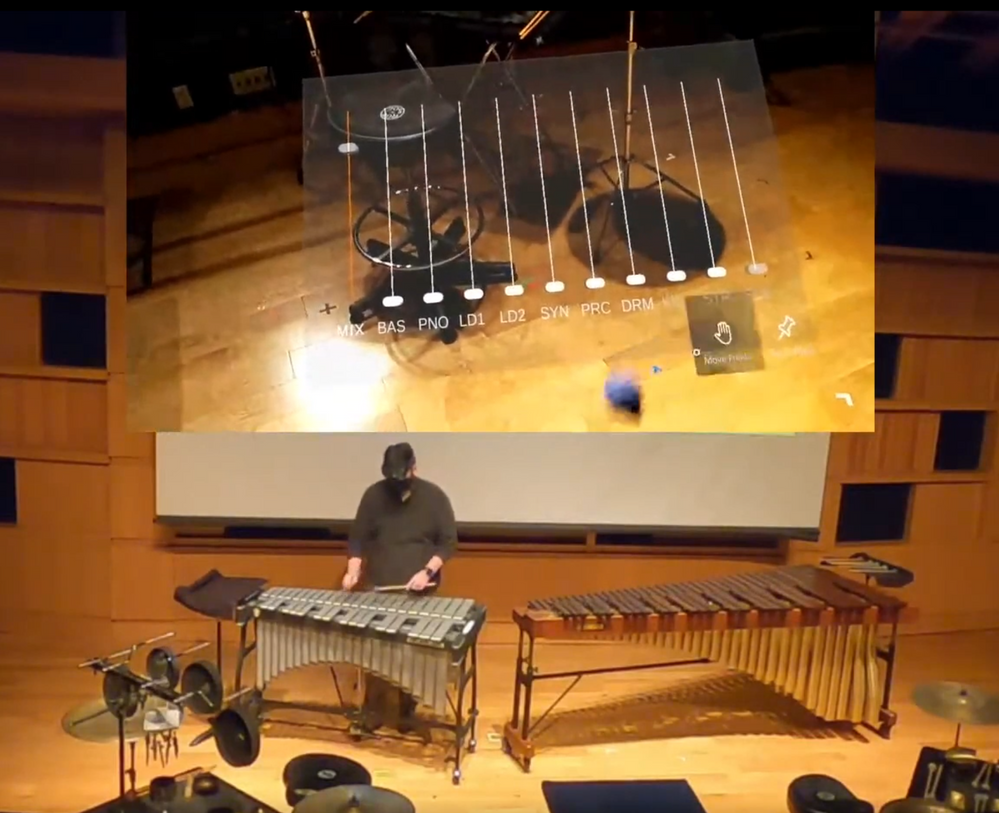
Playing vibraphone while using a holographic audio mixer from Touching Light
Preparing for HoloLens 2
Sometimes it is the mere fact that you know what you don’t know that can provide the clearest path forward. Soon after the reveal of the HoloLens 2 in early 2019, the first seeds of what would eventually become Touching Light began to take root. At the time, while I had done some minimal computer programming experience from high school (Java, and some HTML), since I began studying music in college, I had had little time or reason to engage with the ‘coding’ side of technology apart from some basic formatting for websites.
Knowing that the HoloLens 2 would likely run on something like C# or Visual Basic, I began thinking about other ways that I could engage with code-based music technology and would eventually teach myself how to build rudimentary circuits to trigger lighting and audio effects. Concurrent to this work, I also more fully invested myself into learning about audio recording and engineering, recording and editing my own performance videos from recitals and other concerts. Yet for all this experience, I still didn’t know how to program the HoloLens 2.
Learning Mixed Reality
When the first news of the global coronavirus pandemic entered the public awareness in the United States, it was met by a mixture of genuine concern, reasonable skepticism, and in some cases, outright dismissal. Living in West Virginia, the scope of the pandemic didn’t really hit home until the University received email correspondence from university president outlining the realities of campus closures, and the transition to online delivery for the remainder of the semester as the university endeavored to minimize the risk to the WVU community in the face of uncertain times. In the face of what seemed at the time to be indefinite lockdown, I found myself able to do what anyone would do with a sudden abundance of free time… learn how to code for Mixed Reality!
Over the course of the next several months, particularly during the summer of 2020, through a series of free tutorials, I learned the basics of 3-D modeling using a program called Blender, a modeling engine that is similar in many ways to the sort of interface I would eventually work with in Unity. Upon ordering a HoloLens 2 from Microsoft in early July, I quickly transitioned to Unity while familiarizing myself with the sorts of gestures and interactions that drive the HoloLens 2 holographic interface.
With all the components finally in hand, then began the work of writing, rehearsing, and performing Touching Light. Core to the performative practice of music, and particularly to that of the percussionist the same sorts of interactions that I already employed as a performer would serve as the conceptual framework from which the three ‘dimensions of translucence’ would be derived. These dimensions (modeled after the three coordinate dimensions in physical space) would serve to ground my creative work in the sorts of real decisions that I already knew how to make because of my work with percussion.
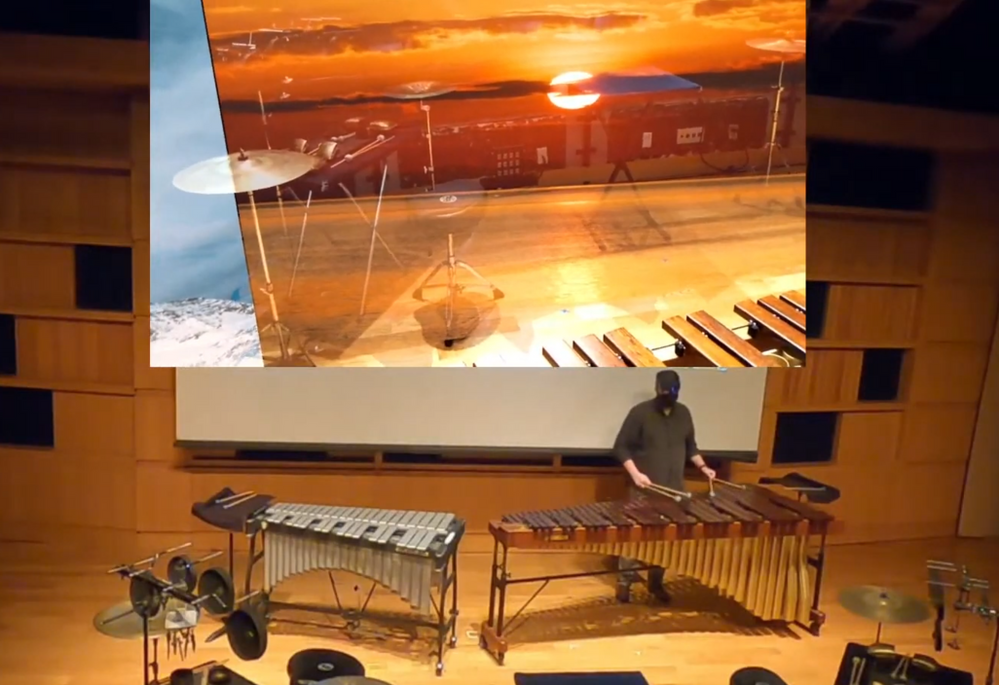
Improvising on a marimba in response to a rotating carousel of landscapes
Developing Music in Mixed Reality
I knew that I wanted Touching Light to be mobile. The promise of the HoloLens 2, and Mixed Reality in general, is that there are ‘no strings attached;’ if you wear this device, that is all you need to enter a Mixed Reality environment. I intentionally connected that idea of mobility to the sorts of interactions and environments that the user engages throughout the work. Even Soliloquy, the second movement of Touching Light which features a large carousel of static images, does not extend far beyond the anticipated ‘near-field’ (that which is within reach) that a percussionist will be used to engaging with. Everything in Touching Light, whether virtual or physical follows the design ethos of ‘always being within reach.’
The unique opportunity to engage music-making and Mixed Reality is not something that I take lightly; what began as a pipe dream just over a year ago has had a significant impact on the ways that I engage with both music and technology. I was pleasantly surprised to discover that Mixed Reality is a profoundly creative medium, and as such, engages easily with the process of music-making. From the deeply satisfying manipulation of a standing wave through the miniscule gestures of a rotating hand, to the shocking immersion of a massive holographic carousel slowly rotating around you while you perform, there is something much more connective about the spatial interactions presented by MR than the limitations of peripherals like a mouse and keyboard to control those same musical and visual elements.
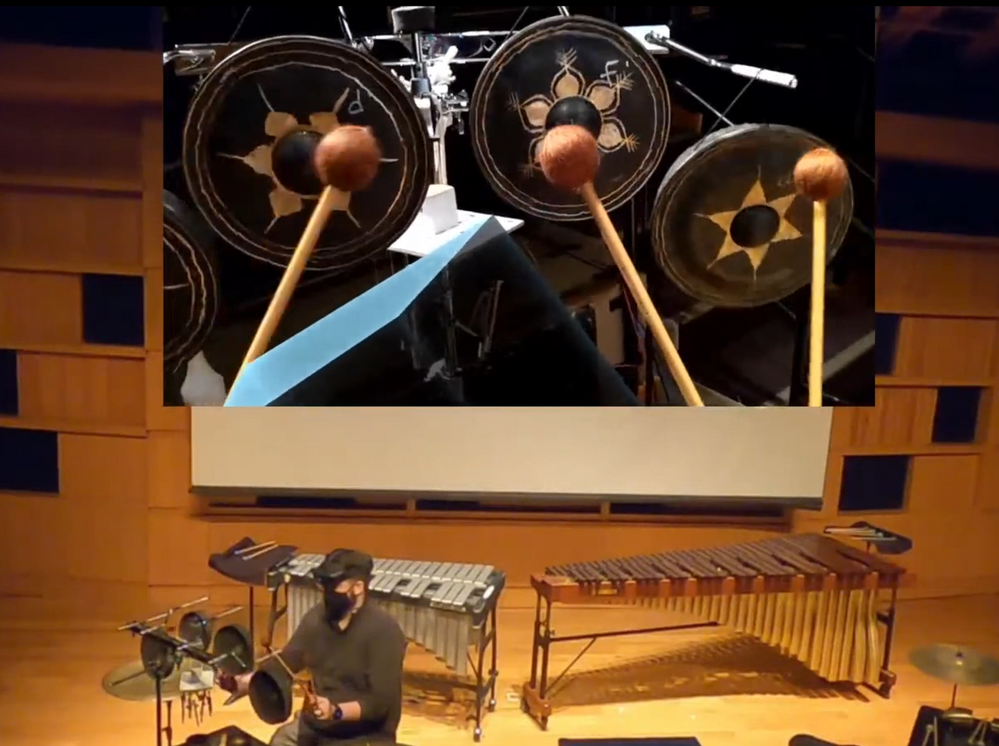
Exploring tuned Thai gongs while manipulating spatialized virtual instruments
Making Music in Mixed Reality (How to Get Started, and Why You Should)
Already, so much of what we do as musicians is, within the context of society at large, a niche endeavor; for the percussionist, these degrees of separation can seem even more severe. But in the same ways that we as artists commit ourselves to the craft of music, and the practice of music-making, engaging with MR has only served to deepen those sorts of commitments for me.
For Musicians or (“Performers”)
For those individuals who are interested in the musical side of Mixed Reality, the first step to get your hands on a platform. Touching Light is obviously designed with the Microsoft HoloLens 2 in mind, but similar functionality is available through any number of other VR headsets. Once you have a platform, you will need to decide what you will perform. If you are working with the Microsoft HoloLens 2, a great place to start is with Touching Light! You can download the complete Unity file package here. Follow the instructions from the Microsoft Mixed Reality Documentation, beginning at “1. Build the Unity Project.” Once you have deployed the application to your HoloLens 2, load up the application, and explore!
One of the most profound discoveries that I have made while working with this technology is just how musical it can be. There is something about engaging with technology within the Mixed Reality volume, about ‘spatial computing,’ that seems intuitive and artistic. This simple fact has even more deeply convinced me that music-making in Mixed Reality is not just an interesting possibility, but a deeply meaningful inevitability.
For Programmers (or “Composers”)
For those individuals who may be more interested in the nuts-and-bolts of developing musical applications for Mixed Reality, the first step is to familiarize yourself with a compiler. If you are interested in programming for the Microsoft HoloLens 2, the de facto solution at present is the Unity Development Engine, though support for other compilers is becoming increasingly available. You can download the Unity Hub for free from their website, and then following the instructions in the Microsoft Mixed Reality Documentation, beginning at “1. Introduction to the MRTK tutorials,” you can begin to develop your first Mixed Reality application.
I would strongly advise that, once you get a handle on the basic functionality of the compiler and complete some of the beginning MRTK tutorials, take some time to consider what sorts of functionality you would like your application to demonstrate, the connect with the Microsoft MR community (via Slack or the Microsoft MR Tech Community forums) and connect with other who may be able to answer your questions, and even help you with your project design.
Throughout the development process of Touching Light, I was surprised at not only how easy it was to onboard myself to Mixed Reality development by using the MRTK, but also by how friendly and helpful the then-current MR development community was. Whenever I had a question, or was struggling with some element of implementation, I would quickly be directed to the relevant documentation, YouTube video, or other resource that very often addressed the exact issue I was having without ever need to post snippets of code or consult more directly with someone on the project. As a bonus, I was also able to connect with a handful of individual who had a particular interest in developing creative applications for the HoloLens 2.
Touching Light
I had the distinct opportunity to present Touching Light in a public recital on Saturday, May 1st, 2021.
Only the beginning
Touching Light is only the beginning. It is my sincere hope that this project will serve to orient, assist, and inspire musicians, artists, and audiences alike as we continue to navigate an increasingly digital and virtual existence. Perhaps more than any other time in history, only compounded by the incredible circumstances surrounding global health and the subsequent impact that a response to such scenarios require, we have been forced to think differently about technology, and for those of us who found ourselves suddenly unable to engage in live musical performances, neither as artists nor audiences, it is my conviction that mediums like Mixed Reality will only become more essential to exploring ‘liveness’ within the context of digital and virtual spaces.
The work was designed during the global coronavirus pandemic of 2020-21 and it is my hope that Touching Light reminds each of us that, despite everything, we are never truly alone; there is a world beyond this one if we are only willing to reach out and touch it.
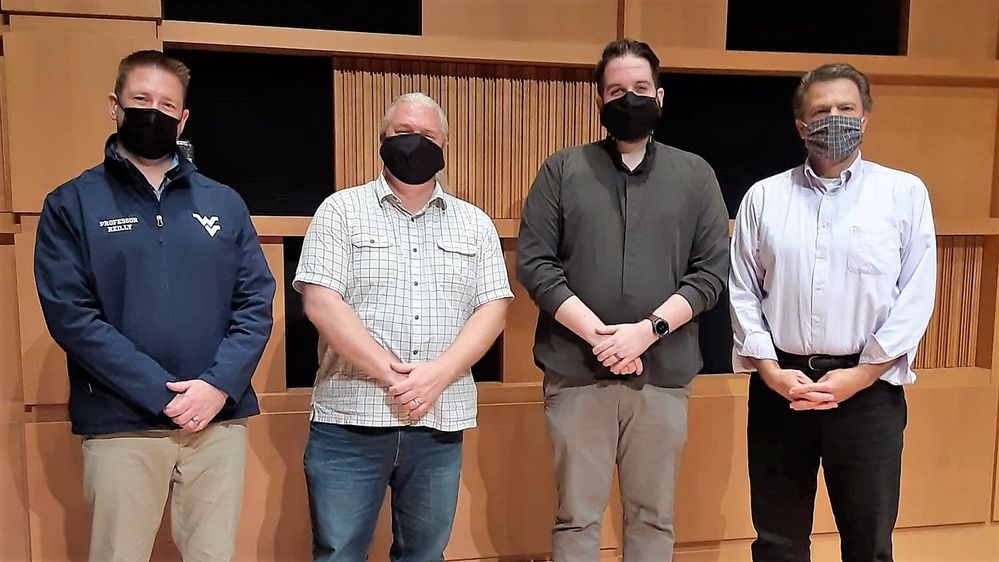
A photo with members of the WVU Percussion Faculty after the recital [from left: Pf. Mark Reilly, Dr. Mike Vercelli, Ian Riley, and Pf. George Willis]
Riley, Ian T. “Touching Light: A Framework for the Facilitation of Music-Making in Mixed Reality.” West Virginia University, West Virginia University Press, 2021.
This article is contributed. See the original author and article here.
The stage is set for the 19thannual Imagine Cup World Championship, taking place duringMicrosoft Build’sdigital experience on May 25.Four finalist teamsfrom across the world are bringing theirinnovations for impact toshowcase globally. Focused on four social good categories – Earth, Education, Healthcare, and Lifestyle – theirideas encompasstheImagine Cup’s mission to empower every student to apply technology to solve issues in their local and global communities.
In the 2021 competition, students reimagined a future through projects guided by accessibility, sustainability, inclusion, equality, and passion. Submitted solutions covered a variety of current issues, includinga 3D sign-language animation, a virtual game to combat social isolation, an early detection platform for Parkinson’s Disease, an intelligent bee keeping system, and more.
On May 25, our four finalists will present their innovations for the chance to take home USD75,000 and mentorship with Microsoft CEO, Satya Nadella. A panel of expert World Championship judges will assess each project. With combined industry and personal experience in diversity leadership, startups, founding businesses, and applying tech for social impact, our judges will apply their knowledge to evaluate the most inclusive and original solution with the potential to make a global difference.
Imagine Cup judges dedicate their personal time and experience to help empower the next generation of developers. We’ve been fortunate to have a diverse panel of industry experts, from around the world, leading up to the World Championship, including Devendra Singh, CTO at PowerSchool, Kai Frazier, Founder at KaiXR, Neil Sebire, Chief Clinical Data Officer at HDK UK, and Jason Goldberg, Chief Commerce Strategy Officer at Publicis, and more.
For the first time in Imagine Cup history, we are pleased to introduce a panel of all women judges for the World Championship. During the competition, each team will pitch their project and demo their technology, followed by questions from judges. Who will take home the trophy? Join our hosts, Tiernan Madorno, Microsoft Business Program Manager, and Donovan Brown, Microsoft Principal Program Manager, and tune into the show on May 25 at 1:30pm PT to find out!
Meet the World Championship judges
Jocelyn Jackson – National Society of Black Engineers National Chair, 2019-2021
Student, researcher, leader, and change agent are just a few descriptors of Jocelyn Jackson. In her final term as the National Chair of the National Society of Black Engineers (NSBE), Jocelyn led NSBE through one of the hardest years it has faced. Through the COVID-19 pandemic as well as the racial injustice reckoning in America, Jocelyn stayed dedicated to using her leadership and voice to make a difference in the lives of other young Black men & women interested in engineering, and to make engineering a more diverse and accepting field for all. As National Chair, Jocelyn made massive strides to accomplish the current strategic goal of NSBE: 10K by 2025, or to graduate 10,000 Black engineers annually by 2025 by launching NSBE’s newest 5 year strategic plan ‘Game Change 2025.’ During her last 3 years at NSBE, Jocelyn managed & led the board of directors to ensure the best overall experience of NSBE stakeholders.
Originally from Davenport, Iowa, Jackson received her bachelor’s and master’s degrees in mechanical engineering at Iowa State University, where her thesis research focused on the development of elastomeric coatings with reduced wear for ice-free applications. She is a second-year doctoral student in Engineering Education Research at the University of Michigan. Her current research works toward advancing equity in STEM and STEM entrepreneurship.
Enhao Li – Co-Founder and CEO of Female Founder School
Enhao Li is the Co-Founder and CEO of Female Founder School. Enhao studied Economics at Harvard and in a former life was an investment banker for fast-growing technology companies – helping to take companies like Pandora public, but she was always itching to be a founder herself. It wasn’t until she finally took the leap and started on her own company did she discover just how unprepared she was; she did all of the wrong things, wasted time and money, only to finally learn that there was a way to do this. Since then, she has become obsessed with learning how to build successful companies from experienced founders and investors and sharing it with new founders. That is where Female Founder School came from – her own personal experiences and a mission to make it easier for anyone especially women to build successful companies of their own.
Toni Townes-Whitley – President, US Regulated Industries, Microsoft As president of US Regulated Industries at Microsoft, Toni Townes-Whitley leads the US sales strategy for driving digital transformation across customers and partners within the public sector and commercial regulated industries. With responsibility for the 4900+ sales organization and ~$15B P&L, she is one of the leading women at Microsoft, and in the technology industry, with a track record for accelerating and sustaining profitable business and building high-performance teams.
Her organization is responsible for executing on Microsoft’s industry strategy and go-to-market for both public sector and regulated industries in the United States, including Education, Financial Services, Government, and Healthcare. In addition to leading a sales organization, Townes-Whitley is helping to steer the company’s work to address systemic racial injustice – with efforts targeted both internally at representation and inclusion; as well as externally at leveraging technology to counter prevailing societal challenges. She has developed expertise and speaks publicly about “Civic Technology”, applying tech innovation for social impact.
——————————–
Don’t miss out on the chance to see which team will win it all at the Imagine Cup World Championship! Plus, as a student at Microsoft Build, you can enhance your own developer skills and prepare to create the next great project. Register at no cost for the Student Zone now.
This article is contributed. See the original author and article here.
Model Lifecycle Management for Azure Digital Twins
Author – Andy Cross (External), Director of Elastacloud Ltd, a UK based Cloud and Data consultancy Azure MVP, Microsoft RD.
Ten years ago, my business partner Richard Conway and I founded Elastacloud to operate as a consultancy that truly understood the value of the Cloud around data, elasticity and scale; building next generation systems on top of Azure that are innovative and impactful. For the last year, I’ve been leading the build of a Digital Twin based IoT product we call Elastacloud Intelligent Spaces.
When working with Azure Digital Twins, customers often ask what the best practice is for managing DTDL Versions. At Elastacloud, we have been working with Azure Digital Twins for some time and I’d like to share the approach we developed to manage our DTDL model lifecycles from .NET 5.0.
What is DTDL?
If you are not familiar with Azure Digital Twins and DTDL, Azure Digital Twins is a PaaS service for modelling related data such as you’d often find in real world scenarios. It is a natural fit for IoT projects, since you can model how a sensor relates to a building, to a room, to a carbon intensity metric, to their enclosing electrical circuit, to an owner, to neighboring sensors and their respected metrics, owners, rooms and so on. It is a Graph Database, which focusses on the links that exist in the graph, giving it the edge over more commonly found relational databases, since it features the ability to rapidly and concisely traverse data by its links across a whole data set.
Azure Digital Twins adopts the idea that the nodes on the graph (known as Digital Twins) can be typed. This means that the store of Entities that holds the data are in defined sets of shapes that are defined in Digital Twin Definition Language. The definition language allows developers to constrain the data that an entity can store, in a list of contents. These are broadly synonymous with the notion of columns in a traditional relational database. Just like in other database systems, when a development team iterates on a data structure to add a property, edit or remove one, the development team has to consider how to keep the software and the data structure in sync.
What is the Version challenge?
Models in DTDL are stored in a JSON format, and therefore typically stored as a .json file. We store these in a git repository right alongside the code that interacts with the data shapes that they define.
The key question of the Version Challenge therefore is: “When I update my model definitions in my local dev environment, how do I automatically update the models that are available in Azure Digital Twin?”
There is one additional twist, when you want to use a model, for example to create a new digital twin, you have to know the version number of the model that you want to create. This means your software needs to also be kept in sync with your models, and your deployment.
In order to keep track of all this, each Azure Digital Twin model has a model identifier. The structure of a Digital Twin Model Identifier (DTMI) is:
dtmi:[some:segmented:name];[version]
For example:
dtmi:com:elastacloud:intelligentspaces:room;168
Our solution then needs to solve these top-level issues, whilst being developer friendly, and fitting into best practice for deployments.
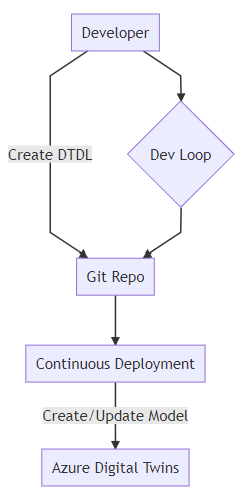
We might consider this ideal workflow:
A developer workflow that includes continuous deployment of DTDL models as described in the text.
Building Blocks
We want to be able to construct our approach to versioning without prejudicing our ability to use the fullness of ADT features. There are a few main options that present themselves to us:
Hold the JSON representation of the DTDL on disk as a file
Build the JSON representation from a software representation (for instance .NET class)
Both of these are valid cases. The JSON representation reflects the on-the-wire payload. The .NET class might give us the ability to later use this class to create instances of the DTDL defined Twin.
Considering this idea, we might consider something like the following:
{
  "@id": "dtmi:elastacloud:core:NamedTwin;1",
  "@type": "Interface",
  "contents": [
    {
      "@type": "Property",
      "displayName": {
        "en": "name",
        "es": "nombre"
      },
      "name": "name",
      "schema": "string",
      "writable": true
    }
  ],
  "description": {
    "en": "This is a Twin object that holds a name.",
    "es": "Este es un objeto Twin que contiene un nombre."
  },
  "displayName": {
    "en": "Named Twin Object",
    "es": "Objeto Twin con nombre"
  },
  "@context": "dtmi:dtdl:context;2"
}
We might then want to create a Plain Old CLR Object (POCO) representation:
public class NamedTwinModel
{
  public string name { get; set; }
}
While we are able to see that the Interface is in alignment with the DTDL definition of contents, it is not immediately apparent how we would manage displayName and globalisation concerns thereof within a POCO.
Note that from a purist’s perspective, a POCO should try to avoid attributes where possible, to boost readability. So a [DisplayName(“en”, “name”)] annotated approach is possible, but not ideal.
Furthermore, you’ll note that the DTDL wraps the contents which is the type definition, with a set of descriptors and globalization values. In order to achieve this, we might consider a wrapped generic POCO approach:
public class Globalisation {
   public string En { get; set; }
   public string Es { get; set; }
}
public class DtdlWrapper<TContents> {
    public T Contents { get; set; }
    public Globalisation Description { get; set; }
}
...
var namedDtdl = new DtdlWrapper<NamedTwinModel>();
namedDtdl.Contents = new NamedTwinModel();
namedDtdl.Contents.name = "what should I put here?";
The problem we start to face when expressing things in this case for the DTDL definitions themselves, is that we are actually building a class hierarchy that is more akin to the Azure Digital Twin instances than it is to the DTDL definitions. As such, we’re going to have to create instances, then use Reflection over them but ignore their values. We could use default values or lookup the types more directly, but still the problem is the same; class definitions in .NET describe how you can create instances, and don’t directly translate to DTDL in an easy to understand way.
Thus, from our perspective, we want to make sure that our description DTDL is native json since there are aspects which are not naturally amenable to encapsulating with a Plain Old CLR Object (POCO). We will use our POCOs to represent instances of Azure Digital Twins, i.e. the data itself, and not the schema.
This means we store the DTDL in JSON format on disk. But this isn’t anywhere near the end of the story for versioning and .NET development.
We just learned that POCOs can represent instances or Digital Twins quite effectively. If we’re going to code with .NET we will still need to use some kind of class to interact with, in order to do CRUD operations on the Azure Digital Twin.
The building blocks are therefore:
Raw JSON held as a file
POCOs to describe instances of those DTDL defined classes
Versioning
Versioning models in DTDL is achieved in a DTMI using an integer value held in the identifier. From the DTDL v2 documentation :
In DTDL, interfaces are versioned by a single version number (positive integer) in the last segment of their identifier. The use of the version number is up to the model author. In some cases, when the model author is working closely with the code that implements and/or consumes the model, any number of changes from version to version may be acceptable. In other cases, when the model author is publishing an interface to be implemented by multiple devices or digital twins or consumed by multiple consumers, compatible changes may be appropriate.
Firstly, mapping POCOs to DTDL in the way we have discussed requires that we choose to actively validate against DTDL, passively validate or don’t validate at all. Some options:
Active; we build a way to check whether a DTDL model exists in Azure Digital Twins on any CRUD activity, that the properties match in name and type
Passive; we do similarly to Active, but use JSON files as the validation target, and assume that the JSON files are in-line with the target database
None; we don’t validate, but instead lead Azure Digital Twins error if we get something wrong, and we react to that error.
In our approach, we want to be able to support either radical or compatible changes but we will have to consider some additional factors brought in by .NET type constraints:
if a DTDL interface changes types, the .NET POCO properties that exist must match its DTDL values
if a DTDL interface changes its named properties, the .NET POCO needs to be updated to reflect this
if a DTDL interface adds a new property, we need to decide whether it’s an error or not for the POCO to not have the property. This is a happy problem, as we’re roughly compatible even if we don’t add the property.
if the DTDL interface deletes a property, we need to decide whether we do create and update methods but omit that value at runtime.
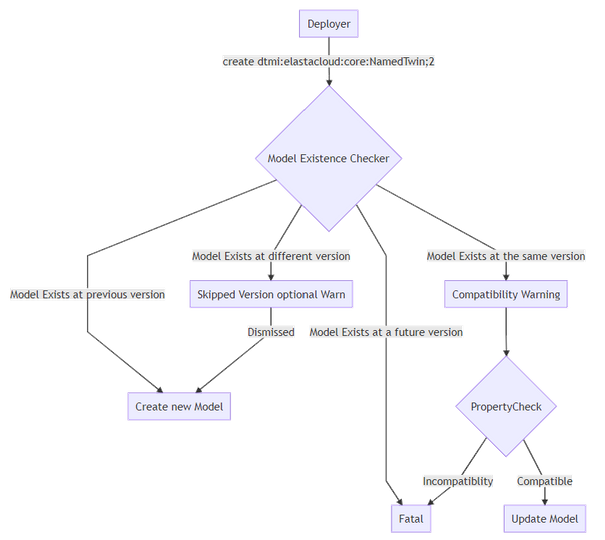
A workflow that shows the order of checking a Model Existence and the states that it may be in.
Applying Versioning
Once we have our DTDL prepared in JSON, we still need to get these into Azure Digital Twins. We have a few choices again to make around how we want to handle versioning.
The absolute core of creating Azure Digital Twins DTDL models from a .NET perspective is to use the Azure.DigitalTwins.Core package available on NuGet, to create the models. In short:
// you need to setup three variables first; tenantId, clientId
// and adtInstanceUrl. var
credentials = new InteractiveBrowserCredential(tenantId, clientId);
DigitalTwinsClient client = new DigitalTwinsClient(new Uri(adtInstanceUrl), credentials);
await client.CreateModelsAsync(new string[] { "DTDL Model in JSON here..." } );
That’s the core of creating those DTDL models. We could just load the JSON files directly from disk as a string and add it to the array passed to CreateModelsAsync, however we have options to employ that might help us out in the future.
For example, we can get the existing models by calling client.GetModelsAsync. We can iterate on these models and check whether our new models to create share a @id including the version. If this is the case we can validate whether the contents are the same, and choose to throw an exception if not, if we are seeking to maintain a high level of compatibility.
Should we find that a model exists for a previous version (i.e. our JSON file has a higher dtmi version) we can choose to decommission that model. This is a one way operation, so we better be careful to do this in a managed fashion. For instance, we might want to decommission a model only after it has been replaced for a period of time, so that we may have live-updates to the system. If this is the case, we should be comfortable that all writers to the Azure Digital Twin have been upgraded.
When a model is decommissioned, new digital twins will no longer be able to be defined by this model. However, existing digital twins may continue to use this model. Once a model is decommissioned, it may not be recommissioned.
Anyway, should we choose to do that, once a model is created (say dtmi:elastacloud:core:NamedTwin;2) we might choose to decommission the previous version:
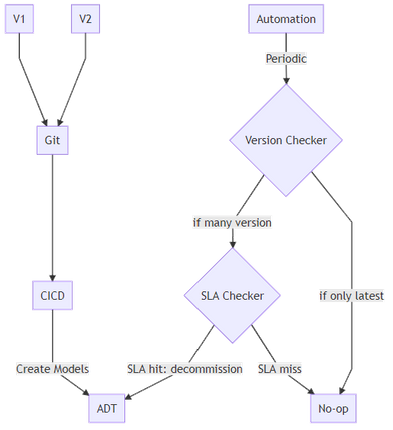
The key thought process around Decommissioning relates to the choice you want to make around version compatibility with your code. The idea we take at Elastacloud is that we want to be able to be sure that the latest Git-held version of the DTDL model is available but also that previous versions should also be available for a period of time that we consider to be an SLA, until we are sure that all consumers have been updated to the latest version.
A strategy for decommissioning DTDL Models in Azure Digital Twins, shown as a workflow that checks an SLA
Other Considerations
Naming standards between .NET and JSON are different. We should name according to the framework that hosts the code, and use Serialization techniques to convert between naming divergences. For example, Properties in .NET start with a capital letter in many circumstances, whereas in JSON they tend to start with lowercase.
DTDL includes a set of standard semantic types that can be applied to Telemetries and Properties. When a Telemetry or Property is annotated with one of these semantic types, the unit property must be an instance of the corresponding unit type, and the schema type must be a numeric type (double, float, integer, or long).
.NET Tooling Approach
So far we have a few key components that we have to build in order to hit our best practice goal.
A .NET application that deploys the models to the Azure Digital Twin instance. That understands versions of DTDL that are already deployed, and the versions held locally, and helps assert compatibility.
A .NET application that holds POCOs that can represent DTDL deployed to Azure Digital Twins and can help marshal data between .NET and Azure Digtal Twins.
This helps us define two main categories of error conditions; deployment and runtime.
A tooling approach to deploying Azure Digital Twin DTDL model changes
CI/CD deployment
At Elastacloud we use our own `twinmigration` tool for managing this process. The tool is a dotnet global tool that we built and that provides features designed for CI/CD purposes.
Since a dotnet global tool is a convenient way of distributing software into pipelines, we add a task to our CI/CD pipeline that takes the latest version of JSON files from a git repo, and validates them against what is already deployed in an ADT instance.
Following the output of a validation stage, we might choose to also run a deploy stage. This will do the action of adding the models to an Azure Digital Twin.
Finally, we have a decommissioning step which causes “older” models to be made unavailable for creation, so that we can keep good data quality practices.
In Summary
For more information about what we’re doing with Azure Digital Twins, visit our website at Intelligent Spaces — Elastacloud, we’ll be updating it regularly with information on our approaches. We have some tools that are ready to go, such as NuGet Gallery | Elastacloud.TwinMigration that help you to do the things we’ve described here!
This article is contributed. See the original author and article here.
Hello! In today’s “Voice of the Customer” blog, Chris Szorc, Director of IT Engineering for Gogo, explains how the company cut costs and streamlined their identity and access management as the pandemic was grounding their airline partners, drying up revenue, and forcing thousands of employees to work remotely. By leveraging their existing Azure subscription, Chris and her IT team were able to migrate thousands of internal and external users to Microsoft Azure Active Directory for simplified, secure access across their enterprise.
Editor’s Note:
This story began in May 2020 when Gogo served both Commercial Aviation and Business Aviation. In December 2020, Gogo’s Commercial Aviation business was sold to Intelsat. As a result, the structure and business model has changed drastically for Gogo, which now has approximately 350 employees and is solely focused on serving Business Aviation.
How to cut costs and simplify IAM during hard times
By Chris Szorc, Director of IT Engineering for Gogo
In 2020, Gogo was a provider of in-flight broadband internet services for commercial and business aircraft. We were based in Chicago, Illinois with 1,100 employees, and at the time we equipped more than 2,500 commercial and 6,600 business aircraft with onboard Wi-Fi services, including 2Ku, our latest in-flight satellite-based Wi-Fi technology.
As we all know, 2020 wasn’t a great year for the airline industry. Last May, the pandemic had drastically shrunk our revenue, forcing the company to cut costs wherever possible. A looming three-year renewal contract with Okta prompted my IT team to consider bringing all our identity and access management (IAM) under the Microsoft umbrella to cut costs and simplify access.
Favor security and simplicity
Pulling off a major migration to Microsoft Azure Active Directory (Azure AD)—when the IT team is shorthanded and working remotely—would be a challenge for anyone. For my team, the first consideration was security. We had to protect our PCI (payment card industry) status, as well as the custom apps that we create with our airline partners. We certify ourselves with ISO (International Organization for Standardization), and we pass our SOX (Sarbanes Oxley Act) audits every year. As it happened, Deloitte was reviewing us, so the industry certifications for Azure AD and Microsoft 365 helped maintain our security standing as well. We made sure to get the most from our Microsoft agreement—including all the security tools in the Microsoft Azure tool set.
We were already using on-premises Active Directory, but we wanted a hybrid cloud identity model for the seamless single sign-on (SSO) experience for our users and applications. We collaborate with a lot of airlines and contractors; so hybrid access fits our model. Like us, you might see migration as an opportunity to reduce the number of redundant apps in your user base. At Gogo, we went app by app, figuring out how people were using each of them, and we saw that Microsoft could cover data analytics among other business functions, as well as IAM.
We were able to further consolidate and simplify by adopting the full Microsoft 365 suite of productivity tools. Microsoft Teams, in particular, was a hit with users. People were working from home because of the pandemic, and discovered they preferred Teams over Skype. Once our people started asking for it, that gave us the green light to roll out Teams companywide as a unified platform for online meetings, document sharing, and more.
Make use of vendor support
Times were tough enough already; we couldn’t allow migrating our multifactor authentication from Okta to Azure AD to disrupt workflow. We knew we couldn’t overwhelm our help desk with calls and tickets; so, we chose to make the migration in waves of 100 users at a time.
My advice—take advantage of all the technical support that’s available. After all, it’s not as if you’ll have a complete test environment to train yourself. You have your production identity, domain, and your services—multifactor authentication, conditional access, sign in—and if you don’t do it right, you’re severely impacting people.
No matter how qualified your IT team is, there’s a wealth of knowledge that a good vendor can provide. Microsoft FastTrack was included with our Azure AD subscription. We also used Netrix for guidance on bringing the migration in on time. FastTrack helped us know where to put people and how to organize—their entire mission is built around helping you complete a successful migration.
FastTrack also helped us untangle previous IAM implementations that were set up before my team was hired. They showed us where Okta Verify could be replaced with the latest best practices in multifactor authentication, enabling us to deliver simplified, up-to-date security with Azure AD. That’s the kind of issue you rarely anticipate during a migration, and it’s one where the right support proves invaluable.
Ensure maximum ROI
At Gogo, we’re already enjoying the advantages that come with unifying our IAM for simplicity and maximum return on investment (ROI). Since adopting Teams and other Microsoft 365 apps, we’ve been able to drop other services like Box and Okta—that saves the company money.
We’re doing federated sharing with Microsoft Exchange Online, sharing calendars with partner tenants, which has been great for planning meetings. We do entitlement management to set up catalog access packages with expiration policies, to stage workflow and access reviews for vendors and collaborators, rather than give them identities in our Gogo directory.
Our IT team seized on migration as an opportunity to implement Azure AD’s self-service password reset feature, which allows users to reset their password without involving the help desk. The decision to simplify your IAM solution will likely pay off in more ways than you can anticipate. We accomplished more than just a migration from Okta to Azure AD; Microsoft helped us streamline our IT services and provided us with direction for future improvements.
Learn more
I hope Gogo’s story of undertaking a daunting migration during tough times serves as inspiration for your organization. To learn more about our customers’ experiences, take a look at the other stories in the “Voice of the Customer” series.
This article is contributed. See the original author and article here.
Exim has released a security update to address multiple vulnerabilities in Exim versions prior to 4.94.2. A remote attacker could exploit some of these vulnerabilities to take control of an affected system.
CISA encourages users and administrators to review the Exim 4.94.2 update page and apply the necessary update. CISA also encourages users and administrators to review Center for Internet Security Advisory 2021-064 for more information.
This article is contributed. See the original author and article here.
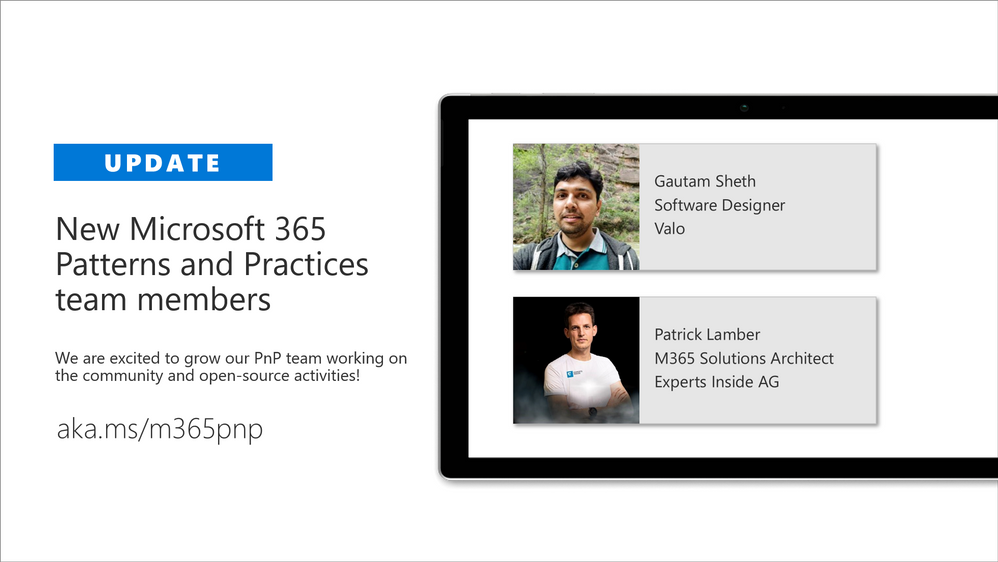
We are excited to announce that we are again extending our virtualMicrosoft 365 Patterns and Practices (PnP) teamwith additional community members. PnP team is responsible of the different community activities in different community channels, including our open-source work in the GitHub. This team consist of Microsoft employees and community members (MVPs) focused on helping the community the best use of Microsoft products, like Microsoft Teams, Power Platform, OneDrive, SharePoint or API layer like Microsoft Graph.
We announced our new PnP team model inApril 2020 with additional community membersand are further extending this team with new community members. We believe thatworking together as a one unified team across the organization barriers, we can make even larger worldwide impact and helping other community member to succeed on adopting different practices withinMicrosoft 365platform.
Gautam Sheth – Software Designer
Gautam is a Software Designer at Valo. Coming from a developer background, he builds products using the Microsoft 365 developer stack. He is also a maintainer of the PnP PowerShell repository and a contributor to PnP Framework and SPFx related repositories. He loves to contribute to the community and share his learnings. He is a firm believer in Sharing is Caring and helping others.
Outside of work, you can find him reading books, listening to Bollywood songs or occasionally speaking at local community/user group events.
Patrick Lamber – Microsoft 365 Solutions Architect
Patrick is a Microsoft Developer MVP and Microsoft 365 solutions architect at Experts Inside AG. He builds business solutions in the Microsoft 365 ecosystem for his international customers and he is the main developer of EasyLife 365 a new governance solution for Microsoft 365.
Patrick actively contributes to various projects on GitHub. You can follow him on GitHub.
When Patrick isn’t coding or helping customers, you will find him walking his dog or dancing Salsa around the world.
If you are looking for more details on whatMicrosoft 365Patterns and Practices (PnP) is all about, see more details on the different activities and projects fromhttps://aka.ms/m365pnp, including all community calls, open-source projects, samples and more.
There are also numerous exciting new projects under development which will be released as open-source solutions soon addressing Microsoft Teams, OneDrive, Microsoft Graph and SharePoint areas. We want to thank also the countless of other community members who have been involved on this journey for past years. We still consider this as just a start and are looking your feedback and input to further improve the processes and model we use.
Got ideas, feedback, comments on our community work? –Don’t hesitate to let us know. We are here for you. Everyone is welcome!
This article is contributed. See the original author and article here.
Microsoft partners like Archive360, BlockApps, and Drizti deliver transact-capable offers, which allow you to purchase directly from Azure Marketplace. Learn about these offers below:
Archive2Azure: Archive360’s Archive2Azure platform enables you to migrate, onboard, secure, validate, classify, search, analyze, and dispose of data from a variety of disparate sources, including email, Microsoft 365, social media, and more. Built for Microsoft Azure, Archive2Azure helps enterprises control costs, optimize storage, and address data management and compliance requirements.
STRATO for Business Networks: BlockApps’ STRATO platform on Microsoft Azure enables you to create and manage programmable business networks. Transactions on STRATO networks leverage blockchain technology to satisfy requirements for speed, reliability, and security. Bring the reliability and efficiency of face-to-face interactions to digital transactions through secure and connected information.
HPCBOX: HPC Cluster for OpenFOAM: HPCBOX by Drizti lets you plug cloud infrastructure into your application pipeline. This HPC Cluster for OpenFOAM provides distributed parallel and hardware-accelerated 3D support. Read the blog post “More performance and choice with new Azure HBv3 virtual machines for HPC” to learn about Drizti’s involvement in the launch of HBv3 series VMs on Azure.
This article is contributed. See the original author and article here.
Through my bedroom window, I can see the street in a typical suburban residential neighborhood. It is a relatively quiet street with mostly cars passing by occasionally, but due to increase in package deliveries, there have been more trucks and delivery folks seen on the street recently.
I want to put a camera on my bedroom window overlooking the street below and build a package delivery monitoring AI application that will detect when a person or a truck is seen by the camera. I want the package delivery monitoring AI application to show me these event detections in a video analytics dashboard that is updated in real-time. I also want to be able to view a short video clip of the detected event.
Here are some details about the project using an Azure Percept DevKit.
You can adapt the project and choose other object classes to build your own AI application for your environment and scenario.
Here’s what you will need to get started
Subscription and Hardware
Azure subscription (with full access to Azure services)
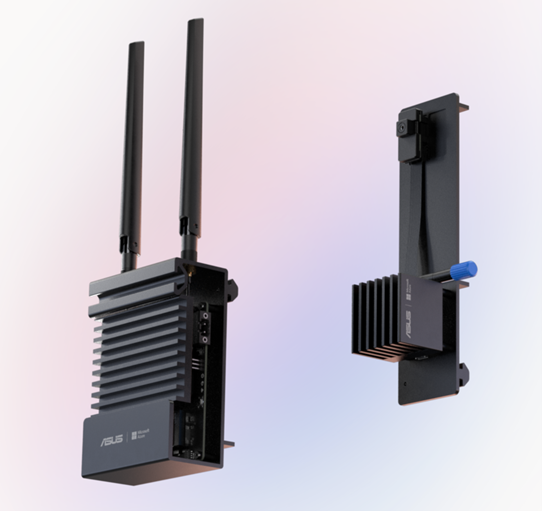
Azure Percept DK (Edge Vision/AI device with Azure IoT Edge)
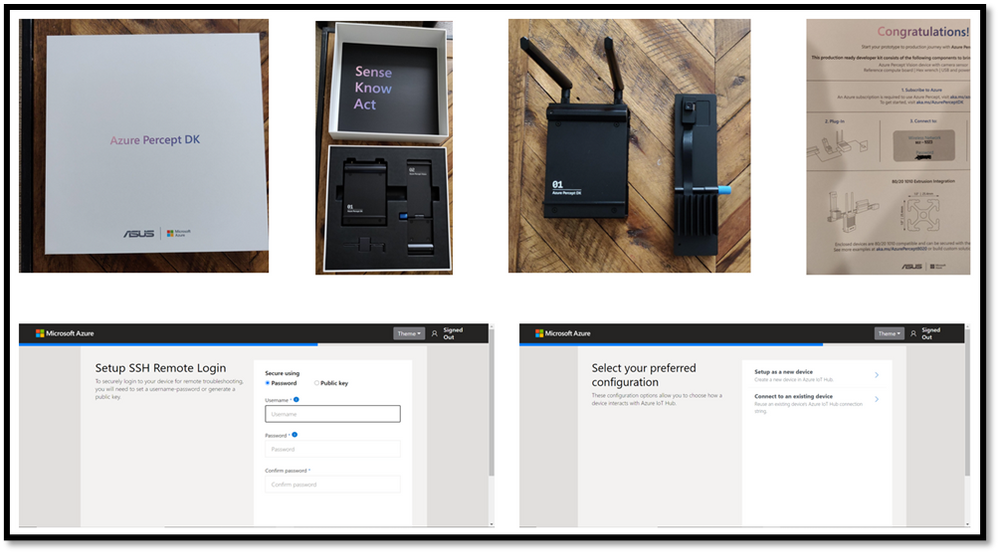
Here are some screenshots that I captured as I went through my Azure Percept device setup process.
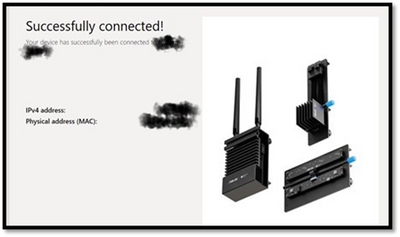
Key points to remember during the device setup are to make sure you note down the IP address of the Azure Percept and setup your ssh username and password so you can ssh into the Azure Percept from your host machine. During the setup, you can create a new Azure IoT hub on the cloud or you can use an existing Azure IoT hub that you may already have in your Azure subscription.
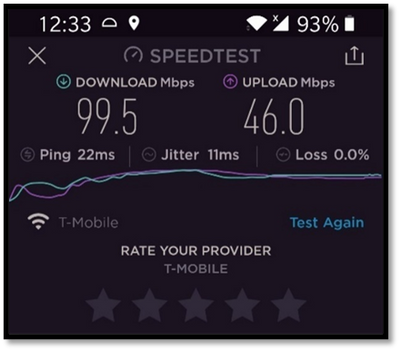
Step 2: Ensure good cloud connectivity (uplink/downlink speed for videos)
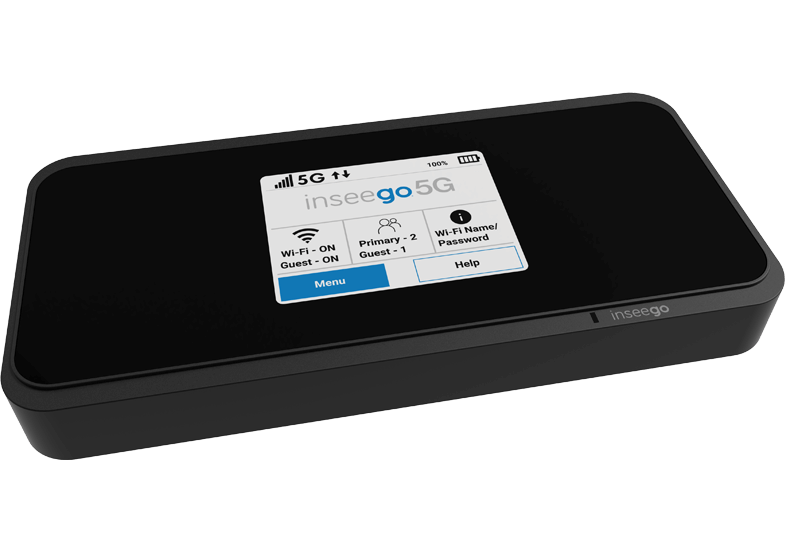
For the package delivery monitoring AI application I am building, the Azure percept will be connecting to the cloud to upload several video clips depending on the number of detected events. Ensure that the video uplink speeds are very good. Here is a screenshot of the speed test for the Inseego 5G MiFi ® M2000 mobile hotspot from T-Mobile that I am using for my setup.
Step 3: Build an Azure IoT Central application
Now that the Azure Percept is fully setup and connected to the cloud, we will create a new Azure IoT Central app. Visit https://apps.azureiotcentral.com/ to start building a new Azure IoT Central application. Navigate to retail and then select the Video analytics – object and motion detection application template and create your application. When you are finished creating the application, navigate to the Administration section of the app (in the left menu) to:
API Tokens menu item -> Generate a new API token and make a note of it (this will begin with SharedAccessSignature sr=)
Your application menu item -> Note the App URL and APP ID
Device connection menu item -> Select SAS-IoT-Devices and make a note of the Scope ID and Primary key for the device
The above information will be needed in later steps to configure the Azure Percept so that Azure Percept can securely talk to our newly created IoT central app.
Step 4: Download a baseline reference app from github
Download a reference app from github that we will use as a baseline for building our own package delivery monitoring AI application on Azure Percept. On your host machine, clone the following repo
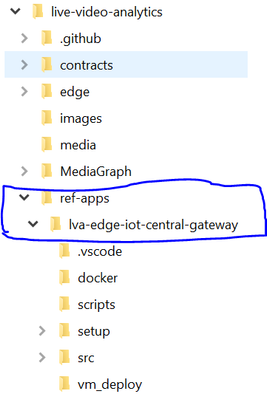
and then navigate to the ref-appslva-edge-iot-central-gateway folder. We will be modifying a few files in this folder.
Step 5: Porting reference app to Azure Percept
The downloaded reference app is a generic LVA application and was not purpose-built for Azure Percept ARM-64 device. Hence, we need to make a few changes, such as building docker containers for ARM-64, updating the AMS graph topology file and updating deployment manifest before we can run the reference application on the Azure Percept which is an ARM-64 device running Mariner OS (based upon the Fedora Linux distribution
5A. Update objectGraphInstance.json
First, navigate to setup/mediaGraphs/objectGraphInstance.json file and update the rtspUrl and inferencingUrl as follows:
This will allow the AzurePerceptModule to send the RTSP stream from the Azure Percept’s camera to the http extension module in the Azure media graph running on Azure Percept (via the LVA Edge Gateway docker container). We will also be building a yolov3tiny object detection docker container that will provide the inference when the http extension node in the media graph calls the inferencing URL http://yolov3tiny/score
5E. Build YOLOv3 tiny docker container for the Azure Percept
Navigate to live-video-analyticsutilitiesvideo-analysisyolov3-onnx folder and use the following commands to build the Yolov3tiny docker container for ARM64v8 and push it to your Azure Container Registry
5F. Update deployment manifest with Yolov3tiny and AzurePerceptModule and update AMS account name and the LVAEdge section
Navigate to setup/deploymentManifests/deployment.arm64v8.json to add Yolov3tiny and AzurePerceptModule and update the AMS account name and the LVAEdge section as follows:
Note that the App id, App secret and tenant id in the LVA Edge section should come from your AMS account and not IoT Central.
Step 6: Create device template in IoT central and upload deployment manifest
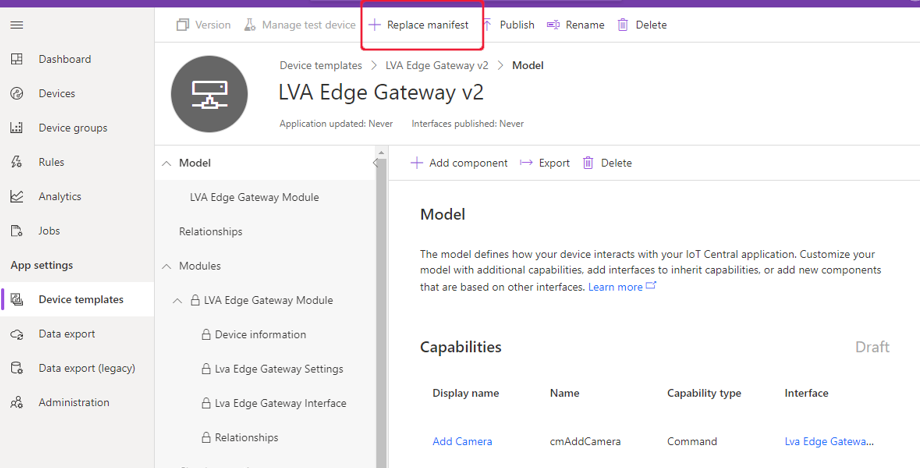
In your IoT Central application, navigate to Device Templates, and select the LVA Edge Gateway device template. Select Version to create a new template called LVA Edge Gateway v2 and then select Create. Click on “replace manifest” and upload the deployment manifest file setup/deploymentManifests/deployment.arm64v8.json that we updated in the previous step. Finally, publish the device template.
Step 7: Create new IoT device using the device template
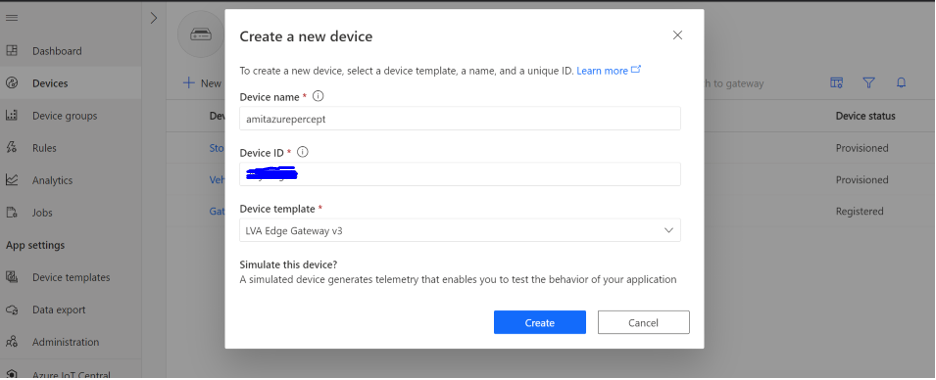
Navigate to the devices page on the IoT Central app and create a new IoT edge gateway device using the LVA Edge Gateway template we just created in the previous step.
To obtain the device credentials, on the Devices page, select your device. Select Connect. On the Device connection page, make a note of the ID Scope, the Device ID, and the device Primary Key. You will use these values later for provisioning the Azure Percept (Note: make sure the connection method is set to Shared access signature).
Step 8: Provision the Azure Percept
SSH into Azure Percept and update the provisioning script.
Update scope_id, registration_id (this is the device id) and symmetric_key with the IoT Central app information you noted down in the previous step.
Finally, reboot the Azure Percept and then ssh into it to make sure the following six docker containers are running:
Step 9: Add camera, manage camera settings and start LVA processing
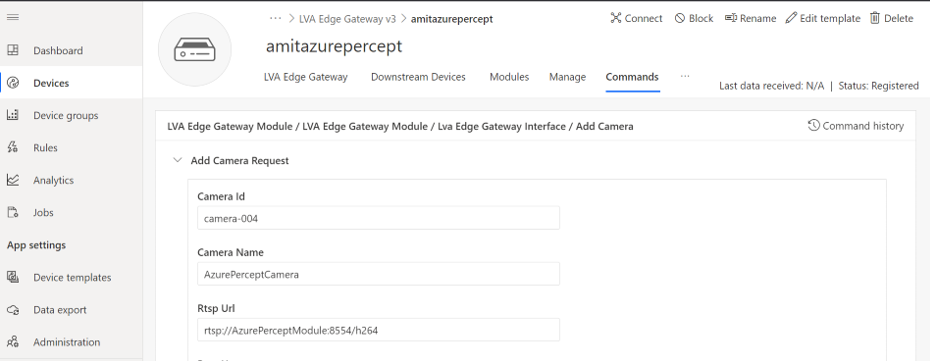
Now that we have created the IoT edge gateway device, we need to add camera as a downstream device. In IoT central, go to your device page and select “Commands” and add camera by providing a camera name, camera id and the RTSP URL and select Run.
On your Azure Percept, you can confirm that the LVA Edge Gateway module received the request to add camera by checking the docker logs:
sudo docker logs -f LvaEdgeGatewayModule
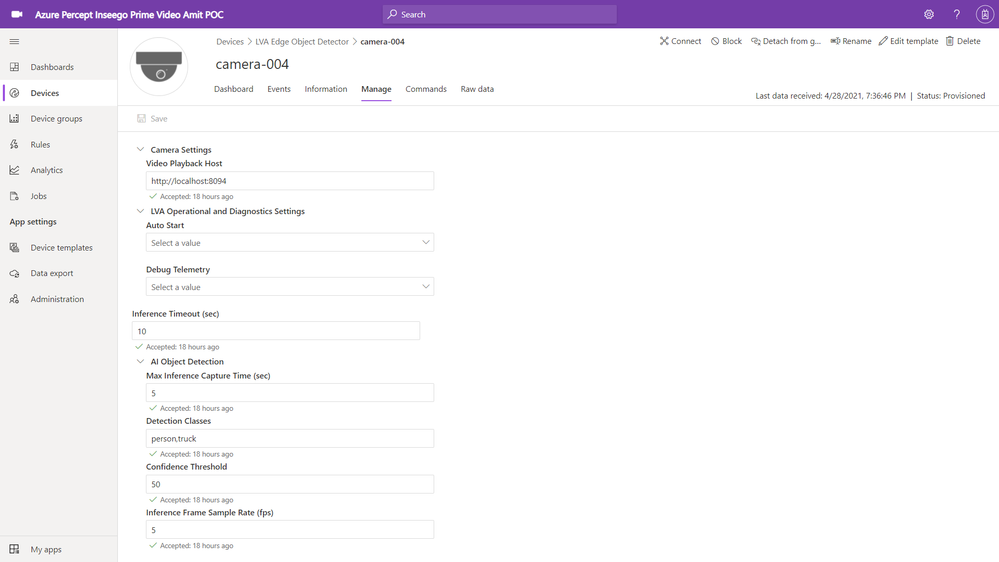
Navigate to the newly created camera device and select the “manage” tab to modify the camera settings as shown below:
You can see that I have added “person” and “truck” as detection classes with a minimum confidence threshold of 50%. You can select your own object classes here (object class can be any of the 91 object classes that are supported by the COCO dataset on which our YOLOv3 model was trained).
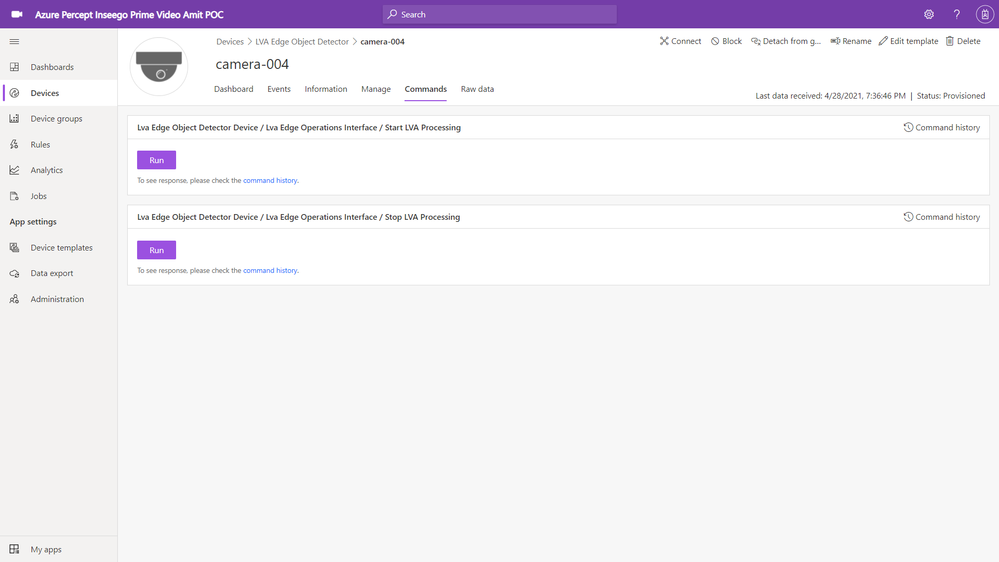
Finally, navigate to the commands tab of the camera page and click on Run to Start LVA Processing.
This will start the AMS graph instance on the Azure Percept. Azure Percept will now start sending AI inference events (in our case a person or a truck detection event) to IoT central (via IoT hub message sink) and the video clips (capturing the person or truck event detections) to your AMS account (AMS sink).
Step 10: View charts and event videos on the camera device dashboard
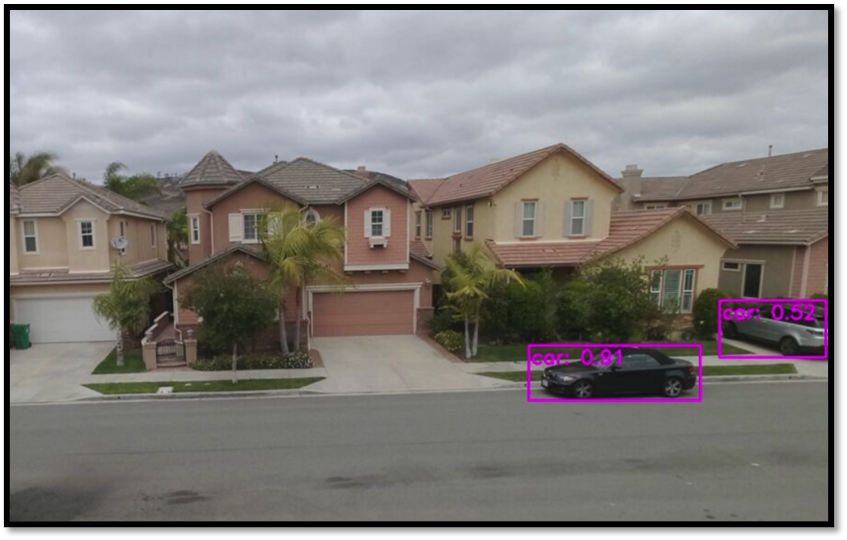
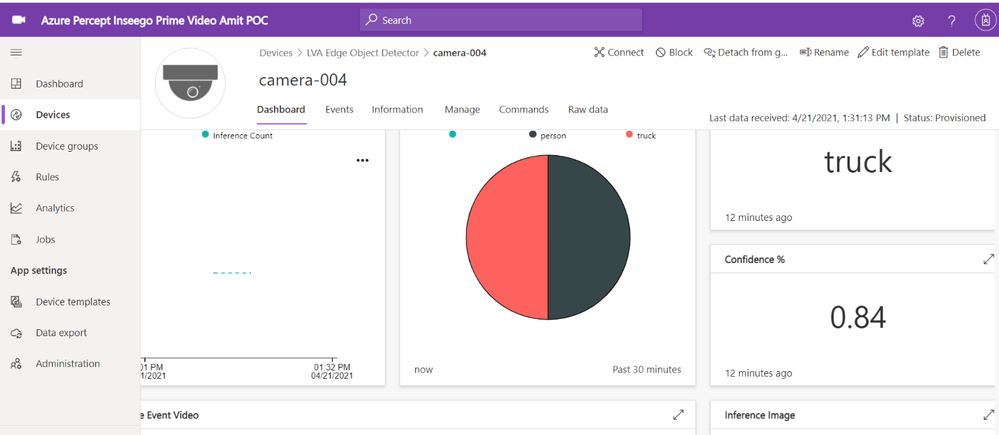
Navigate to the camera device and select the dashboard tab. Whenever the camera sees a truck or a person, the YOLOv3 detection model will send the corresponding AI inference events with the detection class and confidence % to IoT central. The charts on the IoT Central dashboard will update in real-time to reflect these detections.
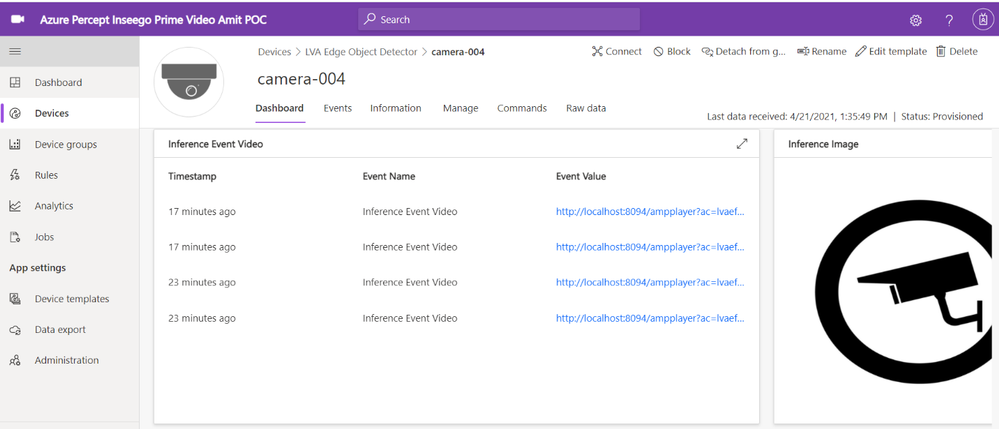
If you scroll further down on the dashboard, you will see a tile that shows event detections and links to corresponding AMS video streaming URL
The IoT Central application stores the video in Azure Media Services from where you can stream it. You need a video player to play the video stored in Azure Media Services.
On your host machine, run the amp-viewer docker container that has the AMS video player.
Once the AMP viewer docker container is running on your host machine, clicking on any of the streaming video URLs will bring up a short clip of the video that was captured for the corresponding event.
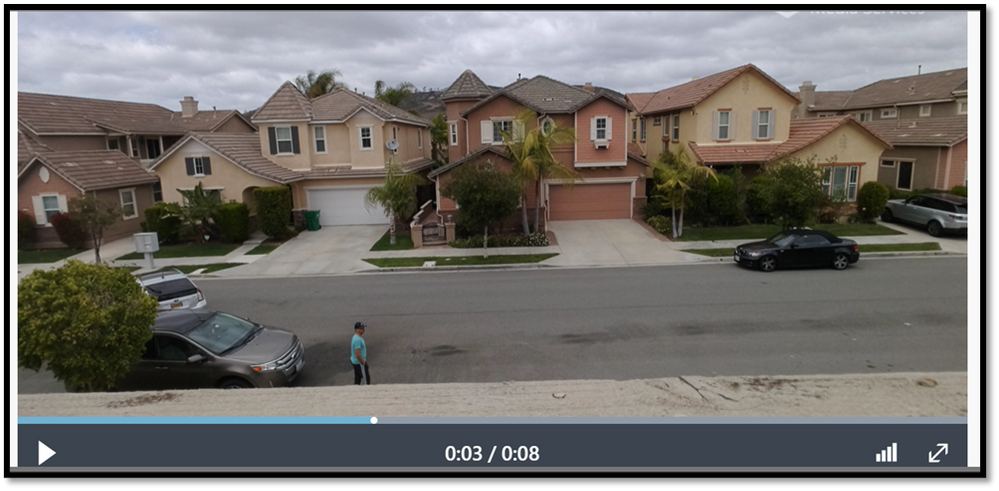
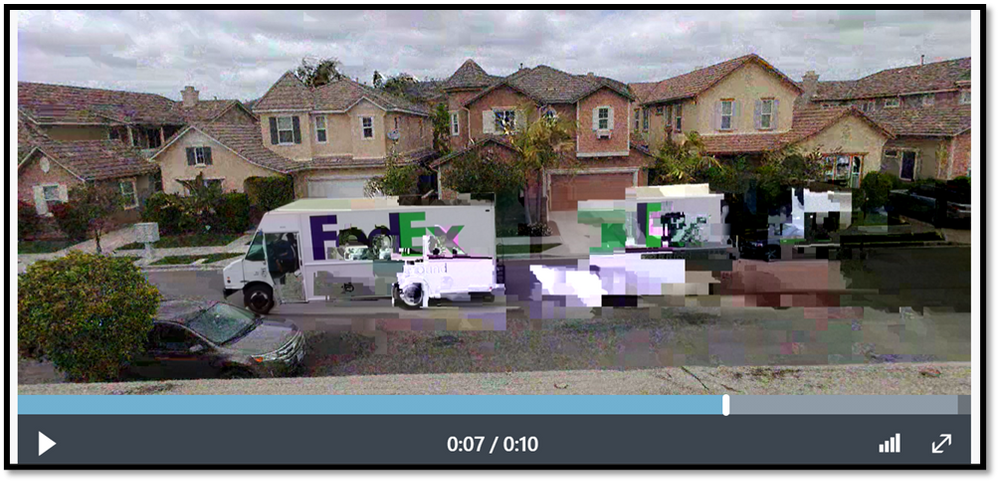
Here are a couple of video clips that were captured by my Azure Percept and sent to AMS when it detected a person or a truck in the scene. The first video shows that the Azure Percept detected me as a person and the second video shows that the Azure Percept detected a FedEx truck as it zipped past the scene. In just a few hours after unboxing the Azure Percept, I was able to set up a quick Proof of Concept of a package delivery monitoring AI application using Azure services and my Inseego 5G MiFi ® M2000 mobile hotspot!
Note: The views and opinions expressed in this article are those of the author and do not necessarily reflect an official position of Inseego Corp.
Vlad Iliescu is an AI MVP, public speaker, storyteller, music lover and uke player. Hailing from Romania, Vlad is Partner and Head of AI at Strongbytes, a company with a strong focus on building software products around well-operationalized machine learning models, and the co-founder of the Romanian AI conference NDR. For more on Vlad, check out his blog and Twitter @vladiliescu
Damien Doumer is a software developer and Microsoft MVP in development technologies, who from Cameroon and currently based in France. He plays most often with ASP.Net Core and Xamarin, and builds mobile apps and back-ends. He often blogs, and he likes sharing content on his blog at https://doumer.me. Though he’s had to deal with other programming languages and several frameworks, he prefers developing in C# with the .Net framework. Damien’s credo is “Learn, Build, Share and Innovate”. Follow him on Twitter @Damien_Doumer.
James van den Berg has been working in ICT with Microsoft Technology since 1987. He works for the largest educational institution in the Netherlands as an ICT Specialist, managing datacenters for students. He’s proud to have been a Cloud and Datacenter Management since 2011, and a Microsoft Azure Advisor for the community since February this year. In July 2013, James started his own ICT consultancy firm called HybridCloud4You, which is all about transforming datacenters with Microsoft Hybrid Cloud, Azure, AzureStack, Containers, and Analytics like Microsoft OMS Hybrid IT Management. Follow him on Twitter @JamesvandenBerg and on his blog here.
Vesku Nopanen is a Principal Consultant in Office 365 and Modern Work and passionate about Microsoft Teams. He helps and coaches customers to find benefits and value when adopting new tools, methods, ways of working and practices into the daily work-life equation. He focuses especially on Microsoft Teams and how it can change organizations’ work. He lives in Turku, Finland. Follow him on Twitter: @Vesanopanen
Chris Hoard is a Microsoft Certified Trainer Regional Lead (MCT RL), Educator (MCEd) and Teams MVP. With over 10 years of cloud computing experience, he is currently building an education practice for Vuzion (Tier 2 UK CSP). His focus areas are Microsoft Teams, Microsoft 365 and entry-level Azure. Follow Chris on Twitter at @Microsoft365Pro and check out his blog here.
This article is contributed. See the original author and article here.
Tuesday, May11, 2021, 08:30 AM – 03:00 PM (CST)
This fourth and final virtual installment of the Cloud Security and Compliance Series (CS2) in 2021willcover best practices for CMMC, DFARS 7012, NIST 800-171 compliance, CUI and ITAR data management. However, as a unique offering, this CS2 Virtual contains several breakout sessionscentered around universities and research institutions preparing to meet cloud security requirements associated with the Cybersecurity Maturity Model Certification (CMMC).
In an article recently published by Federal News Network, ”Federal cybersecurity requirements in higher education”, it is noted that higher education institutions face slightly different challenges than industry, including a deficit of information about CMMC requirements in academic circles. This finalvirtual conference is timely because it will specifically provide insights on how higher education institutions are protecting CUI and FCI and includethe following session highlights:
CMMC for Higher Education with Katie Arrington
Microsoft Program Updates for CMMC Compliance in Higher Education
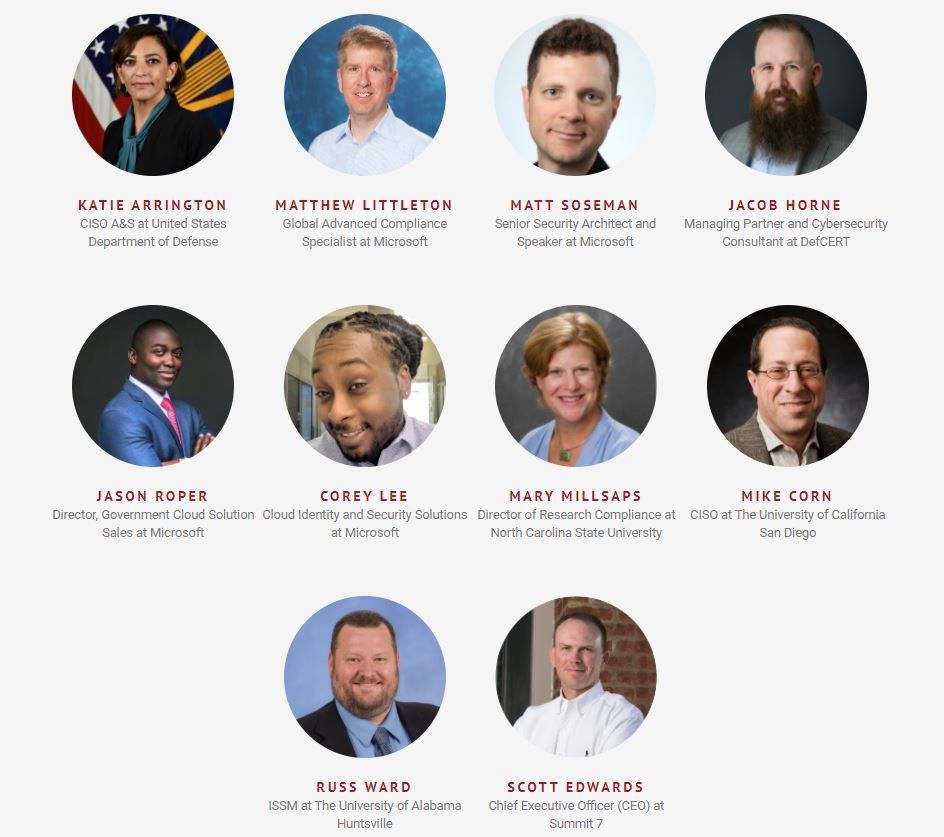
Speakers include leading expertsand US Federal stakeholders – such as Katie Arrington, OUSD – multiple university CISOs and IT Directors, and representatives across Microsoft’s Education and Security teams. Participants will garner insights on the roadmap for variouscybersecurity regulations, address security threats, and glean best practices for their organization’s cloud investments (Microsoft GCC & GCC High / Azure Government). Lastly, Matt Soseman returns to provide a highly focusedsession on “Meeting CMMC with Microsoft Information Protection (MIP)”. You can see his previous session here.

![[Guest Blog] Touching Light: Making Music in Mixed Reality](https://www.drware.com/wp-content/uploads/2021/05/fb_image-571.png)














Recent Comments