
by Contributed | May 11, 2021 | Technology
This article is contributed. See the original author and article here.
We continue to expand the Azure Marketplace ecosystem. For this volume, 85 new offers successfully met the onboarding criteria and went live. See details of the new offers below:
|
Applications
|
|
Agic Key: Agic Key uses AI to automate the search and organization of business documents. It can import, read, and interpret structured and unstructured documents and send them in batch mode to an optical character recognition system. This app is available only in Italian.
|
 |
Apache Web Server on CentOS: This image offered by Cloud Infrastructure Services provides Apache Web Server, MySQL Community Edition, and phpMyAdmin on CentOS Server 8.3. Build secure web applications with this preconfigured full stack.
|
 |
Apache Web Server on Ubuntu: This image offered by Cloud Infrastructure Services provides Apache Web Server, MySQL Community Edition, and phpMyAdmin on Ubuntu Server 20.04. Build secure web applications with this preconfigured full stack.
|
 |
Azure Cognitive Search Japanese enhancement pack: This pack from Acroquest Technology Co. Ltd. extends the functionality of Microsoft Azure Cognitive Search, enabling it to handle issues common to Japanese documents, such as notation fluctuation and variant characters.
|
 |
BACE Modbus Gateway + IoT Connector: BACE Modbus Gateway, an IoT solution, accomplishes remote Modbus management by pairing the BACE module with a device twin in the cloud. The device twin delivers a digital replica of the BACE module, showing you the state of the device and the Modbus registers.
|
 |
Blackbaud Fundraiser Performance Management: Blackbaud Raiser’s Edge NXT is fundraising and donor management software made for nonprofits. It features easy-to-use cultivation tools to find new supporters, powerful analytics to surface smart recommendations, and dynamic email campaigns to keep constituents engaged. |
 |
Cleareye.ai Talentology-Talent Experience Platform: Cleareye.ai’s Talentology automates résumé screening, helping managers get better hiring results while reducing cost and time per hire. Using AI, Talentology extracts relevant information from résumés and matches applicant skills to the right opportunity.
|
 |
Customer Delight Solution Suite: Customer Delight Solution Suite (CDSS) is a customer engagement platform that enables contact center agents to perform omnichannel communications with a single-view desktop. CDSS supports messaging through WhatsApp Business, WeChat, Telegram, Facebook Messenger, and more.
|
 |
Dashworks: Dashworks helps you manage your complex IT migration projects. It automates manual processes associated with onboarding, scheduling, communications deployment, and reporting, enabling you to concentrate on managing budgets, reducing business disruption, and driving efficient logistics.
|
 |
DataTurn: DataTurn provides automated transformation of data structures and conversion of data from legacy data stores to relational databases. This liberates valuable business systems from their dependency on legacy technologies.
|
 |
Discourse – community forum platform: The Discourse community forum platform, written in JavaScript, features modern design and rapid page loading. Discourse lets users create categories, tag posts, manage notifications, and foster discussion.
|
 |
Dynamic Document Approval System: The Dynamic Document Approval System from CloudFirst Technology Solutions is built on Microsoft SharePoint. It allows you to submit documents for approval and create a workflow by choosing approvers from your organization’s Azure Active Directory. |
 |
Freshdesk-Asana Connector: Use this app from IntegrateCloud to connect your FreshDesk customer support software with bug-tracking tool Asana. This will allow agents to file a bug in Asana directly from FreshDesk. After fixing the bug, a developer can add a comment to the task from Asana.
|
 |
Freshdesk-Microsoft Azure DevOps Connector: Use this app from IntegrateCloud to connect your FreshDesk customer support software with Microsoft Azure DevOps. This allows Azure DevOps items to be created inside the FreshDesk form and FreshDesk tickets to be linked to Azure DevOps work.
|
 |
Freshservice-Microsoft Azure DevOps Connector: Use this app from IntegrateCloud to connect your Freshservice customer support software with Microsoft Azure DevOps. This allows Azure DevOps items to be created inside the Freshservice form and Freshservice tickets to be linked to Azure DevOps work.
|
 |
GlobalLogic Microservices Accelerator: Microservices Accelerator by GlobalLogic provides a comprehensive microservices chassis that includes a project configurator and a developer sandbox of modules to implement common nonfunctional requirements.
|
 |
Harpocrates: Harpocrates gives your business and its end users more control over what data is collected and processed, facilitating compliance with the European Union’s General Data Protection Regulation and the California Consumer Privacy Act.
|
 |
ignio AI.Assurance: ignio AI.Assurance uses artificial intelligence and machine learning to automate software testing, enabling enterprises to deliver better software faster. ignio AI.Assurance’s self-healing tests can reduce time to market by up to six times faster.
|
 |
Ispirer MnMTK for Oracle to Azure PostgreSQL: Ispirer Migration and Modernization Toolkit (MnMTK) oversees the conversion process when conducting an automated migration of Oracle assets to Microsoft Azure Database for PostgreSQL. Ispirer Systems can add new conversion rules according to your requirements within two to three business days.
|
 |
Joomla Server on CentOS: This preconfigured image offered by Cloud Infrastructure Services provides Joomla Server, MySQL Community Edition, Apache Web Server, and phpMyAdmin on CentOS 8.3. Joomla is an open-source content management system for building websites, blogs, apps, and more.
|
 |
Joomla Server on Ubuntu: This preconfigured image offered by Cloud Infrastructure Services provides Joomla Server, MySQL Community Edition, Apache Web Server, and phpMyAdmin on Ubuntu Server 20.04. Joomla is an open-source content management system for building websites, blogs, apps, and more.
|
 |
KenSci AI Platform for Digital Health (Payers): This platform from KenSci connects real-time data from partnering health systems using KenSci’s HL7 pipelines or FHIR so you can build your AI and machine learning models to achieve a 360-degree view of your members.
|
 |
LiveTiles Directory: Using AI technology, Directory from LiveTiles identifies what’s missing or wrong in your staff directory and lets you know via emails or chatbots. Achieve complete and up-to-date employee profiles across Microsoft 365.
|
 |
Loymax: Loymax, a comprehensive marketing automation platform for business-to-business use, can help you launch effective campaigns, enhance communications with customers, and raise revenues with an automation tool for bonuses, coupons, accrual, and more.
|
 |
Matillion ETL: Matillion ETL provides a low-code interface to turbocharge cloud data ingestion and transformation workflows and give data professionals the cost-effective tools they need to get results faster.
|
 |
Musiq.ai – AI-Powered Global Music Intelligence: Musiq.ai, an AI-powered platform from Platinum Innovation Ltd., provides media and entertainment organizations access to global insights and trends in commercial music. Musiq.ai’s flagship feature is a module that predicts what the streaming charts will look like next week.
|
 |
Onboarding-as-a-Service: Financial institutions can use DigiPli Inc.’s Onboarding-as-a-Service to automate their account-opening process in compliance with anti-money-laundering (AML) laws. The app screens and verifies new customers, flagging potential issues or risks.
|
 |
OwnBackup Recover: Preserve your Salesforce data and metadata on Microsoft Azure with OwnBackup Recover. Automate end-to-end backup processes, customize rules to proactively monitor your data, and safeguard any number of production orgs and sandboxes.
|
 |
Pension Verification App: The Pension Verification Application from Lotus Beta Analytics Nigeria Ltd. improves the security of pensioners by providing two-factor authentication, and it eliminates the need for users to go to the pension office for verification.
|
 |
PostgreSQL on CentOS 7.9: This preconfigured image offered by Ntegral provides PostgreSQL on CentOS 7.9. PostgreSQL is a relational database management system that can handle small, single-machine applications as well as enterprise-scale applications on Microsoft Azure.
|
 |
SAS 9 on Grid SaaS: SAS 9 is the core data management and analytics engine behind many SAS offerings and solutions. With it, users can access nearly any data source, analyze it, and transform it into meaningful and valuable visualizations.
|
 |
SAS Viya SaaS: SAS Viya is an AI, analytics, and data management solution that transforms raw data into operational insights, enabling data scientists, business analysts, developers, and executives to collaborate and realize innovative results faster.
|
 |
Save Tomatoes: The Save Tomatoes bot from LTI helps vegetable farmers reach urban retail markets and high-need homes so they can sell a greater percentage of their crops before spoilage occurs.
|
 |
Scinan: Scinan is a graphical browser and an advanced search engine designed for students, teachers, engineers, researchers, and R&D managers. Scinan uses data graph technology and natural language processing to transform a list of results into a contextual research environment.
|
 |
Volody Contract Management Software: Volody Contract Management Software intelligently automates contract drafting and allows users to create contracts by answering basic questions and supplying key terms. Data science and machine learning-driven models provide alerts to possible risks in the contracts.
|
 |
Water Management as a Service: Water Management as a Service works with sensors in water sources to measure physical and chemical parameters, including pH, temperature, turbidity, electric conductivity, and atmospheric pressure. This app is available only in Spanish.
|
 |
Xilinx Alveo U250 Deployment VM – Centos7.8: This preconfigured image offered by Xilinx provides a Xilinx Alveo U250 Deployment VM on Centos 7.8. Accelerate diverse workloads like vision and image processing, data analytics, machine learning, and quantitative finance.
|
 |
Xilinx Alveo U250 Deployment VM – Ubuntu18.04: This preconfigured image offered by Xilinx provides a Xilinx Alveo U250 Deployment VM on Ubuntu 18.04. Accelerate diverse workloads like vision and image processing, data analytics, machine learning, and quantitative finance.
|
 |
Zendesk-Asana Connector: Use this app from IntegrateCloud to connect Zendesk with Asana. This will allow you to create Asana tasks inside a Zendesk form and link Zendesk tickets to Asana tasks.
|
 |
Zendesk-Github Connector: Use this app from IntegrateCloud to connect Zendesk with GitHub. This will allow you to link Zendesk tickets to GitHub issues and notify the GitHub team by sending comments through the Zendesk Support ticketing system.
|
Consulting services
|
 |
20-Day Assessment: Data Analytics: The ICT Group will bring order to your data chaos. Deliverables for its assessment include insights enabled by Microsoft Azure and Microsoft Power BI, end-to-end design for ingesting data from selected sources, and analytics tools.
|
 |
Actian Avalanche DW on Azure: 2-Hour Workshop: Join HCL Technologies’ workshop to experience the blazingly fast performance of Avalanche, a hybrid-cloud data warehouse on Microsoft Azure. In this hands-on virtual introduction, you will learn about the technology and key features.
|
 |
App Modernization: 4-Week Proof of Concept: With locations across Canada, MNP Technology Solutions can help validate your application modernization priorities and take one Microsoft Azure application through design and proof-of-concept development. |
 |
App Modernization Readiness: 2-Week Assessment: With locations across Canada, MNP Technology Solutions can help maximize the value of your applications, increase customer engagement, and improve performance by modernizing your apps on Microsoft Azure.
|
 |
Azure: 2-Week Security Assessment: Maximize the value of your Microsoft licensing investment and understand how best to secure your assets in Microsoft Azure. Communications Design & Management will conduct a security assessment using a threat posture framework. |
 |
Azure Administrator: 4-Day Workshop: Segment ApS’ workshop helps you prepare for the Microsoft Azure exam AZ-104: Azure Administrator. The agenda includes managing your Azure subscriptions, securing identities, and administering the infrastructure.
|
 |
Azure Cloud Migration: 3-Week Implementation: CS IT’s suite of solutions ensures that your IT infrastructure is stable and that every business process is under control. The main components are Microsoft Azure Backup and Azure Monitor for applications. This service is available only in Russian.
|
 |
Azure Data Platform Framework: 1-Hour Briefing: Accelerate your journey to a Microsoft Azure data warehouse and data platform with the Adatis Framework and Adatis Accelerators. Adatis utilizes the advanced data transformation capabilities of Microsoft Azure.
|
 |
Azure Kubernetes Services (AKS) 3-Week Proof of Concept: Redapt will help modernize your applications following best practices. Redapt’s agile methodology uses cutting-edge DevOps tools, making deploying and managing containerized applications quick and easy.
|
 |
Azure Migrate QuickStart: 3-Day Implementation: Risual’s service will help you understand the process of migrating business services to Microsoft Azure. The engagement includes the deployment of Azure Migrate and test migration of servers and services.
|
 |
Azure Sentinel Workshop: 1 Day: Communications Design & Management will provide an overview of Azure Sentinel and insights into active threats that could impact your Microsoft 365 cloud and on-premises environments.
|
 |
CAF Enablement: 4-Week Implementation: Using the Microsoft Cloud Adoption Framework, Gijima will walk you through the cloud journey, covering foundational requirements like governance, compliance, and security perspectives.
|
 |
Client service (Citrix Cloud for Windows Virtual Desktop): Set up a telework environment for your employees. Hitachi MFG Co. Ltd.’s managed service will provide a cloud-based virtual desktop environment using Windows Virtual Desktop and Citrix Cloud. This service is available only in Japanese.
|
 |
CloudCan Windows Virtual Desktop: 3-Day Proof of Concept: Windows Virtual Desktop provides a multi-session Windows 10 experience. The CloudCan Consultancy team can design, install, and configure the infrastructure components of Windows Virtual Desktop for you.
|
 |
CloudMoyo Data Migration solution: CloudMoyo will apply a fast-track-to-value approach to transfer your company’s data from servers and legacy systems to a datacenter in the cloud. This will provide elastic scaling so you can easily adapt to business needs and meet dynamic data migration requirements.
|
 |
CloudMoyo Data Modernization: CloudMoyo will help your company develop and execute a phased cloud migration strategy to optimize applications and harness the power of data visualization and self-service business intelligence.
|
 |
CloudMoyo Low-Code/No-Code Application Development: CloudMoyo will help your company take advantage of the Microsoft Power Platform and low-code/no-code functionalities. CloudMoyo accelerates time-to-value by designing and developing critical parts of data architecture with a quick, cost-effective approach.
|
 |
CloudMoyo Return to Work solution: CloudMoyo will centralize your company’s COVID-19 response and return-to-work program, improve visibility into workforce safety and facility occupancy, and raise productivity through low-code automation of tasks, processes, and workflows.
|
 |
Crayon Desktop Anywhere: 1-Week Assessment: The Crayon Group delivers on-demand desktops via Windows Virtual Desktop and on any device based on Microsoft Azure. This provides users with full access to their business desktops from multiple devices.
|
 |
Data & AI Platform as a Service: 1-Hour Briefing: The Adatis services team, integrated across the United Kingdom and Bulgaria, brings expert knowledge of SQL Server business intelligence capabilities, Microsoft Power BI, and Microsoft Azure data platform. Learn about Adatis’ range of service plans in this one-hour briefing.
|
 |
Data Governance: 8-Week Assessment: To build a foundational data governance strategy for your company, Sparkhound will address issues at an enterprise level or with individuals to set up a data quality and governance process via Microsoft Azure Purview.
|
 |
Datalake Pilot: 3-Week Proof of Concept: With ICT Netherlands, you can kick off your journey to become more data-driven by harnessing the power of the cloud and analytics tools such as Microsoft Power BI, Azure Data Factory, and Azure Data Lake Storage.
|
 |
DD Citrix on Azure Consulting: 4-Week Implementation: Specializing in Citrix on Microsoft Azure, Daoudata provides cost optimization and savings guidance, proofs of concept, and support across technology, processes, and people. This service is available only in Korean.
|
 |
DD Real Time Desktop: 4-Week Implementation: Daoudata offers real-time desktop services on Microsoft Azure, providing a secure and high-performing desktop environment at home using Microsoft Azure or on-premises computing infrastructure.
|
 |
digitalNXT Search: 6-Week Proof of Concept: Knowledge mining is empowering organizations to harness a wide variety of content via applied intelligence. The ICT Group’s open platform in the cloud makes enterprise data accessible and manageable across subsidiaries, divisions, and systems.
|
 |
E-Working – VDI: 5-Day Implementation: Nubiral’s solution enables a secure telework environment via Windows Virtual Desktop with the familiarity of Windows 10 and the scalability of the new multi-session experience. This implementation service is available only in Mexico.
|
 |
Get Started on Your AI Journey: 5-Day Workshop: In this workshop, MNP Technology Solutions will explore how AI can advance your business goals. MNP Technology Solutions will also assess your readiness in relation to people, products, processes, data, and infrastructure.
|
 |
HCL Azure cloud Transformation- 3-Day Assessment: HCL’s cloud transformation services for next-generation enterprises involve migration to Microsoft Azure with a quicker go-to-market time and innovation with app modernization services.
|
 |
HCL Azure Hosted Private LTE: 1-Day Assessment: HCL’s Azure Private Long-Term Evolution (LTE) 5G networks assessment will help you easily deploy application and virtualized network functions with low-edge latency and the high bandwidth of Microsoft Azure Edge Zones and 5G networks.
|
 |
HCL Infonomics (BackupNxt, RecoverNxt) Briefing: To help enterprise customers manage data silos and keep data surge in check, HCL offers portfolio services around data backup, recovery, archiving, and migration to Microsoft Azure.
|
 |
Kubernetes Service: 4-Week Implementation: Xenit developed a standardized approach to container-based development and operations. The framework provides simplicity, security, and reliability for every workload in Microsoft Azure Kubernetes Service and Azure-governed multi-cloud setups.
|
 |
Managed Azure Sentinel Security: 1-Hour Briefing: In this briefing, MNP Technology Solutions will discuss its fully managed approach to onboarding and maximizing your ongoing investment in Microsoft Azure Sentinel security information event management (SIEM).
|
 |
Managed Service on Azure Database: In this engagement, Rock Place Co. Ltd. will manage your Microsoft Azure SQL Database assets, providing monitoring, failure response, and performance checks. This service is available only in Korean.
|
 |
Marketing Analytics Implementation in 4 Weeks: Softcrylic can help automate your marketing campaign performance reporting. With Microsoft Azure Synapse Analytics, you get a powerful built-in data workbench and pipeline processing, providing a single-source-of-truth marketing analytics platform.
|
 |
Microsoft Azure Sentinel: 10-Week Implementation: Protiviti offers comprehensive Microsoft Azure Sentinel implementation services for the enterprise. Microsoft Azure Sentinel is a cloud-native security information and event management system.
|
 |
Modernize your Monolith – Audits and Workshops: MaibornWolff’s workshops and audits will assess your current IT environment and deliver business and technical architecture based on the Microsoft Cloud Adoption Framework for Azure and the Microsoft Azure Well-Architected Framework.
|
 |
NTT Windows Virtual Desktop: 5-Day Workshop: NTT brings you end-to-end capabilities with Windows Virtual Desktop services, including consulting, technical, and managed services, and the world-class global cloud infrastructure of Microsoft Azure.
|
 |
RapidDG-Data Governance Program Implementation: 6-8 Weeks: CCG can show you how to use data in Microsoft Azure as a strategic, competitive, and operational asset, streamlining processes, empowering workforce education, and strengthening the trust of data.
|
 |
SAP on Azure: 10-Week Implementation: SoftareONE allows you to safeguard your existing investments in SAP, enabling you to access cloud economics and increase IT agility and innovation on Microsoft Azure.
|
 |
SecWise Azure Security: 3-Day Assessment: SecWise will conduct an assessment of your current or future Microsoft Azure infrastructure as a service (IaaS) or platform as a service (PaaS) infrastructures to make sure they meet cloud security standards and best practices.
|
 |
Tokiota Cloud Managed Service: Tokiota Cloud Managed Service is designed to solve the main challenges that customers face when operating Microsoft Azure environments. Tokiota’s teams will adjust to the needs of your business and propose the optimal parameterization for your scenario. |
 |
Unified Analytics with Azure Databricks: 1-Hour Briefing: Databricks provides a consolidated analytics platform to speed up innovation and productivity. Solutions based on Microsoft Azure Databricks and delivered by Adatis will enable you to maximize your existing investment in Azure.
|
 |
Windows Virtual Desktop: 8-Week Implementation: Gijima’s solution is a comprehensive desktop and application virtualization service hosted on Microsoft Azure and offering multi-session Windows 10, simplified management, and support.
|
 |
Windows Virtual Desktop: 10-Day Proof of Concept: Risual’s deployment and knowledge transfer services for a Windows Virtual Desktop solution will allow your organization to evaluate the features of the service via a proof-of-concept engagement.
|
 |
Windows Virtual Desktop QuickStart: 5-Day Implementation: Risual will deploy a proof of concept or pilot for Windows Virtual Desktop to enable the rapid implementation of a secure remote access solution and encrypted connection to your corporate network. |
|
by Contributed | May 11, 2021 | Technology
This article is contributed. See the original author and article here.
Azure provides a few built-in roles to allow or deny actions for Azure Lab Services. These built-in roles include owner, contributor, lab creator, and reader. If the built-in roles don’t fit your needs, you can also create and deploy a custom role. That is what we will do in this blog post.
In this scenario we need to create a Lab Liaison role. A lab Liaison is a technical helper that will be able to reset student VMs for multiple labs and nothing else. We build off of the information in the previous post, Use Custom Role to Tailor Teachers’ Lab Management Permissions.
Defining the Lab Liaison Role
First, things first. Let’s define our custom role. We’ll look at the overall role definition, and then discuss each section.
{
    "properties": {
        "roleName": "Lab Liaison",
        "description": "Lab Liaison can reset student VMs when necessary.",
        "assignableScopes": [
            "/subscriptions/11111111-1111-1111-1111-11111111"
        ],
        "permissions": [
            {
                "actions": [
                    "Microsoft.LabServices/labAccounts/read",
                    "Microsoft.LabServices/labAccounts/labs/environmentSettings/delete",
                    "Microsoft.LabServices/labAccounts/labs/write",
                    "Microsoft.LabServices/labAccounts/GetPricingAndAvailability/action",
                    "Microsoft.LabServices/labAccounts/GetRestrictionsAndUsage/action"
                ],
                "notActions": [],
                "dataActions": [],
                "notDataActions": []
            }
        ]
    }
}
Roles contain a name, description, assignable scopes, and a list of allowed or not allowed actions. Assignable scopes determine at what level a role can be assigned. This may be a management group (preview), entire subscriptions (as shown above) or a specific resource groups.
Our custom role lists five specific actions. Let’s go over why we need each action.
Action
|
Purpose
|
“Microsoft.LabServices/labAccounts/read”
|
Allows the Lab Liaison to see the labs under each lab account.
|
“Microsoft.LabServices/labAccounts/labs/environmentSettings/delete”
|
Allows the Lab Liaison to reset a VM for any VM in a lab.
|
“Microsoft.LabServices/labAccounts/labs/write”,
“Microsoft.LabServices/labAccounts/GetPricingAndAvailability/action”,
“Microsoft.LabServices/labAccounts/GetRestrictionsAndUsage/action”
|
These three actions are the minimum required set of actions for https://labs.azure.com to successfully load for a user.
|
You’ll notice that we only list specific allowed actions. The advantage to this approach is that we can assign this role once to a user at the subscription or resource group level and that will affect resources contained within the subscription or resource group. The Lab Liaison will have access see the VMs, reset the VMs in the Labs Portal and nothing else. Lab Liaison will not be able to inadvertently set a schedule or change lab settings that affect the cost or running a lab.
If you are creating a role that is less restrictive, consider using wildcard permissions in conjunction with the notAction section to exclude only specific permissions.
Deploying Custom Role
There are a few ways to create or add a custom role in Azure including using the Azure Portal, Azure CLI or PowerShell. We are going to use PowerShell today.
First, we to create a new custom role object.
$role = New-Object `
 -TypeName 'Microsoft.Azure.Commands.Resources.Models.Authorization.PSRoleDefinition'
$role.Id = $null
$role.Name = "Lab Liaison Role"
$role.Description = "Can view labs in Azure Lab portal and reset student VMs."
$role.IsCustom = $true
$role.Actions = @()
$role.AssignableScopes = @()
Next, let’s set the assignable scope to the current subscription. (Run Connect-AzAccount first, if not done already.) You can add more than one assignable scope if there are several management groups, subscriptions and/or resource groups that should have this role available.
$currentSubscriptionId = Get-AzContext `
 | Select-Object -expand Subscription `
 | Select-Object -expand Id
$role.AssignableScopes.Add("/subscriptions/$currentSubscriptionId")
Next, let’s add the specific actions we need for the Lab Liaison Role.
$roleAssignmentsToAdd = @(
"Microsoft.LabServices/*/read",
"Microsoft.LabServices/labAccounts/labs/environmentSettings/environments/delete",
"Microsoft.LabServices/labAccounts/labs/write",
"Microsoft.LabServices/labaccounts/getRestrictionsAndUsage/action",
"Microsoft.LabServices/labaccounts/getPricingAndAvailability/action"
)

$roleAssignmentsToAdd |
ForEach-Object {
    $role.Actions.Add($_)
}
Lastly, let’s add the newly created custom role to Azure.
New-AzRoleDefinition -Role $role
Go to Import-LabLiaisonRole.ps1 to see this script in its entirety. The full script also contains the ability to assign the role to several subscriptions at once, ability to update an existing role, and extra error checking.
Assigning a Custom Role
Yeah! Our custom role is now available for use. Now let’s assign the role to someone. Roles can be assigned to users, groups, and service principals.
For our example, we will assign a specific user, liaison@contoso.com, access at the resource group level. The user will be able to reset VMs under any lab under any lab account in that resource group. Role assignments require the
- Active Directory object id. This is the id of the user, group, or service principal
- Scope the assignment affects. For example if assignment is made at the resource group level, it will affect all resources in that group, including any lab accounts and labs in that resource group.
- Name of role definition. In our case, that’s ‘Lab Liaison’
We are going to assign the role to a user, so let’s find the id for the user first.
#Get AD object id for user.  Try both user principal name and email
$email = 'liaison@contoso.com'
$userAdObject = $null
$userAdObject = Get-AzADUser `
-UserPrincipalName $email.ToString().Trim() `
-ErrorAction SilentlyContinue
if (-not $userAdObject){
$userAdObject = Get-AzADUser `
   -Mail $email.ToString().Trim() `
   -ErrorAction SilentlyContinue
}
if (-not $userAdObject){
 	Write-Error "Couldn't find user '$email' in Azure AD."
}
Next, we need to get the id of the resource group, so we can set the scope of the role assignment.
$resourceGroupeId = Get-AzResourceGroup `
 -ResourceGroupName '{resource-group-name}' `
 | Select-Object -ExpandProperty ResourceId
Now we are all set to make the role assignment. Creating a role assignment with the same object id, definition name and scope will throw an error, so we’ll only create the role assignment if it doesn’t exist already.
$RoleDefinitionName = "Lab Services Liaison"
if (-not (Get-AzRoleAssignment `
 -ObjectId $userAdObject.Id `
 -RoleDefinitionName $RoleDefinitionName `
 -Scope $resourceGroupId `
 -ErrorAction SilentlyContinue)) {

New-AzRoleAssignment `
    -ObjectId $userAdObject.Id `
    -RoleDefinitionName $RoleDefinitionName
    -Scope $resourceGroupId
}
Role assignments can be made with the subscription, resource group, lab account and even specific lab as the scope. Just pass in the resource id for that resource to the scope argument. Consider using the Az.LabServices PowerShell module (preview) to make the task of getting resource id for lab accounts and labs easier.
Conclusion
You are all set! We’ve defined, imported, and assigned our Lab Liaison custom role. If you want to create a role with more permission, refer back to the Use Custom Role to Tailor Teachers’ Lab Management Permissions – Microsoft Tech Community blog post. It has a nice list of Lab Services permissions and their purpose.
We hope that you find this post helpful!
~Az Labs team
by Contributed | May 11, 2021 | Technology
This article is contributed. See the original author and article here.
Understand the various cloud migration drivers, migration strategies, and various phases in the migration journey in this episode of Data Exposed with Venkata Raj Pochiraju. He’ll also introduce various database migration tools and services that Microsoft builds to help you in the migration journey.
Watch on Data Exposed
Resources:
by Contributed | May 11, 2021 | Technology
This article is contributed. See the original author and article here.
Effectively identifying, assessing, and remediating device misconfigurations that deviate from security best practices is pivotal in running a healthy security program, hardening your surface area, and reducing organizational risk. Microsoft’s Threat and Vulnerability Management capabilities already does this for Windows 10 and Windows Server devices today. However, when it comes to misconfiguration detection and remediation, covering additional operating systems is just as important.
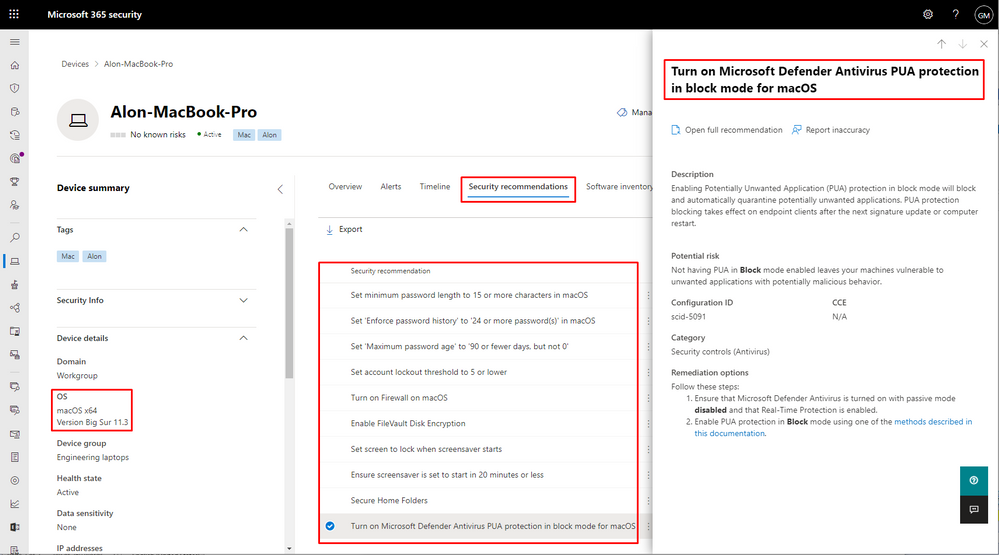
Today, we’re excited to announce that we’re expanding our secure configuration assessment capabilities to cover macOS and Linux, in addition to existing support for Windows 10 and Windows Server devices. With this expansion, organizations can now discover, prioritize, and remediate over 30 known unsecure configurations in macOS and Linux to improve their organization’s security posture. We’ll be continuously expanding on the initial set of supported configuration assessments to provide more visibility into your security posture.
The secure configuration assessment feature in threat & vulnerability management is a key component of Microsoft Secure Score for Devices. When generally available, the newly introduced configuration assessments for macOS and Linux will also be surfaced in the all-up Microsoft Secure Score.
Want to know how many macOS devices have FileVault turned off, or how many Linux devices have real-time protection disabled? Go to Vulnerability management > Security recommendations in the Microsoft 365 security portal (security.microsoft.com). You can also open the device page for any of your macOS or Linux devices and select the ‘Security recommendations’ tab.
This new capability requires client version 101.23.64 and later.
Microsoft Defender for Endpoint team

by Contributed | May 11, 2021 | Technology
This article is contributed. See the original author and article here.
Azure Security Center uses assessments to determine, if a resource is flagged as healthy or unhealthy, or if a recommendation is not applicable to it. Azure Resource Graph and Azure Security Center’s REST APIs are two great starting points for automations around these assessments, however, without knowing when an assessment has been evaluated for the first time, or when a particular resource’s health state has recently changed, it is hard to determine how current the actual assessment result is. Well, I’m beyond excited to announce that the Azure Security Center product group got you covered as of now!
We recently added two new time indicator fields to both, Azure Resource Graph, and the microsoft.security/assessments REST API provider.
to help you be even more successful in creating automations around Cloud Security Posture Management (CSPM). The statusChangeDate field will indicate when a resource’s status has recently changed, for example from healthy to unhealthy, whereas the firstEvaluationDate field explains when a resource has been evaluated for the first time.
Time indicators fields in a REST response
Although it seems like only little information to be added to an assessment result, these two new fields enable a variety of new automations that will help you keep track of improving your organization’s security posture. For example, you can use that data in a custom workbook to show the average time it needs for your resource owners to remediate a particular security control or recommendation. Or think of an automation that sends you a regular list with the latest resources that have been created with open recommendations. Another idea would be an automation that helps you “penalize” your resource owners by sending a notification that tells them they have had open recommendations on their resources for a particular number of days so they are supposed to focus on closing the gaps.
With this article, I want to give you some help to start with using time indicators in your new automations.
Time indicators in Azure Resource Graph
As you might know, Azure Security Center leverages Azure Resource Graph (ARG) to publish information about unhealthy resources in the securityResources ARG table. The following KQL (Kusto Query Language) query
will show all assessments and their corresponding policy initiatives that have recently changed their assessment status to unhealthy:
securityresources
| where type =~ "microsoft.security/assessments"
| extend assessmentStatusCode = tostring(properties.status.code)
| where assessmentStatusCode =~ "unhealthy"
| extend firstEvaluationDate = todatetime(properties.status.firstEvaluationDate)
| extend statusChangeDate = todatetime(properties.status.statusChangeDate)
| where statusChangeDate > firstEvaluationDate
Time indicators within that context are stored in the properties.status.firstEvaluationDate and properties.status.statusChangeDate fields. The query above has also been published to our Azure Security Center Github repository where you can always find the latest version.
Time indicators in REST APIs
Besides using ARG, the microsoft.security/assessments API provider can be used to query the same information. The team is currently working on providing a new API version, however, in the meantime, you can already use the new fields with all existing API versions (2020-01-01 and 2019-01-01-preview) by adding an additional parameter to the GET request. The request will then look like this:
GET https://management.azure.com/subscriptions/{{subscriptionId}}/providers/Microsoft.Security/assessments?api-version=2020-01-01&$expand=statusEvaluationDates
where expand=statusEvaluationDates is the new parameter to be added. As a result, the two new fields are shown within the properties.status section of the reply, as shown in the picture below.
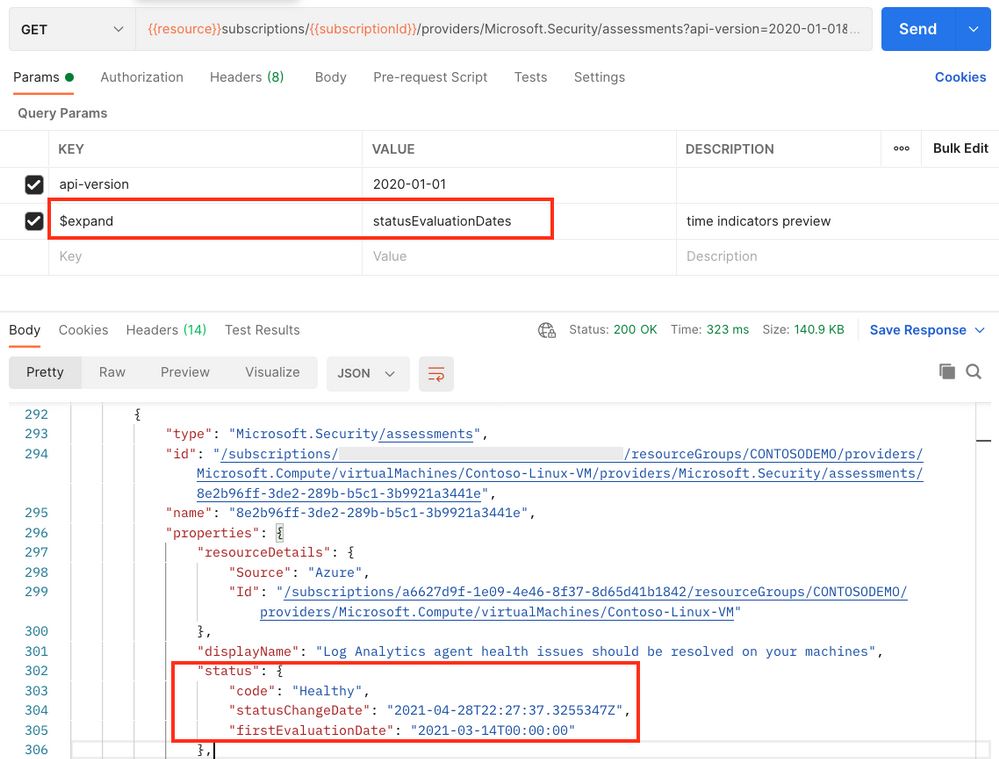 Postman result when requesting information from the microsoft.security/assessments API provider
As always when it comes to automation, it’s all about fantasy and the imagination of what might be possible with new features. To give you a head start, I’ve already created a Logic App that will send a weekly report to list resources that have recently changed to unhealthy.
The Logic App runs on a recurrence trigger and leverages the following KQL query within the context of a REST API POST command to pull all resource IDs that have become unhealthy within the last 7 days.
securityresources
| where type =~ 'microsoft.security/assessments'
| extend assessmentStatusCode = tostring(properties.status.code)
| where assessmentStatusCode =~ 'unhealthy'
| extend statusChangeDate = todatetime(properties.status.statusChangeDate)
| extend resourceId = tostring(properties.resourceDetails.Id)
| extend displayName = tostring(properties.displayName)
| where statusChangeDate > todatetime(now(-7d))
| distinct resourceId, displayName
After that, doing some internal magic, the playbook will leverage two other KQL queries to determine if the unhealthy resource in question is a resource or resource container (such as a subscription), and will then compose a new html email body and send it to the address(es) that you determine when deploying the automation to your environment. The automation has been published to the Azure Security Center Github repository and can directly be deployed from there, using the provided ARM template.
Why using KQL in a Logic App?
Using a single http post request against the Azure Resource Graph REST API provider lets you retrieve a list of resources and pre-filter the output instead of pulling information for every resource using a separate REST GET call. Leveraging the KQL query means that with a single API request you will get all the information pre-filtered in a very quick way, preventing throttling issues and enhancing automation speed.
Now it’s your turn: go ahead, deploy the automation, play around with time indicators and let us know if the new fields are helpful for you and if you have other ideas of using these fields in other automation scenarios.
Happy testing and best regards,
Tom

by Contributed | May 11, 2021 | Business, Microsoft 365, Technology
This article is contributed. See the original author and article here.
Over the last year, we have found new ways to create engaging virtual experiences at work. We’ve transformed spaces in our homes to offices, developed new skillsets for remote collaboration, and in some cases, adopted new technology to get work done. I often hear from our customers about the burden of using different tools to…
The post Introducing Webinars in Microsoft Teams: Easy, professional webinars to engage customers appeared first on Microsoft 365 Blog.
Brought to you by Dr. Ware, Microsoft Office 365 Silver Partner, Charleston SC.
by Contributed | May 11, 2021 | Technology
This article is contributed. See the original author and article here.
Our training and certification portfolio continues to evolve, and we invite you to discover the power of Microsoft technology to open new career possibilities. Here are the new learning paths and modules that we released last month on Microsoft Learn. Look for ways to build and deepen your skills, and then validate them by earning a Microsoft Certification. This month, we have a new learning path (with 12 modules) for Microsoft Power Platform solution architects. Check out our other new Microsoft Power Platform and Power Automate modules, plus a new Industry Solutions module. In addition, we’ve got new Dynamics 365 Fraud Protection, Project Operations, and Human Resources modules. Work through these and other modules at your own pace. Use free, online training on Microsoft Learn, to explore new skills to use on the job or to take your career in a new direction. If you need help figuring out which training to take, check out the Dynamics 365 learning paths page and the Microsoft Power Platform learning paths page, where you’ll find useful collections, learning paths to get you started, and popular modules. We’ve also added product-specific landing pages, listed at the end of this post.
We’re removing older, retired courses from the Dynamics Learning Portal on October 15, 2021, as a result of the significant reduction in the number of downloads of these e-learning courses. If you want to keep any of these courses for your own use, be sure to download them before that date.
The following learning paths and modules were released in April 2021.
Microsoft Power Platform
Power Automate
Industry Solutions
Project Operations
Fraud Protection
Human Resources
Product landing pages

by Contributed | May 11, 2021 | Technology
This article is contributed. See the original author and article here.
It’s time to turn content into knowledge with the help of AI. Let the service reason over your data while you focus on curating a unique employee experience that meets your users where they are already working.
In this episode, Chris and I talk with CJ Tan (principal PM manager | Microsoft) about her role at Microsoft on the Project Cortex team. We dig into knowledge roles, deployment practices, common scenarios, and top of mind for ‘what’s next.’ We don’t think that AI is the only substitute for IA. People, metadata, and AI interact better together. CJ walks us through how it all works from pilot to broad-scale use and adoption.
Listen to podcast below:
Subscribe to The Intrazone podcast! And listen to episode 65 now + show links and more below.
Intrazone guest: CJ Tan (principal PM manager | Microsoft)
BONUS | New episode of Microsoft Mechanics – part 1 of 5 on Viva, “Introduction to Microsoft Viva, an Employee Experience Platform” with Jeremy Chapman:
And hey, we have a new logo for the show – you’ll now see it in all the podcast feeds. Our intent was to emphasize the inclusivity of Microsoft 365, promoting connectedness between people, content, and apps. Note the teal through lines. In addition, we addressed feedback to make the logo more accessible across platforms. Let us know what you think in comments below:
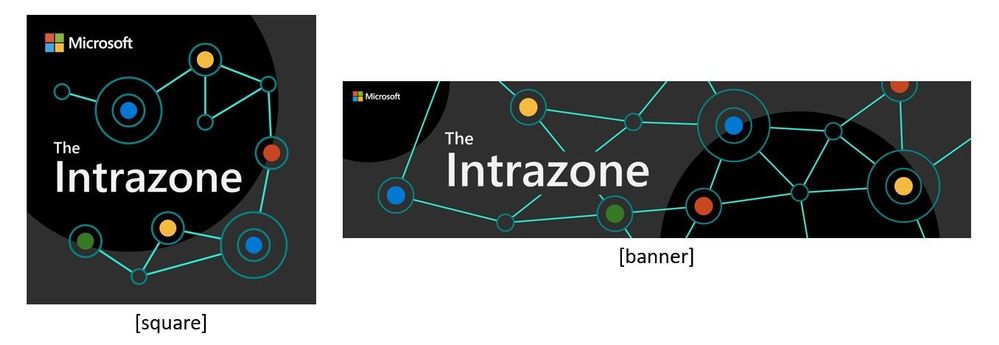 The Intrazone introduces a new logo, showing how it appears in a square format (left) and a rectangle format (right).
Links to important on-demand recordings and articles mentioned in this episode:
- Hosts and guests
- Articles and sites
- Events
Subscribe today!
Listen to the show! If you like what you hear, we’d love for you to Subscribe, Rate and Review it on iTunes or wherever you get your podcasts.
Be sure to visit our show page to hear all the episodes, access the show notes, and get bonus content. And stay connected to the SharePoint community blog where we’ll share more information per episode, guest insights, and take any questions from our listeners and SharePoint users (TheIntrazone@microsoft.com). We, too, welcome your ideas for future episodes topics and segments. Keep the discussion going in comments below; we’re hear to listen and grow.
Subscribe to The Intrazone podcast! And listen to episode 65 now.
Thanks for listening!
The SharePoint teams want you to unleash your magic, creativity, and productivity – and be compliant about it all. And we will do this, together, one compliance score point at a time.
The Intrazone links
+ Listen to other Microsoft podcasts at aka.ms/microsoft/podcasts.
![Left to right [The Intrazone co-hosts]: Chris McNulty, director (SharePoint/Viva – Microsoft) and Mark Kashman, senior product manager (SharePoint – Microsoft).](https://www.drware.com/wp-content/uploads/2021/04/fb_image-89.jpeg "Chris-Mark_in-studio.jpg") Left to right [The Intrazone co-hosts]: Chris McNulty, director (SharePoint/Viva – Microsoft) and Mark Kashman, senior product manager (SharePoint – Microsoft).
Left to right [The Intrazone co-hosts]: Chris McNulty, director (SharePoint/Viva – Microsoft) and Mark Kashman, senior product manager (SharePoint – Microsoft).
 The Intrazone, a show about the Microsoft 365 intelligent intranet (aka.ms/TheIntrazone)
by Scott Muniz | May 11, 2021 | Security, Technology
This article is contributed. See the original author and article here.
Google has released Chrome version 90.0.4430.212 for Windows, Mac, and Linux. This version addresses vulnerabilities that an attacker could exploit to take control of an affected system.
CISA encourages users and administrators to review the Chrome Release Note and apply the necessary updates.

by Scott Muniz | May 11, 2021 | Security
This article was originally posted by the FTC. See the original article here.

It’s never too late to find love, and lots of dating sites and apps are there to help. But scammers are out to steal your heart, too…and then steal your money. This Older Americans Month, let’s talk about romance scams. These can happen when someone makes a fake profile on dating sites, apps and social media. They then message you to get a relationship going, build your trust, and connect.
Then, they hit you up for money. “Baby, I want to come see you but I’m short on funds. Can you send me $500 for a ticket?” Or, “I love you, honey. But we may not be able to talk anymore because my phone is about to get cut off. I need $300 to pay the bill…” Get the idea?
In the name of love, you send money. They come back with other lies to get still more money. Then the messages stop. You can’t reach them. They’ve taken off with a piece of your heart and big chunk of your wallet.
People reported $304 million in losses to romance scams in 2020. Here’s how you can avoid these heartless imposters:
- If someone you’ve never met in person asks you for money, that’s a scam. No matter the story. Never send money or gifts to anyone you haven’t met in person — even if they send you money first.
- Only scammers tell you to buy gift cards, wire money, or send cryptocurrency. Once you send that money, you won’t get it back.
- Do a reverse image search of the person’s profile picture. See if it’s associated with another name or with details that don’t match up. Those are signs of a scam.
Talk to someone you trust about your new love interest, and pay attention if they’re concerned. Learn more by watching this video and at ftc.gov/romancescams. And if a scammer tries to charm you out of your funds, report it to the FTC.
Brought to you by Dr. Ware, Microsoft Office 365 Silver Partner, Charleston SC.


Recent Comments