Video Transcript:
– Up next, we’re joined by lead engineer, Adam Harmetz to take a look at the new Microsoft Viva Connections, part of your Microsoft 365 subscription, that gives you a curated, company-branded experience in the context of the apps used every day, like Microsoft Teams. We’ll walk through the experience as a user, as well as how to set it up as an admin, including options for personalizing information sharing by role. So Adam, welcome back to Microsoft Mechanics.
– It has been a while, Jeremy. Thank you so much for having me today.
– And thanks so much for joining us today. And before we get started and into Viva Connections, if you’re new to Microsoft Viva, it comprises four modules that deliver new employee experiences across knowledge, communications, learning, and insights, all in the context of your work. Now, these leverage the foundational technologies of Microsoft 365, Microsoft Graph and AI to deliver a modern employee experience platform. In fact, you can learn more by watching our essentials episode at aka.ms/VivaEssentials. And one of the foundational experiences in the new Microsoft Viva platform is connection. So Adam, this looks like a very familiar experience, I think, for the folks that are managing SharePoint right now. But it’s also got a lot of integration it’s bringing to the table with things like Teams and Yammer and Stream all into one unified experience.
– That’s right, Jeremy. You know, Viva Connections is really about boosting your employee engagement. And this spans everyone in your organization, from your everyday users, specific groups and departments, all the way through to your frontline workers. And like you were saying, it expands on your SharePoint home site and newsfeed, and it’s designed to give you a curated, company-branded experience: a destination, a place that delivers personalized news, conversations, and other commonly used resources within the context of the apps you use every day, like of course Microsoft Teams, on the desktop, and your mobile device.
– Okay, so can you walk us through what those user experiences look like?
– Sure, let’s start on the desktop. You see here that we’re inside of Teams, and there is native integration. Notice our demo company’s logo on the left nav, which is where you’ll find Viva Connections. In the center, this is your own home site with all the news and important content you’re probably familiar with.
– Right, but does this then replace your SharePoint home site, or do you have to create a different version then for Teams?
– No, that’s the beauty of it. It’s literally the same site pulled into Teams with the same consistent look and feel. So you only need to build and maintain one site. Now, we’ve done a lot of integration work to ensure your home site looks right inside Teams, but maintains the same level of functionality that you have on the web. You know, and in fact, I’ll pull up the web right now. I’ll show the home site running in the Edge browser in the view to show you a few things and compare and contrast them. The first thing you’ll probably notice is the top of the Office 365 toolbar with the app launcher and search. Well, it isn’t there inside of Teams. We’ve integrated a search experience you’d find in SharePoint directly into Teams search. In the upper right corner, controls that you’d find in the browser, like Refresh, are there, as well as Copy Link and Copy the Path to the website, so you can share it with others. On the left, you’ll see the new global navigation with home, sites, news, and files. And you see, when I click on the company’s icon in Teams, it exposes all that same navigation. And if you haven’t set up global-nav in your SharePoint home site yet, it’s pretty easy to do. Just go to aka.ms/SetupGlobalNav and follow the steps there. Now, one more important thing to do on your home site to keep people coming back and making it a two-way conversation, is to add Yammer as a web part on your home site. This keeps the content dynamic and keeps the most important conversations front and center. So as you can see, we’re really taking the best of the SharePoint content management system and your SharePoint home site and putting it in Microsoft Teams, so it’s native and assessable experience for everyone.
– Okay, so what does it take then to light up the experience inside the Teams desktop client?
– Good question. So everything I’m showing you, you can do today. And right now a lot of this is done using PowerShell and later we’ll be adding another way to do it via the Teams admin center. And today I’ll walk through the PowerShell method. Basically, our goal is to create a Connections app and add that to your Teams environment. First, you can find all the PowerShell scripts you’ll need at aka.ms/VivaConnectionsPSBlog. You want to make sure you have a home site ready with global navigation already enabled. Next, you’ll need two PNG images for Connections. We recommend your company logo, or maybe if you have a logo for your intranet already, that works too. One you’ll use for the app catalog and the other for navigation. These should be 192×192 pixel color and 32×32 pixel monochromatic images, respectively. Now in an elevated PowerShell window, we can run the Viva Connections desktop PowerShell script. It’ll ask for a URL to my home site. I’ll paste that in from my clipboard. Now the script prompts me to sign in with my SharePoint admin credentials, and I’ll go ahead and do that. Now I need a name for the Teams app bar and I’ll type in Contoso. I’ll paste in a short description, and then a long description will appear on the app catalog. Then there are a couple of options to add a privacy and terms of use page, I’ll skip these. These are just standard for any Teams app. And now I’ll add the name of my company and URL of our public website. And finally, we’ll upload the images I showed before, starting with the larger image and then the smaller one. This then builds the app package with all the parameters and saves it to my desktop. Now it’s just like adding any app package into Teams using the Teams admin center. So from the Manage Apps menu, I’ll click Upload and navigate to the package we just created.
– Okay, so now any user then, theoretically, would be able to go to the app catalog inside of Teams, choose that app and pin it to their nav bar.
– Yeah, but we can do even better than that. You can use the policy to pin it by default to your users in the Teams desktop experience so it’s available for everyone. Here I am still in the Teams admin center. I’ll go into Set-Up Policies and modify the global policy. In the Pinned Apps section, I’ll add our app. I’ll search for Contoso, then add it, then hit Add one more time. Here, you can also move the app to the top by selecting it and hitting Move Up. Once we hit Save and the policy refreshes, it’ll be in everyone’s Teams desktop and web experience, and just like that, I’ve deployed Viva Connections to my entire organization.
– Nice, so now we’ve covered now desktop and web, but what does it look like then on mobile?
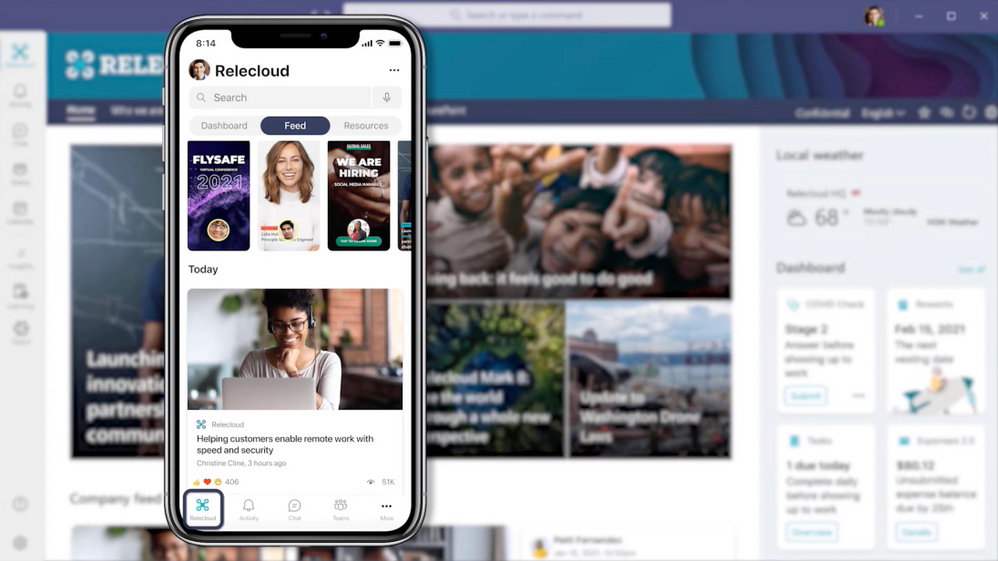
– Yep, great question. Because our new mobile strategy here is one of the things about Viva Connections that I’m most excited about. Mobile is coming later this year, and we’re working hard to make it a native, first-class experience right in the Teams mobile app. Here, you can see our Viva Connections icon in the app tray. It’s easy to find, just like it was on desktop. And up above there’s three pivots to the app: Dashboard, Feed and Resources. I’ll walk you through some of them now. I’ll start with the Feed. You would go here to catch up on company news. As you can see, there’s rich content from SharePoint with related news. I can see important Yammer conversations and announcements, video content from Stream, and even curated external content. Now, if I move over to the dashboard pivot, this is where you find frequently-used tasks and resources that many employees will need every day to answer common questions, like how do I submit time off? Or where’s my expense reporting tool? There’s even integrations for the rest of Viva. For instance, here’s quick access to Viva Insights, with our Headspace integration, as you see here in this tile welcoming me to start meditating. And I can even see Viva Learning recommendations right here from the Connections dashboard. You know, all of these are using adaptive cards. There will be cards from Microsoft and from our partners, and to really personalize a dashboard experience, you can even build your own cards. You know, another cool thing about these cards and experiences, is you can scope who sees them by assigning them to different groups. For example, an office worker can see a dashboard with a different set of cards compared to the frontline employee.
– Those look great, so what are some of the options then for adaptive cards and how do you build them?
– Yeah, so we’ve worked really hard to ensure great time-to-value for your card development experience. And we’ve embraced the fact that you probably have a spectrum of apps you need to integrate into Connections. Some apps have already been modernized on mobile, and you just want to quickly hook it up to your new dashboard. Others, you probably want to use the existence of Connections as an opportunity to motivate you to modernize. And so we offer both ends of the spectrum, and we can dig in right now. So in terms of layout of the dashboard, the adaptive cards I just showed can be built in medium size for two columns and large to span the entire width of the mobile screen. Let me explain the composition of adaptive card in this context. First, there’s the card itself that you see in the dashboard. And if you were to tap on it, it shows a quick view, which in this case is a privacy notice, but in other contexts or other content it could’ve been an announcement or a quick action, maybe something like the public holiday schedule. It’s just really designed to allow you to take quick mobile-focused actions. From there, optionally, you can link out to an entire interactive web experience, maybe an existing app in Teams or a Power App. So let me show you how to build one of these. We’re building the Viva Connections Dashboard offering tool into SharePoint. So this is a cross-platform tool and lets you build and view the formatting of what you created across mobile, tablet and desktop form factors. You can see here, we have a bunch of cards already created, but I’ll add a new one by just clicking on Add a Card. You’ll see this looks a lot like creating web parts in SharePoint. And there are a lot of templates here to help you get started, including generic cards for SharePoint pages, Teams apps, web links, data cards, holidays, and more. Here I’ll create a card for a SharePoint page. I’ll place it on the bottom of the dashboard, but with easy drag and drop I can move it into the position I want. And the other cards will automatically reflow. In the configuration pane, this is really the heart and soul of where you configure the dashboard and configure the cards. You can change the size of the card from medium to large, and I’ll choose large here, and you can see that it spans the entire width of the mobile screen. Now, for this card, we can search for the SharePoint site we want to point to, there we go. This should be a modern site, by the way. And now we automatically pull in the title and thumbnail of the site. I can choose a custom image or change the card icon if I want to. And we can even directly link you to stock images you can choose from, and I’ll choose one of those.
– Okay, so this seems pretty straightforward and really a great way to bring content in. But you said earlier that you can target who can see which cards?
– Yeah, you can. And this is where audience targeting comes in. I’ll show you how to do it right now. So this is the control we’d use to make role or location-specific experiences on the dashboard. Here I choose a group, and we’ll select the group we want right here. And when I do that, you’ll see an icon appear on our card to show that it has targeted to particular audience. And now that our card is built and targeted, we can preview it in the dashboard too. Beyond the form factor options like mobile, tablet, and desktop I showed earlier, we can also preview the dashboard as a particular audience. It’ll default to the everyone group. But if I click on Select Audience to Preview As, you can see right here, I can choose a group we just selected as an audience. And when I do that, our card appears.
– And there it is, so really great stuff. So now we’ve seen Viva Connections in the desktop and on mobile and the adaptive cards, but when can people start to expect to see dashboard capabilities and what’s the best way right now to get started?
– Yep, so as I mentioned, we’re working on delivering the dashboard experience this summer. But right now you can get started by doing a few things. First, build your SharePoint home site and make sure to enable that global navigation. Add Yammer communities to that home site. And in general start creating modern pages that will keep people in the context of Teams. And of course, wire up Viva Connections to your Teams desktop experience using the approach I showed earlier with PowerShell. To get started, go to aka.ms/VivaConnectionsPSBlog. for all the guidance you’ll need. And there’s more to come of course in mobile and dashboard, so look out for that.
– Thanks, Adam. And also don’t forget to watch the rest of our series on Microsoft Viva on Mechanics at aka.ms/VivaMechanics. And keep checking back the latest updates across Microsoft and be sure to subscribe, if you haven’t already yet, and we’ll see you soon.

![[Event Recap] D635 Mixed Reality @ the Microsoft Business Applications Summit (MBAS)](https://www.drware.com/wp-content/uploads/2021/05/fb_image-1397.png)


Recent Comments