by Contributed | Jun 10, 2021 | Technology
This article is contributed. See the original author and article here.
Last month, we announced the general availability of Microsoft Defender for Endpoint and Microsoft Defender for Office 365 capabilities in Microsoft 365 Defender. Security teams can now manage all endpoint, email and collaboration, cross-product investigation, configuration, and remediation activities within a single unified XDR dashboard. Our efforts to bring these solutions together are part of our commitment to deliver world class SecOps capabilities that empower security teams to respond to threats more rapidly and effectively.
We are excited by the reception you have given us on Microsoft 365 Defender and many customers have already made the transition to the new experience. Starting July 6, 2021, the default experience for Microsoft Defender for Endpoint will shift to Microsoft 365 Defender. This change will take some time to roll out across all geographies and will be completed automatically by Microsoft. Once transitioned, you can continue to use your existing portal URL and it will redirect to the new experience.
For Microsoft Defender for Endpoint customers, all existing capabilities are already available in Microsoft 365 Defender. To learn more about the integrated experience and features, please refer to our recent blog and instructional video.
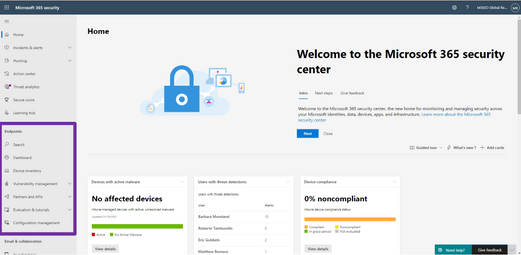
Figure 1: Endpoint features integrated into Microsoft 365 Defender.
For those who have not yet tried out the unified experience in Microsoft 365 Defender, we recommend that you navigate to security.microsoft.com today and explore it. To help you get up to speed quickly please refer to this quick reference to guide you through the changes you can expect in the new portal.
Moving forward, we are focusing our engineering efforts on the unified experience in Microsoft 365 Defender. We recognize that some customers need more time to transition. The legacy portal will still be available and if you need more time to transition you can opt-out of the automatic redirection in your portal settings.
We’d like to hear your feedback as you move to the new experience, and we are here to help you with a smooth transition. Send us feedback directly through the portal. If you wish to opt-out of the preview migration you can contact us at unifiedportal@microsoft.com.
by Contributed | Jun 10, 2021 | Technology
This article is contributed. See the original author and article here.
Yes, yes, yes, SharePointDsc v4.7 has just hit the PowerShell Gallery! This release introduces two new resource (SPService and SPUsageDefinition) and fixes a bunch of issues. It also contains a small change to the way we create the lock table in the TempDB. We recently discovered an issue where lack of permissions in SQL prevented a successful installation.
You can find the SharePointDsc v4.7 in the PowerShell Gallery!
NOTE: We can always use additional help in making SharePointDsc even better. So if you are interested in contributing to SharePointDsc, check-out the open issues in the issue list, check-out this post in our Wiki or leave a comment on this blog post.
Improvement/Fixes in v4.7:
Added
- SPSearchServiceApp
- Added ability to correct database permissions for the farm account, to prevent issue as described in the Readme of the resource
- SPSecurityTokenServiceConfig
- Added support for LogonTokenCacheExpirationWindow, WindowsTokenLifetime and FormsTokenLifetime settings
- SPService
- SPUsageDefinition
- SPUserProfileProperty
- Added check for unique ConnectionNames in PropertyMappings, which is required by SharePoint
- SPWebAppAuthentication
- Added ability to configure generic authentication settings per zone, like allow anonymous authentication or a custom signin page
Fixed
- SharePointDsc
- Fixed code coverage in pipeline
- SPConfigWizard
- Fixed issue with executing PSCONFIG remotely.
- SPFarm
- Fixed issue where developer dashboard could not be configured on first farm setup.
- Fixed issue with PSConfig in SharePoint 2019 when executed remotely
- Corrected issue where the setup account didn’t have permissions to create the Lock table in the TempDB. Updated to use a global temporary table, which users are always allowed to create
A huge thanks to the following guys for contributing to this project:
Thomas Lieftüchter, Johan Ljunggren, Jens Otto Hatlevold and Paul Woudwijk
Also a huge thanks to everybody who submitted issues and all that support this project. It wasn’t possible without all of your help!
For more information about how to install SharePointDsc, check our Readme.md.
Let us know in the comments what you think of this release! If you find any issues, please submit them in the issue list on GitHub.
Happy SharePointing!!

by Grace Finlay | Jun 10, 2021 | Marketing
In online marketing and lead generation strategies, one of the best techniques that can help generate new leads is Search Engine Optimization or SEO for short. There are many advantages to using this kind of technique to create traffic. Below are some of these advantages:
First, by optimizing your website and other social media sites like Facebook, you will increase your page rank on Google’s search engine. This way, people who type in the keyword you target in the search engine’s search bar will find you and see your website, which is better than your competition’s. This also means that you will have a greater chance of getting people to sign-up or buy your products/services from you. By having a high page rank, you will have more chances of getting traffic through organic search results. Therefore, this would result in more possible customers and clients.
Second, content marketing is one of the best lead generation tactics by most online marketers because it does not require too much investment in advertising. All you need to do is post your articles on article directories, blogs, etc., to publish your content on the internet. By doing this, you will be creating more opportunities to get readers to your website. By having a higher number of readers, you will have a higher chance of gaining new leads
Third, you can use the power of email marketing to make sure that you have plenty of leads. Email marketing allows you to capture names and email addresses of potential leads through offers such as free ebooks, reports, etc. You can even make sure that your subscriber list is updated. One of the best ways to do this is to submit your articles to newsletters. If your subscribers have good subscriptions, then you can be assured that they will look for your products or services on the internet.
Fourth, you can use the power of social media to your advantage. Social media allows you to network with people from all walks of life. Some of these people are your competitors, so you have to ensure that you always stay on their toes. Staying consistent on social media is so important. Posting 2-3 times a week is recommended.
Fifth, you can leverage the power of social media by taking advantage of Facebook, Instagram, LinkedIn, and Twitter. You can create accounts on these social media platforms and start sharing articles and information with your potential clients. You can also post links that will lead your leads to your landing page, where they can sign up to your mailing list. In this way, you can generate leads by simply posting updates on your blog.
In a nutshell, if you want to be successful in your online business endeavor, you have to make sure that you are using the best lead-gen tactics so that you will be able to generate new leads for your company or brand. With social media, you will never go wrong.
by Contributed | Jun 10, 2021 | Technology
This article is contributed. See the original author and article here.
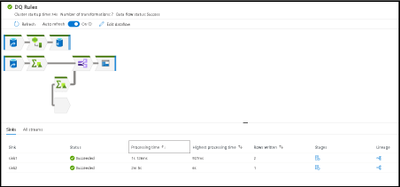
Azure Data Factory and Azure Synapse Analytics have a new update for the monitoring UI to make it easier to view your data flow ETL job executions and quickly identify areas for performance tuning.
Large data flows are now much easier to visualize and traverse inside the monitoring view in ADF and Synapse. The visual indicators of data flow streams from source to sink is now easily viewable by selecting the related sink in either the graph or the details pane at the bottom.
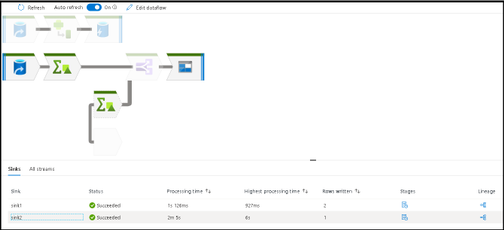
To switch back into large icon mode with visible labels, increase your zoom in ratio with the right-hand zoom slider:
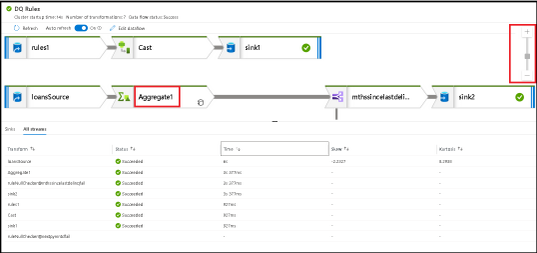
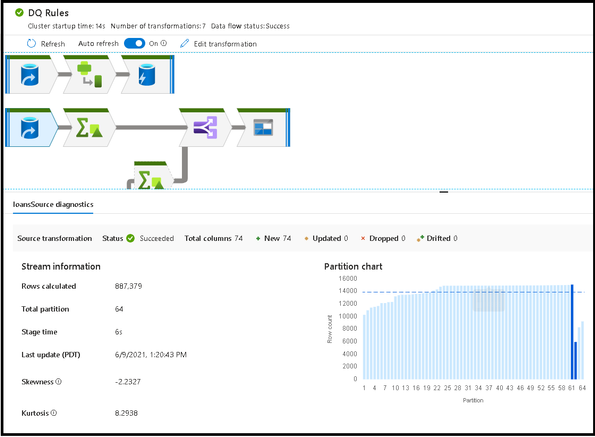
Note that every data point collected from your data flow ETL job execution can be sorted in that results table. This feature makes it easy to find transformations that had partitioning issues via skew or kurtosis as well as quickly identifying which stages of your transformation had the longest execution times by sorting processing time. Sort by rows written to find which stages wrote the most data.
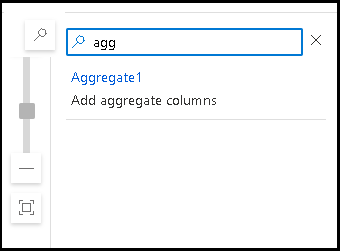
At any zoom level, you can always search for your transformations using the search icon and search bar:
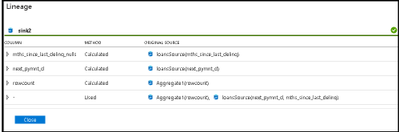
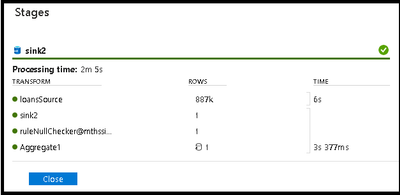
Detailed rows and lineage analysis of each stage of your transformations is available from the Stages and Lineage links on the “Sinks” detail pane.
Selecting a transformation icon from the graph will present details about partitions and timings:
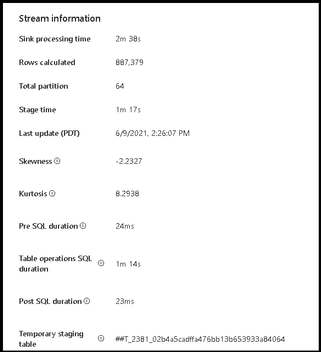
We’ve also added more details in the sink transformation monitoring. When you select the sink transformation in your monitoring graph, you can view properties that now include pre-processing and post-processing times for SQL sinks as well as the temp table name utilized during staging and the time taken for each SQL operation. This will provide more details around the amount of time each data flow ETL job takes to complete.
by Contributed | Jun 10, 2021 | Technology
This article is contributed. See the original author and article here.
Hear Microsoft leaders present the latest announcements about Azure Arc–enabled data services as well as news about other Azure Arc and Azure Stack HCI offerings. Also, watch engineering demos on how to organize and govern environments and use native Azure services—like data services—to run them outside of Azure datacenters. And, listen to customers discuss how they’re using Azure to achieve their goals and turn their hybrid strategies into reality.
Register for the free, two-hour Azure Hybrid and Multicloud Digital Event on June 29 from 9:00 AM–11:00 AM Pacific Time and learn how to be more productive and agile by extending Azure management and running Azure data services across your on-premises, multicloud, and edge environments. The event kicks off with a short keynote followed by these deep dives into key topics and real companies’ experiences:
- Be among the first to hear a major Azure Arc announcement. Learn how to bring cloud capabilities to your data workloads across hybrid and multicloud environments.
- Intel and Microsoft: Partnering to deliver scalable, secure, and flexible hybrid infrastructure to customers.
- Run Azure data services anywhere with the latest developments in Azure Arc–enabled data services. See how SKF Group and Dell Technologies are getting the most out of the latest generation of hybrid data offerings.
- Quickly build, deploy, and update apps anywhere with Azure Arc. Learn how to ensure governance, compliance, and security for all deployments.
- Get consistent operations and security for hybrid and multicloud environments—and learn to automate systems to meet security, governance, and compliance standards.
- Modernize your datacenter and use Azure Stack HCI hybrid capabilities to help improve availability and performance across environments.
You’ll also have the chance to get answers to your hybrid questions from product experts during the live chat and from Microsoft leaders during the live Q&A panel.
Join us to hear more about these benefits, engage with Microsoft leaders and product experts, and explore solutions from the cloud built for hybrid. We hope to see you there!
Azure Hybrid and Multicloud Digital Event
Tuesday, June 29, 2021
9:00 AM–11:00 AM Pacific Time (UTC-7)
Delivered in partnership with Intel.
REGISTER NOW >
by Contributed | Jun 10, 2021 | Technology
This article is contributed. See the original author and article here.
The Workplace Analytics team is excited to announce our feature updates for June 2021. (You can see past blog articles here). This month’s update describes the following features:
• Expanded support for plans
• Updated wpa R package
• Organizational Network Analysis (ONA) updates
• Organization data uploads for licensed employees
• Expanded support for mailboxes in datacenters globally
Expanded support for plans
In response to customer feedback, the Workplace Analytics team has made it possible for users with the Insights by MyAnalytics (basic) service plan to enroll in Workplace Analytics plans.
Previously, the Workplace Analytics plan enrollment page displayed an error when an analyst or PM tried to enroll a user who did not have the MyAnalytics (Full) service plan (made available through the E5 plan). Now, employees can have either MyAnalytics service plan, but note that users must still be assigned valid Workplace Analytics licenses. (See Prerequisites for plans for the updated requirements for enrolling users in Workplace Analytics plans.)
Updated wpa R package is released
We are pleased to announce two release updates to the wpa R library. We have (1) gone live with our release on CRAN, which enables a faster and easier installation process for users, and we have (2) released our first Microsoft Learn module on analysing Workplace Analytics with the wpa R library.
The wpa R package CRAN release
In April 2021, the wpa R library was accepted to CRAN (Comprehensive R Archive Network), which is the official repository for peer-reviewed R packages. Here is our official entry on CRAN:
CRAN – Package wpa (r-project.org)
For users of the package, this means that it will be easier to install or update the package. Instead of installing through GitHub, you can install wpa like most other R packages, with install.packages(“wpa”). If you’ve had issues installing from GitHub, this release should resolve them.
Being available on CRAN also means that the wpa package has been reviewed and accepted as an R package of publication quality, as the package must pass a series of stringent checks and tests before it can be published on CRAN.
Your usage of the package will not be affected by this release, as the CRAN version is always a stable version of the package that’s available on GitHub. We highly recommend updating your local version by following these update instructions. Details of our version release history can be found on the package website.
A new Microsoft Learn module
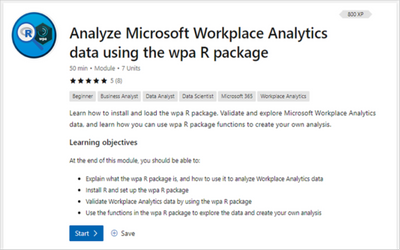
We are also offering a new Microsoft Learn module for the wpa R library:
Analyze Microsoft Workplace Analytics data using the wpa R package – Learn | Microsoft Docs
This module is designed for those who have little or no experience with the wpa R package and want to learn how to use it to extend the capabilities of Workplace Analytics. The module provides a step-by-step walkthrough on:
- what the wpa R package is and how it can be useful when analyzing Workplace Analytics data
- how to install R and set up the wpa R package
- how to validate and explore Workplace Analytics data with the wpa R package
- how to use the functions in the wpa R package to create your own analysis
Like all Learn modules, this one is free, interactive, and available to everyone; that is, you do not need a Workplace Analytics role to use it.
Microsoft Learn
Microsoft Learn is a hands-on training platform that helps people develop in-demand technical skills. To see a full list of Workplace Analytics Learn modules, including the wpa R package module, go to aka.ms/learn OR docs.microsoft.com/learn and search for “Workplace Analytics”. If you took and enjoyed the module, please leave it a rating so we can keep developing more useful, engaging content on how to get more out of Workplace Analytics.
Organizational Network Analysis (ONA) updates
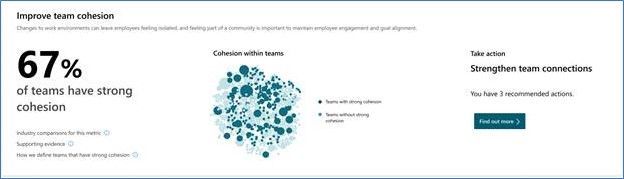
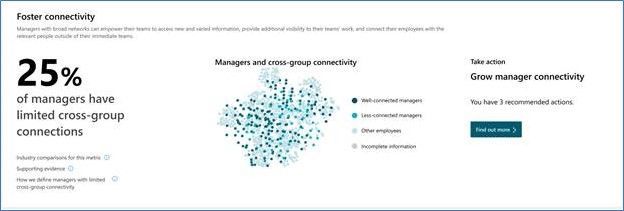
To help customers more easily measure team and manager connectivity, we have released a set of ONA updates. These updates include new visual insights for leaders, query updates that make it easier to consume ONA metrics, and metric enhancements. Now, leaders can more easily get answers to questions like, “Are my teams cohesive?” and “Are managers well-connected across the company for better cross-group engagements?”
This release includes these metric enhancements:
- All ONA metrics are now accessible through one query interface to make it easy to consume in assets such as the Power BI templates.
- More targeted analyses such as evaluating local influencers are now possible.
- Metric enhancements such as Influence rank are now available.
The new visual insights show up in both the Viva insights Teams app as well as in the Workplace Analytics Web app under the Home menu:
All ONA metrics now appear under one query in the Network: Person query, which enables easy use in assets such as Power BI templates:
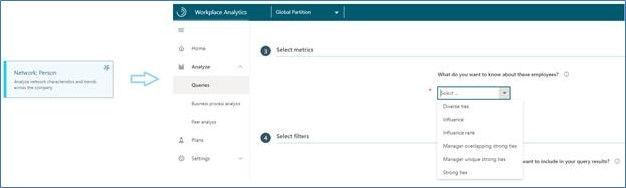
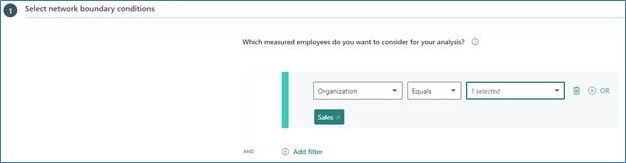
All ONA metrics can also be analyzed for a specific population or type of collaboration, which lets customers perform more targeted influencer or connectivity analyses. This function is available in Workplace Analytics in the Network: Person and Network: Person-to-person queries:
Finally, additional metric enhancements such as Influence rank and overlapping and unique ties for managers are available in Workplace Analytics in the Network: Person query:

For more information, see the product documentation: Workplace Analytics insights, ONA person queries, ONA person-to-person queries, ONA metrics
Organization data uploads for licensed employees
The Workplace Analytics team has added notifications to alert Workplace Analytics admins of missing data and a straightforward means to upload that data.
Admins upload organizational data when setting up the product and afterward, as needed, to maintain that data. Part of this task is to upload HR data for all licensed employees in the organization.
If Workplace Analytics detects that data is missing for one or more licensed employees, it alerts admins with a bell-icon notification and with a banner on the Upload > Organizational data page. Admins can then download a .csv file that contains the names of the employees whose data is missing, after which they can append the missing data and upload the file to Workplace Analytics. For complete information about this new capability, see Include all licensed employees.
Expanded support for mailboxes in datacenters globally
Microsoft now offers full Workplace Analytics functionality for organizations whose mailboxes are in all Microsoft 365 datacenter geo locations. (See Environment requirements for more information about Workplace Analytics availability and licensing.) Previously, analysts in organizations in various regions worldwide could not conduct employee analyses through Workplace Analytics. Now, those analyses are possible.
by Contributed | Jun 10, 2021 | Technology
This article is contributed. See the original author and article here.
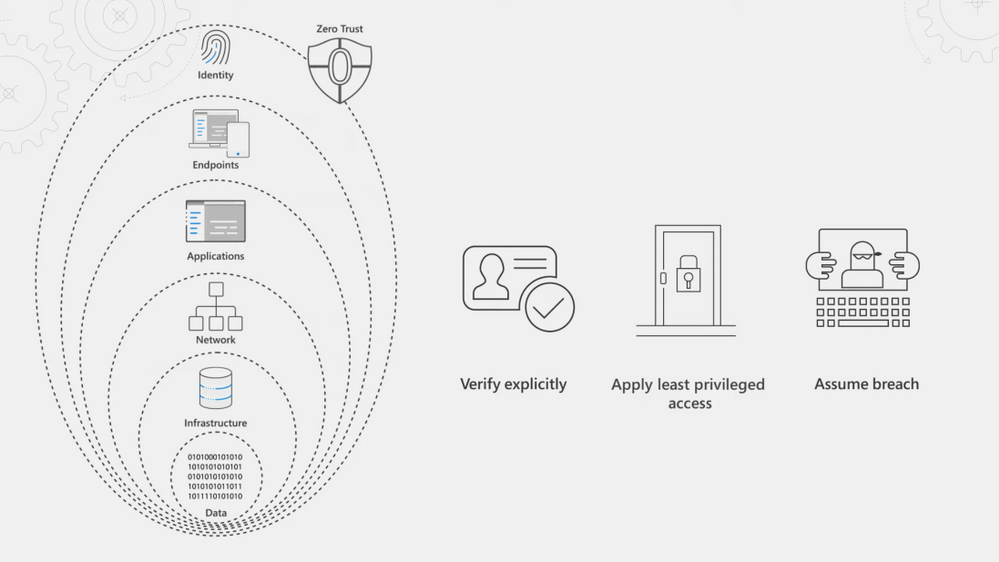
See how you can apply Zero Trust principles and policies to your endpoints and apps; the conduits for users to access your data, network, and resources. Jeremy Chapman walks through your options, controls, and recent updates to implement the Zero Trust security model.
Our Essentials episode gave a high-level overview of the principles of the Zero Trust security model, spanning identity, endpoints, applications, networks, infrastructure, and data. For Zero Trust, endpoints refer to the devices people use every day — both corporate or personally owned computers and mobile devices. The prevalence of remote work means devices can be connected from anywhere and the controls you apply should be correlated to the level of risk at those endpoints. For corporate managed endpoints that run within your firewall or your VPN, you will still want to use principles of Zero Trust: Verify explicitly, apply least privileged access, and assume breach.
We’ve thought about the endpoint attack vectors holistically and have solutions to help you protect your endpoints and the resources that they’re accessing.
QUICK LINKS:
01:16 — Register your endpoints
01:49 — Configure and enforce compliance
02:31 — Search policies with new settings catalog
03:15 — Group Policy analytics
04:00 — Microsoft Defender for Endpoint
04:36 — Microsoft Cloud App Security (MCAS)
06:36 — Reverse proxy
07:06 — Authentication context
08:44 — Anomaly detection policies
09:21 — Wrap up
Link References:
For more on our series, keep checking back to https://aka.ms/ZeroTrustMechanics
Watch our Zero Trust Identity episode at https://aka.ms/IdentityMechanics
Learn more about the Zero Trust approach at https://aka.ms/zerotrust
Unfamiliar with Microsoft Mechanics?
We are Microsoft’s official video series for IT. You can watch and share valuable content and demos of current and upcoming tech from the people who build it at Microsoft.
Keep getting this insider knowledge, join us on social:
Video Transcript:
-Welcome back to our series on Zero Trust on Microsoft Mechanics. In our Essentials episode, we gave a high-level overview of the principles of the Zero Trust security model, spanning identity, endpoints, applications, networks, infrastructure and data. Now in this episode we’re going to take a closer look at how you can apply Zero Trust principles and policies to your endpoints and apps. And these are the conduits for users to access your data, your network and resources. We’re going to walk you through all your options, your controls and even recent updates as you implement the Zero Trust security model.
-So in Zero Trust endpoints refers to the devices that people use every day. Now these can be both corporate or personally-owned computers and mobile devices. And in an era of remote work, they can also be connected from anywhere. This means that the controls that you apply should be correlated to the level of risk that those endpoints pose. And for even corporate managed endpoints that are running within your firewall or your VPN, you’ll still want to apply the principles of Zero Trust: to verify explicitly, apply least privileged access, and assume breach. Now, the good news here is that we’ve thought about the endpoint attack vectors holistically and have solutions to help you protect your endpoints and the resources that they’re accessing.
-First, as we’ve highlighted in the identity episode that you can watch aka.ms/IdentityMechanics, your endpoints should be registered with your centralized identity provider. Now, here Azure Active Directory serves as the front door for your device endpoints and beyond device assessment at sign-in with conditional access with managed and unmanaged devices, it also enables devices to register or join your directory service. Now this relationship between the endpoint and the identity provider ultimately allows for deeper policy management and control.
-Next, to configure and enforce device compliance, Microsoft Endpoint Manager includes the services and tools that you need to manage and monitor mobile devices, desktop computers, virtual machines and even servers. Now it comprises Microsoft Intune is a cloud-based mobile device management service and Configuration Manager as an on-premises management solution. Microsoft Endpoint Manager offers a comprehensive set of policies, spanning MDM and ADMX-backed policies that power Active Directory group policy, as you can see here with these policies that are labeled administrative templates, as well as deep integration with Azure Active Directory and Microsoft Defender for endpoint, for defense in-depth controls. In fact, now when you create a device configuration profile, you can search across all policy providers supported by Microsoft Endpoint Manager using the new settings catalog.
-For example, if I search here for script, I’m going to find all the policies related to scripting. You’ll see the policies are from multiple providers. And I’ll choose Defender here and select all of them. And I’ll go ahead and choose to block all of the ones here, one-by-one. And then I’ll move to the next step. And now with the new device filters, we can even choose only to scope the policy to corporate-owned devices. Additionally, Microsoft Endpoint Manager includes policies to require local drive encryption across platforms, along with secure boot and code integrity on Windows to keep your devices safe. If you’re using Active Directory group policy, Endpoint Manager’s Group Policy analytics assesses your GPOs then it helps you to migrate your settings to the Cloud.
-And this even works for third-party policy templates. So for example, here with this one called Chrome GPO, I’ve already imported the policies in my XML file and you can see that Endpoint Manager’s already matched those policies, in this case matched them to Edge, and everything looks good. So I’m going to go ahead and migrate them. And I’ll select each of the items one by one. There we go, and I’ll give it a name. And now I can assign the policy to my groups and I’ll add all devices in my case. And now I can publish out that policy.
-Now with devices under management, Microsoft Endpoint Manager enables you to install required apps on devices across most common platforms. Next, with your devices under management in the Endpoint security blade of MEM, under Microsoft Defender for Endpoint, you’ll see the service can be distributed to your desktop and mobile platforms. This will provide preventative protection, post-breach detection, automated investigation and response. With Defender in place, if devices are impacted by security incidents, your SecOps team can easily identify how to remediate issues even as you can see here, pass the required configuration changes to you, the device management team, using Endpoint Manager so that you can make the changes and that status will even get passed back to your SecOps team.
-So those are just some of the controls for endpoints and locally installed applications. But for comprehensive management of app experiences, the Zero Trust security model needs to be applied to all of your apps. Now Microsoft Cloud App Security, or MCAS, is a cloud access security broker. Now that helps you extend real-time controls to any app in any browser, as well as comprehensively discover, secure, control and provide threat protection and detection across your app ecosystem.
-Let’s start with Shadow IT and how MCAS can help you apply the Zero Trust principles of verify explicitly and assume breach to avoid the use of unsanctioned apps that have not been verified for your organization that may introduce risk. Now, MCAS gives you the visibility into the cloud apps and services used in your organization and it assesses them for risk and provides sophisticated analytics. You can then use this to make informed decisions about whether you want to sanction the apps that you discover or block them from being accessed. MCAS discovery will continually assess the apps and services that people are using and it also enables discovery of apps running on your endpoints via its integration with Microsoft Defender for Endpoint.
-So here I’ll take a look at an app, File Dropper, and you can see that it has a score of two out of 10. I’m going to click into it and you can see all the details about the app and what it is, security related considerations, compliance and legal information. Additionally, if I drill into users, you’ll see that each discovered app gives specifics on users, their IP addresses, total data transacted, as well as the risk level by area. Now, once you’ve discovered your apps and assessed their risks, you can then take action. You can sanction apps and manage them more tightly with the controls that we’ll show in the next section or block unsanctioned apps outright.
-Once you’ve sanctioned the applications that you want employees to use, layer on the Zero Trust principle of least privileged access, you’ll then use policy to protect information that resides in them and detect potential threats in your environment. Now, web apps configured with an identity provider can be connected via reverse proxy to enable real-time in-session controls. And applications with enterprise-grade APIs can also be connected to Cloud App Security to monitor files and activities in those cloud apps.
-The reverse proxy service in MCAS is easily integrated with conditional access policies that you set in Azure Active Directory to enable granular control over in-session activities. For example, like the ability to download or upload sensitive information. Additionally features like auth context, which are natively integrated with Office 365 apps like SharePoint Online, are extended to any web app. Now this enforces controls like step-up multi-factor authentication in session while attempting to download sensitive data, like you can see here with our policy for Google Workspace. This means that you can work as usual and access content from any expected location or device.
-But for example, if I change location to a coffee shop; in this case, I’ll try to download a sensitive file, then authentication context will kick in. It’ll reevaluate my session due to that new security risk that’s associated with the IP address change. And as you can see here, requires another factor of authentication with this message security check required. Popular third-party applications can also be directly integrated by our API-based app connectors to MCAS. So MCAS leverages Microsoft Information Protection as part of its data loss prevention capabilities.
-So let’s configure another policy, and this time a file policy for Google Workspace. In the policy, you can set different kinds of filters, such as access level and the application that you want to scope the policy to and you can choose to apply this to all files, selected folders or more. Now in this case, our goal is to make sure that any files that have sensitive information are labeled for our company’s compliance policies. So for inspection, we’ll use the same DLP engine that Office 365 uses, the data classification service. And that’s going to look for sensitive content like social security numbers, for example. And we’ll create an alert for each policy match and in governance actions we’ll apply a sensitive label if the file matches our policy.
-And finally, MCAS has built-in anomaly detection policies to monitor user interactions with individual applications regardless of how you’ve connected those apps to Cloud App Security. Now these detections range from suspicious admin activity to triggering a mass download alert. Now MCAS establishes baseline patterns for user behavior and can trigger alerts or actions once an anomaly is detected. Additionally, MCAS offers Cloud Security Posture Management, or CSPM, and here the security configuration screen helps you improve the security posture across clouds with recommendations.
-So that was a tour of your endpoint and application management options and your considerations when moving to the Zero Trust security model. Up next, we’re going to explore your options for networks, infrastructure and data. And keep checking back to aka.ms/ZeroTrustMechanics for more on our series where I share tips and hands-on demonstrations of the tools for implementing the Zero Trust security model across all six layers of defense. And you can learn more at aka.ms/zerotrust. Thanks for watching.

by Contributed | Jun 10, 2021 | Dynamics 365, Microsoft 365, Technology
This article is contributed. See the original author and article here.
In the last year, business travel and face-to-face meetings have reduced significantlybut global workforces are busier than ever. The pace of selling has sped up during the pandemic, and the common pain points sellers face have become exacerbated as they juggle more responsibilities and obligations across work, home, and multiple time zones.
Sellers need to complete their tasks quickly and efficiently, where menial functions are automated and data entry is minimal, allowing them to accomplish their goals and achieve results in less time.
The new Dynamics 365 Sales mobile app, now generally available, brings together the best of the core solutions sellers use most. With Microsoft Outlook, Microsoft Teams, and Dynamics 365 Sales, the mobile app creates a frictionless selling experience, streamlined for a seller’s hectic workday. The app integrates native mobile device capabilities with the best of Microsoft and Dynamics 365 Sales concepts: collaboration, productivity, engagement, and intelligent workflows to create a streamlined native mobile app experience.
The Sales mobile app is also easily extendable using Microsoft Power Platform. With the new mobile sales app, Dynamics 365 Sales supports the always-on expectations so today’s sellers can work from almost anywhere.
Start the day ahead of the game
The Dynamics 365 Sales mobile app keeps sellers on the critical path with real-time push notifications that the organization can customize based on individual business needs. Reminders and insights not only keeps sellers on top of updates to key record details, but it also can alert them to more complex issues, such as opportunities with upcoming closed dates that have shown little or no recent activities. The app can also extract and alert sellers to potential issues, directly from their Outlook inbox, such as licenses for an account that are soon to expire.
Inside the app, the home page highlights the most useful and relevant information for sellers to conduct their daily tasks. The app displays upcoming meetings, recent contacts, and recently viewed records, pulled from Outlook and Dynamics 365 Sales, in the primary focus mode. From the home screen, sellers can create any entity or activity, including notes and contacts. Sellers can easily drill down for more information about any entity.
Come prepared to every customer engagement
On the meetings tab, sellers can review their calendar and join Microsoft Teams meetings with one click of a button.
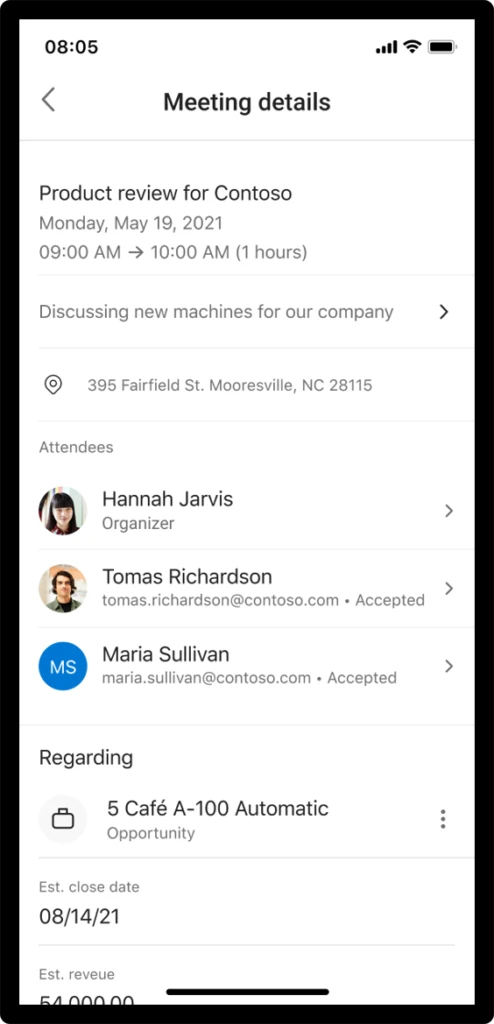
For face-to-face travel, the app provides location links to quickly access the device’s native maps app. The new Dynamics 365 Sales app provides sellers with relationship and logistics data sourced from Outlook and Dynamics 365 Sales. In a single meeting card, the seller knows key meeting details and attendee responses from Outlook. Dynamics 365 Sales data is pulled so the seller sees associated opportunity title, estimated revenue, closed date, pipeline phase, notes, and AI-generated reminders.
Conduct daily tasks with ease, while on the go
Sellers can find contacts they need to reach with recently modified records with typo-proof search capabilities. With the quick view forms optimized for mobile devices, sellers have easy access to make quick updates and drill into a full view if they need more details. Sellers can quickly add notes, create contacts, and update data in relevant records.
Save time, and escape manual data entry
The Dynamics 365 Sales mobile app reduces manual entry and saves valuable time by supporting voice dictated notes while still fresh in the seller’s minds. Sellers can also take photos of their notes in hard copy and associate to the appropriate records as attachments. The app also allows sellers to scan business cards automatically into contacts so sellers have all the relevant details exactly where they are needed for future reference.

Work and domestic responsibilities have blurred across time zones, creating longer workdays that seemingly never end. And, as always, the pressure on sellers to hit goals and achieve results does not abate. The Dynamics 365 Sales mobile app brings together powerful, seller-specific workflows with Microsoft Teams, Outlook, and Sales to give sellers an incredibly powerful edge to stay at the top of their game.
The Dynamics 365 mobile app is a deeply integrated, on-the-go CRM (customer relationship management) that supercharges sales organizations.
Learn More
In the coming weeks, we will be encouraging users to download and begin using the new Sales mobile app.
Learn more about the mobile app and its capabilities: Using the Dynamics 365 Sales mobile app | Microsoft Docs
Enable the Dynamics 365 Sales mobile app in Advanced Settings: Prerequisites for the Dynamics 365 Sales mobile app | Microsoft Docs
To download the mobile app now:
Apple App Store: Dynamics 365 Sales on the App Store (apple.com)
Google Play: Dynamics 365 Sales – Apps on Google Play
The post Enable productivity with native mobile experiences optimized for sellers appeared first on Microsoft Dynamics 365 Blog.
Brought to you by Dr. Ware, Microsoft Office 365 Silver Partner, Charleston SC.
by Contributed | Jun 10, 2021 | Technology
This article is contributed. See the original author and article here.
We are proudly announcing the official launch of our Microsoft 365 Compliance Scenario Based Demos (SBD) video series. Through the series, we will demonstrate how Microsoft Information Protection (MIP) and Microsoft Information Governance (MIG) components can be implemented in a scripted walk-through to provide end-to-end Information protection and governance solution to enforce privacy and ensure compliance with regulatory requirements.
This is a technical demo series – except for the first 2 sessions – that will aim to raise awareness of the MIP and MIG capabilities, and provide another channel to get us more connected with the public audience, providing the opportunity for YOU to share feedback, suggest features and influence our products.
So what are you waiting for? Head to https://aka.ms/MIPC/SBD-Episode1, and start watching. Don’t forget to hit the subscribe button and leave some feedback!
Also, don’t forget to check our One Stop Shop for ALL our resources: https://aka.ms/mipc/OSS
by Contributed | Jun 10, 2021 | Technology
This article is contributed. See the original author and article here.
Introduction
In the first part of this blog, we covered how to determine your Program Goals and what Resources and Dependencies you would need for a successful program. In this part, we’ll be covering the other critical questions you’ll need to answer to fully land your program for maximum success.
If you are interested in going deep to get strategies and insights about how to develop a successful security awareness training program, please join the discussion in this upcoming Security Awareness Virtual Summit on June 22nd, 2021, hosted by Terranova Security and sponsored by Microsoft. You can sign up to attend by clicking here.
Targeting
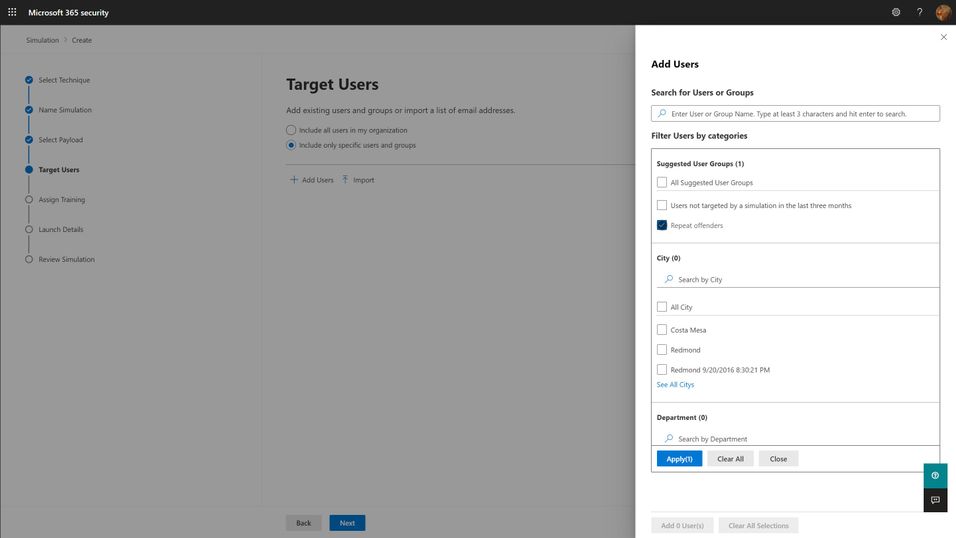
The first question you must answer for your simulation program is “Who should I target?”. The answer to this question can be complicated, but the short answer boils down to “everyone who needs it”. Spoiler alert: everyone in your organization needs it. This includes your executives, your frontline workers, everyone that might interact with email and that might have access to organizational resources. Microsoft has seen an enormous variation on how different organizations have approached the audience question, but we think the best ones start with the assumption that every member of the organization should be exposed regularly, and that higher risk and higher impact members should be targeted with special cycles (more on this below with the frequency question). You should think through partner and vendor relationships and consider requiring training of any users that have access to your organization’s resources. The best tools are ones that will integrate with your existing organizational directories, so figuring out how to segment and target these audiences should be as easy as searching for groups or users in your directory and adding them to the target list.
Frequency
The second, significantly more complicated question is “How often should I do phish simulations?”. The answer to this question is something along the lines of “As often as you need to minimize bad behavior (clicking phishing links), maximize good behavior (reporting phish) of your users, and not significantly negatively impact their productivity.” Like with targeting philosophies, Microsoft has seen enormous variation with different organizations. We understand that your organizational risk culture, risk tolerance, and resourcing will define the best answer to this question for your organization, and so you should take the below recommendations with a grain of salt. Most organizations try to balance how much time and energy goes into actually creating and sending out a phish simulation against the potential productivity impact to users. Doing more frequent simulations can be a lot of work for the program owner, although more data can be very helpful in maximizing the impact of the training on end user behavior.
- Every user in your organization should be exposed to a phishing simulation at least quarterly. Only do this if your training experiences are differentiated and short. Longer training, of the exact same content, required quarterly, will not produce better results and will irritate your users. If you can confidently differentiate your training per user, and constrain the educational experience to a few minutes, quarterly is a healthy cadence to remind your users of the risks of phishing.
- High-risk or high-impact users should be targeted more frequently, at least until they can consistently demonstrate an ability to correctly identify and report phishing messages. Daily or weekly simulations don’t seem to produce significantly better results, so we recommend a monthly cadence for these groups.
One consideration we think you should make when determining your simulation frequency is that the work of actually selecting payloads, target audiences, and training experiences for users is significant, but that automation can ease this burden. So long as your phish simulations positively impact behavior, and don’t negatively impact productivity, you should strive to engage users in this very common, and very impactful malicious attack technique as often as you can. More on this in the section about Operationalization.
Payloads
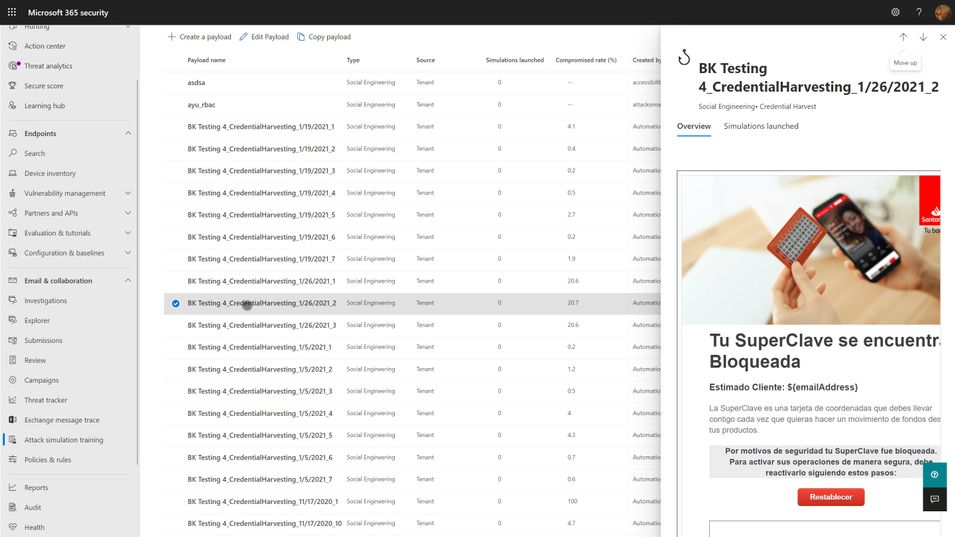
Payloads are the actual email that gets sent to end users that contains the malicious link or attachment. As mentioned in the goal setting portion above, click-through rates for your simulation are, in large part, a function of the payload you select. The conceit of any given payload will hook different users very differently, depending on their personal motivations and psychology. Every quality tool will include a large library of payloads from which you can select. We think the following criteria are important considerations when selecting your payloads:
- Research shows that trickier payloads are better at engaging end users and changing their behavior. If you pick payloads that are really obviously phishing, you may end up with a great, low click-through rate, but your end users aren’t really learning anything. Resist the urge to pick low complexity, or ‘easy’ payloads for your users because you want them to successfully avoid getting phished. Instead, rely on mechanisms like the Microsoft 365 Attack Simulation Training tool’s Predicted Compromise Rate to baseline and measure actual behavioral impact. More on this below.
- Use authentic payloads. This means that you should always seek to use payloads that are created by the exact same bad guys that are attacking your organization. There are many different levels of phishing (phishing, spearphishing, whaling, etc.) and effective attackers will tune and adjust their payloads for maximum impact against your users. If you try to make up silly phishing payload themes (bedbugs in the office!), you might be able to highlight that users will fall for anything, but you won’t be teaching them what real attackers do. The caveat to this is that the payloads you use should not, under any circumstances, contain actual malicious links or code. Real world payloads should be thoroughly de-weaponized before use in simulations.
- Don’t be shy about leveraging real world brands. Attackers will use anything and everything at their disposal. Credit card brands, banks, social media, legal institutions, and companies like Microsoft are very common. Figure out what attackers are using against your users and leverage it in your phish sim payloads.
- Thematic payloads are powerful teaching tools. Attackers are opportunistic and will leverage real world events such as COVID-19 in their campaigns. Pay attention to world events and business-impacting themes and leverage them in your payloads.
- Try not to use the same payloads for every user. This recommendation is tricky, especially if you are using static click-through rates to measure your click susceptibility. You want to be able to compare the click-through rates of user A vs. user B and that usually requires a common payload lure. However, using the same payload for all users can lead to something called the Gopher Effect, where your users will start popping up their heads and letting the people around them know that there is a company-wide phishing exercise going on. Varying payload delivery and content helps tamp this down.
- Don’t be precious about payloads selection. It is something that every user in your org will see, and so you want to make sure it doesn’t have any obvious errors or offensive content. Over-investing time and energy into something that attackers spend mere moments on can dramatically increase the cost of your simulation program. Instead, we recommend you curate a large library of payloads that you want to use, and leverage automation to select randomly from your library.
Training
Every phish simulation includes several components that are educational in nature. These include the payload, the cred harvesting page and URL, the landing page at the end of the click-through, and then any follow-on interactive training that might get assigned. The training experiences you select for your users will be crucial in turning a potentially negative event (I’ve been tricked!) into a positive learning experience. As such, we recommend the following guidelines:
- The landing page at the end of the click-through is your best opportunity to teach about the actual payload indicators. M365 Attack Simulation Training includes a landing page per simulation that renders the email message the user just received annotated with ‘coach marks’ describing all the things in the payload that the user could or should have noticed to indicate it was phishing. These pages are usually customizable, and you should make efforts to tailor the language to be non-threatening and engaging for the user.
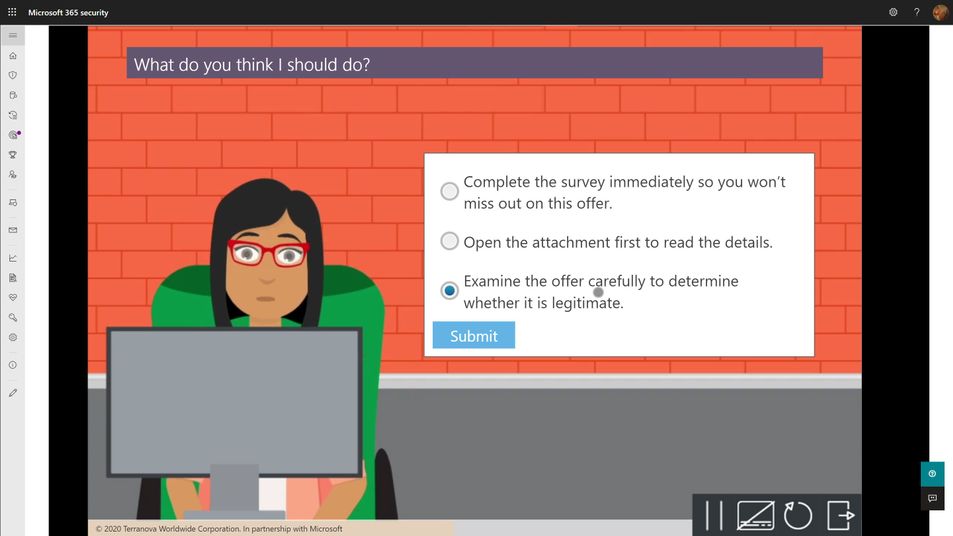
- Every user should complete a formal training course that describes general phishing techniques and appropriate responses at least annually. The M365 Attack Simulation Training tool provides a robust library of content from Terranova Security that covers these topics in a variety of durations from 20 minutes to as little as 15 seconds. Once they have completed one course, we recommend you target different courses based on their actions taken during subsequent simulations. Don’t make the user take the same course more than once per year, regardless of their actions.
- The training course assignment should be interactive, engaging, inclusive, and accessible on multiple platforms, including mobile.
- Many organizations opt to not assign training at the end of any given simulation because the phish guidance is included in other required employee training. Every organization will have a different calculus for training impacts on productivity and so we leave it to you to determine whether this makes sense for you or not. If you find that repeated simulations aren’t changing your user behaviors with phishing, consider incorporating more training.
Operationalization
For any given phish simulation, you’ll find that you will have a fairly complex process to navigate to successfully operate your program. Those steps fall into approximately five major phases:
- Analyze. What are my regulatory requirements? How much do my users understand about phishing? What kind of training will help them? Which parts of the organization are high risk or high impact for phishing? How susceptible am I to phishing?
- Plan. Who needs to review and sign off on my simulation? Who am I going to target with which payloads, how often, and with what training experiences? What do I expect my click-through and report rates will be? What do I want them to be? Which payloads should I use?
- Execute. Who will actually send the simulations? Have I notified the security ops team and leadership? What is the plan if something goes wrong?
- Measure. What specific measures am I tracking? How will I aggregate and analyze the data to draw the best insights and learnings from the data? Which training experiences are affecting overall susceptibility?
- Optimize. What is working and what should change? Which users need more help? What impacts are the simulations and training having on overall productivity? How will I communicate the status of the program to stakeholders?
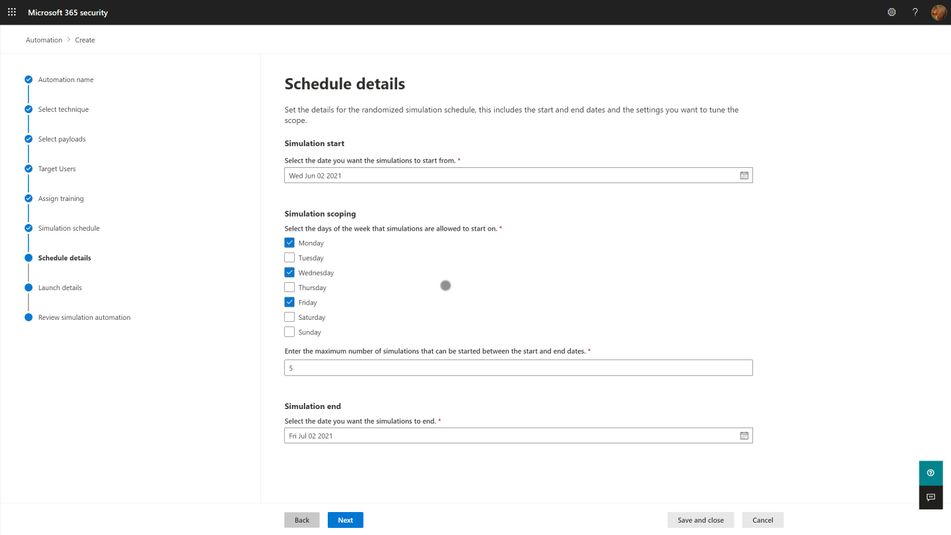
With the right tool, huge portions of this process can be automated, and we strongly suggest that you leverage those capabilities to lower your program costs and maximize your impact. Two pieces of automation are available in the M365 Attack Simulation Training tool today:
- Payload Harvesting automation. This will allow you to harvest payloads from your organization’s threat protection feed, de-weaponize it, and publish it to your organization’s payload library. This is the best, most authentic source of payloads for use in simulations. It is literally what real world attackers are sending to your users. Let the bad guys help inoculate your users against their tactics.
- Simulation automation. This capability will allow you to create workflows that will execute a simulation over some specified period of time and randomize the delivery, payloads, and targeted user audience in a way that offsets the groundhog effect and lowers the risk of a single, huge simulation going awry.
Measuring Success
As mentioned in the goals section above, your program is essentially measuring how susceptible your organization is to phishing attacks, and the extent to which your training program is impacting that susceptibility. The key here is which specific metric do you use to express that susceptibility? Static click-through rates are problematic because they are driven by payload complexity and conceit. It is a reasonable place to start your program health measurements, alongside report rates, but it quickly becomes problematic when you need to compare two different simulations against each other and track progress over time.
Our suggestion is to leverage metadata like Microsoft 365 Attack Simulation Training’s Predicted Compromise Rate to normalize cross-simulation comparisons. Instead of measuring absolutely click-through rates, you measure the difference between the predicted compromise rate and your actual compromise rate, grounded along two dimensions: Percentage Delta and Total Users Impacted. We believe this metric is a much better, authentic representation of how training is changing end user behavior and gives you a clearer path to changing your approach.


Recent Comments