This article was originally posted by the FTC. See the original article here.
The weather is getting warmer, and you might be itching to travel again. The mountains, the beach, and the trails are calling you — and everyone else. At least that’s what it feels like when you start looking into renting a car. With rental car availability at an all-time low, prices are sky high. So, if you suddenly find an available car at a cheap price, you might be dealing with scammers looking to cash in on the rental car shortage.
Scammers are posing as rental car companies, setting up their own websites, and advertising fake customer service phone numbers, all to convince travelers they’re legit. Then, they’re asking people to pre-pay for the rental — with a gift card or prepaid debit card. To avoid rental car scammers driving off with your money:
Research the rental car company by searching for the name of the company and words like “scam,” “complaint,” or “review” to check if other people have had a bad experience.
Verify deals with the company directly. If you need customer support, look for contact info on the company’s official website. Don’t use a search engine result. Scammers can pay to place sponsored ads in search results, so they show up at the top or in the sponsored ad section.
Pay with a credit card if possible, and never pay with a gift card or prepaid debit card. You can dispute credit card charges, but gift cards and prepaid debit cards can disappear like cash. Once you give the number and PIN to a scammer, the money is gone.
This article is contributed. See the original author and article here.
Today we’re pleased to announce availability of the latest Microsoft hardware innovations in support of remote and hybrid work at home and in the office. In the latest episode of Microsoft Mechanics, engineering leader Branden Powell explains how the Surface design team built devices for all day comfort and mobility, delivering the best experience on Microsoft Teams.
Devices now available at your favorite electronics retailer and surface.com include:
This article is contributed. See the original author and article here.
Microsoft Viva is an employee experience platform that brings together communications, knowledge, learning, resources, and insights. Powered by Microsoft 365 and experienced primarily through Microsoft Teams, Viva fosters a culture where people and teams are empowered be their best from anywhere.
* Join us Thursday, June 17th, to learn how Microsoft Viva can take your organizational employee experience to the next level as we cover: Download the meeting invite here.
Viva Connections – Communications and culture
Keep everyone connected
Encourage meaningful connections across the organization by enabling employees to easily discover relevant communications and communities.
Make it easy for people to contribute
Foster a culture of inclusion by empowering every employee to contribute ideas and share feedback.
Unite and inspire your organization
Align the entire organization around your vision, mission, and strategic priorities
Viva Topics – Knowledge and expertise
Turn content into usable knowledge
Use AI to reason over your organization’s content and automatically identify, process, and organize it into easily accessible knowledge
Organize knowledge into topic pages
Enable your organization’s experts to share and refine knowledge through curated topic pages, automatically generated and updated by AI
Make knowledge easy to discover and use
Deliver relevant topic cards in the apps people use everyday
Viva Learning – Skilling and growth
Make learning a natural part of your day
Foster a culture of learning by enabling people to easily discover, share, and engage with learning integrated into Microsoft Teams.
Make all your learning content available in one place
Simplify the learning experience by bringing together world class content from LinkedIn Learning, 3rd parties, Microsoft Learn, and your own content.
Drive results that matter
Empower your leaders and employees to curate, assign and track learning aligned with business outcomes.
Viva Insights – Productivity and wellbeing
Deliver personalized and actionable insights
Empower individuals, teams, and orgs to achieve balance, build better work habits, and improve business outcomes with personalized insights and recommended actions.
Quantify the impact of work on people and business
Gain data-driven, privacy-protected visibility into how work patterns affect wellbeing, productivity, and results.
Address complex business challenges
Use advanced tools and additional data sources to perform deeper analysis, address challenges important to your business, and respond quickly to change.
Wrap Up/Next Steps
* Join us Thursday, June 17th, to learn how Microsoft Viva can take your organizational employee experience to the next level as we cover: Download the meeting invite here.
This article is contributed. See the original author and article here.
Apple has released security updates to address vulnerabilities in iOS 12.5.4. An attacker could exploit these vulnerabilities to take control of an affected system.
CISA encourages users and administrators to review the Apple security update and apply the necessary updates.
This article is contributed. See the original author and article here.
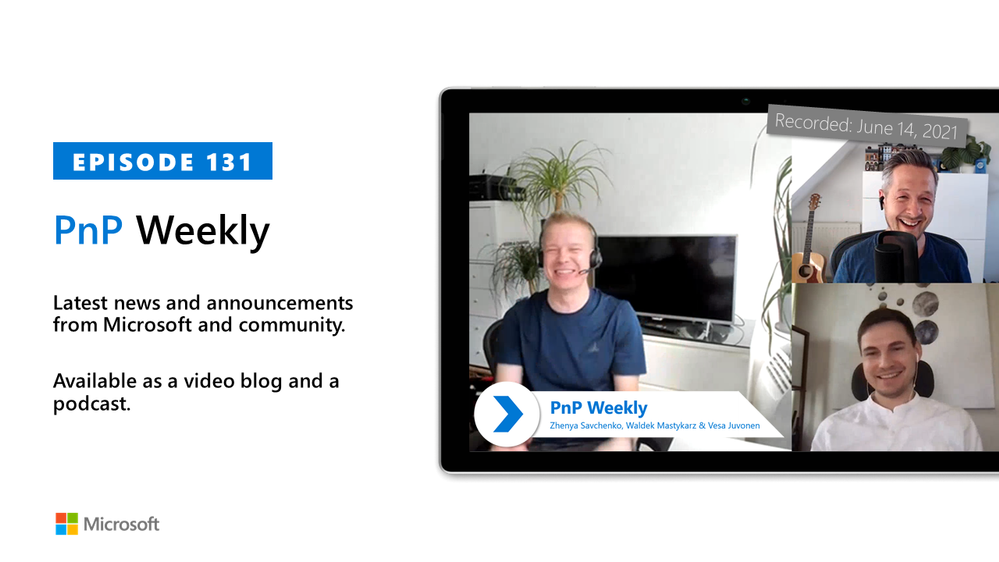
In this installment of the weekly discussion revolving around the latest news and topics on Microsoft 365, hosts – Vesa Juvonen (Microsoft) | @vesajuvonen, Waldek Mastykarz (Microsoft) | @waldekm are joined by the Senior Program Manager Zhenya Savchenko (Microsoft) from the Developer Division of Visual Studio group. He one of the PMs coordinating new Microsoft Teams Toolkit v2 extension for Visual Studio Code. Topics discussed in this session – the Visual Studio developer tools group’s role in the development of the Microsoft Teams Toolkit, ideas for spending $5B to make Microsoft products better for developers, next steps for Teams Toolkit, and wrap up with each participant’s focus for the week.
Covering also 22 new articles from Microsoft and the Community from past week!
Please remember to keep on providing us feedback on how we can help on this journey. We always welcome feedback on making the community more inclusive and diverse.
This episode was recorded on Monday, June 14, 2021.
These videos and podcasts are published each week and are intended to be roughly 45 – 60 minutes in length. Please do give us feedback on this video and podcast series and also do let us know if you have done something cool/useful so that we can cover that in the next weekly summary! The easiest way to let us know is to share your work on Twitter and add the hashtag#PnPWeekly. We are always on the lookout for refreshingly new content. “Sharing is caring!”
Here are all the links and people mentioned in this recording. Thanks, everyone for your contributions to the community!
Want to ask a question or in general engage with the community – Add a note in the Microsoft 365 PnP Community hub athttps://aka.ms/m365pnp/community
Check out all the great community calls, SDKs, and tooling for Microsoft 365 fromhttps://aka.ms/m365pnp
If you’d like to hear from a specific community member in an upcoming recording and/or have specific questions for Microsoft 365 engineering or visitors – please let us know. We will do our best to address your requests or questions.
This article is contributed. See the original author and article here.
Introduction
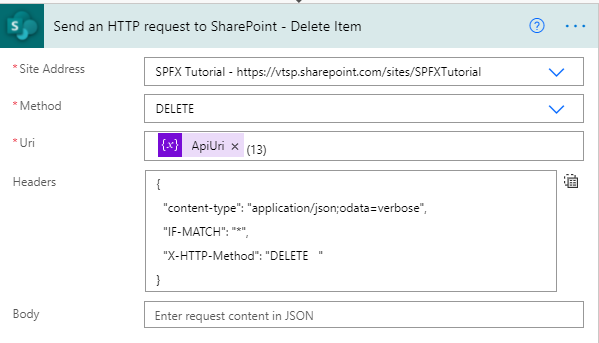
Send an HTTP request to SharePoint action is used to execute REST queries. As we know when we want to perform any operations in SharePoint then we are using APIs so in the flow, we can use fro the same requirements.
We will create a SharePoint list and we will perform Create, Read, Update and Delete operations. we will create an instant flow. let’s see step-by-step implementation.
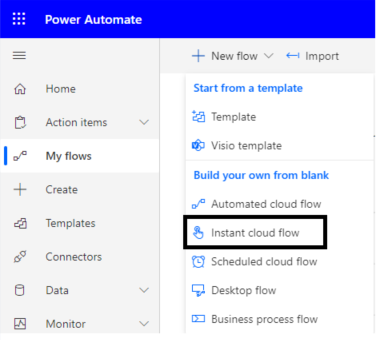
1. Go to Power Automate > My flows > Click on New flow > Select instant cloud flow
2. Read items from To Do list. (Read Operation)
So to perform the read operation we will use the GET method.
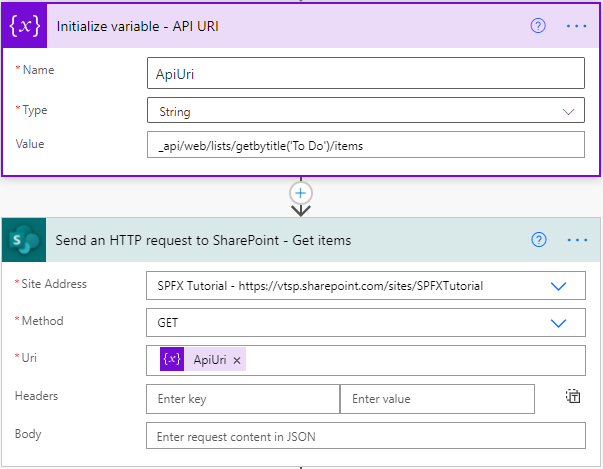
Add Send an HTTP request to SharePoint action from + icon and here we need Site address, Method, and URI.
Site Address: Select the Site URL in which we want to perform actions
Method:GET
Uri:_api/web/lists/getbytitle(‘To Do’)/items
Headers: Not required
You can also add URI in a variable because this we will need for all the actions.
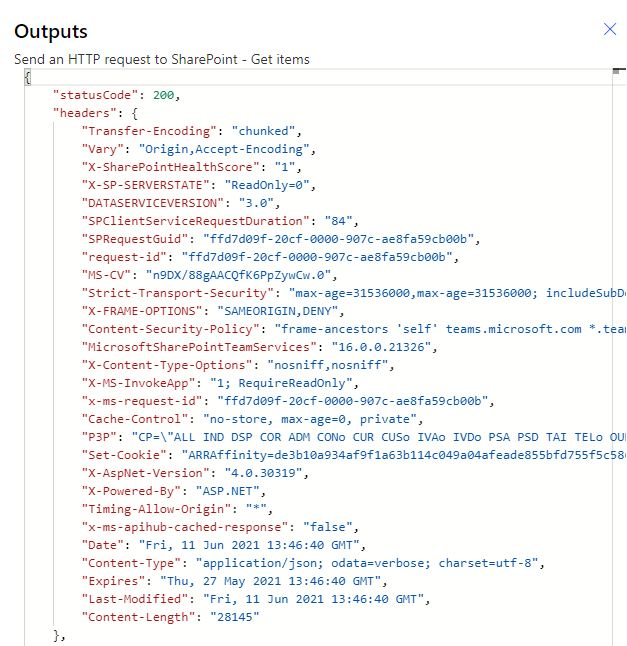
If it will successfully execute it returns statusCode 200 and records in the body if records are available.
3. Create item in To Do list (Create Operation)
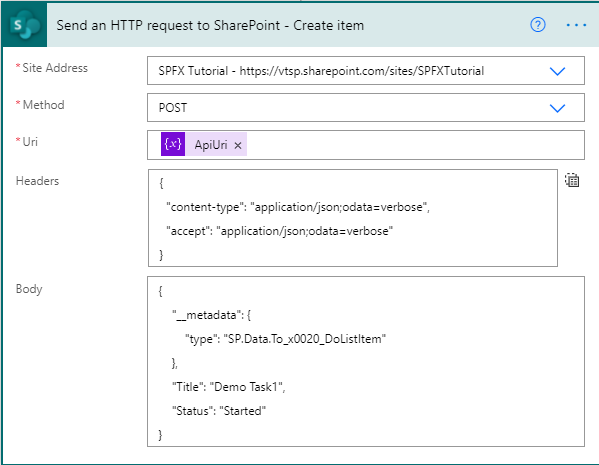
Site Address: Select the Site URL in which we want to perform actions
In the request body, we need type so now the question is how to get type? It is SP.Data.{ListName}ListItem (replace {ListName} with list name. if space in between list name then it will be separated with _x0020_).
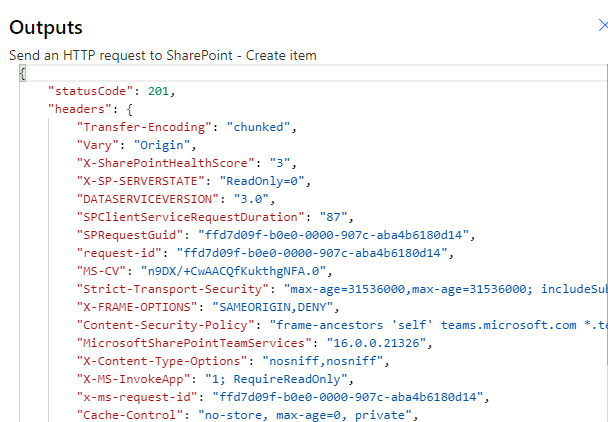
If it will successfully execute it returns statusCode 201.
4. Update item in To Do list (Update Operation)
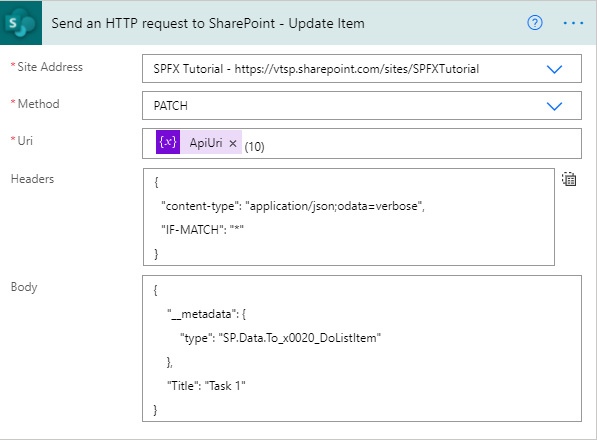
Site Address: Select the Site URL in which we want to perform actions
In this article, we have seen the step-by-step implementation of CRUD operation of SharePoint list items using Send an HTTP request to SharePoint in Power automate.
This article is contributed. See the original author and article here.
Using the CLI for Microsoft 365, you can manage your Microsoft 365 tenant and SharePoint Framework projects on any platform, including running it in a container. By running the CLI for Microsoft 365 in a container you free yourself from installing it locally. Leveraging a Logic App, Azure Container Instances and the CLI for Microsoft 365 you can automate reporting and maintenance of your tenant.
The goal is thus to generate some form of reporting on our tenant. There are a lot of sample scripts available, but we will start simple by reporting all deleted Office 365 Groups (this will include deleted Teams). Executing a report like that with the CLI for Microsoft 365 would be just a single line:
m365 aad o365group recyclebinitem list
To achieve our reporting scenario we need the a few other components as well:
An Azure resource group to group our resources together
A managed identity to make sure we can access our tenant securely;
A Logic App to orchestrate everything;
Azure Container Instances to execute our script;
A Git repo that contains the script we want to execute and pull in;
To create a new Azure resource group simply log in to the Azure Portal and create a new resource group using the create a resource button. For demo purposes I called my resource group cli-test.
Create a Managed Identity
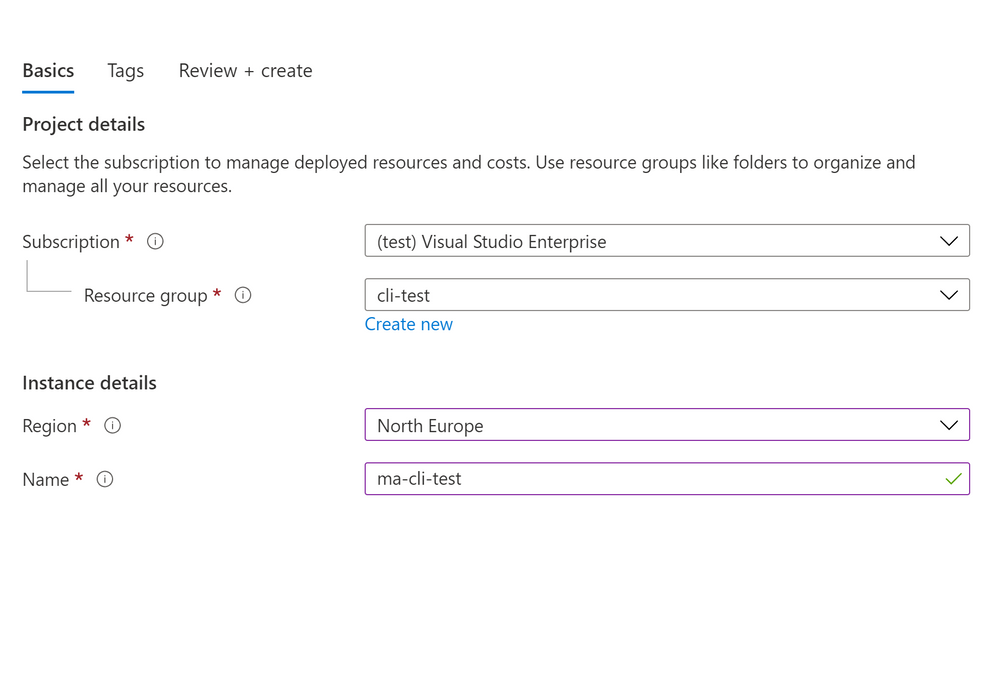
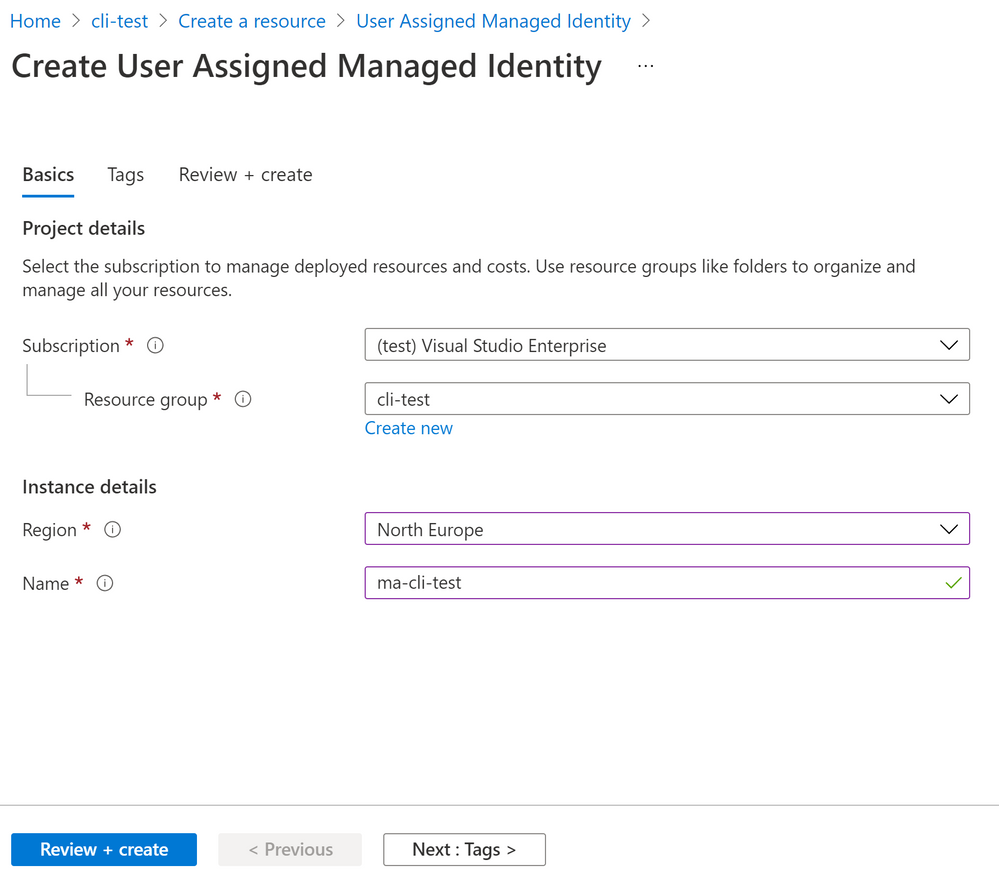
In our resource group we can create a new user managed identity that we can use. Click on the add button and search for User Assigned Managed Identity to create the new managed identity. Simply provide a name and create your new managed identity.
Once the managed identity is created it still need permissions to do anything. Just creating it is not enough. In order to use the managed identity we need to make sure that it has the correct permissions. The CLI for Microsoft 365 docs explain in details what the steps are required. For our reporting scenario’s we need support to query the Graph and SharePoint. You can use the CLI for Microsoft 365 to easily hand out the permissions you need with the following snippet:
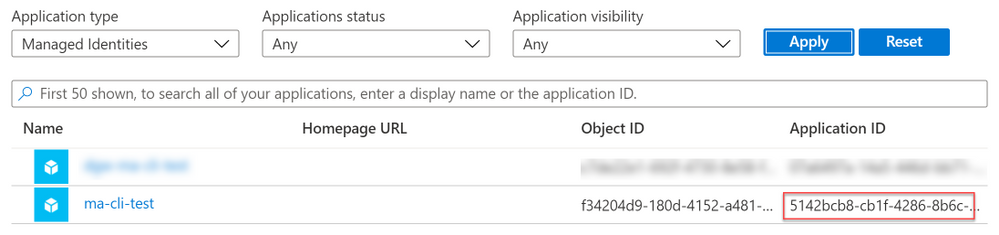
Now all we need is the GUID that identifies the managed identity. Navigate to https://portal.azure.com select Azure Active Directory and pick Enterprise Applications. In the Application Filter filter on Managed Identities and make sure to pick the Application Id of your newly created managed identity.
Store it somewhere save as we need it at a later moment.
Create a Logic App
As we need a Logic App to orchestrate the execution of our script the first step is to create one. You can do so in any resouce group, or create a new one. There are no requirements for your Logic App. So we pick a Logic App (Consumption) and provide a resource group and name. Once the Logic App is created navigate to it and click the edit button. Once in edit mode you are free to pick your trigger. You can pick any trigger you like, for demo purposes you could connect it to a list in SharePoint Online, or just use a HTTP trigger. The next step is to create two parameters, containerGroup and containerName. Both will be used more than once so it helps to create them parameters, but it is not required. For demo purposes I added a small snippet as a postfix to identify when it was created:
formatDateTime(utcNow(),'MM-dd-yyyy')
This helps when debugging as you can always identify when something was created. The next step is to add a new action of type Create or update a container group. It is a pretty complex action with a lot of parameters to get right, so it is worth to pay close attention when typing:
Option
Value
Comments
Subscription id
Any subscription you like
I suggest putting it all in the same subscription.
Resource Group
Any resource group you like
I suggest putting it all in the same resource group.
Container Group Name
@{variables('containerGroup')}
Parameter for ease of use
Container Group Location
Any location is supported
Container Name – 1
@{variables('containerName')}
Parameter for ease of use
Container Image – 1
m365pnp/cli-microsoft365:latest
Container Resource Requests CPU – 1
1
If you are planning to run complex or large scripts it might be worth to add additional resources.
Container Resource Requests Memory – 1
1.5
If you are planning to run complex or large scripts it might be worth to add additional resources.
Container Command Segment – 1
bash
You cannot execute multiple commands in a single line. You will need to add each statement to a segment.
Container Command Segment – 2
/mnt/repo1/test.sh
The value of the mount path and script name are dependant on settings below.
Container Volume Mount Path – 1
/mnt/repo1
Container Volume Mount Name – 1
gitrepo
The name for the mount path must match the volume name specified later.
Make sure the container is restarted if there are problems.
This action will thus create a new container instance, pulls in the CLI for Microsoft 365 image and make sures that a git repo with a script is pulled in. And best of all; the container created will be running with the managed identity you have specified. Now all we need to do is to capture the output of our container instance and clean up.
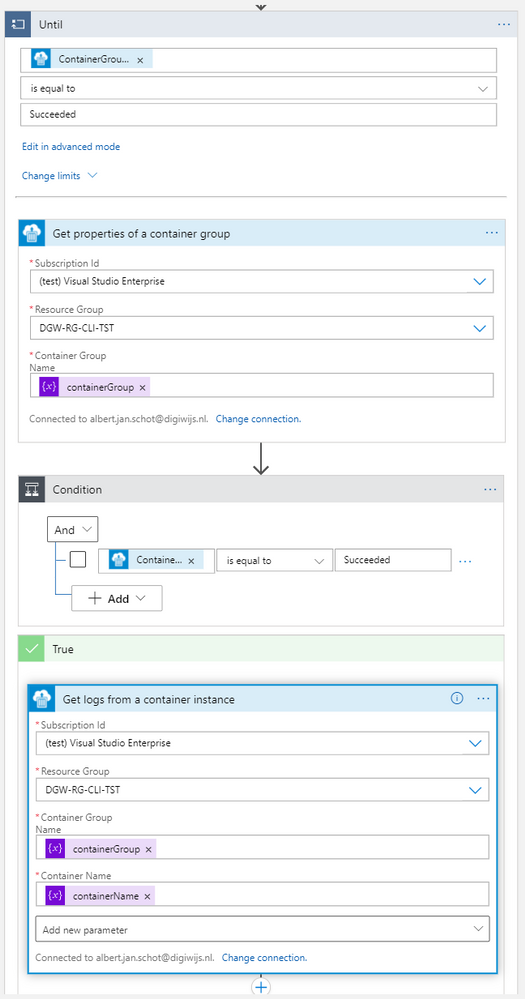
To do so add a action of type until. Do not configure any requirements yet and simply add an action of type Get properties of a container to retrieve the latest status, use the containerGroup parameter to make sure you get the correct container. Put in the Container Group name as a parameter and check for status Succeeded of the untill action. Add a new condition and check there for the same status. In the true statement we can implement the logic for retrieving our data. You can use the Get logs from a container instance and e-mail the output to yourself.
In the false branche add an wait action that waits for 10 or 15 seconds. That will make sure it takes a while before it retries checking the status to see if it is finished.
Create your script
The last part is to make sure that the test.sh file referred to as being mounted in your container actually exists. It should contain all logic to run your script, but the first step is to authenticate. In order to authenticate with the managed identity we need to tell the CLI for Microsoft 365 to do so. By specifying the login using the authType parameter we can pass the GUID of our managed identity. The CLI then knows to use the managed identity of the container it is running in and you are done.
Once all these components are in place you can simply run any script in the container. Just make sure you have the appropriate permissions assigned to the Manged Identity!
PnP Recording
If you are looking at a video walkthrough you can checkout the PnP recording. It highlights the results and steps taken to achieve basic reporting on your tenant.
This article is contributed. See the original author and article here.
Today, I worked on a very interesting case when our customer has a linked server to Azure SQL Database, but, they want to remove the prefix of the linked server that everytime that run a query against this Linked Server, for example, SELECT * FROM MyLinkedServer.DatabaseName.SchemaName.TableName. In this article, I would like to share with an example how to do it.
The first thing that we need is to have a linked server connected to any other Managed Instance, OnPremises or Azure SQL Database. Let’s give the name LinkedServerMI to this linked server.
Once we have this, basically, we need to create a new synonym using the following command: CREATE SYNONYM [dbo].[MyNewTableForLinkedServer] FOR [LinkedServerMI].[DatabaseName].[SchemaName].[TableName]
Using this synonym right now, everytime that I execute any command, for example, SELECT * FROM MyNewTableforLinkedServer automatically this command will run a query against Linked Server, database, schema and tablename.
This article is contributed. See the original author and article here.
Hi all, Alan here again with a new article, I’m a Customer Engineer from Italy on Identity and Security.
I want to show you how to block TOR browser using Cloud App Security, simple and fast!
During the last few months, I had several customers requesting how to block sign-in from anonymous Ip Addresses. One example would be someone using TOR Browser. I started playing around with CAS and finally found a quick solution. Continue reading to find out more.
We will use Azure AD “Conditional Access policy” with Session Control together with “Cloud App Security Conditional Access App Control”.
We will start creating a “special” Azure AD Condition Access policy that will enable the APP in CAS, let’s see how.
PS: the APP will appear in Cloud App Security Conditional Access App Control directly after the user start authenticating/using it.
You will need access to you tenant’s Azure AD (portal.azure.com) and Cloud App Security (mycompany. portal.cloudappsecurity.com).
Thirst thing to do is create an Azure AD Conditional Access policy:
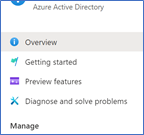
1. Navigate to your Azure Active Directory
2. Under Manage click on Security
3. Click on Conditional Access
4. Select New Policy
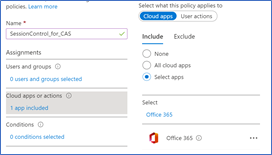
5. Give it a Name
6. Select to which users it will apply
7. Select the cloud application, for this demo I will select Office 365
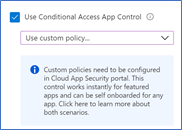
8. Go to Session and select Use Conditional Access App Control
9. Select Use Custom Policy
10. Click Select
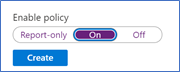
11. Enable the policy and click Create
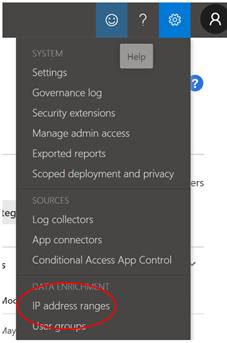
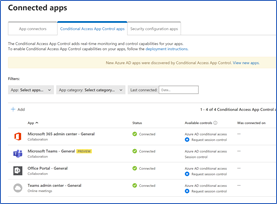
Once this is done the first time users log in Office 365 suite the application will be integrated in Cloud App Security
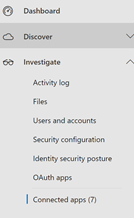
2. In the central pane you will have three tabs, select “Conditional Access App Control apps”.
You will get a list of applications for which you can start creating CAS policies
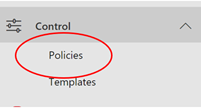
3. Now browse to Control menu and select “Policies”
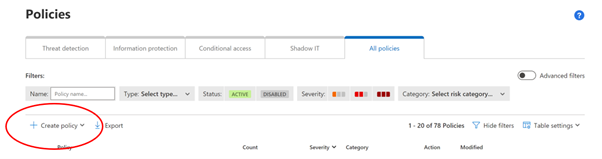
4. Select “ + Create policy”
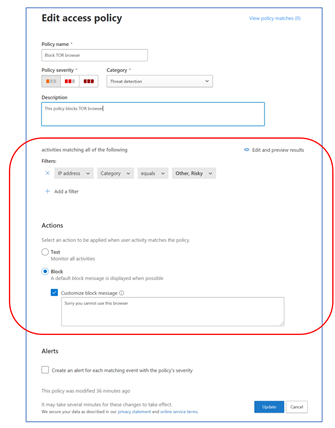
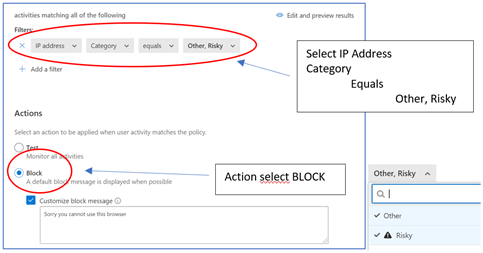
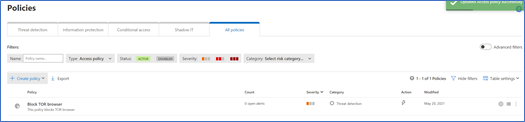
The important part here is FILTERSand ACTIONS
5. Click on “Create” (you will see it listed)
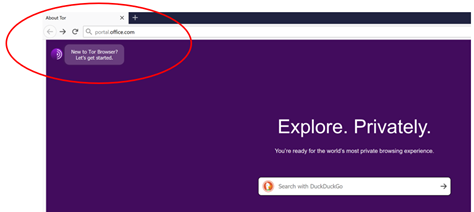
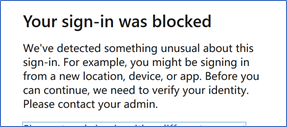
Access Office portal from the TOR Browser (use a valid user account from your Azure AD)
GREAT!!
Hope this article gives some hints on how to use Cloud App Security which I think is a great tool, simple and powerful and can really help enhance your security posture.
This article is contributed. See the original author and article here.
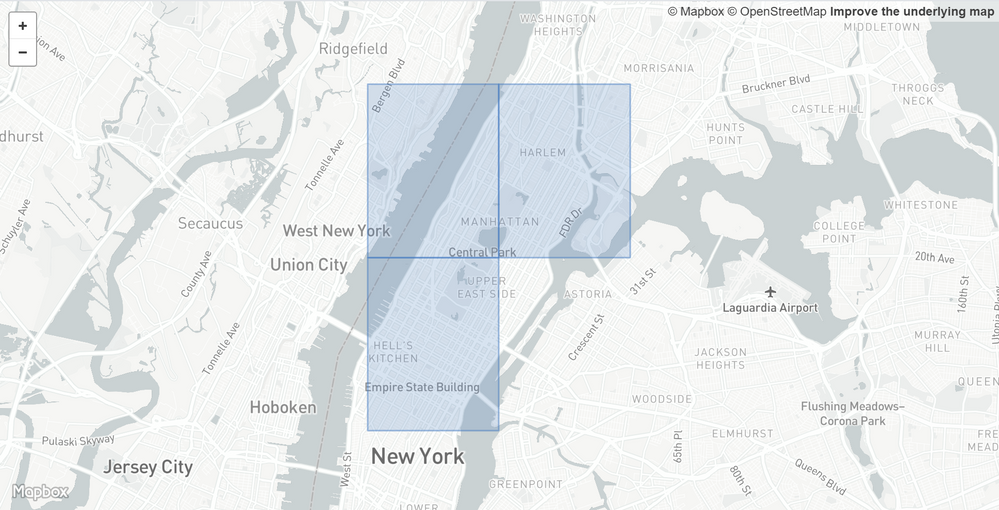
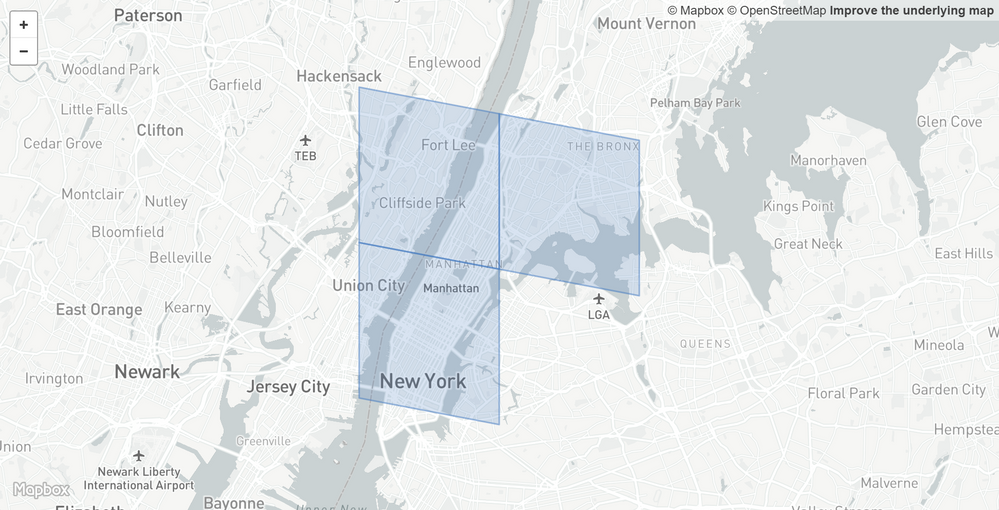
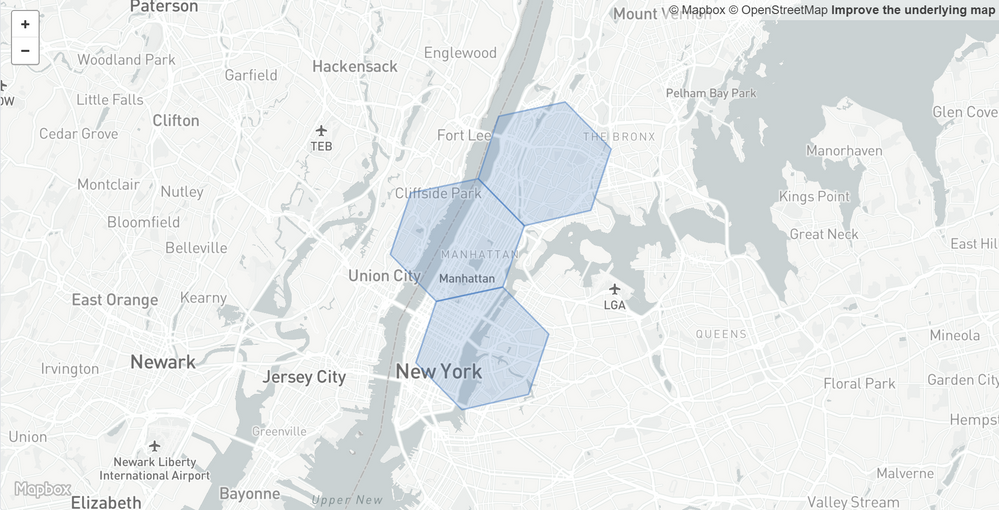
The geospatial functions in Azure Data Explorer (ADX) received a big update in June 2021. Based on our research and very valuable feedback from our customers we decided to add support for H3 Cell tokens. On top of that we provided new functionality to generate polygons from all of our geospatial clustering functions.
H3 Cell token
Geospatial data can be analyzed efficiently using grid systems to create geospatial clusters. You can use geospatial tools to aggregate, cluster, partition, reduce, join, and index geospatial data. These tools improve query runtime performance, reduce stored data size, and visualize aggregated geospatial data. H3 is Uber’s Hexagonal Hierarchical Spatial Index. More information on how to chose the right algorithm can be found on the documentation for geospatial grid systems.
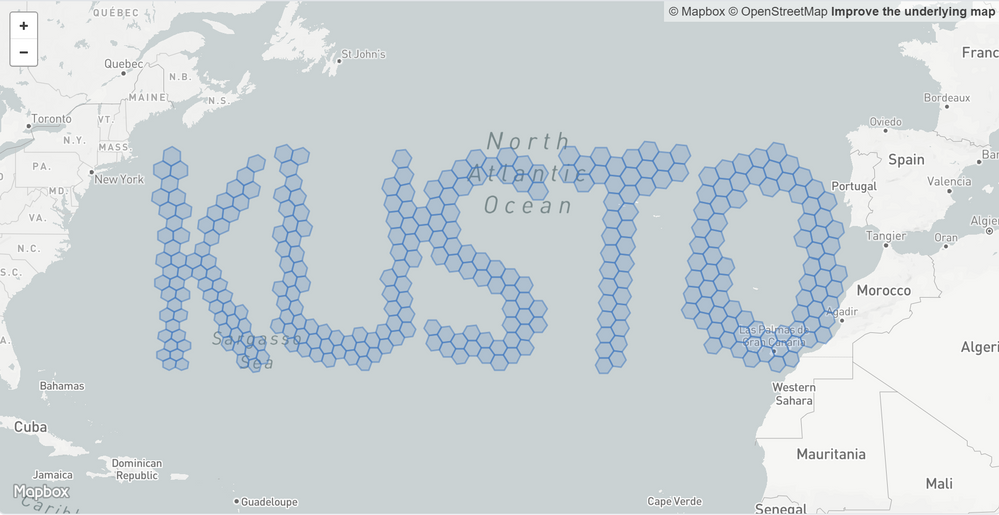
Visualizing “Kusto” on a map: https://gist.github.com/cosh/2c22c1ccf673f2af1dc44aa764887c4b#file-map-geojson
geo_point_to_h3cell()
Calculates the H3 Cell token string value for a geographic location (doc). Example:









Recent Comments