Use analytics and reporting to improve routing of customer service requests

Use analytics and reporting to improve routing of customer service requests

This article is contributed. See the original author and article here.

In the world of customer service, unified routing helps you solve the classic supply-and-demand problem as you distribute customer service requests to the best team or agent, no matter the channel. Dynamics 365 Customer Service automates this process by using rules to classify, prioritize, and assign those customer “demands”. To further optimize this process, your staff needs insight into how it is functioning.

We are introducing analytics and reporting capabilities to help supervisors and administrators understand and improve their routing systems.

In the last several months, we have seen companies redefining the roles and responsibilities of their service delivery employees. Supervisors and administrators now need to have a unified view of both on-site and off-site employees. This not only adds complexity to supervision, but it also reinforces the importance of having accurate reporting and analytics capabilities. We have seen supervisors struggling daily to analyze, identify, and mitigate the misroutes that are caused due to their routing strategies. Supervisors and administrators are asking questions like:

  • Why is this work item in my queue?
  • One of the queues is unreasonably overloaded, while another queue nearly empty. Why is that happening?
  • Agents in my queue are complaining about work items showing up that belong in another queue. What is wrong with the routing?
  • Are there enough agents to handle queries or work items of a certain type?
  • Are we assigning the right agents to solve specific customer queries?
  • Customer satisfaction (CSAT) is down the past few weeks. Is it because of routing failures?

Use historical analysis to improve routing configurations

To address these kinds of questions, your staff can use analytics and reports to gauge the effectiveness of their routing configurations, to help optimize the routing strategy, and to improve the workforce efficiency.

Two types of reports are available:

  • Record report: Covers routing-specific KPIs of records that were processed by the unified routing system.
  • Conversations report: Covers routing-specific KPIs for customer conversations.

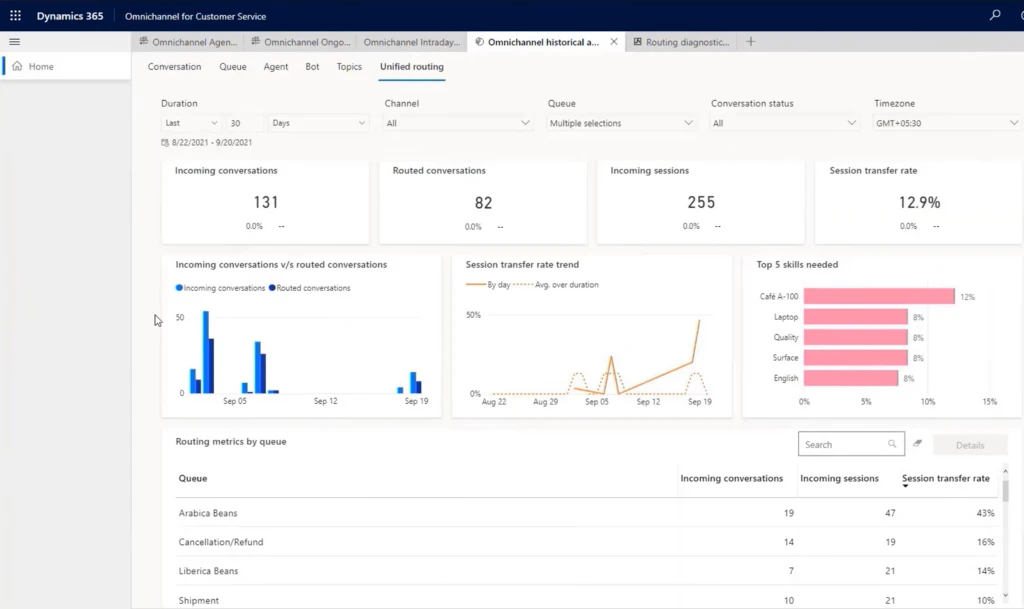
You access these reports on the Ominchannel historical analysis tab on the Unified routing page in Dynamics 365 Customer Service:

Example of conversations report.

Scenario: Coffee cancellation requests

To illustrate the usefulness of historical analysis, consider a scenario based on Contoso Coffee, which sells different types of coffee beans, including Arabica beans and Robusta beans. To manage customer queries, the company has created separate queues in their contact center for each type of coffee bean. In addition, they have outsourced business operations to a third-party vendor to handle order cancellations.

Alex, who supervises the Arabica beans queue, is getting complaints from agents that they are getting cancellation requests even though such requests should go to the vendor queue. Since the agents need to transfer these queries to the vendor-managed queue, they are wasting a lot of time. To investigate, Alex views the unified routing report.
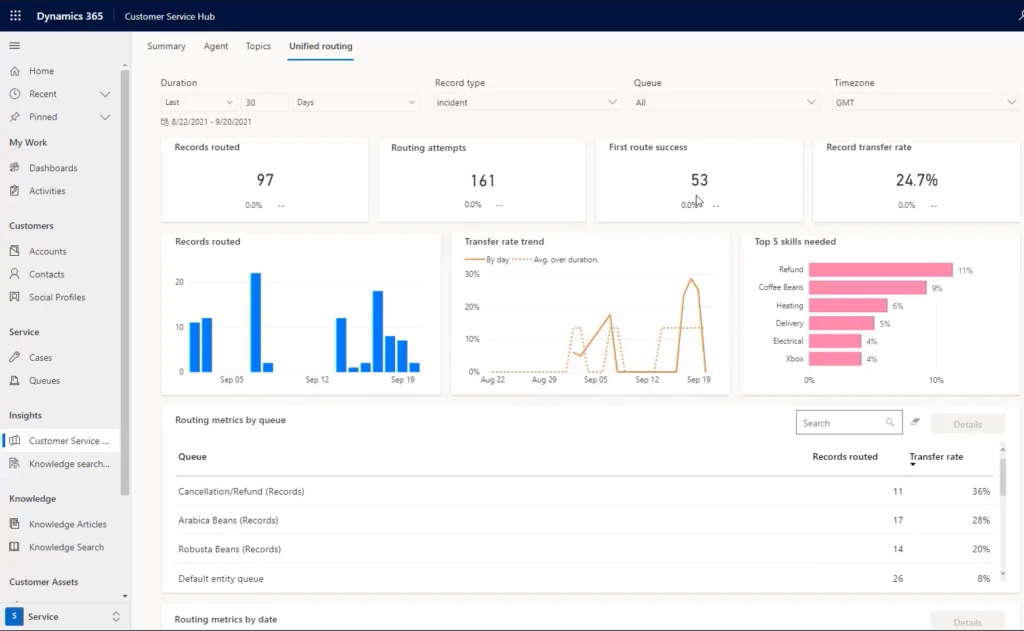
Unified routing report for Contoso Coffee.

This report shows that the overall transfer rate is more than 25%. Alex then selects the Arabica Beans (Record) queue, and it lists an even higher transfer rate that is way above the target of 10%. The bar chart in this report indicates that most transfers are going to the Cancellation/Refund queue.
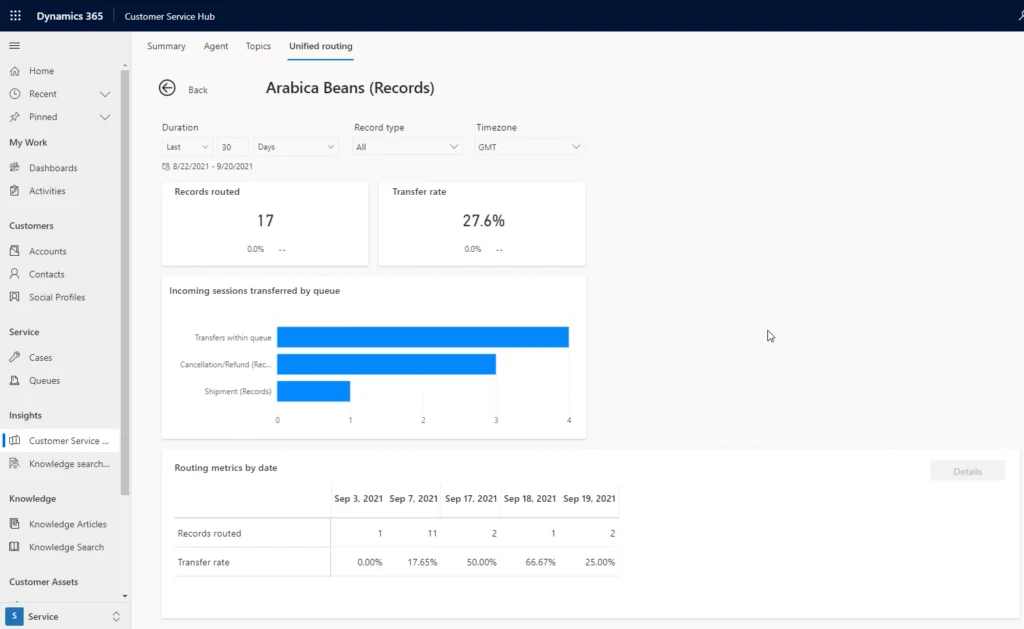
Diagnostics for Arabica bean routing.

Alex now moves to routing diagnostics to check on the details of a few work items in the queue that were transferred out. Alex verifies that many transferred work items were actually cancellation requests regarding Arabica beans. Since the routing configuration does not include rules to differentiate such cancellation queries from other Arabica queries, all these work items are coming to the Arabica queue (example highlighted below).
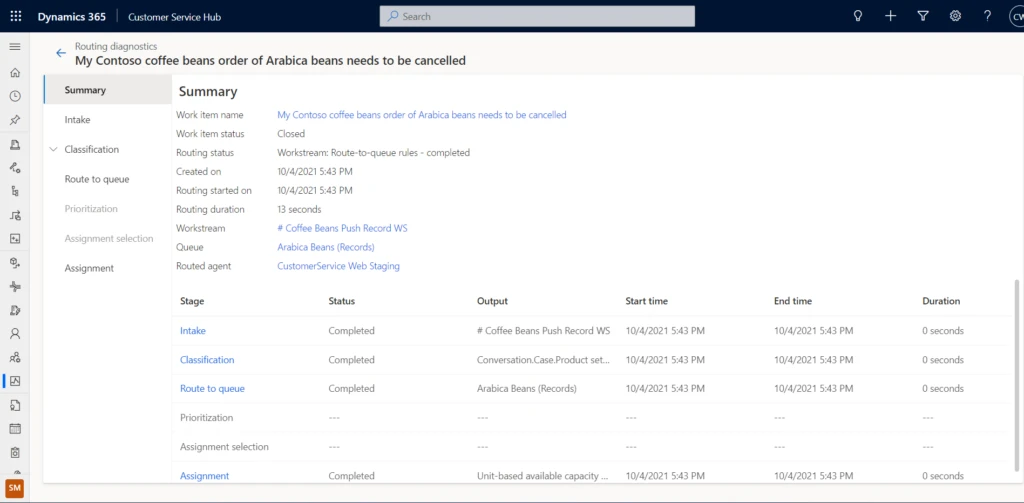
Canceled Arabica bean orders going to Arabica bean queue.

Alex raises this issue with the administrator, Alicia, and also provides the analysis. Alicia uses these details to quickly identify and mitigate the issue by introducing an additional rule.

Historical analytics for unified routing is helpful not just to gauge the health of an organization’s routing system, but it can also guide businesses on how to improve their routing strategies.

Next steps

To understand more about analytics and reporting for unified routing, and how to enable them for your organization, read more in the documentation:

This blog post is part of a series of deep dives that will help you deploy and use unified routing at your organization. See other posts in the series to learn more.

The post Use analytics and reporting to improve routing of customer service requests appeared first on Microsoft Dynamics 365 Blog.

Brought to you by Dr. Ware, Microsoft Office 365 Silver Partner, Charleston SC.

Check out what's new in Security at Microsoft Ignite

This article is contributed. See the original author and article here.

Microsoft Ignite is back! The event starts November 2nd, 2021, at 8:00 am PT.  


If you haven’t already, register now and complete your schedule!  


We are excited for you to join us at Microsoft Ignite for a focused exploration of the security market today. Come share and learn with global leaders in cybersecurity and infrastructure, while exploring the most advanced prevention measures and strategies. Learn how to react to increasing threats, prepare for the next frontier in identity proofing, and improve overall productivity. 


Let’s take a quick look to see what is in store this year: 


Security Focus Area Session  


Join Vasu Jakkal’s keynote: Protect Everything with End-to-End Security 


  • Tuesday, November 2, 10:35 AM – 11:00 PST 

  • Organizations around the world are facing a surge of sophisticated cyber threats. The hybrid work world is creating new opportunities for bad actors, and increased challenges for IT teams. Join us to learn how Microsoft’s integrated, comprehensive approach to security is helping customers become more secure and resilient. Discover new products and innovations that help you protect everything, from the endpoint to the cloud, across security, compliance, identity, device management, and privacy. Se    e how Microsoft Security is helping organizations of all sizes be safe in the face of increased global cyber threats. 


Featured Sessions from Day 1 


Join Rob Lefferts and Eric Doerr’s session: 
Tackling the biggest cybersecurity challenges for 2022 


  • Tuesday, November 2, 11:30 AM -12:00 PM PST 

    Rob Lefferts, CVP of Microsoft 365 Security | Eric Doerr, CVP of Cloud Security 


  • It’s been a year. The security industry has encountered some major challenges. Yet through it all, we’ve made progress on how to keep ahead of adversaries. In this session, we’ll meet with security leaders to discuss the big issues and lessons learned from the past year. We’ll also share key recommendations for security teams to successfully navigate the evolving threat landscape into 2022 and beyond. 


Join Joy Chik’s session: 
Strengthen resilience with identity innovations in Azure Active Directory 


  • Tuesday, November 2, 1:30 PM – 2:00 PM PST 
    Joy Chik, CVP of Identity  


  • Nation-states and criminal syndicates are applying significant resources to orchestrate multi-pronged attacks against critical services and infrastructure. No single organization can withstand these onslaughts alone. In this session, we’ll share investments we’re making in Azure AD to help you stay protected and productive: a resilient platform, teams, and tolls that detect and respond to hard-to-identify attacks, and systems that strengthen the security posture of your expanding digital estate 


Join Rudra Mitra’s session: 


Manage risk and compliance with end-to-end security solutions 


  • Tuesday, November 2, 2:30 PM – 3:00 PM PST 
    Rudra Mitra, CVP, Microsoft 365 Compliance, Security and Privacy 

  • Managing risks is critical to ensuring business continuity, protecting brand reputation, and addressing the various internal and external requirements that you may be subject to. We know your data goes beyond the Microsoft cloud, so we are building solutions to help you reduce risk across your entire digital estate, especially in this hybrid work world. Organizations should not have to make the tradeoff between modern collaboration and modern security. Join our session to learn how our newest innovations help you address these challenges.   


Join Alym Rayani’s session: 


Build a privacy resilient workplace with Privacy Management for Microsoft 365 


  • Tuesday, November 2nd, 8:30 AM – 9:00 AM PST 
    Alym Rayani, GM of Compliance & Privacy 


  • With increasing complexities and changes in the privacy regulatory landscape, organizations must ensure privacy is central to their business to build customer trust. This means having greater visibility into personal data and associated privacy risks in your environment, automating privacy operations including subject requests fulfillment, and empowering employees to make privacy-compliant decisions without hindering productivity. Learn how Microsoft’s Privacy Management solution can help you build a privacy resilient workplace. 


Security sessions from Day 2 


Join us on day 2 for various security topics delivered by industry experts and insiders on major trends facing the industry helping attendees understand the latest threats and risks, how to address workforce challenges, and looking into the near and far future of cybersecurity.  


Microsoft Into Focus: Security 


  • Wednesday, November 3rd, 10:30 AM – 12:00 PM PST 
    Ann Johnson, CVP of SCI Business Development at Microsoft, Vasu Jakkal, CVP of SCI at Microsoft, and more industry experts and insiders 

  • Attend the Keynote Microsoft Into Focus: Security with Microsoft Security leaders Vasu Jakkal, Bret Arsenault, Ann Johnson, on a series of insightful discussions as Microsoft hosts industry experts and insiders around current cybercrime trends, the evolution of hybrid work, and a look into the future of cybersecurity trends and solutions.  


Grounding Zero Trust in Reality: Best Practices and Emerging Trends 


  • Wednesday, November 3rd, 12:30 PM – 1:00 PM PST 
    Alex Simons, CVP of Identity Security, Steve Turner, Forrester Analyst 

  • The events of the last two years confirm Zero Trust is no longer an option—it’s a business imperative. Implementing a Zero Trust strategy is best understood as a journey on which organizations and governments around the world have embarked to meet the expanded threat landscape of today. Come and listen to Alex Simons talk about what best practices Microsoft customers have applied in their Zero Trust implementations and listen to a discussion on emerging trends with Steve Turner from Forrester.   


Skilling for Security: Forging the workforce of the future 


  • Wednesday, November 3rd, 1:30 PM – 2:00 PM PST 
    Naria Santa Lucia – GM, Digital Inclusion, Microsoft Philanthropies, Laramie County Community College, William Amick – Program Director, Information Technology Pathway, Reinier Moquete – Founder & CEO of CyberWarrior.com 

  • There are almost half a million unfilled cybersecurity positions in the United States alone, and the pipeline of new students is not on track to fill the demand. This session will discuss the workforce challenges facing the cybersecurity industry, and what Microsoft and training institutions are doing to address this critical need.    


An inside view on detecting and mitigating insider risks 


  • Wednesday, November 3rd, 3:30 PM – 4:00 PM PST 
    Glenn Kaleta, Microsoft Principal Engineering Program Manager,​ Erin Miyake, Microsoft Principal Program Manager, Mod Tejavanija, Microsoft Senior ​Program Manager, Dan Costa, Technical Manager, Carnegie Mellon University​ 

  • There is no denying the fact that insider risks can pose as great of a damage threat as other security threats like ransomware, phishing, and malware. Yet unlike these security threats where you can develop and operationalize globally optimized detections, insider risk detections present unique and complex challenges where understanding context and correlations is critical to ensure you have a successful insider risk management program. Having run the Insider Threat program at Microsoft we will be discussing the five primary principles that we have learned in our journey both internally and from our customers to help organizations understand what is required to build an effective insider risk program. 


External Attack Surface Management: Intelligence Defense in the Age of Digital Transformation 


  • Wednesday, November 3rd, 12:30 PM – 1:00 PM PST 
    Steve Ginty – Director, Threat Intelligence, RiskIQ 

  • Today’s digital transformation means a rapidly expanding IT ecosystem and an ever-evolving threat and vulnerability landscape of both nation-state and criminal actors that target a growing list of vulnerabilities to breach victim organizations. Understanding today’s external attack surface is essential to assess and protect critical assets. This session will demonstrate the vital role of combining vulnerability and traditional threat-actor intelligence in external attack surface management.   


Understanding Nation-State Threats 


  • Wednesday, November 3rd, 1:30 PM – 2:00 PM PST 
    Cristin Goodwin, Microsoft General Manager & Associate General Counsel, ​​Digital Security Unit​ 

  • The last 12 months have been marked by historic geopolitical events and challenges that have changed the way organizations approach their daily operations. During this time, nation-state actors have created new tactics and techniques to evade detection and increase the scale of their attacks. In this session, Cristin Goodwin, Associate General Counsel and head of Microsoft’s Digital Security Unit, explains the nation-state threat landscape and provides context for security leaders and practitioners who are looking to better understand the relevancy of these new threats.   


Cloud Security: A guide for developing a comprehensive multi-cloud security strategy 


  • Wednesday, November 3rd, 2:30 PM – 3:00 PM PST 
    Andras Cser – Vice President, Principal Analyst, Forrester – Serving security and risk professionals 

  • The era of cloud transformation is driving customers to strengthen the security of their complex environment. Join us for an insightful discussion with a leading industry analyst on how to best approach an end-to-end cloud security strategy. We’ll explore top trends, emerging risks, and potential obstacles – along with practical guidance on how to better protect your IaaS, PaaS, and SaaS services. 


How to Develop a Security Vision and Strategy for Cyber-Physical and IoT/OT Systems 


  • Wednesday, November 3rd, 2:30 PM – 3:00 PM PST
    Phil Neray, Microsoft Director of IoT & ​Industrial Cybersecurity, Katell Thielemann, VP Analyst, Gartner 

  • Recent ransomware attacks that halted production for a gas pipeline operator and food processor have raised board-level awareness about IoT and Operational Technology (OT) risk. Security leaders are now responsible for new threats from cyber-physical systems (CPS) and parts of the organization they never traditionally worried about. Join Katell Thielemann from Gartner® to discuss how to develop a CPS risk strategy using the “language of the business” to show security as a strategic business enabler. GARTNER is a registered trademark and service mark of Gartner, Inc. and/or its affiliates in the U.S. and internationally and is used herein with permission. All rights reserved.   


Engage with our security experts 


Join in on the Connection Zone sessions with security experts for further engagement. The line-up for Ask the Experts this year has something for everyone! 


Ask the Experts: 


Explore the full session catalog to find sessions most interesting for your role and interests. Hear from security experts, attend workshops, watch new product demos, and more. To begin your journey, log into Security at Microsoft Ignite and make sure to register to access all the event has to offer. 


Google Releases Security Updates for Chrome

This article is contributed. See the original author and article here.

Google has released Chrome version 95.0.4638.69 for Windows, Mac, and Linux. This version addresses vulnerabilities that an attacker could exploit to take control of an affected system. Some of these vulnerabilities have been detected in exploits in the wild.

CISA encourages users and administrators to review the Chrome Release Note and apply the necessary update as soon as possible.

GoCD Authentication Vulnerability

This article is contributed. See the original author and article here.

GoCD has released a security update to address a critical authentication vulnerability in GoCD versions 20.6.0 through 21.2.0. GoCD is an open-source Continuous Integration and Continuous Delivery system. A remote attacker could exploit this vulnerability to obtain sensitive information.

CISA encourages users and administrators to update to GoCD 21.3.0 or apply the necessary workarounds.

For more information, see Agent 007: Pre-Auth Takeover of Build Pipelines in GoCD.

Nasal spray’s unsupported COVID-19 treatment claims are not up to snuff

Nasal spray’s unsupported COVID-19 treatment claims are not up to snuff

This article was originally posted by the FTC. See the original article here.

Many of us would like to believe a marketer’s claims that an over-the-counter nasal spray can prevent or treat COVID-19. Luckily, the law sets a high standard of proof before a marketer can say its product can prevent, treat, or cure a serious disease. The law requires competent scientific evidence. In its latest case targeting fake COVID-19 cure claims, the FTC says that nasal spray maker Xlear, Inc., broke the law by promoting its saline sprays as effective treatments for COVID-19 without scientific proof.

The FTC says that since at least March 2020, Xlear and its president used deceptive or unsubstantiated claims to promote their nasal sprays on their websites and in YouTube videos, social media posts, and magazine advertorials. For example, the defendants said the sprays would protect against the virus “for up to four hours, helping keep you and others around you safe.” The FTC staff warned the defendants in July 2020 that they were unlawfully advertising their products. According to the complaint, the defendants told the staff they would remove the claims from their websites and other platforms, but continued using them.

The complaint, filed by the Department of Justice on behalf of the FTC, seeks substantial financial penalties and asks the court to bar the defendants from making similar false and unsupported health claims in the future.

Protect yourself — and your wallet — from bogus health products:

  • Talk with your doctor or healthcare professional before you try any product claiming to treat, prevent, or cure COVID-19 or any other serious illness.
  • Visit CDC.gov and FDA.gov for the most up-to-date information about COVID-19.
  • Remember, when there’s a medical breakthrough to treat, prevent, or cure a disease, you’re not going to hear about it first through an ad or sales pitch.
  • Know that bad actors post fake reviews and testimonials about their own products. Read How to Evaluate Online Reviews to learn more.

If you spot a bogus health product, please tell us at ReportFraud.ftc.gov.

Brought to you by Dr. Ware, Microsoft Office 365 Silver Partner, Charleston SC.

Preview of Feedback for Microsoft Teams now available

Preview of Feedback for Microsoft Teams now available

This article is contributed. See the original author and article here.

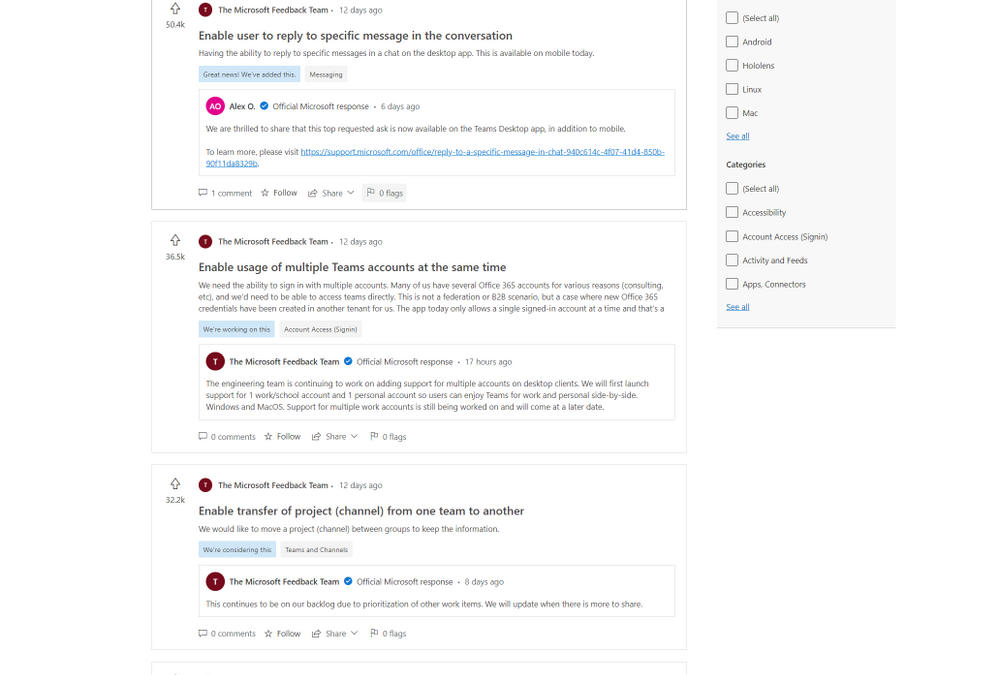
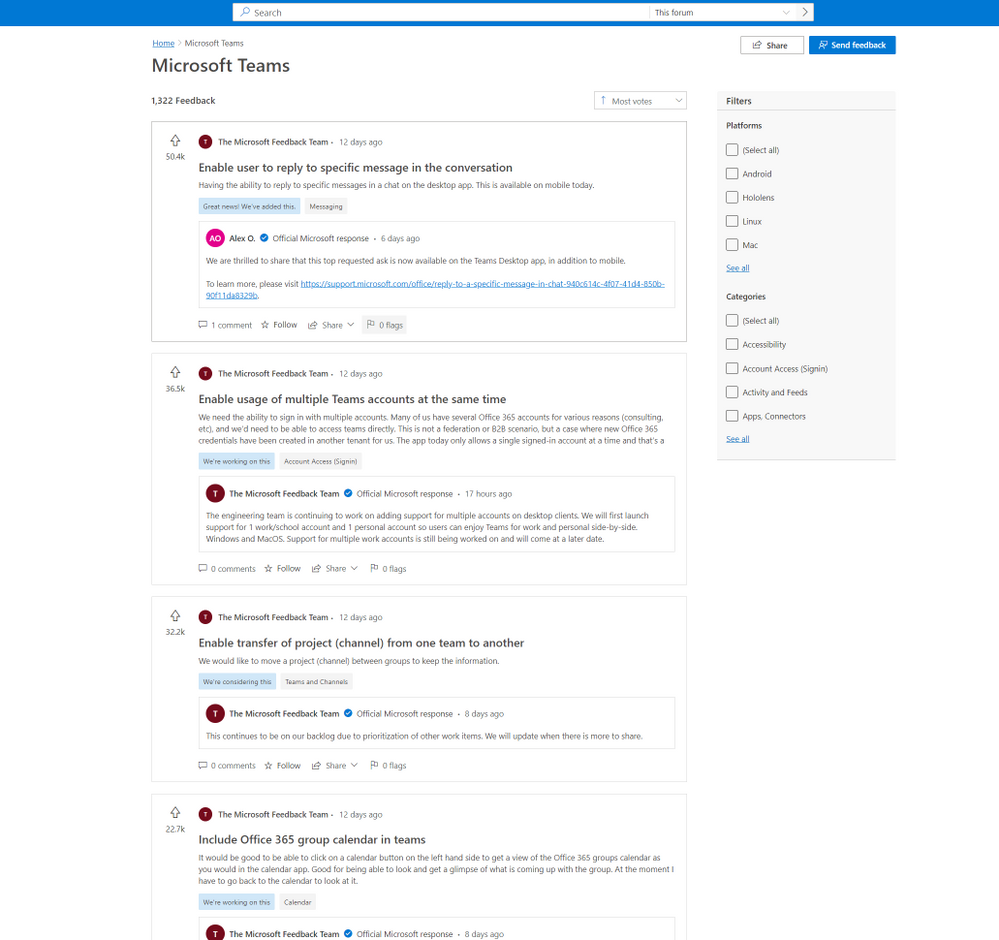
Starting today, the preview of Feedback for Microsoft Teams, a new community feedback experience from Microsoft, is available. Built on Dynamics 365 Customer Service, Feedback continues our dedication to using customer feedback to help with the further development and improvement of Teams. Since 2017, when Teams became the hub for collaboration in Microsoft 365, user submissions have driven the completion of over 500 features and improvements, and we aim to complete thousands more.


The new Feedback portal will allow users to submit their own feedback, browse other publicly submitted ideas, track official Microsoft responses, see our top voted customer ideas, upvote the feedback they agree with, and comment on feedback that matches their own. Top known feedback items remain available in the new portal.


Feedback_image.png


In Feedback, users will also be able to easily track their favorite ideas through the ‘star’ icon and receive notifications when those ideas are responded to by Microsoft.


Explore the new Feedback portal now at https://aka.ms/TeamsFeedback and let us know what you need most from your Teams experience.  Learn more about the broad topic of Feedback at Microsoft in our documentation.

NSA-CISA Series on Securing 5G Cloud Infrastructures

This article is contributed. See the original author and article here.

The National Security Agency (NSA) and CISA have published the first of a four-part series, Security Guidance for 5G Cloud Infrastructures. Security Guidance for 5G Cloud Infrastructures – Part I: Prevent and Detect Lateral Movement provides recommendations for mitigating lateral movement attempts by threat actors who have gained initial access to cloud infrastructures. 

This guidance has been created by the Critical Infrastructure Partnership Advisory Council (CIPAC) Cross Sector Enduring Security Framework Working Group—a public-private working group that provides cybersecurity guidance addressing high-priority cyber threats to the nation’s critical infrastructure. 

CISA encourages 5G providers, integrators, and network operators to review the guidance and consider the recommendations.

A blueprint for cross-organization collaboration: marketing and sales

A blueprint for cross-organization collaboration: marketing and sales

This article is contributed. See the original author and article here.

Dynamics 365 and Microsoft 365: the blueprint for cross-organization collaboration

It’s one of the toughest challenges for organizations today: how to foster collaboration in a workplace that is more decentralized than ever, with people scattered across offices and locations.

Working together to move business forward is nothing new, but the way we collaborate is changing dramaticallyno longer confined to face-to-face time in a conference room or even a virtual web conference. The future of collaboration for all of us is about seamlessly switching between individual work and collaborative activities in the momentin context with the business application on the screen. That’s how information, ideas, and knowledge are shared in a natural way without breaking the flow of work. Everyone can collaborate as one business, everywhere.

In this blog series, we’ll explore blueprints to build a culture of collaboration with Microsoft Dynamics 365 and Microsoft Teams, with examples of how one organization has woven cross-team collaboration into its DNA.

Before we get started, we encourage you to register for our upcoming session at Microsoft Ignite, “Accelerate cross-organization collaboration with Dynamics 365 and Microsoft 365,” where we’ll announce and demonstrate new integrations between Dynamics 365 and Microsoft 365. We’re unveiling a lot of new features in the 30-minute session, so be sure to tune in.

More than meetings: collaboration redefined

Before unrolling the blueprints, we need to set the stage with an updated look at how people collaborate in the workplace.

Collaboration needs no introduction. Many of us spend the day collaborating synchronouslylive, in real-timein-person or in online meetings, one-on-one or in groupswhere we plan, review, share, co-create content, brainstorm. All the familiar activities that have traditionally defined collaboration.

Real-time collaboration is just one way we work together. We also collaborate asynchronously, with ideas and interactions contributed over email or in response to a chat message as schedules permit, rather than in real-time.

Infographic showing elements of collaboration

Whether working together synchronously or asynchronously, collaboration should feel natural and seamless, without breaking your focus. That’s why the business applications you use need to integrate collaborative experiences nativelyso that any person or information you need is immediately available in the moment.

At Microsoft, we are prioritizing collaboration across the applications your organization uses every day, such as Dynamics 365 and Microsoft Teams. Collaborative apps ensure people engage and interact with each other naturally and spontaneously, in context with the task at hand. That’s the key to ensuring everyone achieves more together.

Introducing the blueprints for collaboration

Let’s take a closer look at one day in a typical organization with people scattered across headquarters, home offices, retail stores, and beyond.

A manufacturer of electric bicycles produces a growing line of brands sold online, in several flagship retail stores, and through dozens of retailers across North America. Many departments across the company rely on Dynamics 365 and Microsoft 365including Microsoft Teams and Office applicationsto keep up with demand for the company’s product line. Together, these seamlessly integrated applications keep the business moving in high gear by breaking down all the silos in the business, between data sources, people, processes, and insights.

Marketing

The marketing team hosts monthly webinars for prospective retail partners that showcase product innovation and partner incentives. In the past, planning, hosting, and promoting the presentations was a time and resource-intensive effort for two marketing managers and a third-party production vendor.

Today, one marketing manager, Taylor, runs the entire show.

Taylor uses Microsoft PowerPoint, Microsoft Teams, and Dynamics 365 to produce, host, promote and engage attendees for each monthly webinar. At each step, he can pull in experts when needed right from within the application on the screen, without breaking the flow of the task at hand. The entire marketing team also has a clear view of engagements that the sales team is working on and can recommend or prioritize marketing tactics based on the sales stage for each engagement.

After the event, Taylor follows up with the event participants by sending personalized emails and orchestrating customer journeys using Dynamics 365 Marketing. For this marketing team, webinars aren’t just another marketing tacticthey are one of the best performing tactics to expand its retail footprint across North America. Dozens of qualified leads are delivered to the sales teama seamless hand-off between Dynamics 365 Marketing and Dynamics 365 Sales that lets the sales team rapidly nurture, further qualify and convert opportunities to customers.

Infographic showing how to produce and host webinars

Sales

The marketing webinars are a hit. Leads are flowing in; so many, in fact, that the sales team has been inundated, including opportunities ready for a proposal. It’s a good problem to have, but one that would traditionally lead to a push for quantity over quality.

With Dynamics 365 and Microsoft Teams, the sales team doesn’t need to compromise on detailsfrom the proposed solution to pricingthat can make or break a deal. Right from within Dynamics 365, a sales manager can reach out to experts across the company and quickly get the guidance and information needed to create an unbeatable offer.

Joanna, a sales manager, gets started by browsing a prioritized list of opportunities in Dynamics 365 Sales. Since the marketing and sales teams both use Dynamics 365, they can access a single source of trutha unified record of leads and customers, at every stage of the journey, from the very first engagement to purchase, service, and renewals.

Joanna has been nurturing a warm lead, a prospective customer ready for a quote. With familiar Microsoft Teams capabilities natively integrated in Dynamics 365 Sales, it’s a breeze to find the right people and information needed to create a quote custom-fit for the prospect’s unique challenges and needs.

In our blueprint for team selling (below) Joanna can see who has been engaging with the prospect or working similar deals, as well as any subject matter experts who can offer insights into the prospect’s business or industry. People and related documents discussed on Teams chats and channels are visible right from the customer record within Dynamics 365 Sales.

As Joanna mobilizes the team, she can share the opportunity record in Dynamics 365 to anyone in the company within a Teams chat. Without leaving Teamsand without the need for Dynamics 365anyone on the organization’s Teams domain can directly view details in the shared recordfrom contact details to engagement history, purchases, account notes, and more. They can see the very latest context needed to provide Joanna with informed and relevant guidance.

With collaboration, sharing, and communication capabilities integrated into Dynamics 365, It no longer takes hours or days to hunt down the right people and information across email chains, meetings, and callscollaborative activities are brought to Joanna front and center in the application she depends on to move deals through the funnel.

Infographic showing how to develop a proposal

Once she shares the quote with the customer, it’s just as easy to bring together her team of experts and the prospective customer on a Teams meetingagain, right from within Dynamics 365 Sales. Together, they walk the prospect through quotes and address any questions and concerns. Conversation intelligence transcribes the call and provides meaningful insights and analyzes content, sentiment, and behavioral stylesuch as competitors and keywords that the prospect mentions during the call. AI-guided live feedback and suggestions can help sellers adjust their sales pitch, as well as provide managers with a way to track team performance and provide valuable coaching to help boost customer satisfaction.

The result: an unbeatable proposal, insights to optimize future quotes and sales processes, and plenty of time in the week to convert more webinar attendees.

Up next: blueprints to elevate collaboration across retail and customer service

In the next installment, we’ll share blueprints to elevate collaboration with Microsoft Dynamics 365 and Microsoft Teams on the customer frontlines, from retail storefronts to customer service. Until then, we invite you to explore the four essentials to collaborate as one business, everywhere and take a behind-the-scenes look at two companies reinventing how people collaborate across the organization.

The post A blueprint for cross-organization collaboration: marketing and sales appeared first on Microsoft Dynamics 365 Blog.

Brought to you by Dr. Ware, Microsoft Office 365 Silver Partner, Charleston SC.

Cisco Releases Security Updates for Multiple Products

This article is contributed. See the original author and article here.

Cisco has released security updates to address vulnerabilities in multiple Cisco products. A remote attacker could exploit some of these vulnerabilities to take control of an affected system. For updates addressing lower severity vulnerabilities, see the Cisco Security Advisory

CISA encourages users and administrators to review the Cisco advisory and apply the necessary updates.

ISC Releases Security Advisory for BIND

This article is contributed. See the original author and article here.

The Internet Systems Consortium (ISC) has released a security advisory that addresses a vulnerability affecting multiple versions of the ISC Berkeley Internet Name Domain (BIND). A remote attacker could exploit this vulnerability to cause a denial-of-service condition.

CISA encourages users and administrators to review the ISC advisory for CVE-2021-25219 and apply the necessary updates or workaround.