CISA Adds Two Known Exploited Vulnerabilities to Catalog

This article is contributed. See the original author and article here.

CISA has added two new vulnerabilities to its Known Exploited Vulnerabilities Catalog, based on evidence of active exploitation. These types of vulnerabilities are frequent attack vectors for malicious cyber actors and pose significant risks to the federal enterprise. Note: To view the newly added vulnerabilities in the catalog, click on the arrow in the “Date Added to Catalog” column, which will sort by descending dates.

Binding Operational Directive (BOD) 22-01: Reducing the Significant Risk of Known Exploited Vulnerabilities established the Known Exploited Vulnerabilities Catalog as a living list of known CVEs that carry significant risk to the federal enterprise. BOD 22-01 requires FCEB agencies to remediate identified vulnerabilities by the due date to protect FCEB networks against active threats. See the BOD 22-01 Fact Sheet for more information.

Although BOD 22-01 only applies to FCEB agencies, CISA strongly urges all organizations to reduce their exposure to cyberattacks by prioritizing timely remediation of Catalog vulnerabilities as part of their vulnerability management practice. CISA will continue to add vulnerabilities to the Catalog that meet the specified criteria.

Microsoft UK University Cloud Challenge Friday 27th Jan 2023

Microsoft UK University Cloud Challenge Friday 27th Jan 2023

This article is contributed. See the original author and article here.

LeeStott_0-1673368818106.png


Microsoft UK
University Cloud Challenge 2023
Launches at the Microsoft London Reactor
Friday 27th Jan 2023


This is a face to face (In person) full day event for students who are interested in developing digital capabilities with the most in-demand technologies to accelerate their career.

The day will be packed with demos and activities including hands on Hololens activities, how to rock your LinkedIn profile and keynotes from early-in-career and senior leadership.  We will also be 
providing an initial instructor-led session focused on the AI Fundamentals.


Agenda – Register NOW


10.30 – 11.00: Arrival / Tea / Coffee / Breakfast
11.00 – 11.20: Welcome and mini keynote from Liam Hampton
11.20 – 12.50: Getting Started with AI Fundamentals with Andrew Bettany
12.50 – 13.45: Lunch
13.45 – 14.15: Launch of the University Cloud Challenge
14.15 – 15.00: Rock your LinkedIn Profile with Claudia Costea
15.00 – 15.30: Augmented Reality Keynote with Alex Karim
15.30 – 16.00: Networking and Pizza


Click here for the OFT (Outlook Invite) for this event to share with your students


Register for the University Cloud Challenge Launch eventMicrosoft Reactor LondonFriday 27th Jan


Microsoft Learn Student Community Leader Become a Student Ambassador
Amplify your impact and establish yourself as a mentor and leader in your community while developing the technical skills and emotional intelligence you need to succeed.


Did you know that students with a Microsoft Professional Certification on their LinkedIn profile are 2.4x more likely to be hired?


See more details at Degree + Digital Certification for Job Success.

How Microsoft Teams empowers your retail workers to do more with less

How Microsoft Teams empowers your retail workers to do more with less

This article is contributed. See the original author and article here.

The retail industry has changed dramatically over the past few years due to supply chain disruptions, economic fluctuations, and changing customer demands. Discover the latest Microsoft 365 and Teams innovations that we’ll be showcasing at NRF here.

The post How Microsoft Teams empowers your retail workers to do more with less appeared first on Microsoft 365 Blog.

Brought to you by Dr. Ware, Microsoft Office 365 Silver Partner, Charleston SC.

Transform retail customer experiences with the Microsoft Customer Experience Platform

Transform retail customer experiences with the Microsoft Customer Experience Platform

This article is contributed. See the original author and article here.

National Retail Federation (NRF) 2023: Retail’s Big Show is here, and thousands of people are joining together in New York City to collectively envision what’s next for the future of retail. The lessons and best practices to be shared have important implications for other industries as well. Retailers, operating in a highly competitive environment, are often the first to blaze the trail of innovation in customer experience.

Elevating the consumer shopping experience requires companies to deliver more relevant, streamlined experiences throughout the retail value chain. That delivery starts with unifying disparate data from sources across the end-to-end shopper journey. Driving customer acquisition, retention, and business growth requires a connection between your customers, your people, and your data.

Marketers today are rethinking their data strategies, looking for ways to take ownership of their customer data and to use that resource to create valued customer relationships in a time of tightening privacy legislation. Microsoft continues to make significant investments in helping organizations across industries fulfill customer demands for privacy and personalization while optimizing marketing return on investment (ROI). To that end, we are excited to showcase the Microsoft Customer Experience Platforman opportunity for organizations to jump-start their customer experience transformationsat NRF 2023.

a person sitting at a table in a room

Microsoft Customer Experience Platform

A platform that puts you in control of your customer data

Deliver more relevant customer engagements with the Microsoft Customer Experience Platform

The Microsoft Customer Experience Platform is an end-to-end customer experience platform that brings together industry-leading applications spanning Dynamics 365 Customer Insights, Dynamics 365 Marketing, Dynamics 365 Sales, Dynamics 365 Customer Service, Dynamics 365 Commerce, Microsoft Advertising, Microsoft PromoteIQ, Microsoft Clarity, Microsoft Azure Synapse Analytics, and Microsoft Purview.

With full ownership of their data, organizations can engage buyers the way they expect. With a deep understanding of customers and rich, out-of-the-box insights, organizations can now maximize the value of their customer data. By determining and predicting intent, they can deliver the right content on the right channel and in the right moment. And, with AI-orchestrated journeys, organizations can engage customers in powerful new ways, delivering connected experiences across every customer touchpointall the way from awareness, to purchase, to service.

For Chief Data Officers (CDO) and their data wranglers, the solution delivers on their need to balance technology investments and business productivity demands with the scalability to support ever-changing business complexities. The Microsoft Customer Experience Platform integrates seamlessly with your existing Azure Data Lake to remove the complexities of duplicating the ingestion and storage of data, while making it faster to combine data with other sources and deliver unmatched time to insight.

Teams responsible for enterprise-wide data and information strategies, including privacy, governance, and data quality, can feel secure knowing that the solution fulfils their needs while, at the same time, it is helping them create business value. As consumers increasingly adopt digital technology, the data they generate creates both an opportunity for enterprises to improve their consumer engagement and a responsibility to keep consumer data safe. At the same time, consumers are increasingly exercising their rights to privacy, given the growing awareness of data misuse and breaches. The solution safeguards customer privacy and honors customer consent with built-in and configurable tools that automatically store and manage consent.

Turn insights into understanding to deliver tailored customer experiences

For Chief Marketing Officers (CMO) and their marketing teams, the Microsoft Customer Experience Platform serves as a secure, single source of truth. For marketing leaders who want to elevate customer experiences, the Microsoft Customer Experience Platform is the solution that enables your organization to build deep customer connections while maintaining full control of your data. The consolidated, real-time data powers operational excellence while AI and machine learning capabilities pave a path to competitive advantage. Having the ability to predict customers’ needs and wants means marketers can turn insights into true understanding of their prospects and customers. By leaning on their data with the magic of AI, they can now easily test and measure to ensure their investments are resulting in the most efficient and optimal outcomes. As a result, personalization becomes their crucial strategy. Businesses can now deliver tailored recommendations, content, offers, and experiences, across all channels and devices, along the entire customer journey.

Chief Executive Officers (CEO) also benefit from the solution, knowing that it is helping their teams align on growth and opportunities. The Microsoft Customer Experience Platform can aide in progress by helping to instill a digital mindset for internal processes and, as a result, create a positive, productive culture. Teams looking for new revenue streams can accelerate progress when they have a left-to-right view across the business.

Organizations like Campari Group and Leatherman rely on this end-to-end platform to successfully deliver great brand experiences and build quality customer relationships in an era of heightened customer expectations. Customers attending NRF will have the opportunity to see, first-hand, the power of Microsoft Dynamics 365 in fueling next-generation customer experience.

Extend capabilities to meet retailers’ unique needs

With the power of Microsoft Business Applications, organizations can transform customer experience, driving topline sales and improving operational efficiencies that lead to sustained profitability and meaningful growth. With the Microsoft Customer Experience Platform, retailers can optimize marketing ROI by unlocking customer data with AI-driven insights to deliver connected, personalized experiences at scale.

Customer experience is the most effective avenue for sustainable competitive advantage and often the most important barometer of success. The most successful retailers are taking control of their customer data in this time of uncertainty and changing shopper expectations, engaging in new ways across every touchpoint, creating raving fans.

Microsoft’s growing ecosystem of partners helps customers extend the robust capabilities of the Microsoft Customer Experience Platform. Our partners are dedicated to serving retailers’ unique needs by helping provide integrated retail industry-specific solutions that extend the core capabilities of the Microsoft Customer Experience Platform. They are trusted allies, helping customers to identify new opportunities for benefiting from innovations, and to accelerate the time-to-value for investments. A robust partner ecosystem extends the value of the Microsoft Customer Experience Platform with additional solutions to address the most urgent challenges the retail industry is facing today.

Join Microsoft at NRF 2023

To find out how you can unlock the value of your customer data to fuel your customer experience transformation, we invite you to join us at NRF. For more information about Microsoft announcements at NRF, be sure to read How Microsoft Teams empowers your retail workers to do more with less and the Microsoft Cloud for Retail blog. Not traveling for the show? Learn more with our Microsoft Learn collection of resources and contact your account manager today to find out how you can harness insights to inform and deliver more relevant, connected customer experiences.

The post Transform retail customer experiences with the Microsoft Customer Experience Platform appeared first on Microsoft Dynamics 365 Blog.

Brought to you by Dr. Ware, Microsoft Office 365 Silver Partner, Charleston SC.

CISA Releases Two Industrial Control Systems Advisories

This article is contributed. See the original author and article here.

CISA released two Industrial Control Systems (ICS) advisories on January 10, 2023. These advisories provide timely information about current security issues, vulnerabilities, and exploits surrounding ICS.

CISA encourages users and administrators to review the newly released ICS advisories for technical details and mitigations:

Direct inbound calling: Premier support made easy

Direct inbound calling: Premier support made easy

This article is contributed. See the original author and article here.

Jamie is an IT admin working on managing Contoso’s IT services. Because his work is mission critical, he has a premier support account with the IT infrastructure provider. This includes direct technical support access to a specific support agent with deep knowledge of Jamie’s setup and requirements.  

Jamie is working on enabling a new service in production. He knows there is some risk that he may run into an issue in the process. It gives Jamie peace of mind that he is only one call away from contacting a domain expert with knowledge of his setup if needed. 

Introducing direct inbound calling in Dynamics 365 Customer Service 

Many customer contact centers have scenarios where the ability to contact a specific agent via phone is critical. Handling such setups via workstreams is very cumbersome and not recommended. 

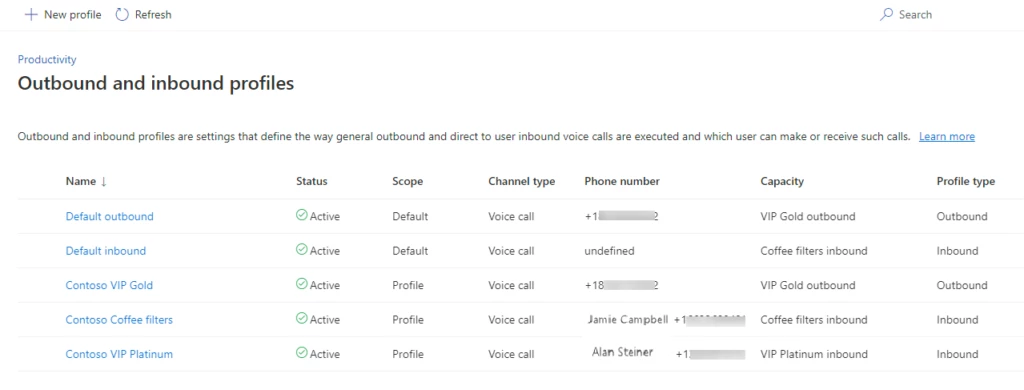
The voice channel in Dynamics 365 Customer Service now provides the ability to configure direct callbacks with just a few clicks. Organizations can set up callbacks using either a default inbound profile as a configuration that can apply to all enabled agents, or specific inbound profiles for select agents. These configurations can account for special behavior settings requirements that differ from the default, e.g., agents that handle sensitive account data vs. technical customer support. Inbound profiles are modeled after existing outbound profiles, which make it intuitive to configure and manage both within the same admin UI.

table

Here are some important concepts to know when you are configuring direct inbound calling: 

  • To enable direct inbound calling, assign a personal phone number to an agent and associate the capacity profile defined in the default inbound profile. 
  • You can specify call behaviors for one or a set of agents. 
  • Agent names are listed with phone numbers for easy agent number lookup when configuring inbound profiles. 
  • Personal agent voice mail receives calls made directly to an agent’s phone number when the agent is unavailable. 

Create personal support experiences and relationships with direct calling 

Back at Contoso, Jamie is running into a service deployment issue. Normally, this would make him very nervous as he is on the clock to finish the deployment over the weekend. What makes the difference for him is that he can simply contact support agent Ana via a direct phone call. Ana knows about the Contoso deployment and is available to take the direct call and help Jamie. She decides to stay on the call with Jamie during the rest of the deployment. Jamie loves that personalized service and is super happy that he went with this IT infrastructure provider. 

For more information, read the documentation: Set up inbound calling for the voice channel | Microsoft Learn 

The post Direct inbound calling: Premier support made easy appeared first on Microsoft Dynamics 365 Blog.

Brought to you by Dr. Ware, Microsoft Office 365 Silver Partner, Charleston SC.

Released: SCOM Management Packs for Azure SQL Database, SQL Server, RS, AS (7.0.42.0)

This article is contributed. See the original author and article here.

Updates to Azure SQL Database, SQL Server, Reporting Services, and Analysis Services Management Packs are available (7.0.42.0). You can download the MPs from the links below. Majority of the changes are based on your direct feedback. Thank you. 


Download Microsoft System Center Management Pack for Azure SQL Database from Official Microsoft Download Center


Download Microsoft System Center Management Pack for SQL Server from Official Microsoft Download Cen…


Download Microsoft System Center Management Pack for SQL Server Analysis Services from Official Micr…


Download Microsoft System Center Management Pack for SQL Server Reporting Services from Official Mic…


There are a lot of new features as well as some bug fixes in these MPs. You can find the full list by following the links below. Some of the bigger additions are:


  • Support for SQL Server 2022

  • Custom monitoring capability which allows creation of monitors and performance rules (SQL MP)


The operations guides for all SQL Server family of management packs now live on learn.microsoft.com. This unifies the content viewing experience for the user as the rest of the SCOM and SQL Server documentation is already there. Furthermore, it allows us to present you with the most up to date and accurate content online. The link to the operation guide for each MP can be found on the MP download page. Here are the links that show what’s new in these MPs:


Features and Enhancements in Management Pack for Azure SQL Database


Features and Enhancements in Management Pack for SQL Server


Features and Enhancements in Management Pack for SQL Server Analysis Services


Features and Enhancements in Management Pack for SQL Server Reporting Services


Lesson Learned #269: Unable to connect – Is unavailable or does not exist – Connection Time out

Lesson Learned #269: Unable to connect – Is unavailable or does not exist – Connection Time out

This article is contributed. See the original author and article here.

Today, I worked on a service request that your customer is facing the following error message: During handling of the above exception, another exception occurred: Traceback (most recent call last): File “src/pymssql/_pymssql.pyx”, line 653, in pymssql._pymssql.connect pymssql._pymssql.OperationalError: (20009, b’DB-Lib error message 20009, severity 9:nUnable to connect: Adaptive Server is unavailable or does not exist (servername.database.windows.net)nNet-Lib error during Connection timed out (110)nDB-Lib error message 20009, severity 9:nUnable to connect: Adaptive Server is unavailable or does not exist (servername.database.windows.net)nNet-Lib error during Connection timed out (110)n’)


It is a python application using pymssql library running in Ubuntu 18.04. Our customer reported that previous connections were fine  and this issue suddenly happened. 


After checking the port 1433 and redirection ports in Network Security Groups we didn’t see any issue.


To check if the ports are available from this machine we ran the command telnet servername.database.windows.net 1433 and we saw  that is not possible to connect.


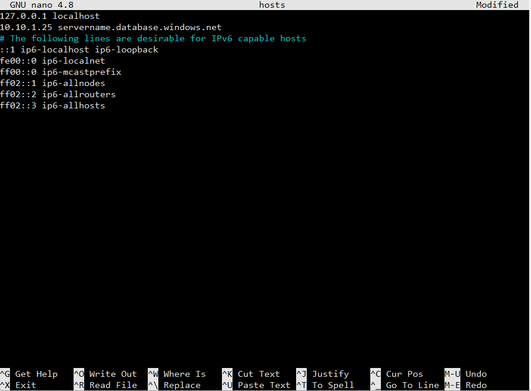
The IP reported is 10.10.1.25. This IP looks like a private link but checking the private link the IP has dynamically changed to 10.10.1.26. In this situation, we checked the DNS server and Local DNS for Private Link and everything is fine, so the next action was to review if we have any configuration in the hosts file of Linux. We found that they have this configuration in their file. 


Changing the value of /etc/host file from 10.10.1.25 to 10.10.1.26 everything was started to work correctly and we suggested to discuss with their IT Security team to check why this situation happened or change the private link to static. 


Jose_Manuel_Jurado_0-1673182507754.png


Enjoy!


Azure App Service & ASP.NET Core 3.1 500.30 – One odd cause

This article is contributed. See the original author and article here.

Summary


The problem in this case was, somehow, being caused by the customer’s App Service having the .NET Core 3.1 runtime installed via Site Extension, instead of using the built-in runtime that comes with App Services.


The issue resolved when the Site Extension was removed, and the App Service was stopped and re-started. 


Deeper Dive into the Data


This issue showed different symptoms depending on whether the ASP.NET Core app was running in-process or out-of-process. 


In-Process


In-process, the symptom was a 500.30 In-Process Start Failure with error code 8007023e. This exception code means “unhandled exception.” Viewing the eventlog.xml in the App Service via Kudu came up with this couplet of events every time:


        1018
        1
        0
        Keywords
       
        -1368025656
        Application
        [redacted]


Application ‘/LM/W3SVC/1365716517/ROOT’ with physical root ‘C:homesitewwwroot’ hit unexpected managed exception, exception code = ‘0xc0000005’. Please check the stderr logs for more information.
        Process Id: 4236.
        File Version: 13.1.22230.29. Description: IIS ASP.NET Core Module V2 Request Handler. Commit: 21d42143378ad6cc4bcbaebfda5f3acddf13aa47


    …
   
       
Application ‘/LM/W3SVC/1365716517/ROOT’ with physical root ‘C:homesitewwwroot’ failed to load coreclr. Exception message: CLR worker thread exited prematurely
        Process Id: 4236.
        File Version: 13.1.22230.29. Description: IIS ASP.NET Core Module V2 Request Handler. Commit: 21d42143378ad6cc4bcbaebfda5f3acddf13aa47


It seems CoreCLR was trying to load and failed with a native access violation exception (c0000005). Very odd. We did not get a dump of this but I wish we had.


Out-of-Process


When switching the app to run out-of-process, we encountered a different error. This is from the eventlog.xml:


        Application ‘/LM/W3SVC/1365716517/ROOT’ with physical root ‘C:homesitewwwroot’ failed to start process with commandline ‘”dotnet” .[redacted].dll’ with multiple retries. Failed to bind to port ‘31490’. First 30KB characters of captured stdout and stderr logs from multiple retries:
        Process Id: 7032.
        File Version: 13.1.22287.31. Description: IIS ASP.NET Core Module V2 Request Handler. Commit: fbe05294ac5c88be848b4d57d60cb2657874da9b
   

Nothing really useful there.


We enabled AspNetCoreModule’s Enhanced Diagnostic Logging and saw that it was timing out while waiting for the app to report itself as started:


[aspnetcorev2_outofprocess.dll] Failed HRESULT returned: 0x8027025a at D:a_work1ssrcServersIISAspNetCoreModuleV2OutOfProcessRequestHandlerserverprocess.cpp:727 

8027025a= E_APPLICATION_ACTIVATION_TIMED_OUT: The app didn’t start in the required time.


We also enabled the stdout log via the web.config and found the app had started just fine:


dbug: Microsoft.Extensions.Hosting.Internal.Host[1]
      Hosting starting

dbug: Microsoft.AspNetCore.Server.Kestrel[0]
      No listening endpoints were configured. Binding to http://localhost:5000 by default.
info: Microsoft.Hosting.Lifetime[0]
      Now listening on: http://localhost:5000

info: Microsoft.Hosting.Lifetime[0]
      Application started. Press Ctrl+C to shut down.
info: Microsoft.Hosting.Lifetime[0]
      Hosting environment: Test2
info: Microsoft.Hosting.Lifetime[0]
      Content root path: C:homesitewwwroot
dbug: Microsoft.Extensions.Hosting.Internal.Host[2]
      Hosting started


Turns out the app for some unknown reason was starting on the default localhost:5000. When hosting ASP.NET Core behind IIS and everything is working fine, AspNetCoreModule sets the ASPNETCORE_PORT environment variable to a dynamic port. Kestrel during startup is supposed to poll the value of that variable and use that port to listen on at 127.0.0.1. So in this case something was breaking down either on the environment variable side in ANCM or on the Kestrel side, or in between with the environment itself. Unfortunately we don’t have more data to drill deeper into that because we were tinkering with the App Service based on an observation I made, and the problem appears to have been resolved.


Another Observation & Resolution


While perusing the ANCM Enhanced Diagnostic Logging I mentioned earlier, I came across this:

[aspnetcorev2.dll] Initializing logs for ‘C:homeSiteExtensionsAspNetCoreRuntime.3.1.x86ancmaspnetcorev2.dll‘. Process Id: 7632.. File Version: 13.1.22287.31. Description: IIS ASP.NET Core Module V2. Commit: fbe05294ac5c88be848b4d57d60cb2657874da9b.

That struck me as odd because App Services itself provides all the .NET Core runtimes (including no-longer-supported ones like 3.1). So why was ANCM loading from a Site Extension?

In a new, test App Service with a basic ASP.NET Core 3.1 app deployed to it, this is what that log looks like:

[aspnetcorev2.dll] Initializing logs for ‘C:Program Files (x86)IISAsp.Net Core ModuleV2aspnetcorev2.dll‘. Process Id: 7496.. File Version: 13.1.19331.0. Description: IIS ASP.NET Core Module V2. Commit: 62eee6e6d21c95668a9e9529dce6562cc6c9f3bf.

That is where ANCM is normally located.

As a test on one of my own App Services, I installed the latest-available Site Extension for the .NET Core 3.1 runtime. I still had no issues, and I confirmed the ANCM log showed the location of ANCM had changed to the Site Extension one, same as the customer’s. 


I, personally, am not familiar with App Service Site Extensions and why the .NET Core runtime is available to use there when it’s already built-in; however, it’s just another copy of the runtime in a different location that theoretically shouldn’t have issues. I will say, in this case the customer had an older version of the runtime installed via the Site Extension, while the latest available was 3.1.32 (the latest build).


On the call with the customer, as a test we removed the Site Extension completely, restarted the site, and confirmed ANCM was using the built-in version that comes with App Services. This immediately resolved the issues for both in-process and out-of-process setups.


Unfortunately, we likely won’t be able to get more data on this problem and what was happening. I am thinking perhaps the fact that the Site Extension was out-of-date/an older version possibly had something to do with it. Thus, the takeaway here is if you have an app experiencing odd startup issues and if you have a Site Extension installed that contains the runtime for the app you are trying to run, try removing that Site Extension (or maybe update it if it needs to be updated?) and see if your issues go away. Make sure to stop and start the App Service as well, to make sure everything is fully picked-up.