A scam alert for the Korean community
This article was originally posted by the FTC. See the original article here.
Brought to you by Dr. Ware, Microsoft Office 365 Silver Partner, Charleston SC.

This article was originally posted by the FTC. See the original article here.
Brought to you by Dr. Ware, Microsoft Office 365 Silver Partner, Charleston SC.
This article is contributed. See the original author and article here.
Jamie is an IT admin working on managing Contoso’s IT services. Because his work is mission critical, he has a premier support account with the IT infrastructure provider. This includes direct technical support access to a specific support agent with deep knowledge of Jamie’s setup and requirements.
Jamie is working on enabling a new service in production. He knows there is some risk that he may run into an issue in the process. It gives Jamie peace of mind that he is only one call away from contacting a domain expert with knowledge of his setup if needed.
Many customer contact centers have scenarios where the ability to contact a specific agent via phone is critical. Handling such setups via workstreams is very cumbersome and not recommended.
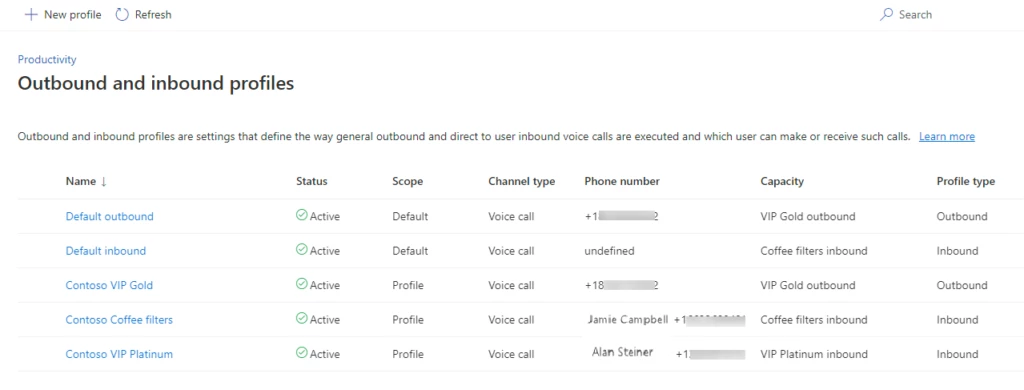
The voice channel in Dynamics 365 Customer Service now provides the ability to configure direct callbacks with just a few clicks. Organizations can set up callbacks using either a default inbound profile as a configuration that can apply to all enabled agents, or specific inbound profiles for select agents. These configurations can account for special behavior settings requirements that differ from the default, e.g., agents that handle sensitive account data vs. technical customer support. Inbound profiles are modeled after existing outbound profiles, which make it intuitive to configure and manage both within the same admin UI.
Here are some important concepts to know when you are configuring direct inbound calling:
Back at Contoso, Jamie is running into a service deployment issue. Normally, this would make him very nervous as he is on the clock to finish the deployment over the weekend. What makes the difference for him is that he can simply contact support agent Ana via a direct phone call. Ana knows about the Contoso deployment and is available to take the direct call and help Jamie. She decides to stay on the call with Jamie during the rest of the deployment. Jamie loves that personalized service and is super happy that he went with this IT infrastructure provider.
For more information, read the documentation: Set up inbound calling for the voice channel | Microsoft Learn
The post Direct inbound calling: Premier support made easy appeared first on Microsoft Dynamics 365 Blog.
Brought to you by Dr. Ware, Microsoft Office 365 Silver Partner, Charleston SC.
This article is contributed. See the original author and article here.
Updates to Azure SQL Database, SQL Server, Reporting Services, and Analysis Services Management Packs are available (7.0.42.0). You can download the MPs from the links below. Majority of the changes are based on your direct feedback. Thank you.
There are a lot of new features as well as some bug fixes in these MPs. You can find the full list by following the links below. Some of the bigger additions are:
The operations guides for all SQL Server family of management packs now live on learn.microsoft.com. This unifies the content viewing experience for the user as the rest of the SCOM and SQL Server documentation is already there. Furthermore, it allows us to present you with the most up to date and accurate content online. The link to the operation guide for each MP can be found on the MP download page. Here are the links that show what’s new in these MPs:
Features and Enhancements in Management Pack for Azure SQL Database
Features and Enhancements in Management Pack for SQL Server
Features and Enhancements in Management Pack for SQL Server Analysis Services
Features and Enhancements in Management Pack for SQL Server Reporting Services
This article is contributed. See the original author and article here.
Today, I worked on a service request that your customer is facing the following error message: During handling of the above exception, another exception occurred: Traceback (most recent call last): File “src/pymssql/_pymssql.pyx”, line 653, in pymssql._pymssql.connect pymssql._pymssql.OperationalError: (20009, b’DB-Lib error message 20009, severity 9:nUnable to connect: Adaptive Server is unavailable or does not exist (servername.database.windows.net)nNet-Lib error during Connection timed out (110)nDB-Lib error message 20009, severity 9:nUnable to connect: Adaptive Server is unavailable or does not exist (servername.database.windows.net)nNet-Lib error during Connection timed out (110)n’)
It is a python application using pymssql library running in Ubuntu 18.04. Our customer reported that previous connections were fine and this issue suddenly happened.
After checking the port 1433 and redirection ports in Network Security Groups we didn’t see any issue.
To check if the ports are available from this machine we ran the command telnet servername.database.windows.net 1433 and we saw that is not possible to connect.
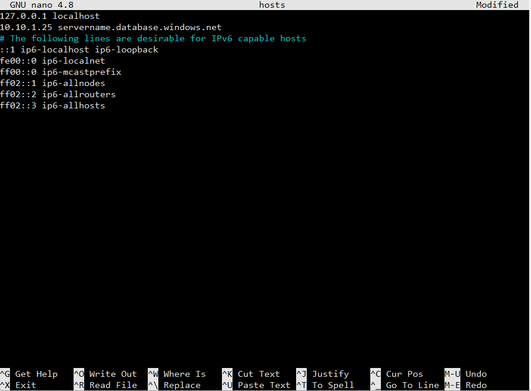
The IP reported is 10.10.1.25. This IP looks like a private link but checking the private link the IP has dynamically changed to 10.10.1.26. In this situation, we checked the DNS server and Local DNS for Private Link and everything is fine, so the next action was to review if we have any configuration in the hosts file of Linux. We found that they have this configuration in their file.
Changing the value of /etc/host file from 10.10.1.25 to 10.10.1.26 everything was started to work correctly and we suggested to discuss with their IT Security team to check why this situation happened or change the private link to static.
Enjoy!
This article is contributed. See the original author and article here.
The problem in this case was, somehow, being caused by the customer’s App Service having the .NET Core 3.1 runtime installed via Site Extension, instead of using the built-in runtime that comes with App Services.
The issue resolved when the Site Extension was removed, and the App Service was stopped and re-started.
This issue showed different symptoms depending on whether the ASP.NET Core app was running in-process or out-of-process.
In-process, the symptom was a 500.30 In-Process Start Failure with error code 8007023e. This exception code means “unhandled exception.” Viewing the eventlog.xml in the App Service via Kudu came up with this couplet of events every time:
        1018
        1
        0
        Keywords

        -1368025656
        Application
        [redacted]


        Application ‘/LM/W3SVC/1365716517/ROOT’ with physical root ‘C:homesitewwwroot’ hit unexpected managed exception, exception code = ‘0xc0000005’. Please check the stderr logs for more information.
        Process Id: 4236.
        File Version: 13.1.22230.29. Description: IIS ASP.NET Core Module V2 Request Handler. Commit: 21d42143378ad6cc4bcbaebfda5f3acddf13aa47


    …

        Application ‘/LM/W3SVC/1365716517/ROOT’ with physical root ‘C:homesitewwwroot’ failed to load coreclr. Exception message: CLR worker thread exited prematurely
        Process Id: 4236.
        File Version: 13.1.22230.29. Description: IIS ASP.NET Core Module V2 Request Handler. Commit: 21d42143378ad6cc4bcbaebfda5f3acddf13aa47
It seems CoreCLR was trying to load and failed with a native access violation exception (c0000005). Very odd. We did not get a dump of this but I wish we had.
When switching the app to run out-of-process, we encountered a different error. This is from the eventlog.xml:
    …

        Application ‘/LM/W3SVC/1365716517/ROOT’ with physical root ‘C:homesitewwwroot’ failed to start process with commandline ‘”dotnet” .[redacted].dll’ with multiple retries. Failed to bind to port ‘31490’. First 30KB characters of captured stdout and stderr logs from multiple retries:
        Process Id: 7032.
        File Version: 13.1.22287.31. Description: IIS ASP.NET Core Module V2 Request Handler. Commit: fbe05294ac5c88be848b4d57d60cb2657874da9b
Nothing really useful there.
We enabled AspNetCoreModule’s Enhanced Diagnostic Logging and saw that it was timing out while waiting for the app to report itself as started:
[aspnetcorev2_outofprocess.dll] Failed HRESULT returned: 0x8027025a at D:a_work1ssrcServersIISAspNetCoreModuleV2OutOfProcessRequestHandlerserverprocess.cpp:727
8027025a= E_APPLICATION_ACTIVATION_TIMED_OUT: The app didn’t start in the required time.
We also enabled the stdout log via the web.config and found the app had started just fine:
dbug: Microsoft.Extensions.Hosting.Internal.Host[1]
      Hosting starting
…
dbug: Microsoft.AspNetCore.Server.Kestrel[0]
      No listening endpoints were configured. Binding to http://localhost:5000 by default.
info: Microsoft.Hosting.Lifetime[0]
      Now listening on: http://localhost:5000
…
info: Microsoft.Hosting.Lifetime[0]
      Application started. Press Ctrl+C to shut down.
info: Microsoft.Hosting.Lifetime[0]
      Hosting environment: Test2
info: Microsoft.Hosting.Lifetime[0]
      Content root path: C:homesitewwwroot
dbug: Microsoft.Extensions.Hosting.Internal.Host[2]
      Hosting started
[aspnetcorev2.dll] Initializing logs for ‘C:homeSiteExtensionsAspNetCoreRuntime.3.1.x86ancmaspnetcorev2.dll‘. Process Id: 7632.. File Version: 13.1.22287.31. Description: IIS ASP.NET Core Module V2. Commit: fbe05294ac5c88be848b4d57d60cb2657874da9b.[aspnetcorev2.dll] Initializing logs for ‘C:Program Files (x86)IISAsp.Net Core ModuleV2aspnetcorev2.dll‘. Process Id: 7496.. File Version: 13.1.19331.0. Description: IIS ASP.NET Core Module V2. Commit: 62eee6e6d21c95668a9e9529dce6562cc6c9f3bf.
This article is contributed. See the original author and article here.
New Years’ Resolutions:
We can’t help you with the first two, but we can help you deploy Microsoft 365 services to improve your company’s efficiency and security with the new Core onboarding advanced deployment guides.
Learn how:
Did you know that thousands of customers use the Core onboarding advanced deployment guides each month? The Microsoft 365 Admin Center features Core advanced deployment guides that simplify moving from On-Premises IT to the Cloud.
IT Pros can use our core onboarding guides to speed deployment and configure Azure Active Directory, DNS, networking, identity management, and more with advanced deployment guides from Microsoft.
Core onboarding involves service provisioning and tenant and identity integration. The Core onboarding advanced deployment guides for onboarding services include:
Here’s how IT Pros can access the Core advanced deployment guides by clicking the purple hammer link in the below tile.
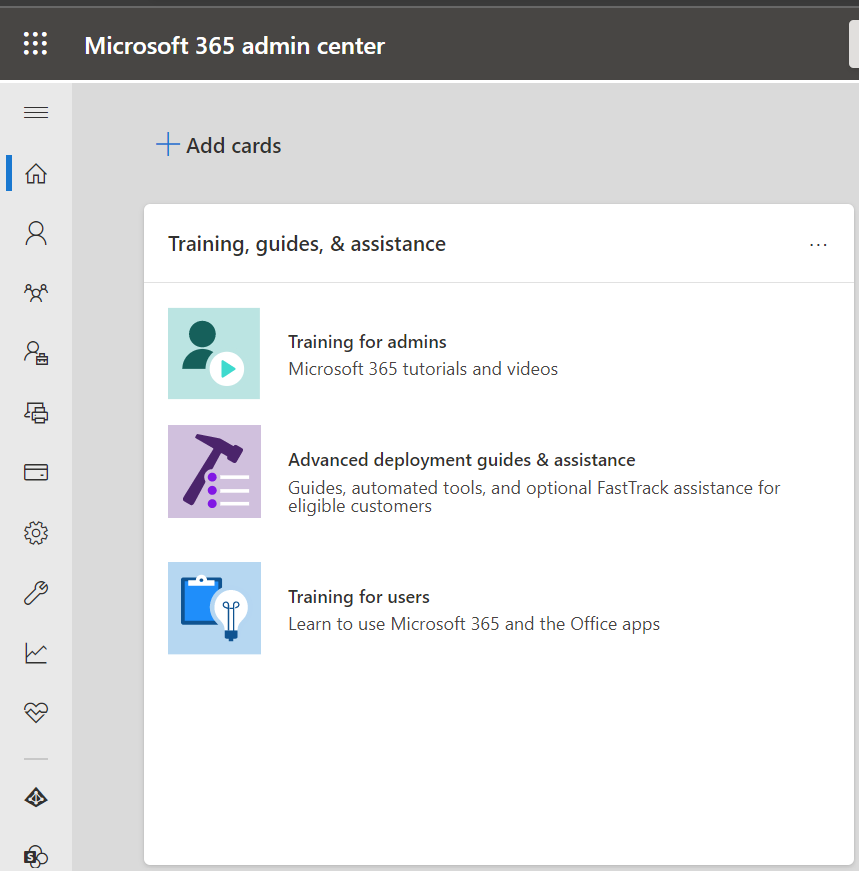
Once there, Core Advanced deployment guides are found in the Identity and authentication section.
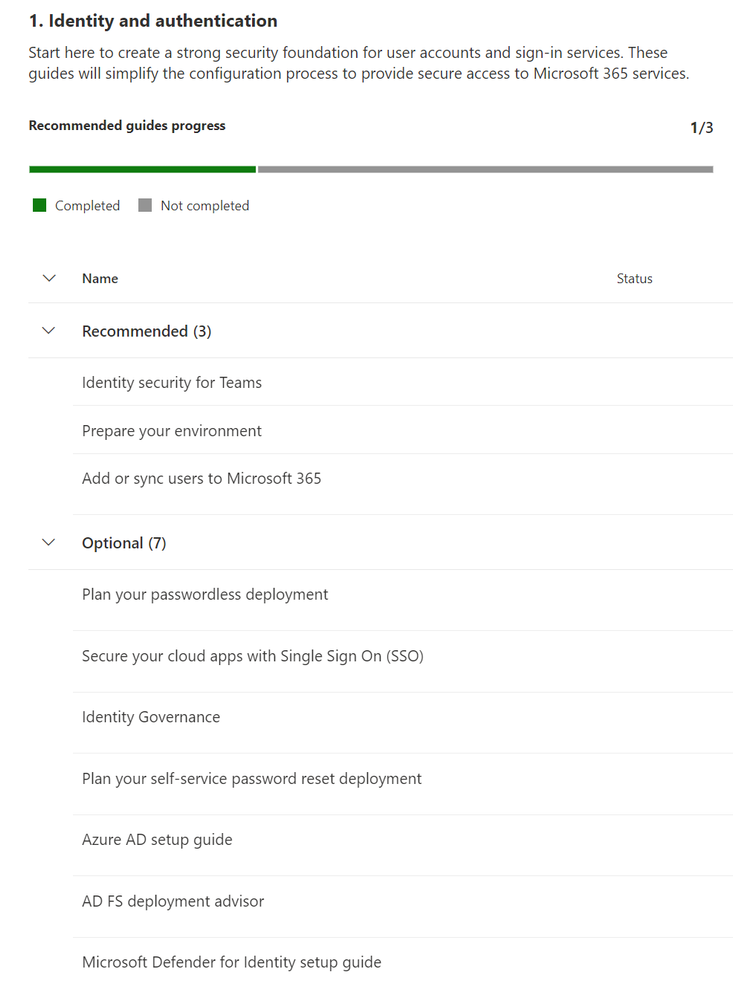
Completing the deployment steps outlined in the Core advanced deployment guides creates a strong foundation upon which additional Microsoft 365 Cloud Services can be deployed successfully and with confidence.
Learn about all deployment guides and setup wizards:
Access advanced deployment guides without signing in:
Getting started with advanced deployment guides within the Microsoft 365 admin center:
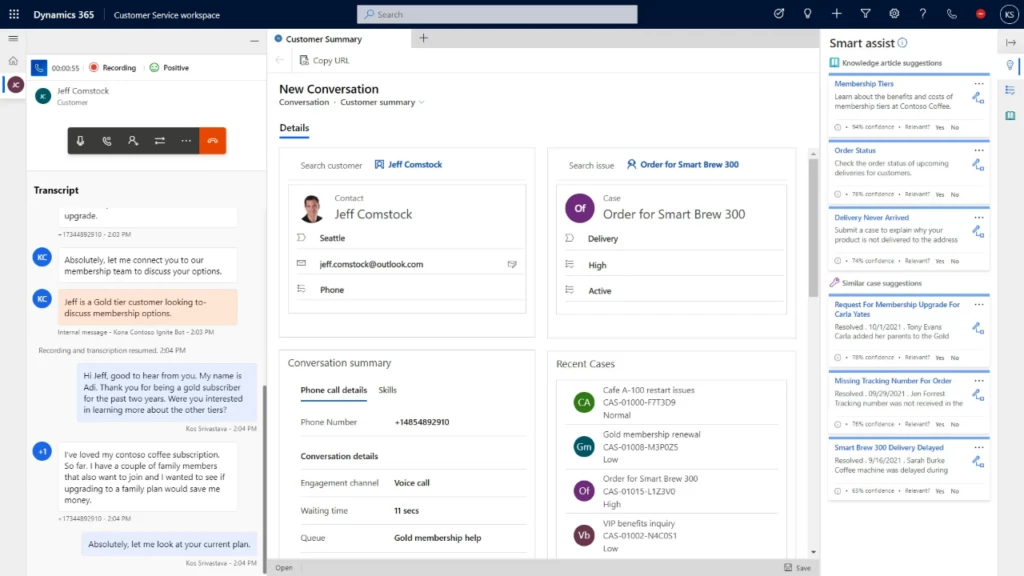
This article is contributed. See the original author and article here.
Since the November 2021 launch in select geographic regions of the native voice channel in Microsoft Dynamics 365 Customer Service, we have been expanding worldwide to satisfy growing customer demand. We are proud to announce that we now support local country regions as well. As of November 30, 2022, the voice support channel is live in Canada.
The integrated voice channel allows customer service representatives to communicate with customers on the phone to resolve issues. The Canada launch includes all the features that the voice channel in omnichannel Customer Service environments supports today.
The Canada general availability launch also integrates Power Virtual Agents. Subject matter experts can build conversational interactive voice response (IVR) bots in just a few clicks to help customers quickly self-serve, reducing contact center operation costs. Learn how to configure Power Virtual Agents bots for voice.
The launch of the voice channel in the Canada is supported by Azure Communication Services, with Azure direct routing in preview. Learn how you can use the telephony carrier of your choice.
The Canada voice support channel is also supported by Microsoft calling plans in public preview. Customers can purchase their own numbers through Azure subscriptions. Check your eligibility and learn how to enable Microsoft calling plans.
As the native voice channel in Dynamics 365 Customer Service continues to expand in regions, languages, and capabilities, subscribe to this blog for the latest updates. Set up your Omnichannel for Customer Service and install the voice channel today. Install voice channel in Omnichannel for Customer Service | Microsoft Learn
Read the documentation to learn about the features the voice channel now supports in Canada: Voice channel in Omnichannel for Customer Service | Microsoft Learn
Learn about other supported locations and languages here: Supported cloud locations, languages, and locale codes for voice channel | Microsoft Learn
The post Customer Service voice support channel launches in Canada appeared first on Microsoft Dynamics 365 Blog.
Brought to you by Dr. Ware, Microsoft Office 365 Silver Partner, Charleston SC.
This article is contributed. See the original author and article here.
Ana is excitedly setting up her new smartphone when the screen goes blank. In dismay, she calls customer service. The estimated wait time is more than 45 minutes, and she is number 7 in the queue because all agents are busy handling holiday call volume. She decides to stay on the line listening to music on hold for 45 minutes. By the time she gets to speak to an agent, she is relieved but a bit angry. Her first support experience with the smartphone manufacturer is less than pleasant, and this is before she even has a chance to discuss her issue. If the company had implemented direct callback, now available in Microsoft Dynamics 365 Customer Service, Ana’s first engagement with it would have been much more reassuring.
Many customer contact centers face limited agent availability during spikes in call volume. At such times, customer satisfaction drops as wait times are long and abandonment rates increase. Staffing for peak volumes is costly and inefficient. So, what can you do to use agent capacity efficiently while keeping customer satisfaction high and even adding a personal touch?
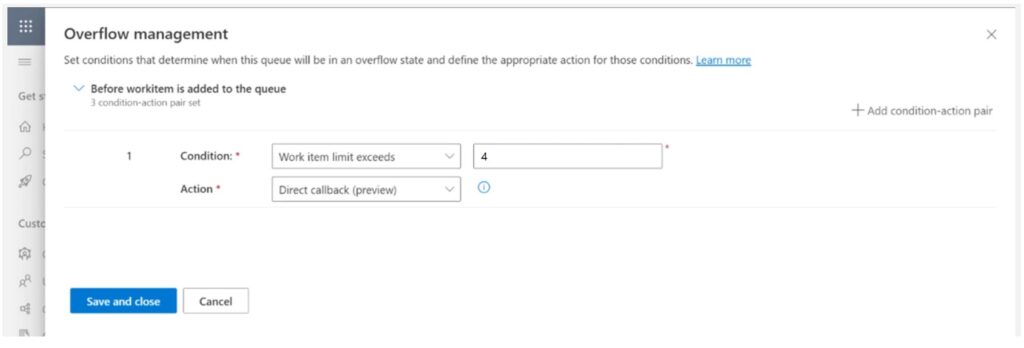
The voice channel in Dynamics 365 Customer Service now provides an overflow action known as direct callback. When your organization configures direct callback, customers have the option to receive a call back as soon as an agent is available without having to remain on the phone in the queue.
Here are some important concepts to know when you are configuring direct callback:
Two editable automated messages are available for the customer when your organization enables direct callback:
So how does this work? Here are the logical scenario steps:
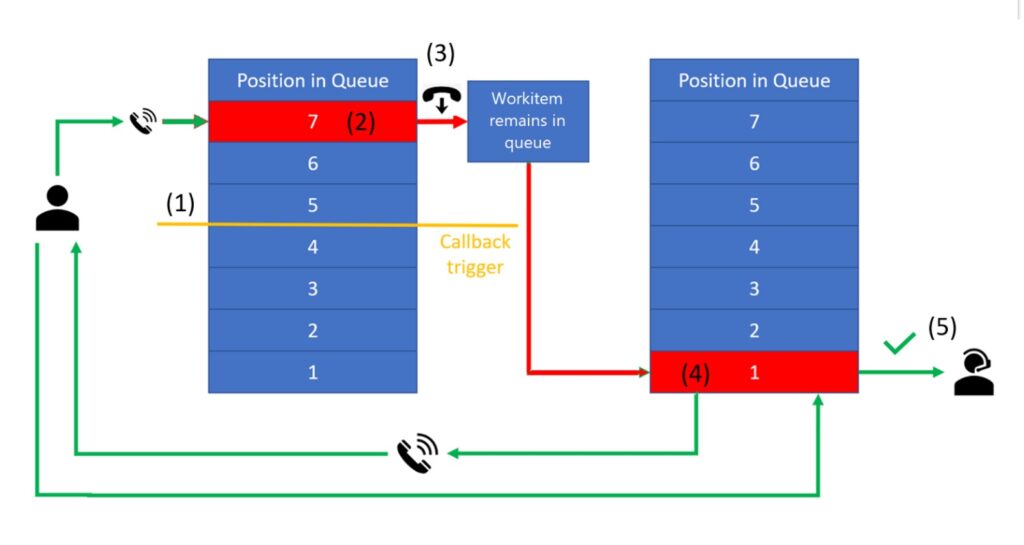
The next time Ana calls the company’s customer service number at peak demand time, she is offered the option to be called back as soon as an agent is available instead of waiting in the queue. An agent who is aware that Ana called earlier returns her call. This experience builds Ana’s confidence in the smartphone company because she feels that it values her time, and the call back offers personalized attention. In addition to higher CSAT, direct callback also allows organizations to utilize agents more productively with confidence that they are handling peak loads well.
For more information, read the documentation: Use direct callback to manage overflowing queues | Microsoft Learn
Not yet a Dynamics 365 Customer Service customer? Take a tour and get a free trial.
The post Direct callback: Because nobody likes to wait on the phone appeared first on Microsoft Dynamics 365 Blog.
Brought to you by Dr. Ware, Microsoft Office 365 Silver Partner, Charleston SC.
This article is contributed. See the original author and article here.
In the next episode in the Azure SQL VM series, join Anna Hoffman, Logan Carrington, and Kartik Pullabhotla as they discuss various options for Azure Backup and restore on SQL Server on Azure Virtual Machines.
Resources:
Back up SQL Server databases to Azure – Azure Backup
Azure SQL Virtual Machine Reimagined Series
View/share our latest episodes on Microsoft Learn and YouTube!

This article is contributed. See the original author and article here.
Official websites use .gov
A .gov website belongs to an official government organization in the United States.

Secure .gov websites use HTTPS
 ) or https:// means you’ve safely connected to the .gov website. Share sensitive information only on official, secure websites.
Recent Comments