This article is contributed. See the original author and article here.
Marketers design customer journeys to provide the right message at the right time for customers to take the next step. With more opportunities than ever for interaction, you must take care not to overwhelm customers with unwanted messages. That’s why we’re delighted to introduce advanced real-time customer journey orchestration tools in Dynamics 365 Marketing that help you engage customers at key moments without bombarding them with spam.
Engage the right audience effortlessly with the new segment builder
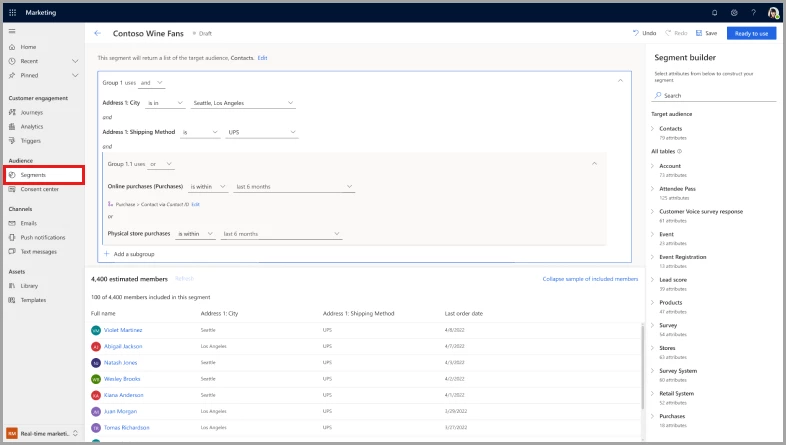
Targeting the right audience is critical for creating highly personalized marketing campaigns that yield high conversion rates and improve engagement. Previously, the segment builder in Dynamics 365 Marketing required a deep understanding of database schemas. The new real-time segment builder in customer journey orchestration is marketer friendly. Easily reach customers through segmenting on demographic, firmographic, and behavioral data.
Here are some of the benefits of the new real-time marketing segment builder:
It’s powered by artificial intelligence. Just describe, in plain English, how you’d like to create the segment, then review and use it.
There’s no need to memorize relationships between tables. The builder automatically populates all the possible paths between customer profiles and the selected data table for you.
View segment size and membership estimates before publishing.
Enjoy a consistent creation experience between static and dynamic segments.
Include or exclude individual members.
Query segments based on their customer data in a consistent manner, without having to worry about which segment type to choose first.
Adjust segment refresh frequency after publication.
Test your journey triggers to provide seamless experiences
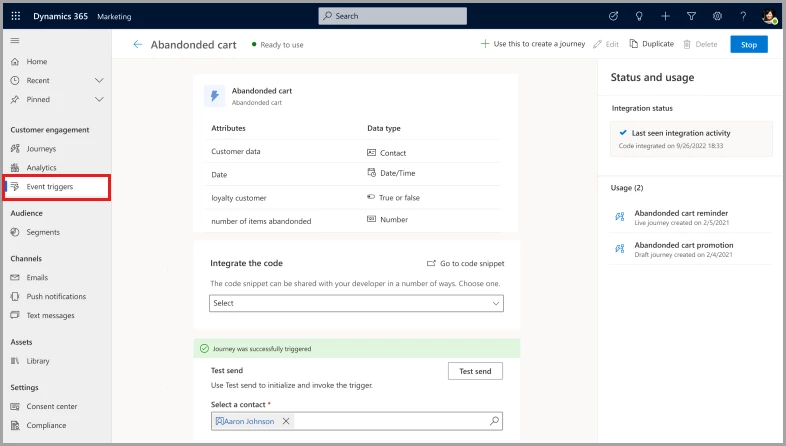
Customers expect consistent and uninterrupted experiences in their interactions with brands. With custom trigger testing, marketers can simulate a customer’s experience, using themselves as a test subject. They can evaluate the journey based on the attributes defined in the custom trigger to identify and address issues before they affect real customers.
Boost your productivity when sending journey reminders
To improve the effectiveness of your marketing campaigns, it’s crucial to remind customers to take action on key tasks such as filling out a registration form or completing a purchase.
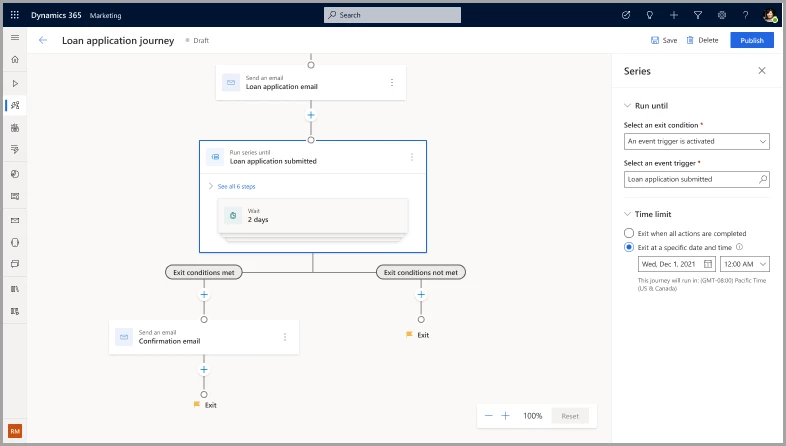
With enhanced real-time customer journey orchestration, it’s easy to set up recurring reminders to streamline the process of moving customers down the funnel. The reminder feature allows sending emails, text messages, and push notifications to increase engagement chances, instead of simply repeating the same marketing messages in the same channels. You can even set the number of repetitions or a time limit to make sure that messages aren’t sent indefinitely.
Track the customer’s exit from the reminder loop, too. By capturing different branches separately, such as cart checked out, cart not checked out, and cart expired, you can target and follow up with each segment appropriately.
Optimize customer engagement by controlling the number of messages sent
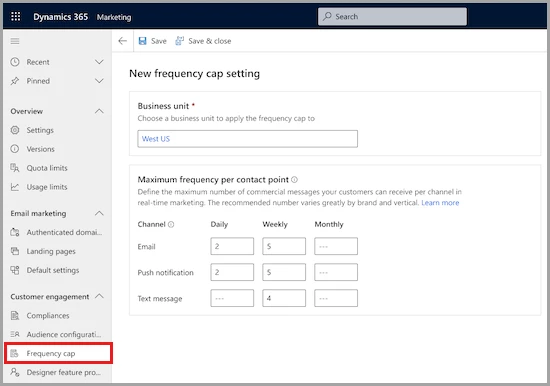
Consumers’ mailboxes are overflowing. Marketers must be careful not to overwhelm their customers with email, which can result in lower message engagement rates, increased unsubscribe rates, spam reports, or important messages being missed. With frequency capping, you can optimize engagement by controlling how many messages are sent.
Frequency capping allows marketers to define the maximum number of messages their customers receive through a particular channel per day, week, and month. Transactional messages are always excluded, and individual journeys can be left out of the cap so that important messages can be received. You can view whether a message was blocked by the frequency cap and for which users.
By monitoring engagement rates with marketing messages, you can fine-tune your message frequency. You’ll make sure that you’re striking the right balance between keeping the brand top-of-mind and overwhelming customers with too many messages.
Deliver personalized experiences at scale with advanced customer journey orchestration tools
Real-time journey orchestration now has interactions capabilities to deliver personalized experiences at scale. Reach up to 100 million contacts and deliver up to 300 million monthly interactions through email, text messages, push notifications, or custom channels, and create segments of up to 30 million contacts. That’s up from the previous limit of 100 million outbound interactions to 30 million contacts and 10 million contacts per segment.
Key takeaways about advanced real-time customer journey orchestration
Get greater engagement from your customers in 2023 with Dynamics 365 Marketing. Thanks to our advanced customer journey orchestration features, you’ll interact with customers on their terms, engaging them when and how they expect, without delivering disjointed experiences or spamming them. You’ll spend less time designing and maintaining your customer journeys and feel more confident that you’re delivering seamless, high-quality experiences.
Next steps
Start using our new features and get ready for the ones coming soon:
This article is contributed. See the original author and article here.
We continue to expand the Azure Marketplace ecosystem. For this volume, 81 new offers successfully met the onboarding criteria and went live. See details of the new offers below:
Get it now in our marketplace
AGRIVI 360 Farm Insights: AGRIVI 360 Farm Insights simplifies administration and helps farmers make precise agronomic decisions based on real-time field information. This can ensure crop production traceability and enable compliance with quality, safety, and sustainability standards.
Booking for Outlook (LV-Tron): IAdea’s LV-Tron, a meeting room booking system, seamlessly integrates with Microsoft Outlook and the Microsoft Graph API, allowing users to easily schedule and manage room reservations from within their Outlook calendar.
Data Science Virtual Desktop – Ubuntu 22.04: This offer from Ntegral provides a customized virtual machine image built specifically for data science. Several popular tools for data exploration, analysis, modeling, and development are preinstalled, including Anaconda, Python, Jupyter Hub, Jupyter Lab, Visual Studio Code, and PySpark.
DevOps All-in-One Platform with Jenkins: This offer from VMLab, an authorized reseller of Websoft9, provides GitLab CE 15.6 with Jenkins 2.375, NGINX 1.22, and Docker 20.10. GitLab CE bundles code review, continuous integration, and continuous deployment into a single UI.
Firebird 3.0.7 on Ubuntu 20.04 LTS: This offer from Tidal Media provides Firebird 3.0.7 on Ubuntu 20.04 LTS. Firebird is a relational database management system that can scale from an embedded single-user model to enterprise-wide deployments with multiple 2-terrabye databases running and hundreds of simultaneous clients.
Grid Vision: Built for the utilities industry, the AI-powered Grid Vision Inspect enables virtual inspections of overhead power lines. This improves inspection safety for transmission and distribution utilities globally, and it supports a transition to predictive maintenance of the power grid.
Grid Vision Asset Guide: Grid Vision Asset Guide allows utilities organizations to consolidate their digitized substation inventory, documents, and images, then visualize that information through an intuitive user interface. Grid Vision Asset Guide can improve inspection planning, capacity planning, and operations.
hyOffice for Microsoft Teams: Fit for the world of hybrid work, the hyOffice app for Microsoft Teams lets your team see who’s in the office for a meeting and who’s joining virtually. Employees can maintain a favorites list of their team colleagues, schedule their office days based on occupancy, and see meeting participants in the day’s calendar.
Keycloak on Ubuntu Server 20.04 LTS: This offer from AskforCloud provides Keycloak on Ubuntu Server 20.04 LTS. Keycloak, an open-source identity and access management solution, encompasses user federation, strong authentication, user management, and fine-grained authorization.
KNIME Analytics Platform on Windows Server 2016: This offer from AskforCloud provides KNIME Analytics Platform on Windows Server 2016. KNIME Analytics Platform is open-source software that lets you build analyses of any complexity level, from automating spreadsheets to ETL (extract, transform, load) to machine learning.
Kubeark Container: Transform your on-premises product into software as a service with Kubeark, a container and app management platform. Using containers managed by Kubeark, your infrastructure costs will be lower, you will gain out-of-the-box high availability, and your DevOps team will be able to run containerized workloads on any infrastructure.
Locust on Ubuntu Server 20.04 LTS: This offer from AskforCloud provides Locust on Ubuntu Server 20.04 LTS. Locust is an open-source load-testing tool that allows you to define the behavior of your users in regular Python code instead of being stuck in a UI or restrictive domain-specific language.
ME Applications Manager with Add-ons (500 Monitors): ManageEngine Applications Manager is an integrated application and server performance-monitoring solution that helps businesses ensure high availability. It provides deep visibility into the performance of a diverse set of apps and infrastructure components, both within the datacenter and in the cloud.
Melingo Search, Secured and Supported by HOSSTED: This offer from HOSSTED provides Morfix Search by Melingo on a Microsoft Azure virtual machine. Morfix Search is a morphological Hebrew-English plug-in for OpenSearch, a community-driven open-source search and analytics suite.
MongoDB: This offer from Kockpit provides MongoDB Community Server, a distributed document database, on a Microsoft Azure virtual machine. MongoDB Community Server’s flexible document model, along with ad hoc queries, indexing, and real-time aggregation, gives you powerful ways to access and analyze your data.
PureFTPd on Debian 10 Minimal: This offer from Art Group provides PureFTPd on a minimal installation of Debian 10. PureFTPd is a security-focused FTP server that uses simple command-line switches to enable the features you need, such as optional support for an SSL/TLS encryption layer using the OpenSSL library.
PureFTPd on Debian 11 Minimal: This offer from Art Group provides PureFTPd on a minimal installation of Debian 11. PureFTPd is a security-focused FTP server that uses simple command-line switches to enable the features you need, such as optional support for an SSL/TLS encryption layer using the OpenSSL library.
PureFTPd on Oracle 8.6 Minimal: This offer from Art Group provides PureFTPd on a minimal installation of Oracle 8.6. PureFTPd is a security-focused FTP server that uses simple command-line switches to enable the features you need, such as optional support for an SSL/TLS encryption layer using the OpenSSL library.
QGIS Server: This offer from tunnelbiz Studio Sdn Bhd provides QGIS on a Microsoft Azure virtual machine. QGIS is an open-source geographic information system that supports viewing, editing, printing, and analysis of geospatial data.
Red Hat Enterprise Linux 8.3 Minimal: This offer from Ntegral provides a minimal installation of Red Hat Enterprise Linux 8.3 on a Microsoft Azure virtual machine. Red Hat Enterprise Linux has built-in security features such as Security-Enhanced Linux (SELinux) and mandatory access controls to help you combat intrusions and meet regulatory compliance.
Starbound Game Server on Windows Server 2019: This offer from Tidal Media provides Starbound on Windows Server 2019. Starbound is an action-adventure video game that takes place in a two-dimensional procedurally generated universe. Players can deploy the game server on Azure and modify the game to add new races, biomes, dungeons, or quests.
Swift 5 on CentOS: This offer from AskforCloud provides Swift 5 on a CentOS Linux distribution. Swift is an open-source high-performance system programming language with clean and modern syntax. Swift offers seamless access to existing C and Objective-C code and frameworks, and it’s memory-safe by default.
Swift 5 on Ubuntu Server 18.04 LTS: This offer from AskforCloud provides Swift 5 on Ubuntu Server 18.04 LTS. Swift is an open-source high-performance system programming language with clean and modern syntax. Swift offers seamless access to existing C and Objective-C code and frameworks, and it’s memory-safe by default.
TIBCO Jaspersoft Reporting and Analytics for Azure v 8.1.1: TIBCO Jaspersoft is a reporting and analytics server built for Microsoft Azure that can run alone or be embedded in your application. Use it to to quickly connect to your Azure data sources, then create and distribute beautiful interactive reports, dashboards, and data visualizations.
Touchcast Metaverse Car Configurator: Touchcast Metaverse Car Configurator gives car buyers a real-time 3D experience instead of static pictures or prerecorded videos. This immersive, hyper-personalized customer journey increases engagement and maximizes conversion rates.
TrilioVault for Kubernetes (PAYG): TrilioVault for Kubernetes is a cloud-native, application-centric data protection and management platform designed from the ground up to support the scale, performance, and mobility requirements of Kubernetes container environments.
Ubuntu Web Server: This offer from tunnelbiz Studio Sdn Bhd provides a preconfigured image containing an NGINX web server, the PHP scripting language, and an Ubuntu operating system on a Microsoft Azure virtual machine.
Yoffix for Microsoft Teams: HybridOffice21’s Yoffix for Microsoft Teams introduces midsize and enterprise clients to flexible-office concepts, such as shared desks, to transparently manage office attendance and to cut costs. Yoffix lets companies manage hybrid work from within Microsoft Teams. Book desks, book parking, and enable collaboration with Yoffix.
Zammad on Debian 10: This offer from AskforCloud provides Zammad on Debian 10. Zammad is an open-source user support and ticketing solution for managing customer communication across channels such as phone, chat, email, and social media.
Zammad on Debian 11: This offer from AskforCloud provides Zammad on Debian 11. Zammad is an open-source user support and ticketing solution for managing customer communication across channels such as phone, chat, email, and social media.
Go further with workshops, proofs of concept, and implementations
Accelerated Cloud Enabler for Azure Virtual Desktop (4 Weeks): Many businesses today have employees working remotely, which requires seamless and secure access to data and applications. This engagement from Devoteam will quickly set you up with an Azure Virtual Desktop solution following an assessment and a series of workshops.
Accelerated Cloud Enabler for GitOps (4 Weeks): Devoteam’s Accelerated Cloud Enabler framework provides an automation engine using GitOps. Devoteam will implement a large number of best practices as Infrastructure as Code (IaC), automated processes, and ready-made templates, ensuring speed, consistency, security, and compliance in your Azure operations.
Accelerated Cloud Enabler for SIEM (4 Weeks): Devoteam’s Accelerated Cloud Enabler for SIEM will enable your IT security team to work faster and more effectively. Devoteam will implement ACE SIEM, which utilizes Microsoft Sentinel, then train your organization to ensure you can use and adjust your new security operations.
Accelerated Cloud Enabler for Transformation (8 Weeks): Devoteam will assess your company’s IT environment, break down your applications and solutions into workloads, and design an optimal migration plan for each workload. A structured migration will use automation and Infrastructure-as-Code processes to ensure consistency. This will be followed by testing and a series of workshops.
AI and Intelligent Automation Workshop: This workshop from Productive Edge will accelerate your adoption of robotic process automation and intelligent automation on Microsoft Azure. You’ll identify potential use cases for automation and be able to take the initiative in standardizing processes and realizing cost savings.
Automating Administration with PowerShell: This five-day course from John Bryce Training will focus on PowerShell. You’ll learn how to remotely manage single or multiple Windows-based servers and automate day-to-day management and administration tasks. Before taking this course, participants should have experience with Windows networking technologies and implementation.
Azure Cost Analysis: In this assessment, TriStratus will provide greater transparency into your Azure consumption. You’ll save money by uncovering unnecessary expenses, get help setting a budget, and establish notifications and alerts to notify you if spending begins to creep over budgeted levels.
Azure Data Warehouse: 4-Week Assessment: Taod will analyze your on-premises or hybrid-cloud architectures and work with you to design a new technological architecture based on Microsoft Azure. This offer is only available in German.
Azure Managed Service (1 Year): In this managed service, experts from TriStratus will drive business optimization and ensure your environment is aligned to Microsoft best practices by continually monitoring against pillars of the Azure Well-Architected Framework. In addition, TriStratus’ sustainability pillar will help you monitor and reduce your carbon emissions.
BaseIT Managed Service for SQL: In this managed service, Base-IT will provide proactive and reactive support for your Microsoft SQL Server and databases. Round-the-clock support is available upon request. This offer is available only in German.
Brand Guardian Intelligent Content Management: 6-Hour Workshop: This collaborative workshop from Wunderman Thompson will identify new solutions to give marketing, creative, and production teams content quality assurance. It’s the first step toward a multi-level engagement involving an Azure-based SaaS solution that provides intelligent content management.
Data Warehouse Foundation: 4-Week Implementation: R Systems will design an architecture for ingesting your organization’s data sources in a common data warehouse, then use pipelines to move, format, clean, validate, summarize, reorganize, and store them for reporting in a business intelligence dashboard.
DevOps Live-Site Engineering and Support (10 Weeks): Quadrant’s implementation service will enable customers to onboard to Azure DevOps with tools and technologies to view service-level agreements and product health metrics through built-in dashboards.
Fully Managed Essential 8 Cybersecurity: Spicy IT’s managed service involves application control, patch management, multifactor authentication, backups, disaster recovery, and more. Businesses will be able to assess their cybersecurity maturity against established benchmarks.
Managed Cloud Services: Absolute Cloud can help you design, build, and manage comprehensive cloud solutions based on your requirements and goals. To begin, Absolute Cloud’s architects, engineers, and DevOps specialists will work closely with your IT team to help you migrate to the cloud.
Managed Service for Windows and Linux Servers: Do you require additional smart eyes and hands to ensure your Azure environment is always up and running? IT Relation can provide continuous monitoring to simplify management of servers on Azure. Linux and Windows operating systems are covered, as are production, development, and test environments.
MicroAge Managed Services for Azure: MicroAge provides managed services such as monitoring Microsoft Azure infrastructure. The standard package caters to cloud service provider clients who would like MicroAge to design, operate, and manage their public cloud infrastructure.
ML Recommendation Engine: 6-Week Implementation: R Systems will implement its machine learning recommendation engine, powered by Microsoft Azure Synapse and Azure Databricks, so you can get a comprehensive profile of your customers. Gaining a deep understanding of your customers’ interests and purchasing patterns will enable you to better engage your customers and drive sales.
SAP SuccessFactors and Azure AD Integration (6 Weeks): Whether your organization is using SAP SuccessFactors HCM or SuccessFactors Employee Central, Oxford Computer Group can help you provision SuccessFactors to Azure Active Directory and to on-premises Active Directory.
SQL Server Health Check: Data Platform will conduct health checks on Microsoft SQL Server systems in your institution’s infrastructure to examine performance and reveal any potential actions for improvement. At the end of the study, suggestions will be presented to you in a report.
This article is contributed. See the original author and article here.
CISA has added two new vulnerabilities to its Known Exploited Vulnerabilities Catalog, based on evidence of active exploitation. These types of vulnerabilities are frequent attack vectors for malicious cyber actors and pose significant risks to the federal enterprise. Note: To view the newly added vulnerabilities in the catalog, click on the arrow in the “Date Added to Catalog” column, which will sort by descending dates.
Although BOD 22-01 only applies to FCEB agencies, CISA strongly urges all organizations to reduce their exposure to cyberattacks by prioritizing timely remediation of Catalog vulnerabilities as part of their vulnerability management practice. CISA will continue to add vulnerabilities to the Catalog that meet the specified criteria.
This article is contributed. See the original author and article here.
We’re announcing the preview of a new generative AI-powered experience in Microsoft Viva Sales that helps sellers communicate more effectively with prospects and customers.
This article is contributed. See the original author and article here.
Cisco released security updates for vulnerabilities affecting multiple products. A remote attacker could exploit these vulnerabilities to take control of an affected system.
This article is contributed. See the original author and article here.
Drupal released a security update to address a vulnerability affecting the Apigee Edge module for Drupal 9.x. An attacker could exploit this vulnerability to bypass access authorization or disclose sensitive information.
CISA encourages users and administrators to review Drupal’s security advisory SA-CONTRIB- 2023-005 and apply the necessary update.
This article is contributed. See the original author and article here.
Today, we’re announcing that Microsoft Teams Premium is now generally available. Built on the familiar, all-in-one collaborative experience of Microsoft Teams, Teams Premium unlocks new experiences for customers looking to make meetings more intelligent, personalized, and protected—whether it’s one-on-one, large meetings, virtual appointments, or webinars.
This article is contributed. See the original author and article here.
Starting Saturday, April 1, 2023, we will be deprecating the Microsoft Dynamics 365 Omnichannel for Customer Service application and encouraging customers to migrate to the Customer Service workspace application. This upcoming change will affect your multi-session agents currently using the Omnichannel for Customer Service application in Microsoft Dynamics 365 Customer Service.
We have decided to consolidate our two multi-session customer service applications, Omnichannel for Customer Service and Customer Service workspace. This change is being made to ensure that our customers benefit from all Dynamics 365 Customer Service capabilities in a single multi-session application. To this end, we will be focusing our future developments on the Customer Service workspace application.
Key Dates
Disclosure Date: January 11, 2023 We sent communication to affected customers and partners that we are planning to deprecate the Omnichannel for Customer Service app.
Deprecation Date: April 1, 2023 After this date, we are no longer going to invest in the Omnichannel for Customer Service app.
End of Support: June 2024 After this date, we are no longer going to support the Omnichannel for Customer Service app.
End of Life: December 2024 The Omnichannel for Customer Service app will be taken out of service.
Next Steps
Starting Saturday, April 1, 2023, we will no longer provide updates to the Omnichannel for Customer Service application. We will continue to support the Omnichannel for Customer Service application, and there will be no change to product availability.
To help with this transition and prevent potential interruption of service, we have developed a migration guide detailing the steps to move your configurations from the Omnichannel for Customer Service application to Customer Service workspace. You can also refer to our migration frequently asked questions document to help answer any questions you may have about the migration process.
Please contact your Success Manager, FastTrack representative, or Microsoft Support if you have any additional questions.
This article is contributed. See the original author and article here.
As economic conditions continue to be uncertain and hybrid poses a unique challenge to keep people connected, organizations everywhere are asking the question “How can we do more with less?” and are looking to optimize and consolidate for cost savings and efficiencies while accelerating growth – and the virtual events space has been no exception. Now more than ever, event hosts and organizers are looking for an end-to-end platform that’s familiar to use, provides a secure and reliable experience, and enables customization and management for all aspects of before, during, and after when delivering virtual events.
Today, we’re excited to share how we’ve evolving the webinar experience in Teams, both the new advanced webinars within Teams Premium generally available now and existing webinars within Office 365 and Microsoft 365 offerings. Below, we’ll take a closer look at how Microsoft Teams is delivering new engaging and richer digital-first event experiences.
General availability of advanced webinars in Teams Premium
We’re excited to announce the general availability of Teams Premium and new advanced webinar functionality¹. Built upon the familiar experience of Teams, advanced webinars enable you to host high-quality webinars to drive deeper engagement and generate new leads. Whether you are promoting a new product, onboarding and training new team members, or connecting with potential leads to grow your business, advanced webinars are designed to enable more dynamic and richer experiences for presenters and attendees for before and during your event.
Seamless setup and preparation before your event
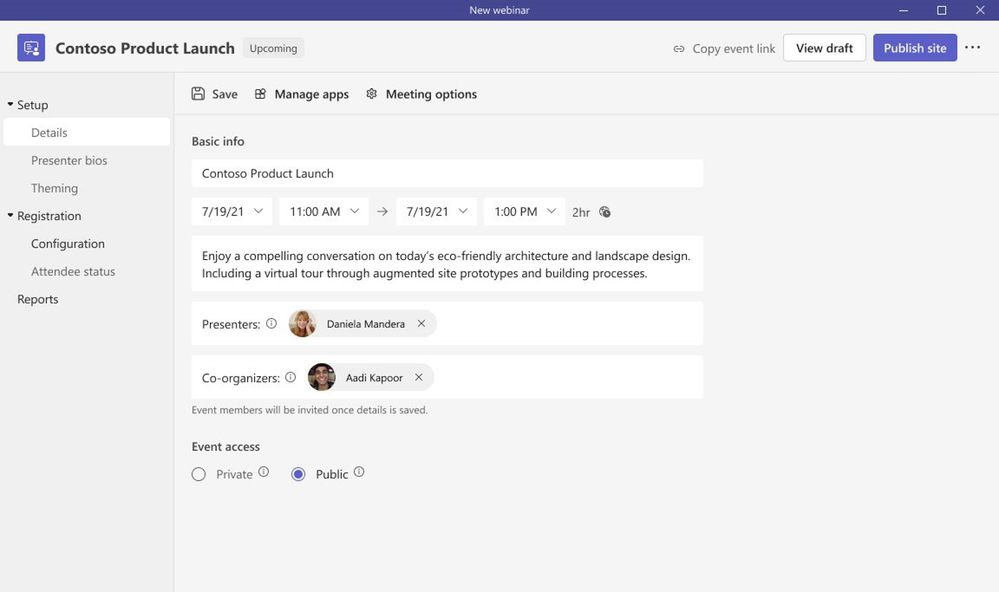
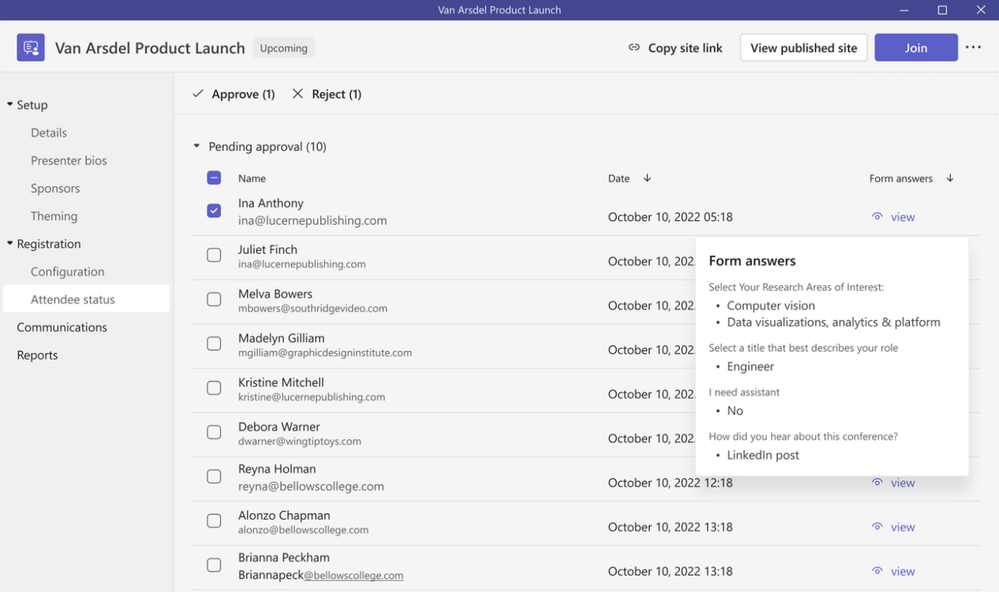
As every webinar is unique, we’ve revamped the setup and management of registration with a new structure and expanded options to customize registration details and event settings. We previously announced this new innovation last year and are excited to share the new experience is now generally available for both Teams Premium and Office and Microsoft 365 offerings. We’ve streamlined the setup of the webinar to offer broader options to tailor the registration experience:
Designating co-organizers and adding the relevant event details
Enhancing presenter bios to showcase their expertise and social credentials
Showcasing your brand to align to the theme of your event; managing registration capacity limits for up to 1,000 attendees
Specifying custom questions to gather pertinent information about your prospective attendees and enabling consent for event terms and conditions upon registration
Viewing attendees status for registrations and cancellations, along with attendee reporting all in one central location
Once registration is set and invites are sent to attendees, you can enable registration waitlist and manual approval to make it easier to manage registration ahead of the webinar. Enabling the waitlist will keep webinar registration open even after the event has reached the capacity set by the organizer. This allows additional people to register and be automatically added to the waitlist. As new spots open up, people will be automatically moved to the pending approval state, which enables the organizer to review their registration information and manually approve or reject each of the registrants. In addition, you can customize the registration start and end time to specify when you want registration to start and end, making it easier to plan for and manage your event.
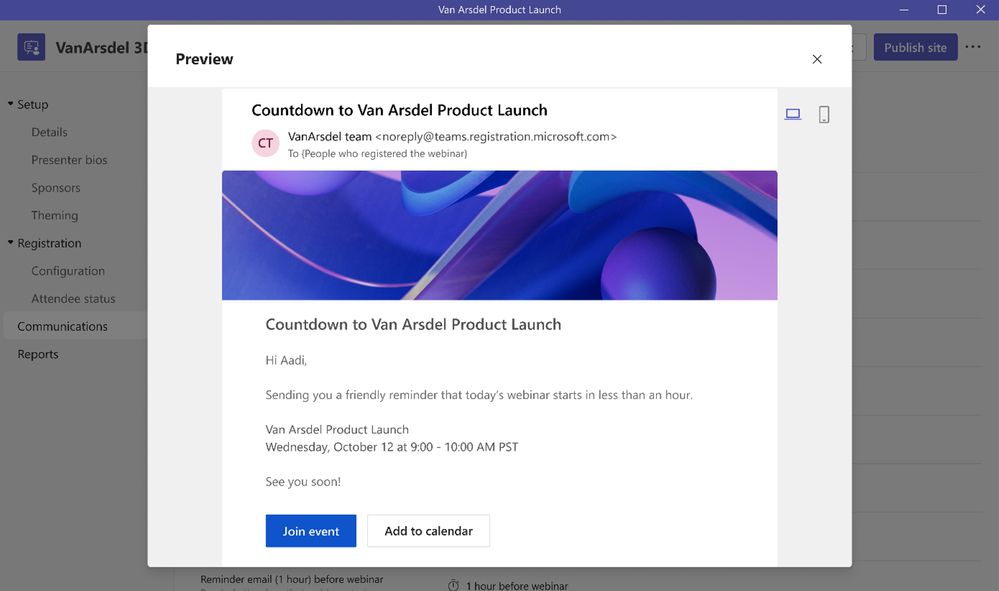
To build excitement and drive attendance as the webinar draws near, you can leverage timely, automated reminder emails¹ to ensure the event remains top of mind. These emails will be sent to every confirmed registrant at a configured date and time you set ahead of the event and will include a custom-branded header, webinar details, and a link to join the event.
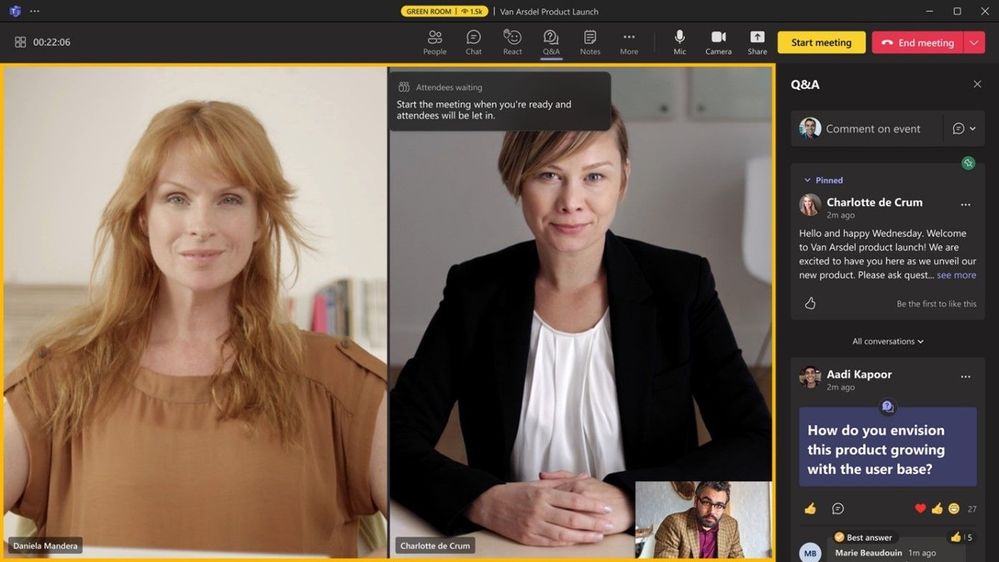
On the day of the webinar, presenters are able to join together with one another and the host in the virtual green room to ensure preparation is seamless. With the virtual green room, presenters have a separate, dedicated space separate from attendees where they can connect and chat real-time, stage content, do a quick briefing, and test run without disturbing attendees. While attendees join and wait for the event to start, they’re greeted with a welcome screen to inform them the event will start shortly and can engage with the presenters and one another through chat and Q&A.
Maintain focus and drive engagement during your event
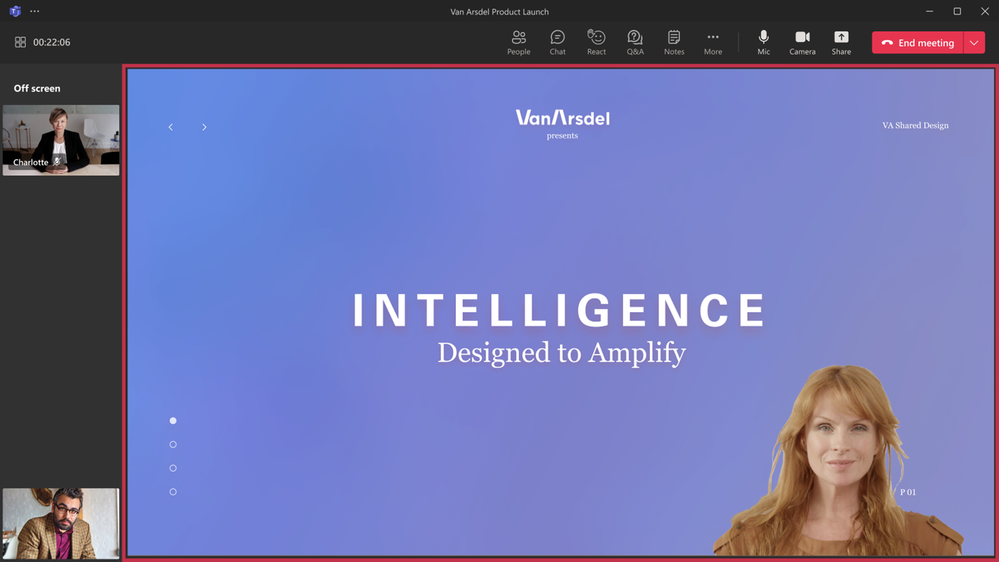
As the webinar is underway, elevate and easily manage the production of your webinar to showcase a more dynamic, curated presentation by managing what attendees see. To keep your attendees focused and more deeply engaged, manage their view so they only see shared content and participants brought on-screen and are no longer distracted by the multiple profiles of other attendees or an accidental attendee video popping up. This enables you to bring presenters both on and off the screen into an off screen area and sharing the relevant content for a more polished presentation, or even bringing an attendee on-screen who raises their hand to ask a question live in the webinar.
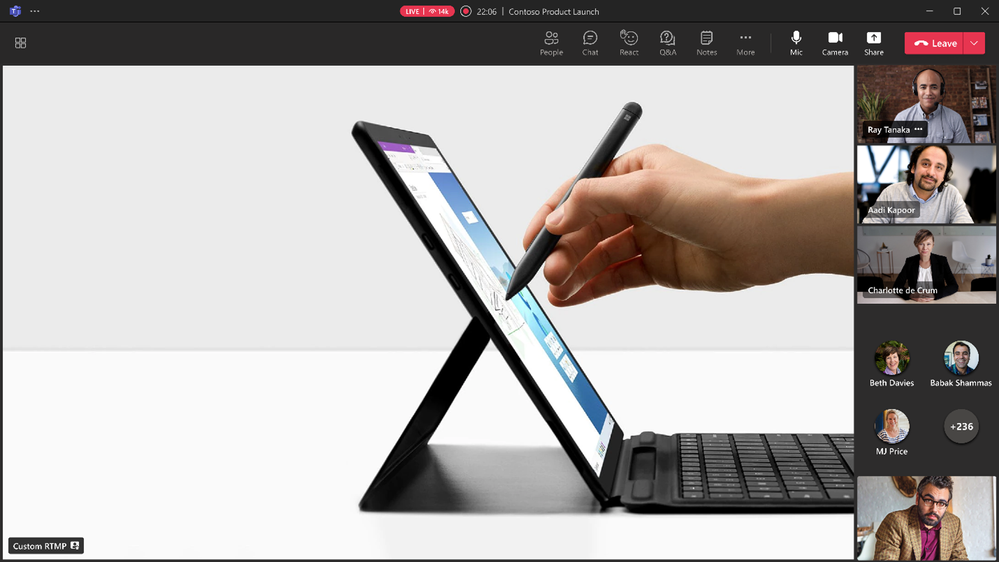
To deliver an even more professionally produced event with more dynamic content, integrate different external media feeds into your webinar using RTMP-in. By leveraging an external encoder and enabling RTMP-in, you’ll be able to live stream a custom RTMP source, whether it be a professionally produced video or high-quality screen sharing, to all attendees in the event.
Improve live event experiences with Microsoft eCDN in Teams Premium
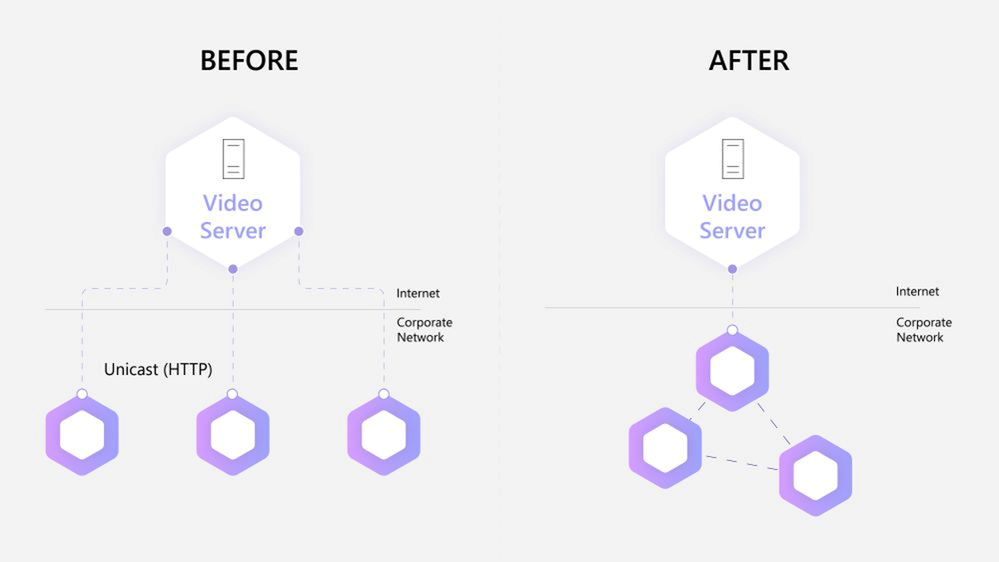
To improve live event experiences within an organization, our Microsoft Enterprise Content Deliver Network (eCDN)is now included in Teams Premium. With Microsoft eCDN, organizations can seamlessly and securely live stream global meetings, all-hands gatherings, and town halls, and distribute company-wide trainings using Teams Live Events. Microsoft eCDN helps reduce the load on the corporate network, helps prevent connectivity failure and poor video quality, and doesn’t require any additional installation on user endpoints and devices.
Enhancing existing webinar experiences While we are excited for users to try new advanced webinar experiences in Teams Premium, we are also excited to share continuous improvements² we are adding to the existing webinar experience in Office 365 and Microsoft 365 plans that users have relied on every day to deliver events around the world. As mentioned above, we’ve revamped the setup and management of registration with a new structure and expanded options to customize registration details and event settings. We previously announced this new innovation last year and are excited to share the new experience is now generally available for Office and Microsoft 365 customers. We’ve streamlined the setup of the webinar to offer broader options to tailor the registration experience: Designating co-organizers and adding the relevant event details; enhancing presenter bios to showcase their expertise and social credentials; showcasing your brand to align to the theme of your event; managing registration capacity limits for up to 1,000 attendees; specifying custom questions to gather pertinent information about your prospective attendees and enabling consent for event terms and conditions upon registration; and viewing attendees status for registrations and cancellations, along with attendee reporting all in one central location.
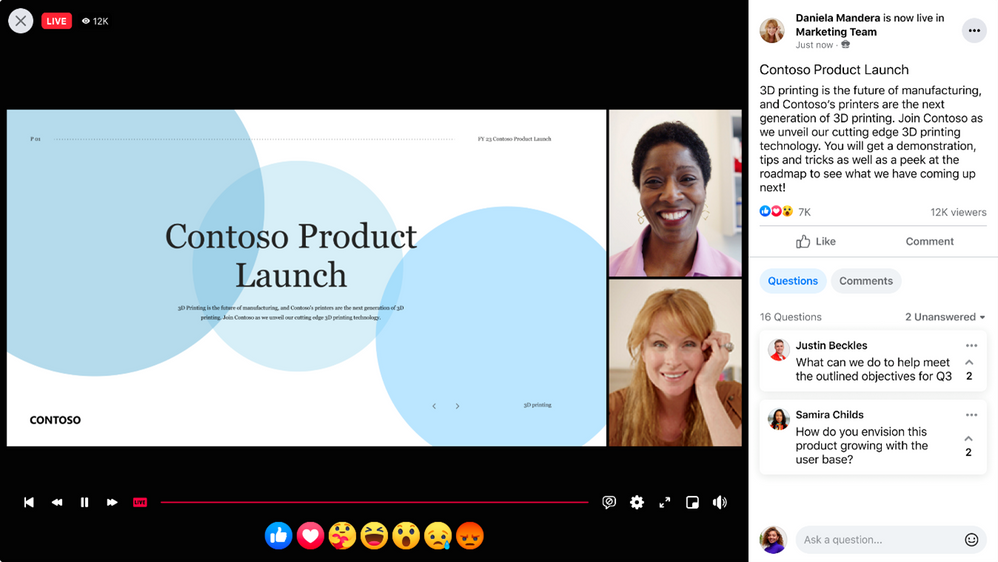
Live stream Teams Meetings and Webinars to Meta Workplace Live As webinars are intended to reach a broader audience, typically outside of your organization, we’re making it easier to connect with your extended network, right within Meta Workplace Live. Now organizers can live stream a Teams meeting or webinar to Meta Workplace Live to increase your reach and enable attendees to engage where works best for them. This new functionality allows your audience to watch the event on Workplace real-time and engage with emoji reactions and comments or catch up later and watch the recording within Workplace.
To enable this new streaming functionality, add the Workplace Live app in your Teams meeting or webinar, sign in using your Workplace account, and select the Workplace Event you want to live stream to. Once you go live with your event, users of both Teams and Workplace can view, react, and comment on the live video.
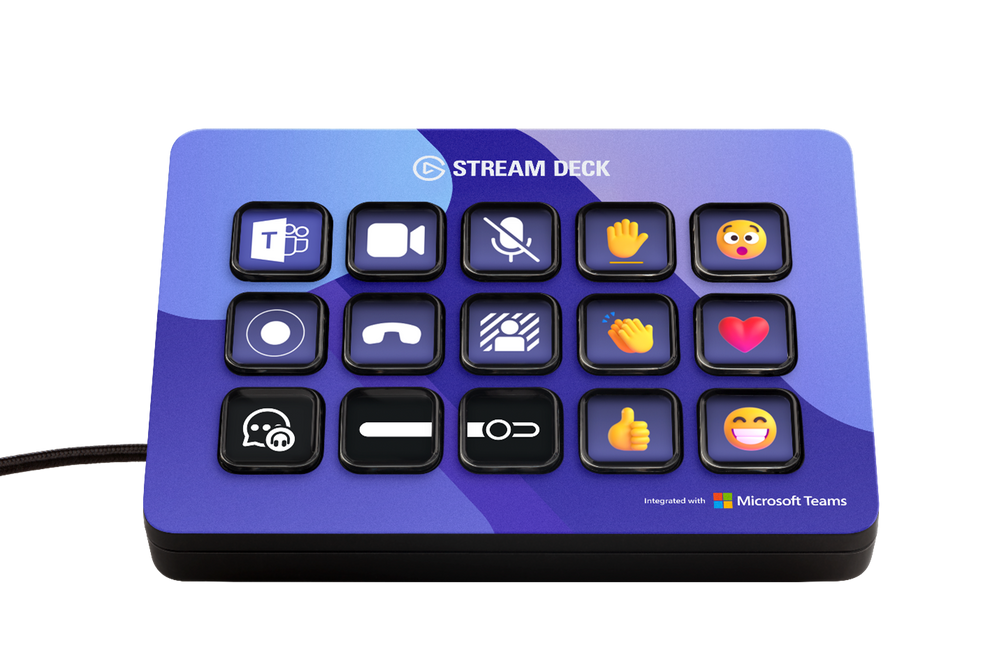
Manage and control Teams meetings and webinars with a touch of a button on Elgato Stream Deck As hybrid is the new norm, people continue to present and attend meetings and webinars more remotely on Teams. As a presenter, it can be challenging to manage your presentation and how you show up on camera without the added stress of wondering whether you started to record the event, blurred your background, or put yourself on mute when you aren’t actively presenting. And it can be challenging to quickly react real-time while searching for the right live reaction to use and remembering to raise or lower your hand once you’ve spoken. With the new Elgato Stream Deck plugin integration with Teams³, you can now easily manage and control functions directly in a Teams meeting and webinar with a touch of a button. By programming custom keys on the Elgato Stream Deck device for some of the most widely used, common features in Teams, you’ll be able to manage controls more seamlessly, ensure you never get stuck on mute again, and remember to leave the event once it’s done.
The new plugin enables you to program the following keys on your Elgato Stream Deck device:
Toggle camera on/off
Toggle mute on/off
Toggle record on/off
Toggle background blur on/off
Leave the meeting
Display live reactions including applause, laugh, like, love, and wow
Raise or lower hand
To leverage this integration, ensure you have latest version of the Elgato Stream Deck plugin installed. Before you join your meeting or webinar, click on the ellipses within Teams (next to your profile), select settings, choose privacy, and click manage API at the bottom of the menu. Toggle on to enable API and generate the API token and copy this API to input into Stream Deck. Within Stream Deck, scroll down to the Microsoft Teams section and drag and drop one of the Teams actions on to a key and paste in the API token. The API token will now automatically be applied with any additional Teams actions you add. Once you join your next meeting or webinar, you’ll see your new Teams keys light up on your Elgato Stream Deck device and be able to have a more seamless experience with Teams.
We’re excited to bring these new webinar experiences to our customers, partners, and community around the world. Whether you’re a seasoned Teams user or recently new to the app, start exploring today and learn how our webinar experiences can elevate your next event and help generate leads and drive results for your business. To get started, learn more about advanced webinars in Teams Premium, existing webinars in Office and Microsoft 365 plans, and how to get started with Webinars.
These webinar capabilities are available now, with the exception of automated email reminders which will be available in March 2023.
These new capabilities are available in Office 365 and Microsoft 365 E3/E5/A3/A5 plans. Microsoft 365 Business Standard and Microsoft 365 Business Premium plans will include all the webinar features for up to 300 attendees. Please visit the Microsoft 365 roadmap and Microsoft Docs for additional feature details and availability.
This functionality will start rolling out this month for general availability.



 ) or https:// means you’ve safely connected to the .gov website. Share sensitive information only on official, secure websites.





















Recent Comments