by Scott Muniz | Jul 16, 2020 | Uncategorized
This article is contributed. See the original author and article here.
Hello everyone, here is part 10 of a series focusing on Application Deployment in Configuration Manager. This series is recorded by @Steve Rachui, a Microsoft principal premier field engineer. These tutorials are from our library and uses Configuration Manager 2012 in the demos, however the concepts are still relevant for Configuration Manager current branch.
This session continues to focus on the client and walks through the detailed flow of events that takes place when a sample application is installed. The application installation is tracked in the logs from acquisition during policy update through full execution. In addition, relevant WMI namespaces and the SQL compact file on the client are discussed.
Next in the series Steve will talk about task sequencing as a mechanism for deploying applications.
Posts in the series
Go straight to the playlist
by Scott Muniz | Jul 16, 2020 | Uncategorized
This article is contributed. See the original author and article here.
The BBC micro:bit is a fantastic little device. It’s small, relatively cheap for a device of its capabilities, has coding tools for developers of all abilities, and has a huge ecosystem of tutorials and projects to do. Young kids use them to code with block-based coding with Microsoft MakeCode, older kids will use Python or JavaScript in MakeCode. They have some sensors and LEDs built in, and you can connect to a whole ecosystem of add-ons from sensors to robots.
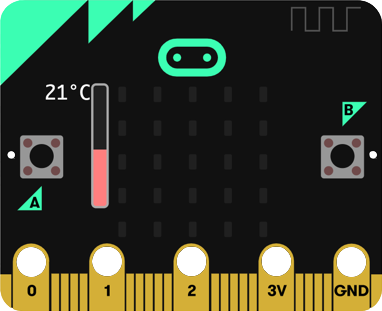 A BBC micro:bit
What it can’t do is connect to the internet. At least not directly…
I recently put together a ‘smart garden ornament’ project as part of our JulyOT month of IoT – the idea being to add sensors to bird boxes, gnomes and other such garden ornaments and bring this sensor data together in an on-line dashboard using IoT Central. This project is designed for families or schools to work on together, gathering data from your neighborhood or school. These sensors would be powered by BBC micro:bits and coded using blocks. The problem came with getting this data to the cloud.
My solution to this took advantage of two things – the radio and the USB connection. The micro:bit has a radio that can broadcast data to other micro:bits in the vicinity (the range in clear air is about 70m). It also has a USB port that can not only be used for power and programming, but you can also send data along it.
This means I can connect a micro:bit to a device with an internet connection (such as a Raspberry Pi) via USB and send messages from the micro:bit to the Pi. The Pi then listens on the serial port for the messages, then sends them on to IoT Central. This forms my central ‘Hub’.
My sensor micro:bits then need to send radio messages with the data they want to send to the cloud, these are detected by the ‘Hub’ micro:bit, routed through the Pi and send to IoT Central.
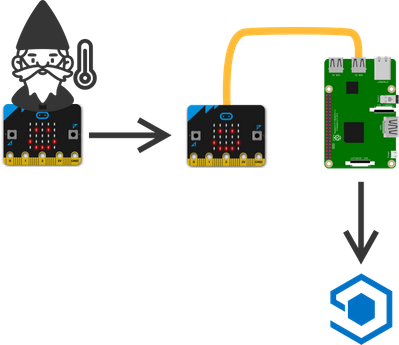
There is a size limit on radio messages of 19 characters. This meant I had to send encoded messages – using things like a single character for the telemetry type (e.g. ‘t’ for temperature) and a single character for the device ID. The Pi then decodes these to the actual values and sends them on.
You can read more on how I did this, see the code and learn how to build this yourself by checking out the project on GitHub:
github.com/jimbobbennett/smart-garden-ornaments
by Scott Muniz | Jul 16, 2020 | Azure, Microsoft, Technology, Uncategorized
This article is contributed. See the original author and article here.
Azure Data Factory announces the immediate public availability of Azure Data Factory Managed Virtual Network as pubic preview!
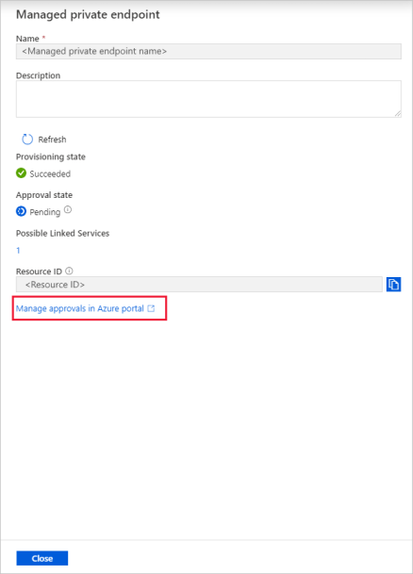
With this new feature, you can provision the Azure Integration Runtime in Managed Virtual Network and leverage Private Endpoints to securely connect to supported data stores.
Your data traffic between Azure Data Factory Managed Virtual Network and data stores goes through Azure Private Link which provides secured connectivity and eliminates your data exposure to the public internet. With the Managed Virtual Network along with Private Endpoints, you can also offload the burden of managing virtual networks to Azure Data Factory and protect against the data exfiltration.
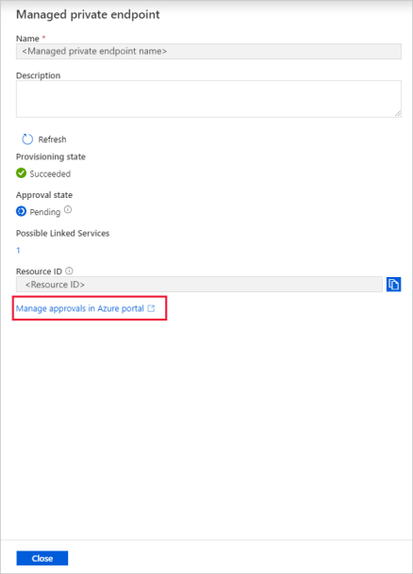
To learn more about Azure Data Factory Managed Virtual Network, visit the Azure Data Factory documentation page.
To sign-up for the preview, please complete this form.
by Scott Muniz | Jul 16, 2020 | Azure, Microsoft, Technology, Uncategorized
This article is contributed. See the original author and article here.
IoT is almost always associated with NoSQL database. This is quite understandable as its flexibility and specialization are great for ingesting IoT data. But what if that flexibility and performance are also available in Azure SQL? That would make Azure SQL a perfect target for IoT data as along flexibility and performance you have security, manageability, analytics, and scalability. In this episode, Davide Mauri discusses all this and more – and shows you why Azure SQL is a great option for IoT and HTAP.
Watch on Data Exposed
Additional Resources:
Azure IoT reference architecture
Streaming At Scale – Azure SQL
Ingesting 10K events/sec Video
JSON Performance in Azure SQL
View/share our latest episodes on Channel 9 and YouTube!
by Scott Muniz | Jul 16, 2020 | Azure, Microsoft, Technology, Uncategorized
This article is contributed. See the original author and article here.
Join the Azure Monitor team on July 30th, 2020 from 9-10AM PST (Pacific Time) for latest product updates and to get real-time answers to all your monitoring questions. This AMA will take place in our Azure Monitor AMA space.
Download the Calendar Invitation (no need to register or RSVP)
Many of you are already using Azure Monitor to collect, analyze, and act on your operational telemetry from one centralized, fully managed location. To help you get even more out of Monitor and learn how to improve your monitoring strategy, we’re inviting you to attend our new monthly community event to get regular product updates and access to our panel of experts for live Q&A.
Agenda (1 Hour):
- What’s new in Azure Monitor – Review all new scenarios & capabilities launched in Azure Monitor in last one month.
- Ask-Me-Anything (AMA) – Throughout the event, you will also have opportunity to ask questions to our team, which we will be answering live.
An archive of our previous AMA(s) is also available for your reference.
Tech Community Account:
You will need a Tech Community account to be able to ask questions during the AMA. With this you will also be able to participate in the Azure Monitor community for discussions or questions outside this event.
Looking forward to see you at the event!
-Azure Monitor Team


Recent Comments