by Scott Muniz | Jul 29, 2020 | Uncategorized
This article is contributed. See the original author and article here.
The realm of cybersecurity is more than a combination of its technical components like hardware and software. It’s an industry that’s founded on the innovation and creativity of its practitioners—continually discovering better ways to protect our homes and our businesses.
Historical Moments in Cybersecurity
Without creativity, many of the historical milestones in cybersecurity wouldn’t have been possible. The ingenuity of security and IT leaders has enabled us to not just communicate remotely around the world but securely communicate. Let’s take a short trip down memory lane to relive some of the industry’s evolutions:
- 870: Though door locks have been around for 4000 years (privacy is…key), the first all-metal lock came out of England.
- 1959: Machine learning was first defined in the late 50s, and today we’re finding more and more applications of machine learning in cybersecurity, from intelligently blocking malware attacks to correlating events into incidents.
- 1961: The first-ever password (Who wants to bet it was “1234”?) was created to secure a MIT computer. Now, more than 50 years later, we’re releasing passwordless technology like biometrics.
- 1987: The first removal of a virus in the wild—Vienna Virus—happened in 1987. The creator of the virus was never identified, and though it was neutralized, it was used as a template for many complex variants over the years.
- 1993: The first DEF CON conference was hosted in Las Vegas, naturally. Since its inception, the event has grown its attendance from 100 people to a whopping 30,000.
- 1999: The first version of SSL was released in 1999. Over 20 years later, TLS has replaced SSL as the industry standard—fixing bugs and vulnerabilities which enabled attackers to gain access to personal information.
The 2000s have seen even more advancement as we continue to bring technologies—such as deep learning, decentralized identity, and biometrics—into our everyday lives. The goal: a safer world and more sci-fi-esque gadgets.
Celebrating Ongoing Improvement
It’s truly great to see how the community has continued to iterate and evolve the cybersecurity space. Over the next few weeks, we’re partnering with cartoonist Drew Dernavich from The New Yorker Magazine to capture the central role of creativity in security. Comment or direct message us on @MSFTSecurity with an example of how you used creativity to solve a security challenge and be entered to win a cartoon of your story! Don’t forget to use the hashtag #CyberContest.
Official Contest Rules
- SPONSOR
These Official Rules (“Rules”) govern the operation of the Microsoft Cyber Creativity Contest (“Contest”). Microsoft Corporation, One Microsoft Way, Redmond, WA, 98052, USA, is the Contest sponsor (“Sponsor”).
- DEFINITIONS
In these Rules, “Microsoft”, “we”, “our”, and “us” refer to Sponsor and “you” and “yourself” refers to a Contest participant, or the parent/legal guardian of any Contest entrant who has not reached the age of majority to contractually obligate themselves in their legal place of residence. By entering you (your parent/legal guardian if you are not the age of majority in your legal place of residence) agree to be bound by these Rules.
- ENTRY PERIOD
The Contest starts at 12:01 a.m. Pacific Time (PT) on July 29, 2020, and ends at 11:59 p.m. PT on August 11, 2020 (“Entry Period”).
- ELIGIBILITY
To enter, you must be a legal resident of the 50 United States (including the District of Columbia), and be 18 years of age or older. If you are 18 years of age or older but have not reached the age of majority in your legal place of residence, then you must have consent of a parent/legal guardian.
Employees and directors of Microsoft Corporation and its subsidiaries, affiliates, advertising agencies, and Contest Parties are not eligible, nor are persons involved in the execution or administration of this promotion, or the family members of each above (parents, children, siblings, spouse/domestic partners, or individuals residing in the same household). Void where prohibited.
- HOW TO ENTER
To enter
- Create a new account or use an existing account on Twitter (“Twitter”); and
- Follow @MSFTSecurity at https://twitter.com/msftsecurity; and
- Submit your story one of two ways:
- Post a publicly viewable message on Twitter that includes the hashtag #CyberContest and your story describing how you used technology to creatively solve a cybersecurity issue, or
- DM your story to @MSFTSecurity on Twitter describing how you used technology to creatively solve a cybersecurity issue.
The story you submit will be your Entry.
All elements must be included to be eligible. If your account is private, your Entry will NOT be eligible; you must change the setting on your account from private to “public” or “unprotected”. The Twitter platform will be the official time clock for the Contest.
This promotion is in no way sponsored, endorsed, or administered by, or associated with, Twitter. You understand that you are providing your information to the Sponsor and not to Twitter. The information you provide will only be used for administering the Promotion and to contact you if you are a winner.
The entry limit is one per person overall.
Any attempt by any you to obtain more than the stated number of entries by using multiple/different accounts, email addresses, identities, registrations, logins, or any other methods will void your entries and you may be disqualified. Use of any automated system to participate is prohibited.
We are not responsible for excess, lost, late, or incomplete entries. If disputed, entries will be deemed submitted by the “authorized account holder” of the email address, social media account, or other method used to enter. The “authorized account holder” is the natural person assigned to an email address by an internet or online service provider, or other organization responsible for assigning email addresses.
- ELIGIBLE ENTRY
To be eligible, an Entry must meet the following content/technical requirements:
- Your Entry must be your own original work; and
- Your Entry cannot have been selected as a winner in any other contest; and
- You must have obtained any and all consents, approvals, or licenses required for you to submit your Entry; and
- To the extent that Entry requires the submission of user-generated content such as software, photos, videos, music, artwork, essays, etc., entrants warrant that their Entry is their original work, has not been copied from others without permission or apparent rights, and does not violate the privacy, intellectual property rights, or other rights of any other person or entity. You may include Microsoft trademarks, logos, and designs, for which Microsoft grants you a limited license to use for the sole purposes of submitting an entry into this Contest; and
- Your Entry may NOT contain, as determined by us in our sole and absolute discretion, any content that is obscene or offensive, violent, defamatory, disparaging or illegal, or that promotes alcohol, illegal drugs, tobacco or a particular political agenda, or that communicates messages that may reflect negatively on the goodwill of Microsoft.
- USE OF YOUR ENTRY
We are not claiming ownership rights to your Entry. However, by submitting an Entry, you grant us an irrevocable, royalty-free, worldwide right and license to use, review, assess, test and otherwise analyze your Entry and all its content in connection with this Contest and use your Entry in any media whatsoever now known or later invented for any non-commercial or commercial purpose, including, but not limited to, the marketing, sale or promotion of Microsoft products or services, without further permission from you. You will not receive any compensation or credit for use of your Entry, other than what is described in these Official Rules.
By entering you acknowledge that the we may have developed or commissioned materials similar or identical to your Entry and you waive any claims resulting from any similarities to your Entry. Further you understand that we will not restrict work assignments of representatives who have had access to your Entry and you agree that use of information in our representatives’ unaided memories in the development or deployment of our products or services does not create liability for us under this agreement or copyright or trade secret law.
Your Entry may be posted on a public website. We are not responsible for any unauthorized use of your Entry by visitors to this website. We are not obligated to use your Entry for any purpose, even if it has been selected as a winning Entry.
- WINNER SELECTION AND NOTIFICATION
Pending confirmation of eligibility, potential prize winners will be selected by Microsoft or their Agent or a qualified judging panel from among all eligible entries received based on the following judging criteria:
- 50% – It must meet the contest guidelines including how and what to submit.
- 50% – It must be a unique, creative approach to a cybersecurity challenge, including finding new ways to unearth threats or encourage proper security hygiene across the business. The creativity must also be human-led. The goal is to show that human creativity is equally as important as technological advancement in cybersecurity.
Within 7 days following the Entry Period winners will be selected from among all eligible entries received. In the event of a tie between any eligible entries, an additional judge will break the tie based on the judging criteria described above. The decisions of the judges are final and binding. If we do not receive a sufficient number of entries meeting the entry requirements, we may, at our discretion, select fewer winners than the number of Contest Prizes described below. If public vote determines winners, it is prohibited for any person to obtain votes by any fraudulent or inappropriate means, including offering prizes or other inducements in exchange for votes, automated programs or fraudulent i.d’s. Microsoft will void any questionable votes.
Winners will be notified via the contact information provided during entry no more than 7 days following judging with prize claim instructions, including submission deadlines. If a selected winner cannot be contacted, is ineligible, fails to claim a prize or fails to return any forms, the selected winner will forfeit their prize and an alternate winner will be selected time allowing. If you are a potential winner and you are 18 or older, but have not reached the age of majority in your legal place of residence, we may require your parent/legal guardian to sign all required forms on your behalf. Only three alternate winners will be selected, after which unclaimed prizes will remain unawarded.
- PRIZES
The following prizes will be awarded:
Three First Prize: Each winner will receive a recognition of achievement when New York Times published cartoonist will render their idea into a cartoon drawing, available as a digital download to the public following the Contest.
We will only award one (1) prize per person during the Entry Period. No more than the stated number of prizes will be awarded. No substitution, transfer, or assignment of prize permitted, except that Microsoft reserves the right to substitute a prize of equal or greater value in the event the offered prize is unavailable. Prizes are awarded “AS IS” with no warranty of any kind, either express or implied, including but not limited to, the implied warranties or merchantability, fitness for a particular purpose, or non-infringement. Prizes will be sent no later than 28 days after winner selection. Prize winners may be required to complete and return prize claim and / or tax forms (“Forms”) within the deadline stated in the winner notification. Taxes on the prize, if any, are the sole responsibility of the winner, who is advised to seek independent counsel regarding the tax implications of accepting a prize. By accepting a prize, you agree that Microsoft may use your Entry, name, image and hometown online and in print, or in any other media, in connection with this Contest without payment or compensation to you, except where prohibited by law.
- ODDS
The odds of winning are based on the number and skill of eligible entries received.
- GENERAL CONDITIONS AND RELEASE OF LIABILITY
To the extent allowed by law, by entering you agree to release and hold harmless Microsoft and its respective parents, partners, subsidiaries, affiliates, employees, and agents from any and all liability or any injury, loss, or damage of any kind arising in connection with this Contest or any prize won.
All local laws apply. The decisions of Microsoft are final and binding.
We reserve the right to cancel, change, or suspend this Contest for any reason, including cheating, technology failure, catastrophe, war, or any other unforeseen or unexpected event that affects the integrity of this Contest, whether human or mechanical. If the integrity of the Contest cannot be restored, we may select winners from among all eligible entries received before we had to cancel, change or suspend the Contest.
If you attempt or we have strong reason to believe that you have compromised the integrity or the legitimate operation of this Contest by cheating, hacking, creating a bot or other automated program, or by committing fraud in any way, we may seek damages from you to the full extent of the law and you may be banned from participation in future Microsoft promotions.
- USE OF YOUR DATA
Personal data you provide while entering this Contest will be used by Microsoft and/or its agents and prize fulfillers acting on Microsoft’s behalf only for the administration and operation of this Contest and in accordance with the Microsoft Privacy Statement.
- GOVERNING LAW
This Contest will be governed by the laws of the State of Washington, and you consent to the exclusive jurisdiction and venue of the courts of the State of Washington for any disputes arising out of this Contest.
by Scott Muniz | Jul 29, 2020 | Uncategorized
This article is contributed. See the original author and article here.
Outlook for Android supports Android and Tizen wearable technology. When the Outlook app is installed on the wearable, the user can receive message notifications and event reminders, interact with messages, and view daily calendars. For data to synchronize to the Outlook app installed on Android or Tizen wearable devices, the wearable must be connected to the Android device via Bluetooth.
By default, Outlook for Android supports a model where wearable sync is enabled.
For more information on what Outlook scenarios are specifically supported on Tizen wearables, see https://galaxystore.samsung.com/geardetail/com.microsoft.office.outlook.tizen.
Controlling wearables with Intune
For Exchange Online and on-premises customers leveraging hybrid modern authentication, Microsoft offers an in-market solution where Intune customers can leverage Intune App Protection Policies to disable wearable technology. This solution prevents any data from being synchronized to the wearable device from the work or school account when protected by an Intune App Protection Policy. For more information, see Deploying Outlook for iOS and Android app configuration settings.
Controlling wearables for non-Intune customers
Today, Outlook for Android does not provide a mechanism to control wearables for non-Intune customers.
Outlook for Android does support Exchange’s mobile device mailbox policy framework. Outlook for Android consumes the mobile device mailbox policy and acts based on what policy settings are configured. The mobile device mailbox policy is evaluated when Outlook for Android connects to Exchange Online. Today, Outlook for Android only supports the PIN and encryption client policy settings (see Managing Outlook for iOS and Android for more information).
Beginning the week of August 31st, 2020, Outlook for Android will be extending its support of mobile device mailbox policy settings to include the AllowBluetooth setting which will be used to disable wearable sync for those customers that do not have Microsoft Intune. While the setting in an Exchange ActiveSync world controls whether Bluetooth on the mobile device is enabled or disabled, Outlook is repurposing this control to manage the app’s wearable sync state because:
- The setting is designed to manage a data synchronization protocol.
- Outlook can dictate how this setting is interpreted and used within its codebase.
- Outlook leverages Bluetooth for data synchronization between the mobile device app and the wearable app. However, even if Outlook extends wearable data synchronization to other protocols like Wifi or cellular, disabling this setting still ensures that app’s wearable sync state is disabled for the work or school account.
- The default nature of this setting does not disrupt existing Exchange customers that are happily using wearable technology with Outlook for Android.
- This setting provides non-Intune customers with a way to disable wearable synchronization.
When Outlook consumes the Exchange mobile device mailbox policy, Outlook will act on the AllowBluetooth setting’s value when an Intune App Protection Policy is not applied to the work or school account:
- When AllowBluetooth is enabled (default behavior) or configured for HandsfreeOnly, wearable synchronization between Outlook on the Android device and Outlook on the wearable is allowed for the work or school account.
- When AllowBluetooth is disabled, Outlook for Android will disable synchronization between Outlook on the Android device and Outlook on the wearable for the specified work or school account (and delete any data previously synced for the account). Disabling the synchronization is controlled entirely within Outlook itself; Bluetooth is not disabled on the device or wearable nor is any other wearable app affected.
How does this impact my organization?
Your organization will likely fall into one of these categories:
- If your organization is utilizing Intune App Protection Policies, there will be no change to the behavior of Outlook for Android and wearable device sync.
- If your organization is not using Intune App Protection Policies and has configured an Exchange mobile device mailbox policy that has disabled AllowBluetooth, Outlook for Android users will lose access to Outlook data on wearable devices.
- If your organization is not using Intune App Protection Policies and has configured an Exchange mobile device mailbox policy that has enabled AllowBluetooth, Outlook for Android users will continue to access Outlook data on wearable devices.
If your organization would like to disable the synchronization of Outlook for Android data onto Android or Tizen wearables, you have two options:
- For Intune customers, leverage Intune App Protection Policies to disable wearable sync. For more information, see Deploying Outlook for iOS and Android app configuration settings.
- For non-Intune customers, leverage Exchange mobile device mailbox policies and disable the AllowBluetooth setting to disable wearable sync. For more information, see Managing Outlook for iOS and Android or Managing devices for Outlook for iOS and Android for Exchange Server.
Summary
Going forward, Exchange customers will have two different options for managing the wearable sync state with Outlook for Android. Intune customers can adopt Intune App Protection Policies to disable the app’s wearable sync for the work or school account. Likewise, customers without Intune can leverage the AllowBluetooth Exchange mobile device mailbox policy setting to disable the app’s wearable sync for the work or school account.
Ross Smith IV
by Scott Muniz | Jul 29, 2020 | Uncategorized
This article is contributed. See the original author and article here.
This article was written by MVP/RD and FY21 Humans of IT Community Ambassador Mario Trentim as part of the Humans of IT Guest Bloggers Series. Mario shares about his personal experience as a Board Member of several nonprofit organizations in Brazil, and how you too, can help nonprofits with digital transformation locally.
Companies and people everywhere have been struggling since the beginning of the COVID-19 crisis. Lack of robust business continuity plans, unemployment, and more have made the economy sluggish. Unfortunately, little attention has been given to nonprofit organizations. Within mere weeks, volunteers disappeared and donations dwindled drastically. It is time we help in creating digitally-capable NGOs so that they can hold together and continue delivering positive social impact on our society and stakeholders at large.
Introduction
In this post, I want to share my perspective as a volunteer and as a Board Member of nonprofit organizations. It is now time that we drive our efforts to make the nonprofit organizations digital-ready, adopting the latest advances in digital transformation and helping them mature in management processes and governance.
Background
To begin with, I’ve always been a volunteer myself. At the age of eight years old, I started my volunteering “career”. More than thirty years later, I held various volunteering positions, including being a Board Member at large international nonprofits.
Over the years, I learned that passion is the fuel that drives volunteers to work countless hours to help a cause, to help other people. Motivation and passion are essential to every nonprofit organization and every volunteering activity. On the other hand, despite all the best intentions, real social impact also depends on management processes and tools. I learned this when I first joined a nonprofit Board of Directors in 2012.
As a volunteer, my perspective was very much focused on the job that needed to be done. However, as a Board Member, my view had to become broader – always thinking of the big picture, thinking years ahead. I didn’t have a “job to be done” mentality to concentrate on anymore. It was time to learn about processes, metrics, efficiency, efficacy, effectiveness, and more.
I soon realized that nonprofits with mature management processes were capable of delivering more value, recruiting more volunteers, engaging more donors and supporters.
Digital-Ready Nonprofits in Brazil
Between March and July 2020, I had the chance to witness firsthand the digital transformation of more than twenty nonprofits of all shapes and sizes in Brazil. I won’t list them all here, but I wanted to highlight their impactful stories below:
- Microsoft Teams helping Families to Connect with the Elderly in Nursing Homes
- Microsoft Project Online enabling nonprofits to track their projects and grants, supporting their Board of Directors in decision making
- Microsoft Power BI delivering real-time information of all kinds to help nonprofits and beneficiaries
- Microsoft 365 tools transforming the way nonprofit organizations work and collaborate, enabling business continuity
My conclusion is that a digital-ready nonprofit is better prepared to deliver value and positive social impact. Volunteers are no longer constrained by having to meet in-person, while donors and supporters can get all the key information they need remotely. With technology, beneficiaries and society can also access services without interruption even in the midst of a global pandemic.
We implemented a variety of Microsoft solutions in different nonprofits to help them cope with the new challenges posed by the COVID-19 crisis. Now it is time to create an ecosystem with multipliers to sustain technology adoption and to spread the word to more nonprofits.
Next Steps
I know you are eager to help. You are here in this Humans of IT community because like me, you also believe that tech for good is our superpower. But perhaps you might not know where to start, so here are my tips to help you to take action:
1) Offer to organize and translate content into your local language
2) Adapt existing adoption plans and best practices to your region
3) Select one or more nonprofits to help them in adopting Microsoft for Nonprofit solutions
4) Showcase the benefits to more nonprofits by using blogs and social media to raise awareness
5) Create a network to sustain digital transformation in nonprofits
Have more ideas? Let’s get the conversation going in the comments below!
#HumansofIT
#TechforGood
by Scott Muniz | Jul 29, 2020 | Alerts, Microsoft, Technology, Uncategorized
This article is contributed. See the original author and article here.
About the 20.07 feature release
The 20.07 feature release contains new features for application development and tenant certificate renewal, additional promotions of Beta features to long-term stable (LTS), and enhancement to improve stability and troubleshooting of device connections on Windows platforms.
New and changed features in the 20.07 release
The 20.07 feature release contains new features and improvements to networking, application development, analog-to-digital converter (ADC) and pulse-width modification (PWM) support, management of tenant certificate authority (CA) certificates, and client-side TLS in wolfSSL.
Networking features
This release adds new and enhanced foundational networking features:
Containers
You can now build Azure Sphere apps in containers, thus providing a reproducible build environment. A preconfigured container image for Azure Sphere is available from the Microsoft Container Registry (MCR).
Templates in Visual Studio and Visual Studio Code
Both Visual Studio and Visual Studio Code now support updated templates:
- The Blink template, intended for validating that the local development environment is set up correctly, supports additional Azure Sphere development boards.
- New blank templates for both high-level and real-time capable applications, which enable you to create an application with minimal removal of unneeded code.
Tenant certificate renewal
The Azure Sphere CLI and public API now support features for (viewing and renewing tenant CA certificates)[../deployment/tenant-cert.md].
In the azsphere CLI, the new azsphere ca-certificate command supports management and renewal of tenant CA certificates. This command replaces azsphere tenant download-ca-certificate, azsphere tenant download-ca-certificate-chain, and azsphere tenant download-validation-certificate.
wolfSSL
Azure Sphere applications can now use the wolfSSL client-side TLS API. Starting with the 20.07 release, Azure Sphere supports wolfSSL version 4.4 . This version includes numerous important changes, including some security features that resolve CVEs.
PC-to-device communication stability
The 20.07 feature release contains bug fixes and enhancements to ensure greater PC-to-device communication stability issues that are related to the FTDI driver on Windows. See Windows-specific problems for details. The new azsphere device rescan-attached command helps in troubleshooting device connection problems on Windows.
Public API
The Azure Sphere public API (PAPI) supports several new operations:
- Delete a device group
- Delete a product
- Get tenant certificates
- Get tenant certificate chain
- Get proof of possession certificate
- List tenant certificates
The following Azure Sphere Public APIs are being deprecated and will be retired on January 1, 2021:
- Tenants – List Certificates
- Tenants – List Certificate Chains
ADC and PWM
The analog-to-digital converter (ADC) and pulse-width modification (PWM) APIs have been promoted to long-term stable (LTS) from Beta.
In addition, Azure Sphere now includes limited ioctl support for both ADC and PWM.
Real-time application development
Real-time application support has been promoted to LTS. It is no longer considered Beta. Along with this change, the application.h API has also been promoted to LTS.
In addition, this release fixes a bug with the value of the reset vector of the M4 to enable the use of the M4 watchdog timer.
Hardware definitions
The Azure Sphere SDK now contains default hardware definitions for common Azure Sphere boards and dev kits, in both header file (.h) and JSON format. The GitHub sample apps also use hardware definitions to create a “sample appliance” abstraction that enables them to run unchanged across many boards, and to illustrate how you can create a similar abstraction for your own usage scenarios.
Sample applications
The Azure IoT sample applications for Azure Sphere have been updated to accommodate changes in Azure IoT Hub and Azure IoT Central. The samples also now support Linux as a development platform.
Boot timing
Boot performance in the 20.07 release has improved by approximately 750ms overall.
GNU Arm path discovery
The Azure Sphere extensions for both Visual Studio and Visual Studio Code now use the same internal mechanism to discover the location of the GNU Arm path. Previously, Visual Studio looked only within the Visual Studio installation directory. Now it looks first in the ARM_GNU_PATH environment variable, then in the registry (on Windows), and then in the Visual Studio installation directory.
Manufacturing samples
The iPerf3 network performance testing tool, which is part of the manufacturing samples, has been updated to LTS status. Support for a subset of fcntl() operations has been added to the base APIs to support the improvements in iPerf3.
Azure IoT C SDK support
Azure Sphere now supports the lts_02_2020 branch of the Azure IoT C SDK.
Linux kernel
The Linux kernel underlying the Azure Sphere OS has been updated to version 5.4.
Known issues in the 20.07 release
If you try to use an unknown client identity to authenticate to an EAP-TLS network, the WifiConfig_GetNetworkDiagnostics function does not return AuthenticationFailed (5) in the current release. Instead, it returns only the ConnectionFailed (1) error, which is a regression from the previous release. We expect to correct this in an upcoming release.
For more information
For more information on Azure Sphere OS feeds and setting up an evaluation device group, see Azure Sphere OS feeds.
If you encounter problems
For self-help technical inquiries, please visit Microsoft Q&A or Stack Overflow. If you require technical support and have a support plan, please submit a support ticket in Microsoft Azure Support or work with your Microsoft Technical Account Manager. If you do not have a support plan and require technical support, please explore the Azure support plans.
by Scott Muniz | Jul 29, 2020 | Uncategorized
This article is contributed. See the original author and article here.
Introduction
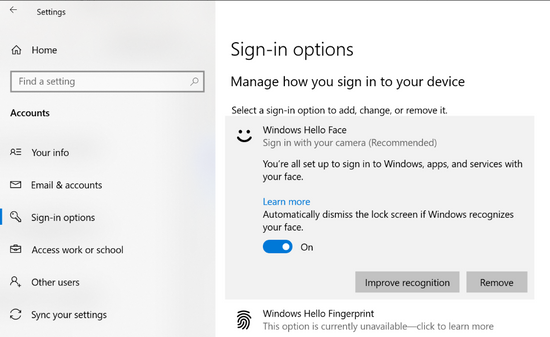
Windows Hello in Windows 10 is a biometric means of recognizing a user and authenticating them to a device using a fingerprint, secure PIN, or face recognition. If a personal or corporate device is capable of face recognition, it can be turned on by going to Settings > Accounts > Sign-in options > Windows Hello Face.
Automatic Dismissal
By default, Windows 10 enables the option Automatically dismiss the lock screen if Windows recognizes your face, as shown in the below image.
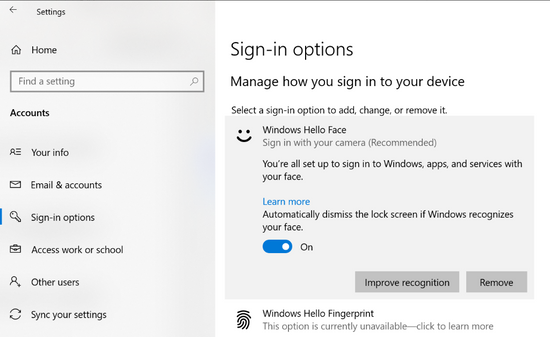
This means that if a face is recognized by the camera in use by Windows 10, it will automatically unlock the screen and login the user without any other user intervention. This also works great if switching between users on a device where more than one face is stored.
However, there are times when a user or a corporation desires slightly more interaction from the user prior to unlock and login. This simply means that once a face is recognized, a user must also press a mouse button or a key press on the keyboard. The switch in the image above can be toggled off, and then the user input is required to unlock and login.
Use Case
I’ve seen a use case for this multiple times on a certain Dell 2-in-1 laptop model sitting on a desk powered on, locked, and completely untouched, whereby the screen would flicker on, the camera would enable, and if I was sitting close by and somewhat facing the camera, it would unlock. Perhaps a piece of dust with enough charge encountered the touchpad, or perhaps something within the manufacturer’s drivers or implementation caused the device to look for a face out of the blue. It could be a security risk if the person were walking away and didn’t notice.
This same behavior was occurring with other users as well, so the customer asked me for a solution, and we deployed it with Intune’s PowerShell script capability.
Initial Solution
This tutorial provided the initial solution on how to disable the automatic lock screen dismissal using registry keys. However, it was quickly apparent that the tutorial advises the reader to modify a registry key for a single user.
Managing at Scale
Going around to every device and toggling the switch or sending a communication to users to do the same would be inefficient. Therefore, I’ve created this PowerShell script that will automate the process. The script can be deployed with Intune, Configuration Manager, Desired State Configuration, or other tools that can run PowerShell scripts locally on devices. Simply deploy this script to a user or groups of users to disable the automatic lock screen dismissal behavior and force users to press a keyboard or mouse button to obtain access to their devices henceforth.
Conclusion
Hopefully, this helps enable a bit more security by preventing devices near a user from unlocking inadvertently, but at the slight cost of user convenience. Perhaps consider only deploying to those device models that actually need it (if users mention it) through deployment groups, or clone and modify the script to do device model logic within.
Thanks for reading!
Disclaimer
The sample scripts are not supported under any Microsoft standard support program or service. The sample scripts are provided AS IS without warranty of any kind. Microsoft further disclaims all implied warranties including, without limitation, any implied warranties of merchantability or of fitness for a particular purpose. The entire risk arising out of the use or performance of the sample scripts and documentation remains with you. In no event shall Microsoft, its authors, or anyone else involved in the creation, production, or delivery of the scripts be liable for any damages whatsoever (including, without limitation, damages for loss of business profits, business interruption, loss of business information, or other pecuniary loss) arising out of the use of or inability to use the sample scripts or documentation, even if Microsoft has been advised of the possibility of such damages.


Recent Comments