by Scott Muniz | Sep 1, 2020 | Azure, Microsoft, Technology, Uncategorized
This article is contributed. See the original author and article here.
Howdy folks,
Over the past six months, we have seen organizations adapt to remote business environments and engage with an unprecedented number of external users, and we’ve seen our own service usage growing like crazy for scenarios. With this growth, we also know that security continues to be top of mind.
Today, we are excited to announce the Public Preview of Conditional Access and Identity Protection for Azure Active Directory (Azure AD) B2C. We also have an update to our pricing that makes all Azure AD External Identities features more predictable and affordable with support for premium security features. On the blog today, we’re welcoming back Robin Goldstein, to share more about the new capabilities and pricing.
Regards,
Alex
—–
Hi everyone,
Previously, I shared our Azure AD External Identities vision to make it easier to secure, manage and build apps for collaborating and connecting with external users. Today’s announcement, which adds Conditional Access and Identity Protection to Azure AD B2C, is another step in our journey to help organizations protect all their identities with Microsoft’s world-class security features.
Protect your customers, apps, and brand
Security is essential to maintaining your customers’ and consumers’ trust and protecting your organization’s data. That’s why so many of our Azure AD customers rely on Azure AD Identity Protection and Azure AD Conditional Access. Identity Protection helps organizations automatically protect against account compromise with cloud intelligence, powered by advanced risk detection based on heuristics, User and Entity Behavior Analytics (UEBA), and machine learning (ML) from signals across the Microsoft ecosystem. By pairing Conditional Access policies with the power of Identity Protection, admins can. This combination already helps Fortune 500 organizations prevent over 10 million attacks each month.
By making risk-based Conditional Access and risk detection features of Identity Protection available in Azure AD B2C, our customers can now:
- Leverage intelligent insights to assess risk with B2C apps and end user accounts. Powered by signals from billions of monthly authentications across Azure AD and Microsoft accounts, Identity Protection real-time ML algorithms use adaptive intelligence to flag authentications as low, medium, or high risk and gets smarter and more accurate over time. Detections include atypical travel, anonymous IP addresses, malware-linked IP addresses, and Azure AD threat intelligence. Portal and API-based reports are also available.
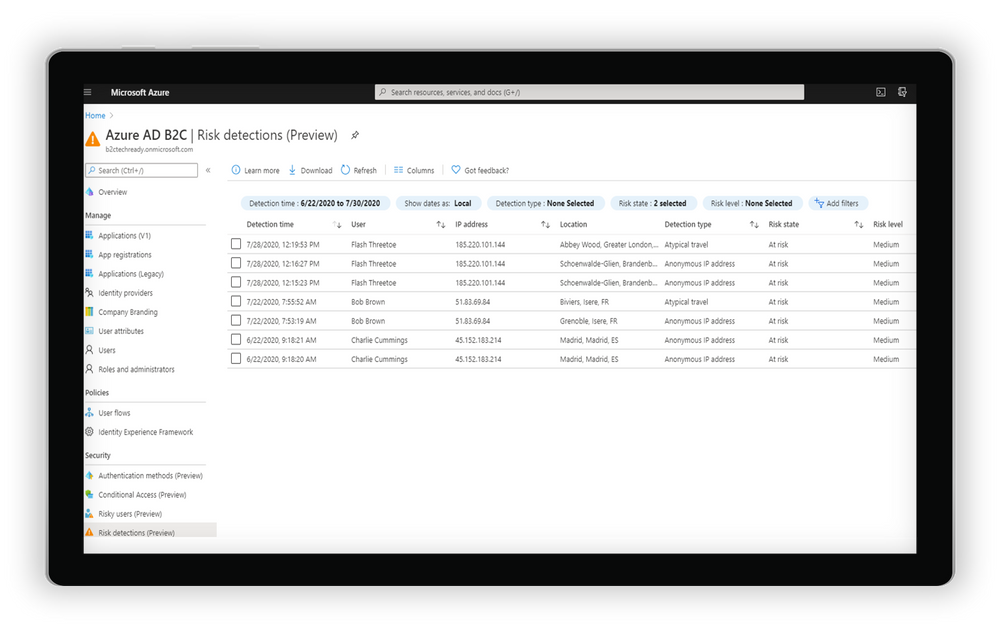 Examine risk detections flagged through the portal
- Automatically address risks by configuring adaptive authentication policies for B2C users. By tailoring Conditional Access policies, app developers and administrators can mitigate real-time risk by requiring multi-factor authentication (MFA) or blocking access depending on the user risk level detected, with additional controls available based on location, group, and app.
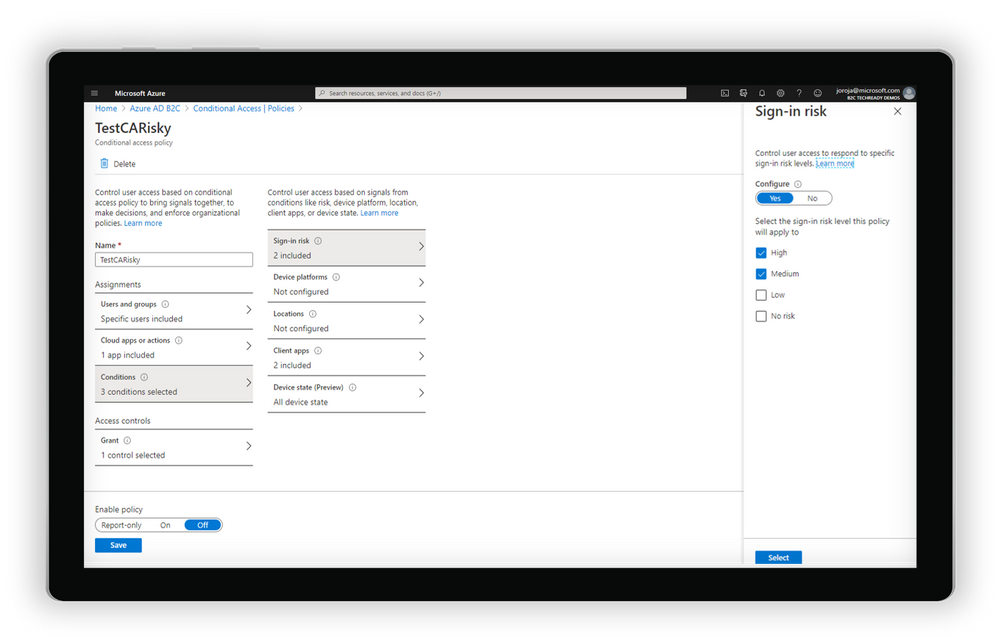
Create a Conditional Access policy based on the level of sign-in risk
- Integrate with Azure AD B2C user flows and custom policies. Conditions can be triggered from built-in user flows in Azure AD B2C or can be incorporated into B2C custom policies. As with other aspects of the B2C user flow, end user experience messaging can be customized according to the organization’s voice, brand, and mitigation alternatives.
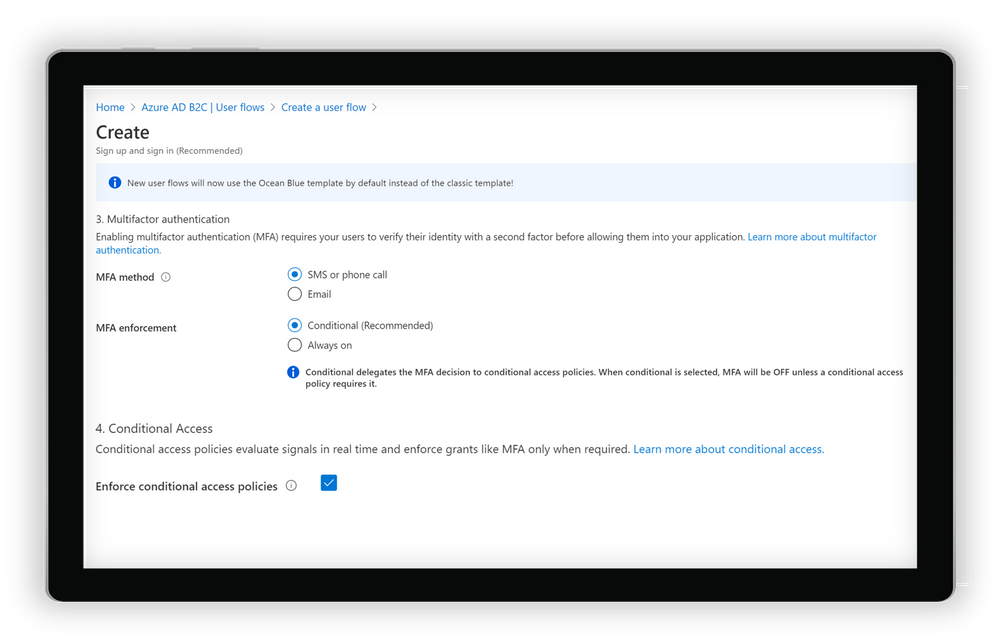
Create a user flow in Azure AD B2C
Get started today
Conditional Access and Identity Protection for Azure Active Directory (Azure AD) B2C will be progressively rolled out across Azure regions starting on September 1. To start using the new features, you will need to do a few things first:
- Link your Azure AD B2C tenant to an Azure subscription. This allows you to use Azure AD premium features for Azure AD External Identities and Azure AD B2C.
- Enable Premium P2 features in your Azure AD B2C tenant. This allows you to access Identity Protection and all future Premium P2 features for Azure AD External Identities and Azure AD B2C.
- Start using the new recommended user flows in Azure AD B2C. This allows you to connect to your Conditional Access policies and all new features added to B2C user flows in the future.
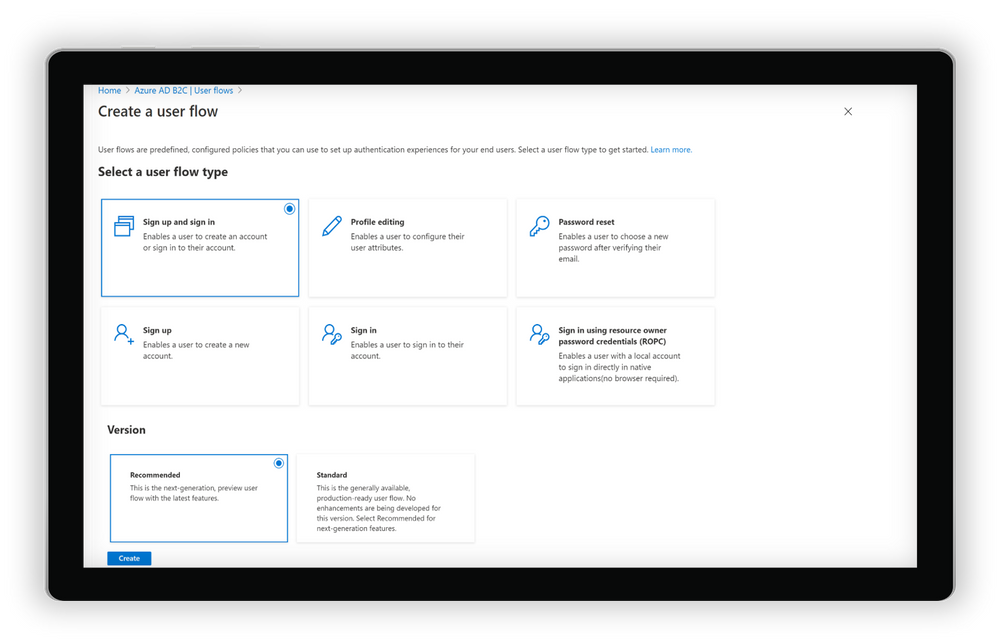
Selecting and creating recommended user flows in Azure AD B2C
And of course, you can always check out our documentation to learn more about setting up risk-based Conditional Access policies for Azure AD B2C.
Pricing update
Azure AD External Identities features are now available as part of one unified offer based on monthly active usage. Whether you use Azure AD B2C, B2B collaboration or the new self-service sign-up features in Azure AD, securing and managing external users is more affordable than ever, with the first 50,000 monthly active users free at both the Premium P1 and Premium P2 tiers. For more information on the new offer with pricing details click For documentation to set up your tenants for this offer, click here.
As always, we hope you’ll try out the new features and share feedback through the Azure forum or by following @AzureAD on Twitter.
Thanks!
Robin
Learn more about Microsoft identity:
by Scott Muniz | Sep 1, 2020 | Uncategorized
This article is contributed. See the original author and article here.
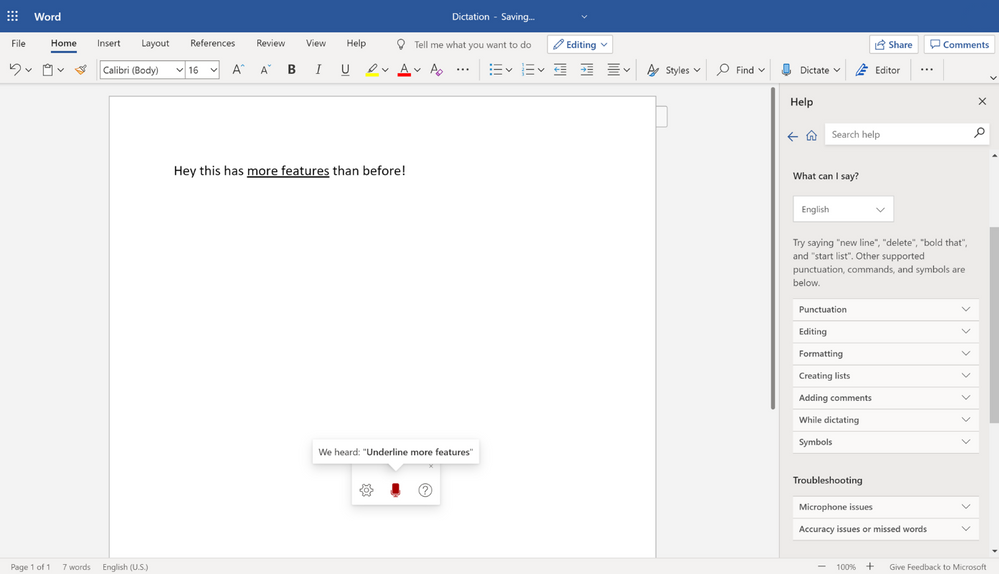
Just recently, it was announced that voice commands are available for Dictate in Word. In this post we will cover some tips and tricks on how to use these commands and other recent updates the next time you are brainstorming, creating an outline, authoring content, or giving feedback!
Why dictate?
Dictating can be 3x faster than typing with a traditional keyboard and mouse, plus gives both educators and students flexibility in how they work. This feature lets you draft content hands-free while on-the-move, multi-tasking, or repetitive stress injury. The option to use speech-to-text is a powerful tool for early learners or students with cognitive differences too – whether just learning to type to having dyslexia or dysgraphia. It’s also much easier to do your best thinking when you can speak at the speed of thought.
Getting Started
- Sign into your Microsoft account on a supported browser – Edge, Chrome, or Firefox
- Go to the Home tab > Dictate button
- Alternatively, toggle the feature on and off using the keyboard shortcut ALT + ` (this is ALT + backquote – the same as the tilde (~) key left of the number 1 on the keyboard)
- Enable microphone permissions if prompted for the first time
- Speak clearly and see the speech-to-text at work
- Try phrases to add punctuation and symbols or even edit and add structure to the document
- Try saying punctuation such as “new line”, “question mark”, or even “dot dot dot”
- Try saying symbols such as “percent sign”, “multiplication sign”, “degree symbol”
- Try using voice commands such as “backspace”, “delete”, “bold that, “start list”
- Explore the various other items on the dictation toolbar including
- In settings, the language dropdown
- In settings, the auto-punctuation toggle
- In help, the list of “What you can say” per language
- If you see a gray squiggle under any dictated text, click on it to see alternate correction options
- For more help check out Dictate your documents in Word
Here are some quick notes about availability
- Dictate is free on Word for the Web, and Office mobile (iPhone and Android Phone)
- Currently has the new experience described below
- Although dictation is available in various languages, voice commands are English-only at this time
- Dictate requires a Microsoft 365 subscription for the desktop versions
- New toolbar and voice commands coming soon
The new dictation toolbar
This new dictation toolbar now exposes new settings such as auto-punctuation and help when you need it. It’s also draggable so that you can move it around and is more flexible in case you want to leave the Home tab, such as to insert a picture.
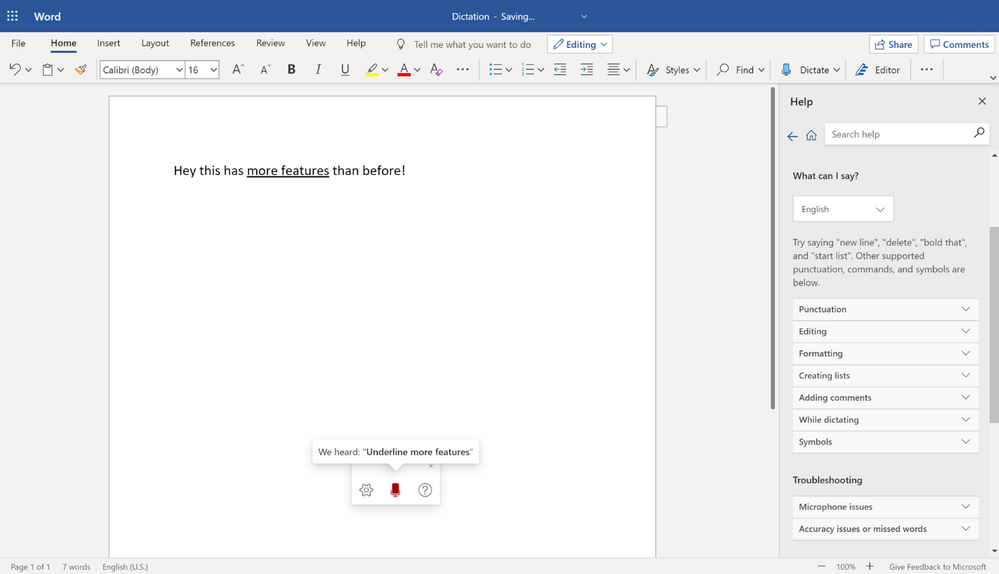 New Dictation toolbar
New settings and Auto punctuation
Let Word insert periods, exclamation marks, and question marks for you based on your inflection and pauses if that works best for your style of dictation. Explicitly saying your punctuation will still work when this is on.
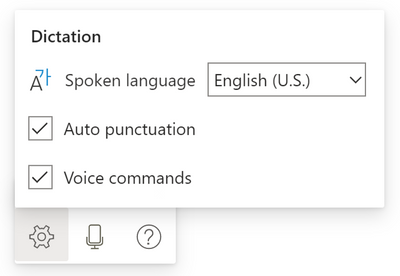
New punctuation, symbols, and voice commands
All the supported things you can say are being added in the help section of each application or at Dictate your documents in Word. We are regularly adding more support. Some scenarios to try include:
- Editing
- Formatting
- Making Lists
- Commenting
Mobile availability
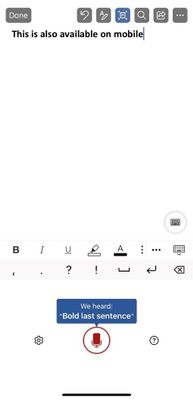
These features are also available on the latest version of the Office app on iPhone and Android phones.
We hope you try out these updates and send us your feedback.
At any time, check out all our dictation offerings at the Dictate in Microsoft 365 page.
by Scott Muniz | Sep 1, 2020 | Uncategorized
This article is contributed. See the original author and article here.
What is Imbalanced Data?
For a given classification problem, if the classes/targets within the dataset are not represented equally, then the dataset is said to be imbalanced. The classes with a higher representation are called majority classes, while the ones with lower representation are called minority classes. Sometimes imbalance exists due to limited availability of data for certain classes, while in other cases it could be attributed to the nature of the dataset. For instance, if there is a spam classification dataset, we’d expect more non-spam emails than spam emails. Similarly, for fraud detection, we would expect the fraudulent transactions to occur only rarely.
It is harder for learning models to generate predictions for the minority classes because the model has access to limited training examples representing those classes, making it difficult for it to learn to distinguish these classes. Most ML algorithms for classification perform well when all classes have a roughly equal distribution and hence it becomes important to address the problem of class imbalance.
How do we detect class imbalance?
While there is no fixed definition of what constitutes an imbalance, generally it is detected using one of the following:
- Ratio of the samples in the least populated class to the overall number of samples in the dataset. Let’s call this Ratio-1.
- Ratio of the samples in the least populated class to the samples in the most populated class. Let’s call this Ratio-2.
Let’s evaluate both methods using a couple of sample cases:
- For a four–class problem with data distributed among labels like this: {‘a’: 20, ‘b’: 20, ‘c’: 20, ‘d’: 200}, Ratio-1 is 7.7%, while Ratio-2 is 10%.
- For a four–class problem with data distributed among labels like this: {‘a’: 20, ‘b’: 200, ‘c’: 200, ‘d’: 200}, Ratio-1 is 3.2%, while Ratio-2 is 10%.
As seen in the above examples, Ratio-2 remains consistent, even if the constitution of the other classes in the overall data changes.
Hence, we utilize Ratio-2 as the indicator of imbalance in AutoML and imbalance is detected when this ratio is lower than 20%.
How to address the problem of Imbalance?
Ideally one would prefer collecting more data for the minority class(es). However, often that is quite expensive or may not be feasible due to the nature of the problem (e.g., fraud or spam detection).
Therefore, we leverage the following methods for dealing with imbalanced data within AutoML:
- Using weights for class balancing: this feature gets automatically applied in AutoML if it improves performance on a subset of the user’s data (more details in later sections)
- Using metrics that are sensitive to imbalance: users can pick relevant metrics based on our recommendations.
- Leveraging the sample weights provided directly by the user via the AutoML config
Additionally, users can apply over/under sampling to rebalance the data before feeding it to AutoML. Methods #1 and #3 will impact the ML algorithm’s cost function in the same manner (covered in the next section), but the difference is that in method #1 AutoML will automatically do it for you. This feature of Class Balancing using weights is the focus of this blog and we shall elucidate that next.
Weights for Class Balancing:
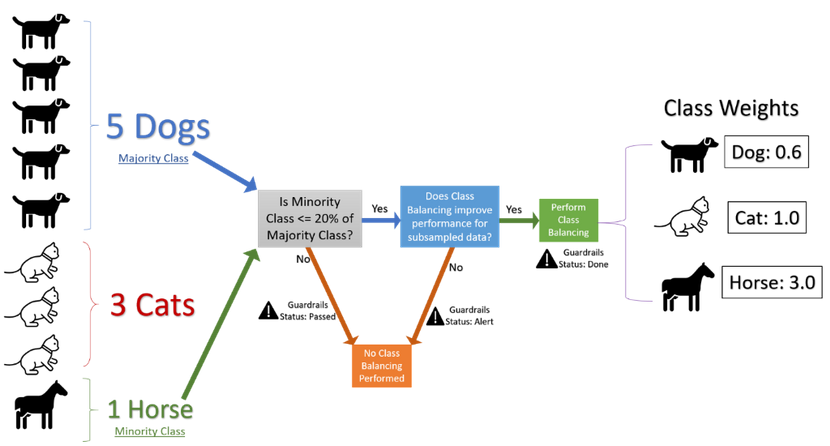
Without actually over–sampling the minority classes or under-sampling the majority classes, we can simply apply weights to the samples belonging to a class, in the inverse proportion of the number of samples representing that class (Fig 1 elaborates on this calculation). The intent is that the underrepresented classes would have a higher weight than the overrepresented ones.
We leverage this method because it allows us to apply balancing without increasing the size of the dataset, and hence without modifying memory requirements. Additionally, even if the classes are well balanced, applying this method would simply apply uniform weights, and in theory this method could be applied for all datasets.
To understand the impact of applying weights, let’s review the cost function J(θ) for a Logistic Regression classifier below. Here m is the number of training samples, x and y are the features and labels respectively, θ refers to the model parameters.

When we use the Weights for Class Balancing, the above cost function is modified to apply the class weight corresponding to every training sample, as shown below, where c(i) refers to the class weight for the ith training sample.

Using metrics sensitive to imbalance:
For dealing with class imbalance we recommend using AUC–weighted as the optimization metric for AutoML runs. There are several benefits, as follows:
- Any macro average will independently calculate the average for every class and then take the overall average, thus treating all classes equally; whereas a weighted average will calculate the contribution of every class based on the relative number of samples representing that class, and hence this is more robust to imbalance. Hence, we choose a weighted metric.
- Additionally, AUC-weighted is threshold invariant since it measures the area under the (ROC) curve over all possible classification thresholds by aggregating them.
- We also report several other metrics sensitive to class imbalance, such as F1, Precision, Recall and Matthew’s Correlation Coefficient.
Analysis and Experimentation:
After selecting the solution and the metric, we performed A/B tests on a variety of datasets with the following setup:
- Treatment Group: using weights for treating class imbalance
- Control Group: with no class balancing
- Significance Level (Type 1 Error probability) preselected as 5%
- H0 (Null Hypothesis): There is no impact on the performance of AutoML after applying weight-balancing
- Ha (Alternative Hypothesis): Weight balancing improves the performance of AutoML
- One tailed t-tests were performed by leveraging the sample statistics like sample standard deviation from multiple runs performed on the same datasets
Extensive A/B testing with this setup demonstrated that we could leverage subsampled data reliably to determine the effectiveness of our class balancing solution. Running A/B tests on subsampled data rather than the full data enabled us to reduce the overall execution time. These tests utilize sample statistics computed using binomial distribution and some heuristics. This helps us decide if balancing the classes using weights would improve the performance and the complete flow is described in the graphic below.
Additionally, AutoML’s Guardrails feature informs the user if their data exhibits imbalance and if the class balancing solution was applied.
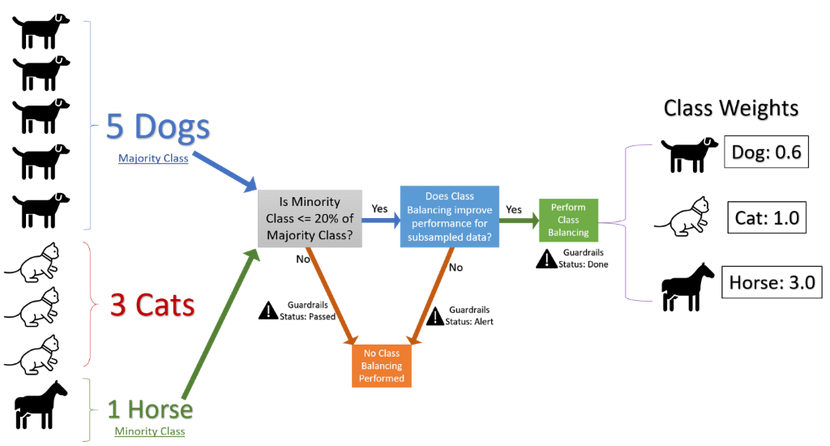
Figure 1: Flow chart describing the handling of imbalanced data within AutoML
If you’re getting started today with Microsoft Azure’s Automated Machine Learning, here are a couple of helpful links:
https://azure.microsoft.com/en-us/services/machine-learning/automatedml/
https://docs.microsoft.com/en-us/azure/machine-learning/concept-automated-ml#how-automated-ml-works
Contributors:
Arjun Singh – Data & Applied Scientist II
Anup Shirgaonkar – Principal Data & Applied Scientist
by Scott Muniz | Sep 1, 2020 | Uncategorized
This article is contributed. See the original author and article here.
A few years ago it was all the rage to talk about “Big Data”. Lots of descriptions of “Big Data” popped up, including the “V’s” (Variety, Velocity, Volume, etc.) that proved very helpful.
But I have my own definition:
Big Data is any data you can’t process in the time you want with the systems you have
– Uncle Buck’s Guide to Technology
Data professionals focused on learning technologies like Hadoop and Spark to ingest, process, and distribute large sets of data. This set of activities is often now called “Data Engineering”. I still teach this term when I talk about the new SQL Server 2019 Big Data Cluster platform.
We’ve moved on to talk about using all that data in applications of Artificial Intelligence (AI), Machine Learning (ML), and Deep Learning (DL). I teach this as part of the operationalizing function of the SQL Server Big Data Cluster.
(AI and ML tend to “top out” for the usefulness of amounts of data at a really high amount, but Deep Learning is always hungry for more data. )
But the “Big Data” moniker has gone largely silent – which means it’s not a thing any more, right?
No, that’s not right at all – Data Scientists were always rather baffled at having to explain “big” data, since the algorithms we use require statistically significant amounts of features and labels to work. For a Data Scientist, it’s always been just “data”. (Or data if that’s how you pronounce it)
So the industry is now catching up with those Data Science concepts. The term “Big Data” has died out in the Hype Cycle, but it is baked in to the AI, ML and DL applications.
Long story short: You still have to learn HDFS, Spark, and Distributed Storage / Computing. And we’ll help you do that here.
FYI – it’s OK to have catchy terms and ways of describing things at first – new industries always do that. Also, it really helps rake in the money for vendors that use the cool new term. Remember when everything was i-this and e-that? No? Well, everything was. And before that, it was all “electro” or “magna-” something or other. Of course, when I started in computing, we just used cards and teletypes, but that’s another blog.
by Scott Muniz | Sep 1, 2020 | Azure, Microsoft, Technology, Uncategorized
This article is contributed. See the original author and article here.
SQLBits 2020 is going digital this year – and, with less than a month away, the excitement for “the greatest data show” is only rising. It is the largest SQL Server and Microsoft Data Platform conference in Europe, bringing together customers, partners, and community members – this time as a fully virtual and interactive conference.
From September 29 to October 3, 2020, join the experts from the Microsoft SQL Server/ Azure SQL product groups for 5 days of learning and connecting with our SQL Server community.
To make your conference planning easy for you, I put together a list of the 2 pre-cons and 30+ sessions from the Azure Data team you won’t want to miss:
| Date |
Sessions |
Speaker(s) |
| PRE-CONS |
| 9/29/2020 |
The Azure SQL Workshop |
Bob Ward, Anna Hoffman |
| 9/30/2020 |
The SQL Server 2019 Workshop |
Bob Ward, Pedro Lopes, Anna Hoffman, Buck Woody |
| THURSDAY |
| 10/1/2020 |
SQL Server in Azure Virtual Machines reimagined |
Ajay Jagannathan |
| 10/1/2020 |
SQL Server to Azure SQL: Performance and Availability |
Anna Hoffman, Bob Ward |
| 10/1/2020 |
SQL Server 2019: The Modern Data Platform |
Bob Ward |
| 10/1/2020 |
Sandboxing SQL Server 2019 Big Data Clusters |
Daniel Coelho, Rahul Ajmera |
| 10/1/2020 |
Optimizing your Azure SQL Database workloads |
Denzil Ribeiro, Sanjay Mishra, Dimitri Furman |
| 10/1/2020 |
What’s New in SQL Tools for Developers |
Drew Skwiers-Koballa, Udeesha Gautam |
| 10/1/2020 |
Run rich confidential queries using Always Encrypted with secure enclaves |
Jakub Szymaszek |
| 10/1/2020 |
SQL Extensibility Architecture in the Machine Learning Platform |
Michelle Wallig |
| 10/1/2020 |
Optimize price-performance using Azure SQL Database serverless |
Morgan Oslake |
| 10/1/2020 |
SQL Server in Azure Virtual Machine reimagined |
Pam Lahoud |
| 10/1/2020 |
Query plans: a map to query performance analysis |
Pedro Lopes |
| 10/1/2020 |
10 DBA Tasks for Azure SQL: What’s Different from On-Prem |
Rie Irish |
| 10/1/2020 |
Azure Data Studio Features in 20 Minutes |
Vicky Harp |
| FRIDAY |
| 10/2/2020 |
Inside SQL Server on Kubernetes |
Bob Ward |
| 10/2/2020 |
An administrators guide to SQL Server 2019 BDC |
Buck Woody, Melony Qin |
| 10/2/2020 |
Azure SQL Hyperscale Deep Dive |
Denzil Ribeiro |
| 10/2/2020 |
New Azure AD authentication capabilities in Azure SQL |
Jakub Szymaszek |
| 10/2/2020 |
Improving Availability in SQL Server and Azure SQL Database with Accelerated Database Recovery and Resumable Operations |
Kevin Farlee |
| 10/2/2020 |
New Azure AD authentication capabilities in Azure SQL |
Mirek Sztajno |
| 10/2/2020 |
Azure SQL Managed Instance: A fully managed SQL Server in the cloud |
Mladen Andzic |
| 10/2/2020 |
Everything you need to know about storing strings in SQL Server and Azure SQL DB |
Pedro Lopes |
| 10/2/2020 |
SQL on Linux – What’s new |
Tejas Shah |
| SATURDAY |
| 10/3/2020 |
Azure SQL: What to use when |
Anna Hoffman |
| 10/3/2020 |
Artificial Intelligence, Machine Learning and Deep Learning |
Buck Woody |
| 10/3/2020 |
Practical Azure SQL for the Modern Developer |
Davide Mauri |
| 10/3/2020 |
Azure data services on Azure Arc |
James Rowland-Jones, Nellie Gustafsson |
| 10/3/2020 |
Notebooks in Azure Data Studio |
Julie Koesmarno, Alan Yu, Chris LaFreniere |
| 10/3/2020 |
Turbo-charge your SQL Server with In-Memory Database |
Kevin Farlee |
| 10/3/2020 |
Democratizing Machine Learning on the SQL Platform |
Michelle Wallig |
| 10/3/2020 |
Azure SQL and SQL Server: Path to an Intelligent Database |
Pedro Lopes |
| 10/3/2020 |
Network access controls for Azure SQL Database |
Rohit Nayak |
| 10/3/2020 |
Azure SQL Database Edge – Optimized SQL Engine for Edge/IoT Computing |
Sourabh Agaral |
| 10/3/2020 |
App Modernization and Migration from End to end, using data migration tools and Azure SQL |
Venkata Raj Pochiraju, Mukesh Kumar |
| 10/3/2020 |
Database modernization best practices and lessons learned through customer engagements |
Venkata Raj Pochiraju, Mukesh Kumar |
| 10/3/2020 |
Coming Soon: Upcoming SQL Tools Features |
Vicky Harp |
Hope to see you there! Tweet us at @AzureSQL for sessions you are most excited about.


Recent Comments