This article is contributed. See the original author and article here.
Fujitsu Limited is a Japanese multinational information and communications technology equipment and services company, established in 1935 and headquartered in Tokyo. They are a world-leading digital transformation partner. Using a wide portfolio of trusted technology services, solutions and products, they work with customers to co-create solutions that help them on their journey to enterprise-wide digitalization.
Fujitsu Limited operates on the global market and it provides services to companies all around the world. As such, the company realizes that communication barriers caused by different languages and disabilities can have a significant impact on the life of many people. With the impact of COVID-19, which severely reduced the ability to interact with people in-person, this problem has become more severe, due to the high volume of remote meetings and interactions.
Introducing LiveTalk
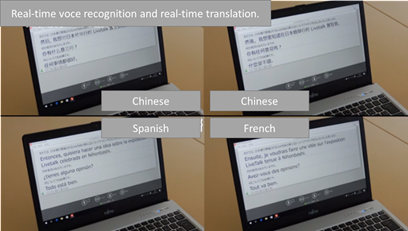
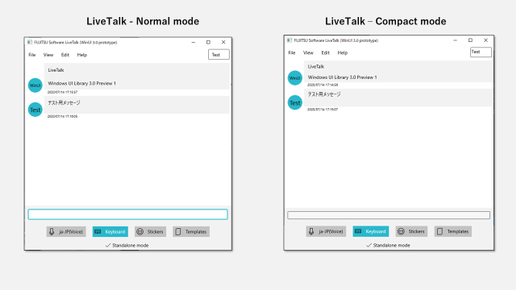
To overcome this challenge, Fujitsu Limited has developed an application called LiveTalk, which enables everyone to communicate without barriers. LiveTalk is able to instantly turn anyone’s conversation into text in real-time, no matter where they come from. LiveTalk, in fact, supports 43 languages, including Japanese and Chinese. It was designed with a real time voice recognition feature and real time subtitles for both in person meetings, as well as remote meetings and remote classrooms. It has been built to facilitate communication between deaf and hard of hearing people and hearing people, but its capabilities extend to real time language translation as well.
The application is targeting a very broad audience: from very young children to adults; from people who are learning Japanese as a second language to people with disabilities. The breadth of this project has introduced a few challenges:
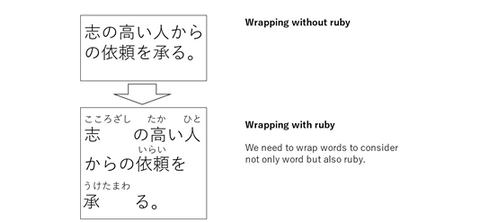
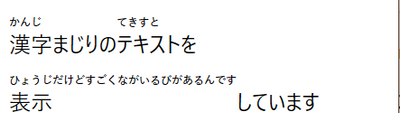
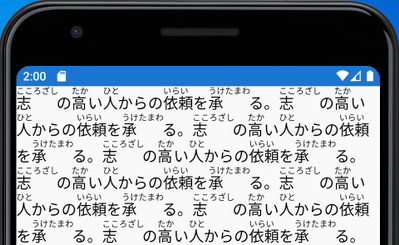
Japanese is based on three writing systems: hiragana, katakana andkanji. To make Japanese easier to learn, especially for very young children or people who wants to learn it as second language, Japanese includes special characters called ruby, which indicate how to pronounce the text. This makes the operation to render Japanese text in the application quite complex, because words must be wrapped considering the space taken by the Ruby feature.
Accessibility is a key requirement. The application must provide features like support to high-contrast mode, so that it can be proficiently used also by people with disabilities.
Since the audience can have different levels of familiarity with technology, the installation and update experience must be as simple as possible.
Fujitsu Limited was able to address all these challenges by leveraging WinUI, MSIX and Xamarin as foundation to the application.
Building a first-class experience with WinUI
WinUI was the natural choice to build a first-class experience on Windows, which could tackle all the challenges that the development team needed to address.
WinUI provides a powerful and extensible UI system, which enables developers to tailor the user experience based on their needs. The flexibility of the XAML framework enabled Fujitsu Limited to customize the TextBlock control, by integrating their own custom algorithm to render Ruby characters.
The application is now able to recognize the speech of the user and convert it into text using the standard Japanese characters. WinUI will do all the heavy work to add the Ruby characters on top and take in account the different spacing.
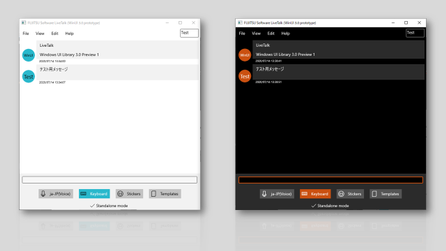
Another WinUI feature the development team took advantage of is built-in accessibility support. All the controls included in WinUI provides first-in-class accessibility features, by recognizing and adapting to the accessibility options that are available in Windows 10. Thanks to this feature, Fujitsu Limited has been quickly able to make the application theme aware, so that it can properly adapt to users who are using a light, dark or high contrast theme in Windows 10.
In the end, due to the flexible nature of LiveTalk, WinUI was the perfect choice to provide a user experience that spans across all the different scenarios where the app is used: from a traditional PC controlled by mouse & keyboard to a touch-enabled device like a 2-in-1 or a tablet. Thanks to the built-in support for multiple input experiences, Fujitsu Limited was able to quickly introduce specific modes to better support mouse, keyboard and touch.
Deploy and update the application with confidence using MSIX
MSIX, the innovative deployment solution for desktop applications on Windows 10, has helped Fujitsu Limited to provide a seamless and simple solution for all their users: consumers, enterprises, schools, etc.
By packaging the application with MSIX, Fujitsu Limited has published LiveTalk on the Microsoft Store, which enables a one-click experience to acquire the application. Additionally, thanks to the built-in automatic updates feature, users won’t have to take any manual action to make sure they’re using the latest and greatest version of LiveTalk. Windows 10 will take care of updating it automatically every time the Fujitsu Limited development team publishes a new version.
Reaching all the users with Xamarin
What makes LiveTalk a very powerful solution is its flexibility: it can be used during a live conference; during a remote meeting; or even just during an informal in-person chat with a colleague. As such, Fujitsu Limited needed to go outside the desktop to reach users wherever they are. Xamarin was the natural choice to bring the Windows application also to other platforms. By sharing a similar UI framework and the same .NET ecosystem as WinUI, Fujitsu Limited was able to reuse most of the investments they made to bring the application also on Android and iOS, including support for Ruby characters.
Microsoft understood our intentions better than we could and provided appropriate and specific advice. As a result, we were able to outperform our expectations for Ruby, minimize the impact of increased Ruby processing time, and plan that we can provide to the market with confidence. Regarding WinUI, the current situation and future vision became clear, and we were able to align Microsoft’s WinUI roadmap with our product roadmap.
Conclusion
Fujitsu Limited has now planned to align the product roadmap of LiveTalk with the roadmaps of WinUI and .NET. This choice has enabled the development team to have a clear plan on the evolution of the app. It will help them to continue researching new technologies for their product and to be confident that they will be able to quickly integrate all the latest enhancements in the Windows ecosystem.
This article is contributed. See the original author and article here.
If you peek inside your Microsoft Azure environment, you’ll see two different kinds of roles – Azure roles and Azure AD roles. Lets see how Tailwind Traders matches these roles to maintain their “least privilege” security principle.
Understanding the Microsoft Azure environment
When Tailwind Traders creates their first Microsoft Azure account, they receive an environment (also known as a tenant or tenancy) which contains:
One Azure Active Directory, with the user account for the owner of the environment.
One subscription, which is the billing entity for the resources they will create. This could be a trial or free subscription, an offer subscription like the Azure benefit for Visual Studio, an organization’s Enterprise Agreement subscription or a Pay-as-you-go subscription with your nominated credit card.
From here, they will create other Azure users inside Azure Active Directory, as well as other types of identities such as service principals, and they’ll add their domain name to this directory. They might even use this directory to synchronize accounts from an existing on-premises Active Directory environment. And they’ll create Azure resources (virtual machines, storage and networking, functions, AI & machine learning applications etc.) inside their subscription.
They may also create other directories and other subscriptions, but for now we’ll keep it simple at just one of each.
Organizational decisions regarding roles and access
Tailwind Traders always works on a “least privilege” principle – that is, all users have the lowest access rights needed to do their jobs. If someone works in a Helpdesk, they should be able to check that Azure resources are functioning and healthy, to help them troubleshoot problem calls, but they shouldn’t be able to create new resources inside Azure. In addition, some people in the Helpdesk are allowed to reset user passwords. Mapping these job functions to access requirements may be something that Tailwind Traders has already completed for their existing non-Cloud systems, that needs extending into Microsoft Azure.
Exploring the roles and their functions
AD roles
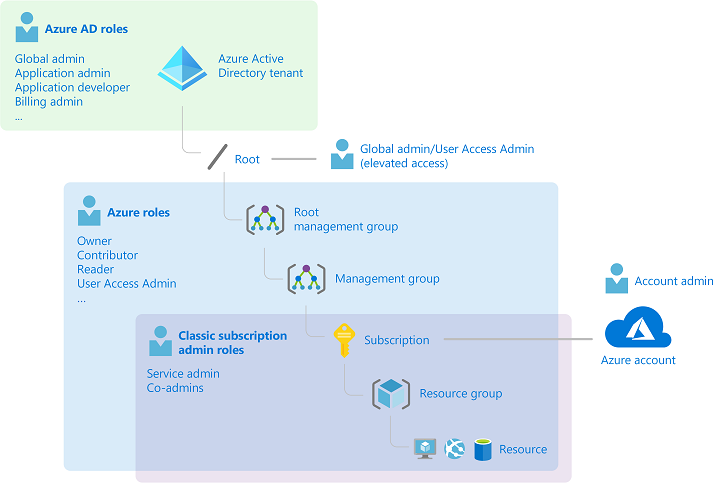
Starting with access to their Azure resources, Tailwind Traders reviews which of the built-in roles will give their Helpdesk staff the appropriate level of access. A role is made up of a name and a set of permissions. Each resource contains an Access Control (Identity and Access Management) blade which lists who (user or group, service principal or managed identity) has been assigned to which role for that resource. Resources can also inherit these role-based access control settings from their parent resource group, subscription, management group, Azure policy or blueprint.
The four fundamental roles are: Owner – Full rights to change the resource and to change the access control to grant permissions to other users. Contributor – Full rights to change the resource, but not able to change the access control. Reader – Read-only access to the resource User Access Administrator – No access to the resource except the ability to change the access control.
There’s also an extensive range of other, more detailed built-in roles that Tailwind Traders can use for specific resource types and work tasks. For example, the Virtual Machine Contributor can only manage Azure virtual machine resources and cannot change storage accounts. Tailwind Traders can also create their own custom roles.
For our Helpdesk scenario, Tailwind Traders will assign the Helpdesk Staff group to the Reader role.
For a full list of the built-in roles and their permissions, visit Azure built-in roles.
Note: Role-based access control applies when someone tries to action a task against a resource using a method that hits the Azure Resource Manager. This does not apply to settings inside a virtual machine operating system or to application access.
Azure AD roles
Azure Active Directory has its own, unique set of roles, specific to identity and billing management. This means that Tailwind Traders can control who has permission to make changes to these tenant-wide components, without needed to grant them access to other Azure resources. There’s also a cross-over here with Microsoft 365, which uses Azure Active Directory as its Identity directory. These roles will be familiar to users of the Microsoft 365 Admin Center.
The Azure AD roles include: Global administrator – the highest level of access, including the ability to grant administrator access to other users and to reset other administrator’s passwords. User administrator – can create and manage users and groups, and can reset passwords for users, Helpdesk administrators and User administrators. Helpdesk administrator – can change the password for users who don’t have an administrator role and they can invalidate refresh tokens, which forces users to sign back in again. Billing Administrator – can make purchases and manage subscriptions.
For Tailwind Traders, the built-in Helpdesk administrator role is perfect. An advantage of using a built-in role is that it is maintained by Microsoft – if a detailed permission has a name change, for example, Microsoft will update all the built-in roles that have it listed, to match. In addition, users can have both Azure roles and Azure AD roles, giving them access to user administration and to Azure resources.
Azure roles and Azure AD roles mapped to Azure components
What about temporary elevated access?
Late one night, the helpdesk gets a call that a system is unavailable. On checking, there are some monitoring alerts that point to an Azure virtual machine that is currently stopped. A quick phone call to the sleepy Level 3 support tech and “try starting it” is the suggested approach. It would be great if the Helpdesk person could start the VM but that would require access that’s greater than their current Reader role, but only for the time needed to try starting this virtual machine.
The user can then activate the role and either provide Multi Factor Authentication, request manual approval or enter a business reason for the activation.
The user is then granted the role assignment and its associated permissions for a pre-configured time period.
In this case, Tailwind Traders could protect the Virtual Machine Contributor role with PIM, enabling on-call Helpdesk staff to elevate their access so they can start the Virtual Machine. This needs to be configured in advanced, but can be activated when required by the Helpdesk staff entering a business reason to justify it (which could include an internal support ticket number, for example). Or, Tailwind Traders could create a custom role with a subset of the Virtual Machine Contributor permissions (for example, Microsoft.Compute/virtualMachines/start/action) and protect that role with PIM, further refining what the Helpdesk staff would have access to do in their elevated role.
Regardless of how your organization is structured, take a look at Azure roles, Azure AD roles and Privileged Identity Management to remove widespread, high levels of access to your cloud resources and identities.
This article is contributed. See the original author and article here.
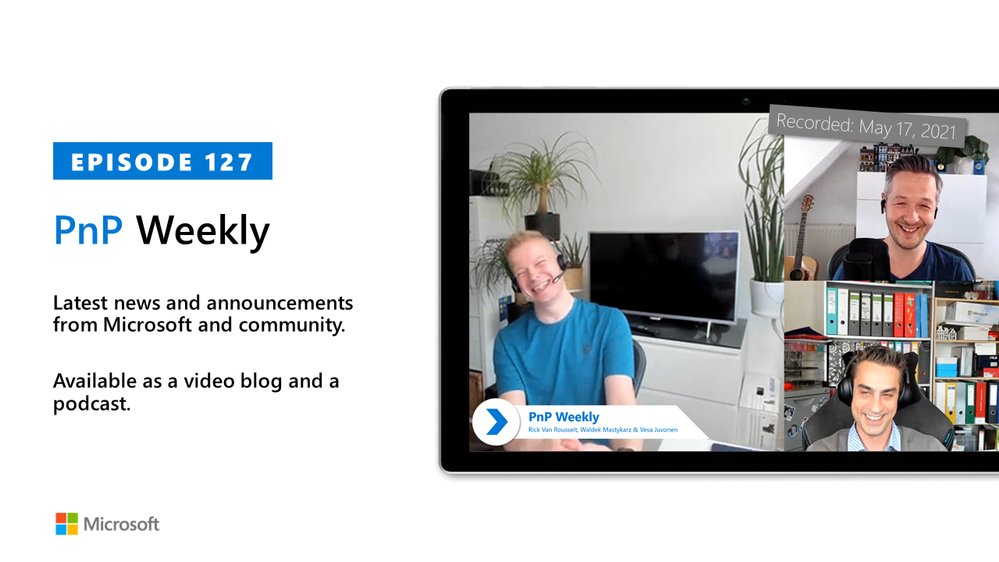
In this installment of the weekly discussion revolving around the latest news and topics on Microsoft 365, hosts – Vesa Juvonen (Microsoft) | @vesajuvonen, Waldek Mastykarz (Microsoft) | @waldekm are joined by Belgium-based, MVP, author, Microsoft Teams developer, and CTO with Advantive, Rick Van Rousselt | @RickVanRousselt. Topics discussed in this session can be summarized with one word. Change! The leap from Teams tab (iFrame) to Extension (Bot Framework) development, or transition from Skype to Teams, in the customer’s mind. Many customers are now circling back to Microsoft partners for guidance on optimizing Microsoft 365 and Microsoft Teams, yet interestingly at differing rates Worldwide. Clearly in part, adoption is cultural. As well, the partner business has changed from having a development to a consultative focus, from selling and executing long term to short term projects, and the staff from specialists to generalists. The pace of change is fast, challenging and rewarding. Case in point on the pace of change – Microsoft and the PnP Community delivered a box busting 29 articles in this last week! This session was recorded on Monday, May 17, 2021.
Please remember to keep on providing us feedback on how we can help on this journey. We always welcome feedback on making the community more inclusive and diverse.
This episode was recorded on Monday, May 17, 2021.
These videos and podcasts are published each week and are intended to be roughly 45 – 60 minutes in length. Please do give us feedback on this video and podcast series and also do let us know if you have done something cool/useful so that we can cover that in the next weekly summary! The easiest way to let us know is to share your work on Twitter and add the hashtag#PnPWeekly. We are always on the lookout for refreshingly new content. “Sharing is caring!”
Here are all the links and people mentioned in this recording. Thanks, everyone for your contributions to the community!
Want to ask a question or in general engage with the community – Add a note in the Microsoft 365 PnP Community hub athttps://aka.ms/m365pnp/community
Check out all the great community calls, SDKs, and tooling for Microsoft 365 fromhttps://aka.ms/m365pnp
If you’d like to hear from a specific community member in an upcoming recording and/or have specific questions for Microsoft 365 engineering or visitors – please let us know. We will do our best to address your requests or questions.
This article is contributed. See the original author and article here.
The HPC SKUs (HBv2 and HC) are now generally available in the Azure Government Virginia region. Customers can leverage this new capability for any unclassified workload including ITAR and FedRAMP High. These are designed to deliver cutting-edge performance for complex engineering and scientific workloads.
HBv2-series
HBv2-series VMs are optimized for applications driven by memory bandwidth, such as fluid dynamics, explicit finite element analysis, and weather modeling. HB VMs feature 120 AMD EPYC™ 7002-series CPU cores, 4 GB of RAM per CPU core, and no hyperthreading. HBv2-series VMs provide up to 350 GB/sec of memory bandwidth, which is 45-50 percent faster than x86 alternatives and 3x faster than what most HPC customers have in their data centers today. HBv2-series VMs also feature 200 Gb/sec HDR InfiniBand from our technology partners Mellanox.
Size
CPU cores
Memory: GB
Memory per CPU Core: GB
Local SSD: GiB
RDMA network
Azure network
Standard_HB120rs
120
480 GB
4 GB
1.6 TB
200 Gbps
40 Gbps
‘r’ denotes support for RDMA. ‘s’ denotes support for Premium SSD disks.
HC-series
HC-series VMs are optimized for applications driven by dense computation, such as implicit finite element analysis, reservoir simulation, and computational chemistry. HC VMs feature 44 Intel Xeon Platinum 8168 processor cores, 8 GB of RAM per CPU core, and no hyperthreading. HC-series VMs support Intel’s rich ecosystem of software tools such as the Intel Math Kernel Library and feature an all-cores clock speed greater than 3 GHz for most workloads. HC-series VMs also feature 100 Gb/sec EDR InfiniBand with support for standard Mellanox OFED drivers and all MPI types and versions.
Size
CPU cores
Memory: GB
Memory per CPU Core: GB
Local SSD: GiB
RDMA network
Azure network
Standard_HCrs
44
352 GB
8 GB
700 GB
100 Gbps
40 Gbps
‘r’ denotes support for RDMA. ‘s’ denotes support for Premium SSD disks.
Customers can accelerate their HC/HBv2 deployments with a variety of resources optimized and pre-configured by the Azure HPC team. Our pre-built HPC image for CentOS is tuned for optimal performance and bundles key HPC tools like various MPI libraries, compilers, and more. The AzureHPC Project helps customers deploy an end-to-end Azure HPC environment reliably and quickly, and includes deployment scripts for setting up building blocks for networking, compute, schedulers, and storage. Also included is a growing list of tutorials for running HPC applications themselves.
For customers familiar with HPC schedulers and who would like to use these with HBv2/HC Virtual Machines, Azure CycleCloud is the simplest way to orchestrate autoscaling clusters. Azure CycleCloud supports schedulers such as Slurm, PBSPro, LSF, GridEngine, and HTCondor, and enables hybrid deployments for customers wishing to pair HBv2/HC Virtual Machines with their existing on-premises clusters. The new H-series Virtual Machines will also be supported by Azure Batch for cloud-native batch processing. HBv2/HC Virtual Machines will be available to all Azure platform partners.
You can also use this learning module that can guide you on how to choose the right SKU for your HPC workload and optimize your tightly coupled jobs on Azure.
Azure is the only cloud platform that offers VM instances with InfiniBand-enabled hardware. This provides a significant performance advantage. Below you can find some of the published performance results using the HBv2/HC:
If you’re a current customer interested in using our new VMs to run your HPC workloads, you can request a H-Series quota via the Azure Government portal.
This article is contributed. See the original author and article here.
This guest blog was written by Mario López,Innovation Team Lead in Bravent and a Microsoft Certified Trainer (MCT) as part of the Humans of Mixed Reality series. He shares his passion about Mixed Reality and how the companies can integrate it.
Today’s reality is shifting – now everything is connected to the internet with gadgets for pretty much everything. Our car gives us directions and the weather of our destination, our fridge lets us know when it’s time to do groceries, and a slew of other different devices now help us with many things and help us stay productive. As far as we know, life is easier with the Internet.
This new reality has also made an impact on the way companies work and their productivity. For example, Artificial Intelligence and Machine Learning can be implemented in several processes to automate tasks like customer service or even machinery maintenance.
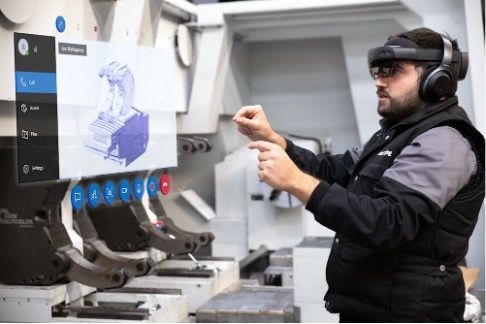
Nevertheless, although we all know that digital transformation is a must for every kind of business, the COVID-19 pandemic has created a stark contrast in the before and after version of implementation of new technologies. Mixed Reality business applications like Dynamics 365 Remote Assist withHoloLens 2 has helped a lot of businesses improve their productivity and cope with complex challenges that the pandemic brought on. For example, now companies can leverage remote expert support without having to fly anyone across borders, or even conduct remote audits and inspections!
I remember the first time that I tried on the first generation of HoloLens back in 2016. The experience was completely incredible – I was very impressed with how this device was able to interact with the real-world environment and how the user was able to see holograms. But this was only the beginning – in 2019, the HoloLens 2 was released, and everything changed. I was excited to witness the evolution of mixed reality happen, and the dramatic impact it has on our lives.
This new version was completely improved with more comfortable interactions, wider field of vision (FOV), improved hand-tracking, etc. Most importantly, Microsoft decided to focus all of these improvements and features for the need of enterprises and key industries like manufacturing, airspace, military and more.
This new version and updated version is carefully tailored to be used in a business manufacturing environment. Microsoft offers us its new suite of Mixed Reality business applications within Dynamics 365:
Dynamics 365 Remote Assist: a Mixed Reality tool to gain assistance from remote experts from any part of the world, with instant, real-time collaboration and 3D holographic annotations right within one’s physical work environment.
Dynamics 365 Guides: a Mixed Reality tool to do guided, step-by-step training for employees with digital overlays.
Dynamics 365 Product Visualize: a Mixed Reality tool for showcasing and customizing products.
All of these applications are readily available from the Microsoft Store, and you just need to purchase the license to use it. In fact, for Dynamics 365 Remote Assist, you don’t even need to purchase a head-mounted device; you can use it on iOS and Android mobile devices too! Also, its synchronization with Microsoft Teams makes it easier for users to adapt to.
Here in Spain, a few companies like Bravent where I work, have experimented with the use of Mixed Reality and HoloLens for our own clients. In the last year, due to the pandemic, we were able to implement it on a special company.
Gurutzpe is one of the biggest manufacturing companies in the north side of Spain. At the time of the pandemic, they were already an innovative business, however, Mixed Reality was not on their radar. The main part of their business was to provide full-time assistance to their end clients by dispatching engineers to the client facility and helping solve any issue. Due to the traveling restrictions, this became an important- and seemingly impossible- challenge to face.
When we show them all the potential of HoloLens and Mixed Reality, there were no hesitations. Bringing Dynamics 365 Remote Assist on HoloLens 2 and leveraging Mixed Reality enabled them to assist their clients from their office to a client that is in any place of the world.
The implementation of this helped them not only for their main business use case, but also on the cost optimization (significant reduction) of traveling and its associated expenses. Additionally, now they are able to seamlessly provide remote expert assistance any time and solve problems faster than before, enhancing their customers’ experience.
I am very proud to be part of this kind of projects and very excited about the future that awaits us.
If there’s one message for you to take away, it’s this: Mixed reality is no longer a thing of the future, it is the present.
This technology is more powerful than ever and the value that can brings to a company is immense. Certainly, they will continue to improve day by day and new applications will appear that provide even more value, so betting on this technology will be a guaranteed success for any business. I encourage you to experience this for yourself – you will be amazed!

![[Guest Blog] How to take your company to the next level using Mixed Reality](https://www.drware.com/wp-content/uploads/2021/05/fb_image-124-999x675.jpeg)


Recent Comments