by Contributed | May 18, 2021 | Dynamics 365, Microsoft 365, Technology
This article is contributed. See the original author and article here.
Today marks the preview release of Microsoft Dynamics 365 Intelligent Order Management, a new application that enables organizations to consistently deliver on order promises by proactively overcoming disruptions. Now, your organization can intelligently orchestrate fulfillment and automate it with a rule-based system that leverages real-time inventory and AI.
In addition, you can adapt quickly to meet future order volumes and fulfillment complexities by supporting new order intake, fulfillment, and delivery partners with pre-built connectors. With support for the latest fulfillment methods, like curbside pickup and Buy Online, Pick Up In-Store (BOPIS), you can constantly evolve order fulfillment to meet shopper’s preferences.
Leverage out-of-the-box connectors to intelligently scale, orchestrate, and fulfill orders
Digital commerce has fueled consumer expectations for true omnichannel experiences, with greater choice, speed, and flexibility in how people buy and receive purchases.
To help you adapt your operations to constantly deliver exceptional experiences, Dynamics 365 Intelligent Order Management offers the flexibility to integrate with existing order infrastructures, such as enterprise resource planning (ERP) and customer relationship management (CRM) systems, and external partner systems through microservice architecture and API integrations. More than 200 configurable, pre-built connectors seamlessly connect you to the solutions you need for omnichannel order intake, cross-channel order fulfillment and delivery, and rule-based order orchestration actions.
Powerful connections
Intelligent Order Management is a standalone SaaS solution with no dependencies on other Dynamics 365 applications. It has an open, modular, and interoperable architecture, so your business can leverage an expansive ecosystem of order source systems such as online e-commerce marketplaces, mobile apps, and social commerce alongside traditional ordering channels such as electronic data interchange (EDI) or brick and mortar POS.
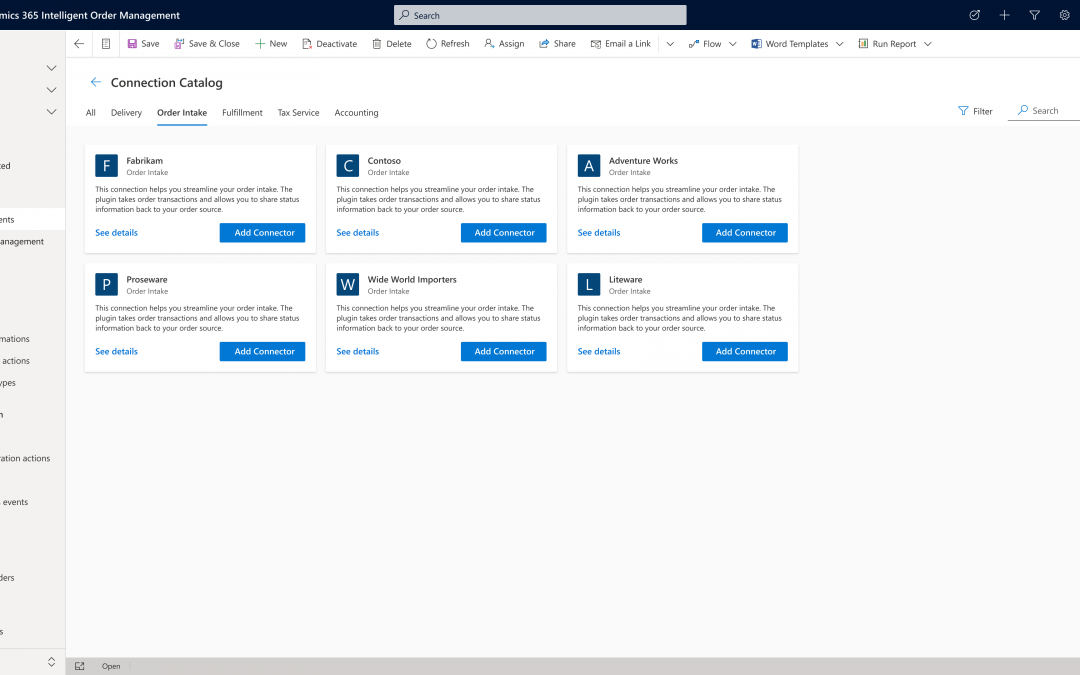
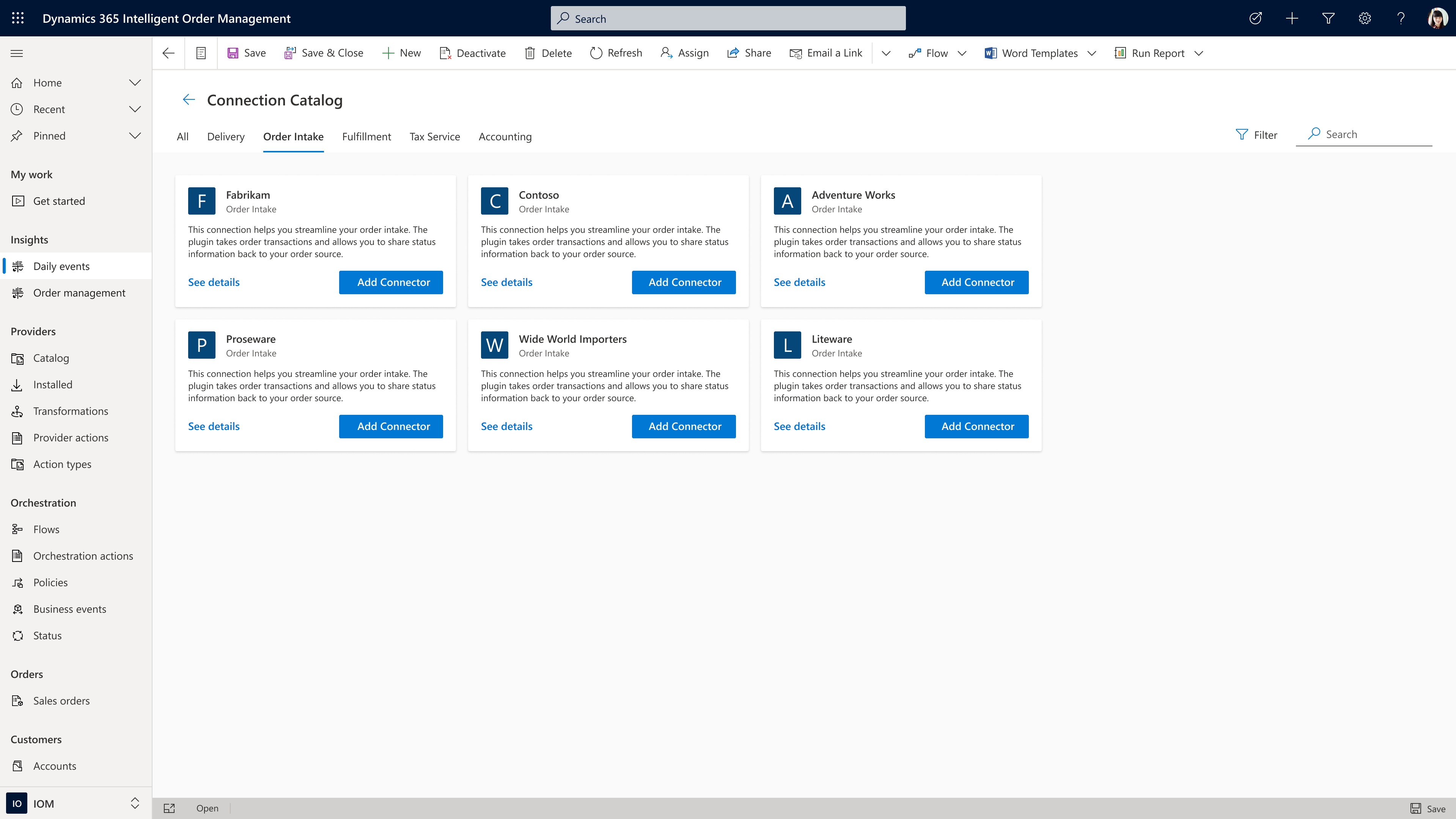
Many retailers, distributors, and manufacturers are working to overcome the challenges of adapting legacy order systems to new ways of operating. A significant benefit of Intelligent Order Management is that it enables business users to visually configure order intake from many of the most common sources by leveraging pre-built connectors in a low-code or no-code application, making rapid implementation and integration possible.
Order source and orchestration
While Intelligent Order Management seamlessly integrates with other Dynamics 365 business applications, it also integrates with applications that you may already use or that you plan to adopt as you transform your business processes. Intelligent Order Management can easily pass through B2C order flows from third-party applications such as BigCommerce with minimal validation at order capture and B2B order flows from EDI intake applications such as Orderful using context-driven validation actions, such as requiring a credit check before passing an order on to fulfillment.
Let’s now look at some of the processes within order source and orchestration.
Automated payments
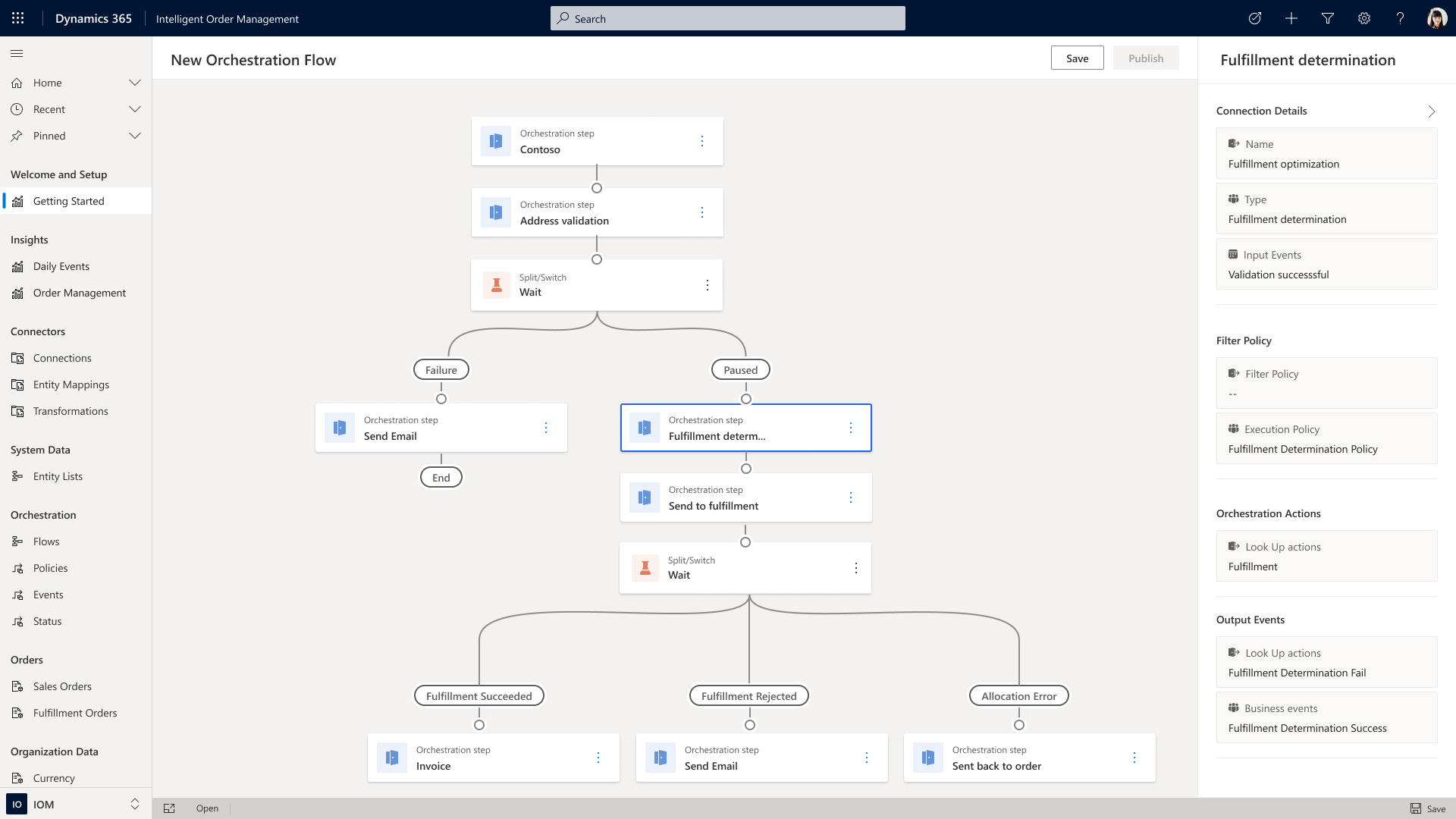
Payment integration is also possible, allowing you to take credit card payments at order intake, finalize payment later based on fulfillment status, or trigger an invoice to be sent to a business application when routing orders from on-account sales. These types of event-driven actions can be incorporated by using the built-in orchestration designer, which allows users to drag and compose order flows using an intuitive design interface.
Dynamic pricing
Regardless of the source, once the order is accepted and received by Intelligent Order Management, additional rule-based validations can be orchestrated depending on your business’s specific needs. Utilizing pre-built connectors to leading applications such as Flintfox, advanced pricing, rebate, and commissions management can be accomplished quickly and efficiently.
“Intelligent Order Management is partnering with service providers like Flintfox to provide real-time, accurate, and dynamic pricing. Utilizing the Flintfox RMx Pricing solution, all orders, regardless of source, or fulfillment, will always receive the right price, thereby reducing disputes, credits, and administration pain caused by pricing mistakes. The combination of Flintfox RMx with its advanced but easy-to-use, Pricing and Promotion Management solution, and Intelligent Order Management will further enable centralized management of pricing across omni-channels, regardless of the ultimate order source system or device.”
Tax compliance
Another critical part of order management is tax determination and compliance. Intelligent Order Management gives you the ability to connect to third-party tax engines to automate the calculation of tax rates and rules based on geolocation and product classification, file and remit tax payments to jurisdictions, automatically omit tax from exempt sales and manage exception documentation. Because you can select from several pre-built partner connectors, Intelligent Order Management provides your business with the means to quickly scale order tax compliance at a global level for sales tax, value-added tax, seller’s use tax, lodging and occupancy tax, and consumer use tax.
“Businesses today are facing intense competitive pressures to quickly evolve into omnichannel organizations, and driving efficiency in their order management processes is a key factor for maintaining smooth operations and ultimately achieving success with digital commerce,” said Sanjay Parthasarathy, Chief Product Officer at Avalara. “We’re excited to work with Microsoft in an enhanced partnership to co-develop solutions for their Dynamics 365 Intelligent Order Management application, providing our mutual customers with an industry-leading solution that solves for automated, friction-free order orchestration in the march to omnichannel success.”
Fulfillment and delivery
Intelligent Order Management also helps you direct orders to the correct node in your supply chain by combining orchestrated order flows with inventory and fulfillment systems. Pre-built connectors allow you to quickly add a range of logistic strategies to employ when working to satisfy your customer’s demand. For example, if you don’t want to use the real-time inventory visibility capability within Intelligent Order Management, you can create order process flows that validate delivery dates through your own in-house inventory application or using a pre-built connector to check that items are available to promise before accepting any order.
Sourcing and allocation
If the item isn’t in stock, Intelligent Order Management allows you to incorporate sourcing rules as a means of providing a flexible framework to automate decision-making on how to fulfill an order using make or buy. Similarly, if stock is limited, you may also use allocation rules to automate decision-making on which orders will be filled or to ring-fence inventory for specific channels or business goals.
Supply chain management
Another pre-built connector to consider is Dynamics 365 Supply Chain Management solution. Though Intelligent Order Management is a stand-alone solution that requires no additional Microsoft Dynamics 365 modules, there are several benefits to connecting to our Supply Chain Management Solution. The connection allows for deeper integration with both manufacturing, in the form of real-time production planning that allows for better synchronization of supply with order demand, and with distribution planning that utilizes an integrated warehouse management system.
Validation rules
Orders coming in from many different locations at scale may have inconsistent data due to limited validation in the source system. The use of condition-based rules, such as a minimum order quantity check, ensures that you accept only orders that comply with your requirements. After validation, Intelligent Order Management’s fulfillment optimization engine can evaluate the order for rules such as the least distance or least cost to find the best fulfillment node in your connected network.
Freight rating and returns
You can also use the platform’s extension capabilities to connect your existing freight rating systems into an order orchestration process. Additionally, Intelligent Order Management can handle reverse logistics so that you can incorporate decision logic into return order flows that will facilitate and automate return orders to stores, fulfillment nodes, or to a service center. And because Intelligent Order Management has no limits on the number of fulfillment nodes you can add, the application is suitable for organizations of all sizes.
Reference API
Intelligent Order Management is designed to be independent of the business applications you are using while also allowing you to easily share data with other business applications. Our reference architecture will enable you to build the needed connection points from order source and orchestrations through to fulfillment and delivery. If we do not have a pre-built partner connector to an application you want to use, we have a reference API that can be used to connect to the system you require.
Take the next step
Learn more about how you can optimize fulfillment by watching the on-demand video, “Intelligent fulfillment orchestration for optimized delivery”, from our recent Microsoft Business Applications Summit event and sign up for a free trial of Microsoft Dynamics 365 Intelligent Order Management. Join the community to engage with our experts on Dynamics 365 Intelligent Order Management, and feel free to contact us at D365OMS@microsoft.com with questions or to learn more.
The post Microsoft Dynamics 365 Intelligent Order Management Preview now available appeared first on Microsoft Dynamics 365 Blog.
Brought to you by Dr. Ware, Microsoft Office 365 Silver Partner, Charleston SC.
by Contributed | May 18, 2021 | Technology
This article is contributed. See the original author and article here.
Today we are excited to announce the addition three new courses to the Microsoft Learn for Educators program:
- SC-900 – Microsoft Security, Compliance, and Identity Fundamentals
- MB-910 – Dynamics 365 Fundamentals Customer Engagement Apps (CRM)
- MB-920 – Dynamics 365 Fundamentals Finance and Operations Apps (ERP)
Among the others, the addition of SC-900 – Microsoft Security, Compliance, and Identity Fundamentals to our portfolio of offerings in the higher education space reflects the growth of these skills in the marketplace and our ongoing commitment to supporting faculty in delivering cutting-edge technical instruction to students to prepare them for future jobs.
By all indicators, the cybersecurity field is one of the largest growth areas in today’s corporate landscape – and it should be. According to TechJury reporting on 2020 cyber-attack statistics, this is what a day in cybersecurity looked like in 2020:
- Globally, 30,000 daily website attacks
- With every passing second, 75 records went missing worldwide
- Every 39 seconds, there was a new attack somewhere on the web
- An average of around 24,000 malicious mobile apps were blocked daily on the Internet
The result? 64% of companies worldwide experienced at least one form of a cyber-attack in 2020 alone.
Companies need to protect themselves by having appropriately skilled employees to help them keep their businesses and their data secure. With explosive growth in demand, cybersecurity is a great area for companies to acquire new talent. As students prepare to enter the workforce in today’s environment, they’re searching for ways to stand out. By bringing SC-900 – Microsoft Security, Compliance, and Identity Fundamentals into your curriculum you will be supporting students in the acquisition of cybersecurity skills and industry-recognized certifications to do just that – stand out.
SC-900 is targeted to those looking to familiarize themselves with the fundamentals of security, compliance, and identity (SCI) across cloud-based and related Microsoft services. The breath of the topics covered in SC-900 reflects the complex nature of the cybersecurity discipline as it involves skills in areas like information or network security, cryptography, identity management, and information assurance.
The cybersecurity job market
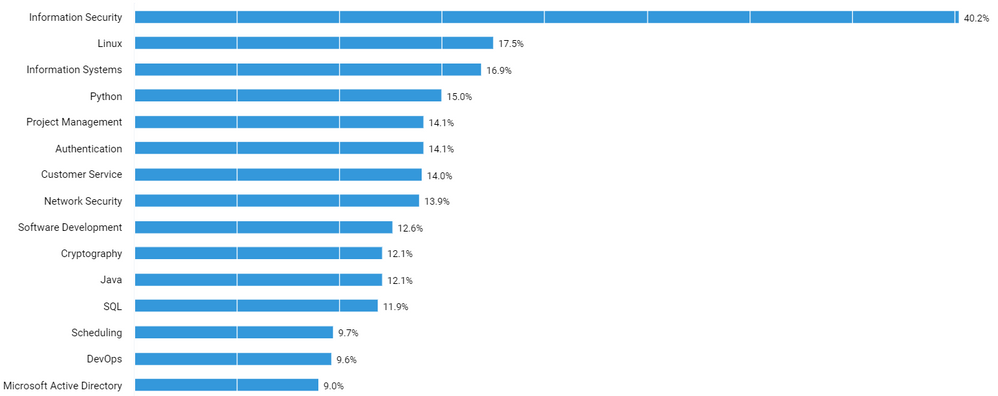
In order to understand how a course like SC-900 might help college students in the job market, we used data from job postings in the United States to examine areas of technical skill growth, demand, and salary data. This analysis was conducted with Labor Insight, an industry data set from Burning Glass for understanding the job market. Figure 1 represents the top 15 skills listed for cybersecurity job postings in the US. It’s a mix of cybersecurity skills, common technical skills, and business skills.
Figure 1. Source: Analytics compiled through Labor Insight from Burning Glass.
Cybersecurity is evolving as its own discipline with security specific occupations; however, the discipline of cybersecurity is applicable to many more traditional titles in the marketplace. Again, relying on Labor Insight from Burning Glass, Figure 2 reflects the top occupations by % for cybersecurity job postings in the US in the past 12 months.
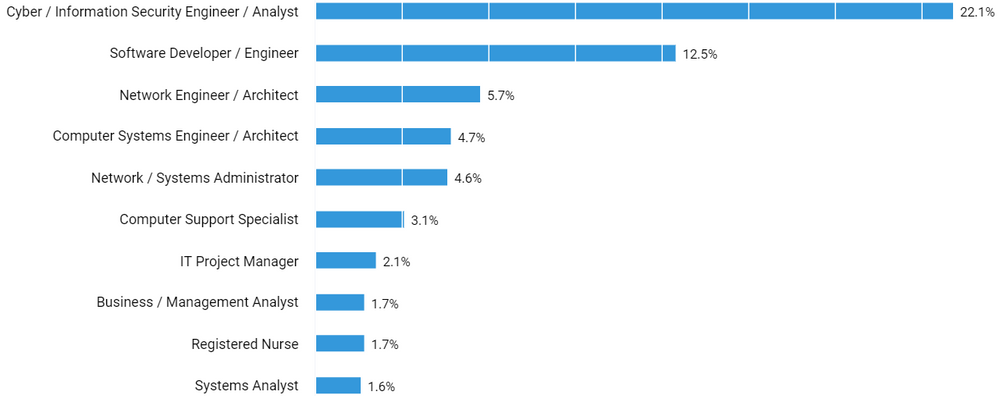
Figure 2. Source: Analytics compiled through Labor Insight from Burning Glass.
And, although there is a rich technical and business consulting industry around cybersecurity itself, every industry needs cybersecurity expertise. We are seeing demand for cybersecurity skills across all industries. From banking to healthcare to insurance to manufacturing, all industries are investing in talent to help them secure their systems, networks, and programs from digital attacks. Figure 3 depicts the top industries by % for cybersecurity job postings in the US the past 12 months.
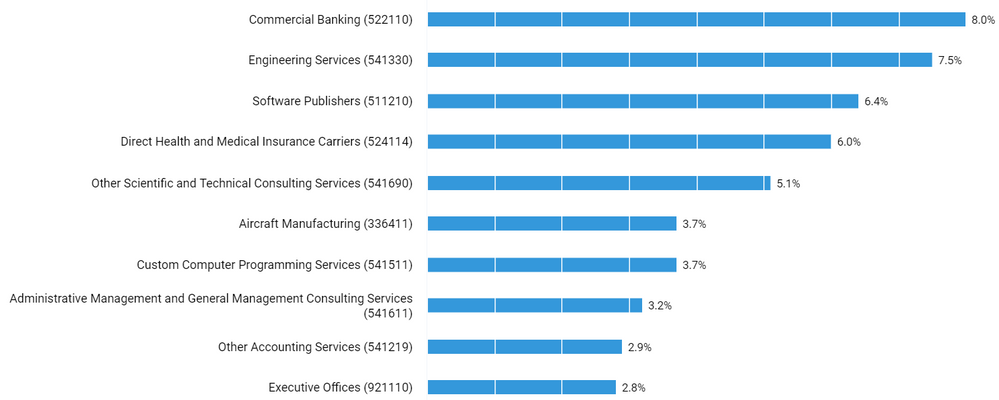
Figure 3. Source: Analytics compiled through Labor Insight from Burning Glass. (Note: these industry classifications are based on the North American Industry Classification System (NAICS) standards.)
The cybersecurity job market provides a broad opportunity for students and recent grads to find a job in a field and company that suits them.
Cybersecurity jobs for recent grads
Amid the overall demand in cybersecurity, when we look at the demand for people with a bachelor’s degree and zero to two years experience, we find that over 82,000 jobs or 19% of all jobs in the cybersecurity space in the US in the last 12 months are posted asking for 0-2 years of experience (Figure 4).

Figure 4. Source: Analytics compiled through Labor Insight from Burning Glass.
Additionally, over 75% of these jobs are looking for a bachelor’s degree or less (Figure 5). This suggests that for recent graduates there is a tremendous opportunity to not only find a job, but to truly find one in a field and at a company that is a great fit.
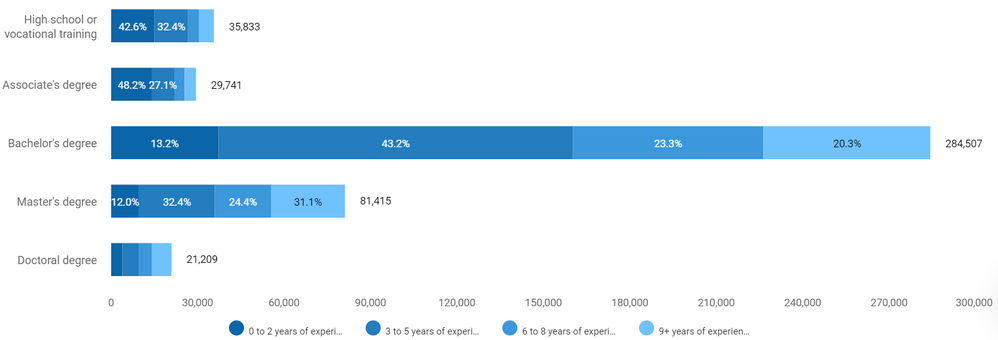
Figure 5. Source: Analytics compiled through Labor Insight from Burning Glass.
Cybersecurity jobs and salaries
When we look at salaries in the cybersecurity space (Figure 6), a bachelor’s degree will put students at the mean salary level at just over $72,000/year. However, when compared to the Information Technology space in general, that’s $17,000/year higher than the mean salary. If you add cloud computing skills to that, for example by also teaching and certifying students in AZ-900 – Azure Fundamentals, the salary is even higher. The mean salary for a cybersecurity job requiring limited experience, a bachelor’s degree, and both cybersecurity and cloud skills is over $92,000/year. By bringing these Microsoft technical skills and certifications into your curriculum, program, or department, you will be playing a pivotal role in empowering your students for future success.
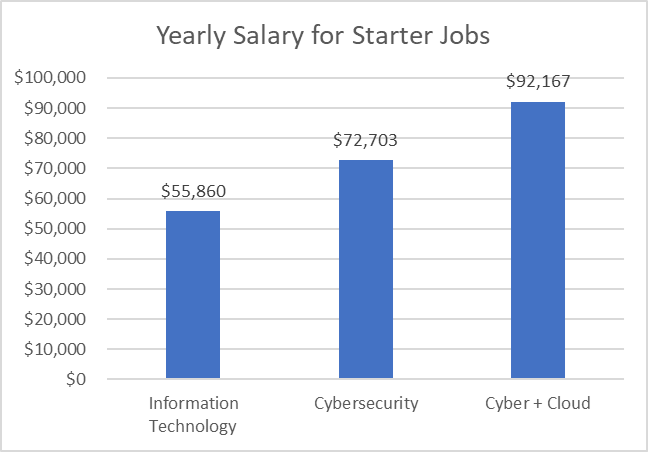
Figure 6. Source: Analytics compiled through Labor Insight from Burning Glass.
Cybersecurity certifications
Not only do cybersecurity skills matter, but so do certifications. For years certifications have provided benefits to learners attaining them in job placement, job effectiveness, salary increases, and promotions. Right now, certifications in cybersecurity have the highest demand in the market. According to the Global Knowledge 2020 IT Skills and Salary Report, “over half of our survey respondents have at least one cybersecurity certification, making it by far the most popular category in 2020. Cisco is second (22%) and Microsoft is third (21%).” Furthermore, when looking at the most in-demand certifications for the upcoming year, there are four of the top ten are security certifications.
Certifications are also in demand by employers. Of the 82,000 job postings for limited experience cybersecurity professionals, 54% of those jobs are looking for at least one certification in their job postings. This may not sound significant on its own, but when compared to the Information Technology (IT) space, it is. For IT positions all-up, only 30% of them ask for a certification of any kind on the job posting. This differentiates the cybersecurity space tremendously not only in the demand for but also the value of certifications in this market. Certifications are a critical part of ensuring your students future success as they enter the job market.
Cybersecurity and Microsoft
Today we are adding SC-900 – Microsoft Security, Compliance, and Identity Fundamentals to the Microsoft Learn for Educators program because we recognize how critical these technical skills are for the future. By joining Microsoft Learn for Educators you will be building you students’ technical skills with curriculum and educational materials provided by Microsoft – a tried and true presence in the certification and cloud space for, according to Global Knowledge, “over half of global IT decision-makers say they expect their organization to invest in Microsoft technology this year. This is the second straight year Microsoft tops the list.” When you couple that type of customer demand for Microsoft technology together with the demand for cybersecurity skills and certifications, adding Microsoft Security, Compliance and Identity Fundamentals to your curriculum will ensure that you are preparing your students for future jobs.

by Contributed | May 18, 2021 | Technology
This article is contributed. See the original author and article here.
Build 2021 is soon upon us (May 25–27). The prudent attendee will take the time to plan their virtual session schedule. To help with your plan, we are highlighting nine key sessions across the platform that you won’t want to miss. These sessions share all the great new features and announcements that demonstrate how we’re empowering developers to build the next generation of collaborative apps. Build is a great way to see the art of the possible – so if you haven’t already registered, do so today and create your session schedule online. And remember – almost all sessions can be seen on demand so you can enjoy them even after Build is over. Let’s walk through these important sessions.
KEYNOTES
These sessions bring a lot of news together in a way so you can understand what the future is for hybrid work. We hope you leave these sessions with an informed perspective that you can share with your colleagues when they ask you about Microsoft and its plans for developers.
Build the next generation of collaborative apps for hybrid work
It’s clear that Hybrid work is here to stay – organizations everywhere are working hard to provide better tools. These hybrid workers have unique needs that are centered around collaborating with colleagues. Reimaging business processes to support them requires a new class of collaborative apps to get work done. Join Jeff Teper, Archana Saseetharan, Yina Arenas, and Mary Anne Noskowski as they share the latest on Teams, Graph, and Windows. Learn how you can use these surfaces to build the next generation of collaborative apps for hybrid workers.
Microsoft: Into Focus with Scott Guthrie, Scott Hanselman, Rajesh Jha and Kevin Scott

Join our ‘Into Focus’ hosts Filisha Shah, Seth Juarez, and Scott Hanselman for a rapid-fire rundown of executive content, roundtable conversations, coding demos and more. Microsoft executives Scott Guthrie, Rajesh Jha, Kevin Scott, and an all-star lineup of special guests will be on hand to answer your audience questions and discuss the real-world impact of the developer news coming out of Microsoft Build.
BREAK OUTS
These sessions are the “one level down” focus sessions for the keynotes. They drill deeper into the topics and features that are important to you — while hearing from the people who design and code these capabilities.
Learn how to build exciting apps across meetings, chats, and channels within or outside Teams

As work continues to evolve, Microsoft Teams will shape how the doing gets done. Please join Nikita Bokil, Ojasvi Choudhary, Loki Meyburg, and Manpratap Suri to learn all that’s new on the Teams platform. You’ll hear about expanded features, customizable communications, APIs for hybrid scenarios and making interactions as inclusive and fun as can be. Teams is the future of work.
Learn how the most successful apps in Teams plug into the platform to deliver customer value

Hybrid work is here. And Microsoft Teams is fueling the innovation that will determine how collaborative – and productive – the next generation of experiences are. Learn from Erin Bailie and Trent Hazy as they discuss how customers and partners are building solutions on Teams that demonstrate the art of the possible. Hear customer success stories to inspire your own.
Empowering developers with powerful tooling and enabling frictionless app adoption

Join Karthig Balendran, Brian Nguyen, and Emily Chen to learn about the new developer tools available that simplify building apps on Microsoft Teams and the new experiences designed for admins and end users to accelerate adoption. They will cover how these new tools allow you to easily build, test, host, publish and manage apps. Speak to how admins can help increase adoption of your app. And how we’ve now provided new experiences and mechanisms for users to discover and purchase your app.
What’s new for Windows desktop application development

Tap into the full power of a Windows PC with your desktop applications! See how we’re unifying the developer platform through Project Reunion, enabling you to modernize without rewriting. You’ll also learn about our work on WinUI (the native UI stack in Windows), Win32 and .NET apps and more. For enterprise developers and ISVs targeting Windows, this is the tech you need to know.
What’s new in Windows 10 for ALL developers

We appreciate that you create many different solutions on Windows – and not all of them are targeted to the Windows platform. Join Kayla Cinnamon, Deondre Davis, and Craig Loewen as they present the innovations with Terminal and WSL2, performance improvements and delighters like Power Toys, and the Windows Package Manager. If you develop for web, cloud, or other platforms including Windows, this is for you.
Build great discovery & collaboration apps for Microsoft 365 with new Microsoft Graph connector & Adaptive Card capabilities

Microsoft Graph is a powerful way to bring your solution’s data into Microsoft’s enterprise-scale apps and experiences. In this session we’ll show you how Microsoft Graph Connectors have evolved to provide even richer access for your data to enterprise search, eDiscovery and more. Presenters Jermey Thake and Rabia Williams will go a step farther and demonstrate how you can use that same connector-fed data to create powerful cross-application workflows using Adaptive Cards.
Three new ways to enrich your productivity apps with Microsoft Graph tools and data

Microsoft is working hard to make it easy for you to enrich your apps with Microsoft Graph data. We are creating tools and services that make using Graph data simple, powerful, and efficient. Ayca Bas and Beth Pan will present a tour of the latest additions to the Microsoft Graph Toolkit. We will then introduce you to rich notifications for Exchange resources. Finally, we will share our new approach to web hooks with our new Event Hub.
And this is only just a portion of all the sessions and experiences we have planned for you at Build! Be sure to check out our interstitial programs, our on-demand sessions, our product roundtables, and we also have 1:1 app consults if you need to connect with a Microsoft subject-matter expert!
See you (virtually) at Build next week!
And if you want to download a deeper view of the content, grab our very convenient PDF with ALL of the sessions we think will be important to you.
https://cdn.techcommunity.microsoft.com/assets/MicrosoftTeams/Microsoft%20Build%202021%20Flyer.pdf
by Contributed | May 18, 2021 | Technology
This article is contributed. See the original author and article here.
Live Security and Compliance Ask Me Anything (AMA) with Microsoft Product Experts
Register Now: Tuesday, June 1, 2021, 11:00 AM – 11:45 AM CDT
Microsoft Security and Compliance thought leaders Matthew Littleton / @Matthew Littleton (CYBERSECURITY) (Microsoft Global Advanced Compliance Specialist, and Retired Navy Captain) and Matt Soseman / @Matt Soseman (Microsoft Senior Security Architect) will offer unique insights and a depth of knowledge around the Microsoft Security product suite during this 45 minute open forum Q&A.
These leaders will bring nearly 25 years at Microsoft to bear while answering questions pertaining to product capabilities and updates, feature availability, and applications for federal cybersecurity mandates such as the Cybersecurity Maturity Model Certification (CMMC) and DFARS 7012. Questions may cover the following and much more:
- Data Loss Prevention
- Microsoft Intune
- Azure Active Directory and Conditional Access
- Microsoft Cloud App Security
- Microsoft 365 GCC & GCC High
In this Ask Me Anything (AMA) style session, Matt and Matt will address audience members and their respective scenarios deploying in the Microsoft Government Cloud to better prepare teams looking to protect corporate and US Government Data.
The goal of this session is to address contractors questions in light of the recent Cloud Security and Compliance Series event where both Matt and Matt have addressed topics such as “CMMC Compliance in the Microsoft Sovereign Cloud” and “Meeting CMMC Level 3 with Microsoft Intune / Meeting CMMC with Microsoft Information Protection (MIP)”.
Register for live event here.
by Contributed | May 18, 2021 | Technology
This article is contributed. See the original author and article here.
Microsoft 365 Apps for Enterprise offers three production update channels for you to choose from: Current Channel, Monthly Enterprise Channel and Semi-Annual Enterprise Channel. The channel(s) you choose to support in your environment will determine the update frequency, features, and support duration between versions. There are a number of ways for you to manage these updates, including our latest addition: Servicing Profiles.
Today, we are pleased to announce an update for Microsoft 365 Apps that will improve update manageability in Microsoft Endpoint Configuration Manager. Up until now the use of Automatic Deployment Rules (ADR) with Microsoft 365 Apps has been a challenge to manage, depending on the update channel(s) you support. Starting in late June, all future updates for Microsoft 365 Apps, including 2019 and 2021 volume license products, will receive an updated naming convention via the Title property. With this change you will be able to utilize the Title property within the search criteria of your ADR definition to easily target the necessary updates for your environment. This improvement should eliminate the need for IT admins to continually update their search criteria with each new release.
Overview
The updated Title property in the update catalog for Microsoft 365 Apps will include the following changes:
- The release type will be included in the title, enabling you to easily specify which update you want to select without needing to include the specific version.
- The Version number and architecture values have traded places.
Adding release type to the Title property should help simplify update management with your ADRs. If we look at the update history for Microsoft 365 Apps, there are three different release types:
- Feature Update. This is the first release of the most recent fork. Feature updates will include new features, along with security and non-security updates.
- Quality Update. These are subsequent releases of the most recent fork. Quality updates will include security and non-security updates.
- Extended Quality Update. These are subsequent releases of the previous fork. Extended quality updates will include security and non-security updates.
A closer look at the upcoming changes
Refer to the following list of updates to illustrate what the upcoming changes look like on release:
Note that this list of updates is for demonstration purposes only and that the announced changes will apply starting in late June.
Before – Channel Name, Release Version, Architecture, Build.Version
Microsoft 365 Apps Update – Current Channel Version 2101 for x64 based Edition (Build 13628.20274)
Microsoft 365 Apps Update – Current Channel Version 2101 for x64 based Edition (Build 13628.20380)
Microsoft 365 Apps Update – Monthly Enterprise Channel Version 2012 for x64 based Edition (Build 13530.20528)
Microsoft 365 Apps Update – Monthly Enterprise Channel Version 2011 for x64 based Edition (Build 13426.20658)
Microsoft 365 Apps Update – Semi-Annual Enterprise Channel Version 2008 for x64 based Edition (Build 13127.21216)
Microsoft 365 Apps Update – Semi-Annual Enterprise Channel Version 2002 for x64 based Edition (Build 12527.21594)
Microsoft 365 Apps Update – Semi-Annual Enterprise Channel Version 1908 for x64 based Edition (Build 11929.21008)
After – Channel Name, Release Type, Architecture, Release Version, Build.Version
Microsoft 365 Apps Update – Current Channel Feature Update for x64 based Edition Version 2101 (Build 13628.20274)
Microsoft 365 Apps Update – Current Channel Quality Update for x64 based Edition Version 2101 (Build 13628.20380)
Microsoft 365 Apps Update – Monthly Enterprise Channel Feature Update for x64 based Edition Version 2012 (Build 13530.20528)
Microsoft 365 Apps Update – Monthly Enterprise Channel Extended Quality Update for x64 based Edition Version 2011 (Build 13426.20658)
Microsoft 365 Apps Update – Semi-Annual Enterprise Channel Feature Update for x64 based Edition Version 2008 (Build 13127.21216)
Microsoft 365 Apps Update – Semi-Annual Enterprise Channel Quality Update for x64 based Edition Version 2002 (Build 12527.21594)
Microsoft 365 Apps Update – Semi-Annual Enterprise Channel Extended Quality Update for x64 based Edition Version 1908 (Build 11929.21008)
Updating your Automatic Deployment Rules
With Configuration Manager, one of the best ways to automate update management for Microsoft 365 Apps is through the use of Automatic Deployment Rules (ADR). This feature helps reduce administrative overhead by automatically selecting, downloading and deploying updates based on the criteria you define. If you have implemented Monthly Enterprise Channel or Semi-Annual Enterprise Channel for Microsoft 365 Apps, an ADR can be challenging to manage due to the fact that both channels have a minimum of 2 versions available at any given time.
The following examples will illustrate how to use the updated Title property to simplify your ADR rules.
ADR search criteria for Monthly Enterprise Channel
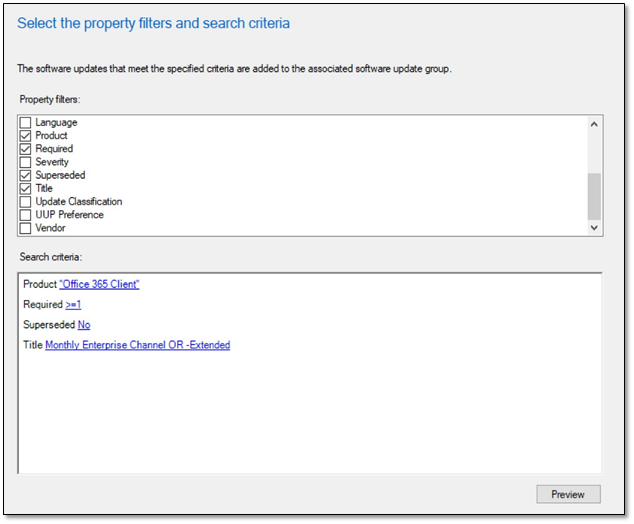
Monthly Enterprise Channel offers 2 releases: current and extended. You can leverage the release type value to select your desired update version. The screenshot below illustrates a set of search criteria that can be used to identify the current updates for Monthly Enterprise Channel by excluding the extended tag. If you require extended updates for this channel use the following value in the Title property: Monthly Enterprise Channel Extended.
The results from this search criteria will include the x86 and x64 non-extended updates for Monthly Enterprise Channel.
ADR search criteria for Semi-Annual Enterprise Channel
Semi-Annual Enterprise Channel offers 4 releases: preview, current, quality, and extended. You can leverage the release type value to select your desired update version. The screenshot below illustrates a set of search criteria that can be used to identify the current updates for Semi-Annual Enterprise Channel by excluding the preview, extended and quality tags.
The results from this search criteria will include the x86 and x64 non-extended updates for Semi-Annual Enterprise Channel.
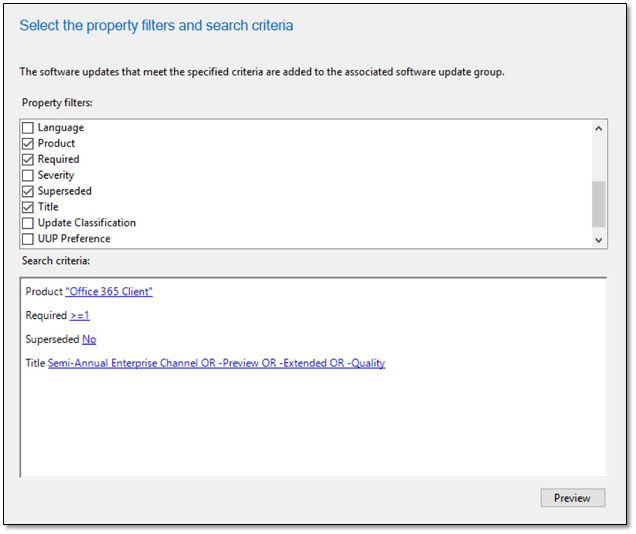
Note: If you are on the current version of Semi-Annual Enterprise Channel and can maintain feature updates every 6 months, the search criteria outlined above will ensure devices update to the next version automatically without the need to update your ADR.
If you are on a version of Semi-Annual Enterprise Channel and need to remain on that version longer than 6 months, you will need to update your ADR search criteria between the months of January-February and July-August as the targeted version moves from Feature > Quality > Extended.
To select an alternate release type for Semi-Annual Enterprise Channel, update the Title property search criteria with a value from the following table:
Release
|
ADR Search Criteria – Title Property
|
Preview
|
Semi-Annual Enterprise Channel (Preview)
|
Quality
|
Semi-Annual Enterprise Channel Quality
|
Extended
|
Semi-Annual Enterprise Channel Extended
|
Additional Resources
For more information on the different update channels available for Microsoft 365 Apps, refer to the following articles:
Change Log
05.14.2021 Initial Release
This blog post is brought to you by Bob Clements, a Senior Customer Engineer and “Office Ranger” at Microsoft. Feel free to share your questions and feedback in the comments below.


Recent Comments