by Contributed | May 25, 2021 | Technology
This article is contributed. See the original author and article here.
Red Hat and Microsoft have collaborated to bring enterprise solutions to Java Enterprise Edition (EE) / Jakarta EE developers with solution templates on Azure Marketplace. Deploy Red Hat JBoss Enterprise Application Platform (EAP) on Azure Red Hat Enterprise Linux (RHEL) Virtual Machines (VM) and Virtual Machine Scale Sets (VMSS) if you are migrating away from proprietary application servers to a production supported open source application server or from on-premises to the cloud.
Red Hat and Microsoft
The Azure Marketplace offerings for JBoss EAP on RHEL is a joint solution from Red Hat and Microsoft. Red Hat is the world’s leading provider of enterprise open source solutions and a contributor for the Java standards, OpenJDK, MicroProfile, Jakarta EE, and Quarkus. JBoss EAP is a leading open source Java application server platform that is Java EE Certified and Jakarta EE Compliant in both Web Profile and Full Platform. Every JBoss EAP release is tested and supported on a variety of market-leading operating systems, Java Virtual Machines (JVMs), and database combinations. Microsoft Azure is a globally trusted cloud platform with a range of services from VMs on infrastructure as a service (IaaS) to platform as a service (PaaS). This joint solution by Red Hat and Microsoft includes integrated support and software licensing flexibility. Read the press release from Red Hat to learn more about the collaboration and JBoss EAP on Azure.
Why JBoss EAP and RHEL?
Customers heavily invested in Java EE / Jakarta EE who want to migrate to the cloud while preserving their investments with open-source solutions can utilize JBoss EAP on Azure RHEL VM/VMSS solutions. This reduces the time, complexity, and cost of migrating Java applications to Azure as it is fully supported and offers flexible subscription choices with Pay-As-You-Go (PAYG) and Bring-Your-Own-Subscription (BYOS) options. With the Red Hat Enterprise Linux (RHEL) PAYG option, your operating system can be more secure and up to date with Red Hat Update Infrastructure (RHUI) on Azure and can benefit from running older versions with the Extended Lifecycle Support (ELS) option.
Azure Marketplace Offerings
The Azure Marketplace solutions use the latest versions for RHEL, JBoss EAP, and OpenJDK for production deployments. JBoss EAP is offered only as BYOS, and you can select either BYOS or PAYG for RHEL. Once deployed, you can perform an upgrade by running the *yum update* command. These Marketplace solutions create the Azure compute resources to run JBoss EAP on RHEL. Solution configuration includes stand-alone and clustered mode on Azure VM and VMSS.
Support and subscriptions
Red Hat Enterprise Linux is available as on-demand PAYG or BYOS via the Red Hat Gold Image model using Red Hat Cloud Access. To use RHEL in the PAYG model, you will need an Azure Subscription. Red Hat JBoss EAP is available through BYOS only for now. Customers will need to supply their Red Hat Subscription Manager (RHSM) credentials along with RHSM Pool ID showing valid JBoss EAP entitlements when deploying this solution.
If you are a new JBoss EAP customer and don’t have a Red Hat subscription, create an account on the Red Hat Customer Portal and you can work directly with Red Hat to get set up. Red Hat provides a variety of flexible billing options.
Benefits of using Azure VMs and VMSS
With Azure VMs and VMSS, you get built-in identity with AAD, Role-Based Access Controls (RBAC), networking, data, storage, and security management. You can troubleshoot with Serial Console or enterprise support and have cloud spend transparency with Azure Cost Management.
In addition, JBoss EAP on VMSS allows automatic scaling of resources, up to 600 VMs. VMSS supports integration with a load balancer or Application Gateway. High availability and resiliency are available across single or multiple Data Centers. VM instance scaling can automatically increase or decrease in response to demand or a defined schedule that you can set after template deployment.
Customers will receive integrated support from Microsoft and Red Hat for any production issues with JBoss EAP on RHEL VM and VMSS solutions.
Migrating to JBoss EAP on Azure
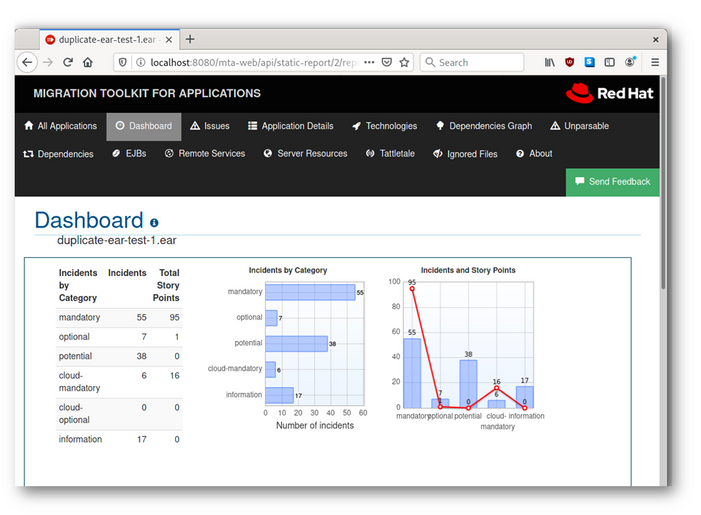
The Red Hat Migration Toolkit for Applications (MTA) is a collection of tools that support large-scale Java application modernization and migration projects across a broad range of transformations and use cases. It is recommended to use MTA for planning and executing any JBoss EAP-related migration projects. It accelerates application code analysis, supports effort estimation, accelerates code migration, and helps you move applications to the cloud and containers. MTA allows you to migrate applications from other application servers to Red Hat JBoss EAP.
Image 1 – Red Hat Migration Toolkit for Applications Dashboard
Interested in Other Azure Hosting Options for Red Hat JBoss EAP?
JBoss EAP is also available on Azure Red Hat OpenShift (ARO) and Red Hat OpenShift Container Platform (for multi-cloud strategy) if you are looking for a container-based solution. For a managed hosting option, try JBoss EAP on Azure App Service (in preview). These services include integrated support where you can start your ticket with either Microsoft or Red Hat. So, the real question should be “How much control do you want or need?” Check out the flow chart and technology stack images below to help you identify the best-suited service for your JBoss EAP apps on Azure.
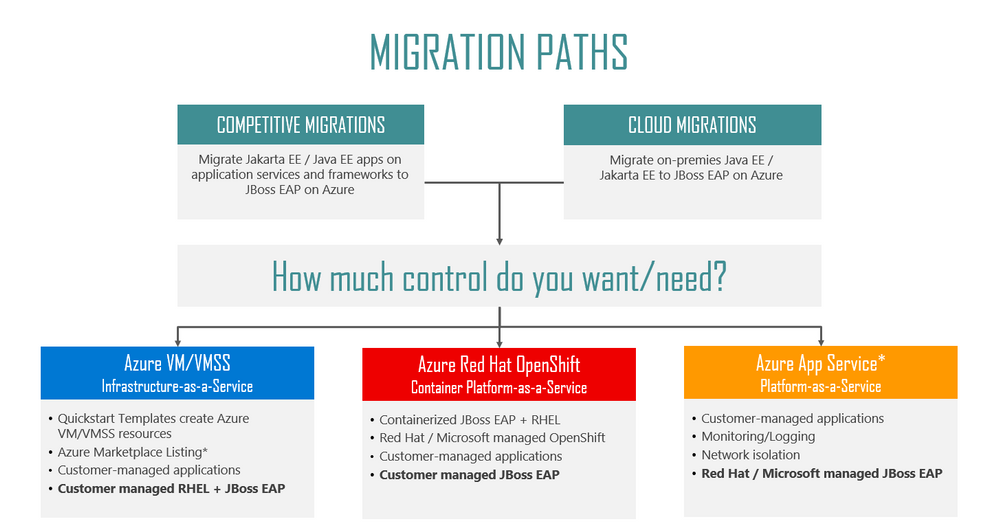
Image 2 – Migration Paths to Red Hat JBoss EAP on Azure
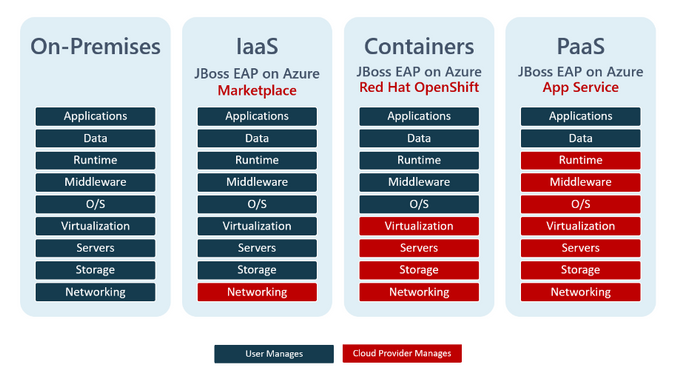
Image 3 – Comparison of Customer vs. Cloud Provider Responsibilities for JBoss EAP Hosting Options on Azure
Try it!
Here are great resources to help you get started.
by Contributed | May 25, 2021 | Technology
This article is contributed. See the original author and article here.
At MS Build 2021, the Azure Video Indexer service is becoming part of the new set of Applied AI services, aiming to enable developers to accelerate time to value for AI workloads, versus building solutions from scratch. Azure Video Analyzer and Azure Video Analyzer for Media are designed to do that specifically for video AI workloads. That is, to enable developers to build video AI solutions easily without the need for deep knowledge in Media or in AI/machine learning; from edge to cloud, live to batch.
As part of this change, Video Indexer will be renamed as Azure Video Analyzer for Media (a.k.a. AVAM). Under the new name, we continue to work hard to bring you the insights and capabilities needed to get more out of your cloud media archives; improve searchability, enable new user scenarios and accessibility, and open new monetization opportunities.
So, what else is new in AVAM (other than the name :) )?
– New insight types added to provide greater support to analysis, discoverability, and accessibility needs
- Audio effects detection, with closed caption files enrichment (public preview in trial and paid accounts): ability to detect non-speech audio effects, such as gunshots, explosions, dogs barking, and crowd reactions.
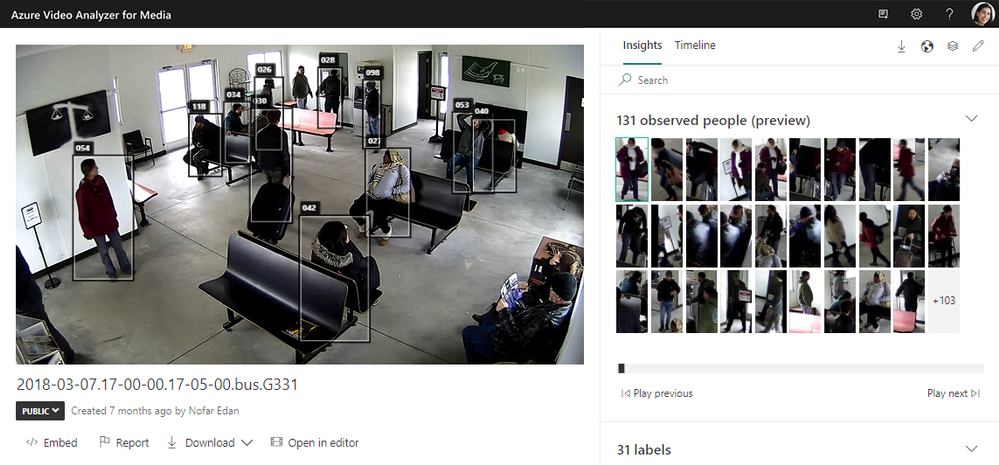
- Observed people tracing (public preview in trial and paid accounts): ability to detect standing people spotted in the video and trace their path with bounding boxes.
– Improvements to existing insights
- Improvements to named entities (locations, people, and brands).
- Improvements to face recognition pipeline.
– Extending global support
- Expanded regional availability.
- Multiple new languages supported for transcription.
– Learn from others
- We are proud to share how our partners WPP and Media Valet use the service to provide better media experiences to their customers.
– New in our developers’ community
- New developer portal enabling anyone to get started with the API easily and get answers fast.
- Open-source code to help you leverage the newly added widget customization.
- Open-source solution to help you add custom search to your video libraries.
- Open-source solution to help you add de-duplication to your video libraries.
– New “Azure blue” visual theme
More about all those great additions and announcements in this blog!
Discoverability, accessibility, and event analysis support through new insights
In our journey to allow for a wider and richer analysis for your video archives, we are happy to introduce two new insight types into the AVAM pipelines that can be leveraged in multiple scenarios: Observed people tracing and Audio effect detection. Both new insights are now available in public preview on trial and paid accounts.
Observed People Tracing detects people that appear in the video, including the times in the video in which they appeared, and the location of each person in the different video frames (the person’s bounding box). The bounding boxes of the detected people are even displayed in the video while it plays to allow easy tracing of them. Observed People information enables video investigators to easily perform post event analysis of events such as bank robbery or accident at the workplace, as well as to perform trend analysis over time, for example learning how customers move across aisles in a shopping mall or how much time they spend in checkout lines.
People observed in the player page
Audio effects detection detects and classifies the audio effects in the non-speech segments of the content. Audio effects can be used for discoverability scenarios. For example, finding the set of videos in the archive and specific times within the videos in which a gunshot was detected. It can also be used for accessibility scenarios, to enrich the video transcription with non-speech effects to provide more context for people who are hard of hearing, making content much more accessible to them. This is relevant both for organizational scenarios (e.g., watching a training or keynote session) and in the media and entertainment industry (e.g. watching a movie). The set of audio effects extracted are: Gunshot, Glass shatter, Alarm, Siren, Explosion, Dog Bark, Screaming, Laughter, Crowd reactions (cheering, clapping, and booing) and Silence. The audio effects detected are retrieved as part of the insights JSON and optionally in the closed caption files extracted from the video.
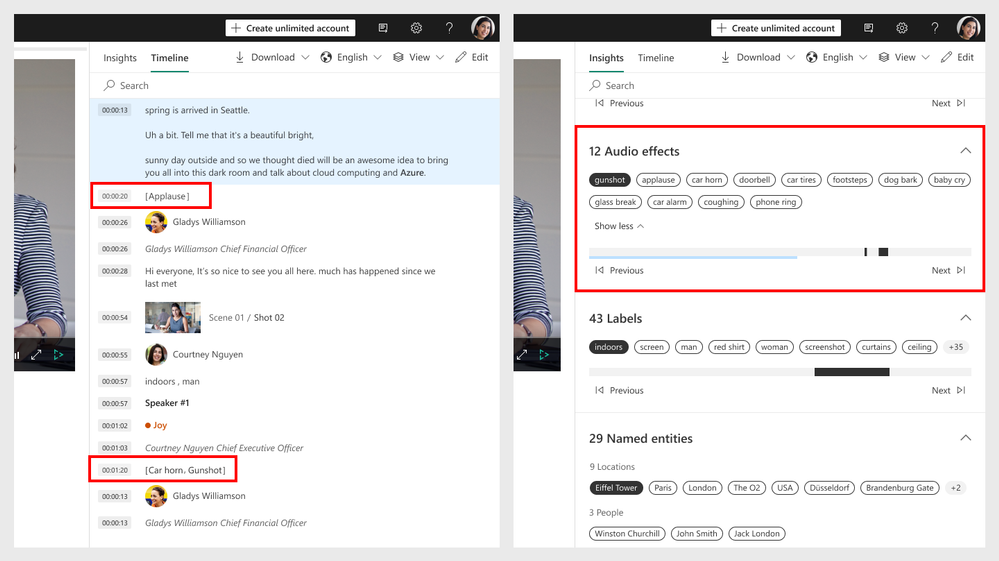 Audio effects found in the player page
The two newly added insights are currently available when indexing a video with “advanced” preset selected, in audio and video analysis respectively. During the preview period there is no additional fee for choosing the advanced preset over the standard one, so it’s a great opportunity to go ahead and try it on your content!
We keep improving, constantly.
AVAM at its core provides an out-of-the-box pipeline of a rich set of insights, already fully integrated together. In addition to enriching this pipeline with new insights, we keep looking at the ones that are already there and at how to improve and refine them, to make sure you get the most insight into your media content.
Just recently we released a major improvement to the named entities insights of AVAM. Named entities are locations, people, and brands identified in both the transcription and on-screen text extracted by AVAM, based on natural language processing algorithms. The latest improvement to this insight included identification of a much larger range of people and locations, as well as identification of people and locations in context, even when those are not well-known ones. So, for example, the transcript text “Dan went home” will extract ‘Dan’ as a person and ‘home’ as a location.
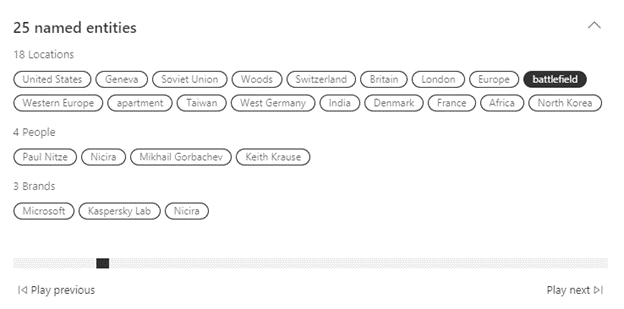 Panel of named entities extracted
We also just released several improvements to the AVAM face detection and recognition pipeline resulting in better accuracy of face recognition, especially when the thumbnail quality isn’t so good.
Expanding global support
To enable organizations across the globe to leverage AVAM for their business needs, we are constantly working on expanding the service regional availability as well as the supported languages for transcription.
The latest regions we deployed and are now available for customers for creating an AVAM paid account include US North Central, US West, and Canada Central. Additionally, in the next two months we are planning to deploy Central US, France central, Brazil south, West central US, and Korea central.
AVAM’s set of supported languages has also expanded and now includes Norwegian, Swedish, Finnish, Canadian French, Thai, multiple Arabic dialects, Turkish, Dutch, Chinese (Cantonese), Czech, and Polish. As everything else in AVAM, the new languages are available for customers using the API and the portal.
Learn from others
We are proud to share recent partnership announcements, where Azure Video Analyzer for Media empowers companies to get more out of media content and provide new and exciting capabilities.
WPP recently announced a partnership with Microsoft that leverages Azure Video Analyzer for Media to index metadata extracted from their content from a central location accessible from anywhere. The partnership aim is to create an innovative cloud platform that allows creative teams from across WPP’s global network to produce campaigns for clients from any location around the world.
Additionally, Media Valet; a leading digital assert management company uses Azure Video Analyzer for Media in their Audio/Video Intelligence tool (AVI) to helps their customers significantly improve asset discoverability and provide greater insight into their audio and video assets through automated metadata tagging. “With Azure Video Analyzer for Media, we deliver more ways for our customers to analyze their assets,” says Lozano. “They can isolate standard and cognitive metadata, find assets quickly—even within a library of 6 million assets, for example—and then home in on specific insights within those assets.”
New in the AVAM developer community
To use AVAM at scale, automate processes, and integrate with organizational applications and infrastructure, organizations use the AVAM’s REST API. To help you get started with the API easily and get support for intuitive use, we recently revamped the AVAM API portal that allows for one central location with intuitive access to all our development resources, such as API calls description and ability to try them out, access to stack overflow, GitHub, support requests forum, etc. You can read all about getting started with our API here.
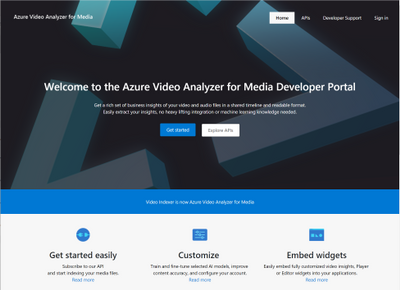 New AVAM developer portal home page
Speaking of development resources, AVAM has its own GitHub repository where you can find code samples and solutions on top of AVAM, to help you integrate with it or just inspire you about the different solutions that can be built with the service. Two of the latest additions to our GitHub are code samples:
Firstly, we added an example code for using the new widgets customization capabilities of AVAM. The newly added widget customization capability in AVAM enables developers to customize the widgets of AVAM into their own applications in different advanced ways including loading the JSON from external location, customized widgets styling to fit in to your application, and adding your own custom insights calculated elsewhere.
Secondly, the commercial engineering team (CSE) created two end-to-end solutions demonstrating how to leverage AVAM for different scenarios:
One solution demonstrates using AVAM’s stable frames and Azure Machine Learning to build custom search video solutions that complement AVAM’s out-of-the-box insights with additional information, tailored to the specific organization’s custom data and search terms using Azure Cognitive Search.
 Enriching AVAM results with “dog types” model
An additional solution to demonstrate how to perform de-duplication on media files. The solution includes a workflow using Logic apps and Durable functions, that take as input either a video (among other content types) and sends it to AVAM. It performs de-duplication of the files by comparing hashes of file and re-using the output of previously analyzed files for any duplicates. The output of the analysis is put on to a service bus for downstream services to consume for cost saving purposes.
And one more fun addition to close with
Lastly, to celebrate the new name, we are expanding the set of visual themes available in the AVAM experience with a new “Azure blue” theme! Now you can choose to use the “Classic” Video Indexer green, pivot to “Dark” theme or choose to go with “Azure blue” which feels right at home as part of the Azure family of services.
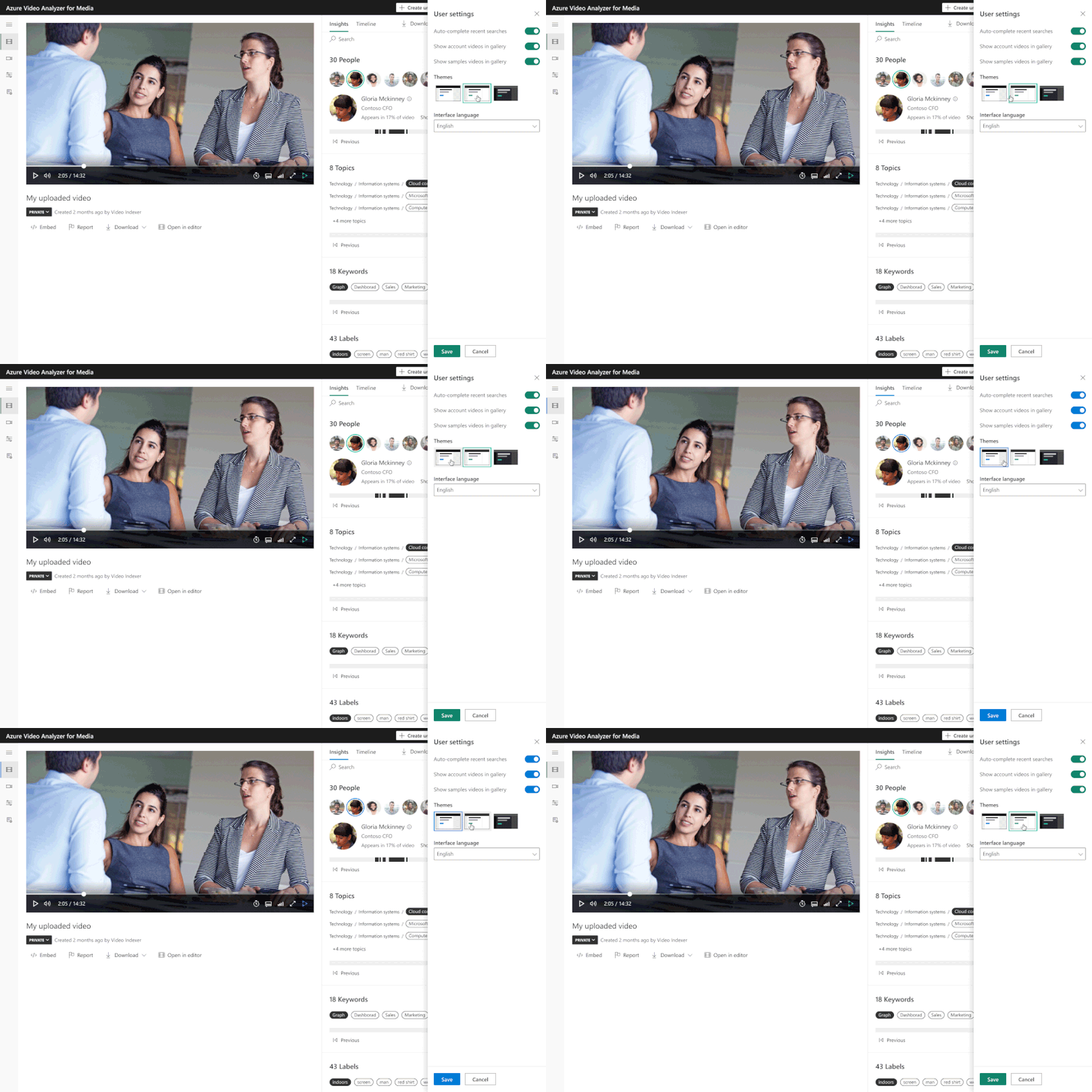 New Theme selector setting
Looking to get your feedback!
In closing, we’d like to call you to provide feedback for all recent enhancements, especially those which were released as public preview. We collect your feedback and adjust the design where needed before releasing those as general available capabilities. For those of you who are new to our technology, we’d encourage you to get started today with these helpful resources:
by Contributed | May 25, 2021 | Technology
This article is contributed. See the original author and article here.
As more organizations widely adopt AI to accelerate their digital transformation, customers have increasingly told us about the need for services that enable faster application of AI to common scenarios, without requiring any machine learning expertise. An of such a service is Azure Form Recognizer, which automates processing paperwork by bringing together vision and language AI capabilities with business logic to isolate and extract key information. helps organizations quickly detect and diagnose issues, as well as trigger alert notifications. Customers like Samsung and Chevron are already using these services in their mission critical workloads.
Today we are bringing such services together into a new product category, Azure Applied AI Services. Applied AI Services solve the most common challenges we’re seeing businesses face today, such as processing documents, scaling customer service, searching proprietary archives for pertinent information, analyzing content of all types, and creating accessible experiences. , development teams can build AI solutions that meet these needs faster than ever before with Applied AI Services. Azure Metrics Advisor, Azure Cognitive Search, Azure Bot Service, and Azure Immersive Reader. We are also introducing Azure Video Analyzer, which brings Live Video Analytics and Video Indexer closer together.
How do Azure Applied AI Services make faster development possible?
Azure Applied AI Models
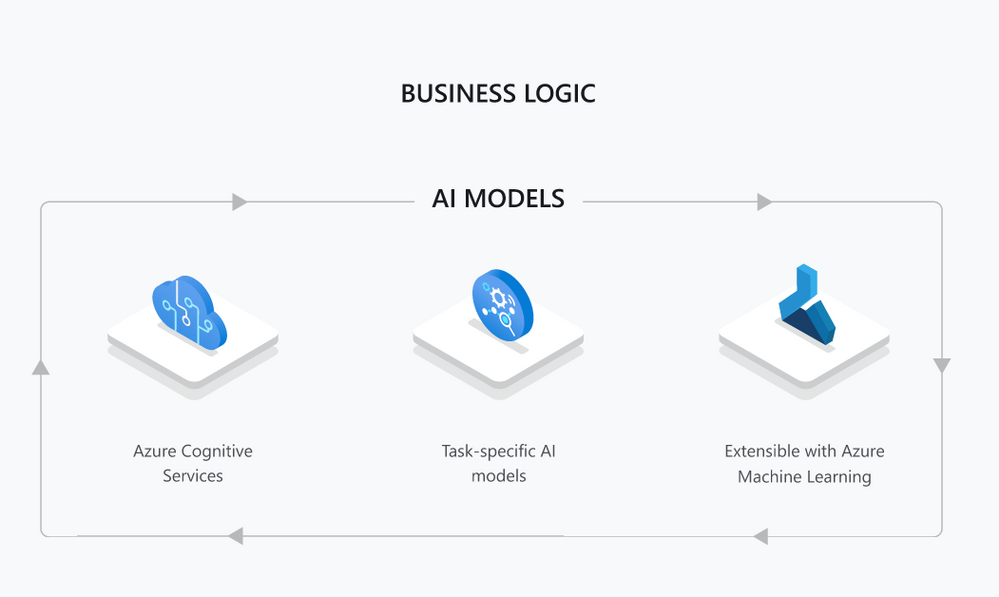
Under the hood of Azure Applied AI Services you’ll find the same world-class Azure Cognitive Services: flexible, reliable tools for all language, vision, decision-making, and speech related AI needs. Cognitive Services are the general-purpose building blocks that allow developers to build any AI-powered solution. Cognitive Services offer SDKs (Software Developer Kits), REST APIs, connectors to easily integrate in Azure Serverless or Power Platform, and even user interface(UI) based tools like Speech Studio and Continuous Integration and Deployment (CI/CD) options.
Azure Applied AI Services builds on top of Cognitive Services, combining varies technologies to solve specific problems.
Applied AI Services build on top of Cognitive Services with additional task-specific AI models and business logic to solve common problems organizations encounter, regardless of industry. Digital asset management, information extraction from documents and need to analyze and react to real time data are common to most organizations. In addition, Applied AI Services accelerate development time by providing reliable services that are compliant with our Responsible AI Principles. You can have control of your own data and minimize the latency for mission-critical use cases by running Applied AI Services in containers on your Edge devices.
Let’s dive into an example of a common scenario for AI. Business of all kinds from mom-and-pop shops to mass manufacturing companies have to process various documents. Azure Form Recognizer targets this scenario by extracting information from forms and images into structured data to automate data entry. Form Recognizer builds on top of Cognitive Services’ Optical Character Recognition (OCR) capability to recognize text, Text Analytics and Custom Text to relate key value pairs, like a name field description to the value of the name on an ID. Form Recognizer includes additional task specific models to identify information like Worldwide Passports and U.S Driver’s Licenses reliably and is in compliance with Microsoft’s Responsible AI Principles.
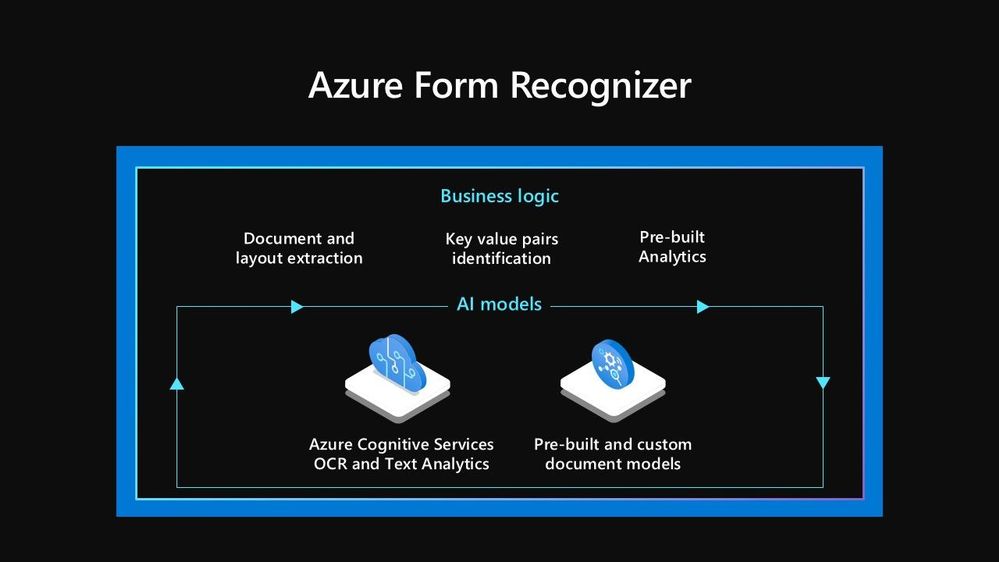 Azure Form Recognizer Business Logic & AI Models
While the service is highly specialized, various stakeholders ranging from developers new to AI to data scientists can use Azure Form Recognizer. A developer can build complex document processing functionality with the minimum effort using SDKs and REST APIs. A domain expert can then use the very same service to further train a custom model for industry-specific forms with complex structures. A Machine Learning expert can bring their own custom Machine Learning models, optimized for their use case to extend Form Recognizer. The same development options are available across Applied AI Services.
What are the latest updates for Applied AI Services?
Today we are introducing Azure Video Analyzer, bringing Live Video Analyzer and Video Indexer closer together. Azure Video Analyzer (formerly Live Video Analytics, in preview) delivers the developer platform for video analytics, and Azure Video Analyzer for Media (formerly Video Indexer, generally available) delivers AI solutions targeted at Media & Entertainment scenarios. With Azure Video Analyzer, you can process live video at the edge for high latency, record video in the cloud or record relevant video clips on the edge for limited bandwidth deployments. You can analyze video with AI of your choice by leveraging services such as Cognitive Services Custom Vision and Spatial Analysis, open source models, partner models or just your own custom-built models. With Azure Video Analyzer for Media, your video and audio files are easily processed through a rich set of out-of-the-box machine learning models all pre-integrated together, in different channels of the content; with Vision to detect people and scenes, Language to so you can quickly extract insights from your libraries.
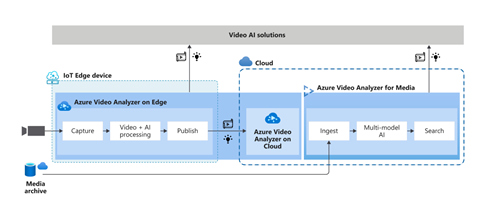 Azure Video AI Solutions
Organizations across the globe are already using Azure Video Analyzer to optimize various processes such as Lufthansa to improve flight turnaround times and Dow to enhance workplace safety with leak detection. Media and Entertainment organizations such as MediaValet use Azure Video Analyzer to extract more value out of their content by finding what they need quickly, scaling across millions of assets.
Azure Metrics Advisor, generally available today, builds on top of Anomaly Detector and makes integration of data, root cause diagnosis, and customizing alerts fast and easy through a readymade visualization and customization UI. Samsung uses Azure Metrics Advisor. In the past, Samsung had relied on a rule-based system in monitoring the health of their Smart TV service. But rules can’t cover all the scenarios and the previous approach generated lots of noise. Using Azure Metrics Advisor, Samsung created a new monitoring solution in China to enhance their previous system and to provide automated, granular root cause analysis that helps engineers locate issues and shorten the time to resolution.
With the latest enhancement to Azure Bot Services, it is easier to build, test, and publish text, speech, or telephony-based bots through an integrated development experience. Varun Nagalia, Director of Unilever HR Systems and Employee Experience Apps: “Una was built on the Microsoft Bot framework foundation. We used the Virtual Assistant templates to streamline the bot’s business logic and handling of user intent in an efficient way. We were able to leverage these templates, adapting them to our business needs and turn around nearly 40 global features in less than 12 months.”
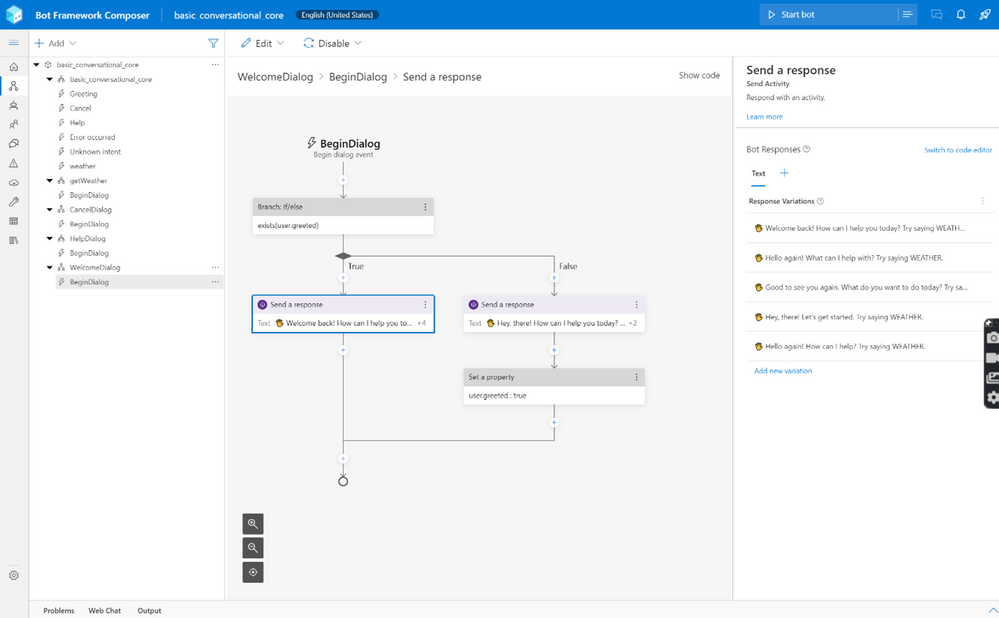 Azure Bot Service
Solving automation, accessibility and scalability problems with Applied AI Services is faster than ever. When a task is not solved with Applied AI Services, Cognitive Services are all purpose APIs that are available to developers to build their solutions. Check out Azure AI Build Session to learn more and see the demos in action.
Read these blog posts for a deeper dive into the latest from these Azure Applied AI Services:




Recent Comments