by Contributed | May 25, 2021 | Technology
This article is contributed. See the original author and article here.
At Microsoft Build 2021, we are pleased to announce the availability of Azure Video Analyzer as an Azure Applied AI Service. Azure Video Analyzer (AVA) is an evolution of Live Video Analytics (LVA) that was launched several months ago. As an Azure Applied AI service, AVA provides a platform for solution builders to build human centric semi-autonomous business environments with video analytics. AVA enables businesses to reduce the cost of their business operations using existing video cameras that are already deployed in their business environments.
Many businesses take a manual approach to monitoring mundane business operations. This is prone to a higher degree of error and miss-rate due to human error and the fact that assessing the criticality of a visual event sometimes requires corelating multiple signals in real-time. AVA, in conjunction with other Azure services, addresses this challenge by providing a mechanism for businesses to automate mundane visual observations of operations and enable employees to focus on the critical tasks at hand.
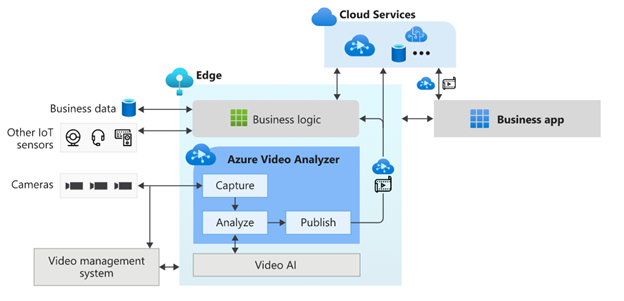
AVA is a hybrid service spanning the edge and the cloud. The edge component of AVA is available via the Azure marketplace and is referred to as “Azure Video Analyzer Edge,” and it can be used on any X64 or ARM 64 Linux device. AVA Edge enables capturing live video from any RTSP enabled video sensor, analysis of live video using AI of choice, and publishing of results to edge or cloud applications. AVA Cloud Service is a managed cloud platform that offers REST APIs for secure management of AVA Edge module and video management functionality. This provides flexibility to build video analytics enabled IoT applications that can be operated locally from within a business environment as well as from a centralized remote corporate location.
AVA can be used with Microsoft provided AI services such as Cognitive Service Custom Vision and Spatial Analysis as well as AI services provided by companies such as Intel. It is also possible to build and integrate a custom AI service that incorporates open-source custom AI models. Business logic that corelates AI insights from AVA with signals from other IoT sensors can be integrated to drive custom business workflows.
AVA has been used by companies such as DOW Inc., Lufthansa CityLine, and Telstra to solve problems such as chemical leak detection, optimizing aircraft turn-around, and traffic analytics. AVA has enabled DOW get closer than ever to reaching their safety goal of zero safety-related incidents. In the case of Lufthansa CityLine, AVA has enabled human coordinators to make better data-driven decisions to reduce aircraft turnaround time, thus reducing costs and improving customer satisfaction significantly. Telstra has been able to unlock new 5G business opportunities with the combination of Azure Video Analyzer, Azure Percept, and Azure Stack Edge.
AVA offers all capabilities that were available in LVA and more. A short summary of some of the prominent capabilities are as follows:
Process live video at the Edge
AVA Edge can be deployed on any Azure IoT Edge enabled X64 or AMD64 Linux device. Live video from existing cameras can be directed to AVA and processed on the edge device within the business environment’s network. In turn, this provides organizations with a solution that considers limited bandwidth and potential internet connectivity issues, all while maintaining the privacy of their environments.
Analyze video with AI of choice
As mentioned earlier, AVA can be integrated with Microsoft provided AI or with AI that is custom built to solve a niche problem, such as Intel’s OpenVINO™ DL Streamer that provides capabilities such as detecting objects (a person, a vehicle, or a bike), object classification (vehicle attributions) and object tracking (person, vehicle and bike).
Azure AI is based on Microsoft’s Responsible AI Principles and the Transparency Note provides additional guidance on designing response AI integrations.
Flexible video workflows
In addition to the existing building blocks provided by LVA, the current release of AVA enables a variety of live video workflows via new building blocks such as Object Tracker, Line Crossing, Cognitive Services extension processor and Video Sink.
Simplify app development with easy-to-use widgets
AVA provides a video playback widget which simplifies app development with a secure video player and enables visualization of AI metadata overlaid on video.
Azure Video Analyzer offers all these capabilities and more. Take a look at Azure Video Analyzer product page and documentation page to learn more.

by Contributed | May 25, 2021 | Dynamics 365, Microsoft 365, Technology
This article is contributed. See the original author and article here.
The past year has brought dramatic change to almost every facet of our lives. We have seen the same disruption play out across every industry, from retail to healthcare to financial services. Customer expectations are fundamentally altered, and it’s hard to imagine things going back to the way they once were.
As organizations work to stay relevant in this new world, they need digital solutions, with a strong software development strategy to meet the evolving needs of their customers. That means, they need developers.
But for developers, the way we have thought about development and product management has changed little in the past 50 years. Although we have moved from binary to assembly to third-generation languages, we have not seen a fundamental shift.
As organizations look for industry-specific digital solutions tailored for their space, developers need to increasingly shift their mindset from coding to composing clouds and components.
The post Build differentiated SaaS apps with Microsoft Industry Clouds appeared first on Microsoft Dynamics 365 Blog.
Brought to you by Dr. Ware, Microsoft Office 365 Silver Partner, Charleston SC.
by Contributed | May 25, 2021 | Technology
This article is contributed. See the original author and article here.
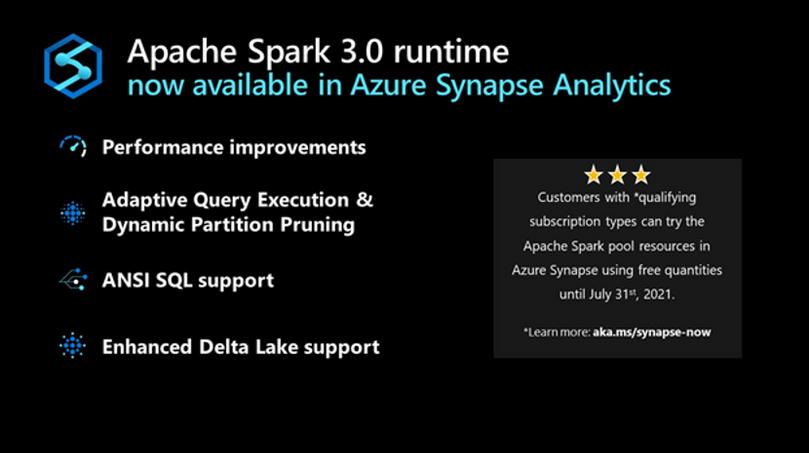
Starting today, the Apache Spark 3.0 runtime is now available in Azure Synapse. This version builds on top of existing open source and Microsoft specific enhancements to include additional unique improvements listed below. The combination of these enhancements results in a significantly faster processing capability than the open-source Spark 3.0.2 and 2.4.
The public preview announced today starts with the foundation based on the open-source Apache Spark 3.0 branch with subsequent updates leading up to a Generally Available version derived from the latest 3.1 branch.
Performance Improvements
In large-scale distributed systems, performance is never far from the top of mind, “to do more with the same” or “to do the same with less” are always key measures. In addition to the Azure Synapse performance improvements announced recently, Spark 3 brings new enhancements and the opportunity for the performance engineering team to do even more great work.
Predicate Pushdown and more efficient Shuffle Management build on the common performance patterns/optimizations that are often included in releases. The Azure Synapse specific optimizations in these areas have been ported over to augment the enhancements that come with Spark 3.
Adaptive Query Execution (AQE)
There is an attribute of data processing jobs run by data-intensive platforms like Apache Spark that differentiates them from more traditional data processing systems like relational databases. It is the volume of data and subsequently the length of the job to process it. It’s not uncommon for queries/data processing steps to take hours or even days to run in Spark. This presents unique challenges and opportunities to take a different approach to optimize and access the data. Over several days the query plan shape can change as estimates of data volume, skew, cardinality, etc., are replaced with actual measurements.
Adaptive Query Execution (AQE) in Azure Synapse provides a framework for dynamic optimization that brings significant performance improvement to Spark workloads and gives valuable time back to data and performance engineering teams by automating manual tasks.
AQE assists with:
- Shuffle partition tuning: This is a major source of manual work data teams deal with today.
- Join strategy optimization: This requires human review today and deep knowledge of query optimization to tune the types of joins used based on actual rather than estimated data.
Dynamic Partition Pruning
One of the common optimizations in high-scale query processors is eliminating the reading of certain partitions, with the adage that the less you read, the faster you go. However, not all partition elimination can be done as part of query optimization; some require execution time optimization. This feature is so critical to the performance that we added a version of this to the Apache Spark 2.4 codebase used in Azure Synapse. This is also built into the Spark 3.0 runtime now available in Azure Synapse.
ANSI SQL
Over the last 25+ years, SQL has become and continues to be one of the de-facto languages for data processing; even when using languages such as Python, C#, R, Scala, these frequently just expose a SQL call interface or generate SQL code.
One of SQL’s challenges as a language, going back to its earliest days, has been the different implementations by different vendors being incompatible with each other (including Spark SQL). ANSI SQL is generally seen as the common definition across all implementations. Using ANSI SQL leads to supporting the least amount of rework and relearning; as part of Apache Spark 3, there has been a big push to improve the ANSI compatibility within Spark SQL.
With these changes in place in Azure Synapse, the majority of folks who are familiar with some variant of SQL will feel very comfortable and productive in the Spark 3 environment.
Pandas
While we tend to focus on high-scale algorithms and APIs when working on a platform like Apache Spark, it does not diminish the value of highly popular and heavily used local-only APIs like pandas. In fact, for some time, Spark has included support for User Defined Functions (UDF’s) which make it easier and more scalable to run these local only libraries rather than just running them in the driver process.
Given that ~70% of all API calls on Spark are Python, supporting the language APIs is critical to maximize existing skills. In Spark 3, the UDF capability has been upgraded to include a capability only available in newer versions of Python, type hints. When combined with a new UDF implementation, with support for new Pandas UDF APIs and types, this release supports existing skills in a more performant environment.
Accelerator aware scheduling
The sheer volume of data and the richness of required analysis have made ML a core workload for systems such as Apache Spark. While it has been possible to use GPUs together with Spark for some time, Spark 3 includes optimization in the scheduler, a core part of the system, brought in from the Hydrogen project to support more efficient use of (hardware) accelerators. For hardware-accelerated Spark workloads running in Azure Synapse, there has been deep collaboration with Nvidia to deliver specific optimizations on top of their hardware and some of their dedicated APIs for running GPUs in Spark.
Delta Lake
Delta Lake is one of the most popular projects that can be used to augment Apache Spark. Azure Synapse uses the Linux Foundation open-source implementation of Delta Lake. Unfortunately, when running on Spark 2.4, the highest version of Delta Lake that is supported is Delta Lake 0.6.1. By adding support for Spark 3, it means that newer versions of Delta Lake can be used with Azure Synapse. Currently, Azure Synapse is shipping with support for Linux Foundation Delta Lake 0.8.
The biggest enhancements in 0.8 versus 0.6.1 are primarily around the SQL language and some of the APIs. It is now possible to perform most DDL and DML operations without leaving the Spark SQL language/environment. In addition, there have been significant enhancements to the MERGE statement/API (one of the most powerful capabilities of Delta Lake) expanding scope and capability.
Get Started Today
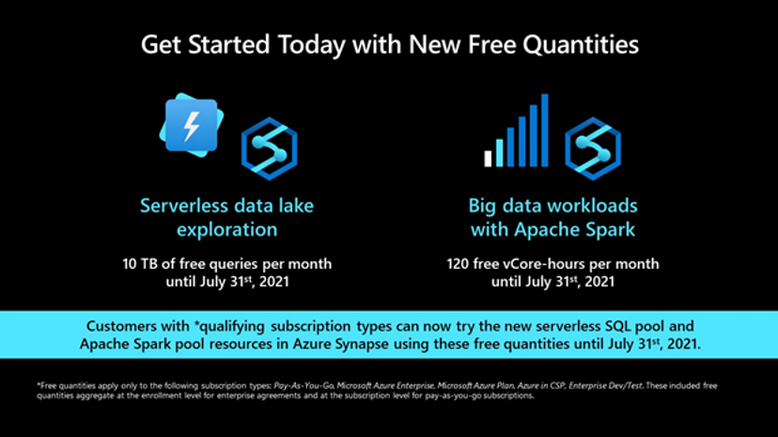
Customers with *qualifying subscription types can now try the Apache Spark pool resources in Azure Synapse using free quantities until July 31st, 2021 (up to 120 free vCore-hours per month).
by Contributed | May 25, 2021 | Technology
This article is contributed. See the original author and article here.
Meet the New Standard in Workflow
Today marks a new chapter for integration at Microsoft – the General Availability (GA) of Logic Apps Standard – our new single-tenant offering. A flexible, containerized, modern cloud-scale workflow engine you can run anywhere. Today, integration is more important than ever, it connects organizations with their most valuable assets – customers, business partners and their employees. It makes things happen, seamlessly, silently, to power experiences we take for granted, APIs being called by your TV to browse must-watch shows or catch the latest weather, snagging a bargain on your favorite website (with all the stock checking, order fulfillment and charging your credit card as backend workflows). Booking vacations when that was a thing, and keeping us all safe scheduling vaccine appointments on our phones, as well as checking in with friends and family wherever we are. The list goes on. Integration is everything.
Breaking Through the Cloud Barrier
Logic Apps has always been central to our industry-leading modern cloud integration platform – Azure Integration Services. But it was stuck in the cloud, our cloud. We know that business can’t always be bounded like this, and integration needs to be pervasive and accessible, connecting to where things are today, where they need to be tomorrow and where they might be in the future. For that, you need to be able to extend the reach of your network using an integration platform than can truly meet you where you are. Welcome Logic Apps Standard, our born in the cloud integration engine that can now be deployed anywhere – our cloud, your cloud, their cloud, on-premises or edge. And your laptop or dev machine for local development. Windows, Linux or Mac. Anywhere.
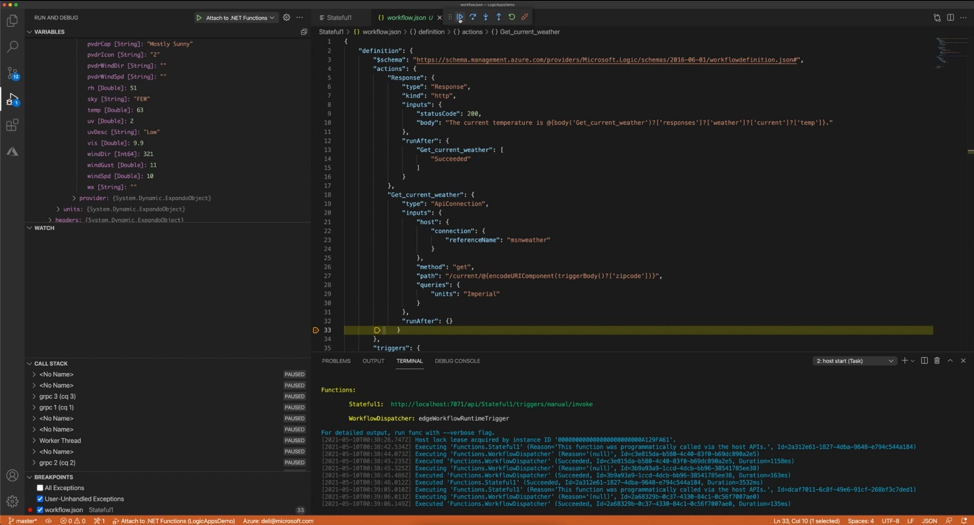
Figure 1. New VS Code extension.
The Speed You Need
We’ve also introduced new Stateless Workflows. As their name implies, this is a new workflow type in Logic Apps that doesn’t need storage to persist state between actions, making your workflows run faster and saving you money. What’s not to like about that? Stateless Workflows open up new high-volume, high-throughput scenarios for real-time processing of events, messages, APIs and data. We’ve achieved performance improvements across both Stateful and Stateless with a new connector model, built-in to the runtime, to provide high performance of some of our most common connectors – Service Bus, Event Hubs, Blob, SQL and MQ. Not only this but you can also now write your own connectors in .Net just like we do with all the same benefits with our new extensibility model for custom connectors.
A New Designer Designed For You
We didn’t want to reimagine our new runtime without reimagining the designer too. The no-code magic that brings integration to everyone, not just those who can code – or have time to. The canvas now allows you to bring your most complex business workflow, orchestration and automation problems. It has been recreated with not just a more modern look but incorporates a new layout engine making complex workflows render faster than ever, with full drag/drop, a new dedicated editing pane to de-clutter the whole experience, and new accessibility and other gestures to make authoring easier than ever. For everyone.
But that’s not all, we’ve also created a new VS Code extension for authoring, allowing you – for the first time– to easily debug and test on your local machine, set breakpoints, examine variables values in flight and generally, just do what you do faster – in the World’s most popular IDE.
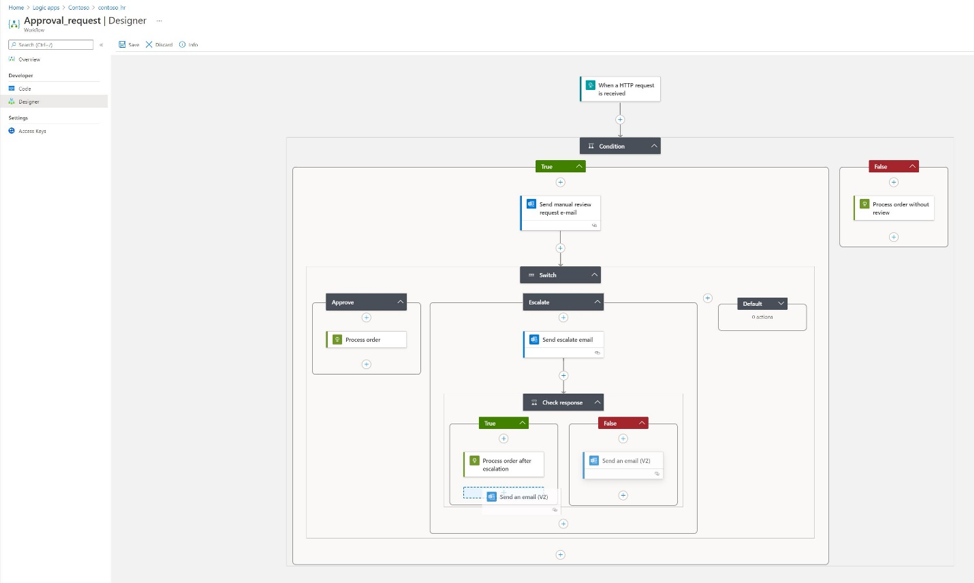
Figure 2. New Workflow Designer.
Easier To Live With
As well as leaps forward in our runtime, our designer and general ‘developer flow’ we know that getting your great work to production with as little manual effort and intervention as possible is also what you need. We’ve worked on making it possible to parameterize your workflows in Logic Apps Standard so that you can automate deployments and set environment-specific values in your pipelines to make DevOps a snap. You can choose what you’re familiar with to stay in your groove with support for both Azure DevOps pipelines and GitHub Actions – with provided templates to help you get productive as quickly as possible. You’re able to take an infrastructure as code approach to deploy your solutions and use CI/CD practices to enable you and your team to iterate and deploy without friction as fast as your business demands.
Not only this but Logic Apps Standard also now provides App Insights support too, allowing you ’see’ your running processes, as data flows between endpoints and monitor them using Azure Monitor as well as a host of other Azure built-in management capabilities.
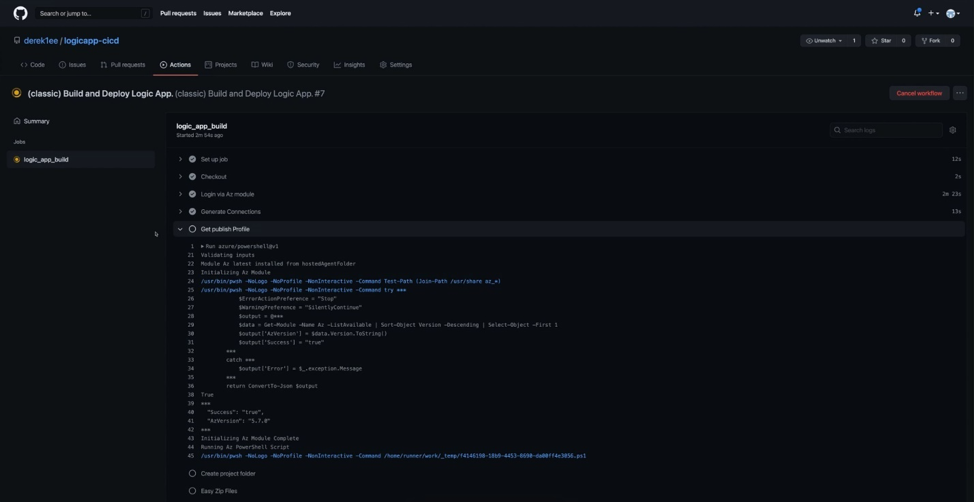
Figure 3. DevOps with Logic Apps.
You’re Always In Control
Because Logic Apps Standard runs on App Service – powering over 2 million web apps serving 40 billion requests per day – you get all the same great benefits that makes App Service great too. Auto scale, virtual network (VNet) support and Private Endpoints – right there at your fingertips – to build amazing solutions that span Web, Workflow and Functions. And of course, because Logic Apps is part of Azure Integration Services too, you can easily connect your applications using over 450 connectors, publish and consume APIs with API Management with just a few clicks and process events with Event Grid at planet-scale.
So What’s Next?
In a word, lots! We’ve also released today, the public preview of Logic Apps (and our other PaaS application services) on Azure Arc. Arc brings a new level of distributed deployment and centralized management to your application and integration environments. We’re also readying SQL support (Azure SQL, SQL Server, SQL Data Services) enabling you to run workloads fully locally with no Azure dependency on storage. Now in private preview, you can sign up here to express interest and get early access before the rest.
See For Yourself
Don’t just take our word for it, watch our Build session on-demand here where Derek Li, will take you through everything that’s new to get you up to speed. You’ll see how ASOS, a global leader in fashion and tech, is using Logic Apps Standard to help them realize their business goals faster than ever before.
You can start right now, for free, and take us for a spin. Read more on Logic Apps Standard here. If you’re already familiar with Logic Apps and want to understand the differences you can review this article. And as always, let us know what you think and what we can do to help you in your efforts.
– Jon & the Logic Apps team
by Contributed | May 25, 2021 | Technology
This article is contributed. See the original author and article here.
We are thrilled to announce that Azure Kubernetes Service on Azure Stack HCI is now generally available. Over the last 8 months we have made 5 public preview releases as we worked closely with customers, and responded to the early feedback that they provided.
You can evaluate AKS-HCI by registering here: https://aka.ms/AKS-HCI-Evaluate.
AKS-HCI makes our popular Azure Kubernetes Service (AKS) available on-premises. It fulfills the key need for an on-premises App Platform in the Azure hybrid cloud stack that goes from bare metal all the way into Azure-connected experiences in the cloud.
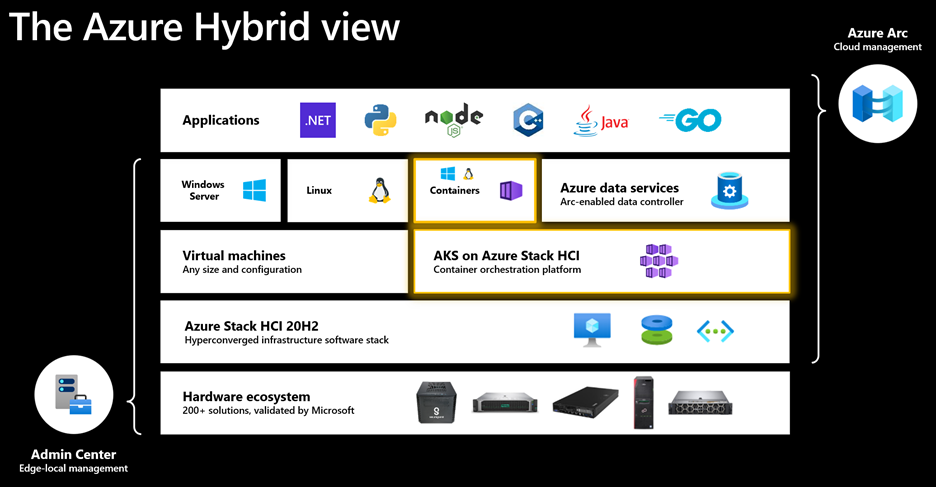
AKS-HCI is a turn-key solution for Administrators to easily deploy, manage lifecycle of, and secure Kubernetes clusters in datacenters and edge locations, and developers to run and manage modern applications – all in an Azure-consistent manner. Complete end-to-end support and servicing from Microsoft – as a single vendor – makes this is a robust Kubernetes application platform that customers can trust with their production workloads.
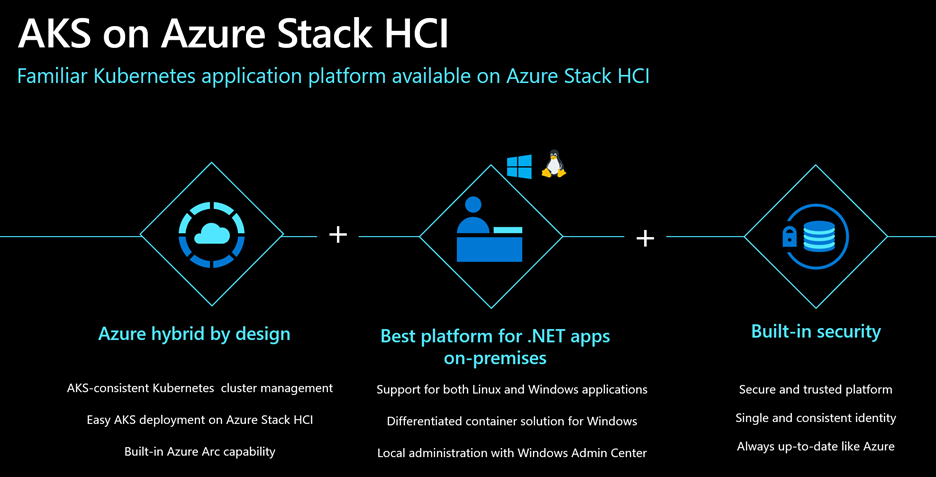
AKS-HCI is an Azure service that is hybrid by design. It leverages our experience with AKS, follows the AKS design patterns and best-practices, and uses code directly from AKS. This means that you can use AKS-HCI to develop applications on AKS and deploy them unchanged on-premises. It also means that any skills that you learn with AKS on Azure Stack HCI are transferable to AKS as well. With Azure Arc capability built-in, you can manage your fleet of clusters centrally from Azure, deploy applications and apply configuration using GitOps-based configuration management, view and monitor your clusters using Azure Monitor for containers, enforce threat protection using Azure Defender for Kubernetes, apply policies using Azure Policy for Kubernetes, and run Azure services like Arc-enabled Data Services on premises.
No matter how you choose to deploy AKS-HCI – wizard-driven workflow in Windows Admin Center (WAC) or PowerShell – your cluster is ready to host workloads in less than an hour. Under the hood, the deployment takes care of everything that’s required to bring up Kubernetes and run applications. This includes core Kubernetes, container runtime, networking, storage, and security, and operators to manage underlying infrastructure. Scaling the cluster up or down by adding/removing nodes and cluster-updates/upgrades are equally quick and easy. So is ongoing local management through WAC or PowerShell.
AKS-HCI is the best platform for running .Net Core and Framework applications – whether your applications are based on Linux or Windows. The infrastructure required to run containers is included and fully supported. For Windows, AKS-HCI offers an industry-leading solution with advanced features like GMSA non-domain joined hosts, Active Directory integration, and WAC based application deployment, migration, and management. We want to ensure that AKS-HCI remains the best destination for Windows containers.
With Microsoft, security is not an afterthought. AKS-HCI is kept up to date just like any Azure service. Security updates for the entire solution including core Kubernetes platform, network and storge drivers, Linux and Windows container VM images, and other binaries are delivered by Microsoft. Hardened VM images, single sign on with Active Directory integration, encryption, certificate management, and integration with Azure Security Center are just a few features – from a long list – that demonstrate leadership in this space.
Customers are using AKS-HCI to run cloud-native workloads, modernize legacy Windows workloads, and/or Arc-enabled Data Services on-premises. As more and more Azure services become available to be run on-premises, AKS-HCI will continue to be the industry-leading and preferred destination.
Here’s how AKS-HCI is enabling digital transformation at one of our customers – SKF.
“At SKF we continue to execute our vision of digitally transforming the company’s backbone through harnessing the power of technology, interconnecting processes, streamlining operations, and delivering industry-leading digital products and services for our customers. Our focus is on digitalizing all segments of the chain and interconnecting them to unlock the full potential of digital ways of working for our business and customers. Our challenge in manufacturing area is that we have more than 100 factories, and we need to be able to provide them with an IT/OT platform that comes with speed, reliability, and low cost, while providing for critical production systems. SKF plan to standardize on Kubernetes as the primary hosting platform for modern workloads. AKS running both on Azure Cloud and Azure Stack HCI, and the fact that Microsoft has also chosen Kubernetes strategy running their other products, allow us to deploy for example Azure Arc enabled Data Services virtually on any of our new or existing environments. This gives us a tremendous jump start into Lean Digital Transformation of our factories worldwide.” — Sven Vollbehr, Head of Digital Manufacturing at SKF
We are honored and thrilled by the trust you have placed in us and are excited to deliver innovation that empowers you – starting with this GA milestone.
Finally, we would also like to take a moment to thank the entire AKS on Azure Stack HCI team, who have worked tirelessly on this project amid the very trying and tough circumstances of the last year. It has been great to partner with all of you and to get to know you all better.
Thanks!
Ben Armstrong, AKS on Azure Stack HCI Group Program Manager
Dinesh Kumar Govindasamy, AKS on Azure Stack HCI Engineering GC
Register for our upcoming Hybrid and Multicloud Digital Event on June 29th!
Learn more about Azure Kubernetes Service on Azure Stack HCI
- Watch our On-demand Build session: Azure Kubernetes Service on Azure Stack HCI (AKS-HCI): A turnkey App Platform for modern .NET apps – with demos featuring e2e deployment, Azure arc, Azure Monitor, Azure Policy, App modernization using WAC, GMSA for Windows Containers, Vision on Edge IoT app on AKS-HCI, and a customer story by SKF.
- Watch Skilling videos


Recent Comments