by Contributed | May 27, 2021 | Technology
This article is contributed. See the original author and article here.
At Microsoft Build 2021 we launched the public preview of 2.0 CLI and REST APIs for Azure Machine Learning, enabling users to accelerate the iterative model training and deployment process while tracking the model lifecycle, enabling a complete MLOps experience.
Azure Machine Learning (Azure ML) has evolved organically over the past few years. With our 2.0 CLI and ARM REST APIs, we offer a streamlined experience for model training and deployment optimized for ISVs and ML professionals.
What’s new?
Announcing the 2.0 CLI, backed by durable ARM APIs
The ml extension to the Azure CLI is the improved interface for Azure Machine Learning users. It enables you to train and deploy models from the command line, with features that accelerate scaling the data science process up and out, all while tracking the model lifecycle.
Using the CLI enables you to run distributed training jobs on GPU compute, automatically sweep hyperparameters to improve your results, and then monitor jobs in the AML studio user interface to see all details including important metrics, metadata and artifacts like the trained model, checkpoints and logs.
Additionally, the CLI is optimized to support YAML-based job, endpoint, and asset specifications to enable users to create, manage, and deploy models with proper CI/CD (or GitOps) best practices for an end-to-end MLOps solution.
To get started with the 2.0 machine learning CLI extension for Azure, please check the link here .
Streamlined concepts
Train models (create jobs) with the 2.0 CLI – Azure Machine Learning | Microsoft Docs
What are endpoints (preview) – Azure Machine Learning | Microsoft Docs
Job
A job in Azure ML enables you to prepare and train machine learning models. It enables you to configure:
- What to run: your code
- How to run it: either an optimized prebuilt docker container from AML or one of your choice from your own docker registry
- Where to run it: either fully managed, scalable compute in Azure, locally on your desktop or (via Azure Arc if we want to call this out)
Train a machine learning model by creating a training job
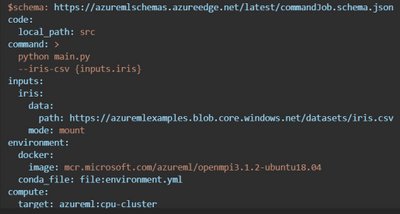
Here is an example training job which invokes the user’s python script from a local directory and automatically mounts data in Azure Storage.
Easy to optimize the model training process with Sweep Jobs
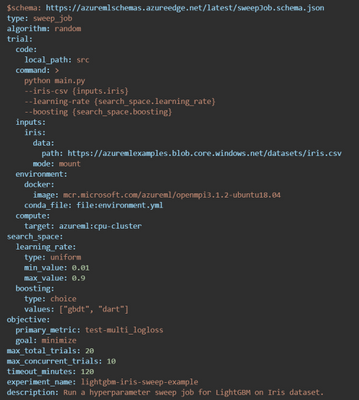
Azure Machine Learning enables you to tune the hyperparameters more efficiently for your machine learning models. You can configure a hyperparameter tuning job, called a sweep job, and submit it via the CLI. For more information on Azure Machine Learning’s hyperparameter tuning offering, see the Hyperparameters tuning a model.
You can modify the job.yml into job-sweep.yml to sweep over hyperparameters:
VS Code support for job authoring and resource creation
The Azure Machine Learning extension for VS Code has been revamped for 2.0 CLI compatibility, with added features such as completions and diagnostics for your YAML-based specification files. You can continue to manage resources directly from within the editor and create new ones with starting templates. Within the template files, you can use the extension language support to fetch completions, previews, and diagnostics for machine learning resources in your workspace.
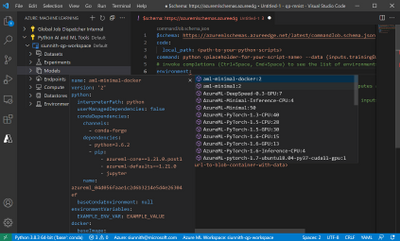
Once you are finished authoring the specification file, you can submit via the CLI from directly within VS Code (tip: right-click in the file itself to view the ‘Azure ML: Create Resource’ command). The extension will streamline invoking the right CLI commands on your behalf. To get started with the extension for creating, authoring, and submitting 2.0 CLI specification files, please follow this documentation.
OSS-based examples for training and deployment
Azure ML is announcing a new set of YAML-based examples for training and deploying models using popular open-source libraries like PyTorch, LightGBM, FastAI, R, and TensorFlow. All examples leverage open-source logging via the MLFlow library and do not require Azure-specific code inside of the user training script.
Examples are tested and validated using GitHub Actions against the latest Azure ML release. Official documentation on docs.microsoft.com leverages these tested snippets to ensure a smooth, working experience for users to get started.
You can find the new examples here: azureml-examples/cli at main · Azure/azureml-examples (github.com) .
ARM REST APIs, templates, and examples
With full ARM support for model training jobs and endpoint creation, ISVs can use Azure ML to create and manage machine learning resources as first-class Azure entities.
Examples using ARM REST APIs
Additional documentation on REST APIs is available here:
Summary
In summary, the new Azure ML REST APIs and helps ML teams focus more on the business problem than the underlying infrastructure. It provides a simple developer interface to train, deploy and score models and help in the operational aspects of the end-to-end MLOps lifecycle.
Please try our new examples and templates and share your feedback with us. You can use az feedback directly from the new CLI :)
by Contributed | May 27, 2021 | Dynamics 365, Microsoft 365, Technology
This article is contributed. See the original author and article here.
For many businesses, success increasingly depends on having the agility to innovate and adapt to rapid change, responding to customer needs, competitive pressure, and industry trends. But this is a difficult challenge when employees are buried in time-consuming busywork like repetitive tasks or complex processes.
That’s why we are dedicated to helping organizations like yours automate manual business processes, across both legacy and modern applications, so you can focus on what’s most important for your business and customers. In March, we released robotic process automation (RPA) capabilities in Microsoft Power Automate Desktop for Windows 10 users.
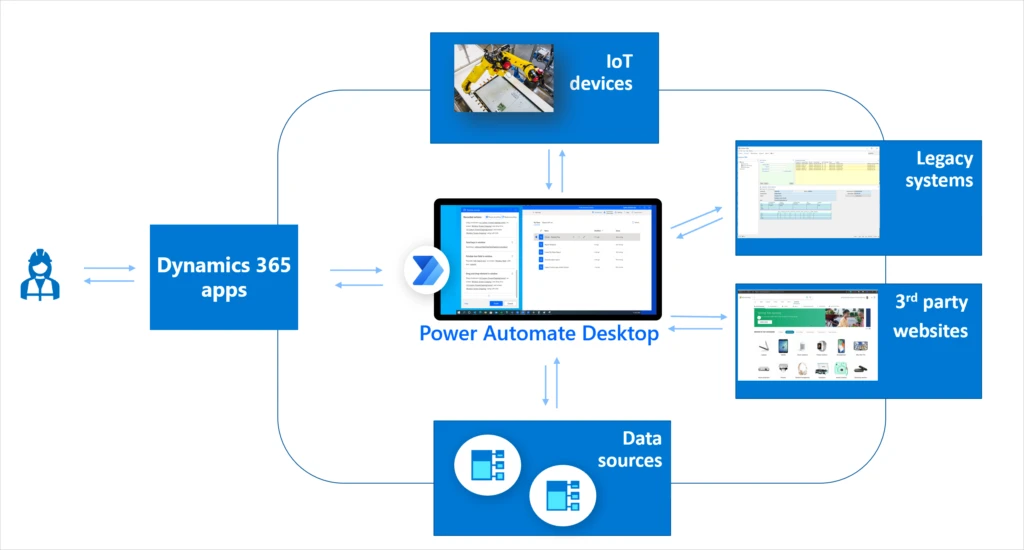
This month, we are introducing enhanced workplace automation capabilities for Microsoft Dynamics 365a set of prebuilt RPA solution templates, now available for public preview, that seamlessly integrate with select Dynamics 365 applications
Initially available for Dynamics 365 Customer Service, Dynamics 365 Supply Chain Management, and Dynamics 365 Finance, the prebuilt automation templates enable teams to rapidly automate common business scenariosfreeing time from day-to-day manual, repetitive, and error-prone tasks.
Developers can further extend any of those solutions by using custom actions, custom connectors, Microsoft Azure services, and APIs to take full advantage of Microsoft’s one cloud and data ecosystem.
Save time across customer service, finance, and supply chain roles
Explore some of the ways that RPA can help streamline processes and save valuable time across the workforce.
Dynamics 365 Customer Service: Helping call center agents rapidly validate customer credentials
Most contact centers require agents to validate or authenticate customer identities before proceeding with the service engagement. By enhancing Dynamics 365 Customer Service with RPA, agents can automate steps of the validation process, streamlining call times and helping agents to troubleshoot and solve customer issues faster.
Dynamics 365 Supply Chain Management: Streamline ordering of replacement parts for manufacturing line equipment
We’ve heard from manufacturing customers about the need to improve the process of ordering replacement parts for equipment on the factory floor. Often, technicians who identify defective parts on the manufacturing line need to write down part numbers, and then place the orders into the tracking system one by one. This is an inefficient and error-prone process. By integrating RPA processes into Dynamics 365 Supply Chain Management, technicians can simply scan or enter part details and submit orders on the spot, saving time and effort. Since Power Automate natively integrates with Azure IOT connectors, this solution can be easily extended to use the Azure IoT management system.
Watch a video to learn more about the new capabilities included in the latest update to Dynamics 365 Supply Chain Management.
Dynamics 365 Finance: Perform end of cycle financial close tasks, such as report generation and account validation
At the end of each financial period, finance team members perform standard recurring tasks in order to close the period (month-end, quarter-end, year-end). Many of these tasks include end-of-cycle report generation for the purpose of account validation and documentation. By integrating RPA capabilities in Power Automate, Dynamics 365 Finance helps streamline many of these manual and time-consuming processes, freeing up finance team members to focus on more critical strategic tasks while at the same time maintaining the accuracy that is highly demanded by the more and more restrictive finance audit regulations.
Next steps
Take the first step to enable your customer service, supply chain, and finance teams to automate processes in Dynamics 365. Get a free Power Automate RPA trial license and install Power Automate Desktop, and then import the three solutions mentioned above into your environment to set it up. Check out the documentation for steps to get started.
Send us your feedback, and we’ll work hard to address your feedback and improve the preview experience.
The post Enhance workplace automation with prebuilt RPA templates for Dynamics 365 (preview) appeared first on Microsoft Dynamics 365 Blog.
Brought to you by Dr. Ware, Microsoft Office 365 Silver Partner, Charleston SC.
by Contributed | May 27, 2021 | Technology
This article is contributed. See the original author and article here.
As you may be aware, Microsoft announced the general availability of the Azure-connected Hyper-Converged Infrastructure, Azure Stack HCI. Previously Azure Stack HCI was built off Windows Server which is a great general-purpose operating system that allows you to run your virtualized workloads. The new and improved Azure Stack HCI OS however is a purpose-built, cloud-connected infrastructure, intended to run your Azure Stack HCI workloads in the modern data center (for more information, start here, then go here, then see what’s coming next over here).
Azure Stack HCI is a subscription service that, like Office 365 or Windows 10, continually get free updates. The next update available to Azure Stack HCI subscribers will be 21H2 which is in preview right now! With this update comes a new feature called Network ATC, which simplifies the deployment and management of networking on your HCI hosts.
If you’ve deployed Azure Stack HCI previously, you know that network deployment can pose a significant challenge. You might be asking yourself:
- How do I configure or optimize my adapter?
- Did I configure the virtual switch, VMMQ, RDMA, etc. correctly?
- Are all nodes in the cluster the same?
- Are we following the best practice deployment models?
- (And if something goes wrong) What changed!?
So, what does Network ATC actually set out to solve? Network ATC can help:
- Reduce host networking deployment time, complexity, and errors
- Deploy the latest Microsoft validated and supported best practices
- Ensure configuration consistency across the cluster
- Eliminate configuration drift
Network ATC does this through some new concepts, namely “intent-based” deployment. If you tell Network ATC how you want to use an adapter, it will translate, deploy, and manage the needed configuration across all nodes in the cluster. For more details, please see our Network ATC preview documentation.
Let’s take a quick look at Network ATC in action. In this video, we deploy the host networking configuration across an 8-node cluster, each with two physical adapters (16 total) – with a single command. By the end, these two physical adapters are ready to run Storage Spaces Direct (storage intent) and provide the compute infrastructure (compute intent) needed run your virtual machines all in under 5 minutes.
One of the greatest benefits of Network ATC is that it remediates configuration drift. Have you ever wondered “who changed that?” or said, “we must have missed this node.” You’ll never worry about this again with Network ATC at the helm. Expanding the cluster to add new nodes? Just install the service on the new node, join the cluster and rest assured that in a few minutes, the expected configuration will be deployed.
As you can see, Network ATC greatly reduces the deployment time, complexity, and errors with host networking for Azure Stack HCI as it manages the lifecycle of the cluster. Whether you’re building out a new cluster, expanding the cluster, or just want the peace-of-mind that the network configuration is in steady-state, Network ATC can make this a breeze.
Please take a look at our preview documentation, give Network ATC a try, and as always, let us know what you think! Next, enjoy your newfound free time now that Network ATC is managing the host networking!
Thanks for reading
Dan “Network ATC helps me sleep at night” Cuomo
by Contributed | May 27, 2021 | Technology
This article is contributed. See the original author and article here.
Analytics and data are key to understand the impact of our efforts. Over the last few months, we’ve shipped new ways to measure activity happening in Yammer across Communities, Knowledge, and Live Events.
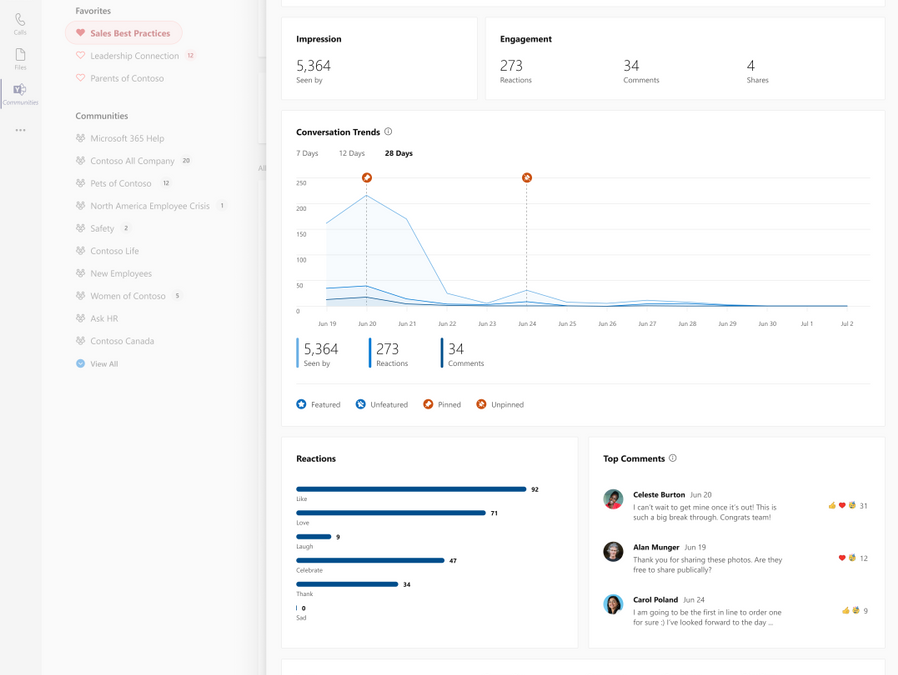
Today we are thrilled to announce the general availability of Conversation Insights. These insights empower authors and community managers to measure the reach and engagement of their conversations and announcements to understand what content resonates best with audiences.
Conversation Insights is available on Yammer.com on the web, and through the Yammer Communities App in Microsoft Teams.
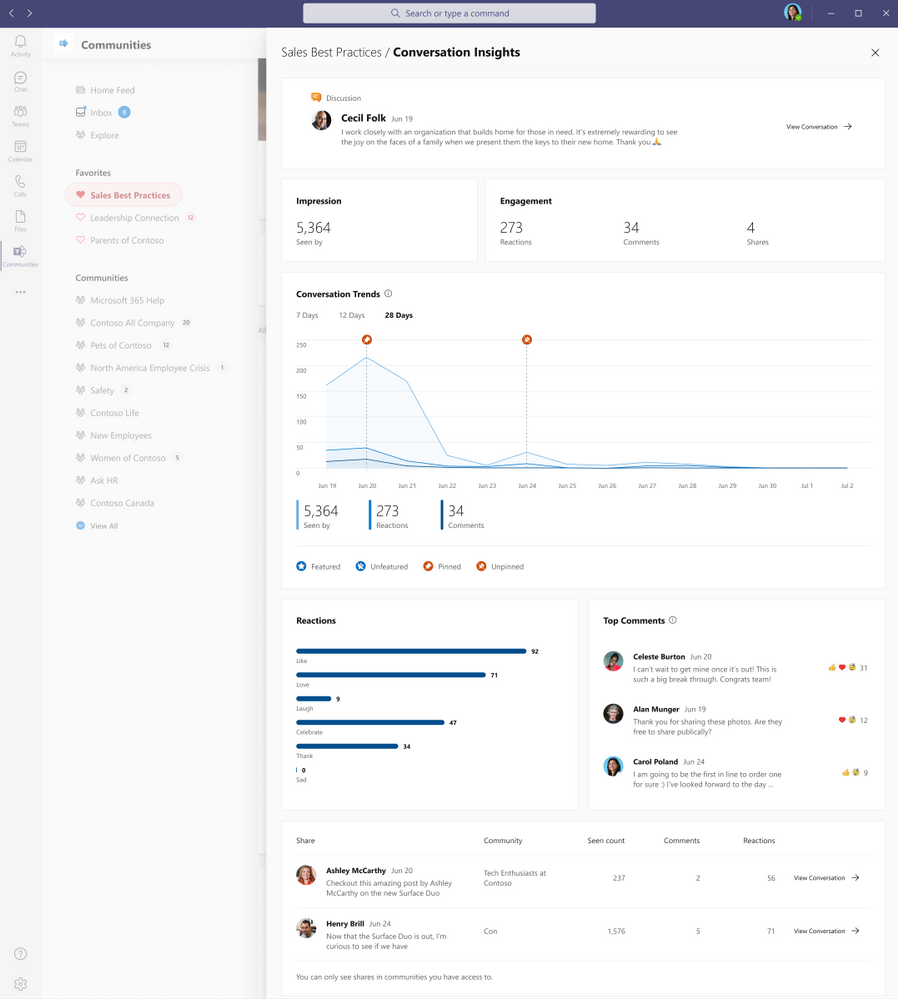 Conversation Insights
Impressions and Engagement
Get a topline summary of the metrics that matter most – the number of people that have seen this conversation and their engagement through comments, reactions, and shares.
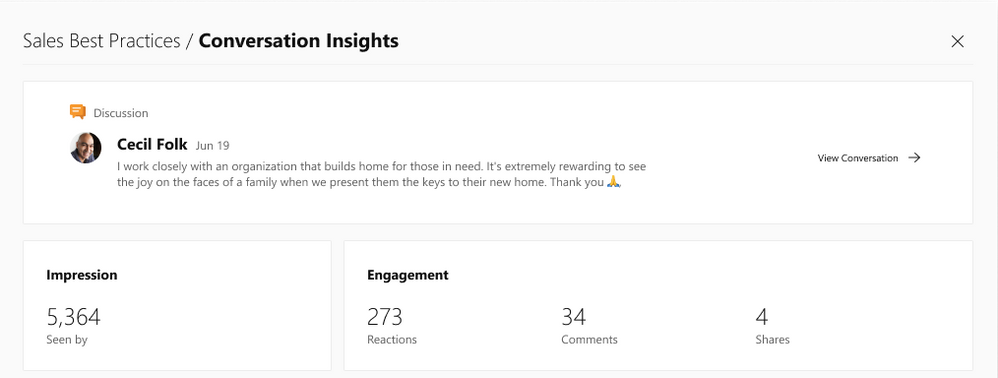 Impressions and engagement
Recognize Trends
Understand the engagement impact of taking actions to pin the conversation in a community or feature it across the network.
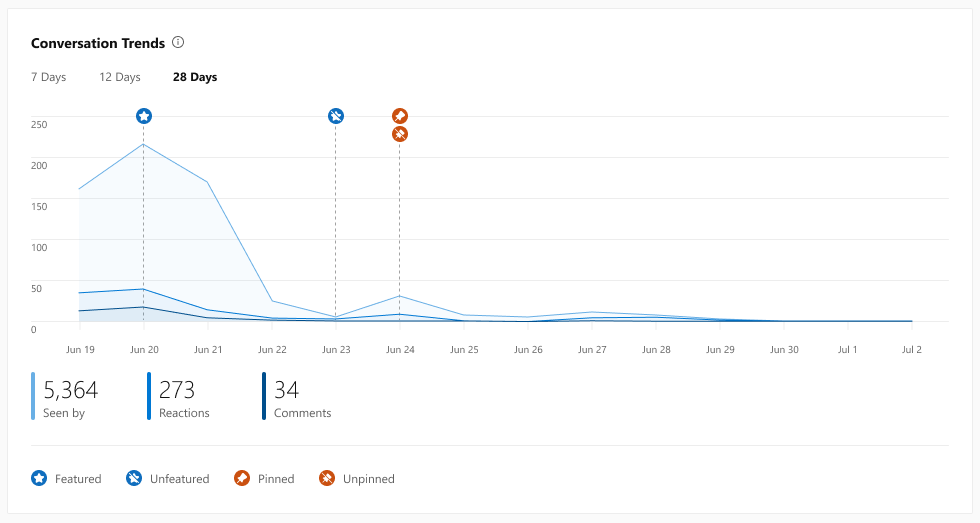 Conversation Trends
See how people react
Get a breakdown of reaction types on the conversation to get a measure of how people felt, and see which comments people most are interested in engaging with.
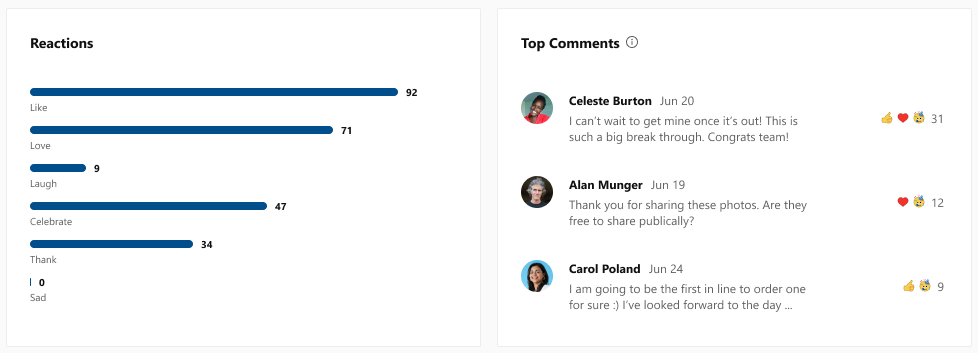 Reactions and comments
Measure spiraling engagement
See if your conversation went “viral” through the number of shares, how many people saw it, comments, and reactions, all in an easy-to-use dashboard.
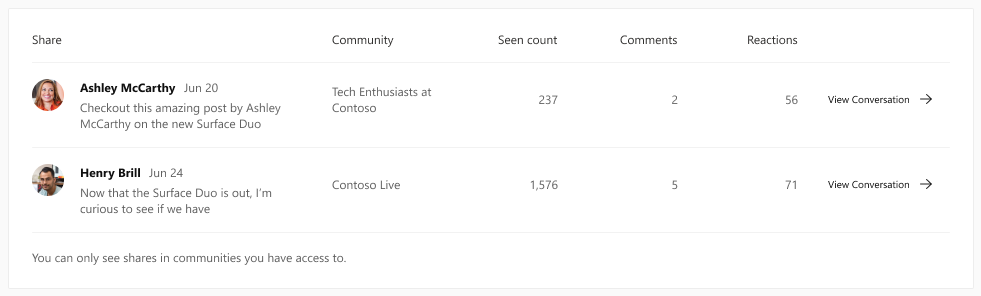 Shares
A new tool for corporate communicators and community managers
These new conversation insights provide a new way for corporate communications teams to track their internal campaigns and announcements. And partnered with the Yammer Communities app for Microsoft Teams, it paves the way for communicators to reach everyone wherever they work, and track the effectiveness of their messages in a whole new way.
See the official documentation.
We’re continuing to strengthen the integration between communities and Microsoft 365 to give everyone the tools and information they need to stay connected and thrive. Keep an eye on our blog for more news coming soon.
Sameer Sitaram
Sameer is a Product Manager on the Yammer team
by Contributed | May 27, 2021 | Technology
This article is contributed. See the original author and article here.
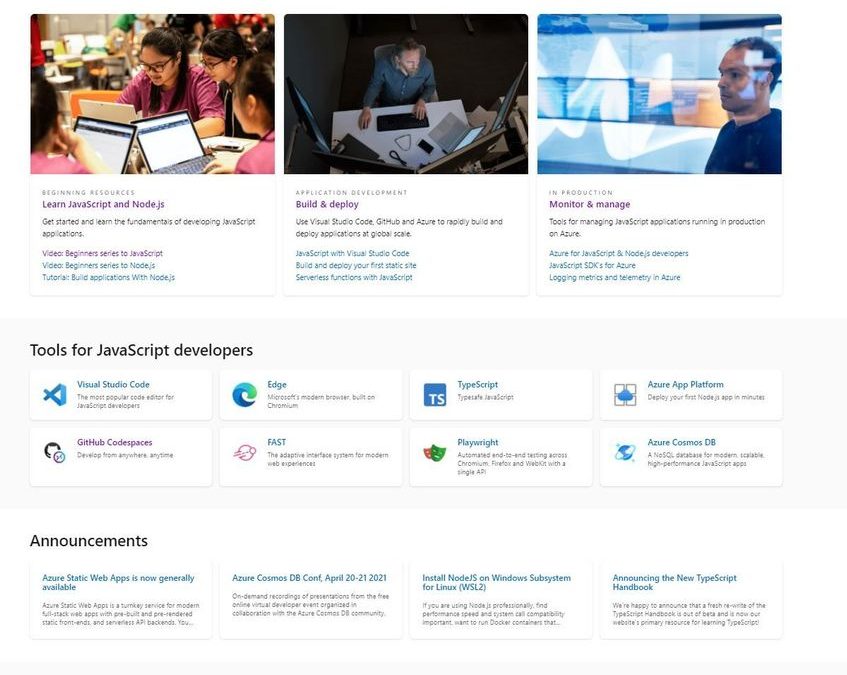
Welcome to docs.microsoft.com/javascript.
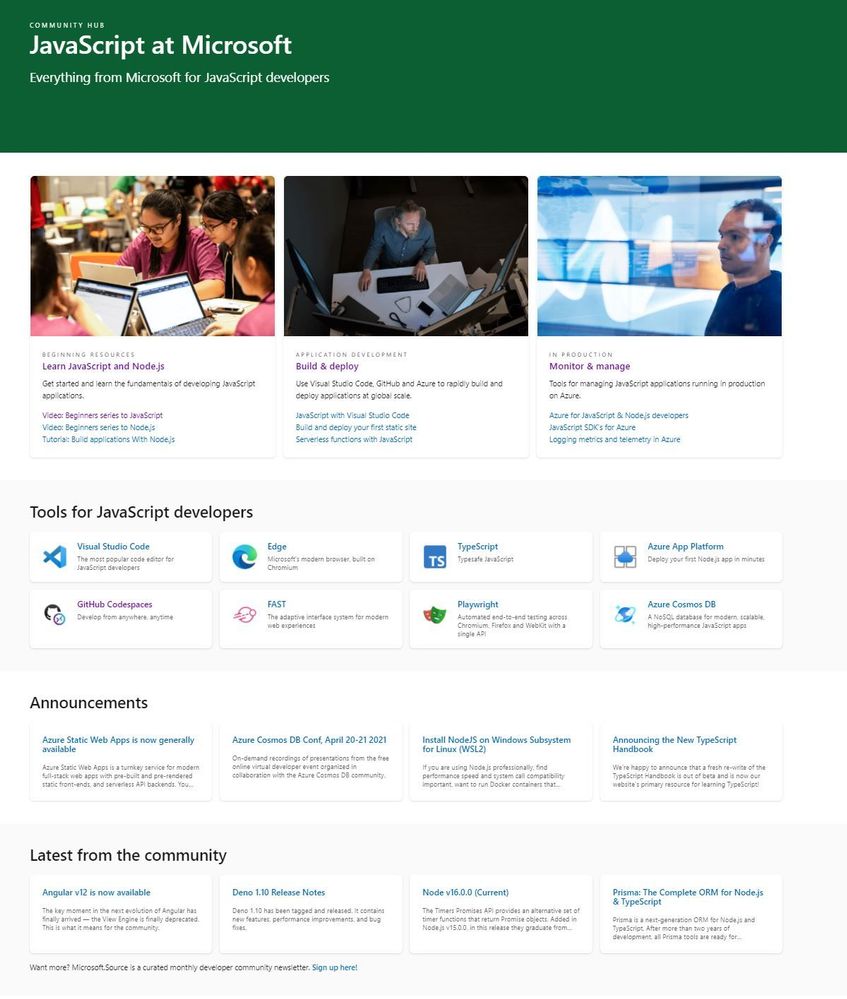
This is a new landing page designed to be a front-door to our end-to-end tools, services and runtimes for JavaScript developers.
Some of the resources which support Educators and Students.
BEGINNING RESOURCES


Recent Comments