
by Contributed | Aug 10, 2021 | Technology
This article is contributed. See the original author and article here.
There is some good news for those of you wanting to shard your Postgres database in the cloud, so that as your data grows you have an easy way to scale out your Postgres database. I’m delighted to announce that Citus 10—the latest open source release of the Citus extension to Postgres—is now generally available in Hyperscale (Citus).
Hyperscale (Citus) is a built-in option in the Azure Database for PostgreSQL managed service, which has been around for a couple of years to help those of you who would rather focus on your application—and not on spending cycles managing your database.
Newly GA features in Hyperscale (Citus) on Azure
Back in May we announced the preview of quite a few major features in Hyperscale (Citus)—including Postgres 12 and 13 support, Citus 10 with columnar compression, and read replicas to name a few. You can find all of the details are in my previous “What’s new” blog post, but here’s a quick bulleted list:
Current & upcoming region availability for Citus 10
Citus 10 and all the features above are now generally available in Hyperscale (Citus) in the East US, Germany West Central, and Korea Central regions.
This means that when you provision a new Hyperscale (Citus) server group in one of those regions, you are going to get access to all these features (and more). In the coming weeks, we will gradually roll out these new GA features in all Azure regions where Hyperscale (Citus) is available.
And if you have an existing Hyperscale (Citus) cluster: once Citus 10 and the rest of these newly GA’d features are rolled out to your region, you can expect us to plan and then update your existing server groups to give you access to the new GA features, over the course of a couple of months. We will include this update as a part of a scheduled maintenance event for your server group. Updates during scheduled maintenance are performed using failover and require a short downtime, in most cases under 60 seconds. And if you can’t wait for regular maintenance and want access to Citus 10 and the rest of these GA features sooner, we can update your server groups on demand as soon as this update reaches your region. Just ask us via e-mail.
Basic tier gives you the ability to shard Postgres on a single node
If your Postgres database doesn’t need the power of multiple nodes yet, you can select Basic tier when you first provision your Hyperscale (Citus) instance. Basic tier is what we call the new “single-node Citus” feature and it allows you to shard your Postgres tables on a single node. With Basic tier, you can be “scale-out-ready” by using a distributed data model from the start—and you can easily graduate to Standard tier and add nodes later. Or you can use Basic tier as a handy way to try out Citus. You can find more details about Basic tier in the docs.
How to get started scaling out Postgres with Hyperscale (Citus)
To figure out if Hyperscale (Citus) in Azure Database for PostgreSQL is right for you and your app, here are some ways to roll up your sleeves and try it out.

Figure 1: Watch this short video demo of Hyperscale (Citus) that showcases some of the new Citus 10 features, including Basic tier (aka single-node Citus) and columnar compression. The demo also showcases the type of performance improvements you can get by scaling out Postgres.
by Contributed | Aug 9, 2021 | Technology
This article is contributed. See the original author and article here.
Text Analytics extractive summarization is in public preview!
The extractive summarization feature in Text Analytics uses natural language processing techniques to locate key sentences in an unstructured text document. These sentences collectively convey the main idea of the document. This feature is provided as an API for developers. They can use it to build intelligent solutions based on the relevant information extracted to support various use cases.
In the public preview, extractive summarization supports 10 languages. It is based on pretrained multilingual transformer models, part of our quest for holistic representations. It draws its strength from transfer learning across monolingual and harness the shared nature of languages to produce models of improved quality and efficiency. The 10 languages are English, Spanish, French, Italian, German, Chinese (Simplified), Japanese, Korean, Portuguese (Portugal), and Portuguese (Brazilian).
Learn more about Text Analytics extractive summarization
References:
Quickstart offers an easy way to get started with any of the Text Analytics offerings.
Text Analytics v3.1 GA Announcement

by Contributed | Aug 9, 2021 | Dynamics 365, Microsoft 365, Technology
This article is contributed. See the original author and article here.
Today we are excited to announce the general availability of Microsoft Dynamics 365 Intelligent Order Management, a cloud-based solution that helps accelerate omnichannel transformation from order intake through orchestration to fulfillment.
Increasingly, consumers expect seamless omnichannel buying and after-purchase experiences with multiple fast delivery options. Companies are responding to this challenge by adopting solutions to centrally manage the entire order lifecycle from the time their customers place the order to the time it is delivered. Dynamics 365 Intelligent Order Management enables organizations to adapt quickly and meet future order and fulfillment complexities while supporting contemporary methods like buying online or from an app for in-store or curbside pickup.
With Intelligent Order Management, business professionals gain real-time cross-channel inventory visibility and advanced analytical capabilities for better decision-making processes. Using AI-powered order insights, they can re-model and orchestrate the order fulfillment journey with easy-to-use drag and drop tools, and proactively overcome bottlenecks all while driving efficiencies across the supply chain to ensure that their customers’ needs are met on time and cost-effectively.
Order fulfillment becomes a competitive advantage
According to Statista, “In 2019, the same-day-delivery market in the United States amounted to 5.87 billion U.S. dollars. By 2024, this market is forecasted to reach 15.6 billion U.S. dollars. Same-day delivery in e-commerce in the U.S. is one of the most requested services.”
At Microsoft, we view this rise in demand for same-day delivery as an opportunity for businesses to turn order management into a competitive advantage. With Intelligent Order Management, we are providing businesses with the ability to meet these growing digital commerce needs by automating and optimizing fulfillment using real-time omnichannel inventory data supported by AI and machine learning.
Learn more in this webinar: Turn order fulfillment into a competitive advantage.
Configurable, not coded
According to Gartner, “by 2023, 50 percent of medium to large enterprise will have adopted a low code application program (LCAP) as one of their strategic application platforms.” In responding to the trend toward low-code/no-code (LC/NC) applications, our solution is designed to be configured, not coded, making it a more modern open platform. Moreover, it allows users to proactively overcome disruptions by reconfiguring order flows using a powerful but simple drag and drop interface. With these tools, users can rapidly deploy and scale with the latest fulfillment methods by leveraging pre-built connectors to various ERP, order intake, fulfillment, and delivery partner from our growing ecosystem.
Learn more in this short video introduction:
Solution architecture
One of our objectives with Intelligent Order Management is to enable order intake from a variety of sources and pass them through the order orchestration, and process layers within the application. Intelligent Order Management’s event-driven order orchestration services then coordinate the events triggered by various APIs to different system connectors to make optimal fulfillment decisions. These decisions are continuously communicated and tracked for the entire order life cycle across all fulfillment partners and legal entities.
We also wanted to ensure that Intelligent Order Management could be used with other legacy systems within your business and since this is built on the Microsoft Power Platform, it enables us to deliver the low code, no code environment that users need to adapt quickly and respond intelligently to constraints and disruptions in the supply chain.
What’s next?
Dynamics 365 Intelligent Order Management allows companies to intelligently orchestrate fulfillment and automate order flows through a rules-based system with effective exception handling. Our groundbreaking solution also empowers business users with real rime visibility across inventory and order flows, and more importantly, provides the capability to quickly adjust and change any order path. Intelligent Order Management uses machine learning to learn how business users react to each exception and provide better recommendations each timehelping them achieve optimal stock levels and improve cash flow.
Ready to take the next steps with Intelligent Order Management? Get started today with a free trial. Or, to learn more, check out the top five reasons to transform your order management system with our e-book The Savvy CSCO’s Guide to Transforming Order Management.
1- “Same-day delivery market size in U.S. 2019-2024”, E. Mazareanu, May 12, 2021
2- Gartner Magic Quadrant for Enterprise Low-Code Application Platforms, 30 September 2020, Paul Vincent, Yefim Natis, Kimihiki Lijima, Jason Wong, Saikat Ray, Akash Jain, Adrian Leow
GARTNER is a registered trademark and service mark of the Gartner Inc., in the U.S. and internationally and is used herein with permission. All rights reserved.
The post Dynamics 365 Intelligent Order Management is now generally available appeared first on Microsoft Dynamics 365 Blog.
Brought to you by Dr. Ware, Microsoft Office 365 Silver Partner, Charleston SC.
by Contributed | Aug 8, 2021 | Technology
This article is contributed. See the original author and article here.
CIS Benchmarks from the Center for Internet Security (CIS) provide organizations with configuration best practices for securing operating systems. Using these standards which have been defined by cybersecurity industry experts and research institutions, can help ensure that your organization’s devices are configured securely from day one using Azure Defender for IoT.
What are the CIS Benchmarks?
Without the right configuration, operating systems are highly vulnerable and include many opportunities for attackers to penetrate the organization. The CIS security Benchmarks program provides the best practices and industry-agreed standards to secure devices against cyber threats. The benchmarks include security recommendations for operating systems, network devices, cloud hosting services and more.
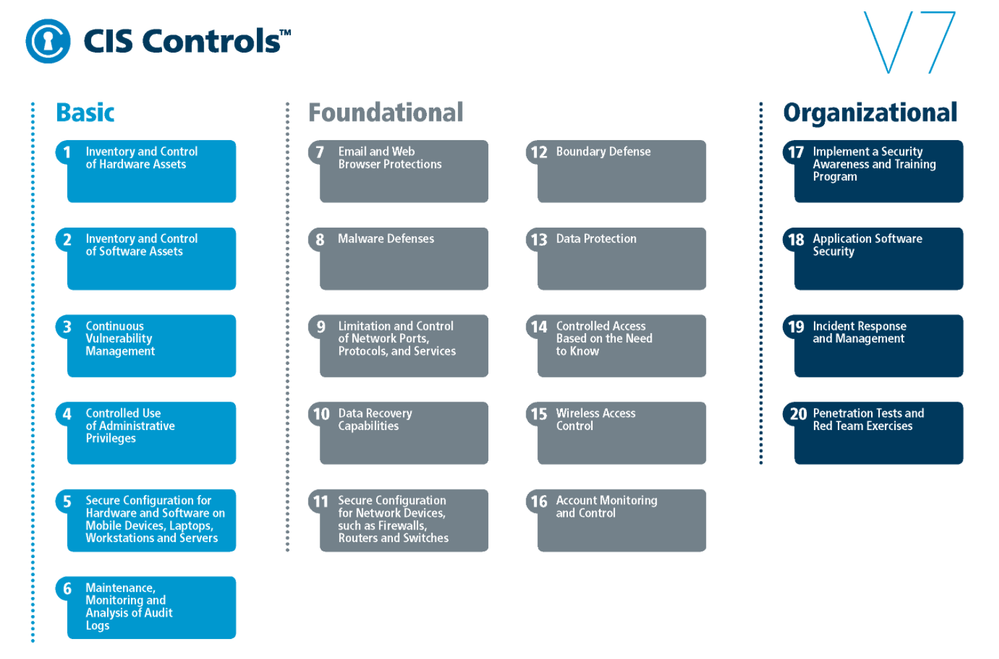
CIS Benchmarks can be used to implement CIS controls which are a prioritized set of safeguards to mitigate the most prevalent cyber-attacks against systems and networks.
Fig. 1 CIS Benchmarks controls
The top 5 most impactful controls from the OS CIS Benchmarks to implement are:
- Secure Configuration for Hardware and Software on Mobile Devices, Laptops, Workstations, and Servers – As delivered by manufacturers and resellers, the default configurations for operating systems are not security-oriented. Botnets brute force attacks for example, can be avoided if the defaults of the device are changed.
- Maintenance, Monitoring and Analysis of Audit Logs – Without solid audit logs, attackers can hide their activities on victim machines. Manage audit logs of events to help detect an attack.
- Limitation and Control of Network Ports, Protocols, and Services – Manage processes on your networked devices to prevent attackers from exploiting services that are installed by software packages automatically without alerting the user.
- Controlled Access Based on the Need to Know – In many attacks the victim is not aware that sensitive data is leaving their system as they were not monitoring data movement. Manage your data flow to minimize its exposure to attackers.
- Account Monitoring and Control – Inactive accounts can be exploited to impersonate legitimate users making the discovery of attacker behavior difficult. The lifecycle of all accounts should be monitored to minimize opportunities for attackers to leverage them.
How can Azure Defender for IoT help you comply with CIS Benchmarks?
Azure Defender for IoT is a comprehensive IoT/OT security solution for discovering IoT/OT devices, identifying vulnerabilities, and continuously monitoring for threats. It is available in both agentless and agent-based architectures, and is tightly integrated with Azure Sentinel, Microsoft’s cloud-native SIEM/SOAR platform. The solution also integrates with third-party SOC solutions such as Splunk, IBM QRadar, and ServiceNow.
In this blog we focus on the agent-based solution that device builders can include in their devices – a lightweight micro agent that allows them to build security directly into your new IoT devices and Azure IoT projects. The micro agent provides endpoint visibility into security posture management, threat detection, and integration into Microsoft’s other security tools for unified security management.
Because each Benchmark can include hundreds of configurations that touch different parts of the OS, such as network configurations, authentication, authorization, maintenance, and others. Reviewing all the checks and ensuring the company is compliant, is a complex and time-consuming task. Defender for IoT helps organizations to automate this process while constantly identifying any existing weak links in their OS security posture.
As soon as the agent is activated, the Azure Defender for IoT micro agent automatically runs all relevant benchmark checks on your devices. The results are then populated into IoT Hub interface under the Defender for IoT Security console as a recommendation.
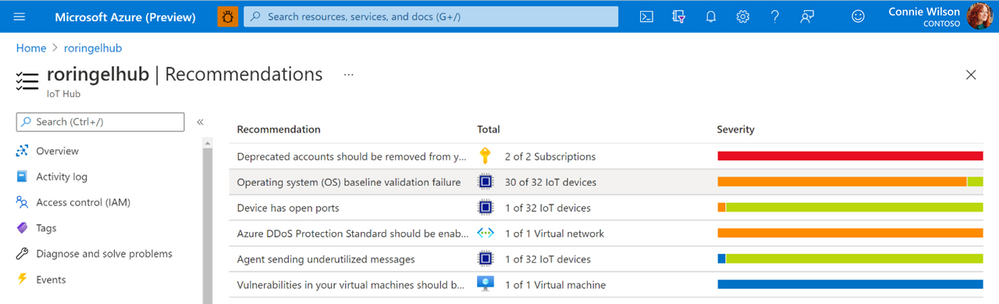
Fig. 2 CIS Benchmarks recommendations as seen in the recommendation page under the IoT Hub
All vulnerable devices are then displayed including the number of failed checks on each device.
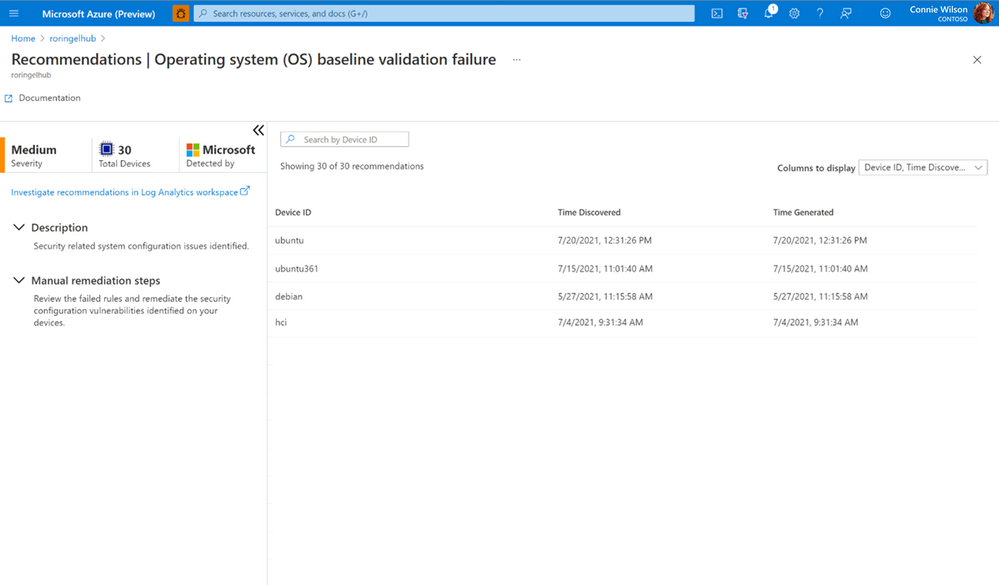
Fig. 3 Vulnerable devices and the results of checks
You can view a specific device and see all the reasons the checks failed and the exact mitigation steps needed to configure the devices correctly using Log analytics, a tool in the Azure portal used to edit and run log queries.
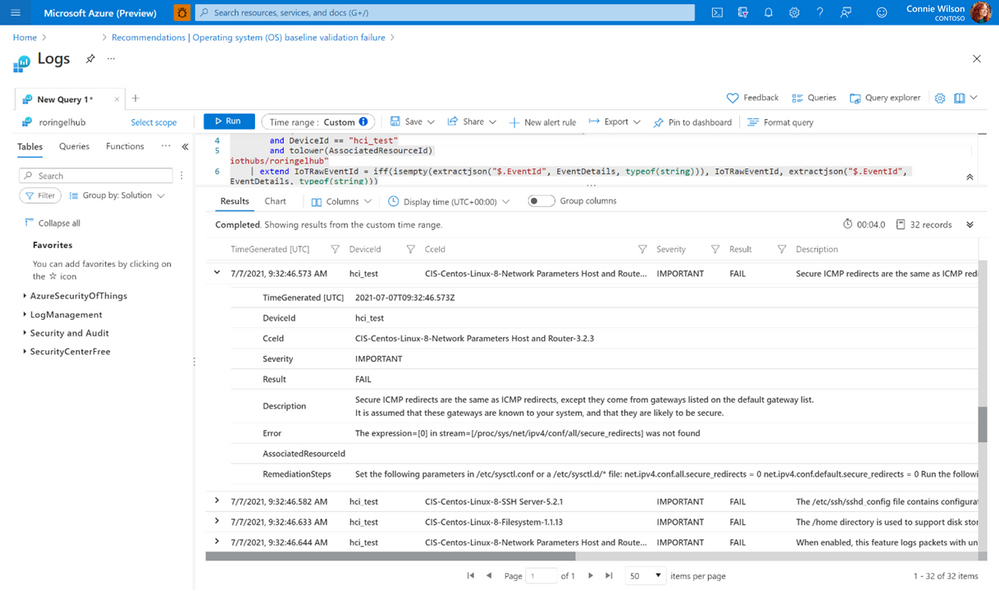
Fig. 4 CIS Benchmarks result and the appropriate mitgation steps for a single device
Currently, the feature is available for Debian and Ubuntu Linux distributions, we are working towards adding more checks for additional OSs in the future.
The CIS Benchmark can also be used to implement the NIST (National Institute of Standards and Technology) Framework for Improving Critical Infrastructure Cybersecurity. The NIST Framework is a U.S Department of Commerce initiative that defines industry standards and best practices in order to help organizations manage their cybersecurity risks.
For customers that need to comply with NIST Cybersecurity Framework (CSF), you can use the CIS controls v7.1 mapping to NIST CSF document that has all the necessary controls, between the two systems mapped out for you.
Thank you for reading and we hope this information proves helpful. To learn more about Azure Defender for IoT can benefit enterprises and device builders check out the following:
by Contributed | Aug 6, 2021 | Technology
This article is contributed. See the original author and article here.
If you’re migrating your data estate to Azure, as is normal considering Azure is an enterprise cloud that can be the home for all data, including Oracle, you may wonder what storage solutions there are to support these types of IO heavy workloads. Maybe you didn’t realize how important storage was to Oracle in the cloud. Most customers we word with are focused on what vCPU and memory are available in Azure, but for 95% of Oracle workloads, it’s IO that makes the decision on the infrastructure we choose and of that IO, its throughput, (MBPs) that is most often the deciding factor in the final VM sizes and storage type.
This post isn’t going to be about promoting one storage vendor or any solution over another, but hopefully help you understand that each customer engagement is different and that there is a solution for everyone, and you can build out what you need and meet every IO workload with Oracle, (or any other heavy IO workload) in Azure.
There are limits on storage, but more importantly, there are limits per each VM on storage and Network that must be considered. When choosing a VM, don’t just match the amount of vCPU and memory, but can the VM handle the throughput demands your workload will place on it. One of our favorite VMs types is the E-series ds v4. This sku series offers us the ability to have premium SSD for the OS disk, constrained vCPU versions if we need to have a larger “chassis” and memory with lesser vCPU for licensing constraints and higher throughput than we see with many others with similar configurations.
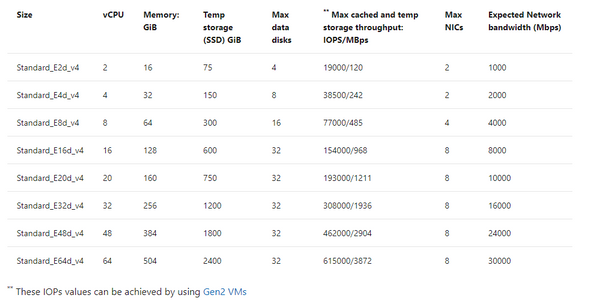
If you inspect the specifications by SKU size, you will see displayed the max cached IOPS/MBPs and Network bandwidth for the E ds v4 series:
Table 1, E-series, ds v4 VMs in Azure specifications
The above table will result in both premium disk and ultra disk being held to both storage and network limits displayed, or for solutions such as ANF, Silk, Excelero or Flashgrid, we’re held to only the network limits shown. As I stated earlier that throughput, MBPs is the biggest headache, not IOPs, (i.e., the number of requests) you can understand why the latter solutions come in handy with IO heavy workloads such as Oracle in Azure.
If you have sized out the Oracle workload for Azure properly, then you will know what you require in Azure IaaS to run it and can then choose the best VM, and storage needed. If you’re then puzzled by storage solutions, let’s take a deeper look and especially for Exadata, demonstrate what options there are.
Don’t Guess
I can’t stress enough, if you haven’t sized out the Oracle workload from an AWR that shows considerable database workload activity from the customer’s environment, you’re just guessing. Do NOT try to lift and shift the infrastructure, especially from an Exadata- you are AGAIN, wasting your time. An Exadata is an engineered system and there are infrastructure components that can’t be shifted over and more often is quite over-provisioned.
I also run into pushback on going through the sizing exercise. Many will want to simply take the existing hardware and lift and shift it to the cloud. This is one of the quickest ways to pay two or more times for Oracle licensing. I’m not going to argue with sales people who pushback with me on this, but chalk the deal or migration up as lost and go spend my time on a migration that’s going to be successful from the beginning.
Fight Me
So I know what the documentation says for storage IaaS VMs–
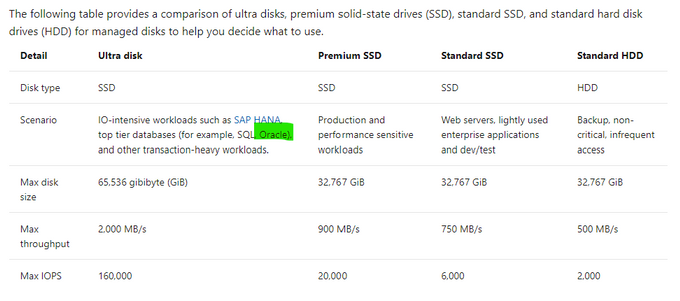
Table 2, Storage Options for IaaS VMs in Microsoft Docs.
Reality of what is best for Oracle on Azure may not agree with what is in this table and I’m going to tell you now, I don’t agree with the above table. Ultra disk may look appealing for Oracle, but we simply haven’t found the limitations vs. the cost for Oracle worthy, where for other uses, such as redo logs, it’s a fantastic win, (along with non-Oracle opportunities.) Ultra is still limited by the storage and network limit per VM, and this means that we can’t gain the throughput that we require for most heavy Oracle workloads with 2000+ MBPs.
Using example workloads, I can begin to direct and “evolve” our storage solution and the levels we use with real customer use cases:
Storage Name
|
Storage Type
|
Use
|
Standard HDD
|
Native
|
Not for use with Relational Databases
|
Standard SSD
|
Native
|
Less than acceptable for Oracle workloads or Oracle VM OS Disks
|
Premium SSD
|
Native
|
Standard Oracle Workloads and OS Disk, With Datafiles, always turn on ReadOnly host caching.
|
Ultra Disk
|
Native
|
Redo Logs, rarely for datafiles due to limitations.
|
Azure NetApp Files
|
Native with 1st Party Partnership
|
High IO Oracle Workloads, some Exadata
|
Silk
|
Third Party Partnership
|
High IO Oracle + Workloads, especially Exadata
|
Excelero NVMesh
|
Third Party Partnership
|
High IO Oracle + Workloads
|
Flashgrid Storage Fabric SW
|
Third Party Partnership
|
High IO Oracle + Workloads
|
NetApp Cloud Volume OnTap (CVO)
|
Third Party Partnership
|
High IO Oracle + Workloads, especially Exadata
|
Table 3, Storage options most common for Oracle in Azure
As you look at the table above, you realize that there are a few options at the lower IO workload levels and many at the higher ones. This is where knowledge of your workload and demands, along with unique features of each will come in handy when deciding.
Premium Disk
It is going to be very, very rare day that we place an Oracle workload on standard SSD. A P10 disk will be recommended practice for the OS Disk for each VM Oracle will be running on and then we need to start allocating storage for the datafiles, redo logs, etc.
We rarely, if ever come across Oracle databases that don’t need the IO horsepower for anything but Premium. With that, we get significant performance gain from ReadOnly host caching so the P40/P50, (minus that last 1Gb to leave it inside the limit for ReadOnly host caching of 4095 TiB) disks are our favorite and meet the needs of many Oracle workloads. For the smallest Oracle database workloads, we may use smaller premium SSD or stripe premium disk, as we can use multiple disks with a single ASM diskgroup. Always pay attention when choosing your VM size, there is a max number of data disks that can be attached, so this will also determine what storage you choose, (refer to table 1.)
ReadOnly host caching is only available on certain VM series/skus, as well as mid to high range premium SSD and limited to 4095 TiB. If you allocate a disk larger than that, the host caching will automatically be disabled. We hear a lot from Infra folks about “disk bursting”, either credit or On-demand versions with IO in Azure premium SSD storage. I haven’t had a customer workload that really could make use of it, but for smaller workloads, upwards of 30 minutes of bursting could be beneficial. For P40-P80, there is an unlimited bursting that can be an option at 1000 MBPs. Many customers batch loads in Oracle are just too intensive and too long to take advantage of credit-based bursting and On-demand or changing performance tier is too expensive or too inconsistent in performance for many. For relational database workloads, consistency in performance really is key. Most customers choose to stripe disks to get the max throughput from storage for most Oracle databases or choose higher tier storage, skipping bursting options all together.
Using the table below, you can see the size and the IO max for each premium storage, which tells you what you will be limited to for a single disk unless you stripe-
|
|
|
|
Premium Disk Size
|
Storage Amount
|
IOPs Max/Bursting
|
MBPs Max/Bursting
|
P10
|
128
|
500/3500
|
100/170
|
P20
|
256
|
1100/3500
|
125/170
|
P30
|
512
|
2300/3500
|
150/170
|
P40
|
1024
|
5000/30000
|
250/1000
|
P50
|
2048
|
7500/30000
|
250/1000
|
P60
|
8192
|
16000/30000
|
500/1000
|
P70
|
16384
|
18000/30000
|
750/1000
|
P80
|
32767
|
20000/30000
|
900/1000
|
When striping, again, you must be cognizant of the max number of disks you’re allowed per VM, remembering that the OS disk is counted as one.
Ultra Disk
We like Ultra disk, but it has numerous limitations when we start pricing out what it will take to run a database on it, realizing that it will be limited at the storage, not just the network limit per VM, that we have no volume snapshot mechanism or availability zone solution using it and the complicated pricing model, it ends up being a solution with limited use with Oracle. That use is redo logs when a database resides on premium disk and experiencing redo log latency.
More often a better option is to stripe premium disks to achieve upwards of 2000 MBPs, use Azure Backup volume snapshots to eliminate excess IO created by large RMAN backups and no need to spend more money on Ultra Disk.
Azure NetApp Files (ANF)
Many folks think this is a third-party solution, but it’s really a native solution in Azure in partnership with NetApp, and might need a rename to something like, “Azure Enterprise Files”. It’s a first tier storage for high IO workloads and is only limited by the network per VM. An ANF capacity pool is storage built at the region level, has HA built into the solution and can be allocated to multiple VMs, offering the ability to meet numerous workloads that other native solutions can’t. Along with robust cloning capabilities, shared volume snapshots across capacity pools even across regions, which can be used to bring up a second Oracle environment in a short order and avoid additional licensing that would be required if Oracle Data Guard was present.
ANF is also an excellent choice for datacenter migrations where a native storage solution is required or strict, Azure certified storage with high IO capabilities are needed.
Silk
As I work almost primarily on Exadata migrations, I spend a lot of time with Silk data pods. This is a third-party solution that uses a number of patented features to build out a Kubernetes data pod inside Azure, out of compute nodes, (D-series VMs) and management nodes, (L-series VMs) using the NVMe storage to accomplish fast IO. They have compression and dedupe that simplifies some of the additional “decoupling” I’d have to do with the loss of Hybrid Columnar Compression, (HCC) in Exadata. As the IO would grow considerably without HCC, I commonly use additional partitioning and Oracle Advanced Compression to try to make up for that loss.
Another feature that I love about Silk is it’s thin cloning. The ability to create a read/write clone and not have a storage cost is beneficial for E-Business Suite (EBS) and other Oracle applications that require consistent copies across multiple stage environments and the ability to save on storage while doing this, plus doing it quickly is fantastic. Anyone who’s used sparse clone on Exadata would love to have the thin clone in Silk, too.
The Rest
Excelero NVMesh I’ve only been working with for a short while and same with Flashgrid Storage Fabric. While both, like Silk, use VMs and the local storage to creation high IO solutions with the only per VM limitation at the Network layer, they don’t have some of the additional features such as compression/dedupe, thin cloning and volume snapshots. I’ve also been introduced to NetApp Cloud Volume OnTap,(CVO) which marries the best of onprem OnTap storage with Azure in a third-party solution that is closer in features to Silk and can benefit Exadata workloads that rely on HCC, thin cloning and snapshot backups.
The How
When deciding what solution to go through, it’s important to identify the following:
- The vCPU and memory requirements
- The IO, both IOPs and MBPs, especially the latter limit for the VM
- Using the size of the database, along with IOPS/MBPs, then choose the type of storage, (premium or high IO)
- The business’ SLA around Recovery Point Objective (RPO) and Recovery Time Objectcive (RTO) will tell you then which solution will be best that meets the IO needs.
- A secondary service can be added to create additional functionality, (as an example, we add Commvault to ANF to add additional cloning features at a low cost).
So let’s take a few example and look at what kind of combinations you might choose:
Example Oracle Workload #1
- 16 vCPU
- 128G of RAM
- IOPS 22K
- MBPs 212M
- DB Size: 5TB
- Backup Size: 23TB
- RPO/RTO of 15 min/8 hrs
I know this may seem limited on all that you might need to size it out, but we are assuming a sizing assessment has been done from an AWR and from this we can come up with the following recommendations:
Recommended VM: E16ds v4
Storage Option A
- 1 Premium P10- OS Disk
- 6 Premium P40 Disks- Datafiles and Redo Logs
- 24 TiB of Azure Blob Storage- Backups
- Backup strategy: RMAN
Storage Option B
- 1 Premium P10- OS Disk
- 5 Premium P40 Disks- Datafiles
- 40G Ultra Disk- Redo Logs
- 24 TiB of Azure Premium Blob Storage- Backups
- Backup Strategy: Azure Backup for Oracle
Example Oracle Workload #2
- 32 vCPU
- 480G RAM
- IOPs 100K
- MBPS 2800M
- DB Size 8TB
- Backup Size 28TB
- RPO/RTO of 15 min/2 hrs
Due to the limited RTO, I would use Oracle Data Guard to support the 2 hr RTO, as an RMAN recovery from storage wouldn’t meet the requirements for the DR on it’s own.
Recommended VM: E64-32ds v4 constrained vCPU VM
- 1 Premium P10- OS Disk
- Storage Option A: ANF with capacity pool and snapshot taken every 10 minutes to secondary capacity pool in separate region.
- Storage Option B: Excelero with Oracle Data Guard secondary in second Availability Zone, using Fast-start Failover and Observer/DG Broker and RMAN backups to Premium file storage.
Example Oracle Workload #3
- 16 vCPU
- 85G of Ram
- IOPs 300K
- MBPs 4500M
- DB Size 12T
- Backup Size: Using ZDLRS from Oracle
- RPO/RTO of 5 min/1 hr
- Using Exadata features HCC, smart scans, storage indexes, flash cache and flash logging
Recommended VM: E16ds v4, (extra memory will come in handy with the SGA and PGA grows post migration)
- 1 Premium P10- OS Disk
- Storage Option A: Silk with Data Guard, thin cloning, and volume snapshot and their compression/dedupe. Lessen post migration optimization that will need to be done.
- Storage Option B: ANF with Data Guard, volume snapshot for backups to eliminate some of the overhead of IO from RMAN, add Oracle advanced compression and partitioning, along with build out a partitioning strategy to assist with increased IO with loss of HCC.
With the examples above, I stuck to the E-series, ds v4 type VMs, as again, these are some of our favorite skus to work with Oracle on Azure in IaaS. Realize that we do have options for each type of workload, but that depending on the IO, there are different solutions that will meet the customer’s requirements and it’s important to have the right data.


Recent Comments