Microsoft HoloLens 2 and mixed reality bridge physical reality and digital experiences

Microsoft HoloLens 2 and mixed reality bridge physical reality and digital experiences

This article is contributed. See the original author and article here.

Across industries, companies are finding practical ways to bridge physical reality and digital experiences using hands-free headsets and augmented reality solutions to inform decisions and action on insights produced by smart, connected solutions.

Mixed realitya set of technologies that superimposes digital data and images in the physical worldbrings new opportunities that have become instrumental to how we tap into unique real-world, human capabilities. This technology is becoming more widely used across organizations today and has proven to be transformative to task performance, learning and retention, and collaboration. In fact, the augmented and virtual reality market is expected to reach $372.1 billion by the end of 2022, and swell to $542.8 billion by the end of 2025 according to new data from the IDC.1

Microsoft’s comprehensive ecosystem of mixed reality solutions such as Microsoft HoloLens 2, Microsoft Dynamics 365 Remote Assist, and Microsoft Dynamics 365 Guides are helping organizations optimize operations, reduce downtime, accelerate onboarding and upskilling, and decrease costs with more precise, efficient hands-free work.

Microsoft HoloLens 2 and mixed reality solutions are driving material ROI across industries

Based on the Microsoft-commissioned Forrester Total Economic Impact (TEI) report, Microsoft HoloLens 2 is delivering 177 percent return on investment (ROI) and a net present value (NPV) of $7.6 million over three years with a payback of 13 months.2 Customers across leading industries are realizing significant value from deploying mixed reality solutions in their most common, critical work scenarios.

Manufacturing

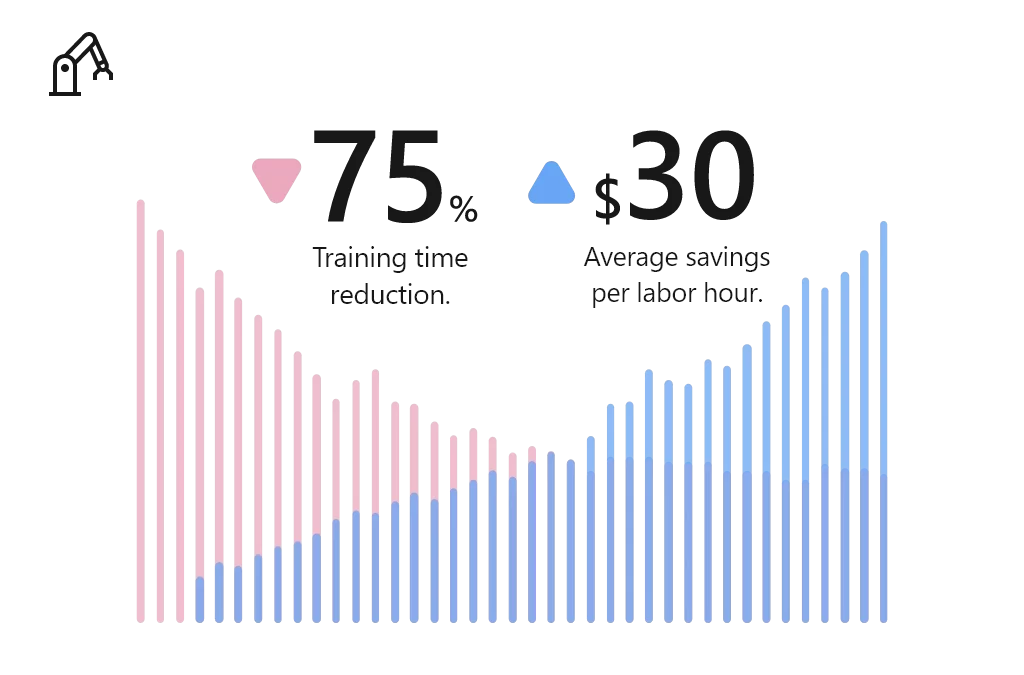
Manufacturing companies deploying Microsoft HoloLens 2 and mixed reality applications to train their workforces, accelerate employee proficiency, and build more agile factories. Using Microsoft mixed reality, Manufacturers reduced training time by 75 percent, at an average savings of $30 per labor hour.2
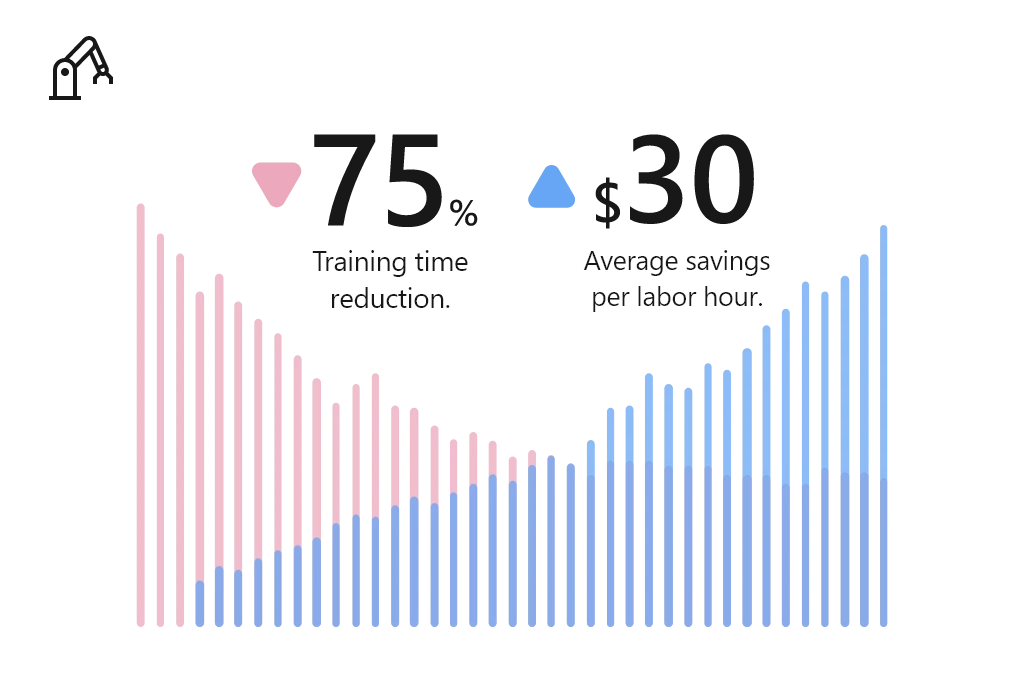
Manufacturers reduced training time by 75 percent, at an average savings of 30 dollars per labor hour.

Common scenarios in which manufacturers benefit from mixed reality on Microsoft HoloLens 2:

  1. Guided assembly and training: Empower employees to learn new skills and complex assembly tasks with holographic step-by-step instructions, no instructor necessary.  
  2. Remote inspection and audits: Enable remote employees to solve business problems in real time, using 3D annotations to access, share, and bring critical information into view.
  3. Connected field service: Connect field technicians with remote experts to collaborate seamlessly, heads-up and hands-free with content capture abilities, interactive annotations, and contextual data overlays.

“When you describe a problem, imagine that we are speaking different languages. When you explain it, someone on the other side may not understand precisely what’s happening, but when you show it in real time with the HoloLens, people understand.”Eaton Vehicle Group. Read more about the Eaton Vehicle Group customer story.

Education

Educators are turning to Microsoft HoloLens 2 and mixed reality applications to help students embrace a new way of learning. For example, education institutions reduced 520 annual hours of instruction per expert by 15 percent.2

Education institutions reduced 520 annual hours of instruction per expert by 15 percent.

Common scenarios in which educators benefit from mixed reality on Microsoft HoloLens 2:

  1. Augmented teaching: Captivate students and bring education to life with impressionable, high-impact 3D visualization models that enable virtual collaboration and instruction.
  2. Experiential learning: Enable educators to build an experience-based lesson plan, integrating textbook concepts into physical environments to create a simple “learn by doing” approach for studentshands-on and unmediated.
  3. Scaled learning and research: Develop a scalable research collaboration model that improves efficiency of research, lab work, and medical training.

“We did a trial back with our medical students. The students that had been in the HoloLens lab scored 50 percent better compared to the rest of the med school class.”Case Western. Read more about the Case Western customer story.

Healthcare

Mixed reality is empowering providers, payors, and health science experts to reimagine healthcare by accelerating diagnoses, reducing time-to-care, and enabling personalization. Using Microsoft mixed reality, healthcare providers reduced average consumables by 80%, saving $4,000 per trainee.2

Healthcare providers reduced average consumables by 80 percent, saving 4,000 dollars per trainee.

Common scenarios in which healthcare providers benefit from mixed reality on Microsoft HoloLens 2:

  1. Holographic patient consultation: Enable healthcare providers to project 3D holographic visualizations of patients’ internal systems that provide procedural understandingbuilding confidence in upcoming procedures and/or treatments.
  2. Remote expert consultation: Support remote consultation and enable medical staff to consult colleagues with heads-up and hands-free through an interactive collaborative experience from anywhere in the world.
  3. Training simulations: Train medical staff with holographic step-by-step guidance without subject matter experts being physically present.

“Using Dynamics 365 Remote Assist, doctors wearing HoloLens, can hold “hands-free” and “heads-up” Teams video calls with colleagues and experts anywhere in the world. They can receive advice, interacting with the caller and the patient at the same time, while medical notes and X-rays can also be placed alongside the call in the wearer’s field of view.”Imperial College Healthcare NHS Trust. Read more about the Imperial College Healthcare NHS Trust customer story.

Architecture, engineering, and construction

With Mixed Reality, architecture, engineering, and construction (AEC) firms are empowered to overcome design, modeling, collaboration, and building site challenges to enhance project quality, decision-making, improve productivity. For example, AEC firms have reduced rework by 75 percent, saving $44 per hour.2
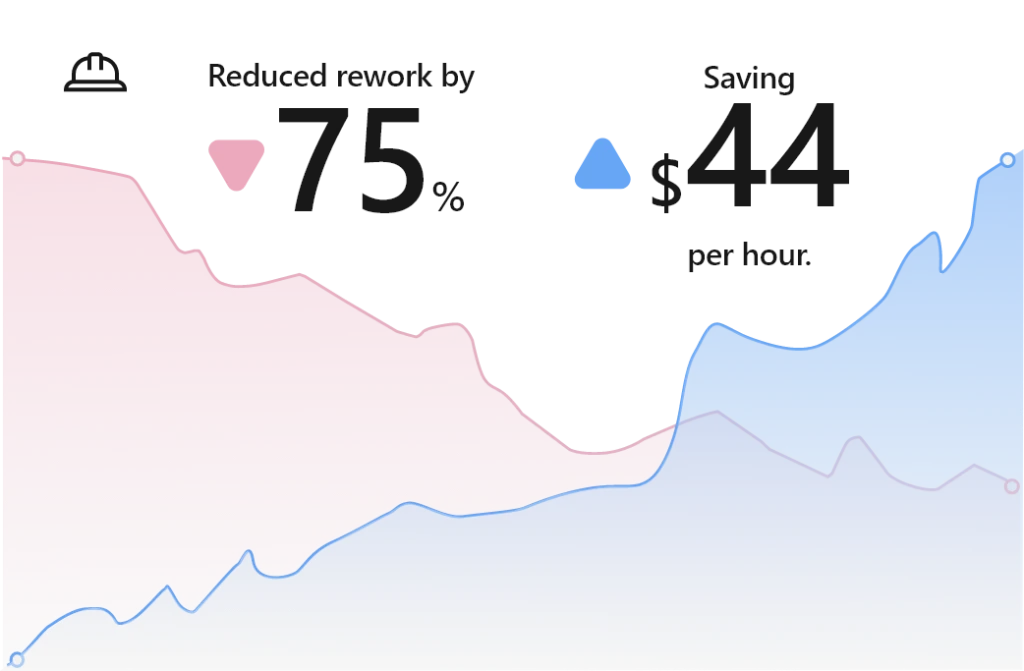
A E C firms have reduced rework by 75 percent, saving 44 dollars per hour.

Common scenarios in which AEC organizations benefit from mixed reality on Microsoft HoloLens 2:

  1. Clash detection: Enable onsite workers to preemptively identify issues, detect clashes, and gain buy-in of onsite workers and key stakeholders with overlay designs on physical locations. This mitigates late-stage design changes that could result in rework, budget overrun, and project delays.
  2. 3D plan and model demonstrations: Empower project leaders, designers, and engineers and improve customer service and sales with 3D demonstration and immersive visualizations.
  3. Self-guided learning: Equip onsite workers to view task instructions, essential data, and model visualizations while in the flow of work, increasing speed, quality, and safety.           

“We use Dynamics 365 Remote Assist on HoloLens 2 to work more effectively and share expertise at critical milestones. This not only saves us money but also helps us construct datacenters for our customers more quickly.”Microsoft. Read the full customer story.

The Forrester TEI study validates how mixed reality solutions on Microsoft HoloLens 2 are empowering enterprises across industries to achieve more. We believe these technologies have offered not only innovative results, but long-term and sustainable solutions for training, remote collaboration, inspections and audits, field service, and more.

Next steps

We look forward to continuing this blog series with a deep dive spotlight on each of these leading industries. In the meantime, learn more about mixed reality applications on Microsoft HoloLens 2 and get started today:


Sources:

  1. Worldwide Quarterly Wearable Device Tracker, IDC, 2022
  2. The Total Economic Impact Of Mixed Reality Using Microsoft HoloLens 2 Report, Forrester, 2022

The post Microsoft HoloLens 2 and mixed reality bridge physical reality and digital experiences appeared first on Microsoft Dynamics 365 Blog.

Brought to you by Dr. Ware, Microsoft Office 365 Silver Partner, Charleston SC.
Build a trusted authentication service for Azure Communication Services using Azure Active Directory

Build a trusted authentication service for Azure Communication Services using Azure Active Directory

This article is contributed. See the original author and article here.

We’re releasing a new service sample to help you build secure voice, video, and chat applications. This sample provides you with an easy to deploy, trusted authentication service to generate Azure Communication Services identities and access tokens. It is available for both node.js and C#. 


Azure Communication Services is designed with a bring-your-own-identity (BYOI) architecture. Identity and sign-on experiences are core to your unique application. Apps like LinkedIn have their own end-user identity system, while healthcare apps may use identity providers as part of existing middleware, and other apps may use 3rd party providers such as Facebook. 


We’ve designed the ACS identity system to be simple and generic, so you have the flexibility to build whatever experience you want. 


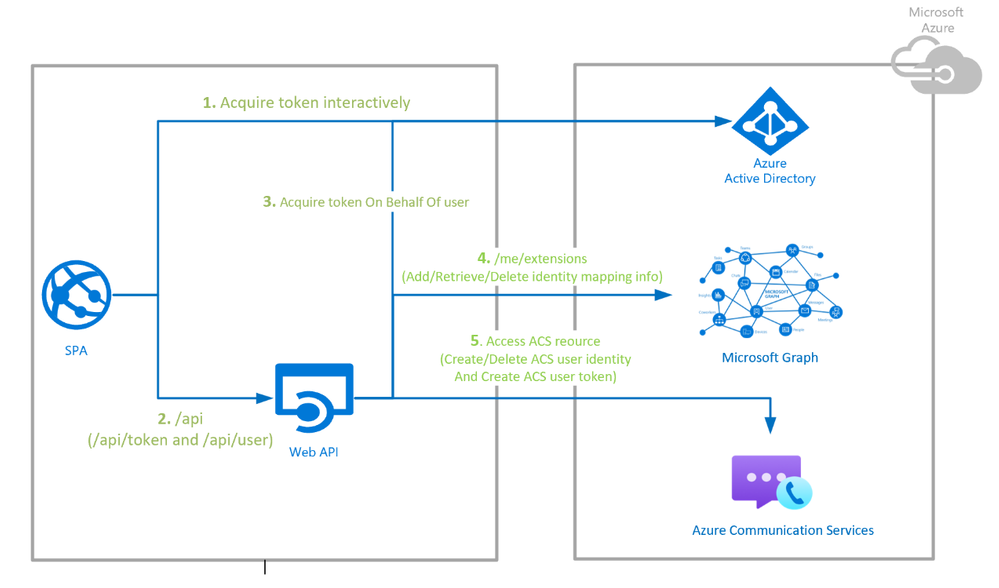
This new sample uses Azure App Service to authenticate users with Azure Active Directory (AAD), maps those users to ACS identities using Graph as storage, and finally generates ACS tokens when needed. We chose AAD for this sample because it’s a popular access management back-end, recognized for its security and scalability. It also integrates with 3rd party identity providers and OpenID interfaces. But you can use this sample as a launching point for integrating whatever identity provider or external system you want. 


The sample provides developers a turn-key service which uses the Azure Communication Service Identity SDK to create and delete users, and generate, refresh, and revoke access tokens.  The data flows for this sample are diagrammed below, but there is a lot more detail in GitHub with both node.js and C# repositories.  An Azure Resource Manager (ARM) template is provided that generates the Azure subscription and automate deployment with a few clicks. 


ddematheu_0-1644947264485.png


This identity service is only one component of a calling or chat application. Samples and documentation for other components and the underlying APIs are below. 


Concept 


SDKs 


Samples


Identity


Calling


Chat


UI Library 


Calling


Chat


Authentication Service 


Calling Client 


Chat Client 


Please hit us up in the comments or Microsoft Q&A if you have questions about building apps! 


Tutorial: Publish Azure Static Web Apps with Bitbucket

Tutorial: Publish Azure Static Web Apps with Bitbucket

This article is contributed. See the original author and article here.

In this tutorial, you learn to: 


  • Set up an Azure Static Web Apps site for a Vanilla API sample app

  • Create a Bitbucket Pipeline to build and publish a static web app 


Prerequisites 


  • Active Azure account: If you don’t have one, you can create an account for free. 

  • Bitbucket project: If you don’t have one, you can create a project for free. 

    • Bitbucket includes Pipelines. If you haven’t created a pipeline before, you first have to enable two-step verification for your Bitbucket account.

    • You can add SSH Keys using the steps here 


NOTE – The static web app Pipeline Task currently only works on Linux machines. When running the pipeline mentioned below, please ensure it is running on a Linux VM.

Create a static web app project in Bitbucket 


NOTE – If you have an existing app in your repository, you may skip to the next section.


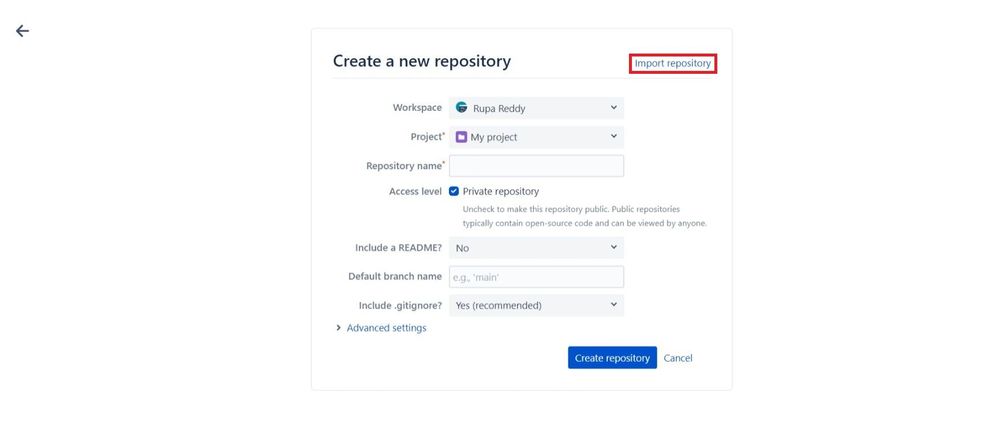
  • After creating a new project, select Create repository and then click on Import repository.


RupaReddy_2-1645095212689.jpeg


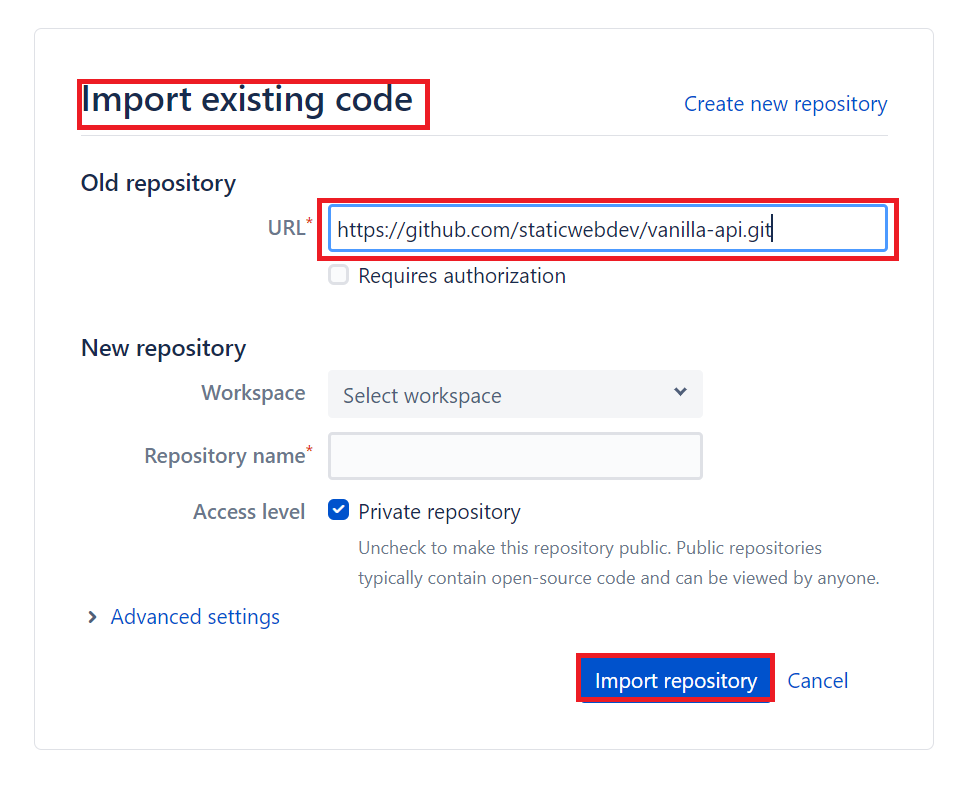
  • Select Import repository to import the sample application. 


RupaReddy_8-1643803948840.png


Create a static web app 


  • Navigate to the Azure portal. 

  • Select Create a Resource. 

  • Search for Static Web Apps. 

  • Select Static Web Apps. 

  • Select Create. 

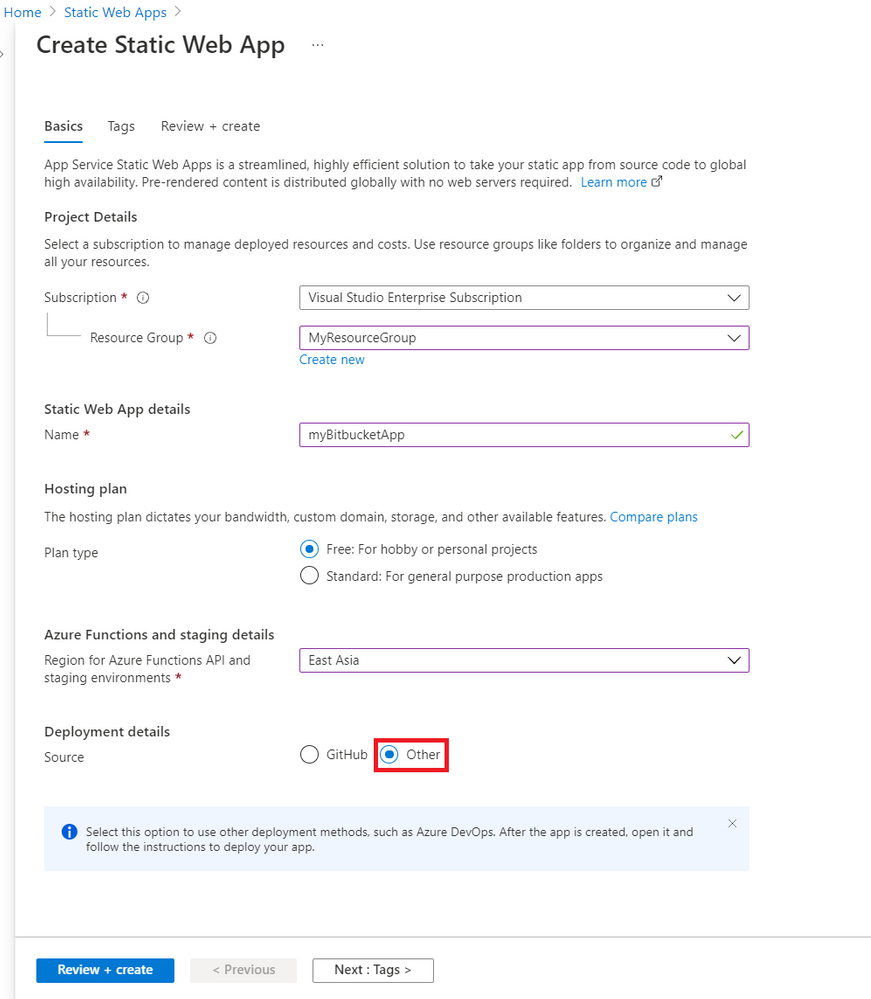
  • Create a new static web app with the following values. 


                          Setting 


                                       Value 


Subscription 


Your Azure subscription name. 


Resource Group 


Select an existing group name, or create a new one. 


Name 


Enter myBitbucketApp. 


Hosting plan type 


Select Free. 


Region 


Select a region closest to you. 


Source 


Select Other. 


RupaReddy_9-1643803974940.png


  • Select Review + create 

  • Select Create. 

  • Once the deployment is successful, select Go to resource. 

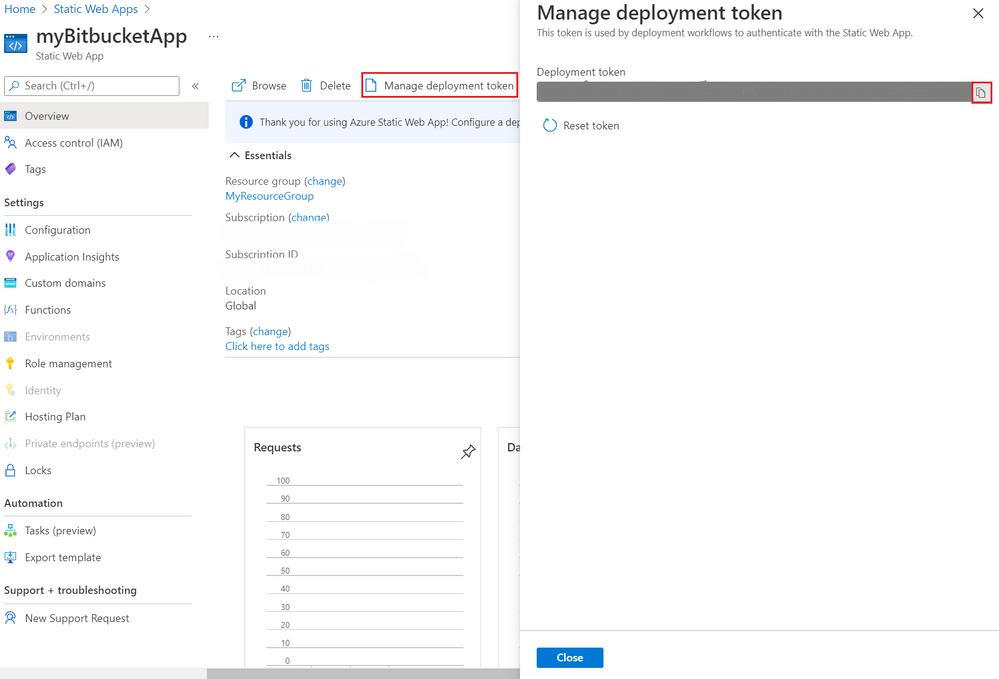
  • Select Manage deployment token. 

  • Copy the deployment token and paste the deployment token value into a text editor for use in another screen. 


NOTE – This value is set aside for now because you’ll copy and paste more values in coming steps. 


RupaReddy_3-1645095672870.png


Create the Pipeline in Bitbucket 


  • Navigate to the repository in Bitbucket that was created earlier. 

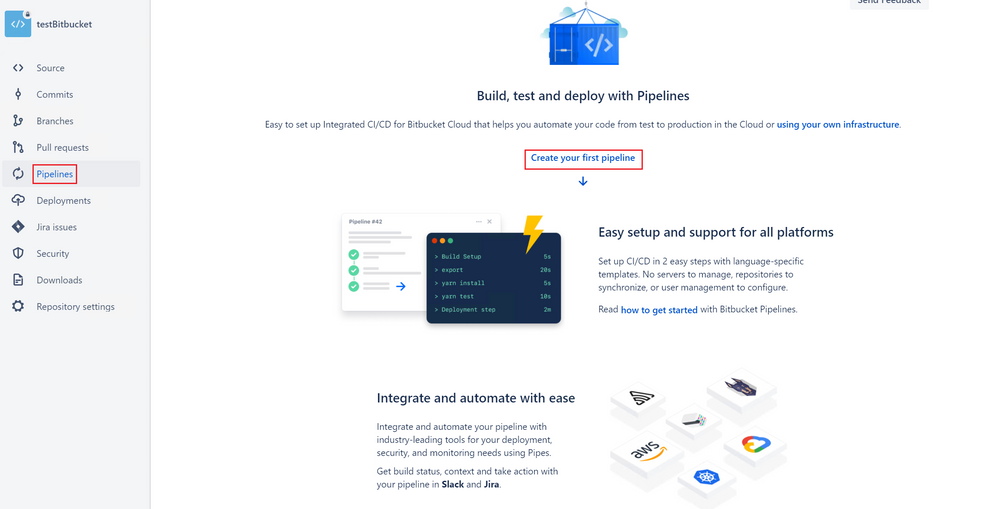
  • Select Pipelines on the left menu. 


  • Ensure that you have enabled two-step verification for your bitbucket account.


  • Select Create your first pipeline. 


RupaReddy_12-1643804053501.png


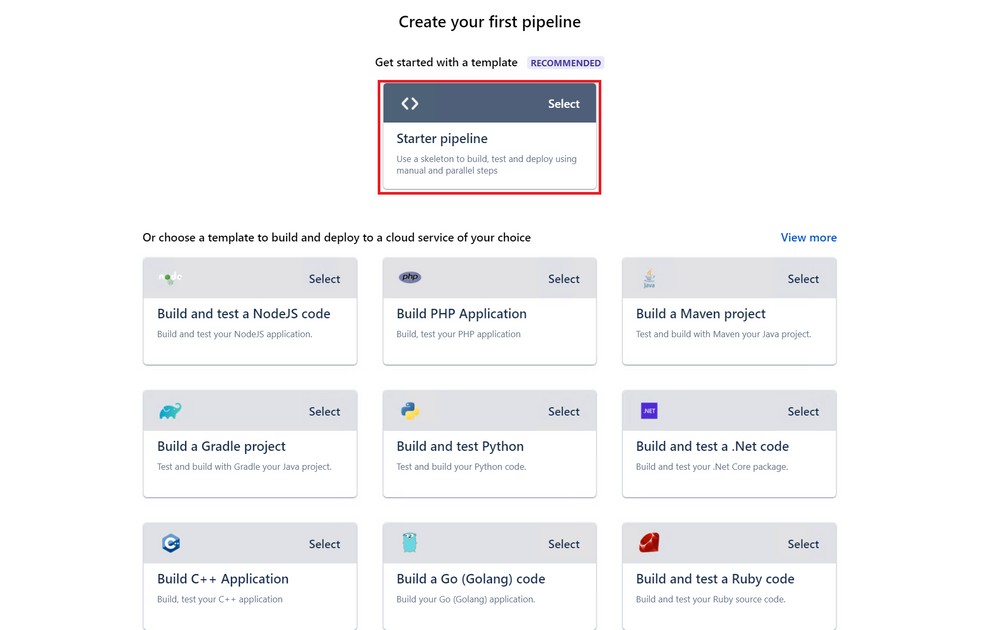
  • In the Create your first pipeline screen, select Starter pipeline. 


RupaReddy_13-1643804086292.png


  • Copy the following YAML and replace the generated configuration in your pipeline with this code.

    pipelines:
      branches:
       main:
        - step: 
            name: Deploy to test
            deployment: test
            script:
              - pipe: microsoft/azure-static-web-apps-deploy:dev
                variables:
                    APP_LOCATION: '$BITBUCKET_CLONE_DIR/src'
                    API_LOCATION: '$BITBUCKET_CLONE_DIR/api'
                    OUTPUT_LOCATION: '$BITBUCKET_CLONE_DIR'
                    API_TOKEN: $deployment_token​


NOTE –  If you are not using the sample app, the values for  APP_LOCATIONAPI_LOCATION, and OUTPUT_LOCATION  need to change to match the values in your application. 
Note that you have to give the values for  APP_LOCATIONAPI_LOCATION, and OUTPUT_LOCATIONonly after  $BITBUCKET_CLONE_DIR  as shown above.  i.e. $BITBUCKET_CLONE_DIR/<APP_LOCATION>

The  API_TOKEN  value is self-managed and is manually configured. 


Property 


Description 


Example 


Required 


app_location 


Location of your application code. 


Enter/ if your application source code is at the root of the repository, or /app if your application code is in a directory called app. 


Yes 


api_location 


Location of your Azure Functions code. 


Enter /api if your app code is in a folder called api. If no Azure Functions app is detected in the folder, the build doesn’t fail, the workflow assumes you don’t want an API. 


No 


output_location 


Location of the build output directory relative to the app_location. 


If your application source code is located at /app, and the build script outputs files to the /app/build folder, then set build as the output_location value. 


No 


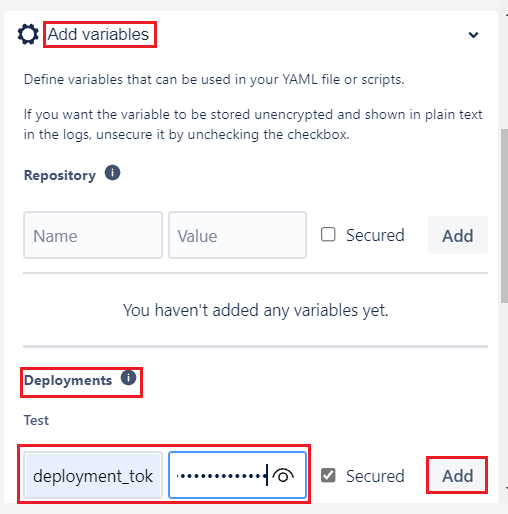
  • Select Add variables. 

  • Add a new variable in Deployments section. 

  • Name the variable deployment_token (matching the name in the workflow). 

  • Copy the deployment token that you previously pasted into a text editor. 

  • Paste in the deployment token in the Value box. 


RupaReddy_14-1643804214954.png


  • Make sure the Secured checkbox is selected. 

  • Select Add. 

  • Select Commit file and return to your pipelines tab. 

  • You can see that the pipeline run is in progress with name Initial Bitbucket Pipelines configuration. 

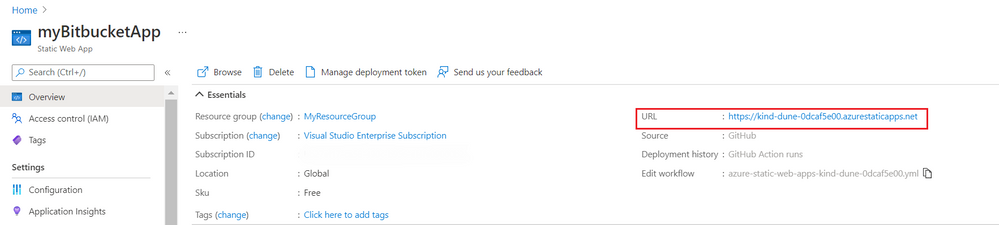
  • Once the deployment is successful, navigate to the Azure Static Web Apps Overview which includes links to the deployment configuration. Note how the Source link now points to the branch and location of the Bitbucket repository. 

  • Select the URL to see your newly deployed website.


RupaReddy_0-1643804687583.png


Clean up resources 


Clean up the resources you deployed by deleting the resource group. 


  • From the Azure portal, select Resource group from the left menu. 

  • Enter the resource group name in the Filter by name field. 

  • Select the resource group name you used in this tutorial. 

  • Select Delete resource group from the top menu. 


Additional resources


Experiencing Data Latency for Log Analytics – South UK – 02/20 – Resolved

This article is contributed. See the original author and article here.

Final Update: Sunday, 20 February 2022 16:57 UTC

We’ve confirmed that all systems are back to normal as of 02/20, 16:52 UTC. Our logs show the incident started on 02/20, 07:34 UTC and that during the duration of incident customers in South UK using Azure Log Analytics, Log Search Alerts & Azure Sentinels services may have experienced intermittent log data gaps and/or incorrect alert activation.
  • Root Cause: The failure was due to a recent deployment to one of the backend instances of our service to become unhealthy leading to a backlog of data to be processed.
  • Incident Timeline: 02/20, 07:34 UTC through 02/20, 16:52 UTC
We understand that customers rely on Azure Log Analytics as a critical service and apologize for any impact this incident caused.

-chandar

Update: Sunday, 20 February 2022 16:25 UTC

Root cause has been isolated to an outage in a backend system which caused ingested data to back up and not be processed. To address this issue, the backend team has rolled back the deployment Azure Log Analytics is now working as expected , though ingestion data is still backed up and data sent to the system which got stuck. Some customers using Azure Log Analytics, Log Search Alerts & Azure Sentinels services may experience intermittent log data gaps and/or incorrect alert activation and/or latency. We estimate 2 hours before all log data gaps and/or incorrect alert activation and/or latency is addressed.
  • Work Around: none
  • Next Update: Before 02/20 18:30 UTC
-Surya

Update: Sunday, 20 February 2022 12:30 UTC

We continue to investigate issues within Log Analytics. Root cause is not fully understood at this time. Some customers using Azure Log Analytics, Log Search Alerts & Azure Sentinels services in UK-South region continue to experience intermittent log data gaps and/or incorrect alert activation and/or latency. We are working to establish the start time for the issue, initial findings indicate that the problem began at 02/20 07:34 UTC. We currently have no estimate for resolution.
  • Work Around: none
  • Next Update: Before 02/20 16:30 UTC
-Surya

Initial Update: Sunday, 20 February 2022 09:55 UTC

We are aware of issues within Log Analytics and are actively investigating. Azure Log Analytics, Log Search Alerts & Azure Sentinels customers using workspaces in UK-South-0 may experience intermittent log data gaps and/or incorrect alert activation and/or latency .
  • Work Around: none
  • Next Update: Before 02/20 13:00 UTC
We are working hard to resolve this issue and apologize for any inconvenience.
-Surya

Lesson Learned #185: Could not find any endpoints error message using PingFederated

This article is contributed. See the original author and article here.

Today, I worked on an interesting service that our customer faced the following error message “Error code 0xA190; state 41360 – Could not find any endpoints.” using SqlCmd/ODBC in combination with -G to connect to Azure Active Directory.


We have the following environment:


  • ReadHat Enterprise version 7.9

  • Customer is using a 3rd party tool to validate the users called PingFederated. 


Troubleshooting done:


  • Using other driver JDBC our customer is able to connect. 

  • Using sqlcmd in Windows Operating System is able to connect. 

  • Taking a network trace with tcpdump we were able a connectivity and reset the connection due to this error.

  • Without using PingFederated in Linux using the native Azure Active Directory call the connection is success.


In this such situation, we engaged our colleagues of Azure Product Team lient Tools and they identified an issue with ODBC and Pingfederated that has been resolved in version 17.9+ as you could see in this URLList of bugs fixed – ODBC Driver for SQL Server | Microsoft Docs . Installing, for example, the version 18.0 the issue has been fixed too.


Enjoy!