This article is contributed. See the original author and article here.
Moved from: bobsql.com
SQL Server leverages MSDTC for distributed transactions (begin distributed transaction, remote proc trans, etc.)Prior to SQL Server 2016 the MSDTC service must be running (started) prior to any SQL Server, DTC based transaction activity.
SQL Server 2016 enhances SQL distributed transaction capabilities leveraging MSDTC,On Demandstartup.The On Demand startup of MSDTC does not start the MSDTC service and consume resources until SQL Server requires MSDTC.
SQL Server 2016 extends the SQL Server DTC manager initialization logic allowing On Demand startup of the MSDTC service.(API Reference:DtcGetTransactionManagerEx)During the SQL Server, DTC manager initialization SQL Server 2016 attempts to obtain the ITransactionManager connection in the same way it did in SQL Server 2014 and 2012.
Once the SQL Server, common initialization activities are complete, if the connection cannot be established (failed to establish the connection because the DTC service is unavailable) DtcGetTransactionManagerEx is invoked.The invocation allows On Demand startup of the needed DTC manager service.
‘It Just Runs Faster’– SQL Server 2016 dynamically starts MSDTC as needed allowing resources to be used for other activities until required.
This article is contributed. See the original author and article here.
In telecommunications, avoiding downtime is Job One. Planning, scheduling, and tracking maintenance operations that can reduce or avoid outages is critical. Plant operators need to have a quick, accurate picture of maintenance while maximizing efficiency.
Version 2.0 of Dynamics 365 telecommunications accelerator includes an extended data model and new sample applications to help you meet customer needs and realize time-to-value more quickly.
The first release of Dynamics 365 telecommunications accelerator provided place management and telecommunication sales capabilities for network and mobile operators, internet service providers, and others in telecommunications:
The ability to tie services, products, and deployed plant and network resources to specific geocoded physical locations such as buildings or a campus
Enhanced lead management with built-in service availability, qualification checks, and lookups for network resources, network mapping, and addresses
A telecommunications extension for the Common Data Model, with telco-specific data entities and attributes for fast application development
Partners who work with the Microsoft Power Platform can extend the data model or sample applications.
Add support for maintenance types, plans, network resources, and zones
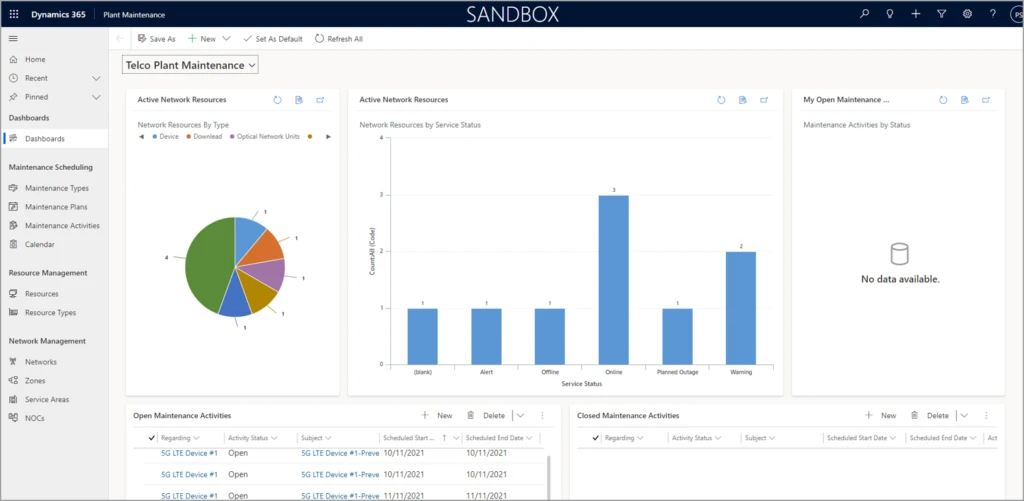
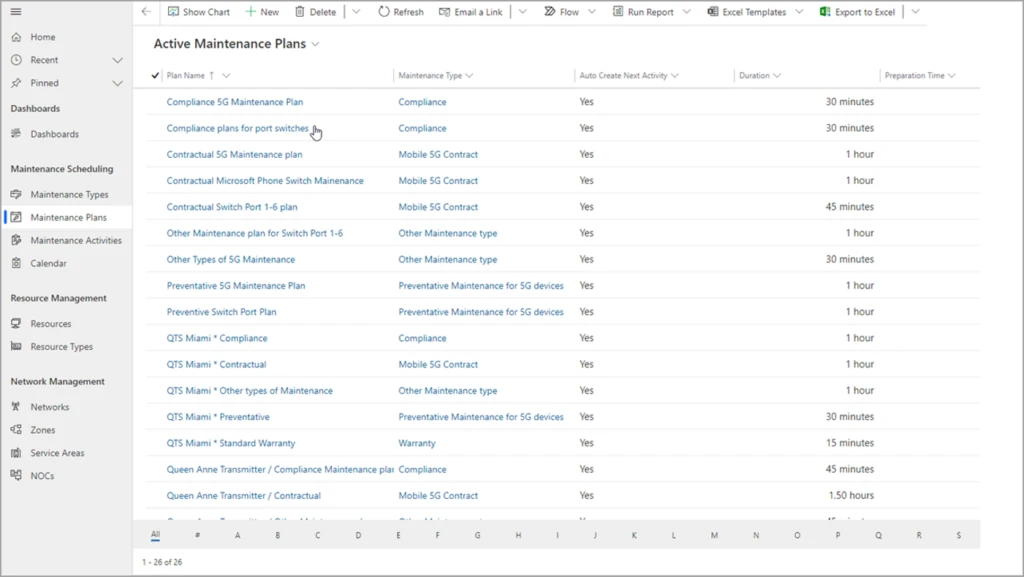
Version 2.0 of the Dynamics 365 telecommunications accelerator enhances the extended data model and adds sample applications. Plant operators can define maintenance types and plans, starting with supplied sample data for warranty, contractual, and compliance.
Operators can also define types of network resources, such as optical network units, antennas, and switches. They can also define network zones and service areas, tracking where they’re deployed, the accounts they serve, and the manufacturer. It’s all fully customizable and configurable out of the box with Dynamics 365.
Schedule maintenance plans and repeatable tasks
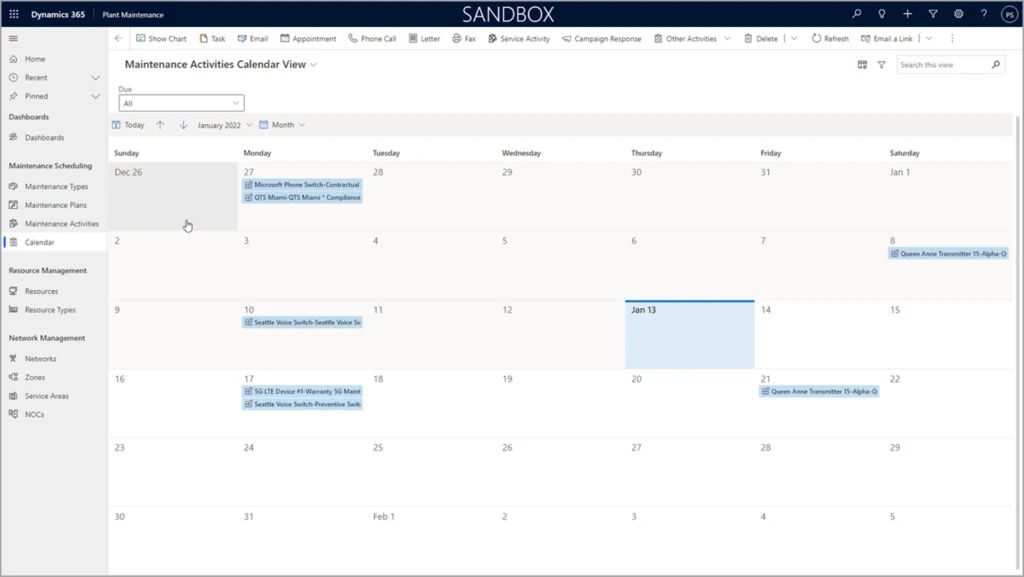
In the latest version of telecommunications accelerator, plant operators can easily schedule repeatable maintenance tasks. This not only streamlines operations, it also helps operators respond to audit and liability questions by tracking maintenance activities.
What our partners are saying
Rhyan J. Neble, Vice President of Product Innovation at ETI Software:
Microsoft’s telecommunications accelerator not only makes it possible for ETI to introduce new features to our customers faster, it empowers our team to innovate and extend our solution. For example, the maintenance scheduling features will enable our digital twin solution to identify customers and service areas impacted by planned and unplanned plant maintenance. This will allow proactive notifications to both the customer service teams and the subscribers. By integrating version 2.0 of the telecommunications accelerator into ETI’s Service Management Platform, we are able to immediately provide critical functionality to our customers and reduce costs at the same time.
Joe McDermott, COO of Carma:
Carma is continually impressed with the collaborative investments Microsoft is making in the Dynamics platform and we’re enthusiastically supporting development of the telecommunications accelerator. The version 2.0 release of the telecom accelerator delivers new functionality that we’ve integrated into Carma’s Network and Digital Infrastructure Platform for our existing and future customers. Planning and documenting preventative and other recurring maintenance is a key activity for datacenter and network operators striving for 100% uptime. With telecommunications accelerator’s plant maintenance features, Carma enables them to manage these activities with ease and visibility across the whole organization.
Next steps
Get started right away with a test drive of version 2.0 of the Dynamics 365 telecommunications accelerator on Microsoft AppSource. The data model, solutions, sample applications and data, Power BI reports, and UX controls that come with the telecommunications accelerator are available to any Microsoft Power Platform developer.
This article is contributed. See the original author and article here.
We are happy to announce self-service trials for Microsoft Visio. As of today, you can sign up for free 30-day trials of Visio Plan 1 or Visio Plan 2 on existing Microsoft 365 tenants managed by your organization using your business login. Then, test out the full functionality of the Visio web and desktop apps before directly purchasing subscriptions.
With self-service trials, you can sign up for trial licenses for up to five users and then, with a limited admin role, assign the trial licenses to your colleagues in the Microsoft 365 admin center. If you run in to any issues signing up for your trial licenses, please contact your IT department.
These new self-service trial capabilities are available worldwide except for India. They are not available for Education or Government customers.
Please note: You will be asked to provide credit card details at signup. At the end of your 30-day trial, you will be charged the applicable subscription fee to continue using Visio. Cancel at any time to stop future charges.
Determine which Visio trial is right for you
With the Visio Plan 1 trial, you and your team members will have full access to the Visio web app—including dozens of diagram templates and hundreds of shapes—and 2 GB of OneDrive for Business cloud storage. The Visio Plan 2 trial includes all the features in the Visio Plan 1 trial, plus additional templates, shapes, and advanced features in the Visio desktop app. During both trials, you’ll be able to create, edit, share, and collaborate on diagrams and flowcharts using Visio or Microsoft Teams (requires a Microsoft 365 subscription to use Teams).
How to sign up
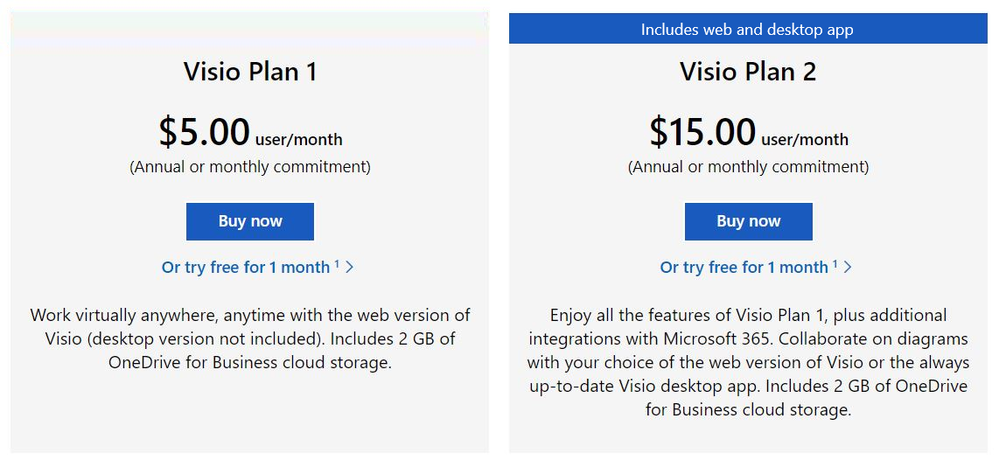
The 30-day trials of Visio Plan 1 and Visio Plan 2 are available for self-service signup by individuals and departments from the Visio plans and pricing comparison page. Select the corresponding trial link below the Buy Now button and complete the necessary steps.
Screenshot of Visio Plan 1 and Visio Plan 2: Click on “Or try free for 1 month” to complete the steps to start your trial
Manage trial licenses as a Global or Billing admin
The self-service trial capabilities do not compromise IT oversight or control. If you are an admin, you can use the same self-service purchase controls to disable self-service trials while making use of subscription management capabilities to oversee and manage trial licenses on the licensing page in the Microsoft 365 admin center.
If you’ve disabled the self-service purchase functionality for Visio in the past, self-service trials signup for individuals or departments will automatically allow users to request licenses directly from you. Learn more about managing self-service licenses acquired by individuals or departments in your organization.
Give us feedback about your trial experience! Please tell us what you think in the comments below or send feedback via the Visio Feedback portal.
Continue the conversation by joining us in the Microsoft 365 Tech Community! Whether you have product questions or just want to stay informed with the latest updates on new releases, tools, and blogs, Microsoft 365 Tech Community is your go-to resource to stay connected!
This article is contributed. See the original author and article here.
Introduction
Azure Form Recognizer is an amazing Azure AI Service to extract and analyze form fields documents. One benefit of using Form Recognizer is the ability to create your own custom model based on documents specific to your business needs.
To create custom models, Azure providesForm Recognizer Studio,a web application that makes creation and trainingof custom model simple without the needs of an AI expert.
One common challenge most customers have when dealing with more than a handful of models is to apply the same DevOps processes, they are familiar with when promoting code changes from one environment to another to their AI models.
This article demonstrates the use of Form Recognizer’s REST APIs to implement a CI/CD pipeline for model management.
The complete implementation is available on Github.
Why DevOps matters
When creating a custom model based on documents that map your business needs, your programmers and data scientists will go through multiple iterations of training, resulting in multiple different models in the development environment. Once they have a model that works well for the specific scenario, this model will then need to be promoted to other environments.
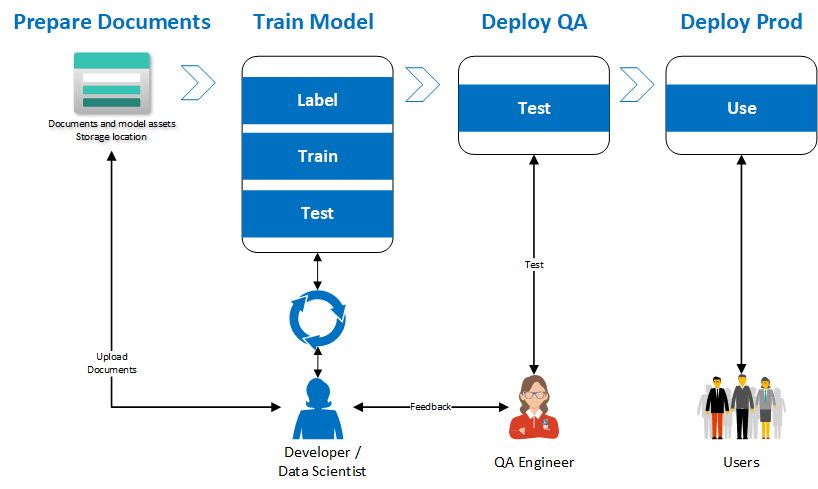
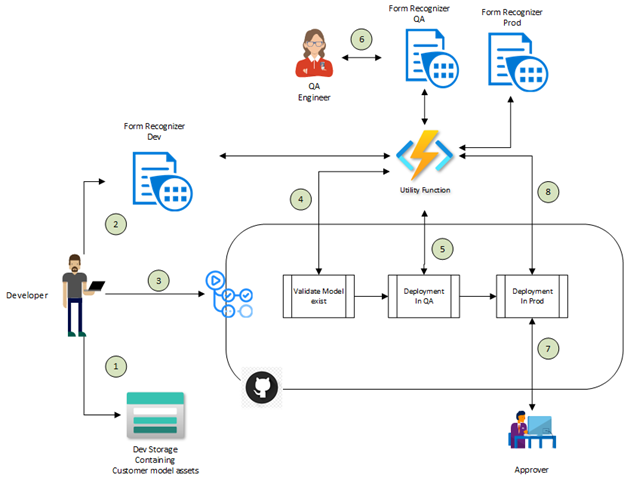
While it is possible to copy the training dataset and train a model in all of the other environments, that process is cumbersome and can result in missed labels resulting in lower accuracy models. A more effective approach is to treat the model like a source code artifact and use a DevOps pipeline to orchestrate the movement of the model across the different environments ensuring traceability and compliance. The diagram below explains the proposed implementation flow to achieve this result.
Our implementation
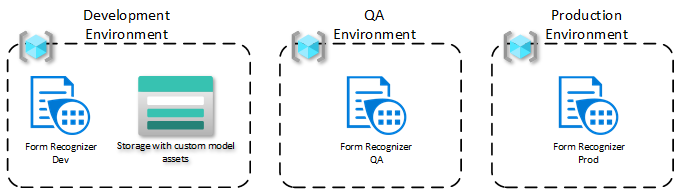
For our use case,let’s assume we have three environments: each is in a respective resource group. This approach would work even if the resource groups are in three different subscriptions.
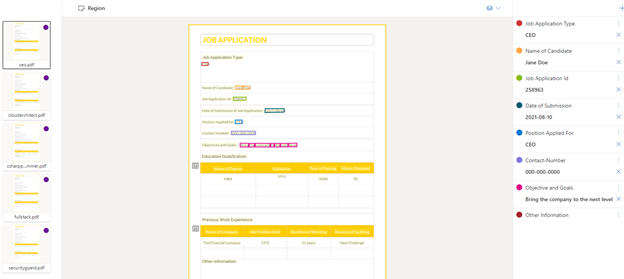
The model is trained in the development environment, where , data scientists and/or developers will use the Form Recognizer Studio to label the documents in a storage account. The following steps describe that process in greater detail.
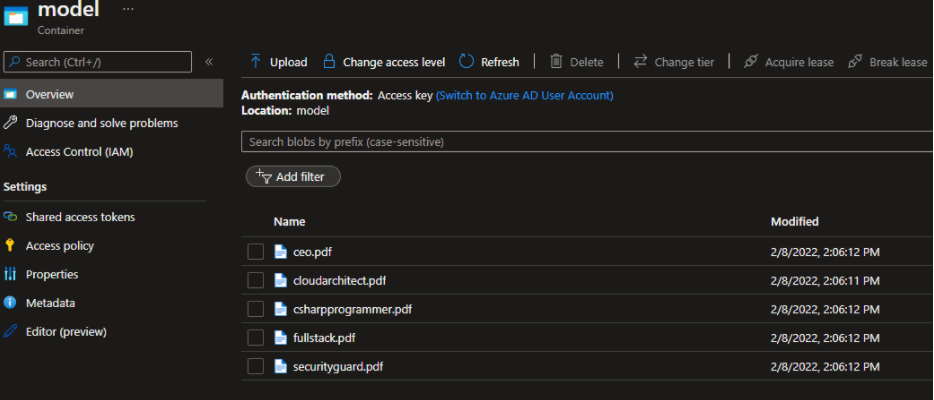
Start by moving the training dataset to a specific container in Azure Blob Storage.
In the Form Recognizer Studio, start by creating a custom project and connecting the Studio to work with the dataset, you just created.
When you train your model, be sure to save the model ID you provided or find the model from the list of models within the project. This model ID will be needed when it’s time to migrate the model to other environments.
Form Recognizer provides a model copy operation that starts with generating a model copy authorization for the target resource, in this case the QA environment. This copy automation is provided to the Form Recognizer development resource to then execute the copy action.
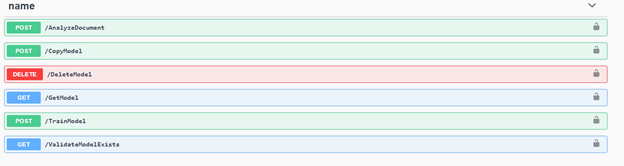
To orchestrate this set of actions, a simple GitHub action was created. The API can be integrated into your CI/CD pipeline using REST or any of the language specific SDKs. In this case, we created an Azure Function that uses the .NET SDK for Form Recognizer. This Azure Function provides multiple endpoints that are leveraged in the GitHub Action.
The following diagram describes the GitHub Actions Orchestration.
The developer moves all the documents needed to train the custom model into Azure Storage account.
The developer uses the Form Recognizer Studio to train the custom model in the development environment. Once the model is trained and the developer is satisfied with the model quality, the model ID is saved for use with the GitHub action.
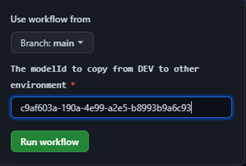
The developer initiates the GitHub action by providing the model ID from the previous step as an input parameter.
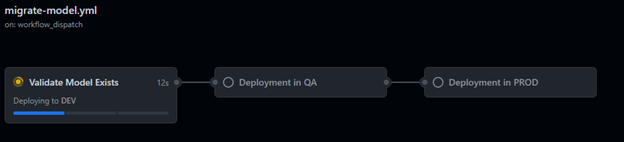
The first step is to validate that the model ID exists in the DEV environment.
If the model exists in the DEV environment, it will be copied to the QA environment
Now, a QA engineer can validate the model produces the expected results.
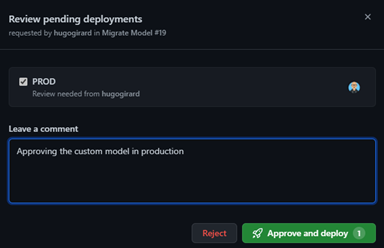
Once the QA tests are successful, an approver needs to approve the next job to promote the model to the production environment.
The model is now copied to the production environment and is available for use.
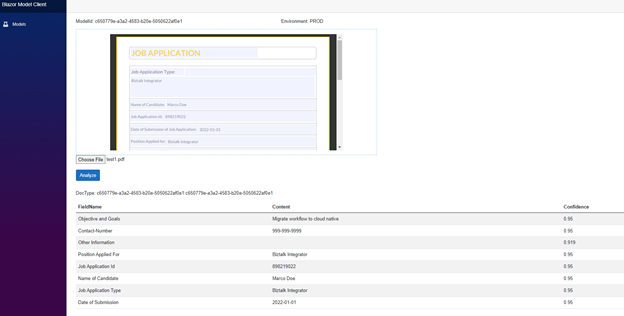
Once the model is in production, you can use it within your applications. The following example demonstrates how the model is being used to analyze documents.
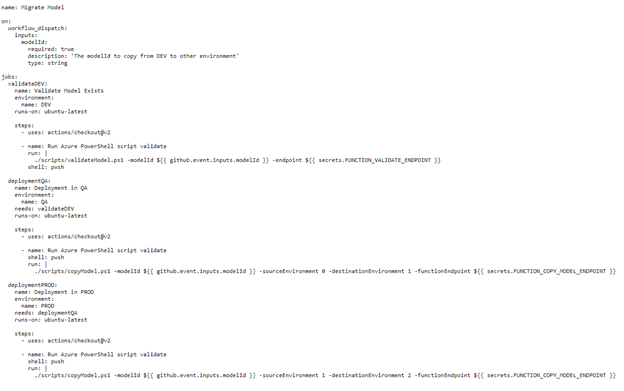
Here are the GitHub Action used in this sample, it consists of 3 jobs that invoke the Azure Function using a PowerShell script. As stated earlier, the Azure Function implementation is optional, this could be accomplished via HTTP requests directly to the Form Recognizer resources from your pipelines.
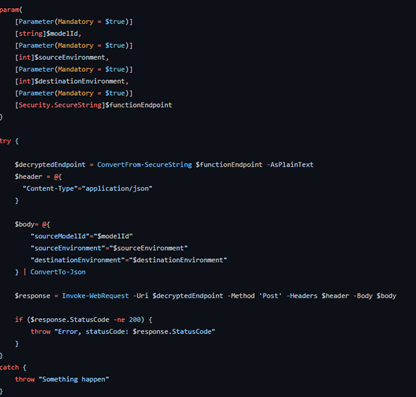
Here is the simple PowerShell script.
Conclusion
In this blog post, we explain the importance of implementing a DevOps practice around your custom models in Azure Form Recognizer. We provide an implementation and illustrate how easy it is to implement with the REST API.
This article is contributed. See the original author and article here.
Final Update: Saturday, 26 February 2022 05:37 UTC
We’ve confirmed that all systems are back to normal with no customer impact as of 02/26, 05:00 UTC. Our logs show the incident started on 02/26, 00:30 UTC and that during the 4 hours & 30 minutes that it took to resolve the issue customers in West US2 and East US2 regions may have experienced Metrics Ingestion delay which may also result in some misfired alerts.
Root Cause: The failure was due to one of our backend dependent service.
Incident Timeline: 4 Hours & 30 minutes – 02/26, 00:30 UTC through 02/26, 05:00 UTC
We understand that customers rely on Azure Monitor as a critical service and apologize for any impact this incident caused.
-Sai Kumar
Initial Update: Saturday, 26 February 2022 03:00 UTC
We are aware of an issue within Azure Monitor and are actively investigating. Customers in West US2 region may notice Metrics Ingestion delay which may also result in some misfired alerts.
Work Around:
Next Update: Before 02/26 07:00 UTC
We are working hard to resolve this issue and apologize for any inconvenience. -Jayadev




Recent Comments