by Contributed | May 11, 2022 | Technology
This article is contributed. See the original author and article here.
At Microsoft, we value, protect, and defend privacy. We believe in transparency, so that people and organizations can control their data and have meaningful choices in how it is used. We empower and defend the privacy choices of every person who uses our products and services. In this blog, we will take a deep dive on Microsoft’s Azure Key Vault Managed HSM’s security controls for encryption and how it provides additional safeguards and technical measures to help our customers meet compliance. Encryption is one of the key technical measures to achieve sole control of your data.
Microsoft’s Azure fortifies your data through state-of-the-art encryption technologies for both data at rest and in transit. Our encryption products erect barriers against unauthorized access to the data including two or more independent encryption layers to protect against compromises of any one layer. In addition, Azure has clearly defined, well-established responses, policies and processes, strong contractual commitments, and strict physical, operational, and infrastructure security controls to provide our customers the ultimate control of their data in the cloud. The fundamental premise of Azure’s key management strategy is to give our customers more control over their data with Zero Trust posture with advanced enclave technologies, hardware security modules and identity isolation that reduces Microsoft’s access to customer keys and data.
Encryption at Rest provides data protection for stored data at rest and required by organizations need for data governance and compliance efforts. Microsoft’s compliance portfolio is the broadest in all public clouds worldwide with Industry and government regulations such as the HIPPA, General Data Protection Regulation, Schrems II and FIPS(Federal Information Processing Standards) 140-2 and 3. These regulations lay out specific safeguards regarding data protection and encryption requirements and in most cases a mandatory measure required for compliance.
How does Encryption at Rest work?
Azure Key Vault services provide encryption and key management solutions that safeguard cryptographic keys, certificates and other secrets used by cloud applications and services to protect and control data encrypted at rest. Secure key management is essential to protect and control data in the cloud. Azure offers various solutions for managing and controlling access to encryption keys, thereby giving you a choice and flexibility to meet stringent data protection and compliance needs.
- Azure Platform Encryption is a Platform Managed encryption solution that encrypts with host level encryption. Platform managed keys are encryption keys that are generated, stored, managed entirely by Azure.
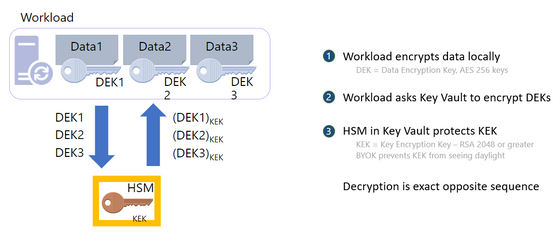
- Encryption with Customer Managed keys are keys created, read, deleted, updated and/or administered entirely by the customer. Customer Managed keys can be stored in a cloud key management service as shown below
- Azure Key Vault (AKV Standard) encrypts with a software key and is FIPS 140-2 Level 1 compliant
- Azure Key Vault (AKV Premium) encrypts with a FIPS 140-2 Level 2 hardware security module (HSM) protected keys
- Azure Key Vault Managed HSM encrypts with a single tenant FIPS 140-2 Level 3 hardware security module (HSM) protected keys and is fully managed by Microsoft and provides customers with the sole control of the cryptographic keys
For added assurance, AKV Premium and AKV Managed HSM support importing HSM-protected keys from an on-premises HSM commonly referred to as Bring your own key (BYOK)
Portfolio of Azure Key Management products
|
Azure Key Vault Standard
|
Azure Key Vault Premium
|
Azure Key Vault Managed HSM
|
Tenancy
|
Multi-Tenant
|
Multi-Tenant
|
Single-Tenant
|
Compliance
|
FIPS 140-2 level 1
|
FIPS 140-2 level 2
|
FIPS 140-2 level 3
|
High Availability
|
Automatic
|
Automatic
|
Automatic
|
Use cases
|
Encryption at Rest
|
Encryption at Rest
|
Encryption at Rest
|
Key Controls
|
Customer
|
Customer
|
Customer
|
Root of trust control
|
Microsoft
|
Microsoft
|
Customer
|
Azure Key Vault is a cloud service for securely storing and accessing secrets. A secret is anything that you want to tightly control access to, such as API keys, passwords, certificates, or cryptographic keys. Key Vault service supports two types of containers:
- Vaults
- Standard Tier – Vaults support storing secrets, certificates and software backed keys.
- Premium Tier – Vaults support storing secrets, certificates, software and HSM-backed keys.
- Managed Hardware Security Module (HSM)
- Managed HSM only support HSM-backed keys.
See Azure Key Vault Concepts and Azure Key Vault REST API overview for details.
What is Azure Key Vault Managed HSM?
Azure Key Vault Managed HSM (Hardware Security Module) is a fully managed, highly available, single-tenant, standards-compliant cloud service with a customer-controlled security domain that enables you to store cryptographic keys for your cloud applications, using FIPS 140-2 Level 3 validated HSMs
How does Azure Key Vault Managed HSM protect your keys?
Azure Key Vault Managed HSM uses a defense in depth and zero trust security posture that uses multiple layers including physical, technical, and administrative security controls to protect and defend your data.
Azure Key Vault and Azure Key Vault Managed HSM are designed, deployed and operated such that Microsoft and its agents are precluded from accessing, using or extracting any data stored in the service, including cryptographic keys.
Customer keys that are securely created and/or securely imported into the HSM devices, unless set otherwise by the customer, are not marked extractable and are never visible in plaintext to Microsoft systems, employees, or our agents.
The Key Vault team explicitly does not have operating procedures for granting such access to Microsoft and its agents, even if authorized by a customer.
We will not voluntarily attempt to defeat customer-controlled encryption features like Azure Key Vault or Azure Key Vault Managed HSM. If faced with a legal demand to do so, we would challenge such a demand on any lawful basis, consistent with our customer commitments as outlined in this blog.
Let us take a deep dive on how the security controls are implemented.
Physical Security Controls – The core of the Managed HSM offering is the hardware security module (HSM) which is a specialized, hardened, tamper resistant, high entropy dedicated cryptographic processor that is validated to FIPS 140-2 level 3 standard. All components of the HSM are further covered in hardened epoxy and a metal casing to keep your keys safe from an attacker. The HSMs are housed in racks of servers across several data centers, regions, and geographies. These geographically dispersed datacentres comply with key industry standards such as ISO/IEC 27001:2013 and NIST SP 800-53 for security and reliability.
Microsoft designs, builds, and operates datacenters in a way that strictly controls physical access to the areas where your keys and data are stored. Additional layers of physical security such as tall concrete and steel fences, dead bolted steel doors, thermal alarm systems, closed-circuit live camera monitoring, 24×7 security personnel presence, need to access basis per floor with approval, rigorous staff training, biometrics, background checks, access request and approval are mandated. In addition, the HSM devices and the related servers are caged locked with cameras filming the front and the back of the servers with tightly controlled access.
Technical Security Controls – There are several layers of technical controls around the managed HSM that further protects your key material but most importantly prevents Microsoft from accessing the key material.
- Confidentiality – The Managed HSM Service run inside a trusted execution environment built on Intel Software Guards Extension (SGX) and offers enhanced protection from internal and external attackers through hardware isolation that protects data in use. Enclaves are secured portions of the hardware’s processor and memory. You cannot view data or code inside the enclave, even with a debugger. If untrusted code tries to change content in enclave memory, SGX disables the environment and denies the operations. These unique capabilities help you protect your cryptographic key material from being accessible in the clear. In addition, Azure confidential computing offers solutions to enable the isolation of your sensitive data while it is being processed in the cloud.
- Security Domain – The security domain (SD) is an encrypted blob that contains extremely sensitive cryptographic information that contains artifacts such as the HSM backup, user credentials, the signing key, and the data encryption key unique to your managed HSM. The SD is generated in the managed HSM hardware, and the service software enclaves at the initialization time. Once the managed HSM is provisioned, you must create at least 3 RSA key pairs and send the public keys to the service when requesting the Security Domain download. Once the Security Domain is downloaded, the Managed HSM moves into an activated state and ready for consumption. Microsoft personnel have no way of recovering the security domain, nor can they access your keys without the security domain.
- Access controls and Authorization – Access to a managed HSM is controlled through two interfaces: the management plane and the data plane. The management plane is where you manage the HSM itself. Operations in this plane include creating and deleting managed HSMs and retrieving managed HSM properties. The data plane is where you work with the data stored in a managed HSM — that is HSM-backed encryption keys. You can add, delete, modify, and use keys to perform cryptographic operations, manage role assignments to control access to the keys, create a full HSM backup, restore full backup, and manage security domain from the data plane interface. To access a managed HSM in either plane, all callers must have proper authentication and authorization. Authentication establishes the identity of the caller. Authorization determines which operations the caller can execute. A caller can be any one of the security principals defined in Azure Active Directory – user, group, service principal or managed identity. Both planes use Azure Active Directory for authentication. For authorization they use different systems as follows
- The management plane uses Azure role-based access control — Azure RBAC (role-based access control) — an authorization system built on Azure Resource Manager
- The data plane uses a managed HSM-level RBAC (Managed HSM local RBAC) — an authorization system implemented and enforced at the managed HSM level. The local RBAC control model allows designated HSM administrators to have complete control over their HSM pool that even the management group, subscription, or resource group administrators cannot override.
- Encryption in Transit – All traffic to and from the Managed HSM is always encrypted with TLS (Transport Layer Security versions 1.3 and 1.2 are supported) to protect against data tampering and eavesdropping where the TLS termination happens inside the SGX enclave and not in the untrusted host
- Firewalls – Managed HSM can be configured to restrict who can reach the service in the first place, which further shrinks the attack surface. We allow you to configure Managed HSM to deny access from the public internet and only allow traffic from trusted Azure services (such as Azure Storage)
- Private Endpoints – By enabling a private endpoint, you are bringing the Managed HSM service into your virtual network allowing you to isolate that service only to trusted endpoints like your VNET and Azure Services. All traffic to and from your HSM will travel along the secure Microsoft backbone network without having to traverse the public internet.
- Monitoring and Logging – The outermost layer of protection is the monitoring and logging capabilities of Managed HSM. With Azure Monitor service, you can check your logs for analytics and alerts to ensure that access patterns conform with your expectations. This allows members of your security team to have visibility into what is happening within the Managed HSM service. If something does not look right, you can always roll your keys or revoke permissions.
- Bring Your Own Key (BYOK) – BYOK enables Azure customers to use any supported on-premises HSMs to generate keys and import them into the Managed HSM. Some customers prefer to use on-premises HSMs to generate keys to meet regulatory and compliance requirements. BYOK enables secure transfer of HSM-protected key to the Managed HSM. The key to be transferred never exists outside an HSM in plaintext form. During the import process, the key material is protected with a key held in the Managed HSM.
- External HSM – A handful of our customers have come to us where they would like to explore the option of the HSM outside of the Azure cloud to keep the data and keys segregated with an external HSM either on the 3rd party cloud or on-premises. While a 3rd party HSM outside of Azure seems to give more control over keys to customers, it introduces several concerns such as latency causing performance issues, SLA issues caused by issues with the 3rd party HSM, and maintenance and training costs. In addition, key Azure features such as soft delete and purge protection cannot be leveraged by a 3rd party HSM. We will continue to evaluate this technical option with our customers to help them navigate the complex security and compliance landscape.
Administrative Security Controls –
- EU data boundary for the Microsoft Cloud – Microsoft’s strong commitment that enables you to process and store all your data in the EU
- Microsoft’s strong commitment to challenge government requests to defend your data
- Contractual obligations around security and customer data protection as discussed in Microsoft Trust Center
- Cross region replication – Managed HSM is introducing new functionality (geo-replication) very soon that will allow you to deploy HSMs in a secondary region
- Disaster Recovery – Azure offers an end-to-end backup and disaster recovery solution that is simple, secure, scalable and cost-effective
- Microsoft Security Response Center (MSRC) – Managed HSM service administration tightly integrated with MSRC
- Security monitoring for unexpected administrative operations with full 24/7 security response
- Cloud Resilient and Secure Supply Chain – Advancing reliability through a resilient cloud supply chain
- Regulatory Compliance built-in initiative – Compliance in Azure Policy provides built-in initiative definitions to view a list of the controls and compliance domains based on responsibility (Customer, Microsoft, Shared). For Microsoft-responsible controls, we provide additional details of our audit results based on third-party attestation and our implementation details to achieve that compliance
- Audit reports – Resources to help information security and compliance professionals understand cloud features, and to verify technical compliance and control requirements
- Assume Breach philosophy – we assume that any component could be compromised at any time, and design and test appropriately, including regular Red Team/Blue Team exercises (Attack simulation in Microsoft 365 – Microsoft Service Assurance | Microsoft Docs)
In conclusion, the Azure Key Vault Managed HSM offers robust physical, technical, and administrative security controls and provides you with sole control over your key material for a scalable, centralized cloud key management solution that help satisfy growing compliance, security, and privacy needs and most importantly provides encryption safeguards required for compliance. Our customers can be assured that we are committed to ensuring their data will be protected with transparency about our practices as we progress toward the implementation of the EU Data Boundary.
For more information, reach out to your Azure account team to facilitate a discussion with the Azure Key Management product team

by Contributed | May 11, 2022 | Dynamics 365, Microsoft 365, Technology
This article is contributed. See the original author and article here.
For decades, companies have relied on skilled technicians to repair equipment and engage with customers in the field. While these technicians were often the only representation that the customer would see, their skills, processes, and systems were seldom seen as critical aspects of the company’s revenue cycle. Until recently, many field technicians or field service teams were merely thought of as necessary cost centers. But like other parts of the organization, even the cost centers must learn to innovate and discover additional revenue–generating opportunities.
Field service is the process of organizing and managing work tasks that need to be completed at a particular location, usually a customer site. The field service process often includes many variables and can be quite complex. It encompasses dispatching, scheduling, skills matching, and route optimization, to name a few. Many people have been in a situation where they’re expected to wait all day for a technician because they’ve been given a broad arrival window time between the hours of 8 AM and 4 PM. Well, that’s field servicealbeit, a rather inefficient model.
As the field service domain evolves, companies are learning their inefficiencies in the field can quickly cost them revenue as customer satisfaction is negatively impacted and the lifetime value of their customers decreases. And while companies across all industries are realizing the extended costs of inefficient field service operations, those that are innovative have begun to understand how to also leverage field service to generate more revenue. Cost reductions by becoming more efficient can be great, but reducing costs while increasing revenue is pure gold.
Here are three ways to drive revenue through your field service operations and how Microsoft Dynamics 365 Field Service can help create efficiencies.
1. Lead generation
This may sound odd primarily because lead generation has always been a staple of marketing and sales operations. But who else gets to know your customers better than your field technicians? Here’s a quick personal story:
After a recent move, I called several internet service providers. For starters, I selected the provider that could deliver service in the least amount of time. Upon arrival, the technician asked about other services, particularly mobile phone service. Since I had a different mobile phone carrier, he said they have specials and asked if I would be interested in hearing them. Shortly after confirming my interest and completing my internet installation, a field salesperson knocked on my door and converted me over to their mobile plan. A lead generated and a sale transactedall originating from the field technician’s simple question.
Field technicians are skilled workers that often have a series of tasks needed to complete the service. By simply including a question or by noting a specific item on their task list, a Microsoft Power Automate flow can be triggered to automatically create a lead and route it to the sales team. This creates a qualified lead for the sales team and a cross-sell revenue opportunity for the company.
2. Expanding business units: Field Service-as-a-Service
To truly turn your field service operations into a revenue generator, the current operation must become efficient. Efficiency requires innovation; that is, innovation of processes, system platforms, and people. When it comes to field service operations, it’s safe to say not all organizations innovate at the same pace and some prefer not to innovate at all. This is where your innovation and efficiencies can become a revenue-generating asset.
For example, a large healthcare facilities provider began as a facilities management operation. They provided facilities management services to the vast and growing network of healthcare providers. Continuing to innovate and drive efficiencies with Dynamics 365 Field Service, the healthcare facilities provider quickly recognized the value they could bring to other healthcare provider networks and began offering their services to other hospitals. By leveraging their efficiencies, they were able to provide great value to more than 160 hospitals which allows their customers to create better patient experiences. The healthcare facilities provider is a great example of how field service efficiencies were used to create a revenue-generating business unit.
3. Connected Field Service: leverage data
Connected Field Service leverages IoT data collected from device sensors and integrates with Dynamics 365 Field Service to create a new revenue-generating service model. Connected Field Service allows organizations to graduate from the traditional break-fix service model to a proactive and predictive service model. This shift creates opportunities for organizations to market and sell new service offerings that yield greater revenue and increase margin.
A connected field service example is a Pacific Northwest mechanical contractor company. The organization specializes in developing energy-efficient buildings. However, by capturing the data from IoT sensors, their connected field service solution enables them to offer post-construction optimization services. IoT sensors capture a building’s energy levels and proactively dispatches a service technician prior to failurethus, ensuring operational efficiency within their customers’ facilities. Building on their efficiencies, they can conserve and reduce travel costs by performing remote inspections and service with Dynamics 365 Remote Assist. Such efficiency creates opportunities to sell more advanced support offerings thereby increasing revenue and profitability.
Learn more about Dynamics 365 Field Service
The good news is that becoming more efficient in field service operations can be extremely valuable to your organization. The better news is that through innovation, field service operations can even be transformed into a revenue-generating machine.
The post 3 ways to turn your field service operation into a revenue-generating machine appeared first on Microsoft Dynamics 365 Blog.
Brought to you by Dr. Ware, Microsoft Office 365 Silver Partner, Charleston SC.
by Contributed | May 10, 2022 | Technology
This article is contributed. See the original author and article here.
Microsoft has released security updates (SUs) for vulnerabilities found in:
- Exchange Server 2013
- Exchange Server 2016
- Exchange Server 2019
IMPORTANT: Starting with this release of Security Updates, we are releasing updates in a self-extracting auto-elevating .exe package (in addition to the existing Windows Installer Patch format). Please see this post for more information. Original update packages can be downloaded from Microsoft Update Catalog.
These SUs are available for the following specific builds of Exchange Server:
The SUs address vulnerabilities responsibly reported to Microsoft by security partners and found through Microsoft’s internal processes. Although we are not aware of any active exploits in the wild, our recommendation is to immediately install these updates to protect your environment.
These vulnerabilities affect Exchange Server. Exchange Online customers are already protected from the vulnerabilities addressed in these SUs and do not need to take any action other than updating any Exchange servers in their environment.
More details about specific CVEs can be found in the Security Update Guide (filter on Exchange Server under Product Family).
Manual run of /PrepareAllDomains is required
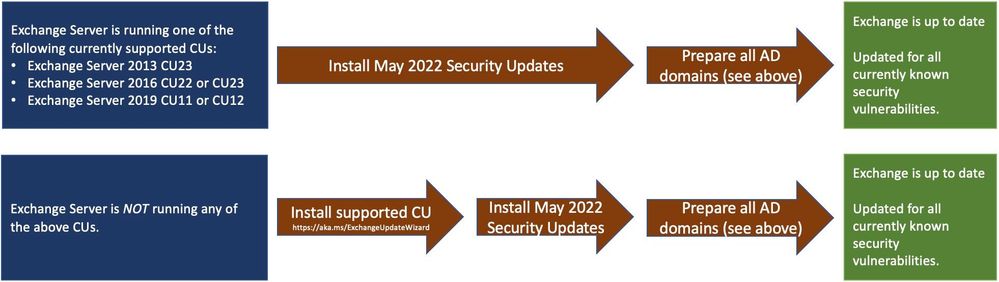
Because of additional security hardening work for CVE-2022-21978, the following actions should be taken in addition to application of May 2022 security updates:
Latest version of Exchange Server installed in the organization
|
Additional steps needed
|
Exchange Server 2016 CU22 or CU23, or
Exchange Server 2019 CU11 or CU12
|
Install the May 2022 SU first and then run the following Command Prompt command once using Setup.exe in your Exchange Server installation path (e.g., …Program FilesMicrosoftExchange Serverv15Bin):
“Setup.exe /IAcceptExchangeServerLicenseTerms_DiagnosticDataON /PrepareAllDomains”
Or
“Setup.exe /IAcceptExchangeServerLicenseTerms_DiagnosticDataOFF /PrepareAllDomains”
|
Exchange Server 2013 CU23
|
Install the May 2022 SU first and then run the following Command Prompt command once using Setup.exe in your Exchange Server installation path (e.g., …Program FilesMicrosoftExchange Serverv15Bin):
Setup.exe /IAcceptExchangeServerLicenseTerms /PrepareAllDomains
|
Any older version of Exchange Server not listed above
|
Update your Exchange server to the latest CU, install May 2022 SU and then follow the steps above.
|
You need to run /PrepareAllDomains only once per organization and those changes will apply to all versions of Exchange Server within the organization. When you run /PrepareAllDomains, your account needs to be a member of the Enterprise Admins security group. This might be a different account from the one you use to install the SU.
Update installation
Two update paths are available:
Inventory your Exchange Servers / determine which updates are needed
Use the Exchange Server Health Checker script (use the latest release) to inventory your servers. Running this script will tell you if any of your Exchange Servers are behind on updates (CUs and SUs).
Update to the latest Cumulative Update
Go to https://aka.ms/ExchangeUpdateWizard and choose your currently running CU and your target CU to get directions for your environment.
If you encounter errors during or after installation of Exchange Server updates
If you encounter errors during installation, see the SetupAssist script. If something does not work properly after updates, see Repair failed installations of Exchange Cumulative and Security updates.
Known issues with this release
We are not aware of any known issues with this release.
Issues resolved by this release
The following issues have been resolved in this update:
- Exchange Service Host service fails after installing March 2022 security update (KB5013118)
- New-DatabaseAvailabilityGroupNetwork and Set-DatabaseAvailabilityGroupNetwork fail with error 0xe0434352
- The UM Voicemail greetings function stops working and returns error 0xe0434352.
- Unable to send mails through EAS and Get-EmailAddressPolicy fails with Microsoft.Exchange.Diagnostics.BlockedDeserializeTypeException after installing Security Update KB5008631 for Exchange 2019
FAQs
My organization is in Hybrid mode with Exchange Online. Do I need to do anything?
While Exchange Online customers are already protected, the May 2022 SUs do need to be installed on your on-premises Exchange servers, even if they are used only for management purposes. You do not need to re-run the Hybrid Configuration Wizard (HCW) after installing updates.
Do I need to install the updates on ‘Exchange Management Tools only’ workstations?
Servers or workstations running only the Management Tools role (no Exchange services) do not need these updates. If your organization uses only an Exchange Management Tools machine, then you should install the May 2022 SU package on it and run /PrepareAllDomains as per the above instructions to update Active Directory permissions.
Instructions seem to indicate that we should /PrepareAllDomains after May 2022 SU is installed; is that correct?
Yes. The May 2022 SU package updates files in Exchange server folders when it is installed. That is why once those files are updated (SU is installed) – we ask you to go and explicitly /PrepareAllDomains using setup from v15Bin folder.
NOTE: This post might receive future updates; they will be listed here (if available).
The Exchange Server Team
by Contributed | May 9, 2022 | Technology
This article is contributed. See the original author and article here.
Descubra vulnerabilidades e automatize a atualização de dependências com GitHub Dependabot
Dando continuidade ao artigo Como manter meu código seguro usando o GitHub nesse artigo vamos ver como o Dependabot pode nos ajudar a manter nosso código mais seguro.
Dependabot
Dependabot é um recurso que além de identificar vulnerabilidades nas dependências do seu código, ele pode te ajudar criando Pull Requests com a atualização da dependência com a versão já corrigida. Ele está disponível para todos os repositórios e recentemente foi liberada uma atualização que permite a atualização das dependências privadas do seu repositório.
Para isso ele conta com o GitHub Advisory Database uma lista de vulnerabilidades de segurança conhecidas, agrupadas em duas categorias:
GitHub-reviewed advisories – As vulnerabilidades que já foram identificadas e analisadas pelo GitHub, para essas são geradas notificações sempre que uma vulnerabilidade for identificada nas dependências do seu repositório, para isso, o alerta do Dependabot deve ser ativado.
Unreviewed advisories – As vulnerabilidades que estão listadas no feed do National Vulnerability Database, o Dependabot não gera alertas para essas vulnerabilidades, pois não houve verificação sobre a validade ou integridade por parte do GitHub.
O GitHub adiciona vulnerabilidades na lista do GitHub Advisory Database a partir das seguintes fontes:
Como habilitar o Dependabot
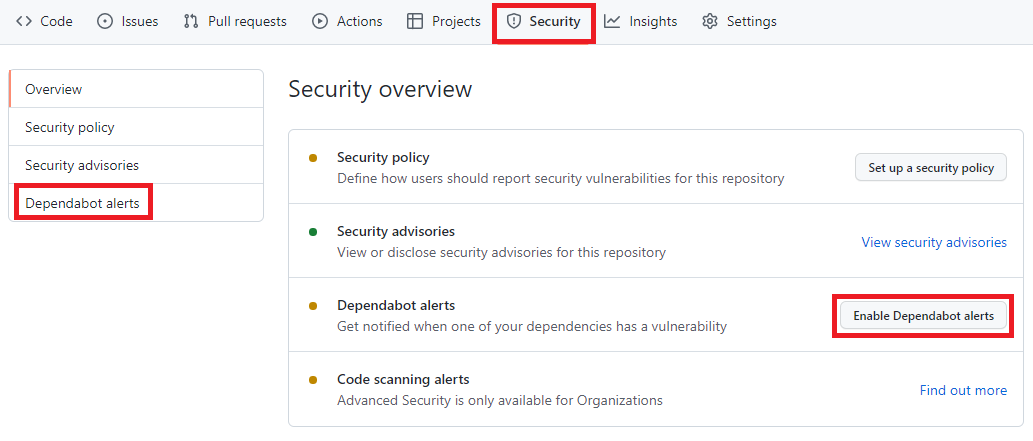
Para habilitar, você precisa acessar o menu Security -> Dependabot alerts e habilitar a opção Enable Dependabot alerts
Painel de Segurança do portal do GitHub, nela está destacado os seguintes termos: Security, Dependabot alerts, Enable Dependabot alerts
Com isso o Dependabot já passa a monitorar seu repositório em busca de vulnerabilidades nas dependências do seu repositório.
A partir de agora o Dependabot passará a gerar aletas sempre que:
- Uma nova vulnerabilidade for adicionada no GitHub Advisory Database
- O Gráfico dependência for atualizado. Exemplo um desenvolvedor faz um push de um commit que atualiza alguma dependência que esteja na lista do GitHub Advisory Database .
O que acontece depois de habilitar o Dependabot
Acessando novamente o menu Security -> Dependabot alerts é possível visualizar se há algum alerta de vulnerabilidade. Você terá acesso a uma lista completa de todas as vulnerabilidades encontradas em seu repositório, podendo filtrar por Pacote, ecossistema ou manifesto, há a opção de ordenar por mais novo, mais antigo, gravidade, localidade do manifesto ou nome do pacote.
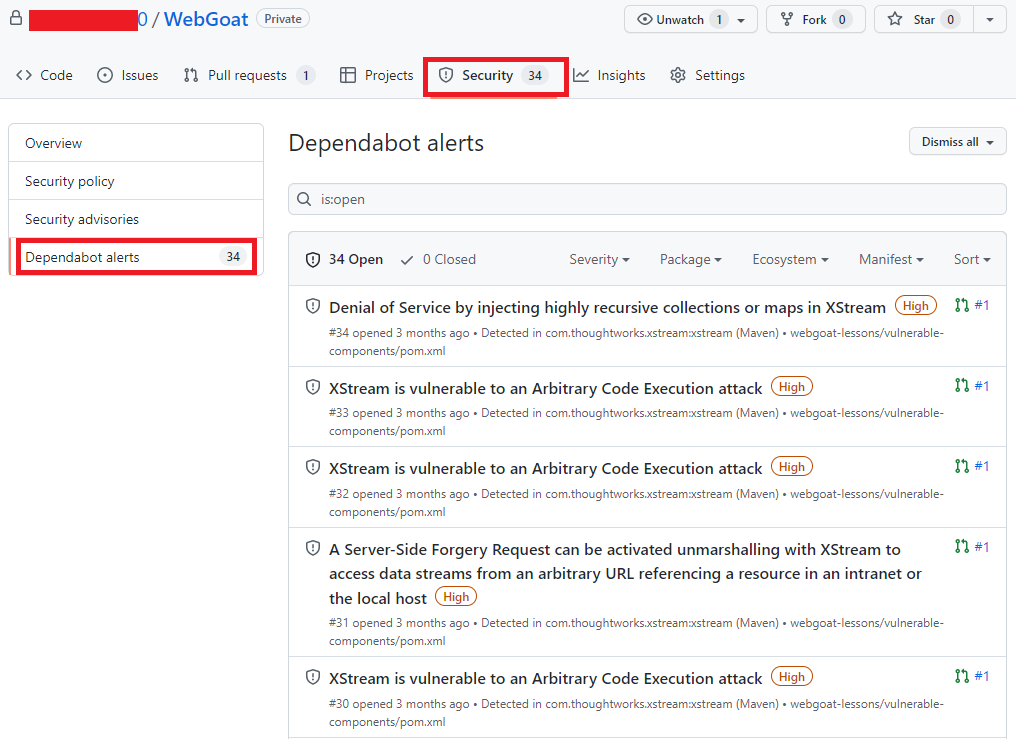 Alertas do portal do GitHub, agora com uma lista de vulnerabilidades e com os seguintes termos destacados: Security e Dependabot alerts
Clicando no alerta é possível obter mais informações sobre a vulnerabilidade, que pode incluir a descrição, nível de gravidade, nome do pacote afetado, ecossistema do pacote, as versões afetadas e as versões de patch, impacto e algumas informações opcionais como, por exemplo, referências, soluções alternativas e créditos. Além disso, um link para o registro CVE, onde você pode ler mais detalhes sobre a vulnerabilidade, suas pontuações CVSS e seu nível de gravidade qualitativa.
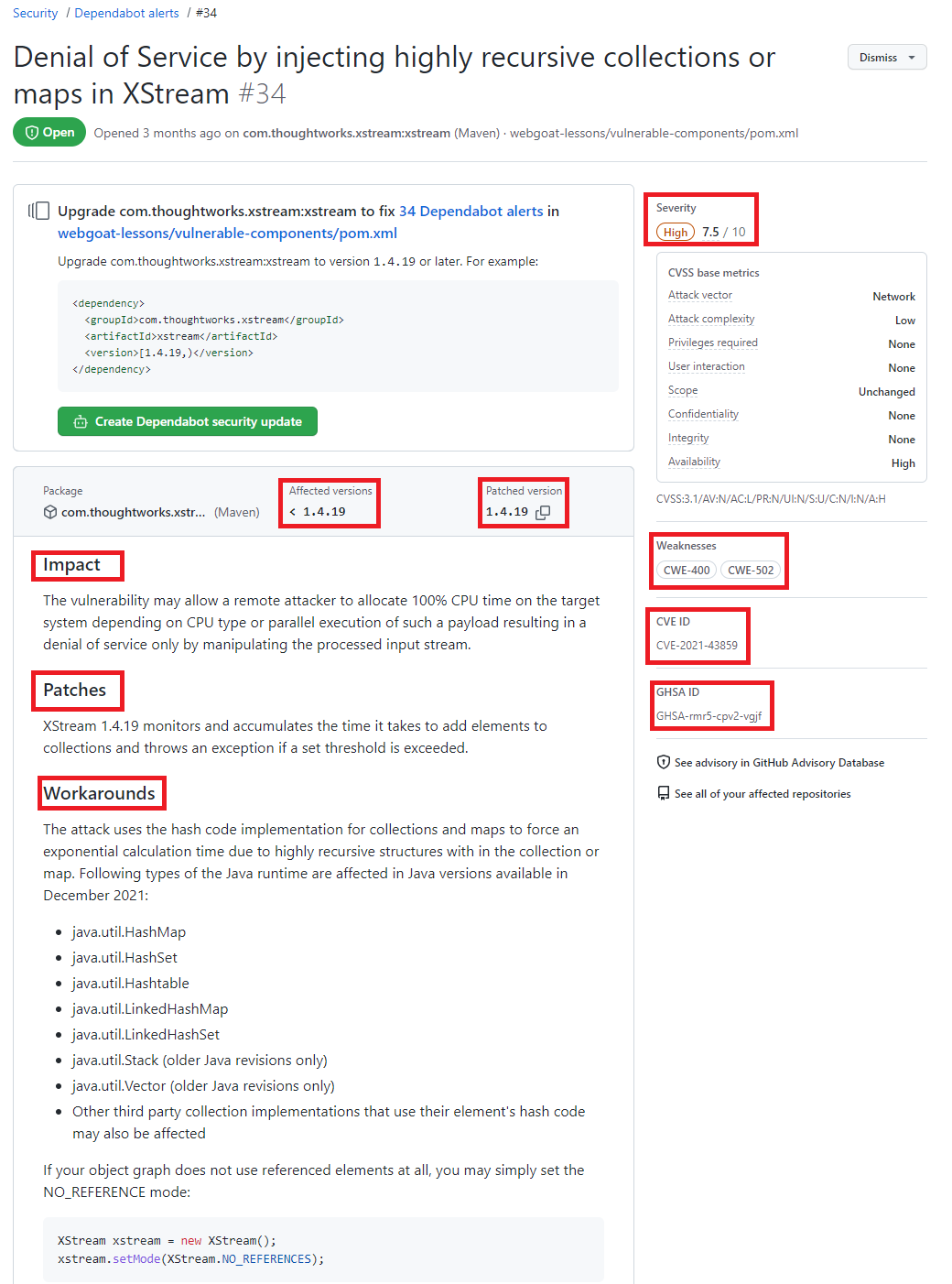 Detalhes de uma vulnerabilidade destacando as seguintes informações Severity, Affected versions, Patched version, impact, Patches, workarounds, weaknesses CVE ID e GHSA ID
O dependabot também envia notificações para os mantenedores do repositório onde a vulnerabilidade foi encontrada. Por padrão o mantenedor receberá um e-mail com um breve relato sobre a descoberta.
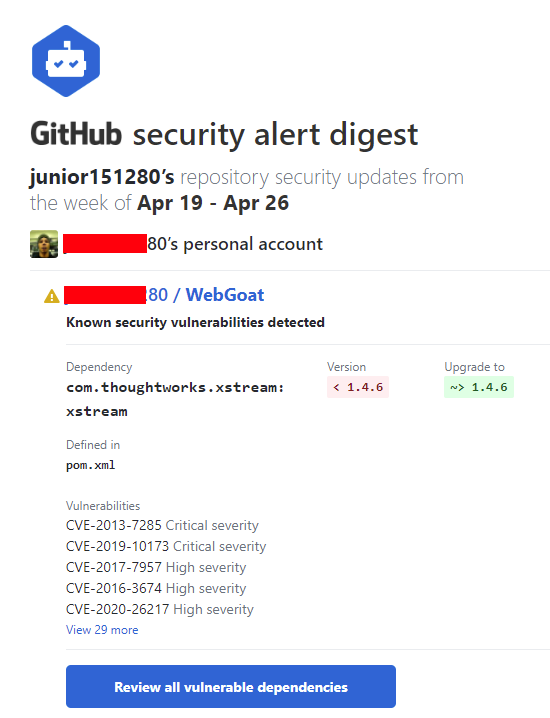 E-mail enviado pelo Dependabot
Localize repositórios com vulnerabilidades
Acessando o GitHub Advisory Database é possível identificar quais repositórios possui dependências com vulnerabilidade, para isso acesse o GitHub Advisory Database clicando nesse link.
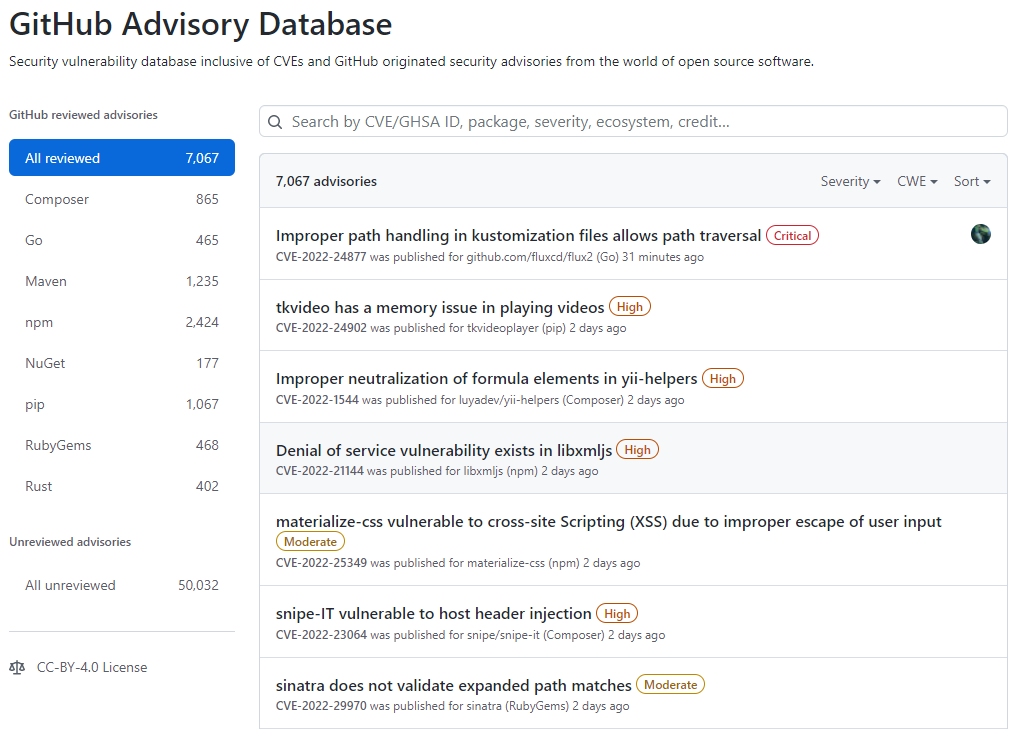 Tela inicial do GitHub Advisory Database
No GitHub Advisory Database é possível filtrar as vulnerabilidades por ecossistema, CVE/GHSA ID, nome do pacote, gravidade ou ordenar por mais novo, mais antigo, atualizado recentemente ou menos atualizado recentemente. Ao localizar a vulnerabilidade desejada é possível ver quais repositórios utiliza a dependência.
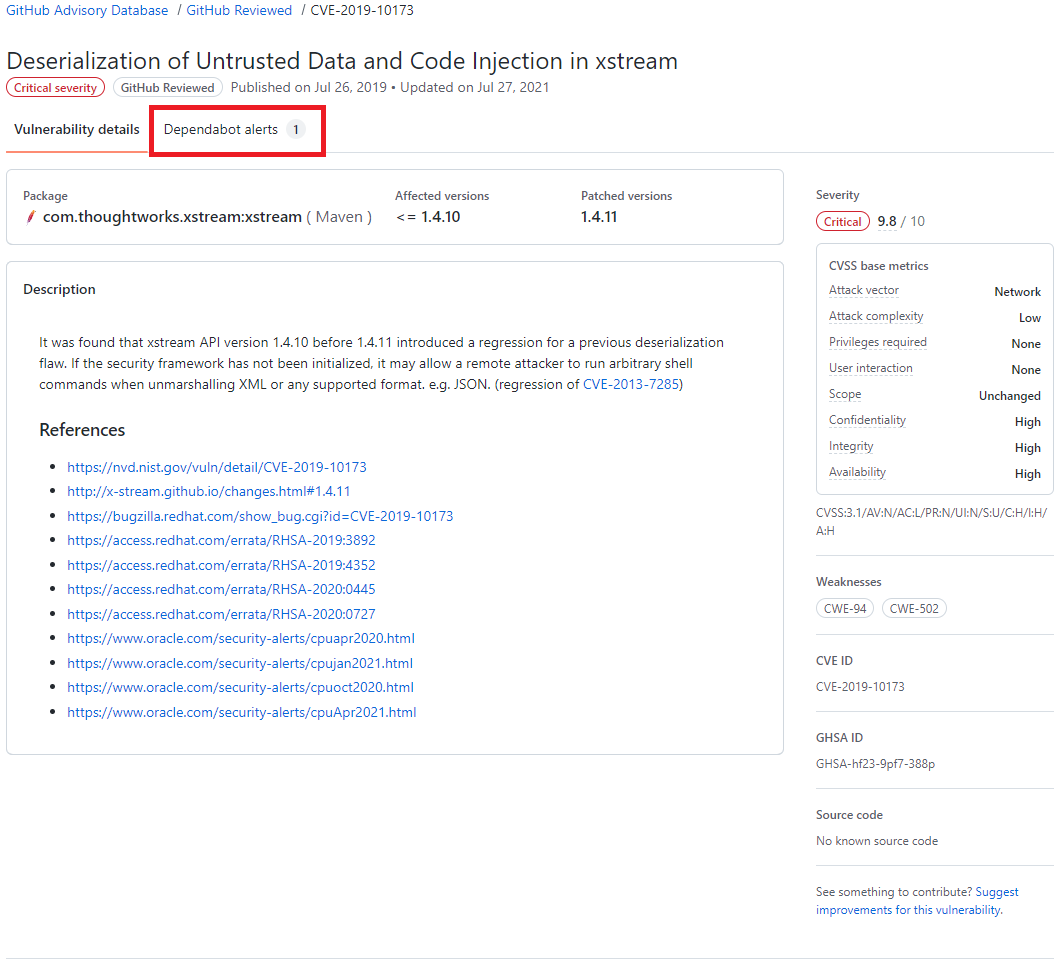 Resultado de pesquisa do GitHub Advisory Database, destacando o termo Dependabot alert
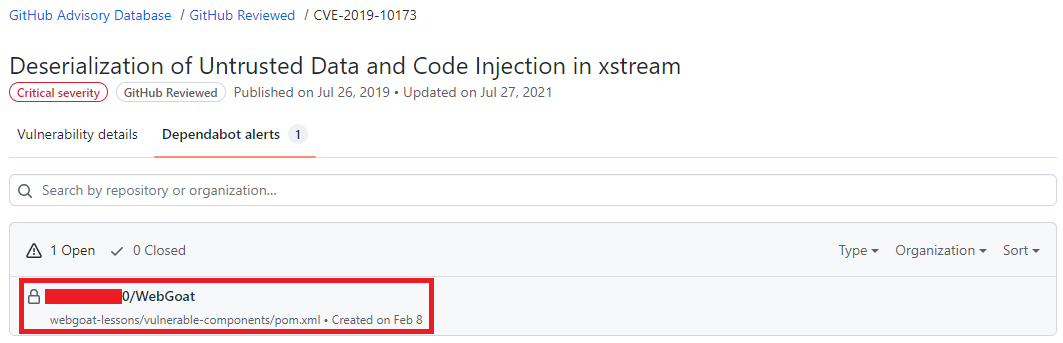 Resultado de pesquisa do GitHub Advisory Database mostrando quais repositórios há a dependência selecionada, o nome do repositório está destacado.
Atualize as dependências com ajuda do Dependabot
Após um alerta ser gerado, se já existir uma versão com a correção da vulnerabilidade o Dependabot abre um Pull Request com a ação corretiva, em alguns casos quando o as informações são suficientes uma pontuação de confiabilidade é gerada.
O Pull Request passa pelos mesmos testes que os demais Pull Requests gerados pelo time responsável pelo repositório, portanto fica na responsabilidade do mantenedor do repositório avaliar e se estiver tudo correto aprovar o Pull Request. A aprovação dos Pull Requests podem ser automatizada utilizando as Actions para saber mais sobre como automatizar o Dependabot com o GitHub Actions acesse esse link
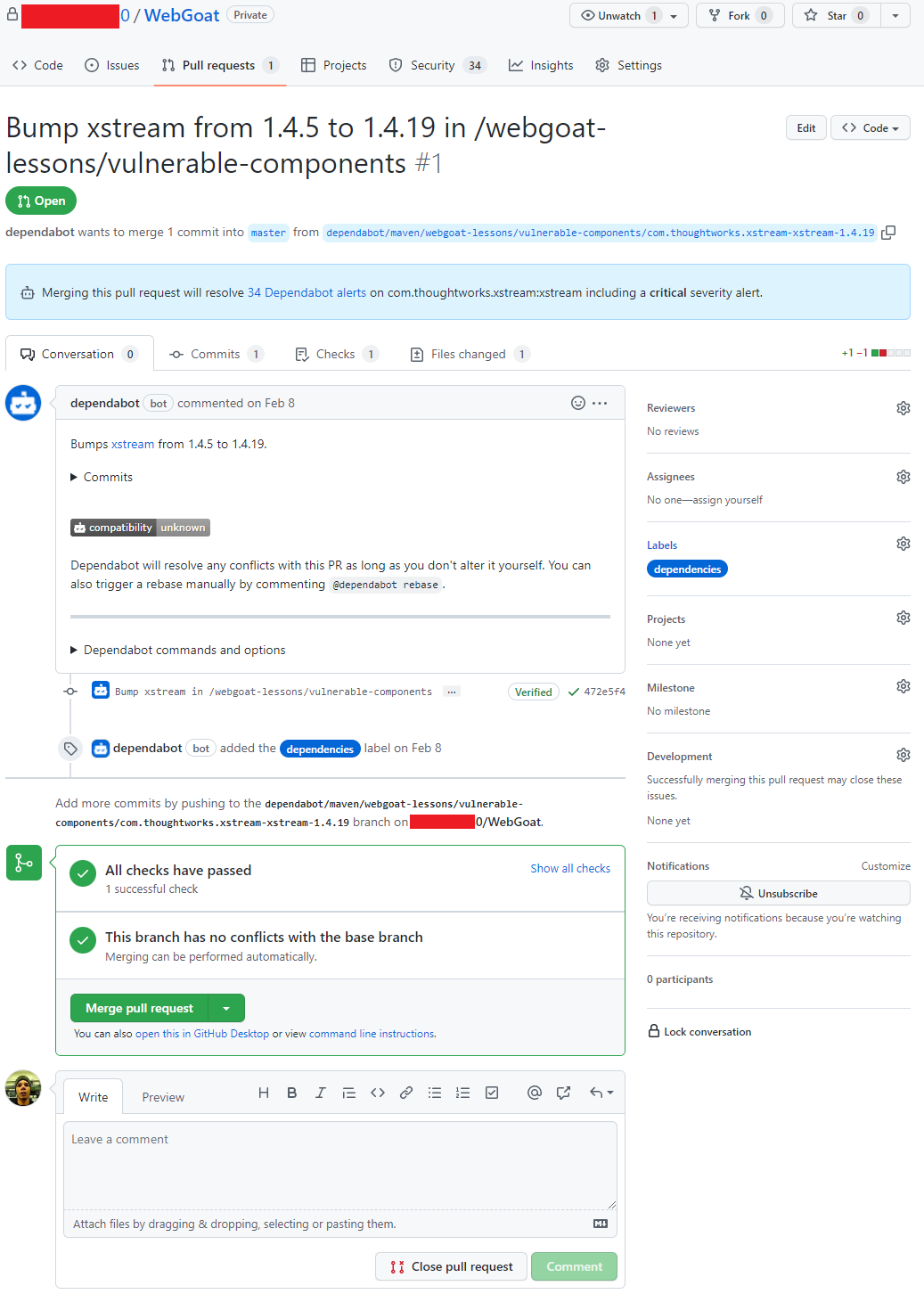 Pull request aberto pelo Dependabot
Conclusão
O Dependabot é um recurso que não podemos deixar de habilitar em nossos repositórios, é grátis, faz boa parte do trabalho sozinho e nos ajuda a manter nosso código muito mais seguro.
by Contributed | May 8, 2022 | Technology
This article is contributed. See the original author and article here.
This 7th of May, my colleague Paloma Garcia and I, delivered a session in Spanish “No encuentro donde esté el problema de la query” where we compare the performance in two different environments (production and staging) where our customer reported differences in execution time. In this article you could find out the link about the session recorded in Global Azure event
Abstract Spanish version
=======================
Muchas veces recibimos casos en soporte de Azure SQL Database donde nos indican que al ejecutar la query en la base de datos de producción tarda más que en la base de datos de preproducción con las mismas características de base de datos. En esta charla explicaremos una serie de pasos que seguimos para encontrar cuál es la razón de esta diferencia e intentaremos arreglar el entuerto.
Abstract English version
=======================
Many times, we received cases in Azure SQL Database support where customer noticed us that running a query on the production database takes longer than on the staging database with the same database characteristics. In this session we will explain a series of steps that we follow to find what is the reason for this difference and we will try to fix the mess.
Enjoy!


Recent Comments