This article is contributed. See the original author and article here.
Unified routing in Microsoft Dynamics 365 Customer Service provides capabilities to connect customers to the best agents. To provide a world-class customer engagement experience, around the clock and across the globe, large organizations rely on multiple vendors and expert pools. They need to balance the incoming workload across service departments, vendor queues, and their expert pools. Percentage-based routing, a new capability of unified routing, helps organizations to easily allocate work to different queues representing departments, vendors, or groups of agents in specific percentages.
How does percentage-based routing help?
Let us look at a customer scenario to understand how percentage-based routing can help your customer service organization.
Contoso Solutions is a Fortune 500 software product and services company. It has a large customer support organization covering more than 20 product lines, served by three vendors with more than 5,000 agents worldwide. Most of their customer queries are in the Billing and Subscriptions area. A single vendor team cannot handle the load. Rajeev, the director of customer support at Contoso, wants to distribute the workload across all three vendors based on each vendor’s pricing plan, quality of service, and the volume it can handle. He has come up with the following allocation:
60% to Woodgrove Solutions, which has consistently delivered good customer support and has offered volume-discounted pricing to Contoso
30% to Adatum Corporation, which has a smaller workforce but can quickly ramp up agents when Contoso releases new features
10% to First Up Consultants, a new vendor that Contoso wants to try out
Rajeev is looking for a solution that can help him implement the percentage-based routing easily to control customer wait times during the busy holiday season. He learns about the percentage-based routing capability in Dynamics 365 Customer Service. In the Customer Service admin center, he opens the workstream and configures a Route to Queue rule with the work allocations he devised.
From that moment, the algorithm dynamically routes every customer query from the Billing and Subscriptions area to one of the three vendor queues according to the configured percentages.
Monitor vendor queues in reports
Rajeev can check the number of customer queries that go to each vendor using the Omnichannel historical analytics insights dashboard.
Conclusion
In a world of high-volume, 24/7 customer engagement, percentage-based routing can be extremely helpful for organizations that want to efficiently manage their workload across multiple vendors and deliver delightful customer experiences to their global customer base.
Learn more
To get more information about unified routing and automated routing rules in Dynamics 365 Customer Service, read the documentation:
This article is contributed. See the original author and article here.
Microsoft Defender for Office 365 is pleased to announce a partnership with SANS Institute to deliver a new series of computer-based training (CBT) modules in the Attack Simulation Training service. The modules will focus on IT systems and network administrators. Microsoft is excited to collaborate with a recognized market leader in cyber security training to bring our customers training that can help our customers address a critical challenge in the modern threat landscape: educating and upskilling security professionals.
“We salute Microsoft for recognizing the requirement to direct security awareness training towards IT System and Network Administrators since our experience tells us that it is precisely these users who are more frequently targeted because of their privileged access.”
Carl Marrelli, Director of Business Development at the SANS Institute
We chose SANS Institute for its long track record of success in technical education and for its focus on an audience that Defender for Office 365 wants to support. Technical education is hard, and cyber security is even more difficult to deliver effectively. SANS Institute’s approach was best-in-class, and we think our customers are going to find this content very valuable for their organizational upskilling.
Today our Attack Simulation Training provides a robust catalog of end-user training experiences, soon to be expanding beyond social engineering topics. This partnership with SANS will help us expand our offerings to cover an important and challenging topic area. IT system administrators and network administrators have to acquire and use a broad and deep set of complex cyber security information in order to successfully protect their organizations. It can be difficult to find good training and Microsoft believes that this new set of training modules will help all of our organizations, large and small, upskill their administrative staff. These new courses will be self-paced, short-form, and easily digestible.
These new courses will be made available in the coming months through the Attack Simulation Training platform. They will ship alongside the rest of our catalog and can then be assigned through our training campaign workflows. Attack Simulation Training is available to organizations through Microsoft 365 E5 Security or Microsoft Defender for Office 365 Plan 2. The courses will meet all of Microsoft’s standards for accessibility, diversity, and inclusivity.
The SANS Institute was established in 1989 as a cooperative research and education organization. Today, SANS is the most trusted and, by far, the largest provider of cybersecurity training and certification to professionals in government and commercial institutions worldwide. Renowned SANS instructors teach more than 60 courses at in-person and virtual cybersecurity events and on demand. GIAC, an affiliate of the SANS Institute, validates practitioner skills through more than 35 hands-on technical certifications in cybersecurity. SANS Security Awareness, a division of SANS, provides organizations with a complete and comprehensive security awareness solution, enabling them to manage their “human” cybersecurity risk easily and effectively. At the heart of SANS are the many security practitioners, representing varied global organizations from corporations to universities, working together to support and educate the global information security community.
Want to learn more about Attack Simulation Training?
This article is contributed. See the original author and article here.
Yammer is committed to strengthening the alignment of Yammer to Microsoft 365. This means we will no longer support tenants having more than one home Yammer network. This change will ensure Yammer networks have the same organizational boundaries as their corresponding M365 tenants. Integrating Yammer more fully into the Microsoft 365 ecosystem has been a multi-year effort and new networks created since October 2018 have not permitted this 1:Many configuration. Similarly, new Yammer networks provisioned after January 2020 have been created in Native Mode. In September 2022, the enforcement of Native Mode was announced. Automated network consolidation is an important prerequisite to reaching Native Mode and gaining access to broader safety, security, and compliance features. This will start on 5/1/2023 and continue through 5/1/2024.
Start the consolidation process
If you have secondary Yammer networks, you will lose access to all your secondary Yammer networks once you consolidate. Users from your secondary Yammer networks will be migrated to your primary network, but groups (communities) and data will be lost. In advance of this change, we strongly recommend that customers perform a full data export of their networks. You can read more about exporting data from your network here.
It is strongly advised that customers perform this network consolidation themselves. This will allow you to choose the time of the consolidation and allow the administrator to choose which primary domain will be associated with the remaining network.
Customers are encouraged to initiate network consolidation any time before or after 5/1/2023.
If you would like to self-initiate your network consolidation:
There is a guide to network consolidation available to walk you through the process. A network administrator can run the network migration tool from within Yammer.
If you would like Microsoft to initiate your network consolidation:
You are not required to take any action. Microsoft will notify you via the M365 Message Center of your scheduled consolidation date and default primary network and domain. The network with the highest total message count will be the default primary network.
If you would like a different default primary network, contact Microsoft 365 support to log an exception.
If you need to postpone or schedule network consolidation around blackout dates:
Contact Microsoft 365 support to log an exception.
What happens next?
Post consolidation of the networks into 1:1 alignment with Microsoft 365, they will be upgraded to Native Mode. This provides access to the latest features in Yammer and ensures that customers are covered by the Microsoft 365 compliance features.
You can read more about our plans to ensure alignment to Native Mode here.
Need more help?
There are Microsoft partners that can help you migrate data from your secondary networks. Please reach out to your Microsoft Account Team or contact a partner for more information.
FAQ
Q: We know which network we want to be our primary network. How can we make sure that our networks are automatically consolidated to that specific network?
A: Please contact support to specify your desired primary network and domain.
Q: We do not want our networks consolidated. What can we do?
A: Please contact support to request an exception, which will include sharing business justifications, when the consolidation can proceed, and your plan to unblock it. This is not a permanent exception.
Q: We consolidated our networks, but we want to reverse the process so we can have a different primary network. Is that possible?
A:No. Network consolidation is an irreversible process.
Step-by-step instructions for network consolidation
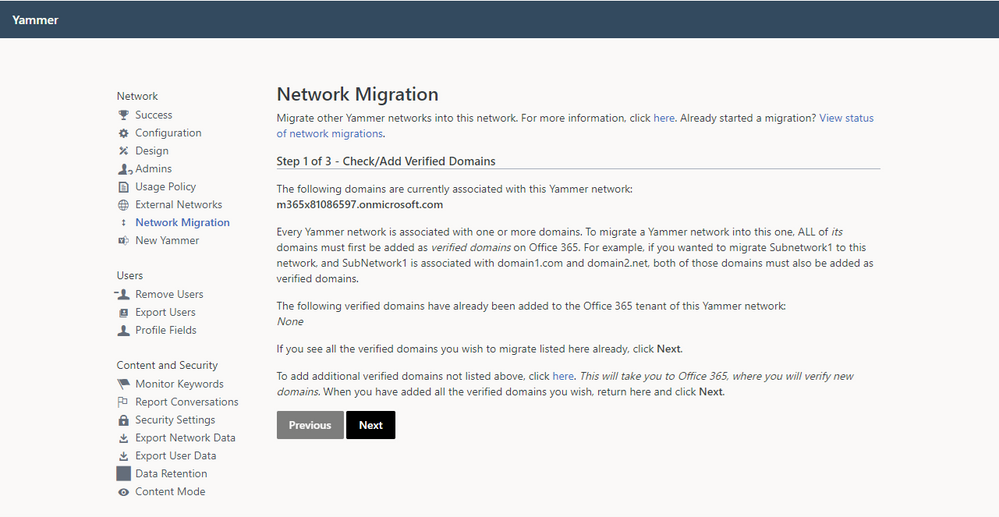
As a network admin, visit the Network Migration page within the Yammer network admin settings of the primary network you want to keep. Make sure that all of the domains you wish to consolidate are listed. If they are not listed, you can follow the link to add and verify additional domains.
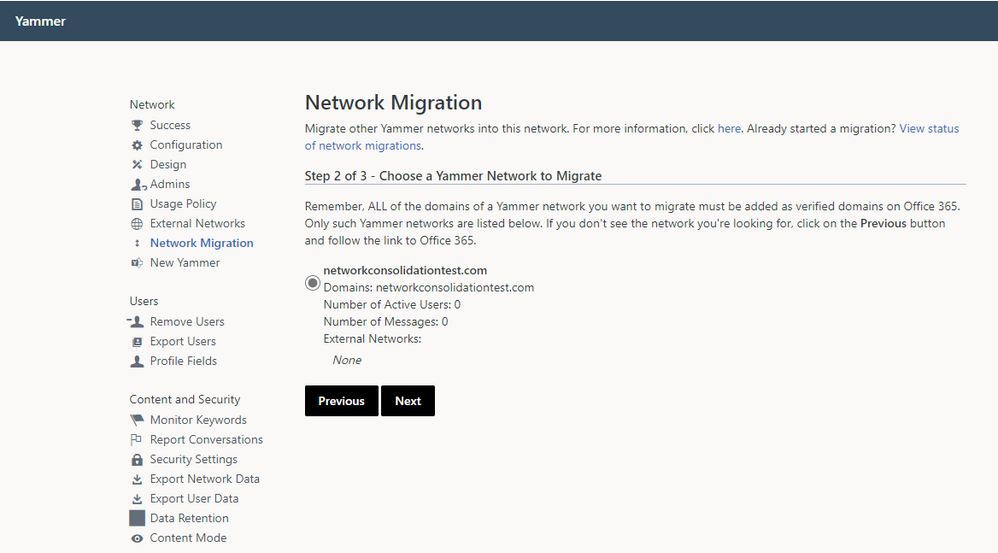
2. Choose the network you wish to consolidate, and click Next.
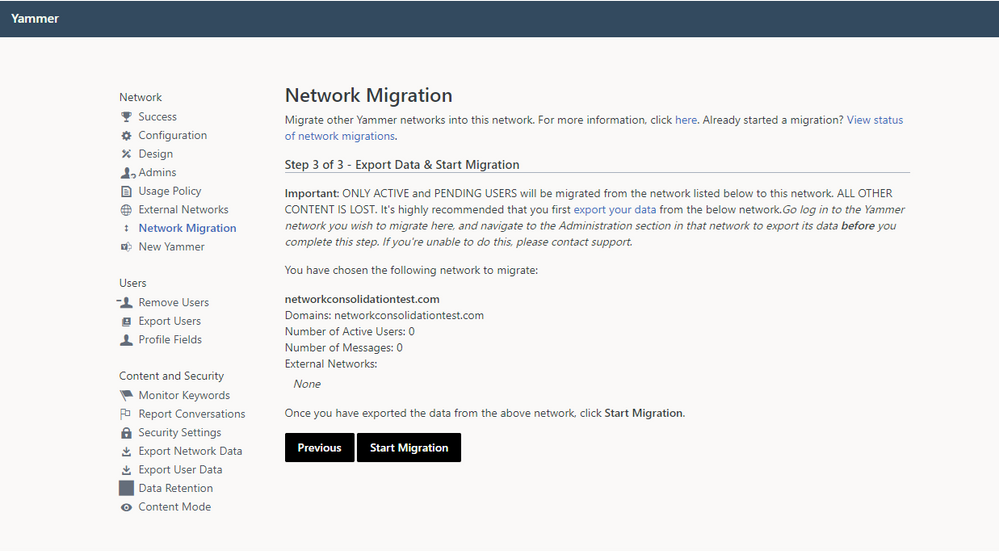
3. Validate that you are ready to consolidate the selected network and have performed any desired data export prior to consolidation.
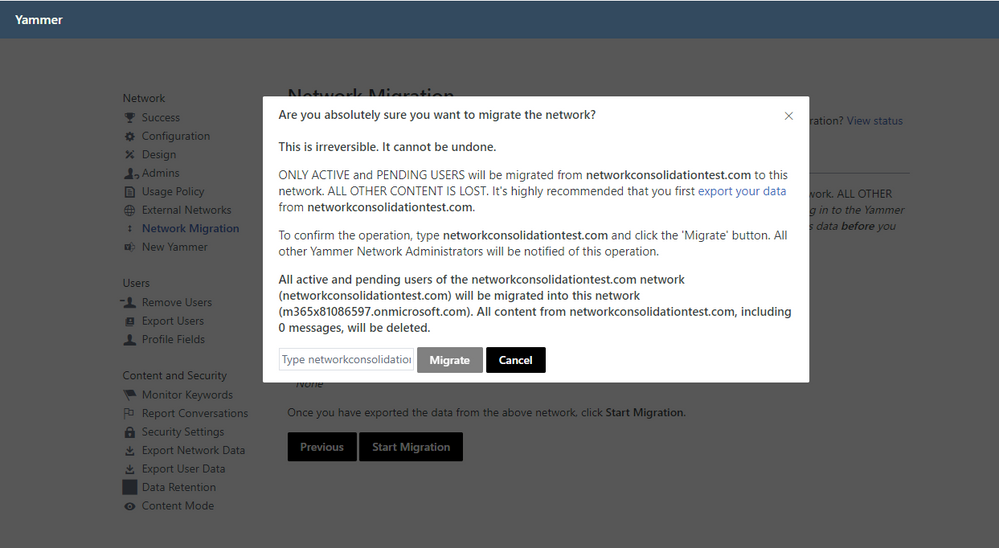
4. Follow the instructions to initiate network consolidation.
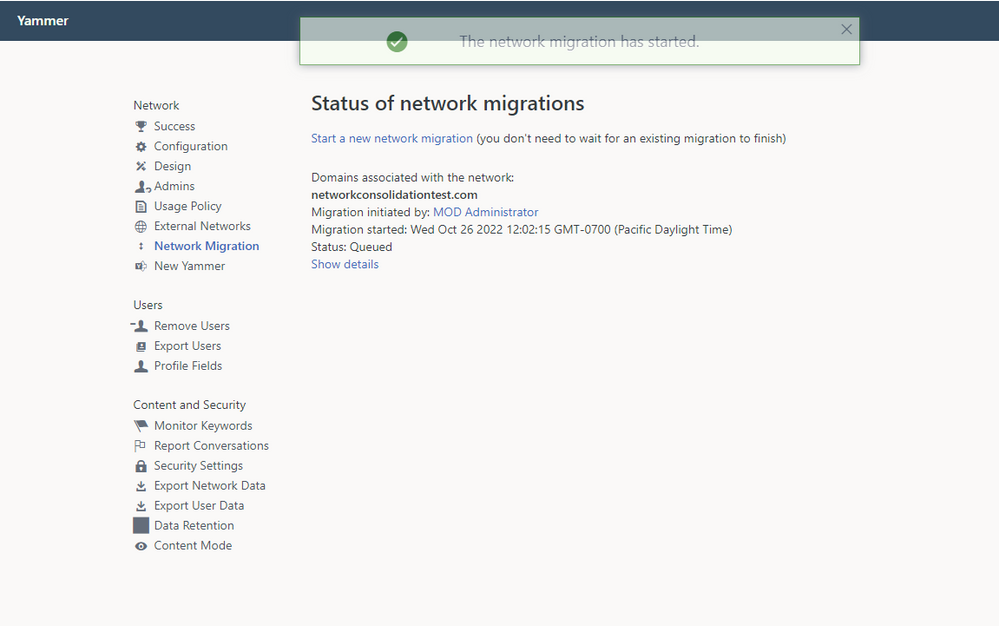
5. You can view the status of your network consolidation on the Network Migration page.
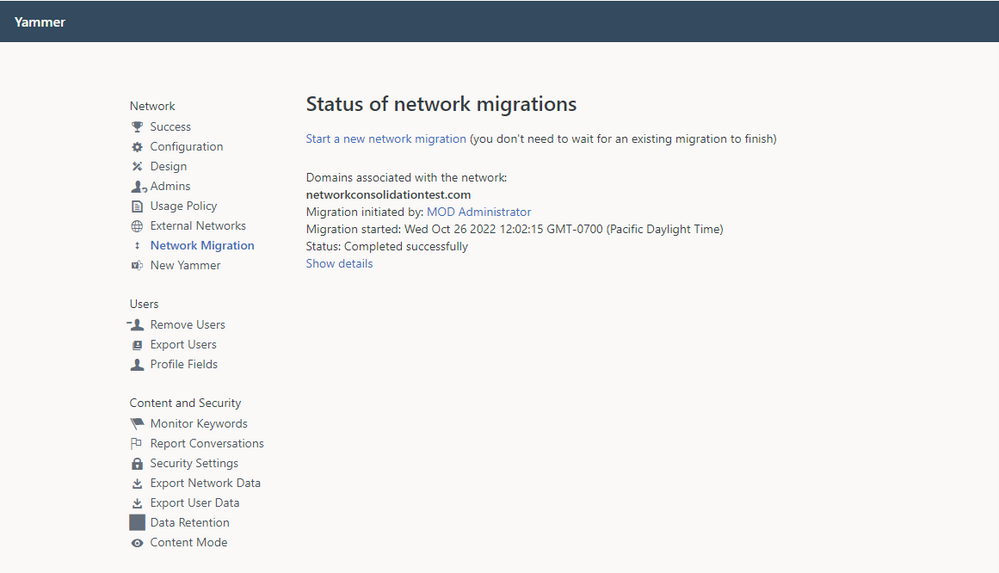
6. When the consolidation is complete, the status will update.
7. Repeat this process until you only have one network associated with your tenant. Congratulations! You are now ready to migrate to Native Mode.
This article is contributed. See the original author and article here.
Microsoft partners like Rubrik and Standss deliver transact-capable offers, which allow you to purchase directly from Azure Marketplace. Learn about these offers below:
Rubrik for Microsoft 365: Safeguard your enterprise data from insider threats or ransomware with Rubrik’s air-gapped, immutable, access-controlled backups, while continuously monitoring and remediating data risks. Rubrik Zero Trust Data Security for Microsoft 365 offers unprecedented simplicity and performance for search and restore operations for Microsoft Exchange Online, OneDrive, SharePoint, and Teams.
SendGuard for Outlook (Microsoft 365): Prevent accidental data disclosure and improve your compliance posture with SendGuard for Outlook. The software scans, detects, warns or blocks potentially sensitive, confidential or non-compliant emails and prevents them from reaching unintended recipients. It prompts Microsoft Outlook users to review and confirm both attachments and recipients before an email with confidential information can be sent. .
This article is contributed. See the original author and article here.
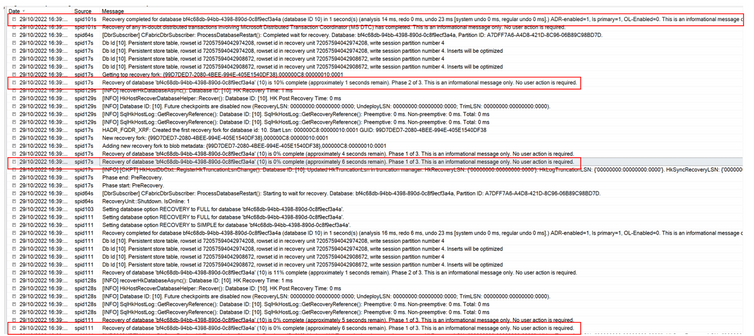
When you start a PITRrestore in your Managed Instance, is very useful be able to track how it progresses. Azure Portal does not show too many details about it, but we can use Managed Instance logs to track it.
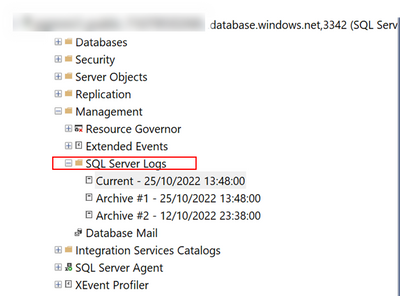
The way to do it, is quite simple. You just need to connect to your MI using your SSMS (SQL Server Management Studio) and open “SQL Server Logs” that you will find under “Management“
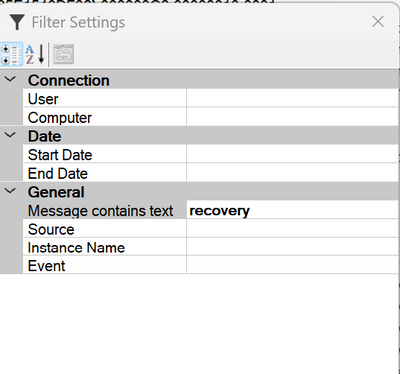
After openlogs, is the time to filter then to be focus on the recovery process.
After applying the filter, you will be able to track restore progression.







Recent Comments