This article is contributed. See the original author and article here.
Detours in the Warehouse Management mobile app in Dynamics 365 Supply Chain Management allow a worker to temporarily jump into another flow and come back to exactly where they were to continue the interrupted process. We have enhanced the detour feature to enable the system to fetch data related to the current task automatically, and then use the data in the detour flow. This enhancement can help reduce the number of steps in a flow, make data capture more accurate, and improve worker efficiency.
Warehouse worker efficiency is key to achieving high throughput at low cost. This is especially true when warehouse business processes are manual and complex. Barcode scanning in the Warehouse Management mobile app makes capturing data easy and accurate. But sometimes, barcodes are unreadable or required information does not exist as a barcode. In these cases, workers must look up and manually key in the data. This can result in data entry errors and reduced efficiency.
Reduce or eliminate manual entry with detour data inquiry
Using flexible detour data inquiry, workers can now look up information while working in standard Warehouse Management mobile app flows. Filtering options ensure that only the most relevant data is listed, making manual selection faster and more accurate.
The mobile app can also bring data from a detour flow back to the calling step. By completely skipping a previously required manual input process, capturing data is even faster and more accurate to improve worker efficiency.
Detours within detours
We have expanded the detour capability by adding another leveldetours within detoursto help workers be even more efficient. For example, coming from a “Pack inventory into containers” menu item to a “Container creation” menu item flow, you might want to include yet another detour to provide a data look-up for the container types that are required to create a new container for the packing process.
How detour data lookup improves worker efficiency
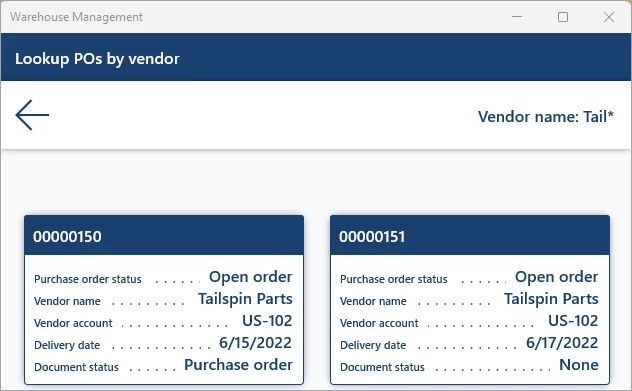
Here is an example using a purchase order receiving flow in the Warehouse Management mobile app. A purchase order number must be captured to match the arriving inventory. Admins can easily configure menu items to provide a card list view of relevant purchase order numbers. Workers can continue the receiving flow by selecting the right one.
The following screenshot shows a detour lookup of open purchase orders using part of a vendor’s name and a wildcard character.
This article is contributed. See the original author and article here.
Get one integrated solution that brings together the business apps and tools you need to launch and grow your business when you purchase a new subscription of Microsoft 365 Business Standard or Business Premium on microsoft.com. Offer available now through December 30, 2022, for small and medium businesses in the United States.
This article is contributed. See the original author and article here.
We are excited to announce that Microsoft Defender Experts for XDR is now officially in preview. Previously introduced as part of our new Microsoft Security Experts category earlier this year, Defender Experts for XDR is our managed extended detection and response (MXDR) service that goes beyond the endpoint to protect across Microsoft 365 using a combination of automation and human expertise to respond to incidents alongside your SOC team.
Many organizations are making the move to managed services to augment their security operations, and along with comprehensive security coverage across all attack vectors, broad industry agendas are further impacting their selection criteria. According to an ESG Research Report1, more than nine in ten organizations identify MITRE ATT&CK support as critical or very important and nearly three-quarters report extended detection and response (XDR) security technology was considered in their selection process.
The Defender Experts for XDR preview launches on the heels of the inaugural MITRE Engenuity ATT&CK® Evaluations for Managed Services, where Microsoft demonstrated industry-leading results against the simulated attack using our recently released Defender Experts for Hunting service alongside Microsoft 365 Defender. Defender Experts for Hunting, which is included in Defender Experts for XDR, is a managed threat hunting service that proactively looks for threats 24/7/365 across endpoints, email, identity, and cloud apps using Microsoft 365 Defender data.
Defender Experts for XDR expands on our proactive threat hunting service to provide from our security analysts, as well as support from your dedicated Microsoft security-focused service delivery manager (SDM). Additional capabilities include:
Managed detection and response – Let our expert analysts manage your Microsoft Defender incident queue or handle triage and investigation on your behalf. Defender Experts partner with you and your team to act on or guide your response to incidents.
Live dashboards and reports – Get a transparent view of our operations conducted on your behalf, along with a noise-free, actionable view into what matters for your organization, coupled with detailed analytics.
Proactive check-ins for continuous security improvements – Benefit from remote, periodic check-ins with your SDM team to guide your Defender Experts for XDR experience and improve your security posture.
24/7/365 threat hunting – Extend your team’s threat hunting capabilities and prioritize significant threats with Defender Experts for Hunting built in.
The preview process is an important opportunity to engage with customers to get their feedback and refine our service capabilities. Our deep product expertise powered by threat intelligence uniquely positions our experts to help:
Focus on incidents that matter – Prioritize incidents and alerts that matter, alleviate alert fatigue, and drive SOC efficiency.
Manage response your way – Provide detailed, step-by-step, actionable guidance to respond to incidents with the option to act on your behalf as needed.
Access expertise when you need it – Extend your team’s capacity with on-demand access to Defender Experts for assistance on investigations.
Stay ahead of emerging threats – Proactively hunt for emerging threats in your environment, informed by Microsoft’s unparalleled threat intelligence and visibility.
Our customers have broad and diverse needs and partners can often provide services to best meet those needs. Microsoft is committed to our partner ecosystem and continues to expand its investment in our managed XDR (MXDR) partner community, including a recently launched verified MXDR partner status that certifies a partner’s SOC capabilities and integration with Microsoft products. Our collaboration with partners will help expand their offerings to help meet growing demand and critical customer needs for managed services.
Interested in augmenting your SOC with Microsoft expertise? Contact your Microsoft representative for details. Click here to learn more about Defender Experts for XDR.
1 ESG Research Report, What Security Teams Want from MDR Providers. September 2022.
This article is contributed. See the original author and article here.
With most customer support agents now working remotely, the days of getting help from a peer in the next cubicle are over. Working in isolation, agents are frustrated, issues take longer to resolve, and customers aren’t happy. But while agents are isolated, resolving a customer issue often requires input from multiple departments across the company. It was no surprise that in our research, agents ranked collaboration as the second most important part of their job, behind only customer engagement. That’s why we’ve made collaboration easier in Dynamics 365 Customer Service. With collaborative customer support powered by embedded Microsoft Teams chat and case swarming, agents can resolve issues fasterwhether it requires consulting a peer, a team, a department, or an entire organizationand that makes for happier agents and customers.
Collaborative customer support starts with embedded Teams chat
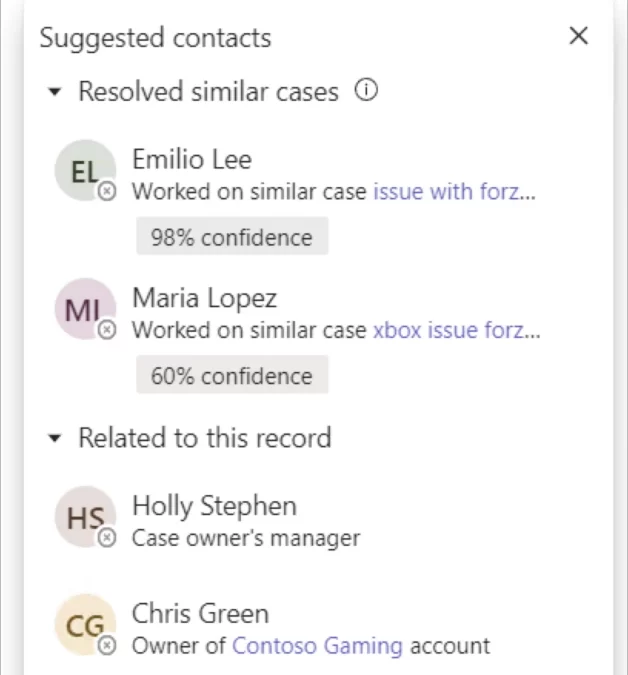
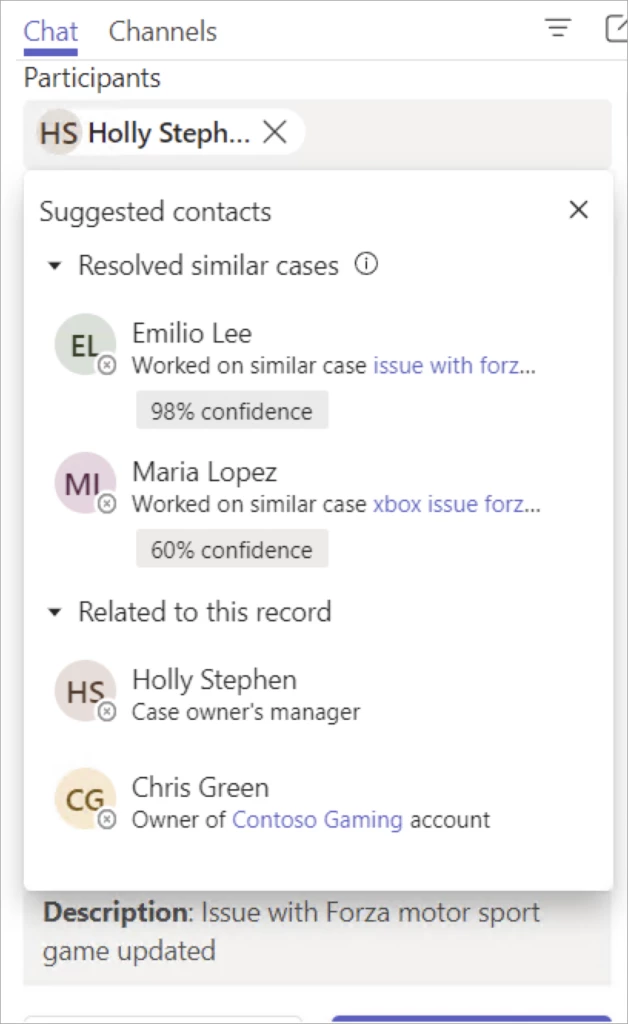
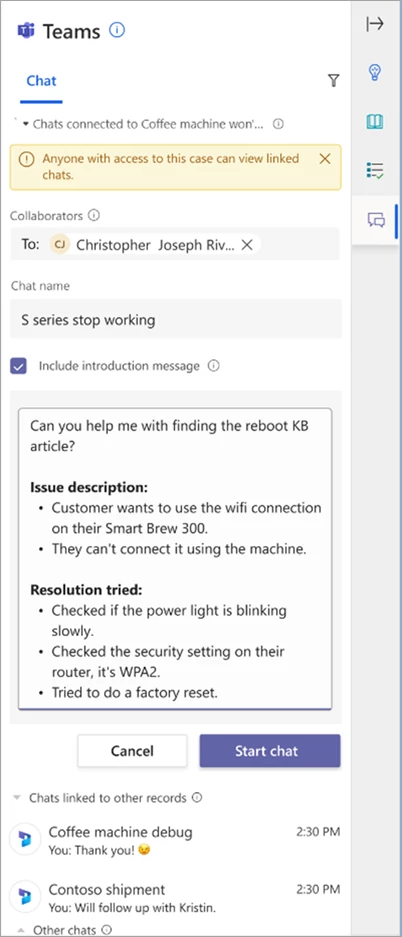
With Teams collaborative experiences embedded in Dynamics 365 Customer Service, agents can get help immediately from experts across the company. AI is infused throughout the collaboration. Agents can share relevant information without extra typing or context-switching, giving them more time for the things that matter. They can chat not only with colleagues related to the case, but to agents who helped resolve similar cases.
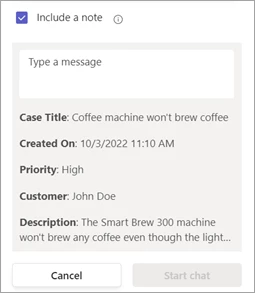
And that’s just the beginning. Because the system automatically shares relevant case details in the chat, the expert gets context quickly without more work from the agent.
Moreover, if the agent is conversing with the customer, AI provides a summarized transcript, saving even more time.
The system automatically connects collaboration chats to cases. Other agents can catch up quickly if they need to take over a case in a hand-off. And coming soon, chat details will appear in the case’s timeline, making it easy for agents to get the full context in one place.
Watch this brief video:
This embed requires accepting cookies from the embed’s site to view the embed. Activate the link to accept cookies and view the embedded content.
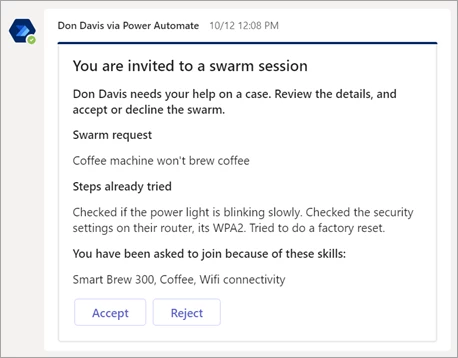
What about when agents need help to resolve a complex case and don’t know who to seek help from? The solution is case swarming. Case swarming brings together experts with the skills to resolve a case faster, regardless of where they are in the organization. They get the context they need automatically, saving agents from typing the details.
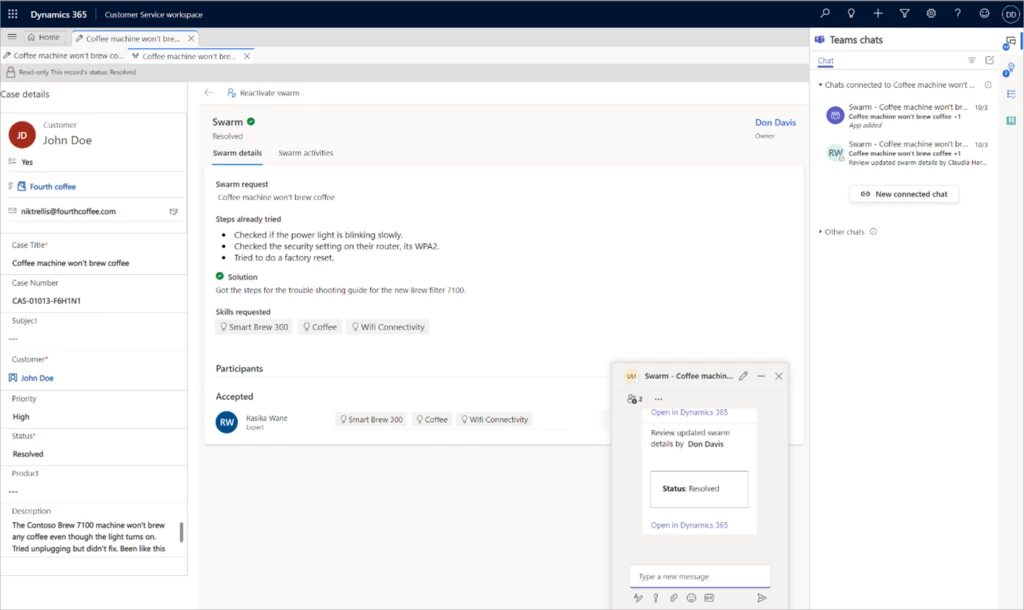
When experts accept the swarm invitation they join the swarm chat, which provides the details of the case along with the swarm request. Experts work together to guide the agent to a resolution.
After resolving the case, the agent can create a knowledge article to preserve relevant information that colleagues can access in the future. The experts who participated in the swarm get an update, too, keeping them aware without extra effort from the agent. Case swarming makes collaborative customer support across an organization seamless.
Case swarming has another benefit. Agents can engage with customers in a more personalized way, acting as the point of contact throughout the life of the issue, and in the process, are upskilled, too.
With embedded Teams chat and case swarming, collaborative customer support is the solution, not the sore spot. Start democratizing knowledge sharing and empower your agents and customer service organization for success.
Watch this brief video:
This embed requires accepting cookies from the embed’s site to view the embed. Activate the link to accept cookies and view the embedded content.
This article is contributed. See the original author and article here.
We are excited to be partnering with SWOOP Analytics to host our 2022 Yammer and Viva Engage Festival on December 7th! This event is for our customers to learn from each another and hear how to build culture and community in your own organizations. If you are launching and not sure where to begin or are curious to hear what’s on the roadmap for Viva Engage, there are sessions for you!
Agenda and Speakers
This virtual event will span across European, Americas, and Asia Pacific time zones. Look at the agenda to see an idea of the types of stories and sessions that will be available and add them to your calendar! Feel free to attend sessions outside of your timezone.
All sessions will be recorded to be able to watch on demand following the event.
Customers from around the world are ready to share with you their experiences from all different types of industries and stages of adoption. Our speakers will share advice, tactics and best practices that you’ll be able to take and use at your organization. You’ll also hear directly from Microsoft and learn more about the future of Microsoft Viva. Take a closer look at all the presenters here.
Nominate your colleagues for the Community Champion Award
The Yammer Community Champion Award is an opportunity to recognize passionate community managers around the world who are committed to employee engagement, knowledge sharing, and collaboration in their Yammer networks and communities.
As part of the Yammer Community Festival, we will announce regional winners of the Yammer Community Champion Award.
Secure your virtual seat and register now! We’re running the event as an interactive Microsoft Teams meeting with Q&A enabled. Bring your questions and ideas as we want to make the chat component active, with many voices heard. Speakers are there to prompt conversations in chat and be prepared to unmute!
FAQs
How much does this cost?
This event is free so invite your whole team!
Who should attend?
With the variety of backgrounds from our speakers and other attendees, most roles will be able to find a similar role from one our customers that supports the work you do, if you are in marketing, communications, sales, product development or IT. Join us!
Can I attend a session outside of my time zone?
Yes! Feel free to attend any session that fits your schedule, regardless of your location.
Will sessions be recorded?
Yes, sessions will be recorded and made available after the event.
How many people can I nominate for the Community Champion Award?
We do not have a set limit for the number of nominations by organization or person. Feel free to nominate all the Community Champions you know!
How many winners will there be and how will they know that they have won?
There will be one winner per regional session and winners will be contacted in advance of session that they have been ‘shortlisted’ as a top contender for the Yammer Community Champion Award. This is to ensure the winners are present to virtually accept their award.
What do the Community Champion Award members win?
There will be custom merchandise sent to each award winner.




Recent Comments