This article is contributed. See the original author and article here.
Companies that operate in more than one channel or region must fulfill orders over networks of ever-increasing complexity. When supply shortages happenand they willhow do you make the best use of limited stock across your most important channels, customer groups, regions, and promotions? And once you decide that, how do you make sure the allocated stock is protected from any other use? With inventory allocation, a new capability of the Microsoft Dynamics 365 Supply Chain Management Inventory Visibility service.
Inventory allocation allows you to virtually apportion your on-hand stock as part of the sales operational planning process before any actual sales are made. It has two purposes:
Inventory protection (ring fencing): Protecting the allocated inventory from other allocations, reservations, or sales demands.
Oversell control: Restricting allocated quantities so that the receiving party doesn’t over-consume them when the actual sales transaction takes place.
Incorporate inventory allocation into your sales planning
First, let’s define a few terms:
Allocation group: The group that owns the allocation, such as a sales channel or a customer group.
Allocation group value: The value of each allocation group. For example, “store” might be the value of the sales channel allocation group, and “VIP” might be the value of the customer allocation group.
Allocation hierarchy: A combination of allocation groups in a hierarchy that determines how inventory is allocated to each group.
Virtual common pool: The quantity of inventory that’s available to allocate.
Now let’s do a case study to see how a company might include inventory allocation in its sales planning process to optimize the distribution and fulfillment flow of limited stock.
Inventory allocation case study
Contoso sells laptops both online and in-store in several countries. Supply chain disruptions severely affected manufacturing capacity of a popular model. The company needs to balance its fulfillment capability between its online and in-store channels in Australia and New Zealand.
First, Contoso determines allocation groups and allocation hierarchies in accordance with the company’s distribution strategy. The allocation is virtual based on current stock numbers. It doesn’t necessarily entail moving physical inventory. Contoso does the initial segmentation and planning of allocation quantities in its planning system, but they could also do it manually based on historical experience. They decide to allocate first by regions (Australia, New Zealand) and then by sales channels (online, store).
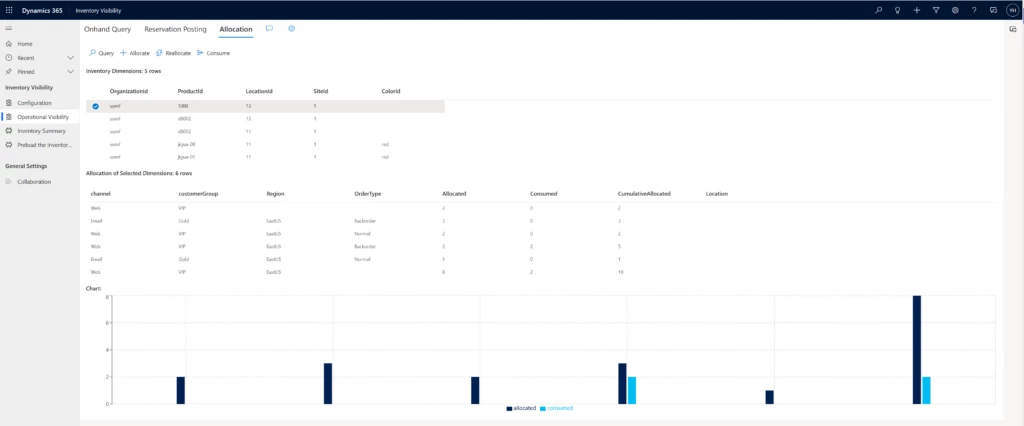
Next, Contoso executes the allocation in the Inventory Visibility service to ring-fence each group’s allotted quantity. An allocation can’t be used by another group unless a reallocation adjustment is made. The Australia group is allotted 5,000 laptops and the New Zealand group gets 3,000, leaving 2,000 as contingency in the virtual common pool. Of Australia’s 5,000, 3,000 is allotted to its online sales channel group. No stock transfer is needed yet, since the actual sales transactions and fulfillment haven’t taken place.
Next, the company fills its regional and channel demands through physical or soft consumption, ensuring that orders from allocation groups use their allocation. A customer visits Contoso’s Australia website and purchases a laptop. The website checks the Inventory Visibility service, confirms that enough of the Australia allocation for the online sales channel is available to fill the order, and allows the order to be processed. The consumed quantity can either be a soft reservation, as in this case, which deducts from the available stock level without affecting physical inventory quantity; or a deduction from physical stock, as in a “cash and carry” transaction in which the store inventory is directly consumed.
Contoso processes and ships the customer’s order as usual.
You can easily incorporate inventory allocation into your order fulfillment process. You’ll have more control over and visibility into your distribution and fulfillment network so that you can make better use of your on-hand stock. Inventory allocation goes beyond planning right through to the execution phase, ensuring allocated stock is protected and helping you keep your promises to sales channels, customer groups, and business partners.
This article is contributed. See the original author and article here.
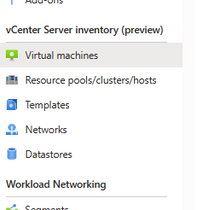
What is Arc for Azure VMware Solution? Simply put, it exposes your Azure VMware Solution resources (VMs, networks, datastores, etc.) to the Azure portal.
Using Arc for Azure VMware Solution, those resources can be managed via the Azure portal, even though they are within your vSphere cluster running in an Azure datacenter. Even better, there is no cost to deploy Arc for Azure VMware Solution. More blogs to come on Arc for Azure VMware Solution, but if you want to get some more details check out this video from Jeremiah Megie.
First things first. Let’s get Arc for Azure VMware Solution installed into your private cloud.
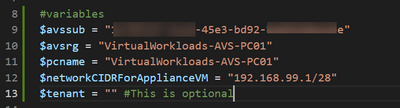
You will need to collect the following information to input into thePowerShell script, which, if you use it, will make the deployment a bit more straightforward.
Subscription ID and Resource Group where the Azure VMware Solution private cloud is deployed.
Name of the Azure VMware Solution private cloud.
/28 network segment for the ARC appliance.
The/28 network segment will be an NSX-T segment in the private cloud. Under the covers, the deployment script creates NSX-T segment for use by the ARC appliances. The value must be entered into the script as the gateway to the segment, followed by /28. For example, if 192.168.99.1/28 is entered, there will be a /28 NSX-T segment created with the gateway 192.168.99.1.
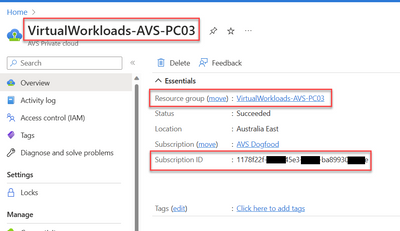
The other information you can get from the Overview blade of your private cloud.
Requirements
Your private cloud must have Internet access.
Also, because of the appliance size, ideally you would want to run this script as close to the private cloud, or from a machine inside the AVS Private Cloud.
This article is contributed. See the original author and article here.
Last year, Reading Coach launched as part of Reading Progress in Microsoft Teams. Reading Coach provides students with personalized and independent practice that Reading Progress identifies a student has mispronounced. Reading Coach has proven to be popular not only with educators, but especially with students. We’ve heard stories from teachers of students “demanding more passages” from the teacher, and that they’ve set personal goals of improvement. To enable students to practice with content that aligns with their interests and focus, without the need for a teacher to make an assignment in Teams, we are rolling out Reading Coach as part of the Immersive Reader in many of our M365 apps. This will be available in school, consumer and work accounts, and in 116 languages and locales.
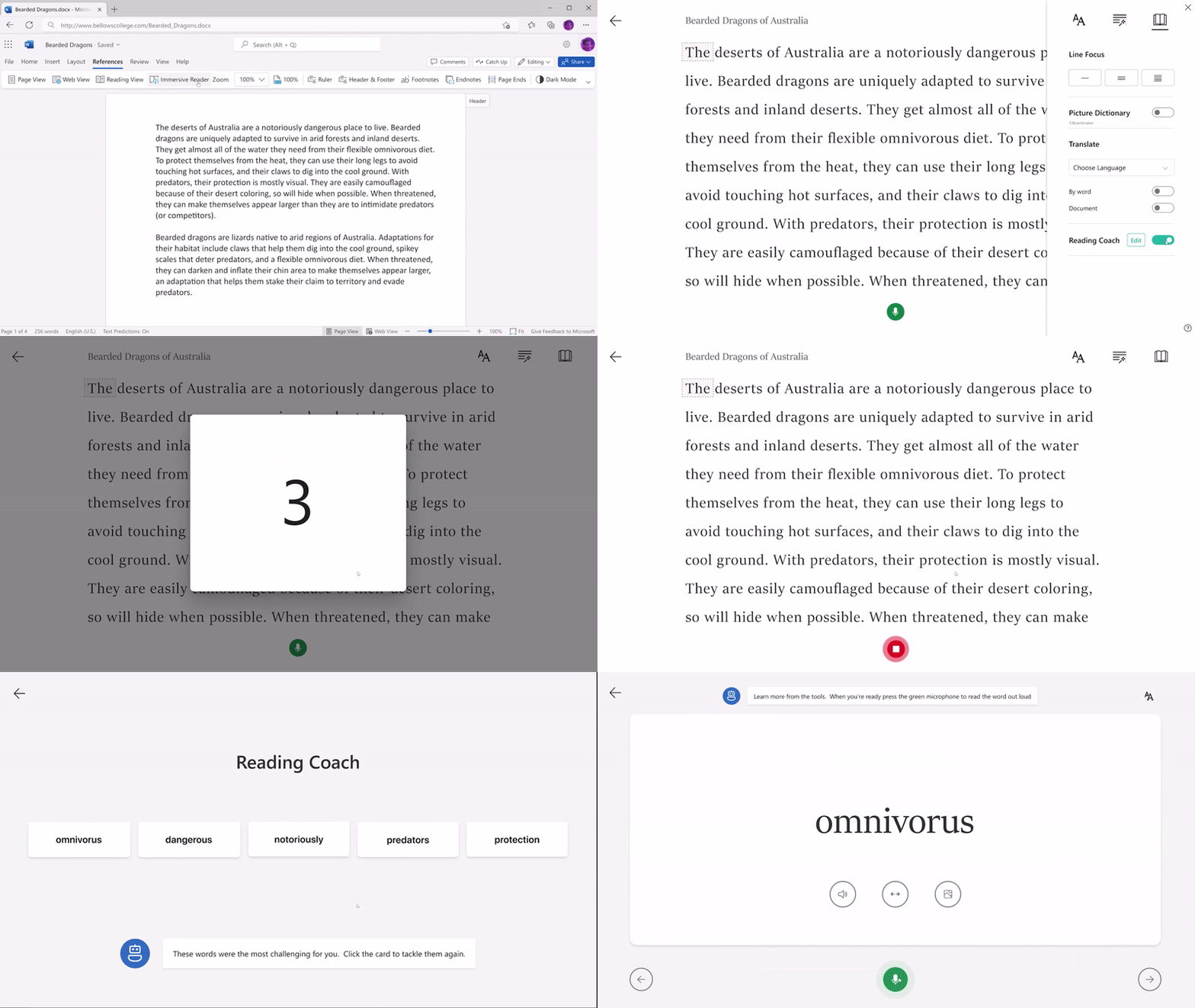
Now anyone using Immersive Reader, with any content they choose, can go to the Reading Preferences pane, enable Reading Coach to practice reading out loud and receive focused practice exercises. When the Reading Coach switch is enabled, the Play button in the Immersive Reader changes to a Microphone button. Students can select the Edit button near the Reading Coach toggle to customize parts of the coach inluding the voice, feedback style, and more. When the microphone button is selected, a dialog pops up that encourages the student to prepare to read out loud.
Once the student selects Let’s read, a 3…2…1 countdown appears, and practice begins. The student reads out loud for as long as they like while Immersive Reader “listens” to their performance. When finished, the reader selects Stop, and a reading report immediately provides data on their reading speed, accuracy, time spent reading, and any words to practice.
If the Practice Words button is clicked, the Reading Coach pops up to allow personalized practice. The Reading Coach interface is the exact same as the one in Reading Progress in Teams.
The initial set of apps that Reading Coach in Immersive Reader is available include Word for web, OneNote for web, Desktop, Mac and iPad, Teams Assignments, Flip and Minecraft Education. We expect to bring Reading Coach to more apps in the near future.
Updates to Education Insights Premium for Reading Progress
We’re excited to share that Education Insights Premium(including all Reading Progress data) is now included in all versions of Microsoft 365 Education including our no-cost Office 365 A1 license. Education Insights Premium enables education leaders to monitor student academic progress and wellbeing across their organization to help improve learning outcomes with actionable insights. Built with student safety, privacy, and security in mind, it helps schools support students while maintaining compliance with industry standards. Below is an example of a Reading Progress report across an entire school system.
Reading comprehension questions in Reading Progress
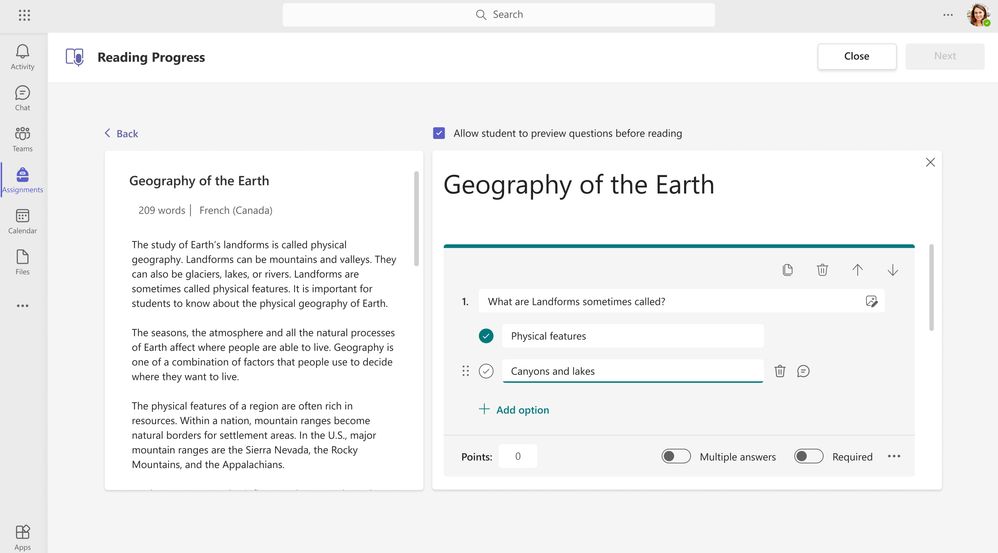
Our reading fluency app Reading Progress, launched in Microsoft Teams in fall of 2021. Reading Progress supports educators in increasing the frequency of reading fluency evaluations, helping them to differentiate more powerfully to support students on their fluency journey. The #1 request from educators and schools has been a desire to add reading comprehension questions for the student to complete after they read. We heard educator’s request and are excited to announce that we will be adding reading comprehension question support to reading progress later this year! Using Microsoft Forms technology, educators will be able to assess not only students’ fluency, but also their understanding, right in Reading Progress. Educators will be able to provide students with access to the questions prior to reading if they wish, a scaffolding strategy that can help students learn to read with purpose. The auto-grading capabilities of Microsoft Quiz will also be included to streamline grading of multiple-choice questions. We expect to have comprehension questions in private testing later in late spring of 2023.
Reading with expression (prosody) in Reading Progress
Reading fluency is composed of three pillars – speed, accuracy, and expression. The initial version of Reading Progress uses auto-detect to help track reading speed and accuracy, but historically an educator needs to listen to each student independently to gauge their expression.
With our forthcoming Expression update, Reading Progress will automatically identify students’ performance on aspects of prosody including monotone reading, long pauses, not pausing for a period or comma, voice inflection for question marks or exclamation points, and even the stress of multi-syllable words. Student expression results will be available in the teacher review experience, alongside accuracy and correct words per minute. Later, this information will be added to the student’s view of their returned work and incorporated in Insights so it can be easily monitored over time. Reading expression updates will begin rolling out to Reading Progress in late spring.
With the introduction of Reading Coach in Immersive Reader and the continued evolution of Reading Progress, we hope to maintain students’ excitement for and growth in literacy while supporting educators as they work to help every student reach their fluency goals.
Mike Tholfsen Group Product Manager Microsoft Education
This article is contributed. See the original author and article here.
With global volatility and inflation impacting organizations across all industries, business agility has never been more important. Leaders turn to finance teams to get real-time insight into business performance and recommendations on future initiatives that will help them thrive amid disruption. But finance teams are overwhelmed with manual tasks, cobbling together data, and disconnected teams. Achieving game-changing business agility begins with augmenting the human ingenuity of your people with intelligent process automation.
When it comes to reimagining processes with AI, automation, and analytics, many finance leaders don’t know where to start. This year, at the third annual Finance Reimagined digital event, we will delve into real-world best practices from Microsoft and industry leaders that will help you prioritize the right cost optimization, growth acceleration, and workforce transformation initiatives.
Finance Reimagined 2023
Tuesday, February 28, 2023, 9:00 AM to 10:15 AM Pacific Time (UTC-7)
Finance Reimagined: Bringing the future of finance into focus
Finance Reimagined is a virtual event bringing together finance leaders from around the world. On February 28, 2023, from 9:00 AM to10:15 AM PT, you can unpack the latest trends shaping the future of finance including the strategic evolution of the role of CFO within organizations, maintaining commitments to multiple stakeholders and bottom lines against a challenging economic environment, and the opportunities to drive transformation through the partnership of human ingenuity and AI.
Discover what’s top of mind for CFOs and financial leaders
You’ll discover best practices, trends, and priorities that are top of mind for CFOs and finance leaders. We’ve lined up experts from Microsoft, IDC, Avanade, EY, HSO, KPMG, and PwC to deliver actionable insights on how to strike the right balance between the following:
Human and AI
Find harmony between automation and your organization’s most important assetyour people. We will tackle one of the top concerns for CFOs today: workforce optimization. The heart of productivity sits in employee well-beingor the organization’s ability to increase creativity, job satisfaction, and ultimately, happiness. Human ingenuity is now business’ greatest investment to drive long-term vision and needs to be incentivized. Automation changes the way we work, thus organizational structures, required competencies, and roles must change as well. Get tips at Finance Reimagined on how to prioritize automation initiatives and how to use them to augment your people resources.
Cost optimization and growth acceleration
Embrace a dual role of gatekeeper and innovator to bring more strategic value to your organization. You’ll hear from a panel of finance leaders at Microsoft as they respond to trends from a recent study of more than 500 senior finance leaders from across all industries. Learn how Microsoft is empowering our finance leaders to do more with less to guide teams through these uncertain times. We will discuss tactics to optimize cash flow, increase operational effectiveness, and reinvest to meet growth expectations.
The speed of business and risk mitigation
Organizational health has become increasingly dependent on data and tools to facilitate agile, data-driven decision making. Finance teams are doubling down on their efforts to keep up with our world’s increasingly volatile and interconnected markets that demand more fluid operating models, extending beyond the walls of an organization. This means that the role of the finance leader has evolved from being an economic guardian inside the walls of an enterprise to designing new business models that focus on delivering customer value outside of an enterprise. This evolution is only possible through a tight partnership between the CFO and Chief Technology Officer (CTO) to ensure data security while activating insights at every level of the organization. Join us for a discussion with the CFO and CTO at Robert Walters, a global recruitment and talent management company with a team of experts spanning 31 countries and serving more than 4,300 clients, to hear how they partnered to speed the time to insight within their organization.
Register today to attend Finance Reimagined for your look ahead at the emerging trends and essential insights defining how tomorrow’s businesses will thrive. We hope to see you there.
This article is contributed. See the original author and article here.
Managing and monitoring devices across your organization can be complicated, especially for small or medium businesses without dedicated IT staff. That’s why Surface partnered with Microsoft 365 and Intune teams to give you powerful insights that simplify managing and monitoring your devices. Our enhanced features make it easier than ever for IT admins to oversee devices via a premium dashboard experience.
Tailor-made experiences
Keep track of your Surface device inventory, view powerful insights, plan your Windows 11 update cadence, create support requests and place bulk device returns – all in one location. Using role-based access rights, we have set predefined access rights based on the M365 user’s role.
Optimized support process
Experience the enhanced process to create support requests for multiple Surface devices at once. The latest feature addition enables you to create a single request1 for multiple Surface devices for eligible device returns or repair needs.
Created to meet your needs where you are
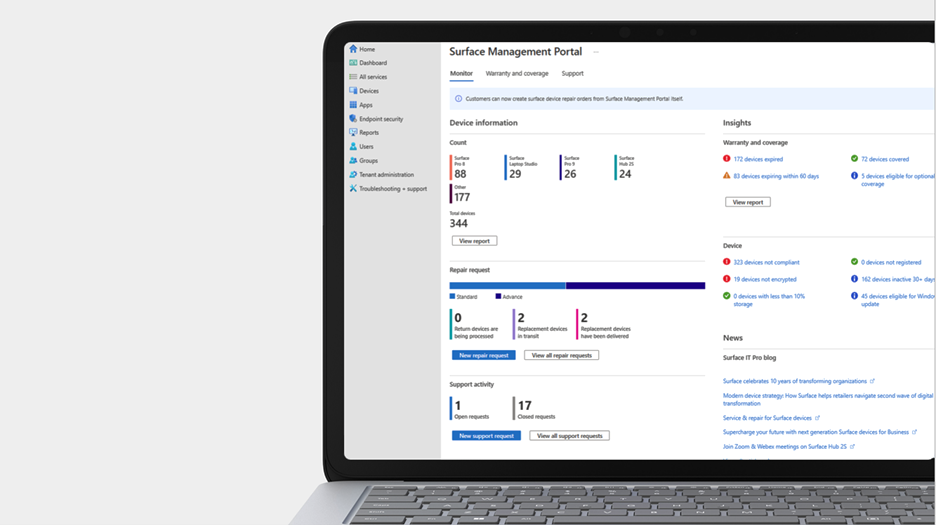
Surface Management Portal: If your Surface devices are enrolled through Intune, they’re automatically enrolled into the Surface Management Portal. In Endpoint Manager, go to All Services > Surface Management Portal. This includes the comprehensive feature set of Intune and Endpoint Manager.
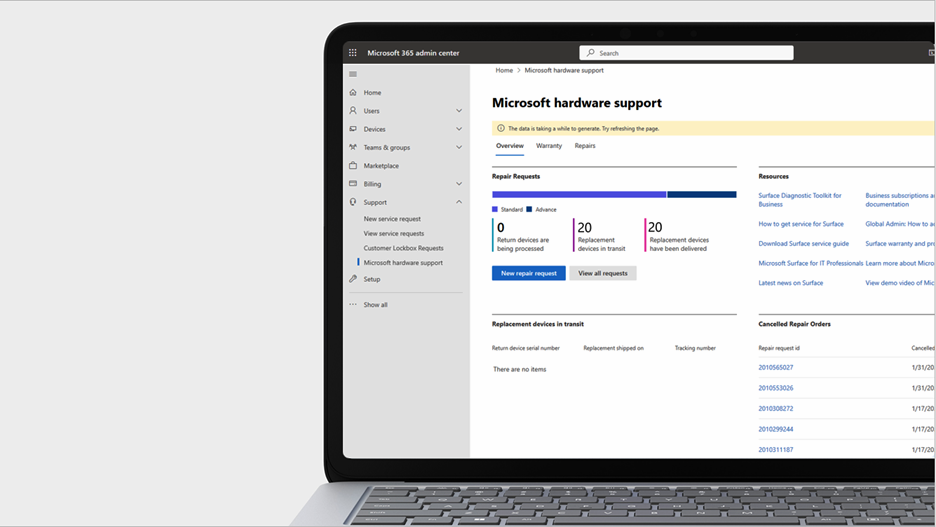
Microsoft Hardware Support Portal: If you have a Microsoft 365 subscription, you can have your support service needs fulfilled via the Microsoft 365 admin center. In Admin center, go to Support > Microsoft hardware support. This does not require your devices to be enrolled through Intune.
Experience the Surface centralized solutions for IT today.
References
1. Single-request support feature for multiple devices may vary based on region and device model.







Recent Comments